As we march towards the June 2nd release of Intel's Haswell processors, the company is slowly but surely filling in the missing blanks. Most recently we saw a shot of the often discussed but rarely seen Haswell GT3e part with on-package DRAM, and today we get some confirmation on what overclocking Haswell will be like.
As a quick refresher, the max clock frequency of Haswell is governed by the following equation:
Clock Speed = BCLK * Ratio
In the old days, both of the variables on the right hand side were unlocked (back then it wasn't called BCLK). Around the time of the Pentium II, Intel locked the multiplier ratios (rightmost variable) and then a few years ago we lost the ability to manipulate un-multiplied input frequency.
We can actually trace the recent struggles with BCLK overclocking back to the days of Lynnfield in 2009. Lynnfield featured Intel's first on-die PCIe controller, which wasn't fully decoupled from the rest of the CPU. We still had BCLK overclocking, but you needed to supply higher core voltages to the CPU to get there with any amount of stability. Nehalem, Lynnfield's predecessor, didn't have this issue.
With Sandy Bridge, we lost the ability to overclock using the BCLK altogether. Intel made good on this tradeoff by giving us a couple of K-series SKUs with unlocked multipliers, but it pretty much killed the market for buying low end Intel CPUs and overclocking them to deliver the performance of much higher end parts (sidenote: this is why we need AMD, ARM only pushes Intel to be more competitive on power at this point).
Ivy Bridge didn't really change things, but Sandy Bridge E did restore a bit of BCLK overclocking. You could select from a handful of predefined straps that enabled BCLK overclocking but without running the PCIe or QPI busses out of spec. With Haswell, we get something similar.
The default BCLK for Haswell parts will remain at 100MHz, however now you'll have the ability to select 125MHz or 167MHz as well. The higher BCLK points are selectable because they come with different dividers to keep PCIe and DMI frequencies in spec. At each of these BCLK settings (100/125/167MHz), the typical inflexbility from previous architectures remain. Intel's guidance is you'll only be able to adjust up/down by 5 - 7%.
Obviously we'll still have K-series SKUs with fully unlocked multipliers. Intel claims the CPU cores will have ratios of up to 80 (8GHz max without BCLK overclocking, although you'll need exotic cooling to get there). Some parts will also have unlocked GPU ratios, with a maximum of 60 (GPU clock = BCLK/2 * ratio, so 3GHz max GPU clock).
Memory overclocking is going to be very big with Haswell. Intel will offer support for 200MHz steps up to 2.6GHz and 266MHz steps up to 2.66GHz on memory frequency, with a maximum of 2.93GHz memory data rate supported.
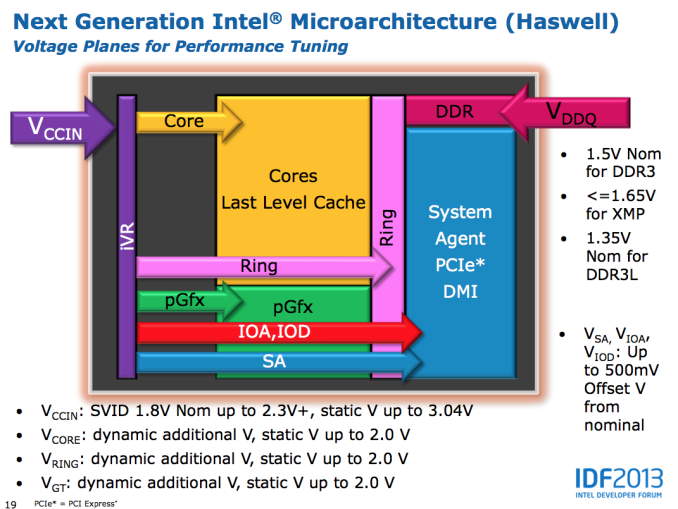
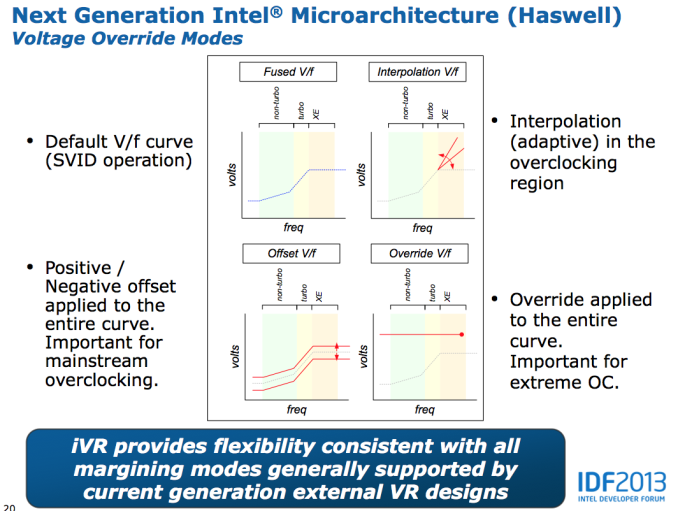
Voltages are the other big change with Haswell. All Haswell SKUs will ship with an integrated voltage regulator. Instead of having multiple voltage rails driven by external voltage regulators enter the SoC, Haswell will accept two input voltages: Vccin for logic and Vddq for DRAM. Vccin should typically be somewhere in the 1.8V - 2.3V range, with a max of 3.04V. Vddq will depend on your DRAM type. The integrated voltage regulator will support all of the same adjustments than we're used to on current Ivy Bridge platforms.
What Intel isn't talking about publicly is just how overclockable Haswell is. I'm hearing great things about LN2 overclocking, but other than the high-end memory vendors being pleased with the new platform I haven't heard much on what will be possible on air. A much beefier GPU (at least on the high-end SKUs) and on-package voltage regulation will make for some very interesting thermal conditions.
Intel has been walking a fine line lately with giving the overclocking community enough to be relatively happy but not too much. The days of the Celeron 300A aren't coming back. Intel isn't a fan of giving things away for free and I wouldn't expect that to change now, especially given AMD's current competitive position.
For this week’s update of our laptop/notebook recommendations, we turn our eye towards the mobile gaming sector—and no, we’re not including tablets in this category, even though they can play games; we’re talking about Windows games played natively on your notebook. Just to set the stage, let me give a few thoughts on the general idea of gaming notebooks.
First, if you’re the type of gamer that wants to set everything at maximum quality and you’re not willing to turn down a few knobs, you’re either going to spend a ton of money (e.g. for GTX 680M SLI) or you’re going to be disappointed—and eventually, you’ll need to opt for lower quality settings on some new titles, as it’s only a matter of time before we see our next GPU-killer Crysis game. Think about that for a moment: Crysis was originally released way back in 2007 when DX9 was relatively new, and here we are in 2013 and there are still many GPUs that can’t run Crysis at 1080p at maximum quality and get more than 60FPS.
The first point is important, but even if you’re willing to compromise on some settings, you probably don’t want to compromise too much. While it’s possible to play almost any game on a moderate GPU, I find the bare minimum GPU to be around the level of AMD’s HD 6630M/6650M (aka HD 7570M, more or less) and NVIDIA’s GT 640M LE. If possible I’d want more GPU performance, especially if you’re running higher than 1366x768 for your resolution. So, for example, AMD’s entry-level A6-4455M and its HD 7500G don’t make the cut for “gaming” in my book, and even the faster A10-4655M with HD 7620G is questionable for many titles.
Finally, there’s the question of GPU vendor, and mostly I’m talking about mobile drivers. I wish I didn’t even have to discuss this, but my experience with AMD’s Enduro is still leaving me wanting compared to NVIDIA’s Optimus. These days it’s difficult to find a notebook with a discrete GPU that doesn’t implement one of those technologies, and while there are people that have no real complaints with Enduro, I’m not one of them. AMD right now seems to be best for iGPUs from Trinity (and soon Richland), and while something like the 7970M can offer great performance in the right games, in the wrong titles it can be a pain.
Finally, let’s not forget that there are new GPUs, CPUs, and APUs just around the corner. If rumors are to be believed, Intel’s GT3e solution (the “e” is for embedded DRAM) may provide some healthy competition to GPUs like the GT 650M and HD 7730M. Driver support is a concern there, sure, but Intel has definitely improved their driver compatibility over the past year since HD 4000 launched, and doubling performance (or more) would go a long way towards making their iGPU viable. AMD and NVIDIA meanwhile will have 8000M and 700M parts, with some rebranding/recycling and minor clock speed changes. AMD will also have Richland APUs that are supposed to be at least 10% faster than Trinity, and at the right price such a solution could be really attractive. If you can wait until June or so, we’ll know who the winners and losers of the next round are, but we’ll have an updated “Best Gaming Notebooks” by then.
TL;DR (Too Long; Didn’t Read): I’ll give a few lower-end recommendations for those on a serious budget, but my real preference for notebook gaming would be at least a Radeon HD 7730M or a GeForce GT 650M—with GDDR5 memory in both cases. Those two GPUs provide enough graphics horsepower to handle every game I can think of at 1366x768 and medium or higher detail settings, and in many cases even 1920x1080 at medium settings will be playable. If you want 1920x1080 with high quality settings (and possibly 4xAA), and you’d really like frame rates of 60FPS or more, you’ll have to go all-in on an HD 7950M or GTX 675MX at the very least.
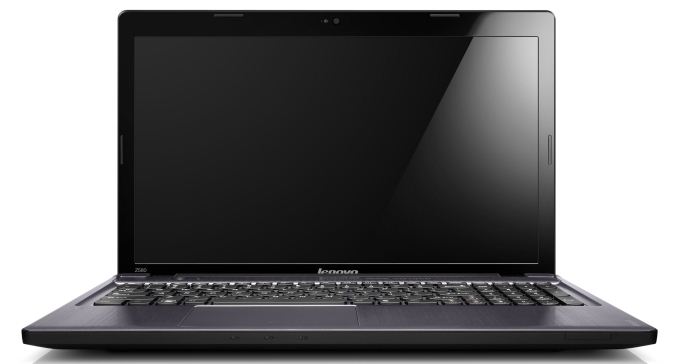
Budget Gaming Notebook: Lenovo IdeaPad Z585 ($580)
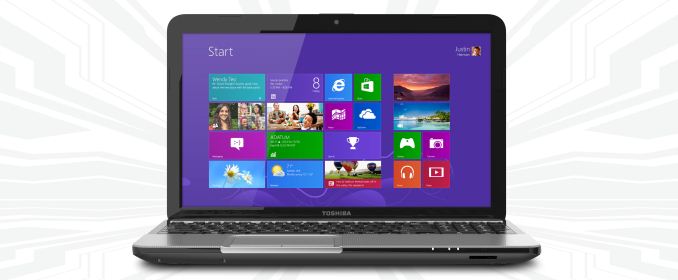
We’re in familiar territory here, as the best way to get acceptable gaming performance without breaking the bank is AMD’s A10-4600M APU. I discussed this category last week as well, so I’ll keep things short. You can get the Toshiba L850D with A10-4600M, 4GB RAM, and 640GB HDD for $540, direct from Toshiba. For just a bit more (and likely quicker shipping), Newegg has Lenovo’s IdeaPad Z585 for $580 with the A10-4600M, 6GB RAM, and a 1TB hard drive. HP’s dv6z is similar as well, but pricing starts at $600 with the A10 APU. Of those three, at least with the current pricing I’d take the Lenovo IdeaPad Z585. Even if Richland shows up next month at a similar price (doubtful), you’re only losing out on the ~10% higher clock speeds of the A10-5750M.
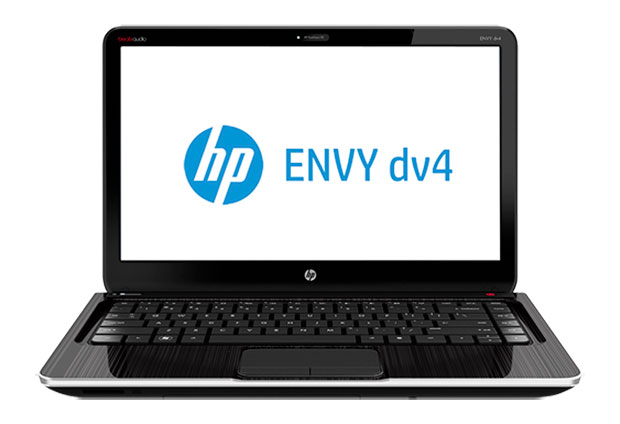
Midrange Gaming Notebook: HP Envy dv4t-5300 ($705)
Considering we’re only looking at $100 more (give or take) than the budget notebook, the HP Envy dv4t is a great value. For that price, you get a dual-core Intel i3-3120M (2.5GHz), GeForce GT 650M 2GB, 4GB RAM, and 500GB HDD. The last two specs are underwhelming, sure, but it’s cheaper to just go buy 8GB of laptop memory rather than paying HP an additional $100 to do the upgrade for you! What’s more intriguing to me personally is that this is a 14” laptop instead of a 15.6” chassis, and I personally find a lot to like in the 14” form factor. The dv6t-7300 is there for you if you prefer 15.6” screens, and you get a $150 upgrade option for a 1080p anti-glare LCD if you’re interested. With similar specs it’s actually the better buy, as $750 will get you 8GB RAM and a 750GB HDD, along with the Core i5-3230M CPU.
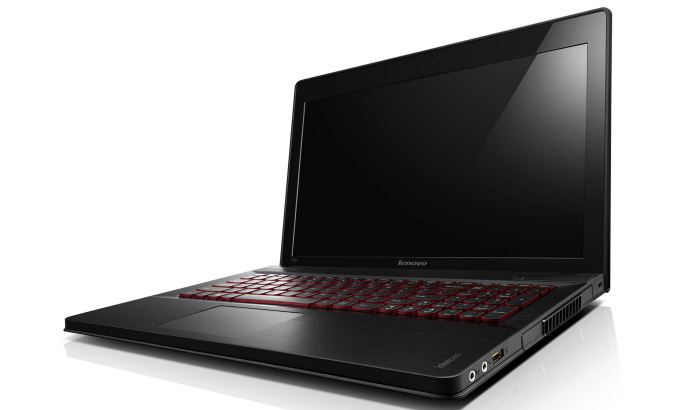
Higher-End Gaming Notebook: Lenovo IdeaPad Y500 ($1100)
I’ll be honest: I’m not a big fan of SLI or CrossFire in notebooks. The combination of dual GPUs in a small enclosure is a recipe for lots of heat and poor battery life. That said, while a single GT 650M isn’t amazingly fast, two of them in SLI should perform quite admirably—roughly somewhere in the GTX 670MX to 675MX range—and you should be able to play most games at High settings and 1080p (but not “Ultra” settings, at least not in the most demanding titles). Lenovo is so far the only company I’m aware of to do SLI with a GK107 GPU, and it’s definitely an interesting tactic. The Y500 comes with a reasonable feature set (1080p LCD, backlit keyboard, Core i7-3630QM, 16GB RAM, and a 1TB HDD) and build quality, and it’s available starting at $1100. For this level of performance, $1100 isn’t a bad price, but if you want better battery life and Optimus (note that the Y500 does not support Optimus—a decision made by Lenovo and not a limitation imposed by NVIDIA or SLI), you’ll need to spend more money.
High-End Single GPU Gaming Notebook: CyberPowerPC Fang III X7-100 ($1400)
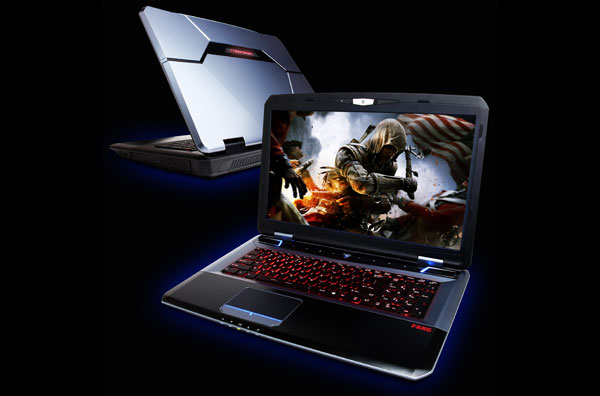
For $300 more than the Lenovo, you can get CyberPowerPC’s branded version of the MSI GT70, the Fang III X7-100. Dustin reviewed a similar laptop with the iBUYPOWER Valkyrie and found it to be a reasonable alternative to the large Clevo and Alienware offerings. The extra money will get you a larger chassis, a single GTX 675MX 4GB GPU (which should be 10-20% faster than the GT 650M SLI—and more in cases where SLI doesn’t scale well), Optimus support, and a good 1920x1080 LCD. You also get 8GB RAM and a 750GB HDD, so Lenovo wins out in those two areas. If you don’t like the look of the MSI chassis, or if you just prefer Clevo, you can of course get similar configurations of the P150EM and P170EM for roughly the same price.
For those that simply want all-out maximum performance, you can get higher performance configurations of the above. I wouldn’t bother with the Radeon HD 7970M personally, as the extra $100 doesn’t make up for the sometimes flaky driver support from AMD, which currently leaves the GTX 680M as the only other option. That adds around $300 to $400 to the price of the MSI, iBUYPOWER, or Clevoofferings (take your pick—CyberPowerPC currently doesn’t have a GTX 680M configuration). It also brings Alienware’s M17x into the picture, which I still find to be the best looking of the bunch with my preferred keyboard layout, but even with 6GB RAM and a 500GB HDD (the minimum Alienware has in their configuration utility) the M17xR4 will set you back $2249 when equipped with the GTX 680M.
Really, not much has changed with any of these notebooks since the GTX 680M launched last June. While I wouldn’t expect any major updates with 700M (maybe a GTX 780M that will bring GTX 680MX clocks to a lower TDP part?), buying right now instead of waiting for the Haswell and 700M updates seems a bit odd at the top of the performance pyramid. Thus, while all of the above are potential options depending on your personal taste, I’d personally hold off spending more than $1500 on a soon-to-be-outdated laptop, and really even $1400 is a stretch.
As always, other options or opinions are welcome in the comments. Think I missed a great option? Let me know! We’ll be back again next week where I’ll scour the thin-and-light market for good 13.3” and 14” offerings that don’t fall into the Ultrabook/Ultraportable category.
Read More ...The AnandTech Podcast: Episode 19
Remember Brian Klug? Want to hear him rant about phones, operators and Facebook? It's time for the next podcast.
The AnandTech Podcast - Episode 19featuring Anand Shimpi, Brian Klug & Vivek GowriiTunes
RSS - mp3, m4a
Direct Links - mp3, m4aTotal Time: 1 hour 42 minutesOutline - hh:mm
HTC One - 00:00
The T-Mobile Announcement - 00:36
Samsung Galaxy S 4 - 00:55
Facebook Home - 01:17
As always, comments are welcome and appreciated.
Read More ...AMD Expands Never Settle Reloaded Bundle; Adds Far Cry 3 Blood Dragon & Radeon HD 7770
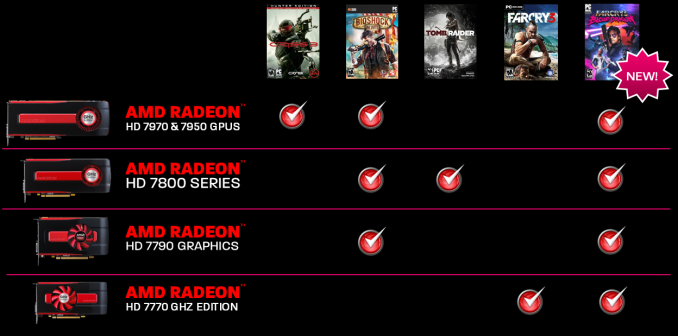
Word comes from AMD this afternoon that as of today they’re going to be expanding their Never Settle Reloaded bundle. The bundle, which launched a bit over two months ago, will be adding a new game along with being expanded to cover more AMD video cards. And in an unprecedented twist, certain aspects of this are being made retroactive.
The most important facet of today’s announcement is that AMD is going to be that AMD is adding Ubisoft’s just-announced retro-styled first person shooter, Far Cry 3 Blood Dragon, to the entire lineup. Being released on May 1st, Blood Dragon is essentially a value priced shooter spun off of Far Cry 3, using Far Cry 3’s engine and game mechanics as the basis of its mini-campaign. Every AMD card from the 7700 up will now include this game, even those bundles that don’t include Far Cry 3 itself.
What makes this particularly interesting and unusual is that the Blood Dragon offer is being made retroactive. Along with new redemptions of the Never Settle Reloaded bundle, anyone who has previously redeemed the bundle will be getting Blood Dragon too, with AMD sending out keys to all of the email addresses involved in earlier redemptions. At $15 Blood Dragon is not a full-budget AAA game, but nevertheless this is unprecedented to say the least; we cannot recall any time in which a video game bundle has been retroactively expanded like this.
Finally, along with adding Blood Dragon to the bundle, AMD will also be extending the bundle to their Radeon HD 7770. 7770 owners will now get vouchers good for Far Cry 3 and Blood Dragon when purchased from participating retailers. With 7770s regularly going for under $100, this marks one of the very few times we have seen any kind of video game bundle of substance offered with a card this cheap, assuming of course new 7700 buyers haven’t already picked up Far Cry 3 in the last 5 months.
As part of our ‘Best X’ range of pipeline posts, our focus turns on to the motherboard segment. At this point of the year, we really are between a rock and a hard place, with new Z77 motherboards still being released, like the MSI Z77 Gaming range, and Haswell just around the corner. Demand for new desktop systems is still going b, regardless of this looming upgrade – I have built two new Z77 systems in the last couple of week for family who wanted a computer today, not ‘in a few months’.
While we attempt to review a wide price range of motherboards at AnandTech, the skew is invariantly on the high end. Manufacturers would rather we reviewed their best products to represent the best of the range, rather than get a perspective from a budget $75 model. Recently we have covered the Z77 range of overclockingorientedmodels, but since Z77 release we have looked at the mITX range and also a wide series of new features on motherboards (for example Thunderbolt and PLX 8747). The AMD side of the equation has been very light in terms of review coverage by virtue of the fact that there has been no real demand from either manufacturers or readers to cover motherboards made-for-Vishera/Piledriver, and any FM2 coverage seemed to lack excitement.
We have awarded a number of Z77 products with awards since the beginning of 2012, and here are our favorites north of $220. In later pieces we look at sub $220 models from Z77 and FM2, and another piece for our X79 picks.
AnandTech Silver Award: ASUS Maximus V Formula ($290 with AC3)
While the Formula doesn’t come cheap, and is in fact the most expensive Z77 motherboard without a PLX 8747 chip, it offers more of a package than any other non-PLX Z77 motherboard. The big draws are the SupremeFX IV audio solution, capable of reaching the Realtek listed dynamic range and THD+N numbers, the combination air/water VRM heatsink, and the package as a whole. In hardware we get an integrated WiFi/mPCIe combo card, an Intel NIC, extra SATA 6 Gbps, extra USB 3.0, options for overclockers and features such as BIOS Flashback. The BIOS is geared for overclocking, with our CPU sample hitting highs rarely seen internally on any other motherboard – the BIOS also includes plenty of OC features for high end memory kits. Software is similarly superb, with fan controls that actually act like fan controls should (see recent reviews for rants on this), network management, and features like USB 3.0 Boost. Users also have access to the vast ROG forums for help and hints to get the perfect system.
Read our review of the ASUS Maximus V Formula here.
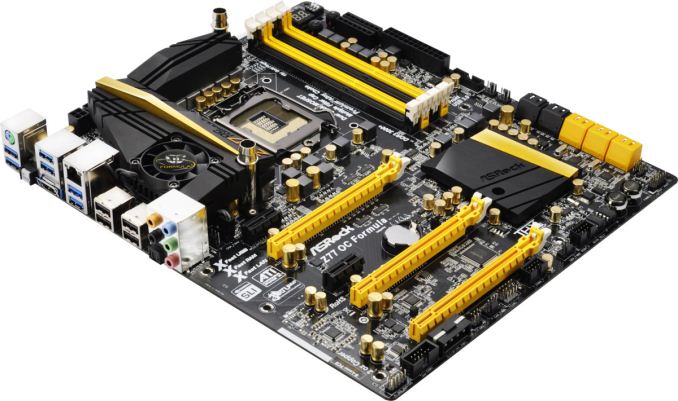
AnandTech Silver Award: ASRock Z77 OC Formula ($225)
In a similar vein to the ASUS MVF, the ASRock Z77 OC Formula is a great motherboard to play with and is easily the best ASRock motherboard I have ever used. It dials in slightly cheaper than the ASUS (at the loss of some software control), but we still get plenty of overclock control, with the automatic options in the BIOS covering a wide range of clock speeds. This allows users to select the first option, stress test, then move to the next – stopping when stability is not to the user’s liking. The BIOS itself is so easy to use, and it looks a lot more polished than almost every other available on the market. Software gets an OC Formula skin, and the XFast combination (RAM, LAN, USB) can help improve performance. The ASRock has some benefits over the ASUS MVF – the ASRock has OC Touch buttons for that last competitive OC MHz and easier voltage check points. For regular use the ASRock has more SATA ports, more USB 3.0 ports, PCIe disable switches, six USB 3.0 on the rear, and in the box we get a front USB 3.0 panel and motherboard standoffs for out-of-the box setups.
Read our review of the ASRock Z77 OC Formula here.
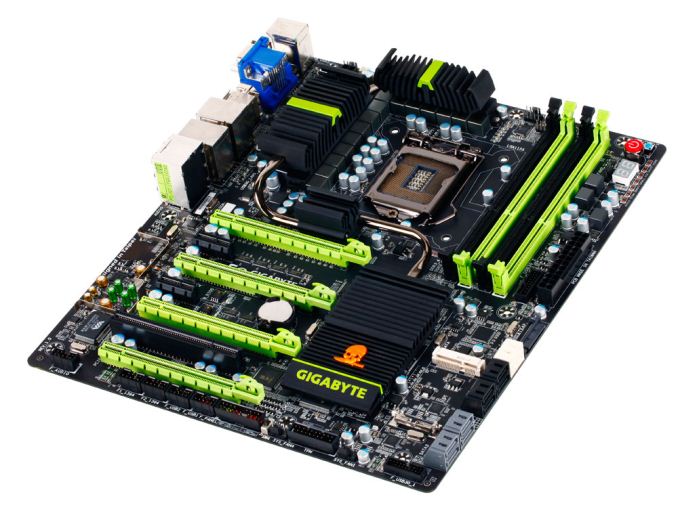
AnandTech Bronze Award: Gigabyte G1.Sniper 3 ($270)
Out of the PLX 8747 enabled motherboards we have tested on the Z77 platform, the Gigabyte G1.Sniper 3 has taken the lead in terms of layout, ease of user and performance. Even though users will probably not be running at stock, the G1.Sniper 3 uses MultiCore Turbo to improve stock performance of the CPU above every other motherboard we have tested. For gamers we have an Killer E2201-B network port alongside an Intel NIC, ten USB 3.0 ports, ten SATA ports, mSATA, PS/2 + Firewire connectivity, and a WiFi PCIe x1 card for users not using all the PCIe slots. There is a TPM as well as an eSATA rear bracket for additional options. While the PLX chip shows enhancements over non-PLX enabled three-way SLI/CFX and above, the option to have different PCIe layouts comes into force with PCIe SSDs or RAID cards. The Gigabyte G1.Sniper 3 still offers the best price/performance ratio for a PLX 8747 enabled board, and with better BIOS/software integration would have got a bigger award. This is something Gigabyte is working on for the future.
Read our review of the Gigabyte G1.Sniper 3 here.
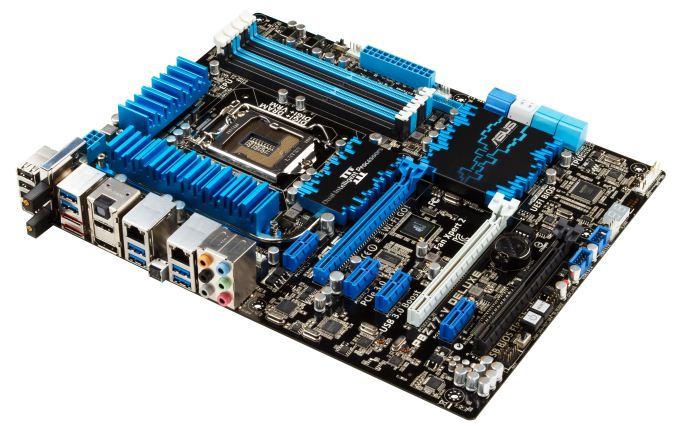
AnandTech Silver Award: ASUS P8Z77-V Deluxe ($280)
Sweeping in at $280 is perhaps not the main price point for Z77, especially when there are motherboards that can run these processors for half the price. However, this is where the P8Z77-V excels - for your extra money, you get a plethora of enthusiast related features that a user would not dream of on a half-price product. Alongside the dual band WiFi, dual network controllers (one Intel, one Realtek), superior fan control and provision for a future Thunderbolt add-in card, we have the stalwarts of the ASUS arsenal, such as USB BIOS Flashback, Fan Xpert II, enhanced USB charging, USB 3.0 Boost, a well thought out BIOS and superior operating software. The only features directly missing seem to be those that add a significant cost on board (PCIe PLX chip for >2 GPUs, a premium sound solution), where instead we would normally see products specifically focused for them in that price bracket. As part of a long term, stable build, it is hard to put a foot wrong if you choose the P8Z77-V Deluxe.
Read our review of the ASUS P8Z77-V Deluxe here.
What To Look Forward To
Haswell is approaching, and each of the contenders here will have a Z87 counterpart. Depending on the Z87 chipset itself, we may see more variation on how the motherboards line up, and whether each manufacturer will want to push up and down market segments. Regardless of what media coverage says regarding the shift to more mobile devices, the high end desktop space is still b – enthusiasts want more and they want it now.
As mentioned, our next ‘Best Motherboard’ feature will take a look at the $120-$200 market for both Z77 (regular + mITX) as well as an FM2 choice worth considering. While no new X79 products are hitting the shelves, we have tested a fair number of X79 and Sandy Bridge-E is still the way to go for a multi-core Intel machine – stay tuned for that roundup as well.
Read More ...Server Update April 2013: Positioning the HP Moonshot 1500
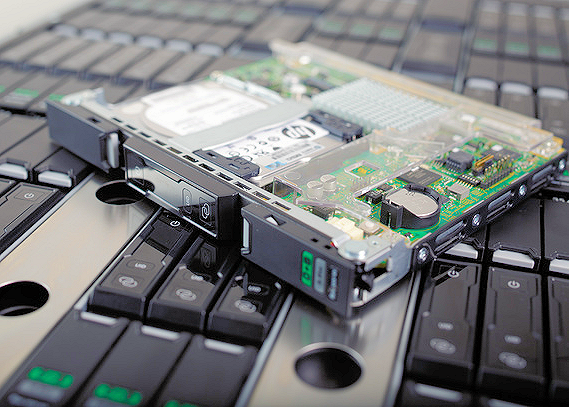
With HP launching the "Moonshot" server class and Intel's IDF at Beijing, we felt it was interesting to look a bit closer at the newest developments in the server world. HP is not shy of grand statements when it is describing its newest baby: "historic", "enables unprecedented scale" "revolutionary new architecture". HP claims "maximum density" and "unparalleled power efficiency". That of course simply begs for closer inspection.
Based upon our own benchmarking on the Atom in server environments and our previous experiences, we are able to get a good idea of what the HP Moonshot is capable off. We also find out more about Intel's next low power server SoCs and CPUs.
Read More ...The HTC One Review
It is nearly impossible to begin to review the HTC One without some context, and I’ll begin our review of the HTC One (formerly the device known as codename M7) much the same way I did my impressions piece simply by stating that HTC is in an interesting position as a result of last year’s product cycle. If there’s one thing Anand has really driven home for me in my time writing for AnandTech, it’s that in the fast-paced mobile industry, a silicon vendor or OEM really only has to miss one product cycle in a very bad way to get into a very difficult position. The reality of things is that for HTC with this last product cycle there were products with solid industrial design and specs for the most part, but not the right wins with mobile operators in the United States, and not the right marketing message abroad. It’s easy to armchair the previous product cycle now that we have a year of perspective, but that’s the reality of things. HTC now needs a winner more than ever.
For 2013 HTC is starting out a bit differently. Rather than announce the entire lineup of phones, it’s beginning with the interestingly-named HTC One. It’s just the HTC One — no S or X or V or any other monikers at all. It’s clear that the HTC One is the unadulterated representation of HTC’s vision for what the flagship of its smartphone lineup should be. HTC is different from other OEMs in that it only makes smartphones, and as a result the flagship clearly defines the rest of the product portfolio below it. With the One it looks as though HTC is making that kind of statement by literally letting it define the entire One brand.
Enough about the position and the strategy for HTC, these are mostly things that are interesting to enthusiasts and industry, but not really relevant to consumers or the review of a singular product. Let’s talk about the HTC One.
Read More ...OpenCL Support Coming To Adobe Premiere Pro for Windows
Taking place next week is the National Association of Broadcasters’ annual trade show, NAB 2013. Though most of the announcements coming out of NAB are for highly specialized products – rackmount video encoders, broadcast-quality software, etc – there are usually a few announcements applicable to the wider world. And Adobe and AMD are getting the jump on one of them with an early announcement of OpenCL support for Premiere Pro.
Premiere Pro is Adobe’s popular non-linear video editor (NLE), which in version CS5 (2010) added support for a collection of GPU-accelerated effects with Adobe’s Mercury Playback Engine. However at the time support was limited to NVIDIA cards due to the use of CUDA, leaving AMD out in the cold, due in part to the fact that Adobe was not satisfied with the state of OpenCL at the time. On the Mac this changed somewhat in CS6 when Adobe added OpenCL support for some (but not quite all) effects, while the PC version of CS6 continued to be CUDA powered.
Jumping forward, with the yet-to-be named upcoming version of Premiere Pro – currently dubbed Premiere Pro CS Next – Adobe is bringing broader OpenCL support to the Windows market, and in effect finally enabling hardware processing on AMD GPUs. As is often the case, AMD has been working directly with Adobe to get OpenCL integrated into Premiere Pro, and in fact today’s announcement comes by the way of AMD rather than Adobe. Adobe for their part isn’t saying much about Premiere Pro Next at this time – traditionally Adobe saves that for their own events – but at a minimum it looks like OpenCL is coming to parity with CUDA (or close enough). Though with Adobe consistently working to expand their usage of GPU processing and having more than a year to work with AMD’s GCN architecture, it will be interesting to see if Premiere Pro CS Next will add support for new effects, on top of OpenCL support for their existing GPU accelerated effects.
Anyhow, for AMD this is of course a big deal. While some other NLEs like Sony Vegas have supported hardware accelerated effects with their cards for some time, Premiere Pro represents a sizable part of the NLE market that they were previously locked out of. Especially since this lets AMD leverage their APU advantage, including both the consumer A-series and the rarely mentioned FirePro APUs. That the A-series is being supported is actually a big deal in and of itself since Premiere Pro CS6’s CUDA path only officially supports a small number of high-end NVIDIA consumer cards, so this marks a major broadening of support on Adobe’s part.
Finally, AMD has a blog up offering a sneak peek at performance, though as with any vendor-published benchmarks it should be taken with a grain of salt. Performance aside, it’s interesting to note that it looks like Adobe will be keeping their CUDA code path, as AMD’s test configurations indicate that the NVIDIA cards are using the CUDA code path even on Premiere Pro Next. Having separate code paths is not all that unusual in the professional world, as in cases like these it means each GPU family gets an optimized code path for maximum performance, but it does mean Adobe is putting in extra work to make it happen.
Read More ...Best Budget Laptops, April 2013
Last week we launched a new sort of buyer’s guide for AnandTech with our Best Budget Ultrabook recommendation. We’ll be fleshing out the “best XYZ” recommendations for other components and categories over the coming months, but for now my focus is on the notebook sector, and the plan is to have a new recommendation for laptops every Friday. Last week was a budget Ultrabook, and this week is the true budget category for all laptops. Let me know what you’d like me to cover next, keeping in mind that there are probably five or six categories of laptop that I’ll rotate through on a regular basis.
With that out of the way, let’s talk briefly about the budget laptop sector. Laptops comprise everything from Chromebooks to ultraportables/thin and lights, and on up to beefy gaming systems. You won’t find us recommending a Chromebook as a gaming laptop for what should be obvious reasons, but otherwise it’s basically wide open. For the budget category, I’m going to try to keep recommendations under $500, with some leeway to go as high as $600 if there’s a really special offering. That gives me plenty of choices, and while I’ll try to avoid short-term sales, it’s difficult to gauge availability if interest suddenly spikes thanks to an article. To that end (and thanks to reader feedback), while there will be a primary recommendation, I’m going to throw in a few alternatives as well—no more of that "one size fits all" funny stuff!
Haswell and Richland laptops are still hiding just over the horizon, but I’m pretty confident that at least for the next couple months we won’t see either new processor challenge the budget category we’re looking at today. Besides, Trinity and Ivy Bridge laptops are still able to handle just about anything you might want to run—for that matter, even Sandy Bridge and Llano can be sufficient. In short, I’m not too worried about performance compromises even when looking at sub-$500 laptops.
Where you will have to make some sacrifices are in areas like display quality (seriously: are there any budget laptops with good displays out there?), build quality, and perhaps battery life and features. Size is another area where you’ll likely end up with a ubiquitous 15.6” LCD, or alternatively an 11.6” or 10.1” netbook. After surveying the options—I focused mostly on Amazon.com, Newegg.com, and a few other major retailers—I ended up finding quite a few laptops that end up being similar in both features and performance, not to mention price. All things being equal, I’d rather have Ivy Bridge than Sandy Bridge, or Trinity than Llano. You can find the older parts for as little as $325-$375 in some cases, but the best option I can find right now comes from ASUS.
Best Budget Notebook: ASUS A55A, $430 (i3-3110M)
The A55A-AH31 is available in black, blue, red, pink, or white, all with the same core features and specs and mostly with the same price of $430—the pink model currently goes for $506 while the white offering costs $510. The specs are reasonable as well: Ivy Bridge Core i3-3110M (2.4GHz, no Turbo, HD 4000 iGPU), 4GB RAM, and a 750GB hard drive. You also get two USB 3.0 ports (one USB 2.0) and—wait for it!—a “glorious” 1366x768 display (like I said, you have to compromise somewhere). The laptop is also a bit chunky at 5.8 pounds, but battery life is at least okay at 4-5 hours of moderate use. However you slice it, I find $430 to be an excellent price for a good laptop, and you still get a reasonable keyboard layout and build quality.
Best Budget Gaming Notebook: Toshiba L850D, $500 (A10-4600M)
If you want something that can handle moderate gaming as well, you have two options: get an Intel system with a discrete GPU from NVIDIA, or buy something with an AMD Trinity APU. My alternate choice is going to take the Trinity route, and it looks like the best way to get Trinity A10 (because A8 and especially A6 tend to be too slow to really do gaming justice) is to go straight to either Toshiba or HP. Of the two, I’m going to give the edge to Toshiba, based on pricing.
Sadly, where Toshiba previously had the Satellite L840D, L850D, and L870D (14”, 15.6”, and 17.3”, respectively), it appears only the L850D remains available in AMD trim—the L840 and L870 are both Intel-only now. The good news is that where pricing on laptops equipped with the AMD A10-4600M tends to hover around $650 (which is frankly too much), Toshiba’s L850D starts at $400 with an A6-4400M and you can upgrade to the A10-4600M for $100. The base configuration ends up being an A10-4600M, 4GB DDR3-1600, 640GB 5400RPM HDD, 1366x768 LCD, and all the other typical accessories. Note that there’s currently a $150 instant rebate going on (and it’s frequently around), so at present the $500 offer lasts through April 8, 2013.
The HP offerings are virtually identical to Toshiba in features, but now you can choose between a 15.6” HP ENVY dv6z-7200 ($530 base price, $630 with A10-4600M) or a 17.3” HP Pavilion g7z-2200 ($480 base price, $580 with A10-4600M). Both of those upgraded prices push the limits of what I would consider “budget”, but they’re still reasonable alternatives if you want a laptop that can handle most games at moderate to high detail settings. The dv6z comes with a base configuration that’s slightly higher than the g7z, incidentally: 6GB RAM and a 640GB HDD compared to 4GB RAM and 500GB HDD. The LCDs are also obviously different, and HP even offers a 1080p upgrade on the dv6z, but at $150 it’s definitely not budget material; the 17.3” panel is 1600x900 while the stock 15.6” panel is the bog standard 1366x768. That said, the HD 7660G iGPU in the A10 APU is better suited to gaming at 768p than it is 900p.
There are a few likely reasons for the current pricing. One explanation is that people have been largely underwhelmed with Windows 8, so discounting the laptops can help move product. I’m not a huge fan of Windows 8, but I’ve found that installing Classic Shell or Start 8 is enough to fix 90% of my gripes (YMMV). Another likely factor is that the laptop OEMs are working hard to clear out existing inventory before the upgraded Haswell and Richland models arrive, and hopefully we’ll start to see Richland before the end of May (if not sooner).
Honorable Mention: Acer C7 Chromebook, $200 (Celeron 867)
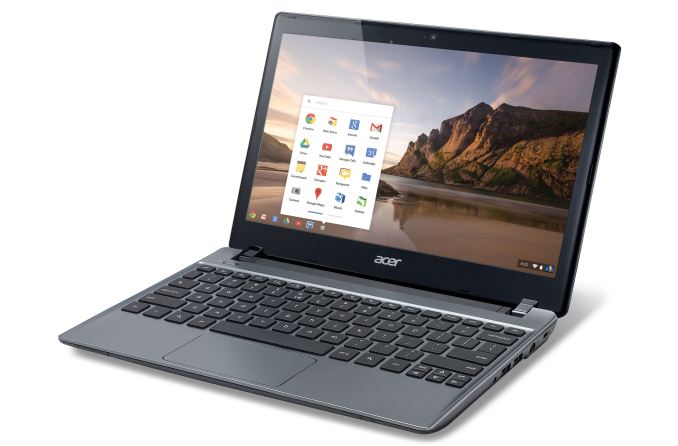
There are other options of course, mostly with even older hardware, or slower and more specialized hardware. Acer’s latest C7 Chromebook has been selling really well, thanks largely to the $200 price tag. If you’re tied into the cloud rather than doing local storage, it can be a great alternative to more expensive laptops, plus you’re less likely to get distracted by games (given the rather poor performance and support for such). It’s definitely more compelling than an Atom-based netbook, and ChromeOS requires far less of the Celeron CPU than Windows 8.
Honorable Mention: Lenovo G570, $330 (i3-2370M)
Another really inexpensive laptop to consider is the Lenovo G570, currently selling for a mere $330 at OfficeMax. You get a Sandy Bridge i3-2370M CPU, 4GB RAM, 500GB HDD, and around 5 hours of battery life. Performance should still be reasonable compared to Ivy Bridge, though the HD 3000 graphics are a big step down from HD 4000 so even light gaming is almost too much to expect.
There are plenty of other laptops in the $300 range with AMD’s C-series and E-series APUs (not to mention the dog that is Intel Atom), but while battery life might be good, just about everything else is too slow for me to personally recommend such a laptop. Then again, people are okay with tablets that offer even less performance in many cases, so consider your own wants and shop accordingly. In the meantime, if you have a favorite budget laptop that you feel we’ve neglected, by all means let us know in the comments, and as noted in above, let me know what category of laptops you’d like me to analyze next Friday.
Today saw some interesting news from Facebook, which announced a new Android experience named Facebook Home, and alongside a new handset from HTC which will run it out of the box, the rather ironically named HTC First. This isn't Facebook or HTC's first attempt at a Facebook-specific handset, either, if you recall the HTC Status, or its codename ChaCha.
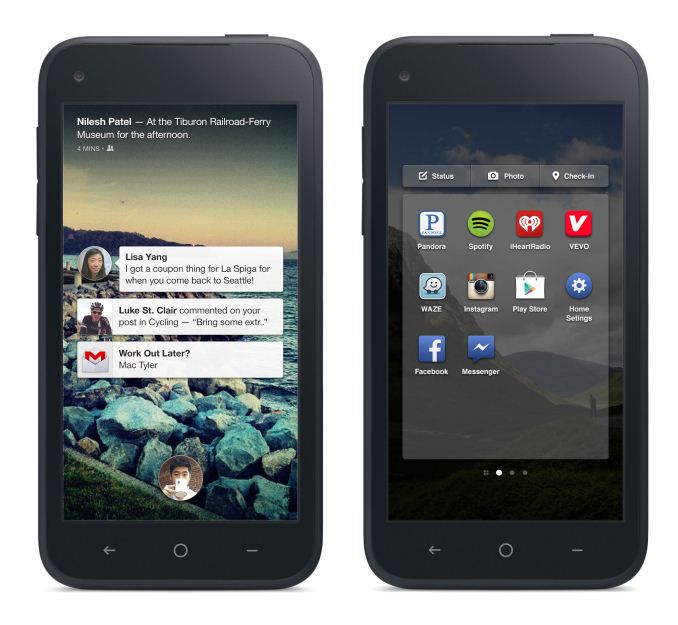
First is Home, which is part Android launcher replacement, part Facebook Skin. Home replaces the lock screen, application launcher, notification, and chat system with Facebook designed counterparts. Home overlays Facebook and Instagram views atop the lock screen, statuses and stories alike. The UI looks like a drastic departure from Android and takes cues from Web OS with lots of transparent regions. Facebook has dubbed its chat interface on Home 'Chat Heads' and intercepts SMS notifications from Android and augments them with Facebook chat as well. These persist throughout the UI atop active applications. Facebook has videos explaining Cover Feed, Notifications, and Chat Heads on their YouTube page.
Rather than build a complete platform from scratch, it makes sense for Facebook to leverage Android and deliver something like Home which essentially is part launcher replacement, part UI skin. Home will be available on April 12 through the Play Store for a limited subset of devices - the HTC One X, X+, Samsung Galaxy S 3, and Note 2, and in the coming months the Galaxy S 4 and HTC One. What's interesting is that subset of devices which Home will work with, it's a bit more than a launcher replacement since it is intercepting some notifications from the OS.
The other part of the announcement is an HTC-made phone called the HTC First. It's a midrange specification HTC handset which will be, well, home to Facebook Home, First, get it? Phew. I've put together a table with the specifications of the HTC First.
The First is at present an AT&T exclusive officially, which is further backed up considering the presence of Band 17 LTE. AT&T is taking preorders for the HTC First which will go on sale for $99 with a two year contract starting April 12th.
Update: I clarified the LTE band situation on the HTC First, which reflects the newer AT&T RFP with LTE on both its current WCDMA bands (850/1900 MHz) in addition to Band 17 (700) and 4 (AWS 1700/2100 MHz).
Source: HTC (First Page), AT&T (Preorders), Facebook (Introducing Home)
Read More ...The Gadget Show Live, April 2013: Technology in the UK
On Tuesday this week I went to The Gadget Show Live, a trade and public show about technology and entrepreneurs in the UK. There are some interesting developments in home grown talent...
Read More ...The Great Equalizer 3: How Fast is Your Smartphone/Tablet in PC GPU Terms
For the past several days I've been playing around with Futuremark's new 3DMark for Android, as well as Kishonti's GL and DXBenchmark 2.7. All of these tests are scheduled to be available on Android, iOS, Windows RT and Windows 8 - giving us the beginning of a very wonderful thing: a set of benchmarks that allow us to roughly compare mobile hardware across (virtually) all OSes. The computing world is headed for convergence in a major way, and with benchmarks like these we'll be able to better track everyone's progress as the high performance folks go low power, and the low power folks aim for higher performance.
The previous two articles I did on the topic were really focused on comparing smartphones to smartphones, and tablets to tablets. What we've been lacking however has been perspective. On the CPU side we've known how fast Atom was for quite a while. Back in 2008 I concluded that a 1.6GHz single core Atom processor delivered performance similar to that of a 1.2GHz Pentium M, or a mainstream Centrino notebook from 2003. Higher clock speeds and a second core would likely push that performance forward by another year or two at most. Given that most of the ARM based CPU competitors tend to be a bit slower than Atom, you could estimate that any of the current crop of smartphones delivers CPU performance somewhere in the range of a notebook from 2003 - 2005. Not bad. But what about graphics performance?
Read More ...MyDigitalSSD BP4 2.5" & mSATA (240GB) Review
When I reviewed MyDigitalSSD's BP3, I have to say I was positively surprised. A relatively unknown manufacturer combined with a Phison controller is not the most promising mix. With SandForce you at least know what to expect but our experience with Phison based SSDs is limited and Crucial's v4 definitely didn't build a golden image of Phison as a controller maker, which made me very skeptical about the BP3 when I first got it. Fortunately, MyDigitalSSD proved me wrong. The BP3 turned out to be not the highest performing drive, but rather a very good bang for the buck. It was noticeably cheaper than any other mSATA offerings in the market, which made it an alluring option for value orientated mSATA buyers.
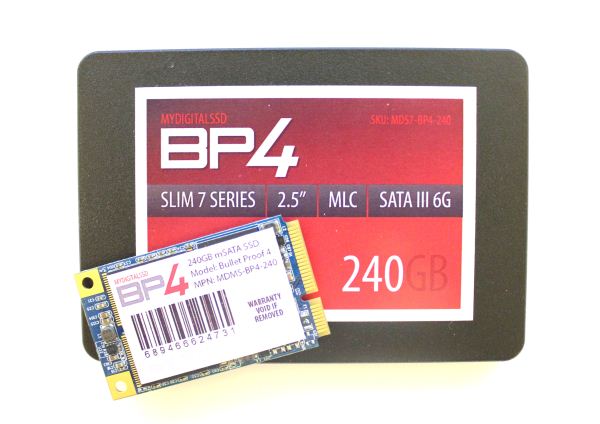
Almost immediately after our BP3 and SMART review went up, MyDigitalSSD told me that the successor to the BP3 was just around the corner: the BP4. From a hardware standpoint, not much has changed in the BP4 and the only major change is the move from 24nm to 19nm NAND. However, there have been some big changes on the firmware front and MyDigitalSSD is promising some pretty impressive performance figures and very affordable prices. Do their claims hold up? Read on to find out!
Read More ...The Great Equalizer Part 2: Surface Pro vs. Android Devices in 3DMark
While we're still waiting for Windows RT and iOS versions of the latest 3DMark, there is one cross-platform comparison we can make: Ivy Bridge/Clover Trail to the Android devices we just tested in 3DMark.
Read More ...3DMark for Android: Performance Preview
As I mentioned in our coverage of GL/DXBenchmark 2.7, with the arrival of Windows RT/8 we'd finally see our first truly cross-platform benchmarks. Kishonti was first out of the gate, although Futuremark was first to announce its cross platform benchmark simply called 3DMark.
Currently available for x86 Windows 8 machines, Futuremark has Android, iOS and Windows RT versions of 3DMark nearing release. Today the embargo lifts on the Android version of 3DMark, with iOS and Windows RT to follow shortly.
Read More ...The AnandTech Podcast: Episode 18
We are back with the first half of our return to podcasting. While Brian finishes up his review of the One, Ryan and I took some time to recap (almost) everything in the world of GPUs for the past couple of weeks. We'll be doing a mobile focused podcast after the One review hits to discuss it, the SGS4 and more.
The AnandTech Podcast - Episode 18featuring Anand Shimpi & Ryan SmithiTunes
RSS - mp3, m4a
Direct Links - mp3, m4aTotal Time: 1 hour 5 minutesOutline - hh:mm
The AnandTech Redesign - 00:00
NVIDIA's GTC 2013 - 00:14
NVIDIA's Maxwell & Volta (2014/2016 GPU Architectures) - 00:18
NVIDIA's Kayla - 00:22
Predicting Logan's GPU Performance - 00:24
AMD Dev Rel at GDC 2013 - 00:27
AMD's Radeon Sky & Cloud Gaming - 00:35
AMD's Radeon HD 7790 - 00:41
NVIDIA GeForce GTX 650 Ti Boost - 00:43
The Sweet Spot between $100 - $200 00:47
FCAT - 00:51
As always, comments are welcome and appreciated.
Read More ...NVIDIA’s GeForce 700M Family: Full Details and Specs
With spring now well under way and the pending launch of Intel’s Haswell chips, OEMs always like to have “new” parts across the board, and so once more we’re getting a new series of chips from NVIDIA, the 700M parts. We’ve already seen a few laptops shipping with the 710M and GT 730M; today NVIDIA is filling out the rest of 700M family. Last year saw NVIDIA’s very successful launch of mobile Kepler; since that time, the number of laptops shipping with NVIDIA dGPUs compared to AMD dGPUs appears to have shifted even more in NVIDIA’s favor. Not surprisingly, with TSMC still on 28nm NVIDIA isn’t launching a new architecture, but they’ll be tweaking Kepler to keep it going through 2013.
Read More ...The Great Equalizer: Apple, Android & Windows Tablet GPUs Compared using GL/DXBenchmark 2.7
For the past few years we have been lamenting the state of benchmarks for mobile platforms. The constant refrain from those who had been around long enough to remember when all PC benchmarks were terrible was to wait for the release of Windows 8 and RT. The release of those two OSes would bring many of the traditional PC benchmark vendors space into the fray. While we're expecting to see new Android, iOS, Windows RT and Windows 8 benchmarks from Futuremark and Rightware, it's our old friends at Kishonti who are first out of the gate with a cross-OS/API/platform benchmark. GLBenchmark has existed on both Android and iOS for a while now, but we're finally able to share information and performance data using DXBenchmark - GLB's analogue for Windows RT/8.
Read More ...A Comment on PC Gaming Battery Life
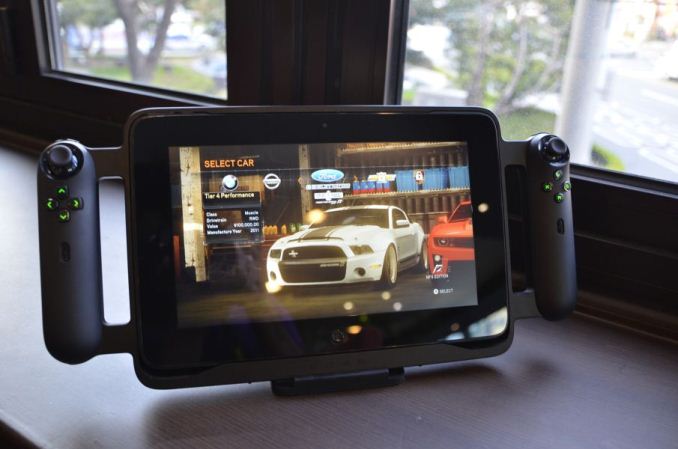
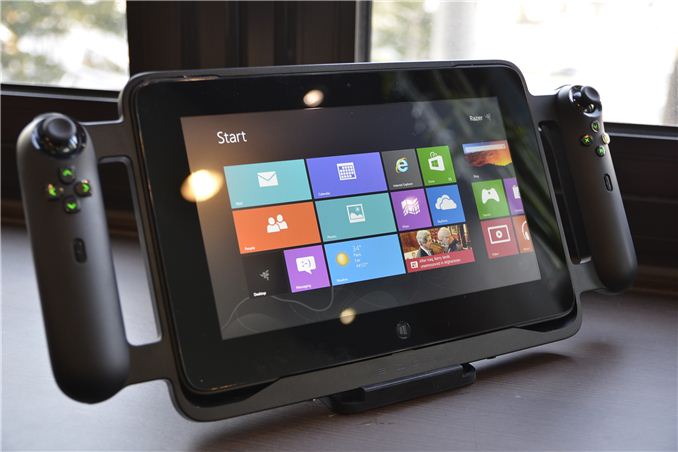
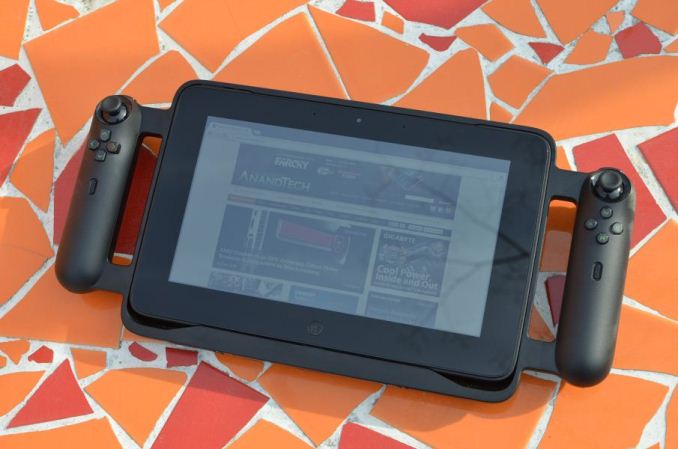
During the process of writing the Razer Edge review, I spent a lot of my time gaming on battery. The Edge is marketed as being a mobile PC gaming console, and is pretty well suited in that role with one caveat - battery life. Razer quotes 1-2 hours of gaming battery life on the internal 41.44Wh battery, with those figures doubling when the extended battery is inserted in the gamepad controller. The range makes sense; playing Angry Birds would be understandably less strenuous than, say, Skyrim or Crysis.
In real-world testing that holds up - I saw just over two hours of Dirt 3 playing time, and around 3.5 hours when playing the decade-old Quake III: Arena. But something I missed was that Jarred had actually developed and done some repeatable, instrumented gaming battery life testing in his preview of the ASUS N56VM, one of the first systems we tested with the mobile Ivy Bridge platform. I can’t honestly remember why we didn’t put more systems through this test, but such is life.
The test itself is pretty simple: looping the four 3DMark06 gaming tests at 1366x768 in the balanced power profile and the display set to 100nits, with the GPU specifically set in the balanced performance setting (usually by default on battery it’s set to maximum battery saving except in the High Performance profile). Jarred ran the test on the N56VM twice, once with the HD 4000 and once with the Fermi-based 40nm GT 630M that our international-spec N56VM test unit had, as well as the Sandy Bridge-based ASUS K53E (i5-2520M and HD3000) and the Compal-built AMD Llano reference platform that we looked at way back in June 2011.
Naturally, my first inclination was to run it on my Edge evaluation unit - so I did. Twice, in fact, both with and without the extended battery. I also had a Sony VAIO T13 ultrabook on hand, a pretty run of the mill entry-level ultrabook from summer 2012, so I ran that too. The spec rundown: i5-3317U, HD 4000, 4GB of memory, 500GB 5400RPM hard drive, 32GB SSD cache, 45Wh battery, a mostly terrible 1366x768 13.3” TN display, and Windows 7. Advance apologies for not having a more recent AMD-based system in this comparison, ideally I’d have a Trinity system to compare against but I’m on the road and had to go with what I had near me.
The Edge checks in at 1:12 on the internal 41.44Wh battery and 2:20 with the extended battery (82.88Wh combined capacity), roughly where I expected given the real-world testing done previously. That works out to efficiency in the 1.75-1.8 minutes per watt-hour range. The ultrabook platform is a good deal more efficient than the Edge, which makes sense given the power consumption delta between GT 640M LE and HD 4000, but at the cost of substantially reduced performance. The Edge would likely hit the close to the 2.5 minutes per watt hour number as the ultrabook if the discrete graphics were disabled and the test run on the HD 4000.
The point of comparison that I'm really interested in is actually the AMD platform. I wish I had a Trinity system nearby to run this on, but Llano does pretty well from an efficiency standpoint, and a system based around the more powerful Trinity could be a very viable alternative. It's a platform that seems pretty well suited to the demands of mobile gaming, with a good balance between power consumption and graphics performance. I know that Razer has pretty close ties with both Intel and especially Nvidia, so I never expected them to go the Trinity route, but it'd be interesting to see a different company explore it.
Update: Jarred also ran the same test on the AMD Trinity prototype. Turns out Trinity actually does worse in this test than Llano, likely thanks to the higher performance GPU. That of course was a prototype system, so performance and battery life with a retail Trinity platform might prove to be better.
Two and a half hours of real gaming isn't great, but to be honest, considering the power draw and sheer amount of battery capacity on board with the extended battery, I’m not sure that anything else can top that number right now. There just isn't another system that can hit 1.8 minutes per watt-hour while gaming with a battery larger than 80Wh. The cut-down version of HD 4000 in the ultrabook platform is more power efficient, but the performance tradeoffs are simply too significant to consider it adequate for gaming unless the titles you are playing are quite old. And even then, there aren't any ultrabooks with more battery capacity than the Edge offers.
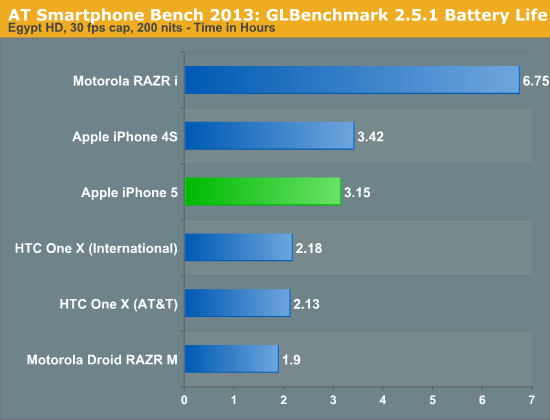
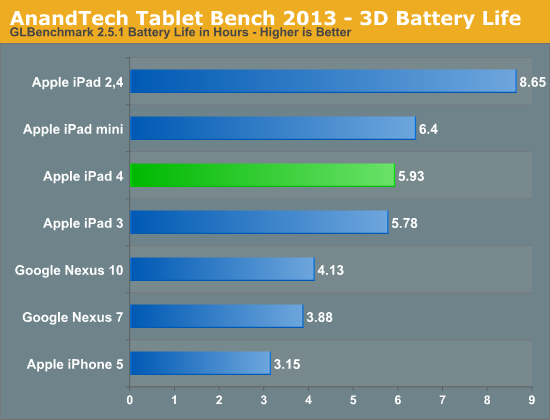
What needs to be kept in mind here is that gaming essentially represents the worst-case real world usage scenario for battery life. Doesn’t matter what type of device, you’ll blow through the battery pretty quickly if you’re gaming on it, even if it’s just Fruit Ninja. My Galaxy Nexus has a Gameboy emulator runtime of roughly 4.5 hours, which is pretty awful considering that Pokemon Silver is one of the least graphically-intensive games out there. Our GLBenchmark-based 3D battery life test for phones and tablets sheds some light on just how quickly it can drain - less than 6 hours for both generations of Retina iPad, a bit under 4 hours for the Nexus 7, 3 hours and 9 minutes for the iPhone 5, just over two hours for both versions of HTC One X (Tegra 3 and Snapdragon). For a quick comparison versus a dedicated handheld gaming device, Sony quotes the PS Vita gaming battery life in the 3-5 hour range, and real world reports commonly place it around 3.5-4 hours.
So while two hours may seem short, for a device running full PC games on real PC hardware at respectable (read: playable) framerates, that’s actually about as good as it gets in today’s world. That should improve going forward - Haswell’s idle power improvements won’t have an impact, but as GPUs become more efficient, attaining this level of performance will require less power. But as GPU performance becomes “cheaper” from a power envelope standpoint, an increase in display resolution starts to make sense, and then we arrive back at the battery life conversation. I expect a lot of the current tablet PC issues to be fixed by Haswell (idle power consumption, Thunderbolt, etc), but the shrink to 14nm in Broadwell and Skylake will probably be what gets us the best of both worlds from a performance and power draw perspective. For now, it’s hard to knock the Edge for battery life - it simply faces limitations from power and thermal standpoints that apply to every PC on the market right now, and makes some pretty logical compromises based on the technology available.
Read More ...Capsule Review: Logitech's G100s, G500s, and G700s Gaming Mice
The dirty secret of gaming peripherals is that if they're good quality products in general, they're often going to be head and shoulders above hardware marketed toward the regular consumer. For whatever reason, high rent keyboards and mice just aren't marketed to consumers who'll often settle on an inexpensive wireless mouse and keyboard combination. This was strangely evident in Logitech's pre-G-branding era, and while the G branding is ultimately a good thing, some users are liable to miss out on some fantastic quality kit.
Read More ...A Visual Guide to the iPhone 5 on T-Mobile
This is normally Brian's beat but with him busy putting the finishing touches on his review of HTC's One, I thought I'd help out. We're still seeing (and hearing) a lot of confusion about what T-Mobile announced earlier this week with regards to existing and future iPhone support on its network. Brian already went through all of this in his excellent article on the topic, but seeing continued confusion I thought I'd whip up a few diagrams to help explain.
For the purposes of this article I'm focusing on compatibility for the current AT&T iPhone 5 (hardware model A1428) as well as the new unlocked iPhone 5 (also hardware model A1428) that will be shipping start April 12.
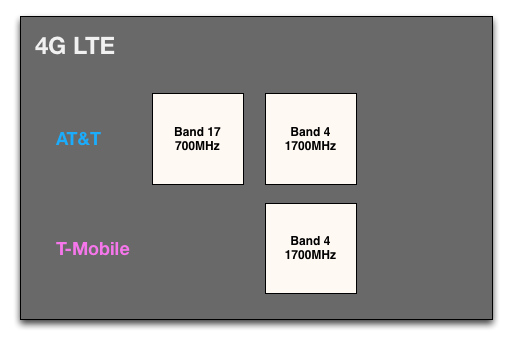
The easiest question to answer is will existing AT&T iPhone 5s that have been unlocked work on T-Mobile's recently deployed LTE network. The answer is an emphatic yes. The original AT&T iPhone 5 was designed to work on LTE band 17 (700MHz) and band 4 (1700MHz), a superset of T-Mobile's LTE deployment (band 4). If you're in one of the few areas with T-Mobile LTE service and an existing unlocked AT&T iPhone 5, the combination will work just fine. Apple will need to release an updated carrier bundle (.ipcc file) for the phones, which I assume is coming soon - but there's no hardware change required.
The new unlocked iPhone 5 that will be available via T-Mobile doesn't add any additional functionality in this case. As you can see, both A1428 revisions support the same LTE bands.
Where it gets somewhat complicated is in the 3G WCDMA discussion. I emphasize somewhat because it's really not that hard to understand. The complexity comes from the fact that there are a number of names and acronyms here that aren't well understood by most who aren't of Klug-descent. If we focus on the frequency bands themselves and ignore their common names, things are a bit easier to understand.
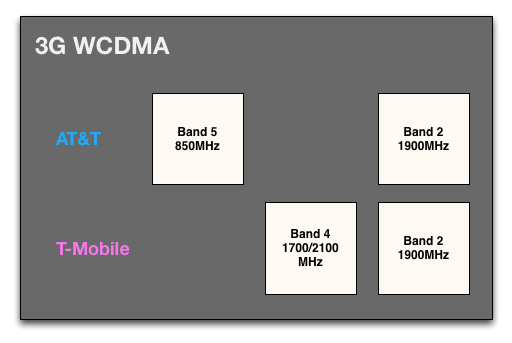
The original AT&T iPhone 5 supported 3G operation on band 5 (850MHz) and band 2 (1900MHz). Only band 2 overlaps with T-Mobile's network. The problem with 1900MHz on T-Mobile is that the majority of that spectrum is used for 2G and hasn't yet been migrated over to 3G. The bulk of T-Mobile's 3G currently exists in band 4 (1700MHz uplink, 2100MHz downlink), which isn't supported on the existing AT&T iPhone 5.
After April 12th, the new unlocked A1428 iPhone 5 with band 4 WCDMA support will begin rolling out and should have much better coverage on T-Mobile's 3G network as a result. The diagram and toggles below help illustrate this:
The original A1428 iPhone 5 lacks band 4 support, which means it'll only support WCDMA on band 2. The only problem here, as I mentioned above, is that T-Mobile's 3G deployment on band 2 isn't ubiquitous - so in many cases you'll fall back to 2G/EDGE speeds. The new iPhone 5 simply enables band 4 WCDMA support.
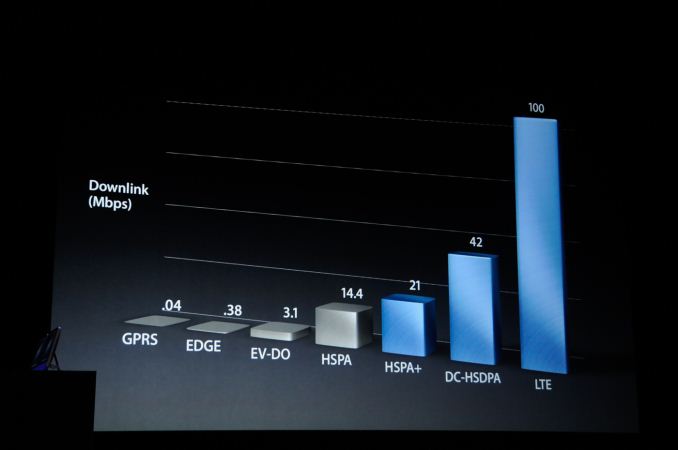
There's one other benefit to the new iPhone 5. DC-HSPA+ (42Mbps max downlink) is now supported on all bands as well. Although it was never (and likely will never ever be) used by AT&T, DC-HSPA+ was a feature of the iPhone 5. T-Mobile on the other hand does use carrier aggregation on WCDMA in some markets and the new A1428 will benefit from higher speeds in those situations.
That's it.
Read More ...Unreal Engine 4 Infiltrator Demo from GDC [video]
The folks at Kotaku spotted a video of Epic's Unreal Engine 4 demo from GDC on YouTube. The video is really a tech demo of Epic's UE4 technology and not any upcoming IP, but in usual Epic fashion it looks downright impressive. Even more exciting is the fact that the demo was run entirely on a single GeForce GTX 680. With the next generation of game consoles targeting GPU performance under that of a 680, the performance target makes sense.
Fortnite will be Epic's first game to use Unreal Engine 4. We can also expect UE4 to make its way onto mobile devices as well thanks to the excellent UDK for Android and iOS.
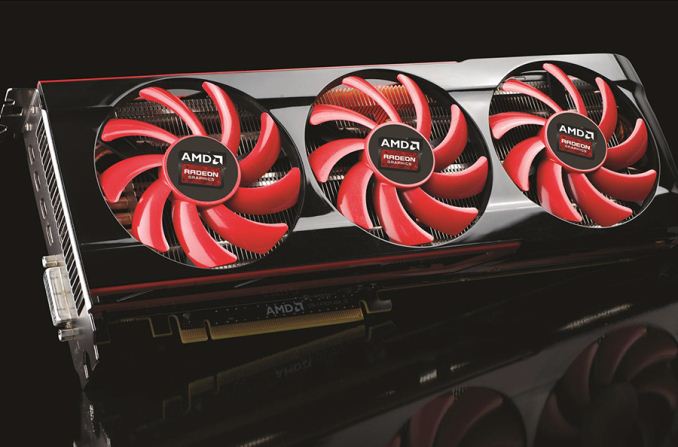
Continuing our AMD GDC 2013 coverage, the other bit of major AMD news coming out of GDC 2013 involves a consumer product after all. But not strictly as a product announcement. Rather this is more of a product tease coming out of AMD. That tease? The Radeon HD 7990.
Since the latter half of 2012, AMD partners such as PowerColor and Asus have been offering what we’ve been calling “officially unofficial” Radeon HD 7990 cards. Officially, AMD doesn’t have a 7990 SKU, but at the same time AMD will approve multi-GPU Tahiti designs, and bless them with the right to be called a 7990. So officially the 7990 doesn’t exist yet, and yet unofficially it’s been offered for months now.
With that in mind, the 7990 will be moving from officially unofficial status to just outright official status. Ending their GDC presentation, AMD’s final item was a tease of their official Radeon HD 7990 design, with word that it’s coming soon. Real soon in fact, as we later found out DICE had been using some of these 7990 cards to power their Battlefield 4 demo elsewhere at GDC.
As this is a teaser AMD isn’t saying anything about the card beyond the fact that it’s a dual Tahiti card just as the unofficially official 7990s were. But even from the few pictures they’ve strategically provided we can infer a few things.
First and foremost, it’s a complete open-air cooler. AMD’s previous dual-GPU cards have all employed some kind of blower; up through the 300W 5970 they were full blowers, and the 375W 6990 was a split blower. Open air coolers have generally high performance, but they do require a breezy case since they’re not very capable of pushing hot air out on their own. The design essentially punts cooling off to the case, which is not always a bad thing since this affords much larger – and thereby slower and quieter – cooling fans.
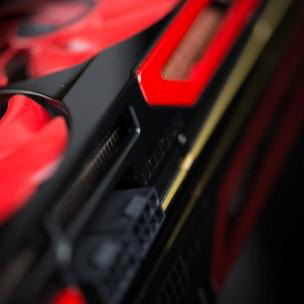
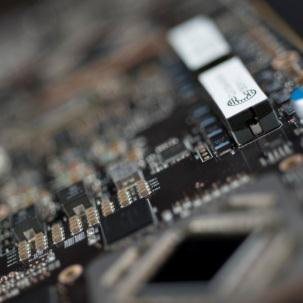
Second of all, we can see something about the power delivery system. Two 8pin PCIe connectors are visible, which would put power at or under 375W. AMD has always shipped their cards with the proper connectivity to pull their rated power at stock, so as long as they’re holding to that this puts an upper-limit on where the 7990’s TDP would be at stock. This would be notably lower than the unofficial cards, which are closer to 500W (though admittedly also designed for liberal overclocking). Meanwhile we can also just see the edge of the VRM circuitry; the Volterra ‘C’ is visible on the edge of what appears to be a Volterra multi-phase inductor. Volterra is widely considered to offer some of the best VRM circuitry in the industry, and has been found on previous generation AMD dual-GPU cards.
In any case, we’ll be following this up as AMD releases more information. The fact that an official 7990 is appearing now makes it hard to argue that AMD isn’t late to the party – we’re coming up on a full year since the GeForce GTX 690 – but with AMD keeping Tahiti through Q4 there’s really no reason not to do it. So we’ll have to see just what AMD comes up with, and how their design differs from the unofficial cards that have come before it.
Read More ...Defense Materials in Pentagon Terrorism Death Penalty Cases Mysteriously Deleted
Defense lawyers in Guantanamo war tribunals are upset over third party monitoring, document disappearance
Read More ...After Volt and Dreamliner 787 Fires, Panel Struggles With How to "Fix" Batteries
Top industry figures says there's no sure fire method of predicting internal shorts
Read More ...NASA Wants to Capture Asteroids for Exploration
It also wants to redirect large asteroids that may harm Earth
Read More ...Quick Note: EA Lays Off Staff in Montreal Game Studio
EA wouldn't say how many were affected
Read More ...BlackBerry Refutes Reports that Z10 Returns "Exceed Sales"
BlackBerry files complaints with the SEC and OSC
Read More ...Elon Musk Says Tesla May Build Second Plant in Texas
This likely has a lot to do with the potential passing of a new EV bill in the state
Read More ...I-Limb Robotic Hand Gets iPhone Support, Improved Thumb
With 24 grips and smartphone support, new design from Touch Bionics would make even Luke Skywalker proud
Read More ...IRS Documents Citizens Have "No Privacy Expectation" With Email
Circuit court says search is unconstitutional, but IRS ignores that ruling
Read More ...Florida Judge: Apple, Motorola Mobility Have No Intention of Solving Patent Cases
The judge says lawsuits have become a business strategy
Read More ...Tesla's Elon Musk Fights for Texas Electric Vehicle Sales Bill
This bill would allow Tesla to sell directly to customers without dealerships
Read More ...Report: Microsoft to Release 7-Inch Surface Tablet
It is expected to go into mass production later this year
Read More ...Obama Calls for 75% Budget Increase for Vehicle Research
Obama continues to press for more fuel-efficient vehicles with new budget proposal
Read More ...PC Industry Sales Dropped Nearly 14 Percent in Q1 2013
IDC blames smartphones and tablets for sharp PC decline
Read More ...Samsung Galaxy Mega 5.8 and Galaxy Mega 6.3 Officially Debut
Galaxy Mega devices get official
Read More ...Warming Evangelist Hansen Retires; Researchers Advise Panic Despite Flat Temps
Critics seize on cooling; warming theorist say models may need "readjusting"
Read More ...Quick Note: EA Wins Worst Company Award for Second Straight Year
Company says DRM debacle has little to do with its unpopularity

 Intel Details Haswell Overclocking at IDF Beijing
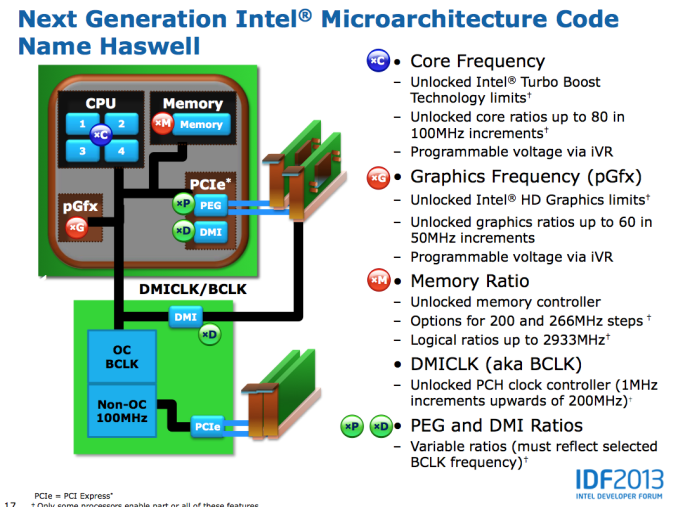
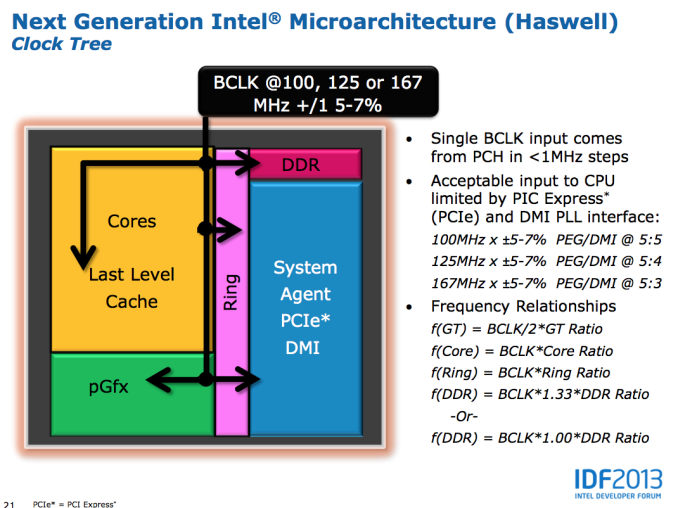 The default BCLK for Haswell parts will remain at 100MHz, however now you'll have the ability to select 125MHz or 167MHz as well. The higher BCLK points are selectable because they come with different dividers to keep PCIe and DMI frequencies in spec. At each of these BCLK settings (100/125/167MHz), the typical inflexbility from previous architectures remain. Intel's guidance is you'll only be able to adjust up/down by 5 - 7%.
Obviously we'll still have K-series SKUs with fully unlocked multipliers. Intel claims the CPU cores will have ratios of up to 80 (8GHz max without BCLK overclocking, although you'll need exotic cooling to get there). Some parts will also have unlocked GPU ratios, with a maximum of 60 (GPU clock = BCLK/2 * ratio, so 3GHz max GPU clock).
Memory overclocking is going to be very big with Haswell. Intel will offer support for 200MHz steps up to 2.6GHz and 266MHz steps up to 2.66GHz on memory frequency, with a maximum of 2.93GHz memory data rate supported.
The default BCLK for Haswell parts will remain at 100MHz, however now you'll have the ability to select 125MHz or 167MHz as well. The higher BCLK points are selectable because they come with different dividers to keep PCIe and DMI frequencies in spec. At each of these BCLK settings (100/125/167MHz), the typical inflexbility from previous architectures remain. Intel's guidance is you'll only be able to adjust up/down by 5 - 7%.
Obviously we'll still have K-series SKUs with fully unlocked multipliers. Intel claims the CPU cores will have ratios of up to 80 (8GHz max without BCLK overclocking, although you'll need exotic cooling to get there). Some parts will also have unlocked GPU ratios, with a maximum of 60 (GPU clock = BCLK/2 * ratio, so 3GHz max GPU clock).
Memory overclocking is going to be very big with Haswell. Intel will offer support for 200MHz steps up to 2.6GHz and 266MHz steps up to 2.66GHz on memory frequency, with a maximum of 2.93GHz memory data rate supported.
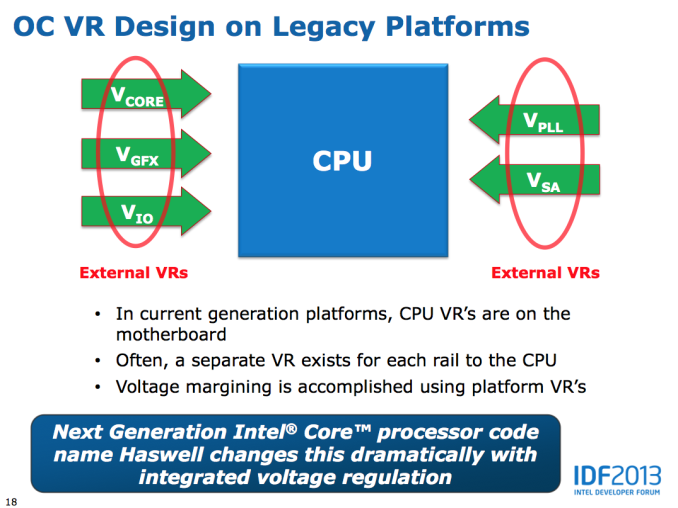 Voltages are the other big change with Haswell. All Haswell SKUs will ship with an integrated voltage regulator. Instead of having multiple voltage rails driven by external voltage regulators enter the SoC, Haswell will accept two input voltages: Vccin for logic and Vddq for DRAM. Vccin should typically be somewhere in the 1.8V - 2.3V range, with a max of 3.04V. Vddq will depend on your DRAM type. The integrated voltage regulator will support all of the same adjustments than we're used to on current Ivy Bridge platforms.
 What Intel isn't talking about publicly is just how overclockable Haswell is. I'm hearing great things about LN2 overclocking, but other than the high-end memory vendors being pleased with the new platform I haven't heard much on what will be possible on air. A much beefier GPU (at least on the high-end SKUs) and on-package voltage regulation will make for some very interesting thermal conditions.
 Intel has been walking a fine line lately with giving the overclocking community enough to be relatively happy but not too much. The days of the Celeron 300A aren't coming back. Intel isn't a fan of giving things away for free and I wouldn't expect that to change now, especially given AMD's current competitive position.
Read More ...
Intel has been walking a fine line lately with giving the overclocking community enough to be relatively happy but not too much. The days of the Celeron 300A aren't coming back. Intel isn't a fan of giving things away for free and I wouldn't expect that to change now, especially given AMD's current competitive position.
Read More ...














_575px.jpg)
_575px.jpg)
_575px.jpg)





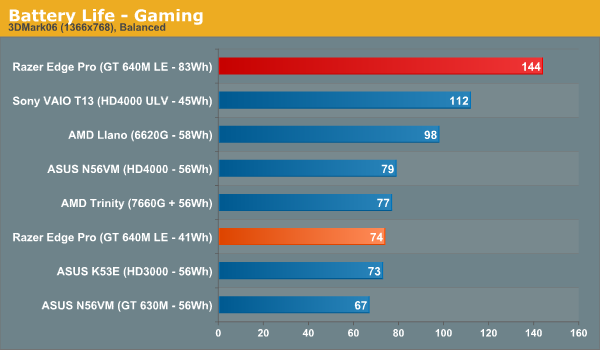
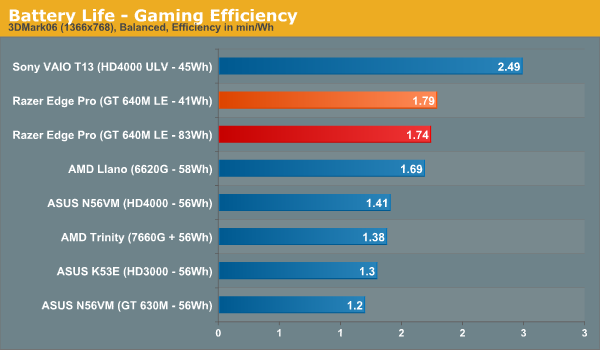 The Edge checks in at 1:12 on the internal 41.44Wh battery and 2:20 with the extended battery (82.88Wh combined capacity), roughly where I expected given the real-world testing done previously. That works out to efficiency in the 1.75-1.8 minutes per watt-hour range. The ultrabook platform is a good deal more efficient than the Edge, which makes sense given the power consumption delta between GT 640M LE and HD 4000, but at the cost of substantially reduced performance. The Edge would likely hit the close to the 2.5 minutes per watt hour number as the ultrabook if the discrete graphics were disabled and the test run on the HD 4000.
The point of comparison that I'm really interested in is actually the AMD platform. I wish I had a Trinity system nearby to run this on, but Llano does pretty well from an efficiency standpoint, and a system based around the more powerful Trinity could be a very viable alternative. It's a platform that seems pretty well suited to the demands of mobile gaming, with a good balance between power consumption and graphics performance. I know that Razer has pretty close ties with both Intel and especially Nvidia, so I never expected them to go the Trinity route, but it'd be interesting to see a different company explore it.
Update: Jarred also ran the same test on the AMD Trinity prototype. Turns out Trinity actually does worse in this test than Llano, likely thanks to the higher performance GPU. That of course was a prototype system, so performance and battery life with a retail Trinity platform might prove to be better.
The Edge checks in at 1:12 on the internal 41.44Wh battery and 2:20 with the extended battery (82.88Wh combined capacity), roughly where I expected given the real-world testing done previously. That works out to efficiency in the 1.75-1.8 minutes per watt-hour range. The ultrabook platform is a good deal more efficient than the Edge, which makes sense given the power consumption delta between GT 640M LE and HD 4000, but at the cost of substantially reduced performance. The Edge would likely hit the close to the 2.5 minutes per watt hour number as the ultrabook if the discrete graphics were disabled and the test run on the HD 4000.
The point of comparison that I'm really interested in is actually the AMD platform. I wish I had a Trinity system nearby to run this on, but Llano does pretty well from an efficiency standpoint, and a system based around the more powerful Trinity could be a very viable alternative. It's a platform that seems pretty well suited to the demands of mobile gaming, with a good balance between power consumption and graphics performance. I know that Razer has pretty close ties with both Intel and especially Nvidia, so I never expected them to go the Trinity route, but it'd be interesting to see a different company explore it.
Update: Jarred also ran the same test on the AMD Trinity prototype. Turns out Trinity actually does worse in this test than Llano, likely thanks to the higher performance GPU. That of course was a prototype system, so performance and battery life with a retail Trinity platform might prove to be better.
 Two and a half hours of real gaming isn't great, but to be honest, considering the power draw and sheer amount of battery capacity on board with the extended battery, I’m not sure that anything else can top that number right now. There just isn't another system that can hit 1.8 minutes per watt-hour while gaming with a battery larger than 80Wh. The cut-down version of HD 4000 in the ultrabook platform is more power efficient, but the performance tradeoffs are simply too significant to consider it adequate for gaming unless the titles you are playing are quite old. And even then, there aren't any ultrabooks with more battery capacity than the Edge offers.
What needs to be kept in mind here is that gaming essentially represents the worst-case real world usage scenario for battery life. Doesn’t matter what type of device, you’ll blow through the battery pretty quickly if you’re gaming on it, even if it’s just Fruit Ninja. My Galaxy Nexus has a Gameboy emulator runtime of roughly 4.5 hours, which is pretty awful considering that Pokemon Silver is one of the least graphically-intensive games out there. Our GLBenchmark-based 3D battery life test for phones and tablets sheds some light on just how quickly it can drain - less than 6 hours for both generations of Retina iPad, a bit under 4 hours for the Nexus 7, 3 hours and 9 minutes for the iPhone 5, just over two hours for both versions of HTC One X (Tegra 3 and Snapdragon). For a quick comparison versus a dedicated handheld gaming device, Sony quotes the PS Vita gaming battery life in the 3-5 hour range, and real world reports commonly place it around 3.5-4 hours.
Two and a half hours of real gaming isn't great, but to be honest, considering the power draw and sheer amount of battery capacity on board with the extended battery, I’m not sure that anything else can top that number right now. There just isn't another system that can hit 1.8 minutes per watt-hour while gaming with a battery larger than 80Wh. The cut-down version of HD 4000 in the ultrabook platform is more power efficient, but the performance tradeoffs are simply too significant to consider it adequate for gaming unless the titles you are playing are quite old. And even then, there aren't any ultrabooks with more battery capacity than the Edge offers.
What needs to be kept in mind here is that gaming essentially represents the worst-case real world usage scenario for battery life. Doesn’t matter what type of device, you’ll blow through the battery pretty quickly if you’re gaming on it, even if it’s just Fruit Ninja. My Galaxy Nexus has a Gameboy emulator runtime of roughly 4.5 hours, which is pretty awful considering that Pokemon Silver is one of the least graphically-intensive games out there. Our GLBenchmark-based 3D battery life test for phones and tablets sheds some light on just how quickly it can drain - less than 6 hours for both generations of Retina iPad, a bit under 4 hours for the Nexus 7, 3 hours and 9 minutes for the iPhone 5, just over two hours for both versions of HTC One X (Tegra 3 and Snapdragon). For a quick comparison versus a dedicated handheld gaming device, Sony quotes the PS Vita gaming battery life in the 3-5 hour range, and real world reports commonly place it around 3.5-4 hours.
 So while two hours may seem short, for a device running full PC games on real PC hardware at respectable (read: playable) framerates, that’s actually about as good as it gets in today’s world. That should improve going forward - Haswell’s idle power improvements won’t have an impact, but as GPUs become more efficient, attaining this level of performance will require less power. But as GPU performance becomes “cheaper” from a power envelope standpoint, an increase in display resolution starts to make sense, and then we arrive back at the battery life conversation. I expect a lot of the current tablet PC issues to be fixed by Haswell (idle power consumption, Thunderbolt, etc), but the shrink to 14nm in Broadwell and Skylake will probably be what gets us the best of both worlds from a performance and power draw perspective. For now, it’s hard to knock the Edge for battery life - it simply faces limitations from power and thermal standpoints that apply to every PC on the market right now, and makes some pretty logical compromises based on the technology available.
Read More ...
So while two hours may seem short, for a device running full PC games on real PC hardware at respectable (read: playable) framerates, that’s actually about as good as it gets in today’s world. That should improve going forward - Haswell’s idle power improvements won’t have an impact, but as GPUs become more efficient, attaining this level of performance will require less power. But as GPU performance becomes “cheaper” from a power envelope standpoint, an increase in display resolution starts to make sense, and then we arrive back at the battery life conversation. I expect a lot of the current tablet PC issues to be fixed by Haswell (idle power consumption, Thunderbolt, etc), but the shrink to 14nm in Broadwell and Skylake will probably be what gets us the best of both worlds from a performance and power draw perspective. For now, it’s hard to knock the Edge for battery life - it simply faces limitations from power and thermal standpoints that apply to every PC on the market right now, and makes some pretty logical compromises based on the technology available.
Read More ...



No comments:
Post a Comment