

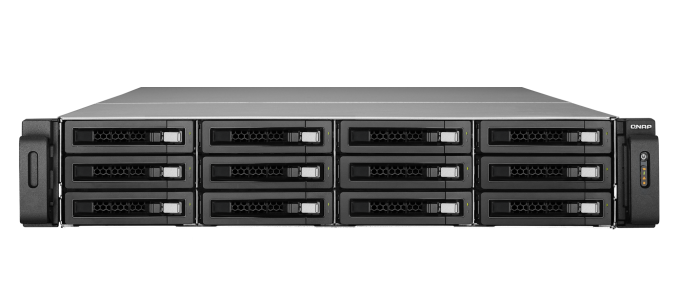
QNAP's TS-EC1279U-RP 12-bay Flagship Rackmount NAS Review
Our enterprise NAS reviews have focused on Atom-based desktop form factor systems till now. These units have enough performance for a moderately sized workgroup and lack some of the essential features in the enterprise space such as acceptable performance with encrypted volumes.
Read More ...
Samsung Galaxy S 4 Incompatible with Original TecTiles, TecTile 2 Announced
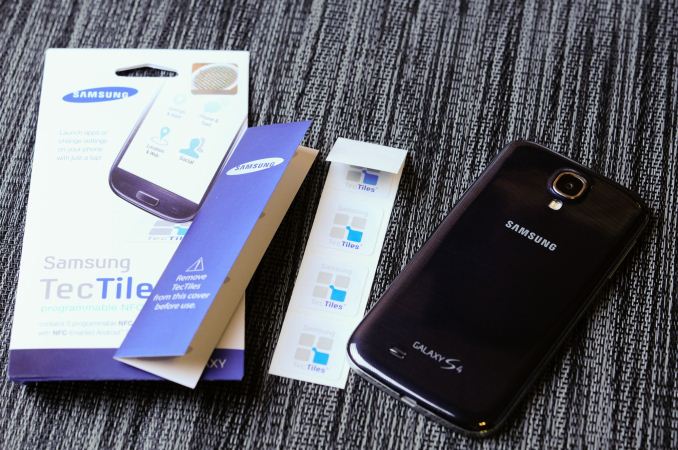
When I saw the presence of BCM2079x, I remembered that this reader doesn’t read MIFARE tags, which the NXP solution does, since it is an NXP tag format. Instead Broadcom only reads tags which adhere to the standard NFC Forum tag types. Ordinarily this isn’t much of a problem, as long as users are aware of the limitation and to stay away from MIFARE classic tags on an incompatible reader. What’s interesting here is that Samsung’s TecTiles were themselves originally MIFARE Classic 1k tags, which makes them not compatible with the new SGS4. I then confirmed that the SGS4 does in fact not read my existing TecTiles which I’ve setup around the house.


Reading a Samsung TecTile on SGS4 (Left), Checking TecTile tag type on another device (Right)
"Samsung is introducing TecTile 2, an update to the original TecTile NFC programmable tags, which will be available in the coming weeks. TecTile 2 will use the current NFC technology on the market, allowing Samsung customers to further incorporate NFC into their daily lives and to use with the latest Samsung Mobile products and services, including the Galaxy S 4. As industry standards continue to evolve, Samsung remains committed to meeting those standards and adapting its technologies if necessary. Samsung customers can also fully utilize TecTiles 2 with existing Samsung Mobile NFC-enabled Android smartphones currently in market."Interestingly enough some newer generation TecTiles not marked as TecTile 2 seem to have already made their way out onto the market. Several users replied on twitter that they’ve seen TecTiles which identify as an NFC Forum Type 4 tag instead of the MIFARE 1k tag, with a visually different appearance as well. If you’ve already got TecTiles that aren’t MIFARE, it seems that you’re in luck, otherwise if you’re upgrading to an SGS4 from another Samsung device and made use of TecTiles, it’s likely you’ll have to replace your NFC tags.
Read More ...
Cooler Master Seidon 240M and 12 More Coolers: The Retest and Mega-Roundup
There's no right way to describe it; we're testing the Cooler Master Seidon 240M along with two new Noctua coolers in a new testbed. Alongside ten of our industry's finest, retested!
Read More ...
Corsair Obsidian 350D Case Review
Corsair's Obsidian 350D is the company's first micro-ATX case, and it's a heck of an entrance.
Read More ...
Capsule Impressions: The Stinky Footboard
Every so often an oddball peripheral or product comes around and your attention is demanded, but with the Stinky Footboard I felt unusually torn. As a gamer I'm an incredibly simple creature: I may assign extra functions to my mice, but I usually don't use them. There are eighteen programmable keys on my Corsair Vengeance K90 keyboard, but of those keys I use...one, which is assigned to a script that toggles Aero on and off. Peripherals are funny things, though, and a feature that one person may have no use for could be extremely desirable to another. A good friend and I both really like the Logitech G500 (and now the G500s); he liked the adjustable weight and didn't care about the freewheel, I loved the freewheel and didn't care about the adjustable weight. So it goes.
And then, every so often, something really unusual comes around. Submitted for your approval, the Stinky Footboard:

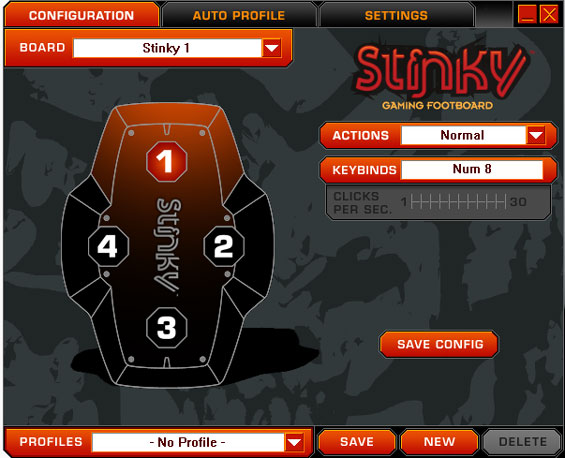
As far as I can tell, the build quality is good, the software side is good, so the pieces of a good experience are at least in play. In practice, though?
Designing a good user experience is an insanely tricky prospect. In my estimation, when you're considering whether or not something is intuitive, you're actually looking at two different types of intuition. The first is intuition within a vacuum: assuming no prior experience with something, how easy is it to figure out, does it work the way you'd hope or expect it to. The second is intuition through experience: you have experience with a particular action, maybe a particular piece of software, so even if that action or software isn't intuitive in a vacuum, you learned how to use it. This second type is where Microsoft tripped up tremendously with Windows 8; there weren't any breadcrumbs leading to the new user experience, it simply came into being, and thus people who were used to the Windows desktop and used to certain things being in certain places are suddenly completely baffled. Confusion frustrates.
By the same token, the Stinky Footboard is a fantastic idea in a vacuum that takes some serious getting used to in practice. I can see some users making the jump, but as someone who can't rub his stomach and tap the top of his head at the same time, I found I used it as a glorified pedal. The idea that our feet, which ordinarily hang uselessly beneath us, could be used to hit additional keys as needed is a sound one in theory. I can't be the arbiter of whether or not this is a good peripheral for everyone due to the very subjective nature of peripherals, but I found the Footboard complicated my gaming experience more than it enhanced it.
As a sidenote, while I was enamored with the concept I did find myself pretty severely put off by the branding. I'm not a foot fetishist nor do I harbor any illusions about the kind of funk that seeks refuge in my nether digits, but the cheeky branding and the idea that I'm going to rub my filth-infested hooves all over a peripheral was incredibly unappealing. I don't have a problem stepping on a peripheral, I play Dance Dance Revolution (badly) in the comfort of my own home whenever my living room isn't overflowing with cases, I just don't like my hardware tacitly acknowledging that my feet are raunchy.
Undoubtedly part of the reason the Footboard came our way was because it's being Kickstarted with a few days to go. My experience with it hasn't been super positive, but the times where I've felt like I was shy keys for whatever I wanted to play have been rare enough that I can't really see myself training myself to use both hands plus my foot. If it seems like something that might work for you, though, no harm in helping out with the Kickstarter. Fair warning, though: minimum pledge to actually get a Footboard is a not insubstantial $89.
Read More ...
AMD Radeon HD 7990 Review: 7990 Gets Official
Launching today and shipping in two weeks, the Radeon HD 7990 is AMD's official dual-GPU card for the Southern Islands family. Based on the same Tahiti GPUs that power the rest of the 7900 series, the 7990 seeks to pack most of the performance of a 7970 CrossFire setup into a single card. Though this isn't the first 7990 card to be launched, as we'll see it may just be the finest one yet.
Read More ...
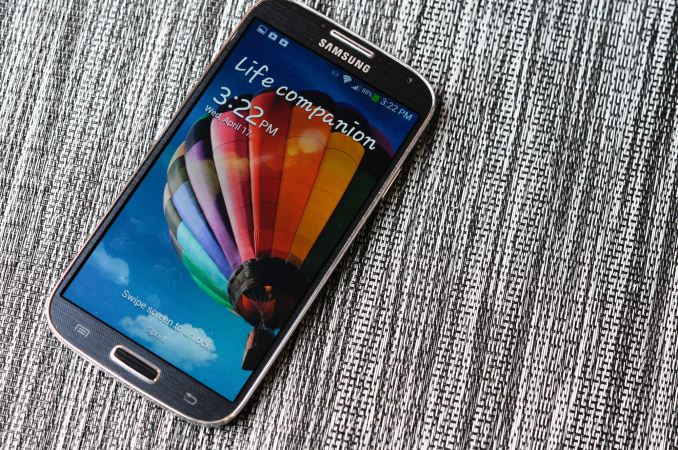
Samsung Galaxy S 4 Review - Part 1
It’s no secret that Samsung enjoyed huge success with Galaxy S 3. In many markets, SGS3 was easily the Android handset to beat, even as faster and arguably better hardware became available during the life of its product cycle. Samsung nailed the branding, marketing, and consistency battles with its third generation of Galaxy smartphone, and now we’re a year later and facing down SGS4.
Read More ...
NVIDIA R319 Series Beta Driver 320.00 Available

OS support is a bit of a change from some releases. Windows XP and even Vista support look like they're finally starting to disappear, or at least they're not a high priority, so the current beta driver is only available for Windows 7 and 8 on laptops, in both 32-bit and 64-bit versions. Desktops on the other hand get the full set of support for everything from XP to Windows 8 in 32-bit and 64-bit form.
The big headliners for this series of drivers is that these are the "game ready" drivers for Dead Island: Riptide, Neverwinter, and Star Trek. NVIDIA is also listing performance improvements for single and SLI configurations for a variety of games, including Dirt: Showdown (up to 18%), Tomb Raider (up to 8%), and StarCraft II (up to 6%), though that's with a GTX 660 so your mileage may vary depending on your specific GPU. Other titles receiving performance tweaks include Sniper Elite V2, Metro 2033, Far Cry 3, Deus Ex: Human Revolution, F1 2012, Assassin's Creed III, Battlefield 3,and BioShock: Infinite.
The full list of driver download links is below. Thanks to reader SH SOTN for the heads up.
Laptops: Windows 7/8 64-bit
Laptops: Windows 7/8 32-bit
Desktops: Windows Vista/7/8 64-bit
Desktops: Windows Vista/7/8 32-bit
Desktops: Windows XP 64-bit
Desktops: Windows XP 32-bit
Read More ...
Intel's Return to DRAM: Haswell GT3e to Integrate 128MB eDRAM?
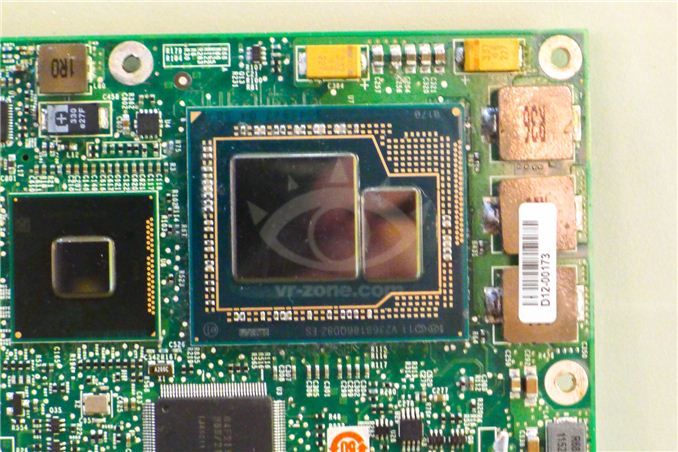
The days of simple performance scaling by throwing more transistors at a design are quickly coming to an end. Moore's Law will continue but much like the reality check building low power silicon gave us a while ago, building high performance silicon will need some out of the box thinking going forward.
Dating back to Ivy Bridge (3rd gen Core/2012), Intel had plans to integrate some amount of DRAM onto the package in order to drive the performance of its processor graphics. Embedding DRAM onto the package adds cost and heat, and allegedly Paul Otellini wasn't willing to greenlight the production of a part that only Apple would use so it was canned. With Haswell, DRAM is back on the menu and this time it's actually going to come out. We've referred to the Haswell part with embedded DRAM as Haswell GT3e. The GT3 refers to the GPU configuration (40 EUs), while the lowercase e denotes embedded DRAM. Haswell GT3e will only be available in a BGA package (soldered-on, not socketed), and is only expected to appear alongside higher TDP (read: not Ultrabook) parts. The embedded DRAM will increase the thermal load of the SoC, although it shouldn't be as painful as including a discrete GPU + high speed DRAM. Intel's performance target for Haswell GT3e is NVIDIA's GeForce GT 650M.
What we don't know about GT3e is the type, size and speed of memory that Intel will integrate. Our old friend David Kanter at RealWorldTech presented a good thesis on the answers to those questions. Based on some sound logic and digging through the list of papers to be presented at the 2013 VLSI Technology Symposium in Kyoto, Kanter believes that the title of this soon to be presented Intel paper tells us everything we need to know:
"A 22nm High Performance Embedded DRAM SoC Technology Featuring Tri-Gate Transistors and MIMCAP COB"
According to Kanter's deductions (and somewhat validated by our own sources), Haswell GT3e should come equipped with 128MB of eDRAM connected to the main SoC via a 512-bit bus. Using eDRAM vs. commodity DDR3 makes sense as the former is easier to integrate into Intel's current fabs. There are also power, manufacturability and cost concerns as well that resulted in the creation of Intel's own DRAM design. The interface width is a bit suspect as that would require a fair amount of area at the edges of the Haswell die, but the main takeaway is that we're dealing with a parallel interface. Kanter estimates the bandwidth at roughly 64GB/s, not anywhere near high-end dGPU class but in the realm of what you can expect from a performance mainstream mobile GPU. At 22nm, Intel's eDRAM achieves a density of around 17.5Mbit/mm^2, which works out to be ~60mm^2 for the eDRAM itself. Add in any additional interface logic and Kanter estimates the total die area for the eDRAM component to be around 70 - 80mm^2. Intel is rumored to be charging $50 for the eDRAM adder on top of GT3, which would deliver very good margins for Intel. It's a sneaky play that allows Intel to capture more of the total system BoM (Bill of Materials) that would normally go to a discrete GPU company like NVIDIA, all while increasing utilization of their fabs. NVIDIA will still likely offer better perfoming solutions, not to mention the benefits of much stronger developer relations and a longer history of driver optimization. This is just the beginning however.
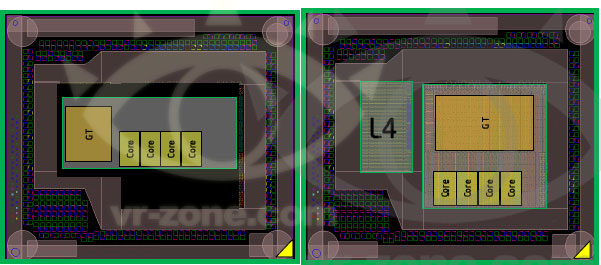
AMD is expected to integrate a GDDR5 memory controller in its future APUs, similar to what it has done with the PlayStation 4 SoC, as its attempt to solve the memory bandwidth problem for processor based graphics.
Read More ...
Origin Genesis Review: Triple Titan Terror
At long last we're taking an in-depth look at Origin's latest generation Genesis desktop system. Backed by a heavily overclocked Core i7 processor and no less than 3 GeForce GTX Ttians, it is unquestionably among the fastest gaming PCs available today. Diving into Origin's powerhouse we'll see just what kind of performance such a machine can achieve, and how well GTX Titan scales out in a tri-SLI setup.
Read More ...
Fractal Design Define Mini Case Review
Good micro-ATX enclosures have actually been frighteningly rare of late; manufacturers seem to be going big or going home, and only letting either beefy XL-ATX cases or diminutive mini-ITX cases out to play. It's a weird situation when the micro-ATX form factor seems to be ideal for the majority of end users. Enter Fractal Design and their Define Mini.
Read More ...
CompuLab Intense PC System Review: Fanless Ivy Bridge
The last time we checked out a fanless desktop system, it was Logic Supply's LGX AG150. While affordable, that system was powered by Intel's Cedar Trail Atom processor, a chip with serious teething issues under Windows. Today, though, we have a beefier beast: can CompuLab's Intense PC with an entirely fanless enclosure handle the heat from a 17W Ivy Bridge CPU?
Read More ...
The King is Back: Raja Koduri Leaves Apple, Returns to AMD

Last year AMD announced it re-hired one of the folks who eventually landed at Apple: CPU architect Jim Keller.
Keller was responsible for one of the more memorable AMD CPU
architectures, as well as played an unknown role in the development of
Apple’s own CPU roadmap (Keller likely had a hand in the planning for Swift).
Today,
word of another major hire surfaced earlier than expected: Raja Koduri
now works at AMD once again. For the past 4 years Raja has been working
on all things graphics at Apple, but now thanks to a great offer and a fear of getting too comfortable at Apple, he's back at AMD.

Raja
Koduri returns to AMD as a Corporate Vice President of Visual
Computing, the implication of the title is more important than its
indication of how highly AMD values its latest hire. In Raja’s previous
role as graphics CTO at AMD, he oversaw GPU hardware but didn’t directly
oversee AMD’s software development. For the first time in recent
history, both GPU hardware and software are falling under the same man.
The
timeframe for Raja’s influence depends on what you’re talking about.
Raja’s immediate goal is to ensure that AMD has the best GPU
architecture/hardware possible. Unfortunately, it will likely take 2 - 3
years to realize this goal - putting the serious fruits of Raja’s labor
somewhere around 2015 - 2016. Interestingly enough, that’s roughly the
same time horizon for the fruits of Jim Keller’s CPU work at AMD.
Raja
believes there’s likely another 15 years ahead of us of good work in
high-end discrete graphics, so we’ll continue to see AMD focus on that
part of the market. However, Raja’s efforts will span everything from
discrete GPUs to its own APU/SoC strategy. There’s no change there from
the path AMD has been on for the past few years now, but it’s good to
hear that as much as low power matters, high performance is still on the
to-do list.
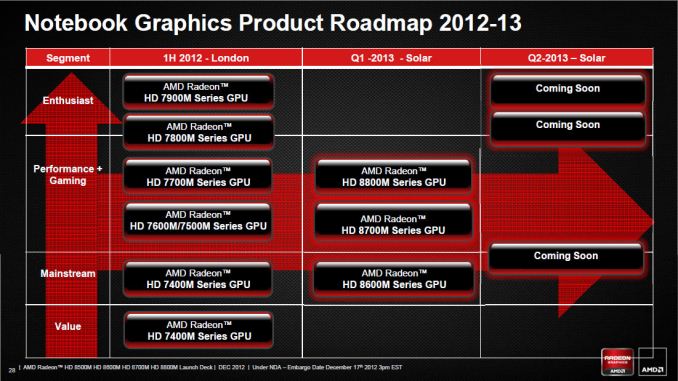
More
immediately you’ll see bits and pieces of Raja’s influence emerge.
Everything from hardware to drivers and developer relations now falls
under Raja’s umbrella. Presumably, all should improve - with the latter
two seeing impacts sooner than the 2 - 3 year timeframe it would take
for us to see results in hardware. We recently spoke about AMD’s multi-GPU frame pacing issues and I wouldn’t be surprised if that’s one of the first bits of low hanging fruit that Raja gets his teams to address quickly.
Raja
returns to a very different AMD than the one he left. I asked him
what’s different and he responded by saying the AMD he left acted like a
company that was 10x its size. Today, AMD is a much smaller and more
agile company. Raja believes AMD is in a better position to take
advantage of new opportunities vs. being in the hopeless position of
never being able to catch up in mature markets. It’s difficult to see
what the next big mover will be after smartphones. Intel is betting on
the TV industry, but to be honest no one knows. What drives Raja is the
belief that delivering good quality, high performance and low power
graphics will continue to matter going forward. I agree.
For
years, Intel held back appreciation of good graphics performance in the
PC space but the current mobile revolution has changed all of that.
Graphics performance is just as important as CPU performance, a fact
that Intel will itself embrace with Haswell/Broadwell.
Raja
views AMD’s challenges as being difficult, but not unsurmountable. AMD
needs a great graphics architecture and it needs a great SoC. Raja’s
scope will include making sure that, at least on the graphics
hardware/software/dev-rel side, AMD is in the best possible shape. Jim
Keller will do the same for AMD’s CPUs. AMD remains focused on this idea of servicing vertically integrated players,
although it's still difficult to see how that strategy is going to play
out given how today's vertically integrated players (outside of game
consoles) aren't big on using AMD hardware.
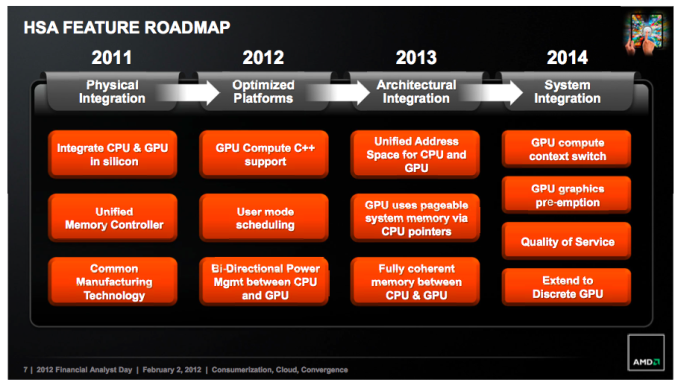
I’ve
known Raja for over a decade now, and he’s always struck me as a man in
search of a challenge. Given the revolution that we’ve seen at Apple
over the past few years, Raja’s attraction to Cupertino made sense.
However, I don’t think you could ask for a bigger challenge than the
position AMD is in today. Raja (and others at AMD) believe there’s still
room for new hires, although they are very interested in bringing in
new blood.
Update: Some have
asked for clarification on Raja's LinkedIn, reflecting his position as
Technical Advisor to Makuta (Raja is full time with AMD, Makuta is a
side project of his). I asked Raja and he offered the following
response:
"I always had the dream
of building a Pixar like company in India and I got an opportunity to
engage with a group of people who have the same mission. AMD allowed me
to stay engaged on this endeavor and that's one of the reasons I chose
AMD."
Whether or not the past
several high profile hires are enough to save AMD is something we won’t
know for sure until 2015/2016. One thing is certain, AMD is trying to
assemble a group of folks crazy enough to try and turn this company
around.
Read More ...
Best Thin and Light Laptops, April 2013
Personally, I’m going to define thin and light rather simply: no more than five pounds on 15.6” laptops, 4 pounds or less on 14” and smaller laptops, and as noted above: not an Ultrabook (but Sleekbooks and other similar options are okay). If you think 5 pounds is too much (and I’m sure some of you do), simply skip those choices and look at the others. I’m also going to cover a range of pricing and features, and again I want to note in advance that AMD’s Richland and Intel’s Haswell chips are coming so I’m not super keen on suggesting you go out and spend a lot of money on a high-end laptop that will soon be outdated. Nevertheless, I will have a couple more expensive options.
As far as other features are concerned, I’m not making any real limitations other than that the current recommendations use AMD Trinity or Intel Ivy Bridge processors—if you want a deal on a Llano, Brazos, or Sandy Bridge laptop, you’ll have to shop around, as inventory tends to be limited on such options these days. I also want to make it clear that we have not done full reviews of most of the laptops we’re recommending; we simply lack the manpower to review every laptop that comes out, and in many cases the reviews would be largely redundant anyway. Performance is rarely the primary consideration in terms of laptop reviews, as we know what to expect from most hardware (i.e. an i5-3210M with an HDD will perform essentially the same whether it’s in a Dell, HP, Lenovo, or some other brand laptop), so a lot of it comes down to finding the right features and design at the right price.
Budget Thin and Light Recommendations:
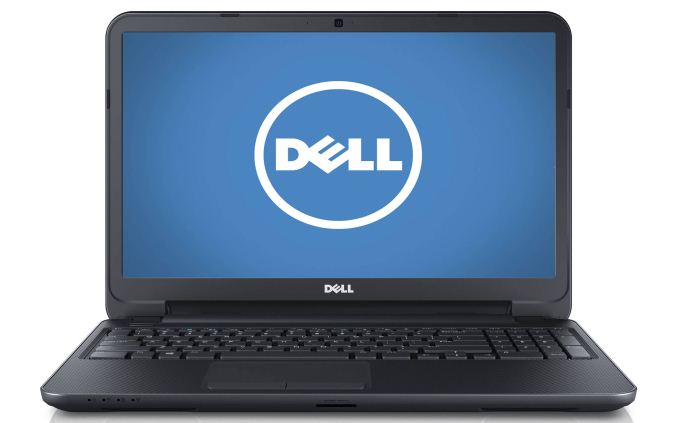
Dell Inspiron 15 ($430)
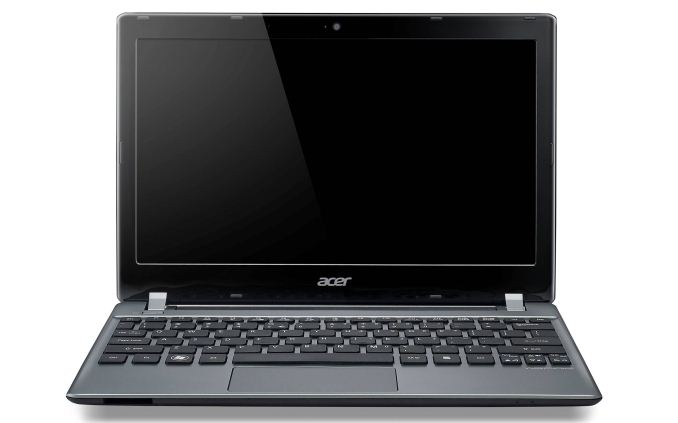
Acer V5-171-6471 ($530)
Let me get this out of the way first: finding a good “budget” thin and light that doesn’t involve compromise is quite difficult. I ended up choosing two offerings, one a larger, less expensive laptop that barely manages to meet my “thin and light” criteria, and the second a much smaller 11.6” offering that costs a bit more but will travel nicely. We’ll start with the less expensive of the two, the Dell Inspiron 15.
Again, at these prices, it’s basically compromise everywhere you look, so let me toss out a few other alternatives and I’ll note the potential issues people have reported. The Lenovo IdeaPad S405 at $400 is a 14” offering that’s a bit cheaper than the above Dell, and it comes with an AMD A6-4455M APU (the slowest Trinity APU on the block), 4GB RAM and a 500GB hard drive. Battery capacity (and thus battery life) is quite low (three hours of light use seems typical, though you might eke out four or five if you turn the brightness all the way down and disable WiFi), build quality isn’t the greatest, and quite a few people dislike the touchpad. What you get is a Windows 8 laptop that weighs just under four pounds; if you want the Intel IdeaPad S400 alternative (faster CPU, potentially slower iGPU) it costs $470 with an i3-3227U.
A few other alternatives I considered are the Dell Inspiron 13z ($450) and the ASUS VivoBook X202E-DH31T ($500), but quite a few people seem to have issues with the wireless networking in the 13z while the ASUS got complaints about thermal throttling. On the other hand, the ASUS is one of the least (if not the least) expensive touchscreen laptops you’ll find and it weighs under three pounds. For the right type of user, either laptop might work well, but unless you really want the touchscreen I’d be more inclined to look at Acer’s V5-171-6471 mentioned above.
Midrange Thin and Light Recommendation:
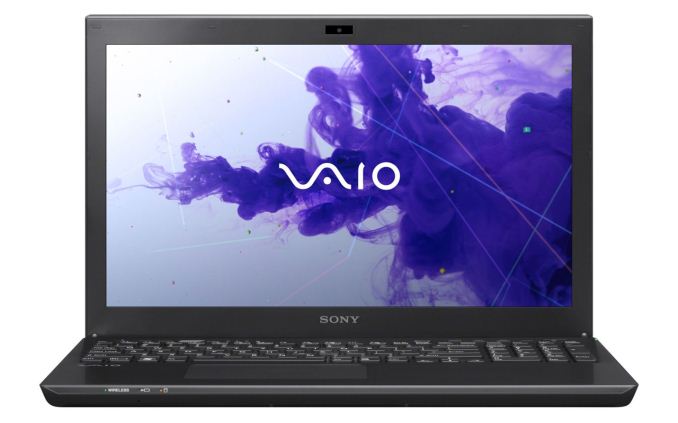
Sony VAIO S SVS15123CXB ($850)
If the budget sector had a lot of similar offerings, the midrange thin and light category is decidedly underrepresented, at least at Newegg. There are tons of Ultrabooks in the $750 to $1000 range that I’m skipping for this guide, which leaves a lot of upgraded versions of the budget options and not much else. However, there’s one laptop that’s basically the updated version of something I reviewed last year, and it has a lot going for it if you’re not looking for a laptop with a discrete GPU: the Sony VAIO S SVS15123CXB ($850).
If you want a faster version with discrete graphics, the VAIO S SVS15127PXB ($1150) comes with an i7-3632QM CPU, GeForce GT 640M LE GPU (switchable via Optimus), 8GB RAM, and a 750GB HDD. The 640M LE isn’t going to handle 1080p gaming in most titles, but it can do 1366x768 fairly well at moderate detail settings. While I'll have a couple other high-end options below, out of all the current thin and light laptops, this is the one I like most as it delivers a good design and some great features, all at a reasonable price.
High-End Thin and Light Recommendations:
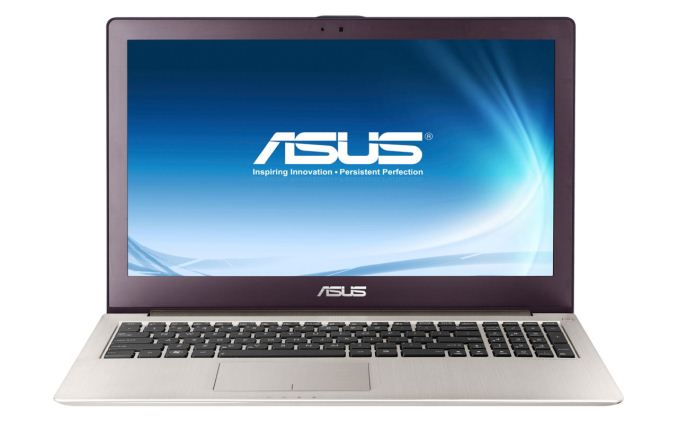
ASUS Zenbook UX51VZ-XH71 ($2300)
Apple MacBook Pro Retina 15 ($2600)
This is basically a question of how much money you have to spend, and whether you want to do so just before a major chip refresh. I wouldn’t, but if you can’t wait these are currently my two top picks, and they’re very well equipped (though still overpriced in my opinion). First, for the Windows users that really don’t want to deal with OS X, Boot Camp, and a screen resolution that Windows is ill equipped to handle properly, there’s the ASUS UX51VZ.
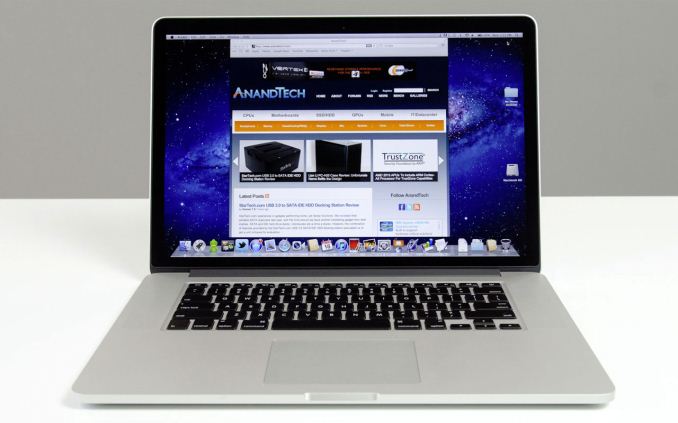
What always amazes me (as a Windows user) is how well Apple MacBooks hold their resale value, even years after purchase. You could probably buy one of these now, use it until the inevitable Haswell update is released, and still sell it for over $2000. In six months, you’ll be lucky to get half of what you paid for most used Windows laptops. I generally find the build quality of Apple’s laptops to be excellent, but I’m still far more comfortable in Windows and it’s easier on my wallet. YMMV.
As an interesting side note, this is the first time I’ve ever explicitly recommended an Apple product. I have complained about the sorry state of affairs with laptop LCDs for six years now; leave it to Apple to not only improve the quality, but to basically leave everyone eating their dust. Kudos, Apple. Now hopefully we can get some reasonably priced PC alternatives in the next cycle.
Read More ...
MSI Z77A-GD65 Gaming Review
ASUS, ASRock and Gigabyte all having gaming ranges as part of their motherboard lines – now it is MSI’s turn.
Read More ...
Best Motherboards for $100-$200, April 2013
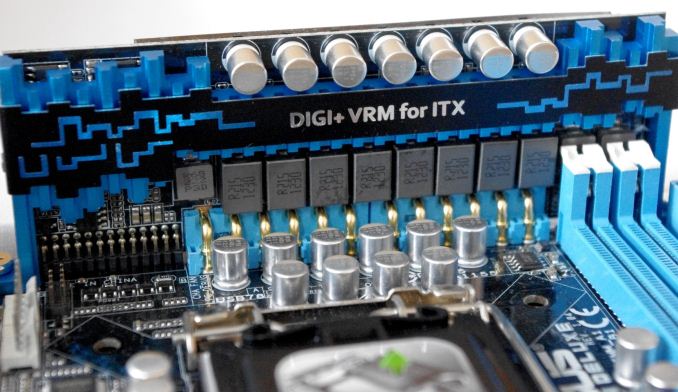
The cheaper a board is, unfortunately, the less likely we are to review it. The sad truth is that motherboard manufacturers want to put their best foot first, which means driving attention to the top of the range, giving their products the best possible light (even if my analysis leaves it dead in the water in the face of competition). Luckily there have been a good number of boards in the $100 to $200 range that have passed my eyes in the past year, and here are some of the best.

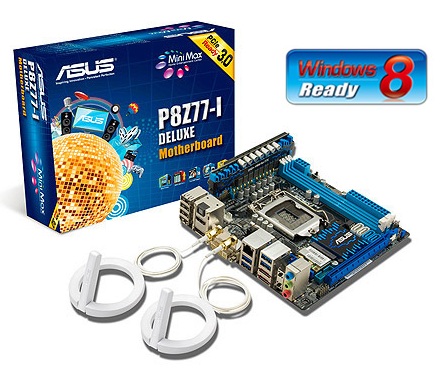
At the turn of the New Year, we published an extensive review of the five main mini-ITX boards on the Z77 platform, from ASUS, ASRock, MSI, EVGA and Zotac (we looked at the Gigabyte H77 earlier in 2012). Out of the list we gave ASRock a recommendation but an award went to the ASUS. The P8Z77-I Deluxe was designed the right way for where all the connectors are offers a lot more in the package than the others, such as an Intel NIC, additional USB 3.0, integrated WiFi and that odd looking daughter board for the VRM, allowing the PCB to free up some space. The ASUS P8Z77-I Deluxe was the best performing mITX board from the bunch, along with the best software and BIOS package, not to mention features like BIOS Flashback. The ASUS P8Z77-I Deluxe is innovative in its VRM solution, paving the ground for the future.
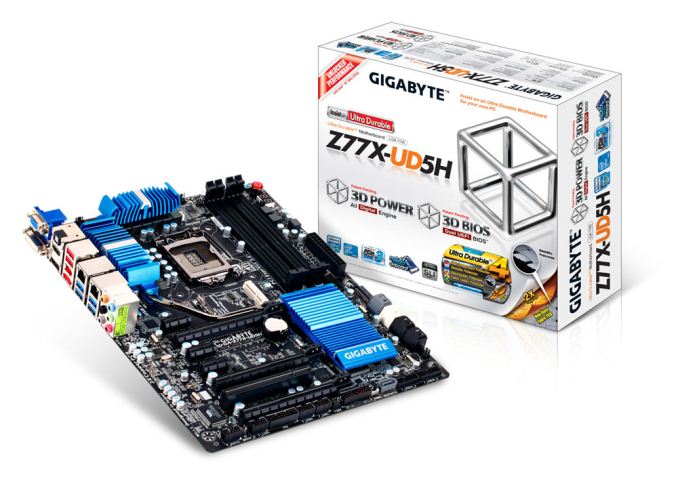
AnandTech Bronze Award: Gigabyte Z77X-UD5H ($175)


One Gigabyte tactic (of late) is to take its motherboard lineup and attempt to push it down one price point. Here steps in the Z77X-UD5H - on paper it has a range of included extras such as dual NIC, extra SATA 6 Gbps ports, three-way PCIe 3.0 GPU gaming without a $30 expansion chip, an mSATA port, TPM, up to ten USB 3.0 ports and a full range of video outputs, all in a $180 (MSRP $200) bundle. Competition at this price point comes from the ASUS P8Z77-V LE Plus, the ASRock Z77 Extreme6, the MSI Z77A-GD65, Gigabyte’s own G1 Sniper M3, and a for a little more, the ASUS P8Z77-I Deluxe and Maximus V Gene. Performance wise, the Z77X-UD5H gets a high grade across the board. It benefits from having MultiCore Enhancement, pushing the board in CPU related benchmarks. IO benchmarks are mid range, reaching the upper echelons on occasion. The Gigabyte Z77X-UD5H comes with a three-year warranty in North America, and for an extra $30 comes with an included WiFi card and antenna in the form of the Z77X-UD5H-WB WiFi. Overall, the Z77X-UD5H lights up the $175-180 price point like a beacon and is placed well for significant sales.
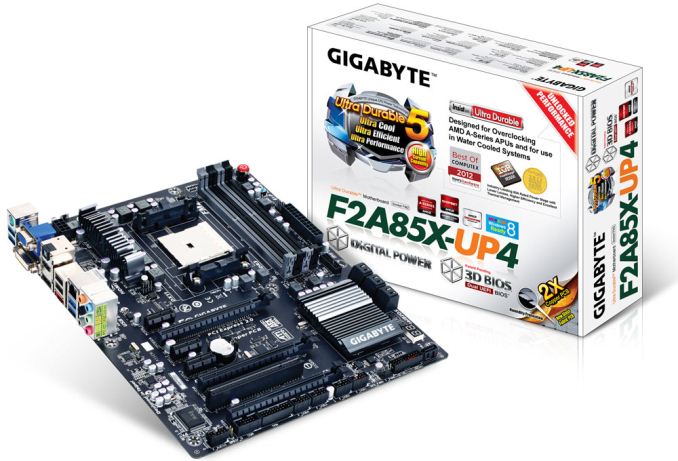
Recommended: Gigabyte F2A85X-UP4 ($120)


While $120 is on the high end for an FM2 motherboard, my motherboard of choice in this category is the F2A85X-UP4 from Gigabyte for a simple reason – during testing, I did not write down a single issue about it. The system just worked without issue during our testing suite. Normally I write at least something down (software failure, BIOS issue), but not so here. The F2A85X-UP4 brings a little more to the Trinity platform than some of its competition, such as PowIRStage IR3550 ICs which have higher efficiency and run cooler than the previous premium power delivery ICs. Design wise we have enough PCIe slots for three GPUs in CrossFireX (no SLI, not certified), seven SATA 6 Gbps ports on board, a TPM header, DualBIOS methodology, power/reset buttons, a debug LED, the Realtek ALC892 audio codec and a Realtek 8111E NIC. Two extra USB 3.0 ports are also supplied through an Etron EJ168 controller. In terms of performance, the Gigabyte F2A85X-UP4 sits well with the rest of the pack of FM2/A85X boards reviewed. The place it really excels seems to be in terms of power usage at idle, during CPU load and during dual GPU gaming. While it the UP4 does not surpass any of the competition for performance (some would argue it is at a lower price:performance ratio), it falls into the category of a rare board that passes my desk without any serious issues, and it should be seriously considered as a reliable purchase.


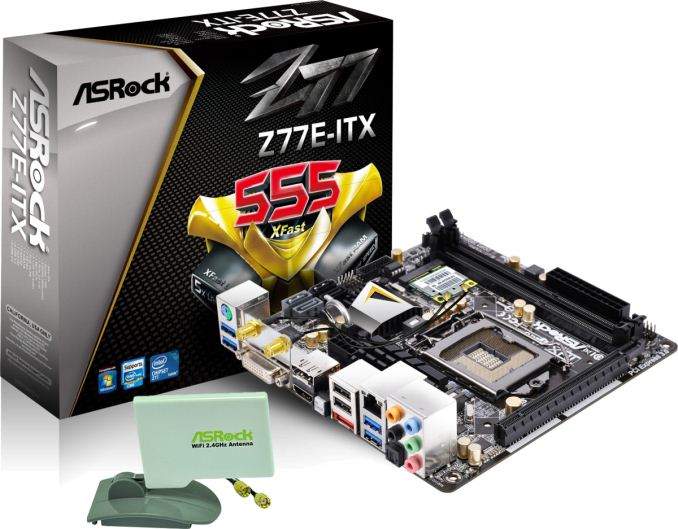
Recommended: ASRock Z77E-ITX ($140)
Our last board to recommend is the one that finished second in our Z77 mini-ITX review. Now down to a remarkable $140, it hits the price:performance ratio of mITX and Intel spot on. The ASRock Z77E-ITX was pretty middle of the pack in performance, but it comes with a good feature set (WiFi, mSATA, six USB 3.0) and software stack (XFast). The placing of the mSATA on the rear of the motherboard is innovative in the desktop computer space (although the norm in laptops), but I think it is great – now my father has a mITX motherboard which he will not be able to destroy a SATA drive by forcefully removing a locking cable!
We Miss AMD


I apologize for not covering more AM3+ motherboards in the past 12 months; demand from manufacturers has mostly been Intel or one a piece from FM2, leaving our last 990FX review back in April 2012, covering ASUS, Gigabyte, MSI and Biostar. AMD has not been keen to refresh beyond 990FX, and while a few new motherboards have been released (ASRock 990FX Extreme9, ASUS 990FX Sabertooth GEN3/R2.0), requests for them have been few and far between, compounded by the fact that manufacturers want other more popular brands to be shown in reviews.
In the future we will get Richland processors, but these will fit directly into FM2 motherboards – meaning that I fear we are probably not due a motherboard refresh any time soon. There may be renewed interest in mainstream AMD if you believe a second line of Vishera CPUs are to be released in 2013 (also recent talk about a 5GHz Centurion CPU). After this online reports suggest we are expecting Steamroller CPUs to replace Piledriver/Vishera in 2014 as well as Kaveri APUs to replace Richland in late 2013/Q1 2014. Steamroller should, as we all wait with fingers crossed, update the 990FX platform, though nothing official has been announced (with 1090FX rumors dating back to 2011).
What To Look Forward To
Smaller and cheaper motherboards are going to become the norm for mainstream users – with the internet in your pocket the days of the bulky system under the desk are going away, and cloud services are bringing performance via a cable rather than localized silicon. There is still a market for the high end, but the mid-range is going to be a tough battle from all manufacturers to get your wallet.
Haswell is going to be a big battleground for this, and I am going after more mATX and mITX boards for future reviews at AnandTech. We have also had requests in for B- and Q- chipset models, which should also populate several reviews this year.
The next motherboard recommendation guide is going to focus on the six core specialty range, Sandy Bridge-E and X79. If you want pure throughput, in most scenarios and with deep wallets, X79 is the way to go (of course Piledriver has some advantages) and we have covered quite a few of the main motherboards available. Stay tuned for our recommendations.
Read More ...
Toshiba's New KIRAbook Brings QHD to the Windows PC
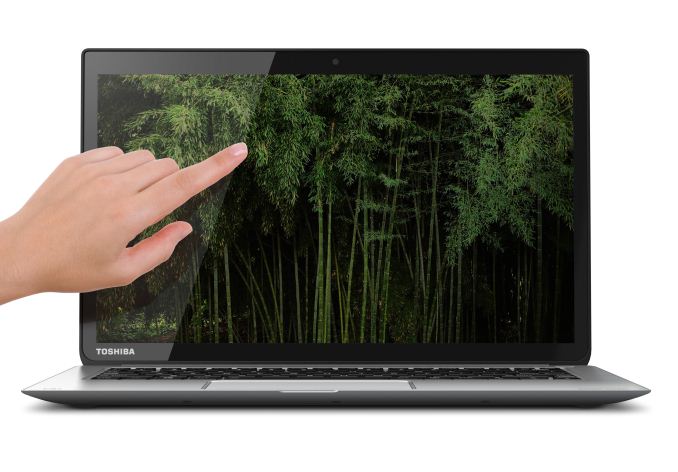
That's why Toshiba's KIRAbook was such a welcome surprise. It's a good looking ultrabook, employing a magnesium alloy shell and Corning Concore Glass, and if it's not exceptionally original in its aesthetic it's at least very well built and specced to please. I'll get into details about its fit and finish later, but for now, all you need to know is this:
13.3" IPS 2560x1440 display. Standard.

It's true we're still essentially stuck with the 16:9 aspect ratio on the PC side while Apple's 13" Retina MacBook Pro offers a 2560x1600 panel, but this is still a very welcome change of pace.
As for the rest of the KIRAbook, Toshiba's reps talked a heavy game about its design and for what it's worth, they raise excellent points. The port layout is smart, the keyboard was designed specifically to avoid backlight bleed from the individual keys, and they're using specially engineered Harmon Kardon speakers that are surprisingly loud for such a slim chassis. Impressively, the whole thing is just 2.6 pounds.
Unfortunately it all comes at a price. The starting model is $1,599 and comes with an Intel Core i5 ULV processor; upgrading to the $1,799 model gets you 10-point multitouch on the display, and the $1,999 model adds an upgrade to a Core i7.


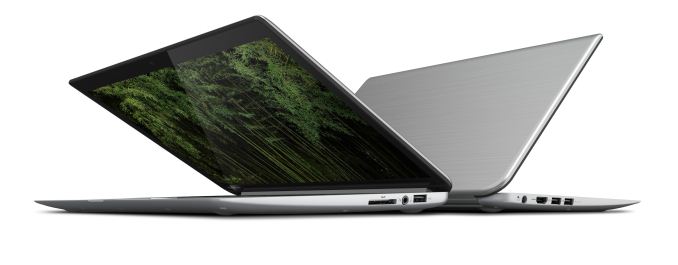
You do get 8GB of DDR3-1600, the QHD IPS display, a 50Wh battery, and a 256GB SSD standard in all models, along with useful Adobe Photoshop Elements 11 and Premiere Elements 11 pack-in software and a standard two-year warranty with 24/7 phone support and basically a dedicated department specifically for handling and servicing KIRA models (it's safe to assume more are en route.) Examining the model, I also found that the bottom panel uses standard Phillips head screws, so theoretically you can swap out the SSD and wireless card, though the RAM is probably soldered to the motherboard.
Either way, we're looking to have a KIRAbook in house for review in time for launch, so stay tuned. Pre-orders start May 3, and the KIRAbook becomes available for purchase on May 12.
Read More ...
Samsung Galaxy Note 8.0 Review
For the past couple of years Samsung, and many other Google partners, have been on the hunt to improve productivity on Android - particularly on tablets. We’ve seen hardware solutions (ASUS’ Transformer line) as well as software solutions (Samsung’s multi-window support) emerge. No one has really perfected the productivity story for Android tablets. I’m not entirely sure that long term even Google sees Android as the productivity platform of choice (perhaps Chrome OS will assume that role?), but there’s no shortage of attempts to solve this problem.
While ASUS was at the forefront of addressing the productivity issue for a while with its Transformer tablets, Samsung has since picked up the torch with its Galaxy Note family of devices. What started as a giant smartphone has now evolved to encompass an entire lineup of tablets as well. The productivity aspect of the Note line is really tied to the integrated active digitizer and stylus (S Pen) that comes with the devices. There are software and other features that complete the picture (e.g. IR blaster), but it all stems from the S Pen. Last year Samsung introduced the Galaxy Note 10.1, its first 10-inch tablet with an integrated S Pen. This year, Samsung expanded the line with an 8-inch model, the aptly named Galaxy Note 8.0.
Read More ...
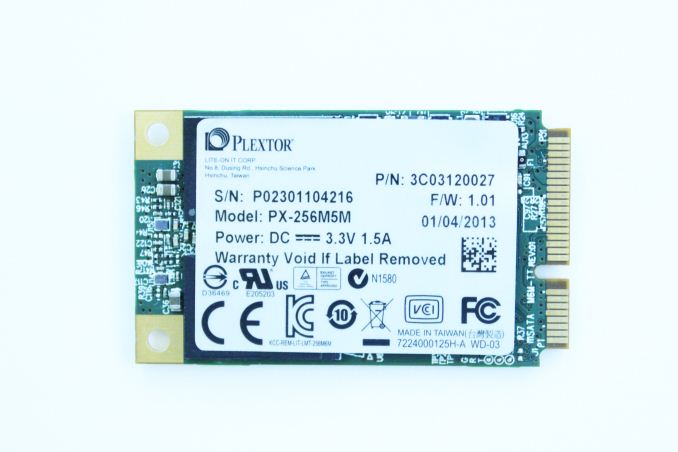
Plextor M5M (256GB) mSATA Review
Plextor has been increasing their presence in the SSD market month by month. It's not a coincidence, we have been very pleased with all Plextor's drives that we have reviewed so far. At CES, Plextor showcased a variety of SSDs ranging from M.2 to TLC NAND based SSDs. While those two will not be available until later this year, Plextor sent us their M5M mSATA SSD.
We have lately seen increasing traction in the mSATA SSD market. For long, there were only a few retail mSATA SSDs available but now we have competitive drives from manufacturers such as Intel and Crucial/Micron. Plextor's M5M is an interesting addition to the mix: It's not based on SadForce's SF-2281 controller like most of the mSATA SSD are, it uses the same Marvell 88SS9187 controller found in the 2.5" M5 Pro. That's currently Marvell's high-end SATA 6Gbps controller and it definitely has the potential to challenge the rest today's high-end SATA solutions. Read on to find out how Plextor's first mSATA SSD performs!
Read More ...
NVIDIA’s Spring GeForce Game Bundle Announced - Metro: Last Light

The Last Light bundle is launching today with the participation of the usual e-tailers and retailers, with participating vendors including coupons with qualifying purchases. Last Light will be released next month – May 14th for North America and May 17th for Europe – so GeForce video card buyers will have to sit tight for about a month before they can get the game. Note that as this offer is only for the GTX 660 and above, it will not be replacing NVIDIA’s $75 free-to-play bundle for the GTX 650 series cards, which remains in effect and runs until the end of the month.
Current NVIDIA Game Bundles |
||||
Video Card |
Bundle |
|||
| GeForce GTX Titan | Metro: Last Light | |||
| GeForce GTX 690 | Metro: Last Light | |||
GeForce GTX 680 |
Metro: Last Light |
|||
GeForce GTX 670 |
Metro: Last Light |
|||
GeForce GTX 660 Series |
Metro: Last Light |
|||
GeForce GTX 650 Series |
$75 Free-To-Play |
|||
GeForce GT 640 (& Below) |
None |
|||
Read More ...
Corsair Obsidian 900D Case Review: Think Big, That's Only HALF as Large
An enclosure built from the ground up for custom liquid cooling loops is actually a fairly rarefied thing. Why wouldn't it be? Building a custom loop is expensive and time consuming, which would make that type of enclosure the very definition of niche. Yet Corsair has come forward with the Obsidian 900D for one big reason: to fill that niche.
Read More ...
Google Announces Glass Specs, Developer SDK, Shipment to Glass Explorers in Waves

Google Glass Specs |
||||
Google Glass |
||||
SoC |
Unknown |
|||
Display |
640x360 "Equivalent of a 25 inch high definition screen from eight feet away" |
|||
Camera |
5 MP forward facing, with 720p video |
|||
Audio |
Bone Conduction Transducer |
|||
Connectivity |
802.11b/g WiFi, Bluetooth |
|||
Storage |
16 GB NAND total, 12 GB free |
|||
Battery |
Unknown mAh, "1 full day of typical use" |
|||
I/O |
microUSB |
|||
Requirements |
Android 4.0.3 or Higher with My Glass app |
|||

Source: Google Mirror API, Glass UI Guidelines, Glass Tech Specs
Read More ...
Dell U3014 LCD Review
In the last year, 27” 1440p displays went from being really high end in the monitor food chain to becoming close to commodity items that you buy off EBay for cheap from random vendors. It seems that there is a bit of a shift in the high-end display market, where previously resolution was dictating the upper echelon but now as we wait for 4K displays, or retina-style PPI displays on the desktop, it’s other features that are dictating what costs more.
The newest reference display from Dell is the U3014, which takes the place of the U3011. It retains the same 2560x1600 resolution of a 30” display, but adds a few more notable features including DisplayPort chaining, USB 3.0 support, uniformity correction, and most notably is one of the first LED-backlit displays with an AdobeRGB gamut. Looking only at the specs, this looks like a monitor aiming for the NEC and Eizo users out there, but does it reach those standards?
Read More ...
Plextor M5 Pro (128GB) SSD Giveaway
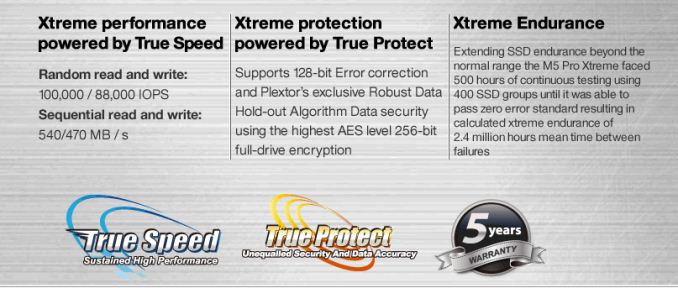
Plextor has been making a name for itself in the SSD space lately with its M-series of drives. The M3 and M5 lines are well received and remarkably competitive, especially considering Plextor is a relative newcomer in the SSD space.
Earlier this week Plextor reached out to us with an offer of two 128GB M5 Pros to give away on the site in exchange for a little market research. Plextor wants to know what you know about Plextor and/or what your experience has been with Plextor products. Leave a comment answering one or both of these questions below and you'll be automatically entered to win one of the two 128GB M5 Pros.
The M5 Pro is a 6Gbps SATA drive that uses Marvell's 9174 controller with Plextor's custom firmware. The 128GB model we have here today is capable of sequential reads/writes of up to 540/330 MBps, and random read/write speeds of up to 92K/82K IOPS.
The giveaway is only eligible for US residents (excluding Puerto Rico). Please only leave a single comment below to enter. We'll be drawing two winners when we close for entries on April 20th.
Official Rules and Regulations for AnandTech Sweepstakes
No Purchase Required to Enter or Win
Upon entering any contest, sweepstakes, or promotion (a “Promotion”) offered by anandtech.com (the “Site”), a website owned and operated by AnandTech, Inc. (“AnandTech”), you must agree to the following Official Rules and Regulations (the “Rules”) as well as any additional rules governing a specific Promotion that AnandTech publishes on the Site.No Purchase Required to Enter or Win
BEFORE ENTERING A PROMOTION, READ THESE RULES AND THE SITE’S TERMS, CONDITIONS AND PRIVACY INFORMATION. BY ENTERING THE PROMOTION, YOU AGREE TO COMPLY WITH THE RULES AND THE SITE’S TERMS, CONDITIONS AND PRIVACY INFORMATION.
NO PURCHASE NECESSARY TO ENTER OR WIN. PURCHASE DOES NOT INCREASE CHANCES OF WINNING.
Eligibility. Promotions are open to entrants who are 18 years of age or older at time of entry, and a legal resident of the United States (excluding Puerto Rico). Entries are limited to individuals only who are not presently banned from AnandTech’s website or comments section; commercial enterprises and business entities are not eligible. Directors, officers, employees, contractors, and agents of AnandTech (excluding volunteer AnandTech forum moderators) and members of their immediate families (spouses, parents, siblings, and children) are not eligible. Subject to all applicable federal, state, and local laws and regulations. Void where prohibited. Participation constitutes entrant’s full and unconditional agreement to these Rules and AnandTech’s decisions, which are final and binding in all matters relating to a Promotion.
Entry Period. Each Promotion will contain a specific time period within which entries will be accepted (a “Promotion Period”). The Promotion Period for this Promotion shall run from 12:01 AM ET on April 15, 2013 through 12:01 AM ET on April 20, 2013. Only entries received during the Promotion Period will be accepted.
How to Enter. Each Promotion will describe an entry procedure. AnandTech is not responsible for lost, late, illegible, stolen, incomplete, invalid, unintelligible, misdirected, technically corrupted or garbled entries, which will be disqualified, or for problems of any kind whether mechanical, human or electronic. Proof of submission will not be deemed to be proof of receipt by AnandTech. All entries must be in English. Individuals are automatically entered in this Promotion by signing up for AnandTech’s Comments at http://anandtech.com/Account/Register and posting a reply to this post. If randomly selected as a winner individuals must provide full name, complete mailing address, telephone number, AnandTech user name and birth date within 7 days of being contacted.
Limits on Entry. An individual may enter a Promotion once only. The use of any automated launching or entry software or any other means that permits an entrant to automatically enter repeatedly or in excess of the entry limitations is prohibited.
Prizes. Winning a gift, prize, or other promotional item (a “Prize”) in a Promotion is contingent upon fulfilling all requirements in these Rules. Winners will be selected in a random drawing of eligible entries received during the Promotion Period. AnandTech will notify Prize winners using the contact information provided in the winning entry. Failure to claim a Prize by the time or in the manner specified in the particular Promotion will invalidate any claim to the Prize. Prizes are not transferable. The odds of winning a Prize or the Grand Prize depend on the number of entries received by AnandTech. TO THE MAXIMUM EXTENT PERMITTED BY APPLICABLE LAW, ALL PRIZES ARE PROVIDED “AS IS” AND ARE NOT EXCHANGEABLE FOR FAIR MARKET VALUE. TO THE MAXIMUM EXTENT PERMITTED BY APPLICABLE LAW, ANANDTECH DISCLAIMS ALL WARRANTIES WITH RESPECT TO THE PRIZES, INCLUDING THE IMPLIED WARRANTIES OF MERCHANTABILITY, FITNESS FOR A PARTICULAR PURPOSE, TITLE, AND NON-INFRINGEMENT. For this Promotion, two winners will be selected by April 22, 2013 and will each receive a 128GB Plextor M5 Pro described above (“Grand Prize”). The Total U.S. Retail Value of the Grand Prize is $200.00. The Grand Prize may not be substituted for cash. The Grand Prize winner will be solely responsible for all applicable taxes, fees, and surcharges associated with receipt and/or use of the Grand Prize. After the Grand Prize winner has been notified and has complied with all applicable Rules, AnandTech will post the Grand Prize winner’s name on this website.
Publicity. The winner of a Promotion agrees to allow AnandTech to use his or her name, photograph, likeness, voice, prize information, and biographical information for publicity and promotional purposes without further compensation where permitted by law.
Governing Law. These Rules and all Promotions are governed by and controlled by the laws of the State of North Carolina, without reference to the applicable choice of law provisions. All actions, proceedings or litigation relating hereto will be instituted and prosecuted solely within Wake County, North Carolina. By entering a Promotion, entrants consent to the jurisdiction of the state courts of North Carolina and the federal courts located within North Carolina with respect to any action, dispute or other matter pertaining to or arising out of that Promotion.
General Terms. Any failure by an entrant, including any prize winner, to comply with any of the Rules or the Site’s Terms, Conditions and Privacy Information may result in disqualification from the Promotion. All entries, whether they are eligible entries or ineligible entries, are the exclusive property of AnandTech. AnandTech is not responsible for any typographical errors in the Rules or in any other communication surrounding a Promotion or for any technical malfunction or error relating to the Promotion. AnandTech reserves the right to amend or interpret the Rules at any time, upon published notice to participants on its website. Promotion participants agree to release, indemnify, and hold harmless AnandTech and its directors, officers, employees and agents from any and all liability regarding the Promotion, including any injuries, losses, or damages (compensatory, direct, incidental, consequential, or otherwise) regarding the use or misuse of any Prize, any event beyond AnandTech’s control resulting in the disruption, cancellation, or postponement of the receipt of the Prize, or any typographical errors or technical malfunctions associated with the Promotion. AnandTech reserves the right to disqualify any entry that it, in its sole discretion, determines (i) to be in violation of the Rules, (ii) submitted by fraud or by tampering with the entry process, or (iii) contains inaccurate or fraudulent information. ANY ATTEMPT BY ANY INDIVIDUAL TO DELIBERATELY DAMAGE THE SITE OR UNDERMINE THE LEGITIMATE OPERATION OF THE PROMOTION IS A VIOLATION OF CRIMINAL AND CIVIL LAWS. IN THE EVENT SUCH AN ATTEMPT OCCURS, ANANDTECH RESERVES THE RIGHT TO SEEK DAMAGES FROM SUCH INDIVIDUAL TO THE FULLEST EXTENT PERMITTED BY LAW.
Read More ...
Intel Details Haswell Overclocking at IDF Beijing

As a quick refresher, the max clock frequency of Haswell is governed by the following equation:
Clock Speed = BCLK * Ratio
In
the old days, both of the variables on the right hand side were
unlocked (back then it wasn't called BCLK). Around the time of the
Pentium II, Intel locked the multiplier ratios (rightmost variable) and
then a few years ago we lost the ability to manipulate un-multiplied
input frequency.We can actually trace the recent struggles with BCLK overclocking back to the days of Lynnfield in 2009. Lynnfield featured Intel's first on-die PCIe controller, which wasn't fully decoupled from the rest of the CPU. We still had BCLK overclocking, but you needed to supply higher core voltages to the CPU to get there with any amount of stability. Nehalem, Lynnfield's predecessor, didn't have this issue.
With Sandy Bridge, we lost the ability to overclock using the BCLK altogether. Intel made good on this tradeoff by giving us a couple of K-series SKUs with unlocked multipliers, but it pretty much killed the market for buying low end Intel CPUs and overclocking them to deliver the performance of much higher end parts (sidenote: this is why we need AMD, ARM only pushes Intel to be more competitive on power at this point).
Ivy Bridge didn't really change things, but Sandy Bridge E did restore a bit of BCLK overclocking. You could select from a handful of predefined straps that enabled BCLK overclocking but without running the PCIe or QPI busses out of spec. With Haswell, we get something similar.
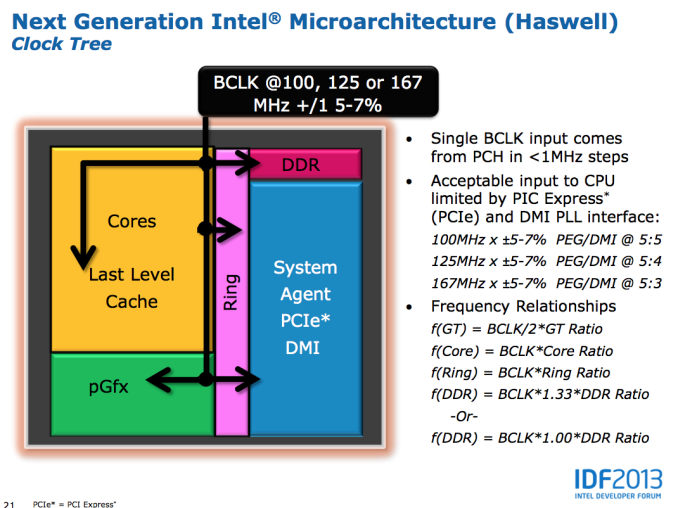
The default BCLK for Haswell parts will remain at 100MHz, however now you'll have the ability to select 125MHz or 167MHz as well. The higher BCLK points are selectable because they come with different dividers to keep PCIe and DMI frequencies in spec. At each of these BCLK settings (100/125/167MHz), the typical inflexbility from previous architectures remain. Intel's guidance is you'll only be able to adjust up/down by 5 - 7%.
Obviously we'll still have K-series SKUs with fully unlocked multipliers. Intel claims the CPU cores will have ratios of up to 80 (8GHz max without BCLK overclocking, although you'll need exotic cooling to get there). Some parts will also have unlocked GPU ratios, with a maximum of 60 (GPU clock = BCLK/2 * ratio, so 3GHz max GPU clock).
Memory overclocking is going to be very big with Haswell. Intel will offer support for 200MHz steps up to 2.6GHz and 266MHz steps up to 2.66GHz on memory frequency, with a maximum of 2.93GHz memory data rate supported.
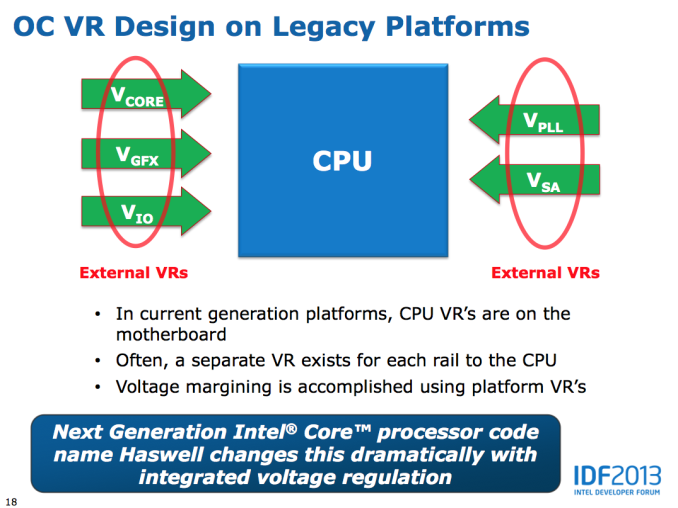
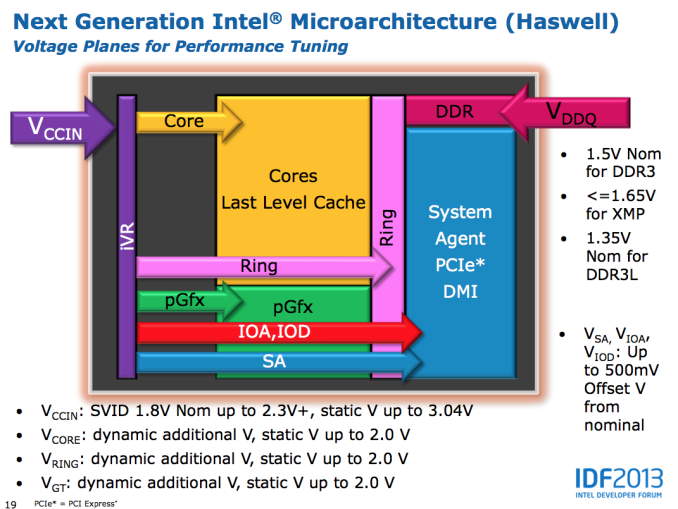
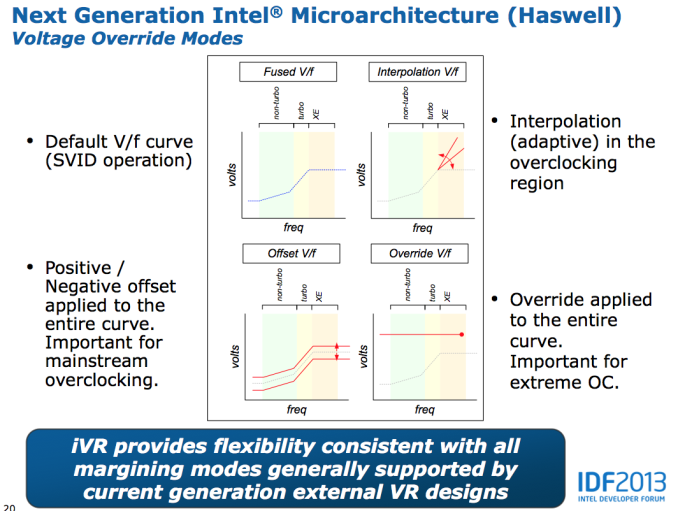
Voltages are the other big change with Haswell. All Haswell SKUs will ship with an integrated voltage regulator. Instead of having multiple voltage rails driven by external voltage regulators enter the SoC, Haswell will accept two input voltages: Vccin for logic and Vddq for DRAM. Vccin should typically be somewhere in the 1.8V - 2.3V range, with a max of 3.04V. Vddq will depend on your DRAM type. The integrated voltage regulator will support all of the same adjustments than we're used to on current Ivy Bridge platforms.
What Intel isn't talking about publicly is just how overclockable Haswell is. I'm hearing great things about LN2 overclocking, but other than the high-end memory vendors being pleased with the new platform I haven't heard much on what will be possible on air. A much beefier GPU (at least on the high-end SKUs) and on-package voltage regulation will make for some very interesting thermal conditions.
Intel has been walking a fine line lately with giving the overclocking community enough to be relatively happy but not too much. The days of the Celeron 300A aren't coming back. Intel isn't a fan of giving things away for free and I wouldn't expect that to change now, especially given AMD's current competitive position.


Read More ...
Best Gaming Notebooks, April 2013
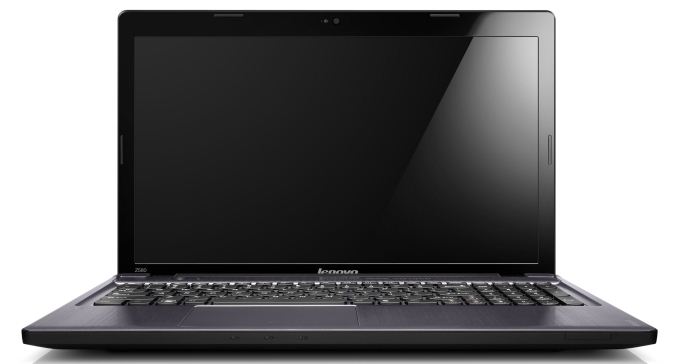
First, if you’re the type of gamer that wants to set everything at maximum quality and you’re not willing to turn down a few knobs, you’re either going to spend a ton of money (e.g. for GTX 680M SLI) or you’re going to be disappointed—and eventually, you’ll need to opt for lower quality settings on some new titles, as it’s only a matter of time before we see our next GPU-killer Crysis game. Think about that for a moment: Crysis was originally released way back in 2007 when DX9 was relatively new, and here we are in 2013 and there are still many GPUs that can’t run Crysis at 1080p at maximum quality and get more than 60FPS.
The first point is important, but even if you’re willing to compromise on some settings, you probably don’t want to compromise too much. While it’s possible to play almost any game on a moderate GPU, I find the bare minimum GPU to be around the level of AMD’s HD 6630M/6650M (aka HD 7570M, more or less) and NVIDIA’s GT 640M LE. If possible I’d want more GPU performance, especially if you’re running higher than 1366x768 for your resolution. So, for example, AMD’s entry-level A6-4455M and its HD 7500G don’t make the cut for “gaming” in my book, and even the faster A10-4655M with HD 7620G is questionable for many titles.
Finally, there’s the question of GPU vendor, and mostly I’m talking about mobile drivers. I wish I didn’t even have to discuss this, but my experience with AMD’s Enduro is still leaving me wanting compared to NVIDIA’s Optimus. These days it’s difficult to find a notebook with a discrete GPU that doesn’t implement one of those technologies, and while there are people that have no real complaints with Enduro, I’m not one of them. AMD right now seems to be best for iGPUs from Trinity (and soon Richland), and while something like the 7970M can offer great performance in the right games, in the wrong titles it can be a pain.
Finally, let’s not forget that there are new GPUs, CPUs, and APUs just around the corner. If rumors are to be believed, Intel’s GT3e solution (the “e” is for embedded DRAM) may provide some healthy competition to GPUs like the GT 650M and HD 7730M. Driver support is a concern there, sure, but Intel has definitely improved their driver compatibility over the past year since HD 4000 launched, and doubling performance (or more) would go a long way towards making their iGPU viable. AMD and NVIDIA meanwhile will have 8000M and 700M parts, with some rebranding/recycling and minor clock speed changes. AMD will also have Richland APUs that are supposed to be at least 10% faster than Trinity, and at the right price such a solution could be really attractive. If you can wait until June or so, we’ll know who the winners and losers of the next round are, but we’ll have an updated “Best Gaming Notebooks” by then.
TL;DR (Too Long; Didn’t Read): I’ll give a few lower-end recommendations for those on a serious budget, but my real preference for notebook gaming would be at least a Radeon HD 7730M or a GeForce GT 650M—with GDDR5 memory in both cases. Those two GPUs provide enough graphics horsepower to handle every game I can think of at 1366x768 and medium or higher detail settings, and in many cases even 1920x1080 at medium settings will be playable. If you want 1920x1080 with high quality settings (and possibly 4xAA), and you’d really like frame rates of 60FPS or more, you’ll have to go all-in on an HD 7950M or GTX 675MX at the very least.
We’re in familiar territory here, as the best way to get acceptable gaming performance without breaking the bank is AMD’s A10-4600M APU. I discussed this category last week as well, so I’ll keep things short. You can get the Toshiba L850D with A10-4600M, 4GB RAM, and 640GB HDD for $540, direct from Toshiba. For just a bit more (and likely quicker shipping), Newegg has Lenovo’s IdeaPad Z585 for $580 with the A10-4600M, 6GB RAM, and a 1TB hard drive. HP’s dv6z is similar as well, but pricing starts at $600 with the A10 APU. Of those three, at least with the current pricing I’d take the Lenovo IdeaPad Z585. Even if Richland shows up next month at a similar price (doubtful), you’re only losing out on the ~10% higher clock speeds of the A10-5750M.
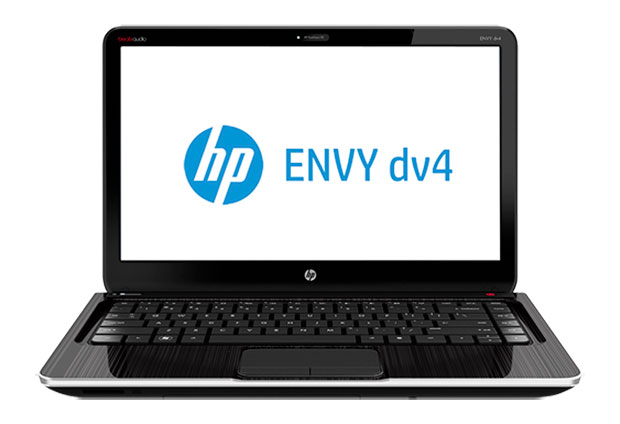
Considering we’re only looking at $100 more (give or take) than the budget notebook, the HP Envy dv4t is a great value. For that price, you get a dual-core Intel i3-3120M (2.5GHz), GeForce GT 650M 2GB, 4GB RAM, and 500GB HDD. The last two specs are underwhelming, sure, but it’s cheaper to just go buy 8GB of laptop memory rather than paying HP an additional $100 to do the upgrade for you! What’s more intriguing to me personally is that this is a 14” laptop instead of a 15.6” chassis, and I personally find a lot to like in the 14” form factor. The dv6t-7300 is there for you if you prefer 15.6” screens, and you get a $150 upgrade option for a 1080p anti-glare LCD if you’re interested. With similar specs it’s actually the better buy, as $750 will get you 8GB RAM and a 750GB HDD, along with the Core i5-3230M CPU.
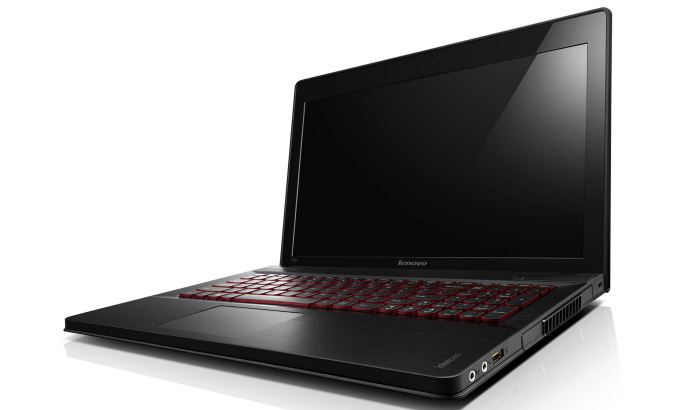
I’ll be honest: I’m not a big fan of SLI or CrossFire in notebooks. The combination of dual GPUs in a small enclosure is a recipe for lots of heat and poor battery life. That said, while a single GT 650M isn’t amazingly fast, two of them in SLI should perform quite admirably—roughly somewhere in the GTX 670MX to 675MX range—and you should be able to play most games at High settings and 1080p (but not “Ultra” settings, at least not in the most demanding titles). Lenovo is so far the only company I’m aware of to do SLI with a GK107 GPU, and it’s definitely an interesting tactic. The Y500 comes with a reasonable feature set (1080p LCD, backlit keyboard, Core i7-3630QM, 16GB RAM, and a 1TB HDD) and build quality, and it’s available starting at $1100. For this level of performance, $1100 isn’t a bad price, but if you want better battery life and Optimus (note that the Y500 does not support Optimus—a decision made by Lenovo and not a limitation imposed by NVIDIA or SLI), you’ll need to spend more money.
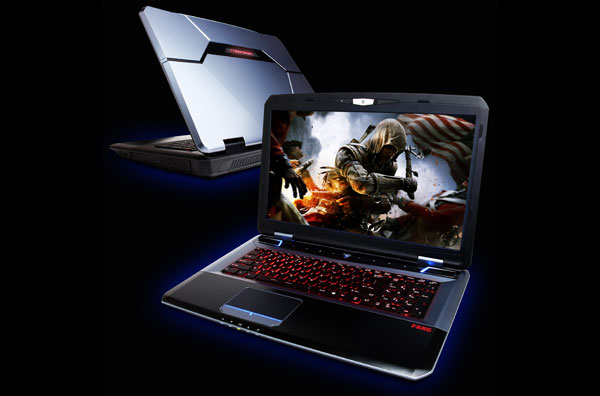
For $300 more than the Lenovo, you can get CyberPowerPC’s branded version of the MSI GT70, the Fang III X7-100. Dustin reviewed a similar laptop with the iBUYPOWER Valkyrie and found it to be a reasonable alternative to the large Clevo and Alienware offerings. The extra money will get you a larger chassis, a single GTX 675MX 4GB GPU (which should be 10-20% faster than the GT 650M SLI—and more in cases where SLI doesn’t scale well), Optimus support, and a good 1920x1080 LCD. You also get 8GB RAM and a 750GB HDD, so Lenovo wins out in those two areas. If you don’t like the look of the MSI chassis, or if you just prefer Clevo, you can of course get similar configurations of the P150EM and P170EM for roughly the same price.
For those that simply want all-out maximum performance, you can get higher performance configurations of the above. I wouldn’t bother with the Radeon HD 7970M personally, as the extra $100 doesn’t make up for the sometimes flaky driver support from AMD, which currently leaves the GTX 680M as the only other option. That adds around $300 to $400 to the price of the MSI, iBUYPOWER, or Clevo offerings (take your pick—CyberPowerPC currently doesn’t have a GTX 680M configuration). It also brings Alienware’s M17x into the picture, which I still find to be the best looking of the bunch with my preferred keyboard layout, but even with 6GB RAM and a 500GB HDD (the minimum Alienware has in their configuration utility) the M17xR4 will set you back $2249 when equipped with the GTX 680M.
Really, not much has changed with any of these notebooks since the GTX 680M launched last June. While I wouldn’t expect any major updates with 700M (maybe a GTX 780M that will bring GTX 680MX clocks to a lower TDP part?), buying right now instead of waiting for the Haswell and 700M updates seems a bit odd at the top of the performance pyramid. Thus, while all of the above are potential options depending on your personal taste, I’d personally hold off spending more than $1500 on a soon-to-be-outdated laptop, and really even $1400 is a stretch.
As always, other options or opinions are welcome in the comments. Think I missed a great option? Let me know! We’ll be back again next week where I’ll scour the thin-and-light market for good 13.3” and 14” offerings that don’t fall into the Ultrabook/Ultraportable category.
Read More ...
The AnandTech Podcast: Episode 19

featuring Anand Shimpi, Brian Klug & Vivek Gowri
iTunes
RSS - mp3, m4a
Direct Links - mp3, m4a
Total Time: 1 hour 42 minutes
Outline - hh:mm
HTC One - 00:00
The T-Mobile Announcement - 00:36
Samsung Galaxy S 4 - 00:55
Facebook Home - 01:17
As always, comments are welcome and appreciated.Read More ...
AMD Expands Never Settle Reloaded Bundle; Adds Far Cry 3 Blood Dragon & Radeon HD 7770

The most important facet of today’s announcement is that AMD is going to be that AMD is adding Ubisoft’s just-announced retro-styled first person shooter, Far Cry 3 Blood Dragon, to the entire lineup. Being released on May 1st, Blood Dragon is essentially a value priced shooter spun off of Far Cry 3, using Far Cry 3’s engine and game mechanics as the basis of its mini-campaign. Every AMD card from the 7700 up will now include this game, even those bundles that don’t include Far Cry 3 itself.
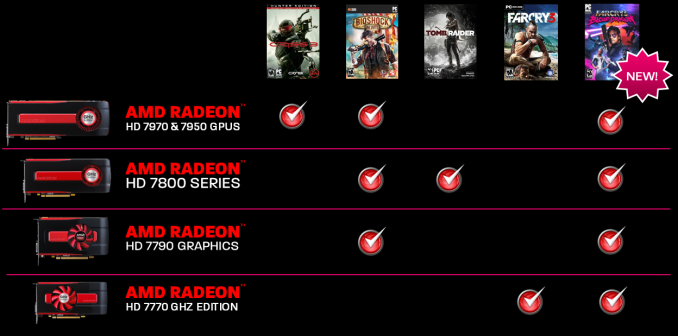
Finally, along with adding Blood Dragon to the bundle, AMD will also be extending the bundle to their Radeon HD 7770. 7770 owners will now get vouchers good for Far Cry 3 and Blood Dragon when purchased from participating retailers. With 7770s regularly going for under $100, this marks one of the very few times we have seen any kind of video game bundle of substance offered with a card this cheap, assuming of course new 7700 buyers haven’t already picked up Far Cry 3 in the last 5 months.
Read More ...
Best High End Z77 Motherboards, April 2013
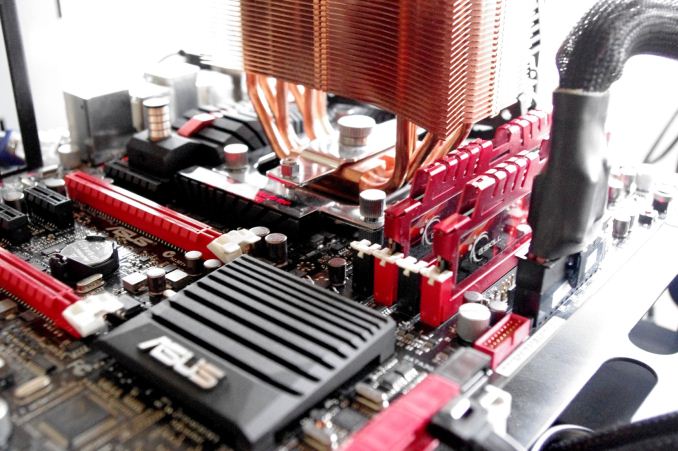
While we attempt to review a wide price range of motherboards at AnandTech, the skew is invariantly on the high end. Manufacturers would rather we reviewed their best products to represent the best of the range, rather than get a perspective from a budget $75 model. Recently we have covered the Z77 range of overclocking oriented models, but since Z77 release we have looked at the mITX range and also a wide series of new features on motherboards (for example Thunderbolt and PLX 8747). The AMD side of the equation has been very light in terms of review coverage by virtue of the fact that there has been no real demand from either manufacturers or readers to cover motherboards made-for-Vishera/Piledriver, and any FM2 coverage seemed to lack excitement.
We have awarded a number of Z77 products with awards since the beginning of 2012, and here are our favorites north of $220. In later pieces we look at sub $220 models from Z77 and FM2, and another piece for our X79 picks.

While the Formula doesn’t come cheap, and is in fact the most expensive Z77 motherboard without a PLX 8747 chip, it offers more of a package than any other non-PLX Z77 motherboard. The big draws are the SupremeFX IV audio solution, capable of reaching the Realtek listed dynamic range and THD+N numbers, the combination air/water VRM heatsink, and the package as a whole. In hardware we get an integrated WiFi/mPCIe combo card, an Intel NIC, extra SATA 6 Gbps, extra USB 3.0, options for overclockers and features such as BIOS Flashback. The BIOS is geared for overclocking, with our CPU sample hitting highs rarely seen internally on any other motherboard – the BIOS also includes plenty of OC features for high end memory kits. Software is similarly superb, with fan controls that actually act like fan controls should (see recent reviews for rants on this), network management, and features like USB 3.0 Boost. Users also have access to the vast ROG forums for help and hints to get the perfect system.
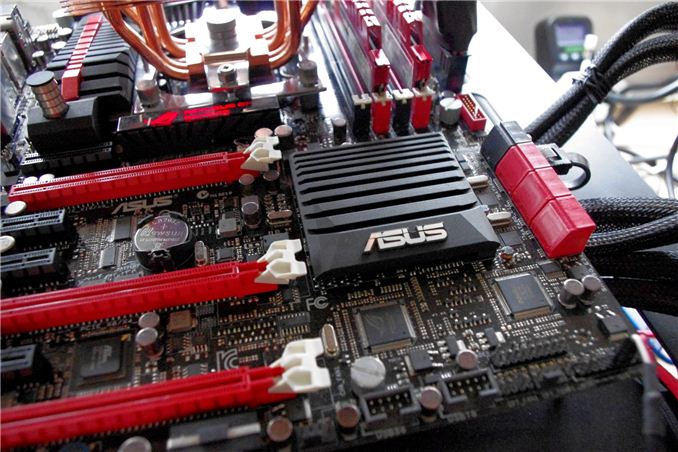
Read our review of the ASUS Maximus V Formula here.


AnandTech Silver Award: ASRock Z77 OC Formula ($225)
In a similar vein to the ASUS MVF, the ASRock Z77 OC Formula is a great motherboard to play with and is easily the best ASRock motherboard I have ever used. It dials in slightly cheaper than the ASUS (at the loss of some software control), but we still get plenty of overclock control, with the automatic options in the BIOS covering a wide range of clock speeds. This allows users to select the first option, stress test, then move to the next – stopping when stability is not to the user’s liking. The BIOS itself is so easy to use, and it looks a lot more polished than almost every other available on the market. Software gets an OC Formula skin, and the XFast combination (RAM, LAN, USB) can help improve performance. The ASRock has some benefits over the ASUS MVF – the ASRock has OC Touch buttons for that last competitive OC MHz and easier voltage check points. For regular use the ASRock has more SATA ports, more USB 3.0 ports, PCIe disable switches, six USB 3.0 on the rear, and in the box we get a front USB 3.0 panel and motherboard standoffs for out-of-the box setups.
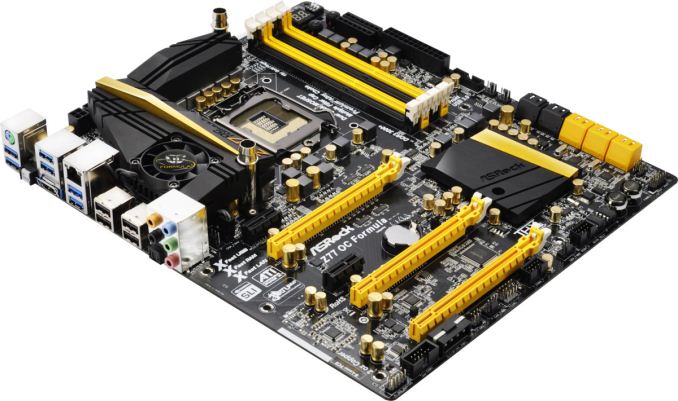


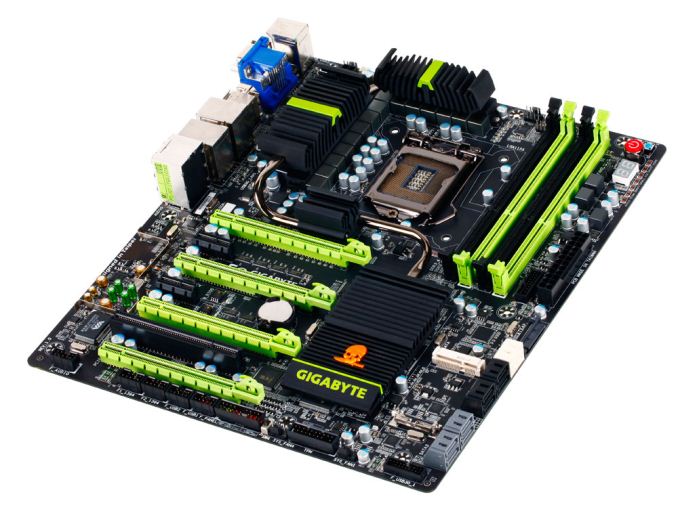
AnandTech Bronze Award: Gigabyte G1.Sniper 3 ($270)
Out of the PLX 8747 enabled motherboards we have tested on the Z77 platform, the Gigabyte G1.Sniper 3 has taken the lead in terms of layout, ease of user and performance. Even though users will probably not be running at stock, the G1.Sniper 3 uses MultiCore Turbo to improve stock performance of the CPU above every other motherboard we have tested. For gamers we have an Killer E2201-B network port alongside an Intel NIC, ten USB 3.0 ports, ten SATA ports, mSATA, PS/2 + Firewire connectivity, and a WiFi PCIe x1 card for users not using all the PCIe slots. There is a TPM as well as an eSATA rear bracket for additional options. While the PLX chip shows enhancements over non-PLX enabled three-way SLI/CFX and above, the option to have different PCIe layouts comes into force with PCIe SSDs or RAID cards. The Gigabyte G1.Sniper 3 still offers the best price/performance ratio for a PLX 8747 enabled board, and with better BIOS/software integration would have got a bigger award. This is something Gigabyte is working on for the future.


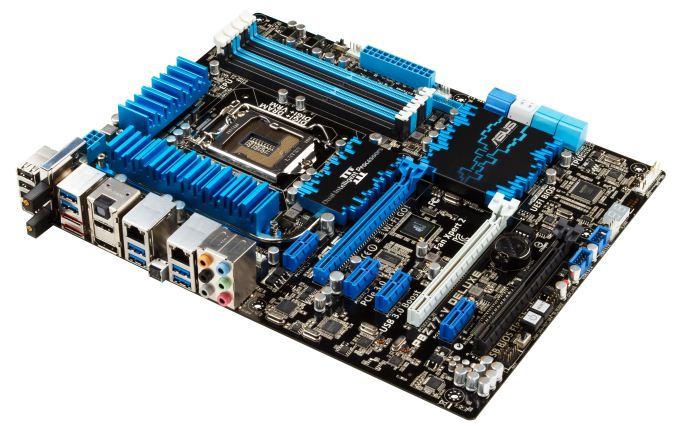
AnandTech Silver Award: ASUS P8Z77-V Deluxe ($280)
Sweeping in at $280 is perhaps not the main price point for Z77, especially when there are motherboards that can run these processors for half the price. However, this is where the P8Z77-V excels - for your extra money, you get a plethora of enthusiast related features that a user would not dream of on a half-price product. Alongside the dual band WiFi, dual network controllers (one Intel, one Realtek), superior fan control and provision for a future Thunderbolt add-in card, we have the stalwarts of the ASUS arsenal, such as USB BIOS Flashback, Fan Xpert II, enhanced USB charging, USB 3.0 Boost, a well thought out BIOS and superior operating software. The only features directly missing seem to be those that add a significant cost on board (PCIe PLX chip for >2 GPUs, a premium sound solution), where instead we would normally see products specifically focused for them in that price bracket. As part of a long term, stable build, it is hard to put a foot wrong if you choose the P8Z77-V Deluxe.


What To Look Forward To
Haswell is approaching, and each of the contenders here will have a Z87 counterpart. Depending on the Z87 chipset itself, we may see more variation on how the motherboards line up, and whether each manufacturer will want to push up and down market segments. Regardless of what media coverage says regarding the shift to more mobile devices, the high end desktop space is still b – enthusiasts want more and they want it now.
As mentioned, our next ‘Best Motherboard’ feature will take a look at the $120-$200 market for both Z77 (regular + mITX) as well as an FM2 choice worth considering. While no new X79 products are hitting the shelves, we have tested a fair number of X79 and Sandy Bridge-E is still the way to go for a multi-core Intel machine – stay tuned for that roundup as well.
Read More ...
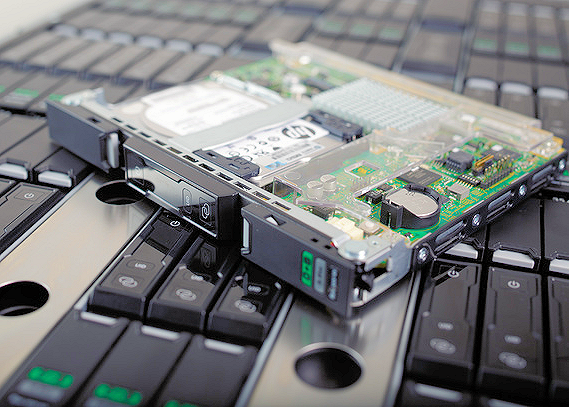
Server Update April 2013: Positioning the HP Moonshot 1500
With HP launching the "Moonshot" server class and Intel's IDF at Beijing, we felt it was interesting to look a bit closer at the newest developments in the server world. HP is not shy of grand statements when it is describing its newest baby: "historic", "enables unprecedented scale" "revolutionary new architecture". HP claims "maximum density" and "unparalleled power efficiency". That of course simply begs for closer inspection.
Read More ...
Virgin Galactic Conducts First Rocket-Powered Test Flight of SpaceShipTwo
The test broke the speed of sound

     |
Read More ...
4/29/2013 Daily Hardware Reviews
DailyTech's roundup of hardware reviews from around the web for Monday

| |
Read More ...
San Francisco Tackles iPhone Theft
Seventh and Market Street is the stolen iPhone marketplace

| |
Read More ...
Tesla Reveals Generous Model S "Hassle Free" Battery Replacement, Service Programs
Tesla wants to make the service process less painful

| |
Read More ...
Canada to Bitcoin Miners: "Pay Yer Taxes"
Cryptocurrency is not exempt from taxation, Canadian government argues

| |
Read More ...
Next Generation Xbox May Be Called Xbox Infinity
New rumors on next-generation Xbox surface

| |
Read More ...
Curved Screen LG OLED TV Goes on Sale in South Korea
No official date given for a launch outside of South Korea

| |
Read More ...
Samsung Unveils New Galaxy Tab 3 Tablet
Galaxy Tab 3 will launch in May

| |
Read More ...
U.S. Turns to Drones to Cut Cost of "War on Drugs" in the Caribbean
U.S. Navy is looking to use drones to cut cost of patrolling seas

| |
Read More ...
Evidence Points to Google Delaying Android 5.0 Due to Sluggish Adoption
Google I/O is also expected to bring a 1080p 5-inch Nexus device from LG

| |
Read More ...
Google's Eric Schmidt Says Talking to Google Glass "Is the Weirdest Thing"
He said the device can be inappropriate at times

| |
Read More ...
Samsung Beats Analyst Profit Expectations by 10%, Outsells Apple 2-to-1
And that's all without the Galaxy S IV even; Samsung is almost even with Apple in profitability

| |
Read More ...
Pennsylvania Ford Hybrid Drivers Sue Over "False" 47 MPG Claims
The lawsuit seeks at least $5 million in damages

| |
Read More ...
Homecourt Judge: Microsoft's Patents are ~1,000x More Valuable Than Motorola's
Seattle federal judge rules that developing standards is pretty much worthless

| |
Read More ...
Samsung, Apple Stay on Top as Smartphone Sales Pass Feature Phone Sales
IDC figures show a changing of the guard

| |
Read More ...
Samsung Brings All of Its Windows Devices Under ATIV Banner
Samsung Launches New ATIV Book 5 and Book 6 Laptops

| |
Read More ...
Lawmakers in Michigan Mull Tax on Electric Cars
States want more money to fix roads

| |
Read More ...
Maserati CEO Calls Shenanigans on Electric Vehicle "Nonsense"
Auto exec admits his company may have to develop a hybrid powertrain in the U.S.

| |
Read More ...
Google Competitors Have One Month to Comment on EU Search Investigation
Many rivals are not happy with Google's proposal

| |
Read More ...
LG to Release a Flexible-Display Smartphone This Holiday Season
Overall phonemaker's profit has plunged, though, amid weakening TV market

| |
Read More ...
Chevrolet Spark EV Gets an EPA Estimated Driving Range of 82 Miles
Spark EV can go 82 miles on full charge

| |
Read More ...
Amazon Planning to Release Television Set-Top Box This Fall
Amazon is looking to further advertise its services

| |
Read More ...
House Judiciary Chief Calls for Review of Copyright Law
Big media wants bills for more punitive enforcement, new media, internet firms, and activists fight back

| |
Read More ...
Verizon Looking to Buyout Vodafone's Verizon Wireless Stake for a Cool $100B+
Pending bid is Verizon Communications' second attempt to purchase Vodafone's stake

| |
Read More ...
U.S. General Services Administration Plans to Purchase up to 10K Hybrid Vehicles
The GSA plans to replace aging vehicle fleet with hybrids

| |
Read More ...
Available Tags:Samsung , Galaxy , Cooler Master , AMD , Radeon , NVIDIA , Driver , Ivy Bridge , MSI , Gaming , Motherboards , Windows , GeForce , Google , Dell , SSD , Intel , AnandTech , Server , HP , Hardware , iPhone , Xbox , Xbox , LG , TV , Galaxy Tab , Tablet , Android , Apple , Ford , Apple , Smartphone , CEO , LG , Smartphone , Chevrolet , Amazon , Wireless ,


No comments:
Post a Comment