

HP z27x Review
The HP z27x is loaded with features. Beyond the usual features like a USB hub and multiple inputs it offers multiple color space support for AdobeRGB, DCI P3, and even Rec. 2020. It goes well beyond this by offering the ability to self-calibrate any of the presets to your own requirements and an Ethernet jack for network management. Read on for our review of one of the most advanced displays around.
Read More ...
The Huawei Ascend Mate 7 Review
It's been a while since I got the Mate 7 at IFA in Berlin and I have been using it on an off since then. As a new member of the AnandTech crew I still had to get the proper equipment to be able to go through our test bench on my own. After lots of delays for which I apologize, we finally take a thorough look at the Huawei's new flagship.
Huawei's been launching new devices at great speed this year. The Ascend Mate 2, which is the Mate 7's literal predecessor was only released earlier in the year, but came only as a more mid-range specced device with corresponding price-tag. Huawei has been gearing up and is now targeting the high-end to try to gain marketshare from other established manufacturers such as Samsung, HTC and Apple. To see how the Mate 7 performs against the competition, read on for the full review.
Read More ...
Seagate Enterprise NAS HDD: WD Red Pro Gets a Competitor
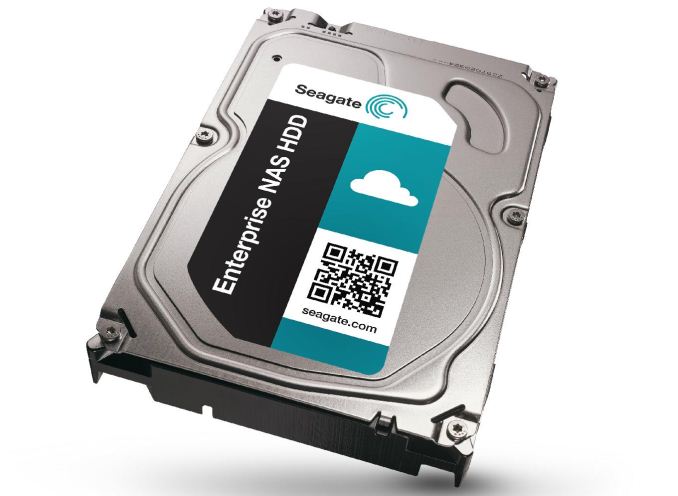

Similar to the WD Red Pro, the Enterprise NAS HDD is targeted at prosumers / SMB / SME tower and rackmount form factor systems with 8-16 bays (though nothing prevents them from being used in systems with a lower bay count). They are standard 7200 RPM drives with the right balance of features imported from both the NAS HDD as well as Enterprise Capacity lineups.
The key points of differentiation over the WD Red Pro are listed below:
- Higher maximum capacity (6 TB for the Enterprise NAS HDD vs. 4 TB for the Red Pro)
- Larger cache size (128 MB in the Enterprise NAS HDD vs. 64 MB in the WD Red Pro)
- Slightly better MTBF ratings (1.2M for the Enterprise NAS HDD vs. 1M for the Red Pro)
- Bundled data recovery service (not available for WD Red Pro)
Other aspects (such as warranty and URE ratings) are mostly similar. Out of the four points above, the bundled data recovery service is the most interesting. Seagate introduced their data rescue and hardware replacement services last year. In pursuit of differentiation and better integration of this offering with the rest of the company products, the Enterprise NAS HDDs come with this service bundled in the cost. In case of any failure (environmental, accidental or even human error), Seagate handles data recovery as well as replacement of faulty drives (within the warranty limitations). Failed RAID arrays are no exception. With the Enterprise NAS HDDs, this DRS is valid for 3 years starting with the date of purchase. Since the risk of data loss and recovery is borne by Seagate for a reasonable premium, both end-users and resellers are bound to be happy.
Coming back to the rest of the HDD products from Seagate, the table below compares their specifications and differentiating aspects.

Even though it is not specifically mentioned, Seagate indicated that the Enterprise NAS HDDs are designed for workloads up to 180 TB/yr.
For the launch of the Enterprise NAS HDDs, Seagate has teamed up with QNAP. They are also running two webinars to cover any questions that SMB / SME IT decision makers may have regarding the new products.
Pricing information is not available yet, but Seagate indicated that they would be competitive with the WD Red Pro at similar capacity points (with a reasonable premium for the additional data recovery service).
Read More ...
Holiday Guides 2014: CPUs
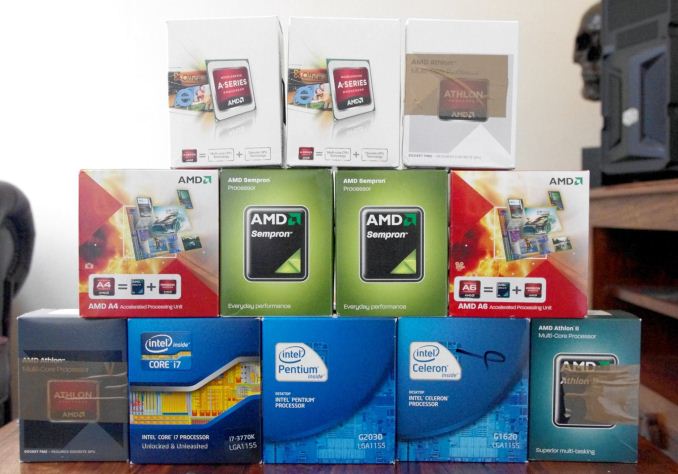
That being said, for a lot of everyday tasks, one might consider today's level of CPU compute power 'enough' for the office environment. Web browsing, email, watching videos and basic photo editing tools are all well catered for. Buying a faster more expensive processor means when the workload hits peak usage, the system can process quicker and responsiveness is still present. No-one wants to tell the boss that the work is not complete because the system is running slow, or that the family can't watch a particular Blu-ray that evening because it isn't encoded for the home NAS.
Therefore when it comes to a holiday guide for purchasing CPUs, we have to split into several separate use cases, which might also have their own niche subcategories. A number of these use cases are particularly obvious, so we will address these first. This year at AnandTech we have specifically reviewed 24 different CPUs and tested many more, and the benchmark details can all be found in our comparison results database Bench.
Gaming CPU, No Discrete GPU: A10-7850K ($160)

AMD and Intel have been battling it out at the top of the integrated graphics charts, with GCN based AMD against Crystal Well’s extra cache in some Intel models. Intel’s downfall is that Crystal Well is only available in a socketed platform, which means the Crystal Well based BRIX Pro (read our review) from GIGABYTE or a laptop. To that end AMD wins by default having the socketed CPU, but one would also point out that the R7 graphics inside the A10-7850K or the A10-7700K often surpass Intel solutions, especially when we bring Mantle into the mix or users take advantage of dual graphics. Then there is also overclocking to consider.
Gaming CPU, Single GPU at 1080p60: i3-4360 ($130), i5-4690K ($210) or FX-8370E ($190)
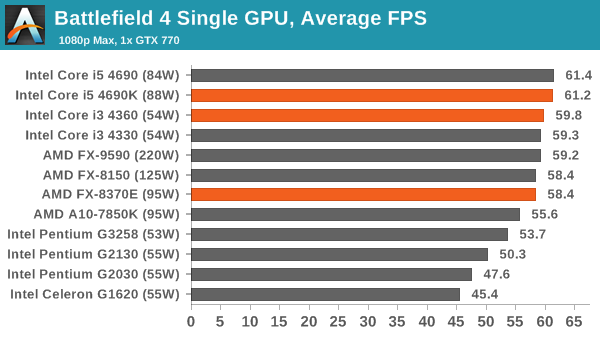
For a single GPU at 1080p, even with everything at max settings, there becomes a limit where more CPU power reaps no benefit. The limiting factor becomes GPU power in the end, but there is still a crossover point. At 1080p60 single core frequency still matters as well, which means some builds can be hampered by a CPU with low frequency or low IPC, especially if max resolution, settings and 60fps minimum is required.
Based on our CPU testing results this year, a Haswell i3 should be sufficient for 92-98% performance across our benchmarks, although moving to an i5 would end up a little more future proof. In a single GPU environment, an i7 is not needed.
For AMD users, the new FX-8370E CPU launched this year provides an AM3+ alternative. It rides on par with the FX-8150 but reduces the power consumption down to 95W. The A10-7700K on FM2+ might also be an option, with both these CPUs preferring titles that take advantage of Bulldozer-like multicore processing for AI or audio.
Gaming CPU, Multi-GPU at 1080p120: i5-4690K ($210)
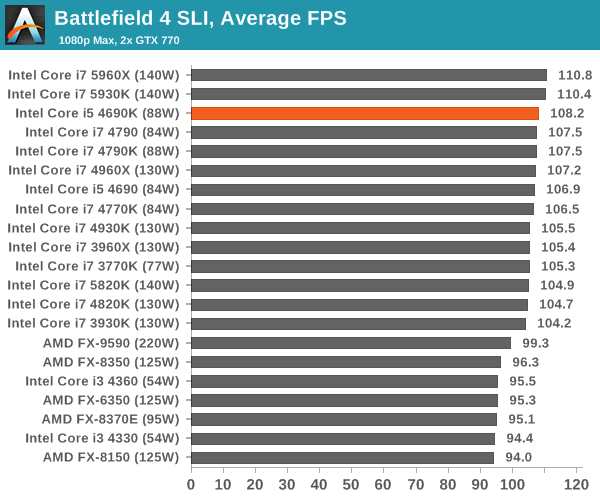
Getting 120 FPS is fairly difficult at 1080p with one GPU without dialing down the settings, and as such the suggested 120 Hz aim I put squarely on multi-GPU configurations. As a result, we get into discussions regarding PCIe lane bandwidth, whether PCIe 3.0 x8 per GPU or PCIe 3.0 x16 is needed. Based on our own testing, for 1080p resolutions with max settings, two GTX 770 GPUs can hit 120 FPS on average in our tests without needing to go down the i7 route. What makes a bigger difference here is perhaps the ability to push the base frequency and overclocking, which opens up the i5-4690K as a key data point. Aiming for 120 FPS minimum however requires substantial GPU power.
Gaming CPU, Multi-GPU at 4K/Multi-Monitor: i7-4790K ($300) or i7-5820K ($390)
In a similar vein to 1080p120, large resolution sizes are going to be primarily GPU bound with larger frame buffers being very important. With all the data moving around, there is perhaps a better precedent for more powerful cores, or the ability to tie in more memory with better bandwidth. As a result, given that a user is likely to spend $800-$1600 on GPUs, it makes sense to look at some of the more extreme parts. The Haswell refresh based i7-4790K boasts the top single core turbo speed as well as the top multi-core speed of any retail CPU, but moving up to three or four GPUs requires talking X99. A tri SLI setup with the right motherboard can use the 6-core i7-5820K in x8/x8/x8 mode, but users who want the best of go for four way will enjoy the i7-5930K ($580) or i7-5960X ($1050) depending on the size of your wallet.
Office CPU, Basic Workload: Athlon 5350 ($60), Celeron J1900 ($various)
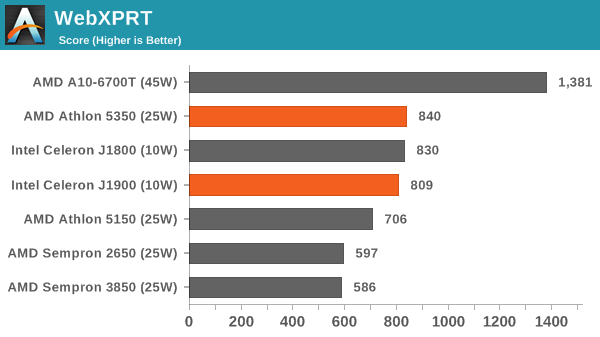
Systems for the office can be a difficult issue to solve. Everyone wants performance when it matters, but the financial side of the equation calls for something cheap enough to spread over 100s of systems. This is especially true when the majority of work consists of email, typing and browsing through the intranet. Thus in order to get the best of both worlds, the low powered SKUs from AMD and Intel should be considered.
As noted in our reviews of AMD’s Kabini and Intel's Bay Trail-D, each side trades blows depending on what the focus is. Intel has better single core performance, while AMD wins for graphics and OpenCL. Both platforms support 8 GB of DRAM, but where AMD supports single channel memory at a higher 1600 MHz, Intel goes for dual channel at the slower 1333 MHz. The J1900 has only a 10W TDP where the Athlon 5350 goes for 25W, but the Athlon CPU is removable and replaceable, allowing different motherboards for different functions or potential upgrades if AMD updates the line.
Intel's Bay-Trail has been successful for system applications, such as digital signage and kiosks, while Kabini offers the graphical capabilities to do a lot more. Personally I'm torn between the two.
Office CPU, Medium Workload: i3-4130T ($128), i7-4765T ($OEM)
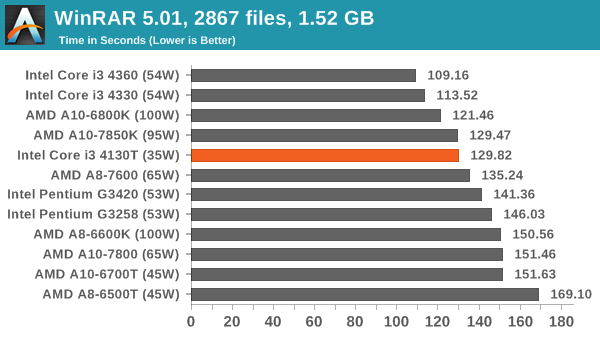
Classifying a medium workload user comes under the heading of basic photo editing, perhaps some form of LibreOffice and stock predictions, or users who write code and need something for basic testing before shipping it off to the main server farm. Again, the office would like something cool, quiet and preferably cheap. As a result I am going along with the T line of Intel processors for this one. We have the i3-4130T in for testing but the principle extends to the other T CPUs for 35W processing while still being in the $150 ballpark. For something a bit meatier, the i7-4765T is perhaps the best CPU to aim for giving i7 performance in 35W, but this CPU is OEM only. The other suggestion for more grunt would be the i7-4790S ($305) or i5-4590S ($205) which are available for purchase but raise the TDP to 65W.
Office CPU, Prosumer Workload: Xeon E3, i7-5820K ($390) or i7-5960X ($1050)
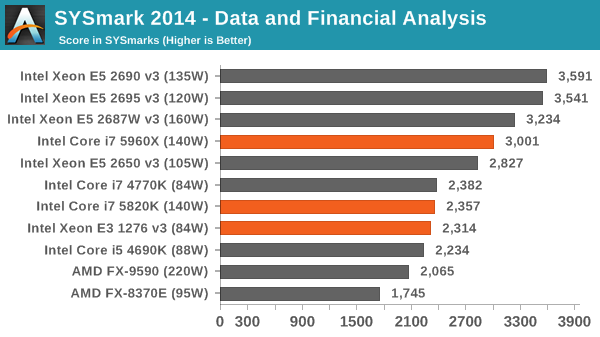
If you have a mission critical workload, and the office demands the best, chances are that means going down the Xeon route with ECC memory and everything that entails. The top of the line E3 Xeons under Haswell have v3 at the end of the name, such as the E3-1276 v3 in the Lenovo ThinkStation P300 workstation we reviewed a few weeks ago, which was paired up with a Quadro GPU for professional graphics and simulation work flow.
For those that are not mission critical but still require an amount of performance, there are two obvious options, both from Haswell-E. The i7-5820K is a six core CPU with high base frequencies but quad channel memory to call on. Similarly the i7-5960X also has quad channel memory, but this has 8 cores as well as another 12 PCIe lanes, albeit for 3x the price and a lower base frequency. Users wanting more cores will have to look to our 10, 12 and 14 core Xeon reviews, with the 14 core E5-1691 v3 sitting at the top of the stack for single socket platforms.
HTPC, Basic with IGP: A6-7400K ($70), i3-4360 ($130)
Decoding video, low noise and low power are the mainstays of the HTPC market, so anything to help nurture these two facets helps greatly. We have two options here - the A6-7400K has a better built in IGP but the single core performance is middling, whereas the i3-4360 surpasses in single core performance but the IGP is not in the top grade so much. The A6-7400K has a low power 45W mode for those willing to change a couple of BIOS settings. Both of these CPUs should handle linear H.265 playback, although start jumping around and you might experience pausing while the system re-analyses the new position. But H.264 and other modern codecs (VP8 etc.) shouldn't miss a beat.
HTPC, Throughput: i7-4790S ($305), i5-4590S ($205) or i7-4765T ($OEM)
Sometimes a NAS doubles as a movie ripper or converter, and some extra power in the box can help a fair bit. As it is still a HTPC, similar principles as before apply: low power and as silent as possible. Here we have the 65W ‘S’ CPUs from Intel, although if you can find it the 35W 4765T offers a great alternative. If you want to be extra silent, put one of these in a closed loop liquid cooler system, and it should carve through most ripping and converting at a reasonable pace without disrupting playback or tie up the main PC.
NAS: Avoton ($various)
Most off the shelf NAS units in 2014 were based on Silvermont cores, either in the form of Rangeley or Bay Trail. The Celeron J1900 (Bay Trail-D), with four Silvermont cores at 2.4 GHz, is a suitable choice for a similar DIY build. However, most Bay Trail-D motherboards need to be augmented with SATA controller cards to get any substantial level of storage. We reviewed the Intel Atom C2750 (an Avoton part) earlier this year in ASRock’s storage-focused C2750D4I system. It features eight Silvermont Atom cores at 2.4 GHz and comes with 12 onboard SATA ports. There is support for up to 32 GB of ECC DRAM. Aside from the lack of hardware RAID 5/6, this system is somewhat prohibitively expensive due to the high CPU cost, however since that review it has been humming away as a personal RAID-1 NAS box without issue. If you really wanted to have lots of motherboard based storage, then something like the Z87 Extreme11 with 22 SATA ports paired with an i3 CPU would suffice. We should have a holiday guide for COTS (commercial off-the-shelf) NAS units from Ganesh coming soon!
Read More ...
The Android 5.0 Lollipop Review
Google has been very busy with their expansion of Android as a platform this year. At Google IO we saw the announcement of endeavors like Android TV and Android Auto. But the stars of the show were a preview of the next version of Android, code named Android L, and Google's new Material Design principles for interface design across all of their products. In the years since Android 4.0 Ice Cream Sandwich released, we've seen the launch of Jellybean and KitKat, but both of these versions were very iterative improvements upon 4.0 and had equally iterative version numbers with Jellybean being major versions 4.1 through 4.3 and KitKat being 4.4. Lollipop is given the major version number of 5.0, and it's quite fitting as it's arguably the biggest advancement to Android in a long time. To find out why, read on for the full review.
Read More ...
Best $500 Laptops: Holiday 2014
More and more people are switching over to laptops as their primary computing device these days, and it's no surprise: the amount of compute power that most people really need has been pretty flat for a while now. Intel and AMD have been pushing out faster and more power efficient processors for decades, but unless you're doing something truly demanding you don't need anything close to the latest and greatest CPU and GPU for most tasks.
Of course part of the reason for the plateau can also be attributed to smartphones and tablets: the fastest SoCs of today are still substantially slower than modern desktop and laptop processors. Their advantage is that they use far less power and are far more portable, and with so many people using such devices we've seen more companies creating apps and websites that target lower performance devices.
While many might also be tempted to "just get a tablet and be done with it", there are still plenty of tasks that are far easier to accomplish on a laptop than on a tablet. Yes, you can add a keyboard case/dock to a tablet and make up some of the difference, but particularly for people that aren't tiny, there's a real benefit to keyboards on larger (13.3" displays or more) laptops. So if you're looking for a decent laptop and you don't want to spend more than $500, that's what we're going to cover in this guide. (Note that we've covered Chromebooks in a separate piece, so we won't discuss those here.)
Fundamentally, there's always compromise involved with any purchase. Either you're giving up more money to get a "better" product, or you're giving up features or performance in order to save money. Some users demand high quality displays – I tend to be one of them – but finding a budget laptop with a good display can be extremely difficult if not outright impossible. There are also many reasons to own a laptop, including school, office work, travel, and even gaming, and you need to balance the intended use with these other elements. For ultra budget laptops, the simple facts of life are that you will have to compromise quite a bit on certain aspects, and generally speaking the brand of a laptop often ends up being a secondary consideration to the price; so let's see just how low we can go with laptop pricing....
Budget Gaming Laptops
If you're looking for an inexpensive laptop that can still play most games, the options are extremely limited at the sub-$500 price point. There's also a lot of overlap between "budget gaming laptops" and "budget general use laptops", which is why I'm starting here. Basically, if you buy a laptop that can play games reasonably well, chances are good that it will handle most other tasks fine.
Not surprisingly, the best (least expensive) way to get a laptop that can run games is to buy something with an AMD APU. Last time I looked at budget gaming notebooks I was unhappy with the price difference between AMD APU equipped laptops and Intel CPUs with NVIDIA GPUs, but these days the AMD APU offerings have become much more affordable.

The absolute best price I can find on a (new) notebook that can legitimately run most games comes courtesy of Acer, the $310 Aspire E5-551-86R8. [Ed: Prices have gone up since initially researching laptop options, but even at $410 it's still a decent option.] There's still plenty of compromise involved here – 4GB RAM, 500GB HDD, and a 15.6" 1366x768 display for example – but the E5-551-86R8 manages to pack in AMD's latest Kaveri APU, the A8-7100. This is the second tier of Kaveri, so it's not going to provide the same level of performance as the A10 options, but you generally save $150-$200 over models with the A10-7300.
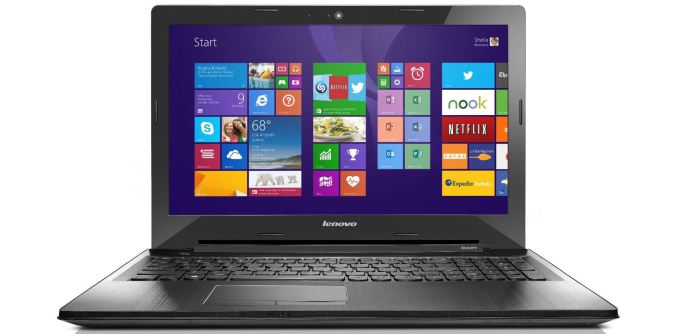
Of course, the A10 laptops tend to be better equipped in other aspects, making them viable alternatives. Sticking with the sub-$500 price, the Lenovo Z50 can be had for $470 right now (on sale) and comes with an A10-7300, 8GB RAM, and a DVDRW (if you use one of those). You're still saddled with a 1366x768 display and a 500GB hard drive unfortunately, but unless you're willing to buy a refurbished laptop or something with a much slower processor – or a Chromebook – you're going to have a hard time finding a higher resolution (or higher quality) display for under $500.
If you'd prefer an Intel CPU and NVIDIA GPU, the closest I can find with current generation parts is the Acer E5-571G-38VF. That has a Core i3-4030U and GeForce 820M, neither of which will top performance charts, though they should prove roughly comparable to the A10 options. The GeForce 840M is a far more capable chip, but the lowest price on laptops with that GPU are currently around $600.
Budget General Use Laptops
There are various elements to consider when looking for a good general use laptop, but I'd argue the best overall experience is something you can't actually buy at a store – you need to get your hands dirty. I'm talking about replacing the archaic and slow hard drive with an SSD. These days you can buy a 256GB class SSD for around $100, or you can even buy a 512GB class SSD for close to $200 – and the Black Friday/Cyber Monday sales can bring SSD prices even lower (if you act fast).

I'd suggest that if you take the Acer E5-551-86R8 or one of the other laptops mentioned in this guide and spend $110 on a Crucial MX100 256GB SSD (or $105 on the SanDisk Ultra II 240GB), you would have a budget (or near-budget) laptop that will be much more responsive and feel faster than a $1000 laptop that doesn't have an SSD. You might also upgrade the RAM to 8GB for another $75 or so (depending on the starting laptop), so if you use the E5-551 you'd end up with a final price of $550 (give or take). The display and build quality remain unchanged, and upgrading a laptop drive and memory requires some technical skills (e.g. you need to clone the hard drive to the SSD or reinstall the OS on the SSD), but you're not going to find an off-the-shelf laptop with better performance for the price. But can we come close?
In a word: no; in slightly more words: not unless you can find something with a big discount/sale (and even then it's unlikely). We don't usually spend a lot of time on short-term deals, as we like our articles to be more useful for future readers, but at this time of year there are so many sales that it's hard to avoid them. For a general purpose laptop that can be useful for several years, I'd recommend getting at least 8GB RAM; that and a $500 price cap dramatically cuts down on the number of results for Windows laptops – I can only find three at BestBuy and six at Newegg that meet those criteria, as an example. That means we have to compromise even more and say that 4GB RAM is hopefully "enough for now".

With those options there are a few potentially interesting laptops but none that I can recommend without some qualifications. The ASUS F555LA-AH51 has a Core i5-4200U processor, which is probably as fast as you're likely to find at this price point, but it also has a 15.6" 1366x768 display and only 4GB RAM with a 1TB 5400RPM hard drive. HP's 15-r018dx is similar in size but drops to a Core i3-4030U and 750GB hard drive while saving $50.

If you want a higher resolution than 1366x768, you basically have to spend more than $500 or else go even larger and buy a 17.3" notebook, but finding a 17.3" offering for under $500 often requires going with previous generation processors (e.g. 3rd Generation Intel Core i3 or AMD A8-4500M/A8-5550M). HP's Pavilion line has a few options, including the A8-5550M for $497 and the 17-e019dx with i3-4000M for just over our price target, tipping the scales at $523 and 6.4 pounds.

Finally, ASUS has a couple hybrid devices that might be worth a look. The ASUS Flip 2-in-1 has a 360 degree hinge similar to Lenovo's Yoga line, only it has a bulky 15.6" 1366x768 display. Still, it's only $440 for the base model with Core i3-4030U, 6GB RAM, and a 500GB HDD. If you want a portable 2-in-1, the Transformer Book T200TA is $459 and features an 11.6" IPS display with 4GB RAM and a 64GB SSD and has a detachable tablet. Those are some good features but the Atom Z3795 processor isn't going to be particularly fast (more like half-fast).
Budget Laptops with Good Displays

As usual, finding a budget laptop that has a good quality LCD is difficult to do. The Toshiba Chromebook 2 has an IPS display on the $329 model, but if you're looking for a Windows laptop that obviously doesn't work. Other than picking up a used laptop (which is always a gamble in my opinion, unless you know the previous owner and/or can test out the laptop in person), one of the few IPS Windows laptops I can find for under $500 is one that I already mentioned: the ASUS T200TA. It's still only a 1366x768 resolution, but on an 11.6" display that's generally forgivable and the 2-in-1 tablet functionality can be handy as well.

Other options with better displays include Acer's V5-122P line, which has IPS panels in at least some models (e.g. the V5-122P-0646 at the Microsoft Store). It's otherwise a relatively low-end device, as you can guess by the price, and it's about a year old so it may be due for replacement. The 6GB RAM and 500GB HDD aren't too bad, but the AMD A6-1450 Kabini APU is pretty much on par with Atom processors – meaning, it can feel quite slow when running a full copy of Windows.
I'm sure I've missed some other options, but after hours of searching and sifting through budget laptops (and excluding used laptops as well as older models) I'm not finding any other budget options with decent non-TN displays. Hybrid devices are more likely to include IPS displays, as the tablet functionality is practically useless without a wide viewing angle technology, but even buying a hybrid is no guarantee you'll get an IPS or similar technology.
Lowest Price Possible
In the Chromebook selection, we also mentioned Windows alternatives like the HP Stream laptops. Brett has a Stream 11 coming in for review, and if you're looking for the lowest possible price on a Windows laptop then these are certainly worth considering. They're essentially a modern take on netbooks, except this time you're getting a full copy of Windows instead of a cutdown "Starter" version.

The cheapest Stream laptop is the 11-inch model, which has a Celeron N2840 (dual-core Bay Trail 2.16-2.58GHz), 2GB RAM, and a 32GB eMMC SSD. The limited RAM and storage might be a problem, but battery life is still good at 8+ hours. $30 more gets you the 13.3-inch model, which has the same specs other than the display and slightly lower battery life. There's a 14-inch variant as well, which drops the Celeron N2840 and replaces it with an AMD A4-6000T, a quad-core 1.0-1.6GHz Kabini APU; it costs just under $300 with 6.5 hours of battery life. Quad-core Kabini should prove faster in many cases than dual-core Bay Trail, though single-threaded performance is still going to struggle.

HP's Stream isn't alone either; Acer has the ES1-111M (11.6", N2840, 2GB and 32GB eMMC) for $190, though battery life is only rated at 5 hours compared to HP's 8+. There are also 15.6" variants of the ES1 with 4GB RAM and 500GB HDD storage starting at $240, and the ASUS X551MAV at $230 is another option. There are frankly too many options to cover, but if you want a laptop for $300 or less it's certainly possible to find one.
Closing Thoughts
I mentioned at the start that shopping for a budget laptop is invariably an exercise in compromise. Having used SSDs on my desktops and laptops for the better part of two years now, I'm at the point where I can't stand using systems that rely on conventional hard drives. Short of doing some upgrades on your own, however, it's very difficult to find a reasonable capacity SSD in any budget laptop – if an OEM decides to build a budget device, one of the first things to get axed always seems to be storage.
The display, RAM, build quality, and processor are all areas that get downgraded as well. This is the race to the bottom we often talk about, and the end result can be rather underwhelming. It makes sifting through laptops trying to find the best budget options a difficult task, made even more difficult by the fact that many of these budget devices don't see proper reviews as those are saved for premium laptops. Regardless, even when you do your best it's easy to overlook a few "diamonds in the rough".
I've picked out some of the decent options here, and if you're open to Chromebooks we have a separate article on that subject. I'd like to open this up for additional recommendations from the readers, or if you have a laptop you're thinking of buying and want my quick opinion just leave a comment and I'll monitor things for the next couple of weeks (not to mention our readers have plenty of good input as well.) In the meantime, what's your favorite budget laptop, and what did I miss? Sound off in the comments, and if there are any good suggestions I'll update the above text with some reader recommendations.
Read More ...
Asustor AS7008T 8-bay Intel Haswell SMB NAS Review
Asustor is one of the recent entrants in the NAS market. Over the last couple of years, they have tried to play in the same space as QNAP and Synology (with units based on the Atom D2700 as well as Evansport). However, they have recently opted to put more emphasis on the mid- to upper-range of the market with Haswell-based products in the 70-series. We have the AS7008T, the 8-bay variant, in-house for review. Read on to see how the unit stacks up against the competitors in this space.
Read More ...
Scientists Use XNA ("Synthetic Genomes") to Brew Brand New Breed of Enzyme
XNAzymes resemble naturally occurring enzymes, but are produced via a manmade biology
Read More ...
Quick Note: Stelle Audio Launches $130 Go-Go Portable Speaker
Stelle Audio releases a portable speaker, the $130 Go-Go, designed for mobile users always on the go.
Read More ...
IDC: Windows Will Gobble Android and iOS Market Share; Smartphone Prices Will Drop
Smartphone makers will need to get more creative, with prices dropping and markets maturing, IDC research group says.
Read More ...
Detroit Pulls Together Amidst Massive Blackout
No major fires or crimes were reported, as city pulled together to deal with massive power loss
Read More ...
Android Lollipop Adoption Abysmal Thus Far, Under 0.1% a Month After Launch
After more than a year KitKat has finally reached roughly 1 in 3 Android devices
Read More ...
U.S. Piracy Police Can't Keep Kim Dotcom From Spending Time With His Kids
U.S.-backed prosecution fumbles, is accused of lies; Judge rules Dotcom is a free man while he awaits extradition hearing in Feb.
Read More ...
Girl Scouts Organization Finally Embraces Cookies on the Web (The Edible Kind)
The Girl Scouts organization has changed its mind, will embrace Internet as girls sell cookies
Read More ...
Xbox One Reportedly "Pwned" PS4 on Black Friday, Outselling it Nearly 2-to-1
Nintendo Wii U sales were relatively absysmal amid lack of discounts; Wii U was outsold by Xbox 360
Read More ...
Samsung's First Tizen Smartphone is Rumored to Launch in India on Dec. 10
Previous launch in Moscow, Russia embarrassingly fell through
Read More ...
Survey: Most Women Don't Worry About Identity Theft, Data Breaches, or Phishing
Men are more concerned about identity theft and fraud-related problems while shopping this holiday season, Protect Your Bubble survey finds.
Read More ...
Microsoft Pays Over $200M for a 8-Month Old Email Client w/ Under a Million Users
Deal sounds crazy given the small user base, but it actually makes sense given Outlook's weak mobile presence
Read More ...
Report: Google Glass Will Switch to Intel Processors Next Year
Google is still struggling to carve a market niche for its wearable, despite public awareness
Read More ...
Finland's Android Modular Puzzlephone Could Beat Google's Ara to the Market
Puzzlephone launched in Sept. 2014, but hopes to have its first devices out by mid-2015
Read More ...
Microsoft Prototype, Lumia 1020 Look-Alike, Leaks in Pictures From China
Sources suggest this could either be the long-awaited Lumia 1030 or the cancelled McLaren device
Read More ...
Quick Note: Monday is Last Day for Half Off (or More) Square Enix Games
Final Fantasy, Drakengard, Soul Reaver, Thief, and many other franchises are found at deep discounts
Read More ...
EXCLUSIVE: Yahoo's New CIO Poorly Covered Up Digital Traces of Fraud at Netflix
Archived webpages, state LLC filings reveal Kail's poorly disguised ties to HiTech Mercs and Unix Mercenary LLC companies
Read More ...
Available Tags:HP , Seagate , Android , Intel , Market Share , Windows , iOS , Smartphone , His , Xbox , PS4 , India , Microsoft , Google , CIO ,


No comments:
Post a Comment