

ASRock X99 OC Formula Motherboard Review: What is the Overclocking Formula?
Within each motherboard manufacturer, there is typically a design team for each market segment they are targeting, be that server, channel or gaming. Overclocking is slightly different as most manufacturers have an extreme overclocker or two directly employed to focus on the engineering and put their name to the product. Nick Shih, former world #1, is the overclocker behind ASRock's OC range and the newest member of this family, the ASRock X99 OC Formula, bears his signature. This is the board for our review today.
Read More ...
QNAP TS-853 Pro 8-bay Intel Bay Trail SMB NAS Review
QNAP has focused on Intel's Bay Trail platform for this generation of NAS units (compared to Synology's efforts with Intel Rangeley). While the choice made sense for the prosumer-targeted TS-x51 series, we were a bit surprised to see the TS-x53 Pro series (targeting business users in the higher level market segment) also use the same Bay Trail platform. Having already looked at the Rangeley-based Synology DS1815+ and the Haswell-based Asustor AS7008T, it is now time to see how QNAP's Bay Trail-based 8-bay TS-853 Pro performs in our evaluation.
Read More ...
Samsung Launches A Snapdragon 810 Powered Galaxy Note 4

The new Galaxy Note 4 adds a third model to this mix. It comes with Qualcomm's Snapdragon 810, which is similar to Exynos 5433 in that it sports four Cortex-A53 and four Cortex-A57 cores in a big.LITTLE configuration. However, the point that Samsung is advertising is not the SoC, but the cellular speeds that this new Galaxy Note 4 model is capable of. Snapdragon 810's modem allows for 3x20MHz carrier aggregation, which will enable LTE speeds of up to 450Mbps on future LTE networks that support Category 9 UE. It can also reach peak speeds of 300Mbps on current LTE networks that support Category 6 UE.
In all other respects, this is the same Galaxy Note 4 that was launched not long ago. Unfortunately, there's no indication that this new model will reach markets outside of Korea. However, like the Galaxy S5 LTE-A, there's always the possibility of importing it elsewhere.
Read More ...
GIGABYTE GA-J1800N-D2H Review: Dual Core Bay Trail-D at $69
Our recent review of the HP Stream 11 by Brett Howse, featuring a dual core Bay Trail-M, made me wonder about the utility of such a desktop system based on Bay Trail-D. Despite testing the J1800N-D2H earlier in the year but not writing a review, I thought it best to polish off the data and see if it still relevant alongside the $200 offerings and worth the potential extra cost for a full build to fill out a motherboard in exchange for the potential extra functionality (2T2R WiFi rather than 1T1R, SATA drives rather than eMMC).
Read More ...
SilverStone Raven RV05 Case Review
Today we are having a look at the Raven RV05, an atypical Midi-ATX case from SilverStone with a rotated motherboard tray and a unique visual appearance. It is the fifth and by far the smallest version of the Raven series cases, with SilverStone boasting that it is "a glimpse into the future of enthusiast PC cases". While we can't foretell the future, we can see what the present holds for the Raven RV05. Read on for the full review.
Read More ...
Samsung/NVIDIA Case Progresses: US ITC Begins NVIDIA Investigation
This is the latest in a series of legal actions by the two companies, and one of many to come in a process that will likely take years to resolve. At the time of their initial counter-suit against NVIDIA and partner Velocity Micro, Samsung indicated that they would be going to the ITC, so this week’s action in turn by the ITC has been expected. Broadly speaking ITC investigations are regular occurrences that do not require a high burden of proof, and in the meantime the ITC already has a similar investigation open against Samsung as per NVIDIA’s original complaint.
Meanwhile of particular note, the ITC’s investigation of NVIDIA will be casting a fairly wide net. Along with NVIDIA, the ITC investigation will also include NVIDIA partners such as EVGA, OUYA, Zotac, Biostar, and Sparkle. As one of the purposes of Samsung’s complaint is to get a ban on the importation of certain NVIDIA SoCs and GPUs, NVIDIA’s use of partners in product assembly and distribution means that those partners are similarly exposed and affected in legal battles such as these.
Read More ...
HGST Deskstar NAS 6 TB Review
The increasing affordability of SSDs has put a strain on the traditional market for hard drive vendors. However, hard drives continue to remain the storage medium of choice for applications where capacity and cost factors outweigh performance requirements. Thanks to the rapid growth in the SMB / SOHO / consumer NAS market, new opportunities have opened up for the HDD vendors. All the major players have lineups catering to this market segment. Western Digital was the first to introduce a 6 TB drive in this space, and Seagate joined in recently with a souped-up Enterprise NAS HDD recently. Today, we will take a look at the highest capacity version in HGST's Deskstar NAS family.
Read More ...
January 2015 Xbox Games With Gold Free Games Preview

2015 looks to be off to a decent start. Personally I’m still hoping to see some of the bigger launch titles made available soon, since they are now being bundled with new systems or offered for steep discounts. Perhaps later in the year. For now, let us take a look at January’s Games with Gold offers.
Xbox One
D4: Dark Dreams Don’t Die

D4: Dark Dreams Don’t Die is a game I have been eyeing up as something that looks pretty interesting. You play the game as David Young, who is a private investigator, however your wire has been murdered. Access Games is the developer for this episodic detective story, and D4 was originally intended to be used with Kinect, but luckily controller support was added. Reviews have been mixed on D4, with some very high scores and some not so high scores. Metacritic has D4 as a 77 Metascore, and 7.2 User score. D4: Dark Dreams Don’t Die was released as a Xbox One exclusive in September 2014, and normally retails for $14.99.
“D4 is the brainchild of legendary Japanese designer Swery (real name: Hidetaka Suehiro), the mind behind the fantastic Deadly Premonition. You play David Young, a detective whose wife has been murdered. David suffers from a strange syndrome as a result of the murder: He can’t remember the past, but he can travel through time. He uses this ability to go back and find out the truth behind his wife’s death so he can try to prevent it. But, along the way, his bizarre powers get augmented (and sometimes impeded) by an equally bizarre cast of characters. The puzzles will leave you scratching your head (in a good way) for a while, but the story and unique cel-shaded graphics will keep you glued to the screen.”
Xbox 360
MX vs ATV Alive

The first game for the Xbox 360 is from THQ Digital Phoenix, and was originally launched in May 2011 on both the Xbox 360 and PS3. MX vs ATV Alive is the fourth title in the off-road racing series. Reviews were not overly high, with many citing the obvious promotion of DLC paid content, and only scored a 63 Metascore and 7.5 User Score on metacritic. MX vs ATV Alive will be available January 1st to 15th on the Xbox 360, and normally retails for $19.99.
“Own the competition as you wrestle for position with tightly contested racing in the fifth iteration of the MX vs ATV franchise. Feel the realism of the revolutionary real-world physics engine which has defined the racing genre. Live the sport as Alive captures the spectacle of motocross and the essence of competitive racing while providing the best riders and gear from the latest manufacturers.”
The Witcher 2: Assassins of Kings

The biggest game available for January is the critically acclaimed action RPG The Witcher 2: Assassins of Kings. Players assume the role of Geralt of Rivia, who is a witcher skilled in the destruction of monsters. The game is based on The Witcher fantasty novels, and has a great story and excellent gameplay. The Witcher 2 came in with an 88 Metascore and 8.4 User Score on metacritic, and is a game any RPG fan will want to check out. The Witcher 2: Assassins of Kings will be available January 16th to 31st and normally retails for $29.99.
“The Witcher 2: Assassins of Kings features a thoroughly engrossing, mature storyline that defines a new standard for realistic,non-linear game narration. In addition to an epic story, the game features a complex combat system that uniquely combines deep tactical elements with dynamic action.”
We are still waiting for the big game to come to the Xbox One Games with Gold program, but D4 is at least a different type of game than we have seen for the last several months. The Xbox 360 has a big name title in the Witcher 2, and right in time to let people get through the second instalment before The Witcher 3: Wild Hunt arrives in May 2015.
Read More ...
ASUS X99-A Motherboard Review
X99 and Haswell-E, due to the price, the performance and the feature set, ends up being very expensive compared to the mainstream. It is an odd state of affairs in the self-build arena when a reviewer states that the budget end of a spectrum is sub-$300. In this space we find the ASUS X99-A at $275 MSRP. This motherboard is the topic of our review today.
Read More ...
Understanding Brightness in AMOLED and LCD Displays

One might immediately assume that one measurement is right, and the other is false. In truth, both measurements are achievable, as we’ll soon see. Before we get into any discussion of testing methodology though, we must first understand how AMOLED and LCD displays work. Fundamentally, LCD and OLED displays are almost completely different from one another, but face similar issues and limitations. LCD is the older of the two technologies, and is fundamentally quite simple, although not quite as simple as OLED. In short, we can view an LCD display as made of a backlight, and a color filtering array which has liquid crystals that control the passage of light, along with polarizers to make sure that the filtering system works correctly.

To break this system down further, we can look at the backlight. In the case of mobile devices, the only acceptable backlight system for thickness and power efficiency reasons is the edge-lit LED, which places a line of LEDs along an edge of the display, which is then diffused through a sheet of transparent material with strategically-placed bumps in the material to create points of light via total internal reflection. For the most part, LEDs in use today are blue LEDs with yellow phosphors in order to increase efficiency, although this means that the natural white point of such a backlight is higher than 6504k and requires filtering in order to reach a calibrated white point.

Schematic diagram IPS LC display / BBCLCD
While the backlight is relatively simple, the actual color filtering is a bit more complicated, although we will avoid extensive depth in this case. In the case of IPS, the structure is generally quite simple in nature, with two electrodes in plane with each other, which is used to generate an electric field that rotates the orientation of the liquid crystals in plane with the display to dynamically alter the polarization of the light that can pass through the liquid crystal array. With a set of fixed polarizers before and after the liquid crystal array, by using the controlling TFTs to alter the voltage applied on the electrodes one can adjust individual color output on a per-pixel basis.

AMOLED is a fundamentally different approach to the problem, which uses organic emitters deposited upon a substrate. These emitters are designed to emit red, green, or blue when voltage is applied across two electrodes. Similarly, TFTs are needed to control each pixel. As one can see, AMOLED is a simpler solution, but in practice the issues with such an implementation can be quite complex.
In order to determine what picture content to use for a measurement of maximum brightness, we must turn to a measurement known as Average Picture Level (APL). This is best explained as the percentage of the display that is lit up compared to a full white display, so a display that is completely red, green, or blue would be 33% APL.
As one might already be able to guess, with AMOLED power consumption is highly dependent upon the content displayed. With a pure white image, every pixel must be lit, while with a pure black image every pixel is off. As the display typically has a maximum power use set for a mobile device, this opens up the capability for AMOLED displays to allocate more power per pixel (i.e. higher maximum luminance) when not displaying a full-white image. This is in contrast with the edge-lit LCDs used in mobile displays, which have relatively limited local-dimming capabilities. As a result, the maximum brightness of an LCD is relatively fixed, regardless of the displayed content.
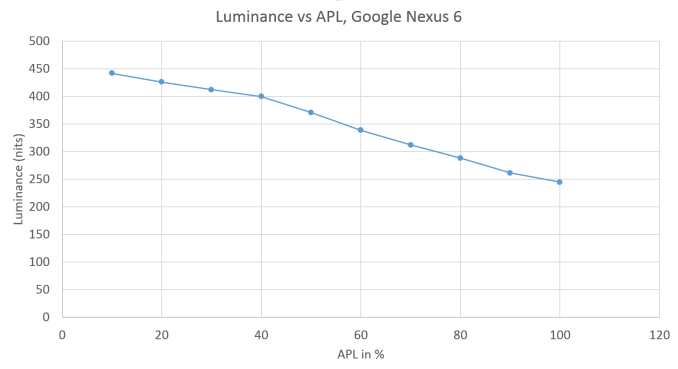
In the case of the Nexus 6, we can clearly see dimishing returns after 40% APL as there is efficiency droop on AMOLED displays that are similar in nature to LED backlights. While now it’s easy to understand why it is that AMOLED can vary in maximum brightness, the question is which brightness is “correct”. While an AMOLED display can technically have a maximum brightness of 750 nits, it’s unlikely that people will look at images effectively equivalent to 1% of the display lit up with white.
In practice, it turns out that with Lollipop and almost all web pages, the average picture level is quite high. It’s increasingly rare to see cases where displayed content is below 50% APL. According to Motorola, 80% APL represents an average APL for light UIs and in light of this, it seems appropriate to test at similarly real-world APLs. Taking a look at some commonly used applications in Lollipop, we see that the APL is regularly at or above even Motorola's 80% figure. I opened some of the applications on my Nexus 6's homescreen to take screenshots of whatever they had open when they came up, and I've tabulated the results below.
| APL in % | |
| Messenger | 86 |
| Calculator | 49 |
| Settings | 84 |
| Calendar | 80 |
| Phone | 89 |
| Reddit Is Fun (Light) | 77 |
| Reddit Is Fun (Dark) | 23 |
| Chrome New Tab | 86 |
| Wikipedia | 83 |
| AnandTech | 52 |
| AnandTech Article | 81 |
| 76 |


As you can see, many of the screens in Android's interface as well as web pages and third party apps have a high APL. There are exceptions, like the Calculator application and any application with a dark theme, but the overall trend is clear. Google's new interface style also means that applications are more likely to adopt interfaces with large amounts of white than in the past.
As a result of this, we test at 100% APL in order to get an idea of perceived brightness. While there may be some need for lower APL testing, it’s important to also consider cases such as OLED aging which will lower peak brightness over time. It's also important to consider that the delta between 80% APL and 100% APL in this case is around 44 nits. This makes for about an 18% delta in brightness, which ends up being around the noticeable difference in most cases. While our testing is subject to change, in the case of brightness we currently do not see much need to dramatically alter our methodology.
Read More ...
Crossbar's Resistive RAM Technology Reaching Commercialisation Stage

I've been following Crossbar for quite some time, but I haven't written anything about the company until now. The company was founded in 2010, headquarters in Santa Clara, California and has secured over $50 million in funding. The company's roots come from the University of Michigan and its Chief Scientist and co-founder, Prof. Wei Lu, is currently an associate professor at the university. The Crossbar team consists of 40-45 members at this point, of which most have extensive backgrounds in semiconductor research and development.
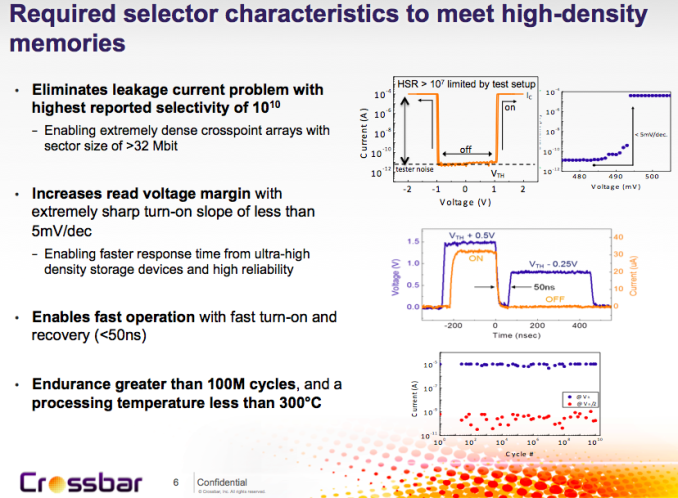
The big benefits RRAM have over NAND are performance and endurance. NAND read latencies are typically in the order of hundreds of microseconds, whereas Crossbar claims latency of as low as 50 nanoseconds for its RRAM design. Endurance in turn can be millions of program/erase cycles, although for the early designs Crossbar is aiming at more conservative ~100K cycles.
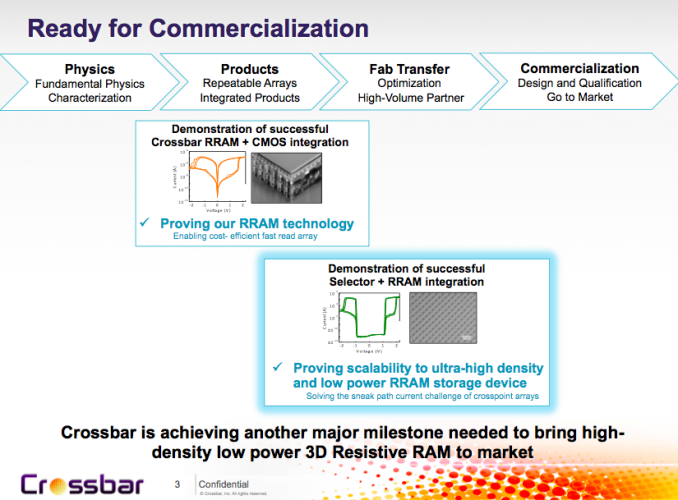
Last week at IEDM Crossbar announced that it is now entering the commercialization stage. In other words, it has already shown a working silicon and it has also proved that the design can be transferred to commercial fab for high volume manufacturing, so the company is now working with the fabs to build final products.
At first Crossbar is aiming at the embedded market and is licensing its technology to ASIC, FPGA and SoC developers with first samples arriving in early 2015, and mass production scheduled for late 2015 or early 2016. Aside from licensing, Crossbar is also developing standalone chips with higher capacity and density, which should enter the market about a year after the embedded RRAM designs (i.e.most likely sometime in 2017).
The beauty of RRAM is that it can be manufactured using a regular CMOS process with only a few modifications. NAND and especially 3D NAND require expensive special tools (for things like high aspect ratio etching), which is why only a handful of companies are making 3D NAND. RRAM in turn can be manufactured by practically any existing fab with very little added cost, which ultimately results in lower prices due to more competition.
Additionally, RRAM doesn't share NAND's lithography issues. As we know, the sole reason why 3D NAND was invented is because planar NAND can't really scale below 15nm without serious endurance and performance considerations. However, RRAM can efficiently scale to 4-5nm without any issues and in fact Crossbar has already demonstrated an 8nm chip that it built in its R&D labs (most likely using multiple patterning). Moreover, RRAM can be stacked vertically to create a 3D crosspoint array for increased density and so far Crossbar is at three layers, but first commercial standalone chips are expected to feature 16 layers and up to 1Tbit capacity.
Obviously, there are still several hurdles to cross before RRAM is ready to challenge NAND, but it's good to hear that there has been significant progress in development and the technology has gained interest from the fab companies. Faster, more durable and cheaper SSDs and other storage devices are a win for everyone and ultimately even 3D NAND is just an interim solution until something better comes around, which may very well be RRAM. I'll be doing a more in-depth article about RRAM technology in the coming months as this article was more of a heads up about the state of RRAM and Crosspoint's recent developments, so stay tuned for a deeper analysis!
Read More ...
NVIDIA 347.09 Beta Drivers Available

I have to be clear, however: NVIDIA's driver numbers can often be something of a mystery, and this is a great example. One look at the full release notes (PDF) and I have to ask: why is this 347.09 instead of 344.80? NVIDIA might know, but I asked and they're basically not telling. The jump in numbering would usually suggest at least some new feature, but if it exists it isn't explicitly listed anywhere. More likely it's something that will come with a future update, but then why bump the number in advance?
I also like how this is part of the "Release 346" branch, but it comes with a 347 major revision (similar to how the Release 343 drivers started with 344 numbering). Of course, you can find 343.xx and 346.xx drivers for Linux, so that at least explains the main branch labeling somewhat.
The main reason for the driver release appears to be getting a Game Ready driver for Metal Gear Solid V: Ground Zeroes, which was released yesterday for PCs. This is also a Game Ready driver for Elite: Dangerous apparently, which might seem a bit odd as Elite: Dangerous was already listed back with the 344.65 update; then again, the game was in early access for Kickstarters before, where now it has officially launched.
Other than being Game Ready for those two titles, the only other changes mentioned are some 3D profile updates, a new profile for Project CARS (apparently for developers and testers, as that game isn't due for release for another three months), and a few miscellaneous bug fixes. We haven't had a chance to do any testing of the new drivers, but NVIDIA didn't mention performance changes so I wouldn't expect much.
I should also note that the AMD Omega Drivers came out almost two weeks back, and I have done some testing of those. We had planned for a launch day article but due to sickness that has not yet been completed. I can report that the Omega drivers appear to be an improvement in performance or at least status quo for all of the games I tested, and a few titles (BioShock Infinite in particular) show a rather large performance increase. We will hopefully have the full write up posted shortly, but if you haven't updated I have found no reason to hold off doing so.
Read More ...
HP Stream 7 Review: A $119 Windows Tablet
Late last month, we published our yearly holiday guide for people interested in buying tablets. We took a look at what we considered to be the best tablets running iOS, Android, and Windows as these have become the three dominant operating systems among tablets. That said, users are likely more familiar with iOS and Android tablets than they are with ones that run Windows, myself included. To get a better feel for the Windows tablet market, particularly the low-cost options, today we're looking at the HP Stream 7. Read on for our full review, and see what you can get for $119.
Read More ...
GIGABYTE X99-Gaming G1 WIFI Motherboard Review
The gaming motherboard range from a manufacturer is one with a lot of focus in terms of design and function due to the increase in gaming related PC sales. On the Haswell-E side of gaming, GIGABYTE is putting forward the X99-Gaming G1 WIFI at the top of its stack, and this is what we are reviewing today.
Read More ...
Best High-End Laptops: Holiday 2014
High-End Laptop Recommendations
Our holiday guides have covered a lot of products so far, and just on the laptop side of things we've looked at budget laptops, Chromebooks, and mainstream offerings – and let's not forget the related Tablets guide, which overlaps with hybrid devices. Today, we wrap up our laptop coverage with the final catch-all category: "high-end" laptops. High-end means different things to different people, and with a price range of $1500 to $3000+ (you can spend more, but we'll try to keep things at least somewhat reasonable) there are a ton of options.
The bird's eye overview is that most people spending this much money on a laptop want a top quality device that also offers excellent performance, and it should have a display and build quality to match. Even with those constraints, however, there's still some wiggle room, and there are frankly a lot of potential options. I can't hope to cover every single one, but if you're wondering what I think are the best laptops of the past year or so, this is my current "Who's Who" list.
Broadly speaking, there are four major categories of high-end laptops. First is your do everything go anywhere laptop that may not offer the absolute fastest performance, but it's also not going to require you to lug around the AC adapter and constantly be on the lookout for power outlets. This is the jack of all trades category, which means office, internet, multimedia, and even moderate gaming are all possible – and again, battery life shouldn't have to suffer in the process. Then of course we have gaming-centric notebooks that will sacrifice battery life in order to give you the best notebook gaming experience possible. Third are the business laptops, which really make up the final two categories. There are general purpose business laptops, and then there are mobile workstations; in many ways the two are similar to the general use and gaming notebooks, as mobile workstations are typically business class laptops but with a workstation class GPU.
I mentioned in the Best $1000 Laptops guide that I get pretty particular about what a laptop needs to include once we hit the $1000 mark, and that applies even more when we're talking about $1500 and up. There's absolutely no reason to skimp on things like memory and SSD storage at this price point, and as far as I'm concerned the use of a merely average (meaning, TN and/or lower resolution) display is a serious mistake as well. But perhaps the best way to illustrate what sort of laptops qualify as great high-end offerings is to get right into our recommendations.
But before we do that, we do need to mention the elephant sitting in the corner: Broadwell. All of the laptops we're looking at in the high-end market come with Intel's Haswell processors, and we know that Broadwell updates will be launching in the near future. Core M (Broadwell-Y, aka BDW-Y) has already launched in a few products, but it's important not to judge "big Broadwell" by the BDW-Y performance – doing so would be akin to judging the quality of Dell's $2000+ laptops by their $500 offerings, or at least thinking the performance of a 50HP car could tell you all that you need to know about a 400HP car. Basically, the extremely limited TDP of BDW-Y makes it difficult to say how standard voltage Broadwell will perform. We could also get into Skylake, and perhaps some of the laptop manufacturers will choose to bypass Broadwell altogether and simply wait for Skylake, but that could be a dangerous waiting game considering Skylake won't appear until 2H'15.
It's not just about Broadwell/Skylake either; several laptops are still using previous generation NVIDIA Kepler GPUs, and while the new GM204 stuff isn't due to be superseded any time soon, quite a few laptops with 700M or GTX 870M are still shipping in the latest configurations from certain OEMs. GTX 970M should be a pretty easy upgrade from GTX 870M, as I'd expect similar thermal requirements, and we've seen several companies do exactly that. The others I'm guessing are waiting for Broadwell before making the switch, although for gaming purposes Broadwell vs. Haswell isn't likely to be a major change. So while we have recommendations today, there will almost certainly be new Broadwell versions in the not too distant future.
All Purpose High-End Laptops

Apple MacBook Pro Retina 15 ($2409)
Let's get this out of the way: I'm not a MacBook or an OS X user; I prefer Windows, thank-you-very-much (but I have nothing against people who don't). That said, if you want a laptop that gets basically every aspect right, Apple is the company to beat and the MacBook Pro Retina 15 shows exactly why that's the case. It starts with the marquee feature, a high resolution 2880x1800 IPS display – and yes, Apple is one of the few companies to eschew the cost-saving decision to move to 16:9 aspect ratio displays (at least on the MacBook line; the latest iMacs are 16:9). The display looks great, and what's more, it comes with very good color accuracy out of the box. That alone puts it above the vast majority of competing laptops, but it doesn't end there.
Apple was one of the first companies to go "all-in" on SSD storage, starting with the MacBook Air and not long afterwards doing the same for the MacBook Pro. There are size benefits to using SSDs of course, but performance – and more importantly, long-term performance over years of use – is the biggest draw, as there's no need to defragment your drive and random access speeds are orders of magnitude faster than a conventional hard drive. The latest MacBook Pro laptops have moved to PCIe based storage, further improving performance. The processor is top of the line as well, with the Crystal Well i7-4750HQ powering the base model, delivering the fastest integrated graphics that Intel offers. Of course, the model we're recommending comes with the i7-4870HQ (2.5-3.7GHz), and for graphics duties it also adds the GeForce GT 750M (which is due for an upgrade).
Rounding out the performance aspects, you also get 3x3 802.11ac WiFi (no other laptop I'm aware of supports three 11ac streams) and 16GB RAM, with battery life upwards of eight hours for realistic use. Now on top of that add the excellent build quality and aesthetics, and then throw in a touchpad that's unmatched in the PC space as far as I've seen. About the only knock against the MacBook Pro Retina 15 (or 13 if you don't need the added performance of a quad-core CPU and Iris Pro Graphics / GT 750M) is that the price is higher than the competition, but there is not a single Windows laptop that can beat Apple in every single area. The one caveat is that Apple's focus remains OS X, and while you can install Windows on a MacBook you are somewhat limited on graphics driver support and battery life takes a hit. Still, it's no surprise there are plenty of people that buy a MacBook Retina and then run Windows on it. A Broadwell (or Skylake) update is inevitable, but until that happens this is the all-around laptop to beat.
The MacBook Pro Retina 13 is a decent option as well, with the smaller size limiting some of the performance aspects. If you need more than a MacBook Air but don't want the size of the rMBP15, the rMBP13 is a viable choice. You'll get a dual-core processor, and given the difficulty of upgrading the storage I'd suggest going for the 512GB model for just under $1800, though the 256GB model at around $1500 isn't bad. The i5-4308U processor comes with Intel's Iris Graphics, but not the embedded DRAM so it's not quite as potent.
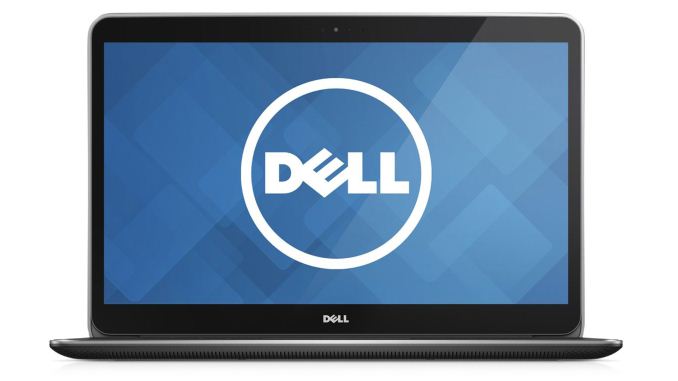
Dell XPS 15 9530 ($2002)
I just said that you couldn't beat Apple's MBP Retina 15 in every area, but that doesn't mean you can't come awfully close. Dell's XPS 15 is arguably the best alternative, and it actually exceeds Apple's offering in a few areas, though it also falls short in others. Starting with the good, the resolution is 3200x1800 and you get a touchscreen as a bonus. For the $2000 model we're recommending, you also get 512GB SSD storage and a large battery that results in good battery life. Of course $2000 means you're paying $400 less than the rMBP15, which is no small savings, and you still get a great looking laptop with a GT 750M graphics chip.
So where does Dell's XPS 15 fall short? There are really only a few potential concerns. First, the color accuracy of the display doesn't match the rMBP without doing calibration, and that's not something everyone is able to do as it requires another $150+ in hardware and software. Second, there are no Thunderbolt ports, which may or may not matter – most of the people I know that use Thunderbolt peripherals are also using Mac hardware.
Finally, in terms of performance, the i7-4712HQ processor is reasonably fast, but Apple's base model includes the i7-4750HQ which is slightly faster and also has better processor graphics; the upgraded rMBP15 models meanwhile further distance themselves in CPU performance. I think part of the reason for Apple's advantage in CPU performance is that they have a superior cooling solution – in our review, the XPS 15 did get quite warm, and we had occasional throttling issues that required a reboot to restore performance levels. Apple also uses a PCIe-based SSD compared to a SATA-based design in the XPS 15, and they have a 3x3 802.11ac adapter compared to Dell's 2x2 solution; it's not going to be a huge difference for most users, but Apple does still lead in these areas.
Overall, the XPS 15 is a great laptop, and it can handle just about everything you might want to throw at it. If you generally prefer running Windows instead of OS X, the price makes the XPS 15 a very compelling alternative. Again, the biggest issue now is more a question of timing, as the current XPS 15 is over a year old and is thus due for some upgrades. Note also that there are less expensive XPS 15 models with 1080p displays (pretty sure they're TN, though I couldn't confirm), but they tend to compromise other areas as well (e.g. less battery capacity and only a caching SSD along with a conventional hard drive for storage). $1648 isn't a bad price for what you get, but the extras that come with the higher spec model are certainly worth the price increase in my book.

Samsung ATIV Book 9 Plus ($1500)
If you're looking for other alternatives, the Samsung ATIV Book 9 Plus is basically a competitor to the rMBP13. For $1500 with the current $300 sale, you get an i7-4500U, 8GB RAM, 256GB storage, and a beautiful 3200x1800 QHD+ touchscreen display. The overall design and aesthetics of the Book 9 Plus are also great, and you get about seven hours of reasonable use battery life in a three pound Ultrabook package. There are less expensive models that still come with the stellar QHD PLS display, and the current sale knocks $300 off the price, but the base model only comes with a rather limiting 4GB RAM and 128GB SSD, which is why I held off listing this in the mainstream guide. Note that out-of-box color accuracy is again average, so if color accuracy is important you'll need to calibrate the display yourself.
High-End Gaming Laptops

MSI GT72 Dominator Pro ($3200)
If you want the flat-out best gaming notebook currently available (in my opinion of course), look no further than MSI's new GT72 Dominator Pro. There are several GT72 models available, including those with GTX 970M graphics, but for a no-compromise notebook you'll really want to get GTX 980M in the GT72 Dominator Pro-445. What's special about that model (as well as the even more expensive Pro-444) is that it includes an IPS display, fixing pretty much the only real complaint I had with the GT72 we reviewed. Other impressive features include an i7-4860HQ processor, 32GB RAM, 512GB (4x128GB RAID) SSD storage, 1TB HDD storage, and an excellent cooling solution. Ironically, one of the few classes of notebook that could legitimately drive HiDPI displays in games is not yet available with a HiDPI option – 17.3" notebooks are pretty niche these days and unfortunately I haven't seen any with more than a 1920x1080 display.
The MSI GT72 also manages to deliver good battery life, thanks to the ability to disable the GTX 980M, reboot, and run on the internal graphics. It's perhaps not always the ideal way of doing things, but most notebook gamers don't worry too much about battery life regardless and it's always nice to have the option if needed. Aesthetically, I think the GT72 also wins out over the competition from Alienware, ASUS, Clevo, and Toshiba (not to mention the previous generation MSI GT60/GT70); obviously aesthetics are mostly personal preference, so feel free to disagree. The Alienware 17 of course is still in need of an update to 970M/980M, so until that happens I'd pass on the current GTX 860M/870M/880M models.
If you're looking for other options, I'd place the ASUS ROG G751JY next in line for top gaming notebook. ASUS has a good design with ample cooling, and the price is better than the GT72. $2824 right now will get you the same i7-4860HQ, 32GB RAM, 512GB SSD (PCIe instead of RAID SATA M.2), 1TB HDD, and an IPS 1080p display as the GT72. My only real complaint against the ASUS G751JY is that I prefer the look of the MSI GT72. Then again, the price difference (for models with an IPS panel) is pretty significant, at more than $300, which means for a lot of people the ASUS notebook is going to be a better bargain. In that case, you should look at the lower spec G751JY, which drops to 256GB of SSD storage and 24GB RAM with an i7-4710HQ for $2278 but otherwise has the same specs as the more expensive model. Bang for the buck, that's the best way to get a GTX 980M right now.

Gigabyte's new P35Xv3-CF4 is so new that I haven't seen any reviews yet, but it's very intriguing and could potentially top the list if it manages to stay cool enough. It has a 15.6" 2880x1620 display, which means it's likely the same panel as the MSI GS60 we looked at. The chassis is quite thin, especially when you factor in the presence of a GTX 980M GPU. It measures just 20.9mm thick (0.82") and weighs 2.2kg (4.84 lbs.), which is about half the size of the GT72. You can even get two mSATA SSDs, a 2.5" HDD, and an optical drive with the P35Xv3. Pricing is a bit higher and I'm a bit concerned about cooling a 980M in such a slim chassis, but assuming everything works properly this is a pretty awesome looking gaming notebook.
If you're simply looking for the least expensive option with a GTX 980M, however, that crown currently belongs to Clevo (with the MSI GT70 coming close, depending on specs). The Clevo P650SG is a 15.6" chassis that can be found with 3K and 4K displays at some boutiques, but $1859 will get you a 1080p IPS display which is a great starting point. To get the price that low there are other compromises, like a 128GB SSD instead of a larger model and "only" 16GB RAM (which is still plenty for most users). I haven't had a chance to personally test the P650SG so I can't say for certain whether it's a noteworthy improvement over the previous generation of Clevo notebooks (P150SM/P157SM and P170SM/P177SM); that said, the design has been updated and support for optical drives was dropped in the process, and at least in images and on paper the new Clevo notebooks look decent.
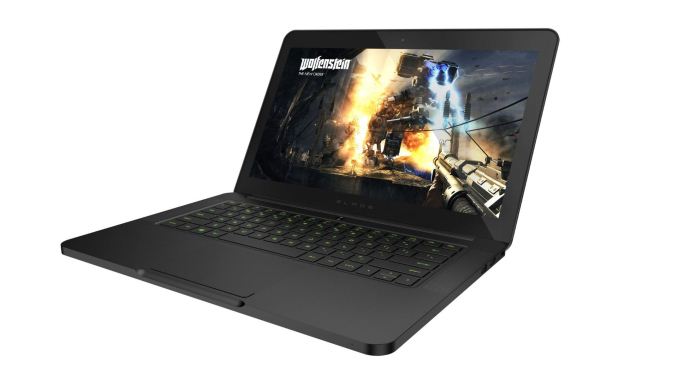
There are a few other gaming notebook potentials worth mentioning, though I'm not going to explicitly recommend any of these right now. First, the Razer Blade 14 has a lot of great elements and strikes a nice balance of size and performance. It's sort of like the gaming equivalent of a MacBook Pro Retina, though the gaming slant does change the looks quite a bit and battery life takes a hit in the process. The biggest issue with the Razer Blade 14 (and the Razer Blade Pro for that matter, which tops out at a GTX 860M) is that the Blade hasn't been updated to use the new GTX 970M yet. And really, that's the only thing I want from the Blade right now, as otherwise it's an excellent laptop. It has a great display and excellent build quality, so it's pretty much the souped-up "Men in Black" take on the rMBP and XPS 15. Gigabyte's AUROS X3 is in a similar situation: GTX 870M with a $2100 price tag make it difficult to recommend for pure gaming, though the 14" 3200x1800 display and 512GB RAID SSD storage at least is good; give me 970M and I'm sold.
There are even more powerful gaming notebooks out there, but SLI/CrossFire notebooks generally compromise on the "notebook" aspect and tend to be more "luggable" computers. There are really only three companies doing SLI notebooks these days, Clevo and Alienware go after the top with 980M SLI (note that Sager is really just Clevo, but with modified model names), and Gigabyte has a few lower tier SLI setups.
Starting with Alienware, the AW18 is now the only SLI option, and as with the AW17 it hasn't been updated with (official) support for GTX 970M/980M yet, so I'd hold off until that happens if you're interested in an Alienware SLI notebook. Clevo on the other hand has several variations of SLI notebooks. The P370SM-A/P375SM-A/P377SM-A models support mobile Haswell CPUs (up to i7-4940MX) and SLI GTX 980M, while the truly monstrous P570WM3 supports desktop LGA2011 CPUs (up to i7-4960X) with SLI 980M. We're due for an update of the SLI models, at least I think we are, so it might be best to wait a bit longer at this point. There are also new Clevo P7xxZM models coming, apparently in both 15.6" and 17.3" configurations, which support desktop Haswell CPUs up to the i7-4790K and a single GPU (up to GTX 980M), but I don't know of any companies currently shipping those.

On the lower tier SLI front, Gigabyte has their recently launched AUROS X7Pro that supports SLI 970M, which should deliver performance clearly ahead of a single 980M configuration (provided SLI scales as expected, which isn't always the case). Around $2500 will get you i7-4860HQ, 16GB RAM, 2x256GB SSDs, and a 1080p IPS display, so it certainly checks all the right performance boxes. Battery life is likely a weak point, but otherwise it's a sleek looking design. The older Gigabyte AUROS X7v2-CF1 is also available, with dual GTX 860M. The problem is that GTX 860M SLI is going to deliver about the same level of performance as a single GTX 980M, there's not really a price advantage for the AUROS over the GT72, and you still have to deal with the occasional issues of running two GPUs instead of a single GPU. It's still a nice looking laptop with good specs, but unless there's a pricing advantage I would always recommend taking a single GPU over two GPUs that may or may not be able to equal the single GPU.
High-End Business Laptops
It can be hard to find well equipped business laptops that don't cost too much, which almost inherently makes all good business notebooks "high-end" offerings. By the time you outfit a business class laptop with 8GB RAM and a 256GB SSD (which is pretty much my baseline recommendation for any serious laptop), $1500 is a reasonable starting point, and other options can quickly scale the price to $2000 or more. As far as other features are concerned, really the only thing I think most business users need is a good display, good build quality, and good battery life – I've supported executives with laptops in the past and pure performance or the presence of a discrete GPU is almost never a factor.
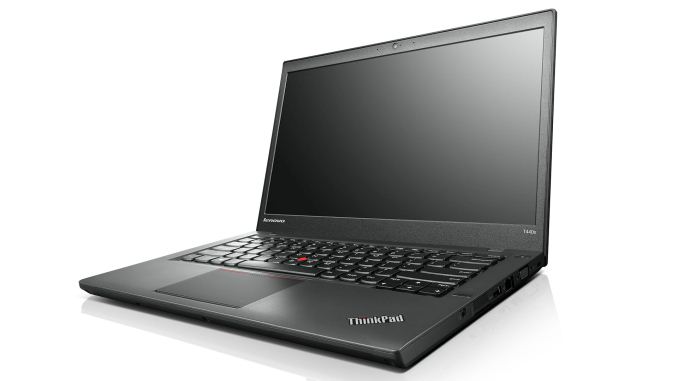
Lenovo ThinkPad T440s ($1387)
ThinkPads in my mind are the quintessential business laptop. They may not look particularly sexy, and if you're after vibrant colors there are very few options, but the T-series in particular has a well-earned reputation of being built to last. I've seen ThinkPads from the early Core Duo days that are still running strong and the owners continue using them. The T440s is the latest in the line of T-series laptops and it's due for replacement as it's more than a year old, but it will be several months before we see any Broadwell versions.
The ThinkPad T440s is a great business laptop with excellent battery life – the 3-cell battery lasts over seven hours while the upgraded 6-cell high capacity option doubles that to more than 14 hours of mobility. While there are less expensive models, they often compromise on storage and memory so I recommend looking at the $1749 (on sale for under $1400) model. That gets you a 14" 1080p IPS display (note that certain models have a 1600x900 TN display), 8GB RAM, 256GB SSD, and Core i7-4600U processor so you’ve got everything most business users could want. The T440s is thinner than previous T-series offerings, measuring 0.81" thick and weighing 3.5 pounds with the 3-cell battery. It’s not the fastest, thinnest, or lightest business laptop in the world, and as with most business offerings the price is a bit higher than I'd like, but overall this is a great laptop.
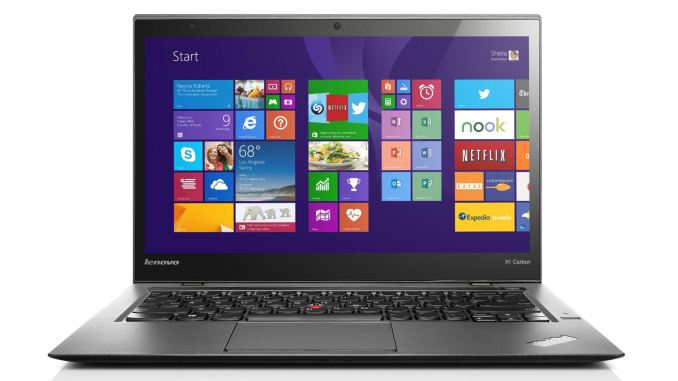
Lenovo ThinkPad X1 Carbon ($1775)
If you're after something sleeker than the T440s, the ThinkPad X1 Carbon gets my recommendation. Performance is going to be similar to the above T440s, as the model I recommend basically has the same components: i7-4600U, 8GB RAM, 256GB SSD. The main advantage of the X1 Carbon is that it has a touchscreen 2560x1440 IPS display, plus it's thinner and lighter than the T440s and the standard battery is good for up to 9 hours of mobility. Considering the upgrade in display quality, the current price of $1775 is fairly reasonable, though I'd pass on the less expensive models that ship with 4GB RAM and a 128GB SSD.
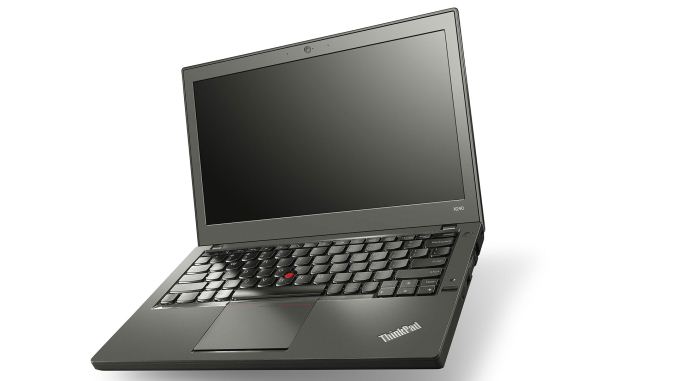
Lenovo ThinkPad X240 ($1587-$1866)
Another option is for those that want gobs of battery life – without having to carry around a sheet battery. Lenovo's X240 starts at a bargain price of around $850, but the trimmings are decidedly lacking for the base model. Add the 1080p IPS upgrade, a faster Core i5 or Core i7 processor, 8GB RAM, 256GB SSD, 801.11ac dual band WiFi, and the 6-cell battery upgrade and you're looking at $1500-$1900. The display is slightly smaller than the X1 Carbon (12.5" instead of 14"), but the real selling point of the X240 is the internal 3-cell 24Wh battery with a swappable 3-cell 24Wh battery, or more importantly the 6-cell 72Wh option. That gives a combined 96Wh of battery capacity, delivering over 18 hours of mobility. Granted, the 6-cell battery protrudes quite a bit from the bottom of the chassis, but I still think it's better than a sheet battery, and build quality on the X240 is also great.
In terms of other options for business laptops, the consumer class notebooks mentioned above are still viable – MacBook Pro Retina, Dell XPS, etc. are all solid offerings that could work in a business environment (unless there's a need for specific business features). Dell, HP, and others also make competing business laptops, but while I complained about Lenovo's prices being a bit higher than I'd like, the fact is the alternatives are generally no better – and they're often worse. Still, there are some decent options. HP's Folio 1040xt G1 for instance comes with the i7-4650U, which means it has HD 5000 Graphics instead of HD 4400. I'm not sure that really matters much for a business users, but the 14" Ultrabook also comes with a 1080p IPS display, 8GB RAM, and 256GB SSD. The price however is $1939, so it's about the same as (slightly more than) X1 Carbon.
Dell's Latitude line requires you to buy from the 5000 or 7000 series if you want similar specs to the ThinkPads listed above, and battery life tends to be somewhat lower. Right now, however, there are some good sales running on Dell's site – the Latitude E5450 for instance is $1259 (normally $1749) with 8GB RAM, 256GB SSD, 1080p (IPS I think) LCD, and an i5-4310U; it's a bit chunky at nearly four pounds, but overall the price is very good for the specs. The Latitude E7440 meanwhile upgrades some of the materials and is built to be a bit more durable while being lighter, though it still weighs 3.6 pounds. The price however is a rather large jump considering otherwise similar specs: $1685 (on sale from $2404). If you're after more performance and don't care as much about weight, the Latitude E6540 is an older design (similar to the earlier XPS 15 models in aesthetics) that boasts higher performance components, and the current price is $1718 (normally $2455). It comes with a standard voltage i7-4610M, 8GB RAM, 256GB SSD, 15.6" 1080p LCD (good quality TN, but still TN), and a large 97Wh battery that protrudes from the back; it also has Radeon HD 8790M graphics. Without the sales, I'd look elsewhere, but Dell often has some form of sale so they're definitely worth a look.
Mobile Workstations
Before we get started with our final category, let's make things clear: when we talk about a mobile workstation, the first requirement is that the laptop/notebook has some form of professional graphics – basically it needs an NVIDIA Quadro an AMD FirePro GPU. That alone is enough to technically qualify as a mobile workstation, but when I hear the term "workstation" I'm generally going to think of much higher than baseline performance. So while Dell's Precision M3800 qualifies, the Quadro K1100M is a bit weak – and the same holds for the HP ZBook 14 with its AMD FirePro M4100. The M3800 incidentally is literally the same laptop as the XPS 15, with about a $200 price premium and the Quadro K1100M instead of the GeForce GT 750M. Anyway, if you want a lighter "mobile workstation" then those are basically the two best options, but I'm going to be looking at more potent GPUs. The bare minimum would be the equivalent of the GTX class, so K2100M/K3000M or above; on the AMD side, I'm looking for FirePro M5100/M6000 or above.


Dell Precision M6800 ($4185)
HP ZBook 17 G2 ($4478)
For maximum performance from a mobile workstation, you're going to want the fastest GPU possible, and right now that's the Quadro K5100M from NVIDIA. It's still a Kepler-based solution, so we'll probably see Maxwell GM204 derived offerings in the next six months or less, but until that happens this is as good as it gets for notebooks. There are currently three options for getting a K5100M: the Dell Precision M6800, the HP ZBook 17, or one of Clevo's notebooks. I'll admit that I'm biased against Clevo for this market, simply because I don't feel they're built as well or look as nice as the ZBook or Precision offerings, but they're definitely an option.
Between the HP and Dell options, really it's basically a toss-up in most areas. The ZBook 17 G2 is a newer design than the M6800 and HP's DreamColor display is an option (that adds $650 to the price compared to the standard IPS 1080p display), but both notebooks are very clearly business offerings and they don't really rock the boat in terms of aesthetics. Both are available in fully configurable models, and that's what you'll need to choose in order to get the K5100M. For Clevo, there are quite a few vendors that stock Clevo notebooks, but not all of them support the K5100M in all possible models; I've deferred to checking prices on Eurocom for this article. As we're looking at top performance, for price comparisons I went with a close to maximum performance setup: i7-4910MQ, Quadro K5100M, 32GB RAM, 512GB SSD, a 17.3" 1920x1080 IPS display, and 2x2 802.11ac WiFi.
Given those components, pricing puts Dell's Precision M6800 in the lead with a total cost of $4185 (on sale from a "normal" price of $5979). Second place in pricing goes to HP, where the 30% discount code on the configurable HP ZBook 17 G2 brings the total to $4478 (from the normal price of $6397, though HP's CTO options always seem to have a discount running). Looking at Clevo builds, they generally end up in the region of $4600-$4800, depending on which model you're using. Note that with the DreamColor display, HP ends up at $4933, but they're the only ones offering a truly high-end panel that I can see.
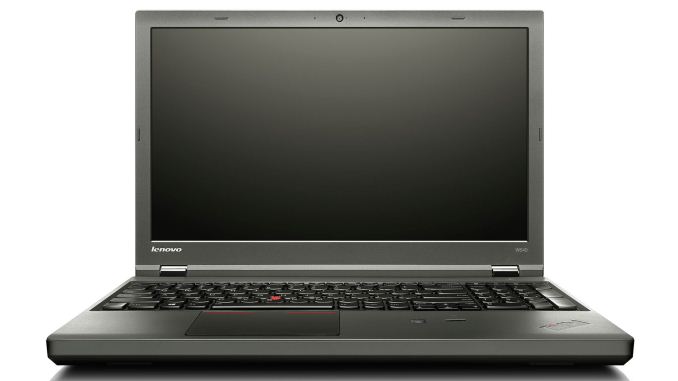


Lenovo ThinkPad W540 ($2258)
Dell Precision M4800 ($2337)
HP ZBook 15 G2 ($2615)
If you don't need absolute maximum performance from a mobile workstation and are willing to step down to a more moderate GPU, a few other options become available. Lenovo's ThinkPad W540 is a good option, and with an i7-4700MQ, Quadro K2100M, 2x8GB RAM, 256GB SSD, 2880x1620 IPS display, and 2x2 802.11ac WiFi it carries a price tag of $2258 (currently on sale from $2509). Dell's Precision M4800 with a similar configuration (but with a 3200x1800 IPS display and i7-4710MQ) costs $2337 (on sale from $3338). The HP ZBook 15 G2 has similar specs to the Dell (QHD+ and i7-4710MQ) and costs $2615 (with the 32% discount code). The Dell and HP workstations can also be equipped with AMD's competing FirePro M5100 and save about $250 in the process, and in SPECviewperf 12 the M5100 is almost always faster than the K2100M – though the difference is far less pronounced in SPECviewperf 11. Most workstation users seem to prefer Quadro over FirePro in my experience, but if you're not locked into NVIDIA (e.g. CUDA) AMD often offers more bang for the buck.
As for Clevo options, they're a bit more flexible as you can still get a 15.6" display with up to the Quadro K5100M; all of the big OEMs top out at K2100M, which is about one third the processing power and half the bandwidth of the K5100M. With similar components (i7-4700MQ, 2x8GB RAM, Quadro K2100M, 240GB SSD, 802.11ac, and a 1920x1080 display), the Eurocom Racer 3W will set you back $2039 – so it's the least expensive "moderate" mobile workstation, but it's also missing a 3K display option. Perhaps more interesting is that you can get the Quadro K3100M, which has twice the memory bandwidth and about 25% more compute performance than the K2100M, and the price is still only $2223. K4100M adds another $640 if you need it, while K5100M would bump the total to $3691 – basically, the K5100M would cost as much as the remainder of the notebook. For those looking at something more than the K2100M but not perhaps a K5100M, however, Clevo (along with some MSI builds) is a decent option.
Closing Thoughts
Wrapping things up, again the pending launch of Intel's Broadwell processors needs to be mentioned. It will require a new platform, however, so it could take several months before we see retail availability and there's likely to be at least a moderate price premium at launch. Broadwell may also improve battery life and efficiency over Haswell, but there's only so far a more efficient CPU can take you when you're dealing with all of the other components that use power. There's rarely any harm in waiting, though there are still quite a few sales going on that may not be around post-holidays, so if you're not in a hurry I'd suggest waiting for at least CES to pass to get an idea of when Broadwell laptops should ship.
Basically, what it comes down to is this: when you're looking at spending $2000 or more on a high quality laptop, it's often best to buy right after new technology is released rather than just before the updates come out. Apple for example doesn't generally drop much in pricing over time, so what you'd pay today for a MacBook Pro Retina 15 isn't all that different from what people were paying at launch; it's just one year later with a few minor speed increases due to component upgrades. When the next generation of laptops with Broadwell launch in 2015, you should have the choice of either a less expensive Haswell model or the new Broadwell options, which makes far more sense than buying right before the updated platform is released. That doesn't mean you absolutely shouldn't upgrade right now, as there's always something new around the corner, but right now is likely a less opportune time for upgrading than we've seen in the past.
Read More ...
AnandTech Acquired By Purch
Over the past several years AnandTech has grown to be much more than just a PC hardware review site. In fact, we consider ourselves to be just as much about the new mobile world as we do about the old PC world. We leveraged our understanding of component and system architecture in bringing a deeper, more analytical look to mobile silicon and devices. As we continued to invest in our mobile coverage and expertise, we found that readers, mobile component and device makers responded quite well to our approach.
AnandTech’s focus grew, but we quickly ran into a bottleneck when it came time to monetize that mobile content. Our mobile content did a great job of helping to grow the site (as well as bring new eyeballs to our traditional PC coverage as well). While we had no issues competing with larger corporate owned sites on the content front, when it came to advertising we were at a disadvantage. Our advantage in quality allowed us to make progress, but ultimately it became a numbers game. The larger corporate owned sites could show up with a network of traffic, substantially larger than what AnandTech could deliver, and land more lucrative advertising deals than we were able to. They could then in turn fund a larger editorial operation and the cycle continues.
Read More ...
HP Stream 11 Review: A New Take On Low Cost Computing
The low cost Windows laptop world has been a rather frustrating experience over the last several years. Manufacturers created big, bulky designs packed with low resolution TN displays and some of the slowest components they could dig up. We are still at a point where the average consumer thinks more is better, so low cost laptops would always have low performance mechanical hard drives. If you wanted a traditional clamshell laptop running Windows, it was just accepted that it would be large, heavy, have poor battery life, and generally come with an unattractive design. HP has the task of changing our perception of what a low cost Windows laptop can be, but is the Stream 11 enough or does it simply bring back memories of past netbooks? Read on for the full review.
Read More ...
Holiday Guides 2014: COTS NAS Units
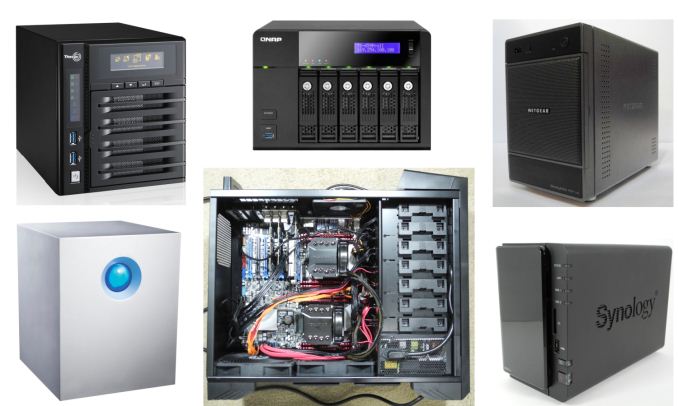
Unlike, say, the GPU market, the COTS NAS market can't be simply delineated based on price and performance. At the basic level, the only aspect that is guaranteed is the fact that the price of a NAS increases with the number of bays in it. Any consumer in the market for a NAS needs to consider the following aspects before choosing a budget:
- Amount of storage needed (number of bays)
- Intended use-case
- Business-oriented or home / multimedia-focused
- Expected number of simultaneous clients
- Downtime tolerance
- Required processing power (both file-serving and tangentially related tasks)
- Value of invested time (in the case where there is a toss-up between the COTS and DIY routes)
- Mobile and native NAS applications ecosystem
We have evaluated a large number of NAS units (with different bay-counts) over the last couple of years. The lineups mentioned below (in alphabetical order) are the ones that we are comfortable recommending for purchase after putting a few of their members through long-term testing.
- Asustor Storage Units
- Lenovo i- and p- Series
- Netgear ReadyNAS 300, 500 and 700 Series
- QNAP Turbo NAS Units
- Seagate NAS and NAS Pro Units
- Synology DiskStation and RackStation Series
- Western Digital My Cloud EX Series
Even though two-bay NAS units are a good fit for the average consumer, the typical AnandTech reader is probably looking at units with four or more bays. With this in mind (and the reviews that we have published before), the rest of this guide will focus only on four and eight-bay diskless units. Another point to note is that we are not considering the multitude of offerings that come with Windows Storage Server or some similar flavor. Only products based on custom OSes are being considered in the guide.
Option 1: Lenovo ix4-300d [ $210, Review ]
Despite being released almost two years back, Lenovo continues to keep the firmware updates flowing (with the latest one addressing vulnerabilities and improving the UI released earlier this month). One of the updates also fixed our main gripe in our original review - the unit's shares disappearing and hardware locking up after a few weeks in operation, with a power cycle being the only way out. I have been running the unit without reboots since June 2014 and am happy to say that the unit is now fit to enter our recommendation list.

The list of reasons to choose this are below. If any of these don't apply, feel free to move on to the other options.
- The budget is tight
- Downtime can be tolerated (i.e, no hot-swap capabilities)
- Limited memory (512 MB) is not an issue (i.e, no plans to run hungry apps)
- Limited native app selection and a barebones mobile app are not issues
On the plus side, the ix4-300d has two gigabit links and also supports 802.3ad dynamic link aggregation. The ~$200 street price makes it an absolute steal.
Option 2: QNAP TS-451 [ $466, Review ]
Option 3: QNAP TS-853 Pro [ $1236 - 8GB Version ; $986 - 2GB Version ]
The QNAP TS-451 and TS-853 Pro are perfect choices for power users in a home scenario with multimedia-heavy workloads (in terms of streaming videos to various devices with different transcoding requirements). The current Newegg listing for the TS-451 includes 4 GB of DRAM compatible with the TS-451. Augmenting the internal memory of the unit can make it fit to run a virtual machine using QNAP's Virtualization Station package. The TS-451 is perfect for users expecting 1 - 5 simultaneous video streaming clients connected to it. For those wanting to experiment with multiple simultaneous virtual machines / requiring more number of bays, the TS-853 Pro is an excellent, albeit, much costlier choice. Our review of the TS-853 Pro should go up before Christmas. Obviously, since we are recommending the unit here, we didn't find any showstopper issues while evaluating it. The 2 GB version can't run virtual machines. The 8 GB version is the one to choose if you are planning on running some VDI applications.

The mobile and native NAS applications ecosystem of QNAP is one of the best in the market. Both Synology and QNAP are on par with respect to this aspect, and the competition between them has turned out to be very good for the consumers. The main reasons to choose a unit in the the TS-x51 or the TS-x53 Pro series are listed below
- The expected use-case is multimedia-heavy, with extensive streaming and transcoding requirements
- The mobile applications need to be top-notch
- There is a need to retire a physical machine (by converting it into a virtual machine running inside the NAS)
Option 4: Synology DS415+ [ $600, Review ]
Option 5: Synology DS1815+ [ $1050, Review ]
Both Synology and QNAP have excellent mobile apps and third-party apps for their operating systems. Though QNAP has some nifty differentiating features such as the ability to run virtual machines using Virtualization Station, Synology wins out on core features for the business users. In particular, if iSCSI support is important, the options provided by Synology are simply unparalleled in the sub-$2000 COTS NAS market space.

The performance benefits (particularly in terms of latency) provided by Rangeley over Bay Trail, coupled with true hardware acceleration for encrypted shared folders make the DS415+ and DS1815+ easy to recommend for business users. Simply put, if you run a SOHO / SMB and need a fast and reliable NAS which excels at its core task of handling storage functions, the Rangeley-based Synology units are the best fit.
Honorable Mentions:
Home users looking for a single point of contact for both the NAS and the hard drives can opt for the WD Red-equipped My Cloud EX4. Recent firmware updates have improved RAID-5 performance. Similarly, SOHO / SMB users with similar 'single point of contact' requirements can opt for the Seagate NAS and NAS Pro units.
If disaster-resistance is needed, there is no alternative to the ioSafe units. The ioSafe 1513+ is fit for business users, while the ioSafe 214 is good for home users. Since both units run Synology DSM, the overall experience is great.
Except for the Netgear ReadyNAS units, all others use EXT3 / EXT4 filesystem for the RAID volumes. Netgear is hoping to stand out in the crowd with the use of btrfs. We did evaluate the RN312 (2-bay Atom-based unit) and the RN716X (6-bay Xeon-based with 10GBASE-T capabilities) last year, but haven't had the chance to put them through long term testing yet. Other than the fact that I would like the new approach to gather some more field reports, I am very impressed with what Netgear is able to provide with the new systems: snapshotting with virtually zero overhead for protection against accidental deletion and data scrubbing / bit-rot protection with minimal overhead. I would personally be wary of trusting a btrfs-enabled ReadyNAS unit with the only copy of any data, but the benefits of ReadyNAS OS 6.x do make a compelling case for testing out.
A look at a couple of build options for DIY NAS units will be published next week.
Read More ...
T-Mobile Announces Uncarrier 8.0: Data Stash

The big feature being introduced with Uncarrier 8.0 is called Data Stash. As you know, when you pay for a certain amount of data from your cellular carrier, that data bucket is only good for your monthly billing cycle. If you have 3GB remaining at the end of your cycle, that data is lost when your next cycle begins. Data Stash allows users to keep their high speed data that they have unused at the end of the month, which allows them to have a greater amount of high speed data for future months. This is similar to how some prepaid carriers have operated for many years by letting users carry their minutes over to later months. Users should be aware that data will only remain valid for a year, but because it is continually rolling over every month this should not be much of an issue except for users who hope to save up in order to turn their LTE service into their home internet.
Legere has also stated that new customers will be given 10GB in their Data Stash for free. Later on in the interview Legere is now discussed various topics, including T-Mobile's network expansion, 15 MHz FDD-LTE, and subscriber numbers.
Read More ...
ARM Challenging Intel in the Server Market: An Overview
Calxeda is no more, but many ARM licensees are preparing to storm the server market. Do they have a have fighting chance? Is the server ARMada capable of competing with the mighty Xeon fleet? We present our first overview and analyses of all the ARM server SoCs that are currently available or will be soon.
Read More ...
Best SSDs: Holiday 2014

Similar to what we have done before, I will be splitting the recommendations into a few different categories specified by form factor and performance. As always, the listed prices are accurate at the time of publishing, but given the dynamic nature and regional variation of SSD pricing, it's impossible for us to guarantee that the prices will remain accurate. Hence this article merely lists the models that you should be looking at and the final decision should be done based on the prices at that time.
Enthusiasts & Professionals: Samsung SSD 850 Pro & SanDisk Extreme Pro
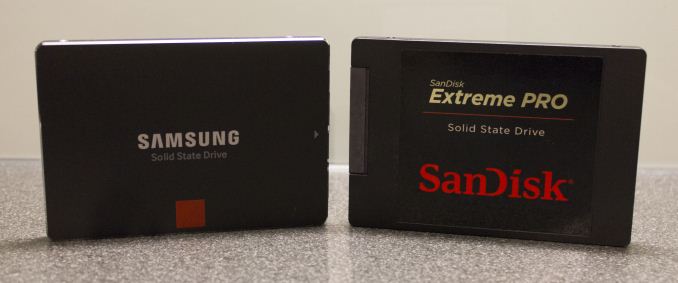
My recommendations for heavy users are the same as they were five months ago. The pack is still led by Samsung's 850 Pro, while SanDisk's Extreme Pro is a very close competitor. Both come with a 10-year warranty and the only substantial difference between the two is that the 850 Pro supports hardware-accelerated encryption in the form of TCG Opal 2.0 and IEEE-1667 (eDrive) standards, which is a crucial feature for users who handle sensitive data (or just want to protect their data in general).
| Capacity | 120/128GB | 240/256GB | 480/512GB | 960/1024GB |
| Samsung SSD 850 Pro | $104 ($0.81/GB) | $175 ($0.68/GB) | $340 ($0.66/GB) | $610 ($0.60/GB) |
| SanDisk Extreme Pro | - | $130 ($0.54/GB) | $270 ($0.56/GB) | $500 ($0.52/GB) |
The 850 Pro is also generally a bit faster than the Extreme Pro, so given equal pricing the 850 Pro is my number one pick. However, in 1TB-class the 850 Pro currently carries nearly $100 premium and hence I'd recommend the Extreme Pro instead as the premium isn't justified (unless hardware encryption is a must). Amazon also has a major sale going on the SanDisk Extreme Pro right now, so as long as that's in effect it's a much better bargain.
Mainstream: Crucial MX100, SanDisk Ultra II & OCZ ARC 100

In July the MX100 was the king of the value market, but since then it has faced serious competition from SanDisk and OCZ. As I've said before, SSDs have matured to a point where any modern SSD is good enough for typical client workloads, which is why price is the dominating factor in the mainstream space. The MX100, Ultra II and ARC 100 all excel in cost efficiency and are currently available at less than 50 cents per gigabyte.
| Capacity | 120/128GB | 240/256GB | 480/512GB | 960GB |
| Crucial MX100 | $62 ($0.48/GB) | $110 ($0.43/GB) | $200 ($0.39/GB) | - |
| SanDisk Ultra II | $70 ($0.58/GB) | $110 ($0.46/GB) | $202 ($0.42/GB) | $400 ($0.42) |
| OCZ ARC 100 | $70 ($0.58/GB) | $100 ($0.42/GB) | $210 ($0.44/GB) | - |
I should note that the ARC 100 doesn't support low-power states, which reduces its power efficiency and thus the Ultra II and MX100 are better picks for laptop users as they'll yield longer battery life. However, in terms of performance, the ARC 100 is the best out of the three thanks to the excellent performance consistency of the Barefoot 3 controller and it's also the best fit in case you're looking for performance on budget.
The Ultra II in turn is slightly faster than the MX100 under very heavy workloads, but to be honest users with such workloads should be looking at the recommendations above (or right below) instead. Hence the Ultra II and MX100 are practically indistinguishable, although with the MX100 you do get hardware encryption (Opal/eDrive) in case that might come handy in the future.
Going PCIe: Samsung XP941 & G.Skill Phoenix Blade

PCIe remains as a hot topic in the industry, but it looks like we won't see more native PCIe SSDs until mid 2015. SandForce SF3700 was supposed to be out by now and officially SandForce/Seagate hasn't changed the schedule from Q4'14, but obviously the launch isn't happening this year anymore. What I've heard is that Computex 2015 is the new release target, but I should know more about the state of SF3700 and other PCIe controllers after CES.
Given the lack of options, the Samsung XP941 is still the only worthwhile client PCIe SSD on the market. Since July we've also reviewed the 128GB and 256GB models, and especially the 256GB model should be alluring to many with its lower price and yet much higher performance than what SATA 6Gbps SSDs provide.
| Capacity | 128GB | 256GB | 480/512GB |
| Samsung XP941 | $133 ($1.04/GB) | $250 ($0.98/GB) | $500 ($0.98/GB) |
| G.Skill Phoenix Blade | - | - | $700 ($1.46/GB) |
The only caveat is that the XP941 is bootable only on some Z97 and X99 equipped motherboards (RamCity has an extensive list of what motherboard models are supported and which aren't), so users with older and unsupported motherboards are out of luck. For them my recommendation is the G.Skill Phoenix Blade, which isn't a native PCIe drive, but despite that it did very well in our tests. Its price is a bit high, but if you really need/want more performance than what SATA 6Gbps and Intel RAID can provide, the price is justifiable.
mSATA: Crucial M500 mSATA

While the M500 is now a year and a half old and its 2.5" version has been superseded by the M550 and MX100, the mSATA version is still alive and going strong. The core architecture in the M500 is the same as in the MX100 that we recommended above, but it utilizes Micron's 20nm NAND instead of the newer 16nm process. Those who are familiar with SSDs and NAND are already aware that a larger lithography is actually a good thing in the world of NAND because it results in higher endurance and better performance, so even though the M500 is no longer current generation it's still a good drive and the best value out of the currently available mSATA SSDs.
| Capacity | 120GB | 240GB | 480GB |
| Crucial M500 mSATA | $84 ($0.70/GB) | $140 ($0.58/GB) | $194 ($0.42/GB) |
M.2 (SATA): Crucial M500 M.2
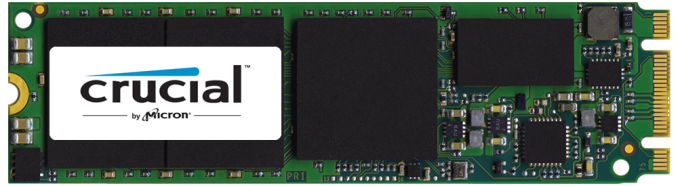
My M.2 recommendation for the SATA 6Gbps interface is the same as our mSATA, but just in M.2 2280 form factor instead if that's what you are after. There aren't many SATA M.2 SSDs available (though there are even fewer PCIe ones) and out of these the M500 is the only reasonably priced model.
| Capacity | 120GB | 240GB | 480GB |
| Crucial M500 M.2 2280 | $80 ($0.67/GB) | $125 ($0.52/GB) | $251 ($0.52/GB) |
Generally speaking mSATA and M.2 SATA SSDs aren't as good value as their 2.5" counterparts are. However, if you have a laptop with an mSATA or M.2 slot and are on a lookout for an appropriate SSD, Crucial has you covered, but otherwise stick with 2.5" drives.
Read More ...
Western Digital to Acquire Skyera
For me personally Skyera has been one of the most interesting flash array companies given its deep expertise of NAND and very high density solutions. I covered Skyera's skyHawk FS launch a bit over a month ago and also gave an overview of the company, but in short Skyera was founded by two of SandForce's key persons (it's a bit ironic that the two are now under Western Digital while SandForce is owned by its biggest rival Seagate) and earlier this year Frankie Roohparvar, the former VP and GM of Micron's OEM NAND business, stepped in as the CEO.
Unlike many flash array providers, Skyera designs the SSDs (or 'blades' as the company calls them) in-house. Micron, Toshiba and SK Hynix have all been investors in the company, which has given Skyera much deeper access to NAND than what normal customers get. As a result Skyera has been able to apply its proprietary technologies to increase NAND endurance. At this point it's unknown whether the NAND companies will continue to grant HGST the necessary NAND access, but I would believe so since that's ultimately Skyera's core advantage and the acquisition wouldn't make much sense without the NAND deals in place. I'll try to get more details on this, so stay tuned for an update.
The acquisition makes a lot of sense for Western Digital. The company has acquired a relatively strong SSD/flash portfolio (Virident, STEC and Velobit) over the past couple of years and expanding to array business is a logical move for vertical integration. While enterprise SSDs have fairly high profit margins to begin with, the premium in storage arrays tends to be quite insane (even +$20/GB is nothing out of the ordinary). Besides, Skyera's engineering knowhow in both controller/ASIC and NAND frontiers are certainly valuable to HGST's enterprise SSD business as well.
All in all, the tides in the storage array market are definitely changing. The likes of EMC and Dell have been dominating the market for a long time, but with many new array providers being backed up by SSD and NAND vendors (and perhaps being acquired eventually like Skyera in this case), there is potential for a revolution.
Read More ...
ASRock X99 WS-E/10G Motherboard Review: Dual 10GBase-T for Prosumers
For a number of months I have been wondering when 10GBase-T would be getting some prime time in the consumer market. Aside from add-in cards, there was no onboard solution, until ASRock announced the X99 WS-E/10G. We were lucky enough to get one in for review.
Read More ...
G.Skill Phoenix Blade (480GB) PCIe SSD Review
G.Skill hasn't been a very visible SSD OEM lately. Like many DRAM module companies, G.Skill entered the market early around 2009 when the market was very immature and profits were high, but lately the company has more or less been on a hiatus from the market. Even though G.Skill has had an SF-2281 based Phoenix III in the lineup for quite some time, it never really did anything to push the product and a Google search yields zero reviews for that drive (at least from any major tech review outlet). However, back at Computex this year G.Skill showcased a prototype of its next generation SSD, the Phoenix Blade, and we finally got a sample that we put through our extensive testing.
Read More ...
Win7 Driver Issues? Microsoft, AMD Recommend Uninstalling KB3004394

The update, designed to update Windows’ root certificate store, has apparently been causing havoc on some Windows 7 configurations. In AMD’s case what they are finding is that the update prevents the installation of new graphics drivers on affected systems, with both AMD and NVIDIA drivers refusing to install. More broadly, Infoword is reporting that KB3004394 is also being blamed as the culprit behind certain issues affecting Windows Defender, Task Manager, and other software.
At this point this looks like the update only affects a small number of systems – Windows 8 is not affected, and even then most Windows 7 systems appear to be fine – but Microsoft has not taken any chances and has pulled the update. In the meantime for those users that are affected, uninstalling the faulty update reportedly fixes the issue.
Read More ...
Windows 10: The Next Chapter

The event will be livestreamed and the Blogging Windows site will offer up information on the announced features. When Microsoft first announced Windows 10, they said that they would be having a consumer event upcoming in the early 2015, and more developer information at Build, so it’s good to see that this is on schedule still. It does appear that the final release for Windows 10 may be Fall 2015 according to Microsoft COO Kevin Turner.

Microsoft also sent out some news to the Windows Insiders letting them know about a few things that may be interesting. First, they have created an Insider Hub app for Windows 10 which is included in the latest build. The app will provide news and announcements regarding the Insider Program and some news may only be shared this way. It will also be a way to help with feedback on new features. People running the Windows 10 Technical Preview can simply pin this hub to their Start Menu to get access to the notifications.
They have also announced that a four hour webcast “Windows 10 Technical Preview Fundamentals for IT Pros” is now available through the Microsoft Virtual Academy, so if you are thinking about possible Windows 10 deployments in the not too distant future, you can check it out here.
Finally, as part of the Internet of Things movement, Windows 10 will support devices with AllJoyn capability. As described by Microsoft Open Tech, “AllJoyn is an open source software framework and set of services to enable interoperability among connected devices to create dynamic proximal networks” and developers who wish to develop apps with AllJoyn capability for Windows 10 can download the SDK from the AllSeen Alliance.
Quite a few changes and additions to Windows came with the Windows 10 Technical Preview, and you can read my initial thoughts here. What the build really is missing though are the consumer focused points. A lot of the initial talk was about deployment, user management, and data security. Quite a bit of the support for WinRT apps and touch was affected, and will likely make their way back in along with the Continuum capability to switch between keyboard/mouse and touch control.
Source: Blogging Windows
Read More ...
Intel Haswell Low Power CPU Review: Core i3-4130T, i5-4570S and i7-4790S Tested
Despite being an integral part of Intel's product stack, reviews of the lower power models are few and far between. For those of us that have no interest in overclocking, the lower power parts offer similar stock performance to the big boys but at 65W and 35W. Today we are testing three chips available from Newegg at $135, $200 and $300.
Read More ...
Seagate Enterprise NAS HDD 6 TB Review
Hard drives continue to remain the storage medium of choice for applications where capacity and cost factors outweigh performance requirements. Vendors have also realized that enterprise hard drives are an overkill for some applications, but the recently launched NAS-targeted drives do not deliver the necessary performance for those. In order to cater to that market, Western Digital introduced the WD Red Pro lineup a few months back. Last week, Seagate launched their competitor, the Enterprise NAS HDD. Read on for our review of the 6 TB variant.
Read More ...
Samsung Galaxy A3, A5 Hit U.S. Unlocked for $330/$410, A7 Specs Leak
Samsung is getting more competitive with pricing, trying more online sales in U.S., after failure of AT&T exclusive Galaxy Alpha
Read More ...
China's ZTE Sees a Major Rebranding, Revamps Logo, Slogan, and Philosophy
Company hopes new message will further its growth and broaden its appeal to global consumers
Read More ...
Nasty Memory Leak in Android Lollipop's Rendering Engine is Killing Apps
Users are being forced to reset daily due to the bug, fix has been formulated and should be delivered with Android 5.0.3 patch
Read More ...
Windows 10's "Spartan" IE11 Variant Will Get Firefox/Chrome-Like Extensions
Internet Explorer may finally catch up with rivals in terms of developer access
Read More ...
Quick Note; Wreckage of Malaysian-Owned Passenger Jet Found
Debris is confirmed to be from lost jet
Read More ...
China Echoes America's NSA in Fresh Crackdown on Gmail
Privacy is becoming an endangered species in the world's two wealthiest police states
Read More ...
Xiaomi Valued at $45B USD, More Than Nokia, Lenovo, and Sony
Chinese smartphone maker raises $1.1B USD in new round of venture capital investment
Read More ...
LG G4 Will Reportedly Debut in Spring With New G Pen
Phone will reportedly launch at MWC 2015, pack a smaller screen, 4 GB of LPDDR3, a Snapdragon 810, 20.7 MP camera, and 3500 mAh battery
Read More ...
Malaysian Passenger Jet Likely at "The Bottom of the Sea", Third Crash in 9 Months
Airbus A320-200 was carrying 162 people, likely crashed amidst bad weather; sources indicate poor flight planning might be to blame
Read More ...
Samsung Kills Off Would-be iPhone 6 Competitor, Galaxy Alpha
Company is revamping its high end smartphone strategy
Read More ...
BlackBerry Passport, Q5, and Z30 Go on Sale Till Dec. 30, Z30 is Nearly Sold Out
Sale celebrates Canada's "Boxing Day"
Read More ...
Despite Bump to $99/Year, Amazon Prime Attracts 10 Million New Customers
Extra perks appear to be adding value and appeal to Amazon Prime, beyond its basic offering of two-day shipping
Read More ...
Qualcomm Snapdragon 810, New Gobi Modem Pass Cat. 9 LTE-A Test on UK's EE
Huawei helps with test, gives a bit of hope that reports of Snapdragon 810 delays may be exaggerated
Read More ...
Happy Holidays From DailyTech!!
Thanks for reading and have a great holiday season
Read More ...
Microsoft, Google Back The Interview, North Korea Vows Attacks on America
Mega found Kim Dotcom mocks North Korea's threatening statements; good or bad, video is now available to stream for $6 USD
Read More ...
Nokia's Sweet $250 Android Lollipop N1 Tablet is Rumored for Jan. 7 China Launch
Tablet promises sweet spec for $250
Read More ...
Quick Note: Drone Loses Fight to the Death With Kangaroo
Mother Nature: 1, Drone Hobbyist: 0
Read More ...
After Obama Blasts Its Surrender, Sony Decides to Release "The Interview" After All
Release will be limited as most major theaters are too afraid to show the film
Read More ...
Samsung Preps 4 GB LPDDR4 RAM to Power "4K" Smartphones in 2015
New RAM is a third denser and uses 40 percent less power
Read More ...
Miyamoto: Nintendo is Prepping Successor to Troubled Wii U
Video game legend Shigeru Miyamoto also talks about upcoming Wii U Star Fox and Zelda titles
Read More ...
Campbell's Monkeys Found to Use Different Dialects to Describe Local Threats
Linguistic differences arose out of threats facing particular populations
Read More ...
Airbus A350 XWB Passenger Jet Takes Off, First Unit Delivered to Qatar Airlines
Orders have begun shipping after an 8-year-development cycle and some delays of the carbon-fiber aircraft
Read More ...
Amazon's Kindle Fire HDX 8.9 Drops to $299 (30 Percent Off) for a Day
At 30 percent of Amazon's regular rate, tablet offers plenty of bang for your buck
Read More ...
Mississippi AG Drops Anti-Google Subpoena After Dirty MPAA Ties Are Revealed
Lazy mistake revealed filings from the AG's office were really written up by big media lawyers
Read More ...
Android-Powered BLU Studio 7.0 Claims to be the "World's Largest Smartphone"
At 7-inches the phone is pushing the phablet form factor directly into the realm of tablets
Read More ...
Paramount Bans Team America Screenings, Cowers Submissively to North Korea
Viacom-owned joins fellow corporate Hollywood studios like Sony Pictures and Fox-affiliated New Regency in self-censorship
Read More ...
News Corp's Fox is Terrified of North Korea, Kills Upcoming Steve Carell Film
Decision to pull the plug on indie film came after Sony Pictures was forced to cancel "The Interview"
Read More ...
Uber Admits Employees Abused "God View" Location Tracking
App will only be used for "legitimate business purposes", which Uber conveniently left undefined
Read More ...
Love and Hate: Mass Murder Game Flirts With Steam Censorship, Then Hits #1
Provocative delivery got isometric shooter pulled from Steam Greenlight before Valve recanted, now it's subject of a parody
Read More ...
Scientist Confirm Men are More Likely to Die in "Idiotic" Ways
Genetics sometimes drives mankind to do foolish, foolish things
Read More ...
Available Tags:ASRock , Intel , Samsung , Galaxy , GIGABYTE , NVIDIA , Xbox , ASUS , HP , Windows , Tablet , AnandTech , Server , Western Digital , SSD , Driver , AMD , CPU , Seagate , HDD , ZTE , Android , Gmail , Sony , LG , iPhone 6 , iPhone , BlackBerry , Amazon , Google , Android , Sony , Nintendo , Kindle , Steam ,


No comments:
Post a Comment