

Why Xbox One is more expensive than PS4 is revealed in teardown

Microsoft isn't sticking it to gamers by charging more for its Xbox One console than Sony does for PS4 - it really costs that much more for the parts.
The more expensive Xbox One's price is $471 (about £291, AU$516) at cost, according to the teardown analysts at iHS iSuppli.
Its bill of materials amounts to $457 (about £282, AU$501) and manufacturing is estimated to be $14 (about £9, AU$15).
That doesn't necessarily mean Microsoft is walking away with a profit on each console being sold for $499 (£429, AU$599), as retailers and distributors often take a cut.
"Just like the PlayStation 4, Microsoft initially will take a loss on each Xbox One sold when other expenses are added into the equation," noted iSuppli in a press release. They're likely to make up for the loss in game sales.
Why PS4 is cheaper than Xbox One
PS4 is in a very similar profit-loss situation, but it's operating with a less expensive set of parts.Sony's at cost price for its next-generation console is said to be $381 (about £235, AU$417),
The PS4 components cost $372 (about £230, AU$408) and manufacturing is somewhere in the ballpark of $9 (about £6, AU$10).
We're looking at you Kinect, looking at us
The biggest difference comes down to Microsoft's decision to include the Kinect camera sensor, which is estimated to cost the company $75 (about £46, AU$82) for every console sold.Sony opted not to include the PS4 Camera, which is a savings in the immediate term. But this may not help its use of motion-controlled games if a small fraction of the userbase is be without the accessory. The jury is still out on this controversial decision.
Another empty cost field in Sony's favor is the power supply. The PS4 contains a less expensive power supply inside the console.
Microsoft opted for an external $25 (about £15, AU$27) brick. The jury is not still out on this annoying decision.
Most of the other part prices are a draw, with Xbox One having a more expensive CPU and GPU combo, while PS4 trades places with higher-priced DRAM.
The good news is that these expenses will decrease over time. Xbox One and PS4 are likely to see price drops in the future even though both companies aren't making a sizable profit right now like most consumers tend to think.
- Read: Apple's to use Xbox 360 Kinect developer PrimeSense 3D to boost indoor mapping, rather than iTV set?

     |
Read More ...
Apple's to use PrimeSense 3D to boost indoor mapping, rather than iTV set?

Following confirmation Apple had purchased the motion tracking company PrimeSense 3D, many observers assumed the tech would be deployed in its long-rumoured flatscreen iTV set.
However, as much sense as that seems to make, it's not the reason Apple handed over a reported $360m (around £222m, AU$394) according to well-connected former Washington Post tech scribe Jessica Lessin.
Lessin's industry sources tell her Apple wants to use PrimeSense's chips to spearhead a 3D indoor mapping drive, something Matterport, a company which makes 3D room scanners is already doing.
Earlier this year Apple also acquired indoor mapping company WiFiSlam, so the two start-ups together could form a potent combination if Apple seeks to battle Google in this relatively new arena.
Falling behind since Kinect?
So what of all that gesture-controlled Apple iTV talk then? Surely the company that helped produce the first Kinect sensor would be perfect for Apple's rumoured needs in this department.Well according to Lessin's report, PrimeSense has fallen "a little behind" in this department, which is held up somewhat by Microsoft going it alone for the second Kinect module for the Xbox One.
As for Apple iTV with motion controls? Well as recent speculation has suggested we could be waiting quite a while.
"As for the endless anticipation around an Apple television, I continue to hear that the company is more interested in set-top boxes for now and that some early prototypes haven't had motion technology."

| |
Read More ...
BBM Channels download exits beta, available to all BlackBerry owners

BlackBerry's BBM instant messaging service is becoming a little more social today thanks to the launch of its Twitter-like BBM Channels feature.
This update is available to all smartphone owners still wielding a BlackBerry after having been in beta since its debut in May, according to dedicated BlackBerry blog CrackBerry.
After downloading the newest version of BBM, Channels will give users the ability to follow and subscribe to other people or business' channels. Users can also set up and post to their own BBM Channels.
It effectively connects users to brands, proving that BlackBerry's messaging service is moving beyond peer-to-peer and group chats.
It's also a great way for BlackBerry to monetize its fledgling BBM service to businesses that want to market with targeted ads to BlackBerry users.
Coming to Android, iOS soon
As the company formerly known as RIM is getting its house in order by reshuffling its executive team, it's continuing to show interest in expanding its platform beyond BlackBerry devices.To that end, BBM Channels is supposed to be "coming soon" to iOS and Android chatters.
Apple and Google hardware owners received a BBM app last month, and it was well-received with 10 million downloads in the first 24 hours.
BBM iPhone owners were particularly energized about the BBM app, which is set to expand with BBM Voice and Video within months.
BBM Channels alone may not be enough to right BlackBerry's ship, but it could make BBM an attractive spinoff in the future.

| |
Read More ...
Updated: Have a busted Xbox One? Here are some free games from Microsoft

Xbox One owners left out in the gaming cold with broken disc drives might be happy - or at least mildly pleased to hear they will receive free games.
In a customer care email published by Polygon, Microsoft will let Xbox One owners with faulty consoles choose from one of four titles including Dead Rising 3, Forza Motorsport 5, Ryse: Son of Rome, or Zoo Tycoon.
Luckily, Microsoft was also smart enough not rub salt in players' grinding Blu-Ray drives by sending them another game disc. Instead, these free games will arrive as a downloadable code they can redeem on the digital Xbox Live store.
Microsoft meanwhile maintains that the issue affects a very small number of Xbox One customers and it is taking care of its customers with a replacement console exchange program.
Who, what, how?
TechRadar reached out to Microsoft for some more specifics and a spokesperson gave us the following statement."While a replacement console is on its way, we want to ensure our advance exchange customers can stay in the game. We will provide each of them with a free digital download of one of the launch titles published by Microsoft Studios."
The games will only be available to those awaiting a replacement console. The spokesperson said defective unit owners will receive a downloadable code they can redeem on the Xbox Games marketplace.
Meanwhile, users experiencing issues with their console should contact Microsoft through the following channels:
- Talking to a live customer support person that can call you back if you don't want to wait.
- Xbox.com for support pages and forums.
- On Twitter with @XboxSupport.
- There are also Help and diagnostics on the console by saying "Xbox Help."
- How does the Xbox One compare to the PlayStation 4?

| |
Read More ...
Nokia updates its camera app for RAW image shooting

Nokia's latest slew of Lumia phones has been really great for smartphone photography enthusiasts and now the Finnish company has upgraded its camera app to shoot RAW images natively.
Nokia updated its Camera app for its Windows Phone 8.1 handsets, the Lumia 1520 and Lumia 1020 running the Lumia Black software update. The new camera app update lends Purview shooters the added bonus of shooting pictures in lossless the RAW Digital Negative Format (DNG).
The Camera app update is free and available to Lumia 1520 and 1020 owners right now. At the moment, it only works on two Lumia devices, but we expect that this functionality will be extended to PureView snappers in the near future.
Doing it RAW
RAW images are uncompressed digital pictures with a minimal amount of post processing. The files are quite a bit larger than your garden variety JPEGs, but they have the added bonuses of carrying more data for finer details.It's not just a matter of having a higher megapixel count either. Nokia's DNG images can be photoshopped with more natural-looking white balance adjustments and can be modified with a few stops of exposure compensation, which means a world of difference when saving an overblown or underexposed image.
This is the second time we heard that RAW image capabilities were being added onto smartphone cameras. Last week, RAW image support was uncovered in some public Android source code.

| |
Read More ...
Nook BNTV800 tablet outed by impressive Tegra 4 benchmarks
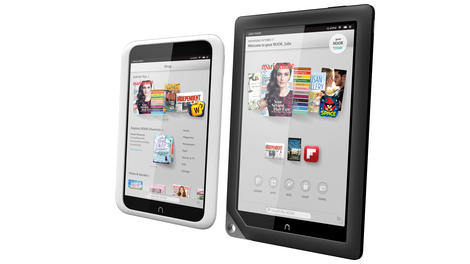
Manufacturers should know by now not to test unannounced hardware in the wild using public benchmarking tools, which traditionally leads to leaks such as Barnes & Noble's forthcoming effort.
The Droid Guy reported that Barnes & Noble's next Nook-branded tablet may very well be worth waiting for - at least based on a set of specs that recently showed up via benchmarks.
Bearing the model number BNTV800, the unannounced fourth-generation Nook tablet popped up on the radar with some mighty impressive specs courtesy of benchmarking website GFXBench.
That particular model number lines up nicely against earlier models such as Nook HD and Nook HD+, which were branded internally as BNTV400 and BNTV600 respectively, suggesting the benchmarked hardware could indeed be the real deal.
Sizing it up
While earlier Nook models were powered by relatively pokey Ti OMAP 4470 SoCs, the BNTV800 appears to come equipped with a welcome upgrade to a quad-core 1.8GHz Nvidia Tegra 4 CPU.Barnes & Noble will also apparently infuse a heavily skinned version of Android 4.2.2 Jelly Bean for the BNTV800 - not the latest and greatest confectionary flavor, but we'll have to take what we can get.
Despite this treasure trove of specifications, the BNTV800 is apparently keeping at least one mystery close to the vest: Will it be a 7-inch or a 9-inch model?
The specs reveal a 1620 x 1008 display resolution, an odd number that suggests on-screen buttons could be part of the mix, but the actual dimensions of that screen are still anyone's guess.
- Go big or go home? Find out in our review of the Nokia Lumia 1520!

| |
Read More ...
Updated: Android KitKat arriving on Google Play Edition HTC One and Samsung Galaxy S4
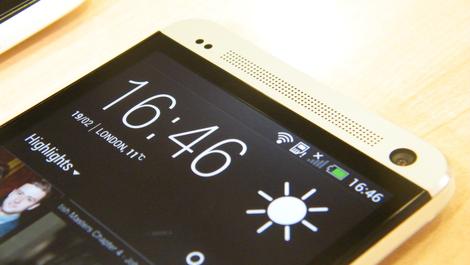
Update: Like clockwork, it looks like Google is indeed releasing Android 4.4 KitKat for the Samsung Galaxy S4 as well.
Android's Google+ page announced that the Google Play Edition of the S4 should start seeing OTA updates as soon as November 25 - though 4.4. is definitely on its way, keep in mind, it may still take some time before it arrives.
Original story ...
HTC has been clear that owners of the HTC One will see an Android 4.4 KitKat update in January of next year but looks like some One owners are in luck.
Android Authority is reporting a 300MB over-the-air update of KitKat is rolling out to the HTC One, Google Play Edition right this moment.
Like the Moto X, the HTC update will not get the "Google Experience Launcher," a feature found on the Nexus 5, which adds a Google Now page to the home screen.
But users at least get a lengthy range of other improvements with KitKat - the interface is much cleaner and boasts changes that help condense your device's memory.
Be on the look out
The Google Play Edition of the Samsung Galaxy S4 should also be receiving KitKat, possibly as soon as today or this week since both the S4 and One saw a same day Android 4.3 update.Once the Galaxy S4 is updated, Google should be done with KitKat - at least until 2014 when the rest of the HTC One batch gets 4.4.

| |
Read More ...
Review: Updated: Acer Iconia B1

Introduction
The £99 / US$130 Android Jelly Bean tablet is here, but only if you're happy to accept a lower amount of storage.However, the 16GB isn't much more these days, coming in at £129.99 / around $210, and the one we're much happier to recommend.
But are these so-low prices enough for this decade's must-have gadget? Compare this to the competition: the iPad Mini 2 is over three times the cost, the Google Nexus 7 is only £199 / $299 for the same capacity, and is much better-specced than the 7-inch Acer Iconia B1-710, which is a bare-bones tablet.
Tablets are on the cusp of replacing laptops for note-taking (or boredom alleviation) in classrooms, lectures and meeting rooms, but the search is on for something that really fits the bill - and the 7-inch tablet size is perfect.
Just the right size to be readable, smaller tablets such as the Acer Iconia B1 are judged perfectly to fit inside the internal pocket of a suit jacket.

The Acer Iconia B1's low price comes with strings attached - largely in the use of lower quality components (surprise, surprise).
The Acer Iconia B1's 340g (12oz) weight feels relatively sturdy in the hand, but at 12mm (0.47 inches) in depth it does come across as rather chunky. That's not a huge problem, since it fits into a jacket pocket - or even a jeans pocket - with some room to spare.
But nobody will be coveting your Acer Iconia B1, its unpredictably wide black bezel makes sure of that. Held in portrait orientation, the Acer Iconia B1's left-hand and bottom bezels measure 15.5mm (0.61 inches), while the right-hand side and top reach a whopping 24.5mm (0.96 inches).
We presume it's that way to give room in the top right-hand corner for the Acer Iconia B1's 0.3 megapixel front-facing camera - for video calls and selfies - though it does give the entire product a lop-sided feel. It's not a good look, and the 2mm-thick silver plastic rim around the Acer Iconia B1 doesn't help either.

A microSD card slot ready for a 32GB card does give the Acer Iconia B1 a real advantage over rival low-cost tablets. And so too does its starting internal storage capacity, since our sample arrived with 16GB of storage. That's a whopping 48GB of content the Acer Iconia B1 can store. It also comes running Android 4.1.2 Jelly Bean, which is really starting to date now.
Features
For a small tablet, the Acer Iconia B1 is reasonably well powered. Its runs off a MediaTek-made ARM Cortex-A9 1.2 GHz dual-core processor and 1GB of RAM, which compares well to rivals. Inside is Android 4.1.2 Jelly Bean, and a 7-inch capacitive touchscreen.However, that's where the good news ends, since the screen's resolution is a mere 1024 x 600 pixels, which means a highly unusual 17:10 aspect ratio that's more suited to watching movies and TV than it is to browsing - though it's imperfect for both.

That resolution is also the smallest we'd want to see on any tablet, though its score of 170ppi is still a notch above the iPad mini's.
Stationed just behind the Acer Iconia B1's silver plastic rim, edging onto the white plastic rear panel itself, are the Acer Iconia B1's controls and ins/outs.
On the right-hand side is the standby button above the volume rockers, though both are too far back; we watched as a colleague fumbled with the Acer Iconia B1 for over 20 seconds before figuring out how to switch it on. None of those buttons have a satisfying press.
Just around the corner is a headphones jack, while in the centre of the lower edge is a micro USB slot for charging and file transfer. The Acer Iconia B1 ships with a standard UK plug and USB-to-micro USB cable, so no drama there. The Acer Iconia B1 is also equipped with Bluetooth 4.0, Wi-Fi and GPS.

Behind that micro USB port is a 61 x 7mm hatch that can be flicked up by a fingernail, revealing that hidden microSD card slot inside that takes memory cards up to 32GB in size. There's an empty space alongside that, which is used for a SIM card slot on variants of the Acer Iconia B1.
Speaking of which, there are two slight variations of our Acer Iconia B1-710 model in the B1 series. There's also the £110 (around US$170 / AU$185) Acer Iconia B1-A71, which has 8GB of storage and a black rear, and the £170 (around US$260 / AU$285) Acer Iconia B1-711, which boasts 16GB and a white back panel - just like our sample - but adds that 3G connectivity we mentioned, via a SIM card slot.
Interface and performance
We have an instant dislike for the Acer Iconia B1's 17:10 screen aspect ratio. Having been impressed by - and even got used to - the extra real estate offered by 4:3-shaped tablets, the Acer Iconia B1's dimensions make it more difficult to use while in landscape orientation.Fewer apps fit on the screen, and browsing feels generally tighter. The Acer Iconia B1 also takes around three seconds to re-orient its screen when moved, which can slow things up a bit.
Still, what Acer's done for the interface is pleasant enough. In a slight mod to the usual Android Jelly Bean experience, Acer adds a taskbar that sits either on the bottom in portrait mode, or on the right-hand side when in landscape.

That taskbar is home to icons for the standard Android browser, Calendar, Gmail, a link to all apps, Google Play and Google Current. The taskbar can easily be customised and changed just by dragging apps on and off.
Also as a default, this time along the bottom of the tablet above the taskbar, are apps including TuneIn Radio, AccuWeather, Zinio, 7digital, Acer Cloud and Games. We'd rate all of those as useful, and everything is neatly presented.
The screen's touch-sensitivity isn't benchmark quality, but it's good enough - excepting a few blind spots - and its dual-core processor enabled us to skip around the interface easily enough.
We also managed to have several apps running in the background while browsing, and the Acer Iconia B1 didn't miss a beat. Only those moving down-market from, say, a Samsung Galaxy Note, iPad or even an Asus Fonepad (which we had alongside us during this review) will think the Acer Iconia B1 rather slow.

However, it's that screen that caused us the most problems. As well as being rather reflective, it's low resolution - and it shows. Either when browsing the web or watching video, the 1024 x 600 pixels are easily visible.
Video isn't exactly sharp, and we noticed a few jagged edges, too, though for most people it will suffice - and it's certainly fit for the likes of YouTube.
Brightness isn't a problem, with a drag-down panel giving a toggle for (just) three intensity settings. The lowest of these really is hardly visible, but it might help to eke out an extra few minutes of battery if the Acer Iconia B1 dies halfway through a long train journey (that's a very likely scenario) or for late-night reading.

Worse is to come if you squeeze the Acer Iconia B1, since its screen responds by solarising and staining, just as an old LCD monitor used to do when you touched it. Yuck.
Our other concern is with the viewing angles, which are so tight that they render the Acer Iconia B1 useless for sharing in meetings or even playing some games on. It stems from the panel not being IPS, which is pretty standard on tablets and TVs.
However, you could look at this as a plus-point, since the chap next to you on the bus won't be able to see what you're doing.
Browser
As a web browsing device, the Acer Iconia B1 passes easily. Acer may have cut corners elsewhere on the tablet, but it hasn't under-specced the processor - and that makes all the difference when browsing. Its dual-core processor proves its worth with speedy browsing while on Wi-Fi and opening pages quickly enough - though it's not a patch on the ultra-quick Asus Fonepad we had nearby.
The vanilla Android browser and Chrome app version's performances will suffice for most casual users, though power users beware.
Neither browser supports Adobe Flash, but video performance is otherwise strong. Video on the BBC News website played instantly in our test, while attempting the same from the BBC iPlayer website prompted the Acer Iconia B1 to visit the Google Play store to download the BBC Media Player software. However, when we returned to the website, the content didn't play, so we had to shut it all down and begin again.
Battery life
This is where the Acer Iconia B1 really trips up. Even Acer admits that the Acer Iconia B1 won't stretch beyond four hours, and by golly it's right.Despite its rather chunky design, in our one-hour long Nyan Cat video test on YouTube - with the Acer Iconia B1 at full brightness - this fully-charged 7-inch tablet's 2710mAh battery crashed to just 55 per cent charge. That's pretty awful, and only half as long as the Google Nexus 7.
Benchmarks
The AnTuTu app produced a lowly score of just 5,825 on the Acer Iconia B1, which doesn't compare well to the 9,208 average score of the Asus FonePad. The Google Nexus 7 scores 12,726.
The Acer Iconia B1's Chrome browser app then scored a rather average 495 on the universal Peacekeeper browser test, its Android browser earning a similar 491.
SunSpider, a web-based Javascript test, produced scores of 1,619 and 1,828 apiece for the Acer Iconia B1's Chrome and default browsers, respectively. The Asus FonePad produced scores of 2,026 and 1,483.
These are all very average results, as you might expect, with the AnTuTu score suggesting that the Acer Iconia B1 is less of an all-rounder than higher-priced tablets.
Media, apps and camera
Movies
While relatively slow to load, a blast of Battle in Seattle streamed from BBC iPlayer revealed the paramount importance of holding the Acer Iconia B1 carefully so as not to cover its already weak speaker.Unfortunately that mono speaker lies beneath the natural resting point for your right hand's fingers while holding the Acer Iconia B1 in landscape mode and, worse still, it's terribly thin and weedy. Movies are therefore a headphones-only experience.

In terms of picture quality, there's little contrast; in a 720p trailer of Cloud Atlas from YouTube via Play Movies, blacks look grey and colours lacklustre, though detail is enough to ensure a clean picture, and video is fluid enough to watch comfortably. If you watch straight-on and don't move the Acer Iconia B1 too much, it's fine for movies.
Incidentally, the Acer Iconia B1's Astro File Manager plays only AVI video files loaded on to it.
Games

We played the accelerometer-fuelled Crazy Cars: Hit The Road HD from the Acer Iconia B1's pre-loaded Games portal, which the tablet managed to host perfectly acceptably with no lag or blips.
However, the pumping soundtrack sounds dreadful through the Acer Iconia B1's pathetic speaker.
Books

For a tablet mooted as a low-cost option for commuters and students, the Acer Iconia B1 makes a pretty bad e-book reader, though that's largely to do with its short battery life.
In our test we synced a Kindle app and began flicking through Life of Pi, which seems crisp enough, but don't expect a tailored, customised reading environment.
You'll not get too many chapters in before the battery runs out, but if left around the house the Acer Iconia B1 will be fine for casual readers, though we did notice some uneven brightness - especially in the corners of the panel - when we tried to read with the lights off.
Apps and games

There are precious few home-baked apps included on the Iconia B1 by Acer, but what there is impresses.
Astro File Manager takes pride of place, which aggregates all music, video, photo and document files nicely. However, while it plays video and hosts photo sideshows itself, music playback is sent to other apps, either 7digital or Play Music.
The Google Currents news aggregation/subscription app is included as a default in the taskbar, while the Acer Iconia B1's pre-loaded Games app is merely a shop front for Wild Tangent titles, though most titles can be downloaded for free and without signing in.
Camera

Although it's touted as having an 'HD webcam for chatting' on Acer's website, that's not actually the case. Fitted with just a 0.3-megapixel VGA front-facing camera, photography on the Acer Iconia B1 is a non-starter.
When using that camera, grab as much ambient light as you can, and forget making video calls in dingy hotel rooms.

In terms of photo navigation, it's best to use Acer's own Astro File Manager, which we've admired on other Acer tablets (notably the step-up Acer Iconia A1).
It can source and aggregate files from various cloud services, and presents photos with a carousel of thumbnail images along the bottom.
Gallery


Verdict
Is this is an occasional tablet for the disposable age? With a fast processor, it does everything you might expect it to do fast enough, but a poor screen and battery consign it to the reserve list.We liked
We do rather like Acer's slight face-lift to the vanilla Android 4.1.2 interface. The taskbar is a nice touch and the general navigation and browsing of the Acer Iconia B1 is unexpectedly smooth and easy to live with.It's also worth pointing out that the Acer Iconia B1 does have a microSD card slot, which some owners of the Google Nexus 7 will covet. For casual users, there's really nothing lacking in the Acer Iconia B1, though power users will likely hate its screen.
We disliked
We're not fans of the lop-sided bezels, but our biggest complaints have to be the screen's viewing angles and lack of touch sensitivity.Even moving the Acer Iconia B1 slightly during browsing or video not only drains, but completely destroys contrast and colour.
Having to touch an app three times before it launches isn't much fun, and the less said about the terrible mono sound, the better.
It also lacks a rear camera and the battery is dreadfully short. So short, in fact, that the Acer Iconia B1 is just not fit to travel.
Verdict
Those wanting a tablet to carry with them, and perhaps get completely addicted to, should look away now. The Acer Iconia B1's poor screen, battery life and speaker ensure that it's not going to do much of a job as a full-timer.But we can see it working well as an occasional email checker, note-taking gadget, a kitchen recipe holder, a voice recorder for meetings, or a device for catching up on the morning news, though we'd worry if it strayed too far from a desk drawer.
Hugely restrictive viewing angles also rule it out for sharing, too, so we're struggling to think of a reason to buy unless you're given a voucher for Acer tablets with a 7-inch screen and poor battery life.
Bbut for all the niggles and low-quality components, the Acer Iconia B1 has enough zip about it to get on with browsing without any major fuss - but there are far, far too many other options to consider to give this our recommendation.

| |
Read More ...
Review: Updated: Acer Iconia A1
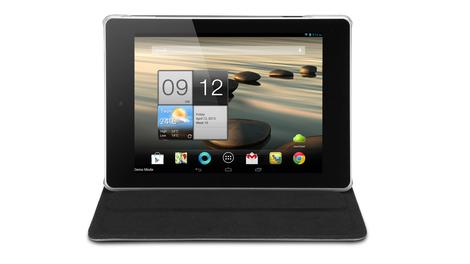
Introduction
The iPad Mini 2 and new Google Nexus 7 might be all the rage in some circles, but they start at £319 / £199 respectively - so what about this £160 tablet?Weighing 410g (14.5oz), this 8-inch Android alternative is 25 per cent heavier than the original iPad mini, and somewhat thicker at 11.1mm (0.4 inches) slim, too.
The Acer Iconia A1 offers a quad-core ARM Cortex-A9 at 1.2GHz, with 1GB RAM, which wasn't bad at launch - and still holds its own now, although it's been out-done by the quietly impressive Tesco Hudl.

The screen here is nothing on its smaller 7-inch rivals, the Asus Fonepad or even the pricier Google Nexus 7, but it feels much bigger.
In practice this tablet won't avoid comparison to the Nexus 7, but in use the Acer Iconia A1 feels much bigger. The screen's single inch advantage in the diagonal measurement hugely increases the overall screen real estate. Its 4:3 aspect ratio just looks and feels more productive than the smaller Nexus 7's 16:10 shape screen.
In technical terms it matches the iPad mini 2, though the chassis is plastic all over - white on the back and silver at the sides. The screen bezel measures 23mm above and below, and 12mm at the sides, so as such it resembles an iPad mini, if only relatively loosely.

Unlike Apple's mini (Wi-Fi only) effort, GPS features here, which could help put the Acer Iconia A1 in the driver's seat, while it's equipped with cameras back and front that manage five and 0.3 megapixels, respectively.
Our Acer Iconia A1-810 review sample had 16GB of storage built-in, though only around 12GB was usable. It also had Wi-Fi connectivity, although there's also a 3G option for £40 more.
Features

Like the iPad mini, the Acer Iconia A1-810 has a 4:3 aspect ratio that appeals to us, especially for browsing, though it does mean black bars above and below widescreen movies. It's consequently got the same resolution as its rival, too, with 1024 x 768 pixels on its 8-inch LCD panel.
Physically the Acer has a few hidden gems, with GPS and its quad-core ARM Cortex-A9 1.2GHz processor leading the way.

Held in portrait orientation, the left side is completely barren of buttons and connections. On the top is a single standby button on the right, while the bottom hosts a 3.5mm headphones jack and a micro USB slot (for charging and file transfers), also on the right.
The right-hand side hosts the rest of the ins and outs - an HDMI output for routing to a TV and a volume rocker both flank the Acer Iconia A1's microSD card slot.
That's certainly something the iPad mini doesn't offer, and it does mean the Acer Iconia A1's native 16GB storage can be improved upon by as much as 32GB extra. Still, a USB slot, as found on the Acer Iconia Tab A210, would have been great - what a brilliant idea.

In the centre of the top of the tablet is a VGA camera for video calls and basic selfies, while the rear optic - housed in the right-hand corner as you look at the screen - manages five megapixel images and Full HD video at 30 frames per second.
There's a single speaker on the back of the Acer Iconia A1, so get your headphones at the ready.
Interface and performance
The Acer Iconia A1 runs the latest Android 4.2.2 Jelly Bean, but there's more than a few useful additions by Acer that create something genuinely more user-friendly. Sadly we've not heard word of an update to Android 4.4 KitKat (or even the newest version of Jelly Bean, for that matter).Down the bottom of the screen are the usual virtual touch-buttons for back, home screen and current tasks, but above is a useful taskbar that contains some nicely sized app icons.
It's possible to customise this taskbar, adding or junking whatever you want, but by default ours had links to the apps for Google Play, Calendar, Google Maps, Gmail, Acer Life (more on that later) and the vanilla browser.
They're ranged either side of a six-dot grid of icons that leads to the standard Android layout of all other apps and widgets.

Google Now is fully integrated into Android 4.2.2 on the Acer Iconia A1, with an icon for this text or voice-activated search service permanently etched on to the top portion of the home screen.
The screen's right-hand corner shows the time and a visual indicator for battery power, but the latter is too small to read properly. Drag a finger downwards from this corner and a nine-way grid of handy utilities comes with it.

On here is a link to your Google account profile, alongside another battery indicator, this time complete with the percentage remaining, a link to Settings, and very handy on/off toggles for Wi-Fi, Bluetooth 4.0, GPS, Brightness, Timeout and Auto Rotate (toggle to lock orientation). It's hence possible to do all of your housekeeping, such as joining networks or making sure you're flight-safe, quickly and simply.
There's also a link to Acer's Touch WakeUp feature, which - if specifically set up - enables you to wake the Acer Iconia A1 up from sleep mode by either touching the screen with a 'five finger gesture' (four fingers and a thumb, surely?) or by grabbing the Acer Iconia A1 like a book and touching the sides of the screen with the pads of both thumbs.

The latter scenario, for reading, is an obvious reason for TouchWakeUp, though we fear it's actually aimed at addicts who reach for their tablet first thing in the morning before even kissing their wife/husband/cat.
In use, Touch WakeUp behaved rather oddly: two thumbs only worked in portrait mode, though as well as waking up the Acer Iconia A1 and bypassing the security, it insisted on always firing up the built-in camera. We would prefer a fully customisable choice of any app.

The five finger gesture worked fine, settling on the home screen, though the ten-point capacitive touchscreen did put up a fight at times - on one occasion we had to touch the screen three times before the Acer Iconia A1 registered what we'd done.
Like many a tablet, the Acer Iconia A1 is also in need of some rubber pads on the bottom to stop it sliding off clothes and sofas, though a matt chassis with some resistance would do the job.
Browser

There's the usual rather pointless choice between the vanilla browser and Chrome, though it's the former that is installed by default on the Acer Iconia A1's taskbar. When setting up the Acer Iconia A1 initially we logged in to Google services and launched Chrome, which imported all of our bookmarks in seconds.

Both browsers are a cinch to use, they're quick to navigate and present web pages concisely. Zooming in is no problem, while we managed to navigate to the BBC News website and almost instantly play videos and clips.

Visit the BBC iPlayer site via the vanilla browser and live channels aren't viewable, while playback requires installation of the BBC Media Player app.
The Acer Iconia A1 took us straight to the Play store, downloaded and installed the app within 15 seconds, and the video we wanted then played immediately and very stably. In the same experiment using Chrome, playback stalled badly and took at least 20 seconds to load and play.

The Acer Iconia A1's screen is a tad slow to reorientate, and there's no ambient light sensor, so you might have to make adjustments as you move into rooms with different light levels, but the browsing experience on the tablet is generally top notch.
Media, apps and battery
Movies, music and books
Though video playback is fast and smooth, it's here that we begun to notice the Acer Iconia A1's physical shortcomings. Yes, the resolution is a bit low, and if you're watching any HD files you won't exactly be blown away, but we're actually more worried about the screen's other drawbacks.It's not very bright, even on its highest setting, and though that's more of a problem for browsing that watching movies or reading, it's indicative of a pretty uneventful display.

Colours don't exactly whizz from the screen, and we also noticed a slight bias towards yellow-green, while contrast is lacking and black areas of the image get a uniform dark grey look.
Viewing angles aren't the best, though they're enough for some accelerometer-fuelled smooth gameplay from CSR Racing, and a blast of HD video proved the Acer Iconia A1 was fit for purpose, if hardly awe-inspiring.

The Acer Iconia A1's screen does a reasonable job for reading, where brightness and colour accuracy aren't as relevant. In our test, text proved readable enough, though only after we'd toned down the panel. An auto brightness sensor really would be handy. That done, the pixel grid is pretty hard to miss at all times
Audio is a predictable letdown; just one speaker resides on the Acer Iconia A1's rear, and it spits out tinny, mono sound that's just about acceptable for short news videos.

In terms of navigation of entertainment, Acer's own Astro File manager is here to present pictures, music, video and documents stored in disparate places - everywhere from a microSD card to Dropbox and Facebook. It works really well, though there are some annoying, if tiny, adverts along the bottom.
Unfortunately, video codec support isn't great (there's no support for MKV, AVI or MOV files, just MPEG4 ones), while music playback is diverted to apps for either Google Play Music or 7digital.
Apps and games

In the widgets area we found a range of Acer's own apps. Acer Cloud storage is available, as are a range of apps under the Acer Life banner.
Life Image is on the Acer Iconia A1's taskbar by default, and is a live scrapbook that's clearly aimed at kids. You take pictures within the app - no need to fire up the separate camera app - and automatically edit, caption and resize them for the digital page.
It creates a chronological scrapbook that's completely GPS stamped, so you can touch the corner of each photo to have the Acer Iconia A1 launch Google Maps and locate the exact location that the photo was taken from.

Other Acer-made apps include Life Digital Clock and Life Weather, which are just what you'd imagine. Otherwise, there's access to the full suite of apps on Google Play.
Battery life
The battery is one of the Acer Iconia A1's highlights. Acer promises a seven-hour stint between charges - a shade under the original iPad mini and about the same as the current generation - though in our real-life tests we consistently managed a little more.
It compares well to other eight-inch tablets, since the hour-long Nyan Cat test on full brightness set the Acer Iconia A1 back from fully charged to 86 per cent, while a Samsung Galaxy Note 8.0 sunk to just 56 per cent - though the Samsung does have a much brighter, much better screen. Perhaps a better comparison is with the similarly priced and sized Archos 80 Titanium, which reduced to 64 per cent in the same test.
An Acer Iconia A1 left fully charged at 11.30pm, with Wi-Fi left on, was down to 98 per cent the next morning.
Benchmarks
The universal Peacekeeper browser test earned the Acer Iconia A1's Chrome browser app a score of 541, which compares well to the Archos 80 Titanium (332), but not to the Samsung Galaxy Note 8.0 (844).
The SunSpider Javascript test caused a respectable 1699.5ms score, while the Acer Iconia A1 scored an average of 12, 389 in the AnTuTu app. The latter score is about average, though we're sad to say that the Acer Iconia A1 did crash during the test and had to be rebooted. It was a rare slip up.
In performance terms, there are no surprises on the Acer Iconia A1; it comes mid-way between the cheapest and most expensive eight-inch tablets around.
Camera
Despite Touch WakeUp automatically opening the camera app when the Acer Iconia A1's screen is thumbed, photography is not this camera's strong suit.Nor should it be, perhaps, but it's best you know that the front-facing camera's whopping (joke) 0.3-megapixel skills are just about acceptable for some grainy, noisy video calls.

Ditto the flash-free, focus-free main camera on the back of the tablet, whose five megapixel images are ruined by dull colours, blur and blocky blacks that lack detail within. However, having dual cameras is relatively rare on tablets this size - and the panoramic feature is useful if you take things slowly.
Video is recorded in 720p resolution at 30fps, but the resulting files (which have a resolution of 1280 x 720 pixels in the MP4 format) are soft, grainy and blurred on any kind of movement. It's HD in name only.

Photos can be inspected within the standard Gallery app, or through Acer's own Astro file manager. The latter gathers up photos from a variety of sources - cloud, network and inserted microSD card - as thumbnails, opening them with Astro Image Viewer.
It's more functional than Gallery, with better transitions during slideshows, though the carousel of thumbnails across the bottom does take a while to load.

Click here to see the full resolution image
Even a 5MP shot lacks detail, with visible blocking.

Click here to see the full resolution image
Using the Acer Iconia A1's digital zoom is a no-no.

Click here to see the full resolution image
Colour and contrast are good, but edge definition and detail are not.

Click here to see the full resolution image
Images from the Acer Iconia A1's camera can very easily be washed out.

Click here to see the full resolution image
Close-ups look blurry and colours aren't well saturated.

Click here to see the full resolution image
Panoramic shots must be performed very slowly. Rendering takes 20 seconds and flattens the image, but with some banding.
Official gallery


Hands on gallery


Verdict
With the number of Android-based seven- or eight-inch tablets rising steadily, the Iconia A1 is starting to look a little lost in the tide, despite looking on paper to be a decent family tablet.In that scenario, maybe its dual cameras and panoramic mode will help the Acer Iconia A1 appeal to anyone looking for an all-round good value tablet for kids.
We liked
Despite its drab design, the Acer Iconia A1 is a very solidly made tablet that we'd be happy to throw around a house for a few years at least. The Touch WakeUp app proves useful in removing a layer of often pointless security, while we love the microSD card slot and HDMI out ports - both of which being features that iPad mini 2 owners miss out on.Few tablets of this price have dual cameras, while we're also fans of Acer's move towards using a micro USB connector to recharge the tablet, rather than using its own proprietary chargers. Mostly, however, we like the Acer Iconia A1's battery life, its speedy browsing and a touchscreen that's just good enough for the job - and all at a price of just £160.
We disliked
With Apple improving the iPad mini display, as well as Google and Amazon also pushing hard in this area, the Acer simply can't keep up.Looking to beat its rivals on price above all else, Acer hasn't allowed itself to get to carried away with hardware generally. The use of grey plastic around its rim isn't fooling us, though it's the white plastic reverse that compares especially badly to an iPad mini - it's more comparable to the cheaper Hudl.
An auto brightness sensor is needed, too. And though we liked Touch WakeUp, we do wish it was possible to customise which app is fired up from here - perhaps Gmail, books or a browser would be more useful to most people.
Final verdict
This isn't the ultimate tablet for any specific purpose, but for those after something highly portable, well made and with a long battery life, the Acer Iconia A1 could just be it.The Acer Iconia A1's screen is fine for browsing and gaming. Its 4:3 aspect ratio makes it better for browsing and general productivity than, say, the smaller Google Nexus 7 or Tesco Hudl, though the quality of its screen can't rival the ones on either of those, or (especially not) on the far pricer Samsung Galaxy Note 8.0. It is, however, superior to the good value Archos 80 Titanium.
A few months ago this was an acceptable tablet, and it's still a good-quality alternative to the iPad mini 2 if you're wedded to the 4:3 screen ratio - but otherwise there are many better options for less money, and even more for only a few pounds more.

| |
Read More ...
Blip: Slim Xbox One probably won't be this tiny, but imagine if it was

As sure as Snow Patrol will put out an album that's worse than the last, Microsoft will eventually release a slimmed-down Xbox One.
That said, we don't think it'll be quite as compact as this 3D-printed Xbox One, created by Dave Nunez, which you can even go and make yourself.
Where's the massive power brick? And where's the tiny Xbox One controller? Who cares - you'll be the talk of the town when you're strutting down the street with your micro Xbox in pocket.
More blips
Big Xbox, little Xbox, read some blips.- HTC goes gold for Christmas to the delight of cash-strapped Wise Men
- Revealed: the world's cheapest and most expensive iPhone 5S
- Google's sly response to Microsoft's Scroogle shwag

| |
Read More ...
Janet6 high speed network launches to support research and education

A new version of the high speed JANET network has been launched to support higher education and research institutions.
JANET6 can scale up to 8.8 Terabits of capacity using 100-Gigabit Ethernet. Its network architecture was in development for three years and its maker, the government-funded JANET organisation, expects that its fibre infrastructure backbone will last for at least 10 years.
The organisation says that the new network will offer "greater bandwidth, be more flexible and agile and is built with greater resilience and incorporates the next generation of optical equipment". As with JANET5, its primary use will be to support the research and education sector, allowing students and staff to connect free of charge.
Fast lane
The upgrade means that its users will be able to upload and transfer huge files much faster than on commercial networks because it's not held back by contention (congestion that slows down a network when multiple users are on it).Tim Marshall, executive director responsible for Jisc technology and infrastructure including Janet and the Janet6 programme, said: "The needs of the research and education communities are constantly evolving and we are developing flexible network architecture able to respond not just to these but to future needs.
"Major developments in bio-medical research and climate science have been made possible over the lifetime of the current network, SuperJanet5. The power, capacity and flexibility of Janet6 will further stimulate and support the exploration that ensures the UK remains at the forefront of global innovation."

| |
Read More ...
In Depth: Computer ergonomics explained: set up your PC or Mac the right way
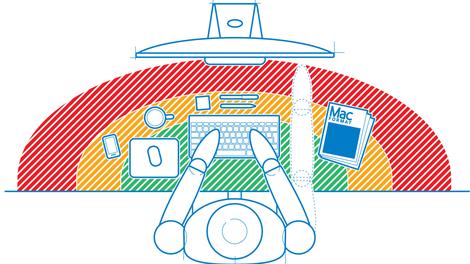
According to the NHS nearly eight million working days are lost each year because of back pain or other MSDs (Musculoskeletal Disorders).
For small business owners creating a safe working environment not only ensures they comply with health and safety regulations, but can also result in an efficiency boost right across their businesses.
Ergonomics is the study of how people use their environment. In a business context this usually means how each component of their offices is set up. A good example where ergonomics can be used to great effect is reducing the instances of RSI (Repetitive Strain Injury) that can be highly debilitating.
As one of the most common components of an office environment is the computer workstation, ensuring these are set up correctly is vital to avoid RSI and more serious MSDs. Follow these steps to create the perfect ergonomic workstation:
- Ensure seating and desk height is adjustable so employees' highs are parallel to the floor. Chairs should be fully adjustable especially the height and angle you are sitting at. If you chair doesn't have at least a height adjustment, now is the time to buy a new one.
- If possible, use a footrest to support your feet. Your chair's height should be adjusted so you can place your feet flat on the floor. If you can't do this, invest in a footrest. You'll be surprised at how comfortable your writing position suddenly becomes.
- The back of your knees should be clear of the front edge of the seat. Think about how deep the seat of your chair is. The front edge of your seat should not press on the backs of your knees.
- Ensure the lower and middle back is well supported. One of the most important aspects of sitting comfortably is to properly support the lumbar area of your lower back.
- Forearms should be supported and your shoulders relaxed at all times. Your chair should have adequate armrests to allow you freedom when you are typing, but give you a place to rest your arms when you are not. This is important as it avoids hunching your back and shoulders that can lead to painful supper torso conditions.
- Elbows should be at approximately the same height as the keyboard. Try and adjust the height of your keyboard either in its tray, or by adjusting the height of your desk to place your keyboard at the same height as your elbows. This reduces the strain of on your forearms when typing.
- The monitor should be at a comfortable reading distance and height. The viewing distance should be within 16" to 29" (40cm-74cm). The monitor height should allow the neck to be in a neutral position when looking at the top row of text on the screen. If you wear varifocal lenses the screen may need to be altered to accommodate this.

Lynn Fotheringham, Marketing Director, Insideout Buildings who manufacturer bespoke office spaces states through personal experience, "As a past sufferer myself, I don't think people start to understand the issues until they have a MSD. I think that the key issues that people need to think about are: A tight, 'hunched up' mind creates a tense, tight body, which then leads to MSD problems. So a good quality office that is your own personal space, built from natural materials and incorporating well designed office equipment is vital."
Ergonomic design
Choosing the right peripherals and accessories that offer high levels of ergonomic design is now vital. For none touch typists the Natural keyboards that Microsoft has been developing for several years can relieve RSI in some users, as it splits the keyboard and encourages a typing angle that takes pressure off the wrists.The humble mouse has also been given an ergonomic makeover with devices including several designs of mouse that can offer desktop and notebook users more comfort. For notebook and tablet users, attaching an external keyboard that offers more space and therefore, easier typing will help reduce the risk of RSI. Here a number of suppliers have high quality external keyboards such as Logitech, and covers for tablet PCs with built in keyboards from Kensington and Belkin.

As more of us use laptops, it's important to think about position with them, too
Ergonomics also goes much further than the peripherals or accessories that a typical workstation would use. Choosing the right desk and lighting are also important. Today there is a range of desk options including standing up desks that have proven to be beneficial to health, and LED task lighting including the award winning Horizon from Humanscale that also have a range of highly adjustable chairs to suit every need.
And think carefully about the monitors your business is using. The Health and Safety (Display Screen Equipment) Regulations 1992 apply where staff habitually use display screen equipment - such as computers. A new range of monitors from BenQ dubbed Eye-Care monitors that reduce flicker to alleviate eye-strain.
The key for small businesses is to carefully assess every component of their office environment and ask how this could be improved with ergonomics. Reducing and even preventing many of the common health issues that can impact on a small business' efficiency and productivity is now possible with some well chosen ergonomic peripherals.

| |
Read More ...
iPhone 6 may let you refocus your photos using Lytro-like tech

Apple has been awarded a patent for a Lytro-like camera system that will refocus an image after the shot is taken and could surface in future iPhones.
The patent for a "digital camera including refocusable imaging mode adaptor" was spotted by AppleInsider and could be a big clue as to the next step for the iPhone snapper.
Without the need to focus, taking pictures on an iPhone would be made instant thanks to the "plenoptic" tech, which basically means you can change what is and what isn't in focus after the shot has been taken.
Early glimpses
The patent even makes reference to the Lytro camera as prior art but adds that certain adjustments can be made in the quality of picture.None of this is too surprising though. During his final months, Steve Jobs actually met with the founder of Lytro to discuss a possible partnership with the company.
The patent was first filed in September 2011, one month before Jobs passed away, so this could be one of his ideas that's yet to surface in an Apple device.

| |
Read More ...
Review: Mini review: Bowers & Wilkins P7

When Bowers & Wilkins does something new, we pay attention. It has been going since 1966, in the grand old tradition of British audiophile companies producing and sticking with a very few, very excellent models.
The iPhone was a catalyst for a new chapter in its history; B&W was for a long time the only manufacturer making a speaker which incorporated Apple's wireless media technology, AirPlay, and partly since the company seems to share Apple's brand values, there's a good chance that the well-off music-obsessed iPhone owner will plump for a pair of B&W on-ear P5 headphones.

In their own way, and in a remarkably short time, they've started to become as iconic as Apple's white earbuds. (The difference is that B&Ws sound wonderful.)
Now, though, B&W has introduced the P7s, a set of over-ear headphones to join the P5s and newer, cheaper P3s, both of which sit on your ear.
Over-ear headphones – more properly called circumaural – such as the P7s have pads that go completely around your ear and press onto your head. They create a little void your ear sits in rather than having a solid pad pressing against your ear itself. There are two main advantages to this approach.

The first is comfort; even soft, high-quality on-ear (supra-aural) headphones such as the P5s can become at least uncomfortable, if not downright painful, when you wear them for hours at a time – especially if you wear glasses – thanks to the way they press your ears against your head.
Here, though, because the generous leather pad presses directly against your skull, you can wear them for hours with very little tiring. (Do note, mind you, that some people with large or very prominent ears still report discomfort having them tucked inside circumaural headphones.)

There is a trade-off, though; these are bulkier and heavier than the P5s, which, though you don't really notice their heft when you're wearing them, can be annoying when you're carrying them around or slip them off to sit around your neck. Happily, at least, the cups fold up; don't imagine that this makes them immediately pocketable, but the slight reduction in bulk is certainly welcome.
The second advantage is that because they're often bigger, there's more space to put in larger drivers – and that usually means better drivers. And certainly, the P7s sound really quite special.
Sound quality
The rich, refined, assured sound won't be for everyone. Some will want a more bombastic sound stage, a super-saturated experience that gives RnB, dance and Top 40 hits a thumping, juvenile quality. Basically we're saying that if you are attracted to Beats by Dre, you'll probably find the P7s lacking in drama.For all right-minded people, though, what you get here is properly glorious. There's a warm, fulsome quality to the bass which is nevertheless always completely controlled and never flabby.
Treble is never reedy or thin, vocals have wonderful presence, and all throughout the spectrum sounds are crisp and distinct. In short, these sound truly excellent, and as with all good headphones, you'll discover subtleties and probably even entire new instruments in tracks you think you know inside-out.
Well, all that holds true if you're listening to tracks that are well-mastered and ripped in a lossless format, or at least ripped at very high bitrates. The P7s very quality means they mercilessly reveal compression artefacts and glitches in mastering that cheaper headphones would gloss over.

What's more, while these are tremendously rewarding headphones to wear at home or in a quiet office – headphones you wear when you want to sink into music as into a hot bath, relishing it, focusing on nothing else – their comparatively poor audio isolation (surprising since they're closed-back) means they're not ideal for wearing on a commute or when walking around a busy town.
You get a carry case for them – which put us in mind of nothing so much as a sporran – and an alternative plain cable which lacks the inline iPhone controls (play/pause, skip, volume and mic for hands-free calls) of the default one.
Swapping this, or replacing it if it gets damaged (which is very welcome) is easy; the ear pads are held in place with strong magnets, so you can pull them off and swap the cable, or indeed the pads. Pricing for replacement pads hasn't been announced yet, but as a guide, a pair of pads for the P5s cost £36.

Verdict
There's no doubt that these headphones are good. They're probably even great. They probably even justify that price tag. If we were to judge them on audio quality alone – sitting here, writing this review, listening to the warm, layered, nuanced balm of Lambchop washing over us; pausing every now and then as a line, a chord, an arpeggio we've hitherto missed suddenly strikes us – then they'd undoubtedly score a perfect five stars.There are a few niggles, though. The first is the price. We're categorically not saying the price is unfair, or that B&W is greedy. The build quality and the care and investment in materials – real leather, though for some that will be a negative – and technology are clearly significant; if you can afford or can scrape together the money to buy a pair, you'll likely, however reluctantly, agree that the price is probably about right. None of that stops 'over three hundred quid' being a lot of money.
The second is the comparatively poor audio isolation. There's no active noise cancelling – which might after all seem a little crass here – but worse is that more ambient sound than you'd expect from a big, circumaural set of headphones leaks in. An answer on the B&W website suggests this is intentional, but it does mean you can't lose yourself in your music when out and about, and does question B&W's claim that these provide 'truly immersive sound'.
Finally, it's worth noting again that while we adore the audio signature, for some people it will be too restrained.
Regardless, the ultimate test of any product is whether you'd be happy to receive it as a gift or whether it would sit unloved in a drawer or be surreptitiously returned to the shop, and if someone gave us a set of B&W P7s, we'd give them a big kiss.

| |
Read More ...
Review: Sony KD-55X9005A

Introduction
Ultra HD is an expensive hobby. However, after a year or so of extortionate five-figure sums being bandied around, the new 4K format is finally beginning to slip from the bracket marked 'footballer' to one with a slightly less salubrious 'AV enthusiast' tag.At the vanguard is this 55-incher, which has received an almost immediate price drop from £4,000 to £3,299, thanks to Toshiba's decision to sell its own 58-inch attempt at 4K for a mere £2,999.
With a screen that measures 55-inches in the diagonal, the KD-55X9005A is just about big enough - in our humble opinion - to make the best of Ultra HD sources (not that there are many of them). However, the KD-55X9005A has got something that rival Ultra HD TVs don't have; amazing speakers.
Boasting a 2.2-channel sound system - with two subwoofers on the rear and what Sony calls its Magnetic Fluid Speakers on each flank - the KD-55X9005A is quite something. It takes us back to the early days of flatscreen TVs, when clip-on speakers were common, and underlines that sound is at least as important as resolution in any attempt at high-end home cinema.
However, from a visual point of view we're not convinced that it works.
Firstly, why are there no grilles on the speakers? The inner rims - all done out in shiny gloss black plastic - tend to catch the light and can be a tad distracting. There's also the strong possibility that anyone with the money to spend on this telly will already have a better sound system at home.

We're also a little worried about the width they add to the already rather large footprint of the KD-55X9005A; though the bezel on the top and bottom measure just 23mm, they stretch to 127mm on each end. It makes the entire product stretch to 146cm, which is 22cm wider than Sony's non-4K range-topper, the 55-inch KDL-55W905A.
Certainly don't plan to swap-out even a 50-inch telly installed in a corner for the KD-55X9005A - it's so much wider. It's also worth considering that the KD-55X9005A has a completely circular stand that increases the depth from around 100mm (it's 58mm without the bulging subwoofers) to 405mm. The KD-55X9005A is beautiful, but it's big.
Aside from its headline-grabbing 3840x2160 pixels - which create about four times the resolution of a regular Full HD telly - the KD-55X9005A uses a Sony-tweaked LED panel called Triluminos.
However, in the absence of any native Ultra HD fare, the KD-55X9005A's key technology is perhaps its 4K X-Reality PRO upscaling.
But things are looking up for Ultra HD fans. Although our review sample of the KD-55X9005A came with a mini-computer that hosts Ultra HD clips, the company also sells its stop-gap Sony FMP-X1 4K Ultra HD Media Player for the brand's X900A Series of Ultra HDTVs, though it's only sold in the US (for US$699, which includes 10 pre-loaded films in 4K).
Sony looks to be covering all bases with its recent announcement that its Video Unlimited service - available on the KD-55X9005A through its Sony Entertainment Network - will soon stream native 4K content.
Besides, the wider AV industry soon seems set to welcome a new Blu-ray format at January's CES exhibition in Las Vegas. Blu-ray Ultra, per chance? If it does come, the owners of the KD-55X9005A will be in pole position.

Also available
The 55-inch KD-55X9005A we have in our glare is surely as close to an everyman TV as Ultra HD gets at the moment.At £2,300 it's got a big price tag, but consider the alternatives: Sony also sells the 65-inch KD-65X9005A, for £6,000, and the quite disgustingly big 84-inch Sony KD-84X9005. That particular slice of opulence will set you back £25,000 - and you'll need to add the world's biggest living room, too. Relatively speaking, the KD-55X9005A is a compromise product par excellence.
Features
Is the KD-55X9005A packed with all-new tech ripe for a new era in TV? There's certainly some tweaked software on board as well as that 3840x2160 pixel panel, but there's plenty of familiar technology - and some familiar problems, too.The KD-55X9005A uses an LED-backlit LCD panel - complete with local dimming - and Sony's own Triluminous technology, which sees white LEDs banished in favour of blue with an accompanying array of quantum dots good for green and red light.
So, exactly how advanced is that 4K resolution? Squeezing in those 8,294,400 pixels on a 55-inch panel is no mean feat, though the maximum image is 'only' eight megapixels.
It's four times that of a Full HDTV - itself capable of a maximum two-megapixel image - but the pixel density still doesn't compare with what you'll see on most smartphones. Take those promises of 'like looking through a window' and chuck them out the door; 4K is an evolution, not a revolution.
That said, the KD-55X9005A produces a stunning image from native 4K footage, though it's also being touted as the answer to the 3D 'problem'.

The KD-55X9005A plays in the 'passive' 3D arena - therefore using an LG-made panel, no doubt - and ships with four pair of super-lightweight specs.
The way passive 3D tech works cuts out half of the resolution, which is a big problem on Full HD TVs; here, that sacrifice is far less noticeable. The 3D specs in question are Sony's TDG-500P, which cost an improbable £9 each, though the ones still in your coat pocket from the last 3D film you saw in the cinema will do just as well. SimulView - aka 2D dual full-screen gaming - requires Sony's TDG-SV5 specs.

Ins and outs on the KD-55X9005A are generous, varied, and all on the TV's left-hand side (as you view it). A lower side panel on the rear of the corner offers two USB slots, while just above and further in is a cut-out featuring a single HDMI, a third USB, a headphones jack and a Common Interface slot. Slightly bizarrely, there's a second HDMI slot on its own near to a fourth connections panel - this time down-facing - that includes the third and fourth HDMI slots and feeds for its built-in Freeview HD and Freesat HD tuners.
A fifth area sweeps-up, adding wired Ethernet LAN (Wi-Fi is also included), an optical digital audio output, component video and phono ins, and, lastly, something of a throwback; a full RGB Scart. Have we time-travelled back to the 1990s?
Sony promises that the HDMI inputs - which are all ARC- and MHL-ready - will be upgraded to the latest HDMI 2.0 spec in the near future, though we're not sure how. Firmware upgrade?
For now, the flagship technology on board is Sony's 4K X-Reality PRO engine, but can it really upscale DVDs, YouTube videos and dodgy Freeview channels to 4K-like quality? The maths involved is mind-boggling; the KD-55X9005A is going to have to use one pixel of SD to occupy 16 of its own pixels.

Other circuitry includes the motion-blur-suppressing Motionflow XR 800Hz, a dynamic backlight and Reality Creation, which ups sharpnesss while keeping noise levels low. Other than that, there's not an awful lot to tweak aside from basic picture parameters such as brightness, colour and contrast.
NFC One Touch Mirroring from smartphones is a nice touch, as is the provision of the free TV SideView app, though it's the Sony Entertainment Network (SEN) that steals the smart TV headlines. It's not the best around, but it's slick and contains most of the apps most of us want; BBC iPlayer, Netflix, LoveFilm, YouTube, Skype, BBC News, BBC Sport and Sky News. It also features Sony's Video Unlimited and Music Unlimited, the former of which will soon offer 4K downloads.
Picture
The KD-55X9005A represents a huge step forward in TVs, but it's not quite as perfect as it thinks it is. Let's start with the headline act - detail.Sony claims that, such is the tiny size of the pixels, it's possible to sit much closer to this TV than to a regular Full HD model. Around 1.5 times the height of the TV, in fact, and though we'd broadly go along with that (the pixels are so small they're almost impossible to see), that only applies to 2D. Watch in 3D and you're better off sitting further back, where you usually sit. Two rows of sofas, anyone?

Back to the detail. Native 4K footage is awesome. In our reservoir of 4K samples were trailers for After Earth and Total Recall, the latter of which we also had on Sony's 'Mastered in 4K' Blu-ray disc (so in Full HD resolution).
Despite 4K X-Reality PRO, the two don't compare; the subtlety of the light and the pin-sharpness of close-ups in the native 4K version are quite brilliant.
The Blu-ray version is actually almost as good, however, and 4K X-Reality PRO is clearly doing its job; watching Blu-rays (and not just 'Mastered in 4K' versions - we watched Hugo and The Amazing Spider-Man, too) on the KD-55X9005A is a real treat.
Reality Creation is a key technology here, effectively dressing up Blu-rays as something akin to 4K, complete with sharp edges and saturated blocks of colour. It's clever stuff, though occasionally the upscaling is overdone, and close-ups can look a little thin. It's worth underlining how brilliant the colour is on everything the KD-55X9005A displays.
However, 4K X-Reality PRO can't do much about this TV's endemic structural issues, which are slight but noticeable.

The most annoying is motion blur; even with Motionflow XR 800Hz on its 'Clear' setting, each time the camera pans that awesome 4K image blurs, retreating into something visibly less than Full HD. It's very noticeable on the many FIFA Confederations Cup football 4K clips provided to us by Sony; camera pans blur, and the ball leaves a trail and a double image. Ditto in some tennis clips. What a shame.
There's also a worry over this panel's native contrast. With the lights off there's a bluish look to dark scenes, denoting some LED clusters, though LED Dynamic Control addresses this pretty well. Black levels are acceptable but, again, not as impressive as on Sony's high-end Full HD tellies - solid blocks of black contain little in the way of shadow detail.
Nor is 4K X-Reality PRO the cure for all ills it claims to be. It makes a decent stab at upscaling Freeview HD channels, but regular standard definition fare isn't as comfortable to watch as on a decent Full HD TV. The same goes for DVD, whose ragged edges are delivered with visible blocking, though the KD-55X9005A does handle digital files well.
Some hi-def MKV trailers we had looked fabulous, though for some reason some AVC HD files from a camcorder appeared over-upscaled.

We've been listening to analysts say that Passive 3D - thus far hamstrung by a lack of pixels on Full HD sets - won't come of age until Ultra HD hits the stage. Well, that's now - and we're here to report that Passive 3D on the KD-55X9005A looks fabulous.
The horizontal lines are still visible (particularly in long-shots, but never in close-ups), but only if you look for them. Sitting further back helps, too, but overall the cleanness, sharpness and completely crosstalk-free 3D images are a delight. Our only regret is that there were no native 4K 3D samples for us to test with.
We are, however, conscious of one 3D fact; in terms of detail, 4K active shutter 3DTVs look even better.
Ease of use, sound and value
Ease of use
We're big fans of the KD-55X9005A's user interface. It's identical to that found on all Bravia TVs for 2013, and it puts an emphasis on simplicity and speed.All graphics are hi-res, too, which is a nice touch - a good example being the bright and breezy electronic programme guides.
However, the remote controls are relatively poor for a high-end TV. As opposed to LG and Samsung - both of whom provide wand-style remotes and/or brushed metallic touchpad versions with embedded microphones - Sony has issued this £3,299 telly with the same remotes found with its everyday TVs.

At least the main remote is simple to use, sporting buttons for Home and SEN for easy access to the main functions and smart TV apps, respectively. We also like the fast Zapping mode, which allows the quick navigation of TV channels on a side-menu, though it takes some getting used to.
However, the second, smaller remote that powers the NFC features (tap to a phone to pair with the TV) is otherwise too basic.
As a smart TV hub, SEN is an add-on, an extra, which makes it vastly different to how most smart TVs walk. However, we like this conservative approach; most of the time one doesn't want to go anywhere near apps when attempting to watch TV.
Our only complaint is that Sony's own Video Unlimited, Music Unlimited and Play Memories apps are given pride of place on the TV's user interface, though that's not necessarily a bad thing since the choice is good.

Digital files - accessed through the Connected Devices menu - are dealt with nicely, with all major filetypes for video and music handled. Via its USB slots we managed to play MKV, AVI, MPEG, MP4, MOV and WMV files, though over a network MKV files aren't supported. Music in WMA, WAV, MP3 and M4A versions played fine, too.
Sound
The KD-55X9005A excels with audio - and in one swoop explains why this set is pricier than Toshiba's 58-inch 58L9363DB.Its 2.2-channel sound system delivers unusual bass levels, of course, but it's the wide soundfield and precise stereo imaging delivered by the Magnetic Fluid speakers we're entranced by. It goes loud, too, and delivers more than enough oomph for frenetic films.
It's all a welcome throwback to the early days of flat TVs (and then some), though we're guessing the wider design won't appeal to everyone.
Value
Despite the rapid price-cut from its original £4,000 level to £3,299 (thanks, Toshiba), Sony's KD-55X9005A is all about having the latest and greatest slab of 4K tech - and at a reasonable size. Considering that the 65-inch version costs almost twice as much, we'd judge the KD-55X9005A as pretty good value - relatively speaking.That impression is helped by the quality upscaling, the proficient handling of digital files (and other hum-drum daily chores), but mostly by the top quality speakers - what a treat.
Verdict
It's a strange thing to say that a major highlight on one of the first 55-inch Ultra HD TVs is, in fact, sound quality. But that's exactly what the KD-55X9005A excels at, along with searing amounts of 4K detail and a fine upscaled Blu-ray experience.We liked
Aside from detail, the KD-55X9005A does brilliantly with colour - and even better with sound.In fact, we'd rate it as the best-sounding TV around. The design is high-end, the user interface slick and the 4K detail stunning. More importantly, at least at this early stage of 4K evolution, is upscaling, and some good news; Blu-rays have never looked better - and that goes for 3D as well as 2D discs.
We disliked
If most Full HD TVs are best fed an HD-only diet, that goes quadruple for the KD-55X9005A, which doesn't make as much of the 4K detail as its bigger 65-inch sibling.Standard definition sources look rather ropey, and we also noticed some issues with contrast and the 4K-cancelling amounts of motion blur.
We're also not convinced that built-in speakers - and the consequent super-wide design - will appeal to the kind of home cinema aficionados that are bound to be most interested in the KD-55X9005A. At 34.5kg it's a whopper, but is it really big enough to show-off 4K?
Final verdict
With only slightly less wow factor than its big sibling, the far pricier KD-65X9005A, the KD-55X9005A is currently the best value Ultra HD telly around.But it's not just the pin-sharp performance with (as yet non-existent) 4K sources that blew us away. As if to throw the AV world a few crumbs as we await 4K Blu-ray, Sony's provision of some awesome speakers flanking the 4K panel are a timely reminder of just how much cinematic impact is from sound.
Colour, too, is stunning, and the upscaling of Blu-ray is proficient.
The downsides are a touch of motion blur and the somewhat ropey-look to upscaled standard definition sources, where the maths involved proves too much.
One of the best performers with Blu-ray, let alone 4K, the KD-55X9005A is a standout winner with 3D, too. The passive 3D system's loss of resolution here looks less like a compromise, and it's always smooth and bright. Until we wait for native 4K Blu-ray discs to drip onto the market, the KD-55X9005A has plenty to keep anyone satisfied.
Also consider
Also offering 55-inch-or-thereabouts Ultra HDTVs is LG, Samsung and Toshiba.LG's effort is the 55LA9700 and Samsung's the UE55F9000, which are both identical in price to this Sony.
If you want to save a few quid, head for Toshiba's slightly larger 58-inch 58L9363DB (£2,999).
Both Samsung and Toshiba use the Active Shutter 3D system on their Ultra HDTVs. Most are available in 65-inch versions, too, but the prices almost double.

| |
Read More ...
In Depth: HTC M8 release date, news and rumors

How do you follow up a phone like the HTC One? It was only the third smartphone to garner a highly coveted five star TechRadar review and the Taiwanese firm has got a job on its hands to repeat the trick with its successor.
HTC is working on something though, as a myriad of leaks, rumors and suggestive benchmark results worm their way onto the web - all of which appear to reference the "HTC M8."
Why is this significant? Well, the codename for the original HTC One during development was M7, so the M8 moniker makes logical sense for the firm's next flagship smartphone.
The handset won't launch under the M8 name however; there's actually a bit of confusion over the name HTC will give it after backing itself into a little bit of a corner with its "One" brand.
Currently HTC One Two is being bandied about, but we reckon that's more for convenience rather than a hard and fast name for the market.
With 2012's One X, One S, One V and then One X+ followed by the One SV and headline making One in 2013 it's not clear where HTC will go next.
The HTC One+ perhaps? Or how about the HTC One Magnificent?
Cut to the chase
What is it? The sequel to the 5 star HTC One - that's a tough act to follow
When is it out? We're hearing before the end of Q1 2014
What will it cost? At lot. The HTC M8 will cost around £550, $650, AU$700
Bear in mind we also have the One Mini and One Max - variations HTC will no doubt want to exploit with its next-gen flagship - and we're left scratching our heads.What is it? The sequel to the 5 star HTC One - that's a tough act to follow
When is it out? We're hearing before the end of Q1 2014
What will it cost? At lot. The HTC M8 will cost around £550, $650, AU$700
One thing is for sure though, the HTC M8 is going to have some stiff competition as the Samsung Galaxy S5 will also be rocking up in 2014, along with the iPhone 6 later in the year.
We've rounded up all the latest M8 chatter from around the web to bring you the best picture of what you may see from the HTC One Two.
HTC M8 release date and price
We have seen a mention of the HTC M8 release date, with perennial leaker @evleaks tweeting that the handset would be with all four US networks by the "end of Q1 '14."In other words the HTC One Two should be hitting stores before the end of March 2014, which pegs an unveiling earlier that month, or even in February - could there be a MWC appearance for HTC's next flagship?
There's no mention of a HTC M8 price just yet, but if it does transpire to be the next flagship handset it'll carry a hefty price tag - so you might want to start saving now.
HTC M8 display
Big screens are the order of the day for today's flagship smartphones and various reports seem to suggest HTC will build ever so slightly on the 4.7-inch display found on the One.It looks like the M8 will pack a 5-inch display, although one report says it could go as big as 5.2 inches.
There's been a lot of talk around 2K and 4K displays on smartphones arriving in 2014, but if an Antutu benchmark result is to be believed HTC will stick to the same full HD, 1920 x 1080 resolution for the One Two.
The 5-inch, full HD screen has been echoed by @evleaks - a usually reliable source of upcoming phone leaks.
HTC M8 power

The HTC One arrived on the scene with a relatively decent 1.7GHz Snapdragon 600 processor, but things have advanced since then and numerous reports are all pointing to the same chip for the M8.
That processor is Qualcomm's Snapdragon 800 SoC, and benchmarking results points towards the quad-core chip being clocked at 2.26GHz - the same as the LG G2.
There was a rumor doing the rounds claiming that HTC was looking to boost the One to an octa-core processor and 3GB of RAM, but the handset never materialized - has it been held back for the M8?
Several other leaks are quoting 2GB of RAM, which would be the same as the HTC One - but still plenty to run Android.
For those of you who love gaming on your smartphone there's some potentially good news for you, as the M8 has also been linked to the Qualcomm Adreno 330 GPU which will enhance the graphical output of the handset.
HTC M8 operating system
No surprises here, when the M8 finally launches under whatever moniker HTC has managed to bodge together you can be sure Android will be hiding under the hood.The good news is that it's tipped to be the very latest version - Android 4.4 KitKat - and of course it will be coated in a heavy layer of HTC's Sense overlay.
Word is that the One Two will come with a brand spanking new version - Sense 6.0 - although we hope it doesn't deviate to much from 5.5, which we greatly enjoy.
If the details surrounding processor and RAM ring true then you can expect the M8 to run whatever version of Android it's rocking smoothly.
HTC M8 camera
HTC broke the cameraphone mould with the One as it introduced its Ultrapixel lens and proceeded to slap it on the Mini and Max variants of the handset as well.The technology was met with mixed responses and questions were raised when the camera transpired to be equivalent to a 4MP snapper - albeit letting in a hell of a lot more light thanks to the larger pixels.

Some will be hoping HTC ditches the Ultrapixels tech in favor of the traditional megapixel approach and with the likes of the 41MP Lumia 1020 and 20.7MP Xperia Z1 on the market competition is fierce.
There's been little leaked on the camera front of the M8, but the one revealing benchmark result we keep referring to quotes the same front and rear cameras as the One.
HTC M8 chassis
Something which really made the HTC One stand out from the crowd was its all metal body - something only Apple had really fully embraced before, and it gave the handset a supremely premium look and feel.A couple of images have already slipped out claiming to show the body of the HTC M8, and from first glance it appears almost identical to the One - no surprise, why change a winning formula?
The report reckons that HTC will keep the all metal body, but that the M8 will feature a slimmer form factor, making the handset even more pocketable - and hopefully a touch lighter too.


| |
Read More ...
Android users get in on Spotify Connect's Wi-Fi speaker streaming

Spotify Connect is a nifty little feature, letting you stream your music to select speakers locally over Wi-Fi and eliminating the need for any Bluetooth pairing faff.
It's also something that iOS users have been able to rub in Android faces for the past couple of months. Now the feature has been made available for fans of Google's OS via an update for the Android app, as spotted by Android Police.
There are currently only a limited number of compatible partner speakers, which include Philips, Argon, Revo, Pioneer and Bang and Olufsen, and of course you'll have to be using Spotify Premium before you can start streaming.
Multi-room, multi-platform
While you're streaming music over Spotify Connect you'll be able to take calls and just generally use your phone however you want without interrupting the music.You won't be able to play any local files though, just tracks you find on Spotify. But it's an especially handy feature if you want to get some of your own tunes rocking when visiting a friend's house.
It also means you can be as far away from the speakers are you like, just as long as you're still in Wi-Fi range.
- Google Play Music All Access or Spotify? FIGHT! FIGHT! FIGHT!

| |
Read More ...
Opinion: Xbox One and PS4: two boring black boxes with a lot of promise

How is it possible for two competing products to be so similar and yet so different?
Both the PS4 and Xbox One run the same AMD CPU and very similar graphics hardware.
They've both moved over to x86, they both rock the same half-matte, half-gloss finish. Neither are good looking, though the Xbox One is particularly ugly.
They both run FIFA 14 and Call of Doody, both respond to voice commands and they even smell similarly musky out of the box.
And yet, they're so different it's almost unreal. They're like identical twins with nothing in common – Dave likes fishing and Big Bang Theory repeats, while Darius is a champion ballet dancer and mostly watches documentaries about railways.
Big differences
The differences between the two consoles are evident from the very first second you set eyes on their packaging. The PS4's box is slim and lightweight. You can pop it out of the box and have it plugged in in seconds. The empty box fits neatly behind a door, beside the sofa or in a cupboard.Bang, off you go. Sony wants to put nothing in the way of the gaming and it also, shock horror, cares about the environment.
The Xbox One on the other hand is quite different – the box is big and heavy, there's a million cardboard compartments storing all of the little extra bits, plastic bags and wrapping, wire tags. It was a mission just extracting it from the box and after I'd done it my living room looked like a war-torn COD map. The box is so big I don't know what to do with it.
These differing experiences permeate even once you've got yourself up and running. As soon as you boot up the PS4, it wants you to play a game. It's like a classic car that just wants to be driven and to hell with filling up with petrol or checking the oil.
The Xbox One is like an egomaniacal supercar that wants to be driven but only after you've spent an hour faffing, setting up Kinect, working out how to navigate the interface and given it a stroke and a hug.
If you didn't get from the original launch events that the PS4 was all about gaming and the Xbox One was all about media, you certainly will when you use them.
The HDMI-in feature on the Xbox is great, but outside of North America it's a redundant feature for the time being. You can pass your Sky, Freesat or Freeview box through it if you're in the UK, but there really is no benefit for doing so other than having to power an extra device.
Does media matter?
The PS4 on the other hand is a feeble media machine and impotent in the launch games department. For a super-powered gargantuan of gaming, there's very little to play on it. Killzone? It's really not great. It's not as pretty as you want it to be and the gameplay is nothing you haven't seen before.But what about Forza 5 on the Xbox One? A reason to splash out all that cash? No way, Jose. It's a great racing game but ultimately it's just another Forza. It's pretty, but it's not that pretty. Worth getting if you buy an Xbox One? Absolutely. Worth buying an Xbox One for? Forget it.
The fact is that both consoles feel as though they launched too early. Crucial features are missing. PS4 doesn't even have a player to read an MP3 file - seriously, Sony?
There are no stand-out launch titles. Prices are high. The race to hit the shelves in time for Christmas 2013 has resulted in the release of two consoles that are basically still in beta.
Should you buy or should you wait?
So should you buy one and if so, which one? I'd say you probably already know which one you're likely to pick up if you haven't already done so.The PS4 is the spiritual successor to the PlayStation 2, still the best selling console the world has ever seen. It's a powerful gaming machine built by gamers for gamers and for the time being it's top dog in sales, at least.
The Xbox One is a super-charged Xbox 360 and it wants to help manage your entire digital existence. We think it'll succeed in doing so.
They're both interesting in our eyes and I'm excited to see how each console matures. But what's missing today is a compelling reason to actually go out and buy either of them.

| |
Read More ...
Sony Xperia Z1s could be the Z1 Max, not the Z1 mini

There's been a lot of talk and rumors lately about the Sony Xperia Z1s, a handset believed to be a mini version of the Sony Xperia Z1.
But as likely as that had previously seemed, a new image posted on Chinese site Digi-wo and found by Xperia Blog shows a phone that's supposedly the Xperia Z1s side by side with an Xperia Z1 and it looks anything but mini. In fact if anything it looks slightly bigger than the Xperia Z1.
The angle of the image isn't great, so it's hard to say for sure, but the Z1s looks both taller and wider than the Z1, as well as having its headphone port near the middle of the top edge, rather than to the side as the Z1 does.
Super size me

The size difference could mean that rather than being a shrunk down Z1, the Z1s is actually a slightly bigger version of the handset, perhaps with a 5.2-5.5 inch display and maybe even an increased resolution to match.
If you were looking forward to a more pocket friendly Z1 though don't give up hope yet, as a shrunk down version known as the Z1F has already been confirmed for Japan. This new news may just mean that we're getting both a mini and a max version of the Z1.
- The Samsung Galaxy S4 has already gone mini. Check out what we thought of it.

| |
Read More ...
HTC M8 smashes benchmark as most powerful HTC yet

News on the successor to the five star, flagship HTC One is rife with new leaks suggesting the follow up M8 handset will be the Taiwanese firm's most powerful to date.
The HTC M8 moniker is widely believed to be a codename for next-gen smartphone (the One was known as M7 during development) and while we'd be surprised if it launch as the HTC One Two, it's currently the most common name in circulation.
Confusion over the name aside, after yesterday's brief outing the folks over at AnTuTu benchmark reckon they've uncovered a gem in their Android app - with a phone carrying the HTC M8 name posting some rather impressive information.
Feel the power
It's not clear how accurate the information is, but with a punchy 2.26GHz Snapdragon 800 quad-core processor and 2GB of RAM it would put the HTC M8 up there with (and ahead of) the LG G2, Google Nexus 5 and Sony Xperia Z1.That's a significant boost from the HTC One, which packs a 1.7GHz Snapdragon 600 chip - so not only will there be more power, but hopefully better battery life from Qualcomm's efficient 800 SoC.
In terms of operating system the HTC One Two is tipped to launch with the latest version of Google's mobile platform - Android 4.4 KitKat. While the One Two may well have KitKat at its heart, HTC will almost certainly stick its Sense overlay on top.
There's no mention of which version of Sense will adorn the HTC M8, but we could well see the new 6.0 overlay, following on from 5.5 which resides on the One Max.
Storage hunters
So what else might we expect from the HTC One Two? Sadly it looks like there won't be any advances in the camera department, with the same 4MP (likely to be Ultrapixel tech) and 2.1MP lenses quoted for the rear and front of the device.Something else which strikes fear into us is the quoted level of internal storage - just 16GB. Considering the One doesn't come with an expandable memory option and the OS takes up 8GB there could be serious storage issues here.
As we've already mentioned, these specs are certainly not set in stone and we'd be surprised if HTC didn't go down the 32GB and 64GB route for the One Two.
Unsurprisingly this handset wipes the floor with its predecessor in all the benchmark tests on Antutu so, while you should take this with a generous dosage of salt, it's looking good over at HTC.
Word on a HTC One Two release date is still relatively sparse, but it's thought the handset will make an appearance early on in 2014 - we can't wait.
- Want a top phone right now? Here's our list of the 20 best mobile phones in the world today

| |
Read More ...
Is Apple about to turn your smartphone screen into a fingerprint scanner?

Touch ID was a big deal for Apple as it gave the iPhone 5S a major selling point beyond just improved specs, but if a patent that recently appeared is anything to go by Touch ID may just be the beginning.
The patent, which turned up in the World Intellectual Property Organization database, shows plans by Apple to turn the entire display into a fingerprint sensor.
Being able to tell which finger is touching the screen opens up a lot of possibilities beyond just security. It could be used for application shortcuts, for example swiping your index finger upwards could cause a specific app to launch. The same principle could be applied to games, allowing developers to add extra controls.
Of course a patent doesn't mean this will happen and even if it does it could be years away yet, but it's certainly an idea with a lot of potential.
You've got the touch
The same patent also details plans to turn the home button into a trackpad. Apple would likely use a modified version of the Touch ID sensor to do this, but basically all that's needed is for the sensor to be able to track the movements of your finger as well as the static imprint.This would then enable you to scroll maps and web pages simply by sliding your finger to one edge of the button, while rotating your finger could perhaps bring up a scroll wheel that could be used to launch apps.
This, if it happens at all, is likely to arrive sooner than the full screen fingerprint scanner and may be enough to tempt Apple to explore bigger screen sizes, as it would make controlling the phone with one hand easier than ever.
- Interested in the ins and outs of Touch ID? Head over here for an in-depth explanation.

| |
Read More ...
12.9in iPad said to be coming late 2014, iWatch facing delays

We thought that rumours of a 12.9-inch iPad launching early next year were too ambitious, and it sounds as though we were right to be cautious.
The occasionally-reliable Digitimes is reporting that manufacturer Quanta Computer has landed the contract to product the larger tablet for the second half of 2014, according to sources in the "upstream supply chain".
If true, this means that a larger iPad is indeed on its way, with Digitimes' sources suggesting that the large iPad is aimed at "education and enterprise" markets.
But according to the same report, Quanta might face some challenges with assembling the super-sized tablet due to its "industrial design".
Max power
As for the iWatch, the same report also says that pilot production for the device has started, with Quanta and Foxconn Electronics taking charge.However, due to "low yields" - a low number of finished products rolling off the production line actually fully functioning and able to be sold - mass production is said to have been pushed back from the first quarter of next year to the second.
Looks like Apple's iTV might be on the backburner while it deals with all this, even if it did just buy 3D motion-tracking company PrimeSense.
- Here's everything we (think we) know about the iWatch so far

| |
Read More ...
iBuyPower has a Steam Machine prototype, looks a bit like a white PS4

The Steam Machines haven't arrived just yet but glimpses of the box have been popping up left and right.
Engadget reported that iBuyPower has two Steam Machine prototypes in the works that so far, look quite a lot like a white PlayStation 4 - except there are light bars that may change colors.
Lovingly named Gordon and Freeman, details on the commercial prototypes are minimal though provide enough info to give you a general idea of what to expect.
Though Tom's Hardware claims the boxes in the photos have "an AMD CPU with a discrete GPU ... Wi-Fi, Bluetooth and at least a 500 GB HDD, with faster and larger options planned."
Both sites note the machines are capable of running all Steam titles in 1080p resolution at 60fps, and of course, are powering SteamOS.
Console competish

The Steam beta boxes are already set to ship out with varying degrees of massive computing power so iBuyPower's "larger options" comes as no surprise.
Along with the Nvidia Titan GPU, you can look forward to the GeForce GTX 780, GTX 760 or GTX 660 GPU plus much, much more.
Pricing for Gordon and Freeman's successors have yet to be revealed though it'll likely be comparable to the PS4 and Xbox One.
- Steam Machines, meet the PS4 and Xbox One.

| |
Read More ...
Available Tags:Xbox , PS4 , 3D , download , BlackBerry , Microsoft , Nokia , tablet , Android , Google , HTC , Samsung , Galaxy , Acer , Mac , iPhone 6 , iPhone , Sony , rumors , Apple , smartphone , iPad , Steam ,


No comments:
Post a Comment