

Review: Liquid Image Apex HD + WiFi Camera Goggles

Introduction
Last fall TechRadar got our hands on the juggernaut of the action cam world, the GoPro Hero 3 Black Edition. While there's much to like about GoPro's latest offering, it's far from perfect. While the image quality is second to none, the cameras themselves can be finicky and boy are they bulky. While rocking a GoPro might appeal to some, others don't necessarily like the idea of having a bulky camera perched atop their helmet. And that's where the Liquid Image Apex HD + WiFi Camera Goggles come in.

We took to the slopes at Alpine Meadows and Squaw Valley near Lake Tahoe, CA to put the Liquid Image Apex HD + WiFi Camera Goggles through their paces and we were very impressed.
Described as an "all-in-one POV camera and goggle" where the Apex HD + WiFi shines is in its relative simplicity. Since you're probably already going to wear goggles, using this setup doesn't really require another piece of gear. Of course, since the camera is built into the goggles, relative to other setups, the Apex HD only sports 30 degrees of vertical angle adjustability. That said in our testing this wasn't really a problem. For the most part when you attach a camera to the front or top or your helmet you pretty much just want to see what's in front of you anyway.

Liquid Image has a mobile app for iOS and Android phones that uses the camera goggles' built-in WiFi and once you have the connection setup you can monitor and set up your shots making sure that the angles are right. You can even use the mobile app to control certain aspects of the camera. Of course, during our tests we tended to shy away from watching the phone all day because of battery life concerns. There's another app as well called Action Connect that lets you control even more of the camera's functions but it has an awful delay that we found to be annoying.

Speaking of battery life the Apex HD + WiFi sports a rechargeable lithium-ion battery that's housed in the right side of the strap. The control mechanism, replete with the tiny 0.5" x 0.5" LCD is housed in the left side of the strap. The camera's battery is rated to last between two and two and a half hours and that was consistent with our experience. Similar to other action cameras controlling the device and feedback is handled via a series of beeps. Turn the camera on and one beep tells you you're in 720p 60FPS video recording mode. Hit the power button again and you're in 1080p 30FPS video recording mode. Another beep and you're in single photo mode. One more beep and you're taking a burst of photos. Hold the power button down for a series of beeps powers the camera off. In our tests we would turn the camera on while riding near the end of the lift, record our video or pics and then turn it off at the bottom to save battery life.
Specifications
The Apex HD + is capable of recording video at 1080p and 720p at 30FPS and 60FPS respectively. It also rocks a built-in microphone but in our tests, while skiing down the mountain, it mostly just picked up wind noise. While quietly riding up the lift the built-in mic did as good a job as can be expected from a helmet cam.
Boasting a 12MP camera the Apex HD + stores data via a 4GB MicroSD card (included) who's slot resides in the left-side housing unit. The device takes about four hours to charge and uses MiniUSB. We would have preferred it to use MicroUSB as that's the format most widely used with cell phones. Of course, this is a rather minor gripe.

Now, the Apex HD + WiFi isn't just a camera. It's also a set of goggles. That said, the quality of the goggles was truly impressive. Of course, if you're spending $399 you expect quality optics. Additionally they ship with two anti-fog, 100% UV Protected lenses.
Video and picture quality
We tested the Apex HD + WiFi in beautiful sunny conditions as well as in a blizzard and the image quality was awesome. Still images were crisp and video too was nice and smooth, especially at 720p and 60FPS. One issue that plagued us while skiing during a blizzard that we didn't notice until we got back to the cabin to go over the day's activities was that the falling snow covered the lens!
Since we setup the camera angle before the snow started falling it didn't occur to us to clean the lens during the day. Lesson learned.


Verdict
All in all anyone who's interested in taking video of themselves and their buddies skiing would no doubt dig the Apex HD + WiFi from Liquid Image. While GoPros are all the rage the fact remains they're not the only game in town and well...not everyone likes the idea of having a camera mounted to their helmet.

We disliked
Compared to other goggles the Apex HD + WiFi is pretty bulky. We tested it with two helmets and didn't really have any problems but the control modules and battery are large especially when they're on top of a helmet. Also, at $399 it's a commitment that definitely lacks the flexibility of other options. We also don't understand why all of these companies continue to use WiFi to connect to your phone as opposed to Bluetooth which is significantly easier to setup and use.
We liked
We really liked having a simple to use and inconspicuous setup. While the kids on the mountain seemed to revel in the fact that everyone knows they have a GoPro some of us prefer to go a bit under the radar.
Verdict
With image and video quality that rivals other manufacturers, if you're a skier looking for a less conspicuous option you'll no doubt be happy with the Apex HD + WiFi.


Read More ...
HTC Tiara may be crowned the first WP8 GDR2 smartphone

The HTC Tiara may be the first Windows Phone 8 smartphone with GDR2, the second update to Microsoft's mobile operating system, according to rumored specifications.
Listed along with "Windows Phone 8 GDR2" as the OS are additional leaked specifications dug up by Unwired View that put this phone in the mid-range category.
Components include a 1.2GHz dual-core Qualcomm Snapdragon CPU, 4.3-inch Super WVGA LCD2 display, 1GB of RAM, 8GB of storage and a 1800mAh battery.
These rumored HTC Tiara specifications line up almost perfectly with the company's mid-range, Android-powered HTC One SV smartphone.
The only exception is that the WP8 version has a slightly superior 8MP rear-facing camera over the One SV's 5MP camera.
HTC is TBA on Tiara
The HTC Tiara release date is said to be in mid-May, according to the same rumor, although the company isn't ready to publicly crown its first Windows Phone 8 GDR2 smartphone just yet.
"HTC does not comment on rumors and speculations," the company told TechRadar when asked for a comment on the leaked specifications.
When Taiwanese device manufacturer does finally acknowledge its next WP8 smartphone, it's unlikely to call it by the codename Tiara.
Instead, look for something along the lines of the HTC 8T, 8U, 8V, or 8W, as this mid-range Windows Phone 8 smartphone's rumored components fit nicely between the existing HTC 8S and HTC 8X.

Read More ...
Review: In Depth: Kogan Agora 5.0" Dual-core Smartphone

Introduction and design
The budget-priced smartphone posed a peculiar problem for technology reviewers. Often we need to look closely to spot the parts of a new gadget that demand attention, and perhaps criticism, but with a cheap phone, these elements are plain to see. But for every shortcoming, there is a part of the mind that replies, "yeah, but it's only $150".
So when does that excuse wear out?

It certainly not the first thing you think when you take the Agora 5-inch out of the box. In fact, we were genuinely surprised at how good the phone looks and feels, given how cheap it is.

It also looks a lot like the original Samsung Galaxy Note. Like, a lot. The shape of the handset, the position of the buttons, the fact that it has a rectangular Home button below the screen: everything screams Samsung.

Even the back of the phone looks like the Note, with the same textured plastic battery cover and the same positioning of the camera lens and flash.
This isn't great for Samsung, but it is a boon for those of you who pick up this bad boy for a quarter of what it costs to buy a Galaxy Note.

Screen time
The first letdown comes when you turn the phone on and see the screen's 800 x 600 pixels stretched across the 5-inch display. If you've every connected your computer into a TV, you'll know what we're talking about here. Pixels are more visible and everything looks sort of soft, like it's just out of focus.
Not only, but the colour of this screen is pretty woeful, too. When viewed at the optimal angle, all screen elements look washed out, with an obvious blue hue across the panel. When viewed off-axis, however subtle the angle, the image of screen degrades considerably.

There is also so obvious colour banding in this screen, so that gradients of colour appear as strips of incrementally different colours, rather than one smooth transition in tone.
But, you know, it's only $150, right? Not when you add the cost of the painkillers you'll need to dull the throbbing headache emminating from behind your eyes.
Interface and performance
In what is ultimately a cost saving excerise, but a move that will make the modding community happy, Kogan doesn't touch the Android interface, leaving it mostly stock. There are a few apps and additions to the system menu, but otherwise this is exactly as it would be on a Google Nexus device.
Well, not exactly. There is, for example, the addition of a Quick Settings menu added to the notification curtain, which is certainly a handy extra.

Everything else is stock, down to the widgets and wallpapers. This is sort of like a clean canvas, given the number of customisable Launcher apps you can download through the Play Store.
A little unsteady
If you are hoping that a stock UI means faster performance, this isn't the case, unfortunately. General navigation is hampered by subtle, yet regular pauses in the animations and transitions. Not so much that it holds up the use of the phone, but it is consistent and noticeable.
We also had the phone crash on us during the review period. A proper, pull the battery, sigh loudly, phone crash. We can only hope this isn't indicative of the stability of the system on the rest of Kogan's stock.
The cheap phone excuse wears thin for us on this point. Budget priced phones can be smaller, can have lower quality or absent features, but all phones need stable software.
Dual-SIM and connectivity
One of the unique selling points of this phone is so unique it lives in the title. Dual-SIM phones are relatively unheard of outside of Asia, thanks mostly to the strength of the mobile operators and their distaste for handsets that would primarily be used to promote the services of their competitors.

But Kogan sells this handset directly via its online store, and it certainly doesn't care which SIM card you put in the phone. Though, we're sure they'd prefer one of the slots to have a Kogan Mobile SIM installed.
SIM on, SIM off

The dual-SIM functionality is very easy to use, with a dedicated system menu slot set aside just ofr this purpose. Both slots work the same way, and you can choose which SIM is responsible for which services, or you can choose to have the phone ask you before each call or SMS.
It would have been nice to have a dedicated Home screen shortcut or a widget for the dual-SIM settings, given that you are likely to access them frequently.
Both slots can be used for data too, with network compatibility for Australia's 3G networks on 900 and 2100MHz. Data speeds are capped at 7.2Mbps for downloads, but to be honest, we haven't noticed the difference in everyday web browsing.

If you prefer to save on mobile data, there is a Wi-Fi module onboard for connection to networks at home or at the office. There is also Bluetooth onboard for connecting to peripherals and other phones.
Interestingly, there is an app installed that controls Bluetooth connections to input tools, like mouse and keyboard. This is a function that is available on all new Android phones, but we've never seen it so prominently displayed before.
Camera
While we might have been pleasantly surprised by the build quality of this phone, the camera is exactly as we expected it to be. Though it looks like the same camera on a Galaxy Nexus, with the same same user interface and tools, the image sensor is among the worst we've seen for quite some time.
But then, this is only a $150 phone, and for that sort of money, you can't have absolutely everything.

This photo of peaches and nectarines is taken outdoors on a clear, sunny day. You'll notice that the colours are washed out, and that the focus is soft.

Admittedly, this photo would be difficult for most smartphone cameras, but what surprised us was that the flash didn't fire despite being on auto-flash mode.

Again, the colours here are all wrong, making this vibrant bouquet seem sickly.

With the flash switched to 'on'. You can see the flash light in the white elements, but it isn't very powerful otherwise.
Internet
As we mentioned earlier, mobile data speeds on the phone are capped to a maximum of 7.2MBps because of the kind of modem used in the Agora. This sounds like it should hold the phone back, but in truth, it doesn't.

In fact, the biggest problem with web browsing on this phone is the quality of the screen, though we think most people will be able to get passed this downside enough for a quick Google search from time to time.
The default browser appears to be based on Google's Chrome browser, with the same tabbed browsing graphic and the same settings and options.
This is a good thing; the Chrome browser is fast and renders pages well. It is no different on the Agora. Pages load as quickly as the network latency allows, and everything looks the way it should.
You also get a grabbed tabbed browsing interface with this browser, too. You can have numerous pages open at once, and easily switch between them using the icon on the right hand side of the URL bar.
Social networking is also well represented, with apps for Facebook, Twitter, Skype and Google Talk all pre-installed.
Calling, Messaging and Email
In line with the decision to keep a stock Android experience on the Agora, all apps for calling, messaging, contacts and email are just as they would be found on a Google phone.

We like this especially, the Android address book from Ice Cream Sandwich is so clean-looking and well laid out, and the calling app is functional.
Of course, these everyday elements are slightly augmented to account for the fact that you could have two SIM cards installed. For example, when you send or receive an SMS, the message has a little flag beside it to tell you which service it was sent or received from.
There are two email apps, as there are on all Android phones. Gmail has its own space, with one of the best email app designs on the market. All other email, particularly Exchange mail for businesses, goes through the standard Email app.

Touch typing
When typing a message, you get the choice of two keyboard types, the standard Android one or something called Magic Keyboard; a bonus app pre-installed on the phone.
To be honest, we're not sure what it is about Magic Keyboard that makes it other-worldly, it really looks and works like most other smartphone keyboards on the market.
Neither of the pre-installed keyboards is a match for Swype and its continuous input method, though. If you buy an Agora we recommend you head straight to beta.swype.com and download the latest version.
Maps and apps
Mapping and navigation duties are handled by Google Maps and the free turn-by-turn navigation that comes with it. This is when the value of this phone really comes into its own. Not only do you get a decent smartphone, with full access to games and apps, but if you were to splash out on a phone cradle, this handset would easily replace a stand-alone GPS unit.

Of course, like web browsing, the quality of the screen is an issue for when you are using the phone for in-car navigation. You really have to be in exactly the right position to get the best possible image out of this screen, and that may not always be convenient from behind the wheel of your car.
As we mentioned before, there are few extra apps installed on our review unit that are not part of the stock Android build. There is the social networking tools, Facebook, Twitter, etc, plus the Bluetooth tool for connecting a keyboard mouse.
In the System Menu there are a few more additions. One that caught our eye was a schedule tool for automatically turning the power on and off. If you can live without your phone at night, you could set it to turn off at midnight and back on at 6 am, saving 8-hours of standy power usage for the next day.
You can also create your own audio profiles in the Sound menu on the phone. This is handy if you don't find that the standard "silent" and "vibrate" presets don't cover your usage patterns.
Verdict
There is a lot to like about the Agora smartphone beyond its bargain-bin price tag. Kogan has excelled at creating a product which is so full-featured on a budget, even if some of these features don't perform as you might expect them to.
What we liked
Overall, the build quality of the Agora is excellent. The phone feels as solid and sturdy as the Galaxy Note it looks so much like, without being too thick or heavy.

The dual-SIM feature is bound to be a winner with a certain segment of the market, especially those with family overseas and a second SIM card for cheaper international call rates. It's great that this all works so seamlessly too, that is easy to choose which service to use, and it is all clearly labelled.
But it is the value proposition which is most alluring. For AU$150, you get a phone that can pretty much do everything the more expensive models can. You can play games, use maps and navigation, send and receive business emails; the works.
What we didn't like
For starters, the camera is rubbish, quite like cameras from several years ago used to be. The image sensor struggles in almost all lighting conditions, and the resulting images are grainy and washed out.
The screen is also like smartphones from several years ago, only much bigger and poorer-looking as a result. An 800 x 600 pixel resolution is much the same as the WVGA resolution screens that were dominant in 2009 and 2010, and perhaps this is how Kogan gets them so cheaply.
The phone is still very usable with this screen, but it is clearly of a much lower quality than the screens in the phones being released today.
Verdict
With most of our criticisms, we're happy to put down to the fact that this is a cheap model, and you get what you pay for. The terrible camera is no great suprise, and the lower mobile data rates are fine for everyday browsing.
But the screen is integral to the smartphone experience, and we have to be looking for quality in this area no matter what. Kogan has chosen to make this a headline-grabbing 5-inch display, but in doing so, has detracted from the viewing experience overall. The panel also suffers from poor off-axis display, giving it a washed out appearance.
Likewise, stability issues need to be ironed out of phones in all price categories, and we definitely noticed a lot of lagging and a few pauses and crashes as we used the Agora. That said, this could just be a minor issue with our review unit and not reflective of the product release as a whole.
Though it's not perfect, the Agora is still a bargain, especially if you're in the market for a dual-SIM phone. It certainly shows that today's important personal technology is in the grasp of just about everyone, which is truly an amazing thing.

Read More ...
Mastercard MasterPass takes aim at PayPal

Mastercard is set to roll out its new digital payments system MasterPass, moving into territory currently owned by PayPal.
Set to launch first in Australia and Canada, MasterPass is designed to be a digital payments system that can be used for all purchase, both online and in the real-world. In the first phase of its roll-out though, MasterPass will be something online merchants can add to the checkouts of their stores.
Down the track, Mastercard hopes to accept payments in stores using any number of data transfer methods, like NFC and QR codes. This builds on the Mastercard NFC-based PayPass system already being used by banks in credit and debit cards.
Digital dollars
Customers using MasterPass won't need to use Mastercard products exclusively either. The system is set up so that a number of different financial sources can be added to a single account. Over time, Mastercard intends to release the code to third-parties so that these businesses can create their own MasterPass-connected digital wallet.
Mastercard is also building a system so that the same functionality can be built directly into phones. Though, the recent partnership announced between rival Visa and electronics manufacturer Samsung prove that Mastercard is already off the pace in this regard.
Registrations will open in Australia and Canada by the end of March, with the USA and UK to follow shortly after, before a wider push around the world later in the year.

Read More ...
Hands-on review: MWC 2013: LG Optimus Vu 2

The LG Optimus Vu 2 picks up from where the original Optimus Vu left off, quirky 4:3 screen and all.
Eyebrows were raised when the first Vu was announced last year, but LG has obviously deemed it enough of a success to churn out a new iteration.
Global release dates and availability for the Optimus Vu 2 are currently unknown, but the handset is already on sale in LG's native Korea for 966,900 won (around £530/$860) and we'd expect it to hit other markets round the world in the coming months.

You still get a 4:3 aspect ratio display, which clocks in at 5-inches and boasts a 1024x768 XGA resolution.
The odd shape of the screen means the Optimus Vu 2, likes its predecessor is more of a square shape which makes the handset very wide and difficult to hold in one hand.

LG has managed to keep the weight down on the Vu 2 and the frame is quite thin so while your fingers may be struggling to properly wrap round at least your wrist isn't giving way.
It looks like a premium device thanks to the metallic frame running around its perimeter, but the sturdy chassis of the Optimus Vu 2 is predominantly plastic with no brush aluminium in sight.

To help manipulate the expansive display LG bundles a stylus with the Optimus Vu 2, but there's no space to slide it into the handset like you can with the Samsung Galaxy Note 2 which makes us think it will get lost in a matter of days.

The screen itself is bright and responsive and we had no trouble navigating our way around Android, although we were disappointed to find the LG Optimus Vu 2 was only running Ice Cream Sandwich and not Jelly Bean.

With a 1.5GHz quad-core processor and 2GB of RAM the Vu 2 has plenty of power under the hood and that makes for a smooth user experience and apps which open quickly.
You get 16GB of internal storage in the Optimus Vu 2 and there's a microSD card slot on hand if you feel the need to expand the memory capabilities.

LG has pre-installed Google Chrome alongside the stock Android browser, and thanks to its 4G connectivity, strong Wi-Fi support and powerful processor we we're able to nip around the web at a decent pace.
Both desktop and mobile sites looked good on the Optimus Vu 2, and the 4:3 aspect ratio makes viewing full versions of websites easier.

Video playback on the Vu 2 was pretty good, but it isn't the best we've seen on a smartphone and the 4:3 display really isn't suited to cinema footage, as you're stuck between having large black bars above and below or a distorted image if you want it to fill the screen.

The Optimus Vu 2 comes with LG's QSlide feature, which lets you make the video you're watching become a transparent overlay on the handset, allowing you to use other features of the phone without interrupting playback.

There's a slider present at the top of the display allowing you to adjust the opacity of the film and the transition from movie watching to the transparent, multitasking layer is a smooth one.

Another LG innovation is Vu: Talk which allows you to share your screen with another Optimus Vu 2 and gives both users the ability to draw on screen, share maps and make notes in real time and even during calls.

It's a pretty impressive feature but due to the limitation of both people requiring the handset to make it work, it's one we fear won't get a great deal of use.
The 8MP camera on the back of the LG Optimus Vu 2 produces some pretty good quality images, and with features such as a flash, HDR, panorama, burst mode and a voice controlled shutter the app is well stocked.

Shutter speed is quick and the voice controlled option is a fun way to take photos, with the simple command of "cheese" or "smile" enough for the Optimus Vu 2 to snap a picture.
There's also a time machine mode which will take five photos before you hit the shutter, to ensure you don't miss the action you're trying to capture and it worked pretty well when we tested it out.

Thanks to the large size and awkward shape of the LG Optimus Vu 2 one handed typing is a bit of a struggle, but you can set the keyboard to bump up to the left or right of the screen to make it a little easier.
However this adjusted view means the keys become bunched up and the cramped layout can lead to mistakes.

Early Verdict
While we applaud LG for breaking the mould with the screen on the Optimus Vu 2 we can't help but think the handset is just a bit too impractical.
The oddly shaped screen will put a lot of people off at point of sale and it doesn't offer anything particularly outstanding over the competition such as the Samsung Galaxy Note 2.
If you want a big screened LG handset you're probably better off checking out the Optimus G Pro which sports a full HD, 5.5-inch display - although you don't get a stylus with that.

Read More ...
Hipster hurrah: Instagram hits 100 million monthly users

The popularity of Instagram spread like wildfire as more and more mobile phone users adapted smartphones with better cameras.
Since its debut back in 2010, Instagram has grown by leaps and bounds, going from start-up photography app to part of the biggest social network in the world.
Shocking then that it took until this week for Instagram to announce it hit the 100 million user mark, when you consider just how many millions of smartphones and Facebook users there are in the wild.
Still, it's an impressive milestone for a service jokingly known for its photos of cats in various states of annoyance and stills of food ready to be eaten.
Look at this Instagram
Interestingly enough, Instagram wouldn't be where it was today without the inclusion of the Android consumer base.
Prior to launching for Android in April 2012, Instagram was only able to cultivate around 30 million users from the iOS market.
Fast-forward 10 months, and you can see just how much of an impact broadening its horizons had on Instagram's success.
Despite the outcry and threats to leave the app from users worried that joining forces with Facebook would somehow impact the service, that vocal minority didn't affect Instagram's growth much if at all.
The launch of the browser version of Instagram earlier this month has only helped more people discover what's possible with smartphone photography, and there's no telling how much more the app will grow over the next two years with the growing adoption rates of smartphones.

Read More ...
MWC 2013: Google is sticking with Play to sell phones, retail stores aren't on horizon

Google executives turned revelatory today during roundtable talks at the Barcelona rendezvous that is Mobile World Congress.
Both Jamie Rosenberg, vice president of Google Play, and Andy Rubin, head of Android, offered up some interesting insights into Google's strategy as it relates to retail moving forward.
First, Rosenberg: According to the VP as reported by The Verge, Google's plan of selling devices straight to customers in the Play store isn't going anywhere.
This is despite the supply debacle that Google experienced when it launched the Nexus 4 - a saga of sellouts that's been well documented and chalked up by hardware partner LG as the result of Mountain View's failure to properly anticipate demand.
Virtual purchases
For those that speculated Google might reconsider its Play-to-customer supply chain in the face of the Nexus drama, Google isn't budging.
"We're getting better at fulfilling demand and kind of operating the store in a way that consumers expect us to," Rosenberg said.
He called the online store "a reliable way" to get products to different parts of the world, which wasn't always (and arguably still isn't) the case.
Google debuted its direct sale initiative with HTC's Nexus One, though when that effort landed on its face the company decided to put the handset in stores as the web outlet remained a "niche channel for early adopters."
"[It's] clear that many customers like a hands-on experience before buying a phone, and they also want a wide range of service plans to chose from," Andy Rubin wrote in a May 2010 blog post.
Whatever the problems from three years ago, Google feels confident it's got something that works, even if that wasn't initially visible at the Nexus 4's launch.
Stores shot down
Rubin's turn in the Spanish spotlight came as the Android chief said that, despite various reports Google is exploring building its own brick-and-mortar stores, there's not really a need for the company to do so.
Unlike in days past when users needed to touch devices before making a purchase, consumers have enough data through reviews and from friends to make informed buying decisions.
"They don't need to go in the store and feel it anymore," Rubin, as reported by AllThingsD, said.
Furthermore, Rubin said Google hardware isn't far enough along to support a retail push.
He hit the final nail in the rumor's coffin with this:
"Google has no plans and we have nothing to announce."

Read More ...
Samsung 'Godiva,' possible Stratosphere III, passes FCC tests
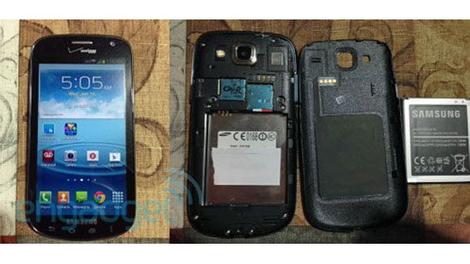
There are plenty of things to assume about the Samsung smartphone codenamed "Godiva," not least that its launch could be approaching, if recent FCC filings are proof of anything.
The Samsung Godiva was identified by the FCC on Tuesday, having been put through the requisite tests that indicate it could be released soon.
This despite the fact that Samsung has yet to even acknowledge Godiva's existence - much less admitted that it's actually the Stratosphere III.
That's another assumption, true, but it's one that's grounded in evidence.
Flying colors
The FCC test results revealed that the Samsung Godiva will be compatible with CDMA and LTE and feature GSM roaming and NFC, a feature that was hinted at in previous leaks.
Beyond that everything that's known about the Godiva came from various leaks, including the Godiva photos that popped up in mid January.
According to these leaks, Godiva's specs will include a Qualcomm 1.4GHz Snapdragon MSM8960 chip and Adreno 305 graphics, a 1280x720 display, and Android 4.1.2 Jelly Bean.
Godiva = Stratosphere III
What's really interesting about the Samsung Godiva, though, is that it's almost certainly the next device in Samsung's "Stratosphere" line of mid-range phones (though it lacks the QWERTY of the Stratosphere II).
The original Stratosphere went by the model number SCH-I405, while the Stratosphere II, launched in the fall, went by SCH-I415.
And the Godiva? SCH-I425. So either the Samsung Godiva is really the Samsung Stratosphere III, or Samsung needs to rethink its process for assigning model numbers to devices.

Read More ...
Best Formula One apps for the GALAXY Note II

There's something other than baking hot sunshine that is conspicuous by its absence in the winter months: the heady, adrenaline-inducing soap opera of Formula One.
True petrol-heads are currently enduring an annual period of cold turkey, in which the Formula One teams frantically scramble to design, build and test the gleaming carbon-fibre projectiles on which their hopes of 2013 glory will be pinned.
However, it's not long before a whole season's worth of kerosene-fuelled excitement will resume: the traditional curtain raiser in Melbourne takes place on 17 March, 2013. And your Samsung GALAXY Note II can help you to immerse yourself in the Formula One rollercoaster more deeply than ever before.
A classic F1 season on the Note II
Things couldn't be set up better for a classic F1 season: already, there are sub-plots galore. Can Lewis Hamilton's defection to Mercedes elevate that team to championship contenders, and will its head honcho Ross Brawn stay, given the advent of Toto Wolff from Williams?
Will the teams take ages to work out the vagaries of Pirelli's tyres again? Will teams that concentrated on car-development in the 2012 season suffer this year – or will the lack of rule-changes ameliorate that trade-off? Who will drive alongside Paul di Resta at Force India?
Answers to these burning questions, plus countless others that will arise throughout the season can be found from a wealth of specialist news sources accessible via the GALAXY Note II.
First off, there is a wealth of essential websites – and we all know how good the GALAXY Note II is when it comes to web surfing, with its ample 5.5-inch HD Super AMOLED display and super-fast quad core processor. Your first stop should be the metaphorical horse's mouth – the Official Formula One website. It's way better than the average sport's official site, with a great news section and some fascinating technical features. And there's a mobile version of the site.
The F1 section of the good old BBC's site is excellent, too, with a handy Gossip section bringing the latest F1 speculation from around the web. And our favourite independent F1 site is Planet F1. If you want the inestimable Martin Brundle's take on the new season, along with a wealth of features and news, Sky also has a great site. The blogosphere also has a keen interest in F1; our favourite blogs are the assiduously updated F1 Fanatic and, for a more tongue-in-cheek take, WTF1.
Essential F1 apps
Given F1's global popularity, it's not surprising that it is pretty well serviced by Note II-friendly Android apps – although you have to be a bit careful – several offer a mix of aggregated news and live updates, but their quality varies. That's not a problem if you're feeling rich: there's no doubt that the best Formula One app is F1 2013 Timing App – Premium (Soft Pauer). The only problem is that it costs an eye-watering £23.99. But it is officially licensed, and provides live track-positioning info for every Grand Prix session, on 3D circuit maps, and will let you follow your favourite driver.
Mind you, it's an awful lot cheaper than subscribing to Sky Sports. If you have Sky, then you'll be needing a copy of Sky Go, bringing all the Grands Prix to your mobile. And if you don't, then the BBC iPlayer will let you catch up with what happened in the races and qualifying on your GALAXY Note II. Both are free.
Of all the apps that aggregate news from various sources, and provide live info about all the practice, qualifying and race sessions, our favourite is Team F1 Free (2013) (Team BobK). It's ad-supported, but there's an ad-free version that costs a very reasonable £1.29. The motorsport bible, Autosport, also has an app , available for £2.99. And F1 Appedia (Tune Systems, Free), is also worth downloading, bringing a wealth of swiftly-updated race info to your fingertips.
Fun F1 stuff for your Note II
We all fancy ourselves as undiscovered driving talent, and what better way to confirm or dispel such notions than by playing a Formula One racing game. By far the best of which is Red Bull Augmented Racing Reloaded, which puts you behind the wheel of a 2011 RB7, for free. A must whether or not you follow Red Bull Racing.
You can show off your encyclopaedic knowledge of all matters Formula One by downloading Champion F1 Quiz (Tune Systems, Free). Plus there's even a free F1 widget that counts down to the next race. And you can bling up your GALAXY Note II in an F1 stylee by visiting the mobile version of the official F1 site (http://mobile.formula1.com/), heading to Galleries and selecting a race, at which point you'll be able to download a wealth of images to use as wallpaper.
Fantasy F1 on your mobile
Given that fantasy Formula One games are probably second only in popularity to fantasy football ones, it's a tad surprising that nobody makes a credible fantasy F1 app.
So you'll have to hit the web if you fancy being a virtual team boss. There are a bewildering number of fantasy F1 sites, and it can be tricky to tell which are the best, although scrutinising their rules and formats offers the best indication . Sky Sports Fantasy Formula 1 has the stamp of officialdom. Fantasy League F1 is perennially popular, and ProFantasy F1 has some interesting twists, like first-corner mini-leagues. Fantasy F1 League spices things up by inviting you to predict the top 10 for each race.
Hopefully, that you should set you up to enjoy a fine new Formula One season on your GALAXY Note II.

Read More ...
Google+ gets Facebook-like app Sign-In, promises 'simplicity and security'

Google announced on Tuesday that users of its social network, Google+, are now able to sign in to third party apps using their Google+ credentials.
Similar functionality has existed in rival social network Facebook for years, and Google+ finds itself once again playing catch-up, fledgling venture that it is.
Google's touting a number of improvements over Facebook's app sign-in functionality, without specifically calling its rival out by name.
But when Google's director of product management for Google+, Seth Sternberg, promised not to let apps "spray updates" all over the place in a Tuesday Google Blog post, we all knew who he was referring to.
Making promises
Sternberg promised that Google is focused on "four key principles" for the initial release of Google+ application Sign-In.
Those principles are "simplicity and security" (which sound like two principles to us), desktop and mobile being "better together," sharing content vs. "spraying" it, and "sharing is for doing, not just viewing."
The first is self-explanatory: With Google's various services becoming increasingly more connected all the time, a log-in for Gmail, Youtube or any other Google service can be used as well as Google+ credentials. And users can easily review the apps they've signed in to at plus.google.com/apps.
"Google+ Sign-In also comes with the protections and safeguards you've come to expect from your Google account," Sternberg wrote.
Being selective
App Sign-In comes with some other features that benefit from Google's ubiquity across devices and service, like the ability to connect mobile and desktop devices in new ways. For example, when users sign in with Google+ credentials to a desktop app that has a mobile equivalent, they'll be able to install the app on their mobile devices with a click.
Google also teased new "interactive" Google+ stream posts that will invite users' friends directly into third-party apps. That sounds a lot like those annoying Facebook notifications that ask users to allow third-party apps to access their profiles, but at least the Google+ equivalent will stay in the stream and out of your inbox (hopefully).
Most importantly, perhaps, Google promised that with help from Circles, it will be easy to determine which apps will share what information with whom on your Google+ profile.
"Google+ doesn't let apps spray 'frictionless' updates all over the stream, so app activity will only appear when it's relevant (like when you're actually looking for it)," Sternberg wrote.
Judging by the number of inane and pointless third party items that appear in our Facebook news feeds, we'd hazard that it's easier said than done. That or maybe our friends just really don't understand what's appropriate to share.
Several apps will soon roll out or have already integrated Google+ Sign-In, including Flixster, OpenTable, The Guardian, Shazam, and USA Today. Developers who want to integrate the Sign-In feature should head to Google's developer docs.

Read More ...
Samsung sees Galaxy Note 8.0 as key to doubling tablet sales

Samsung is continuing its quest for global tech domination by setting an ambitious sales target for its tablet line-up in 2013.
J.K. Shin, head of Samsung Mobile, said that company can double its 2012 performance with more devices like the Samsung Galaxy Note 8.0, unveiled at Mobile World Congress this week.
"We believe the first half will not be an easy one," he told reporters. "But we still think the tablet market will grow by 50 per cent this year."
The company, which is the world leader in smartphones and television sales, holds an estimated 15 per cent share of the tablet market, after reportedly shifting 17m tablets during the previous calendar year.
Consumers take Note(s)
The Galaxy Note 8.0 tablet should definitely help the company's cause to rival Apple for tablet overlordship.
The newest iPad mini challenger has a 1.6GHz quad-core A9 processor, 2GB of RAM and impressed our team in Barcelona with its slim (under 8mm) and lightweight (just 338g) design.
It also brings Android 4.1 Jelly Bean, up to 32GB of storage (plus microSD) and the trademark S-Pen, which sets the Note stable aside from the competition.
"We're confident people will think the latest addition is of much use and a convenient tool in our daily lives," he said.
Smartphone plateau?
Meanwhile, even with the Galaxy S4 launch on the horizon on March 14, the company doesn't seem quite as confident when it comes to continued smartphone growth.
Given Samsung's incredible rise during the last 18 months or so, Samsung Mobile's executive vice president Y.H. Lee feels that a plateau may be inevitable.
She told CNET: "We don't know if growth will grow as fast as before."

Read More ...
Tweeting with Live Tiles: official WP8 Twitter app gets needed update
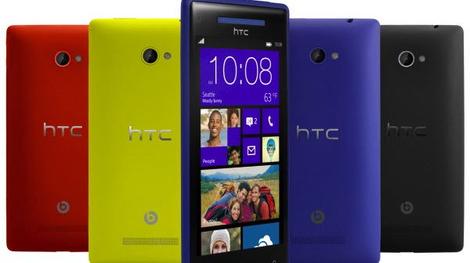
The Windows Phone 8 official Twitter app received an update today, bringing it more in line with other mobile versions and adding a few WP8-specific features to boot.
The most immediate changes are features transplanted from the iOS and Android Twitter apps, such as the new Home, Connect, Discover, and Me tabs at the top of the app.
The four tabs give users quick access to their main timeline, mentions, trends, direct messages, and personal lists.
Also bringing parity to the Windows Phone app is the addition of search and compose tweet buttons, which will appear at the bottom of the screen regardless of which tab is open.
Live Tile tweets
While much of the Twitter app update relates to existing features on other smartphones, Windows Phone 8 gets a unique edge.
With the update, users can now pin their friend feeds, lists, and searches directly to the Windows Phone home screen as a Live Tile.
The Live Tile support is a small addition, but should make it quicker and easier to check lists and searches without shifting through tabs in the main app.
Windows Phone 8 users can download the update to the official Twitter app starting today.

Read More ...
Bored of Android? 17 per cent of new Windows Phone users ditching droids

Windows Phone continues to sneak up in terms of UK smartphone market share, but new research is suggesting it is Android that's losing the most users to Microsoft's mobile OS.
Data from Kandar Worldpanel ComTech claimed Windows Phone added 700,000 new users in the UK during 2012, which was an increase of 240 per cent over the previous 12 months.
However, the research pointed out that 17 per cent of these new users reportedly switched to handsets like the Nokia Lumia 800 and HTC Windows Phone 8X from those on Google's Android operating system.
That's more than any other platform apart from Symbian (26 per cent), which can be easily explained by Nokia loyalists simply upgrading from their old devices running the condemned operating system.
Android has more to lose
In contrast, 6 per cent of Windows Phone leapt from the sinking BlackBerry ship, while only 2 per cent of newcomers to Microsoft's mobile OS arrived via iOS. The other 47 per cent were buying their first smartphone.
Android sure didn't suffer too much by losing an estimated 119,000 or so users to Windows Phone in 2012, increasing its market share to 56.2 per cent. iOS was finished 2012 on 30.6 per cent, while WP was in third with just over 6 per cent, according to the research.
However, it is interesting that Android apparently lost more users to Windows Phone than iOS despite its overall gains.
Elementary analysis of the results would suggest that iPhone users are more loyal to the platform and less inclined to leave for pastures new, whereas Android users are less attached and ready to switch things up a little if a new platform intrigues.
Of course, there are more people using Android than any other platform, so by proxy there are more people who can conceivably leave for Windows Phone, but the numbers still seem a little out of whack.

Read More ...
Opinion: MWC 2013: what happened to all the phones?

While there have been some standout devices shown off at Mobile World Congress 2013, there seems to be something missing: new phones launched.
Team TechRadar has been out at the conference in full force for the past few days, forgoing sleep and the delights of Barcelona to sample the latest and greatest the mobile manufacturing world has to offer.
However, that's been a little trickier than in recent years, as there simply has been less cool new stuff announced at the show.
We're not saying it's a barren wasteland, with Windows Mobile handsets shuffling around empty warehouses screaming 'But we were so POWERFUL' into the cluttered airwaves, but the days when we would almost literally lose our minds with the volume of phones to preview are gone.
Not nothing...
There are notable exceptions of course: the Samsung Galaxy Note 8.0 has been worth a look, Firefox OS is coming to new handsets and new manufacturers have got into the Android game as well.
But even the new launches aren't new; LG press released everything it was bringing to the conference before it started, the HTC One went all iPhone and had its own press event and Sony's big reveal was… a tablet that had already been announced in Japan a month ago.
Rewind just two years and the smell of frazzled keyboards still hangs in the Barcelona air as technology journalists frantically trying to bring you news of the Samsung Galaxy S2, LG's Optimus 3D and the Sony Ericsson 'PlayStation Phone', the Xperia Play.
Even writing those names out has caused our keyboard to become doused in sweat as the memories of caffeine-induced frenzies that fuelled our hands on reviews come screaming back to the mind.
It's all different now though; Samsung has swanned off to do its own Galaxy thing and many other manufacturers are eschewing the traditional MWC launches. However, it does make a lot of sense when you consider the way phones are released, as a February unveil doesn't really allow much flexibility.

If you notice, most handsets go on sale in May, July or October (with a little wiggle room and the odd one chucked out in late February) to fit in with consumer buying cycles – anything announced now would have to wait a few months before hitting customer pockets, and that's wasted buzz.
Much better to have your own launch event, one that doesn't run the risk of being overshadowed by myriad other announcements, than to simply become tomorrow's (quad-core) chip paper.
But here's the upside for you: fewer handsets to talk about means more time to dig deeper into the innovation itself, to speak to the people that matter and get the inside scoop on what's actually going on behind the scenes in the mobile world.
TechRadar will be bringing you more of that very content in the next few days as the dust settles on our extensive previews of the latest handsets, so stay tuned for more on how phones could stay on standby forever without needing a charge, or how you could soon blow on a screen to take a picture.
And if that's not enough to keep you going, well, isn't there a big ol' launch happening in New York in the next few weeks…?

Read More ...
Updated: Razer Edge pre-orders slated to start March 1 for US and Canada
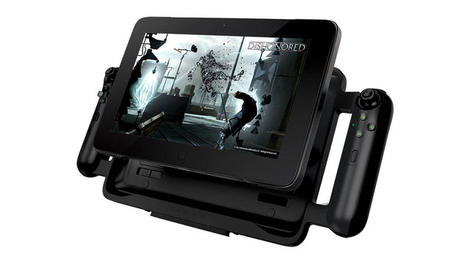
Remember the Razer Edge, the gaming tablet/laptop wunderkind that left an indelible mark on CES 2013?
Those who've kept their ear to the ground for machine availability are reaping their reward today: Razer announced pre-order and shipping times for both the basic model and Razer Edge Pro.
Pre-orders kick off March 1 at 12:01 a.m. PST, available through the firm's "where to buy" web page. So far, only the U.S. and Canada have purchasing powers.
Units will ship off later in the month, and Razer plans to charge $999.99 for its base variant and $1,299.99 for the heftier Pro version.
'I'm on the edge'
For those that need a refresher, the Edge is a Windows 8 tablet/laptop hybrid, yet so much more.
Though the parts will be sold separately (also available for pre-order March 1 and shipping concurrently) a gamepad controller, home console dock and extended battery accessories contribute to the Edge's allure.
Customers can expect to pay $249 for the gamepad controller, $99 for the console dock and $65 to nab that extra battery life.
The Edge runs on an Intel i5 processor and has 64GB SSD, while the Pro welcomes an Intel i7 into the mix. Customers have the option of either 128GB or 256GB SSD for the Pro, though will have to fork over $1,449 for the GB boost.
The models feature Nvidia GT 640M LE graphics. Screen wise, the multi-touch HD display takes up 10.1-inches and has a resolution of 1366 x 768. Normal Edge owners will get 4GB of DDR3 memory while Pro peeps see a double bump to 8GB DDR3.
Finally, both feature stereo speakers, HDMI, a front-facing, 2MP HD webcam, array microphones and a USB 3.0.
Game on
As for what the Edge can do when it comes to games and functions, a Razer spokesperson laid it out for TechRadar:
"It's a full-fledged PC," he said, meaning it can play any current PC game title.
"As a tablet it can play any touch-enabled game, like Civilization V, for instance."
Edge can also play any X-input support game in gamepad mode plus act as a standalone PC with mouse and keyboard hanks to its multiple USB ports and HDMI on the home console dock.
Razer plans to launch an optional keyboard dock during Q3 2013.
Not sure life with the Edge is right for you? Maybe this promo vid will help sway you either way:
We're curious: Will you buy one?

Read More ...
Third-party cases point to iPad mini-style redesign for iPad 5

There's little doubt Apple will unveil an iPad 5 this year, and judging from leaked third-party cases, it could be a dramatic overhaul for the market-leading tablet.
BGR reported Monday that images claiming to be third-party cases for a fifth-generation iPad have surfaced on Alibaba, a Chinese global trade website.
Made from thermoplastic polyurethane (TPU) material and available in six colors, the cases supplied by Shenzhen Sinofly Electronic Company Limited point to a possible new look for this year's iPad.
The key difference would be a form factor more in line with the iPad mini, complete with ready-made holes for placement of the larger tablet.
No announcement yet
Without an official announcement from Apple, it's impossible to say for certain what an iPad 5 might actually look like, despite recent leaks to the contrary.
Third-party case manufacturers have a mixed history where Apple cases are concerned, with many Chinese suppliers taking an educated guess as to what's coming next based on images leaked to the media.
After shots of a rumored iPad 5 which closely followed the design of an iPad mini surfaced last month, it's entirely possible these cases have been created using the same information.
With the spec-bumped iPad 4 released only four months ago, many Apple pundits expect the iPad 5 to debut this fall, presumably alongside a refreshed iPad mini.

Read More ...
Hands-on review: MWC 2013: ZTE Grand Memo

The ZTE Grand Memo is the latest in what is a growing range of super sized smartphones, sporting a frankly huge display.
It slides in at the top of the ZTE range, as the Chinese firm looks to extend its high-end mobile offering after it launched the Grand S last month at CES 2013.
ZTE expects the Grand Memo to go on sale during the second quarter of the year, however an exact release date and price are yet to be announced.

The main attraction on the Grand Memo is its large 5.7-inch display - which features a 1280 x 720 HD resolution - dominates the front of the device, but there's a sizeable chunk of bezel above and below the screen adding extra length to an already big handset.
It puts the Grand Memo up against the likes of the Samsung Galaxy Note 2, LG Optimus G Pro and Huawei Ascend Mate.

This bulk makes it a little unwieldy in the hand and we found ourselves really having to stretch our fingers to properly grasp the Grand Memo.
Design wise the Grand Memo is pretty standard fare, with the now familiar slab of glass on the front coupled with glossy plastic on the rear which offers little in the way of grip - something you really could do with on such a large phone.

At least ZTE has managed to keep the thickness down, cramming an impressive amount of tech into the slender 8.5mm frame.
The screen itself is bright and clear, although on closer inspection its not the most detailed of displays we've had the pleasure of ogling and you may want to consider the full HD Optimus G Pro or the smaller Sony Xperia Z and HTC One.

ZTE has employed a rather hearty overlay onto the Android Jelly Bean OS, with a lot of 3D animation in play as you slide between homescreens and flick through the app list.
These animations are a little annoying however and means operation is slowed down as they perform their various actions.

It's disappointing as we reckon the 1.5GHz quad-core processor and 1GB of RAM inside the Grand Memo could make mince meat of the stock version of Jelly Bean.
Some of the animations can be switched off in the settings menu, but some still remain and that irks us somewhat.

As with Huawei, ZTE can be accused of making its Android UI look a little bit childish, and we'd much prefer the clean cut Google icons to the more cuddly ones we get on the Grand Memo.
Aside from the animations getting in the way the Grand Memo is pretty nippy everywhere else, with apps opening promptly.

There's only 16GB of storage inside the ZTE Grand Memo, but thankfully a microSD slot resides under an easy to remove flap on the left side of the handset, as do the microSIM and microUSB ports.
You'll find the power/lock key located on the top of the device, which can be a little tricky to hit if you're holding the Grand Memo in one hand as you usually need to shuffle it down a bit to reach.

ZTE has packed some of the latest connectivity tech inside the Grand Memo with Bluetooth 4.0, Wi-Fi 5.0GHz and 4G all present and correct, although we were unable to test the internet speeds due to a lack of connection at the booth.
NFC hasn't been included here and we suspect it has something to do with ZTE wanting to keep the body of the handset slender.

A 3,200mAh battery resides inside the Grand Memo which should hopefully keep you going for a day, but we worry about those over the top interface animations draining unnecessary juice.
The Grand Memo is also well equipped in the camera department with a 13MP snapper and LED flash round the back, while on the front you get a 1MP lens.

The camera app has a simple layout which is easy to use and the shutter speed is suitably quick which meant we were able to snap photos in succession without having to wait around.
Modes such as HDR, panorama and burst are all present and correct along with a variety of effects and the option to record 1080p video.
We weren't overly impressed by the picture quality on the ZTE Grand Memo with images seeming to lack clarity and moving objects appearing blurry.
Early Verdict
We're starting to become spoilt for choice in the "phablet" market as more and more manufacturers decide to jump on the super sized smartphone band wagon.
While the ZTE Grand Memo is a decent handset it isn't the best in its class, with the Optimus G Pro and Galaxy Note 2 still the two standout devices.
The Grand Memo could do well if it is priced lower than its competitors, to offer customers a massive screen on a budget, but if ZTE looks to match the cost of its rivals it could spell trouble for this tabl.. sorry, smartphone.

Read More ...
MWC 2013: HTC One beats Xperia Tablet Z to Best in Show at MWC 2013

In the inaugural TechRadar MWC Awards, there could be only one Best In Show - and our crack team of experts deemed the HTC One the cream of this year's mobile crop.
The One also took the coveted Best Phone award, while the Best Tablet went to the impressive Sony Xperia Tablet Z and the People's Choice award went to Firefox OS.
"It's been tremendously hard to judge these awards - congratulations to those that won!" said Gareth Beavis, phones and tablets editor at TechRadar.
Stiff competition
"The sheer level of competition shows that we're in for a strong 2013 in terms of technology and new levels of innovation, with Full HD screens, waterproof designs, next generation connectivity and even new ways of charging our phones being very much to the fore."
Explaining why the HTC One took Best Phone, he described it as "refreshing" for "combining innovation with consumer needs".
"While we were very impressed with efforts from LG, Sony and Huawei, HTC's combination of stunning design, alternative camera technology and cutting edge specs have created a real buzz around its impending launch," he added.
Tablet tie-break
When it came to Best Tablet it was a hard won battle for the Xperia Tablet Z. Gareth explained: "Another close fight between Sony and Samsung, but the Xperia Tablet Z prevails due to its lightweight design, NFC integration and sheer screen quality - we found it very hard to fault in our preview.
"Samsung's Galaxy Note 8 was a strong contender, as the S Pen / screen size combination is really impressive, but the Xperia Tablet Z edged it thanks to its impressive Reality Display."

On to the People's Choice award, and it was Mozilla's open source OS that took gold.
"Firefox OS has had an inauspicious start to life, but it really came to the fore at MWC 2013 thanks to a number of manufacturers pledging to support the platform with devices," said Gareth, explaining the judges' motivations.
"It might be designed for emerging markets, but the OS has a real chance of making waves in budget smartphones and could herald a new way of developing apps for phones in the future."
The best... around!
And finally, the Best in Show - what Gareth describes as "a superbly tricky category to call".
But it was the show floor that swung it for HTC: "You only needed to look at the swaths of people clustered around the HTC stand to play with the One to see that this is where the buzz resides at the show this year."
If all that talk of top-notch mobile madness has left you thirsty for more mobile action, catch up with all the news, hands on reviews and in-depth analysis in our comprehensive MWC 2013 round up.

Read More ...
In Depth: Best weather app: 10 we recommend

Despite the fact we all have amazingly complex supercomputers in our pockets capable of the most amazing feats of gaming, able to entertain us with rich streaming media and with full access to the internet's most amazing wealth of information, what do we all use them for the most?
The weather. Looking at the weather. Checking the weather. Taking photos of the weather. Letting strangers see how amazingly detailed our mobile weather forecasts are, updating others on the weather and, occasionally, stuffing them down our pants to avoid them getting ruined by the worst of our weather.
No one likes taking an umbrella out with them or putting on the less fashionable waterproof coat unless it's absolutely necessary, so you might want to use your quad-core powerhouse to warn you of the external conditions before setting out.
As luck would have it, as well as the feeble weather app that shipped on your phone, some of the cleverest software developers on the planet have created numerous apps designed to let you know the probability of getting your shoes wet this evening.
Here, for your meteorological enlightenment, are the 10 best weather apps for Android, iPhone and Windows 8 smartphones.
1. AccuWeather for iPhone - free, for iOS

AccuWeather has long been one of the unofficial kings of the weather app scene, thanks to offering some great, detailed, and completely free weather forecasting apps.
Its current iPhone weather station is incredibly well featured, including severe weather warnings, a huge 15-day maximum forecast range, integration with the iOS Calendar app for weather stats right there up in your business, plus social sharing and very clever animated maps. It's positively streaming sunlight into the App Store.
Download from iTunes
2. Weather Live - 69p, for iOS

Weather Live takes more of a stylish approach to forecasting, losing some of AccuWeather's nerdy features in favour of a simple, clean app, presented in a modern, tech-barometer format.
Its full-screen layout animates its pretty backgrounds beautifully, presenting pressure, visibility, rain and humidity data on its lovely clock face. It also displays the correct temperature on its home screen icon, too.
Download from iTunes
3. Weather+ - free, for iOS

A very cute little thing offering an HTC-like flip clock above its weather status reports, which tell you about wind speed, humidity, pressure and more, alongside custom location settings letting you voyeuristically spy on weather in other parts of the world.
There are even some nice little widgets, breaking it down into simpler displays that just give you the basics if you're only a casual weather fan.
Download from iTunes
4. Met Office Weather application – free, for iOS

The UK's famous bearer of bad news has an incredibly complex app out for iOS (and also Android and WP), offering our familiar weather warnings, long range forecasts and more.
The app gives out five-day forecasts covering over 5,000 UK spots, using geo data to automatically find the exact tree you're hiding under. It also gives you the "feels like" temperature and wind speeds, so you know if you need to jumper-up for the dangerous run to the newsagent.
Download from iTunes
5. WeatherBug - free, for Android

This one claims to pull in data from the "largest network of real-time weather sensors in the world" to tell you how much it's likely to rain, converting its stats into incredible detailed "real-time" forecasts.
Some of the severe weather features are for the US only so aren't that useful to us, but it's still a comprehensive app, plus there's also a custom layout option in here for those using an Android tablet.
Download from the Play Store
6. WeatherPro - £2.49, for Android

For the Pros out there, this offers seven-day forecasts updated at three hour intervals. You'll never be without weather-related small talk with WeatherPro.
The app also gives you "feels like" data for more realistic guides, sunset times, rain radar maps and more, all packaged in an extremely stylish app that includes some classy Home screen widgets, too.
Download from the Play Store
7. Yahoo Weather - free, for Android

The big search company also does a fine weather app, with its complex tool offering some beautiful transparent widgets, even supporting Android 4.2's new lock screen widget system.
Another big selling point is the inclusion of crowd-sourced photos, which pulls in some great snaps from users via Yahoo's Flickr imaging portal. It's not the most detailed weather app, but it's definitely one of the prettiest.
Download from the Play Store
8. The Weather Channel - free, for Android

The Weather Channel's app takes data to the next level, offering hourly updates and even breaking it down into simple "plain English" alerts. If it thinks it's going to rain at half past four, it'll tell you as much.
The app also goes 10 days out into the future with its long-range predictions, with some really, really nice, clean widgets to jazz up your Home screen. It's another gorgeous app.
Download from the Play Store
9. WeatherLive – free, for Windows Phone

The tiled layout of Windows Phone is well suited to little bite-sized snippets of weather trivia, with WeatherLive coming complete with full support for Microsoft's information grouting system - and that all important extra-wide tile for properly adapting the layout.
The app itself offers simple, clean, 2D weather maps, plus little trend graphs, moon phases, radar and satellite imagery. It's a nice, smart tool.
Download from the Windows Phone Store
10. Amazing Weather HD - £1.49, for Windows Phone

Another gorgeous and minimal weather app for WP8, Amazing Weather HD does a grand job of portraying clouds in a simple style. This one also supports the full size range of Microsoft's live tiles, plus the app provides seven-day forecasts, radar, infrared and satellite pictures, GPS location finding and more.
Download from the Windows Phone Store

Read More ...
Thales teams up with Entrust

Thales and Entrust have announced a strategic partnership to combine their information security offerings.
Entrust will resell Thales' solutions to complement its enterprise and managed service offerings, making them available on-premise, in the cloud or on a hosted basis.
Thales' data encryption and cyber security products, which include its nShield hardware security modules (HSMNs), have been tested and proven to be interoperable with Entrust solutions.
It says the deal will respond to the trend in which organisations are combining HSMs with public key infrastructure, one of Entrust's areas of expertise.
The partnership will also provide key management and user authentication services.
Bill Conner, president and CEO of Entrust, says: "Thales' certified HSMs combined with our leading identity based security solutions, yield a best-in-class solution for securing key assets. This partnership will enable us to provide our customers with industry leading solutions that enable the deployment flexibility for both enterprise and managed or cloud models."

Read More ...
IE 10 finally comes to Windows 7

The long-promised Internet Explorer 10 is finally available for Windows 7 users as Microsoft suddenly remembers that there are a few of you out there.
You'll need Service Pack 1 installed, but if you're running Windows 7 and haven't blocked the upgrade, it should install automatically through Windows Update - those of you with the IE10 Release Preview installed will get the update today.
IE 10 on Windows 7 has many, but not all of the features of IE 10 on Windows 8. You only get the desktop version of the browser, not the full-screen Windows 8 version, and Flash is still a separate plugin that you have to update yourself.
Same same but different
You do get the same much-improved support for web standards, built-in spell check and autocorrect, faster tab closing - and the stalled privacy protecting Do Not Track setting is enabled by default.
Microsoft says IE 10 is up to 20 per cent faster than IE9 on the same system, which you can test for yourself in the new HTML5 version of Minesweeper on the IE Test Drive site.
When we asked about the delay between shipping Windows 8 and IE 10 last year and delivering it for Windows 7 this week, a Microsoft spokesperson put the emphasis on quality (rather than how much of the IE team is busy building IE 11 for Windows 9, say).

Read More ...
Hands-on review: MWC 2013: HP Slate 7
-470-75.JPG)
After its aborted efforts with WebOS and the TouchPad two years ago, it appears that HP thinks now is the time to get involved with tablets. Here is the Slate 7 - a 7-inch tablet running Android 4.1 Jelly Bean.
And why not? After all, though we think of tablets as a market that's 'Apple plus others', it's worth remembering that it's actually in its infancy both in terms of the technology itself and the number of people globally that actually have a tablet - think how complex or widespead the PC or a mobile phone were after only a few years. And, of course, it's only been three years since the first iPad emerged.
-420-90.JPG)
So what about the HP Slate 7? Where does it fit in? Well the first thing to note is the price. The Slate 7 will be available in the United States in April with a starting price of $169. That's pretty cheap, although it doesn't quite match the Kindle Fire's $159 pricing.
-420-90.JPG)
The Kindle Fire is probably its closest competitor, not least as the Slate 7 features the same screen resolution - 1,024 x 600 as well as a dual-core ARM Cortex-A9-based processor (HP hasn't been more specific than that). The screen is the Slate 7's first issue - it isn't as polished as slightly more expensive 7-inch contenders such as the Kindle Fire HD and Nexus 7.
-420-90.JPG)
Up against those slightly more expensive models this screen looks decidedly old-school.
-420-90.JPG)
The Slate 7 is the industry's first tablet to offer embedded Beats Audio, while software settings are also available on the device. HP reckons it hasn't done a lot to the Slate in terms of software development, but says that this is merely its first step into Android - it will offer more differentiation in the future.
Sound quality is undoubtedly given a bit of beef by the addition, and it's a good selling point for the device. But HP must be careful that it's not over reliant on Beats to separate it from the tablet pack.
-420-90.JPG)
As for look and feel, it's a pleasant device in the hand, even if the large black bezel is a little off-putting (we'd expect it at this price point, though). The Slate 7 weighs in at 13 ounces (around 370g). It has front and rear-facing cameras, though the rear is 3 megapixels only. Still, it's a reason to buy the HP Slate over the original Kindle Fire, which doesn't have cameras.
-420-90.JPG)
The Slate 7 is quite good looking from the back and side - there's a stainless-steel frame and soft black paint in grey or striking red. As you can see, there's a microSD slot on the top of the device as well as a headphone jack and the sleep/wake button.
-420-90.JPG)
Charging and data transfer is via a micro USB port on the bottom of the device, where there are also two speakers as you can see.
-420-90.JPG)
The Slate 7 is the first offering from HP's newly formed Mobility Global Business Unit, established in September 2012 with the hiring of Alberto Torres. Torres joined HP from Nokia, where he was executive vice president and oversaw the MeeGo products and platform. Hopefully HP's new tablets will be more successful than MeeGo.
-420-90.JPG)
Early verdict
The HP Slate 7 does just enough to differentiate itself from the competition because of the cameras and Beats Audio support. But it isn't a hugely impressive tablet. While it's good enough for very basic pootling about in Android, using email and browsing the web, it's not the tablet you want if you want to watch video (get a better screen). The Nexus 7 remains our 7-inch choice.
-420-90.JPG)
-420-90.JPG)

Read More ...
Opinion: The Chromebook Pixel is like using a Formula One car for the school run

I've rarely been quite so immediately taken with a piece of technology as I have been with the Chromebook Pixel.
The hardware is ridiculously sexy, the screen is jaw-dropping in a way that only Apple's Retina has managed previously, and the attention to detail is world class.
And then there's Chrome OS.
I've been using the Pixel for a few days now, and when I did the original hands-on Chromebook Pixel review I suggested it was likely that this £1,049/$1,299 wonder was a curate's egg.
A few days of use on and I've come to a conclusion. For now, Chrome OS on a premium laptop remains problematic, but the Pixel itself is a phenomenal and loveable piece of kit.
If the Pixel had Windows 8 on it then it might make me consider switching up from Windows 7, if it had Mac OS on it then I would consider it as genuine competitor for my MacBook Pro.
Premium meets Chrome OS
But why is Chrome OS so bad? Well, in itself, it's fine - it just isn't what should be driving a premium laptop.
Back when the first Chromebook reared its head, I suggested that Chrome OS was a bundle of potential that had a long way to go. Since then it has certainly come a distance - but it still has a long journey ahead.
At the lower end of the market these issues are a little less pressing: not having powerful standalone software for image and video editing is less problematic if you're just after something to surf on, and the offline limitations of a cloud OS disappear if this is a tool for the couch-potato.
The cheaper Chromebooks makes sense as just that - a surfing tool with a nice keyboard. Inexpensive, easy to use and without the irritations of a more complex operating system.
Don't forget that Google Docs/Drive is now a huge stride on from those early Chrome OS days, and it needed to be. It makes the Chromebook an easy occasional work laptop, perhaps not suited to long stints but great in a pinch.

But expectations change when you spend Pixel-money on a laptop; If you bought a MacBook Pro for that price then you would have a content-creation tool; if you bought an Ultrabook or MacBook Air you would have something slimmer and lighter (and still capable of running standalone programs).
I thought that the whole point of Chrome OS was that it was for the masses that want to harness the power and convenience of the cloud, rather than having a super-powerful and super-costly laptop.
Google's hardware is beyond reproach, from the touchpad to that wonderful display this oozes quality from every pore. But given the limitations of the software that it runs, it feels a little like using a Formula 1 car for the school run: impractical, flawed, but still brilliantly fun for a while.
I just think that most people would end up going back to a road car.
I'm definitely going to miss my Chromebook Pixel when it goes back to Google. But the burning question is, would I buy one if I had the money, or go for the safer Mac/Windows option?
I think you probably know the answer; and I would say that Google probably knows it too. I doubt that many Pixels have actually been manufactured for that very reason. But I still applaud Google for making something I adore, despite its flaws.
Now, just one more ridiculous blast around the streets.

Read More ...
Wii Mini UK release date announced

It might not be the souped-up next-gen console that's top of your gaming wishlist, but Nintendo is bringing its teeny Wii Mini to the UK.
You'll be able to pick the diminutive console up from March 22 in its signature matte-black with a red border and, as Nintendo's release helpfully points out, it is smaller than the original Wii.
Bundled with the Mini are a red Wii Remote Plus and a red Nunchuk controller, although you should be able to use most existing Wii accessories with the console too.
Select start
Classic Wii games of varying vintage are being added to Nintendo Selects to coincide with the launch, with Mario Party 8, Wii Sports Resort, Mario Power Tennis and Super Paper Mario joining the roster which already includes The Legend of Zelda: Twilight Princess and Super Mario Galaxy.
Nintendo Selects is basically just the name for a bunch of popular Nintendo games that you can pick up on the cheap.
We're waiting on an official Wii Mini UK price, but the company promises 'big fun' from a 'mini price' and it's on sale for the equivalent of £62 in Canada so we're expecting bargainous things.

Read More ...
Hands-on review: MWC 2013: Acer Liquid Z2

So the Acer Liquid Z2 is not going to set the mobile world alight, but we quite like it all the same.
It's designed primarily as a first baby step into the smartphone world and comes with some helpful features to make the transition as painless as possible.
It's a fairly dinky little thing to look at and comes with a 3.5-inch 480 x 320 display, 1GHz single-core processor, and a 3MP camera.

As a resolutely budget device, it does not feel like a premium smartphone, but it's small and light and certainly isn't horrible to look at and fondle in the hand. There are uglier phones out there that cost twice as much. That said, it is quite a fat device for something so small, but at least it's not heavy.

The great thing about this little phone is that even your mum's silly friend who dresses too young for her age and pretends not to understand the TV remote will be able to use it. It comes with an app called 'Quick Mode' which is essentially an app launcher designed for people who don't know what Android is and don't want to know.

Open it up and it gives you all of the main settings, functions and apps in one menu. Things like Bluetooth on/off, camera, browser etc. All of the things a technophobe needs to make use of a smartphone without trying, basically.

This all runs on top of a mostly vanilla-flavoured build of Android Jelly Bean 4.1, and even though it has low-end specs, it still manages to be nippy and responsive to the touch. There was no sluggishness, and the camera - which "launches in just one second" - was able to fire off snap after snap without any focus or save lag.

Early Verdict
OK, so it's not going to win any awards but we like the Acer Liquid Z2 and look forward to putting it through its paces in a full review. We give it a tentative thumbs up for the time being and encourage you to check it out if you have a technophobic friend or relative who quakes at the thought of touching anything with silicon inside it. Just don't tell them it has silicon inside it.

Read More ...
Available Tags:HTC , smartphone , PayPal , LG , Google , Samsung , GALAXY , Google+ , security , tablet , Twitter , Windows Phone , Windows , iPad , iPad , ZTE , Windows 7 , IE , HP , UK , Acer ,


No comments:
Post a Comment