The State of Qualcomm's Modems - WTR1605 and MDM9x25
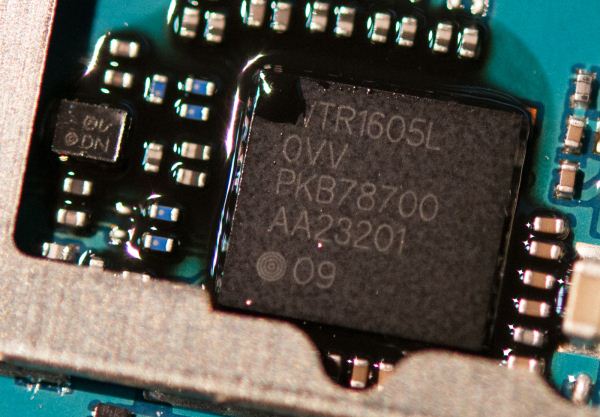
A little over a month ago, Qualcomm flew me out to San Diego to talk all about cellular modem, specifically their baseband lineup, testing, and later their RF and transceiver in what would become their largest RF disclosure ever. In the past few years, we’ve made considerable headway getting SoC vendors to disclose details on the CPU and GPU side of their products, and mobile enthusiasts now are starting to become increasingly cognizant of the SoC inside devices, and in turn the blocks inside that SoC. In a short term the industry as a whole went from smartphones largely being impenetrable black boxes to devices with understandable platforms inside. The days of an OEM not disclosing what SoC was inside a device at all are largely behind us, and for the most part vendors are open to discussing what’s really inside most of their silicon quite publicly.
The last real remaining black box from my point of view is the cellular connectivity side of things. So much of what drives smartphone design and OEM choice lately is, unsurprisingly, how the device gets connected to the cellular network, and baseband remains largely a black box by design for a number of reasons. The focus of this article is specifically about Qualcomm’s newest transceiver, WTR1605L, and some more details about MDM9x25 and MDM9x15.
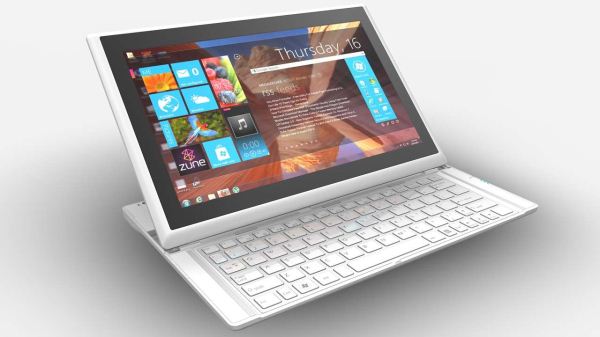
Read More ...MSI Announces Slider S20 Ultrabook Convertible
Next week kicks off CES 2013 in Las Vegas, and I along with many of the other AnandTech editors will be present. Prior to the actual start of the show, however, we see a ton of new product announcements. One of the more interesting laptops coming to the show is MSI’s new Slider S20 Ultrabook. I recently gave a quick rundown of the various tablet/hybrid options for Windows 8 laptops, so the S20 now joins the list.
We’ve seen sliders before—mostly in the Android tablet space, but more recently in the Sony VAIO Duo 11. MSI’s S20 doesn’t appear to add anything radically different from others, but the specifications look good: you get a 1080p touchscreen with 10-point tracking (hopefully IPS, but that’s not specifically stated in the press release), 8GB DDR3 memory (huzzah! Take that all you 4GB non-upgradeable Ultrabooks!), 128GB SSD, and a Core i5 CPU. Other features include two USB 3.0 ports, Ethernet, 802.11n and Bluetooth (Intel 6235), mini-HDMI, and a 720p webcam. The S20 weighs in at 2.2 pounds (1kg) and carries an MSRP of $1200, with expected availability in Q1 2013.
Read More ...Thoughts on Windows 8 Laptops with Touchscreens
The past couple of months have been interesting, what with the launch of Windows 8 and the ushering in of a new user interface. I’ve had a couple of touchscreen Ultrabooks in for testing, and the experience can be quite different depending on how the laptop is designed. I discussed this in our Ultrabook/Ultraportable Holiday Guide, and the first complete review (Acer’s S7) will be up shortly, but one thing that stands out as an immediate point of differentiation is how the touchscreen aspect is presented to the user. At present, I’m aware of sixseven options:
Traditional laptop (e.g. Acer Aspire S7). There’s no major concession made to support the touchscreen—it’s just another feature. Acer does allow you to lay the S7 flat, via the 180 degree hinge, but otherwise this is a laptop with a touchscreen and not really a tablet, no matter how you slice it.
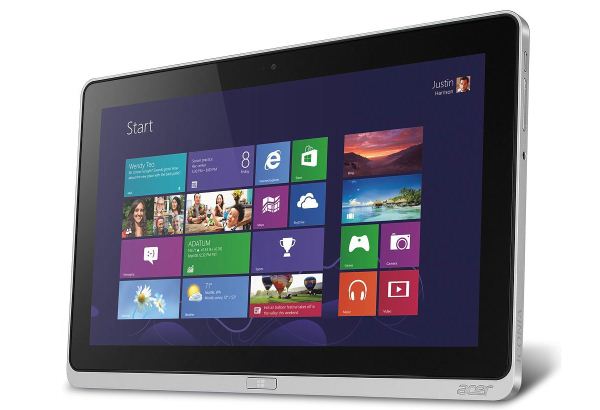
Detachable screen/tablet (e.g. Acer Iconia W700). We haven’t seen this much so far, and I expect Haswell will come out before we see detachable tablets come into their own—no doubt helped by the ~8W TDP processors slated for release—but if the first option is on one extreme, this is the other. You’re really getting a tablet, but you can add a dock (or a keyboard dock) to turn it into a laptop if need be.
Flip screen (e.g. Dell XPS 12). Here’s where we start to see hybrids, and honestly this seems like the best of the three options right now. In the case of the XPS 12, it’s a bit thicker and certainly heavier than a traditional tablet, but you get a fully functional laptop with the ability to flip the screen and use it as a tablet.
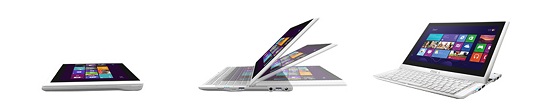
Slider (e.g. Sony VAIO Duo 11). We’ve seen a few sliders before, and they never seem to catch on. I think the problem is often a feeling of compromise and cheapness to the builds—if the slider mechanism isn’t smooth and feels like it will break, people won’t be happy. There’s also an issue with the angle of the screen relative to the keyboard, as typically there’s only one or two notches where the screen stops in “laptop mode”.
Foldable (e.g. Lenovo Yoga 13). This is perhaps the most “out there” design so far, with a 360 degree hinge that allows you to fold the keyboard under the display to end up with a tablet. It’s a cool idea in theory, and in the case of the Yoga the keyboard gets turned off once the hinge passes a certain point, but I’m not sure people will really like the idea of an exposed keyboard. I know with tablets I’ve seen some scratching and scuffing of the bottom surface over time, and having that happen to the keyboard and palm rest is a drawback for me.
Twist hinge (e.g. Lenovo ThinkPad Twist). We’ve seen this sort of hinge in hybrid Windows tablets for years, and there are certainly people that like this approach. The ThinkPad Twist at least looks to be thinner than some of the other options. Personally, I’m still a bit leery of the single hinge connection—it can feel a bit flimsy if it’s not done right, or bulky if it’s designed to last.
Dual screen (e.g. ASUS Taichi). This is actually a very cool concept, but if pricing seems rather high on Ultrabooks in general, I imagine Taichi is going to push things even further. The core concept is that you have two screens in the lid, one for laptop use and one for tablet use. You can also use the screens in mirror mode or as independent screens, effectively giving you two computers (provided the users are sitting across from each other and don't mind fighting for resources). (Thanks to reader bpost34 for reminding us of this omission.)
So there you have it: the various options for adding a touchscreen to a Windows 8 laptop/convertible. Personally I think my ideal is number two, the detachable screen. ASUS’ Transformer tablets basically started this approach, but while they were fine as Android tablets I’ve still felt performance and usability were lacking in the docked “laptop” mode. With Windows 8, we can now get a full Windows 8 experience with all of the usual apps and applications (the latter being a term I use for traditional “desktop” programs). I’m not convinced Clover Trail has the performance to keep me happy with such a design, but give me a Core i5 Ivy Bridge or Haswell processor with a detachable screen and I’d give it serious thought—especially if it’s a 1080p IPS display.
I’m curious to hear what you think are the best choices and why. What tablet/hybrid is your favorite right now, which if any of the above have you personally used, and are there problems and/or successes with any particular approach that I neglected to cover? What would you like to see more of, particularly in terms of coverage of these new devices? Let us know in the comments!
Read More ...The ARM vs x86 Wars Have Begun: In-Depth Power Analysis of Atom, Krait & Cortex A15
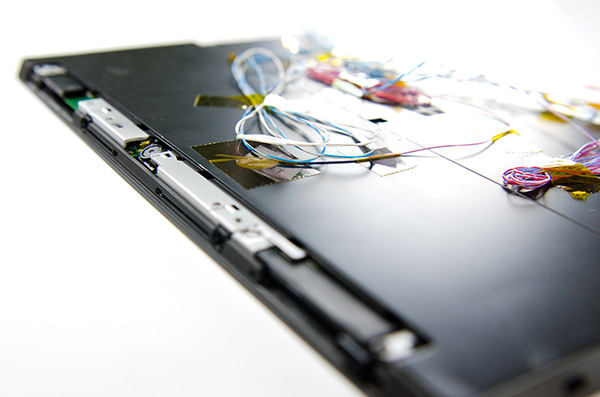
Late last month, Intel dropped by my office with a power engineer for a rare demonstration of its competitive position versus NVIDIA's Tegra 3 when it came to power consumption. Like most companies in the mobile space, Intel doesn't just rely on device level power testing to determine battery life. In order to ensure that its CPU, GPU, memory controller and even NAND are all as power efficient as possible, most companies will measure power consumption directly on a tablet or smartphone motherboard.
The process would be a piece of cake if you had measurement points already prepared on the board, but in most cases Intel (and its competitors) are taking apart a retail device and hunting for a way to measure CPU or GPU power. I described how it's done in the original article.
The previous article focused on an admittedly not too interesting comparison: Intel's Atom Z2760 (Clover Trail) versus NVIDIA's Tegra 3. After much pleading, Intel returned with two more tablets: a Dell XPS 10 using Qualcomm's APQ8060A SoC (dual-core 28nm Krait) and a Nexus 10 using Samsung's Exynos 5 Dual (dual-core 32nm Cortex A15). What was a walk in the park for Atom all of the sudden became much more challenging. Both of these SoCs are built on very modern, low power manufacturing processes and Intel no longer has a performance advantage compared to the Exynos 5.
Read on for our analysis.
Read More ...Marvell Adds NVDRIVE to DragonFly Family of Enterprise Storage Accelerators
Marvell's DragonFly virtual storage accelerators have been around for close to two years. Back in April 2011, StorageReview had some hands-on time with the DragonFly storage accelerator. In August 2012, at the Flash Memory Summit, Marvell officially announced the general availability of the DragonFly platform with two members, NVRAM and NVCACHE.
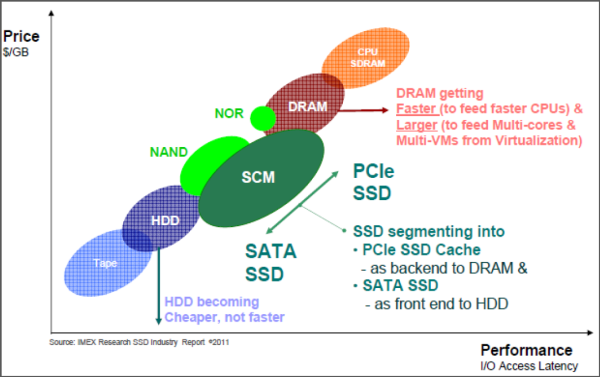
Companies such as Fusio-IO and Violin Memory are growing fast, thanks to exploding interest in the usage of Flash memory for enterprise storage. Bandwidth and latency / IOPS requirements leave PCIe as the interface of choice for this purpose. In the consumer market, we have seen SATA SSDs gain acceptance as a front end for bigger capacity HDDs. In the enterprise market, PCIe SSDs are emerging as a back-end for DRAM.
Marvell's DragonFly platform's base offering is NVRAM, which consists of a PCIe card with up to 8 GB of ECC DRAM on it and up to 32 GB of SLC NAND Flash. There is an ultracapacitor to guard against sudden power loss by backing up the DRAM contents to the Flash. The NVRAM can be used as a data cache for DAS, SAN and NAS arrays irrespective of the protocol used to access the underlying storage. The use of DRAM allows for ultra-low latency and response times (in the order of tens of microseconds). The NVCACHE product, on the other hand, uses off-the-shelf SATA MLC SSDs to augment the storage capacity of the NVRAM product. The DRAM on the PCIe card serves to address the write IOPS and latency limitations of the SSDs. This results in a performance similar to that of high-end PCIe SSDs.
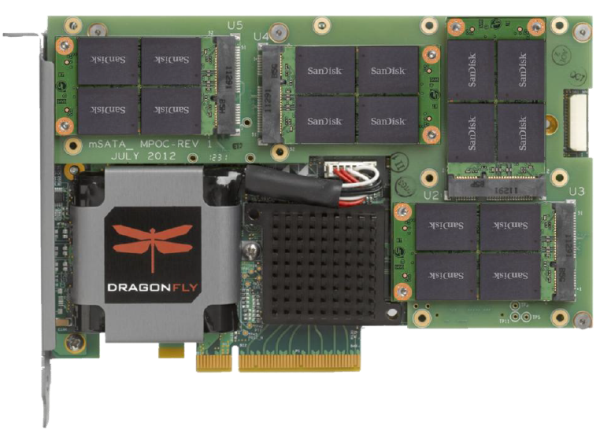
Marvell is announcing the latest addition to the DragonFly family, the NVDRIVE, today. Similar to the NVCACHE, the NVDRIVE is a PCIe SSD storage / caching solution. Instead of relying on external SATA SSDs, Marvell has integrated multiple SanDisk mSATA SSDs on the board. The hardware itself has a PCIe 2.0 x8 interface with 4 GB of DRAM and up to 1.5 TB of usable Flash capacity. The unit can also act in multiple modes (NVRAM / SSD / cache). The ultracaps provide the power backup to backup the DRAM in case of power issues (the amount of DRAM is basically dictated by the largest ultracap that could be placed on the board). The additional cache serves to increase the SSD endurance also. Marvell provides a turn-key solution with firmware and software support (virtualization-aware block and file object filter drivers for caching on multiple Linux distributions). The software also allows for dynamic cache provisioning.
Marvell claims that the NVDRIVE is a price/performance leader with more than 10x TPM (Transactions per minute) per dollar compared to the leading PCIe SSD caching solution (read, Fusion-IO) in the HammerORA TPC-C MySQL 5.1 database benchmark.
Read More ...Samsung ATIV Tab Review: Qualcomm's First Windows RT TabletClover Trail was late by about a month to the Windows 8 launch. Most of the traditional PC partners were delayed either by Intel or by burdens of their own. As much as we wished Surface RT would’ve launched with a different SoC, truth be told I don’t know that anyone else outside of NVIDIA could’ve met the aggressive schedule that Microsoft set. Qualcomm and TI were both design partners working on Windows RT devices, but neither of them had solutions available at launch.
Now that we’re two months out from launch however, things are starting to change. We’ve already reviewed one of the first Clover Trail tablets, with another on the way. And just before the holidays last year, this thing showed up:
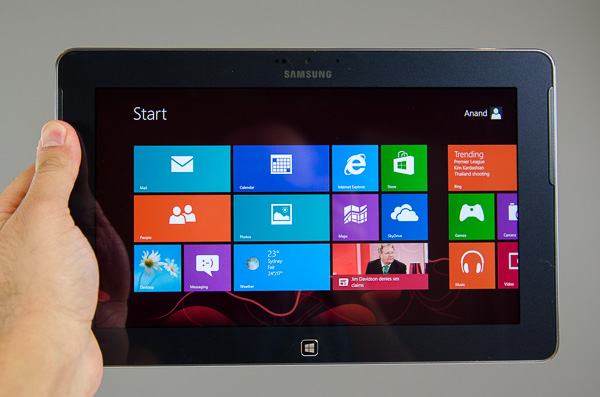
It may look like the Samsung ATIV Smart PC that Vivek is working on, but it’s the smaller 10.1-inch ATIV Tab featuring Qualcomm’s APQ8060A SoC. Yep, this is the first Windows RT tablet we have in house to use Qualcomm silicon.
Read on to see how Qualcomm's APQ8060A handles Windows RT.
Read More ...Arctic Cooling Accelero Hybrid VGA Cooler Review: Not For the Faint of Heart
Traditionally in the desktop space, the next step after high quality air cooling has been high quality liquid cooling, usually centered around custom designed cooling loops that cost a pretty penny in equipment. The industry has met this desire halfway by producing closed loop liquid coolers for the CPU not unlike the ones we tested recently, but interestingly the real power monster in most enthusiast desktops has needed to be served by reference coolers and sometimes exotic custom solutions offered by partners. Any type of liquid cooling has continued to be the province of the more extreme enthusiast.
Arctic Cooling changes some of that today with the Accelero Hybrid. Aftermarket VGA coolers aren't totally uncommon, but generally they're harder to build and market due to the more specific needs of cooling a graphics card. You have to cool the GPU, the video memory, and the voltage regulation, and the layouts of these parts varies from vendor to vendor and card to card. The Accelero Hybrid includes a 120mm radiator courtesy of Asetek, a cooling shroud for board components, and enough tiny parts to choke all but the heartiest of housecats. At $169, it also costs a pretty penny. Is it worth the effort, the money, and the risk?
Read More ...Closing the Loop: Contained Liquid-Coolers from Corsair and NZXT Compared
While closed-loop liquid coolers seem to perform at best comparably to the highest end air coolers, there's a certain appeal in their flexibility, stress on the motherboard, and sometimes even in cost. Prolimatech's industry standard Megahalems starts at $70, and that's before you even put halfway decent fans on it. Meanwhile, closed-loop coolers are getting to the point where you can find them for under $60. One of those is Corsair's H55, just one of the coolers we have in for review today.
Of course, in addition to the H55, Corsair has refreshed their H60, H80, and H100s with the H60 2013 Edition, the H80i, and the H100i. The "i" designates Corsair's Corsair Link technology, software that allows you to control fan speeds from within Windows as well as potentially integrate and monitor other Corsair peripherals. Not to be outdone, NZXT hit us with two coolers based on 140mm fans instead of 120mm: the Kraken X40 and X60. With a 280mm radiator, the Kraken X60 could very well be the best closed-loop cooler available. So how do these new coolers bear out?
Read More ...The x86 Power Myth Busted: In-Depth Clover Trail Power Analysis
The untold story of Intel's desktop (and notebook) CPU dominance after 2006 has nothing to do with novel new approaches to chip design or spending billions on keeping its army of fabs up to date. While both of those are critical components to the formula, its Intel's internal performance modeling team that plays a major role in providing targets for both the architects and fab engineers to hit. After losing face (and sales) to AMD's Athlon 64 in the early 2000s, Intel adopted a "no more surprises" policy. Intel would never again be caught off guard by a performance upset.
Over the past few years however the focus of meaningful performance has shifted. Just as important as absolute performance, is power consumption. Intel has been going through a slow waking up process over the past few years as it's been adapting to the new ultra mobile world. One of the first things to change however was the scope and focus of its internal performance modeling. User experience (quantified through high speed cameras mapping frame rates to user survey data) and power efficiency are now both incorporated into all architecture targets going forward. Building its next-generation CPU cores no longer means picking a SPECCPU performance target and working towards it, but delivering a certain user experience as well.
Intel's role in the industry has started to change. It worked very closely with Acer on bringing the W510, W700 and S7 to market. With Haswell, Intel will work even closer with its partners - going as far as to specify other, non-Intel components on the motherboard in pursuit of ultimate battery life. The pieces are beginning to fall into place, and if all goes according to Intel's plan we should start to see the fruits of its labor next year. The goal is to bring Core down to very low power levels, and to take Atom even lower. Don't underestimate the significance of Intel's 10W Ivy Bridge announcement. Although desktop and mobile Haswell will appear in mid to late Q2-2013, the exciting ultra mobile parts won't arrive until Q3. Intel's 10W Ivy Bridge will be responsible for at least bringing some more exciting form factors to market between now and then. While we're not exactly at Core-in-an-iPad level of integration, we are getting very close.
To kick off what is bound to be an exciting year, Intel made a couple of stops around the country showing off that even its existing architectures are quite power efficient. Intel carried around a pair of Windows tablets, wired up to measure power consumption at both the device and component level, to demonstrate what many of you will find obvious at this point: that Intel's 32nm Clover Trail is more power efficient than NVIDIA's Tegra 3.
Read More ...Streacom's FC10 and Nano150: Building a Fanless Ivy Bridge HTPC
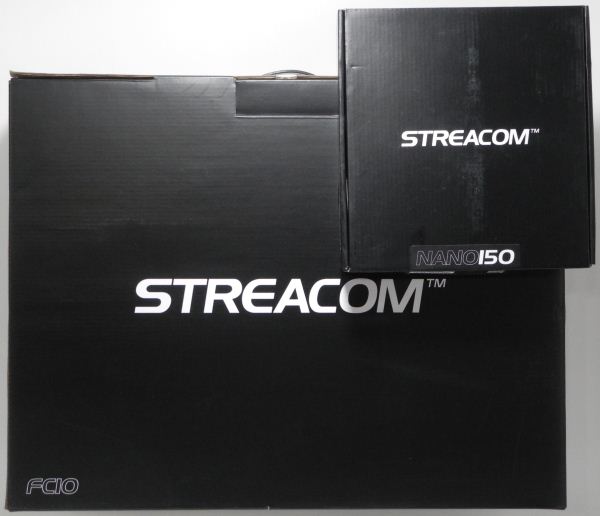
HTPC enthusiasts often place a lot of emphasis on silent systems for obvious reasons. We have looked at systems with passive thermal solutions before, but never presented the build process for one. Back in May, we had covered Streacom's announcement of the fanless FC9 and FC10 chassis. With support for passive cooling of CPUs with a TDP of up to 95 W and a sleek industrial design, HTPC enthusiasts have been eagerly waiting for these units to hit the market. After some delays, Streacom finalized the design and started shipping the units to resellers in mid-November. We requested for samples of the FC10 chassis and the Nano150 PSU and Streacom's shipment reached us in the first week of December.
We are planning to use the FC10 and the Nano150 as building blocks for a passively cooled HTPC. Our intent is also to utilize it as a testbed for evaluating discrete HTPC GPUs. Read on for the first of a three-part HTPC series, where we will be presenting the build process and burn-in testing results for a completely passive and virtually silent Ivy Bridge-based HTPC.
Read More ...Capsule Review: Thermaltake Level 10 M Gaming Mouse
Input peripherals can be an interesting subject to tackle in these tiny bite size reviews. It's difficult to quantify strict performance, an issue ameliorated somewhat by the fact that actual performance (dpi, etc.) can often take a distant backseat to user comfort and the software included. Comfort is a very subjective thing as well; a mouse that's enjoyable to use for one person may be incredibly uncomfortable or even downright painful for another. High performance gaming mice can complicate things, and mice like the Thermaltake Level 10 M even more so.
Picking up with Thermaltake's successful Level 10 branding, the Level 10 M is advertised as being from the same BMW subsidiary that helped design their striking Level 10 enclosure. This mouse is genuinely packed to the brim with features, sporting configurable lighting, adjustable height and angle, four DPI settings that can be toggled on the fly, and seven configurable buttons (not including the four axis DPI adjustment switch). It's an awful lot of mouse; is it the mouse for you?
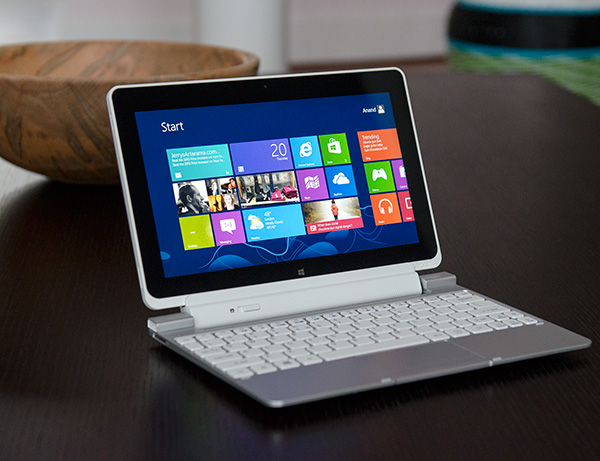
Read More ...The Clover Trail (Atom Z2760) Review: Acer's W510 Tested
Microsoft’s Windows 8/RT launch has been a bit choppier than expected. I remember hearing rumors that the OS release could slip into next year, but it seems that the solution to the problem was to launch as devices were ready rather than delay everything. Surface was among the first out of the gate, and I was generally pleased with the tablet, but Microsoft’s partner devices have been slower to release. ASUS held its VivoTab RT launch on the same day as Surface RT, but there were many key absences from the launch week in late October.
Among those missing from launch week were any x86 Windows 8 tablets. Although for most of the year Intel had been quite confident in its Windows 8 tablet story, the fact that I had to secretly borrow one just to get some rough performance numbers in our Surface RT story was a problem.
A little over a month later and things are beginning to change. Contrary to popular belief, driver problems aren’t what kept the first Atom Windows 8 tablets out of the market at launch. A bug (not related to power management) caught several months ago caused schedules to slip by about a month and a half. Depending on whose design the OEM followed (Intel’s or their own), the implementation of the fix could come quickly or would take a bit longer. In this case, Acer and Samsung found themselves on the right side of the fence. We’ve had Atom based Windows 8 tablets from both companies for weeks now.
Vivek is working on our review of the Samsung ATIV Smart PC, while I’ll kick things off with Acer’s Iconia W510. Read on.
Read More ...Corsair Neutron & Neutron GTX: All Capacities Tested
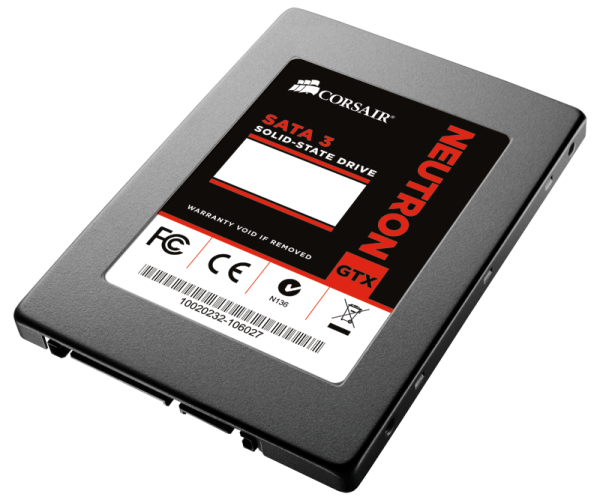
Corsair surprised us all at Computex this year when they announced their Neutron and Neutron GTX SSDs based on a so-far relatively unknown Link A Media Devices (LAMD) controller. While LAMD was new to the consumer-grade SSD controller market, the company had been making controllers for hard drives and enterprise SSDs for years, so the LM87800 found inside Neutron SSDs wasn't LAMD's first attempt in the storage world. The experience LAMD has gathered in the enterprise world is definitely visible in the LM8700 because even though its LAMD's first consumer-grade controller, it was not dwarfed by SandForce or Marvell.
We reviewed the Neutron in August when it was initially launched but Corsair only sampled reviewers with 240GB models. While 240/256GB is undoubtedly the most popular capacity at the moment, there is still a good market for 120/128GB SSDs and the market for 480/512GB SSDs is getting bigger all the time as prices come down. SSDs also perform differently depending on the capacity, NAND and controller, which means testing all capacities is necessary. Corsair sent us the remaining capacities of Neutron and Neutron GTX, so read on to find out how they perform!
Read More ...Behind the Scenes of AnandTech's Server Tests [Video]
We've been quietly testing doing more video content on the site over the past year. I've done a few reviews over at our YouTube channel, and we also host all of our smartphone/tablet camera samples over there as well. Going into 2013 we'll be ramping up the amount of video content on the site to go along with Pipeline and the Podcast as some the new features we've introduced over the past couple of years. In doing so we're also going to be hosting videos locally.
When we were looking for the first content to trial our locally served video, I asked Johan de Gelas, the head of our IT/Enterprise testing at AnandTech if he could put something together. Johan came back with a behind the scenes look at the Sizing Servers Lab in Belgium, the back-end for all of our server reviews and testing.
Johan's video is embedded below and if this goes well he's promised to bring us a look at ARM based servers on video in the not too distant future.
Read More ...HP EliteBook 8570w Notebook Review: The Other Side of the Coin
We recently reviewed Dell's top of the line Precision M6700 mobile workstation and found that the overall design left something to be desired compared to HP's high end EliteBooks, but that the price was definitely right for the performance. The M6700 is likely to remain a good value for the enterprise sector (much as Dell's desktop workstations continue to be), and the 10-bit PremierColor display uses a similar LG panel to the ones HP employs in their DreamColor displays. Can we get something like that in a smaller form factor, though?
As it turns out, theoretically at least, we can. We have an HP EliteBook 8570w on hand for review, and the 15.6" 1080p DreamColor display threatens to hit the sweet spot for productivity, with a smaller chassis footprint than larger workstations like the M6700 and EliteBook 8760w/8770w. But is the 8570w able to hit the same value propositions as Dell's mobile workstations, can it offer similar performance, or is our memory of the HP EliteBook line a little rosier than reality?
AMD held a press briefing today on their upcoming 8000M graphics chips, which they are calling the "second generation GCN architecture" parts. We’ll have more on that in a moment, but while we were expecting (dreading) a rebranding prior to the call, it appears we are at least partially mistaken; there will be at least one completely new GPU with 8000M. (If you want additional background material, you can see the previous generation high-end 7000M announcement from April 2012 for reference.)
I’m not going to get too far into the marketing aspects, as we’ve heard all of this information before: AMD has improved Enduro Technology, they’re continuing to improve their drivers, and APP Acceleration has a few more applications. There have been a few major titles released in the past couple of months with AMD Gaming Evolved branding (Far Cry 3 is arguably the most notable of the offerings, with Hitman: Absolution and Sleeping Dogs also scoring well amongst critics and users), and Bioshock Infinite is at least one future release that I'm looking forward to playing.
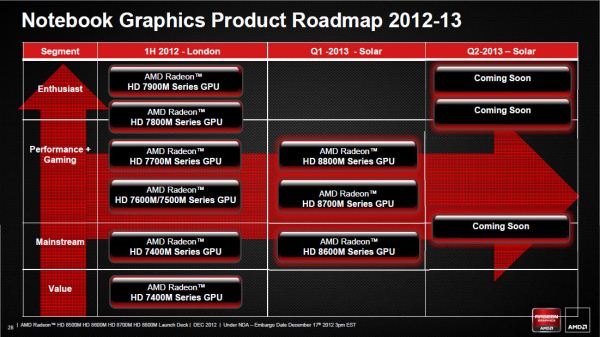
Cutting straight to the chase, at this point AMD has released limited information on the core specifications for some of their 8000M GPUs, but they coyly note that at least one more GPU announcement will be forthcoming in Q2 2013 (8900M by all appearances). Today is a soft launch of high level details, with more architectural information and product details scheduled for January 7, 2013 at CES. AMD did not share any codenames for the newly announced mobile GPUs, if you’re wondering, other than the overall family name of “Solar” for the mobile chips (replacing the outgoing “London” series), but we do know from other sources that the 384 core part is codenamed "Mars" while the larger 640 core part is codenamed "Neptune". Here are the details we have right now:
AMD Radeon HD 8500M, 8600M, 8700M, and 8800M
Radeon
HD 8500M
Radeon
HD 8600M
Radeon
HD 8700M
Radeon
HD 8800M
Stream Processors
384
384
384
640
Engine Clock
650MHz
775MHz
650-850MHz
650-700MHz
Memory Clock
2.0GHz/4.5GHz
2.0GHz/4.5GHz
2.0GHz/4.5GHz
4.5GHz
Memory Type
DDR3/GDDR5
DDR3/GDDR5
DDR3/GDDR5
GDDR5
FP32 GFLOPS
537
633
537-691
992
FP64 GFLOPS
33
39
33-42
62
Obviously there are a lot of missing pieces right now, but what we immediately notice is that the core count on the 8500M/8600M/8700M means that we’re definitely looking at a new GPU. The only other time we’ve seen AMD do 384 cores is with Trinity, but that’s a VLIW4 architecture so we’re not seeing that again. Given the currently shipping Southern Islands chips (“London” on the mobile side) have 640 cores max for Cape Verde, 1280 max for Pitcairn, and up to 2048 for Tahiti, AMD has likely created a fourth SI derivative that drops down to two CU arrays, each with three CUs. (You can read more about the GCN/SI architecture in our earlier GPU coverage.) Performance is something of a wildcard with the new 384 core parts, and the choice of DDR3/GDDR5 memory will also influence the final result. We'll find out in the coming months how the 8500/8600/8700M stack up to NVIDIA's midrange "GT" offerings, which interestingly are also using 384 cores.
Also worth a quick note is that AMD is not discussing TDPs at this point in time—which is common practice for both AMD and NVIDIA. We expect the new "Mars" parts to be more power efficient than the outgoing Thames/Turks cores, thanks to the shrink to a 28nm process. However, AMD and NVIDIA typically stick to common power targets for laptops that are dictated by their OEM partners, which often means they'll play with clock speeds in order to hit a specific TDP. That's why all of the clock speeds listed in the above table have a qualifying "up to" prefix (which I omitted).
The final announced card is the one where we appear to have more of a rebrand/optimization of a previous generation chip. 8800M has the same 640 core count as Cape Verde/7800M, only with modified clocks this time. The earlier 7800M chips could clock up as high as 800MHz, so maximum core clock is actually down a bit, but they only ran the memory at up to 1GHz (4GHz effective) GDDR5. If AMD determined memory bandwidth was more important for that particular GPU than shader performance, the new 8800M would make sense. Also note that AMD isn’t including the boost clock speeds into the above chart; under the right circumstances, all of the new chips can run at higher clocks than the reference clock.
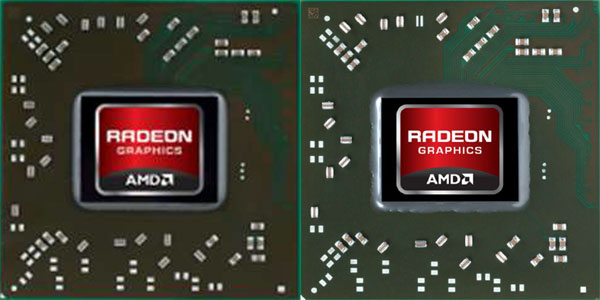
Radeon 7800M Left, Radeon 8800M Right
AMD isn’t calling the 8800M a rebrand, but we’re looking at the same core counts as Cape Verde and the same 28nm process technology, so we wouldn’t expect a substantial change in performance. There’s also the above chip shot as a point of reference. If the 8800M is substantially different from Cape Verde then the above images provided in AMD’s slides must be incorrect, as the new and old chips look the same. Minor tweaks to power use, caching, or other elements notwithstanding, we’re probably dealing with a die respin at most. But, there’s nothing inherently wrong with rebranding—AMD and NVIDIA have both been doing it for some time now. Don’t expect every “upgraded” GPU to be better; a 7400M isn’t faster than a 6700M, and likewise we expect 7700M and 7800M to be faster options than the 384 core 8500M/8600M/8700M and competitive with 8800M. Here’s a quick recap of the same core specs as above for the current 7700M/7800M parts:
AMD Radeon HD 7700M/7800M Specifications
Radeon
HD 7730M
Radeon
HD 7750M
Radeon
HD 7770M
Radeon
HD 7850M
Radeon
HD 7870M
Stream Processors
512
512
512
640
640
Engine Clock
575-675MHz
575MHz
675MHz
675MHz
800MHz
Memory Clock
1.8GHz
4.0GHz
4.0GHz
4.0GHz
4.0GHz
Memory Type
DDR3
GDDR5
GDDR5
GDDR5
GDDR5
FP32 GFLOPS
589-691
589
691
864
1024
FP64 GFLOPS
36.8-43.2
36.8
43.2
54
64
I’ll refrain from commenting too much more about performance of an unreleased part, but AMD indicated their 8870M should be substantially faster than NVIDIA’s current GT 650M GDDR5 (which isn’t too surprising considering clocks and core counts), and the 8770M should likewise be a healthy 20%+ bump in performance relative to the 7670M. I’d rather see comparisons with GTX 670MX and HD 7770M, respectively, but I suspect those wouldn’t be quite as impressive. Anyway, you can see AMD’s comparison charts in the complete slide deck gallery below. Availability of the new GPUs is slated for Q1 2013.
This came out of the blue. Samsung announced their intent to acquire NVELO, known for their Dataplex SSD caching software. Price or specific timeframe of the acquisition have not been revealed yet, but the acquisition does include all NVELO technology and personnel.
NVELO as a company may be a new acquaintance for many as it was founded only two years ago as a spin-off from Denali Software, which was acquired by Cadence in June 2010. While NVELO has not been around for long, the company is full of experience as most of the employees worked over a decade for Denali before the acquisition. In fact, Dataplex development began in 2007 when Denali was still a standalone company.
There are several products in the market that use NVELO's Dataplex software such as OCZ's Synapse, Corsair's Accelerator and Crucial's Adrenaline SSDs. Dataplex is essentially an alternative to Intel's Smart Response Technology (SRT) but with fewer limitations. For example, Dataplex is not tied to any specific chipsets, making it a viable option for AMD based setups and older systems without Intel's SRT support. There is also no 64GB cache size limitation like in Intel's SRT, although most of the SSDs that are bundled with Dataplex are 64GB or smaller. Whether it's worth it to use an SSD bigger than 64GB for caching is a different question, but at least there is an option for that. We have played around with NVELO's Dataplex in our labs but we haven't thoroughly reviewed it (yet).
While at least I didn't expect this acquisition, it does make a lot of sense. SSD prices have come down significantly in the last few years but we still aren't at a point where SSDs can replace hard drives in mainstream products. However, the difference an SSD makes is just so substantial that there is no reason not to want an SSD. The advantage of caching is that you can have SSD-like performance with plenty of storage without breaking the bank. Samsung doesn't have any consumer-grade SSD caching products, so with the acquisition it seems that Samsung is interested in entering that market. Why Samsung chose to acquire NVELO instead of just licensing the Dataplex software is a good question, but it's possible that Samsung wants to develop something in the house instead of using a commercially available solution (given the significant vertical integration already present in their SSDs, this wouldn't be a surprise). The acquisition may also be a way to eliminate competition because Samsung can force the competitors to get out of the SSD caching market or to use another solution (assuming Samsung makes Dataplex proprietary).
Read More ...Corsair Carbide 200R Case Review: How Low Can You Go
Corsair entered the enclosure business from the top with a measure of care to establish a solid brand identity. The Obsidian 800D was released as a flagship product and signalled that Corsair was serious about case design and not just looking for another revenue stream, and for the most part it was well received. Since then they've gradually trickled their designs down, with the Carbide series aimed at more frugal users. Yet the least expensive Carbide, the 300R, still runs $79 when most people would peg the price of a "budget" case as closer to $50 or $60. Enter the 200R.
The Carbide 200R is the ultimate trickling down of Corsair's case line. Coming in with an MSRP of $59 and available for just $49 as of this writing, the 200R is Corsair's shot at the extreme value consumer, but this is a very tricky market to address. The balancing act of features, performance, and price becomes substantially more difficult to manage, and Corsair has a reputation to maintain. Were they able to get the price down while keeping up with their standards for ease of use and solid performance, or did they have to sacrifice too much?
Read More ...AMD's Radeon HD 7970M: Ivy Bridge vs. Trinity Video
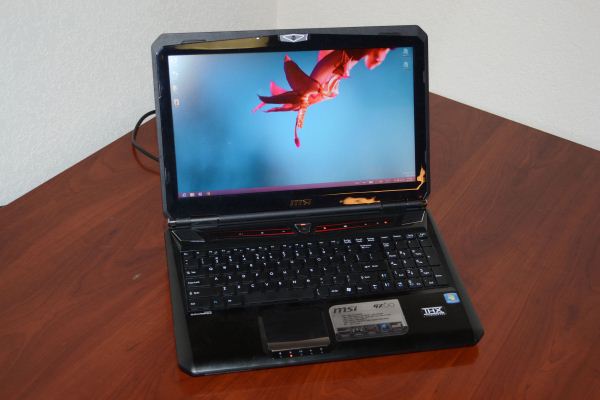
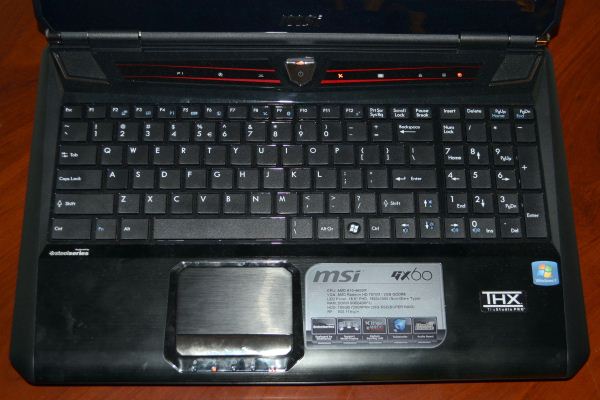
In one of the most "interesting" moves I've seen in the mobile market, MSI has equipped their GX60 gaming notebook with an HD 7970M...paired with an AMD A10-4600M APU. Curious to see how the combination would stack up against the Intel i7-3720QM + HD 7970M combination used in AVADirect's Clevo P170EM, I ran some quick benchmarks and put together a video of Batman: Arkham City showing the systems running side by side. First, here's the video link:
Not surprisingly, the Ivy Bridge solution walks away from the Trinity laptop when we turn down the details a bit, but at maximum quality the two solutions appear relatively close. The issue is that while average frame rates may be close in some cases, minimum frame rates often tell the real story. There are points in the above video where Trinity falls to sub-30 FPS for a second or two at a time, which can be very noticeable in gameplay.
Anyway, I'm curious: are you interested in more videos like this? It takes a lot more time than a simple reporting of a benchmark number, but if there's enough demand for it I'll be happy to oblige. I should also note that there are some titles where the Trinity and Ivy Bridge notebooks are fairly close in performance (at maximum detail at least), while other titles are even more in favor of a faster CPU (e.g. Skyrim). Regardless, the full review of the MSI GX60 will be forthcoming.
Pricing for the GX60 is the one area where MSI looks to beat Intel HD 7970M offerings. The base model comes with a 750GB hard drive, 8GB RAM, A10-4600M, and of course the HD 7970M. Right now (if it's in stock), you can get that configuration for around $1200. Our particular unit takes yet another odd approach by including a 128GB RAID 0 SSD set for the OS and apps, which might sound appealing until you realize they're using SanDisk U100 drives (not exactly the fastest SSDs around); we're not sure what pricing is for this particular configuration. AVADirect's P170EM by contrast is priced at $1519, with a $100 off coupon available at the time of writing. That will get you an i7-3630QM and the 7970M, so for about $150 to $200 extra, for gaming purposes we recommend most users go that route.
Read More ...Gigabyte F2A85X-UP4 Review – Are PowIRStages Needed with Trinity?
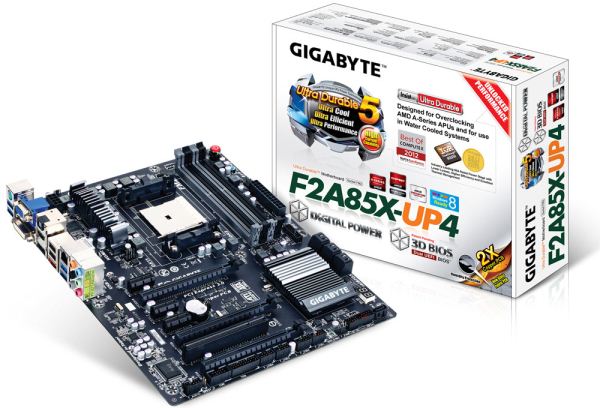
Since Computex back in June, Gigabyte has been pushing a new power delivery system across parts of its motherboard range. This involves an integrated circuit to combine power delivery MOSFETs into a small form factor with great heat dissipation, high efficiency and a smaller PCB space – the PowIRStage IC3550 they have been using is rated up to 60A of current each. This makes sense in the high end spectrum (Z77X-UP7) where power might be needed, or in low airflow situations (mITX) to ensure longevity. But is it required on a desktop Trinity board? These things are expensive, which made me wonder if it is a worthwhile investment in a desktop Trinity system. Read on for the full run-down of the F2A85X-UP4.
Read More ...Steiger Dynamics Launches LEET Gaming HTPC Lineup
We are no strangers to boutique PC makers here at AnandTech, having reviewed systems from AVADirect, iBUYPOWER and Puget Systems regularly. Most of these boutique PCs are targeted exclusively towards gamers, while a few cater to the small form factor space. We rarely see boutique PC makers target the HTPC market. Low Carbon PC is one of the boutique PC makers making an effort to serve the HTPC / gaming crowd. Earlier this month, Steiger Dynamics entered the fray with a luxury gaming HTPC lineup, the LEET series. The LEET series has three models, the LEET Pure, LEET Core and LEET Reference.
Steiger Dynamics uses components from Intel, NVIDIA, Asus, Corsair, EVGA, Seasonic and Western Digital (amongst others) in the lineup. The HTPC credentials are strengthened by the option to add the Asus Xonar Essence STX (for the audiophiles who don't need bitstreaming) and the Ceton InfiniTV 4 quad-channel cable HD TV tuner card.
Steiger Dynamics aims at consolidating the various devices in the living room with the LEET series. By integrating the functionality of a desktop PC, gaming console, cable TV STB, Blu-ray player and NAS into one unit, they are implementing device convergence of a different kind. The LEET series is quite high end, with the premium being justified by an exclusive custom chassis and liquid cooling solution. The low-end LEET Pure series starts at $1798, while one could splurge more than $10000 on the highest-end LEET Reference with maxed out specs. The table below presents the hardware specifications of the various models in the LEET lineup.
Steigler Dynamics LEET Configurations
LEET Pure
LEET Core
LEET Reference
Motherboard
Asus P8Z77-V (LX)
Asus P8Z77-V / Asus Maximus V Formula / Asus Maximus V Extreme
Asus Rampage IV Formula / Extreme X79
Processor
Core i3-3220 / i5-3570K
Core i7-3770 / i7-3770K
Core i7-3930K / i7-3970X
DRAM
Corsair Vengeance Blue / Black (8 - 16 GB), Corsair Dominator (32 GB)
Corsair Vengeance Black (8 / 16 GB), Corsair Vengeance Red (32 GB), Corsair Dominator Platinum (16 / 32 GB)
Corsair Vengeance Red (16 / 32 GB), Corsair Vengeance Black (64 GB), Corsair Dominator Platonum (16 - 64 GB)
We will be meeting up with Steiger Dynamics at CES. If you have any questions for them, feel free to sound off in the comments.
Read More ...Broadcom's pre-CES Sneak Peek: BCM 43341 NFC Combo Chip and More..
We were at Broadcom's press event in San Francisco on Tuesday, where they outlined their vision for the trends in the next few years. Covered aspects included location technologies, Wi-Fi display, 5G Wi-Fi, NFC, connected automotive technologies and enterprise BYOD (Bring Your Own Device) issues. Rather than just presenting details from the press releases, we dug a little bit into what Broadcom thought about related competing and complementary technologies. In this piece, we will be taking a look at Broadcom's thoughts on the technology trends and our analysis of the same.
Location Technologies
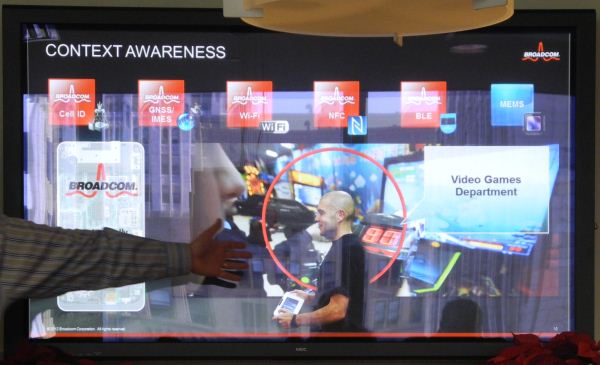
Broadcom was bullish on location technologies which can enable creation of contextually aware platforms. These enable ad-targeting (for example, available sale or discount offers near the user's current location), automatic traffic advisory notes and other similar applications.
Broadcom indicated that they are well positioned to provide location technologies at various levels of 'accuracy' including cellular station identification, GPS, Wi-Fi, NFC, BLE (Bluetooth Low Energy) and MEMS. MEMS might appear to be out-of-place in the list, but it supplies essential information related to directionality / orientation.
These technologies make it necessary to have multiple antennae in the device. Wi-Fi operates in 2.4 GHz and 5 GHz, BLE in 2.4 GHz and NFC in 13.5 MHz. Cellphone reception and GPS signals require completely different frequencies too. Designing a system with a smartphone form factor and antennae for so many different applications is also a challenge in addition to the silicon requirements.
Wi-Fi Display
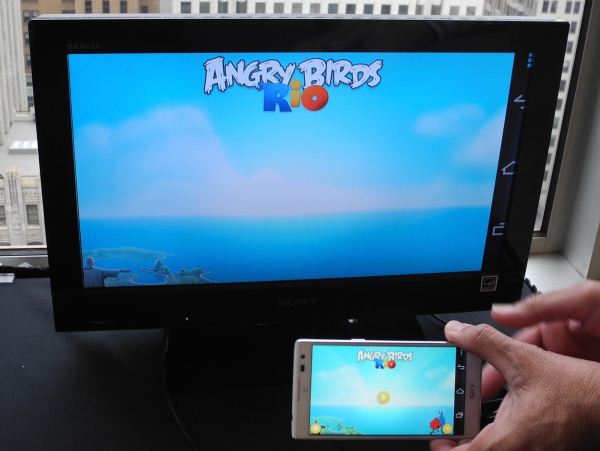
Intel's Wi-Di was one of the earliest commercially well-adopted wireless display technology which involved encoding the frame buffer contents and transmitting it over a ad-hoc Wi-Fi connection. While the initial versions utilized MPEG-2 encoding, the rise of Full HD requirements signalled the move to H.264. Currently, all wireless display technologies using the above method utilize H.264 encoding. While Wi-Di was an Intel-only initiative for notebooks, the Wi-Fi alliance took a keen interest in this segment of the market and created the industry-wide Wi-Fi Certified Miracast standard.
Broadcom showed a demo with the wireless display working on a Korean Sky-branded smartphone and a Broadcom based USB-powered Wi-Fi Display receiver on the sink side. Interestingly, even though the Nexus 4 supports W-Fi Display (and it was used for the NFC demos), it appears that support is not fully baked-in yet for that smartphone. It was also indicated that Broadcom uses the 5 GHz channel for cleaner video transmission. I did see a few encoding / decoding artifacts in some cases during the demo. Latency is a bit of an issue with this technology and gaming is not recommended because of the lag. Battery life is a much bigger concern because H.264 encoding is very power hungry. Notebook batteries might be able to bear the brunt with Wi-Di, but we are very interested in analyzing battery consumption profiles when using Wi-Fi display.
Interestingly, the Wii-U uses Broadcom's chips for the wireless communication features and also uses a customized version of Wi-Fi display in the GamePad. Since the encoding and decoding profiles are both controlled by Broadcom in this case, the latency is lesser than what one gets with standard Miracast.
5G Wi-Fi - 802.11ac
Broadcom ends 2012 as the only company shipping 802.11ac radios in routers being sold to the end users. Marvell and Qualcomm Atheros have also announced 802.11ac radios, but they are not shipping to consumers yet. Broadcom expects PCs, TVs, smartphones, tablets and other devices to join the ac bandwagon next year. Interestingly, Broadcom expects the 'Internet of Things' concept to be carried forward with 802.11ac radios, but we find it difficult to understand why low bandwidth/cost/power requiring applications would go with 802.11ac.
We did ask about where Broadcom stood on the 802.11ah front (something we have been very interested in since starting coverage of home automation technologies). Even though Broadcom is keenly following the developments in that area, they don't seem to be very enthusiastic about the current prospects citing spectrum issues in the sub-1 GHz range. We also asked about where powerline networking stood in Broadcom's plans (considering that they had acquired Gigle Networks, a PLC silicon manufacturer, back in December 2010). They indicated that the shipment of PLC products had come down in favour of Wi-Fi even in traditionally strong PLC markets such as the EU. This may be a biased point of view since we were talking to the wireless group, but the fact definitely presents interesting points to ponder as G.hn slowly picks up speed to compete with HomePlug.
NFC
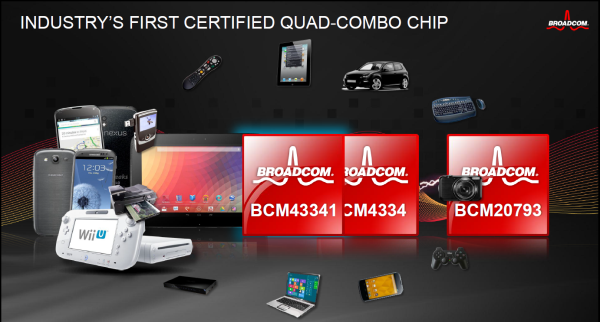
The main announcement at the event was the NFC quad combo chip BCM 43341. Broadom has enjoyed huge success with the Wi-Fi / BT / FM BCM 4334 combo chip and they have now added the IP from the 20793 NFC chip to the mix. This brings down complications in the board design for the OEMs. It also makes it easier for companies which have been hesitant to include a dedicated NFC chip in their phone to join the NFC club.
Manufactured in the 40 nm process, the BCM 43341 supports both 2.4 and 5 GHz WLAN with HT40. Android has been instrumental in driving up NFC adoption and Broadcom's standard NFC software stack is now part of the AOSP 4.2 release. We are looking forward to a combo chip with 802.11ac support.
Personally, I have always regarded NFC as a solution in search of a problem, but Broadcom demonstrated interesting tap-to-share applications (such as playing a video on a smartphone and tapping a tablet to transfer the video playback). I am still not fully convinced, but NFC does seem to have some interesting use cases, provided apps put in support. The integration of the NFC software stack into AOSP should provide app developers with the necessary impetus.
Broadcom also presented some of their achievements in the connected automotive space (particularly, the rapid strides made by OPEN for use of Ethernet for in-vehicle automotive communication). They also talked about some chips for use in enterprise routers where the BYOD (Bring Your Own Device) phenomenon has brought about some challenges in terms of security and feature set. These two topics are not in the main coverage area for us yet, so we have not discussed them in detail.
In conclusion, Broadcom has exciting things in store for 2013. We are looking forward to BCM 43341 based products, increased NFC adoption and more number of devices supporting 802.11ac in the future.
Read More ...Dell Precision M6700 Notebook Review: The Enterprise Split
When you think about it, the enterprise workstation market really only has three key players. You have HP, who produce some excellent mobile workstations but have been stagnating horribly on the desktop side. You have Dell, who produce what are in my opinion the best desktop workstations but seem to be substantially less exciting on the notebook end. And you have Lenovo, who excels in neither discipline but offers a fairly balanced portfolio in exchange. This presents a problem, and it's a problem we're looking at today.
What we really want and need is a single vendor to order notebooks and desktops from and be able to call it a day. While HP's desktops aren't bad, they're overpriced compared to Dell's offerings. Today we have the updated Dell Precision M6700 on hand, a robust notebook featuring a full sRGB IPS panel with user-configurable gamma, a Kepler-based workstation GPU, and Intel's Ivy Bridge quad core processor. But with workstations it's not just about the internals, it's about the design and the experience. Did Dell come up with a worthy competitor to HP's EliteBooks, or did they just come up short?

 The State of Qualcomm's Modems - WTR1605 and MDM9x25
A little over a month ago, Qualcomm flew me out to San Diego to talk all about cellular modem, specifically their baseband lineup, testing, and later their RF and transceiver in what would become their largest RF disclosure ever. In the past few years, we’ve made considerable headway getting SoC vendors to disclose details on the CPU and GPU side of their products, and mobile enthusiasts now are starting to become increasingly cognizant of the SoC inside devices, and in turn the blocks inside that SoC. In a short term the industry as a whole went from smartphones largely being impenetrable black boxes to devices with understandable platforms inside. The days of an OEM not disclosing what SoC was inside a device at all are largely behind us, and for the most part vendors are open to discussing what’s really inside most of their silicon quite publicly.
The State of Qualcomm's Modems - WTR1605 and MDM9x25
A little over a month ago, Qualcomm flew me out to San Diego to talk all about cellular modem, specifically their baseband lineup, testing, and later their RF and transceiver in what would become their largest RF disclosure ever. In the past few years, we’ve made considerable headway getting SoC vendors to disclose details on the CPU and GPU side of their products, and mobile enthusiasts now are starting to become increasingly cognizant of the SoC inside devices, and in turn the blocks inside that SoC. In a short term the industry as a whole went from smartphones largely being impenetrable black boxes to devices with understandable platforms inside. The days of an OEM not disclosing what SoC was inside a device at all are largely behind us, and for the most part vendors are open to discussing what’s really inside most of their silicon quite publicly.








.jpg)

.jpg)

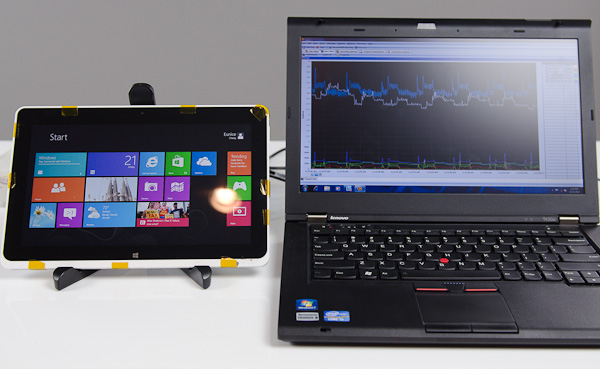 To kick off what is bound to be an exciting year, Intel made a couple of stops around the country showing off that even its existing architectures are quite power efficient. Intel carried around a pair of Windows tablets, wired up to measure power consumption at both the device and component level, to demonstrate what many of you will find obvious at this point: that Intel's 32nm Clover Trail is more power efficient than NVIDIA's Tegra 3.


.jpg)




.jpg)

 Radeon 7800M Left, Radeon 8800M Right



.jpg)








.jpg)


No comments:
Post a Comment