

Review: Exclusive: LG Intouch Max GW620 review
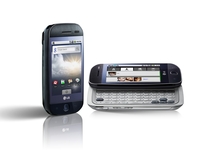
The first Android handset from the Korean firm, the LG Intouch Max GW620, has taken a different direction to its competitors - there are very few Android phones that have aimed at the lower end of the handset spectrum, and it's interesting that the Korean firm has chosen this tack.
However, while the costs have been kept down to make it a competitor to the HTC Tattoo, LG has still added a decent amount of innovation into the mix, by offering the choice of the vanilla Android experience or its own S-Class interface, offering a new level of functionality.
The phone itself is small - a 3.2-inch HVGA resistive pales in comparison with the Google Nexus One phone, with its massive 3.7-inch OLED capacitive screen - but the Intouch Max GW620 also brings a full keyboard and a decent array of buttons as well.

The outside of the phone is well designed in pretty premium plastic - it's light, but still feels solid in the hand. The 3.5mm headphone socket sits at the top next to he power/lock button, and is also raised so the headphone jack sits flush with the chassis - something we haven't seen much of in newer handsets, which leave the metal of the headphone jack exposed.
LG has also had a good think about its media offering on the Intouch Max GW620 as well, with a dedicated music key next to the camera shutter button on the left-hand side of the device. It's a feature we saw in the LG New Chocolate BL40 from the firm, and something we're big fans of.
There's also a dedicated gate for the microSD card on the side of the phone meaning hot swapping of memory cards is much easier - for some reason there's been a trend towards putting this feature under the battery in recent Android handsets, and it's very annoying when you want to watch a video from another device and can't be bothered to connect it to a PC, so kudos to LG for this.

The left-hand side of the phone is more basic - the volume up and down rocker and the microUSB slot are housed here, with the latter housed by a pleasant-to-release gate.
And the main Android functions are taken care of by the front three keys - touch sensitive home and back buttons, and the physical menu key. We kept getting the home and menu button mixed up on the Intouch Max GW620 because of other Android phones choosing a different layout - so if you're upgrading from another Google device watch out.
In the hand the phone fits very nicely. Both in landscape and portrait mode, the dinky chassis sits well, yet in the pocket there's still some width to it thanks to the QWERTY keyboard. That's not too say it's too hefty - just that there are a few thinner devices out there on the market at the moment.

The keyboard is pretty easy to slide out, with minimal effort needed and a pleasing click registered when fully extended.
The great thing LG has done here is to bring a decent number of keys to the party with the Intouch Max GW620 - there's a full set of QWERTY buttons, four directional keys and a full range of numbers too, making tapping out a message a very swift task indeed.
The travel on the keys is similarly good, making it very easy to simply shuffle across the keyboard and write messages without having to go back and correct yourself. There seems to be a slew of full QWERTY devices coming to market at the moment with the likes of Nokia N97, the Motorola Milestone or the BlackBerry Bold 9700, but we'd have to say the keyboard on this little device is probably the best around at the moment.
Android might have been done to death by a number of firms recentlyt, but the problem with that is unless there's some re-skinning going on, such as we've seen on the HTC Hero with the Sense UI for instance, there's not a lot more that can be done with the OS.
However, that's sort of solved by the speed with which Android is being updated - since November last year when it arrived in the UK on the T-Mobile G1, we've seen around four major upgrades, with many little ones in between.
So here's our issue with the LG Intouch Max GW620 - it manages to do something cool by bringing a new skin to the Android experience, but it also is stuck on a very low-end version of the Android firmware in the shape of 1.5.

To put this in context, it's the same firmware that the HTC Magic debuted on in the first half of 2009, and doesn't have a whole lot of cool tricks to show off like the Motorola Milestone does with Android 2.0.
But thanks to the Lord of Mobonia for upgrades - we can't imagine that LG will leave its first Android device lumbered with an archaic version of Android, so we expect this to update in the near future for better mobile use.
Anyway, back to the skin, and LG has done something pretty impressive here in offering a sort of dual boot option for its users. You can either have the vanilla Android option, complete with three home screens and the standard menu, or decide to use LG's effort, which is very similar indeed to the S-Class interface the Korean firm has so lovingly been putting on its device for the past year or so.

The former is just as we said, the basic Android experience, meaning the neat pull-down notifications bar from above the screen, the cool pull-tab menu system with the iPhone-a-like grid of applications on the phone, and the three customisable home screens to dump icons onto.
However, with S-Class, the same principles are applied, but, for instance, the menu is grouped into elements like communication and multimedia, and the home screens operate in a kind of loop, so you can keep scrolling right endlessly to see those icons you've lovingly placed on your home screens.
The resistive screen on the Intouch Max GW620 is a little disappointing, but for the more budget price it's understandable. It works much better than most of LG's other screens though, and is easily on a par with the Nokia N900's, which employs the same technology but is a far more expensive model.

A problem with the resistive screen does come in the shape of unlocking the Intouch Max GW620 from sleep mode. You can either double tap the power key at the top, hit any key and hold the on-screen key, or tap menu twice.
As you can imagine, this many ways of opening a phone, coupled with a 'no fingers needed' touchscreen, means the Intouch Max GW620 will often unlock itself in your pocket, which can sometimes lead to embarrassing calls in the pocket.

The system does suffer from terrible lag at times though - you can be tapping a menu option or trying to answer a call and the phone will freeze for a second, forcing you to press again to see if your touch registered only to find you've inadvertently done something else.
Actually, freezing was an all too common problem on the Intouch Max GW620, with the screen shutting down a number of times when trying to be used in our tests - we hope it's a kink that LG works out soon, as while it's not too annoying it certainly grates.
LG has gone for an interesting take on contacts for the Intouch Max GW620, as despite its early 1.5 version of Android it has chucked in some cool social networking opportunities into the mix.
Where before you had your basic list of phone friends for contacts in the same window as the phone dialler and your favourites, the new way LG wants to do things is to divide the menu up into new tabs, with your favourite people given their own separate application.

This means you can see the phone dialler and call log in the contacts list as usual, but there's also the option to open up the phone to see groups as well, so you can chuck your buddies under labels.
The contact list is large and well laid out, with a simple flick taking you miles down the list, and a tab at the side of the screen allows you to sort your contacts by name as well - this latter function actually works, unlike some other Android devices we don't care to mention *cough*MotoMilestone*cough*.
LG has skinned the contacts list in a similar way to its S-Class interface, meaning wide open spaces for the finger to strike and an easy-to-hit call button next to the picture of each person.

And as we mentioned earlier, social networking is a big part of this phone, with Facebook, Twitter and Bebo all thrown in there for good measure. The only real use for them is to link them with your friends so that the photo from their online profile synchronises with their phone version too, although there is further functionality if you're willing to dig.
When editing a contact you simply have to link them in with their Facebook or Twitter account from the list on the phone to add that element to their profile (a word of warning though - if you accidentally link the wrong profile that photo will stay on there even if you eventually find the right one).

However, this isn't as intuitive as you might hope, especially with the Twitter application - not only does it only show around seven people on a list when you're searching for your friend (with you having to load a new list for a few seconds to bring up a new set of people to choose from... annoying when you've got 500 or so followers) it also sometimes won't synchronise with the chosen person anyway.
But once you have got the right people and profiles together, it's again not the most useful element to have, as there's no way to message them or anything - just the opportunity to see their statuses and link them into the profile to provide an easy way to synchronise their information – although we now expect a little more than just a direct link to their profile from a phone of this calibre.

Calling was adequate on the Intouch Max GW620 – we found the speaker to be of reasonable quality, although we weren't blown away by the clarity of any phone call.
However, coverage was pretty good – although when the phone did decide to roam, it wanted to stay there rather than switching back to 3G, which was pretty aggravating when we knew that there was 3G available.
Messaging on the LG Intouch Max GW620 was a pretty nice experience – as we mentioned before, there's no method of integrating straight with your social networks directly from the contact menu, but that's not to say this isn't a great messaging experience on a mobile phone.
First of all, we love the keyboard bundled with the Intouch Max GW620 – it's up there with the best physical keyboards on a mobile phone, and way better than the likes of the Motorola Milestone, which has that perplexing lip/antenna on the bottom of the device to make typing a complete irritation.

The spacing between each key and the travel is top-notch – this is especially obvious when you send a message more than a few characters long. It puts nearly every other keyboard in the shade.
While the phone itself is sluggish at times, the ability to simply start typing a name and have it show the contact information from the home screen works well – and it adds to the decent messaging experience.
There are a variety of messaging options on the LG Intouch Max GW620 – not least the addition of Exchange email thanks to the Moxier suite added onto the phone. This means that you can get instant push email on the device, with minimal fuss.

We did find that the push element of the email wasn't always as co-operative as we'd like – sometimes it wouldn't download a message and we'd have to head into the menu to manually get it on to the phone.
However, SMS and MMS are as good as we've come to expect on an Android phone, shown by the easy way in which you can send a text (as mentioned before) and the quick ability to send an MMS to someone right from the photography menu, although we're not the biggest fans of the automatic face-recognition technology LG is claiming you can use to achieve this.
Basically, we're in love with the keyboard on the Intouch Max GW620, and coupled with inbuilt Exchange ability we think it's a winning combination.

However, we're perplexed and bamboozled in equal measure that this phone isn't running the latest version of the Android system – 2.0 would have given instant access to Exchange emails, and that's what we all want to see.
We had a look at the French model of the Intouch Max GW620, and that appears to have Exchange built right into the phone – we'll be intrigued to see whether the OS gets an upgrade in the near future.
We're big fans of the internet on Android phones, and the Intouch Max GW620 is no exception - it's a WebKit-enabled browser that simply works well.
There are a few issues with the GW620's ability to handle the net however, and that's mainly down to the resistive screen - we're not big fans of it to start with, and the fact is that we constantly struggled to get the correct level of accuracy when using the phone in both portrait and landscape mode.
The smart-fit technology worked well, though, as double tapping to zoom in meant that the text was automatically re-sized in both portrait and landscape modes - this is something sadly lacking with the likes of the Motorola Milestone for instance.
The visual bookmarks also worked a treat - having tabs to sort between your favourite and most viewed sites was pretty good, along with the history all in one simple-to-get-to place on the phone.
What was odd about the LG Intouch Max GW620 was the fact that initially you think that there's a distinct lack of ability to do simple things like reloading the page, or scooting forward or backwards through the pages you visited - well, that's until you realise that there's a little tab at the side that springs open to reveal a whole new transparent menu, as well as the standard list of functions opened by the normal menu key.
This transparent option allows you to do all the things we thought LG had forgotten to do - it's not blatantly obvious that this function is there though, as the tab is pretty small to hit. What's more annoying is that it also gets in the way of the text sometimes too - sometimes all you're trying to do is scroll down and the tab will pop open.

Also, it's hard to shut the thing down - when you're in portrait mode it's fine, as there's a blank space to tap, but in landscape this wasn't possible, so it was either a physical button press or tapping around the icons trying not to hit one - not ideal.
As you can imagine on a phone of this calibre - there's no Flash video to play with, meaning that you can't watch YouTube or BBC iPlayer in its native format. That said, the rest of the experience is pretty snazzy, with a phone that seems light on specs fair whizzing around the pages we were calling up - no complaints about the performance there.
The Intouch Max GW620 might not be a phone that competes with the likes of the HTC Hero or the Nokia N900 in terms of internetability (new word copyrighted by TechRadar to describe how internetty a phone is), it's still a very passable effort that you'll have no qualms turning to in a day to day setting.
LG knows how to make a decent cameraphone - just check out the LG Viewty KU990 or the Viewty Smart GC900 to see the ability that the company can throw at a snapper.
That's also true in this Android phone - but it doesn't quite match up to the photography power of its siblings. We were impressed with the sheer range of options on offer, with the ability to change the ISO settings and picture modes, as well as face tracking within photos.
But we were left a little bit cold by the new fancy 'Auto Detect' face recognition feature on the Intouch Max GW620, as despite promising to be able to recognise people when taking a snap and then give you the chance to upload the pic to their social networking site, in reality the accuracy wasn't the greatest.

We like the feature as an idea - we just think that LG could have used this social networking phone a bit more intuitively. For instance, it would be better if you could just choose the person from a list by default, rather than making the phone do the work for you and it getting things wrong.
But beyond the fancy pants stuff it was a decent enough camera - the flash sparked well enough to create some good images, but a single LED flash like this isn't going to be bright enough to capture your friends in a nightclub or anything - rather just adding detail to close up shots.
Day to day shots came out well enough under normal conditions - the camera did take an age to process each snap, which meant that if you got one picture wrong you had to wait a long time to fix the problem, but apart from that we were reasonably impressed with the camera, probably rating it among the best of the bunch so far (which isn't saying much when the rest of the crop is similarly poor when it comes to Android cameraphones).

Video was a pretty fine effort on this device, with a smooth image captured by the D1 resolution lens, which managed to gobble up images at a great 30fps – making it much smoother than the iPhone 3GS for instance when it comes to taking video.
Again, sharing was an option here, and while this shows that the Intouch Max GW620 is very much a social networking device, we struggled on occasion to get it to work when we wanted it to.
Now onto media on the LG Intouch Max GW620 - and it certainly was an odd experience. We're not talking about the performance - we're more intrigued by the fact that the way the media is displayed hints at a hidden screen that other companies have failed to spot.
If we compare the GW620 to the Motorola Dext, we see an interesting similarity - they both display the media in a kind of 'angled gallery' format, with the thumbnails of the media in question making up a picture-board effect.

We initially put this down to a new version of the gallery with the Dext, but given it's also being seen here, and on an older version of the OS, we're wondering whether LG and Motorola are the only two companies to discover this hidden secret - or less interestingly, the only two to bother to use it. Either way, we're perplexed.
Media use on the phone was certainly no slouch, with LG throwing in all kinds of video codecs into the mix. DivX, MP4 and H.264 were all present and correct, meaning that the vast majority of our media files played without a problem. However, M4V wasn't present in the compatibility list, which will be a shame for some of those who have coded their files for an iPod.

The music player on the Intouch Max GW620 was the basic Android one AGAIN - and we're getting seriously bored with nobody managing to upgrade it yet. Yes, the big icons are easy to hit, and the level of intuition for placing all the functions on the screen is good - but we want something that offers a little more than just being able to play our tunes (and play then well, sonically, might we add), something like being able to edit the album artwork directly from the song.

Another little feature LG is keen to show off is the movie maker - although we're getting a little tired of this feature and hope the company upgrades it soon. Basically you get to choose a song (or section of it), a few photos and some transition effects, and then fuse the whole lot together to make a little 'film' of your slides.
And you can upload it to YouTube as well - but we can't think of anyone in their right mind who would want to do that.
Battery life on the LG Intouch Max GW620 was remarkably good - that's probably due to the big power pack providing juice under the hood. We managed to get a good day's use out of our device nearly every time - in fact, turn off the push email and Wi-Fi and all that and you'll probably be able to make the phone last two days; and even longer than that if you're a moderate user.
If you've had other phones from LG, you'll have noticed that there are some bizarre additions to the clan, like motion sensitive gaming. Well, that's also here with the Intouch Max GW620, as well as the faithful radio tuner. We can't explain to you how cool the radio portion of this phone is until you try it for yourself - suffice to say that the touch-controlled dial still works like a dream on this phone.

Applications are at a premium here on the phone - that's why there's a link to the Application Market from LG, as is the case with nearly every Android device.
But wait! There's a problem here - Google has upgraded the Android Market, making it easy to see the applications in search, and view screenshots and all that - but that's only for those with Android 1.6 and above to take advantage of.
The LG GW620 runs on 1.5, you might remember, meaning that we're getting a very basic Market experience indeed - not a problem if you've never picked up an Android phone before, a bit iffy if you've played with a better one.
We mentioned before the Moxier suite of products - well, that means that you get corporate access to your calendars and contacts on the phone, although there's no way to synchronise your appointments with the main calendar.
We're still impressed by the addition of the Moxier suite, and there's a lot worse on offer out there to get your work stuff onto a personal mobile phone.
There's also a suite of work-related products on there too - you're able to view Word, Excel and PDF files on the phone thanks to bundled software.

Connectivity is much as you'd expect on an Android phone - there's Wi-Fi, Bluetooth with A2DP support, high speed 3.5G and GPS of course.
The latter option works pretty fast, even managing to get a lock on you when you're in a building (as long as you're near-ish a window) and it can keep hold of your location well too. It means that Geotagging of photos is possible - although we're still not convinced there's a lot of call for such a function.
Overall, the LG Intouch Max GW620 is a pretty well-specified device - connectivity, productivity and battery life are well put together, which is impressive on a phone that costs just آ£20 per month.


The LG Intouch Max GW620 is a good device, a very good device - just one with some flaws baked right in. We understand prioritising making this phone low cost, although we're not sure we agree with all the compromises. At least there's a new direction on offer here, and we always like that.
We liked
The keyboard. Oh, the keyboard on the Intouch Max GW620 - it's so easy to use that we're actually wondering if we've actually left our teens after all, such is our delight at being able to speedily write text messages to our chums. It's a simple to use bit of hardware, and we're glad it showed us what's possible on an Android phone.
We also like the fact LG has clearly thought about what users want from a phone like this - it's not always about the bells and whistles, it's about being able to do things easily. Push email and calendar functionality, turning Wi-Fi on and off from anywhere on the phone through the pull-down menu - these are things we want to see, and Android offers the chance to play with that, as shown in this phone.
The screen is big enough, the media playback above average and the rest of the overlay a real case of how to make Android work without over-complicating things.
We disliked
Actually, we should probably add a caveat to that last line - it's not complicated providing you don't use the S-Class system. Cube-based home screens, a categorical way of looking at the menu - we've not liked it very much on any LG phone so far, and that remains the same on the Intouch Max GW620 - we're just glad you can turn it off.
The use of Android 1.5 is a really big mystery to us as well - we're sure LG is going to have a good reason for using it, but for our money, it should have done whatever was necessary to get at least Android 2.0 on here - it adds so much and given that it's going to be open source any day now, we're hoping and praying that this is an update waiting to happen in the near future.
The resistive screen was also a disappointment - it's low budget technology, and really hampers the fluidity when using the phone. Yes, we can see why LG has done it to keep costs down, but at the end of the day some people are going to pick up this phone and be less impressed - and then they probably won't care about the price.
Verdict
It feels hard to give a proper verdict on the Intouch Max GW620 - it's like a really, really good phone made out with a bad one and the resultant mobile baby came out with elements of both. The cost of the handset is great - آ£20 a month is a smashing deal - and the level of connectivity and productivity will entice a lot of people.
But then again, the resistive screen is poor, the phone is chunky and while the keyboard is good, the on-screen option isn't in the same league, and that's a real turn off for some people.
We hope that an upgrade will come along soon and fix some of the problems, but until then, we'll have to wait and see if LG's plans to do Android on a budget will pay off in the same way as the low-budget Cookie did.
Related Links
 |  |
Read More ...
Official: gaming does not lead to rickets

It's official – prolonged gaming does not give you rickets, despite many a media report last week (including our own) which claimed this may well be the case.
The original story appeared in London's Metro newspaper, which went with the incendiary headline: 'Video gaming leads to surge in rickets'.
It turns out, however, Dr Tim Cheetham's claims were misconstrued in the article. How do we know this? Well, he's spoken out and put the rickets record, er, straight.
Lack of outdoor activity
Speaking to GamesBrief.com, Cheetham explained: "I understand [the] Metro has said that we have linked computers to rickets, whereas we are actually saying lack of outdoor activity in childhood is a risk for poor D nutritional state...
"We do not say that gaming causes rickets... The average age of a child with rickets is around 20 months old: too young to use a keyboard and mouse!"
So, there you have it. Now all we need to confirm is that self-loving does not make you blind and we will be happy TechRadar bunnies.

| |
Read More ...
In Depth: 5 best alternatives to the Windows Task Manager

When your PC seems slow, unstable, or you think it might be infected by malware, then your first step should be to take a very close look at the processes it's currently running.
You could turn to the Windows Task Manager, but that provides only very basic information. If you want an in-depth report, something that makes it easy to spot and control unnecessary, resource-hungry or malicious processes, then you'll need to try an alternative.
Here are five of the very best apps available to download.
1. What's Running 3.0 - Windows 2000/ XP/ Vista/ 7
At the heart of What's Running is a Task Manager-type display of the processes running on your PC. Just clicking a process will display a useful graph showing its recent RAM, CPU and I/O activity (very useful for identifying resource-hogging programs).
And if you don't recognise a process name, right-clicking it reveals a "check online" option that compares its name against an online database of common processes, and will usually tell you more.
What's Running crams in plenty more functionality, though. Its tabbed interface also shows you running services, loaded drivers and DLLs, open internet and network connections, startup programs and basic system information.
The program even provides a snapshot feature to save all this information. You could set a baseline snapshot this month, say, then compare it with another next month to see what's changed - helpful if you're trying to find out why your system is suddenly unstable.
What's Running has one or two problems: we found the interface occasionally confusing, and it won't list the files, Registry keys and other Windows objects opened by your processes. The program does make it very easy to access a great deal of useful system information, though, and it's definitely worth a look.

2. Process Explorer - Windows XP/ Vista/ 7
Launch Process Explorer and you'll see a colour-coded tree view of your processes that makes it very easy to see what's running. And if you spot a name that looks unfamiliar, right-click it, select Search Online, and the program will launch a web search for that process name, so you'll quickly have it identified.
Clicking a process reveals the DLLs and other modules it's loaded, as well as the files, Registry keys and other Windows objects it has open. And double-clicking will display a processes performance graphs, open network connections, thread details and a whole lot more. There's even a Strings tab that displays text strings inside the executable file, very useful if you're trying to identify malware or find out what a particular process is doing.
Process Explorer doesn't have as many extras as some of the competition (no list of Startup programs, for instance), but that's because it concentrates purely on Task Manager-type functionality - it's actually produced by Microsoft. And the end results are impressive: it's lightweight, extremely reliable, and portable, a must-have for everyone's troubleshooting toolkit.

3. Anvir Task Manager Free - Windows XP/ Vista
At first glance Anvir Task Manager Free looks much like the competition. There's a list of running applications here, processes there, and separate processes show you more information about the program you've selected: the DLLs it's loaded, files it's accessing, internet connections it has open, and so on.
Look more closely, though, and you'll find considerable variation in the power and capabilities of each section. The processes tab displays only limited, beginner-level information.
But elsewhere Anvir Task Manager Free also lets you stop or change the startup type of your drivers, a strictly-for-experts feature that, if mishandled, could prevent your PC from restarting, even in Safe Mode. Who's it really for? We're not sure.
Still, there's a lot to like about the program. A well-designed Startup tab gives you control over all the processes launched when Windows starts; a Log window records major PC activity, like processes started, windows created and closed; and bonuses include the "Tweaker for Windows", a TweakUI-type application that provides easy access to more than 100 hidden Windows settings.

4. Process Hacker - Windows XP SP2/ Vista/ 7
Run Process Hacker and you'll see all your running programs displayed in a clear colour-coded tree. If you spot something that you think could be malware, then you can have the file checked by VirusTotal.com in a couple of clicks. And a right-click Terminator option combines multiple low-level techniques to shut down programs that Task Manager alone can't close.
Other straightforward features include a services tab, where you can view, stop and start services; a network tab that displays open internet connections; a Hidden Processes tool detects simple rootkits; and an option to trim the working set of selected processes to help free up RAM.
Drill down to the in-depth information on each process, though, and you'll find some features that are strictly for experts only. Process Hacker not only displays the blocks of memory used by each process, for instance, but it can also change their memory protection settings, edit RAM directly, inject DLLs into a process, create services, and more.
This isn't a program to go exploring if you're not entirely sure what you're doing, then - a single mistake could crash your PC. But if you're an experienced Windows user, or just happy to stick with the basics and leave the advanced features alone, then there's a lot to recommend Process Hacker. It's one of the most powerful and accomplished Task Manager alternatives around.

5. System Explorer - Windows XP/ Vista/ 7
System Explorer provides access to an amazing amount of technical data on your PC. There's the usual Task Manager-type display of running processes; lists of loaded services and drivers; details of loaded modules, and currently open files; and lists of open internet connections, IE addons, Explorer shell extensions, software uninstall programs and a whole lot more.
It could be overwhelming, but a well-designed and attractive tree-based interface makes it easy to find your way around.
The program is particularly good when it comes to identifying mysterious processes. In a couple of clicks you can look up a process name in its own database, at ProcessLibrary.com, Google, or upload its file for a malware check at VirusTotal.com or VirusScan.jotti.org.
A useful History module displays more details on exactly what your programs are doing: processes they're launching, files they're using, internet connections being opened and closed. And a Snapshot tool saves the details of your current running processes, services, drivers and so on. You can then compare your system with a snapshot a few weeks later, and easily see what's changed.
There are better pure Task Manager replacements here. A double-click in Process Explorer, for instance, will display far more information about a process of interest. But if you're more interested in general system management than low-level technical details then System Explorer has a lot to recommend it.


| |
Read More ...
DTG looks to creating UK 3D TV standard

The Digital TV Group (DTG) is looking into creating a 3D standard for UK 3D broadcasts via both broadcast and the internet.
The DTG made its announcement at its 3D TV seminar, starting what is the first-ever industry consultation for the technology in the UK.
Speaking about the DTG's plans, Simon Gauntlett, Technology Director at the DTG, explained: "The DTG has been at the heart of every development in UK digital television since its inception more than a decade ago.
"Since the launch of our consultation, 3D has evolved from an emerging technology limited to cinema into a compelling home entertainment proposition – with broadcasters set to launch 3D services as early as this year and technical standards approved for 3-D Blu-ray and HDMI – what is currently missing is a standard for delivering 3D to the home via broadcast or IP delivery."
3D uncertainties
The DTG hopes to plug the broadcast/IP gap and is taking a big part in the consultations, with Gauntlett noting: "Our 3D consultation revealed members had concerns over uncertainties over standards for 3D and clearly told us the DTG should assume a leadership role in developing an approved, open standard for broadcast 3D."
Getting 3D into the homes isn't going to be that straightforward, however, with standards expert Peter Symes of SMPTE who was at the event, telling Home Cinema Choice that: "it's not going to be easy, and there will be surprises."
Quite what the surprises will be is unknown. Then again, if we did know it wouldn't be a surprise.
At least we do know that 3D broadcast's will have to be 'platform agnostic,' so whether you eventually opt for a polarised experience – like LG is touting – or an active shutter one – like Panasonic and Sony – you will at least see things in another dimension.

| |
Read More ...
Average speed cameras coming for all motorways
Average speed cameras could be installed on all UK motorways if a government-backed group gets its way.
The Sustainable Development Commission (SDC) has stated that the cameras, currently only used for roadwork traffic management, would provide significant environmental benefits.
Not only would they apparently keep drivers at a lower speed, thus burning less fuel, they would also replace the current speed traps, which encourage heavy braking and accelerating when used.
Taking away control
The SDC also has recommended that all cars should be fitted with speed limiters too, with a timetable in place to curb the maximum speed of cars, possibly in line with school opening times.
Stewart Davies, from the SDS, said: "While information technology alone won't provide all the answers, it could go a long way towards making travel in the UK safer, more pleasant and more sustainable.
"Already, eco-driving technology can help motorists spend less at the pumps and reduce their emissions; better information can make using public transport easier, and video conferencing technology can help business travellers avoid some journeys altogether."

| |
Read More ...
In Depth: Linux on the move: the future of portable distros

Over the last 12 months, netbook and mobile Linux has made massive advances in features and install base. This is primarily thanks to two netbook distributions – Moblin and Canonical's Ubuntu Netbook Remix (UNR).
Both have built on the massive potential that was unlocked by the Asus Eee PC but led nowhere, as its operating system failed to inspire a new generation of Linux users.
There's a new breed of netbook distro that's aiming to change this perception and take the fight for the perfect mobile platform back to the manufacturers.
Netbooks aren't the only portable platform where there's innovation to be found: there are millions of mobile phone users completely oblivious to the fact that their devices are powered by Linux. And that's just the way it should be. But there's a growing number for whom it will become increasingly important, whether that's through Android or Nokia's latest gadget.
We're going to document the current state-of-the-art in mobile Linux, and uncover the innovation and the technology that has enabled recent developments to happen. And we're going to start with netbooks, as these desirable items are becoming increasingly important.
Ideally, a netbook OS needs to take into consideration three things: the limited amount of screen space that these devices typically have, the need for applications to be quick and responsive, and fact that these devices have to last as long as possible without being connected to a power source. And this is exactly what both Moblin and Canonical's UNR have been designed to accomplish.
The Moblin advantage
Moblin's great advantage, and the reason why it's been such an important development for the Linux netbook platform, is that it started life as an Intel project (it's now under the guardianship of the Linux Foundation), and Intel makes the hardware that the vast majority of netbook devices use.
This meant that the company had an unparalleled knowledge of the inner workings of these devices and also had the opportunity to make them work to the best of their capabilities by adding drivers and various other components to the Linux kernel.
Despite all the work that has been done in the background for Moblin, it's the user experience that most people will judge this distribution on.
Moblin uses a toolbar that scrolls down from the top border of the display, and from this, you can launch any of Moblin's apps, including a Mozilla-based web browser, an instant messenger client, media player and home screen.
Ubuntu Netbook Remix
Canonical put a great deal of effort into developing Ubuntu Netbook Remix, pulling massive boot speed improvements, power management code and a new window manager into the standard Ubuntu distribution. It also makes good use of recent additions to Ubuntu, including the Ubuntu One cloud storage system and the Empathy instant messenger, which makes good use of the limited screen sizes on these devices.
But the best thing about UNR is the breadth of packages available. You can install anything that any other Ubuntu user can, which is a massive advantage if you look at the tiny selection available for Moblin.
UNR has been tried and tested on the Intel Atom platform that most netbooks use at their core, so you should expect better battery life and reliable suspend and resume, for instance.
One thing we don't like about the latest release of UNR is the installation routine. Canonical has tried to make things easier by only distributing UNR 9.10 as an ISO image that needs to be burned on to a CD. But of course, netbooks don't have optical drives.
To get around this, Canonical wants you to use its USB Creator application. We had little success getting this to work on a couple of Ubuntu based distros, and had to resort to the Windows version that can be found in the root directory of the ISO – which means you need to mount it first, somehow. On Windows, you will also need Python 2.6 installed.
By comparison, Moblin is provided as an IMG file, the same as UNR used to be, and this can be copied using dd on the command line. It takes a long time, and it's more technical than it should be, but because you have control of the block size with the bs argument (we used bs=1024), the writing process shouldn't fail. We'd love to see Canonical providing both packages.
Here's what makes a netbook distribution different from an ordinary distro
Perhaps the most impressive aspect to Moblin in particular is its boot speed, because a netbook has to boot quickly.
It's a device that's going to be routinely turned on and off, opened and closed. It needs to present a desktop with a working internet connection fast enough for people to look up train times, local restaurants and cinema listings without having to resort to their mobile phone.
Fortunately, the unified nature of the Atom platform is a significant advantage for netbook distro builders. It means they can optimise boot speeds knowing the exact capabilities of the hardware. This is a luxury that general Linux distributions don't have.
Instead, they have to play it safe by bundling support for as many different variations in configuration as they can, and this still causes problems.
Fast boot
But Atom-based netbooks don't have the same problem, and this is exactly why Moblin and UNR have been able to make improvements to boot speed.

The Moblin team have been extremely vocal in their belief that they can dramatically reduce the time it takes for a netbook computer to get from post BIOS to a fully operational environment. They've also said that there's no single Linux system that needs to be improved.
Getting a faster boot speed means looking at the whole booting system, which is exactly what they've done. This initiative for Moblin was dubbed the 'fast boot' project, and it was widely reported that Intel felt a 2-second boot time was a realistic goal.
It has yet to accomplish this particularly milestone, but the fast boot changes have made a dramatic improvement in boot speed. But there's no magic piece of optimisation that can suddenly turn a slow-booting netbook into a fast-booting one. There are so many things going on when your computer boots that overhauling a single application won't make that much difference.
Instead, the Moblin team had to look at everything that happens between the moment you press the power button and the moment you log in to your desktop, and that meant looking through the code for everything from the boot manager and the graphics drivers to the window manager and desktop environment.
Process management
As Moblin software engineer and fast-boot troubleshooter, Arjan van de Ven puts it: "Fast boot is not a specific piece or a few pieces of technology. It is largely about how you put the OS together… there are a few pieces of optimisation, but that is almost secondary."
To accomplish this, the Moblin team looked very closely at what was happening at boot time, what was being launched and when, before playing around with everything from compiler flags to configure options in every package loaded at boot time.
Running certain processes asynchronously also helps, such as the USB probing routines. But surprisingly, the kernel itself is only a small part of the whole routine, and as a result it has received only a few patches from the Moblin team to enhance boot speed.
Many of the components required for booting are already built into the kernel image, rather than as external modules. This is also part of the reason why Moblin can't support the Celeron processor, as used in the original Asus Eee PC 701, as the some of the instructions used to optimise performance are Atom-only.
Even the X server can't escape, with several operations disabled, duplicate saved hardware states removed and UXA acceleration enabled by default. These options are only possible because Moblin knows the hardware capabilities of the netbook device.
Canonical is also heavily involved with the Moblin initiative, bundling its own Ubuntu-themed Moblin edition alongside its UNR offering, and it has also been closely monitoring Moblin development for clues on how it can improve its general distribution's performance.
Despite the fact that Moblin uses the Sysvinit initialisation daemon to manage boot processes while and Ubuntu uses Upstart, many of the boot speed improvements that have been made to Moblin have also been made to UNR, and as a result both distributions have made big improvements.
Moblin is still winning, but Canonical's Scott James Remnant, who has looked at the two systems in detail, reckons that they can pull Ubuntu's boot time into the 10-second ballpark for the next release.
Design
After rapid booting, the second thing you're likely to notice when you start your netbook is the user interface. Both Moblin and UNR have tried very hard to morph the standard Linux desktop into a more mobile-friendly amount of screen space, and they've used different tactics with varying degrees of success.
With Moblin, the key to this transformation is the Clutter toolkit. This is the graphical framework that Moblin uses to create most of the individual UI components on the screen. It includes the small graphical animation that occurs when you roll your cursor over the icons in the toolbar, as well as handing the way windows scroll in and out of view and the thumbnail view used for application switching.
Moblin has taken many well known GTK-based applications, and pushed these into the Clutter toolkit, giving most of the desktop a much more unified and homogeneous look than other Linux distros. It also means that these applications will fit easily into the small screen, and sometimes their layout needs to be adjusted to compensate.
This has been taken to a new level with the Moblin-specific applications that are part of the default desktop, and in particular, the integrated web browser.
Baby browsers
The browser is likely to be the most used component of a netbook, and the Moblin browser has been designed to make the best possible use of the available screen space. This means it is always maximised and is also integrated into the applications panel.
Clicking on this will fill the page with your most visited sites, and clicking on any of these will open the browser. The browser is based on Mozilla, and includes Flash support by default. Pages can be opened on a new tab, and the tab bar fits snugly beneath the address bar at the top of the window.
Clutter has also been used to good effect in the contacts page. This is an instant messaging portal that's automatically connected whenever you connect to a network, and it lists your online contacts within a Clutter panel and lets you initiate conversations from the same screen. If you receive messages while using another application, the Contacts icon in the launch bar will display an exclamation mark.
The biggest change for UNR compared with Ubuntu is the way it looks. Canonical has created a large icon-based launch system that apes the same menu layout and contents as its general desktop distribution, while making its features easier to use from a netbook's smaller display and input devices.

Canonical's UNR doesn't use anything as revolutionary as Clutter, but it does bundle several distinct technologies unique to its netbook distribution. The most important is called Maximus.
This is the window manager responsible for the full-screen mode used by most UNR applications, and it enables these application to make the most use of the limited screen space without overlapping the application bar at the top of the screen.
Unlike Clutter, applications don't have to be hard-coded to work with Maximus. The window manager is a drop-in replacement for Gnome's default, and this means it works just as well as KDE's window manager, for example.
There are more uses for a stripped down distro than just your netbook
Netbooks use standard x86-based hardware. The result is that most Linux distributions will run on them unmodified, and you can also run a netbook specific distribution such as UNR on a normal desktop machine or a laptop – but you can't install Moblin.
It's a distribution that's too tied to the Intel Atom platform on which it operates, and there are just too many kernel-specific options and optimisations in the system for it to run on generic hardware. This is the same reason why it won't install on older Asus Eee PCs, for example.
But Moblin also wouldn't be as attractive without the accelerated graphics and superior power management that come with the default hardware combination. You might ask why you would even want to run a distribution designed for smaller hardware on a normal machine.
For normal users, it's true that you're probably better off sticking to the mainstream versions of OpenSUSE, Fedora or Ubuntu. You'll have proper hardware support and a better selection of applications. But if your uses are limited, and so is your hardware, a slimline netbook distribution could be the perfect upgrade.
There are still people using 800x600 displays in a world where 1920x1080 is becoming a new standard, for instance. A netbook distro might also be a good choice for your family, or for other machines you have to maintain. A netbook distribution will be configured for usability and all the main functions are easily accessible, and they're also relatively secure.
Usability
If improved usability is your main concern, you can do a lot worse than choose UNR or one of its derivatives. The large icons used by the application launcher and the low resolution of the default applications would be ideal for those with impaired vision or limited input mobility.
As UNR is really just a series of additional packages built around Ubuntu, it will also work on the same vast array of hardware, from the oldest supported by the kernel to the newest devices. Unlike some of the other netbook distributions available, UNR will also install without too much difficulty.

This is because UNR is distributed as an ISO disc image. It just needs to be burned on to a disc, which is then inserted into the destination machine. Most other netbook distributions prefer the flash image format, IMG, which isn't as versatile if you don't have a USB flash drive, and it can also be rather difficult to create the appropriate boot media.
If you've used Ubuntu, UNR looks different but operates in exactly the same way. Many of the bundled applications are identical, and other than the new title bar and the change in theme, they'll work in exactly the same way.
More importantly, the big advantage it has over Moblin is that you can install all the same packages you can from a normal Ubuntu installation using the Synaptic package manager, which is probably the best reason for using it.
We pit the big two netbook distros against one another in a race!
We interpreted speed as how quickly the machine boots, how long it takes to establish a wireless internet connection, suspend and resume speeds, as well as general performance and battery life, and we've tested both distribution on the same machine.
It's a Samsung NC10 with 1GB of memory and a 160GB hard drive, connected to the same wireless network while plugged into power. Both distributions work well on this device, although we had to update the BIOS for the screen brightness control to work, and Moblin fails to offer a GUI for this.
Both our series of tests were conducted from a cold boot, and we took the timings from the moment we selected the OS from the Grub menu.
Suspend/resume
To measure the time it took to suspend the machine, we waited for the power light to start flashing. With Moblin, the screen went dead instantly and it took a few extra seconds for the hardware to close down and enter suspend mode.
On UNR, we could see the screen and watch the audio being muted followed by the wireless connection being dropped before suspend mode was triggered at almost exactly the same time.
This housekeeping is perhaps why UNR is a little faster at restoring the desktop and reconnecting to the wireless access point than Moblin, although there was some variation in the UNR results, with the fastest wireless resume coming in at under 20 seconds.
We had expected the suspend and resume times to be almost identical, and it's remarkable that both desktops were back up and running in under five seconds, with UNR posting a particularly impressive speed. It's also clear that the the biggest bottleneck is waiting for the wireless radio to negotiate a new connection, as both systems spend about the same amount of time waiting for an internet connection.
Moblin is dramatically quicker at booting, even though the wireless connection is delayed, and you can see why Canonical has been watching Moblin development very closely, and why both distributions are promising further improvements.
It's also noteworthy that the UNR desktop appears with a working wireless connection immediately, whereas we have to wait for Moblin to make the same leap, which shows that UNR is performing certain tasks at the same time. Perhaps that's one of the reasons why Moblin is faster to the desktop?
The only test where we couldn't pick a winner between the two distributions was battery life, as they both gave roughly the same results. In normal, low-power command line usage, we got around 5.5 hours out of each netbook, while continually running the BBC's iPlayer gave us around 2.5 hours of playback.
Results

Alexander Graham Bell never thought phones would turn out like this…
The first device that really caught our attention was Trolltech's Greenphone. It ran an embedded version of Linux and provided an API for programmers to get stuck into and develop their own applications for the new platform. It never really took off, but then the motives for Trolltech doing this have always been somewhat unclear.
It wasn't long after its release that it announced all the stock had been bought and that the project had come to the end of its life. And it wasn't long after this that Nokia intervened and bought Trolltech…
Maemo
Nokia has long been experimenting with embedded Linux systems, via its Maemo platform. We've reviewed these devices in the past, and they each had beautiful and responsive touchscreens, alongside an accessible GTK-based graphical front-end. The only thing these devices were really missing was mobile phone functionality, which always seemed an incongruous omission.
Soon after Nokia bought Trolltech it was announced that Qt would be ported to Maemo, which we're still looking forward to. But the big announcement for Linux-based Nokia devices is the N900, a smartphone that combines the latest generation of the Maemo platform with phone functionality.

It has 3D acceleration and multi-touch, and can perform SIP and Skype calls out of the box. It also comes with an open API that developers can use to build their own applications, and these can be sold on Nokia's own app store, called Ovi Store. It's Nokia's great hope in the battle to defeat Apple's iPhone, and it's a testament to how far we've come that it's built around the power and community offered by Linux.
Android
Of course, there's one particular mobile phone operating system that has done a great deal to change attitudes towards Linux as a mobile platform, and that's Android. It's not particularly because it's any better to use or that it has more applications available, or that developers can get stuck in without selling their souls – it's because it was designed and developed by Google.
This has given it an amazing amount of publicity, and positions the Android platform alongside Apple and Microsoft in the world's media. There are now dozens of phones that either use Android now or will in the future.
In the UK, the highest profile are those offered by T-Mobile, the Hero and the G1. Both are manufactured by HTC, a prolific company that builds Windows Mobile devices with similar specifications.
But there are also a great number of devices from Motorola, including the wonderfully named Motorola Morrison and the much hyped Motorola Droid. This seems to be the current darling of the Google stable, as it's the only Android phone judged powerful to run its new turn-by-turn navigation from Google Maps.
But the best news is that many of these companies are part of the Open Handset Alliance, a group aiming to bring open standard to the mobile phone market. It seems the combination of Linux and Android is unbeatable.
The future's bright. The future's shiny. The future is Chrome
With the 2.1 release of Moblin, many mainstream distributions have started looking at creating their own versions of Moblin and making these as their netbook contribution. The first distribution we've seen to make the leap to Moblin inclusion was Mandriva.
Its 2010 release packages the full Moblin environment alongside the usual fayre of Gnome and KDE. Installation is as simple as searching for the task-moblin metapackage and installing the result.

From what we've seen of it, Mandriva's Moblin differs very little from the standard version. Both the themes and the default package selection are identical.
But you do have the enormous advantage of being to install other Mandriva packages on your netbook, even if they're not going to be able to use the Clutter features of Moblin or look like typical Moblin applications.
Hot on the heels of the Mandriva release, the Fedora team has also been able to integrate Moblin into its latest release – Fedora 12. This is something of a return to its roots for the Moblin project, as it was initially based on Fedora distribution.
It also means that there should be better integration between the original Moblin packages and any new ones offered by Fedora, as both distributions are closely matched and inherit some of the same configuration files and layout.
Not to be outdone, OpenSUSE is also bundling Moblin into its main distribution tree, and there are community packages you can install for the last couple of releases. But rather than make it available for general consumption, Novell would rather sell its Moblin integration to netbook manufacturers directly.
Even more Ubuntu
As UNR is built on Ubuntu, it's highly likely that we'll see almost as many UNR respins as we have for the parent distribution. We've already seen one example in Jolicloud, and we'd put money on many community distributions, such as Linux Mint or Crunchbang offering a UNR overhaul alongside their standard desktop installations.
It's also likely that Canonical will be able to forge stronger relationships with companies like Dell, which is already shipping a specific version of UNR on its Mini 9 platform. As Windows XP is phased out and the cost of bundling Windows 7 rises, manufacturers will be looking for a cheap and easily maintainable netbook OS, and UNR fits the bill admirably.
Chrome OS
Google Chrome OS is Google's long-promised netbook distribution, which is being designed as the perfect platform for Google's growing library of online applications and services. Its release was described by Google Software Engineer Martin Bligh as a foundation rather than a fully functional operating system, and the plan is to have it ready for this time next year.
Chrome OS currently includes user interface experiments and some initial designs for ongoing development. The official blog describes these components as a sketch that will be coloured in over the next year.
To all of us here at LXF though, it's just the Chrome web browser running in full-screen mode. That said, there are some features that Google obviously wants to emphasise.
There will be no conventional desktop applications, with all facilities provided through the Chrome browser. Security has also been a big issue: each session will run as a sandbox, isolated from all other sessions. .
But the most important feature is speed. Google claims that its operating system will take you from boot to login in seven seconds, which gives Moblin and UNR something to think about, especially if that includes wireless initialisation. It could also be the reason why Google intends to ship its OS on specific devices, and not make it available for general consumption.
However it turns out though, you don't need a time machine to know that when Google takes a project like this seriously there are going to be serious implications and exposure for Linux.

| |
Read More ...
Competition: WIN! Genius G-shot HD550T camcorders

TechRadar has teamed up with Genius to give away five of its G-Shot HD550T high definition camcorders.
This tiny 5.0 megapixel marvel records video in stunning high definition 720p quality (1280x720 at 30 frames per second) and can take still 5.0 megapixel photographs thanks to its high-resolution CMOS sensor.
It also features a 3x digital zoom for a closer view of distant subjects.Its killer feature is a 3" LTPS touch display, enabling effortless access to the camera's menu system and touch Auto Exposure function. This allows exposure to be set by touching the area of the screen you wish to be metered.
Swivelling screen
The screen swivels to enable recording of the user – perfect for waxing lyrical on video sharing sites such as YouTube or Vimeo. And as video is recorded in high definition, you can take advantage of these sites' HD capabilities to ensure your viewers get the best viewing experience.
The G-Shot HD550T features dual SD slots, each supporting SDHC cards with up to 32GB capacity. This provides a total of 64GB of space to store many hours of video – great for taking in your hand luggage on holiday.
And when you get back, the The G-Shot HD550T's HDMI port enables playback of your movies on a HDTV – great for showing off where you've been!
The camcorder uses a Lithium Ion battery, and can also take 4xAA batteries – so you'll never be caught out.
You can enter this competition and be in with a chance of winning one of five Genius G-Shot HD550T camcorders by going to the Genius G-Shot HD550T competition page.
Please note that this competition is only open to UK residents over 18 years of age.

| |
Read More ...
HP adds unlimited music-streaming service to PCs

HP has announced that 16 of its computers will come preinstalled with MusicStation, an unlimited music-streaming service which is owned by Omnifone.
The service means that HP is aping the music deal it already has in the US with RealNetworks' Rhapsody.
"As the world's biggest PC vendor, HP has huge opportunity to create a viable competitor to iTunes due to its scale," explained Rob Lewis, Chief Executive of Omnifone about the new deal.
Free trial
Those who have bought an HP laptop with MusicStation preinstalled will be able to try the service for 14 days without payment and then will have to pay آ£8.99 per month.
Like Sky Songs, the service will allow users unlimited streaming and the chance to download 10 of those songs a month.
The service will be installed on the following computer range: Compaq Presario CQ61, CQ71, HP G61, G62, G72, HP Pavilion dm3, dv3, dv6, dv7, dv8, HP Envy 13, HP Envy 15, Presario CQ53, Pavilion HPE-1, p63, s53.
To find out more, go to HP.com/uk for more details.

| |
Read More ...
Google founders to sell off shares

Google founders Sergey Brin and Larry Page seem likely to give up majority control of their company in a share sale.
The duo will shed around 11 per cent of their stake in the search firm, from 59 per cent to 48 per cent, relinquishing control through majority voting rights.
PC Pro is reporting that Page and Brin are looking to shed the shares over the next five years, with the deal netting them over آ£3 billion at current share prices.
While they will be giving up majority voting rights, the CEO Eric Schmidt will still hold 10 per cent power in the firm, so the management team will still be able to shape the direction of the search engine's fortunes.
Committed
"They are both as committed as ever to Google," a spokeswoman told the BBC. "They are integrally involved in our day-to-day management and product strategy. The majority of their net worth remains with Google."
Brin and Page created Google in 1998, and have grown it into a brand worth over آ£13.5 billion in that time.
However the firm has been branching out into a number of new arenas in recent years, such as the Android search platform, so fresh investment and direction could be necessary to keep Google functioning at the sharp end.

| |
Read More ...
Professor announces 'Facebook friends' fallacy

A researcher at Oxford University has deemed the amount of friends you have on Facebook is not actually that reflective to your friend group in real life.
Robin Dunbar, Professor of Evolutionary Anthropology, has noted that the brain can't actually handle much more then 150 friends, so having thousands of 'trophy' friends on their social network seems to be a pretty meaningless exercise.
150 isn't just a number plucked out of the ether but one which is all part of something called Dunbar's number – an idea developed in the 1990s which is based on how much information the part of the brain used for conscious thought can actually contain.
Like the kudos
"The interesting thing is that you can have 1,500 friends but when you actually look at traffic on sites, you see people maintain the same inner circle of around 150 people that we observe in the real world," explained Dunbar about his findings.
"People obviously like the kudos of having hundreds of friends but the reality is that they're unlikely to be bigger than anyone else's."

| |
Read More ...
Review: D-Link DSM-510 HD Media Player

The D-Link HD Media Player DSM-510 was originally designed to be used alongside Intel's Viiv devices to deliver streamed media through a wired or wireless connection. However, it works just as well with any Windows-equipped laptop.
It's an incredibly small box – about half the size of a standard D-Link Wi-Fi router – and is made from white plastic with a black band around the middle. It may be a small device, but it still manages to pack in an impressively wide array of ports.
On the front you'll find a USB port for adding a USB memory key or hard drive, for example, to view photos or run video locally. However, the majority of the connections are on the rear of the unit and offer HDMI and S/PDIF ports, as well as a Composite port and Ethernet connection.
There is also a Composite to SCART adapter in the box for connecting to older television sets, which is a nice touch.
Setting up the media streamer is fairly straightforward. You need to install the supplied software on your laptop, then organise your music and videos using Windows built-in Media Player software.
720p playback
When it comes to streaming content, the HD Media Player DSM-510 is capable of handling 720p high-definition resolution files with a degree of ease, but it doesn't handle 1080p content as effectively.
File support is excellent, as you'll find that the streamer can handle all the most common formats with ease. We found that only the more obscure audio and video codecs proved difficult to run.
The remote control supplied is a little on the large size, but comes with a full array of controls, with dedicated photo, video, music and server buttons, as well as player controls. We found it simple to navigate and it made getting the best from the unit really easy for even first-time users.
It's hard not to be impressed with the DSM-510, as the small size, comprehensive ports and no-fuss setup make for a nicely rounded product. However, it is starting to show its age slightly, as the lack of Full HD support shows its limitations.
Related Links
| |
Read More ...
3DTV is 'Not going to be easy'

Bringing 3DTV to the home is 'not going to be easy, and there will be surprises' said standards expert Peter Symes of SMPTE yesterday.
Speaking at a high-end Digital Television Group (DTG) seminar to which HCC had exclusive access, Symes explained that the technicalities of encoding 3D signals were proving a challenge - for instance, early attempts at compressing signals using MVC (Multi-View Coding) delivered disappointingly inefficient results.
It wasn't the only note of caution sounded at the seminar, at which the DTG announced that it would be working to set standards for 3D delivery to UKTVs and computers.
Chris Johns, Chief Engineer of BSkyB,explained that new techniques had to be developed to create 3D material which delivers 'Emotional involvement, rather than the spear-in-your-face effect'.
Johns demoed Sky's 3D sports footage, which concentrates on creating a wide immersive sense of perspective, rather than gimmicky effects. Partly this is due to the limitations of the 3D camera rigs, partly because viewers might find the 3D effect tiring if it isn't strictly controlled.
Another note of caution was sounded by Simon Parnall of firmware developer NDS, whose research suggests that a 3D effect designed to work on a large screen viewed from a specific distance might not work on a smaller setup, creating a requirement for rescaling according to the size of your TV.
While the DTG, which maintains the standard for Freeview transmission and hardware, works on defining a 3D standard for UK TV, manufacturers are still competing to come up with different delivery systems - Sony, Samsung and Panasonic with active LED shuttered glasses, LG with a polarised passive glasses system.The 3D broadcast standard will have to be 'platform agnostic', working on either kind of TV, as is the HDMI 1.4 cable standard, discussed by Steve Venuti of the HDMI licensing body at the seminar.
We're tempted to wonder whether it isn't worth waiting until 2020, when technology consultants ZetaCast suggested that we might expect to see 'lightfield' 3D - in other words, a Star Wars-type 'holographic' system which captures every element of the light from a scene, so it can be viewed from any angle.
Based mainly on predictions of the processing power needed to handle the amounts of data involved, the estimate seems a bit optimistic to us - but at least you wouldn't have to wear those silly glasses.

| |
Read More ...
MusicDNA: piracy killer and Twitter user

From the makers of the MP3 file format comes a new audio codec which may well be key to help curb music piracy.
Called MusicDNA, the file format is being billed as successor of the MP3 – by Bach, its makers – and is packed to the brim with metadata, containing artist information, artwork and even things like song lyrics and Twitter feeds.
Much like the iTunes LP but not locked to iTunes like Apple's version, MusicDNA hopes to revitalise the music industry by adding extras to the files like live videos and even links to buy merchandise.
Double the price
"We bundle all the audio data and business intelligence in one file. The data can be automatically updated whenever you are online," said co-inventor Stefan Kohlmeyer at the launch of the format.
"You could even sell it for double the price of an ordinary MP3. If content creators make an effort to put a lot of exclusive content in to it, you could definitely charge a higher premium."
So far there are a number of music labels who have signed on to supply MusicDNA, including the UK-based Beggars Group, Delta records and Tommy Boy Entertainment.
Tom Silverman, the founder and CEO of Tommy Boy, is so enthused with the idea of MusicDNA he explained that: "If MP3s were the cassette, MusicDNA will be the CD."
It will be interesting to see if any sort of music format can knock any of the current digital stalwarts off of their perch (MP3, WMA, AAC and the like) especially if MusicDNA is going to be sold at a premium.

| |
Read More ...
Google censors swear words on Nexus One
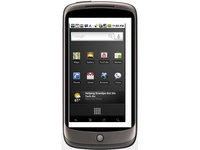
Google has confirmed it's censoring bad words on the Nexus One as part of the voice/text input feature.
The search engine made a big deal about the fact you can now speak your text and emails rather than tapping them out (which sounds to us suspiciously like phone calls) but it's also now confirmed that it will be hash-ing out them cuss-words.
We had a good go at swearing our b*llcks off when we played with the phone, but only the less offensive words managed to get through, with the S- and F-bombs being coded out.
Do no evil, say no evil
"We filter potentially offensive or inappropriate results because we want to avoid situations whereby we might misrecognise a spoken query and return profanity when, in fact, the user said something completely innocent," said Google, according to Reuters.
It's actually a pretty good reason from Google - it's a bit easier to accidentally say something that sounds like a profanity than to accidentally type it - but we'd at least like the brand to be a bit hip and let you turn it off.
Or at the very least - instead of using #### to hide the offending article, get creative like spell-checkers in the '90s, thus creating messages like 'fact this, it's a load of shot and crop yeah?'.

| |
Read More ...
Review: Sony VAIO VGN-FW51ZF/H

The Sony VAIO VGN-FW51ZF/H is a mid-sized media centre, offering a blend of power and portability.
Sitting at the top of the FW range, it provides a specification and performance to put most other laptops in the shade.
The screen is on an equal footing with the Acer Aspire 8935G-744G50Bn, and offers exceptionally bright and vivid colours.
The high-definition resolution helps films look crystal clear and lifelike and there's more than enough space to work with multiple windows, making it ideal for multi-tasking.
A powerful, dedicated ATi graphics card is in place. It's not as fast as the chip in the Acer, but offers enough performance to run media-intensive tasks with ease. You can also play the latest games, adding to the overall media centre functionality.
The keyboard features Sony's now standard isolated style, with each key protruding through a separate hole in the chassis. This makes it easier to type at speed, as there's more space between each key.

With a responsive and accurate typing action, it's a joy to type on. The touchpad is also large and accurate. As with the Acer, a set of dedicated keys let you control your media files and pause, skip and adjust volume settings for your CDs and DVDs at the touch of a button.
Build quality is good, with strong metals and plastics used. The distinctive design – with a circular hinge and swooping curves – won't suit all tastes, but helps the Sony to stand out from the crowd.
Weighing 3kg, it's quite a heavy laptop, but you will still be able to carry it with you on short journeys.
Battery life is capable, lasting for 223 minutes between charges.
Exceptional performance
Office performance is exceptional, thanks to a high-end 2.8GHz Intel Core 2 Duo processor and an unrivalled 8192MB of memory.
Sony has installed the 64-bit version of Windows 7 Home Premium, letting you take full advantage of the memory (32-bit versions of the OS can only access 3072MB of RAM) and it runs multiple tasks smoothly and with no lag.
Features include a recordable Blu-ray drive, letting you watch the latest high definition movies and record data to Bluray discs. The 500GB hard drive also offers lots of storage space.
USB ports are more limited than its rivals, and are positioned close to each other on the right-hand side of the chassis, so bulkier peripherals can obstruct the other ports.
Wireless connectivity is impressive, however, with both 802.11n Wi-Fi and Bluetooth in place. The Sony VAIO VGN-FW51 is a very convincing machine.
While we found that it's not as good an all-rounder as the Acer Aspire 8935G, if you need to carry out multiple tasks or edit HD videos, then it's the best choice here.
Related Links
| |
Read More ...
Motorola complains BlackBerrys infringe its patents
Motorola has filed a complaint over RIM's BlackBerry range, claiming they infringe a number of patents it holds.
The case has been filed with the International Trade Commission in the US, and Moto is looking to block RIM from importing what it calls 'infringing products'.
The patents relate to Wi-Fi access, application and power management, and even the UI - which would be strange given Motorola's clunky interface, but we assume there must be some good elements it believes RIM has nabbed.
The litigation is ongoing, but Motorola believes there time has come to bring things out into the open, as it looks to be re-born through a slew of Android phones as well as protecting the valuable assets it created when it was involved in the development of the mobile phone.
Protection needed
Jonathan Meyer, Senior Vice President of Intellectual Property Law at Motorola, stated: "Through its early-stage development of the cellular industry and billions of dollars spent on research and development, Motorola has created an industry-leading intellectual property portfolio that is respected by the entire telecommunications industry.
"In light of RIM's continued unlicensed use of Motorola's patents, RIM's use of delay tactics in our current patent litigation, and RIM's refusal to design out Motorola's proprietary technology, Motorola had no choice but to file a complaint with the ITC to halt RIM's continued infringement.
"Motorola will continue to take all necessary steps to protect its R&D and intellectual property, which are critical to the Company's business."

| |
Read More ...
Review: Acer Aspire 8935G-744G50Bn

Some great widescreen laptops have come from Acer's Aspire range over the years, and the Aspire 8935G-744G50Bn continues this trend – providing an outstanding screen, great features and good all-round capabilities.
The large 18.4-inch screen is stunning, and one of the best we've seen to date. The glossy coating stretches right to the very edges of the panel and, although it's reflective, it produces a vast array of colours, proving perfect for movies and photography work.
It matches the equally impressive 1920 x 1050-pixel resolution of the Sony VAIO VGN-FW51ZF/H, with pin-sharp images on offer.
There's also an integrated Blu-ray drive to let you take full advantage of the gorgeous high-definition (HD) display.
This machine has been fully designed for multimedia use, with lots of design touches to improve accessibility. There's a control bar to the right of the chassis with a host of touch-sensitive buttons, letting you easily skip scenes or songs, and a large wheel for easy volume control.
The keyboard features the same floating style as Acer's Timeline products, with the flat keys raised high above the board itself. It won't suit all users, as the lack of definition means you'll need an accurate typing style, but quality is excellent and it is very comfortable.
Befitting its status as a high-end machine, the keys are also backlit, which is perfect for working in poor lighting conditions.
Every bit of this machine impresses when it comes to quality, with a neat and cohesive design that's backed by sturdy textured plastics. We found the screen to be held firmly in place as you type.
Powerful graphics
The Acer also features ATi's high-end Mobility Radeon HD 4670 chip. It provides enough performance to play the latest games, and office tasks are dispatched with ease, making this a machine the whole family can enjoy.
Everyday performance comes from a mid-range Intel Core 2 Duo processor and 4096MB of memory. While some of the other machines offer faster processors, we found this laptop very able in daily use, with all test software running smoothly and quickly at all times.

The high-end specification runs through to the features list, with high-speed network adapters and Bluetooth in place. The Blu-ray drive also doubles as a regular DVD rewriter, and five USB ports let you connect a range of peripherals at the same time. External screens can be connected by either the VGA or HDMI port.
We really like the Aspire 8935G. Offering one of the best screens we've seen to date and great usability, it's truly an excellent home media centre.
Related Links
| |
Read More ...
Report: 70m homes will pay for IPTV by 2014

Informa has suggested that the number of homes paying for IPTV services will more than double by the end of 2014 – with 70 million homes likely to be using the next generation service.
IPTV – television over an internet connection – is poised for a huge boom, especially in the UK where the BBC has been given a provisional go ahead to push on with its Project Canvas idea.
However, Informa's latest research into paid-for IPTV suggests that the Asia Pacific region will be the biggest growth market, with China pencilled in to provide 28 million homes.
More than double
"The global total of pay IPTV homes will more than double to 70 million by end-2014; up from 26 million at end-2009," said Informa's report. "Revenues will also climb steeply, from $4.6 billion آ£2.85bn) in 2009 to $12.2 [آ£7.6bn] billion in 2014
"However, only 5% of the world's TV households are forecast to subscribe to IPTV platforms by 2014. In fact, only 13 countries will have more than 1 million IPTV subs.
"This fairly limited penetration comes from having to migrate subscribers away from longer-established cable and DTH services, as well as the lesser impact of DTT."
"Informa Telecoms & Media forecasts 26 million IPTV households by end-2009, up 8 million in the year. Asia Pacific and Western Europe are responsible for 2.6 million and 2.4 million of the additions respectively, with North America adding 1.1 million. However, the global figure represents just 2% of TV households."

| |
Read More ...
Report: 70m homes will pay for IPTV by 2014
Informa has suggested that the number of homes paying for IPTV services will more than double by the end of 2014 – with 70 million homes likely to be using the next generation service.
IPTV – television over an internet connection – is poised for a huge boom, especially in the UK where the BBC has been given a provisional go ahead to push on with its Project Canvas idea.
However, Informa's latest research into paid-for IPTV suggests that the Asia Pacific region will be the biggest growth market, with China pencilled in to provide 28 million homes.
More than double
"The global total of pay IPTV homes will more than double to 70 million by end-2014; up from 26 million at end-2009," said Informa's report. "Revenues will also climb steeply, from $4.6 billion آ£2.85bn) in 2009 to $12.2 [آ£7.6bn] billion in 2014
"However, only 5% of the world's TV households are forecast to subscribe to IPTV platforms by 2014. In fact, only 13 countries will have more than 1 million IPTV subs.
"This fairly limited penetration comes from having to migrate subscribers away from longer-established cable and DTH services, as well as the lesser impact of DTT."
"Informa Telecoms & Media forecasts 26 million IPTV households by end-2009, up 8 million in the year. Asia Pacific and Western Europe are responsible for 2.6 million and 2.4 million of the additions respectively, with North America adding 1.1 million. However, the global figure represents just 2% of TV households."

| |
Read More ...
Alton Towers' new Sega-coaster launches on February 13th

Sega Europe has inked a three-year deal with UK theme park Alton Towers to own the exclusive videogame rights to the Sonic The Hedgehog brand for one of its rollercoasters.
In addition to the Sonic The Hedgehog rollercoaster – which launches on 13 February 2010 (uh-oh!) there is also to be a Sonic The Hedgehog themed room at the Alton Towers Hotel.
It is, basically, any self-respecting Sega fanboy's secret dream weekend break!
Sega Hotel
The hotel room will let guests "live, sleep and even play the latest games from the Sonic franchise in a room dedicated to the famous Sonic videogame universe."
Alton Towers' "Sonic Spinball," coaster is basically an update of the park's "Spinball Whizzer."
"Partnering Sonic with one of the U.K.'s most popular destinations for a family day out is a fantastic opportunity for people to engage, and have fun, with the Sonic brand," said Sega UK Marketing Director Amanda Farr told MCV.
February 13th, though… Did the PR company not check the calendar?

| |
Read More ...


No comments:
Post a Comment