

PS3 Motion Controller detailed - first pics inside

Images of Sony's Motion Controller device have broken cover, and it looks, er, interesting.
Announced at E3 in June, the Sony 'wand' has intrigued many a gamer since the concept was revealed.
The controller is set to take PS3 users into Wii gaming territory and has a release date of next spring, according to Sony.
The news was revealed at this year's Tokyo Game Show. Sony's Kaz Hirai was in attendance, and mentioned that the controller was "very accurate" and "enhances" reality with its vibration feedback.
In a press release, the controller is said to be "equipped with high-precision, highly accurate motion sensors" and "can deliver whole new entertainment experience on PS3 when combined together with the PlayStation Eye camera."
As it uses the Eye camera, the controller is also "capable of recognising and tracking a user's face and voice as well as body motion."
The press release continues: "[The] PlayStation Eye can also output the player's image onto the TV screen. SCE will vigorously promote the expansion of this new experience only possible on the PS3 platform."
World in motion
From the look of the images (courtesy of Joystiq) the controller is the cross between Doctor Who's Sonic Screwdriver and a light bulb.
In fairness, it does look very similar to the patents Sony logged back in November of last year, so the design of the thing has been in the minds of the company for a little while now. Even if it looks a touch strange.
Some of the games that will be compatible with the controller include LittleBigPlanet and Resident Evil 5. It's unknown whether this will be through backwards compatibility or DLC, however.
It will be interesting to see if the Motion Controller is a success on the PS3, as the console is better known for its 'serious' games. But the proliferation of titles like Guitar Hero, Buzz and SingStar does show that PS3 gamers don't shy away from a little bit of gaming peripheral fun.

 |  |
Read More ...
Workplaces still in denial over email distraction

Many companies are still in denial about the widespread problems of email, text messaging, Facebook, Twitter and other 'digital distractions' among employees.
The problem was recently highlighted by the President of the 'Information Overload Research Group' Nathan Zeldes.
Zeldes notes that, "though people suffer, they don't fight back, because communication is supposed to be good for you."
Psychiatrist Edward Hallowell is an expert on attention-deficit disorders and claims that the modern workplace induces what he calls "attention deficit traits", similar to those of genetically based ADD.
Writer Linda Stone uses the term "continuous partial attention" to refer to the mental states of knowledge workers, also referring to a condition she calls "email apnea" or "the unconscious suspension of regular and steady breathing when you tackle your mail."
Yep, I know that feelin'
A Hewlett-Packard study even reported that the IQ scores of knowledge workers in this state of constant distraction drop from their normal level by 10 points – around twice as much on average than compared with smoking marijuana!
The Guardian's Paul Hemp (apt name) notes that the flipside to this feeling of information overload is that increasing numbers of people are becoming addicted to rapidly increasing data flows.
He explains that in a "2008 AOL survey of 4,000 email users in the US, 46 per cent were "hooked" on email. Nearly 60 per cent of everyone surveyed had checked email in the bathroom, 15 per cent checked it in church, and 11 per cent had hidden the fact that they were checking it from a spouse or other family member."
Declare email bankruptcy?
Amazingly, 26 per cent of the email users in that AOL study either declared or were considering "email bankruptcy" – simply going to your inbox and hitting Ctrl+A and then delete!
A more recent Microsoft study also claims that it takes an average of 24 minutes to return to a task after your attention has been diverted by the ping! of an incoming email.

| |
Read More ...
In Depth: Everything you need to know about USB 3.0

When Seagate first demonstrated SuperSpeed USB 3.0 in January at CES, we were promised that USB 3.0-compatible devices would be appearing by the end of 2009.
Bang on time (a phrase not often uttered in the technology industry), the USB Implementers Forum (USB-IF) has announced that the first USB 3.0 products are now ready to roll.
USB is a hugely successful interface – over three billion devices featuring it were shipped in 2008 alone.
So do we really need another wired USB standard? Quite frankly, yes.
So here's everything you need to know about USB 3.0 and why we'll all be using it by 2012.
What is USB 3.0?
Dubbed 'SuperSpeed USB', USB 3.0 represents the next generation of connectivity between computers and peripherals (digital cameras, portable media players, mobile phones, external hard drives, etc.) It replaces the current 'Hi-Speed' USB 2.0 standard.
As the USB-IF explains: "SuperSpeed USB brings significant performance enhancements to the ubiquitous USB standard, while remaining compatible with the billions of USB enabled devices currently deployed in the market. SuperSpeed USB will deliver 10x the data transfer rate of Hi-Speed USB, as well as improved power efficiency."
Just how fast is USB 3.0?
The new specification is rated 10 times faster than USB 2.0, which has a maximum transfer speed of 480Mbps.
In comparison, USB 3.0 has a theoretical peak throughput of 5Gbps. This means that USB 3.0 is capable of transferring a 25GB file in approximately 70 seconds.
If that doesn't warrant a shout of "whoosh!" then what does? In contrast, USB 2.0 would take around 14 minutes to perform the same task. And you'd be twiddling your thumbs for around 9 hours if you used USB 1.1.
This speed boost makes USB 3.0 ideal for the sort of large-scale file shunting we all do today, such as copying large images, MPEG-4 video clips, or making data backups to portable hard drives.
USB 3.0 isn't just fast, it's bi-directional
Unlike USB 2.0, where data can only be piped in one direction at a time, USB 3.0 features the ability to read/write data simultaneously.
This is achieved by adding four new connections to the old USB 2.0 connector – two for transmitting data and two for receiving data. This brings the total number of connections on a USB 3.0 connector to eight (compared to four for USB 2.0).

USB 3.0 is more power-efficient
USB 3.0 has also been designed to be more power efficient than its predecessor. For starters, the USB-IF has upped the maximum bus power (from 500mA to 900mA).
This will enable high-power devices to be powered by your computer and USB hubs to support more peripherals. There's even the bonus that battery-powered devices should charge faster.
USB 3.0 also ditches its device polling protocol for an interrupt-driven approach. This ensures that the USB host controller doesn't continually access a connected USB device (in anticipation of a data transfer) and waste power. Instead, USB 3.0 devices will send a signal to the host controller when a data transfer is initiated.
USB 3.0 will work with your USB 2.0 gear
While USB 3.0 will obviously require new hardware and cables, the standard has been designed to be effortlessly backwards compatible with USB 2.0.
This has influenced the construction of the USB 3.0 connector, which incorporates the new SuperSpeed bus alongside the existing Hi-Speed USB 2.0 bus.
If you've got a USB 3.0-equipped PC, USB 3.0 cable and USB 3.0 digital camera then you'll be able to take advantage of significantly faster speeds. Swap out the camera for an older model with USB 2.0 and the data rate will fall to the maximum that the USB 2.0 standard can deliver.
Who's doing it?
Right now, there are only a few products featuring USB 3.0 – the NEC xHCI host controller, Point Grey's HD video camera, a SuperSpeed USB hard drive from Buffalo, an external USB 3.0 hard drive from Freecom, and a sample USB 3.0 motherboard from ASUS.
All are being showcased at the Autumn Intel Developer Forum (IDF). These is just the beginning for USB 3.0. InStat researchers expect that the new standard will "represent over 25% of the USB market" by 2013.

FIRST OUT: A pat on the back for NEC, which released the world's first commercially available USB 3.0 product – the xHCI host controller

| |
Read More ...
Freecom unveils first USB 3.0 External HDD

USB 3.0 products just keep coming, and it's Freecom's turn to announce a first SuperSpeed USB technology with the first external hard-drive to take advantage of the speedy new port technology.
The catchily-titled Freecom Hard Drive XS 3.0 is now the first in the world to offer SuperSpeed USB, which for the layman means much faster transfer of data.
The drive, based on the XS released earlier in the year, offers transfer speeds of 130Mbps and is just the first of what will be a veritable landslide of similar external drives to offer SuperSpeed tech in the coming months.
Terror bites
The drives will go up to 2TB – which is going to keep you well catered for in terms of storage, for a little while at least.
"The rapid transfer speeds of USB 3.0 are going to make sharing information easier than ever before, and with the rise of interactive web applications and new media showing no signs of slowing, it's arrived just in time," said Axel Lucassen, managing director.
"From downloaded TV programmes to digital photos and music, data-rich files are abundant both at home and in the office.
"The Hard Drive XS 3.0 is the first drive in the world to enable users to back up even the biggest files at unprecedented speeds, combining the latest technology with style and practicality to bring a new breed of hard drive to an increasingly demanding market."

| |
Read More ...
Sony confirms 250GB PS3 Slim bundles for UK

It's official: Sony Computer Entertainment UK is set to launch a range of 250GB PlayStation 3 console bundles later next month, with both an Uncharted 2 and a Blu-ray movie pack on the way.
SCE UK has also confirmed that the 250GB bundles will cost British gamers آ£284.99.
"Sony Computer Entertainment UK today announced a line-up of PlayStation 3 bundles for the holiday season, consisting of a PS3 with a 250GB hard disc drive and a selection of software and content for آ£284.99," reads SCE UK's release just in.
Successfully Slim
The recently-launched 120GB PS3 Slim sold over 1 million units in its first three weeks on sale and Sony informs us that "the 250GB model has the same hardware specifications as the current model, but with greater storage space, to offer consumers even more choice. "
"The 250GB PS3, with its larger storage capacity, will allow owners to take full advantage of the incredible software line-up and the many multimedia functions available on PS3, whether that is storing and viewing your family photographs, listening to your entire music collection in crisp quality, or watching your favourite home videos or TV shows."
Soft bundles containing either two Platinum titles or inFamous will be available as of 1 October, with the Uncharted 2 bundle following on 16 October and a Blu-Ray movie pack containing Wolverine and The Dark Knight and a Blu-ray Remote arriving on October 19.

| |
Read More ...
Sony cameras enter the Twilight zone

In one of the most audacious stunts seen from a tech company, Sony went to extreme lengths to promote the 'twilight' technology found in its latest camera range this week, by organising seven games of football which followed twilight around the globe.
Each game kicked off just as light was getting low, with matches taking place in the UK, Italy, Switzerland, Spain, Argentina and Australia with the Twilight Football finale taking place in South Africa.

LIGHT FANTASTIC: Twilight in Antequera, Spain
TechRadar was fortunate enough to be taken to Tintagel Castle in Cornwall to watch the UK leg of the football taking place, and also tried out the Twilight shooting mode on the company's latest Cyber-shot and Handycam range, which come with an Exmor R CMOS Sensor.
The sensor is said to offer a 2x increase in sensitivity, cutting image noise to half in low light compared with conventional sensors.

SNOW JOKE: Football antics in Chamonix, Switzerland
And while the cameras had their work cut out due to low visibility (typical Cornwall fog) and spatters of rain, the new camera range seemed to cope with whatever Mother Nature wanted to throw at it.
The way the Exmor R sensor works is actually fairly simple. Sony has decided to use back illuminated technology, and take the wired circuit off the front of the sensor and put it on the back, so more light falls directly on the receptive areas than ever before. More light, means you can squeeze out better illuminated shots in low-light situations.

It also means there's less noise in a shot and picture quality is improved as a result.
And with the new handheld Twilight shooting mode, you can shoot in low-light, without the need of a tripod. Which was a good thing in Cornwall as if we had one, it would have completely sunk in the ground.

ENGER-LAND: Tintagel, Cornwall was the UK location
Sony's latest Cyber-shot camera range, including the Sony DSC-WX1 and the Sony DSC-TX1, is available now.
Also out is the company's new Handycam camcorder range, which makes use of the Exmor R CMOS sensor, and includes the HDR-XR520VE and the pistol-gripped HDR-TG7VE.
Got to www.sony.co.uk for more details.

| |
Read More ...
Hands on: Philips uWand review

The more features set-top boxes and entertainment systems get, the more buttons you need on your remote control.
Touch gestures are much more intuitive than remotes crammed with functions and buttons, but you don't want to sit that close to your TV - and you don't want greasy fingers all over the screen.
Previous attempts to add gestures to remote controls, like the Logitech Air mouse and Linksys's abortive 'ring' controller used accelerometers that proved expensive or unreliable.
The uWand prototype that Philips has developed is much simpler; it's the size of a normal remote control but has only three buttons; OK, Back and Home (leaving plenty of room for the embedded infrared camera and RF transmitter, plus two AA batteries that will drive the uWand for a promised six months).

WAND: The prototype uWand remote control from Philips; final devices may not look the same

MINIMALIST: The three buttons are enough to control most interfaces
It only needs three buttons because you use it to drive an on-screen cursor, as you would with a mouse. Unlike a mouse, though, the cursor goes where you're pointing.
You don't have to find the cursor and work out how to drag it around - you just point the uWand at what you want to select on screen and the cursor appears there. That also means the cursor doesn't jump around when you put the remote down.

SIDE ON: The prototype is the size of a standard remote control and has three AA batteries; shipping devices will only need two
In use, we found the positioning was accurate and easy to do and selecting and dragging with the OK button are both completely intuitive too, but the gestures make it more powerful.
Use a uWand with Windows 7 and you'll get the two key touch gestures – rotate and zoom. Rotate is easy; you point at a picture (we tried this out with Cyberlink'sPowerCinema 7 software, which is optimised to work with the uWand) and the cursor changes when you're over it. Hold down the home button and twist the uWand and the picture rotates to match.

POINT TO START: Point at an image in PowerCinema and the cursor changes, showing that you can drag or start a gesture
To zoom in, you hold down the home button and pull the uWand towards you. This takes a little more getting used to and the temptation is to hold the remote out and make exaggerated movements but it works much better if you sit down, lean back and hold it like a normal remote control.

QUICK MOVE: We've just dragged an image down to make it part of a slideshow; try doing that with a traditional remote control
The Windows 7 interface – especially the Media Center interface – is easier to use with touch gestures than previous versions of Windows.
You'll be able to play the Windows 7 Touch Pack games with a uWand, which will be fun on a large-screen TV. But once you start using applications, many controls and buttons are too small to use comfortably with a finger or the uWand.
More touch-aware software will come out when Windows 7 arrives; Corel's recent Digital Studio 2010 software has large buttons designed to be used with touch that would work well with the uWand.
Cyberlink will be bringing out a new version of PowerCinema later this year or early in 2010 with larger controls designed for touch, bundled with a uWand and optimised for the expected 'nettop' PCs designed to plug into TVs.
Buying a uWand
Philips isn't suggesting how much uWand devices might cost because it won't be selling the uWand itself; it's licencing the software to OEMs, including one partner who is making a Media Center remote control – complete with the all-important green button.
That device will probably come with new PCs, but another partner plans to offer a uWand control you can use with any PC by plugging in a small receiver.
Intel is another partner; uWand will work with the Widget Channel that Intel and Yahoo are putting onto TVs, DVD players and set-top boxes to offer internet widgets like Flickr photos and weather updates – assuming the hardware manufacturer builds in the receiver.
How popular the uWand proves to be will definitely depend on the price, as well as how much software gets an interface that works for touch. But it's far less fiddly than most mouse replacements aimed at the big-screen, ten-foot experience and we'd be delighted to see it bundled with an entertainment PC.


| |
Read More ...
iPhone Bionic Eye augmented reality app launches

Augmented reality on the iPhone is taking off at an incredible rate, but none of the apps we have seen before have been as impressive as Bionic Eye.
Created by Presselite, the app makes use of the iPhone's camera to bring alive the area you are in like never before.
The new app offers up a whole host of visual reference points (10,000 if you live in the US) like your nearest fast-food chain and underground access, all with 360-degree functionality.

Fully compatible with Google Maps, the app will throw up a Points of Interest in your location and is updated in real-time, so the closer you get to a POI the distance logger will change.
Not only that, if you point your iPhone to the ground, then a handy blue arrow will appear pointing the way to your desired destination, so you can sit back take a sip on your iPint and let the app do all the navigational work for you.

The Bionic Eye app is available now from the Apple App store and works in the UK, the US, France and Tokyo.

| |
Read More ...
Exclusive: Clive Sinclair was 'a cross between Einstein and Willy Wonka'

Back in June, TechRadar announced that the BBC had commissioned a comedy drama based around the tech exploits of Sir Clive Sinclair and Chris Murray, which was set to catalogue their fight for home computing supremacy in the 1980s.
Originally it was to be called Syntax Era, but while that brilliant title has been lost in the ether (it's now named Micro Men) the show is set hit the airwaves early next month and will star comedian Alexander Armstrong as 'maverick visionary' Sir Clive Sinclair and Martin Freeman (of The Office fame) as his former colleague Chris Curry.

"Profiling the brilliant and eccentric characters that triggered the beginning of the UK computer revolution, Micro Men is part of Electric Revolution, a season of programmes giving viewers a unique insight into how developments in technology have shaped our lives over the past 50 years," reads the BBC's blurb on the show. "The season also charts the rise of today's globally linked, instantly gratified digital culture."

Armstrong explained the challenges and difficulties of playing a character so complex and demanding as Sinclair to TechRadar.
TechRadar: What was it like portraying someone as well known in recent history as Sir Clive Sinclair?
Alexander Armstrong: Difficult. Everyone over 35 has a vivid mental picture of Sinclair – part of his marketing genius was to place himself very much in the public eye – so I had to make my character a fair and truthful version of the Sinclair we all remember. The man is also still very much alive, so one has to be fairly sensitive – it wouldn't do to caricature him, although the temptation was often strong...

TR: How did you research the role?
AA: I watched every piece of footage of Sinclair I could lay my hands on. As I say he put himself forward as a great champion of technology – particularly Sinclair technology – so there's no shortage of interviews, documentaries, adverts, launches etc. featuring him. In the early '80s I remember we all thought of him as a sort of cross between Einstein and Willy Wonka.

TR: In your interpretation of Sir Clive what do you think drives him?
AA: In my version – I can't speak for the real Sir Clive – Sinclair is driven by pride. Not a bad thing to be driven by at all, but then it becomes wounded pride and by the time of the C5 launch it has become vanity. In my opinion Sinclair is a great man whose contribution to the progress of technology should not be under-estimated, however he was reluctant to recognise where his true strengths and – more pertinently – his weaknesses lay. Had he swallowed his pride on a couple of occasions and taken good advice he could have ensured that Sinclair was still at the forefront of British technology.

TR: Your physical transformation is quite amazing, how was this achieved?
AA: A fantastic job done by Amber our make-up designer! It was a daily routine that took four-and-a-half hours at the beginning of the shoot but which we managed to get down to two-and-three-quarters by the end. I grew the beard myself and we coloured that and my eyebrows every day. Then my hair had to be flattened and glued to my scalp so we could stick a bald-cap on, and the fine ginger hair-piece was stuck on once everything else was in place. We were filming on the hottest days of the Summer so I had to keep myself cool by whatever means were available otherwise the latex cap would start to creep and blister. There's one interview scene where you only see me from the waist up – just as well as my trousers were rolled up and my feet were in a bucket of cold water.

__________________________________________________________________________
Micro Men airs on BBC4 on Thursday 8 October. The second part of Electric Dreams, also part of the Electric Revolution season, can be seen on Tuesday.

| |
Read More ...
IDF 2009: Intel launches 'world's fastest' mobile CPU

Hot on the heels of the recent release of new Core i5 and Core i7 desktop chips, Intel has unveiled Core i7 Mobile for notebooks. Intel claims it's the fastest notebook processor on the planet.
Based on the same Nehalem architecture that has sired the Core i7 and Core i5 desktop chips, the new mobile beast will come in three flavours.
The flagship chip is the 2.0GHz Core i7-920XM. It's a quad-core CPU with HyperThreading and therefore eight logical processors. Cache quantities are in line with desktop Core i7s. So that's 512K per core and 8MB shared.
Next up is the mid-range Core i7-820QM, a 1.73GHz chip with 8MB of cache, four cores and eight threads. Finally, there's an entry level offering in the form of the 1.6GHz Core i7-720QM. Again it's an eight-thread, four-core beastie, but it takes a minor hit in terms of cache memory with just 6MB shared. All three sport an integrated dual-channel memory controller supporting 1,333MHz DDR3.
Turbo Boost
Those core clockspeeds may seem a little underwhelming for what is claimed to the the fastest notebook chip known to man. But here's the thing. Just like desktop Core i5 and i7 processors, the new mobile variant sports Intel's Turbo Boost auto-overclocking feature.

This time, however, Intel has really pulled out the stops. With Turbo Boost enabled, the 920XM will spool up to a maximum of 3.2GHz while the 820QM and 720QM will hit 3.06 and 2.8GHz respectively. In excess of 1GHz's worth of overclocking, in other words.
Impressive stuff, though there is a catch. Turbo Boost only runs at full reheat with single-threaded software. Stress a second core and these chips will clock down by 133MHz. More significantly, light up all four cores and they'll run just 266MHz above the officially rated frequency.
Performance on the fly
Still, there's little doubt the new Core i7 Mobile has the most sophisticated power management yet seen in a mobile CPU. Everything from voltages to dividers can be tweaked on the fly to make the most of the available power and thermal budget.
Indeed, Intel's mobile guru Dadi Perlmutter told the assembled throng at IDF that Core i7 Mobile actually delivers more performance than Intel's top quad-core server chip of just two years ago. That's progress for you.

Of course, although Core i7 Mobile shares much with existing Intel desktop chips, it's a thoroughly new architecture for notebooks. It will therefore be just one component in an all new mobile platform. Intel says notebooks are already shipping from the big boys including Dell and HP. We certainly look forward to taking them for a test drive.
More to come
While Core i7 mobile will no doubt blow away all comers for sheer performance, it's unlikely to come cheaply. The most inexpensive model will cost OEMs around آ£250 in 1,000 unit quantities.
With that in mind, it's actually the upcoming 32nm dual-core Nehalem based mobile chip, currently known under the codename Arrandale, that we are keen to see more of. As we discovered today during a benchmarking session, it's a super impressive chip and likely to be much more relevant to those looking for the best combination of portability and performance. More on that tomorrow once we're the right side of a pesky little NDA.

| |
Read More ...
Wacom launches multi touch Bamboo tablets

Wacom has announced its first ever foray into the world of multi-touch, with the launch of four new products: the Bamboo, Bamboo Fun, Bamboo Pen and Bamboo Touch.
Wacom tablets are usually circumnavigated with a pen, but the latest batch can also be controlled with your fingers.
Not that Wacom is banishing the trusted stylus – far from it, as the company states: "Merging pen and touch technology into one device brings the best of both worlds, making it even easier, quicker and more fun to use a computer.
"A gesture using two fingers enables users to simply rotate an image or document, flip through a digital photo album or presentation, scroll through a blog or an excel sheet and zoom in and out of a photo or map."
You've got the touch
While TechRadar is used to giving two-fingered gestures of a different kind, it's definitely a good move on Wacom's part to bring its Tablet range into line with the numerous multi-touch devices available in the tech market at the moment.
The second-gen Bamboo range is available now and will cost you آ£74.99 for the Bamboo, آ£89.99 for the Bamboo Fun (small) and آ£169.99 Bamboo Fun (Medium).
If you don't fancy using multi-touch, then the Bamboo Pen (pen input only) will set you back آ£49.99. And if you want to completely embrace multi-touch, then the Bamboo Touch (touch input only) will cost آ£59.99.
Go to www.wacom.com/bamboo for more information.

| |
Read More ...
Review: O2 Joggler

According to Wikipedia, 'Joggling' is the sport of running while juggling balls. Look it up, the guy who's 'joggling' looks like he's in tremendous pain. As was I when I turned my attention to O2's Joggler (neat segue - Ed).
The Joggler is basically a giant iPhone that you can't take anywhere. It's meant to sit in your kitchen, and O2 says to think of it 'as your new fridge door.' But it still refused to keep our milk cold.
What O2 is getting at is the Joggler is meant to be a kind of family planning device (no, not that sort). You can send and receive text messages on it. It has a calendar so you can see when your li'l cherub's next piano lesson is and you can use it to access the internet.
When I say the internet, I actually mean the Sky News RSS feed. It's meant to be safe for kids, you see.
Sitting somewhere betwixt a digital photo frame and a woeful netbook, I can see but a couple of situations where the Joggler would come in handy.
If you've got eight sprogs and need to see exactly what they're doing, and when, it might come in handy. It's also useful if you're stalking up to eight women, and need to send them anonymous texts, while keeping a diary of where and when you last saw them alive.
If this was You-and-Your-Eight-Children.com, we might be more tempted to give this a glowing review. Anyone with a vague interest in organising their lives, however, should invest the cash in a low-powered Linux netbook or cheapo all-in-one machine and stick that in the kitchen instead. Fridge door my arse.
Related Links
| |
Read More ...
Gary Marshall: Why you can't trust the UK broadband tax

It looks like the broadband tax, a levy on phone lines to pay for rural broadband, is going ahead.
Can we trust it? I'm not so sure. The Government's record on taxation isn't a brilliant one, and I'm worried that the phone line levy's going to hang around for a very long time.
It wouldn't be the first time. Road tax was changed in 1910 to finance the UK's road system, but these days it's just another tax - so I'm forced to shell out nearly آ£300 a year, or one-third of my car's value, to drive on roads so pockmarked they can make your teeth vibrate their way out of your ears.
National Insurance was introduced to insure each of us against illness and unemployment and to pay for our pensions, but it doesn't: it's just another tax. And then there's income tax.
Income tax was introduced in 1798 to fund the war against Napoleon, and as you might have noticed he's been dead for quite a while now.
Technically, income tax is still a temporary tax - the government has to renew it every year in a Finance Act - and we've got rid of it on numerous occasions, only to bring it back again when the government of the day runs out of money to pay for wars or wallpaper.
Taxed for ever?
So is the broadband tax really what the government says it is, or will the homeowners of 2525 still be paying for it the way we're still paying for the Napoleonic wars?
We suspect the latter, partly because of the way the tax has been designed. It isn't a levy on super-fast broadband connections, whose owners arguably won't miss 50p a month to help pay for rural broadband; it's a tax on landlines, levied on the suppliers, which mean every pensioner with a phone will pay it while laptop-lugging, mobile broadband-using executives won't - and if the government gets the wording wrong and concentrates only on copper, people with the fastest fibre-optic connections won't pay it either.
Surely an iPhone tax, or a router tax, or a Twitter tax, would be fairer?
We're already hearing the sound of goalposts moving: depending on what you read the tax is either to pay for 2012 (broadband for everyone), 2017 ("next generation" broadband for 90% of the population) or 2032 (another war against France, just for a laugh).
Last but not least, governments aren't in the business of abolishing taxes.
When was the last time the Chancellor of the Exchequer stood up on Budget day and announced that there were too many taxes and he was getting shot of a whole bunch of them?
That's not how governments work, and while it's all very well for the Tories to moan about this latest tax it's awfully optimistic to expect them to actually dump it if they get into power.
Ladies and gentlemen, the phone tax is coming - and once it's here, it's going to be awfully hard to get rid of it.

| |
Read More ...
Vodafone takes on Apple with '360' mobile service

Vodafone launches a new Limo-OS based internet service this week, offering users access to a range of integrated social networks and apps, along with two new 360-branded Samsung-manufactured mobiles.
The move is clearly Vodafone's attempt to claw back some market share from the likes of Apple's hugely successful iPhone, Google's Android mobile OS and RIM's Blackberry.
Vodafone 360 is described as "a brand new set of internet services for the mobile and PC which gathers all of a customer's friends, communities, entertainment and personal favourites (like music, games, photos and video) in one place," working across a range of mobiles and easily synching with your PC.
Facebook, Twitter, Live Messenger
The 360's connected address book 'Vodafone People' automatically syncs your contacts from your phone, Facebook, Windows Live Messenger and Google Talk, and is soon to also include Twitter, Hyves and studiVZ.
The new 360 app store promises a wide range of new apps, games, music and mapping services, while Samsung is set to produce two new "tailor-made Vodafone 360 mobile handsets [to] give the best customer experience of the services including the unique 3D contacts display, driven by Vodafone's 'proximity algorithm', bringing the most frequently contacted people closer to the front."
Speaking about the new service, Pieter Knook, Director of Internet Services at Vodafone Group, said: "Customers can stay in touch and share experiences through social networks, instant messaging, email, apps, maps, music and buying digital content on their mobile bill, with the personalized address book at its heart."
The new 360 service from Vodafone is set to launch in eight European countries with a release date of Christmas.

| |
Read More ...
Review: Mesh Cute

There's a classic Alan Partridge sketch in which the fictional Norwich tosser browses hi-fis in a branch of Dixons. "Nice action" he says, as the CD tray purrs open. Partridge doesn't care about the sound or features, just the smoothness with which the CD drive opens and closes.
On this basis, Alan Partridge would hate the Mesh Cute. Opening the Blu-ray/DVD-RW drive had a "nice action." But when we closed it, the tray got caught on the front flap, sending the drive into a can't-quite-open-can't- quite-close spasm, like a Terminator caught in a lift door.
Is the Cute cute? It's small, but small things aren't necessarily cute. I don't think anyone's ever described a parasitic worm, as 'cute'. The Cute's about the size of a shoebox, fronted with a flimsy plastic fascia. And even the merest touch of the front sends the DVD drive flying open, such is the thinness of the plastic. Not all that cute, then.
Inside, Mesh has done a fair enough job of packing a lot of components into a bespoke space. The tiny, Mini-ITX motherboard takes laptop-style RAM and has onboard graphics with an inspiring array of outputs: VGA, DVI and HDMI. It also has onboard sound with all the multichannel trimmings, and comes with – incongruently – a 64-bit installation of Windows Vista.
We are quite concerned about Mesh's decision to place the PSU at the front of the machine – the area with the least amount of ventilation – and the Cute certainly seemed to generate a lot of heat. This moves it from 'cute' to 'hawt' in the lingo of what girls say about boys in American TV shows. Not in a good way. The Cute also chucks out a hell of a lot of noise; about as much as an Xbox 360, so if you owned both this and the Microsoft console, you could probably drown out the mother-in-law.
In terms of performance, the Cute is just about okay. Mesh deserves some kudos for chucking a Blu-ray drive into the package. With its additional TV tuner card and wireless keyboard and mouse, the Cute set-up seems to be aimed squarely at people who want to use a PC with their HD telly. Provided you keep the Cute out of sight, so no one can see its hideous plastic frontage, by burying it in a small hole in your living room, or hiding it inside a dog, it'll go quite nicely as a media centre set up.
Inevitably, the words 'media centre' translate as 'you can forget about playing games on this, boyo. You might as well chuck your Steam account into the sun.' Gaming is a definite no-no, and although the graphics chip was able to display a Blu-ray perfectly, it won't handle anything but the lowest of games. One for the World of Warcraft players, then.
The most hideous element of the Cute is the price. At آ£200 it would have been acceptable, but at آ£400 it's ridiculous. You can now pick up a PlayStation 3 and some games for that price, or an Xbox 360 and even more games. Or, you can get a semi-decent آ£300 Core 2 PC and bung a graphics card in it – the Cute's single PCI-express slot is already filled with the TV tuner. But, most importantly, all of these alternatives are guaranteed to have optical drives with 'nice actions'.
Related Links
| |
Read More ...
Microsoft 'Zune phones' shown off in pictures

Microsoft's possibly forthcoming own phones have been shown off in renders, giving a lot more weight to rumours the software giant is about to bring out its own hardware.
The new phones, codenamed Pure and Turtle, have been shown off by Gizmodo, which also brought us news of the forthcoming Courier yesterday.
The Turtle looks like it takes a lot of cues from the Palm Pre, with a bean-like shape and the full QWERTY keyboard.
The Pure is a more conventional device, with a full QWERTY keyboard underneath a large sliding screen and rounded buttons.
Zune phones
It's anticipated both will have a lot of the Zune services Project Pink has allegedly been working on deep in the heart of Microsoft, so although the Zune phone has been denied, this is as close as we're likely to get for now.

CREDIT: Gizmodo
The form factor is likely to please the US market more than the UK, with a Sidekick style form factor a lot to do with Microsoft's acquisition of Danger, the social networking and media platform it bought last year, which developed the hardware for that range.
And it looks like that relationship is set to continue, with Gizmodo stating Sharp will stay on board to manufacture these phones, which many have dual Microsoft and Sharp branding.
Word is that these might run some kind of overlay on top of Windows Mobile 7, which is due out next year, although it's probably going to be a few months before we get any more concrete information.

| |
Read More ...
O2 announces Palm Pre UK release date
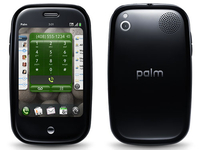
Reports of the Palm Pre's debut in the UK have been varying over the past few months, ever since O2 announced it will be the exclusive carrier.
It has now stated the Palm Pre will have a UK release date of 16 October, three months after the exclusivity deal was announced.
It's going to be آ£96.89 on the آ£35 and آ£40 per month tariffs on an 18 month deal, and free on آ£44 and آ£73 a month deals.
Should you love it so much you want to shack up with the Palm Pre for 24 months, you can get it for free on a آ£35 per month contract, with 500 texts and 600 minutes thrown in.
All the tariffs come with the same data deal as the iPhone – all you can eat data over 3G and Wi-Fi from the Cloud and BT Openzone (with fun Mr Fair Use-Policy along for the ride of course).
Excitement?
"There's a lot of excitement about Palm Pre in Europe as we continue to expand Palm webOS products across new carriers and countries," said Jon Rubinstein chairman and CEO of Palm.
"We look forward to launching Palm Pre with O2 so people in the UK can see firsthand how Palm webOS offers a new and better smartphone experience."
It's a shame the phone has launched so late though – it took five months to debut in the US after its CES announcement in January, and then a further four months to make it to the UK, so the initial wave of excitement has long gone, and other phones (such as HTC's Hero) having managed to boost their OS experience to compete.
Customers can purchase the phone from O2, the Carphone Warehouse and Phones 4U, so head on over and show you're excitement now by pre-registering.

| |
Read More ...
Nintendo confirms 20 per cent Wii price drop

As expected, Nintendo has confirmed that the Wii console will drop in price to $199.99 in the US.
Nintendo has also reduced the trade price of the Wii in the UK and introduced a new آ£179.99 bundle which includes the ultra-sensitive Wii MotionPlus dongle and a bundled copy of Wii Sports Resort.
Nintendo's price cut, announced at the Tokyo Game Show, is hardly a surprise, with the only real shock just how long the Japanese gaming giant has gone without dropping the cost of its innovative console.
In fact, the Wii's steady pricing from launch actually makes it the record holder for the longest amount of time that a console has been at market without being reduced in cost.
Rival boosts
This is despite competition from the likes of Microsoft's Xbox, which was given a big boost in sales following a significant price drop 12 months ago.
Likewise, Sony's decision to drop the cost of the PlayStation 3 – along with the introduction of the PS3 Slim – also handed the platform a major boost.
"Wii has reached more video game players than any game system before because it attracts everyone - both men and women, and people of all ages," said Cammie Dunaway, Nintendo of America's Sales and Marketing chief, in a statement.
"Our research shows there are 50m Americans thinking about becoming gamers, and this more affordable price point and our vast array of new software mean many of them can now make the leap and find experiences that appeal to them, whatever their tastes or level of gaming experience."
Key time
It is a key time for the Wii, with the arrival of Wii Fit Plus in October hoping to take advantage of the staggering number of people who splashed out for the Wii Balance Board.
And for more traditional gamers, the latest Mario games are also on the horizon, which includes New Super Mario Bros – a side scrolling collaborative platformer that is guaranteed to tickle your retro pleasure zone.

| |
Read More ...
iRex launches 3G DR800SG ebook reader

Watch out Amazon, there's a new ebook reader in the US with a built-in estore - the IRex Digital Reader 800SG.
Announced today, the reader seems aimed directly at Amazon's Kindle, with a larger screen (8.1-inch compared to the Kindle's 6-inch), free 3G (EVDO) connectivity and $9.99 best-sellers from Barnes & Noble.
The biggest design difference is the DR800SG comes with a touchscreen (and stylus) interface, instead of the Kindle's miniature Qwerty keyboard.
ePub games
The DR800SG supports multiple formats including the ePub format that is fast becoming the industry standard, with DRM protection. IRex is touting the reader as ideal for 'graphic rich' content like newspapers and magazines (available through its partnership with NewspaperDirect), with landscape as well as portrait orientation and adjustable font sizes. It has 2GB of memory.
iRex's partnership with Barnes and Noble will give users access to more than 750,000 titles, and 3G downloads of books are claimed to take under a minute. Like Amazon, iRex does not charge extra for downloads, managed through Verizon Wireless, although the DR800SG does not have a built-in web browser.
Kevin Hamilton, North American CEO of IRex Technologies said: "IRex has been a driving force behind the evolution of eReaders since its founders invented e-paper display technology based on E Ink Corporation's electronic ink. With the DR800SG, we bring to market all that readers have been asking for: a stellar device that puts the reader in the driver seat with regard to where they buy content and what they do with it."
Gobi goes global
The DR800SG uses the multi-format Gobi communications module from Qualcomm that - unlike the Kindle - should enable it to download content in 3G (and legacy 2G) markets around the world. The Gobi module also includes a GPS receiver, although the iRex reader does not make use of it.
The DR800SG will be available in US electronic chain Best Buy "later this autumn", with a European launch pencilled in for the first half of next year. It will cost $400 (آ£245), compared to the Kindle's $300 (آ£185) price-tag. iRex is still promising to launch its first colour ebook reader in 2011.
More info at www.irexreader.com.

| |
Read More ...
Swedish scientists unwrap paper batteries

Researchers at Uppsala University in Sweden have created a rechargeable battery that's almost indistinguishable from normal paper.
The new cheap, flexible power technology is possible thanks to nano-engineered plastic electronics and a new type of cellulose made from green algae.
The scientists envisage ultra-thin, disposable electronic gadgets, such as wrapping paper that lights up with 'Happy Birthday' messages and communications technology built in to clothing.
Welcoming new technology into the fold
Scientists have long sought light, ecofriendly, inexpensive batteries consisting entirely of nonmetal parts called conductive polymers. The Swedish researchers realised that one such material - polypyrrole (PPy) - could have its capacity and charging ability vastly increased by coating it over a large area in a nano-thin layer about 1/50,000th the thickness of a human hair.
They used a background layer of a special kind of cellulose (or paper) made from algae that was 100 times as porous as normal paper, allowing it to hold and discharge electricity efficiently. The electrodes of the new battery are simply normal filter papers soaked in a salt solution.
The paper battery recharges faster than conventional rechargeable batteries and appears well-suited for applications involving flexible electronics, such as clothing and packaging, the scientists say. Alternatively, low-cost, very large energy storage devices having electrodes of several square yards in size could potentially be made in the future.

| |
Read More ...
Google adds Sidewiki to Toolbar

Google just turned up the volume of the web a notch, with the launch of Sidewiki for Google Toolbar.
Activating Sidewiki allows Google Toolbar users to annotate any website for other Toolbar users with text and links.
An arrow icon opens up a sidebar letting you view other people's comments, or write and edit your own, with about five comments appearing at a time.
Choosing sides
A small drop-down menu lets you share your comments via email and IM, or post a link direct to Facebook and Twitter. Subsequent visitors can rate each comment, so that the most useful comments float to the top. Google hopes that by making web browsing more interactive, everyone's online experience will be improved - a process it calls 'collective intelligence'.
"Many people visiting websites have knowledge, opinions or experiences that could greatly enhance the experience of future visitors to that website," said Tom Stocky, director of product management at Google. "By adding an interactive element to the experience of viewing a webpage, Sidewiki has the power to increase information sharing online and enhance people's overall web experience."
A quick look at the Google home page shows that people are already using Sidewiki, including a predictable selection of Google execs, marketeers and bloggers. Will Sidewiki become a valuable tool for improving web pages, or degenerate into virtual graffiti, name-calling and spam? Why not Sidewiki this page to tell us!
You can download Google Toolbar with Sidewiki at www.google.com/toolbar.

| |
Read More ...
Samsung debuts Genio Touch TXT and Pro
Following on from the debut of the 2.8-inch touchscreened Genio Touch earlier this month, Samsung has unveiled two new touchscreen siblings – the Genio TXT and Pro.
Like the Genio Touch, both are equally focused at the budget end of the market and are lightweight, colourful and tough devices which we'll get fully hands-on with very soon.
Like the Genio Touch, the new models feature Samsung's proprietary TouchWiz interface, meaning access to the imminent app store as well. Each includes Samsung's widgets for uploading photos and interacting with services including Facebook, MySpace, Flickr, Photobucket and Twitter
The Genio TXT first. It's a "message-centric mobile for heavy texters" - with a QWERTY keyboard below the screen – and features a 2.2-inch display with H.263, MPEG4 and WMV compatibility, 40MB of memory, 2 megapixel camera and FM radio.

It weighs in at a mere 94g and measures 111 x 60 x 13 mm. Unlike on the original Genio Touch, there's also a 3.5mm headphone jack.

The Corby Pro adds a full slide-out QWERTY keyboard, 3MP camera, Wi-Fi and 7.2Mbps HSDPA plus dedicated music keys. There's also 100MB of memory while the key measurements come in at 105 x 57 x 16 mm and weight at 135g.

The new models will be released in the UK before the end of September, according to Samsung.


| |
Read More ...
آ£30m UK cybercrime centre officially launches

The Centre for Secure Information Technologies (CSIT) has officially launched in Belfast, and is set to be the central UK hub for counteracting cybercrime.
The آ£30 million centre is billed as the place that will "create the security infrastructure needed to safeguard the trustworthiness of information stored electronically, both at home and in the workplace."
Essentially this means it will help to keep criminal activities off of the web.
CSIT is based at Queen's University of Belfast's Institute of Electronics, Communications and Information Technology (ECIT), and will employ 80 people, with experts looking into data encryption, network security systems, wireless enabled security systems and intelligent surveillance technology.
Vital reference point
Speaking to the BBC, Queen's University Vice-Chancellor Professor Peter Gregson said about the centre: "Cyber-security is a global issue that affects us all, 97 per cent of business in the UK now relies on the internet and other IT systems.
"CSIT will become a vital reference point for all businesses working in this field and beyond."
While it is very much a UK-based institution, those behind CSIT are hoping the centre will become an international research centre, "that will lead the way in solving some of the real world security challenges of the future".
Find out more at: www.ecit.qub.ac.uk.

| |
Read More ...
In Depth: Hands on: Google Chrome Frame review

Tired of IE's feeble HTML5 support? Google is planning to help out with its new Chrome Frame, a plug-in for IE6 and later.
Once installed it will monitor the pages you're viewing, and any that are marked as compatible will automatically be rendered by the Chrome Frame, so displaying all of the HTML5 goodies that IE leaves out: the CANVAS tag, SVG vector graphics, CSS3 colours and a whole lot more.
It all sounded very simple, and the installation process was particularly straightforward. We pointed our copy of IE8 at the Chrome Frame site, clicked "Get Google Chrome Frame", and watched as the plug-in was downloaded and installed in around 30 seconds.
Next we tried a test page on the RGraph site which uses the HTML5 canvas tag to draw various charts and graphs. Normally these wouldn't be displayed in IE, and despite the site including the correct Chrome Frame tag ( ) they weren't visible now, either. Hmm.

NOW YOU SEE: These charts aren't visible within IE - unless you install Chrome Frame
There's another way to forcibly test a page, though, and that's by including "cf:" in front of the URL. So we pointed the browser at cf:http://dev.rgraph.net, and that did the trick, the page was rendered by Chrome Frame and our colourful charts appeared immediately. That's much better, and we immediately forgave the earlier hiccup. This is a beta, after all.
The real benefit of Chrome Frame should come from its blisteringly fast JavaScript engine, though. To test this we first pointed IE8 at the SunSpider JavaScript Benchmark page, where it completed all the tests in 5.287 seconds.
Then we used the cf: trick to force Chrome Frame to render the page, and this time the tests took only .526 seconds - that's more than 10 times as fast.
These are seriously impressive results, and if you currently spend a lot of time on a JavaScript-heavy site then you could benefit from them within IE right now. Just change the bookmark to add cf: before the URL and see what happens.
It's a hassle to do this for every page, though, and it can actually cause problems on some sites. They won't realise you're using Chrome Frame, and may instead send you pages specifically designed for IE, potentially creating worse results than if you were using IE on its own.
Chrome Frame isn't going to be really useful until most HTML5 pages are modified to support it, then.
If that happens then it really will bring fast, standards-compliant browsing to anyone who currently must use IE (businesses where it's the corporate standard, say).
But until then, the simplest way to get Chrome performance remains the same as always: install a copy of Chrome.

| |
Read More ...
Hyundai shows OLED future for in-car info

Hyundai has shown off the future of in-car information at the recent Frankfurt motor show – using transparent OLEDs instead of the humble speedometer.
The concept looks a lot closer to reality than usual though, as it uses a model from NewView Kolon, a Korean OLED developer.

Pictures by Car Advice, from the recent Frankfurt Motor Show have turned up, showing the new system in render and in the car itself.
The heads up display (HUD) shows a variety of information when switched on, such as fuel efficiency, distance and gears, similar to a normal car.
Infotainment
But the touchscreen display will also be used for entertainment and satellite navigation as well, all in high-resolution colour.

And the coolest thing is that when you switch off the car, it just goes back to a normal-looking piece of glass.
So it might not be the most useful application for the technology (put it in the windscreen, and you'll be talking) but there's no denying it's pretty cool, and that's something hybrid cars are still very much in need of.

| |
Read More ...


No comments:
Post a Comment