

Google Commits To Monthly Security Updates For Nexus Devices
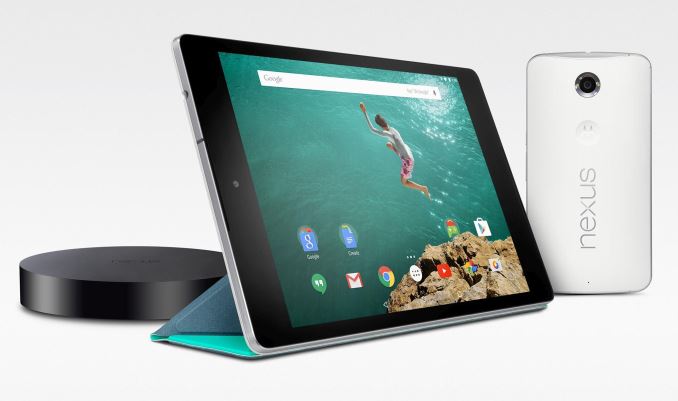
Google appears to have come to the same realization as Microsoft, and today they announced that they will start pushing monthly security updates over the air to Nexus devices that are still within their support timeframe. The list of supported devices includes the Nexus 4, Nexus 5, Nexus 6, Nexus 7 (both generations), Nexus 9, Nexus 10, and Nexus Player. In addition to security fixes, the monthly OTA updates will include general bug fixes, but the focus is primarily on security improvements.
The first monthly patch for Nexus devices is rolling out today, although as usual it may take some time to get to your device due to Google's staged rollout system. In addition to this announcement, Google has also implemented a long rumored change to their Nexus update policy. While in the past devices were guaranteed 18 months of updates, under the new policy they will be supported for two years of major software updates, and security updates will continue for three years or eighteen months after the device is discontinued on Google Play depending on which is longer.
Read More ...
The Intel 6th Gen Skylake Review: Core i7-6700K and i5-6600K Tested
It’s the Intel review you’ve been waiting for. Today is the launch of the first two CPUs from Intel’s Skylake architecture, the 6th Generation Core i7-6700K and the Core i5-6600K. With the new processors we get a new architecture, a new socket, the move to DDR4 and the potential to increase both performance and efficiency in one. A lot of readers have asked the question – is it time to upgrade? We had a CPU or two in to test to answer that question.
Read More ...
Intel Skylake Z170 Motherboards: A Quick Look at 55+ New Products
Along with the launch of the two Skylake-K processors today, we also have a raft of new motherboards to go with them. The Skylake processors use the LGA 1151 socket (which is new) combined with the Z170 chipset, meaning every motherboard manufacturer has been developing and putting together a whole stack of products to meet different price points and demand. The Z170 chipset itself represents a large jump in terms of IO design, driven by the growing need for diversification and utility on modern platforms.
Read More ...
Build-A-Rig Round 1, Zotac vs. Corsair: The $1500 PC Showdown
We’re back again for the final phase of our inaugural Build-A-Rig Challenge, the performance showdown. For the showdown we have run the assembled Zotac and Corsair systems through our benchmark suite in order to document their performance and crown a winner. With a $1500 price tag and a loosely defined goal of putting together a solid gaming system, Zotac and Corsair have submitted designs that are both alike and divergent at times, an excellent showcase of the many different ways one can build a gaming system. Now we get to see how they perform, and better yet give them away.
Read More ...
Seagate Announces 2TB Game Drive for Xbox At Gamescom 2015
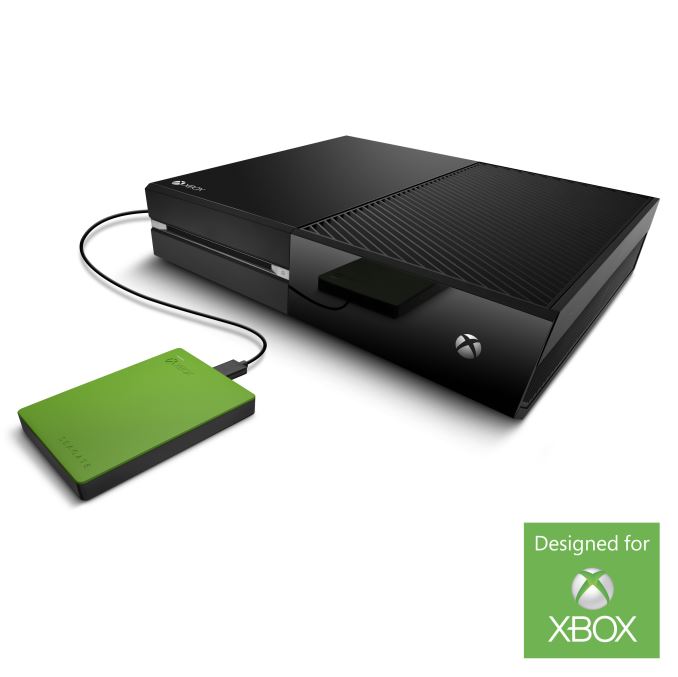

Seagate has a solution, and one that comes at a perfect time since the Xbox One is gaining the ability to record television, and that can burn up a lot of space in a hurry. The 2TB Game Drive for Xbox is a USB 3.0 based external drive. Now, before we get any further, it needs to be pointed out that the Xbox One will work with any USB 3.0 based hard drive, but Seagate is the only company to provide one that is licensed and endorsed with the Xbox branding.

The distinctive Xbox green means that you will never be in doubt what this drive is for, and the capacity should let you store around 50 or more games on it, and then you can take them with you if you need to play on another console.
The 2TB model will have a MSRP of $109.99, and be available from GameStop, Best Buy, Amazon, and other retailers. If you want to add some Xbox branding to your storage, the price premium over a less attractive model should not be too much.
Update: Seagate has apparently worked with Microsoft to create custom firmware for this drive for console gaming workloads. What that means is pretty unclear so we'll test the device out and see how it performs.
Source: Seagate
Read More ...
Xbox One Will Be Upgraded To Windows 10 In November
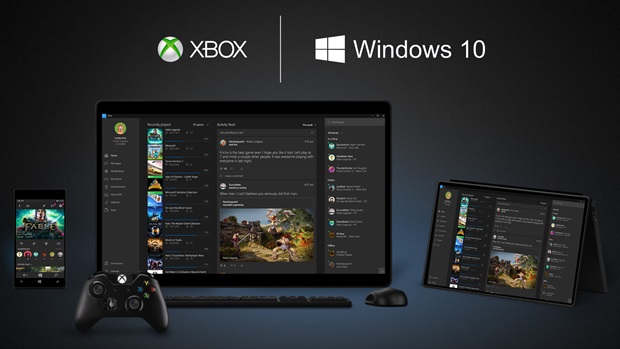
Microsoft fist showed off the new interface back at E3, and today at gamescom 2015 a release date was announced for November. This will bring a lot of new capabilities to the Xbox One, but the most obvious will be the new user interface. The style has certainly morphed from the Windows 8 Metro design language to what is now available in Windows 10, and the new look is certainly sharp.

There will also be some changes to some of the Xbox One’s experiences, such as the OneGuide. I do run my cable box through my Xbox One, but I have never been happy with the OneGuide that is available now, so I’m looking forward to seeing these changes. The new guide will be a key piece of the Xbox DVR functionality coming next year. Xbox One will also have a Watch section in select regions where it will pull together movies and TV shows across services, including live TV, Netflix, and HBO Go, to make discovery easier.
The Store is also getting a makeover, as it did in Windows 10. With the new Windows 10 framework, Xbox One should be able to install Microsoft’s apps created with the universal app platform, assuming the dev does the UI work to make it function on the Xbox One and its unique inputs of a controller, and possibly Kinect.
With Windows 10 on Xbox One, Cortana will also be making her way to the console to let you do natural language inputs on the Xbox One, though this will require the Kinect for the audio input. Cortana will first be available in the USA and UK on the Xbox One, but the number of countries slated to get Cortana on Windows 10 has been increased over the last couple of weeks so it would make sense for it to then roll out to the Xbox.
For those that need to do a lot of text chat, the Xbox One is also getting a new accessory called the Xbox Chatpad which lets you snap a keyboard onto the Xbox One controller.

The Xbox One has been getting some pretty solid monthly software updates since it was launched, and the November update should be the biggest yet.
Source: Xbox Wire
Read More ...
Xbox One To Get TV DVR Capabilities


So it is understandable that there was disappointment when Windows Media Center did not get an update for Windows 8’s launch, and perhaps even some anger when it was announced that Windows Media Center would not be coming to Windows 10 at all, and any installations of Windows 10 over computers with Windows Media Center would end up in a prompt to let you know it would be removed. I think WMC was one of Microsoft’s finest examples of good software bundled with hardware support, and though we lacked the CableCARD standard in Canada, I was still able to record multiple HD stations on my now defunct WMC PC and broadcast them around the house.
I loved the software, and even the version that came with Windows 7 back in 2009 is to this day far superior to any cable box I have seen even six years later. But despite this, I eventually mothballed my WMC PC and went with the less robust Cable Co DVR setup just last year. The reason? Having a full PC running in my living room 24/7 was not without its challenges. I was of course the only support line to call if anything happened, and partially due to the lack of native HD support in Canada I decided to give it up. I don’t enjoy what I have now at all, but it works, and I, like many others, have found myself watching less cable TV anyway.
With the rise in streaming services like Netflix, Hulu, and Amazon Video, cable TV certainly is under pressure it has likely never faced before. And so I think it makes a lot of sense that Microsoft has decided to shift its focus away from WMC, which was almost certainly an extremely expensive venture, to the Xbox One.
Back in April, Microsoft announced that it was adding Over-The-Air TV tuner support to the Xbox One for North America, supplementing the existing tuner that was already available in Europe. At the time, I said that adding DVR support would put this over the top, and today we have an official announcement that this is happening. The Xbox One will offer OTA TV DVR capability next year. And the introduction certainly seems to move the Xbox One into a WMC replacement.

You will be able to stream recorded TV from the Xbox One to any Windows 10 PC, or even mobile devices running Android or iOS using the Smart Glass app. The new connected age also lets you schedule recordings through the Smart Glass app so you can set up recordings almost anywhere. In a way, it basically replicates what WMC could do by streaming to an Xbox 360, but reverses it.


Is it a true replacement for WMC? No, certainly not until it supports CableCARD, since it restricts you to just recording OTA broadcasts, but for a lot of people this is exactly what they want. The Xbox One can now be at the center for people who “cut the cord” and ditch cable, since it offers a pretty good assortment of streaming and local video playback.

Windows Media Center was great for its time, but I am glad to see that Microsoft is not abandoning it completely. Moving the capabilities to the Xbox One make a lot of sense, and should open the technology and experience up to a lot more people, since you don’t need an IT background to keep your DVR up and running any longer. They have not announced any plans for support for recording from either CableCARD yet, but still, this is a nice step for the Xbox One and should be a great solution for a lot of people.
Source: Xbox Wire
Read More ...
Toshiba and SanDisk Announce 48-layer 256Gbit TLC 3D NAND
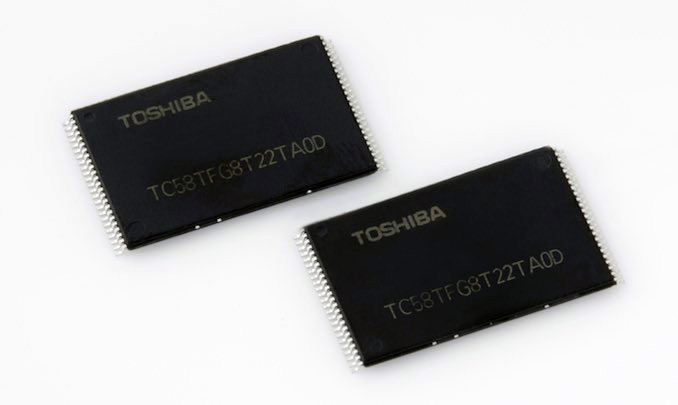
Central to this development is the outfitting of Fab 2 at their facility in Yokkaichi, Japan. The previous Fab 2 was demolished in 2014 and construction started on a replacement to be used as their first fab for 3D NAND. The new Fab 2 has now started pilot production of 3D NAND as it is being readied for mass production, scheduled to begin in 2016. Toshiba says the fab will be completed in the first half of the year and SanDisk plans to be shipping products using their 3D NAND by the end of the year.
The new 3D NAND will face experienced competition from Samsung who are currently shipping 32-layer 3D NAND in capacities up to 128Gb for both MLC and TLC configurations. Samsung has also announced its third generation V-NAND which should be starting mass production in the latter half of this year. Meanwhile, Intel and Micron have stated that their 32-layer 3D NAND will be in mass production by the fourth quarter of this year in the form of a 256Gb MLC die and a 384Gb TLC die. SK Hynix is to begin mass production of a 36-layer 128Gb MLC die during the third quarter and is working toward a 48-layer TLC that will be available in 2016.
All of the major flash manufacturers have now publicized their plans for introducing 3D NAND. Planar NAND won't be disappearing overnight or even in a year, as it takes a lot of time and money to convert a fab to a new process. But from here on out, we can expect all the most interesting news about NAND flash memory to be about 3D.
Read More ...
Seagate and Micron Announce 1200.2, S600DC SAS SSD Families for Enterprise

Making today's announcement particularly different (and wordy) is the fact that both companies are announcing the same drives under their own brands. Developed in a joint partnership between the two companies, Seagate and Micron have developed a single line of drives to be sold under different brands by each manufacturer for the purpose of making the drives available from multiple vendors for second-sourcing needs. For Seagate these drives will be known as the 1200.2 series, and will total 36 drives altogether. Meanwhile for Micron these drives will be known as the S600DC series.
We'll start things off with Seagate, who has released the most information on these new drives. In Seagate's 1200.2 lineup the drives are available in four different tiers that trade cost against the higher endurance and performance, enabled through greater over-provisioning. The “High Endurance” line (rated for 25 drive writes per day) is tuned for write-intensive workloads and lots of random I/O. The “Mainstream Endurance” line (10 DWPD) is intended for a workload with a 70/30 mix of reads and writes, while the “Light Endurance” (3 DWPD) and “Scalable Endurance” (1 DWPD) are for very heavily read-intensive workloads with mostly sequential I/O.
Capacity options vary between the different tiers: the HE drives are available in only two smaller sizes (200GB and 400GB), the SE drives in two large sizes (1920GB and 3840GB), and the middle two tiers offer more choices between those extremes. As is often the case, the smallest drives in each tier have somewhat lower performance ratings, which causes the 200GB HE drive to be rated a bit slower than the three largest ME drives. All models are using the same platform - that is the same controller and NAND - and Seagate isn't binning the Micron MLC flash chips between tiers, so all of the performance differences stem from the differences in firmware configuration and the amount of over-provisioning.
| Seagate 1200.2 SAS SSD specifications | ||||
| Endurance Tier | HE | ME | LE | SE |
| Capacities (GB) | 200, 400 | 400, 800, 1600, 3200 | 400, 480, 800, 960, 1600, 1920, 3200, 3840 | 1920, 3840 |
| Sequential Read | 1800 MB/s | 1800 MB/s | 1750 MB/s | 1700 MB/s |
| Sequential Write | 600-800 MB/s | 600-800 MB/s | 390-750 MB/s | 500 MB/s |
| 4kB Random Read | 205k-210k IOPS | 205k-210k IOPS | 170k-190k IOPS | 140k IOPS |
| 4kB Random Write | 70k IOPS | 66k-70k IOPS | 35k IOPS | 15k IOPS |
| Average latency | 115 µs | |||
| Endurance | 25 DWPD | 10 DWPD | 3 DWPD | 1 DWPD |
| Warranty | 5 years | |||
All drives use a dual-channel 12Gbps SAS connection, and these are the first 12Gbps drives that can use the two channels in tandem for higher performance rather than fault tolerance. This enables peak sequential read speeds of 1700 MB/s to 1800 MB/s, compared to the single-channel limit of 1200 MB/s. Peak 4kB random read speeds are also great looking, ranging from 140,000 IOPS to 210,000 IOPS. Advertised write speeds are nothing special, but the SAS interface does allow almost all of the drives to exceed the capabilities of 6Gbps SATA for sequential writes.
Rounding out the enterprise feature set, every drive is available in a self-encrypting model, and the ME models are also offered in variants with FIPS 140-2 validated encryption. The drives have full power-loss protection and a 5 year warranty. All models use the 2.5” form factor. Drives under 1TB are 7mm thick while the larger models are 15mm thick.
Meanwhile for the Micron S600DC branded release of these drives, we don't have quite as much information for today's announcement. We know that Micron will be releasing three different models of the drive as the S610DC, the S630DC, and the S650DC. However we don't know which models are the higher endurance models and which are the higher capacity models.
Overall, the fact that Seagate and Micron are entering into a second-sourcing partnership on SSDs here is an interesting one, and one that makes a lot of sense given the desire for multiple sources from enterprise customers. And to be clear, this is true second-sourcing for as much as Seagate and Micron can achieve it, making it more than just both companies selling the drives under their own brands. In order to ensure a second-source supply, the two companies are using second-sourcing wherever practical in their supply chain and have geographically-diverse stockpiles for the important components that are only available from a single source, so they are confident they can offer a reliable ongoing supply.
Finally, we're told that the drives will be on display this month, with Seagate planning on publicly demonstrating the 1200.2 SSD next week at Flash Memory Summit. As for availability, Seagate tells us that the 1200.2 series will be shipping to channel partners starting this month.
Read More ...
Seagate Backup Plus Portable 4TB USB 3.0 Drive Review
The rise in popularity of USB 3.0 has enabled a large number of high-speed bus-powered storage devices. While flash drives and external SSDs can take advantage of the high-speed nature of the interface, bus-powered external hard drives (2.5") still remain the only way for consumers to have an economical high capacity option. Seagate recently launched the Backup Plus Portable 4TB USB 3.0 drive based on one of the first 4TB 2.5" drives in the market. Read on for our review.
Read More ...
Acer Announces Ultra Low Cost Cloudbooks With Windows 10 Home
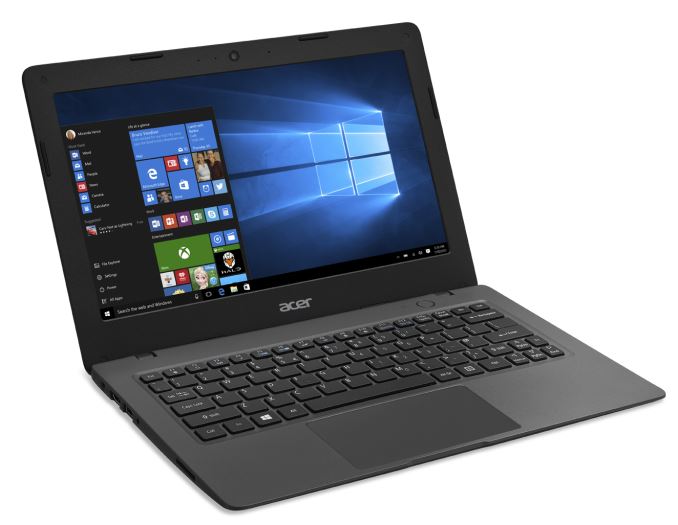
The 11.6-inch model starts at only $170, with a bump in storage boosting the price to $190, or for $199.99 you can step up to the 14-inch model. For this price you get a 1366x768 resolution display, which is likely going to be a TN panel. The fanless design is powered by the 14nm Intel Celeron N3050 processor, which is a dual-core model with a base frequency of 1.6 GHz and turbo frequency of 2.16 GHz. This is going to be Airmont cores, similar to the previous N series Celerons with Silvermont. Performance expectations should be in check, but with a 6 watt TDP it should be able to maintain its peak frequency fairly well. As a comparison, the Surface 3 has four Airmont cores at up to 2.4 GHz, but with just a 2 watt scenario design power. Graphics will also get a boost over the older Celerons, with the Airmont cores now paired with Gen 8 graphics and 12 execution units rather than just 4 Gen 7 units available on the older chips.
One of the ways Acer was able to hit these price points was due to the storage available. The 11.6-inch model starts with just 16 GB of storage, and even with the Windows 10 storage features which can save even more space than Windows 8.1’s WIMBoot, 16 GB is not a lot for a Windows install. For those interested in this device, the $20 boost to 32 GB would be a wise investment. The 14-inch model starts with 32 GB and will also offer a 64 GB model later on. There is a SD card slot, but Windows 10 has not yet implemented the same features as Windows Phone has for SD card use, so no Windows Store apps can be installed to it yet, although that is coming later.
| Acer Aspire One Cloudbook | ||||||
| Cloudbook 11 | Cloudbook 14 | |||||
| CPU | Intel Celeron N3050 Dual-core Airmont 1.6-2.16GHz Intel HD Graphics 12 EUs 320-600MHz |
|||||
| Memory | 2GB DDR3L | |||||
| Storage | 16-32 GB eMMC | 32-64 GB eMMC | ||||
| Display | 11.6" 1366x768 | 14.0" 1366x768 | ||||
| Ports | USB 3.0 x 1 USB 2.0 x 1 HDMI SD Card Slot Headphone |
|||||
| Networking | 802.11ac WiFi Bluetooth 4.0 |
|||||
| Dimensions | H: 0.70" (17.8 mm) W: 11.5" (292.1 mm) D: 7.95" (201.93 mm) |
H: 0.70" (17.8 mm) W: 13.36" (339.3 mm) D: 9.25" (235.0 mm) |
||||
| Weight | 2.54 lbs (1.15 kg) | 3.5 lbs (1.59 kg) | ||||
| Battery Life | Up to 7 hours | Up to 6 hours | ||||
| Price | $169.99-$189.99 | $199.99+ | ||||
Both models will feature 802.11ac wireless, which is nice to see since that seems to be one of the first cuts on a budget notebook. Acer is positioning these devices as Cloudbooks, and they include one year of Office 365 Personal and the included 1 TB of OneDrive storage, and Acer is also promoting their cloud based abApps to help in keeping files in sync with smartphones and tablets.
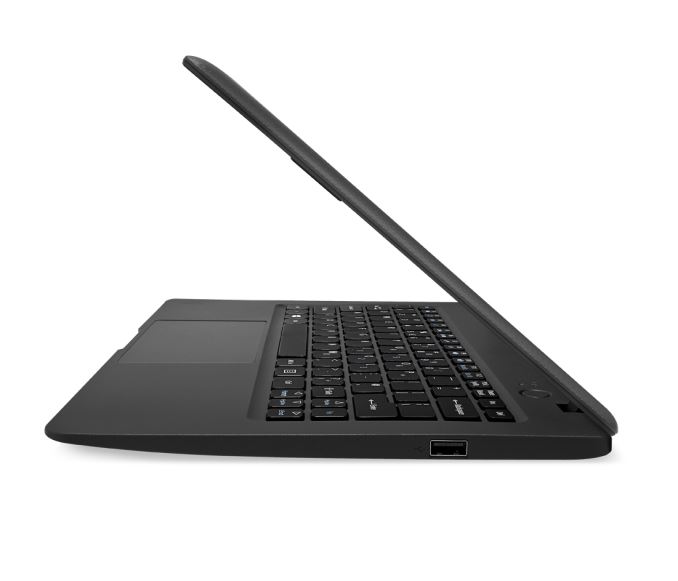
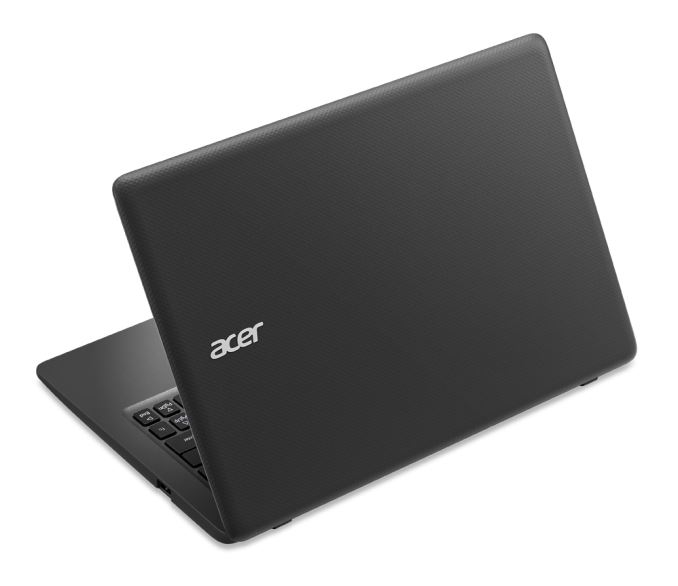
While inexpensive, Acer has done well with the design. Both models are just 0.7-inches thick, and the smaller device comes in at just 2.54 lbs, and the larger 14-inch model tips the scales at 3.5 lbs. The textured pattern is finished in a mineral grey which looks quite sharp.
The Acer Cloudbooks will be available starting this month for the 11.6-inch model, with the 14-inch version coming in September.
Source: Acer
Read More ...
Strontium Nitro Plus Nano USB 3.0 64GB Flash Drive Capsule Review
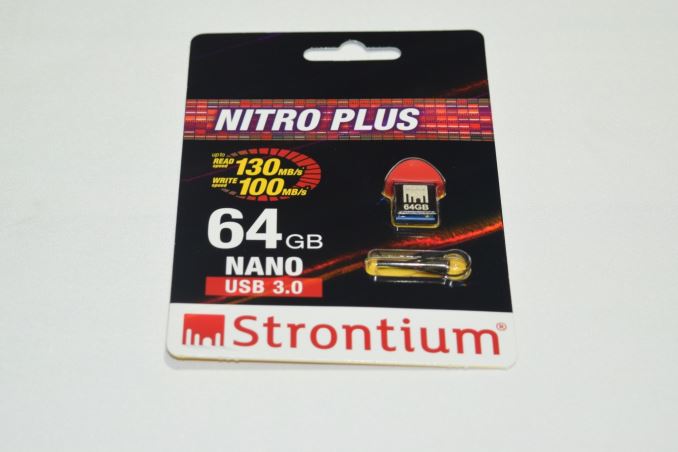
High-performance flash drives have traditionally employed a SATA SSD controller behind a USB 3.0 - SATA bridge. However, this increases the drive cost in what is essentially a price-sensitive market. Vendors have recently begun to introduce native high-performance USB 3.0 flash controllers, and the Strontium Nitro Plus Nano sports one such controller. The list of flash drives used for comparison purposes is provided below:
- SanDisk Extreme 64GB
- Mushkin Atom 64GB
- Strontium Nitro Plus Nano 64GB
Hardware Design and Internals
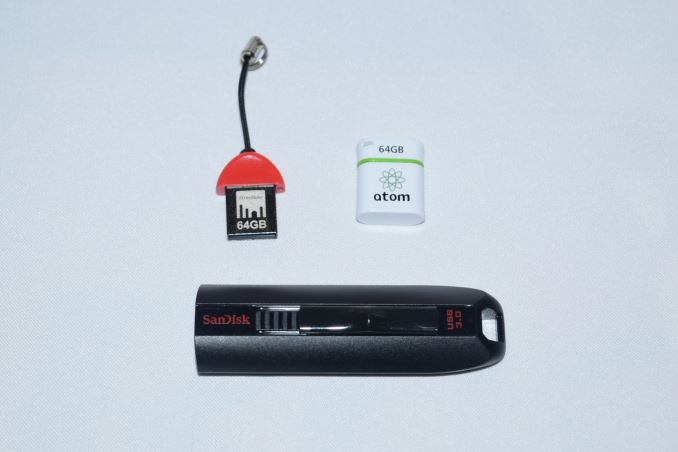
In terms of external design and features, the Strontium Nitro Plus Nano USB 3.0 drive is small and discreet. A red cap that protrudes 8mm from the USB slot and has a total width of only 16mm ensures that the unit can fit in easily even in the ill-placed / oriented USB ports. A small hole at the top accommodates the bundled thread that enables hanging the flash drive off a keychain. As we can see from the photograph below, the Strontium Nitro Plus Nano USB 3.0 is one of the smallest flash drives that we have evaluated in its capacity class.
Without opening up the unit, it is possible to identify the controller and flash inside the unit.
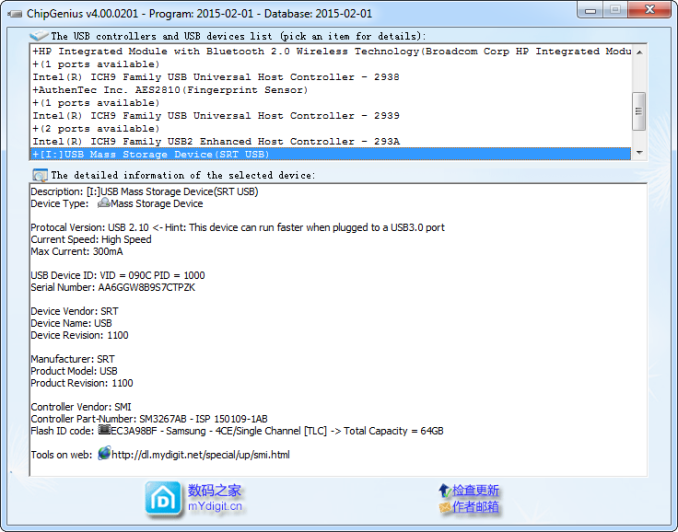
The controller is the Silicon Motion SM3267 single-channel USB 3.0 controller. This appears to be an ideal controller for low-cost flash drives with a small physical footprint because it reduces BOM (bill-of-materials) cost as well as PCB area by integrating the required power IC and crystal oscillator. Depending on the flash memory used, Silicon Motion claims performance of up to 160 MBps reads. Strontium has gone in for Samsung TLC NAND in the flash drive. This must be compared to the Phison PS2251-07 used along with Toshiba TLC NAND in the Mushkin Atom 64GB drive.
Testbed Setup and Testing Methodology
Evaluation of DAS units on Windows is done with the testbed outlined in the table below. For devices with USB 3.0 connections (such as the Strontium Nitro Plus Nano that we are considering today), we utilize the USB 3.0 port directly hanging off the PCH.
| AnandTech DAS Testbed Configuration | |
| Motherboard | Asus Z97-PRO Wi-Fi ac ATX |
| CPU | Intel Core i7-4790 |
| Memory | Corsair Vengeance Pro CMY32GX3M4A2133C11 32 GB (4x 8GB) DDR3-2133 @ 11-11-11-27 |
| OS Drive | Seagate 600 Pro 400 GB |
| Optical Drive | Asus BW-16D1HT 16x Blu-ray Write (w/ M-Disc Support) |
| Add-on Card | Asus Thunderbolt EX II |
| Chassis | Corsair Air 540 |
| PSU | Corsair AX760i 760 W |
| OS | Windows 8.1 Pro |
| Thanks to Asus and Corsair for the build components | |
The full details of the reasoning behind choosing the above build components can be found here.
Synthetic Benchmarks - ATTO and Crystal DiskMark
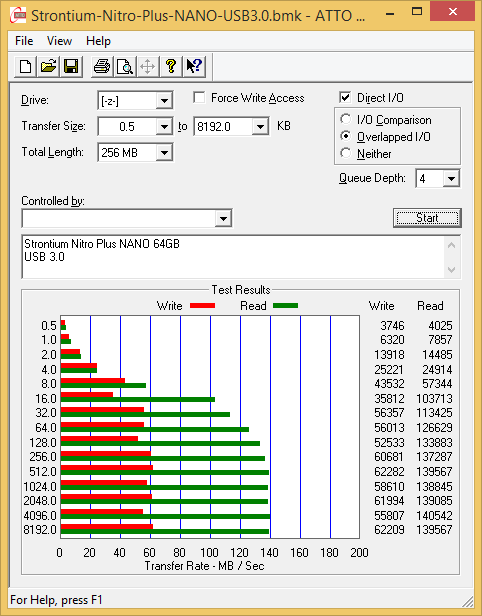
Strontium claims read and write speeds of 130 MBps and 100 MBps respectively, and the read number is backed up by the ATTO benchmarks provided below. Writes only seem to go up to 60 MBps with our standard testing queue depth. Unfortunately, these access traces are not very common in real-life scenarios.
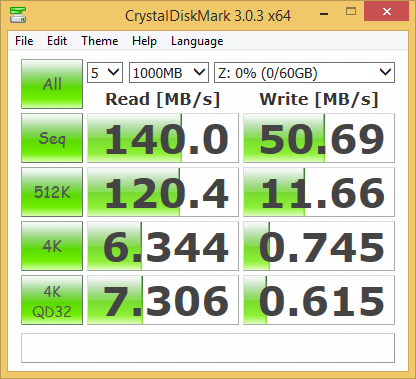
CrystalDiskMark, despite being a canned benchmark, provides a better estimate of the performance range with a selected set of numbers. As evident from the screenshot below, the performance can dip to as low as 0.615 MBps for random 4K writes.
Benchmarks - robocopy and PCMark 8 Storage Bench
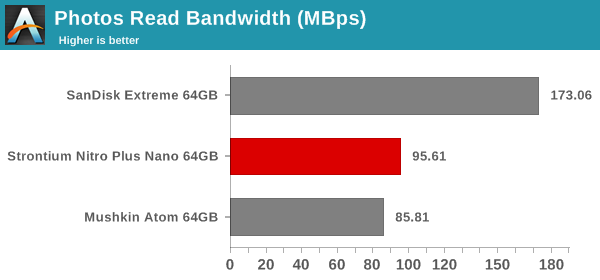
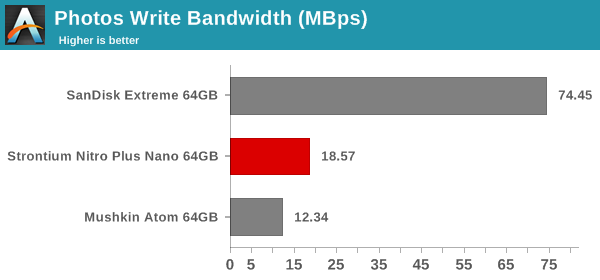
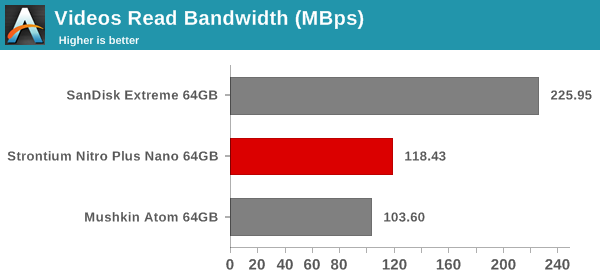
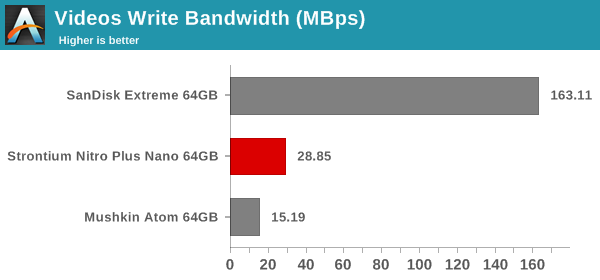
Our testing methodology for DAS units also takes into consideration the usual use-case for such devices. The most common usage scenario is transfer of large amounts of photos and videos to and from the unit. The minor usage scenario is importing files directly off the DAS into a multimedia editing program such as Adobe Photoshop.
In order to tackle the first use-case, we created three test folders with the following characteristics:
- Photos: 15.6 GB collection of 4320 photos (RAW as well as JPEGs) in 61 sub-folders
- Videos: 16.1 GB collection of 244 videos (MP4 as well as MOVs) in 6 sub-folders
- BR: 10.7 GB Blu-ray folder structure of the IDT Benchmark Blu-ray (the same that we use in our robocopy tests for NAS systems)
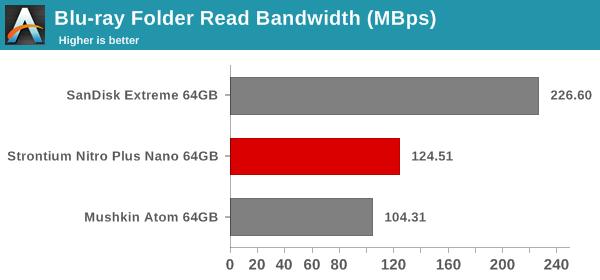
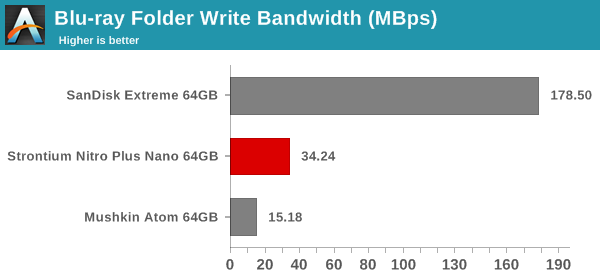
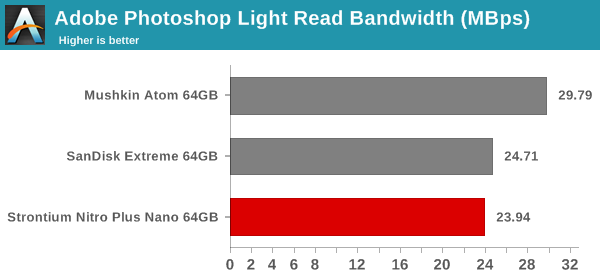
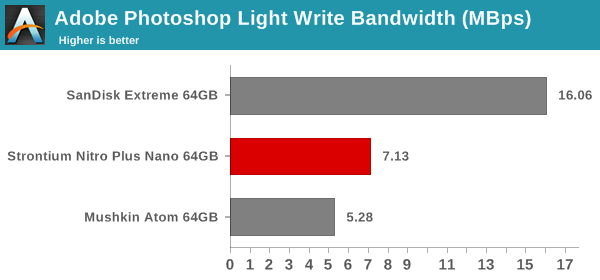
For the second use-case, we take advantage of PC Mark 8's storage bench. The storage workload involves games as well as multimedia editing applications. The command line version allows us to cherry-pick storage traces to run on a target drive. We chose the following traces.
- Adobe Photoshop (Light)
- Adobe Photoshop (Heavy)
- Adobe After Effects
- Adobe Illustrator
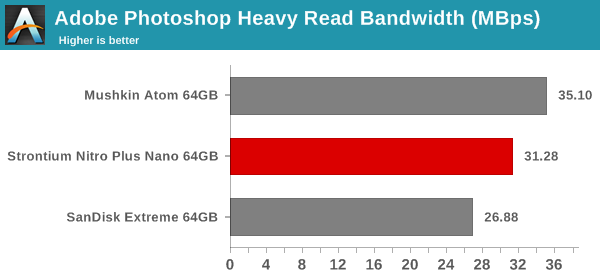
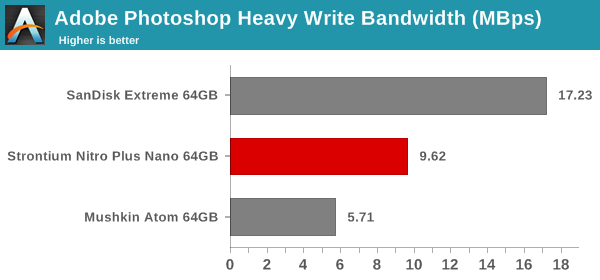
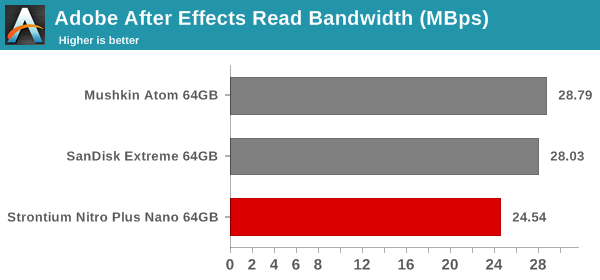
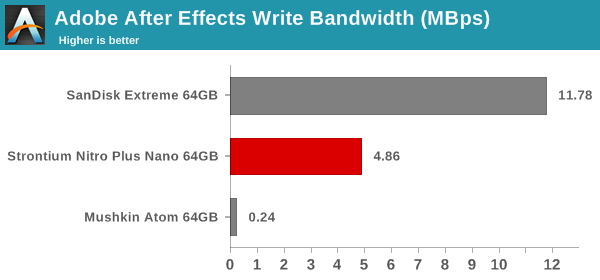
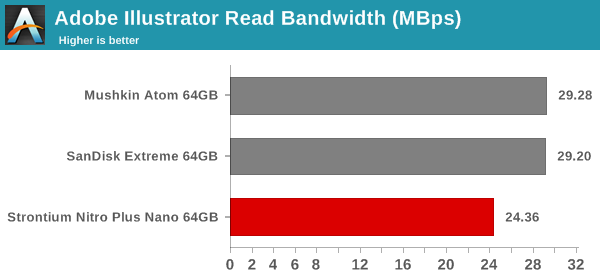
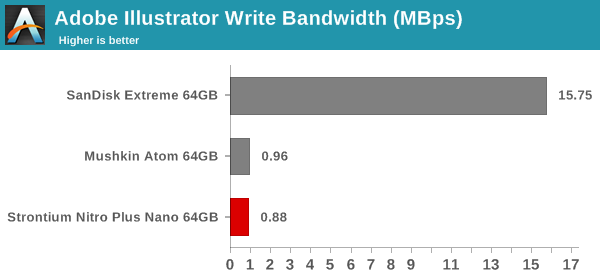
Usually, PC Mark 8 reports time to complete the trace, but the detailed log report has the read and write bandwidth figures which we present in our performance graphs. Note that the bandwidth number reported in the results don't involve idle time compression. Results might appear low, but that is part of the workload characteristic. Note that the same testbed is being used for all DAS units. Therefore, comparing the numbers for each trace should be possible across different DAS units. In any case, the PCMark 8 storage workloads are hardly the type of traces that would ever run on drives such as the Nitro Plus Nano.
In general, these results show that the Stronitum drive performs better than the Mushkin one in most relevant benchmarks. The Mushkin is the only one that can be used for apples-to-apples comparison, since the SanDisk drive employs a SATA controller behind a USB 3.0 - SATA bridge, and has a much bigger physical footprint.
Performance Consistency
Yet another interesting aspect of these types of units is performance consistency. Aspects that may influence this include thermal throttling and firmware caps on access rates to avoid overheating or other similar scenarios. This aspect is an important one, as the last thing that users want to see when copying over, say, 50 GB of data from the flash drive, is the transfer rate going to USB 2.0 speeds. In order to identify whether the drive under test suffers from this problem, we instrumented our robocopy DAS benchmark suite to record the flash drive's read and write transfer rates while the robocopy process took place in the background. For supported drives, we also recorded the internal temperature of the drive during the process. The Strontium unit, however, doesn't expose the temperature over the USB interface. The graphs below show the speeds observed during our real-world DAS suite processing. The first three sets of writes and reads correspond to the photos suite. A small gap (for the transfer of the videos suite from the primary drive to the RAM drive) is followed by three sets for the next data set. Another small RAM-drive transfer gap is followed by three sets for the Blu-ray folder.
An important point to note here is that each of the first three blue and green areas correspond to 15.6 GB of writes and reads respectively. Throttling, if any, is apparent within the processing of the photos suite itself.
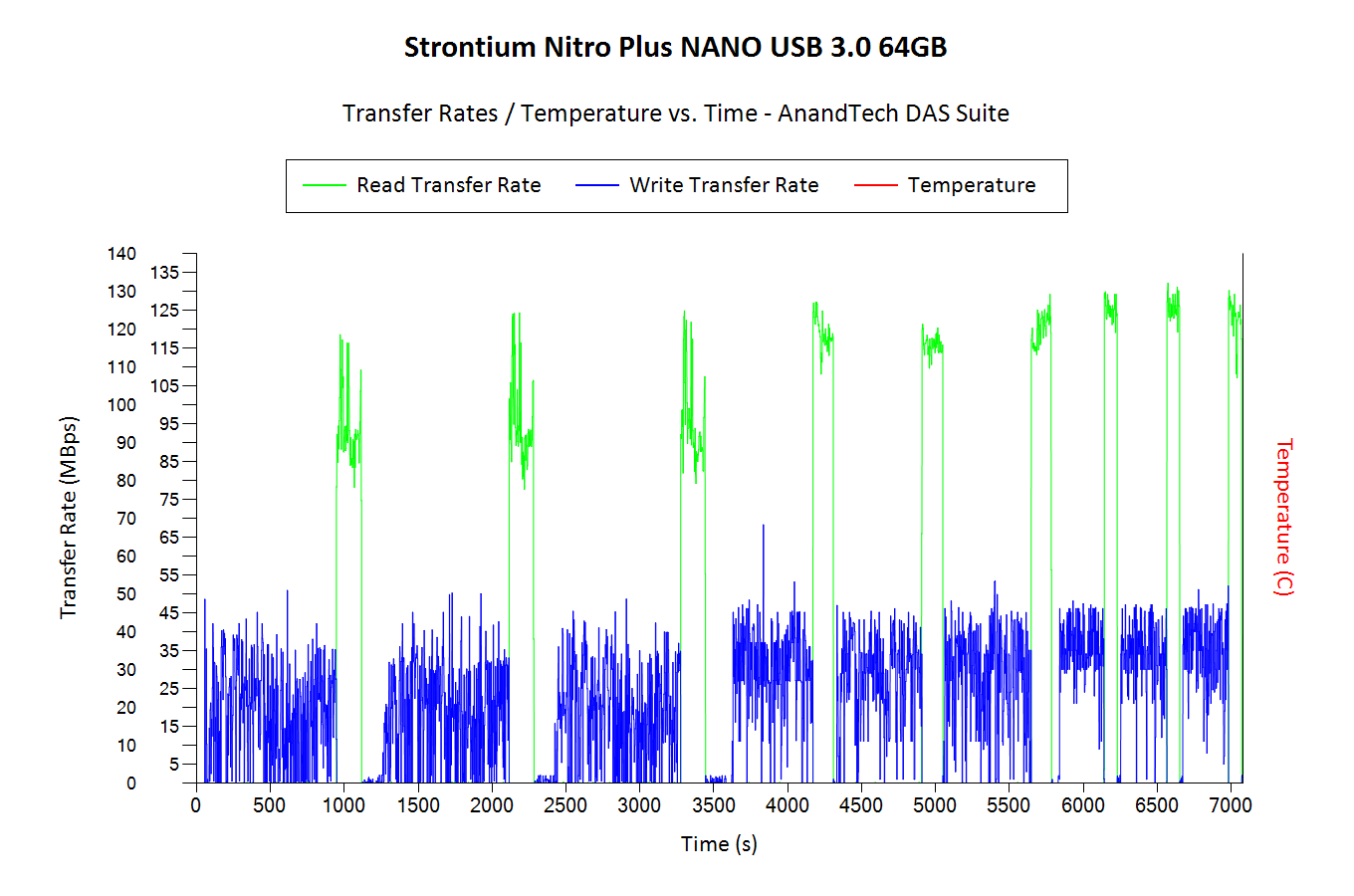
Despite the small size, the Strontium unit has not problems with sustaining the expected transfer rates and there seems to be no thermal throttling at play. The write rates are quite disappointing for small-sized files, but, that is to be expected given the nature of the device.
Concluding Remarks
The performance of the drive is impressive when one considers the size of the unit. Obviously, the numbers are not going to be similar to what a real SSD controller with multiple flash chips can give us. This brings us to the most important aspect in this particular market niche - the pricing. As per the press release, the Strontium Nitro Plus Nano USB 3.0 64GB drive is expected to cost $20.
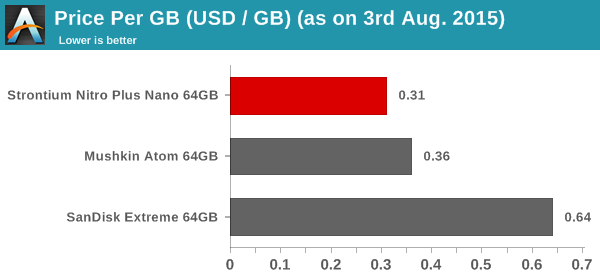
The Strontium unit manages to beat the Mushkin Atom in both pricing and performance numbers for real-life workloads. In addition, Windows reports an usable capacity of 60.44 GB with the Strontium unit, while the Mushkin one comes in at 57.70 GB only. When it comes to packing a punch in the smallest possible form factor for a USB 3.0 flash drive, the Strontium Nitro Plus Nano USB 3.0 is the king of the hill right now. Pretty much the only complaint that could be made against the unit is the absence of a protective covering for the USB connector.
Read More ...
The Intel Broadwell Review Part 2: Overclocking, IPC and Generational Analysis
In our first part of our Broadwell coverage, we rushed to test both the i7-5775C and the i5-5765C in our new benchmarking suite against the previous generation of Haswell processors as well as AMDs Kaveri lineup. In Part 2, we have spent more time with the architecture to see how it stacks up against the last four years of Intel, as well as probing the high end overclocking capabilities.
Read More ...
Lattice Announces First superMHL Chips: Sil8630 & Sil9396

Being announced today by Lattice (née Silicon Image) are the first transmitter and the first receiver to support superMHL, the Sil9396 and Sil8630 respectively. These two chips are small, one-lane chips intended to allow superMHL usage with mobile and PC devices in order to drive displays at up to 4Kp60, and will be the first use for superMHL.


As previously announced alongside superMHL itself earlier this year, superMHL is available as a USB Type-C alt mode, and this is where Lattice is focusing their efforts for today’s mobile-centric products. With Type-C expected to quickly take over the market on both mobile devices and laptop PCs, it’s quickly become the port of choice for virtually every other standard that wants to move high speed data, and superMHL is no exception. What results is an impressive (and dizzying) array of connectivity options, as superMHL can interface with a number of different display types.

That said, the two mobile superMHL combinations that are most likely to actually be seen in the wild are Type-C to HDMI active and Type-C to MHL (i.e. HDMI passive). The difference between the two is that as with previous generations of MHL technology, superMHL can be carried into a TV that supports the protocol over an HDMI port, allowing the use of a straight-through passive cable. Otherwise superMHL can be actively converted via a chip such as the Sil9396 in an HDMI cable, allowing a superMHL device to interface with an HDMI-only display. In both cases superMHL offers the equivalent of HDMI 2.0, including HDCP 2.2 support and the annexes for improved color spaces and HDR.
What Lattice and the MHL Consortium is hoping to do right now in what is a crowded market for display connectivity standards is to have superMHL stand apart from the other standards by the combination of legacy MHL support, USB Type-C support, and the fact that it can work over a single high-speed lane. Legacy MHL support in this context is rather straightforward, as it means superMHL devices can directly transmit to existing MHL receivers by downgrading the protocol, retaining MHL’s power changing abilities in the process. Otherwise HDMI of course can’t be natively passed over Type-C, and DisplayPort requires multiple lanes for 4Kp60 – 4 for DP 1.2, and 2 for DP 1.3 if a display supports the reduced blanking timings. This leaves further lanes open for USB 3.x Superspeed data, meaning that superMHL can drive a 4Kp60 display and carry a full USB Superspeed data connection at the same time. Though as Superspeed requires 2 lanes per connection, we’re not aware of any scenario for USB where a third lane is any better than having just two lanes, though superMHL would still leave the last lane open for something else.
| USB Type-C Alt Mode Display Standard Comparison | ||||
| superMHL | DisplayPort 1.3 | |||
| Maximum Resoluion | 4Kp60, 4:4:4 @ 24bit | 4Kp60, 4:4:4 @ 24bit | ||
| Type-C Lanes Required | 1 | 2 | ||
| Image Compression | "Visually Lossless" (Lossy) | No Compression | ||
| TV Interface | superMHL-over-HDMI (Passive) HDMI (Active Conversion) |
HDMI (Active Conversion) | ||
| Power Charging | USB-PD or MHL (legacy) | USB-PD | ||
Meanwhile, along with today’s announcement of the first transmitter/receiver pair, we’ve also learned a few more technical details about the superMHL protocol. superMHL operates at 6Gbps per lane, using what Lattice calls "visually lossless" (i.e. mathematically lossy) compression in order to pack 4Kp60 into that limited amount of bandwidth. So for 4Kp60 we’re looking at around 3:1 compression on the image side. DisplayPort 1.3 by contrast takes up an additional lane to deliver 4k60, but it doesn’t require image compression. Alternatively compression is in the works via Display Stream Compression, but the DisplayPort 1.3 standard has not yet been updated to include it.
Finally, along with announcing their first superMHL transmitters/receivers today, Lattice is also announcing that engineering samples for the Sil8630 and Sil9396 are now available. It will still be some time before these chips will appear in retail products, but it means that OEMs can now being testing them and building designs that ingrate these chips.
Read More ...
Analyzing Intel-Micron 3D XPoint: The Next Generation Non-Volatile Memory
The current mainstream memory technologies, namely DRAM and NAND, have been around for decades. While clever engineering work has allowed the two to scale below 20nm geometries, both technologies have their inherent architectural limitations. But what if you were to take the best characteristics of DRAM and NAND and create a whole new type of memory? Meet Intel's and Micron's new 3D XPoint, the next generation non-volatile memory technology. It is said to provide up to a thousand times better endurance and performance than modern NAND technology does, while being non-volatile and very scalable at the same time. Read on for our full analysis.
Read More ...
ASUS Launches X99-M WS for Haswell-E Workstations
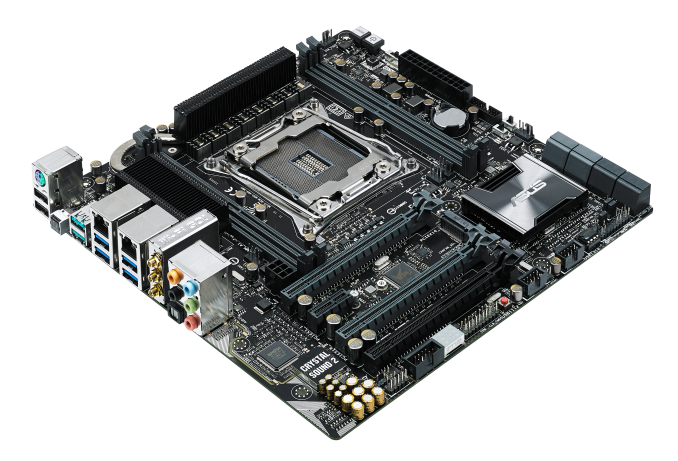
We tackled the ASUS P9X79-E WS from the last generation of products, and over the course of the launch of Haswell-E, ASUS updated the line with a full E-ATX X99-E WS model. In a flurry of mATX X99 launches, today sees the official North American launch of the smaller form factor micro-ATX version of the workstation line, the X99-M WS.
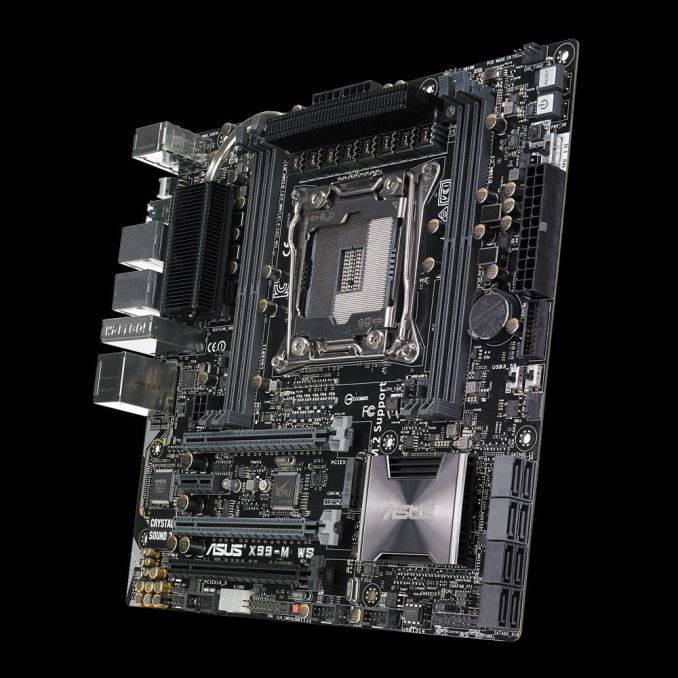
With the smaller form factor, as we’ve seen on other smaller X99 motherboards, there are some different arrangements in functionality over the regular X99. For example, the X99-M WS here has only four memory slots and eight SATA ports, but is equipped with x16/x16 full speed PCIe 3.0 lanes as well as a PCIe 2.0 x2 M.2 slot in the middle. (Note the third PCIe slot is from the CPU also, affording x16/x8/x8 with 40-lane CPUs and x16/x8/x4 with 28-lane CPUs.)
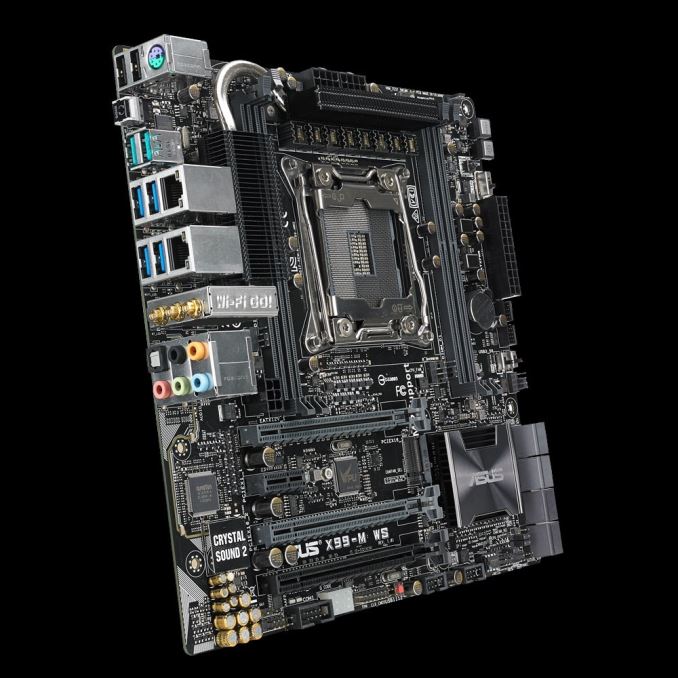
The dual I210-AT and I218-LM Intel network ports on the rear are supplemented with a 3x3 802.11ac tri-stream dual band module, with USB 3.1 ports (two Type-A) coming into the mix. Audio is provided with by the Realtek ALC1150 codec under the enhanced Crystal Sound 2 arrangement.
With the workstation level branding the components are subject to more extensive validation requirements, as well as full compatibility with Xeon E5-2600/1600 v3 processors and up to 64GB of registered ECC memory.
ASUS has set an MSRP of $280 and the board should be available from today in North America.
Source: ASUS, extra photos from TechPowerUp


Read More ...
NVIDIA Initiates Safety Recall of SHIELD Tablets (Update: 4 Units Have Overheated)
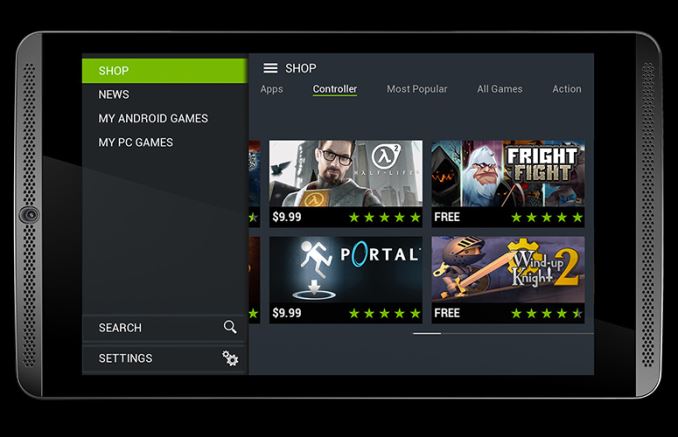
NVIDIA’s recall covers SHIELD Tablets manufactured between July 2014 and July 2015, essentially covering the entire lifetime of the tablet so far. Furthermore the company is asking that current owners do not use the tablets any more than is necessary to back them up and participate in the recall due to the aforementioned risk of fire.
As for the recall process itself, the company notes that only some batteries are defective. As a result the recall process for the Tablet is a bit more involved than a blanket recall, as tablets containing defective tablets need to be identified. To do this, NVIDIA has pushed out a new SHIELD software update, SHIELD Tablet software 3.1 (their release of Android 5.1.1) which includes additional battery information in the Tablet’s About screen. Defective batteries are labeled Y01, while the alternative B01 batteries are unaffected.

Finally, for those owners who have defective tablets, as part of the recall NVIDIA will be shipping out replacement tablets with proper batteries, with an ETA of 2-4 weeks. NVIDIA’s recall notice doesn’t mention how defective tablets will be collected, though the page does mention that defective tablets “will be deactivated remotely and rendered unusable” once owners receive their replacements.
Update, 08/01/2015:
The Consumer Product Safety Commission report for the recall has been posted, which offers a bit more insight into the problems and the numbers involved.
NVIDIA has sold 83,000 faulty SHIELD Tablets in the US, along with another 5,000 in Canada. Of those, NVIDIA has received 4 reports of overheating, with 2 of those reports indicating that the overheating tablet had caused property damage (specifically, to flooring).
Read More ...
Buffalo TeraStation 5200 Network Video Recorder Review
Surveillance cameras have experienced rapid growth over the last few years as security has turned out to be a very important aspect in both home and business environments. Almost all NAS vendors have either specific NVR (network video recorder) models, or provide apps for recording surveillance footage on their generic NAS models. A couple of years back, we reviewed the LenovoEMC PX2-300D with Milestone Arcus VMS pre-installed on the NAS. Unlike pure NAS vendors, vendors of networking components such as Buffalo Tech can provide a complete package for surveillance based on IP cameras. Today, we will take a look at one of Buffalo Tech's solution in this space - the TeraStation 5200 NVR coupled with a BSL-POE-G2105U 5-port Power-over-Ethernet (PoE) switch.
Read More ...
EVGA X99 Micro2 Motherboard Launched with USB 3.1 Type-C on mATX
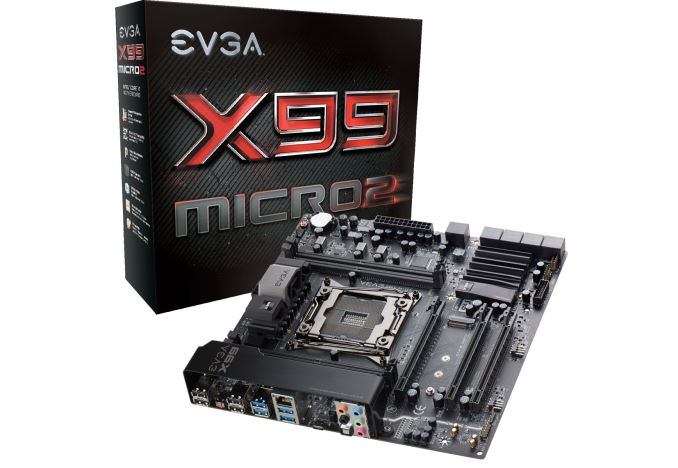

The EVGA X99 Micro2 is an updated version of the X99 Micro, combining that extra Type-C port with more SATA ports, a revised trace layout and a refreshed BIOS over the previous model. The PCIe layout gives x16/x16 or x16/x8/x8 for 40-lane CPUs, allowing another x4 to be used in the PCIe 3.0 x4 M.2 slot between them. The full 10 SATA ports from the chipset are equipped despite the smaller size of the board, although we only get four DDR4 slots which is understandable. These slots are out-of-the-box defined as supporting 16GB modules.
Networking is provided by an Intel I217 network chip, while audio is from an enhanced Realtek ALC1150 codec solution. The two-digit debug display doubles up as a processor temperature display after the POST sequence, and EVGA is heavily promoting its newer BIOS interface as well as in-OS overclocking software.

Pricing has not been officially announced; however the X99 Micro is currently on sale for $226, down from $250. I would imagine that this is around the price point that the Micro2 will hit the market.
Edit: Pricing via the EVGA website is currently set to $229. Many thanks to @JordanMcAuley3 for pointing this out.
Source: EVGA
Read More ...
Here’s How You Can Install Windows 10 Now
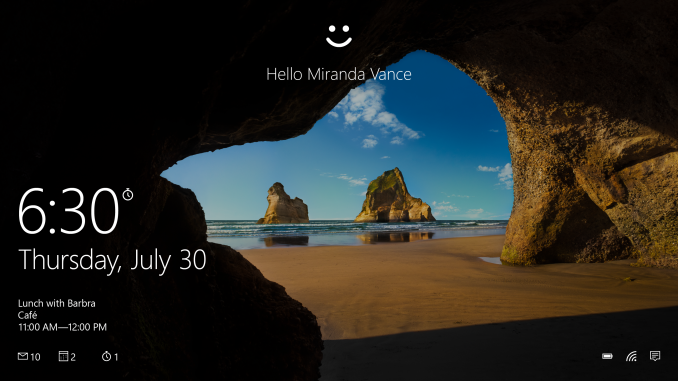
If you want to upgrade now, and you really don’t want to wait, you can download the software yourself to initiate the install.
There are a couple of warnings I’ll give before you do this though. Windows 10 is really unlike any previous version rolled out. The plan is to be constantly updating and improving it over time, and adding features. As such, as of the day of the launch, it is a bit rougher than other builds of Windows at launch. It also might mean that your particular device may have a compatibility issue. To check the status, click on the Windows 10 reservation icon in your system tray – it looks like a white Windows logo – to open up the reservation.
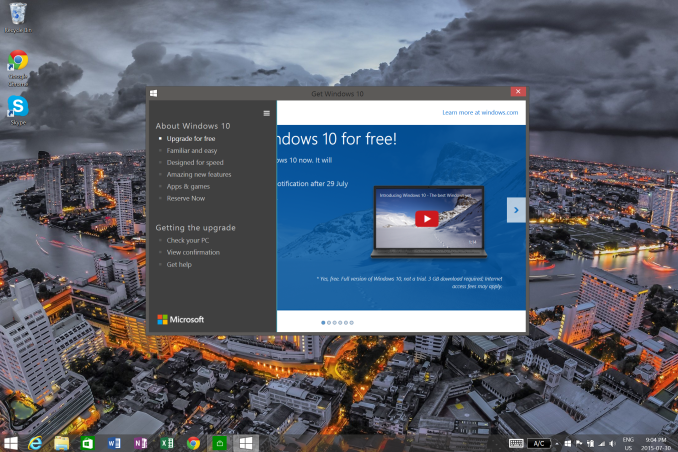
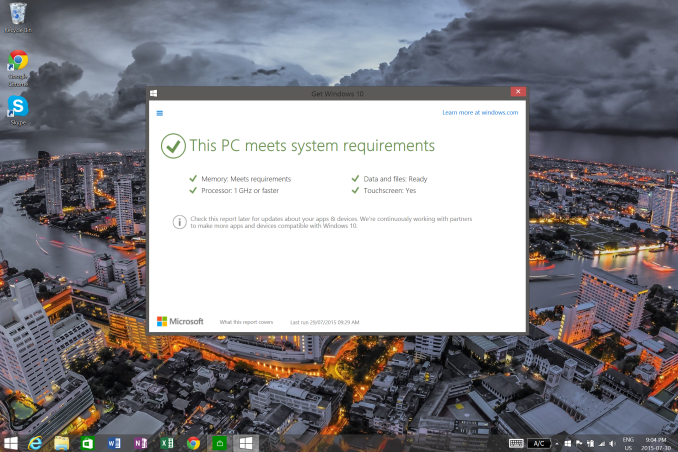
Inside of this, there is a hamburger menu icon on the top left. Click this to expand the menu, then open the “Check your PC” option. This will display a compatibility report which you should verify is ready to go before proceeding. You may have to wait for device driver updates from your manufacturer before the system is Windows 10 ready.
If you don’t have a backup of your PC then that is the next step. You can make a system image using our Backup Guide and you may want to make a recovery drive too in order to get back to that system restore if needed. I’ve not had any issues with the upgrade, but I still didn’t skip this step.
Gabe Aul sent out an email tonight to Windows Insiders explaining how they can get the upgrade. Microsoft has a page up with the tools to download and create a bootable USB drive or ISO, and you can find it here:
http://www.microsoft.com/en-us/software-download/windows10?OCID=WIP_r_Win10_Body_AddPC
Go there, and download the tool. Run the tool, and it should give you the option to either upgrade the PC you are on now, or download the files to a USB or ISO. I’ve not had any luck with the “upgrade this PC” option, so I had to do the download. I downloaded it to a USB drive.
Then, instead of booting from the USB drive, simply navigate to it in Windows Explorer and run setup.exe from there to initiate the upgrade process. It takes a few minutes to get ready, then it will prompt you asking what you would like to keep on your PC, and then it does the upgrade. This is only meant to be used from a genuine copy of Windows, and it should activate correctly after.
If all of this seems a bit daunting, you may want to just wait for the upgrade to be delivered to you through Windows Update. But it might be a good idea to get that backup done anyway.
Source: Windows Insider Program
Read More ...
Windows 10 Installed On Over 14 Million Devices
At Microsoft’s Build developer conference, they laid out their goal of having Windows 10 installed on one billion devices in the next three years, which is their key to their future. Windows is not the primary development platform for many apps anymore, and one way to help that is to have a platform large enough to not easily be ignored. 14 million devices in one day is a good start.

There are a lot more reservations to go though, and those that have “reserved” their free upgrade will be notified when it is ready for their device.
Source: Windows Blog
Read More ...
Build-A-Rig Round 1, Zotac vs. Corsair: The $1500 PC Build Logs
In early July we introduced our new Build-A-Rig project. The aim of the project, with help from our partners Newegg, is to approach the companies that make up the personal computing industry and ask them to create a list of components within a certain budget and aimed at a particular user base. Aside from that there are no rules, and at the end of the day the systems would be built and tested by AnandTech to be given away to our readers along with interviews with the individuals from the companies who we work with about the state of the PC industry and their chosen components. This round is our first, and we spoke to Chinny Chuang from Zotac and Dustin Sklavos from Corsair to specify a system to match that a $1500 single monitor gaming system. Zotac went for style, Corsair went for power, and we carefully dissected each component chosen. Before we get to the performance numbers, we had a look at just how easy these two systems were to build, in the form of build logs.
Read More ...
The LG G4 Review
The LG G3 was probably the Android phone that was closest to getting everything right last year, but it ultimately fell short of being the “best Android phone”. The camera was the most balanced between the Galaxy S5 and One M8, the design wasn’t quite as nice as the One M8 but definitely better than the Galaxy S5, and LG’s UI fit in relatively well with Android 4.4.
The one flaw that held it back was ultimately the display, which was probably responsible for a lot of the problems that I noticed in the G3. Battery life wasn’t as good as the competition, which was probably due to the new 1440p display. The display itself wasn’t all that impressive either, as there was significant saturation compression and some sharpening effects which really hurt the quality of the display. However, in the context of 2014 flagships it was definitely a valid choice among many that year, as it seemed every device had missed the mark in some way that year.
This brings us to the G4, the successor to the G3. To find out how it does, read on for the full review.
Read More ...
Fine Wine and Androids: How the Flip Phone Got Smart
Second gen. LG Wine Smart leads a pack of nostalgic Android smart flip phones
Read More ...
Microsoft CEO: HoloLens V1 Will Debut for Devs in 2016, See 5 Year "Evolution"
Satya Nadella shared in a recent interview about his company's roadmap for an intriguing wearable.
Read More ...
Quick Note: Amazon UK Offers £10 Back on Any Order £50 or Over
That's about $15.60 USD on an order of $78 USD
Read More ...
EA Set to Milk the Star Wars Cash Cow w/ Video Games
Star Wars: Battlefront preorders have beat expectations, leading EA to raise its fiscal forecast
Read More ...
Windows 10 to Get New Features in October Service Release 2 (SR2)
Service Release 1 will land in August, tentatively, will mostly be comprised of bugfixes and battery life improvement tuning
Read More ...
Cortana Help Button is Coming Soon for $23
Device can talk to Cortana on a PC in your home or office, or it can mount to a car or bike for on-the-go-use w/ mobile devices
Read More ...
Available Tags:Google , Security , Intel , Zotac , Seagate , Xbox , Windows , TV , Toshiba , 3D , SSD , USB 3.0 , USB , Acer , USB 3.0 , ASUS , NVIDIA , EVGA , LG , Microsoft , Amazon , UK , EA ,


No comments:
Post a Comment