

OnePlus Announces the OnePlus 2: 389 USD High-End Flagship
| OnePlus One | OnePlus 2 | |
| SoC | Snapdragon 801 2.5 GHz Krait | Snapdragon 810 1.8 GHz A57/A53 |
| RAM | 3GB LPDDR3 | 3/4GB LPDDR4-1555 |
| NAND | 16/64GB NAND | 16/64GB NAND |
| Display | 5.5” 1080p IPS |
5.5” 1080p IPS |
| Network | 2G / 3G / 4G LTE (Category 4 LTE) | 2G / 3G / 4G LTE (Category 6/9 LTE) |
| Dimensions | 152.9 x 75.9 x 8.9mm, 162g | 151.8 x 74.9 x 9.85mm, 175g |
| Camera | 13MP Rear Facing (Sony IMX214) f/2.0, 1.1 micron 1/3.06" sensor | 13MP Rear Facing w/ OIS and laser AF, f/2.0, 1.3 micron 1/2.6" sensor |
| 5MP Front Facing | 5MP Front Facing | |
| Battery | 3200 mAh (12.16 Whr) | 3300 mAh (12.54 Whr) |
| OS | Android 4.4 w/ CM11S (At Launch) | Android 5.1 w/ OxygenOS (At Launch) |
| Connectivity | 1x1 802.11a/b/g/n/ac + BT 4.0 (WCN3680), USB2.0, GPS/GNSS, NFC |
802.11a/b/g/n/ac + BT 4.1, USB-C, GPS/GNSS |
| Fingerprint Sensor | N/A | Touch |
| SIM | 1x MicroSIM | DSDS NanoSIM |
| LTE Bands | Global: 1/3/4/7/17/38/40 | US: 1/2/4/5/7/8/12/17 EU: 1/3/5/7/8/20 |
| Launch Price | $299 (3GB/16GB) $349 (3GB/64GB) |
$329 (3GB/16GB) $389 (4GB/64GB) |
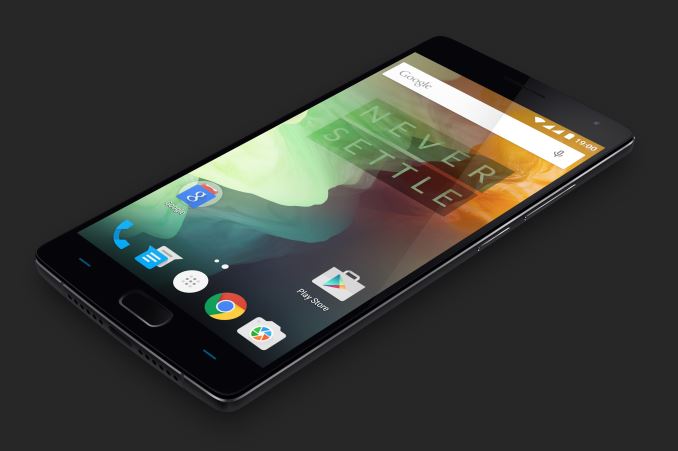
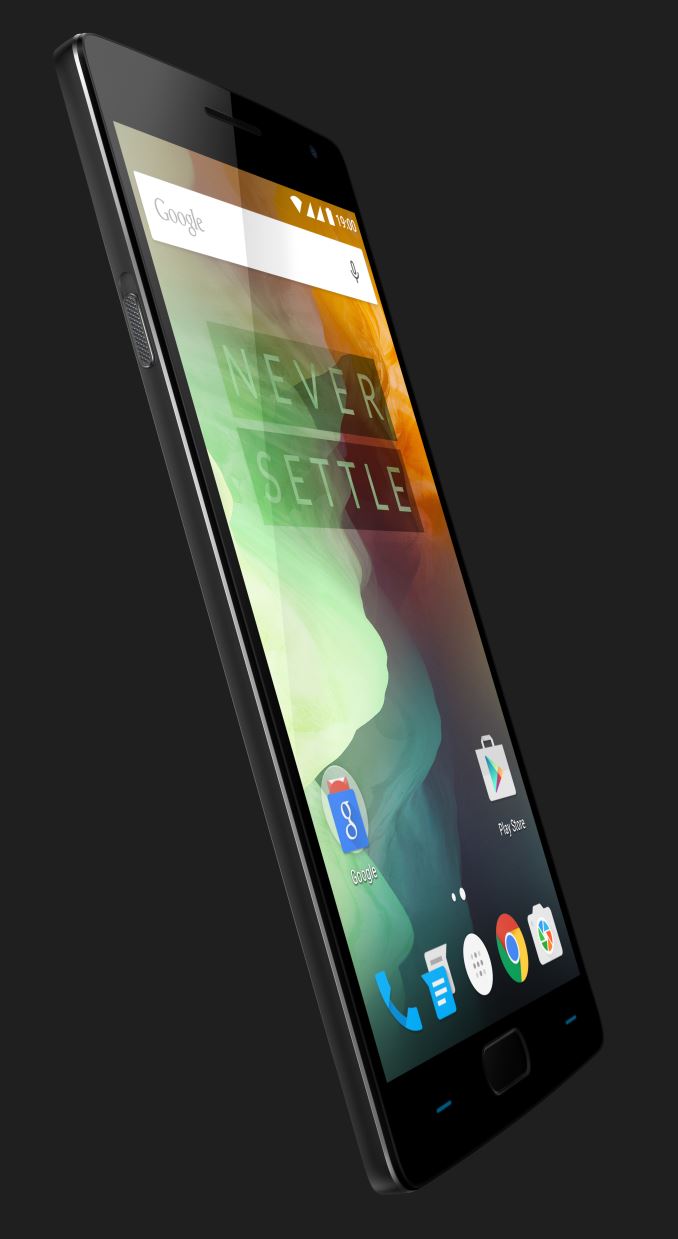
As one can see, the display size and resolution is unchanged from the OnePlus One, but OnePlus is promising higher static contrast at 1500:1, relative to the ~1000:1 contrast of the One. This is likely due to the use of photoalignment technology, which seems to have become an industry standard within the past few months. The 1080p resolution is sufficient for a 5.5” smartphone, although an increase to 1440p would be noticeable I suspect that OnePlus is responding to demands for improved battery life over higher display resolutions. The OnePlus 2 also has the somewhat standard Snapdragon 810 for a high-end smartphone, although it’s notable that the maximum frequency of the A57 cluster has been capped to 1.8 GHz in order to improve thermal performance. It isn’t clear if OnePlus is also using hotplug or other mechanisms to only use two big CPU cores either, but this will take a review to really figure out what’s going on. Battery also receives a minor size increase from 3200 mAh to 3300 mAh, presumably at a 3.8V nominal voltage. The lack of microSD expansion likely comes from user experience concerns, as is the non-removable battery. The OnePlus 2 also has a significant improvement to materials, as the frame is an alloy of aluminum and magnesium while the OnePlus One was only made of plastic on the outer casing.

The other major change is the camera. It seems that OnePlus has elected to use a 13MP, 1.3 micron camera sensor with OIS integrated into the module and laser auto focus. The 13MP 1.3 micron sensor is likely to be the OV13860, which means that the sensor format is similar to both the LG G4 and Samsung Galaxy S6, but with a larger pixel size to improve low light performance to reduce read noise from the sensor. Optical stack details remain unknown but the aperture stays at f/2.0 to balance distortion and low light performance. OIS is also introduced to improve low light photo performance for longer exposures. Laser AF is also added to reduce AF speed, a weakness that was present in the OnePlus One. Given the look of this laser AF mechanism, I suspect this is ST-M's time of flight sensor which means that this sytem will be most effective within 10cm of the laser AF sensor.
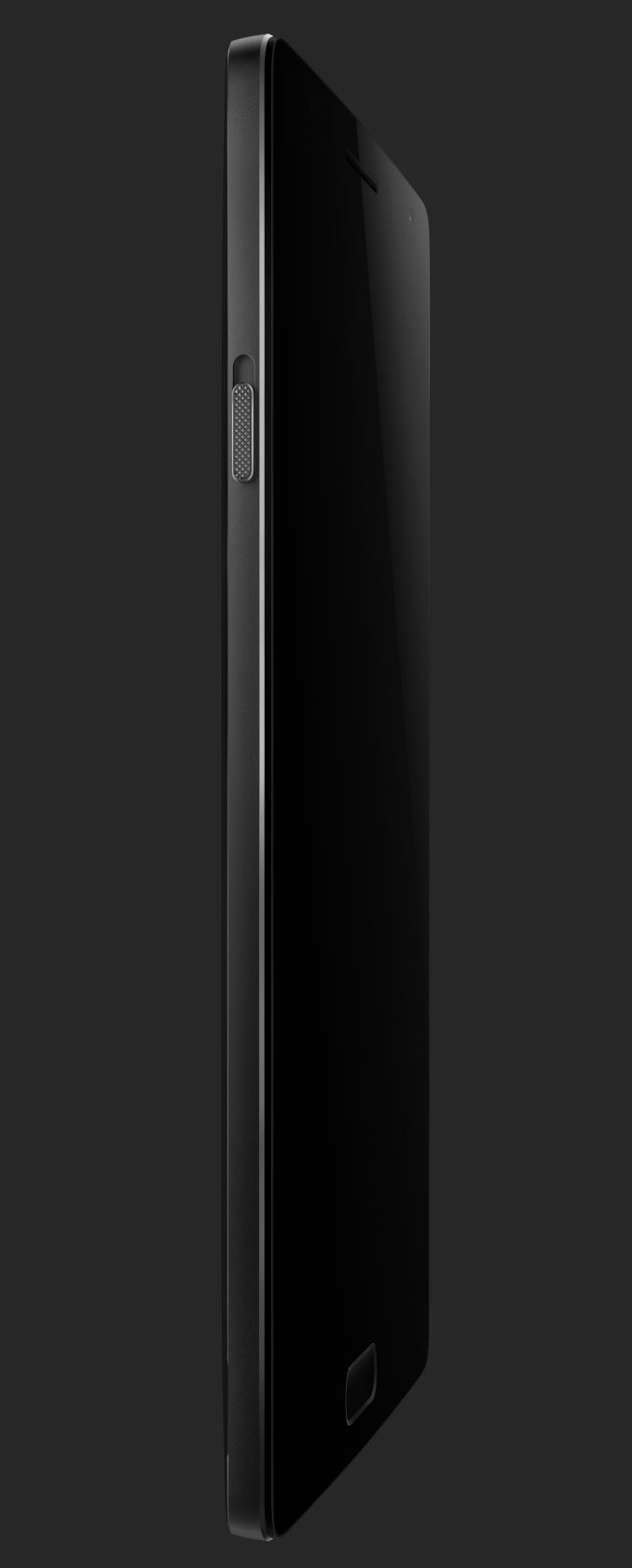
OnePlus has also introduced some new features in the form of a notification switch, fingerprint sensor, and USB-C port. The notification switch allows for fast switching between all, priority, and no notifications somewhat similar to the iPhone’s mute switch. The fingerprint sensor is also said to be better and faster than the iPhone 6’s TouchID sensor. It’s also purely capacitive, which should make it unlikely to fail over time and you can turn the phone on and unlock it only by using the fingerprint sensor, which would make the experience similar to the HTC One M9+ and Huawei Ascend Mate 7. The addition of USB-C is also great to see, as this makes OnePlus one of the first OEMs to adopt the reversible USB connector standard although it isn’t clear if all of the various features that come with USB-C will be adopted with the launch of Android M.
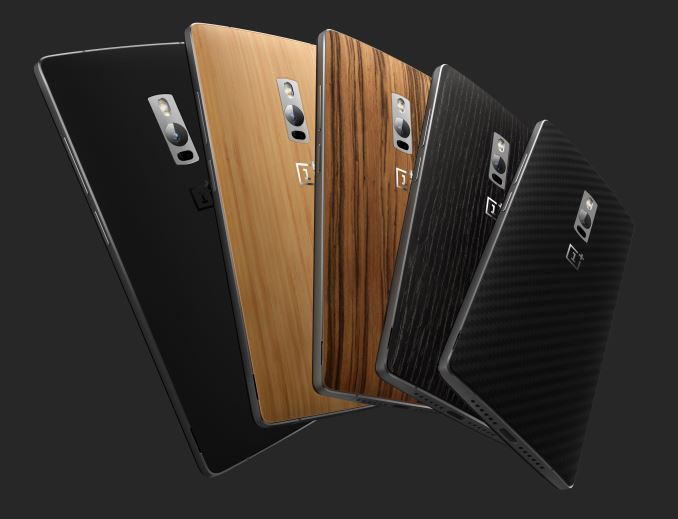
The OnePlus 2 will be available starting August 11 in select countries for the 64GB storage variant. The 3GB/16GB model will be 329 USD, and the 4GB/64GB model will be 389 USD. StyleSwap covers, which allow you change the back cover’s look and feel, will also be available, with black apricot, Kevlar, bamboo, rosewood, and sandstone black options.
Read More ...
The Huawei P8 Lite Review
Although many consumers are not familiar with Huawei, they are a company that I have seen selling smartphones for quite some time now. In the earliest days of the smaller Canadian carriers Huawei was one of the few companies that had smartphones available on their networks due to their use of the AWS band for HSPA which was uncommon in other devices here at the time. While Huawei has always had one or two flagship devices and makes some phablets, to me their core market was always mid range devices. Often these mid range devices are a downsized version of their flagship devices, and the smartphone being reviewed today is no exception. It's the Huawei P8 Lite, and it's the little brother of the Huawei P8. Read on for the full review of Huawei's latest mid range smartphone.
Read More ...
Lime Technology's unRAID 6 Brings Containers and Virtualization to NAS Units
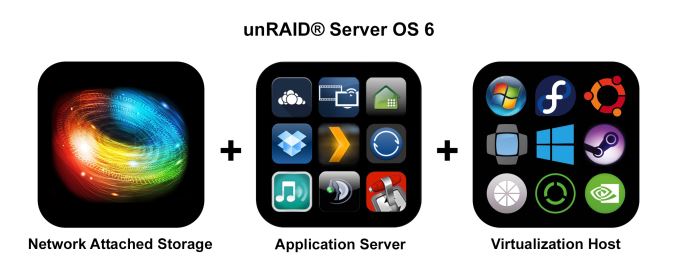
Some of the popular operating system options for DIY NAS units include Windows and its server variants, NAS4Free, FreeNAS, Rockstor etc. While NAS4Free, FreeNAS and Rockstor are free open source solutions, Windows and its server variants are paid options. Lime Technology's unRAID is a Linux-based embedded NAS OS that belongs to the latter category.
The following trends have been observed in the evolution of NAS operating systems over the last couple of years:
- An attempt to move from the traditional EXT3 / EXT4 to the more robust and modern ZFS and btrfs file-systems
- Movement of enterprise features such as high availability down the product stack
- Extensive focus on SDKs for enabling third-party applications / mobile-OS-like app stores
- Extending core functionality via features such as virtualization (NAS acting as a host for virtual machines) etc.
In the COTS space, QNAP's QTS brought about virtualization support more than a year back. Synology's high availability feature has been around in their business-class units for some time now. In addition, Synology's DSM 5.2 as well as QNAP's QTS 4.2 beta brought about Docker support. Recently, Lime Technology issued a press release to highlight the release of their unRAID Server OS 6.0 and proclaimed it to be the first non-beta NAS OS with support for both virtualization and containers (Docker). Where does unRAID stand in the current ecosystem of NAS units? Is it a good choice for your particular use-case? Read on for our analysis of the press release.
How does unRAID Work?
Traditional RAID systems use RAID 0, RAID 1, RAID 5, RAID 6 or some combination thereof. These RAID levels stripe data over multiple disks and, for non-RAID 0 or RAID 1 systems, also distribute parity blocks across the member disks. unRAID is not like these traditional RAID systems. The closest it can be compared to is RAID 4, a system in which data is striped across member disks and parity is always written to a dedicated parity disk. In the case of unRAID, the data is never striped. A given file is written to only one of the member disks. A dedicated parity disk enables recovery in case of a single disk failure. In addition, the disks can be of different sizes, as long as the parity disks is the largest of the lot.
unRAID 6 is a lightweight system in the sense that it can be booted off even a 512 MB flash drive on any x86_64 system. Usage as a NAS only requires 1 GB of RAM, and the whole system is loaded into and run off the RAM. Earlier versions of unRAID used ReiserFS, but unRAID 6.0 uses XFS by default. The use of a dedicated parity disk has a couple of drawbacks - the stress on the parity disk is comparatively higher when compared to traditional RAID systems, and the performance is bottlenecked by the performance of the parity disk. In addition, with UnRAID's policy of not striping data across the member disks, the performance is often what one disk can provide. To alleviate these shortcomings, unRAID provides the option of cache pools.
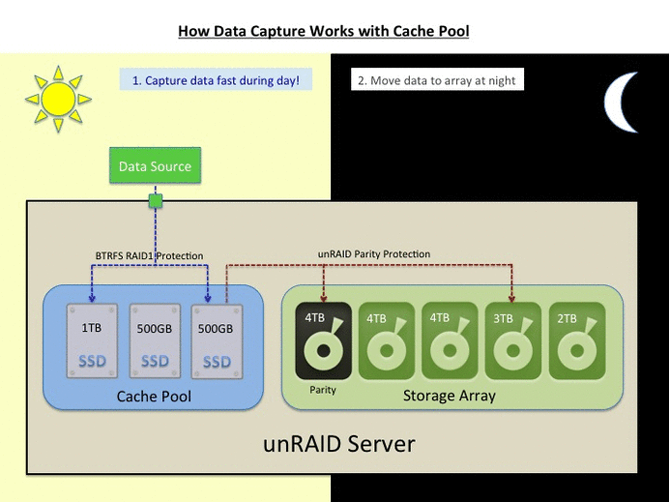
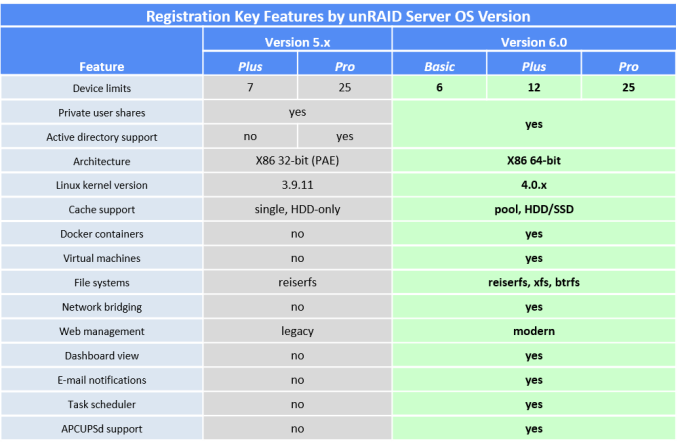
Cache pools can be made up of multiple disks protected using a traditional RAID-1 configuration. Unlike the main pool formatted in XFS, the cache pools are formatted in btrfs. unRAID 6.0 comes in three falvors - Basic ($59), Plus ($89) and Pro ($129). They differ only in the number of supported devices, as shown in the table below.
NAS Units as VM Hosts
We have already covered the usage of COTS NAS units as hosts for virtual machines using QNAP's QTS. unRAID 6 uses the same KVM / QEMU combination. Like QTS, unRAID also requires Intel VT-x / AMD-V support for running virtual machines.
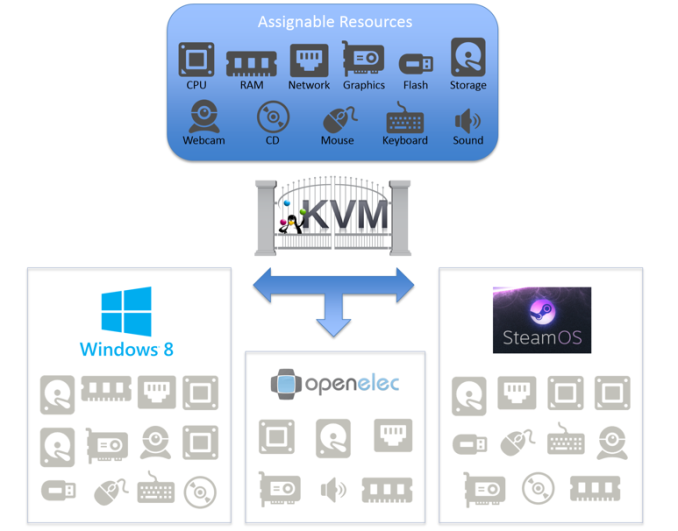
In addition, unRAID 6 also supports pass-through of PCIe devices such as GPUs. To give an example, it is possible to run Windows as a guest OS on unRAID 6 and also have it take advantage of discrete GPUs in the PCIe slot. This feature is in the works for QNAP's QTS, but unRAID seems to be the first to bring it to a stable release. It is important to note that PCI device pass-through requires IOMMU (VT-d / AMD-Vi) support.
Docker - Containers for Lightweight Virtualization
Over the last couple of years, OS-level virtualization has taken off, with Docker leading the way. It enables applications to be deployed inside software containers. Portable applications made using VMWare's ThinApp or Microsoft App-V are very popular in Windows - one can think of Docker as enabling similar functionality on Linux. Arguably, Linux is much more fragmented (with respect to the number of distros) compared to Windows. Docker enables seamless deployment of one application build on a variety of Linux distros / versions. Each application has its own isolated environment, preventing the creation of software compatibility / co-existence conflicts with others.

It must be noted that container technology is not an alternative for full-blown virtualization. To be more specific, the KVM/QEMU combination allows users to run even Windows on top of a Linux OS. On the other hand, Docker allows only apps written for any Linux distro / version to run on a particular machine. Obviously, the hardware requirements and stress on the host machine are comparatively lower for Docker compared to KVM/QEMU.
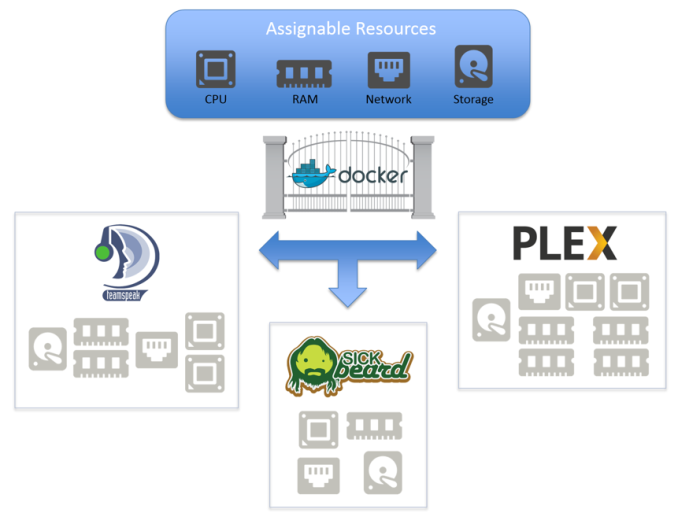
The benefits of Docker in the server space are not touched upon - unRAID's Docker feature is meant for use in a home environment.
Concluding Remarks
The nature of unRAID's approach to data protection severely restricts the target market for the OS, unlike, say, the approach of FreeNAS, NAS4Free or Rockstor. Realizing this, Lime Technology has gone to great lengths to ensure that UnRAID 6 targets power users and enthusiasts with media serving / storage needs. The presence of both Docker and full-blown virtualization with PCIe device pass-through enables it to target users with gaming PCs that need to double up as media storage servers.
unRAID has been having a loyal following (I have been following them on AVSForum since 2009). The new features in unRAID 6.0 will serve to bring in more people into the fold. unRAID's approach does have some advantages for media serving scenarios:
- Avoiding striping ensures that it is trivial to take out a disk, mount it on another Linux system and copy off its contents. To drive home the advantage of this aspect - in case of simultaneous failure of two or more disks, it is possible to recover at least some data from the array by mounting the remaining good disks on another PC. (In the case of a RAID-5 array, the whole data is toast).
- Avoiding striping ensures that only the relevant disk needs to be spun up to read or write data. This may result in substantial power savings for multi-bay units where the power consumption of the member disks far outweighs the consumption of the system components.
However, there is plenty of scope for improvement - particularly since many users tend to have a single NAS for storing both media as well as other data:
- Improvement in data transfer rates across all types of accesses
- Automatic / continuous protection against bit-rot (available for the btrfs cache pool, but not the main XFS volume)
- Increasing disk sizes (and URE ratings remaining the same) make it a risky proposition to run multi-bay storage servers that can withstand only the failure of one disk.
- Compared to solutions like FreeNAS, NAS4Free and Rockstor, unRAID is closed-source and carries a licensing fee (ranging from $59 for the Basic version to $129 for the Pro).
We have provided a brief overview of unRAID and what v6.0 brings to the table. More information can be gleaned from Lime Technology's FAQs. If you are an unRAID user, feel free to chime in with more information / opinions in the comments section.
Read More ...
The MSI Z97A Gaming 6 Motherboard Review
Choosing a motherboard is not as easy as it sounds. Most people rely on price, brand experience, perhaps specific features and online reviews to help decide what fits best. While the Intel 9-series (Z97) platform has had a rough ride, motherboard companies always see the need to refresh to new designs periodically. As a result we get devices such as this, the MSI Z97A Gaming 6, to review.
Read More ...
NVIDIA Launches Summer GeForce Game Bundle - Metal Gear Solid V: The Phantom Pain
Launching today is a new bundle for the summer, which NVIDIA is calling the “Game Like A Boss” bundle, and is built around the forthcoming Metal Gear Solid V: The Phantom Pain. The Phantom Pain is the latest in the long, long line of Metal Gear games, and the follow-up to last year’s Metal Gear Solid V prologue game, Ground Zeroes. Meanwhile, although an NVIDIA bundle game, The Phantom Pain is not a GameWorks game and won’t feature any of NVIDIA’s effects libraries, though the company is quick to note that it will work with SLI, DSR, and the company’s other baseline features.
Like the previous Two Times bundle, the Phantom Pain bundle is for the bulk of NVIDIA’s 900 series desktop lineup, and once again covers some of NVIDIA’s mobile parts as well. The GTX 960, GTX 970, GTX 980, and GTX 980 Ti are included in the bundle on the desktop, and on the mobile side the GTX 980M and GTX 970M are included as well. Meanwhile the GTX Titan X will remain absent, as NVIDIA more often than not NVIDIA excludes them from bundles, as is the case here.
| NVIDIA Current Game Bundles | ||||
| Video Card | Bundle | |||
| GeForce GTX Titan X | None | |||
| GeForce GTX 980 Ti | Metal Gear Solid V: The Phantom Pain | |||
| GeForce GTX 980/970 | Metal Gear Solid V: The Phantom Pain | |||
| GeForce GTX 960 | Metal Gear Solid V: The Phantom Pain | |||
| GeForce GTX 750/750Ti | None | |||
| GeForce GTX 980M/970M | Metal Gear Solid V: The Phantom Pain | |||
| GeForce GTX 965M/800M Series | None | |||
Finally, as always, these bundles are being distributed in voucher from, with retailers and etailers providing vouchers with qualifying purchases. So buyers will want to double check whether their purchase includes a voucher for either of the above deals. Checking NVIDIA’s terms and conditions, the program is valid in all regions except China, with the program scheduled to run through September 1st (or while supplies last). As for The Phantom Pain itself, the game is being distributed through Steam and is currently scheduled for release on September 15th.
Read More ...
The 2TB Samsung 850 Pro & EVO SSD Review
For the past two years, client SSD capacities have been stumbling at 1TB. The cost of NAND is still too high to make terabyte drives a mainstream capacity, but the prices have fallen enough to create a market for multi-terabyte SSDs among enthusiasts and professionals. Samsung has historically held density records (e.g. 1TB mSATA) thanks to its advanced NAND and packaging technology and with the release of 2TB 850 Pro and EVO models Samsung is the first SSD manufacturer to enter the multi-terabyte era.
Read More ...
Quick Note: Apple Watch to Get Brick and Mortar Boost From Best Buy
Smartwatch will hit Best Buy retailers nationwide next month
Read More ...
Available Tags:MSI , Gaming , NVIDIA , GeForce , Samsung , SSD , Apple ,


No comments:
Post a Comment