

ASRock at Computex 2015: Pre-Show PR gives Z170 Motherboards and 4T4R Router
Next week is the annual Computex trade show and we have a substantial number of meetings booked, but as part of the regular pre-show ritual, companies are coming at us with the start of their press release mêlée. One of the first to officially release their embargo is ASRock, showing off some impressive equipment ready for media to gawk at when we hit the booth on the show floor.
First up is a tantalising teaser of what is to come. Anyone interested in the PC space is talking about upcoming Broadwell and the iteration after that called Skylake. Skylake for desktops will require a new chipset and new motherboard, which we at least know that Z170 is part of it (H, B and Q series motherboards are likely in the scheme as well). A big part of Computex in recent years has been showing off these designs regardless of the launch window, and ASRock’s PR today mentions two such Z170 motherboards: the Z170 Gaming K6 and the Z170 Extreme7.
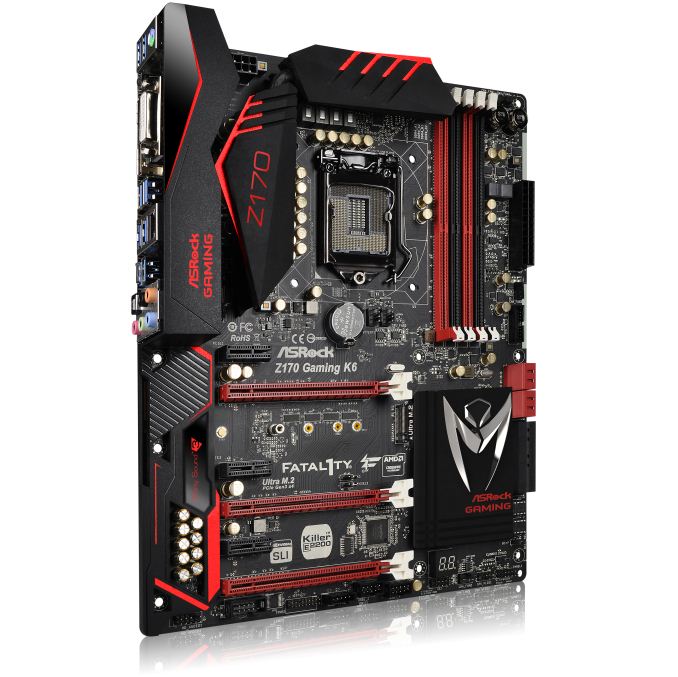
The Z170 Gaming K6 throws up some interesting talking points. We have an ASRock gaming logo on the chipset, which is supposed to be akin to a praying mantis and will most likely supplant the Fatal1ty branding on the gaming range. The new socket looks similar to the one used for Z87 and Z97. The PCIe slots are split electrically x16/x8/x4 with an Ultra M.2 in the middle suggesting a PCIe 3.0 x4 M.2 slot. Killer networking returns on this platform, and it would seem that SATA Express is also along this line. In the top left, you’ll notice the DRAM slots are listed as DDR4_A1, DDR4_A2 and so on, with single sided latches supporting the DDR4 modules.
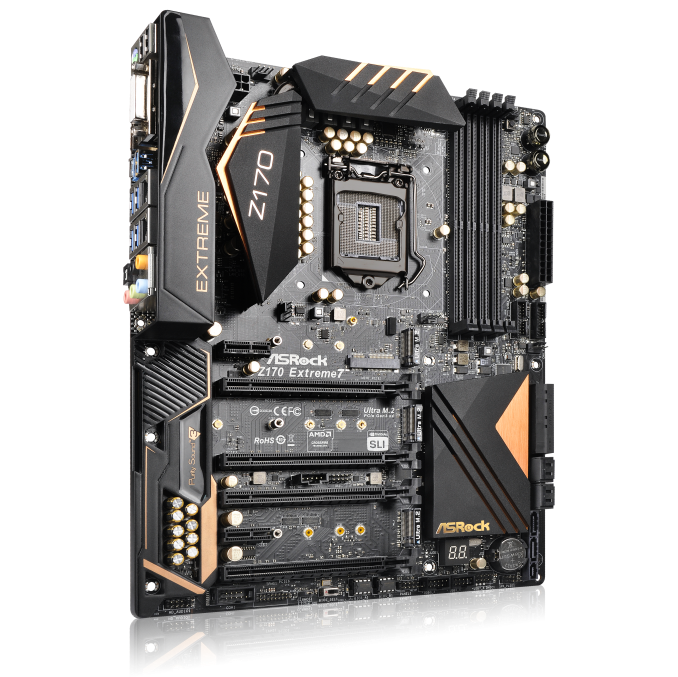
The Z170 Extreme7 images are more exciting, showing off three M.2 slots between the PCIe slots. These are all listed as Ultra M.2, which means PCIe 3.0 x4 bandwidth each for 12 lanes. At this point details of the Z170 platform have not been released, but having access to three M.2 x4 slots either means that some can only be used when integrated graphics is in play, the CPU has more than 16 lanes, or some of these are running off the chipset, none of which can be confirmed. Both the Extreme7 and the Gaming K6 would seem to have Purity Sound 3, the next iteration of the upgraded motherboard audio. This should be the Realtek ALC1150 still, however that is not confirmed as of yet.

Another surprising element to the press release was the announcement that ASRock’s Gaming brand is expanding beyond motherboards. Similar to other gaming brands from motherboard companies, ASRock will also provide mice and mousepads (no mention of keyboards or headsets), but in an interesting twist they will also provide a router. The G10 is meant to be a similarly themed (with the logo and the angled edges) device but offers 4T4R connectivity on 802.11ac. This means up to 1733 Mbps connectivity over a single WiFi application. The only critical point here is that no-one sells a 4T4R WiFi card for a PC – the most we’ve seen so far is 3T3R in commercial applications. It will be interesting to see if that leads down a certain path of better WiFi bandwidth opportunities.
We have plans to meet with ASRock during Computex where we hope to get some hands-on time with this stuff. Release dates and pricing are not being announced as of yet.


Read More ...
A Look At The Changes In The Android M Preview
Today during Google I/O 2015's opening keynote Google announced the latest release of their Android operating system. The new version of Android is using the code name Android M, much like how Lollipop was initially referred to as Android L. While Android Lollipop was a major release with many new features and a comprehensive redesign, Android M goes back to basics, and focuses on polishing what Google introduced with Lollipop. That isn't to say that there are no new features or design tweaks, but they are not on the same scale as Lollipop's changes. It may be best to think of Android M being to Lollipop what Jellybean was to Ice Cream Sandwich.
When Google originally announced Android L at Google I/O last year, they released a developer preview so developers could prepare their apps for the new operating system, as well as for both developers and Android enthusiasts to provide feedback about the changes that were being made. Google has done the same thing with Android M, and they have committed to releasing over-the-air updates to the developer preview on a monthly basis.
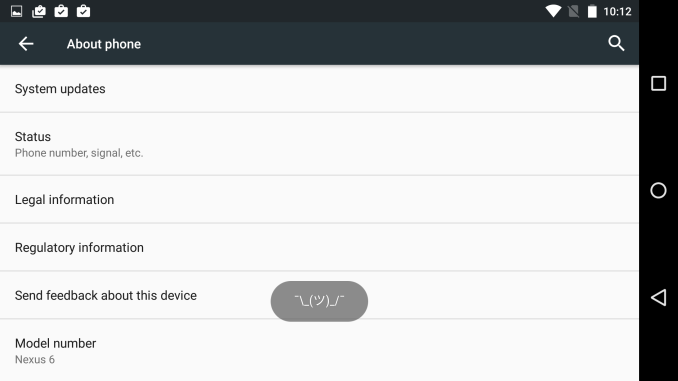
While I'm hopeful that the final name of this next Android release will be Android Muffin, we won't know details about the name of the new OS for quite some time. Opening the Android M Easter egg in the About phone section of Settings shows you the new Android M logo which you can see in the cover image of this article. Long pressing on that logo kicks you out of that section and presents you with the increasingly common Tsu (ツ) emoji. Google clearly enjoys the speculation from users and the press about what the final name will be.
While we don't know the full name of Android M, we can look at some of the changes that are included in the developer preview build that Google has released. All of these features are obviously subject to change, and some will most certainly change as users and developers give feedback on them in the coming months. I'm just taking a look at what changes have been made so far to see where Google is headed, and to cover some of the changes that were too small to be mentioned during Google's keynote.
Launcher Changes
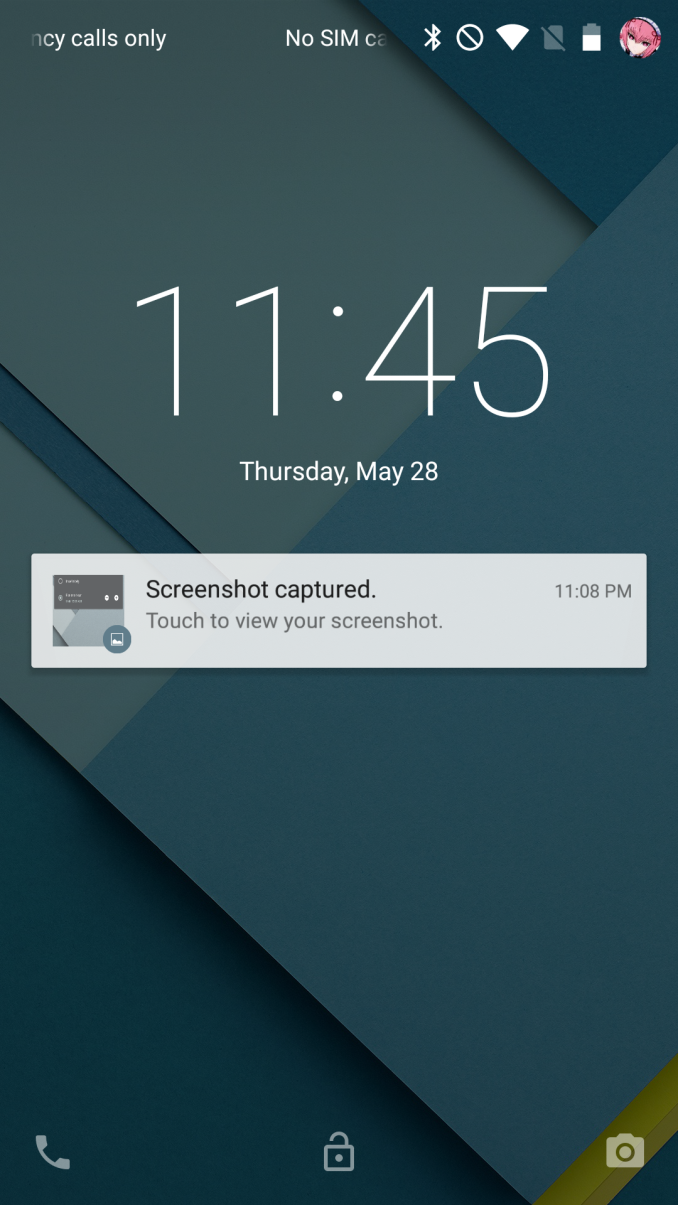
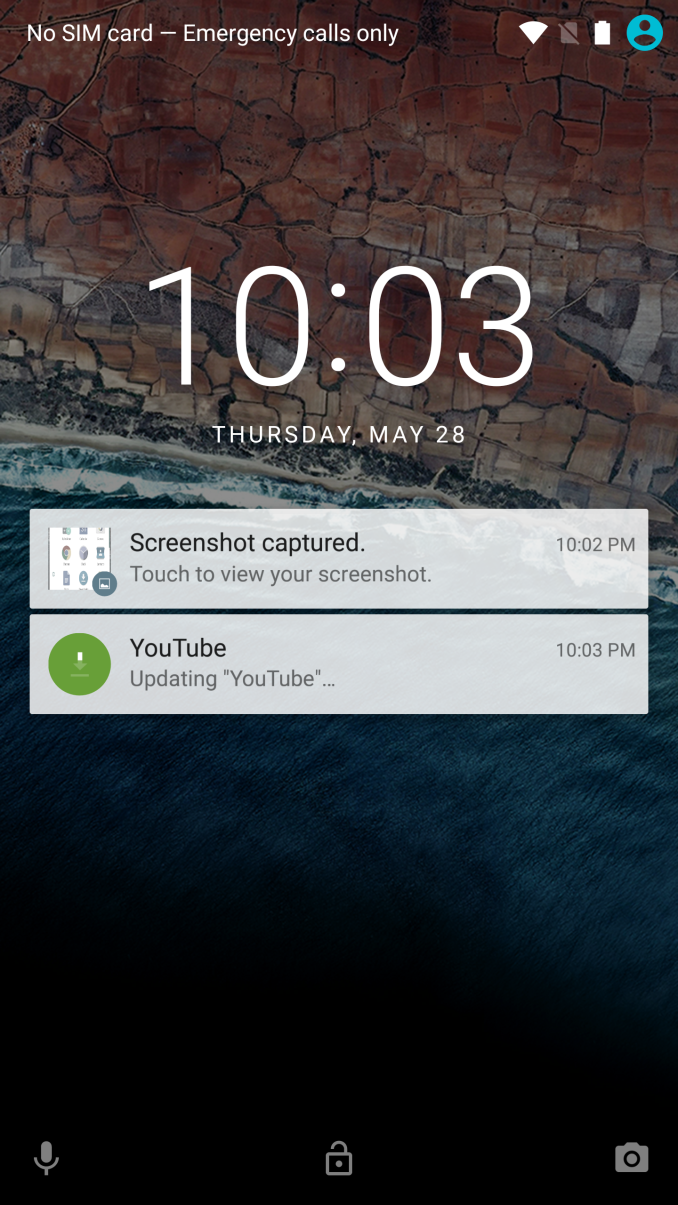
Android Lollipop on the left, Android M on the right
The first thing you're likely to notice after installing the Android M preview is that Google has included a new wallpaper which is set as the default option. They've also made some notable tweaks to the lock screen. The most obvious is the change to the clock and date. Not only is the text more bold, but the altered spacing between characters may mean that we're looking at a font other than Roboto, or at some special version of Roboto. I've never been very good with identifying fonts so I couldn't say for sure, but I personally prefer the thinner look of the original clock.
On top of the new font, Google has also replaced the phone dialer shortcut with a voice search shortcut. I would love to know if this is the result of data showing that people rarely used the phone shortcut. The phone part of a smartphone now seems more like an additional app on what is really a computer in your pocket.
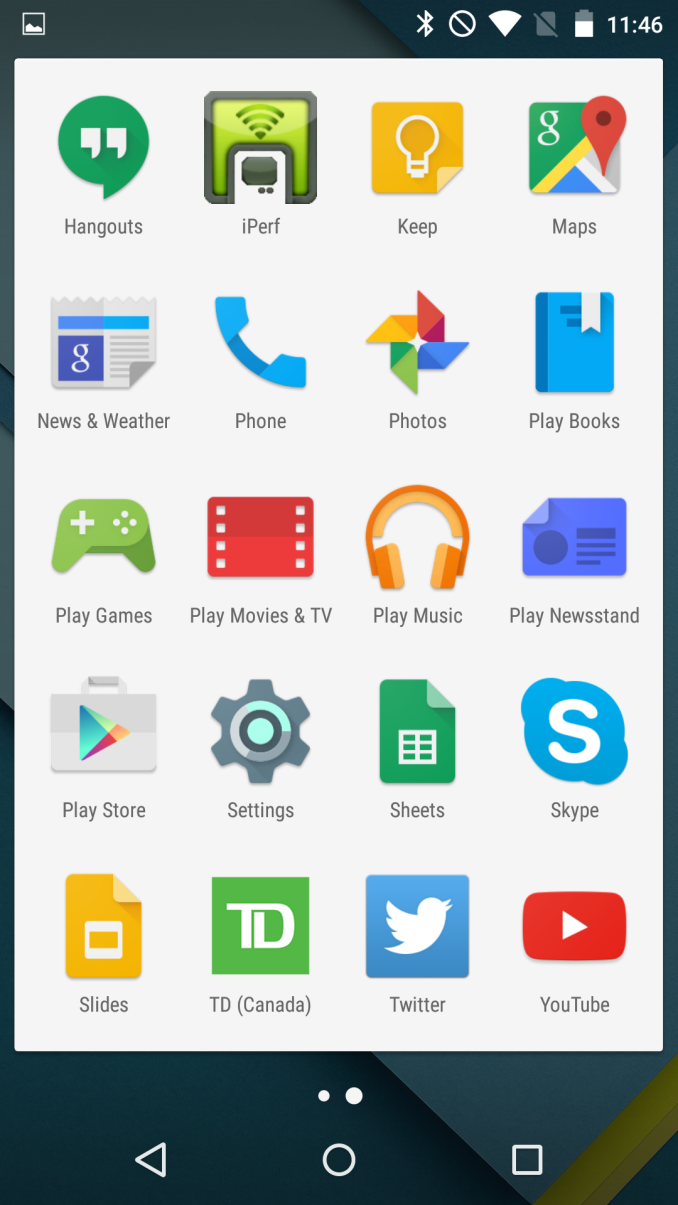
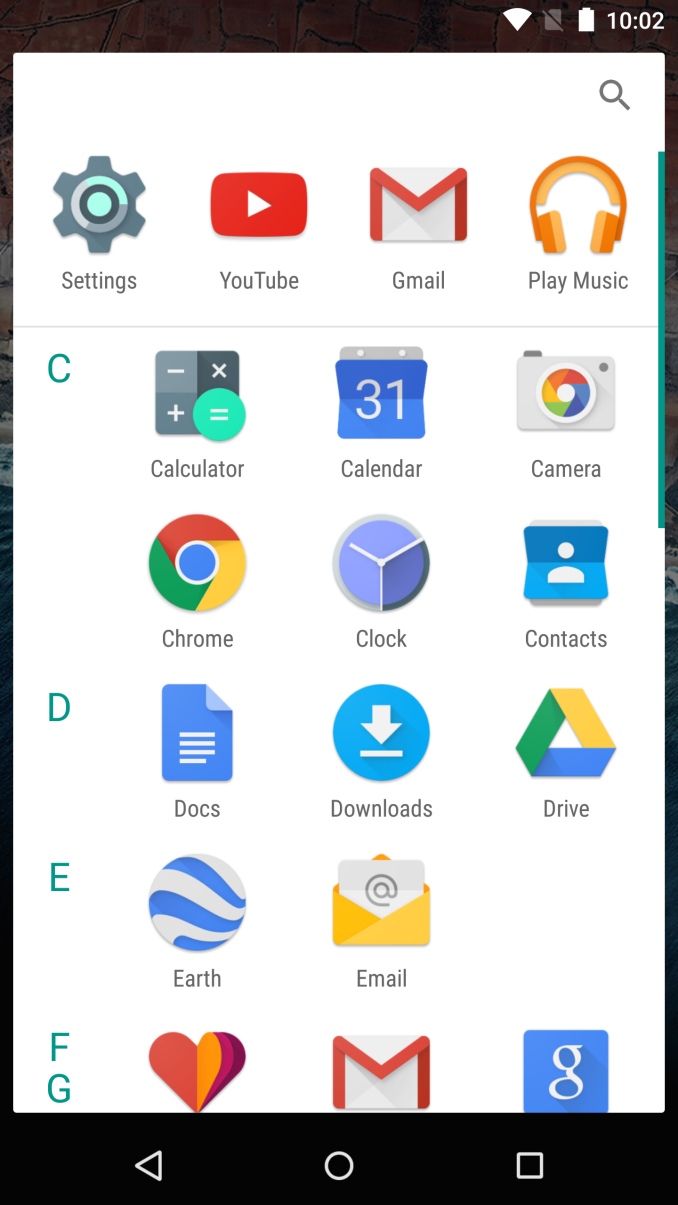
Android Lollipop on the left, Android M on the right
Not much is tweaked with the home screens of the Google Now Launcher in Android M. You still get the same grid of icons, with the leftmost home screen being Google Now. Once you enter the app drawer you'll see that Google has made some significant changes after all. The big change is a switch from having pages of apps that you scroll horizontally between to having a continuously scrolling vertical list of apps. From a functional standpoint, this layout is similar to how the app drawer was designed in older versions of Android from Gingerbread and prior.
There are also some changes at the top and on the side of the new app drawer. Based on some quick testing, I believe that the row of four icons on the very top are your four most commonly used applications. Above those is a search bar for those users who have so many applications that scrolling to them becomes a chore. Since the drawer is organized alphabetically, Google has made finding apps easier by putting letters on the left side which indicate the first letter of the app names that you're currently viewing.
App Permissions
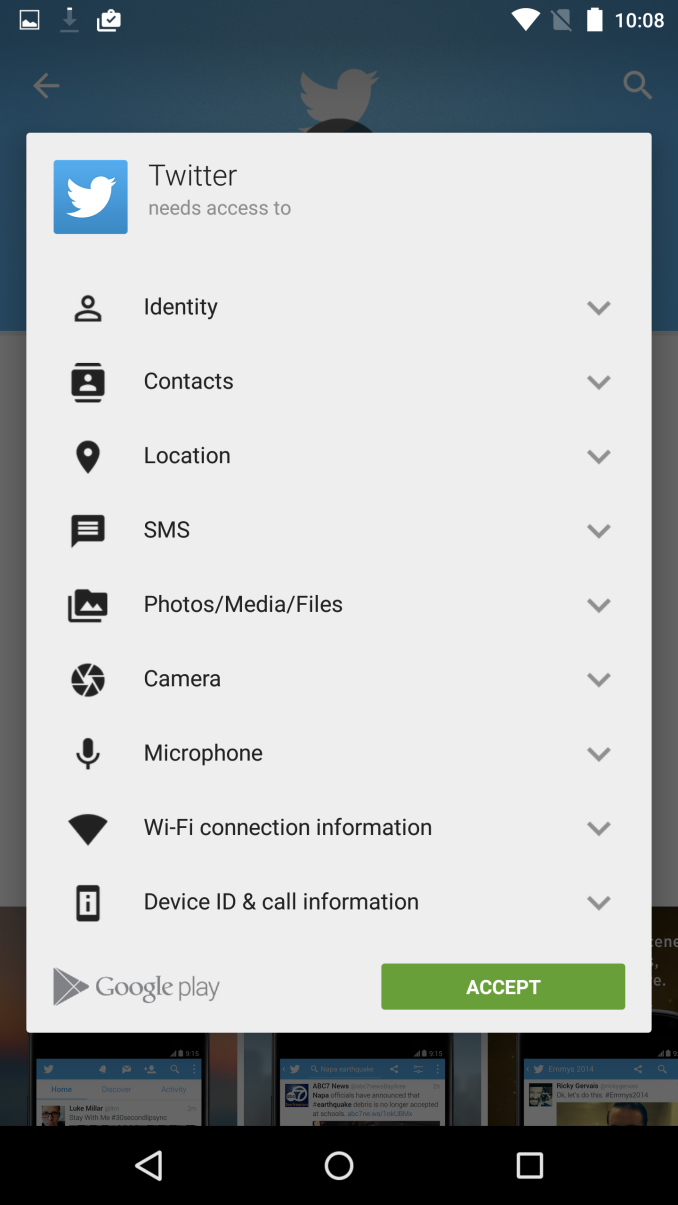
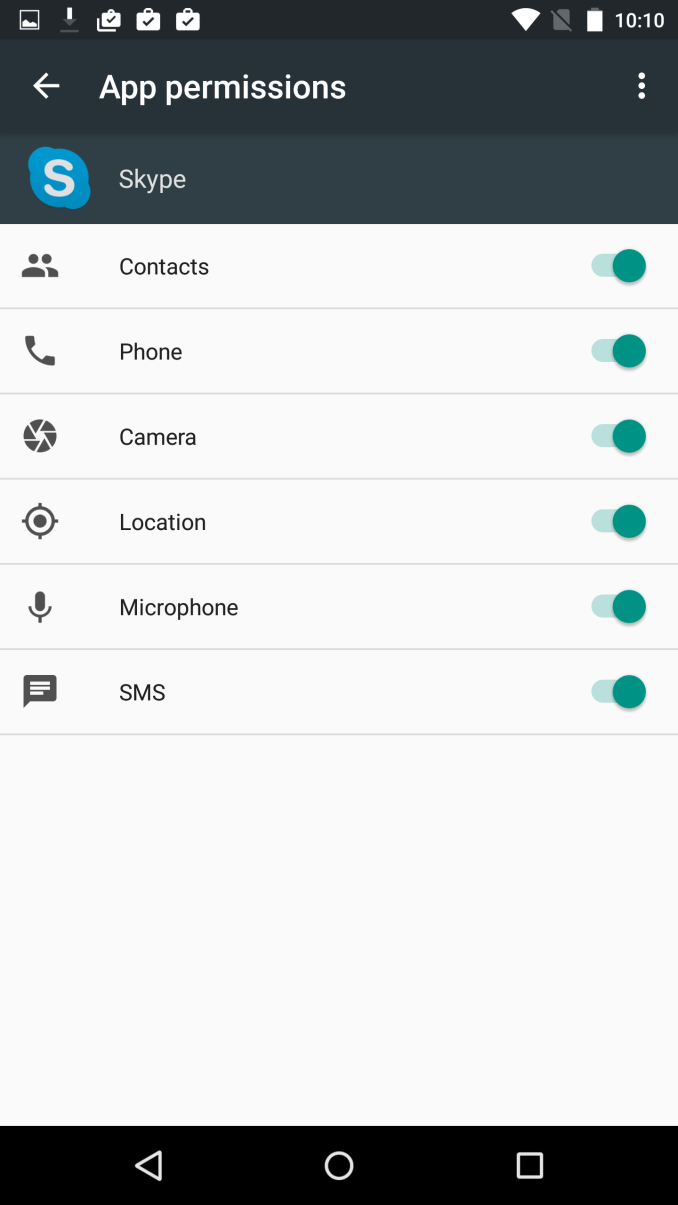
Something I've desired for a long time is a revamp of the permissions system on Android. Quite frankly, I feel like the system prior to Android M was a complete and utter disaster. The reason is that if there was a single permission that you didn't want an app to have, then you were barred from installing that application. Permissions were also grouped poorly, and sometimes apps would have to ask for permissions that made them seem malicious but for some obscure reason were required for part of that app to function. In Android M, Google has resolved both of my concerns by changing the system to ask permission at the time a function of the phone needs to be used rather than at the time of install.
Since the permissions system is a key part of Android, it wasn't possible for Google to bring their new system to older applications. Because of this, the screen above with a list of permissions that you need to accept at the time of install won't be going away any time soon. However, Google has been able to implement part of their new permissions system, and if you take the time to use it you can control which permissions an application has access to. This can be done by going to the Apps menu in Settings, selecting the app, and then selecting permissions. This brings up the list you see in the right image above, and you can enable to disable permissions at will. I think this is a huge win for users and their privacy, and it will be even better when developers update their applications so that users can just accept or deny permissions as they are needed.
Copy and Paste
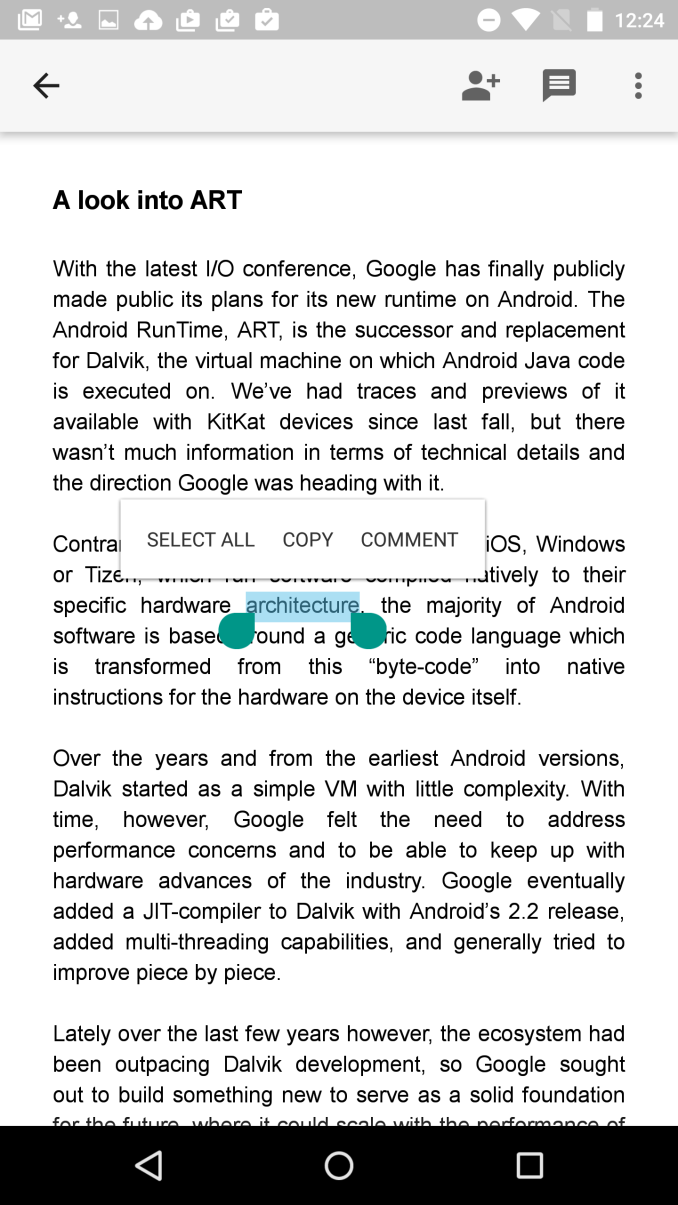
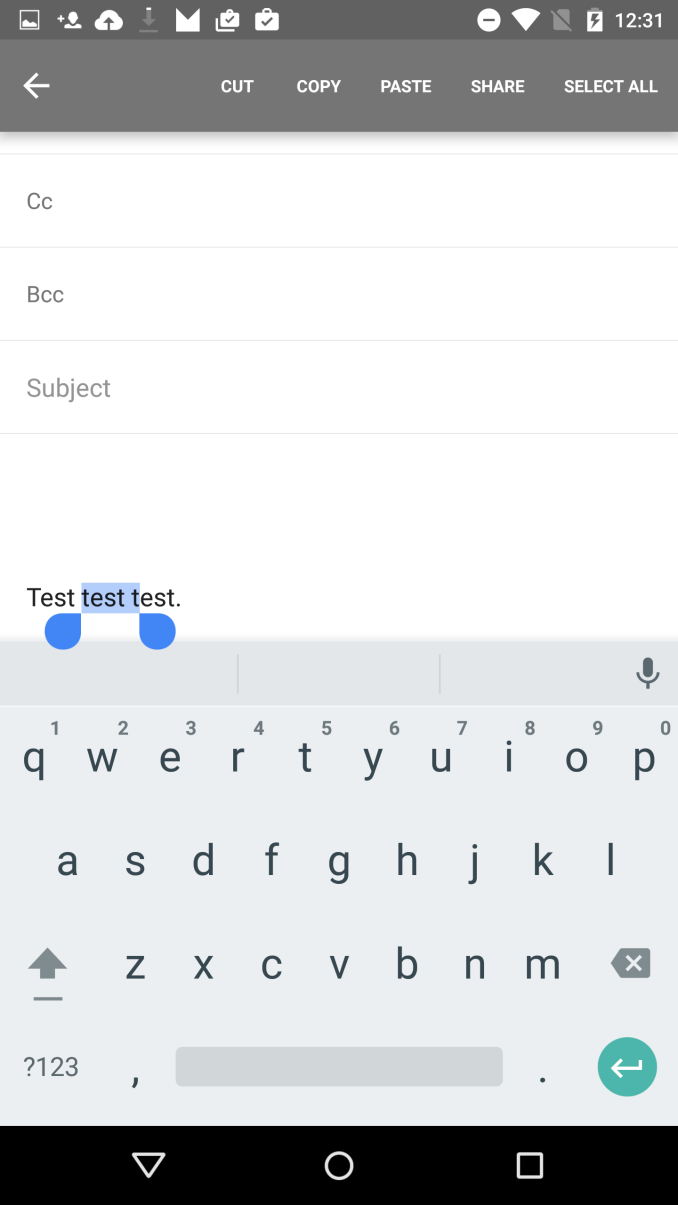
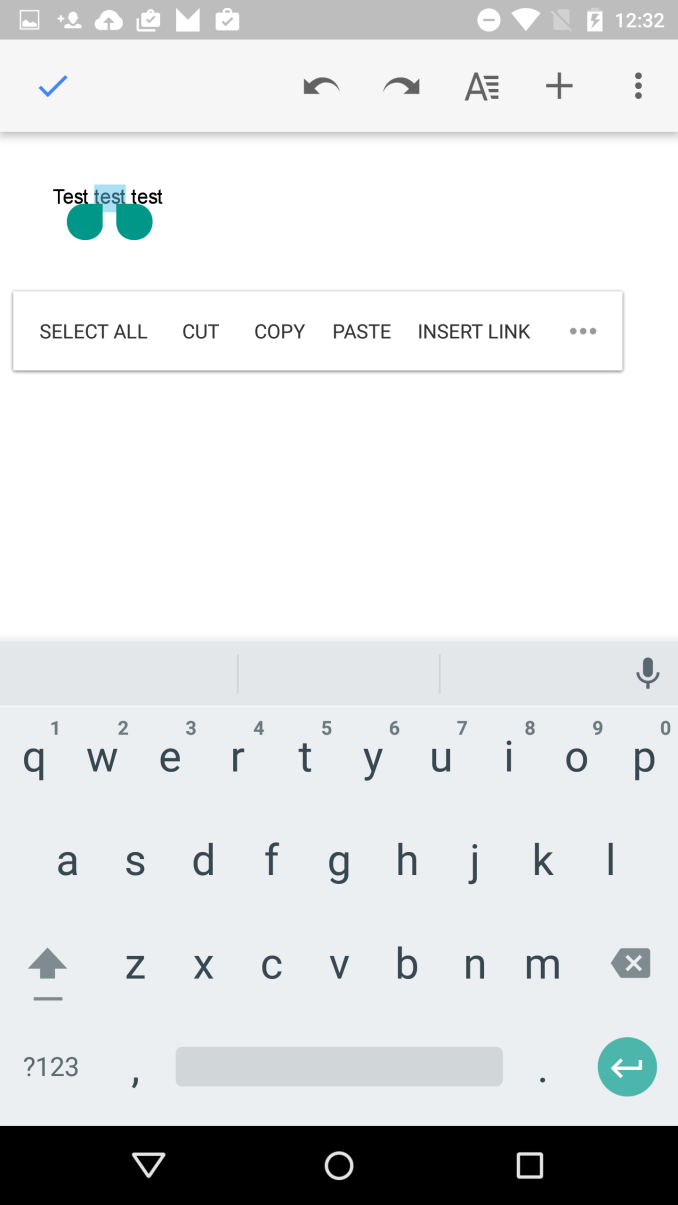
One of the smaller improvements that Google noted during the keynote was a new system for copy and paste. Rather than having a group of unlabeled options appear at the top of the phone, a floating menu would appear over the text that was selected with the available options. It's basically the same way iOS and Windows Phone handle copy and paste, and it's not surprising to see all the operating systems converge on this way of doing it as it really does seem like the best way to handle it.
Unfortunately, as of right now it doesn't seem to work properly in every application. Above you can see Docs, Gmail, and Chrome, and each of them present a different menu for copy and paste. Docs supports the new floating menu, Gmail now uses text instead of unlabeled icons but still has it at the top, and Chrome is unchanged in its behavior. The new feature where words would be selected in chunks surprisingly only worked in Gmail which doesn't even support the new menu properly.
Thankfully, the feature worked perfectly in third party apps like Skype and Twitter just fine. I was concerned when Google's own applications weren't cooperating with the new feature, but it appears that they are the exception rather than the rule.
Volume Controls
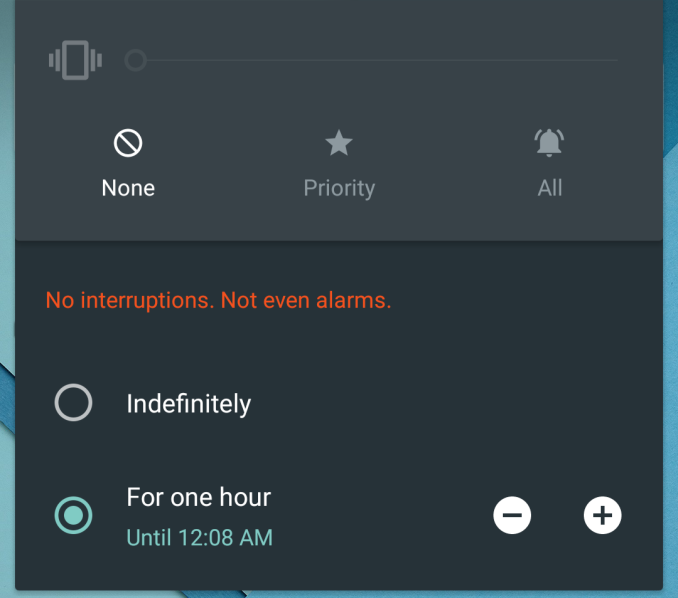
Android Lollipop Volume Menu
Another smaller change in Android M that Google made note of is a change in the behavior of volume controls. Google was clearly aware of the user confusion caused by the new system they introduced in Android Lollipop for handling when the phone was muted, as they made a point of asking how many members in the Google I/O audience didn't like the changes. The problem was fairly simple. In older versions of Android, hitting your volume down button at the lowest volume level would enable a vibration only mode, and hitting it once more would enable silent mode. Android Lollipop made some strange changes that made it seem like silent mode was removed, and instead added three options which defined what notifications would be allow to trigger a vibration. While this was actually a nice feature for allowing only certain contacts to trigger notifications, it was implemented in a clumsy manner that confused users.
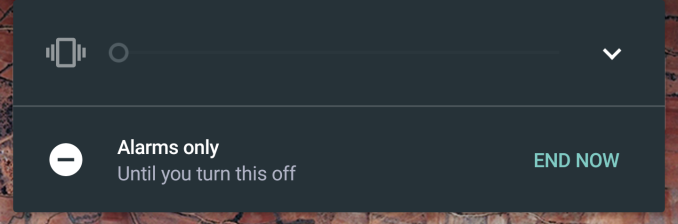
In Android M, the volume options have been greatly simplified. When hitting volume down while vibration only mode is enabled, all sounds and vibrations are completely disabled, with the exception of alarms. This still poses a problem for users who want to have their phone be completely silent no matter what the circumstance is. For that, users will need to take a look at the new Do Not Disturb toggle in the Quick Toggles section of the Notification Drawer.
To me, the new system in M is better, but it's still not perfect. I don't understand why Google feels like Do Not Disturb needs to take the place of silent mode by allowing you to block all sounds, with the volume mode accessible via the volume buttons limited to still allowing alarms to be triggered. iOS has had a Do Not Disturb feature for years now, and it coexists perfectly with the ability to have a silent mode that blocks all alerts or vibrations.
Other Tweaks
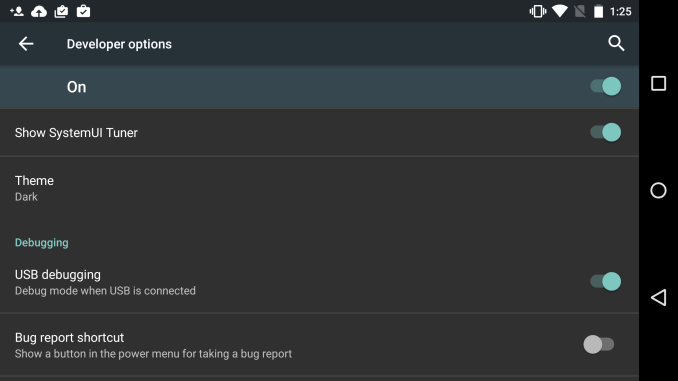
The Developer options section of the Settings app also has a couple interesting new feature additions. The first is a Theme option which allows you to select a Light or Dark theme, much like the ones that you can select for the keyboard. At present it only changes the appearance of the Settings app, and it's unclear if this will ever be extended to other applications or parts of the operating system.
The second interesting new feature in the SystemUI Tuner. The design of the menu makes it clear that Google plans to add more options here in the future, but right now it allows you to tweak the toggles that are available in the Quick Toggles part of the Notification Drawer. After removing the rotation lock toggle, the SystemUI Tuner began to crash upon opening for me, so I would recommend not altering any toggles that you use frequently.
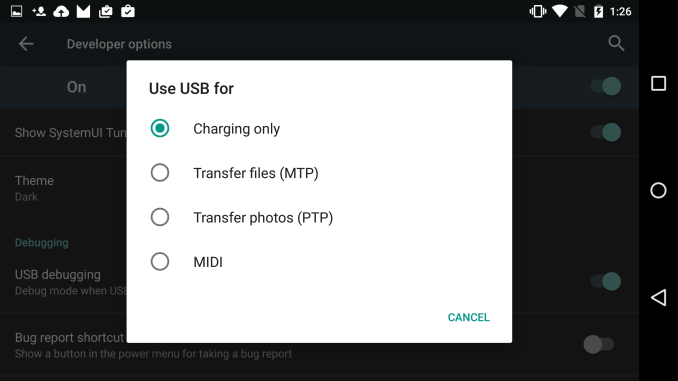
The last change that I've noticed during my time using the Android M preview is this new menu for choosing what you want your USB connection to do. Google showed this off during their keynote, but with a different purpose. At the moment, it allows you to choose whether you want to just charge your device, or whether you want to connect via MTP or PTP to transfer files. This is probably to defend against attack vectors like hacked USB chargers, but the menu will also be very useful when USB Type C becomes common among devices as it will allow you to negotiate which device is going to charge the other. This means you could potentially recharge your phone from your tablet's larger battery.
These impressions all relate to the user-facing changes in Android M. Because this is a release that focuses on polish and bug fixes, there are a lot of changes under the hood that are hard to easily examine and evaluate, and some of the most amazing ones such as the new Now on Tap feature are yet to be implemented. However, what I've seen so far is very promising. As both Android and iOS are reaching a point of maturity after their respective redesigns and feature additions, I openly welcome a focus on polish and under the hood changes that will improve the user experience in ways that the user will not directly see. That's clearly the philosophy Google has adopted with Android M, and it will be very interesting to see how it evolves in the next few months as Google releases more developer previews to show us where they're headed.
Read More ...
Avago Acquires Broadcom Corporation For $37 Billion

Avago is a semiconductor company that produces a number of different products. They make PCIe switches for motherboards, and at one point were the owner of SandForce and their SSD controllers before they were sold to Seagate. Some of their products also cross over with Broadcom’s focus on the wireless industry, such as their power amplifiers for mobile radios. Broadcom is a company that we encounter frequently in the mobile space, as they make many different chips for WiFi and GNSS. If you have a smartphone, it’s very likely that something in it was made by Broadcom. They also produce many of the chips used in networking equipment for data centers.
As for why Avago would seek to acquire Broadcom, it could be that both Avago and Broadcom hope to combine their product portfolios in order to compete with Intel and Qualcomm in the areas of wired and wireless networking. The combined company after the acquisition will be based in Avago’s home of Singapore, and will continue to be called Broadcom.
Read More ...
AMD Releases Catalyst 15.5 Beta Drivers
The internal build number on these drivers is 14.502.1014.1001, so for anyone counting branches these new drivers are an incremental update over the 15.4 betas, and at this point I’m not expecting any differences in games other than the two games AMD is specifically targeting.
Finally, as always, you can grab the drivers for all current desktop, mobile, and integrated AMD GPUs over at AMD’s Catalyst beta download page.
Read More ...
Google Announces Project Brillo and Weave for IoT
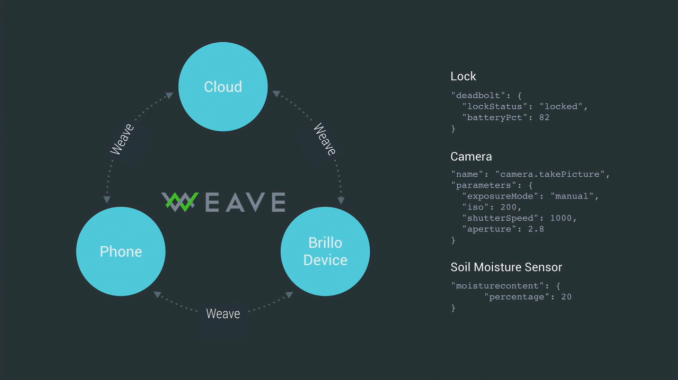
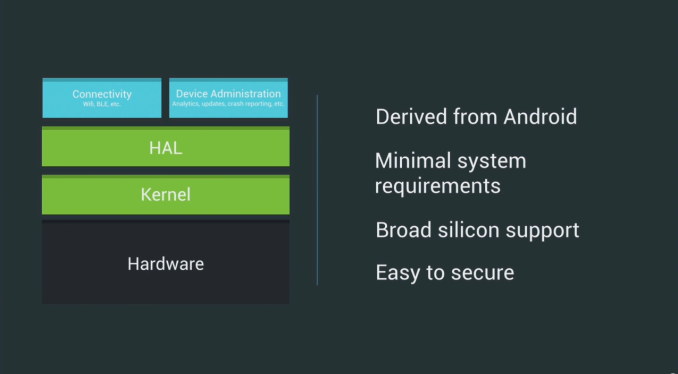
Starting off with the new OS, under the codename of Project Brillo, Google promises a very stripped down Android-derivative operating system. Google explains that it keeps the lower-level components of Android such as the specific Linux kernel modifications and hardware abstraction layers. Device, and most importantly SoC manufacturers can reuse and continue basing their software stacks on the Android frameworks that have been standardized in the mobile space. Project Brillo is meant to offer a versatile OS with minimal system requirements for IoT devices such as for example your thermostat or light switch.
To make use and interconnect the IoT ecosystem, Google also announces WEAVE, which is an API framework meant to standardize communications between all these devices. We still don't have much technical information yet, but from code-snippets given in the presentation it looks like a straightforward simple and descriptive syntax standard in JSON format. WEAVE is a platform-agnostic API that can be implemented by any vendor and developer if they wish to do so.
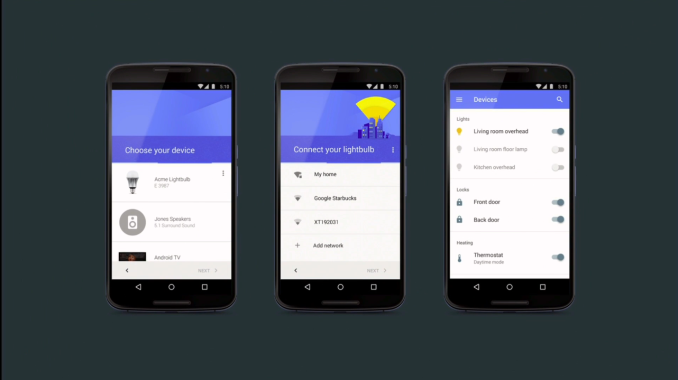
Google plans to release the developer preview of Project Brillo in Q3 while the WEAVE API standard is supposed to see its publication in Q4 later in the year.
Read More ...
Google Introduces Google Photos
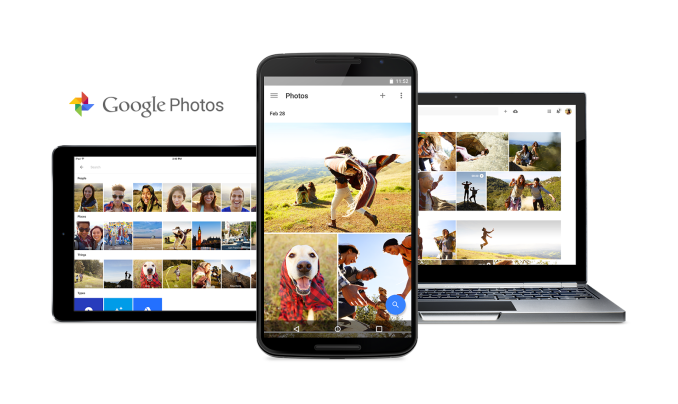
Google's goal is that Google Photos will become a place where users can permanently store a continually growing collection of photos from their cameras and mobile devices. They also hope to improve upon the organization and sharing of photos, which has become a difficult problem to tackle with people taking and sharing more photos than ever.
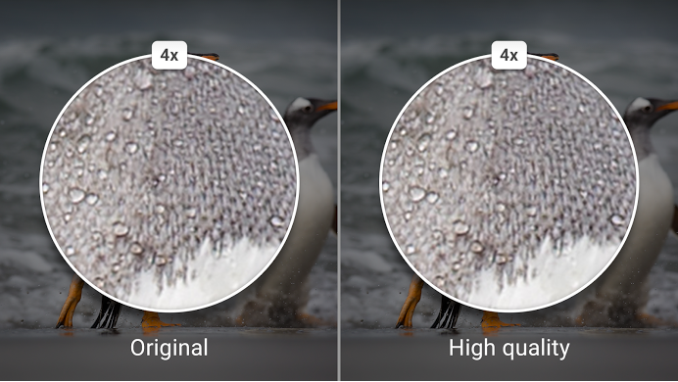
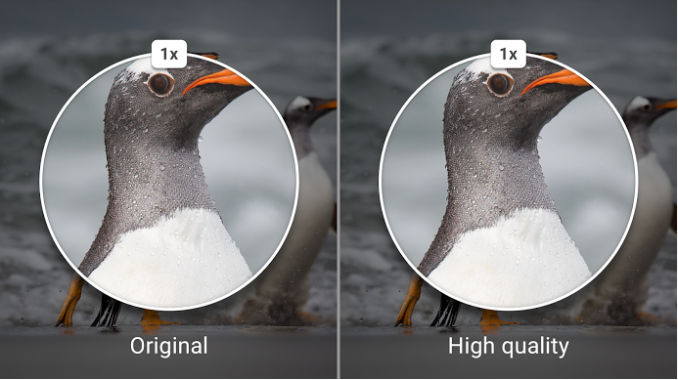
The big promise of Google Photos is that the storage for your photos will be unlimited. This is a huge step above the measly 5GB of iCloud storage you can use with Apple's Photos offerings, and still an improvement over services like Flickr which offer users 1TB of storage. However, there is a caveat to the unlimited storage. While you aren't limited by the amount of photos or videos you can store, you are somewhat limited by their quality. Users who opt for unlimited storage can only store images at up to 16MP, and videos at 1080p. This shouldn't really affect any users who intend to use the service for storing photos from their smartphone, as most smartphone cameras have lower resolutions than 16MP.
There is another option for users who want to use Google Photos for their high resolution pictures from their DSLR or mirrorless camera, or who just have a very high resolution smartphone. Users can opt to have Google Photos use their Google Account's 15GB of storage, and with this option there are no limits to file size or resolution. Since many devices give away 1TB of free Google Drive storage, I suspect that this option will be popular among users who want to keep their photos in the highest possible resolution while staying within Google's ecosystem instead of going with another photo offering like Flickr.
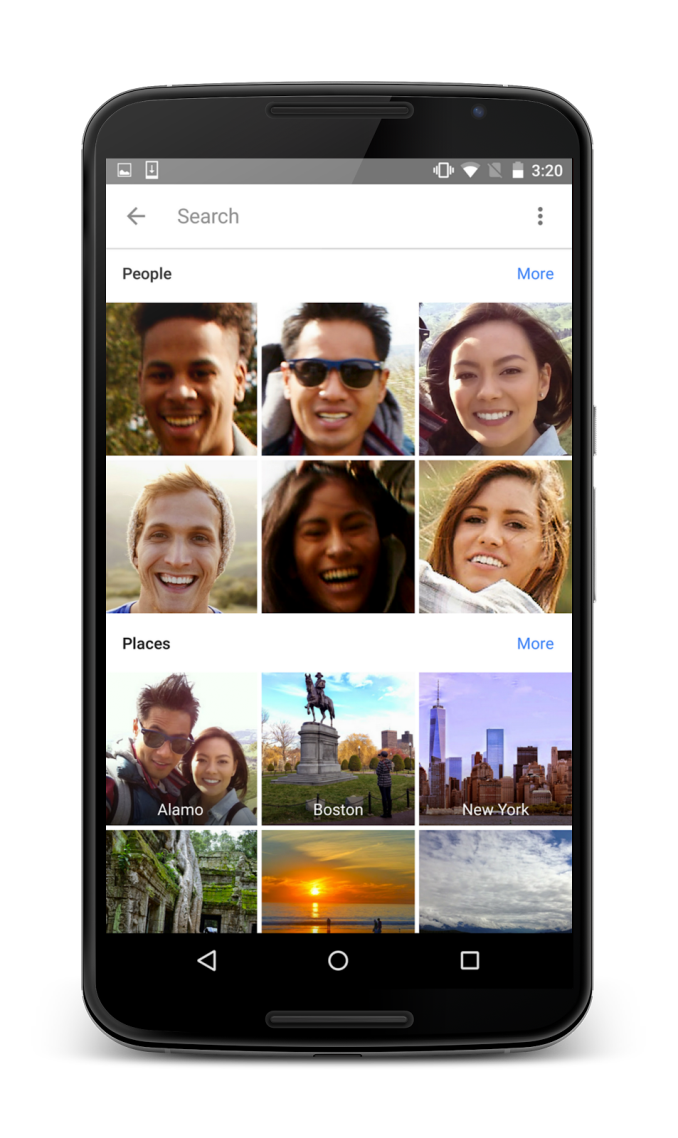
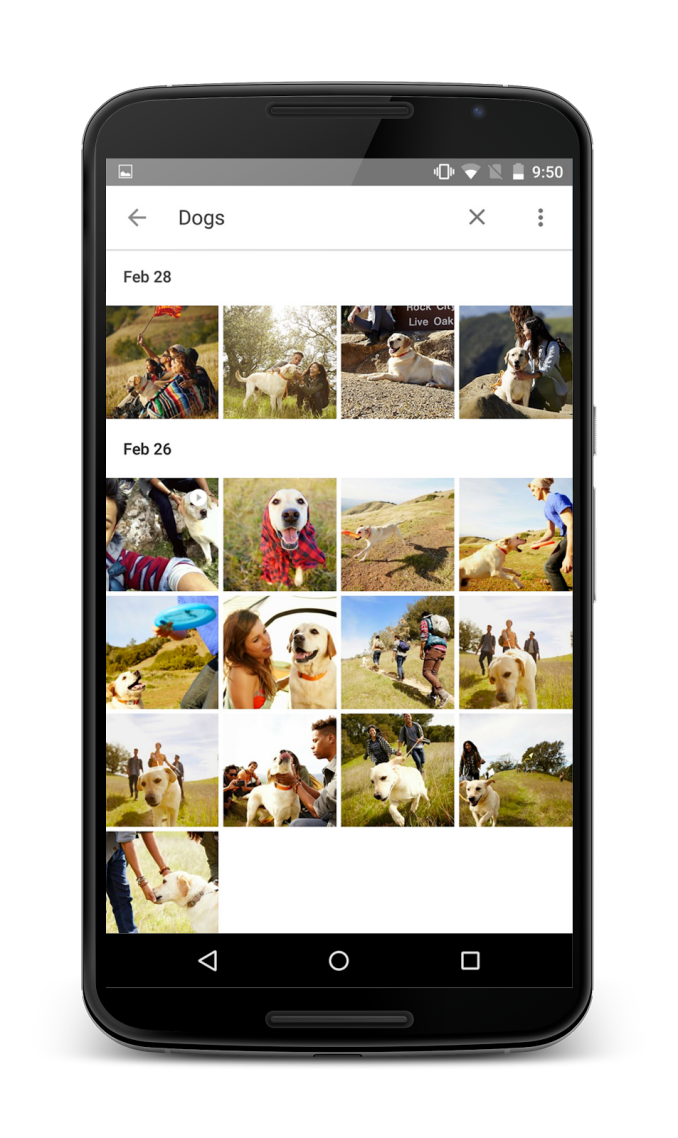
The second half of Google Photos is how it will intelligently organize your photos. Google can analyze the content of photos and group them into categories based on their subject. While I haven't seen this in action, if it does actually work as well as Google claims then it would remove much of the hassle involved with organizing your photo collection.
Google Photos also allows for groups of photos to be shared. You can share a link to one of Google's automatically created groups, or you can make a collection of photos and get a single link to share them all at once. There's no need for the person you're sharing them with to have a Google+ account or to have the app installed.
In addition to grouping and sharing, Google Photos has all the other features that one would expect from a photos app such as simple color adjustments, cropping, and other editing controls. Google Photos will be available today across essentially all major platforms, with apps available for iOS, Windows, OS X, and an update to the existing Photos app coming on Android.
Read More ...
The NVIDIA SHIELD Android TV Review: A Premium 4K Set Top Box
The battle for the living room is heating up with forays from multiple vendors. As the cord-cutting trend gains momentum, the time seems to be right for disruption. Coinciding with Google I/O, NVIDIA is announcing the availability of the SHIELD Android TV, a premium 4K-capable over-the-top set-top box (OTT STB) with excellent gaming credentials. It also happens to be the first shipping product with the Tegra X1 SoC. This review presents results from evaluating the performance of the Tegra X1 in the SHIELD, while also sharing our thoughts on Android TV and what the SHIELD brings to the table.
Read More ...
Google Announces Android M At Google I/O 2015
The first area of improvement is permissions. The permissions system on Android has been less than optimal since its earliest days. The big issue has always been that applications have to ask for permissions access at the time of install. This means that if a user wanted to install an application like Skype, but didn't want to give it access to their microphone, then they would not be allowed to install the application at all.
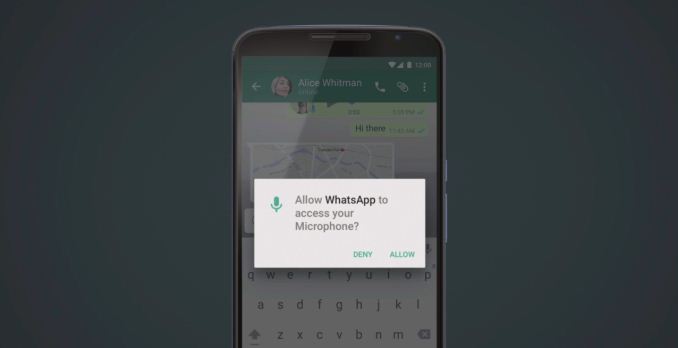
Android M changes the existing permissions system this by breaking down user permissions into specific categories, and having apps ask the user for permission at the time access to a feature is required. You can see an example of this above, where an application like Whatsapp will ask for microphone access when the user tries to do something that requires it. This means that the user can grant applications some permissions but not others, and they can manage permissions access after the fact. It also makes it more clear to the user what an application is asking to do.
The new permissions system in Android M is only available for applications that target Android M with the new version of the Android SDK. Unfortunately, this means that it won't be automatically available to existing applications when users update to Android M.
The next area of improvement in Android M is to the behavior of web views within other applications. This is through a feature called Chrome Custom Tabs. Essentially this feature allows applications to have the Chrome browser run atop their app whenever the user clicks on a link. This means that all of a user's autofill data, passwords, and cache are available when they open links within that application.
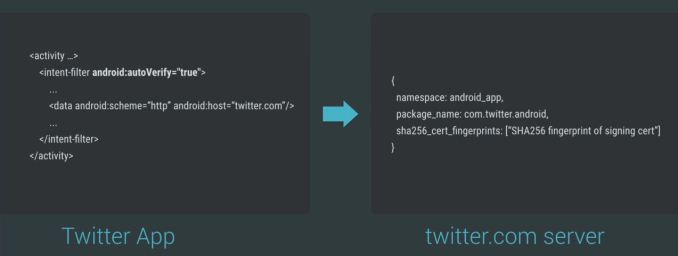
The third major improvement Google is making in Android M is to how Android Intents handles web links. Because many web services now have native applications, selecting a link in an application will often bring up a menu asking the user whether they would like to open that link using a web browser, or whether they would like to have an app on the phone handle it. With Android M, app developers can now have the operating system verify that certain types of links are meant to be opened with their app by checking with the web server that those links point to and verifying that it is meant to be opened with that app.
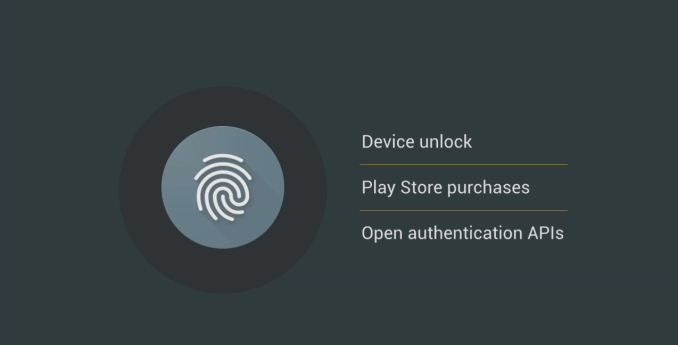
Google's next two areas of focus relate strongly to Android Pay, the mobile payments system they announced at MWC earlier this year. Android Pay is not strictly an addition to Android M, as it will be available on devices that run KitKat or newer. However, Android M will allow a greater degree of security when using Android Pay through a new API to standardize fingerprint sensors on Android devices. This means that users will be able to authorize Android Pay transactions both at stores and in apps using their fingerprint. It also means that app developers will be able to use a user's fingerprint for verification, which is currently not feasible with the various different standards and implementations for fingerprint scanners on Android devices.
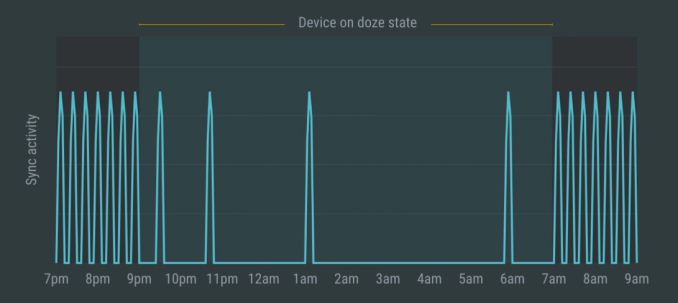
The last area of focus in Android M is arguably the most important. It's a focus on power usage, and more specifically, the power that a device uses when it's idle. With an OS like Android which supports multitasking, there's always a delicate balance between managing power and keeping applications running in the background updated. With Android M, Google is introducing a new feature called Doze. Doze uses motion detection to see whether or not a device has been left idle for a long period of time, such as when it's sitting on a table or in a dock. If it has been left idle for a long period, the operating system will greatly scale back background activity in order to reduce idle power usage. According to Google, they've seen up to 2x longer idle battery life on the Nexus 9.
In addition to improvements in power usage, Google is implementing new charging options for future devices that use USB Type C. Type C allows devices to negotiate whether they should be the device being used to charge from, or the device being charged, and this will be supported in Android M. This means that a user can use their tablet's battery to charge their smartphone from.
Android M looks like a more minor release than Android Lollipop was. However, what Google has detailed here is only scratching the surface of the many small improvements and bug fixes that it will bring to Android. Other improvements include changes to how text selection works, and further changes to the not very popular changes to the volume controls that were made in Android Lollipop.
Much like when Android Lollipop was announced at Google I/O last year, this year's release is accompanied by a preview for developers so they can test their apps and give Google feedback on the changes that they are making to Android. The Android M developer preview will be available today for the Nexus 5, the Nexus 6, and the Nexus 9.
Read More ...
Google IO 2015 Live Blog
Read More ...
Editorial: Apple Say Watch is "Not [Selling] Enough" -- What's Gone Wrong?
Apple Watch has complex interface, production woes; will its maker find a way to squeeze clever out of an "overly clever" deivce?
Read More ...
Google Previews Android M to Devs at I/O, w/ Android Pay, Doze, and More
Marshmallow? Milkshake? Muffin? Google's lips are sealed, but at least we know what features are onboard
Read More ...
Available Tags:ASRock , Motherboards , Router , Android , AMD , Catalyst , Google , NVIDIA , TV , Apple ,


No comments:
Post a Comment