

Windows 10: Build 10122 Released To Fast Ring
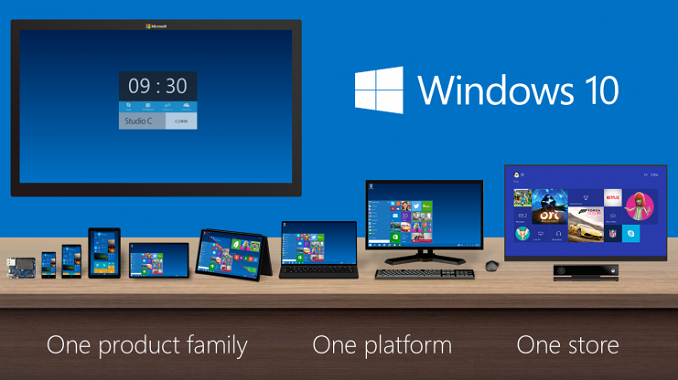
The Start Menu continues its constant evolution, and some of the functions have been moved around to make them more accessible. One that is now less accessible is the ability to expand the Start Menu to cover the entire screen. In build 10074 there was a toggle at the top left corner of the Start Menu to expand it out, but according to Microsoft’s data, people though that by doing this they entered Tablet Mode, which is not the case. So to avoid confusion, the toggle has been moved to the Start Menu settings page.

This double arrow is going away since it is confusing
Continuum, which is the name given to the ability to switch between desktop and tablet mode, also seems some tweaks in this build. They are mostly cosmetic though. For example, the icons have been made larger to mimic Windows 8.1’s touch interface.
The browser, now called Microsoft Edge (even though it is still called Project Spartan in the new build) sees quite a few new additions. I’ve been using Spartan as my main browser for some time now, and it is lacking things you take for granted so there should be plenty more of these features coming, but you can now use InPrivate mode in Spartan in order to buy all of your family birthday presents, and like IE 11, you can now pin sites to the Start. One nice feature that other browsers have had for a while is an indicator on the tab to let you know which is playing audio. This is very handy when you have lots of tabs open and one starts playing video. Likely the biggest addition is the New Tab page which was first shown off at Build. In addition to your most frequent websites, there will also be apps and content presented from MSN. The content on the page can be “lightly customized” and I am sure there will be plenty of feedback from Insiders as to what they like and don’t like about the New Tab page.

Default Apps also gets a tweak. Currently, when you install Win32 apps, the app itself can try to set itself as default. This will no longer work, and instead you will be prompted the first time you open a file that the new app would normally open. This mimics the way Windows Store apps operate now, and will make the experience more consistent.

Buried in the fixed issues though is something else that caught my eye. “We have fixed issues where fonts would render blurry on High DPI displays. We’re cooking up a blog post we plan to publish shortly that talks a little more in depth about our investment with High DPI in Windows 10 so watch for it.“
High DPI has been an issue on Windows for some time now. It is a big enough issue that I wrote a post explaining what is going on. The Windows 8 Start Screen and app model has solved high DPI issues on Windows, but that is only for new apps found in the store. Existing Win32 apps for the desktop can have terrible DPI support, and the native method to scale apps up can easily be overwritten by the developer even if they do not support High DPI. Hopefully Windows 10 brings some solutions to this issue. Even many of Microsoft’s own apps can have issues, so leaving this for the developer to correct might be asking a lot. I will eagerly wait to see what this blog post has to offer us, and hopefully it is good news.
Of special note, devices with AMD GPUs will have issues with this build when running the new Microsoft Edge browser, so if you have an AMD GPU you may want to wait for a driver update before installing.
After using Windows 10 off and on since October of last year, and then as my daily machine since January, I’m glad to see that they are starting to move towards polish and stability. The experience has not been without its trials, and there are certainly enough bugs kicking around that I wondered how they could ever make the Summer launch window. We’ll have to see how the next couple of builds go, but hopefully the stability is increased to a point where running the OS no longer feels like Beta testing and would feel more like feature testing.
Source: Windows Blog
Read More ...
Inside OCZ's Factory: How SSDs Are Made
At CES I had the opportunity to sit down with OCZ's CEO, Ralph Schmitt, to discuss the state of OCZ after Toshiba acquired the company in late 2013. We talked about how the company has changed and evolved under the new ownership and how Toshiba has brought in some much needed NAND supply and expertise. In the article we posted summarizing that discussion I also mentioned that I would be taking a closer look at OCZ's manufacturing and validation in the coming months, so in today's article we look at the journey of an SSD all the way from the drawing table to the warehouse from where it ships to a reseller or customer.
Read More ...
OCZ Introduces Z-Drive 6000 Enterprise PCIe SSD Series with NVMe Support
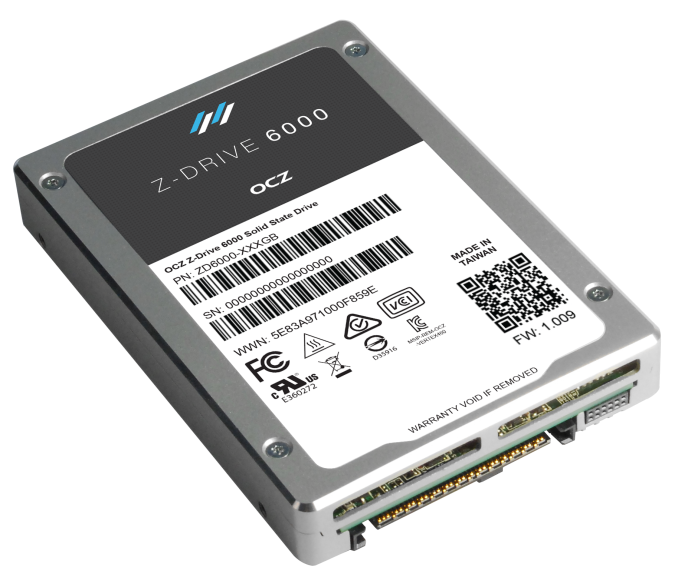

We've talked about NVMe in the past, but in short it's a software/driver stack that replaces the ancient AHCI. NVMe has been designed for SSDs from the ground up and its main benefits are scalability (up to 64,000 outstanding commands versus 32 in AHCI) and streamlined software stack that reduces both latency and CPU overhead for higher and more efficient performance. The Z-Drive 6000 series supports the native Windows (8.1 & Server 2012 R2), Linux, UNIX, Solaris, and VMware NVMe drivers, although OCZ will also have custom NVMe drivers for Windows, Linux, and VMware for drive management reasons. The current native drivers lack some necessary management features (e.g. I still haven't found a way to secure erase an NVMe drive with the in-box drivers), so in order to have the features available at launch OCZ is offering a custom driver. That said, OCZ is fully invested in improving the native open source drivers, but the problem is the long turnaround time for updates that has created the need for vendor-specific drivers.
| OCZ Z-Drive 6000 Series Specifications | ||
| 6000 | 6300 | |
| Capacities | 800GB; 1,600GB & 3,200GB | |
| Form Factors | 2.5" 15mm (SFF-8639) | 2.5" 15mm & HHHL AIC |
| Interface | PCIe 3.0 x4 (NVMe 1.1b) | |
| Controller | PMC-Sierra "Princeton" | |
| NAND | Toshiba A19nm 128Gbit MLC | Toshiba A19nm 128Gbit eMLC |
| Endurance | 1 DWPD | 3 DWPD |
| Encryption | AES-256 | |
| Power Loss Protection | Yes | Yes |
| Warranty | Five Years | |
| Price | ~$1.70/GB | ~$2.00/GB |
The Z-Drive 6000 series comes in two flavors: 6000 and 6300. The underlying controller and firmware architectures are the same in both models and the difference lies merely in NAND: the 6300 uses more durable eMLC NAND, which increases the endurance to three drive writes per day from one in the 6000 with normal MLC. Due to the endurance, the 6000 is aimed more towards read-intensive applications such as online archiving and media streaming, whereas the 6300 is suitable for mixed workloads that includes for example big data analysis and financial transaction services.
Unlike Intel, OCZ doesn't offer a model for write-intensive workloads with super high endurance (10 DWPD). OCZ explained to me that the reason is mostly cost efficiency -- a high endurance drive is doable, but it would require additional over-provisioning (which is what Intel does) that would increase the cost. OCZ did some market research and concluded that most customers are seeking for lower cost NVMe drives to make the transition, so OCZ didn't see a huge niche for the expensive high endurance drives. At $1.70 and $2.00 per gigabyte, the Z-Drive 6000 series is certainly price competitive against Intel's P3x00 series and the premium isn't too large compared to the enterprise SATA/SAS SSDs.

At the time of launch, the Z-Drive 6000 series will be available in capacities of 800GB, 1.6TB and 3.2TB. OCZ does, however, have a 6.4TB Z-Drive 6300 in development, which is scheduled to be available in Q4'15. The reason for the delay lies in NAND because in order to fit 8TB of flash inside a 2.5" chassis, OCZ needs to use 16-die packages, but currently the price of those is, from what I have heard, approximately 3x higher per gigabyte compared to 8-die stacks. The production as well as yields are expected to ramp up during this year, so the 6.4TB Z-Drive 6300 will be available once the NAND is available in high volume and at a reasonable price.

The Z-Drive 6000 series employs PMC-Sierra's "Princeton" controller, which is a native NVMe controller with support for 16 NAND channels. The controller supports PCIe 3.0 x8 interface, but OCZ has decided to split that to offer two independent 3.0 x4 connections to the host. The benefit of dual-port is redundancy and data availability because if one of the host systems is down (due to hardware failure for instance), the data is still accessible through the second host. This is a feature borrowed from SAS and the Z-Drive 6000 is actually the first NVMe drive to have dual-port support, which is something OCZ said its customers have been looking for.
Typical enterprise-class features, such as AES-256 encryption, full power loss protection and end-to-end data protection are all included as well. The Z-Drive 6000 series also features user-configurable power modes (15W, 20W and 25W), which can be used to limit the power consumption (and performance) in more temperature critical environments. A 2.5" 25W drive will definitely run hot and require a high amount of airflow for cooling, although OCZ did pay close attention to the chassis design to maximize heat dissipation and avoid throttling issues.
| OCZ Z-Drive 6000 Series Performance Specifications | ||||||
| Model | 6000 | 6300 | ||||
| Capacity | 800GB | 1,600GB | 3,200GB | 800GB | 1,600GB | 3,200GB |
| Raw NAND Capacity | 1,024GiB | 2,048GiB | 4,096GiB | 1,024GiB | 2,048GiB | 4,096GiB |
| 128KB Sequential Read | 2.2GB/s | 2.9GB/s | 2.9GB/s | 2.2GB/s | 2.9GB/s | 2.9GB/s |
| 128KB Sequential Write | 1.3GB/s | 1.9GB/s | 1.9GB/s | 1.0GB/s | 1.4GB/s | 1.4GB/s |
| 4KB Random Read | 600K IOPS | 700K IOPS | 700K IOPS | 600K IOPS | 700K IOPS | 700K IOPS |
| 4KB Random Write | 115K IOPS | 160K IOPS | 160K IOPS | 75K IOPS | 120K IOPS | 120K IOPS |
| Mixed 4KB 30R / 70W | 290K IOPS | 330K IOPS | 330K IOPS | 230K IOPS | 280K IOPS | 280K IOPS |
| Idle Power Consumption | 9W | 9W | 9W | 9W | 9W | 9W |
| Active Power Consumption | 25W | 25W | 25W | 25W | 25W | 25W |
OCZ focused specifically on read performance and at up to 700K random read IOPS, the Z-Drive is definitely top of the class as Intel specs the P3700 at only 460K IOPS. Random write and mixed performance look excellent too, so it will be very interesting to see how the Z-Drive 6000 stacks up against the Intel and Samsung drives in objective third party testing. Note that the Z-Drive 6300 with eMLC is a bit slower in writes, which is due to the fact that eMLC NAND has higher program latencies (basically the voltage distribution for each voltage state is smaller, so programming requires more precision that is achieved by increasing the number of program pulse and verification iterations).

OCZ's own testing data puts the Z-Drive 6000 way ahead of the competition in terms of performance and consistency in both reads and writes. I would of course take the data with a grain of salt, but if the Z-Drive 6000 series is really as good as OCZ's marketing suggests, then OCZ has one hell of a drive in its hands. OCZ is currently sampling the Z-Drive 6000 series to key customers and partners, so I would expect more widespread availability to be later this year. All in all, it's a very potent drive that could very well help OCZ gain some market share in the enterprise space.
Read More ...
GIGABYTE Server Launches the MW70-3S0, Targeting 3x PCIe 3.0 x16 and LSI 3008
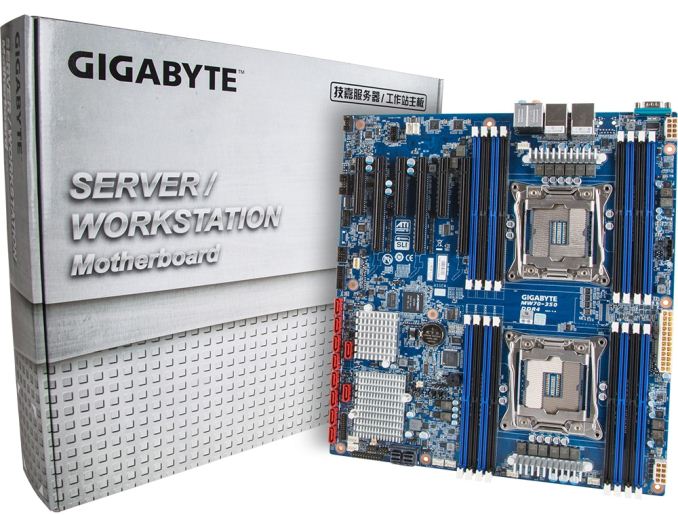
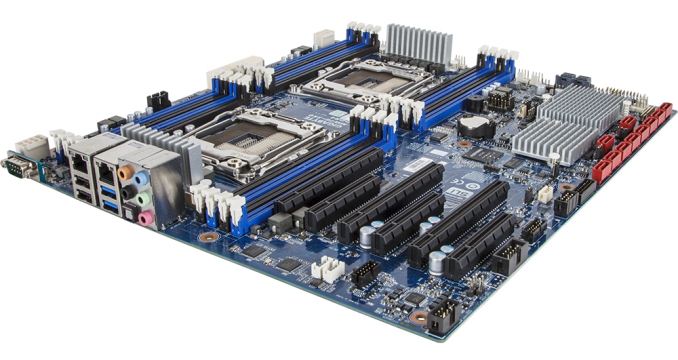
To that effect, GIGABYTE Server is launching another addition to their already large LGA2011-3 Haswell-EP motherboard lineup. No-one as ever fully explained the naming system of their motherboards to me yet, but the MW70-3S0 is specifically targeted at a business or home customer that requires dual processor capability, three PCIe 3.0 x16 slots, extra SAS storage via an LSI 3008 chip and also a server level of control through the IPMI management (AST2400).
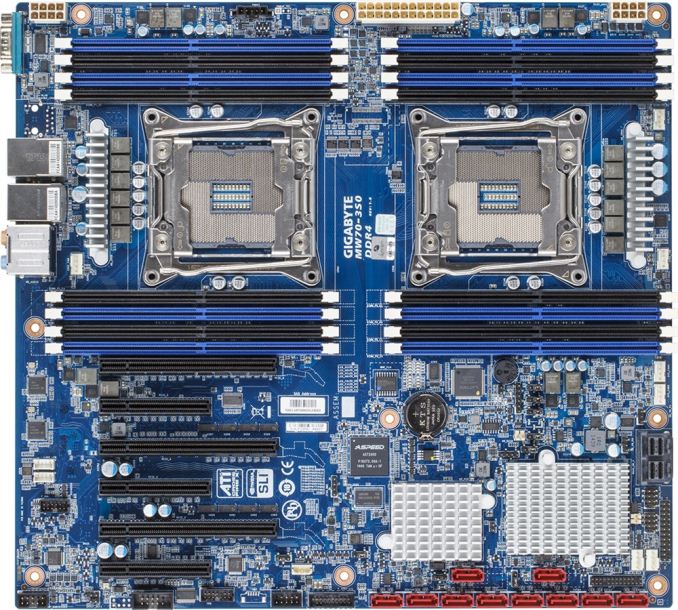
GIGABYTE Server says that 3D modelling, video production or small scale scientific analysis environments are the main aim here. Personally I’ve seen the LSI 3008, which requires eight PCIe 3.0 lanes, on the Extreme11 line of consumer motherboards, but we get it here as well. The dual processor nature of the board makes PCIe lane routing fairly easy:
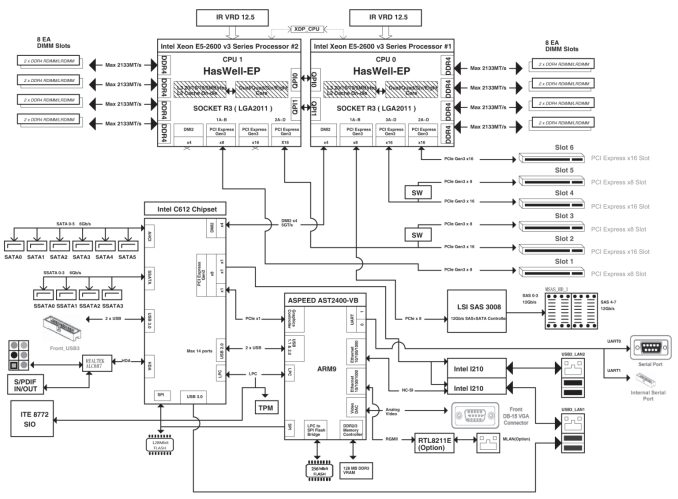
What this somewhat complicated diagram means is that the two CPUs are labelled 0 and 1, with CPU0 on the right. From the 40 PCIe lanes (x16/x16/x8), we get two of the three PCIe 3.0 x16 slots and the LSI 3008 chip. CPU1 gives another PCIe 3.0 x16 slot, which uses a switch to form two x8/x8 slots, and another PCIe 3.0 x8 slot (CPU1 slots are disabled if only one CPU is installed). Technically a user can have this system in x16/x16/x16/x8 or x8/x8/x8/x8/x8/x8/x8 mode, should they own sufficient PCIe cards at the right size. Technically we’ve seen this PCIe layout possible before in the consumer space with a single socket motherboard, but that requires the use of PLX PCIe switches to get that level of bandwidth.
The MW70-S30 uses both QPI links on the CPUs to communicate with each other, and the C612 chipset is partitioned off of CPU0. The chipset uses all available SATA ports, giving 6 from the first AHCI controller that is RAID capable and 4 from the second AHCI controller without RAID. Audio is provided by the ALC887 codec, while networking comes via two Intel I210 network controllers. The IPMI management controller also uses a Realtek NIC for its own management, but both can make use of the TPM header on board as well as the ITE chip for system sensing. It is worth noting that typically the AST2400 comes with a VGA port so users can load into the OS without a discrete card for 2D scenarios – technically it says in the block diagram above that there can be one, but it is greyed out. We see that there is no VGA on the rear panel here, meaning that a video output PCIe card is needed unless the system is run headless:
GIGABYTE Server’s selling point with their LGA2011-3 lineup is full speed DDR4 support. Typically JEDEC gives specifications of DDR4-2133 for one DIMM per channel (1DPC), DDR4-1866 for 2DPC and DDR4-1600 for 3DPC. GIGABYTE promises that its design is able to handle 3DPC at DDR4-2133, allowing software to take advantage of the extra speed. Given some of the email I receive from researchers who need faster memory for their computation, this can only ever be a good thing.
Pricing is as-yet not announced, but B2B customers are free to enquire with their distributors. We might see it in the consumer line in due course as well. While it might come across that these types of motherboards all look pretty much the same, and you’re getting similar sorts of stuff on them, the reason for so many variations is usually due to the equipment onboard – if a server customer wants XYZ, then they will make XYZ if the order is large enough. Some single-company bulk orders get rebadged for other customers too, depending on the demand, as we’ve seen in the past.
Source: GIGABYTE Server


Read More ...
Imagination Announces OmniShield: Hardware Security Zones For MIPS + PowerVR Ecosystem
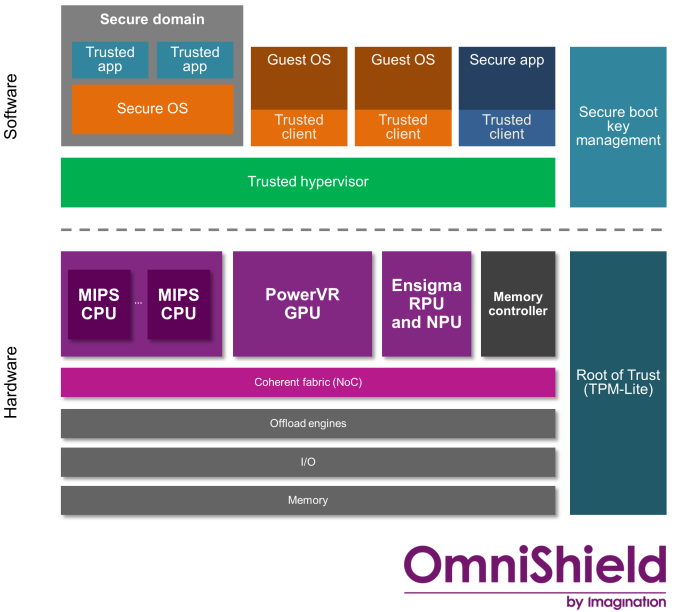
So far pretty much every vendor has taken their own crack at the matter, and Imagination Technologies is no different. As the owner of the MIPS architecture and the PowerVR family of GPUs, Imagination has been working on the matter for some time now. Most recently, as our long-time readers may recall, the company announced that their forthcoming PowerVR Series 7 GPUs would support multiple hardware security zones.
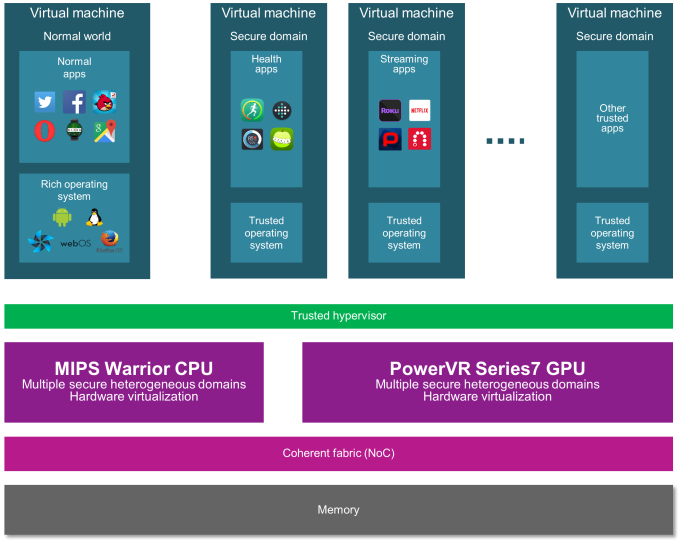
This brings us to today. Building off of the earlier PowerVR announcement and in conjunction with this week’s US Imagination Summit, today Imagination is announcing that they are expanding their hardware security zone technology in to its own brand, OmniShield. Under the OmniShield banner, the technology will eventually be supported across Imagination’s MIPS CPUs, PowerVR GPUs, and Ensigma communications processors.
Though Imagination doesn’t say so by name, OmniShield is essentially Imagination’s answer to ARM’s TrustZone technology, but for the Imagination ecosystem. With Imagination’s latest CPUs and GPUs supporting OmniShield, Imagination has the ability to setup hardware security zones that cover both the CPU and the GPU, isolating not only the CPU but preventing the GPU from being used as a backdoor as well. And though the technology can be used to some extent piecemeal, it is clear that for best results the technology is best used as part of a complete MIPS Warrior + PowerVR design.
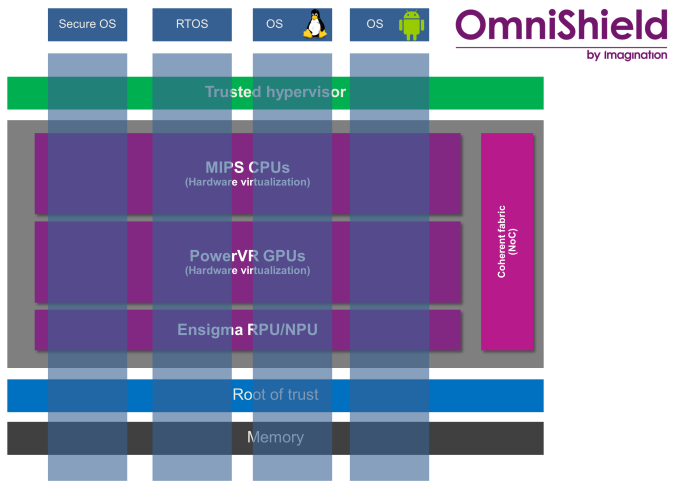
From a technology standpoint, OmniPath works by using hardware virtualization to create multiple zones where various applications and system components can be isolated from each other, allowing them to communicate only as much as desired by the hypervisor. There are several ways that developers can setup secure environments with this technology, the most basic of which is simply isolating the important parts of the OS inside a secure zone, and letting everything else run in an insecure zone. However with the ability to support up to 8 zones – a feature unique to OmniShield – Imagination is also pitching the possibilities of having various classes of applications located in their own zones, so that not only is the OS protected from apps, but apps are protected from each other as well.
As for why a developer would want to do this, the use cases are varied, but all pretty straightforward. In the consumer space this would include isolating the OS and sensitive apps (e.g. banking) from wilder apps such as web browsers, and by the same token isolating DRM-enabled apps to prevent the breaking of DRM. Meanwhile in server and embedded scenarios, this can include everything from isolating various systems operating in a firewall/router to securing core systems from entertainment systems in cars that make heavy use of embedded processors (e.g. self-driving cars).
Ultimately Imagination is responding to customer demands for additional security options in their products, but at the same time Imagination is looking to get ahead of the curve by rolling out improved security technologies ahead of the competition. Doing this level of fine grained zoning can definitely incur some overhead in weaker systems, which is why Imagination is pushing hardware virtualization so hard for both CPUs and GPUs. As for what systems the technology will end up in, with today’s launch being a branding of existing technology, OmniShield is already available in some product designs. Though from the sounds of it, shipping products using OmniShield-enabled SoCs may be a bit further off.
Read More ...
Ruckus Unifies Controller Product Platforms under SmartZone Umbrella

Till now, Ruckus has had different product lines for different market segments - small business, medium-sized enterprises, large scale enterprises and carrier-grade infrastructure. However, as the number of WLAN clients for a given system increases, the traditional market delineation makes it difficult for customers to choose the correct product. In order to solve this problem, Ruckus is introducing an umbrella 'SmartZone' software platform for management and control which allows their customers to easily upgrade the infrastructure to meet future requirements ('Wi-Fi as you grow').
The new Ruckus SmartZone has a single-pane software interface for different deployments (on-premises single controller, clustered controllers as well as virtualized WLAN controllers). These can scale from one up to 300K devices. In terms of hardware offerings, we have the SmartZone 100 WLAN Controller, each of which can support up to 25K clients and 2048 WLANs, with up to 10 Gbps data throughput. Each can manage up to 1000 Ruckus ZoneFlex Access Points and a cluster can have up to three units.
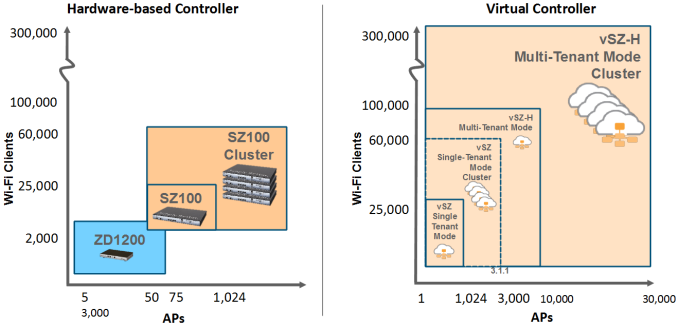
Ruckus is also supporting virtual SmartZones (vSZ) for easy scaling and flexibility with software-defined networking (SDN) and support for network functions virtualization (NFV). The vSZ can support up to 30K APs and 300K clients. Rounding up the SmartZone platforms is the Ruckus SmartCell Gateway SCG-200. By integrating 3GPP gateway functions along with WLAN controller duties, the SCG-200 can help carriers to integrate Ruckus WLANs into their existing mobile networks. Wi-Fi is being talked about as a credible solution for congested mobile network cells, and the SCG-200 targets that market trend.
The SmartZone 100 has a MSRP of $4995 (for the 1 Gbps throughput model), while the vSZ licenses will go for $995 for each deployed instance. Each ZoneFlex AP attached to either carries an additional $100 license fee.
Read More ...
The Pirate Bay Loses Its Iconic Swedish Dot SE Domains
Domain takedown is the latest attempt by Swedish officials to silence the persistent pirates
Read More ...
Apple Finally Updates 15" MacBook Pro w/ Force Touch; 5K iMac Gets Price Cut
MacBook Pro also gets brand new AMD R9 M370X (Strato XT) GPU
Read More ...
Available Tags:Windows , OCZ , SSD , GIGABYTE , Server , Hardware , Security , Apple , MacBook ,


No comments:
Post a Comment