

PlayStation Plus April 2015 Free Games Preview
PlayStation 4
Tower of Guns

The first game for the PlayStation 4 is Tower of Guns from developer Terrible Posture Games. This is a single-player first-person shooter which is set in… wait for it… a tower full of guns! This shooter was released in March 2014 on the PC and has been ported to the consoles. It has randomized levels for a new take every time you play. The game was released to above average reviews, with it scoring a 77 Metascore and 7.3 User Score on metacritic. Tower of Guns normally retails for 14.99 on the PC and should be around that price on the PlayStation Store as well, and will be cross buy with the PS3.
“A game that needs little introduction. Why? Because it’s a tower filled with guns! Over-the-top in all the right ways, try to survive this tower with random enemies, bosses, power-ups, and a boatload of bullets.”
Never Alone

Developed by Upper One Games, Never Alone is a puzzle-platformer set in an Inuit theme, where the main characters are an Iñupiat girl named Nuna and an Arctic Fox. Players swap control between the two characters to solve the levels and advance. It was recently released on the PS4, with a launch date of November 2014. Despite the artistic graphical style, Never Alone was met with mixed reviews. It scored a 73 Metascore and 7.0 User Score on metacritic. Never Alone normally sells for $14.99 on The PS Store.
“This beautiful puzzle adventure tasks you with guiding Nuna, a native Alaskan girl, through breath-taking environments to save her village. Also, you get to travel with a fox! Can’t get much better than a pet fox.”
PlayStation 3
Dishonored

Originally released in October 2012, Dishonored is a stealth action game from Arkane Studios. Players control Corvo Attano, who is framed for a murder, and takes revenge against his conspirators. It has a strong emphasis on stealth. Being published by Bethesda Softworks has brought this game a lot of attention, and it was met with strong reviews. Dishonored has an 89 Metascore and 7.8 User Score on metacritic, and normally sells for $19.99.
“Players take control of Corvo Attano, a bodyguard framed for murder and imbued with powerful abilities to seek revenge. This game is all about player choice, and feeling awesome while executing extreme stealth maneuvers.”
Aaru’s Awakening

Aaru’s Awakening is a hand drawn 2D action platformer game from the Icelandic developer Lumenox Games. This game is set in the dreamy world of Lumenox, and the goal of the creator was to set up a euphoric and dreamy experience with the artistic style. It was first released only a month ago in February 2015 on the PC, and is now making its way to the PlayStation. Unfortunately the nice visuals have not translated into a well-received game, with this Indie game getting only a 60 Metascore and 3.4 User Score on metacritic. As it is new to the store, pricing is not set yet but expect it to be around $14.99 as it is on Steam. It will also be available on the PS4.
“What started as a school project for a team of students in Iceland is now a gorgeous platformer about navigating treacherous terrain with well-timed teleports.”
PlayStation Vita
Killzone: Mercenary

The first game for the Vita is Killzone: Mercenary, from developer Guerrilla Cambridge and released in September 2013. This is the second handheld game set in the Killzone series, and the first-person shooter has the player following Mercenary Arran Danner through a backdrop of an interstellar war. It has received good reviews, scoring a 78 Metascore and 8.9 User Score on metacritic, and normally sells for $35.99.
“View the iconic war against the Helghast from a mercenary’s point of view, and jump into a robust multiplayer mode to show how good (Or bad?) you actually are.”
MonsterBag

In a big departure in genre from the previous game, the second game for the Vita is MonsterBag from Iguana Bee. This is another new game to the store, and will be available on April 7th. This game is about a little blue monster called V, and is set as a puzzle platformer. V has some telekinetic skills, and is on a journey to get back to his friend Nia. Being an unreleased game, there is not much info on how the game plays or what it will sell for, but if you are a PS Plus subscriber, at least you know you won’t already have this interesting looking game.
“An adorable puzzle game about a bag-shaped monster named V trying to reach his friend Nia without scaring the pants off of people. May or may not include a battle of wits, skill, and the inevitable apocalypse.”
There we have it. Six more games from Sony to keep subscribers busy for the month of April. If you are too enamored with the spring weather, pick these up and save them for the depths of winter.
Source: PlayStation Blog
Read More ...
Google Announces $149 Chromebooks and the Chromebit Chrome OS Stick
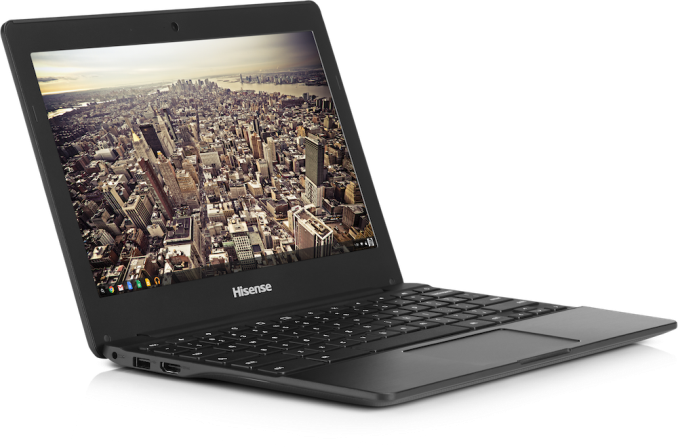
The first two devices announced are the Haier Chromebook 11 and the Hisense Chromebook. Both of these laptops have 11.6" 1366x768 displays, 16GB of eMMC storage, 2GB of DDR3L memory, and surprisingly, 2x2 802.11ac WiFi. The main aspect that they differ on is their processors, and subsequently, their battery life. The Haier Chromebook 11 uses a Rockchip RK3288 SoC which has four Cortex A17 cores with a max frequency of 1.8GHz, and a 600MHz ARM Mali-T764 GPU. It advertises a battery life of up to 10 hours. The Hisense Chromebook also uses the Rockchip RK3288, but despite using the same name as the chip in the Haier Chromebook, it has a max CPU frequency of 2.5GHz. Hisense advertises a battery life of up to 8.5 hours. Both of these devices are sure to be popular with educational institutions and anyone looking for a very inexpensive machine to browse the web on.
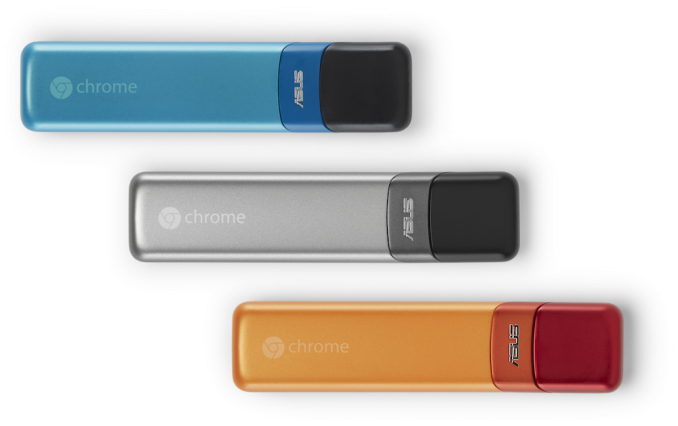
Possibly the more interesting announcement of the day is the Chromebit. There's very little information about specifications, but the Chromebit is essentially a Chrome OS computer on a stick which can be connected to a display and other peripherals to be used as a computer. The Chromebit will be launching in the summer of this year for less than $100, and we'll likely see more concrete pricing and information about specifications as we approach closer to its release date.
Read More ...
LG 34UM67: UltraWide FreeSync Review
AMD officially launched FreeSync earlier this month, and the technology is interesting not just in how it works but also in how it differs from NVIDIA’s G-SYNC. Our first FreeSync display comes by way of LG, and it boasts an IPS display with an UltraWide 2560x1080 resolution. For gamers there are certainly benefits to discuss, but there are also some problem areas. How does this FreeSync display stack up against other gaming monitors, and how does it fare outside of gaming? Read on for our full review.
Read More ...
CTL Launches New Chromebook For Education


There are several companies which specialise in the education sector. CTL is one of those companies, and today they are launching a new even lower cost entry into the Chrome OS education market. The CTL Chromebook J2 and J4 for Education both feature the quad-core Cortex A17 based processor, and in this case it is the RK3288 made by Rockchip. The differentiation is laid out in the name, with the J2 featuring 2 GB of memory, and the J4 having 4 GB of RAM.

As these are aimed at the less than forgiving student population, they are available with a three year warranty with accidental damage coverage. Also, of interest to the sector, they will come with one year of Securly content filtering and analysis, so that schools and parents can set automatic filters for approved sites. In addition, they can be bundled with the Chrome Device Management licenses, Hapara licenses, and Pearson Education Software and eTextbooks.
These are low cost devices, and as such are outfitted with some low cost components. The J2 starts at $179, or $199 with the Chrome Device Management license. The J4 bumps the price to $209 and $229 respectively. Both feature an 11.6 inch 1366x768 matte display, 16 GB of eMMC storage, and a 1.3 MP webcam.
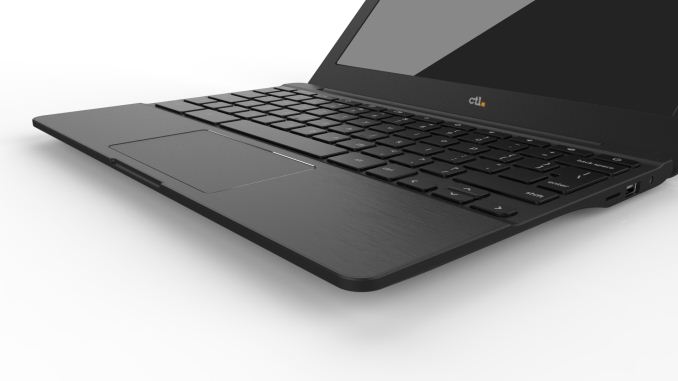
CTL lists the new Chromebook at over nine hours of battery life though, which should be adequate for most school tasks. The device is relatively thin and light too, with it coming in at just 2.46 lbs (1.12 kg) and they feature an HDMI port, two USB 2.0 ports, a micro SD card slot, and 802.11ac wireless.
While these will not be the fastest devices available with Chrome OS (for that a school would have to purchase the new Pixel) getting the price down should help out with school budgets.
For those in education who want to check out the new devices, the CTL Chromebook for Education J2 and CTL Chromebook for Education J4 can be sourced from www.ctl.net.
Source: CTL
Read More ...
The Samsung SSD 850 EVO mSATA/M.2 Review
Four months ago Samsung introduced the world to TLC V-NAND in the form of SSD 850 EVO. It did well in our tests and showed that 3D NAND technology essentially brings TLC NAND to the level where planar MLC NAND stands today. The initial launch only included the most popular form factor in 2.5", but did not address the upgrade market where mSATA and M.2 are constantly growing in popularity. With today's release, Samsung is expanding the 850 EVO lineup with M.2 and mSATA models.
Read More ...
Microsoft Announces Surface 3: 10.8-inch 2-in-1 with Atom x7 on 14nm from $499


The Surface 3 is being billed by Microsoft as the thinnest and lightest Surface device, and will run the full Windows 8.1 inside which can be upgraded to Windows 10 later this year for free. The price will include a 1-year subscription to Office 365, as well as 1TB of OneDrive storage. On the device will be a full-size USB 3.0 port, a mini-DisplayPort and a microSD card reader to supplement storage. Charging comes via a bundled fast-charging micro-USB, although it can also be charged with a standard smartphone micro-USB as well. Battery life is listed as 10 hours for video playback, with the screen being described as having ‘incredibly accurate colors’ – here’s hoping for a calibrated display out of the box. Front and rear cameras (3.5MP / 8MP) are designed to both capture 1080p, with an auto-focus feature on the rear camera.

The device on its own will be 8.7mm thin, weighing in at 622 grams (1.37 pounds), and seems to not feature the kickstand that Anand liked in his Surface Pro 3 review. Instead we get a standard 3-position stand. Accessories start with the standard Type Cover but also include a Docking Station with more USB ports as well as ‘The Surface Pen’. The new digital pen will be available in red, blue, black and silver with 256 levels of pressure sensitivity - we presume this is an N-Trig design although we’re waiting for official confirmation.

The Surface 3 and accessories are now available for pre-order in the US, shipping on May 5th. Resellers and partners should have availability on May 7th, although from 1st April users should be able to head into a Microsoft Store in Canada, Puerto Rico and the United States for some hands on time before full launch.
We’ve already put in our request for a review unit.
Source: Microsoft


| Microsoft Surface 3 | ||
| Size | 10.52 x 7.36 x 0.34-inch 267 x 187 x 8.7-mm |
|
| Weight | 1.37 lbs - 622 g | |
| Display | 10.8-inch ClearType Full HD Plus 1920x1280 resolution, 3:2 ratio 10-point multi-touch Surface Pen Support |
|
| Battery Life | Up to 10 hours (video playback) | |
| Storage/DRAM | 64GB / 2GB | 128GB / 4GB |
| CPU | Atom x7-Z8700 Quad Core 14nm 1.6 GHz Base Frequency 2.4 GHz Burst Frequency |
|
| WiFi | 802.11ac + BT 4.0 LTE Models at a later date |
|
| Ports | USB 3.0, Mini-DisplayPort, microSD, Micro USB charging, 3.5mm Headset Jack |
|
| Software | Windows 8.1 Office 365 Personal with 1TB OneDrive (1-year) |
|
| Front Camera | 3.5 MP | |
| Rear Camera | 8.0 MP with Autofocus | |
| Operating System | Windows 8.1 64-bit | |
| Warranty | 1-year limited | |
| Price | $499 | $599 |
Edit: This news post originally stated that the kickstand was the same as the Surface Pro 3. This error has been adjusted due to new information.
Read More ...
Intel Braswell Details Quietly Launched: Cherry Trail and Airmont on 14nm
CPU World recently published details of four Braswell SKUs. For Braswell, similar to Bay Trail, Intel designs its Atom SoCs in terms of dual core modules, where each core is separate apart from a shared L2 cache. The SoC then puts one or two of these modules on die (for two or four cores) without an overriding L3 cache. The Braswell SoCs will support DDR3-1600 memory, with SIMD instructions up to SSE4 with support for VT-x and Burst Performance Technology offering higher clocks for extremely short periods when required.
The four SoCs are presented as follows:
| Intel Braswell SKUs | ||||||
| SKU | Cores / Threads |
CPU Freq |
CPU Burst |
L2 Cache |
TDP | Price |
| Celeron N3000 | 2 / 2 | 1040 | 2080 | 1 MB | 4W | $107 |
| Celeron N3050 | 2 / 2 | 1600 | 2160 | 1 MB | 6W | $107 |
| Celeron N3150 | 4 / 4 | 1600 | 2080 | 2 MB | 6W | $107 |
| Pentium N3700 | 4 / 4 | 1600 | 2400 | 2 MB | 6W | $161 |
This is similar to elements of both the Bay Trail-M (Mobile) the Bay Trail-D (Desktop) product line, which would perhaps mean that we will see both inside mini-PCs as well as some laptop designs, such as Chromebooks. In the current Braswell list there are two dual core models and two quad core models, although in the Bay Trail-D line there are six in total with four Celeron and two Pentium. The Celeron N3000 from the Braswell line is an interesting element to consider, especially when we compare it against the similar TDP of the Core M 5Y10.
| Celeron N3000 | Core M 5Y10 | |
| Architecture | Airmont | Broadwell |
| Cost | $107 | $281 |
| Cores / Threads | 2 / 2 | 2 / 4 |
| Base Frequency (MHz) | 1040 | 800 |
| Turbo / Burst (MHz) | 2080 | 2000 |
| L2 Cache | 1 MB | 0.5 MB |
| L3 Cache | - | 4 MB |
| TDP | 4 W | 4.5 W |
| GPU | 'Gen 8' | HD 5300 |
| Execution Units | Unknown ? | 24 |
| GPU Frequency / MHz | 320-600 ? | 100-800 |
| DRAM | DDR3-1600 | DDR3/L-1600 |
Ultimately Intel’s differentiation lies with the architecture and price, meaning Core costs more, and historically this also correlates with performance. That being said, Core M is susceptible to both cTDP-Up and cTDP-Down depeding on how the OEM wants to use it. Braswell may be in a similar position, although we do not have confirmation of this as of yet.
It will be interesting to see what applications for Braswell will be released first. I would imagine everything we currently see in Bay Trail-D form should get an upgrade. We have already seen shots of ECS’ roadmap for the LIVA which states a Q2 2015 launch for example.
Source: CPU World
Read More ...
AMD Dives Deep On Asynchronous Shading

It’s this last item that ended up kicking up a surprisingly deep conversation between myself, AMD’s “Chief Gaming Scientist” Richard Huddy, and other members of AMD’s GDC staff. AMD was keen to show off the performance potential of async shaders, but in the process we reached the realization that to this point AMD hasn’t talked very much about their async execution abilities within the GCN architecture, particularly within a graphics context as opposed to a compute context. While the idea of async shaders is pretty simple – executing shaders concurrently (and yet not in sync with) other operations – it’s a bit less obvious just what the real-world benefits are why this matters. After all, aren’t GPUs already executing a massive number of threads?
With that in mind AMD agreed it was something that needed further consideration, and after a couple of weeks they got back to us (and the rest of the tech press) with further details of their async shader implementation. What AMD came back to us with isn’t necessarily more detail on the hardware itself, but it was a better understanding of how AMD’s execution resources are used in a graphics context, why recent API developments matter, and ultimately why asynchronous shading/computing is only now being tapped in PC games.
Why Asynchronous Shading Wasn’t Accessible Before
AMD has offered multiple Asynchronous Compute Engines (ACEs) since the very first GCN part in 2011, the Tahiti-powered Radeon HD 7970. However prior to now the technical focus on the ACEs was for pure compute workloads, which true to their name allow GCN GPUs to execute compute tasks from multiple queues. It wasn’t until very recently that the ACEs became important for graphical (or rather mixed graphics + compute) workloads.
Why? Well the short answer is that in another stake in the heart of DirectX 11, DirectX 11 wasn’t well suited for asynchronous shading. The same heavily abstracted, driver & OS controlled rendering path that gave DX11 its relatively high CPU overhead and poor multi-core command buffer submission also enforced very stringent processing requirements. DX11 was a serial API through and through, both for command buffer execution and as it turned out shader execution.
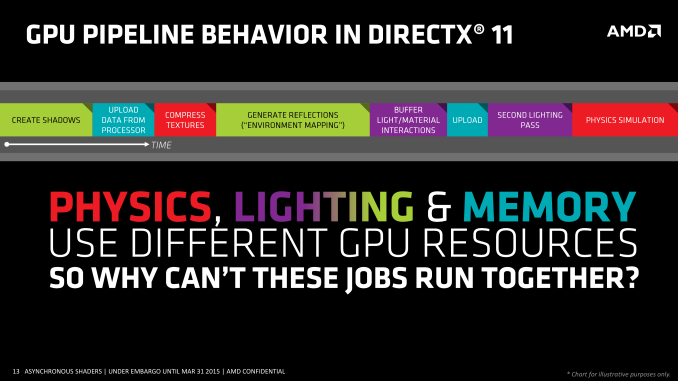
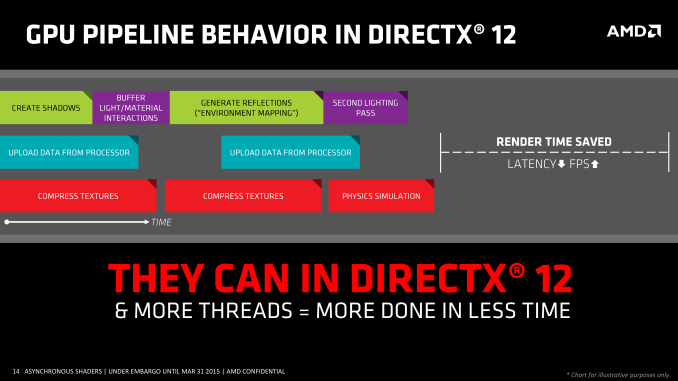
As one might expect when we’re poking holes into DirectX 11, the asynchronous shader issues of the API are being addressed in Mantle, DirectX 12, and other low-level APIs. Along with making it much easier to submit work from multiple threads over multiple cores, all of these APIs are also making significant changes in how work is executed. With the ability to accept work from multiple threads, work can now be more readily executed in parallel and asynchronously, enabling asynchronous shading for the first time.
There is also one exception to the DX11 rule that we’ll get to in depth a bit later, but in short that exception is custom middleware like LiquidVR. Even in a DX11 context LiquidVR can leverage some (but not all) of the async shading functionality of GCN GPUs to do things like warping asynchronously, as it technically sits between DX11 and the GPU. This in turn is why async shading is so important to AMD's VR plans, as all of their GCN GPUs are capable of this and it can be exposed in the current DX11 ecosystem.
Executing Async: Hardware & Software
Of course to pull this off you need hardware that can support executing work from multiple queues, and this is something that AMD invested in early. GCN 1.0 and GCN 1.1 Bonaire included 1 graphics command processor and 2 ACEs, while GCN 1.1 Hawaii and GCN 1.2 Tonga (so far) include 1 graphics command processor and 8 ACEs. Meanwhile the GCN-powered Xbox One and Playstation 4 take their own twists, each packing different configurations of graphics command processors and ACEs.
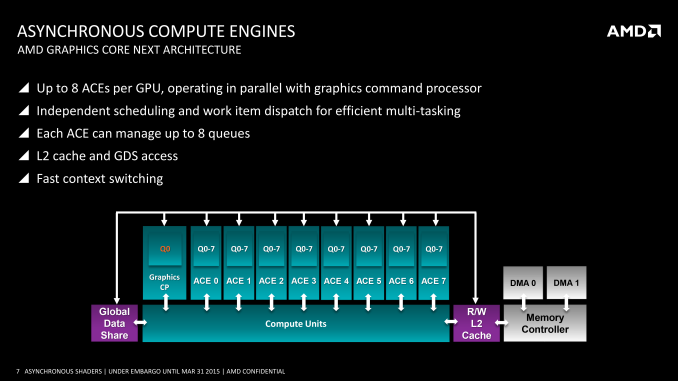
From a feature perspective it’s important to note that the ACEs and graphics command processors are different from each other in a small but important way. Only the graphics command processors have access to the full GPU – not just the shaders, but the fixed function units like the geometry units and ROPs – while the ACEs only get shader access. Ostensibly the ACEs are for compute tasks and the command processor is for graphics tasks, however with compute shaders blurring the line between graphics and compute, the ACEs can be used to execute compute shaders as well now that software exists to make use of it.
On a side note, part of the reason for AMD's presentation is to explain their architectural advantages over NVIDIA, so we checked with NVIDIA on queues. Fermi/Kepler/Maxwell 1 can only use a single graphics queue or their complement of compute queues, but not both at once – early implementations of HyperQ cannot be used in conjunction with graphics. Meanwhile Maxwell 2 has 32 queues, composed of 1 graphics queue and 31 compute queues (or 32 compute queues total in pure compute mode). So pre-Maxwell 2 GPUs have to either execute in serial or pre-empt to move tasks ahead of each other, which would indeed give AMD an advantage..
| GPU Queue Engine Support | ||||
| Graphics/Mixed Mode | Pure Compute Mode | |||
| AMD GCN 1.2 (285) | 1 Graphics + 8 Compute | 8 Compute | ||
| AMD GCN 1.1 (290 Series) | 1 Graphics + 8 Compute | 8 Compute | ||
| AMD GCN 1.1 (260 Series) | 1 Graphics + 2 Compute | 2 Compute | ||
| AMD GCN 1.0 (7000/200 Series) | 1 Graphics + 2 Compute | 2 Compute | ||
| NVIDIA Maxwell 2 (900 Series) | 1 Graphics + 31 Compute | 32 Compute | ||
| NVIDIA Maxwell 1 (750 Series) | 1 Graphics | 32 Compute | ||
| NVIDIA Kepler GK110 (780/Titan) | 1 Graphics | 32 Compute | ||
| NVIDIA Kepler GK10x (600/700 Series) | 1 Graphics | 1 Compute | ||
Moving on, coupled with a DMA copy engine (common to all GCN designs), GCN can potentially execute work from several queues at once. In an ideal case for graphics workloads this would mean that the graphics queue is working on jobs that require its full hardware access capabilities, while the copy queue handles data management, and finally one-to-several compute queues are fed compute shaders. What each of those task precisely is depends on the game developer, but examples of graphics and compute tasks include shadowing and MSAA on the former, and ambient occlusion, second-order physics, and color grading on the latter.
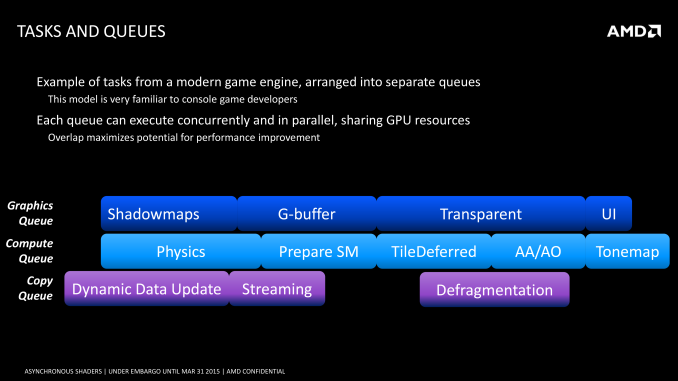
As a consequence of having multiple queues to feed the GPU, it is possible for the GPU to work on multiple tasks at once. Doing this seems counter-intuitive at first – GPUs already work on multiple threads, and graphics rendering is itself embarrassingly parallel, allowing it to be easily broken down into multiple threads in the first place. However at a lower level GPUs only achieve their famous high throughput performance in exchange for high latency; lots of work can get done, but relatively speaking any one thread may take a while to reach completion. For this reason the efficient scheduling of threads within a GPU requires an emphasis on latency hiding, to organize threads such that different threads are interleaved to hide the impact of the GPU’s latency.
Latency hiding in turn can become easier with multiple work queues. The additional queues give you additional pools of threads to pick from, and if the GPU is presented with a situation where it absolutely can’t hide latency from the graphics queue and must stall, the compute queues could be used to fill that execution bubble. Similarly, if there flat-out aren’t enough threads from the graphics queue to fill out the GPU, then this presents another opportunistic scenario to execute threads from a compute task to keep the GPU better occupied. Compared to a purely serial system this also helps to mitigate some of the overhead that comes from context switching.
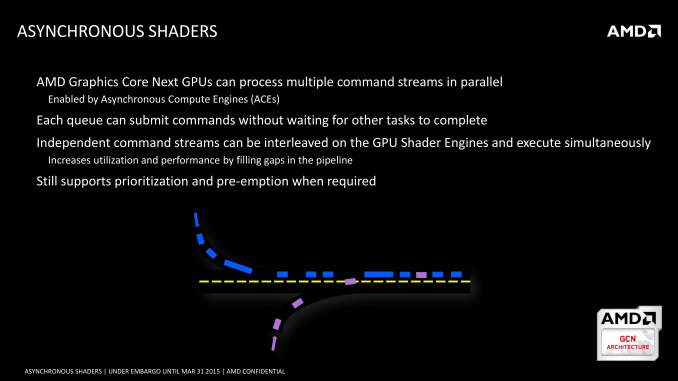
Ultimately the presence of the ACEs and the layout of GCN allows these tasks to be done in an asynchronous manner, ties into the concept of async shaders and what differentiates this from synchronous parallel execution. So long as the task can be done asynchronously, then GCN’s scheduler can grab threads as necessary from the additional queues and load them up to improve performance. Meanwhile, although the number of ACEs can impact how well async shading is able to improve performance by better filling the GPU, AMD readily admits that 8 ACEs is likely overkill for graphics purposes; even a fewer number of queues (e.g. 1+2 in earlier GCN hardware) is useful for this task, and the biggest advantage is simply in having multiple queues in the first place.
The Performance Impact of Asynchronous Shaders
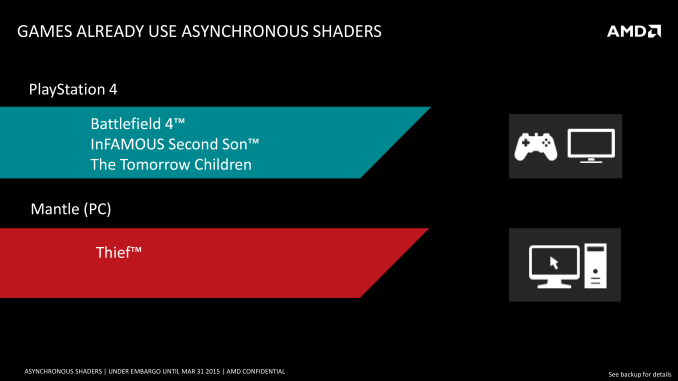
Execution theory aside, what is the actual performance impact of asynchronous shaders? This is a bit harder of a question to answer at this time, though mostly because there’s virtually nothing on the PC capable of using async shaders due to the aforementioned API limitations. Thief, via its Mantle renderer, is the only PC game currently using async shaders, while on the PS4 and its homogenous platform there are a few more titles making using of the tech.
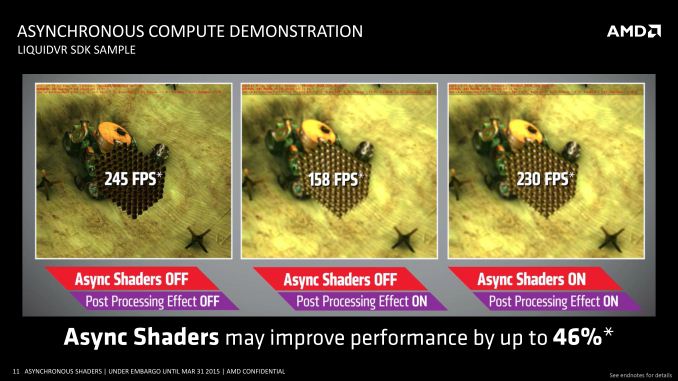
AMD for their part does have an internal demo showcasing the benefits of async shaders, utilizing a post-process blurring effect with and without async shaders, and the performance differences can be quite high. However it’s a synthetic demo, and like all synthetic demos the performance gains represent something of a best-case scenario for the technology. So AMD’s 46% performance improvement, though quite large, is not something we’d expect to see in any game.
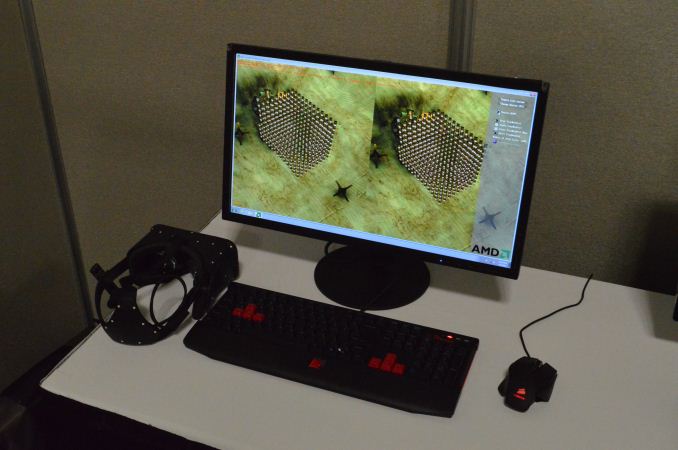
That said, VR (and by extension, LiquidVR) presents an interesting and more straightforward case for the technology, which is why both NVIDIA and AMD have been pursuing it. Asynchronous execution of time warping and other post-processing effects will on average reduce latency (filling those rendering bubbles), with time warping itself reducing perceived latency by altering the image at the last possible second, while the async execution reduces the total amount of time a frame is in the GPU being rendered. The actual latency impact will again not be anywhere near the 46% performance improvement in AMD’s sample, but in the case of VR every millisecond counts.
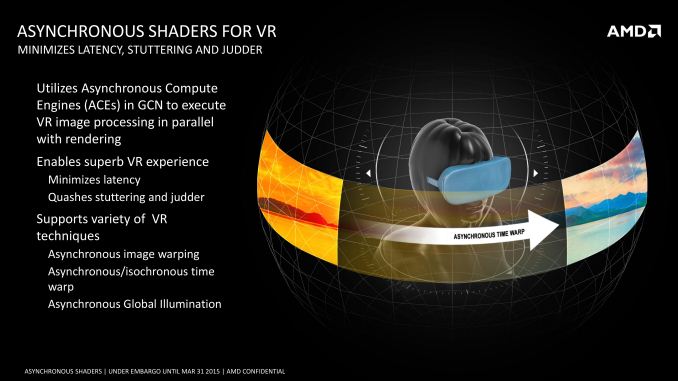
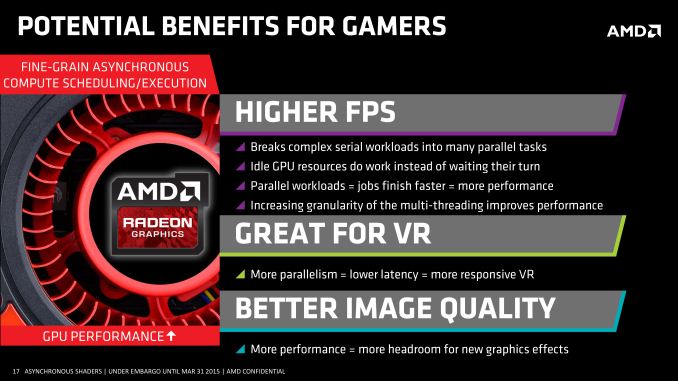
Of course to really measure this we will need games that can use async shaders and VR hardware – both of which are in short supply right now – but the potential benefits are clear. And if AMD has their way, both VR and regular developers will be taking much greater advantage of the capabilities of asynchronous shading.
Read More ...
Windows 10 Build 10049: Meet Project Spartan
Back in January we took a look at some of the parts of Project Spartan. At that time, the goal from Microsoft was to include the new rendering engine which would be the heart of Spartan in both Internet Explorer and the new, as yet unnamed browser. Those plans have shifted though. Internet Explorer will still be available for legacy applications (think business) but it will not include the new rendering engine, which is EdgeHTML. Project Spartan will be exclusively EdgeHTML and not include the legacy MSHTML rendering engine for compatibility. Microsoft’s metrics on compatibility with the new browser have shown them that it is really not necessary. So the new browser should be free of any of the legacy code which caused issues with standards.
On our initial look at EdgeHTML rendering within Internet Explorer, we saw some pretty substantial performance gains. We will dig into that again with the new build and report back if any additional progress has been made.
So what is “Project Spartan” then? Technically it is a new branch of Internet Explorer’s Trident layout engine, but slimmed down and built for the modern web rather than compatibility with legacy things like ActiveX controls. If that is needed, Internet Explorer will still be available in Windows 10. For the vast majority of users though, they just need a clean, fast, secure browser. Whether Spartan is any of that will have to be seen, but it is more than just a new layout and ECMAscript engine too.

Spartan (I really wish they would just name this browser already) has some interesting technology which Microsoft hopes will bring some mindshare back to their browser. For instance, Cortana, which is Microsoft’s digital assistant and search engine front end, is now built directly into the browser. Being contextually aware should help with relevant search results, and if you type things like “what is the weather” into the address bar, Cortana will respond.
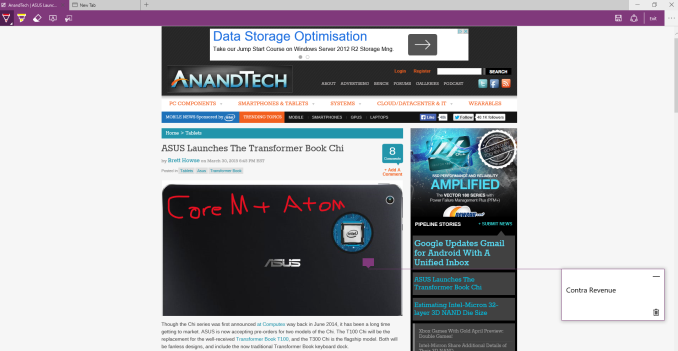
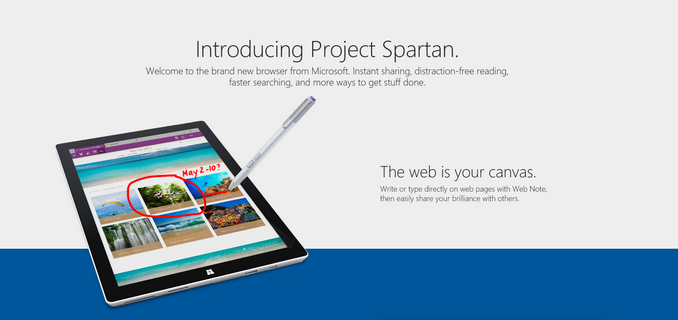
Another feature coming to the new browser is the ability to annotate web pages, and inking is supported for this. The resultant page will be sharable as well, so comments about pages can be shared with friends or colleagues. This may or may not be interesting, but even with the preview just going out, there have already been some clever uses of it shared on social media.

The new browser also supports both Reading List and Reading View, which are extensions to already deployed technologies from Windows 8.1. Reading List is clearly a list of sites, and Reading View offers a distraction-free browsing experience.
One of the best features of the new browser though is that it will be updated through the store, so hopefully the extremely long wait times between feature updates will go away. There was always the capability of this with Windows Update, but Internet Explorer is certainly behind in adoption of new web standard drafts as compared to other browsers.
For those in the Fast Ring, go check your Windows Updates and get a crack at the new browser, but before you do, be sure to check out the list of known bugs, as there are some serious ones in this build such as Hyper-V being broken on this build. Remember though, this is called the Fast ring for a reason!
Source: Windows Blog
Read More ...
Google Updates Gmail for Android With A Unified Inbox
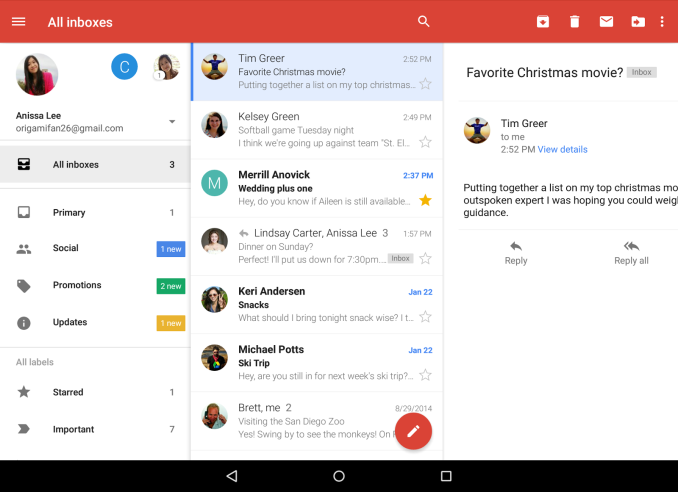
In addition to the new unified inbox, Google is also enabling support for displaying threaded conversations on non-Gmail accounts. This means that users who have long email threads on their email accounts from other providers will be able to view them in a single thread, which was previously limited to Gmail accounts. The omission of this feature just seemed like an oversight when third party account support was integrated into Gmail, and it's good to see Google ensuring parity between the features for Gmail accounts and other providers now that the application acts as the standard Android mail app.
In addition to the two major features above, this update to Gmail also brings a few smaller features like better auto-complete when searching, larger attachment previews, 1-tap saving to Google Drive, and improved animation responsiveness. The update is currently rolling out now, although it may take some time for devices to receive it as Google always performs staged releases for application and system updates.
Read More ...
ASUS Launches The Transformer Book Chi
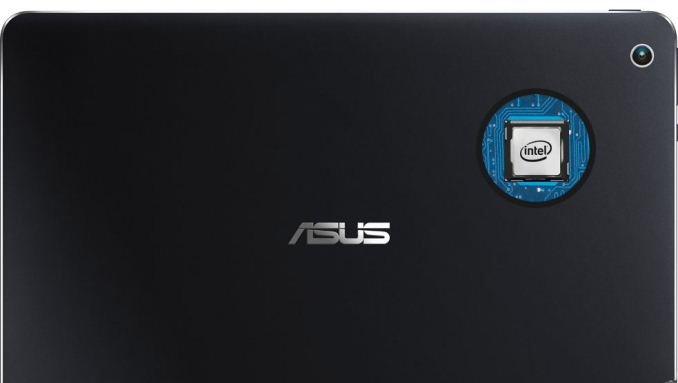

Starting with the T100 Chi, we get a nice update to a good design. The T100 Chi is a tablet convertible , so all of the components are in the 10.1 inch display. Speaking of the display, ASUS has went with a 16:10 ratio, with a 1920x1200 resolution. It is nice to see a few devices bucking the 16:9 trend, especially with tablets. It also features a laminated IPS display, which removes the air gaps between the different display layers. This is not a new feature of course, but one that has normally been reserved for more premium devices. And the premium feel does not end there, with the T100 Chi being made completely out of aluminum. The T100 is powered by the Intel Atom Z3775 quad-core processor, and has 2 GB of memory. Storage is eMMC in 32 and 64 GB tiers. The T100 Chi has a MSRP of $399, which is very much keeping in line with the previous T100, and comes with the keyboard dock.
| ASUS Transformer Book Chi Series | |||||
| T100 Chi | T300 Chi | ||||
| Processor | Intel Atom Z3775 (quad-core 1.46-2.39GHz, Intel HD GPU) | Intel Core M-5Y10/5Y71 (2C/4T 0.8-2.0 GHz/1.2-2.9GHz, Intel HD 5300 GPU) | |||
| Display | 10.1" 1920x1200 IPS Multitouch | 12.5" 1920x1080/2560x1440 IPS | |||
| Memory | 2 GB LPDDR3 | 4/8GB | |||
| Storage | 32/64GB eMMC plus Micro SDXC | 128GB SSD plus Micro SDXC | |||
| Networking | 802.11n dual-band + BT 4.0 | 802.11n dual-band + BT 4.0 | |||
| I/O | Micro USB 3.0, Micro HDMI, Headset | Micro USB 3.0, Micro HDMI, Headset | |||
| Battery | 31 Wh | 31 Wh | |||
| Dimensions | 10.1 x 6.9 x 0.3" (256.5 x 175.3 x 7.1mm) | 12.5 x 7.5 x 0.3" (317.5 x 190.5 x 7.62mm) | |||
| Weight | 1.3 lbs (590g), 2.4lbs (1.1kg) with keyboard | 1.6 lbs (726g), 3.2 lbs (1.45kg) with keyboard | |||
| MSRP | $399 32GB $449 64GB | $699 FHD, $899 WQHD | |||
The T300 Chi is 12.5 inch tablet, with the same laminated display as the T100, but we are back to the 16:9 ratio. Two resolutions are offered, with a 1920x1080 model being the mainstream version, or you can opt for a WQHD 2560x1440 version as well. The 1080p model comes with the Intel Core M-5Y10 CPU, 4 GB of memory, and a 128 GB SSD with micro SDXC expansion. The higher resolution T300 Chi will come with the Intel Core M-5Y71, 8 GB of memory, and a 128 GB SSD with micro SDXC expansion. The tablet alone is just 1.6 lbs, and combined with the included keyboard dock, the weight doubles to 3.2 lbs.

Both models feature support for the ASUS Transformer Book Chi Active Stylus Pen, which has 256 pressure levels supported and

The keyboard docks have always been the key to the Transformer Book series, and the Chi models feature a unique magnetic hinge to perform the connection. The new models also offer support for additional modes beside attached and detached, with flipped and tented now joining the capabilities. While they do not feature the kickstand of the Surface, if you do have somewhere to rest the tablet, the tent mode should offer some nice functionality.
The ASUS Transformer Book Chi T100 and T300 are available for pre-order starting today.
Source: ASUS
Read More ...
The Phanteks Enthoo Pro Case Review
The Enthoo Pro is most popular tower case of Phanteks, which the company claims to be "beautifully crafted, amazingly flexible, budget friendly and with maximized cooling potential". One might imagine this tries to put too many eggs in one basket - we received a review unit and put it through our test suite.
Read More ...
Windows 10 Build 10049 Installation May Take Hours, Will Fail if You Have < 8 GB
To say the installation process was rocky would be a fair assessment; a warning about space restrictions would have been nice
Read More ...
Microsoft Gives Away iPhones to Promote Cortana's Little Sister in China
Apparently Lumias weren't good enough prizes?
Read More ...
Windows 10 Build 10049 Airs, Complete With Project Spartan Browser
Build is Microsoft's second preview of the month for "Fast Ring" testers
Read More ...
Church of Scientology Buys Twitter, Facebook Space to Attack HBO Documentary
Of course, this unwittingly gives free advertising to the documentary
Read More ...
HTC's One E9+ ("A55") Unveiled, Packs Quad-HD; 1080p One E9 ("A53") Nears
The HTC One E9+ smartphone/phablet embraces a premium display at the cost of a lower end chipset
Read More ...
How to Recover Most Apps After Your NVIDIA Driver Crashes in Windows 10
For Windows 10 testers with high resolution laptops and discrete graphics, crashes are all to common... here's a handy fix
Read More ...
HTC One M9 Plus ("Hima Ultra") w/ QHD, Duo Camera May Launch April 8
Device should offer nice compromise for those who value raw performance above battery life
Read More ...
Available Tags:Chrome OS , Google , Chrome , LG , Samsung , SSD , Microsoft , Intel , AMD , Windows , Gmail , Android , ASUS , Facebook , NVIDIA , Driver , HTC ,


No comments:
Post a Comment