

Panasonic at MWC 2015: Lumix CM1 Hands-On
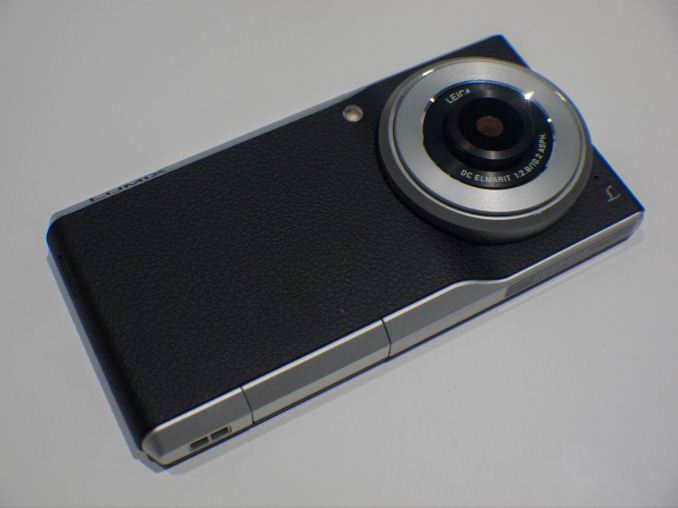

At MWC 2015 this year we had the opportunity to pass by the Panasonic booth while they were holding a media event for the Lumix CM1 camera/smartphone hybrid. These "big-camera" smartphones have been around for quite a while, most notably from Samsung with their Galaxy Camera or Galaxy K Zoom product lines. The biggest disadvantage from those products were that the phone-side of the devices were always rather large spec downgrades from their flagship "pure" smartphone counterparts.
The Lumix CM1 offers some fresh air by trying to not skimp on the phone hardware itself, offering a Snapdragon 801 as the brains of the device. While this isn't the newest and most powerful SoC from Qualcomm, it still offers a very high-end experience over other products such as Samsung's alternatives. It is pretty clear that Panasonic is trying to position itself the CM1 into against the K Zoom as both are the only Android camera hybrids which also offer cell connectivity.
| Samsung Galaxy K Zoom |
Panasonic Lumix CM1 |
|
| CMOS Resolution | 20.7MP | 20.9MP |
| CMOS Format | 1/2.3", 1.12µm pixels | 1", 2.4µm pixels |
| Optical System | Focal Length: 4.4 - 44mm (35mm equiv: 24-240 mm) F/3.1-F/6.3 aperture 10x zoom + OIS |
Focal Length: 10.2mm (35mm equiv: 28mm) F/2.8 - 11 aperture |
| Dimensions | 137.5 x 70.8 x 16.6mm (20.2mm max at lens) 200g |
135.4 x 68.0 x 15.2mm (21.1mm max at lens) 203g |
| Video Recording | 1080p60 max | 2160p15 (50mbps) 1080p30 (20mbps) |
| Display | 4.8" 1280x720 Super AMOLED |
4.7" 1920x1080 LCD |
| SoC | Exynos 5 Hexa (5260) 2x 1.7GHz A15 4x 1.3GHz A7 Mali T628MP3 600MHz |
Snapdragon 801 (MSM8974AB) 4x 2.26GHz Krait 400 Adreno 330 450MHz |
| Storage | 8GB + microSD | 16GB + microSD |
| Battery | 2430 mAh (9.23Whr) | 2600 mAh (9.9 Whr) |
| OS | Android 4.4 | Android 4.4 |
| Connectivity | 2G / 3G / 4G LTE (Intel XMM7160 Category 4 LTE) 802.11a/b/g/n, NFC, BT 4.0, GPS/GNSS |
2G / 3G / 4G LTE (Qualcomm MSM9x25 Category 4 LTE) 802.11a/b/g/n/ac, NFC, BT 4.0, GPS/GNSS |
Panasonic's crucial feature to differentiate the CM1 from the competition is the massive 1" CMOS image sensor. This is by far the biggest sensor employed in any currently exisiting smartphone and should offer substantial advantages in light sensitivity as the 2.4µm pixel pitch offers more than quadruple the light collecting area over the 1.12µm on the K Zoom and other commonly found smartphone image sensors.

It's on the optical system that Panasonic didn't venture too far, as the CM1 offers no optical zoom at all. The Leica lens promises excellent optical characteristics such as a reduction in vignettes, flaring, ghosting and chromatic inconsistencies while increasing resolution and edge-to-edge sharpness. The lack of OIS may also be eyebrow-raising as we're starting to see the technology adopted in current conventional flagship smartphones. Having a large image sensor and the capability to shoot in up to ISO 25600 mode here may help to reduce exposure time, and thus possible blurriness due to shaking, but it's still something that needs to be tested out in practice. Panasonic employ their own dedicated ISP named the "Venus Engine", from which we might also see some advanced post-processing done to improve image quality.
The device offers a 4.7" 1080p LCD screen that is by far the sharpest in its category. Panasonic did great here as we've seen camera-oriented smartphones employ lower resolution screens. From the small hands-on time, visibility seemed good as was the colour accuracy.
The device ships with Android KitKat 4.4, a rather disappointing aspect for a device shipping in 2015. There is very little OS customization and Panasonic relies more on stock Android looks and features. It's on the camera side where the CM1 shines, as we see a camera application that basically mimics every feature found on standard Lumix dedicated cameras. We have the full breadth of controls that you would expect from a full-featured camera, including exposure, aperture, ISO, white-balance, focus-modes and the vast plethora scene-modes that would put competitors such as the K Zoom to shame. We also have full RAW capture, a feature avoided in existing camera-oriented smartphones up until the release of Android 5.0 and Camera2 API compatible devices.

The camera lens is surrounded by a "manual control ring", a turnable ring which can be set up, depending on shooting mode, to control different functions such as shutter speed, aperture or ISO. I found the ring to function very well and it certainly helps when you want to take very quick adjustments in (for example) the exposure while in manual mode. The device also features a dedicated hardware camera shutter button and a camera-quick access button which can be used to open up the camera app in sub-one second time even when waking up the device.
The general feel of the device was extremely solid, at 203g and 15.2mm thickness the device felt quite hefty. The faux-leather texture found on the front and sides give it a very good grip and it doesn't detract from the rather premium feel of the camera-phone. Although the device is quite thick and heavy, we're only seeing a 2600mAh battery employed. I'm not sure how the internal hardware is set up, but I expected it to much larger than that when I initially first picked up the unit.
The LED flash was probably the most disappointing aspect, as it simply really can't be considered a proper solution and even Samsung's camera-phones employ Xenon flashes. I tried it out in the Panasonic booth and it is little more powerful than your standard smartphone flash.

On the bottom of the device we find a flap which covers the SIM and microSD slots. There are two contact pins right next to it which seems to be designed for dock-charging, although Panasonic didn't have the corresponding accessories on display.


The Lumix CM1 seems to be an interesting device which wants to position itself as a serious alternative to the K Zoom. We've seen quite a few Android-powered cameras announced in the past, but these two products remain the only ones which offer the true combination of point-and-shoot cameras with the option of cellular connectivity.
There seems to be no contest on the software side as Panasonic brings the years of experience from its Lumix brand to Android with little compromise. I'm not yet sure how image quality will pan out given the lack of an optical zoom and OIS, and it's something we would have to extensively test in an eventual full review. On the phone side we have the hardware matching 2014's flagship smartphones, which again, doesn't match current flagship devices, but nevertheless narrows the spec gap which we've seen to be quite large on the K Zoom.
It all falls back down to pricing. With an MSRP of 899€ and availability only in certain European countries, the CM1 comes with a really steep price that is hard to reason with. It remains a niche product for those who really want the flexibility of a smartphone device, yet want to have a higher-end camera without actually carrying one around.
Read More ...
Updates on Valve’s Steam OS, Steam Link, and Steam Machines at GDC 2015
First, let’s talk about Steam OS a bit more. Based on a fork of Debian, Valve has released several major updates since Steam OS first entered public beta last year. The current build is SteamOS update 153, which includes NVIDIA 343.22 drivers and AMD 14.9 drivers, so right there we can see things are still lagging behind the current official drivers from AMD and NVIDIA. Of course, there are plenty of games that don’t work natively with Steam OS (yet?), and newer drivers often focus on the latest games so it’s not really critical to be on the latest driver release.
Perhaps more interesting is that Valve apparently feels Steam OS is now at the point where they’re willing to start pushing it a bit more, and to that end they currently have a “Steam OS Gaming” sale going on – basically, games that are available (or coming soon) for Steam OS have discounts of 10-80% right now. The offer runs through March 9, and there are definitely some gems worth checking out, whether or not you have any interest in Steam OS.
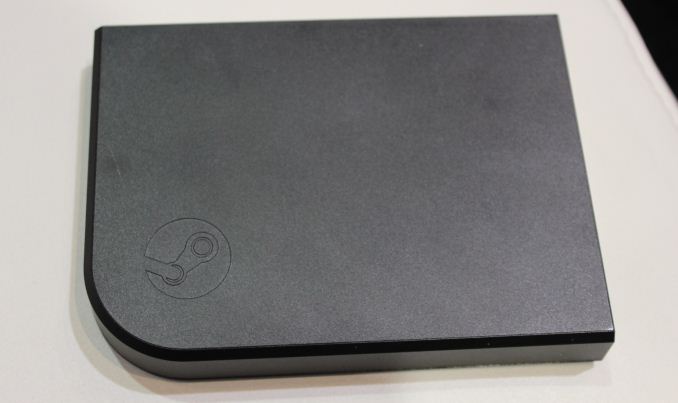
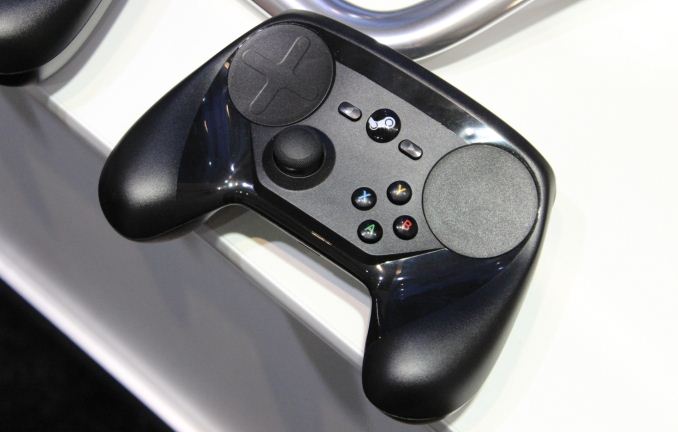
Steam Link is a new device shown for the first time at GDC 2015. This is an in-home streaming device that will work with Windows, OSX, or Steam OS PCs and is priced at $49.99. It supports 1080p 60Hz streaming and is optimized for low latency. It also supports the Steam Controller, which has apparently reached its final form (for now?) and will be priced at $49.99 as well. The streaming capabilities are apparently pretty good, though availability isn’t slated until November so there’s still plenty of time to perfect things.


Also on display at Valve are 14 upcoming Steam Machines – some could probably be shipped now, but officially they’re all slated to begin shipping in November. We’ll cover these in alphabetical order, with a brief list of specs and expected pricing where applicable. First up, Alienware has a system starting at $479, but they don’t provide much in the way of details; it will support Intel i3/i5/i7 processors, NVIDIA GTX graphics, 4-8GB RAM, and 500GB-2TB of storage. ASUS has their GR8S starting at $699 with Core i5/i7 processors, NVIDIA GeForce 9-series graphics, 4-16GB RAM, and 500GB-1TB HDD storage or 128GB-512GB SSD storage. CyberPowerPC’s Syber brand Steam Machines will be a configurable build ranging in price from $499 to $1399; Syber will support both AMD and Intel platforms, so CPU options range from Athlon X4 840 up to an Intel i7-4790K, with the GPUs going from R9 270 2GB to GTX 980 4GB. The Digital Storm Eclipse is priced at $699 with a Pentium G3220, 8GB RAM, 1TB HDD, and a GTX 960 GPU.


One of the most expensive options is the Falcon Northwest Tiki Steam Machine, which uses the Tiki chassis that we’ve previously reviewed. The starting price is $1999 with a maximum price of $4999, but it’s not clear what the base hardware will be. Falcon lists CPU support up to the i7-4790K, NVIDIA GPUs up to the Titan and Titan Z, 16GB of DDR3-1866 RAM, and up to 8TB of HDD storage (with SSD storage as an option as well). On the opposite end of the spectrum, Gigabyte has their BRIX Pro with i7-4770R and Intel Iris Pro 5200 graphics, making them the only Steam Machine on display to not use AMD or NVIDIA graphics. The price starts at $599 and the BRIX Pro supports two SO-DIMM slots and a single 2.5” drive. iBUYPOWER’s SBX is one of the few AMD-only affairs, with a starting price of $459 that gets you an Athlon X4 840, R7 250X 1GB, 4GB RAM, and 500GB HDD. Maingear’s Drift starts at $849 and supports up to i7-4790K, GTX 980, 16GB RAM, and 2x1TB SSD or 1x6TB 3.5” HDD – there was no mention of the base configuration, unfortunately. Origin’s Omega is another high-end box, with up to i7-4770K (no i7-4790K?), 3-way GTX 980 SLI, 32GB RAM, and 14TB of storage; the base price is $899 while the maximum price is “$4999+”.


Getting into companies that might not be as recognized by our readers, Materiel.net has a $899 cube system with i5-4440, GTX 960 OC, and an indeterminate amount of RAM and storage. Hmmm…. next also has a cubic NextBox priced from $799-$1299. The base CPU is an i3-4160 with i7-4790K at the top; GPUs range from GTX 750 to GTX 970, and you get 8GB RAM and 500GB-1TB HDD storage. Scan Computers offers their 3XS ST ranging in price from $999 to $1299, with Core i3/i5 CPUs, GTX 750 Ti/960/970 GPUs, 8-16GB DDR3, and 120GB and up on SSD storage – interestingly, they’re the only company that doesn’t list an HDD option. Webhallen has their S15-01 box for $949 with i5-4460, GTX 960 2GB, 8GB RAM, and 1TB HDD. And last but not least, Zotac has their $999 SN970 that uses mobile parts, pairing an i3-5010U with a GTX 970M 3GB, 8GB SO-DIMM, and a 1TB 2.5” 7200RPM HDD; this is one of the smallest Steam Machines on display, thanks to the low power components.
Wrapping up the Steam OS related announcements, there’s still that lingering question of why anyone would want to get a Steam Machine running Steam OS as opposed to a Windows PC running Steam. It remains to be seen if games can be made to run faster/better under Steam OS than under Windows, and while the cost of the OS can be a factor it may not be enough in savings to make Steam OS preferable to Windows. We should have some better answers come November, when most of these products will launch.
Read More ...
Unlocked Socketed 65W Broadwell Iris Pro Desktop CPU Demoed by Intel at GDC15
The key elements here include the CPU being socketed (replaceable), unlocked (overclockable) and having Iris Pro, or Intel’s extended eDRAM segmentation usually under the Crystal Well name but with the much improved Generation 8 graphics architecture. While we have heard that an unlocked Iris Pro has been coming to desktop since March last year, very few details were given at the time, and the news today at least puts a TDP on such a part: 65W. Normally the high end SKUs from Intel are 77W to 85W, suggesting that this component may not in actual fact be an i7, or it could be an Iris Pro part but using one of the low power monikers such as ‘S’.

Image from Intel
The news also puts on a more firm date, so rather than ‘2015’ we get ‘mid-2015’, which puts it within the May to September timeframe. There are two important events occurring between those dates - Computex in June and the Intel Developer Forum in August, suggesting that Intel may aim for one of these events to have a formal launch.
Despite the launch of 14nm on the desktop, there has been recent talk of Intel’s next architecture, Skylake, also occurring within the year. This puts Intel in an interesting dynamic of releasing two different platforms for desktop within the same year. One could speculate and suggest that these will synergistically work in tandem, with Skylake-DT taking a segment and Broadwell-DT taking another segment. Where mobile fits into all this as well is difficult to tell, especially given the launch of Broadwell-U and Core-M within the past few months.
As much as we would like more information, it seems that the only thing we can tell is that the motherboard being used looks like an EVGA design due to the right angled power connector. Intel is also stating that the Iris Pro model will be great for all-in-ones (no argument there) which could also feature its RealSense camera, enhancing compute power and interactivity. It would be interesting if a socketed Iris Pro was truly aimed at the AIO market, but then such a SKU would not need to be unlocked. Unlocking for the purposes of overclocking is naturally aimed at the desktop market, although usually for gamers with discrete GPUs rather than Iris Pro.
Naturally we want to get our hands on a sample for review. Ryan is at GDC this week so if he gets a chance to spend a few minutes with the system it would be interesting to hear what they actually represented in the demo as well as more information about the system itself.
Read More ...
AMD FreeSync Update
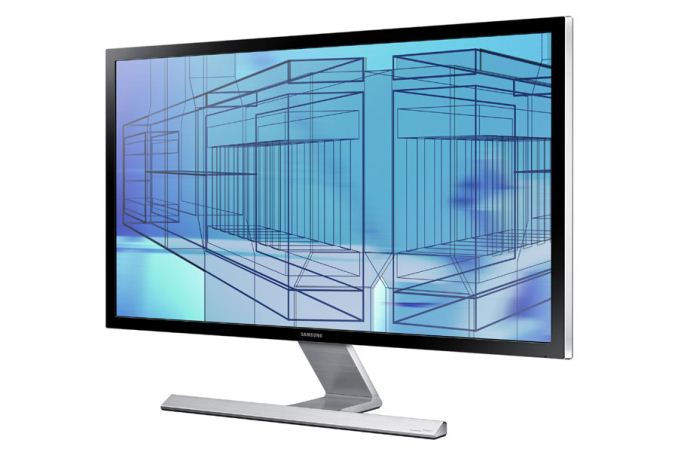
While we can't come to any real conclusions without true hands on experience with testing FreeSync displays across a variety of games, this should hopefully be a pretty straightforward piece of hardware. At this time I'd argue that the panel technology is just as important as the adaptive VSYNC, as having to go with a TN panel to get higher refresh rates tends to be a case of one step forward, one step back. Thankfully, there should be IPS FreeSync displays (alongside TN models) available.
Of course having a FreeSync display won't do you much good without an appropriate FreeSync enabled driver, and AMD announced that they will have a publicly available FreeSync driver posted on their website on March 19. There's a corollary that's just as important, however: a driver with support for CrossFire configurations won't be available until the following month. If you're running an AMD GPU and have been looking forward to adaptive refresh rates, the wait is nearly over.
Update: In the UK at least, OverclockersUK has several FreeSync models available. The BenQ XL2730Z at £498, the LG Flatron 34UM67 for £500 and the Acer Predator XG277HU for £430 are listed with the BenQ listed in stock.
Read More ...
Intel and Raptr Announce Partnership To Bring Raptr To Intel GPUs

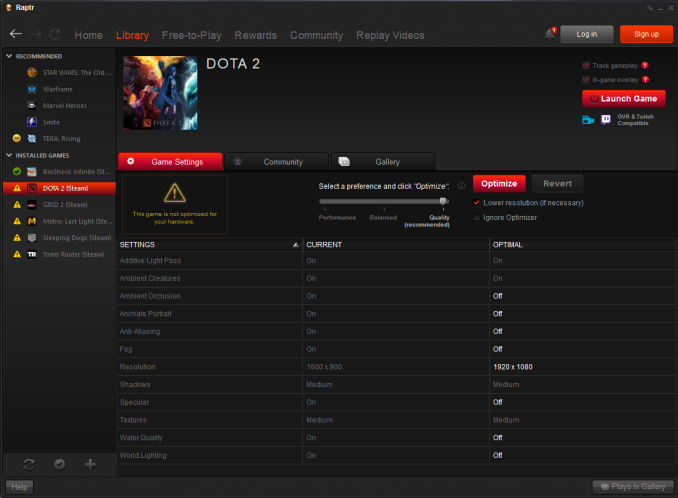
Between Raptr/GEA and NVIDIA’s GeForce Experience, both of the major dGPU providers now offer game settings recommendations and game recording through their respective applications. In fact the only PC GPU that there isn’t a similar utility for is Intel’s iGPUs, and this week at GDC Intel and Raptr have revealed that this will be changing.
Being announced this week is a new partnership between Intel and Raptr that will see Raptr’s GPU features extended to support Intel’s GPUs. This means that Raptr will be gaining the ability to use Intel’s QuickSync encoder for their GameDVR feature, Raptr’s driver update checking & notifications, and Raptr’s settings recommendation service will soon be able to profile performance on and generate settings for Intel’s GPUs as well. This deal essentially brings Intel up to parity with AMD on the utility front, offering the same features as AMD through what is fundamentally the same software.
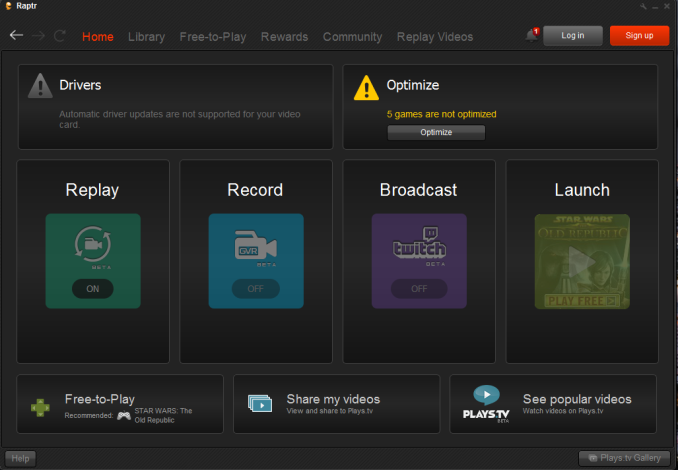
Unlike the AMD partnership however there are a few differences, especially at the hardware level. While AMD offers a complete range of GPUs, Intel only focuses on the low-end with integrated GPUs. Which means that for Intel, a good game settings recommendations service is especially important because the lower performance of their GPUs means games will often require extra tweaking to be made playable on their GPUs, and all the while there is no significant extra performance margin to absorb suboptimal settings. It’s important to keep in mind just how incredibly large the Intel HD Graphics user base is, which means that any improvements Intel invests in here will pay off in bulk, making the reward/effort ratio quite high.
More broadly speaking, Intel also benefits from the Raptr service since the performance recommendation service is a continually updating service, offering something Intel and game devs cannot. Intel actually already does performance profiling for new games, and Raptr will be getting this data as well in order to create their initial recommendations. However once put in motion, Raptr’s crowd source data collection mechanism means that in the future they can adapt to things like driver performance improvements and use that data to provide newer, better recommendations. And with Raptr offering driver update notifications (something Intel’s control panel does not), users will be more likely to have regularly updated drivers that offer the best performance for a given game.
Meanwhile from a business perspective there will also be a few important differences between the Intel and AMD deals. Unlike AMD, Intel will not be receiving a branded application (GEA) and instead Intel users will be directed to use the stock application. Intel will also not be bundling the application with their drivers like AMD does. What Intel will be doing instead is offering the Raptr client for download from their website – http://www.intel.com/raptr – and Intel will also be encouraging OEMs to bundle the Raptr client with their prebuilt systems. This partnership means that Raptr will have a much slower rollout on Intel systems, but if the OEMs go ahead and bundle it then in the long run the end-user uptake could be much higher.
Wrapping things up, as of this publication time Intel’s Raptr site has already gone live. Meanwhile Raptr users should see an increasing amount of support for Intel HD Graphics in the game settings service as the service continues to ramp up its data sets.
Read More ...
Apple, World's Most Valuable Tech Company, Bumps AT&T Off of the DOW Index
After years on top the profit ranks, Apple finally joins the prestigious market index
Read More ...
Office 2016 Preview Comes to Mac w/ Retina Support
Refresh is first since Office 2011, packs a plethora of changes, and promises better compatibility
Read More ...
Microsoft May Announce Windows 10 Release Candidate at Ignite
New conference will kick off on May 4 and big things are expected to be in store
Read More ...
Study Predicts Self-Driving Vehicles Could Rake in Billions
A recent study expects big things from autonomous vehicles and related technology, including record-setting revenue
Read More ...
Sour Brew: How Keurig Cofounder Came to Hate His Invention, The K-Cup
More than 8 billion K-cups are sold each year, making toxin-transporting microplastic waste from K-cups a serious concern
Read More ...
Available Tags:Panasonic , Steam , Steam , Steam , CPU , Intel , AMD , Mac , Microsoft , Windows , His ,


No comments:
Post a Comment