

Zotac Updates ZBOX mini-PC Lineup at CES 2015

ZBOX CI321 nano
An evolutionary update to the ZBOX CI320 nano, it features a Haswell-Y Celeron in the place of a Bay Trail-M processor. The Intel Celeron 2961Y clocks in at 1.1 GHz. It is also the first nano C-series SKU to come with two GbE ports. Other than that, the specifications are just like any other C-series Intel-based mini-PC.


ZBOX EN860
This is a traditional ZBOX with a discrete mobile GPU. Like all traditional ZBOX units, it comes with two GbE ports. The gaming credentials of the system is boosted by the presence of a GTX 860M. A Haswell-U processor, the i5-4210U does the CPU duties. The unit can drive 4Kp60 displays over the DVI-I and Display Port outputs. It is also compatible with NVIDIA G-SYNC displays.


ZBOX PA330
The PA330 is the follow-up to the pocketable PI330 introduced late last year. A tablet platform in a different form factor, the PA330 uses a AMD A4-6400T quad-core Mullins APU with 2 GB of DDR3L and 32 GB eMMC storage. The PI330 from last year uses an Atom Z3775 Bay Trail-T SoC with 4 GB of LPDDR3 and 64 GB of eMMC. That said, the PI330 comes with 802.11n Wi-Fi, while the PA330 sports a 802.11ac connection. GbE LAN, a couple of USB ports and a headphone jack are also present.


Zotac also supplied us with a brochure listing features of their ZBOX units that are currently in the market. One of the tables in it tabulates the features that are available in each series. We are reproducing it below, as we believe readers will find it useful in choosing the right model that fits their needs.

Full pricing details and firm launch dates for the ZBOX models launched at CES 2015 are not yet available.
I had a few suggestions for Zotac when visiting their suite at CES. First of all, for models which have only one SO-DIMM slot, Zotac should put more marketing emphasis on the PLUS models. The drawback of the PLUS units for models with two memory slots is that consumers often do not bother to fill up the free slot. Operating in the single memory channel mode prevents users from realizing the full potential of the computing platform. The quality of the SSDs being used in those PLUS models must also be good (not the FORESEE models in the C-series that we have seen so far). For the premium ZBOX units with two GbE ports, Zotac should opt for Intel GbE transceivers instead of going with Realtek.
Read More ...
NZXT Launches DOKO In-Home Streamer
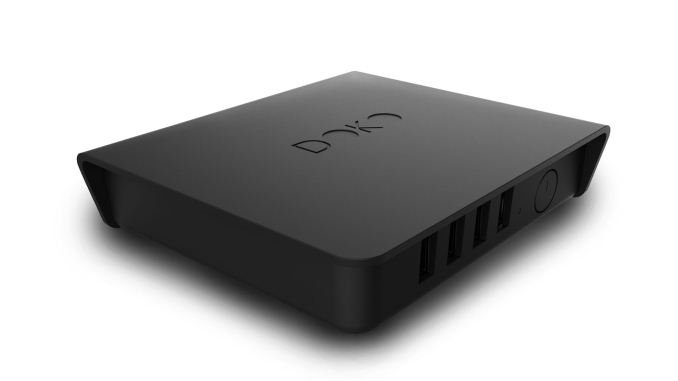
Steam is a custom software-based streaming solution designed around gaming, so first you need to be running a Steam game for it to even work, and second you need to have two full PCs – the source PC and the destination PC. Steam in-home streaming can be a great solution, but it's only really viable if you want (and can afford) a second full PC in the living room. Granted, it can be a relatively low-end PC, but it will still cost at least $200 and it will consume a moderate amount of power. Media streamers on the other hand are great at one thing: streaming media. Whether it's Netflix, Hulu, or some other content, that's basically the only thing media streamers are really intended to handle: video/multimedia content. And wrapping up with NVIDIA's SHIELD, you're able to hook up a SHIELD device to your living room HDTV, and if you have a PC with an NVIDIA GPU you can stream games or any other content available on Android…but you're locked into NVIDIA for gaming.
Basically, all of the above have limitations as well as areas where they do well. NZXT's DOKO looks to be something of an inexpensive jack of all trades…and master of none. The biggest issue most will have is that the DOKO in its current form only outputs 1080p30 content. That's fine for some use cases (video streaming is usually not a problem, and less "twitchy" games should be fine), but for others it may prove a serious limitation. The good news is that outside of the DOKO box, there's nothing else required other than installing the DOKO software on any and all PCs in the house.


Connecting to a PC is relatively simple and only takes a few seconds, most of which is spent initializing the USB devices plugged into the DOKO. Once that's done, you can interact with the PC just as you would if it were connected directly to the HDTV. Want to open an office application, surf the web, watch a movie, play a game, read email, or anything else? No problem. Everything your PC can do gets streamed to the HDTV via DOKO, at 1080p30. Lag in my experience wasn't bad either; NZXT quotes 15-80ms, depending on how you're connected, which brings up an interesting point: DOKO only has a Gigabit Ethernet connection; no WiFi. I suspect the latency over pure GbE will be extremely low – and the 30 FPS limitation becomes even more surprising – but if you connect over a wireless bridge then latency will certainly take a hit.


Let's finish off with a few specs, for those who are interested in the internal workings of the DOKO. It comes with a Wonder Media 8750 SoC, four USB 2.0 ports, and HDMI 1.3 output, Gigabit Ethernet, and a headphone jack. The DOKO box measures 108mm x 121mm x 29mm (WxDxH), and it weighs just 0.32kg – it's almost too light for wired devices, as the weight of a few cables could easily move the box around. Power is provided via a 12V 2.5A adapter, though I'd be surprised if the device uses anywhere near the maximum 30W that adapter can supply (unless you happen to have all four USB ports connected to relatively power hungry devices). The box also includes 256MB RAM and 2GB storage. The encoding/decoding of the 1080p30 signal is uses a licensed codec from a third party, I believe, but I didn't get the details – it does not at present utilize NVENC, Quick Sync, or any other form of hardware accelerated encoding as far as I am aware, which is likely a big part of the 30 FPS limitation.
As far as USB device support goes, DOKO currently supports most USB storage devices, plug-n-play keyboards/mice, wireless keyboards/mice (with a USB adapter), and the official Xbox 360 wired and wireless controller. Additional USB devices may function properly but are not guaranteed. DOKO does not currently support USB headsets or USB webcam devices, but NZXT is working on a firmware update that will bring support for both devices. DOKO has a support page with information on tested peripherals that should contain the latest information.
DOKO is an interesting idea, but that 30 FPS cap is going to turn away a lot of users. As someone that tests laptops, I can say that 30 FPS isn't the end of the world – especially a smooth and consistent 30 FPS – but by no means is it anywhere near ideal. NZXT may end up making a DOKO 2.0 with 1080p60 support and that would definitely help, but until/unless that happens the DOKO is going to be a niche product. If you want an easy way to connect to your PC from the living room and you can run Ethernet to the location (or have a WiFi bridge), it will get the job done, but only at 30 FPS. At least the pricing is reasonable, as $99 gets you a DOKO with support for as many PCs as you might have in your home. System requirements list a 1GHz of faster CPU, 512MB RAM, Gigabit Ethernet, and Windows 8 is recommended (though Windows 7 apparently works with sub-optimal performance).


Read More ...
Corsair Show DDR4-3400, also mentions 16GB UDIMMs?
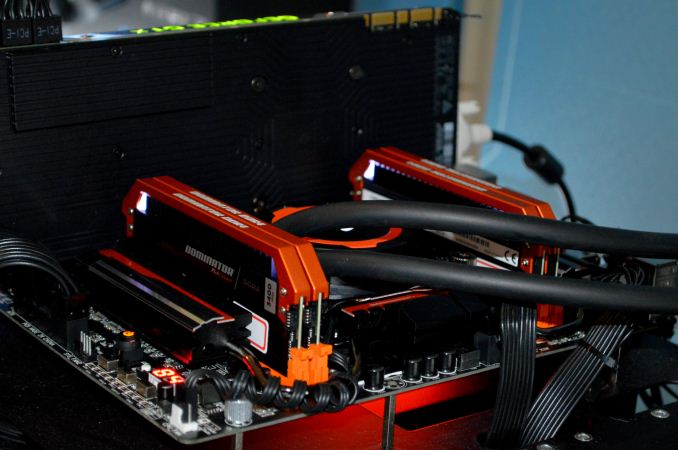
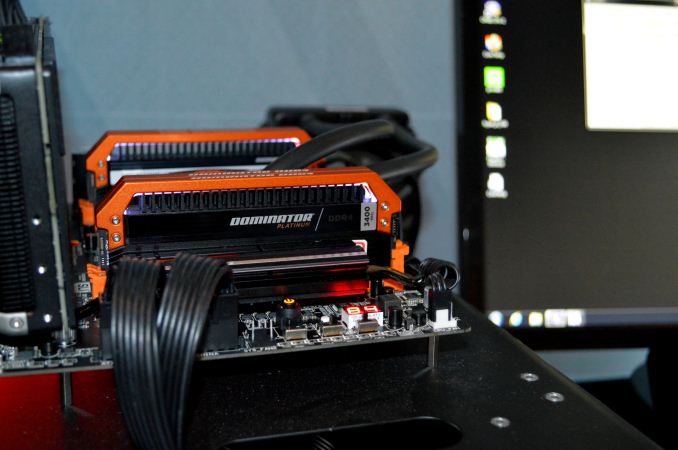
Up until this point, Corsair had released DDR4-3200 (we have a kit of this in to test) at $740 for 4x4GB to DDR4-3333 at $910, but DDR4-3400 pushes the margin out a bit more. With most DRAM, binning for higher speed hits the law of diminishing returns – you have to bin more ICs to get the high speed. As a result, these modules will be pretty expensive, and because it is X99 which needs four modules to reach quad channel bandwidth, a user has to buy all four. At the suite, they even had them running with a small overclock to DDR4-3500:
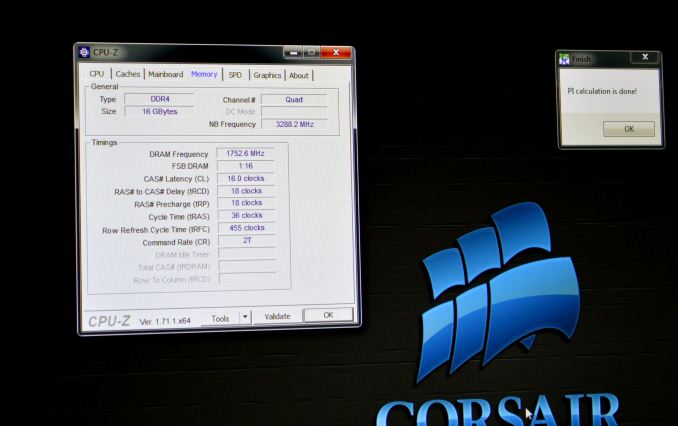
This sets them up to be very expensive. They are currently on Corsair’s website for $999.99 for a 4x4GB kit. To put that into context, two sets of 4x8GB DDR4-2133 C13 will run at just over $1000 combined, making these modules almost 4x the cost per GB than the base JEDEC frequency memory. These DDR4-3400 modules are set at 16-18-18, which is looser than JEDEC at 2133, but indicates that both primary sub-timings and frequency are tight compared to each other. Compatibility for this kit is so far only listed as with the X99-SOC Champion.
While the kit was impressive and did catch my eye, the following wall image caught my attention more:
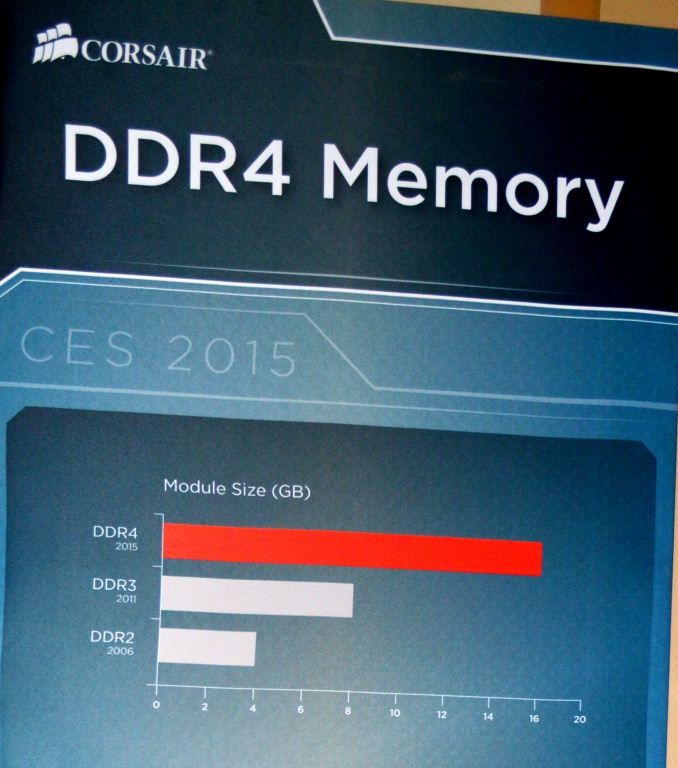
Here it explicitly states that a module size of 16GB is coming to DDR4 in 2015. Unfortunately no other information could be crowbarred out of Corsair regarding time frame or pricing, but we were able to speak with a memory manufacturer who said it should be coming in the near future. We will be working hard with Corsair to secure some testing kits if they pop up, but it means that soon we should (hopefully) start to see 128GB UDIMM arrangements on X99. It might also mean another round of BIOS updates to help support a full 8x16GB configuration. These would most likely start at DDR4-2133, as this would have the highest yields.
Read More ...
AMD FX-8320E CPU Review: The Other 95W Vishera
Back in September we reviewed the FX-8370E, a new AMD CPU based on the older Vishera/Piledriver architecture but at a lower power – 95W rather than 125W. This was achieved by a combination of a mature 32nm process, adjusting clock speeds and (potentially) some specifically binned voltage characteristics. The FX-8320E was the other lower power CPU launched that day, which AMD has now been supplying for reviews.
Read More ...
Oculus Demos Crescent Bay and VR Audio

To be clear, this is the first time Oculus Crescent Bay has been demonstrated publicly and the first time ever that Oculus has shown VR Audio to anyone outside the company. They held private screenings for the press and other "VIPs", and on the way there we passed by the Oculus booth that had a long line of people waiting to experience Oculus. Being able to jump the line and go into a private screening, I can’t help but feel a bit sorry for them. As for Crescent Bay, things have come a long way since the last time I tried Oculus (DevKit 2 at NVIDIA in September, if you’re wondering).
For Crescent Bay, Oculus put together a series of short demos that lasted about five minutes I’d estimate. All of these used positional audio, so as you turned or leaned in, you got a clear sense of the sounds moving around you. This isn’t anything really new, as we’ve had audio HRTF (Head Related Transfer Functions) doing positional audio for a while now, but combined with the goggles and stereoscopic 3D it’s very immersive. Oculus has licensed Visisonics’ 3D audio libraries, though they’re doing a lot of customizations to make things work with the Oculus Rift obviously. I had seen some of the demos before, and some of them were more in line with what you would expect from indie games; a few however were really designed to impress.
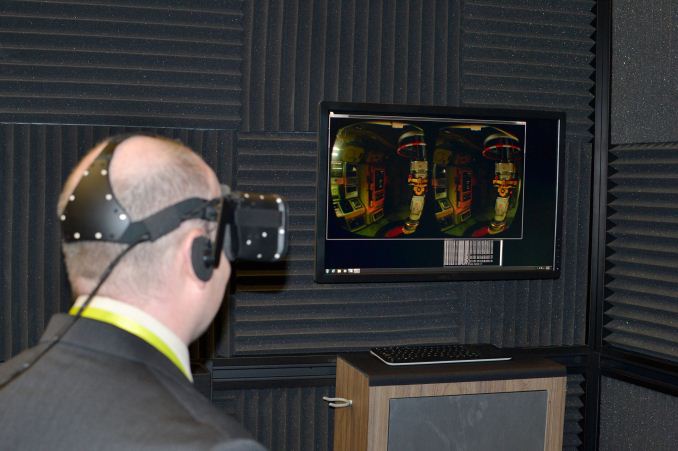
One was a city-scape that looked a bit like Gotham, with your view positioned on a platform high in the air. Looking down and stepping off the edge of the platform definitely gives a sense of vertigo, though the demo didn’t let you plummet towards the ground sadly. (And when you look down and can’t see your feet or any other representation of your persona, it definitely removes you a bit from the experience.) Another sequence has a T-Rex come stomping around a corner, similar to a scene from Jurassic Park. I was admiring the level of detail when the dinosaur puts his face right next to you, opens his mouth, and roars. The little bits of spittle flying through the air are a nice touch. Finally, there’s a slow motion on-rails sequence where your view moves forward toward a large alien robot with bullets, missiles, and even cars flying through the air – NVIDIA called this the “car flip demo” back in September. This was one demo where I definitely noticed the increase in visual fidelity thanks to the higher resolution display and the VR Audio.
In terms of the hardware, Oculus wouldn’t provide us with very many specifics of the display, but all indications are that they’re using a 2560x1440 OLED display like that in the Samsung Galaxy 4 Note. While they wouldn’t tell us the actual resolution, however, they did tell us some of the changes that they’ve made since DevKit 2. DK1 obviously was the starting point, and it used a 1280x720 60Hz LCD. While it looked okay, pixilation was very visible and there was some ghosting between images. For DK2, Oculus switched to a 1920x1080 OLED display, and they were able to drive it at 75Hz. They also use minimal persistence where the image is shown on the OLEDs for 2ms and then the image is blacked out, which works better with our eyes and doesn’t lead to ghosting as much – but it was still present at times with DK2. Crescent Bay has increased the refresh rate to 90Hz, with 2ms showing the image and then blacking out the screen, and that combined with an increase in resolution helps to improve the visuals even more. This was the first time I didn't notice any ghosting on Oculus.
One thing Oculus wouldn’t comment on is a release date. The hardware at this point could probably ship and people would be really impressed, but there’s a lot of work yet to be done with interacting with the environment and the user interface. I wouldn’t be surprised if Crescent Bay gets released to developers as DevKit 3 later this year, but other than some cool tech demos this isn’t really something end users would want/need just yet. It could easily be a couple more years before public release and by then we might see 4K or even 8K displays in the goggles. More important however is that we’ll need compelling games and other software that people can actually use, and that will take time more than anything.
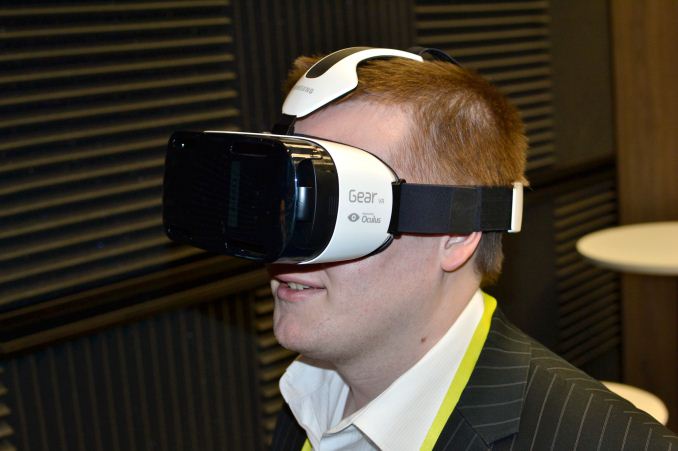
I should also note that I was able to try a few other VR headsets at CES. The first was from SoftKinetic, and they mounted a forward facing 3D camera on the Oculus DK2 to allow you to interact with the environment using your hands. The demo involved reaching into the space in front of you to “grab” boxes, stack them up, and then you could whack them around and knock them over – all with your virtual hands floating in the air. This helped place you in the environment, but it is still early in development. The second was similar in some ways, in that it involved a forward facing camera mounted on the goggles, and it was at the Razer booth. You were supposed to hold your hands in front of you and fire and ice would appear in your left and right hands, which you could then throw at flaming or freezing floating skulls to “kill” them. It was a game of sorts, and the goggles use different software and hardware than the Oculus Rift, but the demo at least for me was a bit raw – most of the time my hands wouldn’t actually appear in front of me. Oculus also had Samsung's Gear VR (powered by Oculus) available, but the software being run wasn't at the same level as the Crescent Bay demo, and the hardware seemed more like a cross between DK1 and DK2.
There’s definitely a lot of interesting stuff being done with VR these days, and compared to the stuff I saw back in the 90s what we have now is truly impressive. Large polygons have given way to impressively realistic textures and models, and the positional tracking and latency are very good as well. It’s not perfect yet but we’re getting there. It’s going to be interesting to see who manages to release a public product first and what software we’ll end up using, and I’m looking forward to seeing more over the coming years.


Read More ...
Origin PC Shows Off High-End Notebooks and the “Not-a-Steam-Machine” Omega
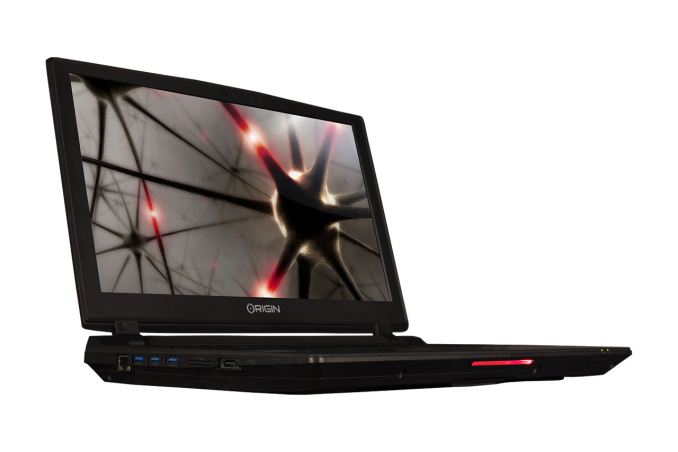
This was the first time I was able to go hands on with the new Clevo laptops. The designs have been updated since the last generation, with some minor to moderate tweaks in terms of aesthetics. Perhaps more importantly, they Clevo ditched the awful (IMO) trackpads from the last generation, so there's no "tribal tattoo" this time.

For the mainstream mobile segment, Origin was showing the Clevo P650SG, which they call the EON15-S. It’s the update to the P150SM more or less, with support for up to GTX 980M. This is still running Intel’s HM87 Mobile Haswell platform, but of course standard voltage and quad-core Broadwell hasn’t launched yet so that’s to be expected at the high-end. The CPU is the i7-4720HQ, and the chassis has support for two M.2 SATA drives (or two M.2 PCIe drives) along with two 2.5” drive bays.
Origin also says the laptop has “4K gaming support with 4K Ready external display”; 3K and 4K 15.6” displays are available on the market, but for now it doesn't appear Origin will be offering the EON15-S with those; I believe the included 1080p display was wide viewing angle at least, which is likely sufficient for most users. I didn’t have a lot of time to really get a feel for the laptop, but while the keyboard looks pretty much unchanged the touchpad was much more responsive than the last P157SM that I tested, and it is using a Synaptics touchpad. The new EON15-S is also 36% thinner (1.13”) and 25% lighter (5.5 lbs.) than the previous model, which is a welcome change.


For those who are looking for extreme performance, Origin PC has two new notebooks that have desktop CPUs, including support for the Devil's Canyon i7-4790K. Origin calls these the 15.6” EON15-X and the 17.3” EON17-X, and they use the Clevo P750ZM and P770ZM, respectively. Overclocking is apparently supported, but only up to 4.5 gigahertz – though that is on all four CPU cores. Of course battery life will take a hit, with or without overclocking, so these are very much transportable laptops rather than something that you could use unplugged for a long period of time.
Other features are similar to the P650SG: dual M.2 PCIe drives with dual 2.5” drives for HDD/SDD use. The laptops all support four SO-DIMMs for up to 32GB RAM, and Origin plans to ship 1080p IPS displays in these systems (though it might take a bit longer to get in sufficient supply of the 17.3” IPS displays; the model they showed was still using a TN panel). Also note that all three models have dropped support for optical drives, so if you need an optical drive you’ll have to look at other options. The EON15-X measures 1.4” thick and weighs 7.49 lbs. so it’s not exactly light, but it is a reduction compared to the previous model. EON17-X meanwhile sees some larger changes, reducing the thickness by 37.5% (1.52” thick now) and it weighs 8.59 lbs. All of the EON notebooks also support full color configurable RGB zoned backlighting.
Origin also carries MSI based laptops now, with Origin PC branding. They had the new GS60 based notebook on display, the EVO15-S, sporting the GTX 970M. This model was also equipped with a 4K 3840x2160 panel, which is one step up from the 2880x1620 model I reviewed last year. I don't expect cooling and battery life has improved much since the 870M MSI variant I tested, though it’s possible firmware tweaks have helped. Regardless, this is still a nice looking notebook and the 970M should offer more performance with perhaps slightly lower power requirements.
All of these notebooks are available for order now and should ship in the near future. Origin PC systems tend to cost a lot of money and they list the starting price at around $1850; that includes the 980M on the new EON15-S, but that's with 8GB RAM and a 500GB HDD. A single 480GB PCIe SSD and 16GB DDR3-1600 (and no HDD) will result in a price of $2406. As for the EON15-X, the base price includes the 970M and an i5-4460S, which seems pointless as anyone after a desktop processor will probably want something significantly faster than mobile options. With a 980M, 16GB RAM, 480GB PCIe SSD, and an i7-4790K, the price jumps to $2874. The EON17-X is slightly more at $2906 with the same components, though again note that the display at this time isn't an IPS panel.
In short, Origin PC provides a premium laptop experience for dedicated gamers that have enough cash to afford the fastest systems. Origin does offer some free aesthetic alterations to their notebooks at least (multiple colors are available for the top cover) and they provide lifetime 24/7 US-based phone technical support for customers. Laptops that support overclocking also receive "free" professional tuning, though I personally am hesitant to recommend overclocking of any laptop as they already tend to run hot and loud with this level of performance; YMMV.

One final item to quickly mention is the upcoming Origin Omega. This was previously supposed to be a Steam Machine when Valve first launched the platform, but delays to the Steam Machine platform (ostensibly due to controller modifications) have delayed that long enough that many companies are choosing to ship the PCs with Windows. That’s the situation with the Omega, a system with support for liquid cooling and up to two GTX 980 or Titan Black GeForce cards in SLI. Pricing will depend heavily on the configuration, with availability planned for this quarter.


Read More ...
AMD’s Carrizo not on the Desktop? Depends What You Define as Desktop

However, in our periphery we noted The Tech Report come out and categorically state that ‘Carrizo will face off with Broadwell-U, won’t land in desktops’. The first part of that is definitely true, with Carrizo’s 15W-35W range synchronizing nicely with Broadwell-U’s 15W-28W parts, however the second part of it is somewhat new. Up until this point, AMD had neither confirmed nor denied (in true CIA style) about the future of their desktop landscape, to the point that their desktop roadmap stopped at 2014:

The Tech Report mentions a single line to the claim: ‘AMD has no plans to offer Carrizo as a socketed chip for desktop PCs’. We reached out to AMD for some form of confirmation or explanation as to this line, because it felt kind of odd. With a well-positioned launch, with enough SKUs in enough markets to cater up and down the price range, AMD could re-launch the APU line with the latest architecture updates for the better. We received the following response from AMD’s James Prior:
“With regards to your specific question, we expect Carrizo will be seen in BGA form factor desktops designs from our OEM partners. The Carrizo project was focused on thermally constrained form factors, which is where you'll see the big differences in performance and other experiences that consumers value.”
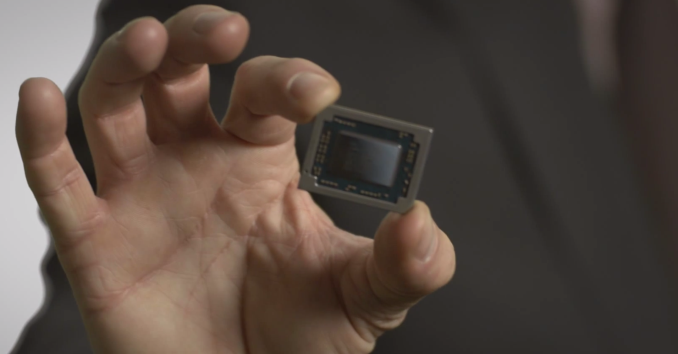
There’s no direct denial of socketed Carrizo based parts here, but all arrows point to BGA desktops, such as all-in-ones and mini-PCs (the high-end segment for Broadwell-U). We have seen at least one socketed part, when AMD launched its Carrizo video:

But this was labelled as a pure engineering sample when we saw it at AMD’s suite at CES. So while we can’t confirm the ‘no plans’ part from TR’s quote, Carrizo as a socketed part for desktops is currently not public knowledge as of yet. AMD is in a quiet period right now and not wanting to rock the boat from what is currently on the market by announcing anything on the desktop side. This is despite AMD’s list of features being a prominent slide in their Carrizo slide deck, most of which would be important parts within a desktop environment.

If AMD is planning no further socketed desktop APUs from the base-Bulldozer architecture, we would have to head towards Jim Keller's team and K12/Zen in 2016 as the next port of call, despite that platform currently being touted more for low power, servers and embedded right now. Part of me wants to believe we won’t have to wait that long, given that Kaveri first appeared in January 2014 at it would mark a two-to-three year gap on the desktop side. Even AMD would have a hard time explaining that one, unless it made financial sense overall.
Read More ...
D-Link's Networking Solutions at CES 2015

The ULTRA Series of Routers
D-Link's revamped router lineup consists of three main products:
(a) DIR-890L AC3200: This is the standard XStream configuration from Broadcom with two sets of 5 GHz radios and one 2.4 GHz radio. Speeds of up to 1.3 Gbps on each 5 GHz radio and 600 Mbps on the 2.4 GHz radio justify the AC3200 tag. This model is shipping now for $310.
(b) DIR-885L AC3100: This is based on Broadcom's recently announced 4x4 MU-MIMO solution (BCM4366 + BCM47094). The maximum WLAN PHY rate is 2165 Mbps for the 5 GHz band and 1000 Mbps for the 2.4 GHz band.
(c) DIR-895L AC5300: This combines the Broadcom 4x4 MU-MIMO solution with the XStream concept - putting 2x 4x4 MU-MIMO capable radios together gives 2.1 Gbps on each of the 5 GHz bands along with 1 Gbps on the 2.4 GHz band to justify the AC5300 name.

D-Link is also set to launch a 3x3 802.11ac USB Wi-Fi adapter in the DWA-192/R. Obviously, with the AC1900 rating, it supports connection via USB 3.0 for maximum performance. Pricing for everything other than the DIR-890L is yet to be decided. Shipping is slated for Q2 2015.
The industrial design of all the products in the ULTRA series is quite striking. It is definitely fitting for the revamp considering that D-Link effectively was an also-ran for the previous two generations of 802.11ac products.
Powerline Networking
On the PLC front, D-Link is again at the forefront with one of the highest performing powerline kits in the market. The PowerLine AV2 2000 (DHP-701AV) Gigabit starter kit is based on the Broadcom BCM60500 HPAV2 MIMO chipset.

D-Link also updated their AV2 1000 DHP-601AV product. Unlike the DHP-701AV, this is not MIMO-capable. Both products are scheduled to launch this quarter, with the kits coming in at $130 and $80 respectively.
The Smart Home Play
As I mentioned in the introduction to this piece, D-Link has been accumulating expertise in the connected home market, thanks to being the hub manufacturer for the Staples Connect program. The Smart Home is an interconnection of automation, entertainment and security aspects in a typical house. In order to tackle this market, D-Link is having two plays in mind - DIY security kits and a set of Wi-Fi / Z-Wave sensors along with a hub for the DIY home automation market.
The DIY security kit comes in two flavours - the HD edition and the HD Pan and Tilt Edition.

The kits come with a motion sensor, a smart switch (the one that D-Link has been shipping for about a year now) and a HD IP camera (with pan and tilt capabilities in the latter edition). The IP camera in the first package (HD edition) is the DCS-935L capable of recording H.264 clips at 720p30. It is one of the first 802.11ac-capable IP cameras that I have seen in the market.
The mobile apps ecosystem for the above kit is the same as that for the DIY home automation kit. The IP cameras have their own ecosystem with the mydlink Cloud - recordings get uploaded when motion is detected. Fortunately, local storage with a D-Link NVR is also possible.
The DIY Security Kit - HD Edition (DCH-101KT), DIY Security Kit - HD Pan & Tilt Edition (DCH-301KT) and the HD Wi-Fi Camera (DCS-935L) will go on sale later this quarter with pricing set at $190, $230 and $120 respectively.
The home automation play from D-Link is quite strong this year. At the heart of the ecosystem is the Connected Home Hub (DCH-G020 - Q2 2015 - $80) which acts as a Wi-Fi / Z-Wave bridge with a wired connection to the router. It is AllSeen compatible. Two Z-Wave sensors (Open/Close - DCHZ110 - Q2 2015 - $40 and Motion Sensor - DCH-Z120 - Q2 2015- $50) and two Wi-Fi sensors (water sensor - DCH-S160 - Q2 2015 - $60 and siren - DCH-S220 - Q2 2015 - $50) round out the lineup. The mydlink Home App controls all these devices, sets rules and allows creation of scenes - the typical home automation play.
My only complaint as a power user / person who likes to tinker around is that the ecosystem is closed - It is not currently possible, for example, to even control the Wi-Fi Smart Plug with the Logitech Harmony Home Automation hub.
The last two years have been a bit quiet for D-Link. So, it was great to see them bouncing back with very interesting products. My only wish is for them to recognize the value of a open home automation platform. On the router side, shipping the AC5300 DIR-895L in Q2 would definitely bring D-Link back in contention as a market leader.
Read More ...
Site for "Glitter as a Service" Mail Pranks, ShipYourEnemiesGlitter, Launches
Is it legal? We're not sure... but apparently the people are excited to prank their foes (I also reveal the man behind it)
Read More ...
Microsoft Kills "Mainstream Support" Windows 7
Sorry fans, the ride is almost over, says world's top PC OS maker; venerable OS enters extended support era, will hit EOL in 2020
Read More ...
OS X Yosemite Compromises Security by Retrieving Embedded Email Images
Spotlight will automatically open email attachments, revealing your IP address to potentially malicious parties
Read More ...
Available Tags:Zotac , AMD , CPU , Other , Windows 7 , Microsoft , Windows , Security ,


No comments:
Post a Comment