

No Man's Sky will come to the PC after being a timed exclusive on PS4
No Man's Sky has officially been announced for the PC, with Hello Games' procedurally generated exploration title enjoying a timed exclusive on the PlayStation 4, according to the latest issue of Edge magazine.

No Man's Sky arrives on the PS4 sometime next year, and will hopefully hit the PC not too long after.

Read More ...
Trading games in at GameStop? You'll need to provide your fingerprint
Some GameStop customers have had to provide their fingerprints when they traded in their used games in some of the Philadelphia-based stores in the US. GameStop is using fingerprints to help authorities track criminals who trade-in used games.

This employee said that customers of GameStop in these fingerprint scanning equipped stores an no longer trade in games if they don't provide their fingerprints. The fingerprints that are collected are uploaded onto the online database Leads Online, according to the Philadelphia Police Department, reports CBS Philadelphia. According to customers of these GameStop stores that CBS Philadelphia interviewed, they aren't happy with these '1984' style measures, which makes them all feel like they're being treated like criminals.

Read More ...
Hulu Plus app updated for Android users with more free shows
If you are a fan of the Hulu Plus app on your Android smartphone or tablet, you will have some new content to check out thanks to an update. Hulu has announced that Android users out there can now get new content free when using the updated app.

With the update, the Android version of the Hulu Plus app is now on par with the content available on the free ad-supported version of Hulu on the web. The fee for Hulu Plus to unlock all content is $8 monthly.

Read More ...
iPhone 5S screen replacements start in Apple Store on August 4
Apple is set to start replacing broken iPhone 5S displays in the US and Canada at Apple Stores. Sources say that the screen replacement program will kick off on August 4, which is this coming Monday. A few test locations have been replacing screens for the iPhone 5S over the last few weeks.

Getting a damaged screen replaced will cost $150 per repair. Before the screen replacement program was available, the only way to get your phone fixed from Apple if you broke the screen was to replace the entire smartphone for $269.

Read More ...
Google Barge in Portland heads to the scrap heap
Remember that massive barge that Google was working on that had so many people wondering what the firm was up to. The thing was envisioned as a sort of floating party house and showroom that would allow Google to show off its products to various people.

The barge in Portland was supposed to be towed to NYC once finished for its unveiling. This week the barge was towed from the dock where it has been moored with reports indicating the barge itself had been purchased while the shipping containers will be scrapped. There is no word on why Google is abandoning the project.

Read More ...
Office for iPad updated with new PDF file and image tools
Microsoft has issued an update for the popular Office for iPad app that brings some new tricks for Word, Excel, and PowerPoint. The update brings several user requested features to the apps, with one of the big new features being the ability to export files as PDFs.

Excel also gets improved support for external keyboards and support for "Flick to Select" so you can select data in a cell with a flick of your finger. The new features for Word include the Picture Tools, fonts, and PDF feature. PowerPoint received more improvements with a new Presenter View, new presenter tools for highlighting and drawing, and more.

Read More ...
NVIDIA to launch its GeForce GTX 880 next month, at under $500
It looks like NVIDIA will unveil its GeForce GTX 880 sometime next month at a press event, but what to expect from NVIDIA for its next-gen GPU? We shouldn't expect too much in the performance department, but a decent price is something we can smile about.

When it comes to performance, we should expect it to obviously beat the GK104-based GTX 780, and hopefully beat the GTX 780 Ti. By how much, we don't know. I think we can expect it to fall 10% either side of the GTX 780 Ti, and at $400-$450, this is going to push the prices of the GTX 780, and GTX 780 Ti down, too.

Read More ...
BlackBerry launches popular BBM app for Windows Phone users
One of the best things that BlackBerry has going for it right now is that its BlackBerry Messenger or BBM service is very popular with users. BlackBerry is working on opening that BBM ecosystem up to other smartphone users and has announced that it has now launched the BBM app for Windows Phone users.

With the addition of the BBM for Windows Phone app, the major platforms are now supported. Keeping the BBM platform closed for so long and only allowing BlackBerry devices to use it hurt the service and made it hard to compete with WhatsApp and other rivals for secure messaging.

Read More ...
UAV weed delivery gone wrong, crashes outside maximum security prison
Reuters is reporting that the wreckage of a crashed drone was found outside of a maximum security prison in South Carolina, where it is believed that the drone was attempting to deliver contraband into the prison.

This is a first for South Carolina, but it's nothing new for some other prisons around the world. Down in my part of the world, Australian authorities arrested a man who was controlling a drug-packed drone, and before that four people were arrested in Georgia on charges of delivering tobacco into a prison yard with a drone.

Read More ...
French firm Iliad stock falls 13% after T-Mobile US bid
Over the last few years, several firms have tried to buy wireless operators in the US with varying degrees of success. We have seen mergers of US telecom firms blocked by courts while firms from outside the US have had more success moving into the US market, such as Sprint and Softbank. A French company called Iliad has made a bid for T-Mobile US and a result of that bid is that its stock price has dropped 13% in trading.

Sprint parent company Softbank and T-Mobile have already reportedly agreed to broad terms for a deal that would see Softbank buy into T-Mobile. The Iliad deal may be easier for T-Mobile to pull off since it will have no red flags for regulators concerned about competition in the US market.

Read More ...
US judge orders Microsoft to turn over email stored in Ireland
Microsoft is currently in the middle of a legal campaign that sees a US court trying to force the software giant to turn over email that is stored on servers housed in Ireland. The catch for Microsoft is that to comply with the US law and court order, it will have to break European Union law. EU law says that only local courts can make the decision to release data stored on local servers.

In the end Microsoft is in a bad place, turning the data over to the US court will violate EU law and not giving it to the US court will violate law in the US. Microsoft will likely appeal the ruling so it's not clear yet if it will have to turn the data over.

Read More ...
ADATA announces its new 16GB kit of DDR4-2133 RAM
DDR4 will make its debut later this year when Intel launches its Haswell-E and X99 platform, but ADATA has come out and officially launched its first kit of DDR4 RAM for consumers in the form of their new Premier line of DDR4 RAM.


Read More ...
Tesla pulled in $858 million in revenue for Q2, shipped 7,579 vehicles
Tesla Motors has reported its Q2 2014 results, which saw the electric car maker pull in non-GAAP revenue of $858 million, and non-GAAP earnings per share of $0.11. The non-GAAP revenue is up a huge 55% from the same period of last year.

Moving into Q3, Tesla expects to build around 9,000 vehicles for the three-month period. The company expects to reach 10,000 vehicles per year on a run-rate basis by the end of 2014, which would see revenue growth expand for 2015.

Read More ...
Google owns the mobile OS market with 84.6%, Apple has just 11.9%
The latest numbers from market research firm Strategy Analytics for Q2 2014 see that Google is completely dominating the mobile OS market, with Android hitting a global market share of 84.6%, up from 80.2% in the same quarter of last year.

When it comes to smartphone manufacturers, Xiaomi has become the world's fifth-largest brand, which has Strategy Analytics calling the company a "star performer" for taking control of 5% of the global smartphone market by shipping 15.1 million units. Samsung is still number one, with 74.5 million smartphones shipped in Q2 2014, down from 76 million units in the same quarter of 2013. Apple shipped more units this year, hitting 35.2 million shipments, up from 31.2 million in Q2 2013.
Huawei is in at number three with 20.1 million smartphones shipped, up considerably from Q2 2013's shipment numbers of 11.3 million. Xiaomi is in fifth place, increasing its smartphone shipments from 4.1 million units in Q2 2013 to 15.1 million in Q2 2014. LG falls into sixth place, shipping 15.6 million units, up from 12.1 million units in the same quarter of last year.

Read More ...
PlayStation 4 sales thrashed the Xbox One for Q1 2014
How are the console wars going? Well, according to Sony's latest financial report, the PlayStation 4 outsold the Xbox One three to one in Q1 2014. Sony has said how many consoles it sold separately between the PS3 and PS4, but combined, they sold some 3.5 million units in the first three months of the year.

Sony generated a huge $2.5 billion in sales from its Games & Network Services division, something that is credited to the launch of the PS4.

Read More ...
Leaked photos of the purported OneWatch smartwatch from OnePlus
When OnePlus launched its One smartphone earlier this year, most were wondering when the company would release something else - were they working on the next version of One (Two?) or a wearable? Well, BGR India has an exclusive look at the OneWatch from OnePlus, something the company is reportedly close to launching.

We don't know if OnePlus will use Android Wear on the OneWatch, or whether it'll feature a customized version of Cyanogen mod. OnePlus levied the custom Android-based OS for its One smartphone, so it might do the same with the OneWatch, too. The biggest selling point of the upcoming OneWatch will be its price, with OnePlus pricing its One smartphone incredibly cheap, at under half the price of the competition, with similar, if not better specifications inside of the One smartphone.

Read More ...
Apple rumored to delay its iWatch, continued production difficulties
Apple seems to be stumbling over itself to get the iWatch production started, with another rumor coming from analyst Ming-Chi Kuo, who says that the company will start mass producing its iWatch in the second half of November, instead of in September like previous reports have stated.


Read More ...
Oculus Rift DK2 teardown reveals it uses Samsung Galaxy Note 3 panel
iFixit have given the new Oculus Rift DK2 unit its teardown treatment, revealing what makes the DK2 provide one of the best VR experiences known to mankind. Inside of the DK2, iFixit found that Oculus VR is using not just the Galaxy Note 3 panel, but Oculus VR has either sourced them directly from Samsung, or is buying up Note 3s as it still has the Samsung branding on it - inside of the DK2 itself.
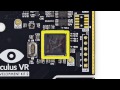
Considering the rumors of the Note 4 sporting a 5.7-inch 2560x1440 panel, this is what I think we'll find in the CV1 (the retail release) of the Oculus Rift. The rest of the iFixit teardown on the Oculus Rift DK2 unit is an interesting watch, and if you don't have time for the video, there's a slew of pictures you can flick through here.


Read More ...
Samsung expected to launch its Galaxy Note 4 on September 3
Just a few days before the IFA event in Berlin, Germany, Samsung is expected to unveil its new Galaxy Note 4 smartphone. The Korea Times has reported the news according to its sources over at Samsung that the company will unveil the latest Galaxy Note 4 on September 3, a day earlier than it revealed the Galaxy Note 3 last year.

On top of that, we should have an 8-core processor inside of the Note 4, 3GB of RAM and a 16-megapixel rear-facing camera using a Sony sensor. We should know more in a little over a month from now.

Read More ...
Man survives being shot, with the bullet hitting his Galaxy Mega phone
A man has survived being shot thanks to having his 6.3-inch Samsung Galaxy Mega 6.3 smartphone in his shirt pocket, stopping the bullet from piercing him and possibly killing him.

Now we just need Samsung to build a Galaxy jacket, made from the same materials that stopped this bullet. For someone like myself, who keeps their phone in their jeans or trouser pocket, I would've had this bullet shot into me. Luckily this man, out of all the clothes he owns, wore this top with the pocket on that day.

Read More ...
Distraught startups say London's so-called Tech City has dire internet
An area the British government now officially brands "Tech City" has broadband so poor that a group of startups and small internet providers have formed a lobby to fix it.

The startups will be meeting with Labour Member of Parliament Meg Hillier to try to iron out the connection, which has been described as "not fit for purpose" and a "national embarrassment". Hillier is now proposing a "comprehensive review of broadband, plans for infrastructure and roll out, and a competitive framework for delivery".

Read More ...
Facebook launches app to provide free mobile internet to all of Zambia
Social networking powerhouse Facebook has launched a brand new app called Internet.org which will provide basic mobile internet for free to the African country of Zambia.

"Affordability and awareness are significant barriers to internet adoption for many and today we are introducing the Internet.org app to make the internet accessible to more people by providing a set of free basic services," Rosen said in the post. "With this app, people can browse a set of useful health, employment and local information services without data charges. By providing free basic services via the app, we hope to bring more people online and help them discover valuable services they might not have otherwise."

Read More ...
Russia wants source code from Apple and SAP to prove they're not spies
Tech heavyweights Apple and SAP are being taken to task in Russia, with officials from the government demanding the two hand over their source code to allay fears they can be exploited for surveillance purposes.

Nikiforov made clear in his comments that the revelations exposed by NSA whistleblower Edward Snowden are a driving force behind the demands. "The revelations of Edward Snowden in 2013 and public statements of US intelligence to strengthen [the] surveillance of Russia in 2014 raised the question seriously [of] confidence [in] foreign software and hardware," he said, ZDNet reports. "It is obvious that those companies that disclose the source code of their programs, not hiding anything, but those who did not intend to cooperate with Russia on this issue may have undeclared capabilities in their products." The agency also asserted companies that do not agree to the tests could well find their products leaving the Russian market.

Read More ...
Four dead, 180 hurt in suspected gas explosions in Kaohsiung, Taiwan
At least 180 people are injured and four dead following explosions in Kaohsiung city, south-west Taiwan.



Read More ...
Sony says EA Access doesn't offer good value for gamers
Earlier this week EA unveiled a new subscription service for Xbox One gamers called EA Access. The subscription service gave the gamers access to a number of online games among other things. If you own a PS4, you may be wondering why EA Access didn't come to the PS4 as well.

"We evaluated the EA Access subscription offering and decided that it does not bring the kind of value PlayStation customers have come to expect," a Sony representative told us via email. "PlayStation Plus memberships are up more than 200% since the launch of PlayStation 4, which shows that gamers are looking for memberships that offer a multitude of services, across various devices, for one low price. We don't think asking our fans to pay an additional $5 a month for this EA-specific program represents good value to the PlayStation gamer."

Read More ...
Ghostbusters: Mastered in 4K (1984) Blu-ray Movie Review

Ghostbusters (1998)
Even after thirty years, there's still an immense amount of goodwill for a franchise which only delivered two feature films, the last which was released 25 years ago, but which spawned a lucrative merchandising train, two animated TV series, a number one song and a range of computer games.Down on their luck, New Yorkers Peter Venkman (Bill Murray), Ray Stantz (Dan Akroyd) and Egon Spengler (Harold Ramis) are the Ghostbusters; University slackers turned paranormal hunters. Initially facing community skepticism and their own poor work ethics, they quickly evolve the Ghostbusters into a thriving, successful business when a portal opens in New York City which lets a bunch of nasty ghouls loose that threaten Armageddon. To prevent this, the team will need all their skills and more than a little luck.


Video
Ghostbusters is encoded with AVC MPEG-4 compression and presented in the intended aspect ratio of 2.40:1.The initial release of Ghostbusters on Blu-ray some five years ago was, at the time, a reasonable upgrade from standard definition, but still left a little to be desired - especially in regards to grain management and brightness and contrast which fluctuated wildly. Whilst the release scored a respectable 76 percent score in our 2009 review, I did note that whilst "this is hands down the best the film has ever looked... at the same time I suspect down the track there will be a better release with a bit more in the way of restoration work." Well, it might have taken a while, but Sony eventually answered the call with the spectacular remaster.
Gifting the film with a brand new 4K scan from the original film, rights many of the wrongs of its predecessor. The rest are built into the film, the combination of three decades age and analogue seams which are starting to show. The image is clear, with a very detailed image that retains a fine layer of film grain, which should not be confused with the video noise that hampered the original edition. The image might be occasionally a tad too dark, perhaps to hide some of the more obvious matte composites, but color is much more stable and far more balanced.
In short, this is the remaster that Ghostbusters has always deserved, but now finally receives.

Audio
Ghostbusters is presented in Dolby TrueHD 5.1, at 16 bits.Utilizing the very same audio mix and indeed the exact same audio encode as the 2009 Blu-ray is not a massive problem, as it was always very respectable with the only problems laying squarely with the limitations of the source audio - in this instance, 1980's recording technology proving problematic.
The occasional tinniness and constrained frequency response are unavoidably part of the experience of Ghostbusters. Still, there's a lot to be happy with in this 5.1 mix, including a surprisingly aggressive surround presence and bass activity. The theme song by Ray Parker Jr, in addition to the score by Elmer Bernstein, scrubs up nicely and is mixed into the surrounds pretty well.
My only real complaint with the mix is that it's been mastered at a reasonably low level, which requires boosting far in advance of standard reference levels. Overall, with expectations slightly in check, fans will have a lot of fun with this mix.

Extras
Sadly, this 'Mastered in 4K' edition comes with no bonus features. The previous, region-free disc released in the United States and Australia came with a commentary and an assortment of featurettes.Even so, on balance, I'd give the edge to this edition, forgoing the extras in favor of a superior viewing experience. That said, with around 15 gigs of unused disc space, it's a shame that a compromise between both editions could not have been made.
PRICING: You can find the Ghostbusters (Mastered in 4K) for sale below. The prices listed are valid at the time of writing but can change at any time. Click the link to see the very latest pricing for the best deal.
United States: The Ghostbusters (Mastered in 4K) (Single-Disc Blu-ray + Ultra Violet Digital Copy) retails for $12.85 at Amazon.
Canada: The Ghostbusters (Mastered in 4K) [Blu-ray] (Bilingual) retails for CDN$7.99 at Amazon Canada.


Read More ...
ASUS Z97-A (Intel Z97) Motherboard Review
Introduction of the ASUS Z97-A
After having had a look at a few cheaper video card options as of late, it's time to head back over to the wonderful world of motherboards. With the new high-end X99 chipset coming out in roughly a month, we want to spend the next couple of weeks working our way through the Z97 motherboards that are floating around the office.Of course, it's worth remembering that the X99 chipset won't replace the Z97 one but will instead accompany it to help cater to two levels of users. The X99 will aim at the power users who are wanting to get the absolute most out of their system. The Z97 chipset, on the other hand, is aimed at users who are looking for something with more value and in the middle of the pack.
Today, we're looking at another ASUS Intel Z97 motherboard. We've already looked at a few, and they've done an excellent job impressing us already. This one comes in at a bit of a cheaper price point that will indeed be attractive option for us. It's also the first ASUS board we've used that will be making use of our new Intel i7-4790K CPU.
We've already got a pretty good understanding of both ASUS and the Intel Z97 chipset, so there doesn't seem to be a huge need to go into too much detail. So, with that all said and done, let's get into the package and see just what ASUS is offering us today with its Z97-A motherboard.
Package - What comes inside the box


Other major features include Remote GO!, which gives you control of your PC anywhere, while across the bottom of the box, we can see features revolving around increasing gaming performance like the Turbo App, Crystal Sound 2, and Turbo LAN.

PRICING: You can find the ASUS Z97-A for sale below. The prices listed are valid at the time of writing but can change at any time. Click the link to see the very latest pricing for the best deal.
United States: The ASUS Z97-A retails for $139.99 at Amazon.
Canada: The ASUS Z97-A retails for CDN$55.64 at Amazon Canada.
... Read the rest in your browser!

Read More ...
ASUS GeForce GTX 750 Ti 2GB OC Edition Video Card Review
Introduction of the ASUS GTX 750 Ti 2GB OC Edition

One of the first cards we're going to be looking at comes from our friends over at ASUS and is based on the lower-end GTX 750 Ti GPU. Coming in at the low to mid $100 price mark, depending where you buy from, it has been a while since we've looked at a card so cheap.
We're looking forward to seeing how it does in our benchmark line up today, especially since it has been expanded a bit and changed since the last time we looked at these budget friendly video cards.
We really don't have a whole lot more say today, so let's leave it at that and move to the package of the ASUS GTX 750 Ti 2GB OC Edition to see just what exactly we have hands here today.
Package - What comes inside the box


PRICING: You can find the ASUS GTX 750 Ti 2GB OC for sale below. The prices listed are valid at the time of writing but can change at any time. Click the link to see the very latest pricing for the best deal.
United States: The ASUS GTX 750 Ti 2GB OC retails for $149.99 at Amazon.
Canada: The ASUS GTX 750 Ti 2GB OC retails for CDN$269.59 at Amazon Canada.
... Read the rest in your browser!

Read More ...
WD Red and Red Pro HDD NAS Performance Analysis in RAID 5 with 10GbE
Introduction

Upon release, Western Digital marketed the Red 3.5-inch drives for NAS products ranging from 1 to 5 drives. It didn't take long for adventurous souls to try even higher drive counts in larger NAS products. The highest we took the original Red with NASware 1.0 was 11 drives with a single SSD cache in a QNAP TS-EC1279U-RP. At that point, we were way out of Western Digital's recommended usage model, but the system performed flawlessly.

The latest NASware piles on features to existing 1.0 and 2.0, the most notable being TLER, a technology designed for hard disks in a RAID environment that reduces the chance of your NAS performing a full rebuild when a recoverable error occurs.


Let's take a look at the two new Red products and then put them to the test in a high performance NAS environment.
PRICING: You can find the Western Digital Red and Red Pro for sale below. The prices listed are valid at the time of writing but can change at any time. Click the link to see the very latest pricing for the best deal.
United States: The Western Digital Red 6TB retails for $299.99 at Amazon.
United States: The Western Digital Red Pro 4TB retails for $259.99 at Amazon.
... Read the rest in your browser!

Read More ...
HIS IceQ R9 290X iPower Hybrid iTurbo 4GB OC'ed Video Card Review
Introduction of the HIS IceQ R9 290X iPower Hybrid iTurbo 4GB

Saying that, though, HIS did have one special video card that grabbed our attention. The HIS IceQ R9 290X iPower Hybrid iTurbo 4GB, and while it was not ready, it was due to come out in the following months. The big feature behind this card was the Hybrid cooler that utilized both a standard heat sink fan setup, along with an all-in-one (AIO) water cooling solution.
Any time you strap water cooling to a video card, you have our attention, and this was no different here. The addition of water cooling brings with it lower temperature numbers, which of course means that companies are able to throw higher clock speeds through the card. The addition of water, though, means that you can also give the card quite a healthy bump in terms of voltage, and still have the core temperature kept under control.
While video cards with water blocks aren't too uncommon, the fact that they require a full on water cooling setup means that they're a turn off for some people. With the quality of AIO water cooling solutions getting better and better, the desire for a setup that uses them is so much higher.
With such a strong looking cooler and a high-end card, we find ourselves thinking of only one thing to do with it. Overclock it! Before we find out just what we get out of the card, we've got to take a closer look at it.
Package - What comes inside the box


Turning the box over, you can see that HIS goes into detail on some of the main features that are being offered. A lot of these we've seen before, including the cooler and quieter logos and the IceQ technology. The big new one here is the Hybrid System, which makes note of the optimized cooler.
You can see a bit of information on the iPower features, which bring Full Solid State Capacitors and 6 Dynamic Phase Control PWM IC, while across the bottom, we see some of the main features that relate to the AMD core itself.


Along with this, you can also see that HIS has chosen to include a mouse pad in the bundle, as an extra. To be honest, if you're buying such a high-end video card, you'll more than likely have a great mouse pad already. The good news is, though, that the overall quality of this mouse pad is quite good.
... Read the rest in your browser!

Read More ...
Phison S10 Quad-Core Performance SSD Controller Preview
Introduction

The Phison S10 is a premium quad-core SATA controller designed for use with MLC and TLC (3-bit MLC) NAND flash. For years, we've tested products with MLC flash from a number of fabs, but Samsung is the only company with TLC shipping in volume. That's about to change. In Q4, Toshiba TLC will blaze to market like a horse with its tail on fire. Early projections show TLC will dominate the mainstream SSD market by late 2015, displacing a number of consumer MLC drives.
The market wants SSDs, but it doesn't want to pay a high price for them. TLC NAND flash will lower the cost of consumer SSDs, maybe by as much as 50% by 2016. At that point, we're talking about 25 cents per gigabyte, potentially a 512GB SSD for less than $130.
On the surface, it sounds all warm and cuddly, but 3-bit per cell flash also introduces tough challenges for controller makers. With PE cycles ranging from 1,000 to 1,500, controller makers need strong ECC methods to get 3,000+ write cycles from SSD grade TLC flash. That means controllers need to be high performance with multi cores just to play with TLC.
The side effect is controller makers that would normally build products for the mainstream SSDs will now make mainstream controller for TLC and have a performance part ready for use with MLC. Enter the new Phison S10 that we have on hand today.
... Read the rest in your browser!

Read More ...
Akitio Neutrino Thunder D3 Thunderbolt / USB 3.0 DAS Review

The D3 is a small form factor aluminium enclosure capable of housing two 2.5" SSDs or HDDs. Connectivity options include both USB 3.0 and Thunderbolt, with OS support for Windows and OS X 10.7+, though a single downfall is the unit is not compatible with BootCamp. The Neutrino Thunder D3 is available in many capacities ranging from two 256GB SSDs to two 2TB HDDs. The model we have in house is the diskless version.
MSRP of the diskless Akitio Neutrino D3 is listed at $299.99 with a two-year warranty.


[img]12[/img]
4K allowed the Neutrino Thunder D3 to max out its Thunderbolt connection at 800MB/s in RAID 0.
The Neutrino Thunder D3 carries a great amount of performance thanks to its Thunderbolt connectivity. While this device is first-generation Thunderbolt, the Neutrino Thunder D3 offers up support for both Windows and OS X, which sets it apart from many solutions on the market. One downfall of the Thunder D3 is it requires a power adapter, so that limits portability options, where access to a power source just isn't available.
Build quality of the D3 was quite good, the aluminium doubles as both a heat sink for the internal drives, and adds to the durability factor. The only build quality issue I did have was the drive trays being a bit clunky with nothing but the drive to support them.
Performance of the D3 was quite good; we were able to peak out our Thunderbolt connection with 4K testing. In addition, we even topped 700 MB/s in RAID 0 as well.
PRICING: You can find the Akitio Neutrino Thunder D3 (Enclosure Only) DAS for sale below. The prices listed are valid at the time of writing but can change at any time. Click the link to see the very latest pricing for the best deal.
United States: The Akitio Neutrino Thunder D3 (Enclosure Only) DAS retails for $299.99 at Amazon.


Read More ...
Diamond MDS3900 DisplayLink USB to HDMI/DVI/LAN Mini Ultra Dock Review

The MDS3900, as the name suggests, uses the DisplayLink DL-3900 chipset enabling two monitors to be powered simultaneously with a maximum resolution of 2048 x 1152. The MDS3900 supports both OS X and Windows platforms, while also providing a gigabit Ethernet port and support for up to 5.1 channel audio.
MSRP of the Diamond MDS3900 is set at $69.99 with a one-year warranty.


The Diamond MDS399 is certainly a great device for adding additional monitors to your portable computer whether it is a MacBook or Windows based notebook or Ultrabook. The built quality of the Ultra Dock is pretty solid, the plastics fit together well and at no time did I feel like corners were cut.
Performance with what testing I was able to do was two sided. The Ultra Dock wasn't able to power the high resolution of my Qnix 2710 Evolution, but did fine with my older Gateway FPD2185w and HD2200. The gigabit Ethernet port, while it does give you a gigabit connection, only has about 600 Mbps of throughput available in our testing, not the 1000 Mbps you would expect.
Overall, the MDS3900 is a decent product at a fairly good price, but for those wanting to use multiple high-resolution monitors, you would be better off looking for a DisplayLink product with a 5000 series chipset as it supports 4K.
PRICING: You can find the Diamond Multimedia USB 3.0/2.0 to HDMI/DVI Mini Ultra Dock for sale below. The prices listed are valid at the time of writing but can change at any time. Click the link to see the very latest pricing for the best deal.
United States: The Diamond Multimedia USB 3.0/2.0 to HDMI/DVI Mini Ultra Dock retails for $69.99 at Amazon.
Canada: The Diamond Multimedia USB 3.0/2.0 to HDMI/DVI Mini Ultra Dock retails for CDN$102.61 at Amazon Canada.


Read More ...
Thermaltake Water 3.0 Ultimate 360mm AIO CPU Cooler Review
Introduction, Specifications and Pricing

They have also done great things with coolers with the introduction of the NiC series, where performance is key, but clearance to everything else around it is priority number one. Then of course, while everyone else was offering Cherry MX based keyboards, Thermaltake took their own path and released the Poseidon Z with Kailh switches, and a super impressive five-year warranty.
We have also seen very good things with their water cooling products. Of course most people will laugh at the Big Water name, but Thermaltake was leading the market then too. They also came along with the Water series of AIOs that did much better for them. Along with these AIOs is where a new set of hardware was first introduced that took some really hard to work with gear, and for the first time in many years, made it easy to install an Asetek OEM sealed loop. It really seems that in almost every aspect we can think of in what Thermaltake is currently offering, it is very hard to deny that they have learned from the past, don't mind turning over a new leaf, and are now a company that can stand proudly as an industry leader.
All of this brings us to why we have you here today. In years of trial and error, and with a great team putting the ideas out on the table, Thermaltake is attempting to become the AIO master, the end all be all leader in performance of any AIO that has been released prior to this latest submission to our labs. Thermaltake has broken the rules when it comes to what is an acceptably large AIO. Where most companies would stop with a 240mm radiator and some serious fan power, Thermaltake thought why not take it one step further, and while keeping serious fan power to cool the system, they are introducing the first 360mm version.
If that in itself does not have you interested, stick around, as the charts will for sure give you some serious food for thought, and make you want this cooler more than just based off initial impressions of our introductory image.

First on the list is the copper waterblock, well the cold plate actually, as the block is made of black plastic, the top of which emblazoned with the Thermaltake name and logo, along with the Water 3.0 naming. Under the covering cap with the naming on it, we also find the pump for this system. This pump is rated to spin at 2900 RPM (give or take a small bit), when powered with 12 volts.
Since we have a triple 120mm aluminum radiator to cool this time around, we also are shipped a trio of 120mm fans that are rated for a maximum of 2000 RPM and 99 CFM per fan. Also connecting the radiator to the head unit, they supply 326mm of black rubber tubing, or on this side of the pond, that is roughly twelve inches. We also see that the entire unit, radiator, tubing, head unit, fans, and the coolant safe for mixed metals comes in at 1.32 kg in weight, but only a small fraction of that is supported by the motherboard. Lastly, as any AIO should, the Water 3.0 Ultimate is more than capable of fitting all the latest sockets for both Intel and AMD processors.
Currently availability is quite low, as we have the first of its kind to arrive to any media. We do know of one other unit in existence, but we somehow beat a shipping snafu and are able to show off the Water 3.0 Ultimate as soon as possible. We were told via a conversation with our rep that these coolers will release soon, we were told anywhere from a week to a month depending on how smoothly the container clears customs.
We were also made aware of the MSRP, which all things considered with all other AIO releases prices, to obtain this 360mm AIO, it isn't going to set you back that much more at all. During that talk, we were told that the Water 3.0 Ultimate will carry a $139.99 MSRP, but keep an eye out for introductory sales, as they always seem to happen for the first week or so upon release.
... Read the rest in your browser!

Read More ...
Areca ARC-8050T2 Thunderbolt 2 8-Bay RAID Tower DAS Review
Introduction

Today, things change quite a bit for myself, as we take things to an entirely new level of Thunderbolt storage with the Areca ARC-8050T2. The 8050T2 as we will call it from here on out, is a complete 6Gb/s SAS capable RAID storage solution, with compatibility on both Mac and Windows platforms. The 8050T2 utilizes a dual-core 800MHz RoC with 1GB of DDR3 memory and supports a hardware RAID 6 engine allowing for two drive failures without impacting data retention.
Another feature of the 8050T2 is its intelligent power function, which allows the RAID box to turn on and off with the host system to enhance data integrity. In addition to this, the Areca 8050T2 supports a backup battery option that protects all data in cache in the event of power loss.
Let's take a close look at it now.
Pricing, Availability and Specifications

RAID levels include 0, 1, 3, 5 and 6, along with higher levels 10, 30, 50 and 60. In addition, we have support for multiple RAID and stripe size up to 1MB.
MSRP for the Areca ARC-8050T2 is set at $1799.99 with a three-year warranty. Availability is high at this point with many online retailers having the unit in stock.
PRICING: You can find the Areca ARC-8050T2 DAS for sale below. The prices listed are valid at the time of writing but can change at any time. Click the link to see the very latest pricing for the best deal.
United States: The Areca ARC-8050T2 DAS retails for $1799 at Amazon.
... Read the rest in your browser!

Read More ...
Zalman Knossos ZM-GM4 Professional Laser Gaming Mouse Review
Introduction, Specifications and Pricing

We always try to go back to the site and see where a design got its lines, features, components, as well as where newer design implementations may have come from. With this mouse, it is not hard at all to see that it takes a lot of its aesthetic appeal from its predecessors, and over the years, the design has been fine tuned with an ear to the gaming scene in order to offer a laser mouse that is everything you could want in a mouse. At least that is what Zalman hopes this mouse will be. In this instance, Zalman must have heard that people like the design and implementation of adjustable panels; that's right, sort of like the EVGA TorqX10, but on a whole other level. But we are getting a bit ahead of ourselves here.
We're going to have to take a step back, and try not to spill the excitement of what Zalman has brought forth with their newest mouse, the Knossos ZM-GM4 Professional Laser Gaming Mouse. This mouse does in fact have three adjustable panels incorporated into the design to help it adjust to fit the hands of even the largest gamers out there. However, outside of that, Zalman doesn't really follow conventional designs, and with one glance at this new mouse, it is easy to see the same concepts that have made Zalman a household name is not lost in their peripherals.
If what we have addressed so far has not interested you yet, you may want to check for a pulse, because while it's certainly not the first adjustable mouse on the planet, Zalman does it in a way that takes this design to new levels. This adjustable design is something we can already see people taking and running away with on their own designs. If that still hasn't gotten your attention, give us just a couple of pages, and we will definitely have your attention then.

We are also shown that there are eight buttons on the mouse, there is a limit of 12,000 fps imaging processing, a 1000Hz polling rate, and this mouse offers a five million click lifespan in the Omron switches under the right and left-click buttons. If we were writing this chart, we would have addressed things like the mouse's dimensions, or at least the adjustability of them.
There is not one truly normal surface on this design. The right and left-click buttons, and the scroll wheel are set into their own section. Behind that, there is the DPI button, and a clear circular section where the weights can be added or taken away. At the back of the mouse is the heel section, which is adjustable in length, but it also rises in height as it moves back. If that isn't enough, both sides of this uniquely designed mouse also adjust quite a bit, so skinny, wide, short, or long hands can all find a comfortable setup for use.
Outside of that, you are given a mostly plastic mouse that is primarily black. There are instructions, denotations, and naming painted in gray on all of the sections, and if that wasn't enough for aesthetics, there is also a generous use of black nickel plating to dress things up, and add body lines and styling to the design.
As we are writing this, the ZM-GM4 is still quite new, and being as such, it is tough to find at the moment. In fact, as far as inside of the USA is concerned, there is only one location currently offering stock of this mouse, and it happens to be Newegg.com. The best part about locating the Knossos ZM-GM4 was that we found it listed for a mere pittance of $58.99. We do see that the normal price is a bit higher, five dollars in fact, but even at that price, you certainly get a lot of mouse for your dollar. If you still aren't sure about the ZM-GM4, we strongly urge you to continue along with this article, because images do more for this product than anything we could type out.
PRICING: You can find the Zalman Computer Adjustable Laser Gaming Mouse (ZM-GM4) for sale below. The prices listed are valid at the time of writing but can change at any time. Click the link to see the very latest pricing for the best deal.
United States: The Zalman Computer Adjustable Laser Gaming Mouse (ZM-GM4) retails for $69.99 at Amazon.
... Read the rest in your browser!

Read More ...
BitFenix Neos Mid-Tower Chassis Review
Introduction, Specifications and Pricing

With all of that in mind, where is the next logical step? Well, the fact that we were sent three different versions of the same chassis to give you an idea of its possibilities seems to answer that question. BitFenix has delivered a chassis based on a mid-tower design that has a few options to consider when purchasing. The chassis comes in white or black, and it also offers a windowed or windowless option, but the kicker here is that the front bezel is mostly mesh. This allows BitFenix to play around with many color choices to grab the attention of potential customers. On the BitFenix website, you will see black, white, red, blue, and what appears to be silver, as color options for these mesh panels. But it gets better: our samples have a couple more options to choose from as well.
While this chassis does fall into the realm of a system builder's case, or the economical mid-tower that it is, there is still something to be had inside as well. Unlike our last sample from BitFenix, this isn't just a dressed up an old case. This chassis offers a completely different interior, which is made for systems that people use today, and shows that BitFenix does have what it takes to give us a competitive chassis at a great price point.
Even if mid-towers are not your thing, we think after seeing what the Neos mid-tower chassis is all about, you will also see that this is a drastic change from the mundane chassis that still sits very fresh in our minds.

Inside of the chassis there are tool-free mechanisms on the left side of the optical drive bays, while the right side requires screws to secure them. Under these bays there is a thinner storage rack that houses three 2.5" drives with plastic trays, and screws for mounting them. At the bottom there are three more drive trays, this time expandable trays. Because the trays are expandable, they can get around the 3.5" drives that go into that rack. The motherboard tray has built-in standoffs, and will house Mini-ITX, Micro-ATX, or ATX motherboards, while still offering some wire management as well.
The chassis also offers room in the front for a pair of 120mm fans, but they are not supplied at this price point. There are dust filters on the front of the chassis, as well as under the PSU in the floor. The last thing to cover here is that the front I/O panel offers a USB 3.0 port, a USB 2.0 port, and HD Audio connections, outside of the buttons and lights for the chassis.
Availability of the Neos in many of its forms is high, so finding one is definitely not an issue. Pricing is affordable, but it does vary depending only on the window option, it seems all color options are the same price, no matter its configuration. For the plain version without a window, in either black or white, we see the price ranging from just north of $50, to the $60 range, depending on where you are shopping. Across all stores though, it seems if you wish to buy one with a window in the left side panel, the cost only increases by $9 for that option. So, at this point, the real problem is personal to every reader that ends up liking this chassis. What colors will you choose to give it that personal touch?
PRICING: You can find the BitFenix Neos for sale below. The prices listed are valid at the time of writing but can change at any time. Click the link to see the very latest pricing for the best deal.
United States: The BitFenix Neos (Black/Black, no window) retails for $59.98 at Amazon.
The BitFenix Neos (Black/Blue, no window) retails for $59.98 at Amazon.
The BitFenix Neos (Black/Red, no window) retails for $59.98 at Amazon.
The BitFenix Neos (Black/Silver, no window) retails for $59.98 at Amazon.
The BitFenix Neos (Black/Gold, w/ window) retails for $66.74 at Amazon.
The BitFenix Neos (White/Blue, no window) retails for $59.98 at Amazon.
The BitFenix Neos (White/Red, no window) retails for $59.98 at Amazon.
The BitFenix Neos (White/Silver, no window) retails for $59.98 at Amazon.
The BitFenix Neos (White/Purple, w/ window) retails for $69.00 at Amazon.
... Read the rest in your browser!

Read More ...
Virident FlashMAX II 2.2TB Enterprise PCIe SSD Review
Introduction

Virident came under the umbrella of storage industry heavyweight WD when HGST brought Virident in October of 2013. HGST is fast becoming the flash arm of WD, and the existing Virident product line fills a gap in their offerings. Virident gains access to an established channel and more engineering muscle to develop tightly integrated server-side flash storage and software.
The Virident FlashMAX II is a Storage Class Memory (SCM) product designed to maximize density and performance, and minimize latency, to provide higher performance in cloud computing, virtualization, database, analytics, HPC, and webscale applications.
The third generation FlashMAX II design features formidable density packed into the HHHL (Half-Height, Half-Length) form factor. Three models, Standard, Performance, and Capacity, address varying performance and density requirements. The Standard model features the lowest speed and densities of 550 GB and 1.1 TB. The Capacity model has incrementally slower speed than the performance variant, but offers a whopping 4.8 TB of storage in the slim HHHL form factor.

The Storage Class Memory (SCM) distinction is the pillar of the FlashMAX series architecture. The inefficiencies of the SCSI and AHCI driver stack are well known and there are new emerging standards, such as NVMe and SCSI Express, that are developed from the ground up to maximize the driver stack for non-volatile flash. Virident's SCM architecture minimized the driver stack even before finalization of standards such as NVMe.

Many competing PCIe SSD designs employ multiple ASICs assigned to control separate 'drives' (consisting of onboard NAND components) that are controlled by a central RAID controller. This creates a flash hierarchy that limits NAND control to the ASIC managing each bank of NAND. vFAS utilizes an FPGA to provide a global view of the underlying flash resource for the host-based SMC software. Applications can create hot spots of activity that lead to premature wear, but the vFAS architecture maximizes endurance with a global wear distribution technique.
Data integrity is always a concern and vFAS addresses this with a flash-aware RAID scheme and end-to-end data protection. This allows isolation of the onboard NAND components into separate stripes in a RAID 5 (7+1) configuration. The global view of the NAND yields the benefit of a flash-optimized parity scheme that protects from multiple component failures, and capacitors protect from host power-loss events.
Most PCIe SSD implementations, with the exception of Fusion-IO (Virident's chief competitor), offload all SSD functions onto the device itself. This alleviates any host overhead and minimizes CPU cycles dedicated to managing the flash resource. Virident's approach utilizes host processing of NAND management to achieve lower latency than competing devices. This removes other performance bottlenecks and gives the SCM architecture a tight integration with their other software offerings.
Virident does not lead with chart-topping performance numbers, instead focusing on providing a performance and low latency that most users can utilize in a typical environment. Today we test the Virident FlashMAX II against two tough competitors, the MLC Micron P420m, and the SLC Micron P320h. First, let's take a look at the software offering of the FlashMAX II.
... Read the rest in your browser!

Read More ...
Sony Xperia Z2 Smartphone Review
Introduction

Well, Sony's time has come - between my review of the Xperia Z, Sony has released the Z1, and now the Z2, something that I have come to find is one of the best Android-powered smartphones I've used yet, even when it's up against LG's G3 smartphone, the one that features a 2560x1440 display.
Sony amplified things with the Xperia Z2, from its specs to display, and everything in between. Let's dive right into the specifications of the Z2.
Specifications
Sony has done a little bit of work on the Xperia Z2 internals, with a beautiful 5.2-inch Full HD "TRILUMINOS" display with X-Reality - this is a bunch of words that simply mean it has a gorgeous 1920x1080 display.Moving on with the specs, we have Qualcomm's Snapdragon 801 SoC, which sees a 2.3GHz quad-core processor doing all of the heavy work, with 3GB of RAM to keep everything running smoothly. We have 16GB of internal storage (with around 11GB free), which is expandable by microSD right up to 128GB, 4G LTE support, Wi-Fi a/b/g/n/ac, Bluetooth 4.0, and more.
We have a very, very capable 20.7-megapixel rear-facing camera, which is capable of shooting 4K video and taking massive 5248x3936 resolution pictures, taking 1080p@60FPS and 720p@120FPS video. The 2.2-megapixel front-facing camera is surprisingly good for those selfies and video calls.
All of this arrives in a phone that not only looks great, but feels great. We have measurements of 146.8 x 73.3 x 8.3mm (or 5.78 x 2.89 x 0.32 inches). It weighs just 163g (or 5.75oz), so it feels quite light to hold in your hand. One of the more important things that the Xperia Z2 has going for it is the massive 3200mAh battery that just keeps on keeping on, all through the day. It's non-removable, but it's great to see Sony cramming in a giant battery, without making the phone much thicker.
You can get the Sony Xperia Z2 on Amazon outright for $625 completely unlocked, which is a good price. It is only $35 more than the Samsung Galaxy S5 - and that's not bad considering the marketing pull Samsung has against Sony in the smartphone market.
... Read the rest in your browser!

Read More ...
XTracGear Carbonic, Ripper and Ripper XXL Mouse Pads Review
Introduction, Specifications and Pricing

Today we will be looking at three mouse pads from XTracGear. It would appear that the company also owned and operated another website under the XTracPads.com address, but a quick glance there shows that the newest mouse pad has not been added to the lineup, where it has on XTracGear.com. We also looked at some of the older reviews of the products we have here, looked over what XTracGear offered then, and will be comparing that to what we see today as well.
It is not very often that you will see TweakTown.com do a standalone mouse pad review, as we typically add a page to mouse reviews of the mouse they are sent along with. However, we are obviously making an exception in this case, and for two key reasons. One reason is that we have a chance to look at multiple products over a long product life; or, in other words, we can see where XTracGear started, and how that plays into what they are offering today.
The second reason is that we also found this company to be worth a good look, as they not only offer flexible or hard style mouse pads, but they also offer a few accessories that are universal to any mouse on the market, so there is no need to hunt down more specific pieces. We hope to not only point out this relatively hidden company, but to also show that they are on top of their game, and have been for years according to what we have gathered in our testing.


The second is that after the sandwich of materials is completed and made into one cohesive unit, the shape is laser cut. Laser cutting not only offers perfectly straight edges, but it also melts the top cloth, and "adheres" it to the pad, so it will not fray or lift from the foam center. The third part of this combination is that after 0.5mm of cloth on the top, and 2mm of foam in the middle, there is yet another 0.5mm of what XTracGear calls an "Enhanced Sure Grip," where the open cell foam has been textured to ensure these pads will not slide around on most surfaces. This extra 0.5mm of material makes these pads 3mm in total thickness.
At the top of the Carbonic chart, it states that this mouse pad is extremely durable, soft, and comfortable. Also, lending to its name, the Carbonic offers a Carbon Fiber patterning that not only looks cool, but also offers irregularity for the sensor to track more easily against, making movements more accurate and precise. That covers the features, but we also see that XTracGear offers a brief statement just below as well. Here they say "Why settle for less when you can have the best. Get yourself the XTracGear Carbonic precision gamer mouse pad today." That statement sort of sounds like something we would write at the end of this review. Regardless, at the bottom of the chart we find the Carbonic measures 216mm from front to back, 280mm in width, and is 3mm in thickness.
As we move on to a "larger sized" offering, we find the chart for the Ripper. Since the features of the Ripper are only what all three mouse pads share in common (which we already discussed above), we move on to the advantages instead. Here they discuss things like the whisper quite movement due to the polishing treatment offered on these pads. They also discuss the open cell foam being soft to the touch and forgiving, which will allow for longer stays in games without your hand sticking to the pad, or you becoming annoyed with the slight vibrations more aggressively textured pads have. It also addresses the size of the Ripper, and the fact that it would allow gamers who prefer lower DPI/CPI settings to still have plenty of room to get around without lifting. The Ripper measures in at 3mm thick, 280mm in depth, and 432mm in width.
The last chart offered is for our largest sample, the Ripper XXL. This product carries all of the same things that we discussed in the Ripper, with the only major change being the size. We still get a pad that is 3mm thick, but this time the pad is enormous, and it will take a large desk to allow you to spread out the entire 914mm of width, and 457mm of depth that this pad requires to lie flat.
Locating these products is not too hard at all. You can buy them directly from XTracGear.com, where we found that the Carbonic was listed at $14.95, the Ripper at $21.95, and the Ripper XXL was priced at $34.95. Of course, you don't "have" to go that route; you could go and Google shop for it, and there you will find quite a few places carrying their gear. Shopping around does pay off as well. We located all of these mouse pads on Amazon, and found the Carbonic is only $10.98, the Ripper is $13.98, and the Ripper XXL is a few dollars cheaper at $31.06.
For what we see offered on paper, and from what the features and specifications tell us, we feel that all three pads are priced well for what they offer, but will they stand up to countless others we have seen in the past? Continue reading, as we plan to cover exactly how well these mouse pads perform by the end of this review of the XTracGear Carbonic, Ripper, and Ripper XXL mouse pads.
PRICING: You can find the XTracGear Carbonic, Ripper, and Ripper XXL for sale below. The prices listed are valid at the time of writing but can change at any time. Click the link to see the very latest pricing for the best deal.
United States: The XTracGear Carbonic retails for $10.98 at Amazon, the XTracGear Ripper retails for $13.98 at Amazon, and the XTracGear Ripper XXL retails for $31.08 at Amazon.
... Read the rest in your browser!

Read More ...
LUXA2 GroovyW Bluetooth Speaker with Wireless Charging Station Review
Introduction
LUXA2 is quickly becoming a force to be reckoned with in the mobile audio world, with its latest GroovyW Bluetooth Speaker with Wireless Charging Station being another notch in that dominating belt.
What's In The Box
Instead of providing some pictures, we've done an unboxing video using Google Glass. You can take a look at that below, but if you don't want to watch the video, we'll tell you what you get in the box below the video itself.
Specifications, Pricing and Availability
LUXA2 has provided some serious specs in the GroovyW Bluetooth Speaker with Wireless Charging Station, something you can take a closer look at below.
The wireless range is not bad at all, rated at 10m (or 32 feet). The GroovyW speaker features NFC technology, a great touch interface, a built-in microphone and Bluetooth-powered remote control. When it comes to the weight of the two devices, the GroovyW speaker weighs in at a respectable but hefty 596g (or 1.3 lbs), where the Wireless Charging Station weighs 192g (or 0.42 lbs).
The playing time on the GroovyW speaker when it's fully charged is rated at around 15 hours, but when it's bundled with the Wireless Charging Station, this doubles to 30 hours (or so). The GroovyW takes around 4.5 hours to charge from 0%, while the Wireless Charging Station takes around 5.5 hours from 0%.
LUXA2 has priced the GroovyW Bluetooth Speaker with Wireless Charging Station at a respectable $119.99 on Amazon. Considering this includes two devices, this is quite a decent price. Even at around $120 for the GroovyW, it would still be a good price, but with an included Wireless Charging Station? Yes please, LUXA2.
PRICING: You can find the LUXA2 GroovyW Bluetooth Speaker with Wireless Charging Station for sale below. The prices listed are valid at the time of writing but can change at any time. Click the link to see the very latest pricing for the best deal.
United States: The LUXA2 GroovyW Bluetooth Speaker with Wireless Charging Station retails for $119.99 at Amazon.
... Read the rest in your browser!

Read More ...
Top 10 TweakTown Content from the past week [28 July 2014]
Here are our top 10 articles, reviews and guides from the past week!
- Intel DC P3700 800GB NVMe vs. Intel 730 Series SATA SSD RAID Report
- Crucial MX100 256GB SSD Review
- Western Digital Red 6TB NAS Consumer HDD Review
- Western Digital Red Pro 4TB NAS WD4001FFSX Consumer HDD Review
- The Lego Movie (2014) Blu-ray Movie Review
- Intel SSD Pro 2500 Series 240GB Encrypted SSD Review
- Intel Pentium G3258 (Haswell) 20th Anniversary CPU Gaming Performance
- Thrustmaster HOTAS Warthog Flight Stick Review
- Seagate Desktop 4TB, 5TB and 6TB HDDs RAID Report

Read More ...
IN WIN S-Frame Open-Air Chassis Review
Introduction, Specifications and Pricing

Although, it wasn't too long until we saw the limited edition X-Frame. This $500 chassis was the first of its kind, and took the conventional wisdom of what composed a great test bench, but it was also designed to run lying flat, or it could stand up in ATX or reverse ATX configurations as well.
After a year or so of using the X-Frame exclusively to test our CPU coolers on, we were given yet another IN WIN chassis in a line of exclusive chassis designs. We are pretty sure there were only five hundred of the X-Frame cases, and we were told the same about the D-Frame that now graces our CPU cooler test setup. Of course, with the D-Frame, there were orange and red versions of the chassis, so in total, they may have produced a thousand of these cases, and they retailed those hand built creations for an almost unobtainable $700.
The reason we have you here today is because IN WIN has stayed the course, and has now released something intended to top all other cases they have made in the past. This new case is open-air like the previous two; it has glass sides like the D-Frame had, but in all ways, things are much different in their latest release. Today we will be looking at the new S-Frame from IN WIN, which gets its name from the one piece, 4mm thick, extruded aluminum frame that meanders from front to back much like a snake would. We feel that IN WIN has definitely come up with something very unique, and it will undoubtedly be sought after. However, the question is: Did IN WIN cross the line where art takes precedence over function, or have they mastered the two for a harmonious blend of aluminum, glass, and technology? Stick with us and find out.

In, on, or around the chassis somewhere, since this is in no way a conventional design or layout, you will also find the following. The S-Frame will house either a Micro-ATX or ATX motherboard in the middle. In front of that, there are trays for four storage drives, whether 3.5" or 2.5" (they are drilled for both), but there are no optical bays. The PSU hangs hidden to the right side of the chassis, and like the D-Frame, this chassis also uses plastic clips to tie wiring together as a form of wire management. Along with eight PCI slots, support for a 360mm radiator, room for 195mm CPU cooler, 340mm of video card, and its massive size and weight, the motherboard is also turned ninety degrees, and allows this chassis to take advantage of stack effect cooling.
As we have seen with other exclusive IN WIN chassis designs, if you want one you, are going to have to dig real deep. Both the MSRP, and the pre-orders we were able to locate for this chassis, boast a $799.99 price tag is that same across the board. With this sort of a price point, we have to take into consideration cases like Mountain Mods, CaseLabs, and the like, as you can get some mighty fine cases there for this sort of price point. There is something that none of these cases can offer, and that is this very unique design, which is easily recognizable, even from across a crowded hall. One look at the S-Frame, and you know what it is for sure. The real issue at this point is to find out whether we are paying for a Michelangelo, or for the ultimate evolution in case design.
... Read the rest in your browser!

Read More ...
OlliOlli PC Game Review

I remember attending many press events for Tony Hawk skating games and people wanting to know every single bit of detail. Well, OlliOlli has again come back to show the world that skateboarding can still be fun in the video game format. This time, however, it's on the PC, and whilst it was a smash hit on the VITA, the PC offered new opportunities and challenges. So, it's time to see how this smash hit VITA game has translated to an entirely different platform.
Like its VITA counterpart, the game is all about emulating the culture of skateboarding in a video game format. You control a little man on screen and use the various keys (or gamepad) to perform tricks that many of us could only dream of doing with the skateboard. However, this is not a game that is about tricking - it is far more than that. Putting together good runs is not only rewarding in a points score, but essential to be able to progress in the game.


For those of you who have not played the VITA version, OlliOlli is a game that is all about the flow of movement and putting tricks together. Rather than belt through levels as fast as you can, you really do need to think about each trick and each level differently. Towards the midpoint of the game, the difficulty amps up and it will take many tries through learning the course before you get that perfect run.
However, this is what is so appealing about OlliOlli. It is a game that is easily learned, but not easily mastered, and putting together a decent run is incredibly rewarding, even if it can be after a few hours of frustration. Especially due to the fact that when you make a mistake, a simple button tap has you back ready to roll again with no loading.
What makes OlliOlli somewhat unique is that there are multiple ways to complete objectives in each level. At the base level, the task is to reach the end of the track, but there are also sub-objectives in each level, such as collecting all the tokens, grinding a number of Hind helicopters or just gaining a high score. Perfecting each level is a challenge in itself and to really finish this game will take many hours of play.
And this leads us into one of the best features of the game that has been carried over, the daily challenge. Each day the game has a new map for you to try out and post a time. There is one catch to this, however. You can practice the map as many times as you wish in that twenty four hour period, but once you start the 'real' run, you only get one shot at it. It really does put the pressure on during that run and is one of the more unique and enjoyable aspects of the game.


Read More ...
MAINGEAR Launches the SPARK Small Form Factor Gaming PC
MAINGEAR, an award-winning PC system builder offering custom desktops, notebooks, and workstations has launched their perfect living room PC solution with the new SPARK, winner of Popular Science Product of the Future award, CES 2014. Packed with performance and energy saving features from AMD the SPARK is the ultimate small form factor portable solution for gamers and PC enthusiasts alike.

MAINGEAR's SPARK offers a powerful small form factor PC that weighs less than one pound and can fit in the palm of your hand. With a tiny footprint measuring 4.5" wide, 4.23" deep, and 2.34" tall, it is the smallest, lightest, and most versatile gaming PC solution MAINGEAR has ever offered. The MAINGEAR SPARK PC will be offered in the iconic red and black MAINGEAR colors and can easily be placed in a living room environment without taking up a large amount of space. It is also extremely portable, and makes a great LAN party or dorm-room PC.

The MAINGEAR SPARK utilizes the 4-core AMD A8-5557M APU with a Frequency of 2.1 GHz and Turbo Frequency of 3.1 GHz. It is an accelerated desktop processor that combines the power of a multi-core CPU with AMD Radeon graphics, all-in-one energy-efficient chip. The SPARK also sports the AMD Radeon R9 M275X GDDR5 2 GB discrete video card, designed to push the boundaries of DirectX 11 gaming and is DirectX 12 ready. Utilizing AMD MANTLE API to unlock performance and image quality, making it a top choice for gamers. It's a powerful combination of immersive features and energy-saving performance for games, applications, and entertainment.


Options
With the option to be customized without the Microsoft Windows operating system, it gives customers the freedom to install Linux or Valve's SteamOS (currently in Beta). Featuring customizable components such as memory and storage, the SPARK is a versatile small and powerful PC. It will offer peripherals including an XBOX PC wireless controller, and a TV kit that includes a networked cable card tuner and remote for the perfect living room setup to play games or enjoy entertainment.
"The AMD A8-5575M CPU and the AMD Radeon R9 M275X GPU are a perfect fit for MAINGEAR's SPARK solution," said Jay Marsden, Product Marketing Manager for AMD Mobile Graphics at AMD. "Gamers will love the performance and power saving features of the AMD solution in a tiny form factor that can fit just about anywhere."
"The SPARK is an extremely small and powerful gaming box that will make gamers think twice about small form factor performance." said Wallace Santos, CEO and founder of MAINGEAR "Building what we think is a great performing tiny PC with tons of storage for games and entertainment, this is the best PC to complete your home entertainment system."
Technical Specification:
- Processor: AMD A8-5557M, 4 Core Frequency of 2.1 GHz and Turbo Frequency of 3.1 GHz
- Video Card: AMD Radeon R9 M275X
- Memory: 2 x SO-DIMM DDR3, 1600/1333 MHz, Max.16 GB
- Hard Drive: 1 x mSATA slot support SSD up to 512 GB, 1 x 2.5" HDD tray support SATA III 6Gb/s
- Network Adapter: GigabitLAN (Realtek RTL8111G)
- Audio: Realtek ALC269
- Wi-Fi: IEEE802.11b/g/n,/ac 2.4 -5Ghz bands, Bluetooth: v4.0/ 3.0+HS, 2402MHz~2483MHz
- Expansion Slots: 1 x mSATA slot and 1 X Half size mini-PCIe slot occupied by Wi-Fi 802.11a/b/g/n/ac + Bluetooth 4.0 & 3.0 combo half mini card
- Optional: Operating System: Microsoft Windows 7, Professional or Ultimate 64-Bit or Windows 8.1
- Power Supply: 135W power adapter with power cord, Input: AC 100-240V, Output: DC 19V, 7.1A
- I/O Ports: 1 x HDMI-Out, 1 x Mini DisplayPort, 4x USB 3.0, 1 x RJ45, 1 x Audio, 1 x Kensington Lock
- Dimensions: (W)4.5" x (H)2.34" x (D)4.23"
- Weight: 0.89 LBs
- Price: $699 (+ 4 FREE GAMES a $200 Value)

Read More ...
Logitech Announces the G402 Hyperion Fury Gaming Mouse
Logitech, a leading innovator of gaming peripherals, today introduced the fastest gaming mouse ever made, the Logitech G402 Hyperion Fury Ultra-Fast FPS Gaming Mouse. The Hyperion Fury features Logitech's exclusive Fusion Engine sensor technology that can reliably track over 500 inches per second (IPS) and Logitech's exclusive Delta Zero sensor technology for unrivaled accuracy.

The Fusion Engine in Hyperion Fury, created by Logitech engineers, solves a problem many FPS players have: their mouse can't track as fast as they can move. By combining state-of-the-art optical sensor technology with an accelerometer and gyroscope, the Fusion Engine provides unmatched tracking speed.
"Hyperion Fury is now the go-to in my hardware arsenal," said Braxton "Swag" Pierce, a Counter Strike: Global Offensive (CS:GO) champion for iBUYPOWER. "It's the mouse I have been waiting for."
Superior Tracking Speeds
A 32-bit on-board ARM processor powers the Fusion Engine in Hyperion Fury, allowing reliable and accurate tracking speeds exceeding 500 inches per second. In addition, lightweight materials and low-friction feet allow for high-speed moves, while offering the most comfortable feeling.
Unrivaled Accuracy and Precision
The Logitech exclusive Delta Zero technology ensures pinpoint accuracy for Hyperion Fury. Four DPI settings can be accessed in an instant, so you can shift down for pixel-perfect sniping or shift up for high-speed maneuvers, all with maximum precision. Using Logitech Gaming Software, you can add a fifth DPI setting and customize the experience to your liking. With DPI shifting, Hyperion Fury can go from 4000 DPI to 240 DPI in the blink of an eye, giving you the flexibility to thrive in the chaos of battle.
Customizable Settings
Hyperion Fury features eight programmable buttons that can be configured for anything - whether complex macros or single keystrokes - using Logitech Gaming Software. Your personal configuration can be saved to onboard memory for maximum speed and accessibility. And with a consistent 1-millisecond report rate, Hyperion Fury ensures all your commands are executed as quickly as possible.
Pricing and Availability
The Logitech G402 Hyperion Fury FPS Gaming Mouse is expected to be available in the U.S. and Europe beginning in August 2014, for a suggested retail price of $59.99.

Read More ...
Corsair Announces the Link Commander Mini
Corsair announces the Link Commander Mini air-flow control unit. The new Corsair Link Commander Mini is a tremendous evolution over the first generation Commander, giving you full voltage control over up to six fans, support for one RGB LED lighting chain, and connectors for up to four thermistors...and that's before you even get into the Corsair Link ecosystem. A single small box connected to an internal USB 2.0 header and powered by a single SATA power lead.


HXi and AXi series power supplies can also have their loads monitored and Over Current Protection toggled from within Corsair Link, either by connecting to the Commander Mini or plugging directly into a USB 2.0 header on your motherboard.
This is really the tip of the iceberg. Corsair Link has been admittedly rocky in the early going, but the Commander Mini is a substantial hardware revision designed to improve functionality and reliability. Meanwhile, the Corsair Link Dashboard itself continues to see great strides and a renewed focus on development, and there are big plans for the future of the Corsair Link ecosystem.

Read More ...
Top 10 TweakTown Press Releases from the past week [28 July 2014]
Here are our top 10 posted press releases from the past week!
- Razer Charity Drive Closing Soon: Free Razer Surround Available for 30 More Days
- BIOSTAR Unveils the Hi-Fi B85S2G LGA1150 Motherboard
- PNY Launches the HP v239g USB Flash Drive
- NVIDIA Powers the World's Most Advanced Gaming Handheld
- Super Talent Updates its DuraDrive AT3 SSD
- ROCCAT to Unveil Two New Products at Gamescom 2014
- ASUS Republic of Gamers Launches Swift PG278Q Gaming Monitor

Read More ...
Available Tags:PS4 , Hulu , Android , iPhone 5 , iPhone , Apple , Google , iPad , NVIDIA , GeForce , GTX , Windows Phone , BlackBerry , Windows , security , Microsoft , Xbox , Samsung , Galaxy , Galaxy , his , Galaxy , Facebook , SAP , Sony , EA , gamers , Blu-ray , ASUS , ASUS , HDD , HIS , SSD , USB 3.0 , Thunderbolt , USB , USB , CPU Cooler , Thermaltake , CPU , Thunderbolt , Zalman , Gaming , SSD , Sony , Smartphone , Wireless , TweakTown , Gaming , Logitech , Gaming , TweakTown ,


No comments:
Post a Comment