

Facebook to bring F8 conference back from the dead, with focus on app developers

Facebook has announced plans to resurrect its once-annual F8 conference with a developer-focused event scheduled for April 30 in San Francisco.
The company will use the event, the first of its kind since 2011, to entice mobile software makers to create better mobile apps for the social network.
"This year, we're going back to our roots and having a pure developer conference," Ilya Sukar, the CEO of Facebook-owned Parse, which handles the backend for mobile apps on the platform.
"F8 will open with a morning keynote, followed by four tracks that will cover getting-started guides, technical best practices, infrastructure strategies, engineering deep dives, and advertising tips for making your app or game highly successful."
No big announcements
Because of the developer-focused nature of the event, it's unlikely there's unlikely to be any major announcements concerning Facebook users.The last time the event took place three years ago, Mark Zuckerberg announced the new Timeline user profiles and the ticker.
Zuckerberg may or may not appear at the keynote address next month.

     |
Read More ...
New York Times promises NYT Now app with abridged stories for mobile readers

The New York Times has announced a new mobile news app, offering subscribers a selection of hand picked, mobile-friendly shortened stores for a monthly fee.
The NYT Now app, which will launch "very soon" according to the paper, will be run by a dedicated staff who will be responsible for scaling down and abridging news content for a mobile audience short on time.
For all of those summarised reports, which are designed to keep users abreast on the biggest news of the day, the paper will ask the rather sizeable monthly fee of $8 (around £4.70, AU$ 8.82) a month.
As well as half-stories from the world's most famous newspaper, the NYT Now app will also collate other big stories from publications around the web. Don't worry though, it's curated by New York Times editors.
Mini-newsroom
Apparently, it's not the unashamed rip-off that it sounds. Attendees at the SXSW festival in Austin, Texas were informed that it's still around half the price of the $15 digital subscription to the New York Times.It'll feature an ingenious scrollable interface, making the news easy to digest for those mobile users who want top quality journalism and are willing to pay for it, but, you know, just can't be bothered to read all of it.
According to two-time Pulitzer Prize-winning reporter, the aptly-named Clifford Levy, it's like a "mini-newsroom for mobile. Don't forget that super-innovative "Save it for later" feature too!

| |
Read More ...
Hands-on review: Roku Streaming Stick

These days, everything short of your toaster seems to have a Wifi connection and a Netflix app. Streaming support has become a given as more and more devices become "smart" and media providers smarten up as well, offering their content on demand or at the very least, pay to play.
Roku took an early lead in the days before the smart TV. It's a no frills way to bring all those disparate streaming services into one simple interface. The Roku 3 remains one of the simplest solutions for streaming 1080p content, thanks to a remote that's friendly to users of all generations
Not a Chromecast knock off, but not the only Stick in town
When it comes to the Roku Streaming Stick versus Chromecast, you shouldn't see the Stick as a copycat. It's actually more like a downsized Roku 1. The only difference is that the Stick requires an HDMI port and the Roku 1 can do composite. You know, those red, white and yellow cables poking out of your grandpa's TV. Roku's Stick also supports 5 Ghz Wifi, while Google's streamer does not.
On the Stick you've got every "channel" or app Roku offers, familiar names like Netflix, Hulu, YouTube, HBO GO and newcomers like Showtime Anytime and the WWE app, plus music from Spotify and Pandora.
You can also cast videos, pictures and music stored locally on your phone or computer. There's an iOS app for that, as well as Android. Sorry Windows Phone 8 fans, no love for you yet.

I didn't personally get to cast anything to the Roku Streaming Stick during my demo at SXSW Interactive. It remains unclear to me how the Stick will be able to stream music or movies from an iOS device. I doubt it'll be able to circumvent Apple's famously locked down ecosystem, snagging a privilege exclusive to AirPlay with the Apple TV. Pictures on your iPhone seem like a simpler matter though.
There's also no support for the Chromecast's signature feature, the ability to cast browser tabs directly to the TV. Roku says that's something it's "looking into," but no more than that. I'm not terribly hopeful; it would seem difficult to get Apple and Google, makers of Safari and Chrome, to play ball with that. Someone get Mozilla on the phone.
One stop shopping
I've got a decent amount of Roku experience from setting up and using my parents' Roku 3. I can say that the my whole family would be at home navigating the Roku Streaming Stick's interface, which was just like other Roku products.
Menus were bright and snappy, which surprised me, given the molasses in January nature of convention Wifi. Best of all, Roku's unified search is here, allowing you to look for a movie and see prices and availability across all platforms. It's easily the interface's best feature and it's completely intact on the Streaming Stick.
On a whim, I searched for an obscure seventies Clint Eastwood film I knew was on Amazon. Not only did the Roku Streaming Stick find it, but it was easy to see the cheapest option.

Beautiful streamer
Moving from the digital to the physical, that's where the Roku Streaming Stick is at its most Chromecastic. It's a simple little dongle, clad in Roku's signature purple. Roughly the size of your thumb, it pops into an HDMI port and needs your TV's USB port or a wall jack for power.
All the necessary plugs are right in the box, and a Roku remote is also part of the $50 package. It's not the same remote you'll find with more advanced models; there's no headphone jack and it lacks the motion sensor that makes games like Angry Birds possible on more expensive Roku models.

Not such a loss on the latter but a pity about the former; while not amazing in sound quality the simple privacy that headphone jack provides is one of the Roku 3's best features.
Roku Streaming Stick price, release date, in the US and UK
Roku's Streaming Stick will be arriving in April. That's as specific a date as I could get. It'll be $50 here in the U.S. and £50 in the United Kingdom.Early verdict
As far as being the latest version of a reliable streaming service, the Roku Streaming Stick looks like the complete package, crammed into an unassuming little stick. With its unified search and simple interface, it's everything a seasoned Roku fan looking to upgrade should expect.If you're new to the streaming game and have a decently modern TV – one with an HDMI port, basically – it looks to be more than worth the money.
However, it's those casting features that might be trouble, as well as manipulating different file formats, which has always given the little purple streamer grief. And without browser casting support there's still a reason to keep your Chromecast plugged in.
I'll be getting a Roku Streaming Stick in for review soon. Check back in April to see my final thoughts and official yay or nay.

| |
Read More ...
New HTC One smart cover purportedly leaked, but this story is full of holes

A new press image showing the forthcoming HTC One sequel has surfaced, showing a neat new smart case that displays information through perforations in the surface.
The case appears to be covered with small holes, allowing users to see the time, weather conditions and almost certainly other notifications, without opening the cover or waking the device.
The photo comes courtesy of @evleaks (who else?), who tweeted it alongside the caption" "Holes. Time. Colours."
The case makes the device look a little like an LED scoreboard, roadsign or, as The Verge points out, a modern interpretation of Hasbro's Lite Brite toy!
In recent times there have been plenty of smart cases showing vital info through cut out sections, but this would represent a welcome new approach from the Taiwanese firm.
Pure Android coming too
As well as the image, @evleaks also informed users to expect a Google Play Edition of the device, running pure Android, rather than HTC's like-it-or-loathe it Sense UI.HTC plans to officially announce the phone on March 25 at a media event although, thanks to innumerable leaks, it looks like there'll be little left to announce.

| |
Read More ...
Oppo's Find 7 shows up in official shots, but no sign of that 50-megapixel snapper

The launch of Oppo's eagerly-anticipated Find 7 smartphone isn't until March 19, but the first official shots of the device have apparently shown up prematurely on a design awards website.
A press render of the Oppo 7 appeared (since removed) on the Red Dot 21 website showing the device in all its glory and seemingly confirming some of the headline specs.
Within the product description, the site lists the 2650 x 1440 (2K!) display we already knew about, the presence of a 13-megapixel camera, 4G LTE connectivity and a Snapdragon 800 quad-core processor.
If that turns out to be the case, some folks may be a little disappointed following reports Oppo planned to stick a Nokia Pureview-smashing 50 megapixel sensor in there.
Breath light
The page also claims the phone has a ridge-less, seamless design with metal sides and glass on the front and rear. It also speaks of a "breath light" at the bottom of the phone for notifications.As well as the 2K version, Oppo this week confirmed the Find 7 will have a 1080p cousin. With that in mind it's possible that 50-megapixel camera could still show up in an alternate version.
We'll find out for sure when the device is officially revealed later this month.

| |
Read More ...
South Park creator calls Stick of Truth censorship 'lame, ridiculous and stupid'

South Park creator Matt Stone has hit out at Ubisoft's decision to censor the European version of The Stick of Truth game, which went on sale on Friday.
Despite carrying an 18+ rating, the publisher decided to cut seven scenes from the long-awaited game, centred around abortions and anal probing, which have been replaced by cards explaining the action.
Stone told The Metro: "We weren't going to change the content, so we've written little cards to explain what is going on, what they've censored, and made a joke out of it.
"We're talking about 30 or 40 seconds out of the whole experience but we wanted people to know exactly where the line was: this is what you couldn't see but for some reason the rest of the world could and we have no idea why. It's not cool – it's lame, ridiculous and stupid."
Worthy
The censorship, which Ubisoft recently explained as a 'market decision' only affects the PS3 and Xbox 360 versions, with the PC game mysteriously remaining unchanged.The Stick of Truth is three years in the making and was finally released this weekend following a host of delays and problems. The wait has been much longer for fans of the show waiting for a worthy video game.
"We really didn't want to make a game that sucks," Stone added. "There were some South Park games, like, 15 years ago but they were just cheap licensed products and we hated them, frankly.
"The limitations of the consoles didn't work for us and that's why we didn't do one for a long time. The Stick Of Truth started when we figured out: "Oh, you can actually replicate the look of South Park on an Xbox, and wow you can walk around like you do on the show."
"It's a great way to be introduced to the world of South Park: become a character and let that character grow, like a Grand Theft Auto situation."
Have you given The Stick of Truth a spin yet? Let us know whether you think it lives up to the hype in the comments section below.

| |
Read More ...
Sony confirms GDC event, will it bring the PS4 virtual reality headset?

Sony's rumoured virtual reality gaming headset could make its public debut next month, with the Japanese giant confirming a presentation at the Games Developers Conference.
The firm is inviting GDC attendees to an event on "innovation at PlayStation," and "the future of gaming" on March 18th.
The concise description offers few other hints that the Oculus Rift rival is ready for a public showing during the hour-long event but, perhaps significantly, Sony is bringing some of the big dogs to the party.
Shuhei Yoshida, president of Sony Computer Entertainments, Richard Marks, SCEA's senior director of R&D, and Anton Mikhailov, the senior software engineer in R&D will all be on the panel.
Big time player
Last month a Sony insider exclusively told TechRadar the headset was almost ready for the big time, with an understanding the company planned to make the big reveal at GDC.With rumours the company also plans to demonstrate VR games at E3 this summer, GDC seems like the perfect time to make it official. At least we hope so!

| |
Read More ...
Week in Gaming: Watch Dogs back on track, Gabe talks Source 2, MGS5 takes lessons from Breaking Bad

Hey guys, remember this? HAHAHAHAHA yeah good one.
Ok, no one was happy about the right-at-the-last-moment delay, but Watch Dogs is finally back out of hiding with a spangly new trailer and a confirmed release date of May 27.
Ubisoft explained a few more of the details behind the delay on its blog, while the game's creative director, Jonathan Morin, confirmed that the game will have an 8-player free roaming multiplayer.
That all sounds well and good, but there's also been some community backlash at the footage which, on a graphical level, is undeniably less impressive than that shown off at E3.
It's likely that Ubi has had to strip the game back a little since then, which is a shame, but it's hardly going to cause a mass exodus. Our expectations are still high but we can only wait until May to find out.
Fancy sauce
In a Reddit AMA this week, Valve's Gabe Newell touched on topics from Bitcoin to Mario 64. But perhaps most interestingly of all, he commented on the progress of the Source 2 Engine - something that Valve announced back in 2012 and has kept mum on ever since.One user asked what changes we can expect to see in the updated engine. "The biggest improvements will be in increasing productivity of content creation," replied Newell.
"That focus is driven by the importance we see UGC having going forward. A professional developer at Valve will put up with a lot of pain that won't work if users themselves have to create content."
He also said that Valve was "getting Source 2 working well with VR", which is unsurprising given Valve's pledge of support for virtual reality and how closely it's been working with Oculus Rift.
We reckon we'll see Valve launch Source 2 with Half-Life 3 later this year. You can come back and throw abusive comments at us if we're wrong. We can take it.

I am the danger
We're told that Metal Gear Solid V: Ground Zeroes has a pretty shocking ending. "It's gross, it's violent, it's painful, it's heartbreaking," said IGN.The game is out this month and needless to say we're pretty damn excited to play it - even if it is just a glorified trailer for Phantom Pain. As for the themes within, Metal Gear father Hideo Kojima said that it was important to cross the line.
"I didn't want to stay away from these things that could be considered sensitive. If we don't go that far, games will never be considered as a culture," he said.
"In Breaking Bad, I also see that these guys are trying to go to the limit, trying to take it as far as they can to try to get their message across. For us as well. In fames we have to go to the limit."
The Big Boss added: "We look around and we don't see too many games like this. That is unfortunate." [CVG]
Wonder what Kojima thinks of South Park: The Stick of Truth's censorship. Anyway, here are some other going-ons from around the Future network. Enjoy!
CVG
Need some guidance on what to buy for your new Xbox One? Check our Best Xbox One Games of 2014Respect our authority! New kid, here's all you need about your new home in our South Park Stick of Truth review
Games Radar
Check out these 11 top-secret things we discovered in Metal gear Solid 5: Ground Zeroes from our recent hands-on.Think you know everything about Nintendo? See if you know these 56 little known facts about the gaming giant.
Official Nintendo Magazine
After the announcement of a third Monster Hunter 4 model, there are now 61 different types of 3DS. Come and see every single one.Alongside a raft of pre-order bonuses, Nintendo has announced a limited edition Mario Kart 8 software bundle.
Official Xbox Magazine
Won't get fooled again? You certainly won't with our Seven Ways to Spot a Gaming Hoax guideTry before you buy? Why not with our comprehensive Xbox One game demo list guide
Total Film
The Raid 2: Berandal Review50 Most Successful Movie Sequels

| |
Read More ...
In Depth: 10 best Android launchers: amazing ways to supercharge your phone

Spend more than three minutes with any Android fanboy, and you'll quickly learn that the real beauty of Google's operating system lies in the potential to customise it.
Any problem can be solved by downloading enough apps. Nowhere is that more true than for Android's homescreen – so we've rounded up the best alternative Android launchers for your modding pleasure.
On an Android phone, the launcher is the app responsible for the home screen, the app 'grid', and launching the aforementioned apps. Phones generally come with either the stock Google launcher, or more commonly, a launcher whacked on top by a hardware manufacturer like Samsung.
But, if you don't get on with your phone's default launcher, installing a new one just takes a quick visit to the Google Play Store.
1. Google Now Launcher

Google's very own stock Android launcher is now up for grabs – but just because it's the Android standard, doesn't mean it's boring. For your money (well, actually, it's free), you get easy access to Google Now, button-free voice controls, and enough transparent window-bars to make you think you're back in Windows Vista.
It's compatible straight out of the box with all Nexus and Google Play Edition devices, and two minutes with a computer will get it running on all Android 4.x handsets. Just be careful what you say around it – the Big G's always listening, probably.
2. Nova Launcher

Nova and Apex (below) are the two standout Android launchers – both strike an excellent balance between having enough features to customise things, without bogging you down with unfeasibly long options lists and 17 levels of sub-menu hell.
Nova's arguably the better of the two, with a few more options available in the free version (there is also a Prime version), and slightly better performance – but really, we're splitting tiny Android hairs trying to find a difference between the two.
3. Apex

Apex Launcher, just like Nova, blends smooth performance and ease-of-use with a good level of customisation to create a genuinely appealing alternative to most standard Android launchers.
Standout features on Apex include a superb tablet mode (finally allowing Nexus 7 owners to rotate the home screen); and the Pro version has the fantastic Apex Notifier service, which pushes notifications to a widget on your home screen. (Although, Notifier requires running an extra app in the background, which is a small drain on battery life.) Once again, the Pro version does cost money, so it's worth downloading the free version first.
4. Launcher Pro

Launcher Pro is aimed at users with phones that are yet to taste the frozen goodness of Android 4.0, Ice Cream Sandwich, and are still stuck with Gingerbread.
Although it lacks some of the bells and whistles of its more advanced stablemates, Launcher Pro is a solid upgrade from the stock launcher, with much faster scrolling and more customisation options, and even some sleek tricks like unlimited widget resizing in the full-fat, paid-for version.
5. Buzz Launcher

Buzz Launcher packs the standard set of customisation options, but with a killer advantage: a user-created library of thousands of themes and widgets you can browse, download and tinker with. Whereas other launchers feel like masterpieces of efficiency – trying to find you the app you want, with minimum hassle – Buzz is all about the aesthetics.
There are certainly more powerful launchers out there, but if you're all about matching the colour of your shoelaces to your cravat (and don't have an iPhone), then this is probably the launcher for you.
6. Action Launcher Pro
Action Launcher has some nifty, unique features – stuff like a quick-access set of shortcuts (all customisable, of course), special gestures for launching apps from within folders, and a cool one-touch method of creating widgets from apps.
Sadly, you have to pay the requisite couple of quid for the premium version if you want to get your hands on the goodies.
7. ADW Launcher

ADW's probably the ultimate modder's launcher – anything you want to tweak is tweakable, from the particular shade of Gmail red, to the precise gesture needed to open an app.
Sadly, it all comes at a price – ADW is complicated to use and sluggish compared to other offerings. More worryingly, development has ground to a halt, with no new releases to support versions of Android after 4.1.
8. Facebook Home
Facebook Home is Mark Zuckerberg's mess of a Facebook takeover for Android. It serves a single purpose: making sure you share every waking moment of your life with your 639 closest friends.
As such, Home turns your lock screen and home screen into a torrent of Facebook statuses; whether or not that's an improvement depends on how witty your friends are. On the upside, though, it's a beautifully designed app, with slick graphics and user interfaces, provided your handset's got the horsepower to run it.
9. Next Launcher
Some will consider Next Launcher jaw-droppingly cool – a 3D launcher that's completely different to the standard grid-with-some-widgets-whacked-on-top. Of course, it's insanely impractical and a complete battery hog, but it might just impress a girl at the bar on Friday night.
However, it costs more than a Blu-ray, which is money that could be better spent buying drinks at the aforementioned bar instead.
10. Zeam

Zeam is at the other end of the spectrum to the rest of these launchers – all the developers seem to care about is speed. It's the stripped-out racing version, ditching pretty much all the customisation options or swanky floating menus of the other versions, in favour of a minimalist code-base.
The upside of course is super-smooth performance, even on the oldest, crummiest phones around. If you're looking for a speed boost for a handset running Gingerbread (that's Android 2.x to you and us), Zeam fits the bill pretty well, and it's also free.
- Best Android games: 50 of the greatest games in a handy list

| |
Read More ...
In Depth: 25 tech mistakes you should never make

25 tech mistakes you should never make: 1-13
Regrets, we've had a few - and they're not too few to mention. The more tech you have in your life, the more tech regrets you're likely to have.Whether it is the platform you jumped on just as everyone else jumped off, the phone battery that died at the worst possible moment, the moment of madness when you bought a Zune or a BlackBerry Playbook.
So which tech decisions are you likely to regret today? These are our suggestions - let us know your own regrets in the comments.
1. Planning a quick game on a long-neglected console
Whenever we fancy a quick run-and-gun, our plans are foiled by enormous and essential updates we have to install before we can fire a single shot.2. Expecting anything but tears from wireless printing
Wireless printers have three operating states: off, demanding ink, and hiding from your router.3. Buying the Bad Windows

See if you can spot the pattern. Windows XP was good. Windows Vista wasn't. Windows 7 was good. Windows 8 appears to have destroyed the consumer PC industry.
We're stocking up on tinned food and guns in anticipation of Windows 10.
4. Scrimping on storage
Manufacturers' prices for flash storage are often insane, but opting for the smallest capacity is almost always a mistake. The OS immediately grabs a bunch of gigabytes, and a half-dozen cat GIFs will quickly fill the rest.5. Throwing out your DVDs because it's all on Netflix

We like Netflix as much as the next person, but we wouldn't rely on it for our movie library. Netflix reshuffles its content as streaming deals expire, so what's here today might not be there tomorrow.
6. Embracing the cloud when you have slow broadband
Cloud storage and streaming is great, if your connection is up to the job. If it isn't, you'd be quicker copying your media in Biro.7. Forgetting the backup bit

Everybody knows that you should always back up your stuff before installing a major software update - but they know it in the same way that they know you should eat healthily, drink moderately and drive within the speed limit. For most of us, the "remember to backup!" bit of our brain only kicks in halfway through reformatting a hard disk.
8. Picking an 'hilarious' email address
Sure, sexybumbum@outlook.com might seem like a good idea now. It won't seem so good when you're typing it into job application forms or emailing your kids' head teacher.9. Taking photos at a gig
Even assuming you aren't using an iPad - something we'll continue to protest against, even though we know in our hearts that it's pointless - the odds of getting a decent smartphone shot at a gig are approximately zero, or less than that if you're using the flash.10. Leaving the house with less than 63% battery life

63% might seem like a lot when you're at home, but that's because you have Wi-Fi and distractions. Step outside the front door and you're good for roughly six minutes.
11. Expecting a new Apple app to work the same
We're very glad Apple doesn't make white goods, as version 2 of an Apple washing machine would be a cooker, or a helicopter. As Final Cut Pro X and iWork customers learned the hard way, sometimes Apple updates keep the name and stick it on a completely different program.12. Buying a Wii U

The U appears to stand for "unpopular". Developer support is dwindling and Mario's moustache is drooping.
13. Investing in a 3DTV
3DTV's time in the sun is already over: this year's CES was all about 4K and UltraHD. It'll be back in glasses-free guise eventually, but for now it's the elephant in the room that you need stupid specs to see.25 tech mistakes you should never make: 14-25
14. Downloading free mobile apps
Free generally means "stuffed with malware", "impossible to play without paying real cash money" or "full-screen video ads! Just what everyone wants!" Not all apps are like that, of course, but the good ones get bought by Facebook or Flipboard as soon as you start to rely on them.15. Accepting friend requests from ancient mates

Remember them as they were, not as the bigots they've apparently all become.
16. Thinking a cheap printer is a good investment
Cheap printers are only cheap until you get them home. Their ink reservoirs are smaller than ants' bladders, they jam more often than Beyonce's backing band and the ink they use is pricier than plutonium.17. Looking at anything at all online
Ad networks know what you're looking at, and they'll never let you forget about it. We looked at a shed in 1996, and our internet has been full of sheds ever since. And by sheds, we mean bras.18. Buying BlackBerry

According to analysts at Kantar Worldpanel ComTech, BlackBerry's European market share is down from last year's 3.4% to a barely-there 1.5%. This is not a platform whose best days are ahead of it.
19. Buying a phone running old-Android
There are two kinds of old-Android buyers: there are the people who don't care which version they have, and there are the people who bought a device expecting the manufacturer or network to provide a firmware update to KitKat. The second lot are easy to spot, because they're crying.20. Selling your old kit on ebay
Goodbye, kit! Goodbye, money!21. Choosing car firms' in-car tech

Adding in-car entertainment and navigation to new cars can add thousands to the bill, but two years down the line the maps are out of date, the storage is stuffed and the iPod connector doesn't work because Apple's dumped the design. Proprietary in-car tech has a limited lifespan, but incoming systems such as Apple CarPlay don't: when you upgrade your phone, you upgrade your car tech too.
22. Keeping files in the wrong formats
If you're transcoding video, ripping music or storing anything for future safekeeping, make sure it's in a format you'll still be able to access years from now, not a format whose continued existence or copy protection system depends on the continued goodwill of a handful of companies (or worse, a single company).23. Using social media after a few drinks

"I know, I'll pick a fight with Piers Morgan!"
24. Letting kids anywhere near your game discs
Jammy-fingered disc destruction just means a trip to the torrents when it's a CD or DVD, but a gubbed games disc means buying a fifty-quid game all over again. That and Barney the Dinosaur are very good reasons not to have children.25. Early adoption of anything
Early adoption is rather like travelling during the school holidays or going to London: everything's horrible and costs a fortune.Whether it's an iPhone or an Xbox One, if you're a day-one queuer you're paying a hefty price for bragging rights.
- Now read . It's where TechRadar gets angry

| |
Read More ...
Roundup: Best of TechRadar: this week's star features and hottest reviews

The Oscar-winning effects of Gravity

In space, no one can hear you pee?
It is hard for a blockbuster nowadays to deliver the all-important 'wow' factor. Audiences in the 21st century have been conditioned to expect expensive special effects - so much so that they are only usually noticed now if they fall short of being exceptional. When it comes to Gravity, though, it was not the audience's expectations that had to be met but that of the director's. Continue reading...
Godz and Monsters: the making of Godzilla

Godzilla director talks about bringing the monster to life
When making a Godzilla movie, the conclusion you are going to come to pretty quickly is that size matters. For director Gareth Edwards there was only one way he wanted to go with the size of his Godzilla and that was upwards. Continue reading...
Apple CarPlay: Everything you need to know

iOS in the car is finally here
Finally announced at the start of March 2014, Apple CarPlay is the much-mooted and long-awaited 'iOS in the car' project finally coming to fruition. With our digital tech barely having made a scratch on the largely analogue in-car experience, the automobile is considered by many to be the next great tech battleground. Because the lifespan of a car is so long compared to the lifecycle of digital technologies like phones and the software they run, the challenge is to create a smart in-car infotainment system that can stay up to date even as your car ages. Here's everything you need to know about CarPlay
Why internet speed should determine your next home

Don't bet the house on a crap connection
What's a decent broadband connection worth? According to some reports, it could account for as much as 20% of the value of your home. Never mind homes built on flood plains, homes on fire or homes next door to Piers Morgan: it seems that the thing that scares homebuyers more than anything else is a crappy connection. Continue reading...

Google vs Apple CarPlay
Maps, Glass, driverless cars - Google is miles ahead alreadyWith the launch of CarPlay, Google and Apple are on collision course in the contest for car tech supremacy. But in my view, Google already has Apple well beaten. Both Apple and Google have now unveiled plans to get their mobile operating systems, usually found in phones and tablets, running in cars. The first skirmish in what is likely to be a drawn-out battle will be all about mapping and navigation. And Google Maps is miles ahead of Apple Maps. Factor in Google's broader track record in automotive tech, including driverless cars and the promise of Google Glass and a very strong case for favouring it over Apple in the contest for in-car supremacy emerges. Read: Google vs CarPlay
PlayStation Games are too expensive, here's why Valve has the right idea

It's time for PSN pricing to reflect digital values
Did you miss the biggest games story of the last seven days? If you play your games on PlayStation, you probably did. PC developer Valve Software has told its dev partners they can now freely discount the prices of their games on the Steam download store. So why does this matter to PlayStation? Because Valve has just triggered a downhill sales race on Steam. Many developers, understandably eager to seize the spotlight in front of an audience of more than 75 million PC gamers, will give in to the temptation to go low, driving others to go even lower. Read: PlayStation Gamer
Why The Walking Dead makes triple-A video games look like zombies

In the new world of games, story counts more than size
With the release of The Walking Dead Season 2 Episode 2 this week, studio Telltale is continuing to do things differently. Instead of focusing on one full-length retail title, Telltale launches its games in episodes, with one 2-3 hour instalment of a series being released every couple of months. It's a great approach to development and marketing, and it works. The result is a fresh, reactive game with a fanbase who are constantly hungry for more. Frankly, more studios should be sitting up and taking notice. Shorter games could be the future of gaming. Read: Xbox Gamer
Spying smartphones could save your life

Never mind the NSA - we need iPod nannies
There's a big problem with wearable health tech: the people who need it won't buy it. With the obvious exceptions - people who have conditions that mean they need to keep a close eye on what their bodies are up to - the kind of people who'll embrace wearable health gadgets are the kind of people who don't really need them. If you care enough about your health to drop hundreds on health kit, you're probably not the kind of person who runs screaming from salad bars. We don't need health sensors for healthy people, we need them for everybody else. We need smartphones that will spy on us.
How Spotify dealt a huge blow to its rivals

Swedish streamer just got a lot more powerful
Spotify just bought The Echo Nest - a music intelligence engine. If you're a Spotify user, you should be happy about the move - the company has inherited a treasure-trove of music data, which can only make Spotify's products better. "With The Echo Nest joining Spotify, we will make a big leap forward in our quest to play you the best music possible," said Daniel Ek in the company's statement. But if you're not, you might find the musical rug being whipped out from underneath you.
This week's hottest reviews

LG 55EA980W
It's OLED. It's curved. It's bloody brilliant!The long, long wait is over and vaguely affordable big-screen OLED entertainment has finally arrived. And what style it's arrived in, with the 55EA980W imperiously rising to the challenge of living up to all the hype OLED has built up around itself over the past three or four years. Apparently OLED screens remain prohibitively difficult to make, leading to everyone bar LG seemingly withdrawing from the OLED market again for the time being. But that loss looks set to be LG's gain, for if it can continue to make OLEDs as outstanding as the 55EA980W, there will surely always be people out there desperate to buy them. Read: LG 55EA980W review

Samsung Galaxy Note Pro 12.2
Samsung throws everything into the fledgling maxi-tablet categoryAs the first significant manufacturer to step forward with its vision of a super-sized tablet, Samsung has quite a job on its hands to convince the world that there is a genuine need, and that this isn't just a gimmick. If nothing else, the Samsung Galaxy Note Pro 12.2 successfully answers that question to the affirmative. It's not a tablet you'll want to lug around with you or whip out in public, and it is dauntingly expensive. But if productivity is foremost in your mind as you shop for an Android tablet, the Galaxy Note Pro 12.2's combination of huge HD display and S Pen interactivity is a compelling combination.
Read: Samsung Galaxy Note Pro 12.2 review

Nokia Lumia 1320
A capable phablet, but is it already obsolete?The Nokia Lumia 1320 is positioned as budget alternative to the all-powerful Nokia Lumia 1520, but there's a problem. The Nokia Lumia 1520 has dropped in price significantly, making the 1320 seem surplus to requirements. Comparisons aside, it's an extremely hefty phone that lacks Nokia's usual design flair, with a workmanlike plastic construction that's prone to creaking. This middle-of-the road feeling continues with its underwhelming processor, average camera, and lack of any stand-out software that really marks the Lumia 1320 out as unique. You'll be getting a strong Windows Phone 8 experience here, but that can be had for less money and in a more desirable package these days. Read: Nokia Lumia 1320

Pentax K-50
A weather-proof all-rounder well-suited to beginnersThis is a good purchase for those looking for their first DSLR and want something a little bit rugged that can cope with a wide variety of different shooting conditions. If you have no particular affiliation to the Canon and Nikon standards here, definitely think about the K-50, if for the weather-sealing alone. Read: Pentax K-50 review

AlcoSense Digital Breathalyser Lite
An affordable and reusable tool for testing your blood-alcohol levelsThere are two conundrums facing the Alcosense Digital Breathalyser Lite. Firstly, is it accurate? On that subject we can't be sure thanks to the disappointing lack of co-operation from Avon and Somerset Constabulary. That said, we've seen enough to think the device works well and would function in its intended role. In other words, we think the Alcosense Digital Breathalyser Lite will indeed give you a good guide as to whether you are risking driving over the allowed limit.
Read: AlcoSense Digital Breathalyser Lite review

Philips Fidelio E2
A decent two-speaker setup that offers sound far above its paygradeSlight sound niggles aside there is a lot to love with the Philips Fidelio E2 speakers. Coming in at a price point that (literally) sounds to good to be true, they will be hard to beat in their category. The only issues you may have are with styling - the wood finish won't fit all living rooms - and an occasional low dirge but these are slight complaints when the overall package is such a multi-faceted delight.
Read: Philips Fidelio E2 review
Follow TechRadar on Twitter...


| |
Read More ...
Sony talks PlayStation data 'Matrix' at SXSW Interactive

Remember the scene from The Matrix where Cypher tells Neo he doesn't even see the code anymore? He just sees blonde, brunette or redhead.
At SXSW Interactive, Sony Senior Manager of Global Technology Services Zane Mumford and Hosting Experience Manager Tyler Gaede explained how Sony is getting better at deciphering its own Matrix.
This peek behind the big data curtain of the PlayStation 3 and PlayStation 4 revealed how developers working for the gaming giant are learning to spot everything from cheaters to game balance issues to what makes a great map a great map.
Boom, headshot! A thousand times a week
Sifting through terabytes of player data is no easy task. Sony has licensed analytics software from Tableau for its developers, which lets them easily generate digestible charts.On Tableau, cheaters pop out like a sore thumb. Gaede's example was a week when the highest ranking player on the PS3's Starhawk had played a thousand games a week cutting down the same player. Needless to say, he was dishonorably discharged from the leader boards for exploiting.

Sometimes the data doesn't point out the answers, just which questions to ask. Developers can easily see the most popular maps and weapons, but when it comes to determining why, they often reach out to player forums for further enlightenment.
Big data is a big help for issues of game balance. Gaede again used Starhawk as an example, where developers cross-referenced fighter jet control styles with a player's ability to dodge a missile, just to make sure no one's wings needed to be clipped.
Want more single player games? Play more single player games
One particularly easy-to-read pie chart was the preference for single player versus multiplayer gaming. There's a surprising lack of overlap between gamers who play only story mode and those who like to mix it up online.
Mumford also noted that single player has a much quicker drop-off than multiplayer, meaning players are more likely to stop playing once they've conquered the end boss, as opposed to those who are racking up kill streaks online.
You don't have to be able to read the Matrix to guess which games might be getting turned over the quickest in the used games market, and how much multiplayer is being leveraged to keep the shelves of GameStop bare.
When we asked Mumford and Gaede about how Sony is responding to this data trend as far as resource allocation and development decisions go, their answers focused on choosing between single player and multiplayer downloadable content. The two declined to provide examples from specific titles.

The writing is already on the wall, at least for Sony's competition. Microsoft is betting big on the multiplayer-only Titanfall to help the Xbox One catch up to the PS4 in overall sales.
That drop-off trend doesn't seem to have shaken Sony much though. It's most anticipated PS4 releases are single player-focused, story-driven titles. Infamous: Second Son, arriving this month, features no multiplayer, and while the next Uncharted surely will, it's a cinematic single player experience that it's known for.

So is Sony looking at the re-playable sandbox nature of games like Infamous as an alternative to multiplayer life support? Or is it betting on the drama of single player, casting Last of Us lead Troy Baker as its Second Son?
Sony's plan for maintaining its lead is unclear, but surely it's no Cypher, chowing down on rich system sales and thinking that ignorance is bliss.

| |
Read More ...
Review: Razer BlackWidow Ultimate
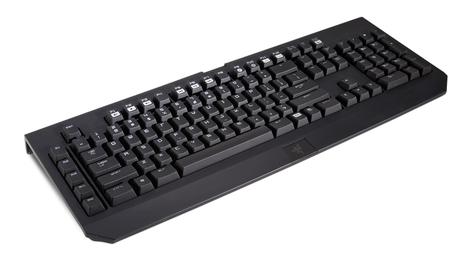
Razer says that it's new Ultimate BlackWidow Keyboard can sustain 60,000,000 keystrokes over the course of its lifetime. Its the kind of statement you can't actually prove. Type at 375 keystrokes a minute and it'd take 2,667 hours of constant typing to break this thing - by that point, you most certainly have carpal tunnel. But the Ultimate upgrade and the new mechanical switches found within are more than just science and the intangible. What's on offer here is a sturdy, responsive keyboard that's worth a look, whether you're coming to the brand fresh or looking to trade up.

Let's talk about those new mechanical keys. Razer has honed the actuation point of its keys to around 1.9mm, with an actuation vs. reset point of 0.4mm. Your response to this information, dear reader, should rightly be one of confusion. Said another way, if you're coming from, say, Razer's standard-edition BlackWidow keyboard, you will immediately notice that the key strikes aren't as crisp and have a slightly dampened feel. The trade-off here is that key strikes also aren't as clacky as other mechanical switch keyboards, and you won't find yourself needing to push as hard to make your input.

Now, unless you're actually an eSports athlete (Razer's target demo on the packaging), you'll likely find yourself using the BlackWidow for word-processing, Internet-surfing, and furious G-chatting. To that end, good news: The keyboard totally functions in this capacity, with keys that are responsive yet not so hair-sensitive that you'll be jamming on the backspace key every second. And, because of the aforementioned dampened keys, your coworkers/significant other/etc. won't mistake your typing for a rabbit tap dancing on your desk. It's by no means silent, but far from the loudest keyboard I've used - at least that's what my co-workers have told me.

If you are an eSports athlete, or just take your gaming very seriously, you'll find Razer has taken a suitably no-frills approach to your keyboard inputs. No, you won't find a track pad, a touch screen, or really much else beyond a handful of macros keys. One frill I would have liked on a $140 would be dedicated media controls. Skipping a track or adjusting the volume on the BlackWidow requires you to hold a function key. However, if you're playing games - let's say it's League of Legends - and you're at all competent (Faker-senpai, is that you?), all you really want is a fast, durable keyboard and mouse. In this respect, the Widow delivers.

Razer's Synapse 2.0 driver software is equally bare-bones. Sure, you can control the brightness of the keyboard's backlight, rebind keys, and record eccentric macros. None of it's necessary, though, and Razer gives no compelling reason for you to find it necessary. Install it and forget about it.
Verdict
Taken on its own, the Razer Ultimate BlackWidow is a sturdy, responsive keyboard that will do what you want most out of a peripheral - fade into the periphery, especially if you disable the backlight. And as much as Razer would like you to believe it has revolutionized the game with its new mechanical switches, you likely won't notice the science within the keys. What you will notice, however, is the keys' slightly more quiet, slightly less crisp actuation, as compared to other mechanical boards. And even that, you won't notice for very long. Razer's standard-edition BlackWidow had been my keyboard of choice - I for one will be upgrading.
| |
Read More ...
Pebble watch app store finally opens up to Android

The Pebble Android app has been updated to version 2.0, which adds several important features, including access to the Pebble smartwatch's watchapp directory.
Now users on Android can browse apps with ease and install them on their Pebble watches with a single tap.
In TechRadar's Pebble review we suggested that the inexpensive and highly customizable wearable is "the Linux of smartwatches," and having access to the app directory on your phone makes it even easier to make it your own.
Available apps include Foursquare, Yelp, eBay, Plex and Runtastic Pro, among others. Users can browse categories like essential apps and popular watch faces.
Better late than iOS-exclusive
These improvements were added to the iOS app in February, and Android users have had to wait almost a month to enjoy them fully.But the smartwatch's app directory isn't the only improvement in the Pebble 2.0 app.
Android users' Pebble notifications are now stored on their phones as well so they can scroll back through prior alerts, and they can also now browse their downloaded and installed Pebble apps in the watchapp locker.
In addition the UI design has been "completely revamped and improved."
Pebble's Android app store beta got off to a rocky start, but it sounds like the latest update might be exactly what it needed.
- Here's TechRadar's assessment of the Pebble Steel

| |
Read More ...
The Tip Off: TechRadar Tip Off: Moto X student discounts, plus Galaxy S4, iPhone 5S, 5C deals

This Tip Off is a doozy because we've got quite a few phones lined up with GREAT deals.
First up, that beauty known as the Moto X is now $339 off-contract and only $49 with a two year contract. Simply register at motorola.com/college with a valid .edu address for the discount to apply.
Not a college student? Motorola will still hand over over the phone for the same $49 price on-contract but off-contract, it'll cost you $399.
Show your school spirit with the Moto Maker's new College Collection while you're at it. Nine new back colors and three new accents have been added plus clear cases with 40 school logos and team names (with more coming) too.
Apple caught your eye?

Most likely prepping for the advent of the iPhone 6, several stores are practically throwing out the current-gen iPhone 5S and iPhone 5C models.
The best deal we've seen is from Walmart; you can pick up 16GB versions of the 5S for only $119 and the 5C for a whopping low price of $29.
To give you an idea of how much the cost has dropped, Walmart was previously selling the phones for the already low prices of $145 and $45 respectively, while the Apple store has maintained the original $199 and $99 respectively.
If you've been holding out on the latest Apple greats, now is definitely the time to upgrade.
Can't forget Samsung

Speaking of making way, the Samsung Galaxy S4 is seeing hefty price cuts thanks to the impending arrival of the Samsung Galaxy S5.
If the Moto X isn't your thing, the Galaxy S4 is another top Android device that's only $49 instead of $99.
With such an array of phones to choose from, you're probably antsy to get browsing so don't let us keep you any longer.

| |
Read More ...
Got the feels? Google Glass app can recognize emotions

A new prototype Google Glass app looks set to reignite the privacy debate thanks to its purported abilities to recognise human facial emotions and facial expressions.
San Diego start-up Emotient has announced its sentient Sentiment Analysis application, which it claims can identify positive, negative and neutral emotions of anyone who happens to step into Glass' field of vision.
It can also identify deeper emotions such as surprise, joy and disgust (that's when the person realises they're being ogled by Google Glass).
The software can also tell if you're elated, confused or frustrated, according to Emotient, which claims none of the data will be stored, only used by the wearer in real time.
Getting Glassed
The app comes amid a flurry of controversy surrounding facial recognition on Google Glass. The company itself has banned them for the time being.Google wants strong privacy measures in place before the Glass camera can be utilised to pick out individuals, but that's likely to be a while in coming.
Emotient claimed retailers looking to improve customer service may be among those finding its app more useful. Because that's all we need isn't it? A bunch of snooty Abercrombie and Fitch lackeys judging reactions to every overpriced item.
We wonder whether if the Sentiment Analysis app can recognise our, 'You're about to get a slap, mate!' face?

| |
Read More ...
Bitcoin cash machine pops up in Tech City, offering digital dough for banknotes

Inhabitants of London's TechCity can now grab some Bitcoins along with their coffee, after the UK's first cash machine offering the digital currency popped up in a trendy Shoreditch cafe.
The new machine at the trendy Old Shoreditch Cafe and Bar allows users to scan the QR code on their Bitcoin wallet, insert some banknotes and receive some of that en vogue digital currency in return.
The $3,000 machine, sold by Lassana, is basically a Google Nexus 7 running a bespoke application and an additional QR code scanned, enclosed within a safe box that can count-up and store physical cash.
Within a few taps of the touchscreen users can top up their Bitcoin accounts and trade them in for offerings at the cafe, which has accepted the currency for over a year.
The machine is limited to deposits of £1,000 per transaction, with the proprietor Joel Raziel opting against allowing users to sell their Bitcoins and thicken their wallets with some real cash.
Investment
"We've had a great response," Raziel told the International Business Times. "Including a mother and child who came in to buy the child his first fraction of a bitcoin as an investment for the future, which was very cute."One bloke even made the trip down from Manchester just to use the machine, Raziel revealed.
Is the Shoreditch Cafe starting a new craze that'll see businesses up and down the UK bring in their own 'reverse' cash machines?
Let's face it, if anything from Shoreditch is going to spread to the rest of the country, we'd rather it be cool tech than those folks' terrible fashion choices and facial hair configurations.

| |
Read More ...
Samsung pours a tall glass of ad-free streaming with Milk Music app

Samsung is taking another crack at the streaming music business with its new release, the Milk Music app.
The app is situated in for free the Google Play Store and exclusively for Galaxy Devices, like the Galaxy S5 and Galaxy Note 3. The Korean device maker claimed users can jump into any genre within a few seconds.
Samsung said there are no ads whatsoever to interrupt users from listening to the curated music library of over 13 million songs. However, an asterisk in the app description reveals Milk's ad-free-ness is only for a limited time. There's no word on when ads will start to appear.
From a large porthole-shaped control users can tune into over 200 genre stations. Along with the nifty interface, the dial lets users to switch between stations without having to wait for the music to buffer.
Milk Music can pull this trick off because it downloads the first eight seconds of every song from the nine selectable genres shown on the interface. From the basic genres users can drill down into sub-genres, such as post modern and grunge from "rock."
Rock it out
 While
Milk Music doesn't currently have any ads, users are given a limited
number of skips. Six to be exact, putting it right in line with other
services including Pandora, Last.fm and iTunes Radio.
While
Milk Music doesn't currently have any ads, users are given a limited
number of skips. Six to be exact, putting it right in line with other
services including Pandora, Last.fm and iTunes Radio.There's also an option to bookmark songs. Like Spotify and Pandroa, users can fine tune radio stations based on popularity, novelty and song favorites.
It'll be intriguing to see whether Milk flies off the shelves or spoils given the over-flooding streaming music market.
Samsung's app may face an extra challenge as it's particularly closed off, running exclusively the company's Galaxy devices and having availability only in the United States for now.

| |
Read More ...
Microsoft goof lets anyone grab Windows 8.1 Update 1

Too impatient to wait until next month to download the first big update to Microsoft's latest desktop OS? If you know where to look, you might not have to. Then again, you may not want to just yet.
Wind of a release to manufacturing (RTM) build of the forthcoming Windows 8.1 Update 1 started making the rounds of public cloud storage services after mistakenly being released by none other than Microsoft itself.
Although the update isn't due for a public release until April 8, the leaked build is what manufacturers use to make sure their hardware is ready to go, especially for PCs that will ship with the latest version of Windows already installed.
Adventurous types won't have to wait nearly that long, since the RTM build of Update 1 is now available for download, assuming you know where to look.
Mega leak
The update flap began with Microsoft's enthusiasm for getting Update 1 into the hands of its employees, using the public Windows Update servers to post the build with a file name that wouldn't be obvious to outsiders.That tactic apparently backfired, allowing non-employees to access and download the files using little more than a "simple software tweak," and it didn't take long for those files to get uploaded to cloud storage lockers such as Mega.
But just because you can download now, doesn't mean you should. Mashable noted the RTM build is likely missing many "hardware-specific drivers" as well as links to services that have yet to be updated, making Update 1 a dubious prospect at the moment.
Windows 8.1 Update 1 is expected to include improvements to the so-called "modern" UI including the ability to boot straight into the Desktop, the return of shutdown on the Start screen and a more familiar task bar that aims to unify the old and new user interfaces.
- Research before buying with our comprehensive PlayStation 4 review!

| |
Read More ...
The skies just got a lot friendlier for Amazon's drones

Thanks to a new court decision, unmanned commercial drones are more or less legal for the time being. Unfortunately for the drone industry, it probably won't have a field day just yet.
A US National Transportation Safety Board (NTSB) judge has ruled that the US Federal Aviation Administration (FAA) has no legal authority over unmanned drones, which qualify as small aircraft.
The judge dismissed a $10,000 (about £6,000, AU$11,000) fine that the FAA had leveled against a commercial drone operator.
The FAA is the organization that's been enforcing the ban on commercial drones in the US since 2007, but with its wings effectively clipped, Amazon and every other company that wants to use the aircraft is technically free to do so.
For now
That said, Amazon and the likes of Facebook (possibly) probably aren't dumb enough to start flooding the air with drones considering this ruling will inevitably be appealed.In fact, the drone industry is adopting a measured approach in the ruling's aftermath.
"We are reviewing the decision very carefully and we have also been in touch with the FAA to discuss its implications and the agency's response," Association for Unmanned Vehicle Systems International President and CEO Michael Toscano said in a statement.
He continued, "Our paramount concern is safety. We must ensure the commercial use of [unmanned aerial systems, or UAS] takes place in a safe and responsible manner, whenever commercial use occurs. The decision also underscores the immediate need for a regulatory framework for small UAS."
Before this decision the FAA was working on writing actual rules for drone operators in the US.
Those rules are supposed to be drafted by 2015, but the appeals process and whatever follows will almost certainly cause delays, and this might end up harming the drone industry more than it helps it.

| |
Read More ...
Review: Roccat Kave XTD review

Sound cards in gaming PCs, save for serious audiophiles, have largely been rendered irrelevant by motherboards with more than passable sound chips. Ailing bassheads could just try and cram a sound card into their gaming rigs, but German peripheral peddler Roccat has another idea. This is the Kave XTD gaming headset, with 5.1 digital surround sound and its very own sound card enabling a swath of fun features.
For those who follow Roccat, the Kave XTD is the successor to the company's $129 Kave 5.1. The difference here is a.) the price: $169 (about £101, AU$188), b.) its sedentary design and c.) it's feature set.
Where the original Kave 5.1 was focused on a fusion of portability and features, the XTD is all about offering as many relevant features as possible in a similar package, committing to a desktop-first design. However, that comes with some compromises that might not fly for more mobile-minded gamers.

Design
Save for the original's folding ear cups (these tilt for a better fit), the XTD looks nearly identical to the the Kave 5.1 in shape and silhouette. You'll get the same thick, black leatherette cushions for your ears, which are comfy if a tad stiff. The headband is now a single – but indented – strip of cushioned fabric where the Kave 5.1 sported three separate fabric cushions.On the outside, the XTD rocks the same soft touch plastic on the cans and plenty of glossy plastic accents on the headband and microphone. The band extends eight notches, but also has half-extensions on each number for fine control over its fit. This is extremely important, as the ear cup cushions are more rigid than I'd like. (You might still get that pressurized feeling while and after wearing the XTD, though I'm quite sensitive to it.)

What's interesting is that the microphone is removable, though I'm not sure why, given that the XTD is not all that portable. You see, this headset is not only wired, but permanently tethered to the USB desktop remote. This is a must, given the device's onboard sound card, I'm told.
Speaking of which, the included – whether you like it or not – USB remote is a major shift in design from the previous model. Coated in shiny black plastic, this dock, if you will, stands on two prongs with soft touch buttons to mute the microphone and accept phone calls. (More on that later.) Pressing any of these buttons activates cool blue LEDs underneath, and muting the mic causes a similar light to glow on the mouthpiece.

Front and center is a large rubber and plastic knob that controls volume with a corresponding row of blue lights underneath. Touching the capacitive Bluetooth button causes the XTD to broadcast its signal to nearby smartphones and the like. All of these features are possible through USB and only USB, which, if you ask me, is a bit of a bummer.
The XTD offers audio ports for whatever 5.1 speaker setup you might have, making this unit your receiver, in a way. The "Speakers" button feeds the audio coming through via USB to the speakers, allowing you to control the volume and channels from the desktop remote.
However, this means one less USB slot for you, which can be problematic for gaming laptops or smaller case setups. Not to mention this limits the XTD's compatibility to Windows-based systems – no jacking into your Xbox One or Sony PS4 with this thing. I'm told that a $99, 3.5mm jack model is in the works, but will lack the integrated sound card. The wise words of Mick Jagger: You can't always get want you want.
Sound quality
Before we get into this, I must admit that I'm not exactly an audio nut. The nuanced differences between lossless sound and 320 kbps audio don't come to me naturally. That said, I was impressed by both the volume and depth that the XTD provided.
Listening to Phantogram's latest hit "Fall in Love," I could hear the reverberations in the lowest-of-fi bass chords on the synthesizer. During some intense sessions in the recent Titanfall beta test, I could hear rockets whiz by the left and right sides – and yes, I could tell which – of my giant suit of mecha armor.
But Roccat promises that the XTD's built-in sound card (and three drivers per ear cup) allows for more subtle effects, like hearing the direction from which enemy footsteps are coming. My kill-death ratios are evidence enough that I couldn't hear opponents' boots in Titanfall, even when inside buildings. Though, that could be due to the bombastic nature of the game.
What I did love about this headset is how could boost its performance, down to the audio sampling in kilohertz (up to 48KHz). You can also up the virtual bass, which noticeably boosts depth, and enhance the quality of compressed audio.

That latter feature was so amazing for streaming music over Spotify that I wonder why it wasn't toggled by default. This is all possible through Roccat's software, lazily named "Roccat Kave XTD Sound Console," which you can download from its website. Given that it's a USB device with a sound card, I would expect this software to come pre-loaded on the unit, but alas. Regardless, you'll definitely want to download this app.
Fun, useful features
Through Roccat's feature-rich software, not only can you mix stereo sound to come through the headset's 5.1 channels, but you can automatically normalize the volume across apps and media. The mixing solution isn't the greatest, given that its applying audio that wasn't recorded in 5.1 to those channels, but it makes a difference for sure.What's more interesting are features like Xear Magic Voice, which transforms your voice into either that of a monster, man, woman or a rubber duck. I used this feature to great effect when calling a colleague, though she didn't like hearing me as a rubber duck all that much. That said, it's fantastic for pranking friends and coworkers or remaining anonymous during public game sessions.

Interesting as voice masking is, the most important feature on offer here is probably Bluetooth support for smartphones. Similar to most Bluetooth headsets, the XTD can take calls from your smartphone, minimizing distraction during those tense firefights. Pressing the phone button on the desktop remote answers an incoming call and automatically reduces the PC volume.
Verdict
The Roccat Kave XTD presents quite a deal for PC gamers, saving them much-needed chassis space with its own sound card. That said, the XTD is in no way ideal for portable use, nor is it compatible with any platform but Windows. Wireless headsets, like Sony's PlayStation Gold Wireless Stereo, offer cross-platform compatibility and 5.1 sound (on PlayStation at least) for just $100.Also, I must admit that setup with certain apps, especially Steam's voice chat, proved troublesome, with the program recognizing either audio input or output, and never both simultaneously. A simpler 3.5mm interface would fix these issues, but wouldn't be able to support this robust feature set.
The dedicated, DIY type of PC gamer – the kind with their own gaming desk or den – will find a lot to like in the Kave XTD. This is a comfortable headset with great performance and upscaling/sampling features only possible with a sound card. While you won't be able to take it elsewhere, this headset could be the final set piece for your shrine to PC gaming.

| |
Read More ...
The phone show: Has Samsung done enough to make the Galaxy S5 a winner?

Regardless of what the naysayers may think, the Galaxy S5 marks another notable step forward for Samsung.
The company has brought to the table a device that takes everything back to basics, stripping away unnecessary gimmicks and focusing solely on the core ingredients that make a top-of-the-range smartphone.
There's been the inevitable outcry from some, bemoaning the lack of metallic gloss and similar iPhone-besting features. But once you really dig down into the S5 and take a look at what's new, what's improved and what's been chucked altogether, you begin to realise that it's actually a handset perfectly in keeping with the Galaxy ethos.
In this week's Phone Show, Gareth Beavis and John McCann take an in-depth look at Samsung's latest offering, and explain why this is an Android handset worthy of your time.

| |
Read More ...
Review: Updated: Moto G

Introduction and design
Motorola's back, and it's kicking off its global smartphone revival with the keenly priced Moto G handset. A mid-range handset with a low-end price tag and Android KitKat - okay Moto, I'm listening.First things first then, the Motorola Moto G price. You can pick the handset up in two storage sizes - 8GB and 16GB. The former will set you back just £135/$175, while the larger size is still a very palatable £159/$199.
And here's some more good news: both Vodafone and Tesco Mobile in the UK have got the phone on offer, coming at £100 (with a £10 top up) for the former, and £110 from the latter - man, that's cheap for what you're getting.
So where does this place the Moto G in the market? Well at that price it has the likes of the Samsung Galaxy Fame, Nokia Lumia 520 and LG Optimus L3 2 for company, but dive into the spec list and you'll note the Moto G wipes the floor with them.
In terms of design the Moto G takes most of its cues from the firm's first, post-Google takeover handset, the Moto X.
It's hardly groundbreaking in terms of looks, but the soft, curved edges of the Moto G make it relatively attractive and the swath of plastic feels solid and well built.
Weighing in at 143g the Moto G has a pleasing, well balanced presence in the hand without being overbearing, and while it may measure 11.6mm thick in the middle the tapered edges make it feel thinner than it is.
Couple that with a rubberised rear plate which slightly hugs the side of the handset too, and the Motorola Moto G fits comfortably in the palm, providing a decent level of grip.
The Moto G features a water repellent coating which means you'll be able to whip it out in the rain without fear of a short circuit, but it is not waterproof - so no jumping in the pool with it.

You can even take the rear cover off and swap it for a different color, which Motorola is pushing as a big customizable feature of the phone. In reality however it just reminds me of my Nokia 3310.
Sure, changing covers is fun for all of five minutes, but the novelty soon wears off. Not to mention the back cover is also pretty tricky to remove - you need to really dig your nails in at the base of the handset to get it free.
In fact, so much strength needs to be employed to free the cover from the Moto G I feared on more than one occasion that the thin plastic would snap - thankfully it never did.
Motorola did make a point that the younger generation like the ability to "customize" their handsets and this particular feature, along with the rock bottom price, reinforces the Moto G's credentials as a handset which may land in the laps of many teenagers.

The left side of the Motorola Moto G is devoid of any features, while the top of the handset only sports a centralized headphone jack. Both the power/lock key and volume rocker switch are located on the right of the G and these are easy to reach and responsive to the press.
On the base is a microUSB port, while under the removable cover is a microSIM port - but no microSD slot. That means if you want to expand the onboard storage you'll have to take to the cloud.

The 2070mAh non-removable battery housed inside the Moto G is claimed to give you all day battery life, and I put that to the test - skip ahead to the battery life and connectivity section to see how it got on.
The Moto G comes with a 4.5-inch, 1280 x 720 display and boasts a 329ppi pixel density. To put that in some perspective that's a bigger, higher resolution and more defined display than the iPhone 5S - not bad for a handset which is a third of the price.

Of course a HD display isn't the only key factor in a smartphone, but Motorola has managed to equip the Moto G with a 1.2GHz quad-core Snapdragon 400 processor and 1GB of RAM.
In terms of specs then the Motorola Moto G is actually giving the HTC One Mini, Samsung Galaxy S4 Mini and Nokia Lumia 820 a run for their mid-range, dual-core money - and once again the screen is bigger than these rivals. The Motorola handset even beats the Samsung and Nokia when it comes to resolution.

The camera on the rear of the Moto G is only 5MP and this is trumped by the S4 Mini and Lumia 820 and their 8MP snappers.
All in all the Moto G finds itself in no-mans land, with a complete disconnect between its price and spec list. This, of course, isn't a bad thing and on paper it offers outstanding value for money.
The proof however, is in the pudding, so let's see how the Moto G got on in real life.
Interface
The Motorola Moto G is one of the first handsets to be updated to Google's latest software - Android 4.4.2 KitKat - thanks to the manufacturer now being owned by the search giant.
With a 1.2GHz quad-core processor and 1GB of RAM at its heart, the Moto G is more than well equipped enough to run KitKat which is the smoothest version of Android to date.
Android purists will be pleased to learn that the Moto G is running the stock version of KitKat, with Motorola opting against applying an overlay - claiming instead that it's focused on things which add real benefit to users.
These "benefits" include a faster boot up time and improved audio, data management, web speeds and general navigation.
I found that the Moto G did boot up impressively quickly, but Motorola's claims that it performs various tasks quicker than the Samsung Galaxy S4 still seem a little far fetched to me.
Sure the interface is smooth - impressively so in fact when you consider the price - but I can't say that it noticeably out performs, or even matches the various flagships I've had the pleasure of using.
General operation is fluid and while it may not be as lightening quick as the top end handsets, the quad-core chip is doing a good job under the hood and I had no issues with lag.

You get five homescreens - no more, no less (there's no way to add or remove) - and the familiar Android set up with a selection of widgets available in the tabbed app drawer for you to choose from.
Drag and drop an app onto another on any homescreen and the Motorola Moto G will automatically create a folder with both applications inside, allowing you to easily organize and manage your favorite apps.
The pull down notification bar at the top of the Moto G's display offers up a feast of information from recent calls, new emails and text messages to Google Now prompts, app updates and third party notifications.
Glide a finger over certain notifications, such as a new email alert, and it will expand allowing you to see a longer overview of the message.
Slide you finger up from the home key at the base of the screen and you'll launch Google Now, Android's own digital personal assistant and Siri rival.

Google Now offers up relevant information in a series of cards, and by tracking your movement, messages and emails it can tailor these cards to suit your needs.
You can get information such as the weather, meeting reminders and details on the journey home here. It's still relatively hit and miss and there are far fewer features enabled for those outside of the US, but Google is constantly working on Now and it's slowly becoming more relevant.
Tap the multi-tasking key in the bottom navigation bar and you'll be greeted with the familiar stack of thumbnails showing the apps which are currently running.
This is testament to the quad-core processor inside the Moto G, as the handset can comfortably handle multiple apps at the same time and you're able to switch between them very quickly.
Basic applications opened promptly, but I did notice some lag with some of the more demanding games, such as Stick Cricket and Stick Tennis.

When these were tapped the Motorola Moto G took a couple of seconds to load up the application. It's not a huge issue and game play is still smooth once you're past the initial load, but it just hints at a potentially small flaw in the low 1.2GHz clock speed of the quad-core chip.
Everything looks bright, crisp and clear on the 4.5-inch display and while the Moto G doesn't match up to the full HD offerings you get on the flagship phones, for a handset with such a low price you'll be more than happy and it puts the competition to shame.
There's a thin bezel down each side of the screen, but it's not the slimmest I've seen and I reckon Motorola is pushing its luck a little calling it an "edge-to-edge display."
Sure it doesn't feel like there's any unnecessary plastic padding around the screen, but it's not a close cut as on other handsets - the LG G2 springs to mind immediately as a handset with a slimmer bezel.
The screen is also very responsive to the touch which makes moving around the Moto G a stress-free experience.
Contacts and calling
Contacts
As I've mentioned the Motorola Moto G is running pretty much stock Android, so there are no surprises in the People app.Contacts are displayed in the standard, alphabetical list format with pictures of your chums to the left - that is if the Moto G can pull them through from your Google contacts and their Google+ pages.

A lot of my contacts ended up faceless for the simple fact that they aren't on Google+ and there's no way of linking your buddies up with their Facebook or Twitter profiles - Whatsapp integration is available however.
Why? Well it's because Google had a bit of a falling out with some of the main social media players and the join contact integration we see on the likes of Samsung, HTC and even Huawei devices are all the doing of the manufacturers themselves tinkering with the OS.
It's not a huge issue, it just means your contact list doesn't look quite as pretty, but it's something I feel Motorola could have included as part of its added benefits for the user - never mind, you can't win them all.
What all this means is that your contact cards a relatively bland - there's all the vital information - numbers, emails and the sort - but don't expect any thrills. It's cheap, cheerful and user friendly.
As well as your main contact list the People app offers two further tabs at the top of the screen - groups and favorites. Nothing out of the ordinary here, but it makes it easier to find the people you contact most often.
Adding a new contact is easy - just tap the central icon in the bar below your contact list and you'll be transported to the data entry screen where you can fill in all manner of details about your new found friend.
Calling
The Phone app is where you'll be heading if you need to make a call, and as default you'll find it in the app dock on the homescreen of the Motorola Moto G - although you can move it out of here if you prefer.
Fire it up and you'll be taken to the phone overview tab which a new feature in Android KitKat. Here you'll see your more recent calls, most called contacts and your stared buddies for easy call-back ability.
Hit the dial pad icon at the base of the screen, start tapping out a number and you'll notice that smart dialing is enabled, with the Moto G offering up various contact suggestions relating to the numbers you've entered.
If you want to call someone you've spoken to recently tap the clock icon at the top of the screen and you'll get to the call list. Press the phone icon to the right of a contact and the Moto G will start calling them.
Call quality is acceptable, although it was far from crystal clear and the Moto G could do with the addition of HD voice to improve the clarity of voice chat.
That said I was still able to hear and understand the person on the other end of the line, and vice versa, so for a budget handset the Moto G doesn't perform badly.
I found the Moto G was able to keep hold of signal well, even in areas of poor reception and I didn't witness any dropped calls during the review period.
Messaging
The Motorola Moto G offers up the usual array of messaging capabilities, but thanks to the inclusion of Android 4.4.2 (and Android 4.3 before it) you get not one, but two text messaging clients.
There's the stock Messaging application which will be familiar to anyone who has used an Android phone in the past. It's a minimalist, intuitive interface with a list of all your message streams and options at the base of the display to create a new SMS, search your current messages and a basic menu.
Profile pictures are pulled through from contact cards which makes the app look a little better - although the lack of Facebook and Twitter integration means you'll still end up with a lot of blank tiles.
This is all very well and good, but Google is looking consolidate messaging apps by bringing together SMS and what was known as Google Talk into the Hangouts application.
In terms of text messages Hangouts works in a very similar way to the standard Messaging app, albeit with a slightly different look. But mixed up in your text messages are also instant messaging streams, allowing you to talk to more people from a single app.
Talking of things coming in twos, you're also treated to two email clients on the Moto G, with the Gmail app living alongside the standard Email offering.

If you only deal with Google's email setup then you can completely disregard the stock Email app and focus all your efforts on the intuitive Gmail client.
From here you can manage multiple Googlemail accounts, with an attractive and colorful interface making it a seamless and pleasing experience.
Those of you with other accounts outside of the search giant's remit will have to go to the stock Email app where you'll be able to sign in to all manner of addresses - you can even stick your Gmail accounts in here.
There's a unified inbox on offer, allowing you to see all your messages in one place, but you can also filter by account if things start to get a little confusing.
HTML emails load in a fully zoomed out view in both apps, allowing you to easily navigate to the area you want without a lot of frantic scrolling.
The Moto G looks set up for the younger generation with its low price and interchangeable covers, so I was a little puzzled when I found Motorola hadn't pre-installed the likes of Facebook and Twitter.

It's not a huge issue, as a quick trip to Google Play quickly resolves this, but it is a little frustrating. Although with Google breathing down its neck, perhaps these pre-installs were out of the question for the Moto G.
In terms of an input method you get the stock Android keyboard, which is a serviceable offering with word prediction and auto-correct, although I'd still recommend downloading a third party option such as SwiftKey if you're planning on doing a lot of typing.
The responsive 4.5-inch touchscreen aids typing speed, and provides enough space to ensure the keys are not cramped. Rotating the Motorola Moto G 90 degrees will see the keyboard adjust to the landscape view, giving you larger keys.
Internet
Chrome is the default browser on the Motorola Moto G, which isn't a huge surprise, and I found that on a strong Wi-Fi connection web pages loaded up in good time.The desktop version of TechRadar managed to render in an impressive five seconds, while the mobile site took just a couple of seconds.

There's no 4G connectivity on the Moto G, so you'll have to settle for 3G data speeds, but even so it was able to load mobile sites in around three seconds, while desktop offerings took less than 10.
The Moto G comfortably outperforms its price bracket when it comes to surfing the web, and the 4.5-inch display means there's plenty of space to play with.
Text is crisp and clear and images are well defined on the 1280 x 720 display, which gives the impression you're using a smartphone which is twice the price of the Moto G.
Double tapping on a paragraph of text will see the Moto G zoom in to fit the width of the text to the screen, and thanks to the 4.5-inch display you can read it relatively easily.
If you find that the text is still a little small you can zoom in further, but there's no auto text reflow available, which means you'll be scrolling sideways as well as down.
Sadly there's no reader mode on offer here and that's probably the one negative mark against Chrome, as along with the lack of text reflow it makes reading long articles a little frustrating.

Chrome supports tabbed browsing and you can view the number of open tabs at the top of the page next to the URL bar and quickly jump between them by tapping the icon.
This gives you a thumbnail view of each tab, displayed in a series of scrollable cards. The Moto G has no trouble running multiple tabs at the same time.
You can also open up incognito tabs which don't track your surfing history, meaning you can visits all those special sites without a trail for your partner to find at a later date.
A handy feature within Chrome is the ability to sign into your Google account and have all your bookmarks, and even opened tabs, pulled through from your desktop and vice versa.
Bookmarks can be accessed from the Chrome menu and appear as app icons on the screen for easy perusal.
Camera
While many of the specs on the Moto G have exceeded its price, the camera is an area where Motorola has clearly tried to save some money.On the rear of the handset you'll find a 5MP camera and single LED flash, while on the front you get a 1.3MP snapper.
Motorola has done some work in the camera app on the Moto G, providing a minimalist interface which sees all the settings hidden from view and the whole screen made into a shutter key.

Now I've bemoaned the use of the whole screen as the shutter on other handsets, as the fiddly little app icons could be easily missed, leading to me taking many unwanted snaps.
Luckily this issue has been overcome on the Motorola Moto G, as the settings wheel is accessed by sliding your finger from left to right over the display - not once did I accidentally take a picture when trying to tweak options.

That might be partly due to the fact I rarely found myself accessing settings, because it's seriously slim pickings.
For anyone looking to tinker with various modes, effects and advanced settings such as brightness and white balance the Moto G is not the cameraphone for you.
All you get are flash, HDR mode, shutter sound and aspect ratio toggles along with a Panorama mode, the ability to attach location information to your snaps and a rudimentary focus & exposure control.

Shutter speed is pretty swift, but if you fancy a burst mode just hold down on the screen and the Moto G will snap away until you release your finger.
There's a 4x digital zoom to boot which is controlled by sliding your finger up and down the display - although picture quality takes a serious battering, so it's best avoided.
The full screen trigger makes snapping photos easy as you don't have to aim for a small shutter button on screen, although once you see the results you may wish you never bothered.

That budget price tag really rings true here, and I found the majority of my photos were a pixelated mess. The Motorola Moto G struggled to focus properly and even with the focus & exposure setting turned on things didn't improve.
The Moto G performed better close up, as it was obvious what to focus on - but when looking at landscapes and situations with a lot going on it just couldn't make up its mind.
It's a real shame that the Moto G doesn't have even a slightly better camera offering, but at its rock bottom price point a concession had to be made somewhere, and this is it.

Click here for full resolution image

Click here for full resolution image

Click here for full resolution image

Click here for full resolution image

Click here for full resolution image

Click here for full resolution image

Click here for full resolution image
Video
If you've already read the camera section of this Moto G review then your expectations for video recording on the handset are probably pretty low.And so they should be, as that 5MP sensor is also responsible for the 720p video capture on the Moto G.
Options were sparse for the camera function, and there's even less choice on offer when it comes to video recording.

Hit the video recorder icon in the camera app and the Moto G will start recording straight away - no change of mode and no new wheel of settings, just straight into the action.
That's great if you're in a hurry to start recording, but it also means you get the same limited settings wheel as the camera app, with some of the features obviously not compatible with the video recorder.

One option which is dedicated to filming is slow motion capture, allowing you to add a rather simple, yet pleasing effect to your videos. It's not as impressive as the implementation on the iPhone 5S, but nether the less it's a nice feature to have.
Resulting footage is acceptable when played back on the Moto G's 4.5-inch display, but it doesn't look great when moved to a larger screen such as a computer or TV.
Media
Under the removable rear cover of the Moto G is a microSIM port - but no microSD slot. That means if you want to expand the onboard 8GB/16GB of storage you'll have to take to the cloud.Thankfully Motorola has struck a deal with parent company Google to offer Moto G users an additional 50GB of Google Drive storage on top of the 15GB already provided.
If I've done my maths correctly that means you'll get 65GB of cloud storage for free if you pick up a Motorola Moto G, although the additional 50GB is only free for the first two years.
With no microSD slot you'll find yourself digging out your USB cable and connecting the Moto G up to your computer to move large quantities of music and movies over - although with limited internal storage you may find it filling up fast.
In fact 2.5GB of storage is taken up by the Android operating system, so if you end up plumping for the 8GB Moto G you'll only get 5.5GB of physical storage - that's not great.
Music
There's just one music app on the Moto, Google's Play Music offering which fuses your own personal library with the search giant's All Access streaming service.
You can get a 30 day free trail of All Access which has millions of songs and radio stations, but once that trail is up it'll cost you £9.99, $9.99, AU$11.99 per month to continue listening.
If you're already signed up to another streaming service, such as Spotify, you don't need to bother with All Access, but if you're new to the game then you might want to check it out.
For those of you who already have a huge music collection Google will let you upload 20,000 of your tracks to its Play Music cloud service for free, giving you access to all your songs on any Android device.
Of course you can always dig out the trusty USB cable and transfer your tracks over the old fashioned way - either way they'll appear in the "My Library" section of the Play Music app.
You can browse your songs by title, album, artist and genre with album art pulled through to make things look a little nicer.

Tap a song to starting playing it and it will appear in a bar at the bottom of the screen, allowing you to continue browsing your collection.
Hit that bar and you'll be taken to the now playing screen where you'll find the usual play/pause, skip and scrub controls along with shuffle and repeat.
Sound quality is more than acceptable through a half decent set of headphones, although the built in speaker isn't exactly great with tinny, distorted sound the order of the day - in short, best avoided.
FM radio
The Moto G comes equipped with a FM radio, which Motorola claims was included to give people free access to music if they didn't fancy signing up to costly streaming services.You'll need to have the headphones plugged in to get reception, and ideally you need to be outside as indoor reception was generally pretty poor.
The app is at least easy to use, with the Moto G automatically scanning the radio waves for available stations, and you can favorite the ones you listen to the most for easy access.
Video
There's no dedicated video player app on the Moto G, so if you've transferred your own videos onto the handset, or fancy playing pack something you recorded with the phone you'll need to head to the Gallery.Video clips which you've transferred onto the Moto G will reside in a separate folder to your images, but anything you've filmed through the 5MP camera will be bunged into the camera roll, which can make clips a little tricky to find.

Tap a video and it will open in a very basic video player - you can play/pause by tapping the middle of the screen and skip through using the scrub bar. That's your lot though.
Playback itself is very good thanks to the decently sized 4.5-inch display and the 1280 x 720 resolution and once again its an area where the Moto G can comfortably compete with the likes of the One Mini and Galaxy S4 Mini.

The Moto G is comfortable to hold for long periods of time, and it's not too heavy. I would recommend listening to your videos via headphones though, as the speaker on the rear isn't up to much.
Google's Play Movies & TV app also resides on the Moto G and if you've purchased films or TV shows from Google Play you'll be able to access them from here.

Once again the video player screen is very basic with the same controls as found in the gallery, but at least it's a simple, intuitive app.
You can buy or rent movies from Google Play and there's a direct link to the store from the Movies & TV app.
Photos
Head on over to the Gallery on the Moto G to view all your snaps and other images downloaded from the likes of Whatsapp or received via Bluetooth.
It's very much standard Android fare here, with the usual thumbnail galleries allowing you to get a good overview of all your snaps.
Tap a photo and then select the pencil icon in the bottom corner and you'll be transported into the well stocked photo editor housed with the Moto G.

From here you can apply various effects, exposure settings and frames to your snaps as well as crop, rotate, mirror and even straighten any wonky efforts.
It's simple to use and there's a decent range of options for you to chose from, although the poor performance of that 5MP camera may be a step too far for this editor.
Battery life and connectivity
Battery life

Motorola claims that the 2070mAh non-removable battery inside the Moto G will give you all day battery life, and while I found it's unlikely to see out 24 hours, it's just about able to see through the day.
I managed to get a full days use from the Moto G (7am-11pm) and by the time I got into bed the battery meter in the notification bar was red and the handset was in need of an overnight charge.
The Moto G had been used pretty heavily, with a couple of hours of music streaming, web surfing, constantly updating email inboxes, some social media activity and a few hours of pretty intense gaming.
With more reserved usage the Moto G will comfortably make it to bedtime, last overnight and give you a few hours use in the morning (if you're lucky). If you're planning on staying overnight somewhere you'll still need to take your charger with you to be safe.
It's worth keeping an eye on screen brightness, especially when you're watching movies on the Moto G as it can drain the battery somewhat.

During the battery test I played a 90 minute Nyan Gareth video on full brightness with all accounts syncing in the background and the Moto G lost 33% of life from a full charge.
That's not a terrible result, but if you're planning a bit of a movie marathon you'll want to make sure you're within reach of a charger.
If you find yourself getting close to the limit but are nowhere near a charger you can always enable the battery saver which restricts background data activity in an attempt to eek out more life.
Connectivity
The Moto G comes with all the standard connectivity options you'd expect from a low-end smartphone - Wi-Fi, Bluetooth, GPS and 3G are all on board.Pull down the notification bar on the Moto G, tap the icon in the top corner and you'll get a selection of quick settings allowing you to toggle Wi-Fi and Bluetooth quickly.

For the other options you'll need to head into the settings menu, where you'll also find the wireless hotspot function. This lets you share your phone's data connection with other devices, such as tablets and laptops.
Keep an eye on your data usage though, as this can munch through it in next to no time and you don't want to be lumped with a huge bill.
I've already talked about the lack of a microSD slot, so more of an importance is placed on the microUSB port on the base of the device as you'll need to plug the Moto G into a computer to transfer over multiple files.
There's sadly no 4G support and while this isn't a surprise when you look at the price tag, it's still something I'd have liked to see on the Moto G. NFC is also missing, but this is less of an issue as the contactless tech is still yet to take off in a big way.
Maps and apps
Maps
The Moto G comes equipped with Google Maps, which has been heavily documented many times before so I'll keep this brief.I tend to find that low-end handsets struggle with the power hungry Maps app, with sluggish load times and fragmented user experience - things are different on the Moto G though.

Maps loaded almost instantly, even over 3G, and the Moto G was usually able to pinpoint my location in under a second.
Zooming and panning around the map is smooth, while the ability to plan routes and start up the free turn by turn navigation makes the Moto G one of the most affordable sat navs on the market.

You do need a data connection for navigation to work though, so if you're planning some rural routes it may not be able to direct you if signal drops.
Apps
Apart from the stock Google applications Motorola has added very little in terms of additional pre-installs, which isn't a bad thing as the swath of bloatware you get on some smartphones (I'm looking at you Samsung) can be overbearing.
You can quickly build up a decent app collection on your Moto G thanks to the well stocked Google Play store which offers up a huge range of free and paid-for apps and games as well as movies, music, books and magazines.
There are a handful of Motorola's own apps on the Moto G, the first of which being Assist. With Assist you can automatically have the Moto G switch itself to silent between certain hours at night so your sleep is not disturbed.

Motorola Assist can also go through your calendar appointments and automatically mute itself when you're in meetings - perfect if you have a really embarrassing ringtone.
You can select predetermined exceptions, so if someone was to ring you twice with five minutes Assist would allow your Moto G to ring, as the call could well be something very important - or your friend could just be very drunk and feels compelled to tell you that they love you at 4am.
While Assist is a nice idea it is rather limited, as Meeting and Sleeping are the only two options, with each offering a limited number of customisable options.
I'd have liked to see an option to create your own scenarios and a wealth of exceptions and rules that could be applied - for example a location tracker which knows when you've got to work so automatically turns the Moto G to vibrate and turns on Wi-Fi.
Motorola Migrate is the next app in the line up, which aims to make it really easy for you to transfer content from your old phone to your shiny new Moto G.

You'll need to download the Motorola Migrate app on your old Android handset too, and there's currently no support here for Windows Phone 8, BlackBerry 10 (or BB OS7) or iOS 7.
In terms of what Migrate can pull across from your old phone it'll take care of text messages, call history, SIM contacts, media, volume settings and screen brightness.
Sure it's a nifty little app and the easy to follow wizard will mean even rookie Android users will be able to follow it - it's just a shame about the limited platform support.
Finally there's the Moto Care app, giving you a troubleshooting port of call if your Moto G isn't behaving itself, or you can't work out how to do something.
You can search the various help topics, tutorials and FAQs to find your answer, but if that doesn't help there's also the option to start a live chat with a support representative - plus there's an option to call someone too.
Comparison
There's an awful lot to compare the Motorola Moto G to, with not just phones in its price range to consider, but also more expensive offerings with a similar spec list.A firm favourite
When the Nokia Lumia 520 rocked up it was rather overshadowed by the headlining Lumia 920 and then the 925 - but venture towards the bottom of the Finnish firm's range and you'll find a golden nugget of a handset.The Lumia 520 seriously impressed with its low price tag, decently sized 4-inch (though not HD) display, dual-core processor and smooth performance all wrapped up in a sturdy chassis.

Then the Moto G turned up, with a bigger 4.5-inch HD display, more powerful quad-core processor and all the bells and whistles of stock Android KitKat.
If you're looking for a simpler interface the Lumia 520 is the better choice, and it's slightly cheaper, but if you want to get the most for your money the Moto G is the one you want.
The big brother
The Moto G was born out of Motorola's return to the mobile market - the Moto X.If the Motorola Moto G is just a little bit too small for your liking then the Moto X may be just up your street with a 4.7-inch HD display.
It also packs a punchier 1.7GHz dual-core processor, a superior 10MP camera and 2GB of RAM giving you technically more bang for your buck.

KitKat may still be on board, but poor battery life, weak camera performance and the lack of a microSD slot makes the Moto X feel rather limited.
On paper Moto X tops the Moto G in terms of specs, but it just doesn't feel that much better than its younger, cheaper brother - in terms of value for money the G still wins it.
What out Mini brigade
Put the Motorola Moto G up against the Samsung Galaxy S4 Mini and even then it's difficult to pick faults at the cheap handset.In fact the Moto G has a bigger screen than the S4 Mini (4.5 inches over 4.3) and a higher resolution (720 x 1280 versus 540 x 960), plus it's 1.2GHz quad-core processor is on par, if not better than the Samsung's 1.7GHz dual-core offering.

The Moto G even runs a newer version of Android - version 4.4 KitKat - while the Galaxy S4 Mini is still languishing on Jelly Bean. It's not looking good for the considerably more expensive Samsung.
Naturally there are areas where the S4 Mini excels and its 8MP camera is a significantly better performer than the 5MP offering on the Moto G.
It also brings 4G connectivity to the table, while you'll only get 3G on the Moto G, but considering the low cost of the Motorola you won't be disappointed.
Hands on gallery


Verdict
On paper the Moto G looks like an excellent handset for the price, and in practice it lives up to the billing.As the Nexus 4 did with the mid-range market, the Moto G has turned the budget end on its head with features found on handsets double its cost.
We liked
The whole package. Look at what the Moto G offers, look at its price, and then look at the other handsets which cost the same amount.It exceeds its rivals in several key areas, from the well defined 4.5-inch display to its 1.2GHz quad-core processor and Android 4.4 KitKat operating system. There's a lot to love about the Moto G for its price.
You could easily be fooled into thinking that the Moto G costs the same as the Galaxy S4 Mini and the One Mini - even web browsing is impressive on the handset.
We disliked
It's simple. Motorola must have cut some corners to get the price of the Moto G so low, and the camera is one area which has seen the compromise.The 5MP lens is simply not up to the job and my photos either came out blurry, grainy or both, while the camera app itself will be far too basic for some.
The lack of expandable memory will be a real bug bear for some, especially if you end up with the 8GB model and it's missing the more recent tech advances in the form of NFC and 4G.
Verdict
Motorola is back folks, it's official. It may not be the return I would have predicted - there's no flagship phone stuffed full of the latest tech - but arguably what the now Google-owned firm has done is even better.The Moto G is a top notch, low cost smartphone and I wholeheartedly recommend this as the best budget mobile currently on the market.
I was genuinely impressed with the feature set on the Moto G, so if you're looking for a low cost phone you can stop searching - just go out and grab a Moto G right now.

| |
Read More ...
Europol warns about dangers of using public WiFi

Head of Europol's cybercrime centre is warning companies and individuals not to send sensitive information over public WiFi hotspots.
Troels Oerting told the BBC that man in the middle attacks using public WiFi were becoming the favoured method of attack for hackers.
Oerting said it was difficult to grasp the magnitude of the problem, because you might see that your credit card is being misused but you cannot really tell when and where it happened.
Man in the Middle
He added that there had been an increase in the misuse of WiFi in order to steal information, identity or passwords and money from the users who use public or insecure wi-fi connections.There was little new about the technology the hackers were using. Normally they relied on well-known approaches that attempt to trick people into connecting to a fake hotspot that, superficially, resembles those seen in cafes, pubs and restaurants and other public spaces.
A few months ago, the European parliament turned off its public WiFi system after it was discovered that a "man-in-the-middle" attack was being perpetrated via the service.
- Now read how major cyber attacks can be predicted

| |
Read More ...
Hands-on review: Nikon D4S

Image quality and resolution
We've finally got our hands on the D4S, Nikon's long-awaited upgrade to its most advanced flagship DSLR. As part of our image quality testing for our forthcoming Nikon D4S review, we've shot a resolution chart, and frankly we were too excited to keep the results to ourselves, so here they are.The D4S features the latest Expeed 4 imaging engine (compared with the D4's Expeed 3 device). This helps to facilitate the expansion to the highest sensitivity setting - an industry-leading ISO 409,600 (equivalent).
For a full explanation of what our resolution charts mean, and how to read them, check out our full explanation of our camera testing resolution charts.
Examining images of the chart taken at each sensitivity setting reveals the following resolution scores in line widths per picture height x100:

JPEG

ISO 50, Score: 28 Click here for full resolution image

ISO 100, Score: 26 Click here for full resolution image

ISO 200, Score: 26 Click here for full resolution image

ISO 400, Score: 26 Click here for full resolution image

ISO 800, Score: 26 Click here for full resolution image

ISO 1600, Score: 26 Click here for full resolution image

ISO 3200, Score: 26 Click here for full resolution image

ISO 6400, Score: 26 Click here for full resolution image

ISO 12800, Score: 24 Click here for full resolution image

ISO 25600, Score: 22 Click here for full resolution image

ISO 51200, Score: 20 Click here for full resolution image
ISO 102400, Score: 20 Click here for full resolution image

ISO 204800, Score: 20 Click here for full resolution image

ISO 409600, Score: 20 Click here for full resolution image
RAW

ISO 50, Score: 28 Click here for full resolution image

ISO 100, Score: 28 Click here for full resolution image

ISO 200, Score: 28 Click here for full resolution image

ISO 400, Score: 28 Click here for full resolution image

ISO 800, Score: 28 Click here for full resolution image

ISO 1600, Score: 26 Click here for full resolution image

ISO 3200, Score: 26 Click here for full resolution image

ISO 6400, Score: 26 Click here for full resolution image

ISO 12800, Score: 24 Click here for full resolution image

ISO 25600, Score: 22 Click here for full resolution image

ISO 51200, Score: 20 Click here for full resolution image

ISO 102400, Score: 20 Click here for full resolution image

ISO 204800, Score: 20 Click here for full resolution image

ISO 409600, Score: 20 Click here for full resolution image
Sensitivity and noise images
JPEG

Full ISO 50 image. See 100% crops below.

ISO 50 Click here to see full resolution image

ISO 100 Click here to see full resolution image

ISO 200 Click here to see full resolution image

ISO 400 Click here to see full resolution image

ISO 800 Click here to see full resolution image

ISO 1600 Click here to see full resolution image

ISO 3200 Click here to see full resolution image

ISO 6400 Click here to see full resolution image

ISO 12800 Click here to see full resolution image

ISO 25600 Click here to see full resolution image

ISO 51200 Click here to see full resolution image

ISO 102400 Click here to see full resolution image

ISO 204800 Click here to see full resolution image

ISO 409600 Click here to see full resolution image
Noise and dynamic range
We shoot a specially designed chart in carefully controlled conditions and the resulting images are analysed using DXO Analyzer software to generate the data to produce the graphs below.A high signal to noise ratio (SNR) indicates a cleaner and better quality image.
For more more details on how to interpret our test data, check out our full explanation of our noise and dynamic range tests.
Here we compare the Nikon D4S with the Nikon D4, Canon EOS 1DX, Nikon Df and Sony Alpha 7R.
JPEG signal to noise ratio

In terms of the JPEG images, separating out most of the cameras on this test is very difficult, with extremely similar results from the D4S, D4, Nikon Df, and the Canon EOS 1Dx for signal to noise ratio. The Sony Alpha 7R, which also uses a full-frame sensor is the worst performer on this test here, and it isn't capable of shooting the very high ISO values that the others can.
Raw signal to noise ratio

In this chart for signal to noise ratio for raw format (after conversion to TIFF) files, we can see the D4S putting in a good, consistent performance across the sensitivity range, coming out on top for the lower values (ISO 100 - 400) and matching very closely with the Df across the range. Towards the higher end of the sensitivity run (ISO 1600 and above), the D4s just slips behind the D4 and the Canon EOS 1Dx. This could be down to the camera favouring detail reproduction of noise reduction.
JPEG dynamic range

Raw dynamic range

In terms of the raw format files (after conversion to TIFF), the D4S once again performs very well. Here we can see that the Sony Alpha A7R is actually the best performer at the lower end of the sensitivity scale, but other cameras including the D4S, D4 and Df are very close behind. The Canon EOS 1DX is the worst performer at the bottom end of the sensitivity run, but it beats the other cameras on test at the very top of the range.

| |
Read More ...
Available Tags:Facebook , HTC , Sony , PS4 , Android , iPhone 5 , TechRadar , Galaxy , iPhone , Google , Samsung , Windows 8 , Microsoft , Windows , Nikon ,


No comments:
Post a Comment