

AMD Changes 290 Series Fan Algorithms & About That 290 Conclusion
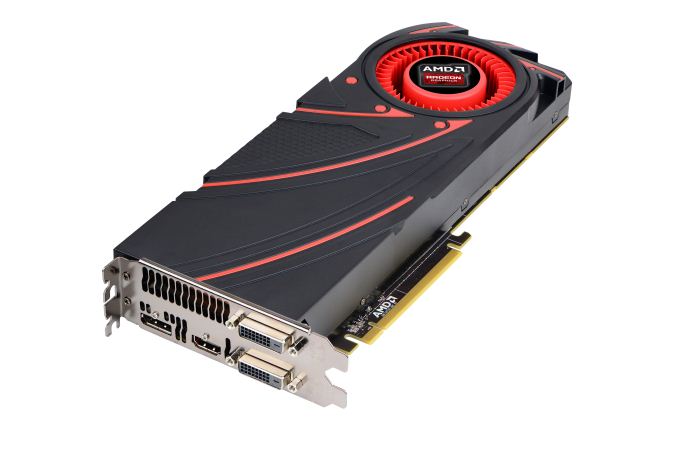
First off, let’s talk about what AMD has done with their drivers. Citing an issue with variability in the fan speeds on 290 series cards, AMD has changed the algorithms for how their drivers handle the fan speeds on 290 series cards, essentially overriding the BIOS defaults with new values. This is similar to how AMD deployed their specification changes for the 290 ahead of its launch – adjusting it from 40% to 47% as the default maximum fan speed – but AMD has also used their driver update to change how they’re defining and controlling fan speeds.
Rather than controlling fan speed based on percentages, which are really measuring fan speed as the duty cycle of the fan’s motor on a relative basis, AMD has switched to controlling fan speeds on an absolute basis, using the measured RPM of the fan as their metric of absolute fan speed. This goes back to AMD’s concern over variance, as there is going to be some variance – and apparently too much variance – from fan motor to fan motor in how fast it can go, and consequently just what a specific duty cycle represents on a relative basis. Consequently by switching to measuring fan speed on an absolute basis there will definitely be less variation. as AMD is now controlling fan speeds by the very same metric they use to define that variation (RPM).
For the release of this driver, this is what AMD specifically had to say.
We’ve identified that there’s variability in fan speeds across AMD R9 290 series boards. This variability in fan speed translates into variability of the cooling capacity of the fan-sink.Given the significant interest there has been this week in articles published over at Tom’s Hardware and their experience with additional retail 290 series cards, it's likely that this is related to the issues Tom’s was seeing. In which case the implication is that fans are running too slow, which could've definitely resulted in lower performing cards. It's obviously also possible that fans could be running too fast in some configurations, which would obviously result in louder/higher performing cards. The third scenario that this update corrects is one that AMD told us about: where the fans are running too slow during light-to-medium workloads, which in turn allows the GPU to heat up more than it should and forces the fan to run at higher speeds down the line. In this third scenario, the overall acoustic profile of the card would actually be quieter post update. Admittedly this isn't something we test for or something we've seen internally, but it's a situation that AMD says also improves with this update.
The flexibility of AMD PowerTune technology enables us to correct this variability in a driver update. This update will normalize the fan RPMs to the correct values.
Along with reducing variation the net result of this driver as far as our samples are concerned will be that fan speeds are going to go up. AMD’s new maximum fan speeds for the 290X (quiet mode) and 290 will be 2200RPM and 2650RPM respectively. A quick meta-analysis doesn’t show any site as having reported their review samples as having RPMs that high or higher, in which case the situation should be similar to ours. Our cards topped out at 2100RPM for the 290X and 2500RPM for the 290, so these new values represent a 100RPM and 150RPM increase in default fan speeds respectively. Or on a percentage basis, we’ve gone from 40% to 42% for the 290X, and 47% to 49% for the 290.
| AMD Radeon R9 290 Series Maximum Fan Speeds | |||||||||||
| Card | Catalyst 13.11 Beta 8 | Catalyst 13.11 Beta 9.2 | |||||||||
| 290X (Quiet Mode) | ~2100 RPM (40%) | ~2200RPM (42%) | |||||||||
| 290 | ~2500 RPM (47%) | ~2650 RPM (49%) | |||||||||
What we can briefly look at however is how this changed our performance results. The net effect of this change is that AMD has increased their fan speeds for the 290 series, and as a result noise levels are going to go up slightly, and due to the close relationship between noise, cooling, and heat dissipation, power consumption will also go up slightly too. We’d say performance is going to go up too (again similar to the 290’s spec change), but in reality the amount of variance caused by PowerTune has all but drowned out any possible performance difference on our 290X. Meanwhile our 290 wasn’t cooling limited in the first place, so this change hasn’t affected gaming performance.
With respect to PowerTune on the 290X, we’ve been finding that PowerTune adjusts clockspeeds rather significantly in response to the smallest input changes, which makes it difficult to isolate any resulting performance changes from the fan speed adjustment. The reason why this is happening is unclear, but we suspect that it has to do with the 290 series cards not having much flexibility to adjust their voltages, resulting in them having to instead widely adjust their clockspeeds to achieve the necessary reduction in power consumption and heat generation.
To put this concept to the test, here are some quick scatter plots of the 290 and 290X running FurMark, plotting clockspeed against voltage (VDDC) as measured by GPU-Z. These voltages are going to be subject to external factors such as vDroop, but it’s the best we have right now since we can’t see VIDs.

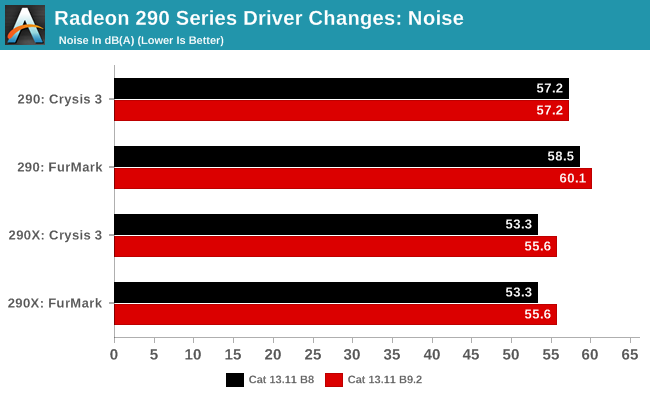
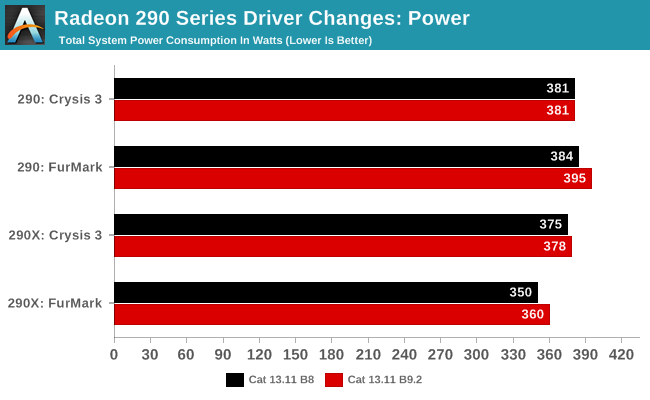
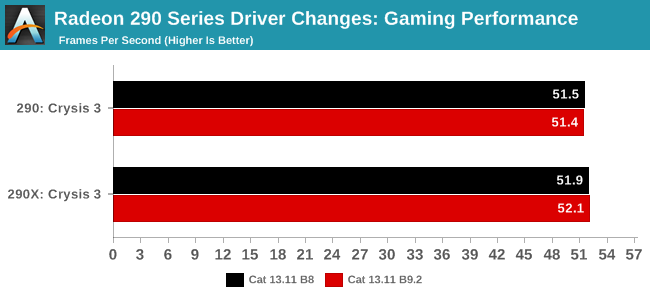
With all of that said, this won’t be impacting our reviews of the 290 or 290X (or GTX 780 Ti), as there isn’t a performance change to account for, and the noise change, though unfortunate, is under gaming workloads limited to the 290X (though this does mean 290X loses some further ground to 290).
About that 290 Conclusion
Since we’re already on the matter of our recommendations, I wanted to spend a bit of time following up on our 290 review, as that review and its conclusion generated a lot more feedback than we had been expecting. In this week’s article I flat out avoided recommending the 290 because of its acoustic profile. When faced with the tradeoff of noise vs. performance, AMD clearly chose the latter and ended up with a card that delivers a ridiculous amount of performance for $399 but exceeds our ideas of comfortable noise levels in doing so.I personally value acoustics very highly and stand by my original position that the reference R9 290 is too loud. When I game I use open back headphones so I can listen for phone calls or the door for shipments, and as a result acoustics do matter to me. In the review I assumed everyone else valued acoustics at least similarly to me, but based on your reaction it looks like I was mistaken. While a good number of AnandTech readers agreed the R9 290 was too loud, an equally important section of the audience felt that the performance delivered was more than enough to offset the loud cooling solution. We want our conclusions to not only be reflective of our own data, but also be useful to all segments of our audience. In the case of the 290 review, I believe we accomplished the former but let some of you down with the latter.
Part of my motivation here is to make sure that we send the right message to AMD that we don’t want louder cards. I believe that message has been received loud and clear from what I understand. It’s very important to me that we don’t send the message to AMD or NVIDIA that it’s ok to engage in a loudness war in the pursuit of performance; we have seen a lot of progress in acoustics and cooler quality since the mid-to-late 2000’s, and we’d hate to see that progress regressed on. A good solution delivers both performance and great user experience, and I do believe it’s important that we argue for both (which is why we include performance, power and noise level data in our reviews).
The Radeon R9 290 does offer a tremendous value, and if you’re a gamer that can isolate yourself from the card’s acoustics (or otherwise don’t care) it’s easily the best buy at $399. If acoustics are important to you, then you’re in a tougher position today. There really isn’t an alternative if you want R9 290 performance at the same price. The best recommendation I have there is to either pony up more cash for a quieter card, accept the noise as is or wait and see what some of the customized partner 290 cards look like once those do arrive. I suspect we’ll have an answer to that problem in the not too distant future as well.
Note that this isn't going to be the last time performance vs. acoustics are going to be a tradeoff. AMD pointed out to us that the 290/290X update is the first time its fan speed has been determined by targeting RPMs vs. PWM manipulation. In the past, it didn't really matter since performance didn't scale all that much with fan speed. Given the current realities of semiconductor design and manufacturing, the 290/290X situation where fan speed significantly impacts performance is going to continue to be the case going forward. We've already made the case to AMD for better reference cooling designs and it sounds like everyone is on the same page there.
Given the amount of interest this has generated I'm curious to get your feedback on the performance vs. acoustic debate. Feel free to share your comments below on how important acoustics are for you (vs. performance) and at what point does a GPU become too loud? For us the reference point was NVIDIA's GeForce GTX 480, but I'm interested to know what GPUs in your past have been too loud.

     |
Read More ...
Ode to Wasteland
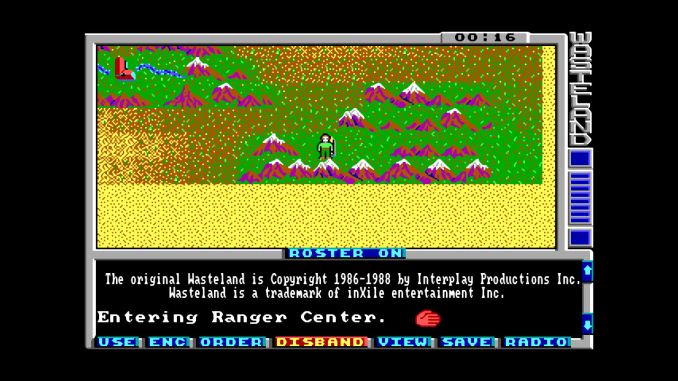
I mentioned in the latest Humble Weekly how I started playing computer games back in the halcyon days of yore, when Sierra Online and Origin Systems were a couple of the biggest names in the business. Electronic Arts (with its square-circle-triangle logo) was around as well, and there was another company called Interplay Productions (then a developer as opposed to a publisher). Interplay created the Bard’s Tale series (which I’ll be honest hasn’t aged very well), and then in 1988 they released the granddaddy of post-apocalyptic RPGs, Wasteland (published by EA).
I first played Wasteland on a Commodore 64, swapping floppies and dealing with level load times measured in minutes. Ah yes, the good old days of LOAD “*”,8,1 how I miss them…. I finished the game, then I went back and played it again, and again. Then I got an IBM compatible computer (thanks, dad!) and played the game again (more than once). I yearned for a sequel for a very long time, and when the Fallout games came out I was thrilled and enjoyed those as much as Wasteland, though they weren’t quite the same. Later we got Fallout 3 and New Vegas, which while excellent games in their own right continue to be quite different from the original. Eventually Wasteland was even given away for free, on a magazine CD if memory serves, and I think I’ve gone back and played it at least a couple more times over the past 25 years. So it’s perhaps only fitting that as we pass its 25th anniversary, Wasteland is getting a new release.
No, I’m not talking about Wasteland 2 – well, not entirely, though I backed that Kickstarter, and I’m really excited to return to the wastes. What I’m talking about is Wasteland 1 – The Original Classic, which is an updated version of the original Wasteland with some improved graphics, integrated journal entries (no more spiral bound book containing descriptions of areas!), new music, and even some voiceover work for good measure, plus there’s the ability to have multiple save games. The game is free to all backers of Wasteland 2 as well as Torment: Tides of Numenera, and if for some reason you missed both of those but still want in on the action, you can go hit up the Wasteland 2 Late Backer Store. I’d assume it will eventually show up as a game you can buy on Steam or GOG as well. I just received my Steam code in the mail today, and I’ve downloaded the 300MB (!) game and fired it up.
As for the gameplay, it’s definitely from a different era, but it’s still a fun way to see the precursor to the Fallout series, not to mention a good way to get you ready for the eventual release of Wasteland 2. So if you don’t have anything else going on this weekend, why not revisit the wastes and brush up on your toaster repair skill – you never know when you’re going to need it!


| |
Read More ...
Qualcomm's Modem Workshop - Lots of Comparisons
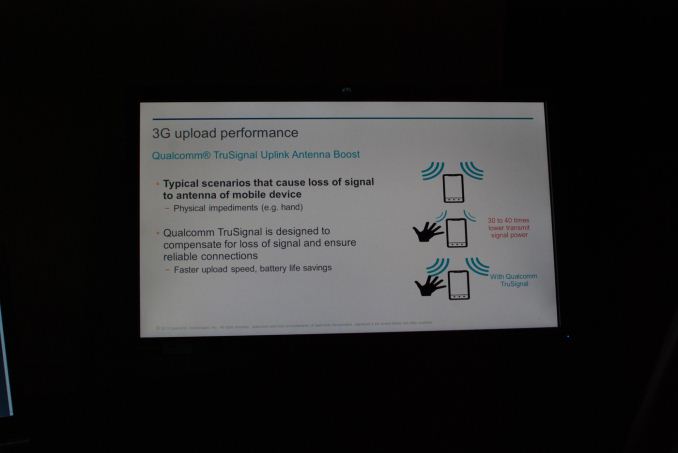
Qualcomm invited press and analysts out to a modem workshop this week, and the attempt is to create for modems an event roughly analogous to the blogger benchmarking events we’ve seen for APQ8064 and most recently MSM8974. Since benchmarking and testing modems is a lot more daunting than AP, Qualcomm setup a number of demos with comparisons to competitor products and also talked about their own capabilities. With the benchmarking events we usually have an opportunity to see final silicon before its arrival in a shipping device, unfortunately that wasn’t the case here, we didn’t catch any glimpses of the upcoming MDM9x25 Category 4 modem (although it’s functionally the same as what’s in MSM8974) or hear an announcement about its successor, nor were there any details about WTR1625L or its coprocessor, the upcoming successor to WTR1605L.

Update: I asked Qualcomm for specifics about the FDD-LTE testing throughput since I didn't catch all the details exactly the first time around, apparently AWGN wasn't used, and there was EVA70 Hz (mobility) fading.
Scenario 1· 27 dB SNR· 4K Video: Landscape Scenery· Fading: EVA70HzResults:· QCOM: 40 Mbps· Competitor: 28 MbpsScenario 2· 14 dB SNR· 4K video: Sony Bravia· Fading: EVA70HzResults:· QCOM: 20 Mbps· Competitor: 15 Mbps
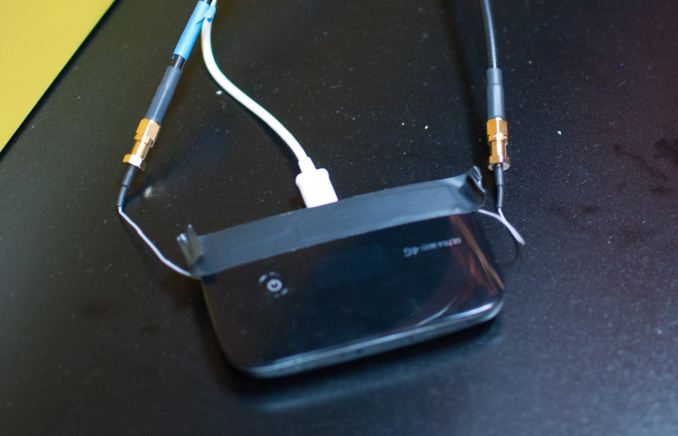
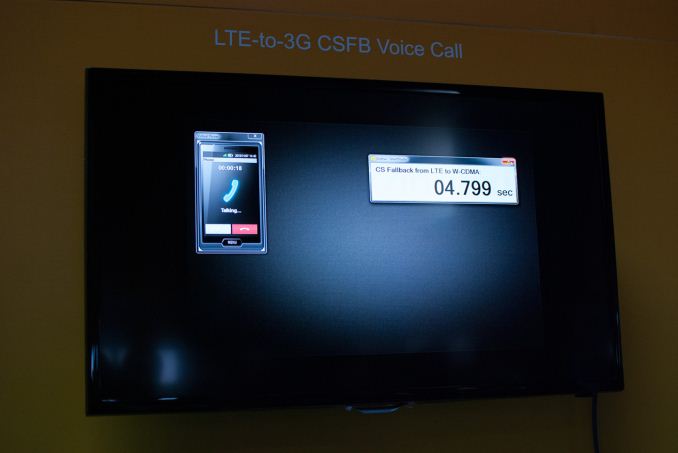
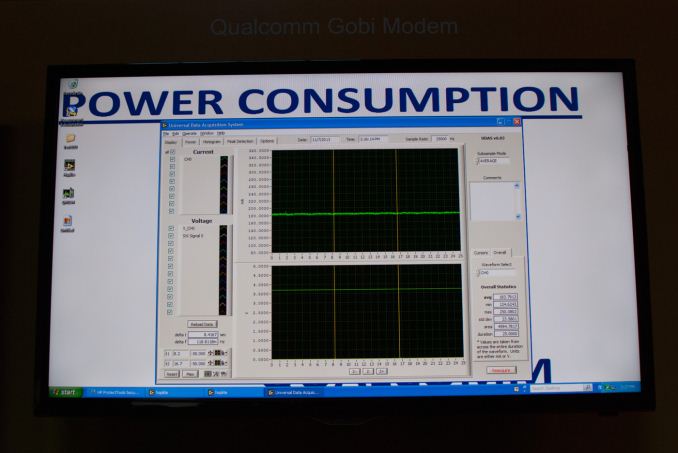
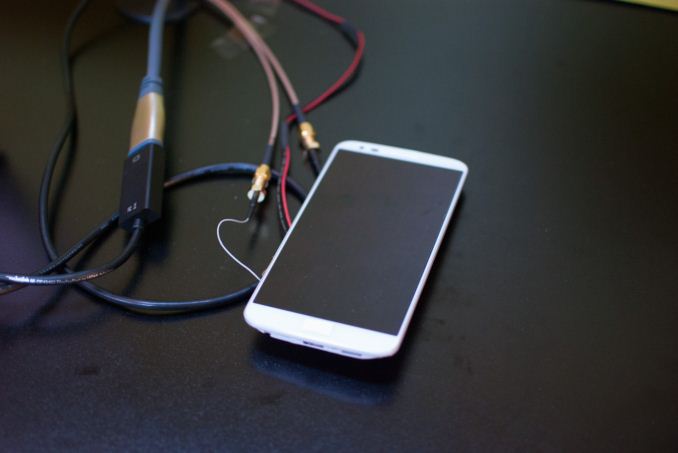
In the LTE data transfer scenario, the Qualcomm solution drew an average of 184mA, while the competitor drew 234 mA. On the voice call, Qualcomm pulled 115mA versus 137mA for the competitor.
It’s interesting to see modem discussion start to get serious now that more LTE competitors are starting to enter the space once occupied essentially solely by Qualcomm. I’d love to run some of these and more comparisons myself as well and there’s a good chance we’ll be able to do so in the near future.


| |
Read More ...
GIGABYTE Launches $170 Z87 G1.Sniper
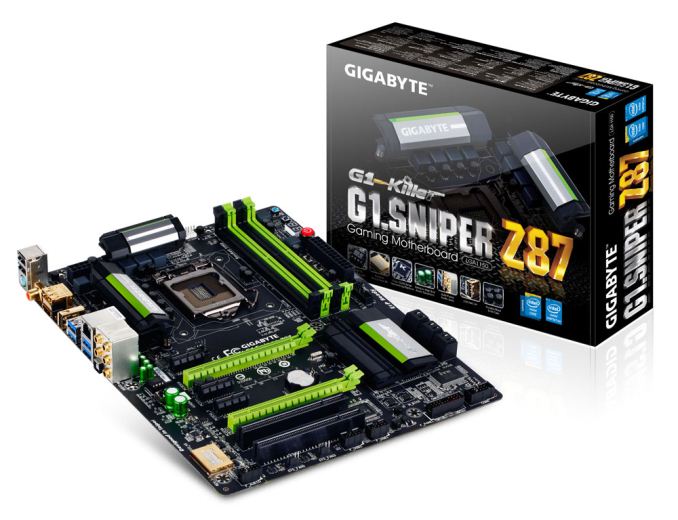
At Z87 launch, very few models were aiming at gamers for the low-end. GIGABYTE for example has the G1.Sniper 5, a high end ($400) motherboard supporting removable OP-AMP technology and four-way graphics card support. For users wanting smaller systems, there is the G1.Sniper M5 which is a $205 micro-ATX alternative, or for non overclockers there is the B85 model. On the ASUS side the cheap gaming ATX is the Maximus VI Hero ($195) and ASRock offer the Z87 Professional from the Fatal1ty range.
Today GIGABYTE has launched a new G1.Sniper Z87 model, sans numeral, for the lower budget machine but still with overclocking support and SLI/Crossfire:


I am being told that it will retail in the ~$170 range (still to be finalized, which puts it head to head with motherboards such as the ASRock Z87 Professional. MSI has two gaming motherboards within arm's reach as well, along with a number of non-gaming oriented motherboards. With any luck I am hoping to push out a round-up of several of these products in the near future. GIGABYTE say the G1.Sniper Z87 is on display at Blizzcon for attendees, and should be available soon after.


| |
Read More ...
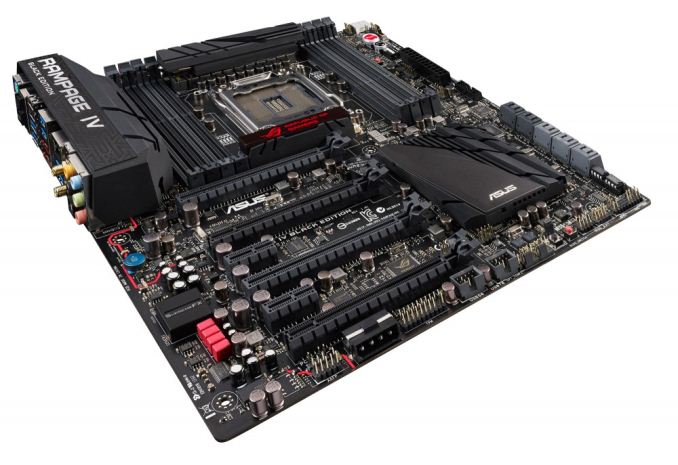
ASUS Announces Rampage IV Black Edition, Coming 11/19
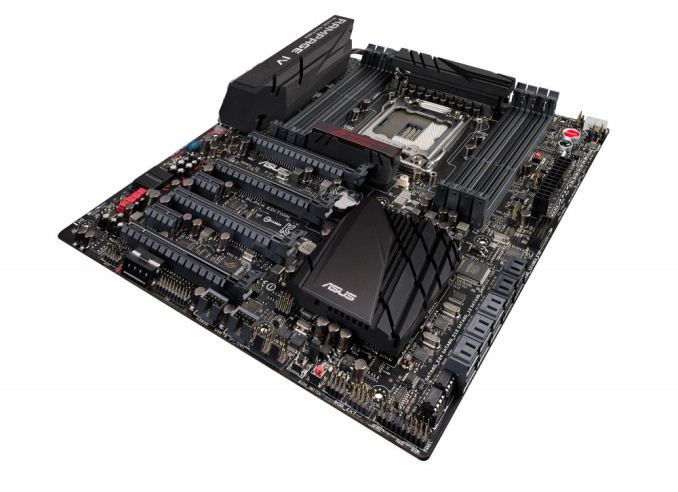
When Ivy Bridge-E rolled around, I expected an uptake on the motherboard side to incorporate many of the new features Z77 and Z87 development had brought to the game, despite the age of the chipset holding the ecosystem back somewhat (no native USB 3, limited native SATA 6 Gbps). What happened at Ivy Bridge-E launch was almost a non-starter: very few motherboard manufacturers announced updates, most of them delayed, and some decided not to bother even updating the BIOS on old boards to support the new processors.
There are a few new X79 motherboards I would like to test while the platform is still alive, and one of them is the new ASUS Rampage IV Black Edition, officially announced for an 11/18 launch. ASUS had teased a Rampage IV Extreme in black on the forums for several months, but this is designed to be a wholly new board in the spectrum above the Extreme.

The RIVBE also features an updated sound system, taking cues from the SupremeFX range on Z87 to become SupremeFX Black with ELNA audio caps, WIMA film caps and a Cirrus Logic CS4398 DAC for a 120dB signal-to-noise ratio. This works in turn with Sonic Radar, a feature designed to help gamers determine noise location with an on-screen visual sound map. Software-wise the motherboard also comes with the new ROG RAMDisk, GameFirst II, and Secure Erase.
Other hardware on the motherboard includes a dual band 802.11ac / BT 4.0 WiFi solution, an Intel GbE NIC, eight USB 3.0 (six on rear), two eSATA 6 Gbps, support for four-way SLI and Crossfire, four SATA 6 Gbps (and six SATA 3 Gbps). The only issue I can see with the motherboard that I might disagree with is the use of a 4-pin molex for additional PCIe power rather than a 6-pin PCIe.
The Rampage IV Black Edition is set to retail at US$499, compared to $430 for the Rampage IV Extreme. This is indeed a lot of money for a motherboard – we are hoping to get one in before launch to see if it can build on the success of the RIVE.


| |
Read More ...
Humble Weekly: Pointing and Clicking with Daedalic Entertainment

So I know a thing or two about adventure games, and I’ll be frank: in my opinion there’s a reason they have largely died out and become a niche market (hello linearity and trial-and-error object combination “games”). My second confession: I haven’t heard of a single one of the games in this week’s Humble Bundle, though I have heard of publisher Daedalic Entertainment.
With that out of the way, if you’re hankering for some old-school point-and-click adventuring, you might be interested in the latest weekly Humble Bundle. There are five core games available ($1 contribution or higher), and $6 or more will unlock three additional games. A few of the games are apparently so far off the radar that they don’t even have entries on Metacritic, which might be taken as a bit of a red flag. Those that have been reviewed by a reasonable number of sites (many based outside the US) typically received fair to moderate scores, with a few enthusiastic reviews cropping up here and there. As usual, YMMV.
Here’s the complete list, starting with the core games. Any donation of $1 or more will get you Edna and Harvey: Harvey’s New Eyes (10/2012, 75%), A New Beginning – Final Cut (12/2012, 72%), The Whispered World (04/2010, 70%), Chronicles of Shakespeare: Romeo and Juliet (07/2012), and Chronicles of Shakespeare: A Midsummer Night’s Dream (07/2012). Other than the two Chronicles of Shakespeare titles, all of the games are available for Windows and on Steam; they’re also all available for OS X, with the exception of The Whispered World. I should pause here for a moment to note that the two Chronicles of Shakespeare titles really aren’t adventure games; instead they’re hidden object games where you basically click on objects based on hints in order to solve mysteries (and judging by most reviews, they’re rubbish, explaining perhaps why they’re not listed on Metacritic). Paying $6 or more gets you three additional games: Deponia (08/2012, 74%), Journey of a Roach (11/2013), and The Dark Eye: Chains of Satinav (06/2012, 75%).
Not all of the games are widely available, but with a bit of searching I found some prices. The three bonus games are, not surprisingly, more expensive titles. Deponia runs $20 on Steam, though you might be able to find a code on eBay for less than half that (and there are two sequels for Deponia if you happen to enjoy it). Journey of a Roach is brand new and currently priced at $13.49 on Steam. The Dark Eye is also a $20 Steam game. If you want any of those three, a $6 donation is obviously a better value. The Chronicles of Shakespeare games are, as mentioned, probably not worth the time required to get them (I’ve seen plenty of “free” Facebook games that look similar in concept), while Edna and Harvey ($20 Steam), A New Beginning ($10 Steam), and Whispered World ($10 Steam) bring the total value to around $100.
This is another bundle I’m going to skip, but if you’re (still?) a fan of adventuring there’s probably a few good ways to pass some hours. And if you have any personal experience with the games, let others know in the comments. On the bright side, you can always donate the money to charity (Red Cross or Child’s Play), and you could even give the games to someone else. Until next week….
PS: I regret missing a few Humble Weekly updates (several times now since I started doing these udpates), and two weeks back you could have snagged Cipher Prime's bundle with their new game Intake. It's an addictive little pill shooter, which is currently on sale (10% off) for $9 at Steam. When you consider you could have picked up four other games for $6 total (Auditorium, Splice, Fractal, Pulse), you get a good idea of the value proposition offered by the Humble Bundle. I can't promise I won't miss another update (and in fact I can pretty much guarantee I will!), so if you like these bundles I'd suggest subscribing to their email updates.


| |
Read More ...
The NVIDIA GeForce GTX 780 Ti Review
First announced last month at an NVIDIA event, launching today is NVIDIA's newest flagship video card and the capstone to the GK110 family, GeForce GTX 780 Ti. Taking everything we like about the GTX 780 and GTX Titan and cranking up the performance, GTX 780 Ti taps the rest of GK110's held back capabilities to unlock the 15th and final SMX while also offering slightly higher clockspeeds than any GK110 card that has come before. As a result, and as we’ll see, after last month’s launch of the Radeon R9 290X threatened NVIDIA’s hold on the single-GPU performance crown, with GTX 780 Ti it is once again solidly back in NVIDIA’s hands.

| |
Read More ...
OCZ Vector 150 (120GB & 240GB) Review
The holiday season is one of the busiest shopping seasons of all year. As it can be the lifesaver (or destroyer) of company's financials, having a competitive product lineup is extremely important. OCZ's offering for the performance orientated holiday shoppers is the Vector 150. It's based on the same Barefoot 3 controller as the original Vector and Vertex 450 but with the Vector 150 OCZ went with Toshiba's 19nm MLC NAND. With the market's and OCZ's focus being performance consistency, can the Vector 150 keep up with the competition? Read on to find out!

| |
Read More ...
Windows 8.1 Battery Life Investigation: 1080p Video Playback

One interesting subject did come up with that article, however, and it was something I wanted to investigate further. One of the readers asked about what program we were using for video playback in our “Heavy” test, and I responded we use Media Player Classic Home Cinema (MPCHC). One of the main reasons we use MPCHC is that our test video is a 1080p MKV file with a high bitrate video, specifically it’s a 10.4Mbps video stream using the AVC High L4.1 profile. The file also has a 510Kbps 6-channel DTS audio stream, and that’s where we start to run into trouble with our choice of video playback software. MPCHC supports the file natively, as does VLC, but Windows Media Player and the Windows 8 Video app would require additional codecs (they show the video but don't handle the audio). Rather than deal with those issues, I chose (back in the Windows 7 era) to simply use MPCHC 64-bit and call it a day.
Keep in mind that we’re dealing with something of a worst-case scenario in terms of battery life, so as long as the workload is consistent among tested laptops we’re don’t have a problem. However, I wanted to look at a variety of programs and decoding video on Windows 8.1, and as Windows Media Player and Video couldn’t handle our original file natively I had to resort to using a different video file.
For this testing, I grabbed a 1080p MP4 video that worked with all four video playback options. The file is a 2.03 Mbps MP4 with an AVC High L4.1 profile video stream and a 93.8 Kbps 2-channel AAC audio stream. (Update: I also used the 720p MP4 file we use for tablet battery life testing, which I only tested with the Modern Video app. It's a 4Mbps video stream using the AVC High L3.1 profile, with a 2-channel 164Kbps AAC audio stream.) I tested with MPCHC, VLC, Windows Media Player, and the Modern UI Video app – and the last I tested with and without activating desktop mode to see if that made a difference. I also tested the original MKV file with both MPCHC and VLC as a reference point.
In all cases the software is set to loop and a local file logs the time until the laptop shuts off (at 1% battery life remaining). All of the video players were using the default GPU decoding (DXVA) for the initial testing; I am in the process of running additional tests (e.g. MPCHC will be retested with EVR mode enabled). Here are the current results.
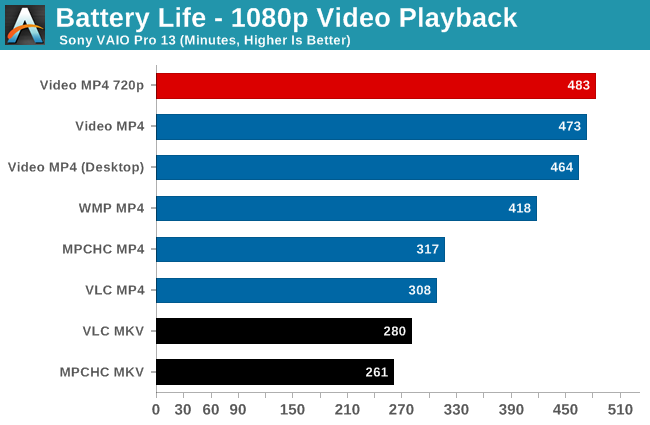
Windows Media Player manages 418 minutes of playback time with the MP4 file – or 32% better than MPCHC and 36% better than VLC. That’s a huge difference and suggests that Microsoft still knows a thing or two about optimizing better than the third part video applications. If that’s not enough, the Windows 8 Video app ends up surpassing Windows Media Player by an additional 13% in Modern mode – or nearly 50% more than MPCHC and 54% more than VLC.
As for launching from the desktop vs. staying in the Modern UI, we see a 2% difference by staying within the Modern UI, so it’s measurable but not massive. Personally, I use so many desktop mode applications that I'm not sure it's realistic to even stay exclusively in the Modern UI, but it does make a slight difference in battery life.
Of course there’s more to the story than simply which media player gets the best battery life. Are they all showing the same quality and doing the same work? That’s difficult to say without further analysis. It could be that WMP and Video are offloading more work to the GPU than CPU, or perhaps the opposite. Either way, the battery life results show just how big of a factor software optimizations can be.
Looking at the big picture, with the Windows 8 Modern Video app and sporting a 37Wh battery, the Sony VAIO Pro 13 manages nearly eight hours of battery life on a 1080p video file. Our tablet video file is a 720p video file with a higher bitrate but lower resolution, and with that Surface Pro 2 and updated firmware gets just under eight hours of battery life as well – on a smaller 10.6” display and with a higher capacity 42Wh battery. (Note that Anand tested Surface Pro 2 with the Modern Video app as well.) Update: I tested the VAIO Pro 13 in the Modern Video app with the 720p tablet MP4; battery life is slightly higher than with the 1080p MP4, as seen in the updated chart.
It’s clear that Sony has done more to optimize for battery life on the VAIO Pro 13 than any other Haswell laptop that we’ve encountered. We’re still not at the point where Haswell with Windows 8 matches the various Android or iOS devices on video playback, but with the right tuning of hardware and software that goal may be within reach, especially with a 10” display and other hardware tweaks. Unfortunately, most laptop manufacturers haven’t put in the effort to get there, but Sony shows what’s possible and we hope to see better efforts in this area from other manufacturers going forward.
I'm still looking at running additional tests of video playback battery life on the VAIO Pro 13, while I still have it in hand. If you have any specific requests (e.g. "Run MPC-HC version XYZ with the ABC decoder"), send me an email and I will try to accommodate any reasonable requests. Keep in mind that every test run requires at least six hours (including recharge time) and as much as ten hours, so realistically I can at best run two battery tests per day. Again, feel free to email me if you have any other suggestions or questions.

| |
Read More ...
Pebble Releases Update – Better iOS 7 Integration, New APIs, Enables Bluetooth LE

I've been wearing Pebble basically nonstop since first getting it, and have watched the platform slowly mature from its initial state to where it is today. Changes initially focused on improving stability, adding more watchfaces, and changing navigation, but the update today seems to be the largest yet. Pebble gave us a few days with a prerelease version of the firmware and iOS application to play around with, which dramatically improves the types of notifications that can be delivered to Pebble from attached iOS devices.

Pebble simultaneously is launching their SDK 2.0 which includes the promised accelerometer data support and a few other new APIs – JavaScript, data logging, and persistent storage support. Accelerometer data APIs have been something people have wanted for a while now for health and fitness, the other APIs add support for web interaction and storing data on the watch for logging.
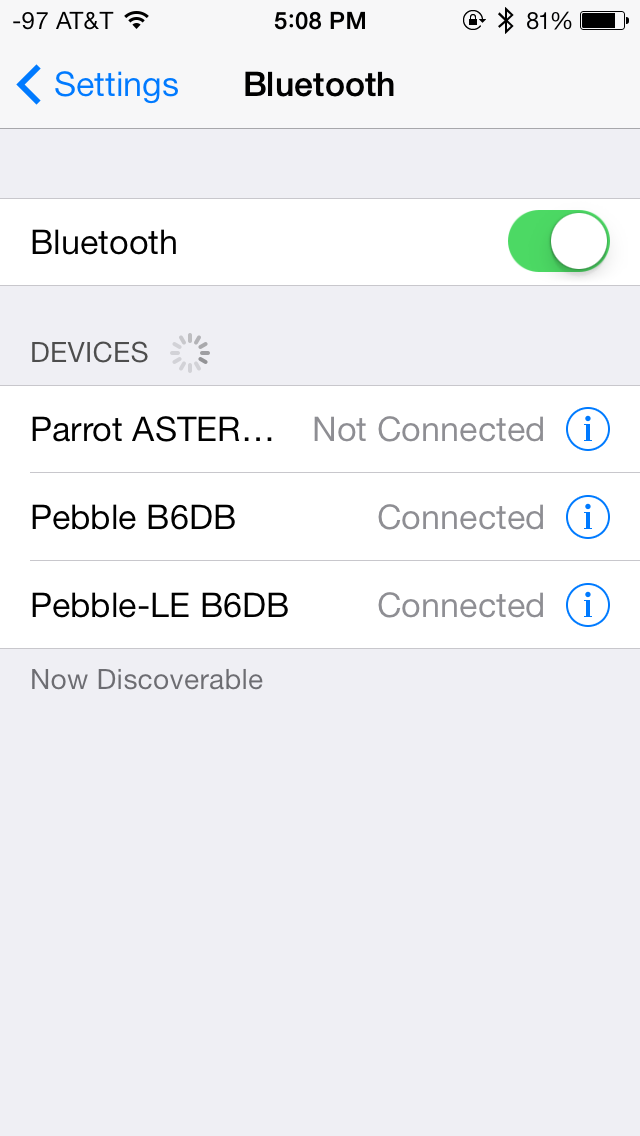
Last but not least this update enables Bluetooth Smart (formerly Bluetooth LE) on the Pebble's integrated Bluetooth controller (TI's CC256x inside a Panasonic PAN1316 module), which initially shipped disabled. Interestingly enough the implementation under iOS has Pebble show up as two devices, one for Classic, another for Smart (LE). It's important to note that only notifications from ANCS are delivered on the LE connection, the Bluetooth 2.1 (Classic) connection is used for caller ID, music remote control, installing watch apps and faces, and updates.

All in all though, this is a major update to Pebble that addresses many of the limitations that it previously had when used in conjunction with iOS.


| |
Read More ...
ASRock Z87E-ITX Review: Motherboard Juxtaposition
In the office I am currently running through a series of smaller sized motherboards – both micro-ATX and mini-ITX. Due to the size, there is plenty of scope to push towards something niche, something that works, or something that slips comically on a banana by missing the point entirely. Today we have in the ASRock Z87E-ITX, a

| |
Read More ...
NVIDIA Beats Profit Expectations, But Predicts Gloomy Tegra Outlook
The theme is familiar for semiconductor investors: the slowdown in high-end device sales has hurt

| |
Read More ...
Is Microsoft Trojan Horsing Itself? CEO Candiate Elop Reportedly Wants to Break up Company
Sources close to Microsoft unveil Mr. Elop's controversial vision to sell of Xbox, Bing units

| |
Read More ...
London to Host Cyber "War Games" for Financial Firms
It's in preparation for cyber attacks on banks

| |
Read More ...
NSA Employees Gave Edward Snowden Login Credentials, Passwords
Snowden then accessed and downloaded secret NSA documents with that information

| |
Read More ...
Panasonic Toughpad 4K UT-MB5 20-inch Tablet to Debut Next Year for $6,000
Tablet will ship in January

| |
Read More ...
U.S. Pre-Orders Kickoff for Nokia Lumia 1520, Deliveries Commence November 22
Pre-orders from a Microsoft Store get additional bonuses

| |
Read More ...
Titan Arm Biceps Boosting Exoskeleton Scores $45K from Dyson
Group is first American team to win the prize; product currently can lift 40 lb, inches towards market

| |
Read More ...
DISH Decides to Close Final 300 Blockbuster Stores
Internet killed the rental star

| |
Read More ...
Twitter Stock Spreads Its Wings and Soars to 92 Percent Above IPO Price on First Day
Twitter started trading on NYSE under the ticker TWTR this morning

| |
Read More ...
FDA Looks to Eliminate Trans Fat Entirely
The process of actually removing trans fat from all food could take awhile, even years

| |
Read More ...
Qualcomm Disappoints Investors as Growth of High-End Smartphones Slow
Budget growth in developing markets remains strong, but pickup of Snapdragon 800 was worse than expected

| |
Read More ...
Wired Video Shows Off PS4 Innards
Take a look at the PS4's innards a week before its release

| |
Read More ...
Internet Archive Building Catches Fire, Equipment and Documents Destroyed
Internet Archive scanning facility destroyed

| |
Read More ...
Lenovo Announces Q2 Financials, Keeps Top Spot Among Global Computer Makers
Lenovo is the fourth largest smartphone supplier in the world

| |
Read More ...
U.S. Air Force Looks to Develop Long-Range Strike Bomber on a Budget
Working with a decreased budget, the U.S. Air Force will push on with the Long-Range Strike Bomber (LRS-B) program

| |
Read More ...
Samsung: Roadmap: Folding 4K Display Smartphones, Custom 64-Bit Cores, and LPDDR4
Highlights also include Samsung's plans to be the first to 10 nm UV-based lithography; holographic display note

| |
Read More ...
Tesla Turns a Non-GAAP Profit in Q3, But Misses Wall Street's Model S Delivery Targets
It actually reported a GAAP loss of $38 million, but adjusted results were earnings of $16 million

| |
Read More ...
Apple Orders DMCA Takedown of "Apple-Tracker" Website
Apple has a beef with the site's use of page-scrape tools for data on Apple's official online store

| |
Read More ...
Quick Note: Xbox One Gold Subscribers Will Get Xbox Music at No Additional Cost
Free memberships will require users to listen to some ads

| |
Read More ...
Intel Creates New Division for Internet-Connected Devices
Internet of Things Solutions Group answers directly to Intel's CEO

| |
Read More ...
Apple Discloses Government Requests in First-Ever Transparency Report
The report said government bodies in 43 countries requested information about 40,000 Apple accounts or devices

| |
Read More ...
New London Network Delivers LTE's Full Promised Speed, America Lags Behind
"If you ain't first, you're last." -- Ricky Bobby

| |
Read More ...
Available Tags:AMD , GIGABYTE , ASUS , NVIDIA , GeForce , GTX , OCZ , Windows 8 , Windows , iOS , ASRock , Microsoft , CEO , Panasonic , Tablet , Nokia , Twitter , PS4 , Lenovo , Apple , Xbox , Xbox , Intel , Apple ,


No comments:
Post a Comment