

Capsule Razer Roundup: Deathstalker Ultimate, BlackWidow Ultimate, and Tartarus

In a recent roundup I mentioned what I considered to be the one serious flaw of Razer's portfolio: their Synapse 2.0 software. Razer's approach to software isn't uniformly bad; having a unified software suite for their products is good, and being able to synchronize settings to the cloud is a welcome feature. But the Synapse software has two dire shortcomings: it requires a Razer account, meaning you have to log in to the software every time your system boots up, and its update process is onerous at best. It seems like no matter what version of Synapse you download from Razer's servers, it always has to go through a long and drawn out update period, and heaven help you if you plug in any new Razer peripherals. You'll likely have to restart your system after installing them as well. Synapse has a lot of polish, but let me put it another way: if you can update your video card drivers without having to reboot, why should you have to wait so long for updates to install for your keyboard, and then reboot after?
Blackwidow Ultimate
Mechanical Keyboard, $139

While I prefer having an optional wrist rest, I think the Blackwidow Ultimate's major failing as a gaming keyboard is the use of Cherry MX Blue switches. No amount of macro recording, gaming modes, backlighting, and so on can really change the fact that for the vast majority of users, Cherry MX Blues are one of the worst mechanical switches for gaming. I adore them for typing text, but the amount of actuation force that Blues require makes them poorly suited for any game that might require quick input and especially double tapping. This is something that's going to be a matter of preference for a lot of users, but there's a reason Blue switches are rarefied in gaming keyboards. Under the circumstances, I'm still inclined to stick with my old recommendation of the Corsair K70 and K95.
DeathStalker Ultimate
Switchblade UI Keyboard, $249


I'm also really underwhelmed by the keyboard itself. $249 for a membrane keyboard is a very bitter pill to swallow, Switchblade UI or no. People willing to spend $249 on a keyboard are liable to be willing to spend the extra scratch to get one with mechanical switches. Where I do think Razer has a slight edge is that the chiclet keys are very shallow; the DeathStalker Ultimate fares a lot better at the quick taps that the Cherry MX Blue switches hinder the Blackwidow Ulitmate with. If you're strictly gaming with the keyboard, then it definitely gets the job done.
The problem is trying to do just about anything else with it. There's definitely an adjustment period with the DeathStalker Ultimate, but the keys just don't lend themselves to a very enjoyable typing experience. This is like a slightly deeper laptop keyboard. The chiclets make sense for style and matching the Switchblade UI, but they really are lousy for productivity.
Still, Razer gets a lot of points for doing something different. Logitech's G600 MMO mouse was too big and unwieldy for me but found a very happy home with a friend, and I think the DeathStalker Ultimate is another one of those products that just needs to find a good match. I can see this being a borderline ideal keyboard for some users, and it's entirely possible I'm off base with parts of my assessment. I just can't help but feel that Razer, like Logitech with the G19s, is scratching at the surface of producing the ultimate gaming keyboard but not quite willing to make that jump yet.
Tartarus
Gaming Keypad, $69

Gaming keypads require a heavy adjustment period. I have a friend who swears by his Nostromo and actually has trouble adjusting back to using a conventional keyboard for gaming; I personally have a harder time making the adjustment. If I'm going to invest in the time it takes to adjust to using a new peripheral, it needs to be worth the transition, but something like the Tartarus only gives you more input options if you use the thumbstick and buttons. If you don't, you're actually down keys.
It's comfortable enough in the palm (the palm rest itself is adjustable, capable of sliding on one axis closer to or farther from the keys), and I find the membrane switches a bit more forgivable than on a full keyboard. For some users, the Tartarus will shine. Certain gamers, but I also know that a lot of art students will use a keypad like this in conjunction with a Wacom Cintiq and program it with Photoshop shortcuts. Either user will be very happy with the Tartarus, but it's difficult to recommend. Some users will become true believers, but some, like me, will probably just be happy to stick with their gaming keyboards.
Read More ...
NVIDIA Announces Fall GeForce Game Bundle - Batman: Arkham Origins

Just as the case was with the outgoing Splinter Cell: Blacklist bundle, the Batman bundle is for the GTX 660 and above, including the complete GTX 700 series, but still excludes NVIDIA’s most expensive cards, GTX 690 and GTX Titan. Meanwhile, as always distribution is being handled at the etailer/retailer level, with the usual cabal of participating etailer and retailers throwing in a voucher for the game with qualifying purchases.
This promo comes nearly two months before the game actually ships - Arkham Origins won’t be released until October 25th – so GeForce video card buyers will have to sit tight for a bit before they can playing the game. The promo itself will run until January 31st, 2014 or until NVIDIA runs out of codes; though it wouldn’t be unheard of for NVIDIA to try to squeeze in one more new bundle program before the year is out.
With regard to graphics and functionality, like the past two past Batman games NVIDIA’s has once again been providing engineering resources to WB Games to enhance the game. The joint NVIDIA/WB Games press release specifically mentions “DirectX tessellation, NVIDIA TXAA antialiasing, soft shadows and various NVIDIA PhysX engine environmental effects, such as cloth, steam and snow” as being additions provided by NVIDIA.
Finally, for GTX 650 series and GTX 700M buyers, a quick check shows that NVIDIA’s has quietly launched a new revision of their $75 Free-To-Play bundle. Replacing the old F2P bundle is a new edition that offers $25 of in-game credits for each of the F2P games Warframe, Neverwinter, and Marvel Heroes. Other than the change in games this bundle is functionally identical to the last bundle, and is set to expire at the end of 2013.
Current NVIDIA Game Bundles |
||||
Video Card |
Bundle |
|||
GeForce GTX Titan |
None |
|||
GeForce GTX 690 |
None |
|||
GeForce GTX 700M Series |
$75 Free-To-Play |
|||
GeForce GTX 760/770/780 |
Batman: Arkham Origins |
|||
GeForce GTX 660/660Ti/670/680 |
Batman: Arkham Origins |
|||
GeForce GTX 650 Series |
$75 Free-To-Play |
|||
GeForce GT 640 (& Below) |
None |
|||
Read More ...
Capsule Gaming Headset Roundup: Entries from Logitech, SteelSeries, and Razer

Gaming headsets are a trickier proposition. First, audiophiles should just close this review now, because these products straight up aren't for you. That's not to say these headsets offer poor sound quality, but they're not calibrated for and not designed for studio accurate sound. Their primary reasons for being are to produce an immersive gaming experience with usable positional audio and to offer decent microphone communication for VoIP. For these products, the issues turn into whether or not the headset is comfortable, sound is at least of palatable quality, the positional audio is effective, and the features included are useful.
Logitech G230
Basic Stereo Sound, $59

Its best feature is that it has very strong, eardrum rattling bass and produces a pretty crisp sound overall. This is a fine headset, but if you're gunning for a barebones gaming set, the G230 really isn't worth the $59, especially not when the vastly superior G430 is only $20 more.
Logitech G430
Simulated 7.1 Surround Sound, $79
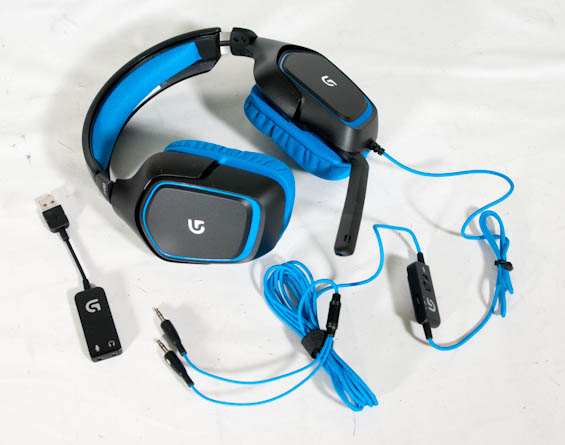
Bass is as boomy as ever, and while the positional audio subjectively felt better than the G230, it still seemed a little bit off compared to the Razer Kraken 7.1. I tested the G430 in the declining-due-to-piss-poor-management MechWarrior Online and in Doom 3: BFG Edition; in the latter, I was mostly able to get a bead on targets and the atmospheric sound was quite good. Of the four headsets I've tested here, this is probably the one I'm most likely to use due to its fairly smart combination of features.
Razer Kraken 7.1
Simulated 7.1 Surround Sound, $99

So why isn't it my favorite? In my estimation, Razer makes two fatal miscalculations. First, and most practically, is the lack of in-line audio control of any kind. The Kraken 7.1 uses software volume control, and there's no in-line microphone mute, and these are both features I was pretty desperate for. The second miscalculation is a more subtle one: like any major vendor, Razer wants to get you into their ecosystem. While their Synapse 2.0 software isn't bad, having to actually create an account and log in just to use any of the advanced features of your Razer product is irritating. Their software ecosystem should be opt-in; install the drivers and just use the headset and whatever other Razer products you might have, and then you have the option to create and log in to your Razer account if you want to use their cloud-based settings and services.
SteelSeries Siberia V2
Simulated "3D" Sound, $66

The dongle uses bone stock Realtek drivers with a simulated 7.1 surround mode that can be calibrated but has no testing mode short of actually going into a game and just checking by feel. There's an in-line volume control for both the mic and the headphones if you do use the USB dongle, along with a mic switch. The LiveMix settings theoretically allow you to control how audible VoIP is as opposed to standard game sound, but ultimately it's both not relevant and not enough to make up for the Siberia V2's middling audio quality and awful positional sound. You're paying for the idea of positional sound and cross-compatibility with the PlayStation 3 and Xbox 360, but you're undoubtedly better off just going with Logitech's less expensive and better quality G230.
Read More ...
Mythlogic Pollux 1613 / Clevo P157SM Review
Two months after the Haswell and GTX 780M launch and there’s still some question as to what sort of performance you can expect. With the Mythlogic Pollux 1613 (aka Clevo P157SM), we can finally shed some additional light on the hardware and provide some thoughts on properly balancing CPU and GPU requirements. Round two of our GTX 780M coverage is ready; is this the mobile GPU we’ve been waiting for? Read on for our complete review.
Read More ...
SilverStone Fortress FT04 Case Review
The chassis used in the SilverStone Raven RV04 returns in its premium model: does it ameliorate the existing issues or exacerbate them?
Read More ...
Lenovo Announces New ThinkCentre AIOs and Desktops
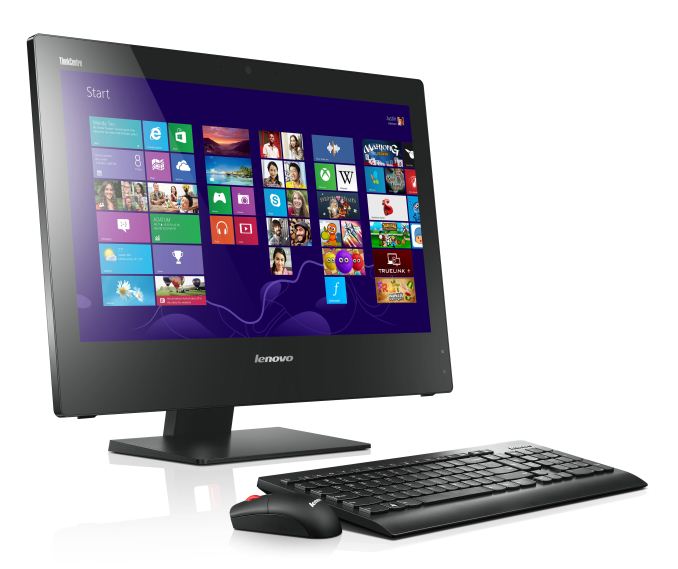
The E93z is a 21.5” AIO with a 1080p touchscreen that measures 48mm thick, with support for the optional UltraFlex Stand. It supports up to Core i7 quad-core processors, with NVIDIA GeForce 720 graphics on some models. The 720 is likely an OEM-only product, and unfortunately we don’t have any detailed specifications for it, but it’s going to be on the low end of the performance spectrum as this is a business system. Other features include optional SSHD, HDMI In and Out, WiDi, Energy Star 5.2 compliance, and a built-in physical webcam blocker (for those companies worried about unauthorized recordings). Availability is in September, with pricing starting at $699 on the base model.


The ThinkCentre E73z and M73z are quite similar, and both are 20” AIOs with support for up to Core i7 Haswell CPUs, optional SSHDs, and high performance WiFi and WiDi. The main difference is that the M73z includes a TPM Security Chip, hardware password management, and an optional OPAL SSC self-encrypting hard drive. Both models also feature HD webcams and array microphones with noise cancelation, and built-in speakers designed to target VoIP and video conferencing users. The E73z will be available late September starting at $599 while the M73z will be available in October, again starting at $599.


Wrapping up, the ThinkCentre M73 desktop is available in standard, SFF, and Tiny sizes. The Tiny size is a one liter chassis that can mount to the back of supported display stands, while the larger options allow for higher performance and more expansion opportunities. Pricing on the M73 starts at $439 with availability scheduled for October.


Additional Lenovo products will be launching next week at IFA, so stay tuned.
Read More ...
Meet the CODE Keyboard
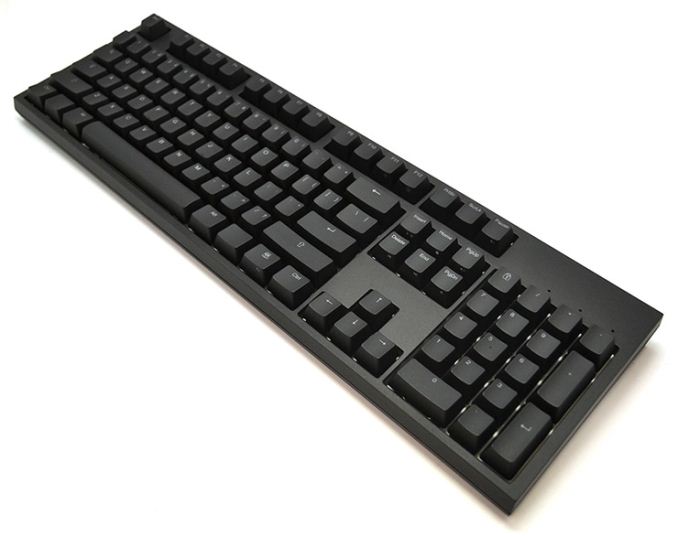
Of course, many people have differing opinions on what makes for a great keyboard. For typists, I don’t think you’ll find many that will disagree with the claim that mechanical switches are better than membrane domes, though I’m sure there are also a few people that prefer scissor-switches (e.g. Logitech K740) or buckling springs (IBM Model M). Jeff Atwood over at Coding Horror has decided to team up with WASD Keyboards to create the CODE Keyboard, apparently his dream keyboard. As with most keyboards that come with Cherry MX switches, the cost is going to be higher than membrane-based keyboards: $150. And at first blush, it might seem that the CODE Keyboard isn’t all that different from other mechanical keyboards – it has a lot in common with my Rosewill RK-9100 for example. Dig a little deeper however and you’ll find some nice features.
Starting with perhaps one of the most critical factors, the CODE Keyboard uses Cherry MX Clear (White) switches. The description of the keyboard calls these “ultra-rare” switches, but I’m not sure there any rarer than some of the other Cherry MX switches; “lesser-used” might be a better term, and interestingly the ErgoDox that I just reviewed used the same switches. Again, everyone has opinions on what’s “best”, and I don’t think it’s possible to definitively call one switch better than another; they’re just different. I personally really like the clicky action of Cherry MX Blue while other people prefer Cherry MX Red; Jeff Atwood apparently prefers the Clear switches. They have a tactile bump but are not clicky with a slightly higher activation force than Blue switches, basically a slightly stiffer version of the cherry MX Brown switches.

Finally, in terms of customization options, a set of six DIP switches on the bottom allows you to configure several options: you can select between QWERTY, Dvorak, and Colemak layouts, Mac users can swap Alt with Command, you can disable the Windows key, and “more”. What I would really like to see is the ability to reprogram the entire keyboard similar to what you can do with the ErgoDox configurator at Massdrop. I’m not sure I’ve seen anything like that for any other keyboard, although the TECK now has a layout designer that at least provides a decent level of configurability. Considering the price of the CODE Keyboard, I think the layout designer is something they really need to create – my personal preference for example is to have a Windows key, Fn key, and Menu key all available; the CODE Keyboard apparently support either the Menu key or an Fn key, but not both. The Fn key provides access to the multimedia shortcuts as well as backlighting functions, but I personally use the Menu key regularly; it looks like there’s a right hand Windows key, which I would be more than willing to give up in order to get both, but it’s not clear if the DIP switches allow this or not.
The CODE Keyboard is certainly an elegant/minimalist design, and I’m sure it will appeal to a lot of people. There’s also a wire key puller so that you can remove keys if you want to rearrange the layout or clean your keyboard. My real question is this: do you really want a straight keyboard for regular typing duties? The CODE Keyboard says yes, but Kinesis, TECK, ErgoDox, and others have a different opinion, and I’m inclined to go with them. If your primary use is hammering out code (or gaming, or maybe you just move between PCs enough that you don't want to deal with the learning curve with the modified layouts), like Jeff you might not need/want an ergonomic design. The CODE Keyboard is more expensive than a lot of other mechanical keyboards by about $50, but there aren’t very many keyboards with MX Clear switches these days so if that’s what you’re after, all of the other features are simply icing on the proverbial cake.
Read More ...
Lenovo Introduces New ThinkCentre E-Series and M-Series Desktops/AIOs
They'll be released throughout September and October

     |
Read More ...
Leak Confirms Hypothesis that U.S. Spied on Bin Laden from Space
Claim was controversial at the time

| |
Read More ...
Nokia Reveals "Here Auto" Maps Software for Cars
There's a mobile app and cloud service available

| |
Read More ...
Quick Note: Verizon Communications Wants to Buy Vodafone's Wireless Stake for $130B
An announcement could come as soon as September 2

| |
Read More ...
Federal Regulators Consider Seat Belt Ignition Interlocks on Automobiles
Seatbelt ignition interlocks haven't been used since the 70s

| |
Read More ...
Snowden Leak: An Intelligence Contractor Costs Ten Times as Much as a Bureaucrat
The "free market" appears to be more a game of shills and payola

| |
Read More ...
China to Robotically Roam the Moon by the Year's End
Mission is planned for December, if successful will deliver on 2006 promise four years early

| |
Read More ...
Report: BlackBerry Q10 Sales Looking Dismal
BlackBerry hasn't released any solid sales figures yet, but others have testified that the Q10 is a failure

| |
Read More ...
Researchers Grow Small Human Brains from Stem Cells
The team hopes this can one day be used to treat or even cure developmental issues in the brain, which lead to diseases

| |
Read More ...
Toyota to Release 15 New Hybrids by 2015, Reveals Specs for Next-Gen Prius
It will also show off its hydrogen fuel cell vehicle at the 2014 Consumer Electronics Show in Las Vegas

| |
Read More ...
Court: Text Drivers and You May be Liable if They Hurt or Kill Someone
If it is proven you knew the subject was driving, you can be taken to court by victims for damages

| |
Read More ...
Hyundai, Kia Team up with the University Of Michigan to Fight "Highway Hypnosis"
Study on preventing highway hypnosis will begin in a few weeks

| |
Read More ...
Android Executive Leaves Google for Chinese Smartphone Maker Xiaomi
He will become vice president of Xiaomi Global

| |
Read More ...
Hacking the Gibson: 24 YO Scored Root on Nation's Top Supercomputers
Defendant also sold access to Domino's Pizza domain and other targets; enters plea deal with feds

| |
Read More ...
Nintendo Announces Tablet-Like "2DS," Cuts Wii U Price by $50
The 2DS will be available October 12 for $129.99 USD

| |
Read More ...
Vermont's Only Nuclear Plant Becomes Fifth Reactor to Close in 2013
America's aging nuclear is headed to the retirement home

| |
Read More ...
Nissan to Offer Autonomous Vehicles by 2020
The plan is to make them widely available and affordable by that time

| |
Read More ...
Judge Proposes External Monitor in Apple eBooks Case
Apple said this would be "extremely costly and burdensome"

| |
Read More ...
HTC is Reportedly Building a Smartphone OS Just for China
Whether the OS is built on Android or something else is unknown

| |
Read More ...
UW Researcher Moves Another Human's Finger with his Thoughts
It's the first noninvasive human-to-human brain interface to do so

| |
Read More ...
Syrian Hacker Group Takes Control of NYT, Twitter
Both domains have been restored and protected

| |
Read More ...
Available Tags:NVIDIA , GeForce , Gaming , Lenovo , Keyboard , Nokia , Wireless , BlackBerry , Toyota , Android , Google , Smartphone , Nintendo , Nissan , Apple , HTC , his , Twitter ,


No comments:
Post a Comment