

The 2013 MacBook Air: Core i5-4250U vs. Core i7-4650U
Apple typically offers three different CPU upgrades in its portable Macs: the base CPU, one that comes with the upgraded SKU and a third BTO option that's even faster. In the case of the 2013 MacBook Air, Apple only offered two: a standard SKU (Core i5-4250U) and a BTO-only upgrade (Core i7-4650U). As we found in our initial review of the 2013 MacBook Air, the default Core i5 option ranged between substantially slower than last year's model to a hair quicker. The explanation was simple: with a lower base clock (1.3GHz), a lower TDP (15W vs. 17W) and more components sharing that TDP (CPU/GPU/PCH vs. just CPU/GPU), the default Core i5 CPU couldn't always keep up with last year's CPU.
The Core i7 CPU upgrade comes at a fairly reasonable cost: $150 regardless of configuration. The max clocks increase by almost 30%, as does the increase in L3 cache. The obvious questions are how all of this impacts performance, battery life and thermals. Finally equipped with a 13-inch MBA with the i7-4650U upgrade, I can now answer those questions. The two systems are configured almost identically, although the i7-4650U configuration includes 8GB of memory instead of 4GB. Thankfully none of my tests show substantial scaling with memory capacity beyond 4GB so that shouldn't be a huge deal. Both SSDs are the same Samsung PCIe based solution. Let's start with performance.
Read More ...
Some Quick Gaming Numbers at 4K, Max Settings
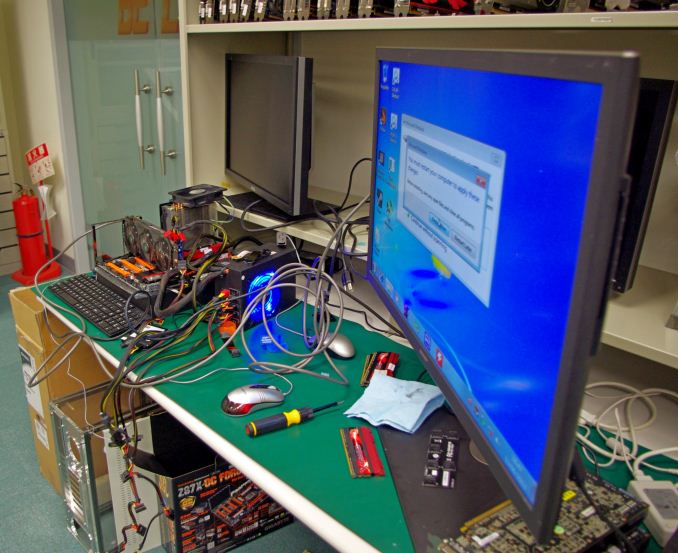
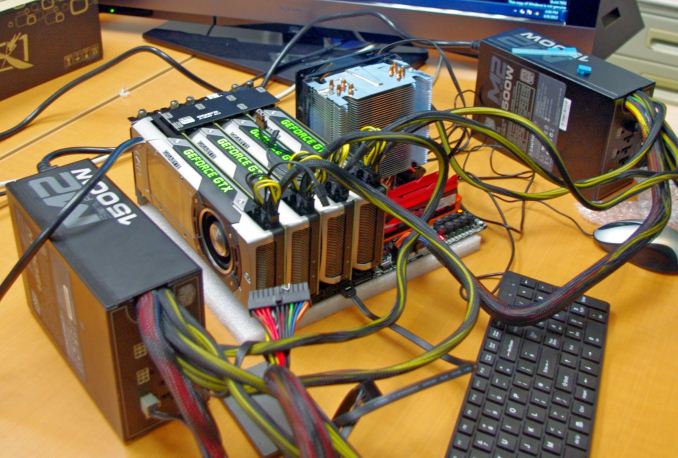
Part of my extra-curricular testing post Computex this year put me in the hands of a Sharp 4K30 monitor for three days and with a variety of AMD and NVIDIA GPUs on an overclocked Haswell system. With my test-bed SSD at hand and limited time, I was able to test my normal motherboard gaming benchmark suite at this crazy resolution (3840x2160) for several GPU combinations. Many thanks to GIGABYTE for this brief but eye-opening opportunity.
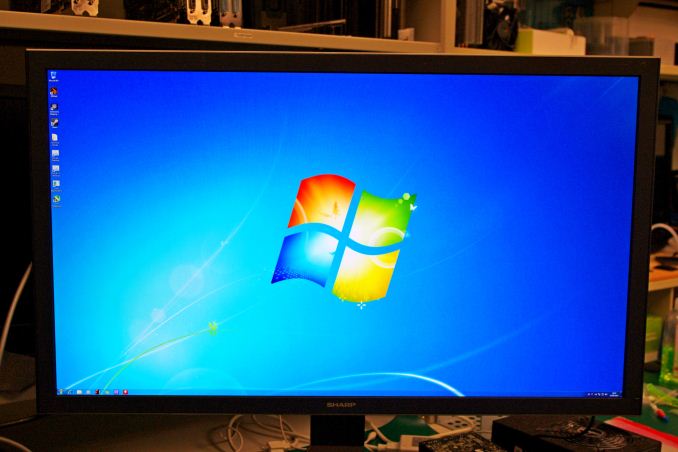
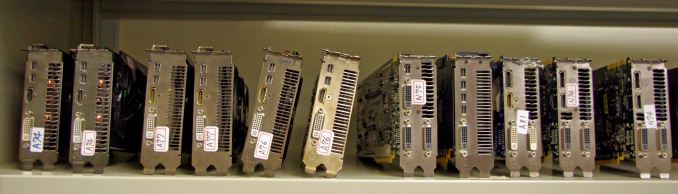
Intel Core i7-4770K @ 4.2 GHz, High Performance Mode
Corsair Vengeance Pro 2x8GB DDR3-2800 11-14-14
GIGABYTE Z87X-OC Force (PLX 8747 enabled)
2x GIGABYTE 1200W PSU
Windows 7 64-bit SP1
Drivers: GeForce 320.18 WHQL / Catalyst 13.6 Beta
NVIDIA |
||||||
|---|---|---|---|---|---|---|
GPU |
Model |
Cores / SPs |
MHz |
Memory Size |
MHz |
Memory Bus |
GTX Titan |
GV-NTITAN-6GD-B |
2688 |
837 |
6 GB |
1500 |
384-bit |
GTX 690 |
GV-N690D5-4GD-B |
2x1536 |
915 |
2 x 2GB |
1500 |
2x256-bit |
GTX 680 |
GV-N680D5-2GD-B |
1536 |
1006 |
2 GB |
1500 |
256-bit |
GTX 660 Ti |
GV-N66TOC-2GD |
1344 |
1032 |
2 GB |
1500 |
192-bit |
AMD |
||||||
GPU |
Model |
Cores / SPs |
MHz |
Memory Size |
MHz |
Memory Bus |
HD 7990 |
GV-R799D5-6GD-B |
2x2048 |
950 |
2 x 3GB |
1500 |
2x384-bit |
HD 7950 |
GV-R795WF3-3GD |
1792 |
900 |
3GB |
1250 |
384-bit |
HD 7790 |
GV-R779OC-2GD |
896 |
1075 |
2GB |
1500 |
128-bit |
Games:
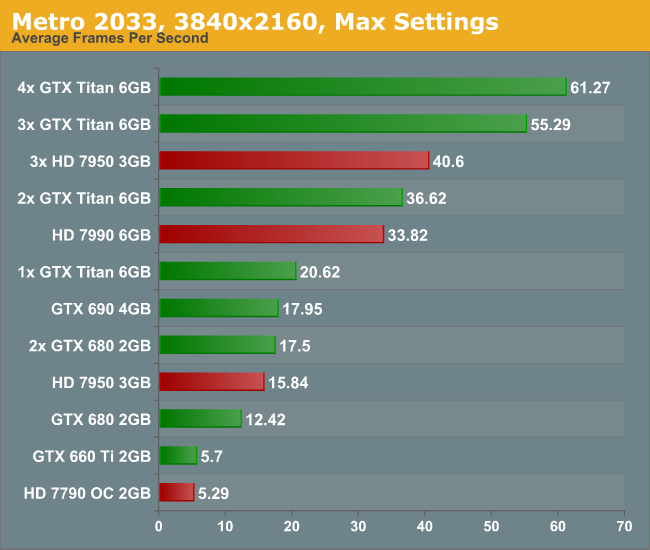
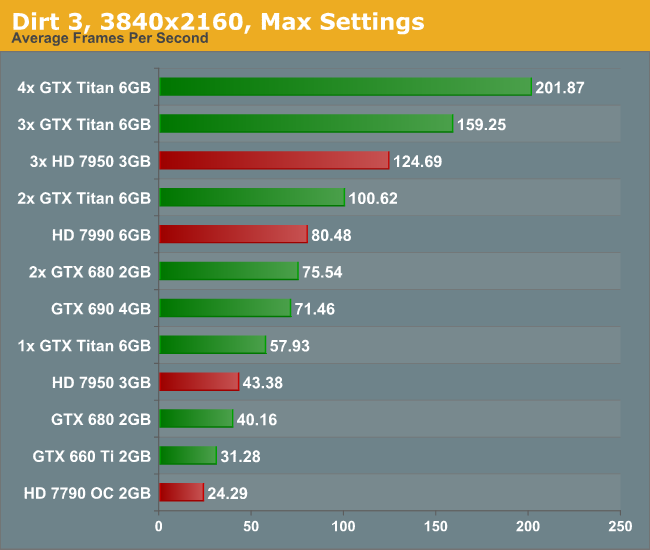
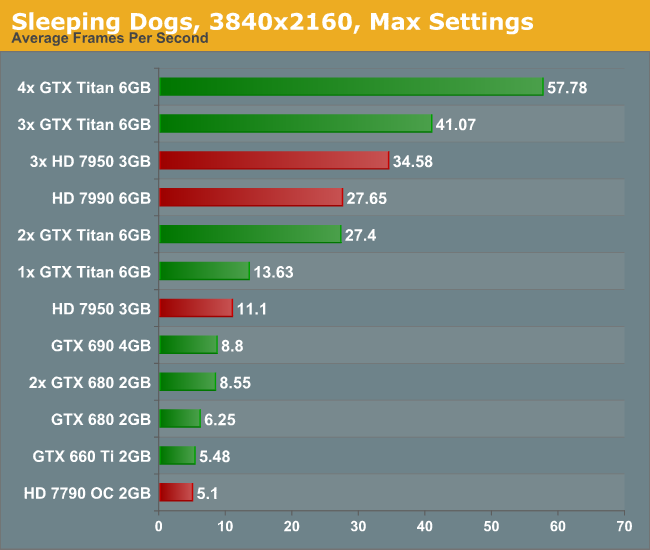
As I only had my motherboard gaming tests available and little time to download fresh ones (you would be surprised at how slow in general Taiwan internet can be, especially during working hours), we have a standard array of Metro 2033, Dirt 3 and Sleeping Dogs. Each one was run at 3840x2160 and maximum settings in our standard Gaming CPU procedures (maximum settings as the benchmark GUI allows).
Metro 2033, Max Settings, 3840x2160:
Dirt 3, Max Settings, 3840x2160:
Sleeping Dogs, Max Settings, 3840x2160:
Conclusion:
First of all, the minute you experience 4K with appropriate content it is worth a long double take. With a native 4K screen and a decent frame rate, it looks stunning. Although you have to sit further back to take it all in, it is fun to get up close and see just how good the image can be. The only downside with my testing (apart from some of the low frame rates) is when the realisation that you are at 30 Hz kicks in. The visual tearing of Dirt3 during high speed parts was hard to miss.
But the newer the game, and the more elaborate you wish to be with the advanced settings, then 4K is going to require horsepower and plenty of it. Once 4K monitors hit a nice price point for 60 Hz panels (sub $1500), the gamers that like to splash out on their graphics cards will start jumping on the 4K screens. I mention 60 Hz because the 30 Hz panel we were able to test on looked fairly poor in the high FPS Dirt3 scenarios, with clear tearing on the ground as the car raced through the scene. Currently users in North America can get the Seiki 50” 4K30 monitor for around $1500, and they recently announced a 39” 4K30 monitor for around $700. ASUS are releasing their 4K60 31.5” monitor later this year for around $3800 which might bring about the start of the resolution revolution, at least for the high-end prosumer space.
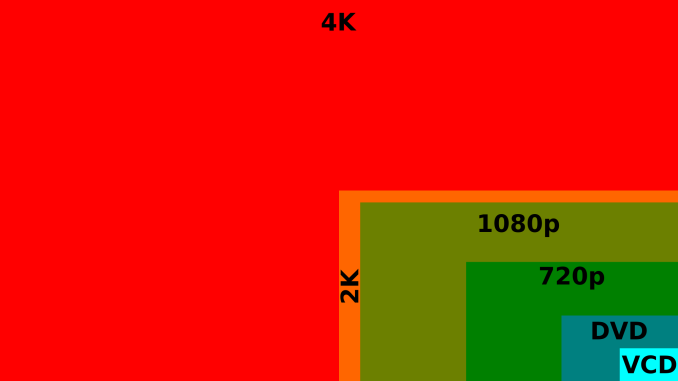
16:9 4K Comparison image from Wikipedia
Read More ...
Addonics Secure NAS R5 - A NAS / DAS Combo for the Security-Conscious
The number of readers requesting for encryption benchmarks after reading our NAS reviews has shown an uptick in the recent past. For consumers paranoid about security, Addonics is launching the Secure NAS storage appliance series. Unlike other established NAS vendors' offerings, the Secure NAS R5 (the first model in the series) differentiates itself in the following aspects:
The entire RAID volume (including the boot sector and the partition table) is encrypted.
Encryption is activated with a hardware cipher key (which can be replicated only by specialized means). There is no software to run or password to enter.
The unit also acts as a Direct Attached Storage (DAS), thanks to an eSATA port on the unit.

in a single volume and encryption is done with a 256-bit AES crypto engine. The RAID configuration (RAID0 (Striping), RAID 5 (Parity), RAID 5+S, Large Drive or Clone Mode (N-Way Mirror)) is set via DIP switches at the rear of the unit. We have built-in SMB and FTP servers and a web server for Web GUI administration. As a NAS, the supported formatters for the internal file systems are XFS and EXT3. However, when connected as a DAS, the volume can be formatted in EXT2 / EXT4 / NTFS or FAT32. Such volumes are still available when the unit is connected as a NAS. The network link is 10/100/1000 Mbps. The unit claims speeds of up to 85 MB/s over the network.
The Secure NAS R5 has a MSRP of $499.
Read More ...
AMD's A10-5750M Review, Part 2: The MSI GX60 Gaming Notebook
In the first part of our review of the AMD A10-5750M, we revealed the chip had a predisposition for better CPU performance. Does that carry over and help MSI's budget oriented gaming notebook, the GX60?
Read More ...
Logic Supply Launches LGX ML250 Intel Socket G2-based Fanless Industrial PC
We had reviewed Logic Supply's fanless LGX AG150 Cedar Trail-based PC last year. Though a majority of fanless x86-based PCs are based on the anemic Atom platform, there has been a sudden spurt in industrial PCs based on more powerful CPUs. The Aleutia Relia and the Habey BIS-6922 are examples of the general direction in which this market space is moving.

Logic Supply LGX ML250 Configuration Options |
|
Chassis |
Logic Supply Custom |
Processors |
Intel Sandy Bridge Celeron B810 @ 1.6 GHz |
Intel Ivy Bridge Core i3-3120ME @ 2.4 GHz |
|
Intel Ivy Bridge Core i5-3610ME @ 2.7 GHz |
|
Motherboards |
Jetway NF9G |
ASRock IMB-170 |
|
Memory |
2x (1/2/4/8 GB) / DDR3-1333 / DDR3-1600 |
Disk Drive(s) |
2.5" HDD (7200 rpm 250 GB / 500 GB / 5400 rpm 1 TB) |
Transcend MLC Flash SSD (32 GB / 64 GB / 128 GB) |
|
Transcend SLC Flash (8 GB) / Emphase SLC Flash (60 GB / 120 GB) |
|
Power Supply |
80 W / 100 W AD Adapter and 80 W / 90 W / 120 W PicoPSU |
Wireless |
Azurewave AW-NB114H Wi-Fi/BT Card |
Intel 6235 Wi-Fi/BT PCIe Mini Card |
|
Mounting |
None |
Vibration Isolating Mounting Kit |
|
DIN Rail Mounting Clips |
|
Operating Systems |
Barebones |
Windows 8 x86/x64 Standard/Professional |
|
Windows 7 x86/x64 Home Premium / Professional / Ultimate |
|
Windows Embedded Standard 7 x86/x64 |
|
Ubuntu 12.04, LTS |
|
Warranty |
1-year / 2 and 3 year available for build-and-test systems |
Pricing |
Starting at $712 |
Read More ...
The AnandTech Podcast: Episode 21
featuring Anand Shimpi, Brian Klug
iTunes
RSS - mp3, m4a
Direct Links - mp3, m4a
Total Time: 2 hours 6 minutes
Outline h:mm
Google Glass - 0:00
Google IO - 0:20
HTC/Samsung GPe - 0:23
Samsung Galaxy NX - 0:43
SGS4 Active - 0:51
Snapdragon 800 - 0:59
Exynos 5 Octa - 1:12
WWDC - 1:20
Haswell ULT Platform Power vs. iPad 4 - 1:26
ARM and Intel in the Smartphone/Tablet Space - 1:30
Xbox One/PS4 - 1:43
Read More ...
AMD's A10-5750M Review, Part 1: The APU and Radeon HD 8650G Performance
While AMD's Richland update has been of modest benefit on the desktop, improved power consumption and turbo features tend to go over much better in mobile. Is the AMD A10-5750M a worthy jump over the outgoing A10-4600M?
Read More ...
The ARM Diaries, Part 1: How ARM’s Business Model Works
We’ve had well over a decade of Intel sharing its beliefs with us, but this is ARM’s first attempt at doing the same. What will follow over the next few posts are a bunch of disclosures, some related some not, attempting to bring everyone up to speed on where ARM is today and where ARM will be in the near future. The best place to start is with ARM’s business model.
Read More ...
Intel Z87 Motherboard Review with Haswell: Gigabyte, MSI, ASRock and ASUS
Talk about Haswell and Z87 has circulated the internet for many quarters – today we reap the benefits of the wait and get our chance to review both the CPU and several examples of the Z87 chipset. Today we have in the Gigabyte Z87X-UD3H, the MSI Z87A-GD65 Gaming, the ASRock Z87 Extreme6/AC and the ASUS Z87-Pro.
Read More ...
Windows 8.1 Preview Released
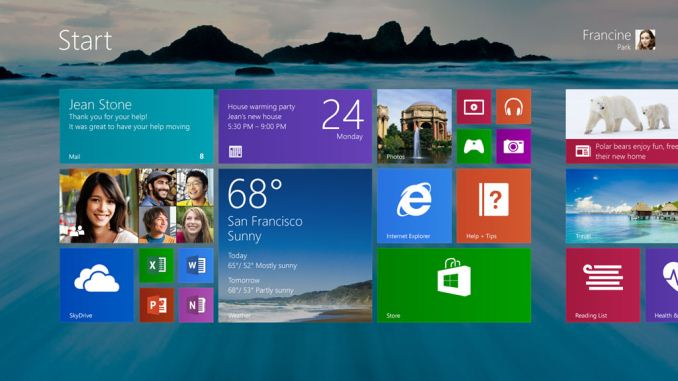
Windows 8.1 (née Blue) is Windows 8’s first service pack, presenting Microsoft’s first chance to iterate on Windows 8 after the OS’s rocky launch. This goes for both the traditional desktop/mobile PC environment, and the tablet environment where yearly OS updates have come to be expected.
Consequently a number of the changes in Windows 8.1 are to the Metro/Modern layer, such as changes to tile management and window snapping, however there are some low level changes that techies will also be interested in. Among other things, Windows 8.1 will ship with support for Intel’s Connected Standby technology for Haswell, and a revised DPI scaling mechanism that is better suited for driving the high DPI displays that are coming down the pipeline for both Ultrabooks and desktops. We’ll have some updates on these features once we get a chance to tinker with Win8.1 in depth.
Windows 8.1 is being made available as both an update and an ISO. The update itself is being distributed through the Windows Store app – after downloading and installing the requisite platform patch from Microsoft’s website – and weighs in at a hefty 2.44GB for the Windows 8.1 Pro Preview. The ISO files have not been posted yet, but are expected to be available tomorrow.
Update
To go along with the release of the new OS, AMD has released a new Catalyst preview driver set. The new drivers bring support for WDDM 1.3 and its associated features to Trinity and GCN hardware, though the driver also covers last-generation VLIW5 hardware.
Update 2
Like AMD, NVIDIA has also released new drivers, version 326.01. However unlike AMD these drivers are only being distributed through Windows Update to machines running Windows 8.1.
Read More ...
NVIDIA Shield Delayed, Now Ships In July
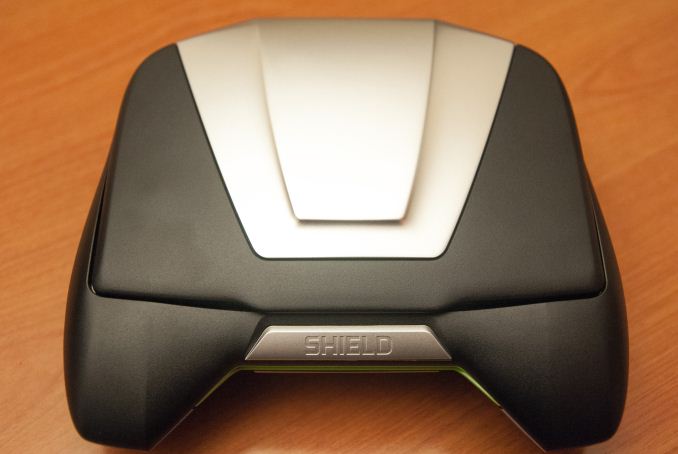
"Some final quality-assurance testing has just turned up a mechanical issue that we’re not happy with.So, while we announced last week that SHIELD will go on sale this Thursday, we’ve taken the hard decision to delay shipping until next month.The issue relates to a third-party mechanical component, and we’re working around the clock with the supplier to get it up to our expectations."
Read More ...
Ask AnandTech: Ideal Tablet Specs & Form Factor for Work?

Read More ...
HTC One and Samsung Galaxy S 4 Google Play edition Review - Nearly Nexus
Back at Google I/O, the search giant announced the Samsung Galaxy S 4 with Nexus User Experience, a device which combined Samsung's SGS4 hardware and the stock Android experience atop it. Later on, HTC made an announcement of its own about an upcoming HTC device with the same exact promise – unadulterated HTC One hardware running unadulterated Android. Both devices originally didn't have formal names, they're now the Samsung Galaxy S 4 Google Play edition and HTC One Google Play edition, respectively (henceforth SGS4 GPe or HTC One GPe).
Google I/O went on to be a not so subtle breakdown of Google's strategy to de-couple more of the platform from the primary point releases of Android to get more consistent user experiences and APIs across the ecosystem. While many expected new hardware and a new version of Android, although both were teased, the real big news was primarily Google solidifying more of the experience consistency for developers and users alike. If you look at that theme from a higher level, you can see how Google also clearly wants to extend this to hardware through an ambitious new Google Play edition initiative which starts with the HTC One and Galaxy S 4 Google Play editions. The hardware is already a known entity – we've reviewed both the HTC One and the Snapdragon 600-based Galaxy S 4 – the question is how that experience works with stock Android. Read on for the full review.
Read More ...
NVIDIA GeForce GTX 760 Review: The New Enthusiast Kepler
A little less than a month has transpired since the launch of the GeForce GTX 770, and we’re back again with another new NVIDIA card. Launching today at $250 is the GeForce GTX 760, the successor to the GTX 660 Ti and GTX 670, and NVIDIA's new enthusiast class Kpeler card. Designed to go up against the Radeon HD 7950, as we'll see the GTX 760 can both beat it on performance and undercut it on price, making for a very welcome shakeup in the enthusiast market segment.
Read More ...
Strontium Hawk (240GB) Review
Strontium is probably a new acquaintance for many of our readers, but their story may be familiar. Founded in 2002 in Singapore, Strontium is one of the many memory manufacturers who have turned to SSDs to expand their product portfolio and increase revenues. What makes Strontium special is the fact that they actually buy the whole SSD from a third party and simply rebrand it. In case of the Hawk, Strontium sourced the SSD from Toshiba. Read on to find out how the Hawk performs.
Read More ...
Qualcomm Announces Snapdragon 200 Additions - MSM8x10 and MSM8x12
MSM8x12 is the higher end of the two, and has four ARM Cortex A7s at 1.2 GHz inside alongside Adreno 302 graphics. MSM8x10 is dual core ARM Cortex A7 at 1.2 GHz also alongside Adreno 302. Both include support for single channel LPDDR2 at 333MHz. Both also include up to HSPA+ 21.1 on the downlink with the usual multimode flavors (HSPA+, TD-SCDMA, EVDO), the only difference on the modem side is that MSM8x12 includes support for both dual sim dual standby and dual sim dual active (DSDS, DSDA) while MSM8x10 only includes dual sim dual standby (DSDS). Both of these are 28nm SoCs and will be available with Qualcomm's reference design (QRD) platform late 2013.
Source: Qualcomm
Read More ...
A Look at Intel HD 5000 GPU Performance Compared to HD 4000
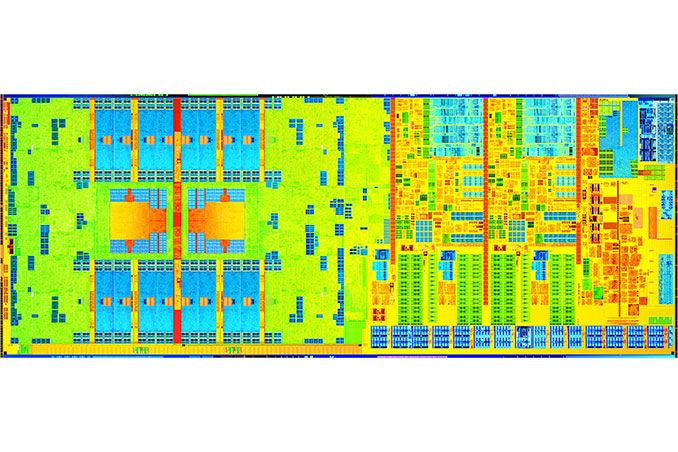
In mobile, Haswell is presently available in five different graphics configurations:
Intel 4th Generation Core (Haswell) Mobile GPU Configurations |
||||||||
Intel Iris Pro 5200 |
Intel Iris 5100 |
Intel HD 5000 |
Intel HD 4400 |
Intel HD 4200 |
||||
Codename |
GT3e |
GT3 |
GT3 |
GT2 |
GT2 |
|||
EUs |
40 |
40 |
40 |
20 |
20 |
|||
Max Frequency |
1.3GHz |
1.2GHz |
1.1GHz |
1.1GHz |
850MHz |
|||
eDRAM |
128MB |
- |
- |
- |
- |
|||
TDP |
47W/55W |
28W |
15W |
15W |
15W |
|||
First, let's look at what Intel told us earlier this year:
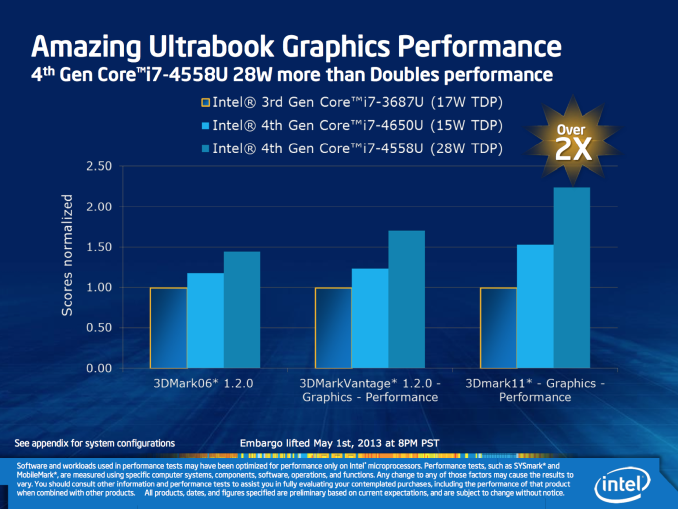
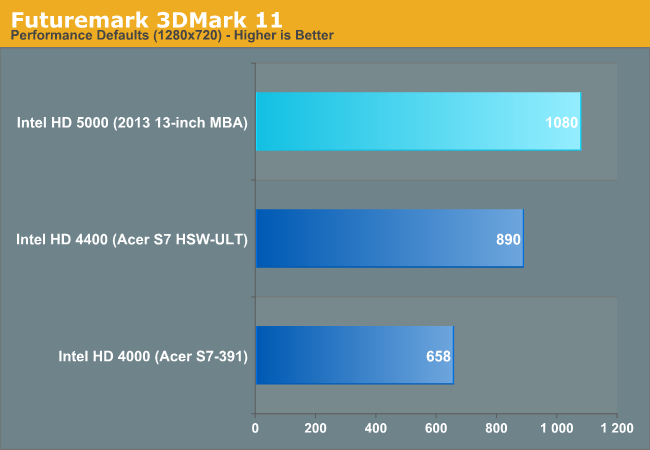
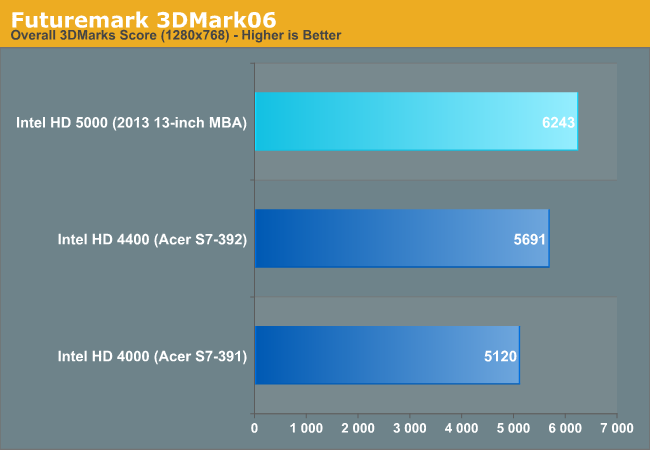
Intel HD 5000 (Haswell ULT GT3) vs. Intel HD 4000 (Ivy Bridge ULV GT2) |
|||||||||||
GRID 2 |
Super Street Fighter IV: AE |
Minecraft |
Borderlands 2 |
Tomb Raider (2013) |
Sleeping Dogs |
Metro: LL |
BioShock 2 |
||||
HD 5000 Advantage |
16.2% |
12.4% |
16.9% |
3.0% |
40.8% |
6.5% |
2.3% |
24.4% |
|||
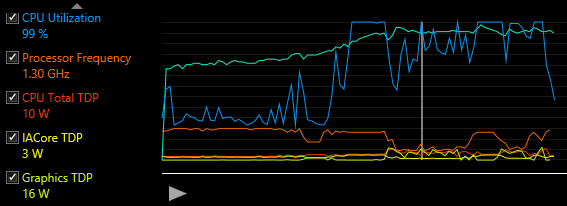
The range of performance improvement really depends on turbo residency. With only a 15W TDP (inclusive of the CPU and PCH), games that have more CPU activity or the right combination of GPU activity will see lower GPU clocks. In Borderlands 2 for example, I confirmed that the GT3 GPU alone was using up all of the package TDP thus forcing lower clocks:
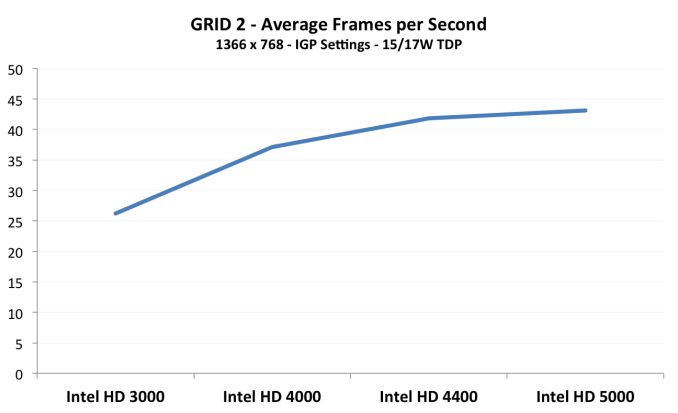
I also put together a little graph showing the progression of low TDP Intel GPU performance since Sandy Bridge. I used GRID 2 as it seemed to scale the most reasonably across all GPUs:
If you want more details and Intel HD 5000 numbers feel free to check out the GPU sections of our 2013 MacBook Air review.
Read More ...
Western Digital Acquires STEC

This is a good move from both. STEC has been having financial issues for a long time and one of their biggest shareholders, Balch Hill Capital, has publicly said that the company should look for a buyer. STEC was one of the earlier players in the enterprise SSD market but over the past few years their revenue has constantly been declining, partly because the competition has gotten much tougher as companies such as Intel, Samsung and Toshiba have entered the market. Nowadays even getting a steady NAND supply can be hard if you don't own a fab and the NAND market is only going to get worse next year because manufacturers are currently seeking for higher profits instead of increasing volume. While Western Digital doesn't own a NAND fab, it definitely helps when you're backed up by a multi-billion dollar company with tons of purchasing power.
For Western Digital the biggest motives behind this acquisition are the engineering talent and intellectual property: STEC has over 100 SSD-related patents and over 900 employees. HGST does have a joint-operation for SSD controllers with Intel and that operation will continue, but the acquisition certainly makes HGST more independent when it comes to SSDs and will allow them to strengthen their position in the market.
It will obviously take time before we'll see the fruits of this acquisition, but it's good to see Western Digital being more aggressive in the SSD front. Initially this acquisition will only impact the enterprise SSDs but it's possible that we'll see STEC's technology in Western Digital (or HGST) branded consumer SSDs too.
Read More ...
Best Mac Laptops - June 2013
Apple Mac Laptop Recommendations - June 2013 |
||||||||
Budget |
Writer's Aid |
Mobile Workhorse |
Desktop Replacement |
Desktop Replacement |
||||
Model |
11-inch MacBook Air (Mid 2013) |
13-inch MacBook Air (Mid 2013) |
13-inch Retina MacBook Pro |
15-inch Retina MacBook Pro |
15-inch Retina MacBook Pro |
|||
CPU |
1.3GHz Core i5 |
1.3GHz Core i5 |
2.6GHz Core i5 |
2.4GHz Core i7 |
2.7GHz Core i7 |
|||
GPU |
Intel HD 5000 |
Intel HD 5000 |
Intel HD 4000 |
Intel HD 4000 + NV GT650M |
Intel HD 4000 + NV GT650M |
|||
RAM |
4GB |
8GB |
8GB |
8GB |
16GB |
|||
SSD |
128GB |
256GB |
256GB |
256GB |
512GB |
|||
Buy or Wait |
Buy |
Buy |
Wait (~3 months) |
Wait (~3 months) |
Wait (~3 months) |
|||
Total Price |
$999 |
$1399 |
$1599 |
$2079 |
$2629 |
|||
Next up is the writer's aid configuration, an upgraded 13-inch MacBook Air. Once again I'd stick with the base CPU, but mostly to optimize for battery life than anything else. The faster CPU would be nice, but I'd only consider the upgrade if you need a mobile workhorse and for whatever reason won't consider the 13-inch rMBP. I threw in the larger SSD simply because I believe 256GB is really the minimum for all of the applications I'd typically install as someone who regularly has to produce content (Photoshop, Dreamweaver, Lightroom, iWork, Office, Boot Camp partition). You're going to need some form of external storage for photos, videos and music though. I could go either way on the memory capacity, but at only $100 for the upgrade it might make sense to give the machine a bit more longevity.
Both of the MBA configurations I'm fine with recommending today. It'll take us some time to get to Broadwell, so there won't be an issue with early obsolesence with any of these. The next three configurations are a different story however.
MacBook Pro Recommendations
As I alluded to in this morning's MacBook Air review, the most interesting configuration for me is the 13-inch MacBook Pro with Retina Display. Unfortunately, the current model still ships with a 35W Ivy Bridge part. All current indications point to the next-gen model using a 28W Haswell-ULT part, which should have a tremendous impact on battery life (similar to the MBAs). That shift alone makes this one worth waiting for. If you have to have one today though, this is the configuration I'd opt for. Amazon has a deal on the upgraded configuration, with a 256GB SSD and 2.6GHz processor for $1599. That's probably what I'd recommend. The cost of the upgrade to a 512GB SSD is a bit too high on the entry level model ($500) and on the upgraded system it'll put your total cost right at $2000. If you need the space, go for it, but if you can make 256GB work it might make sense to go that route and rely on external storage for the rest of your needs. Do keep in mind that you'll want to keep around 10 - 20% of the drive free to keep it performing nicely. The CPU upgrade isn't necessary, but it's a part of Amazon's deal so why not. I've been pretty happy with 8GB of memory in this configuration as well.
The higher end DTR configuration is really the reasonable shoot-for-the-moon option. Here I finally cave in to the larger SSD, double the amount of memory and opt for the upgraded CPU. The total price ends up at $2629 if you snag the latest deal from Amazon.
My Personal Choices
For me personally, I'd wait for the 13-inch rMBP upgrade (Mobile Workhorse option) as that'd be a great combination of display and battery life (if it gets a 28W Haswell ULT). I like the 15-inch model but that's a bit too large of a machine to comfortably use in coach on most US domestic airlines (where I spend a lot of my time). If I didn't travel as much, I'd opt for the 15-inch rMBP. If you're running a dual-system configuration (perhaps 2013 Mac Pro + a notebook), then I might go lighter end on the notebook side and opt for the 13-inch MBA (Writer's Aid configuration).Read More ...
The 2013 MacBook Air Review (13-inch)
Apple launched its Haswell ULT based MacBook Air into the wild earlier this month. With lofty battery life claims, an increased focus on lower power, 802.11ac and a PCIe SSD, read on as we figure out just how well the new 13-inch MacBook Air measures up.
Read More ...
Haswell and GK110 vs. Ivy and GK104: DigitalStorm Virtue System Review
While NVIDIA's GeForce GTX 780 has proven to be a solid update to the venerable 680, Intel's Haswell architecture has left enthusiasts underwhelmed. Can a good GPU and overclock make up the difference?
Read More ...
Performance Retrospective: AMD’s Radeon HD 7970M
We recently posted our first review of a notebook equipped with NVIDIA’s latest mobile tour de force, the GeForce GTX 780M. With a theoretical computational performance increase of 30% relative to GTX 680M and 39% more memory bandwidth, the GTX 780M should be stomping all over the competition from AMD. What’s more, the Radeon HD 8970M doesn’t really help matters, as the only change from the 7970M is a Boost clock that’s 50MHz (6%) higher. The other side of the story is drivers, and that's the focus for today.
Read More ...
GeForce GTX Titan Two-Way SLI Scaling: PCIe 2 vs. PCIe 3
As it turned out, the Intel DX79SR used in the Genesis supported PCIe 3, but only on the 2 full-fledged x16 slots. The third x16 slot (electrically x8) won’t operate beyond PCIe 2 speeds even after forcing it in NVIDIA’s drivers, which is unfortunately a bit of a double whammy since it’s the slot that’s already lacking in bandwidth. That dashed our hopes of a PCIe 3 vs. PCIe 2 comparison for tri-SLI Titans, and as a result the subject never reached print.
However in the last couple of weeks I’ve received several requests for two-way SLI Titan/780 PCIe performance benchmarks, which we did happen to collect while looking into tri-SLI and merely never published. So with that in mind we’re going to finally publish that data, since there’s clearly more interest in the matter than I initially expected.
As a heads up this data is a bit stale; it was taken back in April with NVIDIA’s 314.22 drivers. So the primary goal here is to compare two-way SLI Titan performance on PCIe 2 versus PCIe 3.
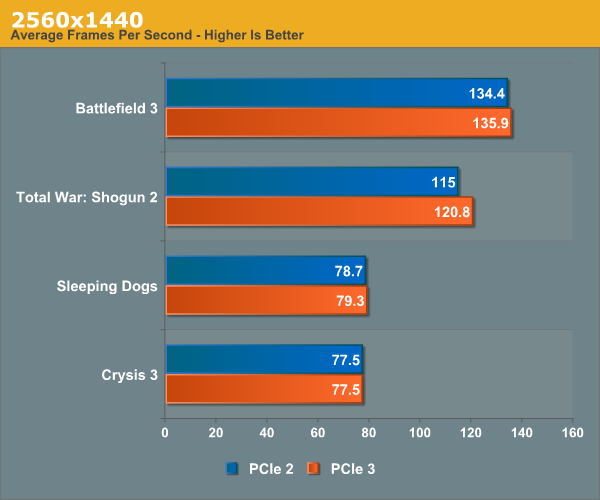
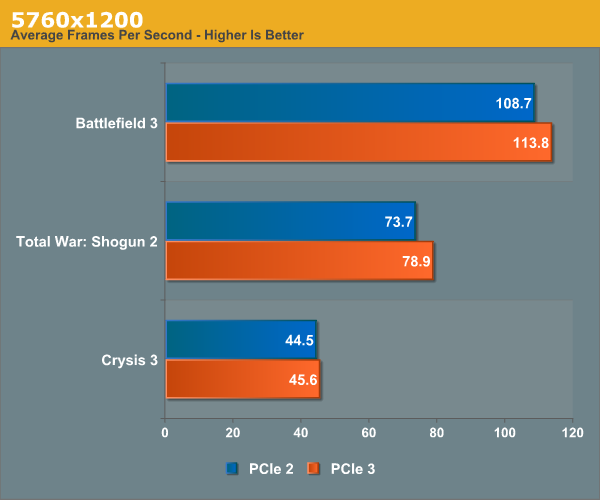
Admittedly this is a small sample set, but it does paint a distinct picture of the PCIe bus being a bottleneck when using surround modes. NVIDIA has never gone into great detail on how their surround mode works, but based on this and previous data we’ve long assumed that they’re shuffling a significant amount of data around via the PCIe bus in order to keep the cards in sync and to give each card the portion of the frame buffer it will be responsible for sending to its attached display(s). This is as opposed to 2560x1440 and other single monitor modes, where the master card merely needs to collect completed frames and there’s no further redistribution involved.
In any case, while NVIDIA does not officially support PCIe 3 on SNB-E systems, between the Genesis and our own testbed we’ve yet to run into an issue in using it. Consequently we can’t see any good reason not to enable it, especially in surround mode setups. Based on our data the performance gains aren’t going to be huge (at least not in two-way SLI), but it’s free performance being left on the table. At the very least it’s worth a shot, since NVIDIA makes it easy to turn PCIe 3 support on and off.
Read More ...
Samsung's ATIV Book 9 Plus: 3200 x 1800 Display in an Ultrabook
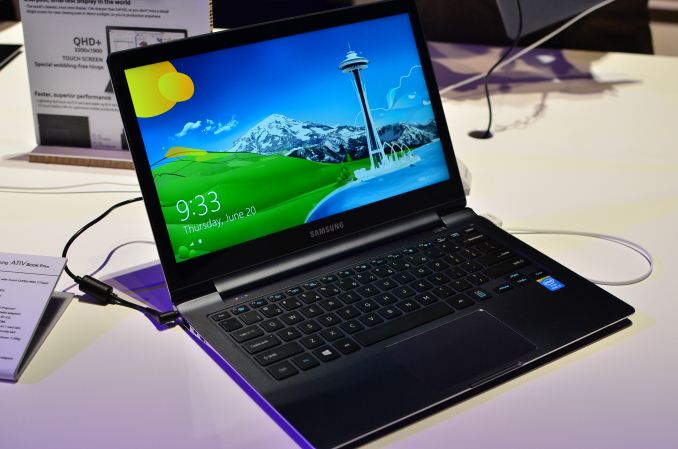
Like many of the Ultrabooks announced in Taipei, the ATIV Book 9 Plus is a marriage of MacBook Air and rMBP. You get a form factor that's very similar to the 13-inch MBA, but with a display that's clearly aimed at the more expensive rMBP. Where the ATIV Book 9 Plus falls in pricing will be very interesting to see.
Internally, there's a familiar refrain: Core i5-4200U (Haswell ULT), DDR3L and an SSD. Like the ATIV Q, the SSD in this case is one of Samsung's own - the MZNTD128HAGM, a 6Gbps SATA M.2 drive. The machine ships with an integrated 55Wh battery and weighs 1.39 kg. Samsung claims up to 12 hours of battery life.
The notebook looked good in person. I'm a fan of the hidden SD card reader with spring loaded door. Just like we saw with the ATIV Q, the ATIV Book 9 Plus was running Windows 8 but I fully expect that it's meant for Windows 8.1's improved handling of high DPI displays.


Read More ...
HTC Profit Plunges, Sales of "One" Slow as Sector Stagnates
HTC may now be moving a million units of its flagship smartphone or less, slips to tenth place

     |
Read More ...
Toyota's Prius Hybrid Crosses 3 Million Unit Threshold in Worldwide Sales
The automaker also said that it would spend a consolidated 890 billion yen on environmental technology development in the fiscal year ending March 2014

| |
Read More ...
Apple, Google Excused from Irish Tax Questioning
There will be an inquiry into how Ireland uses the "global tax architecture," but the questioning will no longer require the presence of company executives

| |
Read More ...
Slow Samsung Galaxy S IV Sales, Advertising Expenses Trigger Earnings Miss
Is smartphone market reaching saturation?

| |
Read More ...
Dell Exploring Wearable Device Offering
It's looking at alternatives to the PC sector

| |
Read More ...
Japanese Carrier NTT DoCoMo's List of Demands Make iPhone Alliance Unlikely
Apple's iPhone has a 42% share of the smartphone market in Japan: Apple and NTT DoCoMo want to expand that figure

| |
Read More ...
7/5/2013 Daily Hardware Reviews
DailyTech's roundup of reviews from around the internet for Friday

| |
Read More ...
Quick Note: Microsoft Conducting Xbox Live Update Public Beta
Beta will test transactions using local currency

| |
Read More ...
World's Largest Offshore Wind Farm -- 630 MW, 175 Turbines -- Turns on in the UK
Project cost $2.84B USD, exploits natural abundance of marine winds

| |
Read More ...
HTC Kills Android Updates for One S, Tells Customers to Stay "Confident"
Don't count on me, says HTC

| |
Read More ...
Fuel Cell Tech Gets Boost from New Bio Catalyst
Platinum is much too expensive and limited

| |
Read More ...
More Images of Super-Camera Endowed Nokia Lumia 1020 Leak
Sensor is an estimated 5x the size of the iPhone 5's, 1020 has adjustable aperture, manual shutter, xenon flash

| |
Read More ...
Available Tags:MacBook , Gaming , MSI , Notebook , Intel , AnandTech , APU , Radeon , ASRock , ASUS , Windows 8 , Windows , NVIDIA , Tablet , HTC , Samsung , Galaxy , Google , GeForce , GTX , GPU , Western Digital , Mac , GeForce , GTX , Dell , iPhone , Hardware , Microsoft , Xbox , UK , Android , Catalyst , Nokia ,


No comments:
Post a Comment