

What's New in Android 4.3

On the graphics side, the big change is inclusion of support for OpenGL ES 3.0 in Android 4.3. Put another way, Android 4.3 now includes the necessary API bindings both in the NDK and Java for ES 3.0. This release brings the numerous updates we’ve been over before, including multiple render targets, occlusion queries, instances, ETC2 as the standard texture compression, a GLSL ES 3.0, and more.
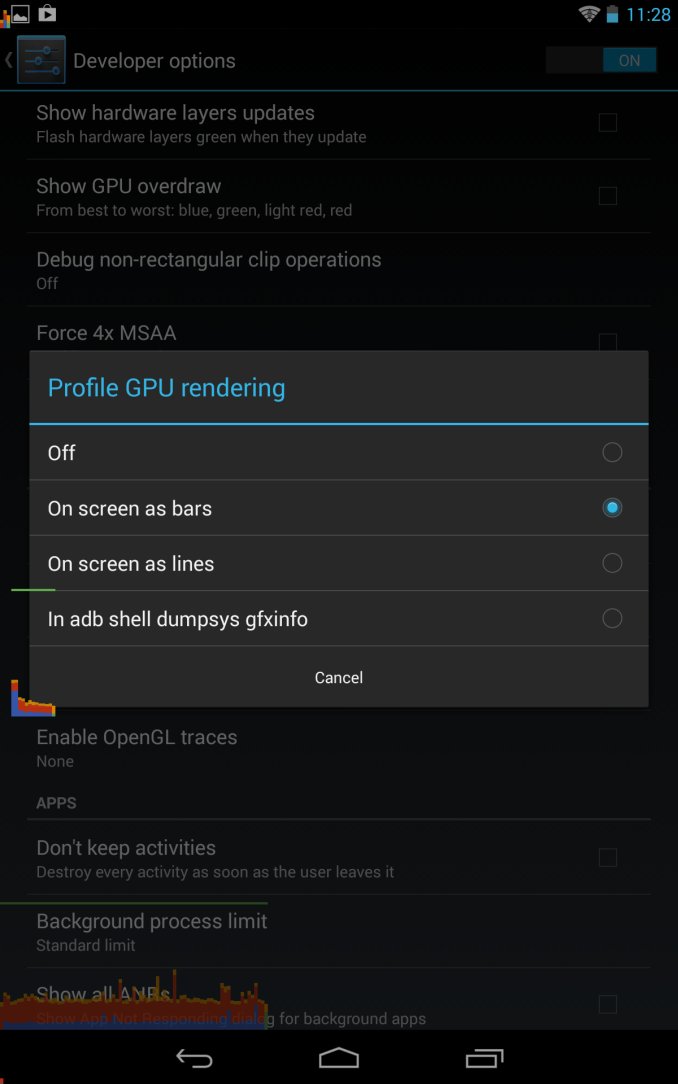
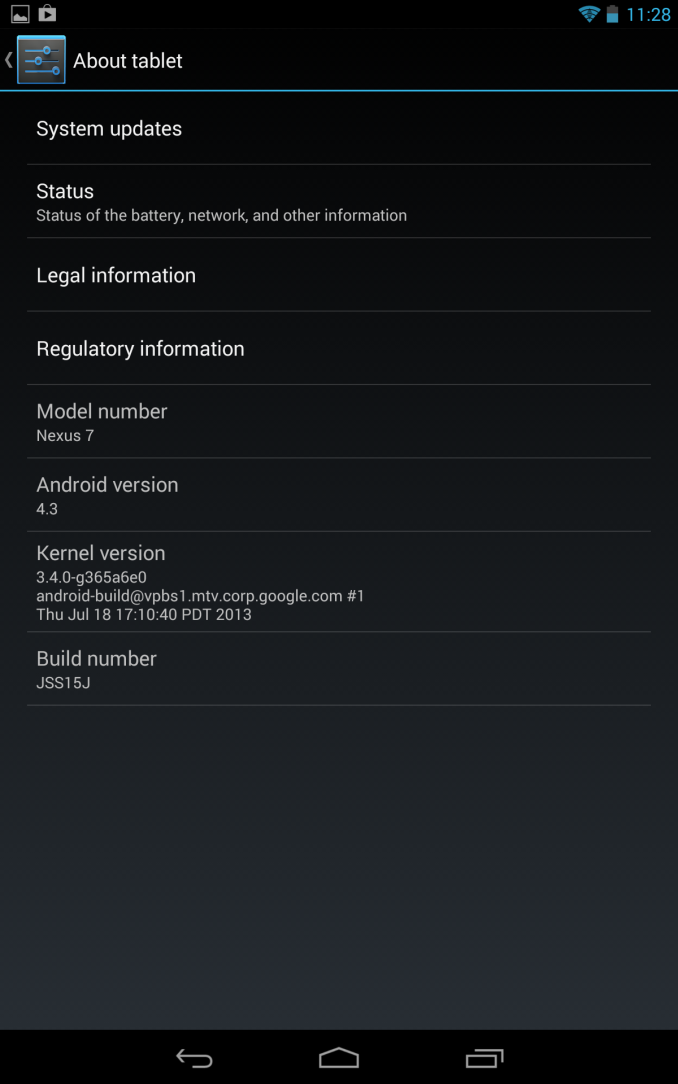
Google has been trying to increase adoption of WebM and along those lines Android 4.3 now includes VP8 encoder support for Stagefright. The platform APIs are updated accordingly for the ability to change settings like bitrate, framerate, and so forth. New DRM modules are now added as well, for use with MPEG DASH through a new MediaDRM API.
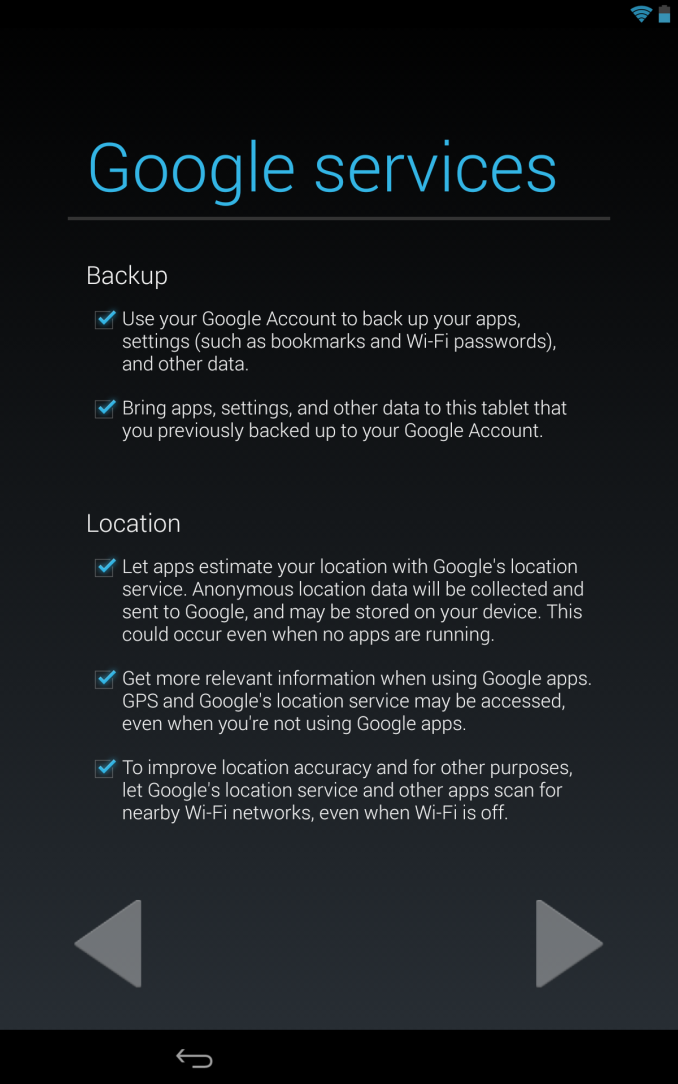
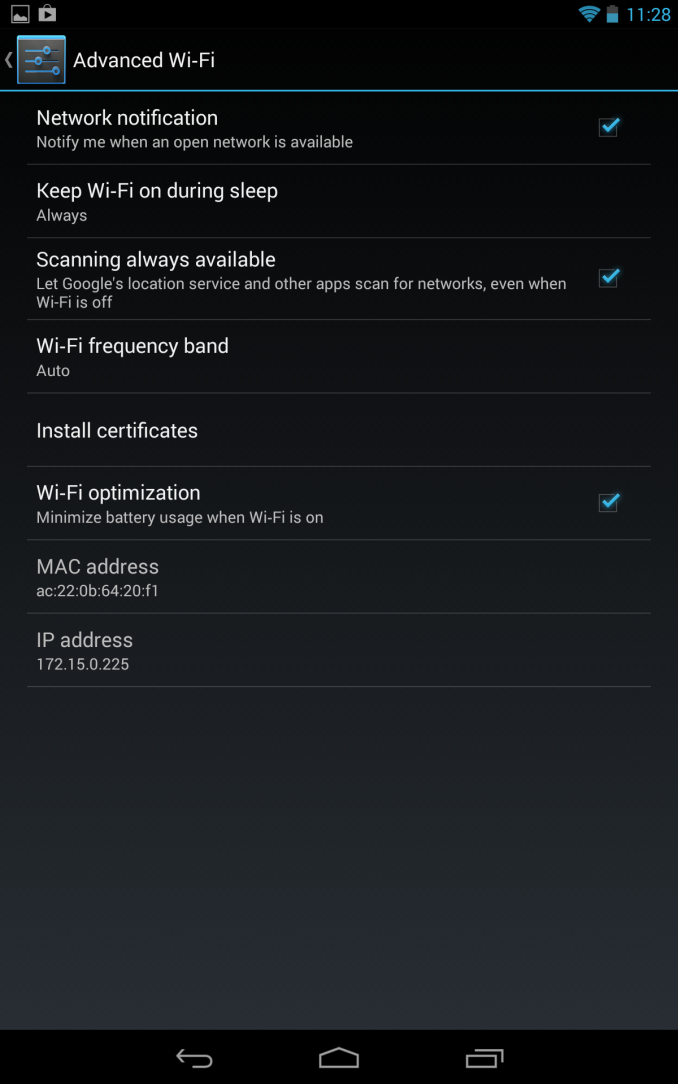
Like we saw hinted not so subtly at Google I/O, 4.3 also includes support for Bluetooth low energy (rebranded Bluetooth smart) through the new Broadcom-sourced Bluetooth stack. This OS-level support for BT Smart APIs will do a lot to ease the API fragmentation third party OEMs have resorted to in its absence.
Likewise Bluetooth AVRCP 1.3 is now included which supports better metadata communication for car audio and other devices, as well as better remote control.
Security gets improvements as well, Android 4.3 moves to SELinux MAC (mandatory access control) in the linux kernel. The 4.3 release runs SELinux in permissive mode which logs policy violations but doesn’t break anything at present.
A number of other security features are changed, including fixes for vulnerabilities disclosed to partners, better application key protection, removal of setuid programs from /system, and the ability to restrict access to certain capabilities per-application. Lastly there’s a new user profiles feature that allows for finer grained control over app usage and content.
We'll be playing around with the new features on the new Nexus 7 as well as the other Nexus devices getting the update (Nexus 4, Nexus 10, Nexus 7 (2012), and Galaxy Nexus). Google has already posted the factory images for those devices as well if you're too impatient to wait for the OTA and want to flash it manually.
Source: Google


Read More ...
Google's Breakfast With Sundar Pichai Event - Live Blog
We're in San Francisco again for Google, and this time we're expecting news about the next release of Android, and perhaps some news on the Chrome OS front, and a new Nexus 7. Join us inside for our live blog.
Read More ...
NVIDIA Demonstrates Logan SoC: < 1W Kepler, Shipping in 1H 2014, More Energy Efficient than A6X?
Ever since its arrival in the ultra mobile space, NVIDIA hasn't really flexed its GPU muscle. The Tegra GPUs we've seen thus far have been ok at best, and in serious need of improvement at worst. NVIDIA often blamed an immature OEM ecosystem unwilling to pay for the sort of large die SoCs necessary in order to bring a high-performance GPU to market. Thankfully, that's all changing. Earlier this year NVIDIA laid out its mobile SoC roadmap through 2015, including the 2014 release of Project Logan - the first NVIDIA ultra mobile SoC to feature a Kepler GPU. Yesterday in a private event at Siggraph, NVIDIA demonstrated functional Logan silicon for the very first time.
Read More ...
NVIDIA Confirms Ship Date for Shield - July 31
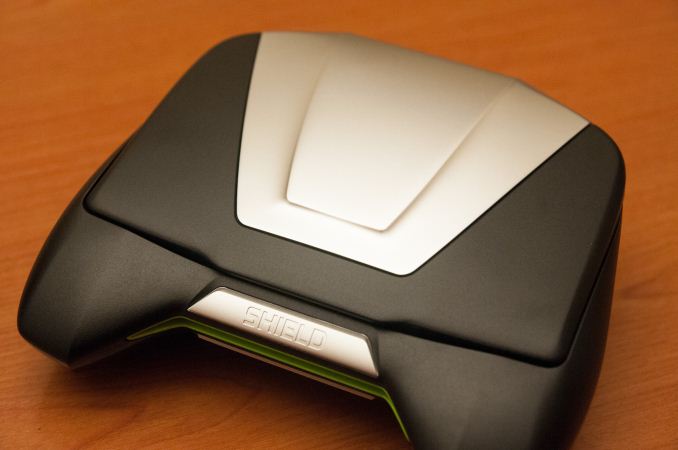
We've played with NVIDIA's final Shield hardware a while back, and came away decently impressed. Now all that remains is the full review.“We want to thank you for your patience and for sticking with us through the shipment delay of your SHIELD. We have great news to share with you - your SHIELD will ship on July 31st.Our goal has always been to ship the perfect product, so we made sure we submitted SHIELD to the most rigorous mechanical testing and quality assurance standards in the industry. We built SHIELD because we love playing games, and we hope you enjoy it as much as we do.”
Source: NVIDIA Blog
Read More ...
The AnandTech Podcast: Episode 23
featuring Anand Shimpi, Brian Klug
iTunes
RSS - mp3, m4a
Direct Links - mp3, m4a
Total Time: 1 hour 4 minutes
Outline h:mm
Nokia Lumia 1020, Windows Phone - 0:00
HTC One mini - 0:23
HTC One 4.2.2 - 0:27
SGS4 with a Giant Battery - 0:29
SGS4 Wireless Charging Pad - 0:33
ARM Cortex A12 - 0:36
Aptina - 0:55
Read More ...
The AnandTech Podcast: Episode 22
featuring Anand Shimpi, Dustin Sklavos
iTunes
RSS - mp3, m4a
Direct Links - mp3, m4a
Total Time: 1 hour 28 minutes
Outline h:mm
Haswell on the Desktop - The Entire Time
Read More ...
NZXT Phantom 530 Case Review
With the 530 model, NZXT continues to fill out their product line with a Phantom for every season and price tag. But is the 530 the Phantom they and we needed?
Read More ...
NVIDIA GeForce 326.19 Beta Drivers Available

As is usually the case NVIDIA’s release notes mostly focus on the performance of these drivers. Among other things, NVIDIA notes that 326.19 “Increases performance by up to 19% […] in several PC games vs. GeForce 320.49”, calling out Tomb Raider and Codemasters’ racing games in particular.
Meanwhile users on the cutting edge of display hardware will want to pay attention to the fact that this is the first full GeForce driver to support “tiled” 4K displays such as the Asus PQ321Q, which requires support for 2 device “mosaic” mode to properly drive the display at 3840x2160@60Hz. Outside of 3 display Surround modes, this functionality was previously limited to NVIDIA’s Quadro cards as a product differentiator.
As usual, you can grab the drivers for all current desktop and mobile NVIDIA GPUs over at NVIDIA’s driver download page. And thanks to reader SH SOTN for the heads up.
Read More ...
HTC Announces One mini - 4.3 inch display, aluminum, and Snapdragon 400


Flash moves to a centered 12-o-clock position above the rear-facing camera aperture, which is still 4.0 MP with 2.0 µm "ultrapixels," although there's no OIS this time around for cost reasons, which is a bit unfortunate since that was half of what made the HTC One's camera exciting.
HTC One mini Specifications |
||||
HTC One mini |
||||
SoC |
1.4 GHz Snapdragon 400 (MSM8930 - 2 x Krait 200 CPU, Adreno 305 GPU) |
|||
RAM/NAND/Expansion |
1GB LPDDR2, 16 GB NAND |
|||
Display |
4.3-inch LCD 720p, 341 ppi |
|||
Network |
2G / 3G / 4G LTE (MSM8930 MDM9x15 IP block) |
|||
Dimensions |
132 x 63.2 x 9.25 mm, 122 grams |
|||
Camera |
4.0 MP (2688 × 1520) Rear Facing with 2.0 µm pixels, 1/3" CMOS size, F/2.0, 28mm (35mm effective) no OIS 1.6 MP front facing |
|||
Battery |
1800 mAh (6.84 Whr) |
|||
OS |
Android 4.2.2 with Sense 5 |
|||
Connectivity |
802.11a/b/g/n + BT 4.0, USB2.0, GPS/GNSS, DLNA |
|||
Misc |
Dual front facing speakers, HDR dual microphones, 2.55V headphone amplifier |
|||
Bands |
GSM/EDGE: Quad Band WCDMA/HSPA+ 42 Mbps: EMEA: 900/1900/2100 MHz Asia: 850/900/1900/2100 MHz LTE Cat. 3: EMEA: 800/1800/2600 MHz Asia: 900/1800/2100/2600 |
|||
Hardware Comparison |
|||||||
HTC One mini |
HTC One |
HTC One S |
iPhone 5 |
||||
Height |
132.0 mm |
137.4 mm |
130.9 mm |
123.8 mm |
|||
Width |
63.2 mm |
68.2 mm |
65 mm |
58.6 mm |
|||
Thickness |
9.25 mm |
9.3 mm |
7.8 mm |
7.6 mm |
|||
Mass |
122 grams |
143 grams |
119.5g |
112 g |
|||
Update: A number of people have asked how the One mini compares in size and mass to the iPhone 5, I've tossed that in the table as well.

HTC One (left), HTC One mini (right)
The HTC One mini will launch in some markets (Europe, others) in August and globally in September this year. HTC isn't naming a price for the One mini, but with the specs above it has to be competitive given the relatively midrange spec list and targeting. There's no official word on availability, operator partners, or pricing for the USA market, but it is inevitably coming here in some shape or form.


Read More ...
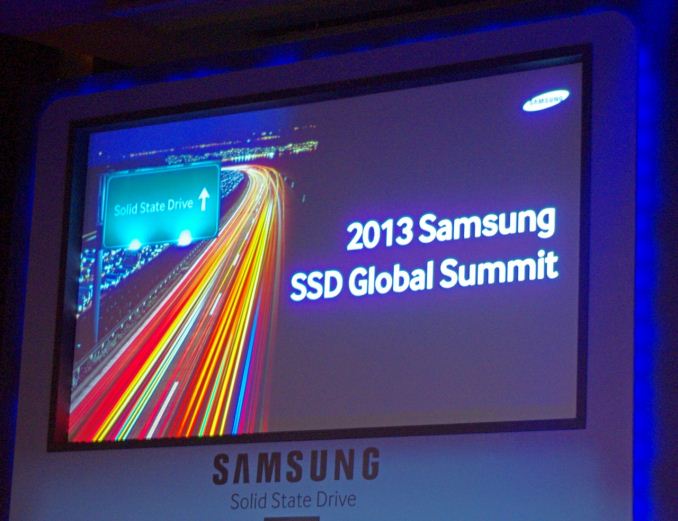
New Elements to Samsung SSDs: The MEX Controller, Turbo Write and NVMe
The MEX Controller
First up is the upgrade to the controller. Samsung’s naming scheme from the 830 onwards has been MCX (830), MDX (840, 840 Pro) and now the MEX with the 840 Evo. This uses the same 3-core ARM Cortex R4 base, however boosted from 300 MHz in the MDX to 400 MHz in the MEX. This 33% boost in pure speed is partly responsible for the overall increase in 4K random IOPS at QD1, which rise from 7900 in the 840 to 10000 in the 840 Evo (+27%). This is in addition to firmware updates with the new controller, and that some of the functions of the system have been ported as hardware ops rather than software ops.
TurboWrite
The most thought provoking announcement was TurboWrite. This is the high performance buffer inside the 840 Evo which contributes to the high write speed compared to the 840 (140 MB/s on 120GB drive with the 840, compared to 410 MB/s on the 840 Evo 120GB). Because writing to 3-bit MLC takes longer than 2-bit MLC or SLC, Samsung are using this high performance buffer in SLC mode. Then, when the drive is idle, it will pass the data on to the main drive NAND when performance is not an issue.
The amount of ‘high-performance buffer’ with the 840 Evo will depend on the model being used. Also, while the buffer is still technically 3-bit MLC, due to its use in SLC mode the amount of storage in the buffer decreases by a factor three. So in the 1TB version of the 840 Evo, which has 36 GB of buffer, in actual fact can accommodate 12 GB of writes in SLC mode before reverting to the main NAND. In the 1TB model however, TurboWrite has a minimal effect – it is in the 120GB model where Samsung are reporting the 3x increase in write speeds.
In the 120GB and 250GB models, they will have 9 GB of 3-bit MLC buffer, which will equate to 3 GB of writes. Beyond this level of writes (despite the 10GB/day oft quoted average), one would assume that the device reverts back to the former write speed – in this case perhaps closer to the 140 MB/s number from the 840, but the addition of firmware updates will go above this. However, without a drive to test it would be pure speculation, but will surely come up in the Q&A session later today, and we will update the more we know.
Dynamic Thermal Guard
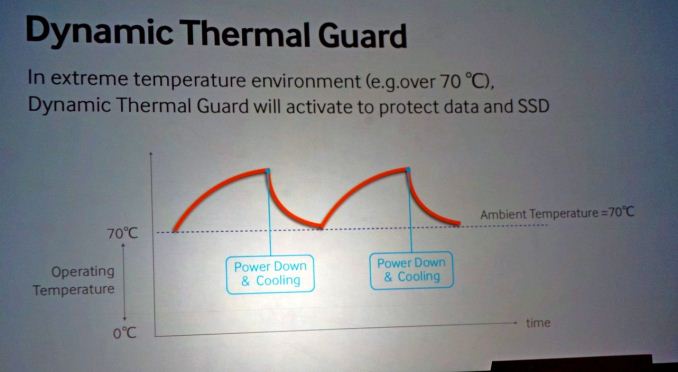
A new feature on the 840 Evo is the addition of Dynamic Thermal Guard, where operating temperatures of the SSD are outside their suggest range (70C+). Using some programming onboard, above the predefined temperature, the drive will throttle its power usage to generate less heat until such time as the operating temperature is more normal. Unfortunately no additional details on this feature were announced, but I think this might result in a redesign for certain gaming laptops that reach 80C+ under high loading.
While this is something relatively new, it is not on the 840 Evo, but as part of the summit today it is worth some discussion. The principle behind NVMe is simple – command structures like IDE and AHCI were developed with mechanical hard-disks in mind. AHCI is still compatible with SSDs, but the move to more devices based on the PCIe requires an update on the command structure in order to be used with higher efficiency and lower overhead. There are currently 11 companies in the working group developing the NVMe specifications, currently at revision 1.1, including Samsung and Intel. The benefits of NVMe include:
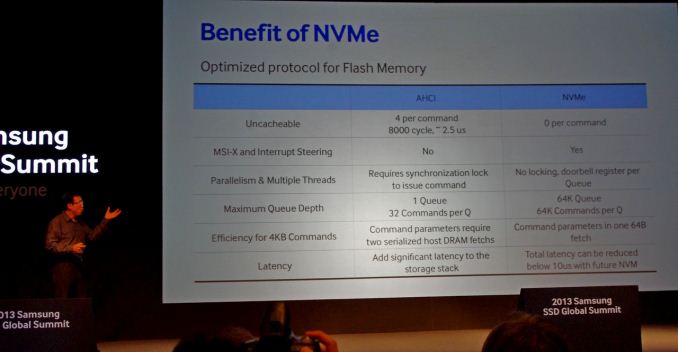
The purpose of NVMe is also to change latency. In AHCI, dealing with mechanical hard drives, if latency is 10% of access times, not much is noticed – but if you reduce access times by two orders of magnitude and the level of latency stays the same, it becomes the main component of any delay. NVMe helps to alleviate that.
Two of the questions from the crowd today were pertinent to how NVMe will be applied in the real world – how will NVMe come about, and despite the fact that current chipsets to not have PCIe-based 2.5” SSD connectors, will we get an adapter from a PCIe slot to the drive? On the first front, Samsung acknowledged that they are working with the major OS manufacturers to support NVMe in their software stack. In terms of motherboard support, in my opinion, as IDE/AHCI is a BIOS option it will require BIOS updates to work in NVMe mode, with AHCI as fallback.
On the second question about a PCIe -> SSD connector, it makes sense that one will be released in due course until chipset manufacturers implement the connectors for SSDs using the PCIe interface. It should not be much of a leap, given that SATA to USB 3.0 connectors are already shipped in some SSD packages.
More information from Korea as it develops…!


Read More ...
Samsung launch the 840 EVO: Up to 1TB and Faster Writes for 120GB
Samsung SSD 840 EVO Specifications |
|||||||
Capacity |
120GB |
250GB |
500GB 750GB |
1000GB |
|||
Sequential Read |
540MB/s |
540MB/s |
540MB/s |
540MB/s |
|||
Sequential Write |
410MB/s |
520MB/s |
520MB/s |
520MB/s |
|||
4KB Random Read (QD32) |
94K IOPS |
97K IOPS |
98K IOPS |
98K IOPS |
|||
4KB Random Write (QD32) |
35K IOPS |
66K IOPS |
90K IOPS |
90K IOPS |
|||
Cache (LPDDR2) |
256MB |
512MB |
512MB |
1GB |
|||

Samsung SSD 840 EVO vs 840 Pro vs 840 vs 830 |
||||
Samsung SSD 830 (256GB) |
Samsung SSD 840 (250GB) |
Samsung SSD 840 Pro (256GB) |
Samsung SSD 840 EVO (250 GB) |
|
Controller |
Samsung MCX |
Samsung MDX |
Samsung MDX |
Samsung MEX |
NAND |
27nm Toggle-Mode 1.1 MLC |
21nm Toggle-Mode 2.0 TLC |
21nm Toggle-Mode MLC |
19nm Toggle-Mode 2.0 TLC |
Sequential Read |
520MB/s |
540MB/s |
540MB/s |
540MB/s |
Sequential Write |
400MB/s |
250MB/s |
520MB/s |
520MB/s |
Random Read |
80K IOPS |
96K IOPS |
100K IOPS |
97K IOPS |
Random Write |
36K IOPS |
62K IOPS |
90K IOPS |
66K IOPS |
Warranty |
3 years |
3 years |
5 years |
3 years |

More information from the Summit as it occurs throughout today and tomorrow!
UPDATE: Pricing is as follows:


Read More ...
Aptina Announces AR1331CP 13 MP CMOS with Clarity Plus - We Take a Look
If you've been reading along with our smartphone coverage for some period of time, you'll know one of the big challenges facing mobile device and image sensor makers has to do with size – pixel size to be exact. The prevailing industry trend has been a steady march towards smaller pixels for a number of related reasons – with smaller pitch you can include more pixels in the same area, or keep the same number of pixels in a smaller area, thus allowing the handset maker to reduce the z-height of their image module thanks to a smaller area it has to form an image onto. The tradeoff of course is less area over which each pixel can integrate light during an exposure, something which up until this last 1.1µm step has largely been able to be mitigated by pixel design. The step from 1.4µm to 1.1µm however does come with a tradeoff in sensitivity, and as a result you see industry moves to mitigate this with OIS, multiple exposures, or avoiding it altogether.
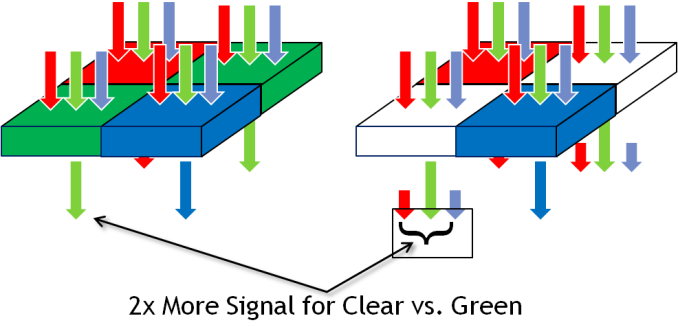
Pixels in a digital camera only count photons, not the wavelength (color) of those incident photons. To resolve more than an image of luminance, you need a color filter array, and interpolate (demosaic) the color of each pixel based on its neighbors. The dominant color filter array for the last twenty or so years of digital imaging has been Bayer, a 2x2 pixel array consisting of RGB pixels, arranged RG,GB, with twice the number of green pixels to mimic human eye response which peaks in sensitivity in the green. This has been dominant in part thanks to how simple it is and how well it works – for most practical imaging applications, Bayer is great. Of course, adding a color filter means rejecting some light, in this case only photons inside the spectral response of the filter get passed, and in the smartphone space where pixels are getting smaller and smaller, every photon matters. For that reason, there's been much attention on using clear pixels somewhere in the array to increase sensitivity. There have been a number of different arrays tried, RG,CB, and 4x4 RG,BC arrays, all with some tradeoff.


An immediate question is how Aptina avoids losing dynamic range in a CMOS sensor with clear pixels (the claim is 0.2 dB loss from the ~38 dB of dynamic range). The answer is that the clear pixel structure has been accordingly modified so it doesn't saturate before the blue and red pixels.


(left) AR1331CP with Clarity+, (right) AR1230 with Bayer
Moving beyond Bayer is something the smartphone industry has tried and failed to do before, with Clarity+ it looks like Aptina might have a much better chance at doing so without any of the loss of resolution, introduction of color artifacts, or other tradeoffs that other proposed clear pixel filters have introduced. There's still the issue of ISP and getting third party silicon vendors to adopt the platform, but handset vendors are enthusiastic enough about improving sensitivity in low light scenarios that there's sufficient pressure to do so.
Source: Aptina (whitepaper - PDF)
Read More ...
The ARM Diaries, Part 2: Understanding the Cortex A12
A couple of weeks ago I began this series on ARM with a discussion of the company’s unique business model. In covering semiconductor companies we’ve come across many that are fabless, but it’s very rare that you come across a successful semiconductor company that doesn’t even sell a chip. ARM’s business entirely revolves around licensing IP for its instruction set as well as its own CPU (and now GPU and video) cores.
Today we focus on one of ARM's newly announced microprocessor cores: the Cortex A12.
Read More ...
AnandTech Mobile: Pinch to Zoom & Pipeline FP Now Supported

Yesterday, with the help of our friends over at Box, we launched the first responsive version of AnandTech. To recap, our single site design will now present you with one of four different views depending on your browser's reported resolution (not user agent string). You'll get a smartphone portrait, smartphone landscape, tablet or desktop view depending on what resolution your browser supports.
Based on your feedback from Monday our developer John has added a couple of additional frequently requested features:
1) Support for Pinch to Zoom is now enabled in the mobile view.
2) The most recent 8 Pipeline stories are now integrated on the front page (all other front pages had them integrated already).
Next on the list are higher res icons :)


Read More ...
Micron Announces 16nm 128Gb MLC NAND, SSDs in 2014

Micron NAND Evolution |
||||||||||||
50nm |
34nm |
25nm |
20nm |
20nm |
16nm |
|||||||
Single Die Max Capacity |
16Gbit |
32Gbit |
64Gbit |
64Gbit |
128Gbit |
128Gbit |
||||||
Page Size |
4KB |
4KB |
8KB |
8KB |
16KB |
16KB |
||||||
Pages per Block |
128 |
128 |
256 |
256 |
512 |
512 |
||||||
Read Page (max) |
- |
- |
75 µs |
100 µs |
115 µs |
? |
||||||
Program Page (typical) |
900 µs |
1200 µs |
1300 µs |
1300 µs |
1600 µs |
? |
||||||
Erase Block (typical) |
- |
- |
3 ms |
3 ms |
3.8 ms |
? |
||||||
Die Size |
- |
172mm2 |
167mm2 |
118mm2 |
202mm2 |
? |
||||||
Gbit per mm2 |
- |
0.186 |
0.383 |
0.542 |
0.634 |
? |
||||||
Rated Program/Erase Cycles |
10000 |
5000 |
3000 |
3000 |
3000 |
~3000 |
||||||
Micron is targeting 3000 program/erase cycles for its 16nm NAND device. Micron's 16nm NAND is sampling now, and will be in production in the Q4 of this year. Micron expects to ship SSDs based on its 16nm NAND in 2014. If the 20nm ramp is any indication, we should expect 16nm NAND in drives in around a year from now.


Read More ...
Razer Hammerhead Pro Audio Impressions
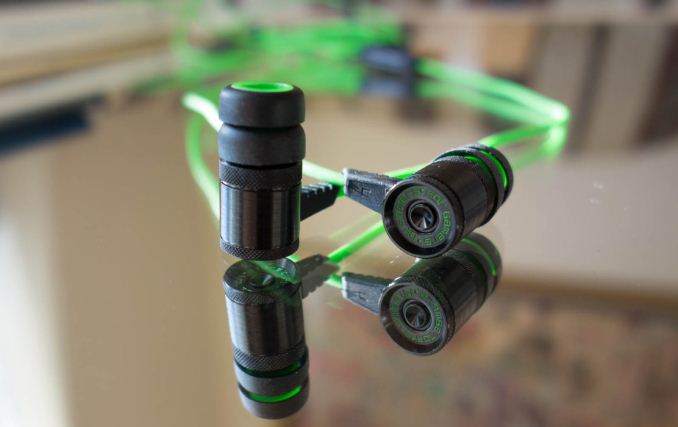
So when Razer told me they had come up with a pair of earbuds that emphasized audio quality, I scoffed. A couple of days later, a set of Hammerhead Pros showed up on my doorstep and I got to test them for myself. The Hammerhead is an in-ear-monitor (IEM) with 9mm Neodymium magnet dynamic drivers priced at $49.95, while the Pro adds an inline microphone for an extra $20. Design and build quality are pretty stellar, with all of the connected pieces being machined from aluminum. There’s some great detailing throughout the design, including knurled aluminum accents and the Razer motto “For gamers, by gamers” stamped into the back of each earbud. Between the black brushed finish of the aluminum and the neon green of the cable, you’re left with a pretty eye-catching set of IEMs.
Given Razer’s recent efforts in the mobile computing space, their motivation in creating a more portable audio solution is pretty clear. It’s a pretty interesting price point, at the intersection of the low end of the audiophile-grade IEMs and the “fashion” earbuds, popularized by the House That Dre Built amongst others. The Hammerheads are certainly styled well enough to compete with the latter, but my interest was looking at them relative to the best budget IEMs. This includes the Klipsch S4, the Etymotic MC5, and my personal pick for best $50 IEM at the moment, the Logitech Ultimate Ears 600, of which I just so happen to own a set.
The Hammerhead sound signature is definitely bass-heavy and tonally warm, though the mids are a bit muddled and instruments aren’t particularly well detailed at the top end. This isn’t really an issue if you’re listening to pop, as the bass-heavy nature of the tracks tends to suit the response of the dynamic driver, but for instrumentally-heavy songs, it certainly isn’t ideal. When compared to the UE 600, a very detailed and responsive set of IEMs, the mids and highs really lack a lot of clarity. The UE 600 is interesting because it’s one of the only balanced armature IEMs you can get at this price point, a feature typically reserved for premium IEMs. Balanced armature drivers tend to respond faster and thus have more accurate, if less bassy, sound profiles. In comparison, the Hammerhead’s overall sound signature ends up feeling not particularly refined, though the bass response is quite nice. It’s neither as crisp nor as balanced, though depending on your music selection it can certainly sound better than the at-times mid-heavy UE 600. Run through a Jay-Z/Kanye West playlist, and the UE 600 just sounds thin, while the warmth of the Hammerhead really shines through. Of course, it should go without saying that audio quality is very subjective, and personal preferences may vary when it comes to sound signature.
Comparing against the UE 600 is probably a bit unfair, because that’s legitimately one of the single best in-ear audio experiences you can get for a street price of $50, with an original MSRP of double that. It’s a legitimately premium set of monitors that’s available on the cheap. Relative to urBeats and most other fashion earbuds, the Hammerheads are a distinct step up, and of course, like any set of half-decent headphones, they’re a huge improvement from OEM-bundled headsets like Apple’s EarPod and the HTC One’s surprisingly not-awful earbuds. I come away pleasantly surprised, because I certainly wasn’t expecting Razer to deliver a competitive audio experience at this price point. For anyone whose primary usage will be music, I would still recommend a set of audio-centric IEMs in this price range, primarily the UE 600s or possibly Klipsch S4s, but the Hammerheads are worth a look. They’re visually impactful and well put together, sound decent (if a bit bass-heavy), and aren’t badly priced, either. For the style conscious, it’s an IEM that could certainly strike the right balance.
Read More ...
MSI GE40 Review: a Slim Gaming Notebook
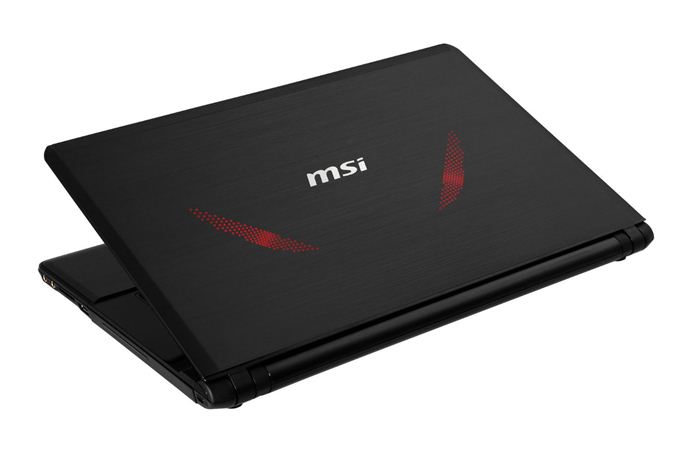 With
Intel’s Haswell launch officially behind us, we’re getting a steady
stream of new notebooks and laptops that have been updated with the
latest processors and GPUs. MSI sent their GE40 our way for review, a
gaming notebook that’s less than an inch thick and pairs a Haswell
i7-4700MQ with NVIDIA’s new GTX 760M GPU. At first glance, it has a lot
in common with the new Razer Blade 14-inch laptop that we recently
reviewed; on second glance, it has even more in common. Read on to find
out the good and the bad of MSI’s GE40.
With
Intel’s Haswell launch officially behind us, we’re getting a steady
stream of new notebooks and laptops that have been updated with the
latest processors and GPUs. MSI sent their GE40 our way for review, a
gaming notebook that’s less than an inch thick and pairs a Haswell
i7-4700MQ with NVIDIA’s new GTX 760M GPU. At first glance, it has a lot
in common with the new Razer Blade 14-inch laptop that we recently
reviewed; on second glance, it has even more in common. Read on to find
out the good and the bad of MSI’s GE40.Read More ...
Introducing AnandTech Mobile: A Responsive Design Update
For the past couple of months our ad sales team has been engaged with Box, an enterprise file sharing and cloud content management company. Box was looking for a way to increase its exposure and brand awareness, and we had a platform to do just that. Rather than rely on typical advertising, Box was thinking of something a little more, er, outside of the box.
Box is absolutely amazing to work with. Rather than asking what we could do for them, they asked us what they could do for us. What immediately came to mind was the overwhelming number of requests for a responsive version of AnandTech. We presented the idea of sponsoring the design and creation of AnandTech Mobile to Box, and they loved it. Over the past month we've been modifying AnandTech and preparing the first responsive implementation of the site. Today, AnandTech Mobile is live.
Read More ...
Samsung Galaxy S 4 Qi Wireless Charging Pad and Cover - Mini Review

Using the wireless charging accessory is simple – you remove the stock battery back, snap on the new one, and plug the wireless charging pad into the Samsung charger that originally shipped with the phone. This last point is critical, as the wireless charging pad requires the 2 amp charger that Samsung supplies with the SGS4. I’ve touched on charging in the past before, but this charger includes the 1.2 V signaling across the D+ and D- pins which signals 2 amp (tablet-class) compatible charging to Samsung devices, like the charging pad. Using a normal BC 1.2 compatible charger won’t work, as that specification only stipulates up to 1.5 amp delivery on its dedicated charging port.

The only downside with the wireless charging back is that it does add noticeably to the thickness of the SGS4. I broke out my calipers and measured an increase in thickness of just over 1.7 mm with the wireless charging back attached instead of the stock one.
Samsung Galaxy S 4 Charging Back Thickness (Measured) |
||||
SGS4 No Battery Cover |
7.20 mm |
|||
SGS4 Stock Battery Cover |
7.94 mm |
|||
SGS4 Wireless Charging Battery Cover |
9.70 mm |
|||


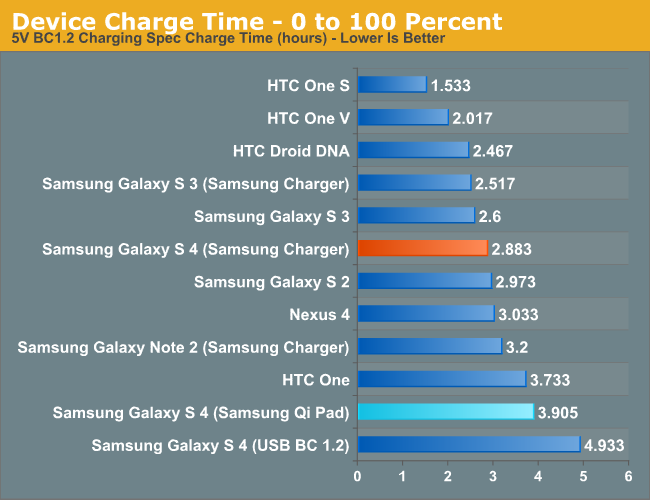
As I mentioned earlier, wireless charging is slowly gaining momentum. It isn’t everywhere, but it’s starting to become more and more of a given instead of a one-off. I’m still waiting for my Qi-compliant nightstand table from IKEA, or charging pads at my local cafe, but who knows when that’ll finally (if ever) happen. Obviously uptake for Samsung would be faster were the SGS4 compatible without the need for an accessory back and charging pad, but the tradeoff would obviously be a thicker phone. I’m pleased with the wireless charging accessory, it works like it’s supposed to, and wireless charging definitely is an added convenience after you’ve used it for a while. The wireless charging pad from Samsung runs for $49, and the wireless charging cover runs $39, both of which are a little steep but still around what I would expect for the pad. Of course the nice thing about Qi is that after you have the cover, you can always shop around for a pad that suits you.
Source: Samsung (Wireless Charging Pad) (Wireless Charging Cover)


Read More ...
ASUS PQ321Q First Look
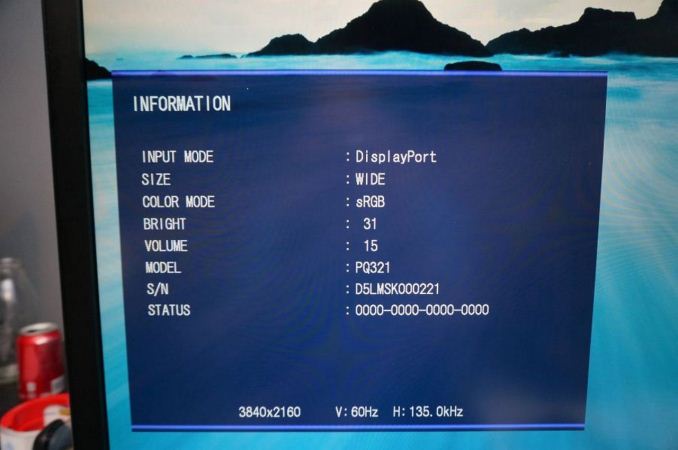
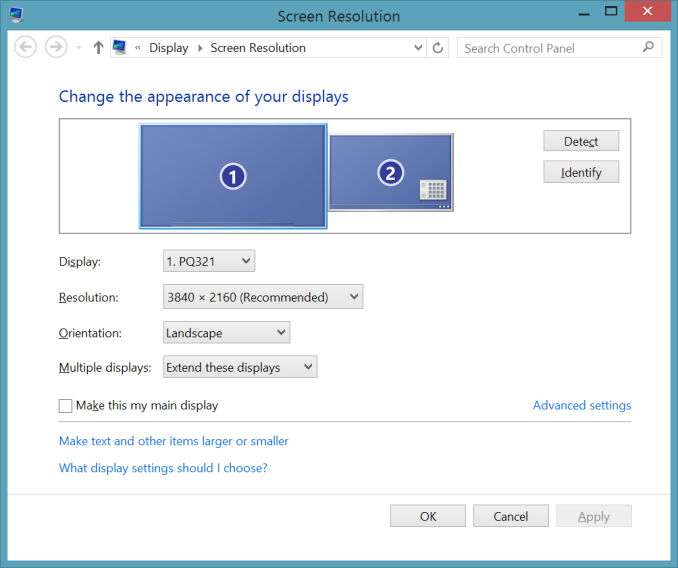


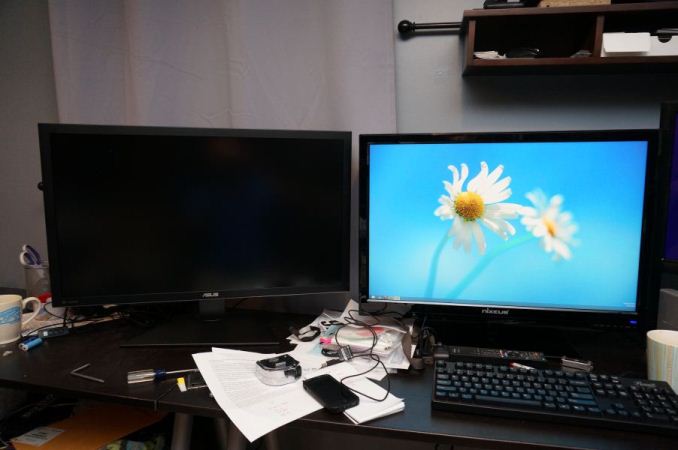
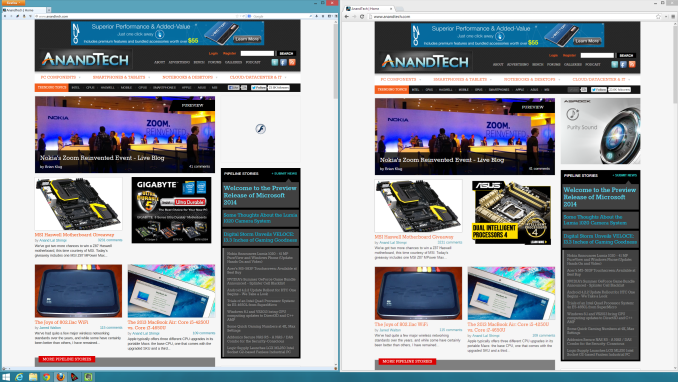
For my testing I also installed the preview copy of Windows 8.1 to use DPI scaling. At 100% text on the ASUS is very small and hard to read. Setting it to 150% and now on applications that support it, it looks very sharp. Images and screenshots look amazing, but typing this in Chrome right now it looks fuzzy. This is going to be an issue with Windows and HighDPI displays until every vendor manages to update their software to support resolution scaling better. Viewing webpages in Firefox they are crisp and sharp compared to Chrome, so software vendors really need to catch up.
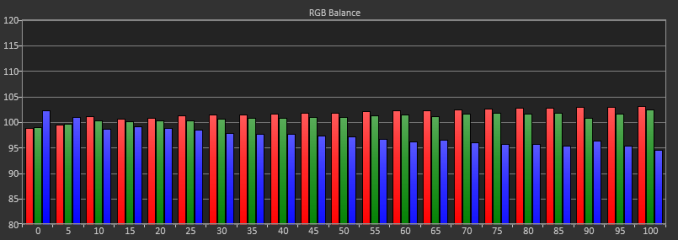
For some initial testing, I used CalMAN 5.1.2 and the sRGB mode on the ASUS PQ321Q. All measurements were done as they are with other monitor reviews, using a profiled C6 meter and targeting 200 nits of light output and a gamma of 2.2.
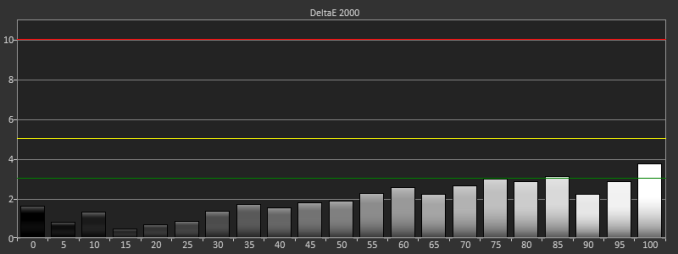
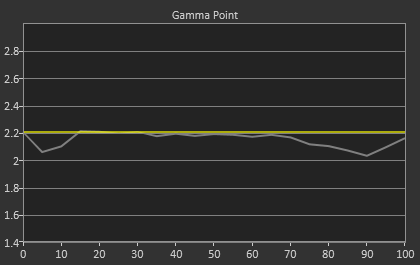
Testing maximum and minimum brightness levels for white level, black level, and contrast provided the following data.
Maximum Backlight |
Minimum Backlight |
|
|---|---|---|
White Level |
408 nits |
57 nits |
Black Level |
0.5326 nits |
0.0756 nits |
Contrast Ratio |
766:1 |
755:1 |
With colors, the ASUS PQ321Q isn't quite as good as with the grayscale. The main issue looks to be a lack of red and blue saturation, which causes a lack of magenta saturation as well. Looking at the CIE chart you see those points fall short of their targets. You'll also see that green goes a bit too far, giving us some color errors that are over 3.0 except for Cyan.
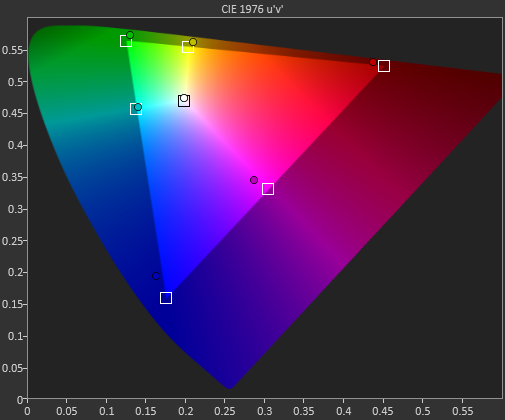
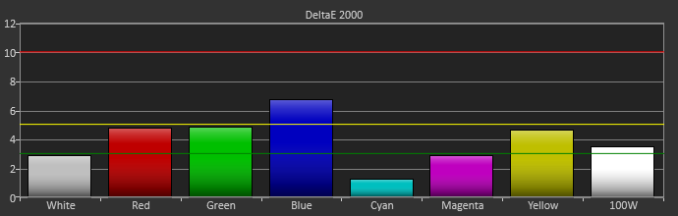
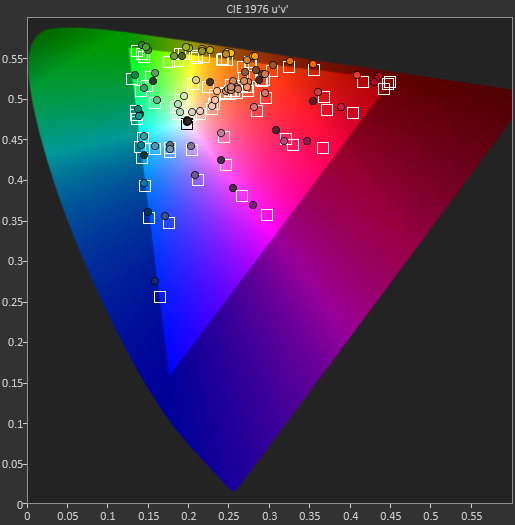
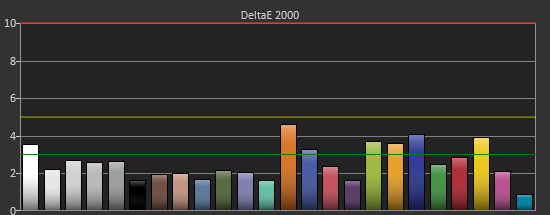
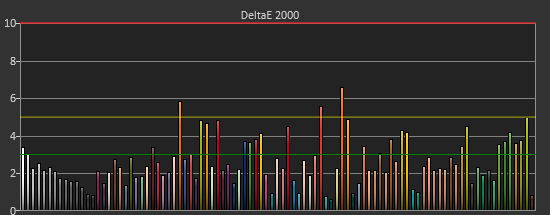
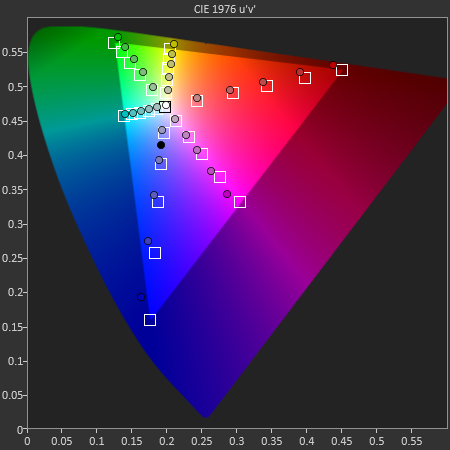
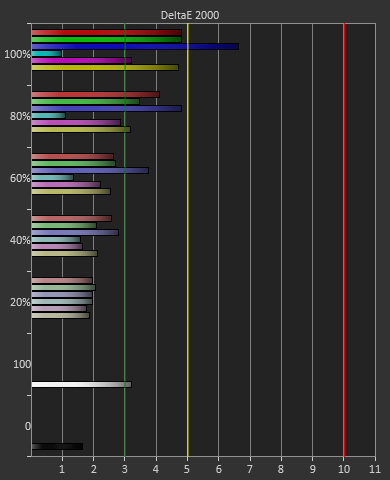
Our final initial test is the saturation test. As you might expect with a gamut where under-saturation is an issue, the errors get larger as saturation approaches 100%.
Read More ...
Google Offers $35 Media Streaming Stick "Chromecast"
It's available in the U.S. starting today, with other countries to follow

     |
Read More ...
Neuron Chip "Learns" to Recognize Distinct Gestures Via Retina Sensors
Neuromorphic community continues to advance towards offering analogous behavior to mammal brains

| |
Read More ...
ARM Beats Profit, Revenue Expectations, but Misses on Margin Growth
Generally Q2 2013 was still a good show for ARM, though who was buffered from smartphone slump on the high end

| |
Read More ...
DARPA Plans Hydra Mothership for Underwater Attacks
Hail Hydra!

| |
Read More ...
Quick Note: "Gran Turismo" Movie in the Works
The producers of "Fifty Shades of Grey" will be working on it

| |
Read More ...
Apple's Q3 Earnings, iPhone Sales Beat Analyst Expectations
Apple sold 31.2 million iPhones for the quarter

| |
Read More ...
Turkey's Top Hacker Defaces Skrillex's Webpage, Posts Poetry
Eboz/KriptekS works alone, claims to have defaced 90,000 webpages, compromised Gmail

| |
Read More ...
Ford and Toyota Sever Partnership to Develop Hybrid Trucks
Each automaker will go their own way with hybrid truck development

| |
Read More ...
7/24/2013 Daily Hardware Reviews
DailyTech's roundup of reviews from around the internet for Wednesday

| |
Read More ...
Best Buy Steals Google's Thunder, Already Taking Pre-Orders for New $229 Nexus 7
Best Buy jumps the gun with Nexus 7 information, pictures

| |
Read More ...
Available Tags:Android , NVIDIA , AnandTech , GeForce , HTC , Samsung , MSI , Gaming , Notebook , Galaxy , Wireless , ASUS , Google , Via , iPhone , Ford , Toyota , Hardware ,


No comments:
Post a Comment