

Samsung Galaxy S 4 ZeroLemon 7500 mAh Extended Battery Review
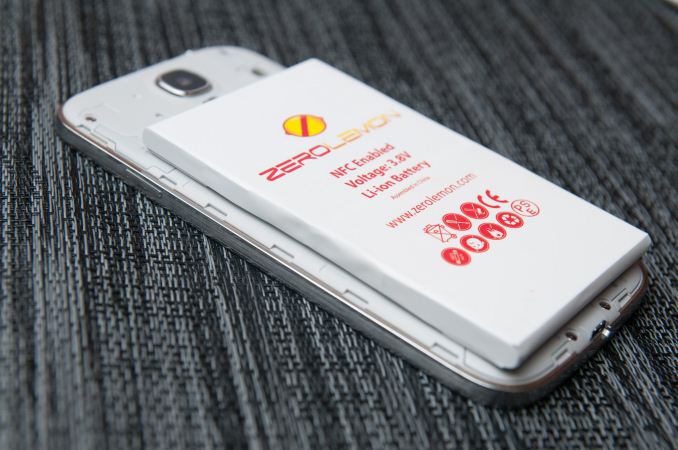
I’ve been carrying the Samsung Galaxy S4 Google Play edition (henceforth SGS4 GPe) alongside the HTC One GPe since getting the two devices, and while I have a Mophie Juice Pack for the HTC One, I didn’t really have a bigger battery solution for the SGS4 GPe. Probably my biggest use case for extended batteries is when I’m traveling, where having a bigger battery often is the difference between being able to relax and searching for an outlet in a terminal. When I saw the ZeroLemon 7500 mAh battery mentioned on Reddit’s r/android and instantly knew I wanted to give it a try and put it through our battery life and charge test routine.


Obviously the weight and size of the SGS4 changes with the case and extended battery installed, the question is how much. The tradeoff with the bigger battery is that the SGS4 gets considerably bigger, but not unwieldy so. It’s a big phone for sure though.


Samsung Galaxy S 4 Extended Battery |
|||||
Battery |
Stock 2600 |
ZeroLemon 7500 mAh |
|||
SGS4 Thickness With Door |
7.94 mm |
17.0 mm |
|||
Battery Mass |
43.5 grams |
132.3 grams |
|||
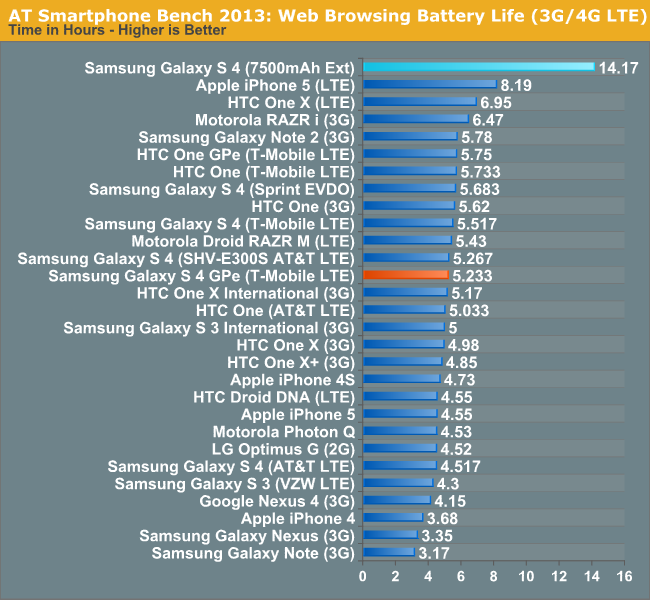
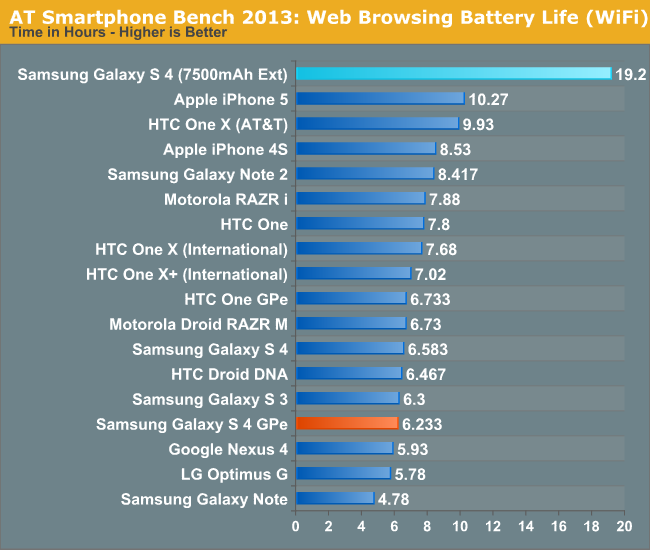

If you’re willing to make the size and weight tradeoff and want an absolutely huge extended battery for the SGS4, the ZeroLemon 7500 mAh battery seems like a pretty good choice.
Source: ZeroLemon (Amazon)
Read More ...
Haswell Goes Fanless: 4.5W SDP Parts in Limited Volumes Later this Year
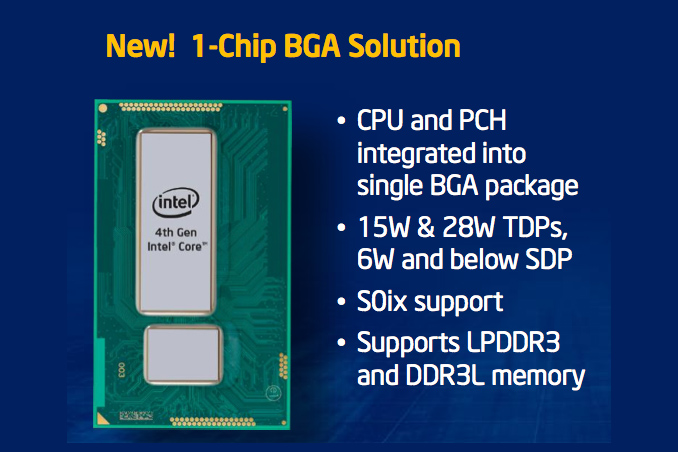
I went through the SDP discussion earlier this year. But in short, Intel calculates TDP by looking at average power through a set of benchmarks that tend to include some of the worst case offenders on a desktop or notebook PC. The SDP thermal rating is specific only to Y-series parts and uses a lesser set of benchmarks, more appropriate for a thin tablet chassis, to determine average power. If you run Furmark on one of these parts and the OEM building the system does nothing to thermally manage the platform, it'll dissipate 11.5W. If you use it like a tablet, you should see 4.5W (or 6W depending on the SKU) as the average power dissipated. Realistically the 11.5W value can be boosted up to, but not sustained.
Moving from 6W SDP down to 4.5W SDP is a big deal because it enables something huge: fanless Haswell tablet designs. At 6W Intel recommends some sort of active cooling within the chassis, but at 4.5W it's possible to go completely fanless.
Earlier this week I pointed out that Haswell ULT finally got its platform power story in order, enabling ARM-like battery life on some light tablet workloads. The benefit to tossing Haswell into a tablet is the ability to have a greater dynamic range of performance than what's currently available from the ARM ecosystem. Great battery life when you're running tablet workloads, but the ability to get notebook-like performance when you need it as well.
Just because it's possible to get Haswell in a fanless tablet however, doesn't mean that it's going to happen. Uptake of the 7W SDP Ivy Bridge parts was pretty much non-existent from what I've seen. Intel's use of the phrase "limited volumes" gives us an indication that we shouldn't expect anything major here either. In my Haswell ULT tablet experiment I noted that although CPU power efficiency looked good, power consumption during video decode was pretty bad compared to what you can get from modern ARM SoCs.
The other thing worth thinking about is the total board area required by a Haswell implementation vs. effectively a high-end ARM smartphone SoC. Haswell may be capable of fitting into an iPad-like chassis, but can an OEM shrink the PCB enough to be a comparable size? If the answer is no (and I'm assuming that's the case given how much bigger the Haswell ULT/ULX package is than what you get from ARM), then a 4.5W SDP Haswell ULX based tablet would either have to be larger than an ARM equivalent or you'd get it with a smaller battery.
It's good to see Intel continuing to push its Core family of microprocessors down the power scale, but I feel like there's a lot more room for integration to happen before we can really speak about Core in the same breath as an ARM SoC. The good news is that some adventurous OEMs can likely build something iPad sized out of Haswell this year if they want to, but I'm still expecting the best attempts to come with Broadwell (with the exception of the Haswell Surface Pro of course, depending on what Microsoft decides to do).
Read More ...
ASUS PQ321Q UltraHD Monitor Review: Living with a 31.5-inch 4K Desktop Display
Many consider me to be a 4K hater. The past few trade shows I’ve attended have been pushing it on consumers to replace their TVs, but I see less value in it. When it comes to a computer display, it is a different game. Unlike a 50” TV, we sit close to our monitors, even if they are 30” in size. We also have no worries about a lack of native content, since everything is rendered on the fly and native. There are issues with about the lack of HDMI 2.0, as DisplayPort 1.2 can drive a 3840x2160 screen at 60 Hz.
When it comes to 4K on the desktop, my main question is: how much difference will I see? ASUS is one of the first with a HiDPI display in the PQ321Q. While not truly 4K, it is a 3840x2160 LCD display that can accept an Ultra High Definition (UHD) signal over HDMI and DisplayPort. It also clocks in at a wallet-stretching $3,500 right now. The question is, are we seeing the future with displays here, or are we seeing a niche product?
Read More ...
NVIDIA Announces Quadro K6000
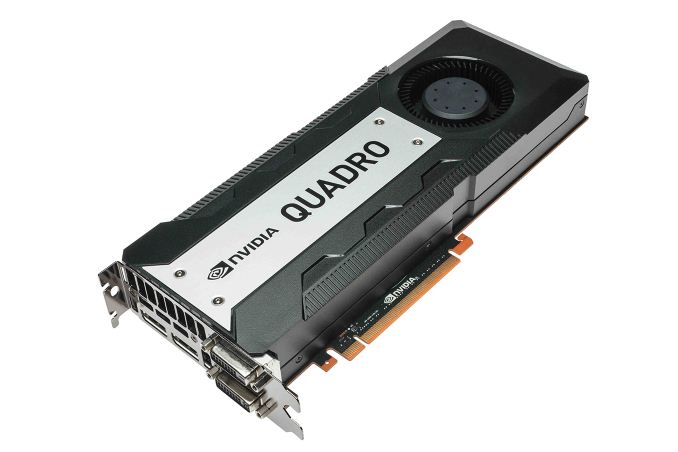
In NVIDIA’s product hierarchy, the Quadro 6000 cards hold the position of NVIDIA’s most powerful products. They’re not just the flagship cards for the Quadro family, but really the flagship for the entire generation of GPUs, possessing the compute functionality of Tesla combined with the graphics functionality of GeForce/Quadro, and powered by what’s typically the single most powerful GPU configuration NVIDIA offers. They’re unabashedly high end – and have a price tag to match – but in many ways they’re the capstone of a generation. It should come as no surprise then that with the Quadro K6000, NVIDIA is looking to launch what will become the king of the Keplers.
Quadro K6000 |
Quadro K5000 |
Quadro 6000 |
|
Stream Processors |
2880 |
1536 |
448 |
Texture Units |
240 |
128 |
56 |
ROPs |
48 |
32 |
48 |
Core Clock |
~900MHz |
~700MHz |
574MHz |
Shader Clock |
N/A |
N/A |
1148MHz |
Memory Clock |
6GHz GDDR5 |
5.4GHz GDDR5 |
3GHz GDDR5 |
Memory Bus Width |
384-bit |
256-bit |
384-bit |
Frame Buffer |
12GB |
4GB |
6GB |
FP64 |
1/3 FP32 |
1/24 FP32 |
1/2 FP32 |
Max Power |
225W |
122W |
204W |
Architecture |
Kepler |
Kepler |
Fermi |
Transistor Count |
7.1B |
3.5B |
3B |
Manufacturing Process |
TSMC 28nm |
TSMC 28nm |
TSMC 40nm |
With Quadro NVIDIA doesn’t promote the specifications of the card nearly as much as they promote the use cases – in fact they don’t even publish clockspeeds – but based on their performance data it’s always easy to quickly calculate the necessary information. With a quoted compute performance of 5.2TFLOPs/sec for single precision (FP32), Quadro K6000 is the first fully enabled GK110 part, shipping with all 15 SMXes up and running. These in turn are clocked at roughly 900MHz, the highest base clockspeed for any GK110 card. Paired with this GPU is a staggering 12GB of VRAM clocked at 6GHz, marking the first NVIDIA product shipping with 4Gb GDDR5. The TDP on all of this? Only 225W.
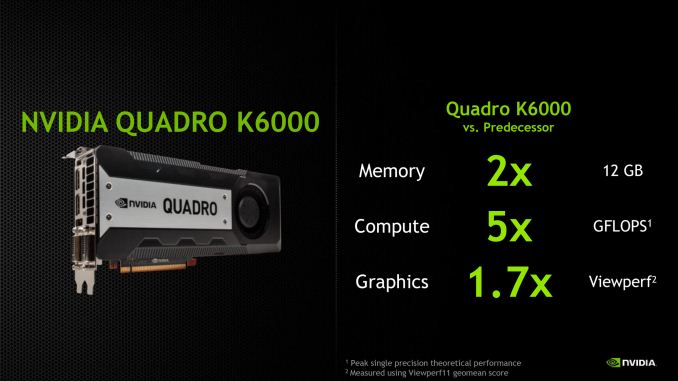
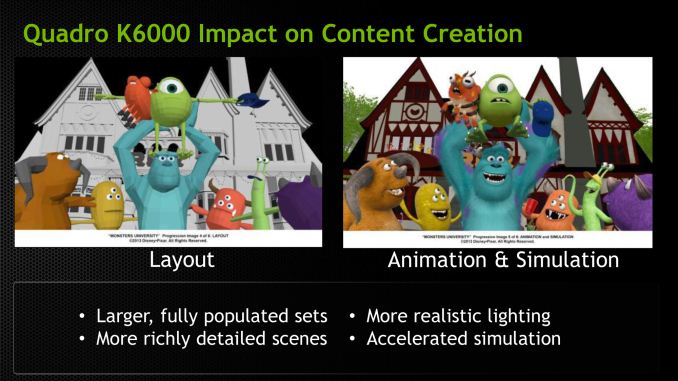
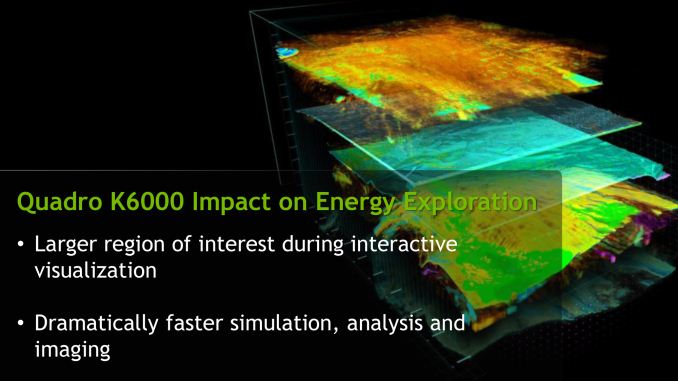
So who and what is NVIDIA pitching the Quadro K6000 at? As with the Quadro 6000 this is primarily (and unabashedly) being pitched at the deep pocketed content creation and product design crowds, who can afford to drop several kilobucks on a single card. In these cases the gains from Quadro K6000 are a mix of greater rendering performance and the greater VRAM. The latter in particular may very well be more important than the former, since often the limits in real time workloads is fitting all of the assets into memory rather than drawing them, due to the very severe performance cliff from spilling over into system memory.
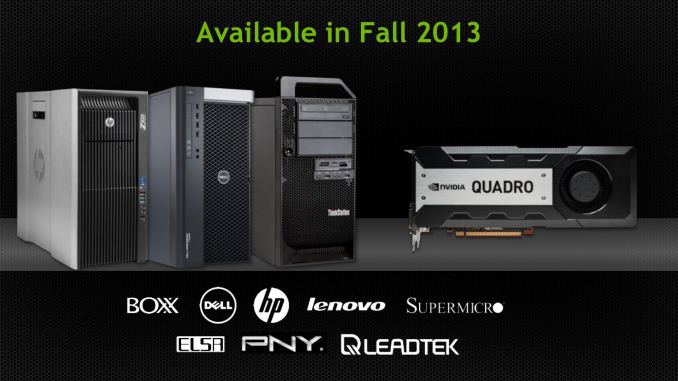
Finally, let’s quickly talk about launch details. As is usually the case for Quadro products NVIDIA is announcing the Quadro K6000 a couple months ahead of its ship date, so K6000 is not officially slated to start shipping until sometime in the fall. As always the cards will be sold both individually and through NVIDIA’s usual OEM partners, including Dell, HP, and Lenovo. NVIDIA has yet to announce a price tag for individual K6000 cards, but based on the price of the previous Quadro 6000 cards we’d expect to see them at around $5000-$7000 each.
Read More ...
OCZ Announces ZD-XL PCIe SQL Accelerator SSD Solution
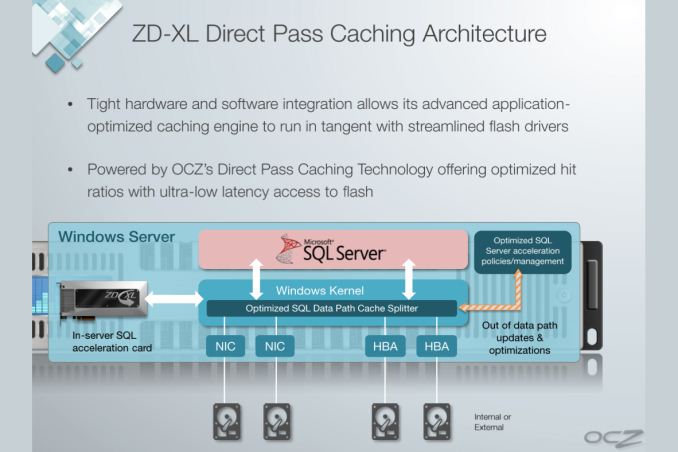
Enterprise accelerator cards are effectively very high performance SSD caching solutions. Some enterprise applications and/or databases can have extremely large footprints (think many TBs or PBs), making moving to a Flash-only server environment undesirable or impossible. The next best solution is use a NAND based SSD cache. You won't get full data coverage, but if you size the cache appropriately you might get a considerable speedup.
OCZ's ZD-XL is specifically targeted at servers running Microsoft SQL. Although technically the solution caches all IOs to a given volume, OCZ's ZD-XL software is specifically tuned/optimized for SQL server workloads. The ZD-XL only supports a physical Windows Server environment, OCZ offers a separate line of products for accelerating virtualized environments.
The ZD-XL SSD itself is based on OCZ's Z-Drive r4, featuring 4 or 8 SF-2000 series controllers on a single PCIe Gen 2 x8 card, depending on capacity. OCZ doesn't make the NAND or controller, but the card is built in-house. The ZD-XL implementation comes with a custom firmware and software solution, courtesy of OCZ's Sanrad team. The architecture, at least on paper, looks quite sensible.
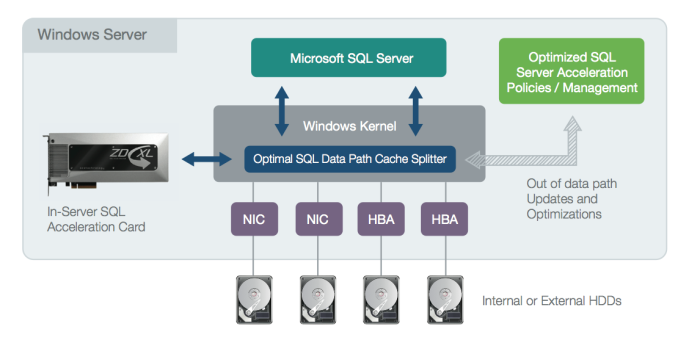
The ZD-XL card comes with a special firmware that enables support for the ZD-XL software layer, preventing Z-Drive r4 owners from simply downloading the ZD-XL caching software and rolling their own solution. The software layer is really where the magic happens. All IOs directed at a target volume (e.g. where your SQL database is stored) are intercepted by a thin driver (cache splitter) and passed along to the target volume. An out-of-band analysis engine takes a look at the stream of IOs and determines which ones are best suited for caching. Frequently accessed data is copied over to the ZD-XL card, and whenever the cache splitter sees a request for data that's stored on the ZD-XL it's served from the very fast PCIe SSD rather than from a presumably slower array of hard drives or high latency SAN.
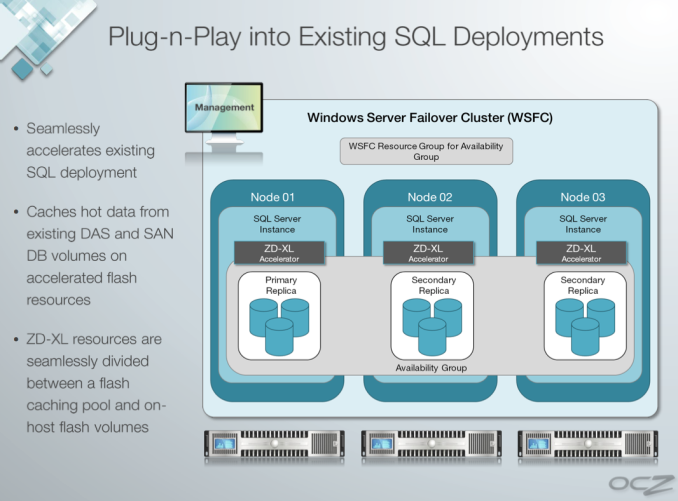
The analysis engine supports multiple caching policies that it can dynamically switch between, depending on workload, to avoid thrashing the cache. There's even cache policy support for deployment in a SQL AlwaysOn environment.
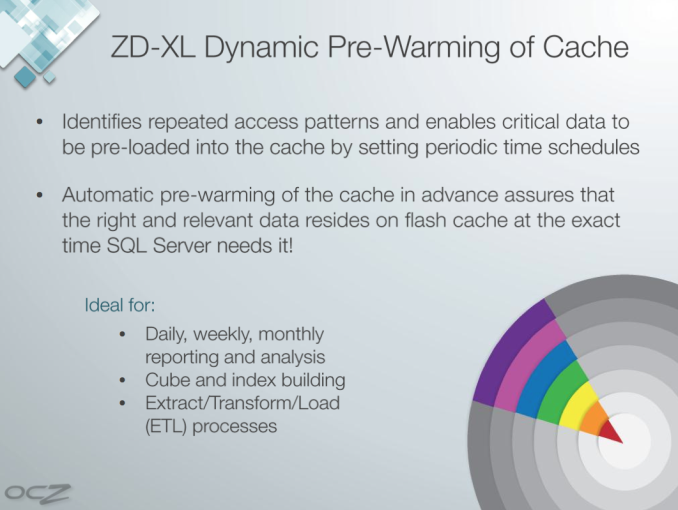
OCZ's software supports automated pre-warming of the cache. For example, if you have a large query that runs between 9AM and 11:30AM every day the ZD-XL can look at the access patterns generated during that period and ensure that as much of the accessed data is available in the cache as possible during that time period.
OCZ's ZD-XL can be partitioned into cache and native storage volumes. In other words you don't have to use the entire capacity of the card as cache, you can treat parts of it as a static volume (e.g. for your log files) and other parts of it as a cache for a much larger database.
The large capacities OCZ offers with the ZD-XL (600GB, 800GB, 1.6TB) will likely help ensure good cache utilization, although there's no pre-purchase way of figuring out what the ideal cache size would be for your workload. This seems to be a problem with enterprise SSDs in general - IT administrators have to do a lot of work to determine the best SSD (or SSD caching) solution for their specific environment, there aren't many tools out there to help categorize/characterize a workload.
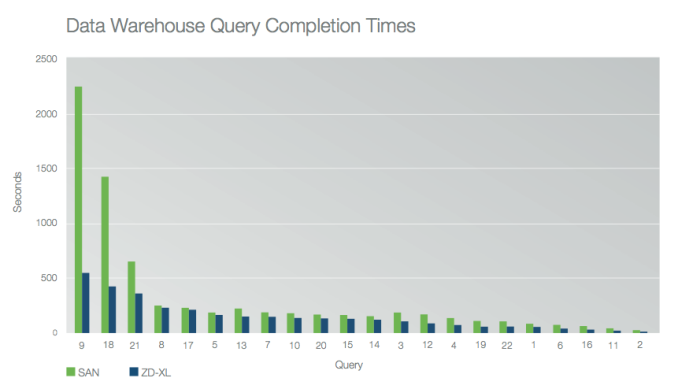
OCZ published a white paper showing performance gains for simulated workloads with and without the ZD-XL accelerator. In all of OCZ's test cases the improvements were tremendous, which is what you'd expect when introducing a giant PCIe SSD into a server that previously only had big arrays of mechanical hard drives. Queries complete quicker, servers that aren't CPU bound can support more users, etc...
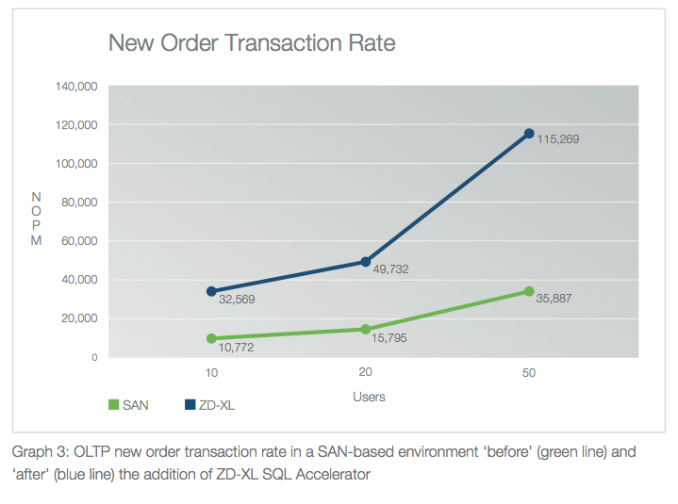
Just as we've seen in the client space, SSD caching can work - the trick is ensuring you have a large enough cache to have a meaningful impact on performance. Given that the smallest ZD-XL is already 600GB, I don't think this will be an issue.
The only other requirement is that the caching software itself needs to be intelligent enough to make good use of the cache. OCZ's internal test data obviously shows the cache doing its job well in caching very long queries. Building good caching software isn't too difficult, it's just a matter of implementing well understood caching algorithms and having the benefit of a large enough cache to use.
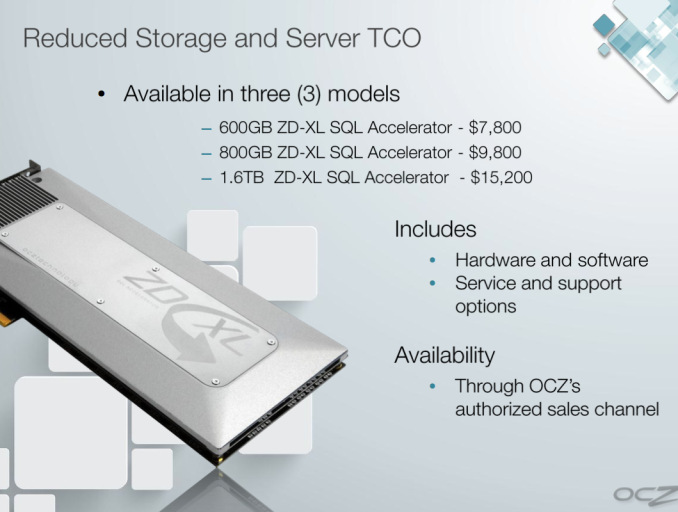
The ZD-XL is priced at $7800, $9800 and $15,200 for 600GB, 800GB and 1.6TB capacities. The prices include software and drivers.
Read More ...
Google's Bid to Combat Glass Porn Proves Flaccid, Adult POV Film Airs
James Deen and Andy San Dimas used Google glasses to shoot a unique brand of experiential porn

     |
Read More ...
Fukushima Plant is Leaking Radioactive Water Into the Sea
Tokyo Power company had deep Yakuza ties, ignored warnings from its most senior engineers

| |
Read More ...
Two-Drug Therapy Could Keep Cancer from Growing, Spreading
It's not a cure just yet, but could lead to one

| |
Read More ...
Intel Targets Low-Power Server Market With 14nm Broadwell SoCs in 2014
Move is a calculated counterattack on low power ARM server offerings

| |
Read More ...
T-Mobile Slams AT&T's "Upgrade Program" in New Print Advertisement
T-Mobile says AT&T only wants to make more money

| |
Read More ...
New Images of Earth/Moon Captured by NASA Spacecrafts in Saturn, Mercury
They were taken July 19, 2013

| |
Read More ...
Samsung Unleashes 28 nm Octacore Chip for Smartphones, Tablets
New chip has four low power and four high power cores for maximum efficiency

| |
Read More ...
Publishers Offering Feature-Packed, Digital Textbooks to Overcome Used Market Woes
About 77 percent of students said they still prefer print books

| |
Read More ...
Ford Police Interceptor Offers New Surveillance Technology to Protect Officers
Ford offers technology to help protect police officers at night

| |
Read More ...
Available Tags:Samsung , Galaxy , ASUS , NVIDIA , OCZ , SQL , SSD , Intel , Server , NASA , Ford ,


No comments:
Post a Comment