

New Elements to Samsung SSDs: The MEX Controller, Turbo Write and NVMe
The MEX Controller
First up is the upgrade to the controller. Samsung’s naming scheme from the 830 onwards has been MCX (830), MDX (840, 840 Pro) and now the MEX with the 840 Evo. This uses the same 3-core ARM Cortex R4 base, however boosted from 300 MHz in the MDX to 400 MHz in the MEX. This 33% boost in pure speed is partly responsible for the overall increase in 4K random IOPS at QD1, which rise from 7900 in the 840 to 10000 in the 840 Evo (+27%). This is in addition to firmware updates with the new controller, and that some of the functions of the system have been ported as hardware ops rather than software ops.
TurboWrite
The most thought provoking announcement was TurboWrite. This is the high performance buffer inside the 840 Evo which contributes to the high write speed compared to the 840 (140 MB/s on 120GB drive with the 840, compared to 410 MB/s on the 840 Evo 120GB). Because writing to 3-bit MLC takes longer than 2-bit MLC or SLC, Samsung are using this high performance buffer in SLC mode. Then, when the drive is idle, it will pass the data on to the main drive NAND when performance is not an issue.
The amount of ‘high-performance buffer’ with the 840 Evo will depend on the model being used. Also, while the buffer is still technically 3-bit MLC, due to its use in SLC mode the amount of storage in the buffer decreases by a factor three. So in the 1TB version of the 840 Evo, which has 36 GB of buffer, in actual fact can accommodate 12 GB of writes in SLC mode before reverting to the main NAND. In the 1TB model however, TurboWrite has a minimal effect – it is in the 120GB model where Samsung are reporting the 3x increase in write speeds.
In the 120GB and 250GB models, they will have 9 GB of 3-bit MLC buffer, which will equate to 3 GB of writes. Beyond this level of writes (despite the 10GB/day oft quoted average), one would assume that the device reverts back to the former write speed – in this case perhaps closer to the 140 MB/s number from the 840, but the addition of firmware updates will go above this. However, without a drive to test it would be pure speculation, but will surely come up in the Q&A session later today, and we will update the more we know.
Dynamic Thermal Guard
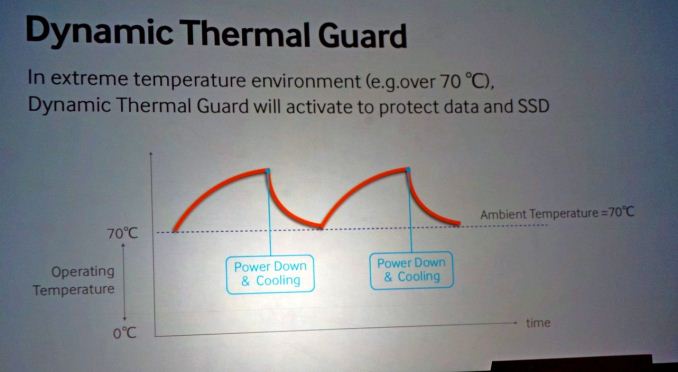
A new feature on the 840 Evo is the addition of Dynamic Thermal Guard, where operating temperatures of the SSD are outside their suggest range (70C+). Using some programming onboard, above the predefined temperature, the drive will throttle its power usage to generate less heat until such time as the operating temperature is more normal. Unfortunately no additional details on this feature were announced, but I think this might result in a redesign for certain gaming laptops that reach 80C+ under high loading.
While this is something relatively new, it is not on the 840 Evo, but as part of the summit today it is worth some discussion. The principle behind NVMe is simple – command structures like IDE and AHCI were developed with mechanical hard-disks in mind. AHCI is still compatible with SSDs, but the move to more devices based on the PCIe requires an update on the command structure in order to be used with higher efficiency and lower overhead. There are currently 11 companies in the working group developing the NVMe specifications, currently at revision 1.1, including Samsung and Intel. The benefits of NVMe include:
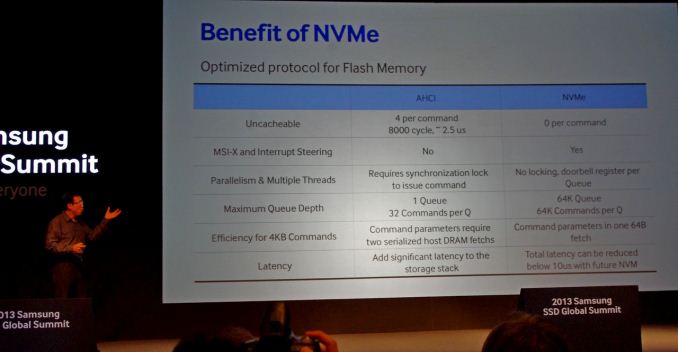
The purpose of NVMe is also to change latency. In AHCI, dealing with mechanical hard drives, if latency is 10% of access times, not much is noticed – but if you reduce access times by two orders of magnitude and the level of latency stays the same, it becomes the main component of any delay. NVMe helps to alleviate that.
Two of the questions from the crowd today were pertinent to how NVMe will be applied in the real world – how will NVMe come about, and despite the fact that current chipsets to not have PCIe-based 2.5” SSD connectors, will we get an adapter from a PCIe slot to the drive? On the first front, Samsung acknowledged that they are working with the major OS manufacturers to support NVMe in their software stack. In terms of motherboard support, in my opinion, as IDE/AHCI is a BIOS option it will require BIOS updates to work in NVMe mode, with AHCI as fallback.
On the second question about a PCIe -> SSD connector, it makes sense that one will be released in due course until chipset manufacturers implement the connectors for SSDs using the PCIe interface. It should not be much of a leap, given that SATA to USB 3.0 connectors are already shipped in some SSD packages.
More information from Korea as it develops…!


Read More ...
Samsung launch the 840 EVO: Up to 1TB and Faster Writes for 120GB
Samsung SSD 840 EVO Specifications |
|||||||
Capacity |
120GB |
250GB |
500GB 750GB |
1000GB |
|||
Sequential Read |
540MB/s |
540MB/s |
540MB/s |
540MB/s |
|||
Sequential Write |
410MB/s |
520MB/s |
520MB/s |
520MB/s |
|||
4KB Random Read (QD32) |
94K IOPS |
97K IOPS |
98K IOPS |
98K IOPS |
|||
4KB Random Write (QD32) |
35K IOPS |
66K IOPS |
90K IOPS |
90K IOPS |
|||
Cache (LPDDR2) |
256MB |
512MB |
512MB |
1GB |
|||

Samsung SSD 840 EVO vs 840 Pro vs 840 vs 830 |
||||
Samsung SSD 830 (256GB) |
Samsung SSD 840 (250GB) |
Samsung SSD 840 Pro (256GB) |
Samsung SSD 840 EVO (250 GB) |
|
Controller |
Samsung MCX |
Samsung MDX |
Samsung MDX |
Samsung MEX |
NAND |
27nm Toggle-Mode 1.1 MLC |
21nm Toggle-Mode 2.0 TLC |
21nm Toggle-Mode MLC |
19nm Toggle-Mode 2.0 TLC |
Sequential Read |
520MB/s |
540MB/s |
540MB/s |
540MB/s |
Sequential Write |
400MB/s |
250MB/s |
520MB/s |
520MB/s |
Random Read |
80K IOPS |
96K IOPS |
100K IOPS |
97K IOPS |
Random Write |
36K IOPS |
62K IOPS |
90K IOPS |
66K IOPS |
Warranty |
3 years |
3 years |
5 years |
3 years |

More information from the Summit as it occurs throughout today and tomorrow!
UPDATE: Pricing is as follows:


Read More ...
Aptina Announces AR1331CP 13 MP CMOS with Clarity Plus - We Take a Look
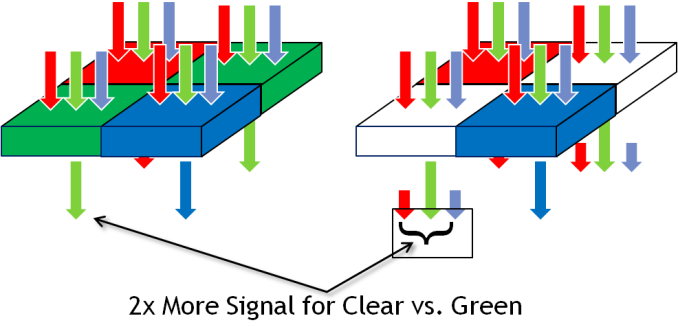
If you've been reading along with our smartphone coverage for some period of time, you'll know one of the big challenges facing mobile device and image sensor makers has to do with size – pixel size to be exact. The prevailing industry trend has been a steady march towards smaller pixels for a number of related reasons – with smaller pitch you can include more pixels in the same area, or keep the same number of pixels in a smaller area, thus allowing the handset maker to reduce the z-height of their image module thanks to a smaller area it has to form an image onto. The tradeoff of course is less area over which each pixel can integrate light during an exposure, something which up until this last 1.1µm step has largely been able to be mitigated by pixel design. The step from 1.4µm to 1.1µm however does come with a tradeoff in sensitivity, and as a result you see industry moves to mitigate this with OIS, multiple exposures, or avoiding it altogether.
Pixels in a digital camera only count photons, not the wavelength (color) of those incident photons. To resolve more than an image of luminance, you need a color filter array, and interpolate (demosaic) the color of each pixel based on its neighbors. The dominant color filter array for the last twenty or so years of digital imaging has been Bayer, a 2x2 pixel array consisting of RGB pixels, arranged RG,GB, with twice the number of green pixels to mimic human eye response which peaks in sensitivity in the green. This has been dominant in part thanks to how simple it is and how well it works – for most practical imaging applications, Bayer is great. Of course, adding a color filter means rejecting some light, in this case only photons inside the spectral response of the filter get passed, and in the smartphone space where pixels are getting smaller and smaller, every photon matters. For that reason, there's been much attention on using clear pixels somewhere in the array to increase sensitivity. There have been a number of different arrays tried, RG,CB, and 4x4 RG,BC arrays, all with some tradeoff.


An immediate question is how Aptina avoids losing dynamic range in a CMOS sensor with clear pixels (the claim is 0.2 dB loss from the ~38 dB of dynamic range). The answer is that the clear pixel structure has been accordingly modified so it doesn't saturate before the blue and red pixels.


(left) AR1331CP with Clarity+, (right) AR1230 with Bayer
Moving beyond Bayer is something the smartphone industry has tried and failed to do before, with Clarity+ it looks like Aptina might have a much better chance at doing so without any of the loss of resolution, introduction of color artifacts, or other tradeoffs that other proposed clear pixel filters have introduced. There's still the issue of ISP and getting third party silicon vendors to adopt the platform, but handset vendors are enthusiastic enough about improving sensitivity in low light scenarios that there's sufficient pressure to do so.
Source: Aptina (whitepaper - PDF)
Read More ...
The ARM Diaries, Part 2: Understanding the Cortex A12
A couple of weeks ago I began this series on ARM with a discussion of the company’s unique business model. In covering semiconductor companies we’ve come across many that are fabless, but it’s very rare that you come across a successful semiconductor company that doesn’t even sell a chip. ARM’s business entirely revolves around licensing IP for its instruction set as well as its own CPU (and now GPU and video) cores.
Today we focus on one of ARM's newly announced microprocessor cores: the Cortex A12.
Read More ...
Samsung Galaxy S 4 Qi Wireless Charging Pad and Cover - Mini Review

Using the wireless charging accessory is simple – you remove the stock battery back, snap on the new one, and plug the wireless charging pad into the Samsung charger that originally shipped with the phone. This last point is critical, as the wireless charging pad requires the 2 amp charger that Samsung supplies with the SGS4. I’ve touched on charging in the past before, but this charger includes the 1.2 V signaling across the D+ and D- pins which signals 2 amp (tablet-class) compatible charging to Samsung devices, like the charging pad. Using a normal BC 1.2 compatible charger won’t work, as that specification only stipulates up to 1.5 amp delivery on its dedicated charging port.

The only downside with the wireless charging back is that it does add noticeably to the thickness of the SGS4. I broke out my calipers and measured an increase in thickness of just over 1.7 mm with the wireless charging back attached instead of the stock one.
Samsung Galaxy S 4 Charging Back Thickness (Measured) |
||||
SGS4 No Battery Cover |
7.20 mm |
|||
SGS4 Stock Battery Cover |
7.94 mm |
|||
SGS4 Wireless Charging Battery Cover |
9.70 mm |
|||


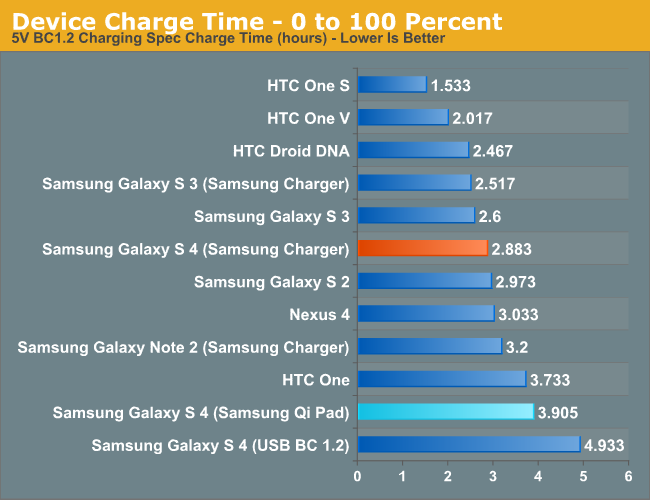
As I mentioned earlier, wireless charging is slowly gaining momentum. It isn’t everywhere, but it’s starting to become more and more of a given instead of a one-off. I’m still waiting for my Qi-compliant nightstand table from IKEA, or charging pads at my local cafe, but who knows when that’ll finally (if ever) happen. Obviously uptake for Samsung would be faster were the SGS4 compatible without the need for an accessory back and charging pad, but the tradeoff would obviously be a thicker phone. I’m pleased with the wireless charging accessory, it works like it’s supposed to, and wireless charging definitely is an added convenience after you’ve used it for a while. The wireless charging pad from Samsung runs for $49, and the wireless charging cover runs $39, both of which are a little steep but still around what I would expect for the pad. Of course the nice thing about Qi is that after you have the cover, you can always shop around for a pad that suits you.
Source: Samsung (Wireless Charging Pad) (Wireless Charging Cover)


Read More ...
ASUS PQ321Q First Look
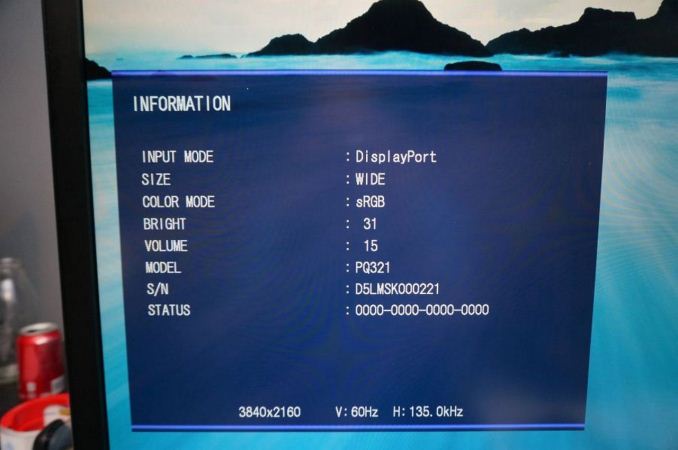
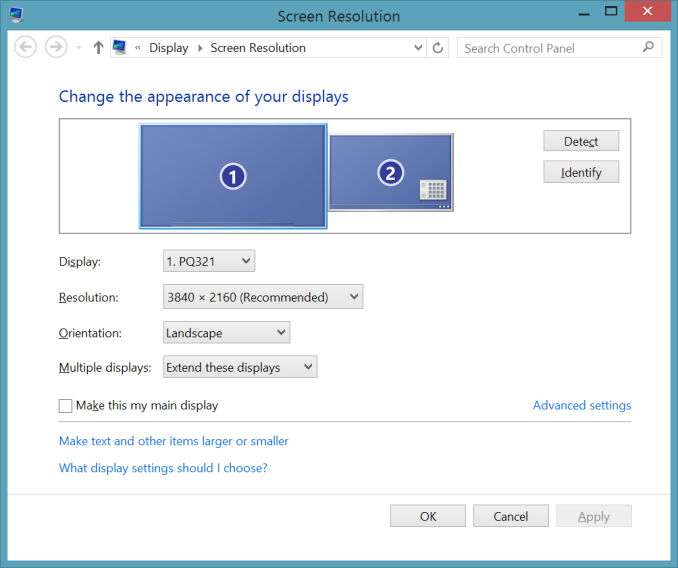


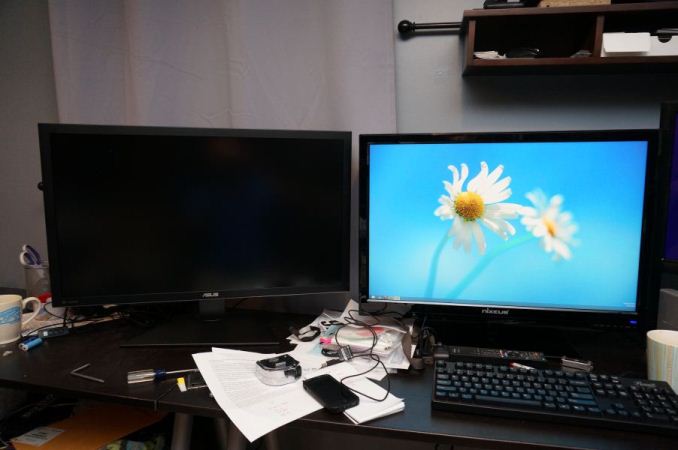
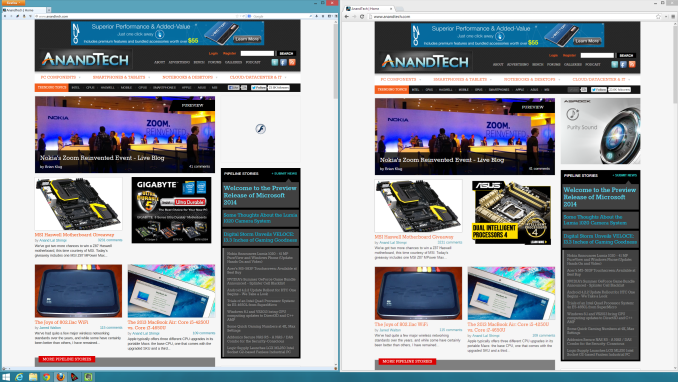
For my testing I also installed the preview copy of Windows 8.1 to use DPI scaling. At 100% text on the ASUS is very small and hard to read. Setting it to 150% and now on applications that support it, it looks very sharp. Images and screenshots look amazing, but typing this in Chrome right now it looks fuzzy. This is going to be an issue with Windows and HighDPI displays until every vendor manages to update their software to support resolution scaling better. Viewing webpages in Firefox they are crisp and sharp compared to Chrome, so software vendors really need to catch up.
For some initial testing, I used CalMAN 5.1.2 and the sRGB mode on the ASUS PQ321Q. All measurements were done as they are with other monitor reviews, using a profiled C6 meter and targeting 200 nits of light output and a gamma of 2.2.
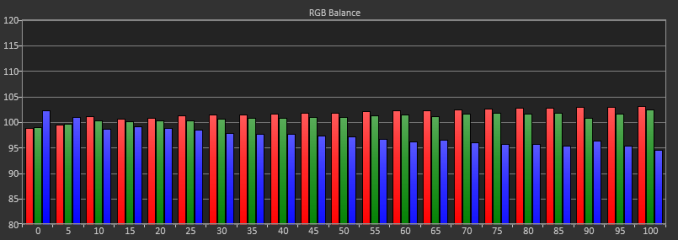
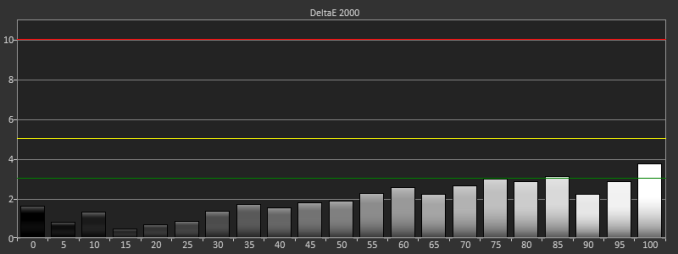
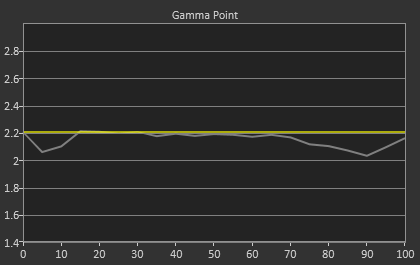
Testing maximum and minimum brightness levels for white level, black level, and contrast provided the following data.
Maximum Backlight |
Minimum Backlight |
|
|---|---|---|
White Level |
408 nits |
57 nits |
Black Level |
0.5326 nits |
0.0756 nits |
Contrast Ratio |
766:1 |
755:1 |
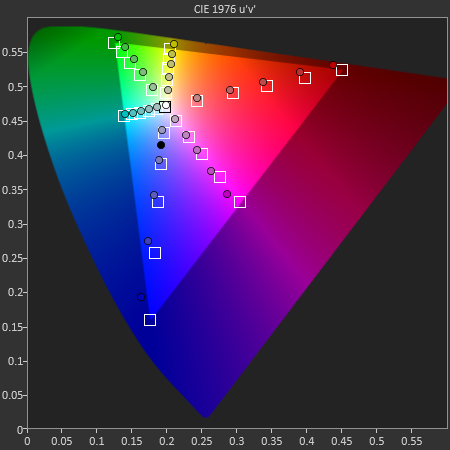
With colors, the ASUS PQ321Q isn't quite as good as with the grayscale. The main issue looks to be a lack of red and blue saturation, which causes a lack of magenta saturation as well. Looking at the CIE chart you see those points fall short of their targets. You'll also see that green goes a bit too far, giving us some color errors that are over 3.0 except for Cyan.
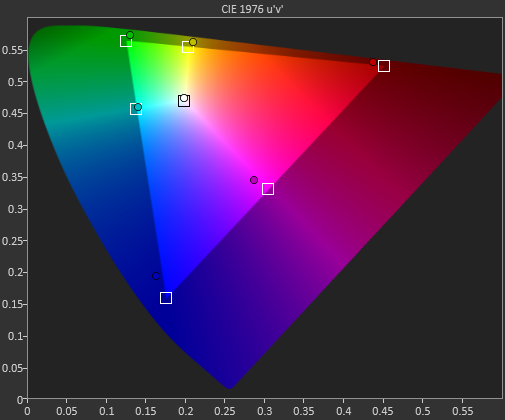
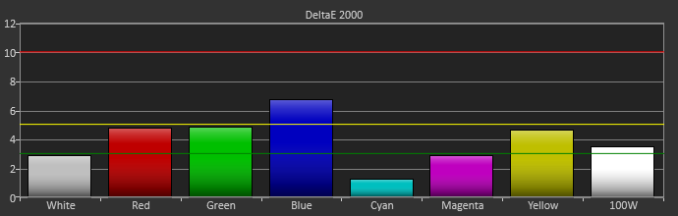
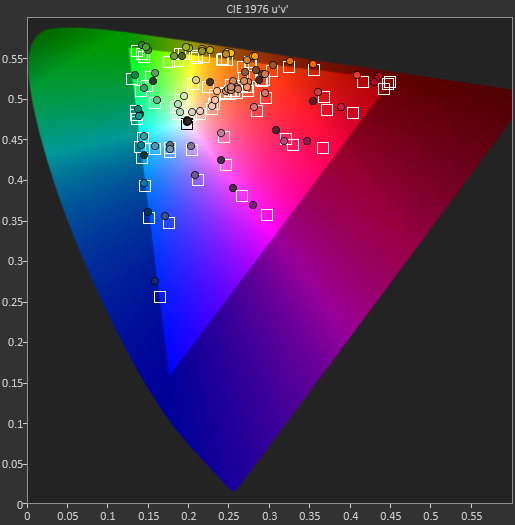
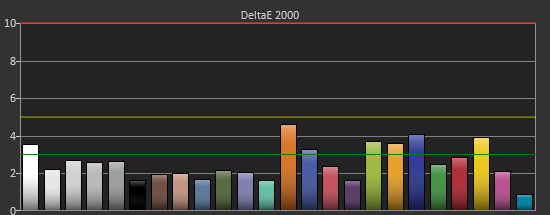
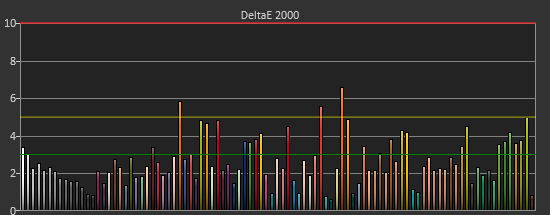
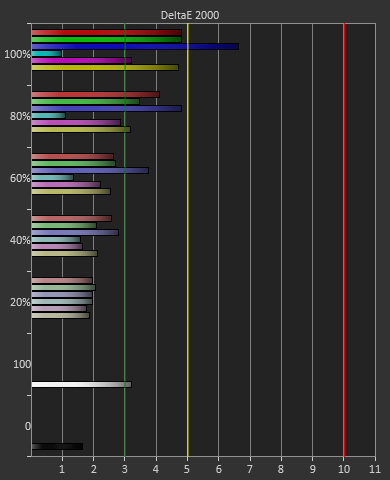
Our final initial test is the saturation test. As you might expect with a gamut where under-saturation is an issue, the errors get larger as saturation approaches 100%.
Read More ...
Welcome to the Preview Release of Microsoft 2014

We’ve seen some of this already over the past year or so, in particular the Microsoft Surface and Surface Pro devices are a departure from the way Microsoft has done things in the past – though of course we had other hardware releases like the Xbox, Xbox 360, Zune, etc. We’ve discussed this in some of our reviews as well, where the traditional PC markets are losing ground to smartphones, tablets, and other devices. When companies like Apple and Google are regularly updating their operating systems, in particular iOS and Android, the old model of rolling out a new Windows operating system every several years is no longer sufficient. Depending on other companies for the hardware that properly showcases your platform can also be problematic when one of the most successful companies of the last few years (Apple Computer) controls everything from the top to bottom on their devices.
There’s also the factor of cost; when companies are getting Android OS for free, minus the groundwork required to get it running on your platform, charging $50 or $100 for Windows can be a barrier to adoption. When Microsoft talks about a shift towards devices and services, they are looking for new ways to monetize their business structure. The subscription model for Office 365 is one example of this; rather than owning a copy of office that you can use on one system, you instead pay $100 for the right to use Office 365 on up to five systems for an entire year. This sort of model has worked well for the antivirus companies not to mention subscription gaming services like World of WarCraft, EverQuest, etc., so why not try it for Office? I have to wonder if household subscriptions to Windows are next on the auction block.
One of the other topics that Microsoft gets into with their memo is the need for a consistent user experience across all of the devices people use on a daily basis. Right now, it’s not uncommon for people to have a smartphone, tablet, laptop and/or desktop, a TV set-top box, and maybe even a gaming console or two – and depending on how you are set up, each of those might have a different OS and a different user interface. Some people might not mind switching between the various user interfaces, but this is definitely something that I’ve heard Apple users mention as a benefit: getting a consistent experience across your whole electronic ecosystem. Apple doesn’t get it right in every case either, but I know people that have MacBook laptops, iPads/iPods and iPhones, Apple TV, iTunes, and an AirPort Extreme router, and they are willing to pay more for what they perceive as a better and easier overall experience.
Windows 8 was a step towards that same sort of ecosystem, trying to unify the experience on desktops, laptops, smartphones, tablets, and the Xbox One; some might call it a misstep, but regardless Microsoft is making the effort. “We will strive for a single experience for everything in a person’s life that matters. One experience, one company, one set of learnings, one set of apps, and one personal library of entertainment, photos and information everywhere. One store for everything.” It’s an ambitious goal, and that sort of approach definitely won’t appeal to everyone [thoughts of Big Brother…]; exactly how well Microsoft does in realizing this goal is going to determine how successful this initiative ends up being.
One of the other thoughts I’ve heard increasingly over the past year or two is that while competition is in theory good for the consumer, too much competition can simply result in confusion. The Android smartphone and tablet offerings are good example of this; which version of Android are you running, and which SoC powers your device? There are huge droves of people that couldn't care less about the answer to either question; they just want everything to work properly. I’ve heard some people jokingly (or perhaps not so jokingly) suggest that we would benefit if more than one of the current SoC companies simply “disappeared” – and we could say the same about some of the GPU and CPU vendors that make the cores that go into these SoCs. Again, Microsoft is in a position to help alleviate some of this confusion with their software and devices; whether they can manage to do this better than some of the others that have tried remains to be seen.
However you want to look at things, this is a pretty major attempt at changing the way Microsoft functions. Can actually pull this all off, or is it just so many words? Thankfully, most of us have the easy job of sitting on the sidelines and taking a “wait and see” approach. Steve Ballmer notes, “We have resolved many details of this org, but we still will have more work to do. Undoubtedly, as we involve more people there will be new issues and changes to our current thinking as well. Completing this process will take through the end of the calendar year as we figure things out and as we keep existing teams focused on current deliverables like Windows 8.1, Xbox One, Windows Phone, etc.”
Whatever happens to Microsoft over the coming year or two, these are exciting times for technology enthusiasts. Microsoft has been with us for 37 years now, and clearly they intend to stick around for the next 37 as well. Enjoy the ride!
Read More ...
Some Thoughts About the Lumia 1020 Camera System
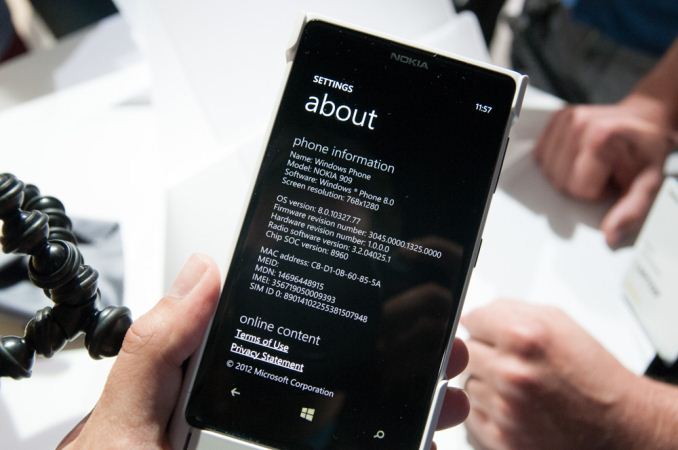
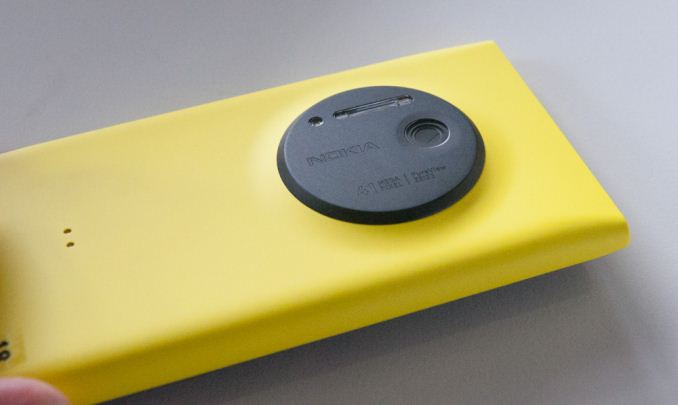
Today Nokia announced their new flagship smartphone, the Lumia 1020. I’ve already posted about the announcement and details, and what it really boils down to is that the Lumia 1020 is like a better PureView 808 inside a smaller Lumia 920 chassis. In fact, a quick glance at the About page on the Lumia 1020 shows exactly how much the 1020 is the 808’s spiritual successor – it’s erroneously named the Nokia 909.
Camera Emphasized Smartphone Comparison |
|||||||
Samsung Galaxy Camera (EK-GC100) |
Nokia PureView 808 |
Samsung Galaxy S4 Zoom |
Nokia Lumia 1020 |
||||
CMOS Resolution |
16.3 MP |
41 MP |
16.3 MP |
41 MP |
|||
CMOS Format |
1/2.3", 1.34µm pixels |
1/1.2", 1.4µm pixels |
1/2.3", 1.34µm pixels |
1/1.5", 1.12µm pixels |
|||
Lens Details |
4.1 - 86mm (22 - 447 35mm equiv) F/2.8-5.9 OIS |
8.02mm (28mm 35mm equiv) F/2.4 |
4.3 - 43mm (24-240 mm 35mm equiv) F/3.1-F/6.3 OIS |
PureView 41 MP, BSI, 6-element optical system, xenon flash, LED, OIS (F/2.2, 25-27mm 35mm eff) |
|||
Display |
1280 x 720 (4.8" diagonal) |
640 x 360 (4.0" diagonal) |
960 x 540 (4.3-inch) |
1280 x 768 (4.5-inch) |
|||
SoC |
Exynos 4412 (Cortex-A9MP4 at 1.4 GHz with Mali-400 MP4) |
1.3 GHz ARM11 |
1.5 GHz Exynos 4212 |
1.5 GHz Snapdragon MSM8960 |
|||
Storage |
8 GB + microSDXC |
16 GB + microSDHC |
8 GB + microSDHC |
32 GB |
|||
Video Recording |
1080p30, 480p120 |
1080p30 |
1080p30 |
1080p30 |
|||
OS |
Android 4.1 |
Symbian Belle |
Android 4.2 |
Windows Phone 8 |
|||
Connectivity |
WCDMA 21.1 850/900/1900/2100, 4G, 802.11a/b/g/n with 40 MHz channels, BT 4.0, GNSS |
WCDMA 14.4 850/900/1700/1900/2100, 802.11b/g/n, BT 3.0, GPS |
WCDMA 21.1 850/900/1900/2100, 4G LTE SKUs, 802.11a/b/g/n with 40 MHz channels, BT 4.0, GNSS |
Quad band edge, WCDMA 42 850/900/1900/2100 LTE bands 1,3,7,20,8 |
|||
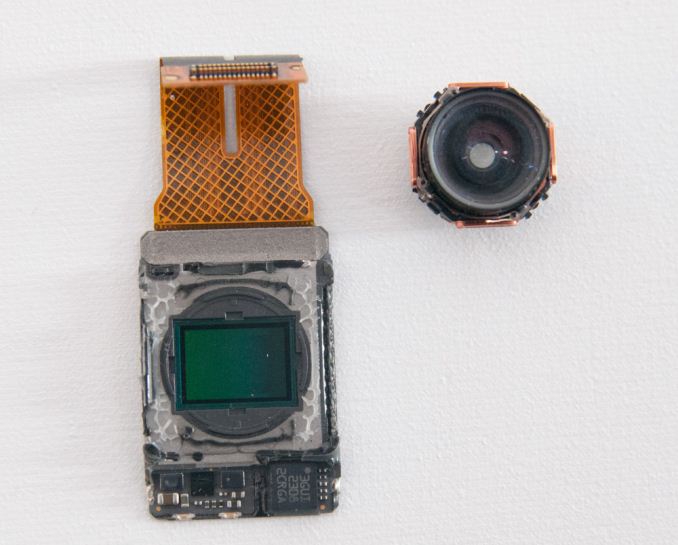
Lumia 1020 CMOS (left), Lens system (right)
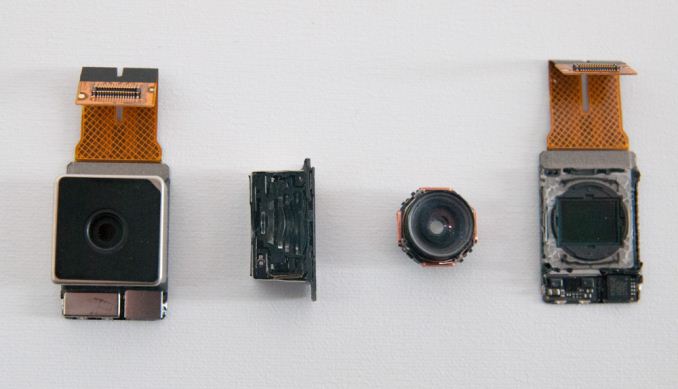
Left to right: Lumia 1020 Module, Module cut in half, lens, CMOS sensor
The Lumia 1020 also has two flashes - an LED for video and AF assist, and xenon for freezing motion and taking stills. Although I still hesitate to use direct flash on any camera, even if it’s xenon and not the hideously blue cast of a white LED, this will help the 1020 push considerably into completely dark territory where you just need some on-camera lighting to get a photo. A lot of the thickness constraints of the 808 I’m told were due to the capacitor for the xenon, the 1020 moves to a flat capacitor.
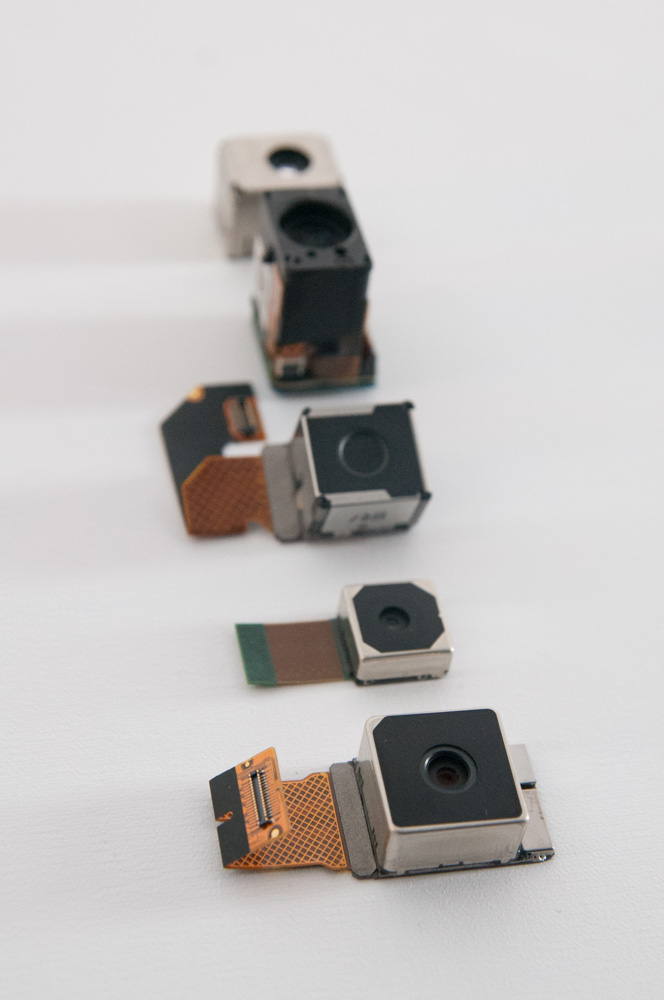
(Bottom to top: Lumia 1020, Lumia 920, PureView 808, N93, ?)
One of my big questions when I heard that 41 MP PureView tech was coming to Windows Phone was what the silicon implementation would look like, since essentially no smartphone SoCs out of box support a 41 MP sensor, certainly none of the ones Windows Phone 8 GDR2 currently supports. With the PureView 808, Nokia used a big dedicated ISP made by Broadcom to do processing. On the Lumia 1020, I was surprised to learn there is no similar dedicated ISP (although my understanding is that it was Nokia’s prerogative to include one), instead Nokia uses MSM8960 silicon for ISP. Obviously the MSM8960 is only specced for up to 20 MP camera support, Nokia’s secret sauce is making this silicon support 41 MP and the PureView features (oversampling, subsampling, lossless on the fly zoom) through collaboration with Qualcomm and rewriting the entire imaging stack themselves. I would not be surprised to learn that parts of this revised imaging solution run on Krait or Hexagon DSP inside 8960 to get around the limitations of its ISP. I suspect the Lumia 1020 includes 2 GB of LPDDR2 partly to accommodate processing those 41 MP images as well. Only with the next revision of Windows Phone (GDR3) will the platform get support for MSM8974 which out of box supports up to 55 MP cameras.
Of course the hardware side is a very interesting one, but the other half of Nokia’s PureView initiative is software features and implementation. With the Lumia 1020, Nokia has done an end-run around the Windows Phone platform by including their own third party camera application called Nokia Pro Cam that leveraging their own APIs built into the platform.
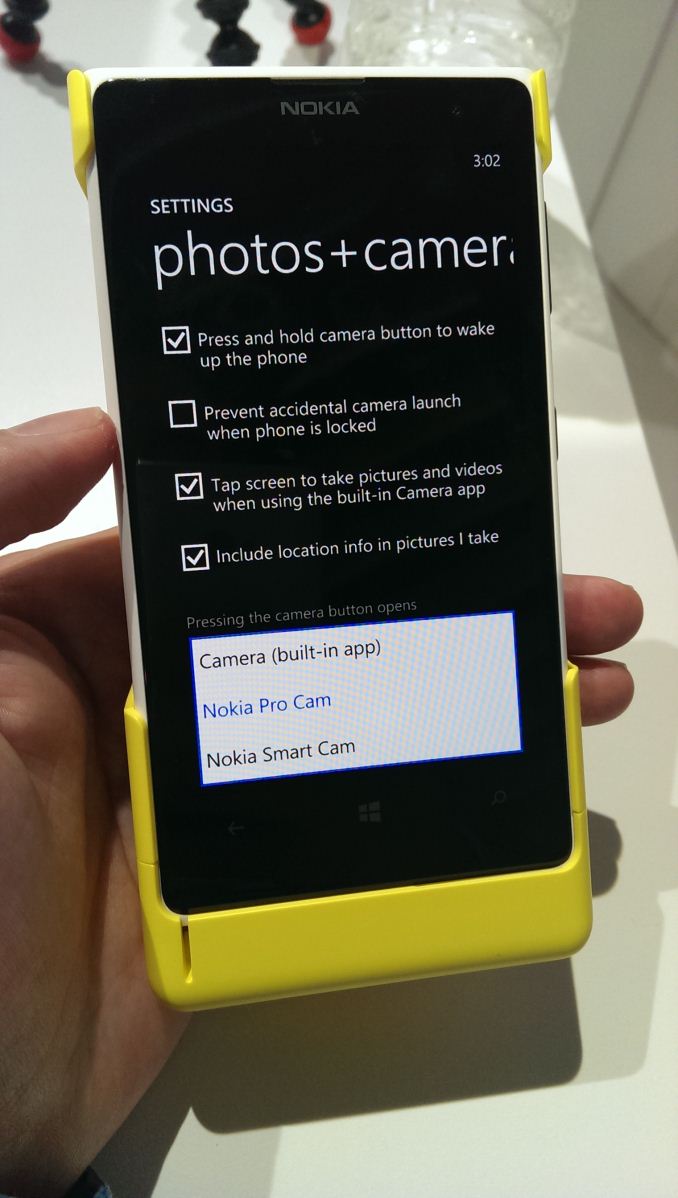
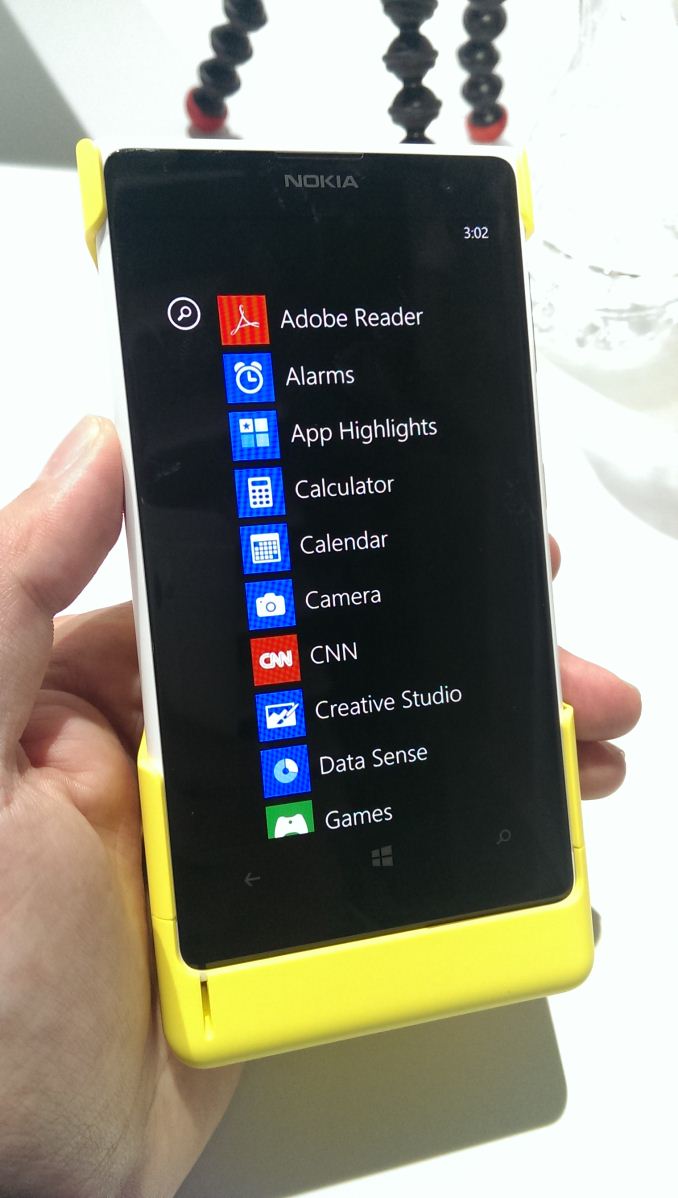
Default camera setting (left), Stock camera still exists (right)
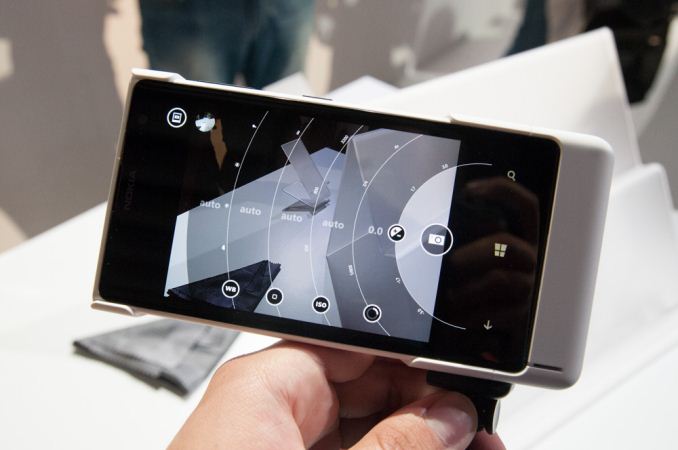
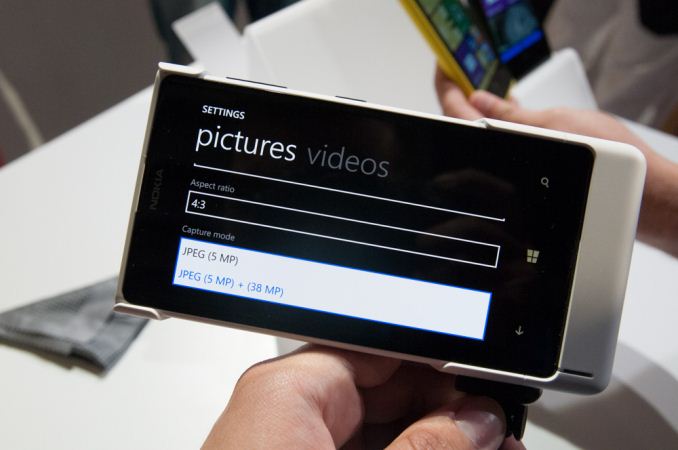


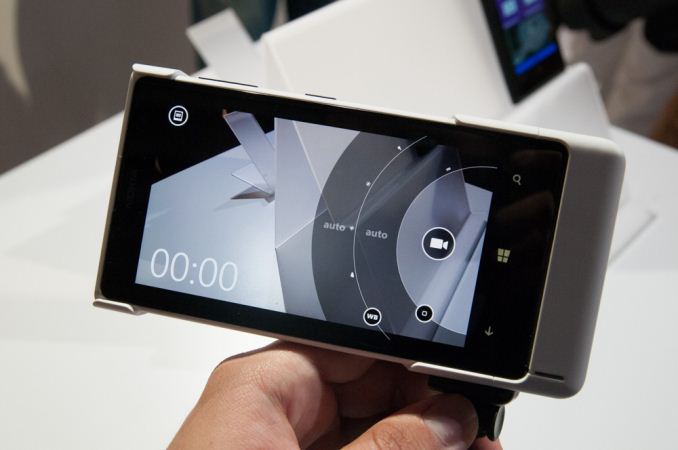
For a full walkthrough of the camera UI and features, I'd encourage you to take a look at the video I shot of Juha Alakarhu going through it, who presented on stage. I also took another video earlier in the day walking through some of it myself. It's really the only way to get an appreciation for how fluid the interface is and how much better it is than the stock WP8 camera app.
Source: Nokia


Read More ...
Digital Storm Unveils VELOCE: 13.3 Inches of Gaming Goodness
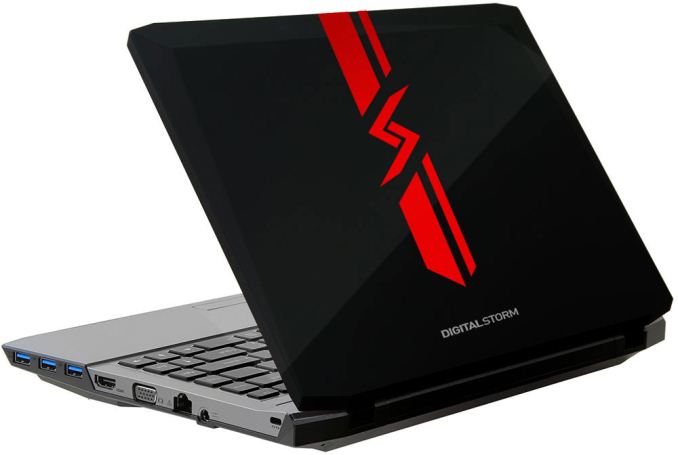
Like the Razer Blade (the MSI GE40 uses the slightly slower GTX 760M), the VELOCE uses NVIDIA’s GTX 765M 2GB for graphics duty. Where it differs from the Razer Blade and GE40 is that it supports full voltage Haswell processors, not to mention it has a slightly smaller display size but ups the resolution to 1920x1080 – anti-glare no less! The full specifications are pretty impressive, and while it’s not as thin as the Razer Blade or GE40, it looks like we might finally have a no-compromise 13.3-inch gaming laptop. Digital Storm offers for customization options on their laptops, but here is one set of specifications for the VELOCE:
Digital Storm VELOCE Specifications |
|
Processor |
Intel Core i7-4800MQ (Quad-core 2.7-3.7GHz, 6MB L3, 22nm, 47W) |
Chipset |
HM87 |
Memory |
2x4GB DDR3-1600 |
Graphics |
GeForce GTX 765M 2GB (768 cores, 850MHz + Boost 2.0, 4GHz GDDR5) Intel HD Graphics 4600 (20 EUs at 400-1300MHz) |
Display |
13.3" Anti-Glare 16:9 1080p (1920x1080) |
Storage |
750GB 7200RPM HDD 8GB SSD cache |
Optical Drive |
DVD-RW (?) |
Networking |
802.11n WiFi (Killer Wireless-N 1202) (Dual-band 2x2:2 300Mbps capable) Bluetooth 4.0 (Killer 1202) Gigabit Ethernet |
Battery/Power |
6-cell, 11.1V, 5900mAh, 65Wh 90W Max AC Adapter |
Left Side |
Headphone and Microphone 1 x USB 2.0 Exhaust Vent |
Right Side |
3 x USB 3.0 1 x Mini-HDMI 1 x VGA Gigabit Ethernet AC Power Connection Kensington Lock |
Operating System |
Windows 8 64-bit |
Dimensions |
1.26” (32mm) thick |
Weight |
4.6 lbs (2.09kg) |
Pricing and Availability |
$1535 as configured Available July 17, 2013 |
Digital Storm is currently in the process of revamping their entire notebook lineup, so the mobile section of their website consists of a countdown to July 17. We would assume there will also be additional notebooks announced at that time, or at least sometime in the near future. We have requested a review sample and we hope to be able to provide a full review in the future. The current price is about $300 more than the MSI GE40 (which includes a 128GB SSD), but VELOCE has a higher-end processor; it’s also about $300 less than the baseline Razer Blade. Hopefully the VELOCE can live up to our expectations and deliver a quality gaming experience in a reasonably portable package.


Read More ...
Nokia Announces Lumia 1020 - 41 MP PureView and Windows Phone (Update: Hands On and Video)
Camera Emphasized Smartphone Comparison |
|||||||
Samsung Galaxy Camera (EK-GC100) |
Nokia PureView 808 |
Samsung Galaxy S4 Zoom |
Nokia Lumia 1020 |
||||
CMOS Resolution |
16.3 MP |
41 MP |
16.3 MP |
41 MP |
|||
CMOS Format |
1/2.3", 1.34µm pixels |
1/1.2", 1.4µm pixels |
1/2.3", 1.34µm pixels |
1/1.5", 1.12µm pixels |
|||
CMOS Size |
6.17mm x 4.55mm |
10.67mm x 8.00mm |
6.17mm x 4.55mm |
||||
Lens Details |
4.1 - 86mm (22 - 447 35mm equiv) F/2.8-5.9 OIS |
8.02mm (28mm 35mm equiv) F/2.4 |
4.3 - 43mm (24-240 mm 35mm equiv) F/3.1-F/6.3 OIS |
PureView 41 MP, BSI, 6-element optical system, xenon flash, LED, OIS |
|||
Display |
1280 x 720 (4.8" diagonal) |
640 x 360 (4.0" diagonal) |
960 x 540 (4.3-inch) |
1280 x 768 (4.5-inch) |
|||
SoC |
Exynos 4412 (Cortex-A9MP4 at 1.4 GHz with Mali-400 MP4) |
1.3 GHz ARM11 |
1.5 GHz Exynos 4212 |
1.5 GHz Snapdragon MSM8960 |
|||
Storage |
8 GB + microSDXC |
16 GB + microSDHC |
8 GB + microSDHC |
32 GB |
|||
Video Recording |
1080p30, 480p120 |
1080p30 |
1080p30 |
1080p30 |
|||
OS |
Android 4.1 |
Symbian Belle |
Android 4.2 |
Windows Phone 8 |
|||
Connectivity |
WCDMA 21.1 850/900/1900/2100, 4G, 802.11a/b/g/n with 40 MHz channels, BT 4.0, GNSS |
WCDMA 14.4 850/900/1700/1900/2100, 802.11b/g/n, BT 3.0, GPS |
WCDMA 21.1 850/900/1900/2100, 4G LTE SKUs, 802.11a/b/g/n with 40 MHz channels, BT 4.0, GNSS |
Quad band edge, WCDMA 42 850/900/1900/2100 LTE bands 1,3,7,20,8 |
|||
On the network side, the Lumia 1020 variant I've seen specs for have quad band GSM/EDGE and WCDMA, and LTE bands 1,3,7,20,8. Obviously the AT&T version coming will have LTE bands 4,17.
The Nokia Lumia 1020 will be available starting July 26th for $299.99 with a 2 year agreement, and preorders on att.com will start July 16th.
We're going to get hands on with the Lumia 1020 shortly.

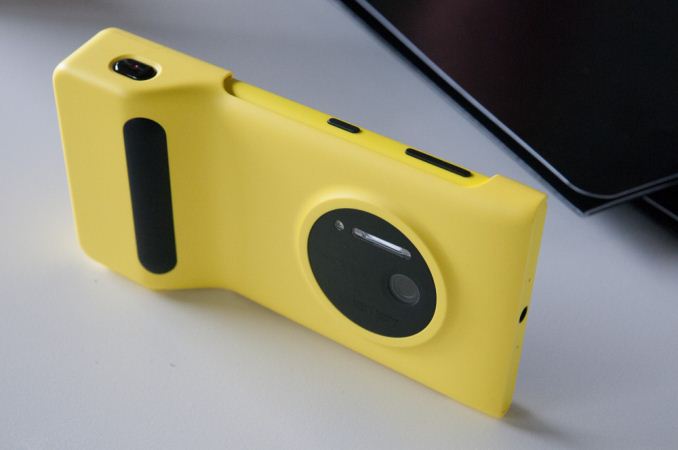
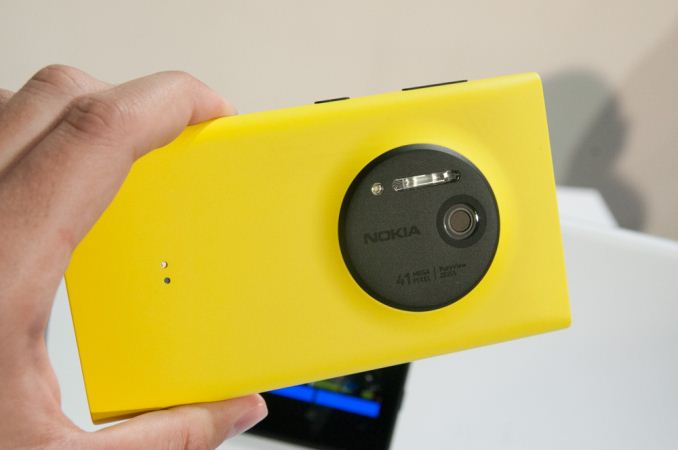
The camera grip feels very solid, not flimsy at all. The two stage camera button is communicative and works just like the button on the device and activates the application if you hold it down just like one would expect. I can see the camera grip being a popular accessory for people who want to extract every bit of camera from the Lumia 1020. I played with the rest of the camera UI and gallery, and on the whole it's essentially what you'd expect – like a better PureView 808 but running Windows Phone. On the whole smoother and more refined, in the chassis of a 920. Shot to shot latency is a bit long, but that's expected given the gigantic image size and processing, I suspect it might get faster if you disable the full size image storage and only keep the 5 MP oversampled versions, which there is an option for.


Read More ...
Nokia's Zoom Reinvented Event - Live Blog
We're here in New York City for Nokia's Zoom Reinvented event, where the handset maker will undoubtedly be announcing the next flagship Lumia with PureView imaging. We'll be covering the event live, read on for our live blog.
Read More ...
Acer’s M5-583P Touchscreen: Available at Best Buy
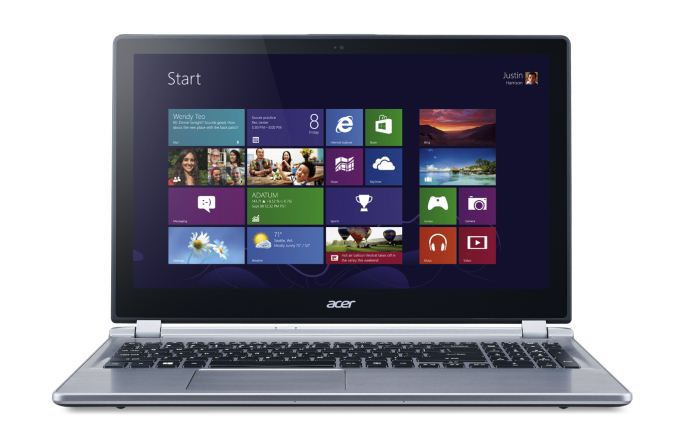
Other specifications are certainly going to draw some groans from our enthusiast community. While the display is a 15.6-inch touchscreen with 10-point capacitive input, the resolution is the painfully low 1366x768 that we’ve come to know and loath over the past several years. Other details are somewhat light; we know it has a 500GB hard drive (no solid state storage), 8GB RAM, a touchscreen LCD, and 802.11n wireless networking. What we don’t know is whether it’s a dual-band networking solution or not (probably not, and probably single-stream as well), and whether the LCD is decent quality or not (probably another low contrast TN panel). Acer does mention a "premium sound system" and enhancements to improve the microphone quality, but otherwise it sounds like the typical update every time a new CPU platform is launched. If we get one in for review, we'll of course provide full details.
The saving grace with laptops like this is their pricing, and with a price at Best Buy of $700 this is probably the lowest price we’re going to see on a Haswell touchscreen notebook in the short term. However, it’s also $200 more than what you might pay for similar Ivy Bridge laptops (e.g. ASUS VivoBook), and again about $200 more than touchscreen offerings with AMD E-series APUs (e.g. Toshiba Satellite). On the other hand, it has more memory and performance should be better than those types of laptops. Haswell has also impressed us with the battery life it’s able to achieve, and the Acer M5 looks to continue that pattern with a rated 6.5 hours of battery life (it’s only a 4-cell battery, so that tempers our expectations). If you’re interested in getting one, the M5 is available as of yesterday; we expect we’ll see quite a few similar laptops in the coming weeks.


Read More ...
MSI Haswell Motherboard Giveaway
We've got two more chances to win a Z87 Haswell motherboard, this time courtesy of MSI. Today's giveaway includes one MSI Z87 MPower Max and one Z87-GD65 Gaming.
Read More ...
NVIDIA’s Summer GeForce Game Bundle Announced - Splinter Cell Blacklist
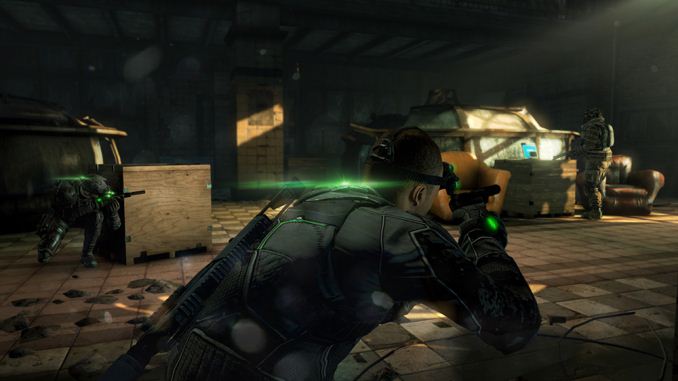
Much like the previously expired Metro: Last Light bundle, the Splinter Cell Blacklist bundle is for the GTX 660 and above, including the complete GTX 700 series, but strangely not NVIDIA’s most expensive cards, GTX 690 and GTX Titan. As is usually the case, all of the typical etailers are participating, with participating etailer and retailers throwing in a voucher for the game with qualifying purchases. The specific edition being bundled is the Digital Deluxe edition, which among other things includes bonus items and a copy of the previous Splinter Cell game, Conviction.
This promo comes about a month before the game actually ships - Blacklist won’t be shipping until August 20th – so GeForce video card buyers will have to sit tight for a bit before they can playing the game. The promo itself will run until the end of the year or until NVIDIA runs out of codes; though historically NVIDIA is likely to replace the bundle before the fall/winter game rush.
On a side note, while Blacklist isn’t being branded as a The Way It’s Meant to Be Played Game, NVIDIA’s press release did note that they’ve been providing engineering resources to Ubisoft as part of their deal. So “tessellation, NVIDIA HBAO+, TXAA antialiasing and surround technologies” appear to be NVIDIA additions to the game. Of note, this marks the first TXAA enabled game to ship in several months and the first such game released since TXAA creator Timothy Lottes left NVIDIA earlier this year for Epic Games.
Finally, for GTX 650 buyers, a quick check shows that NVIDIA’s $75 Free-To-Play bundle is still active for those cards. However that looks to be coming to an end at the end of this month.
Current NVIDIA Game Bundles |
||||
Video Card |
Bundle |
|||
GeForce GTX Titan |
None |
|||
GeForce GTX 690 |
None |
|||
GeForce GTX 760/770/780 |
SC Blacklist |
|||
GeForce GTX 660/660Ti/670/680 |
SC Blacklist |
|||
GeForce GTX 650 Series |
$75 Free-To-Play |
|||
GeForce GT 640 (& Below) |
None |
|||
Read More ...
Android 4.2.2 Update Rollout for HTC One Begins - We Take a Look

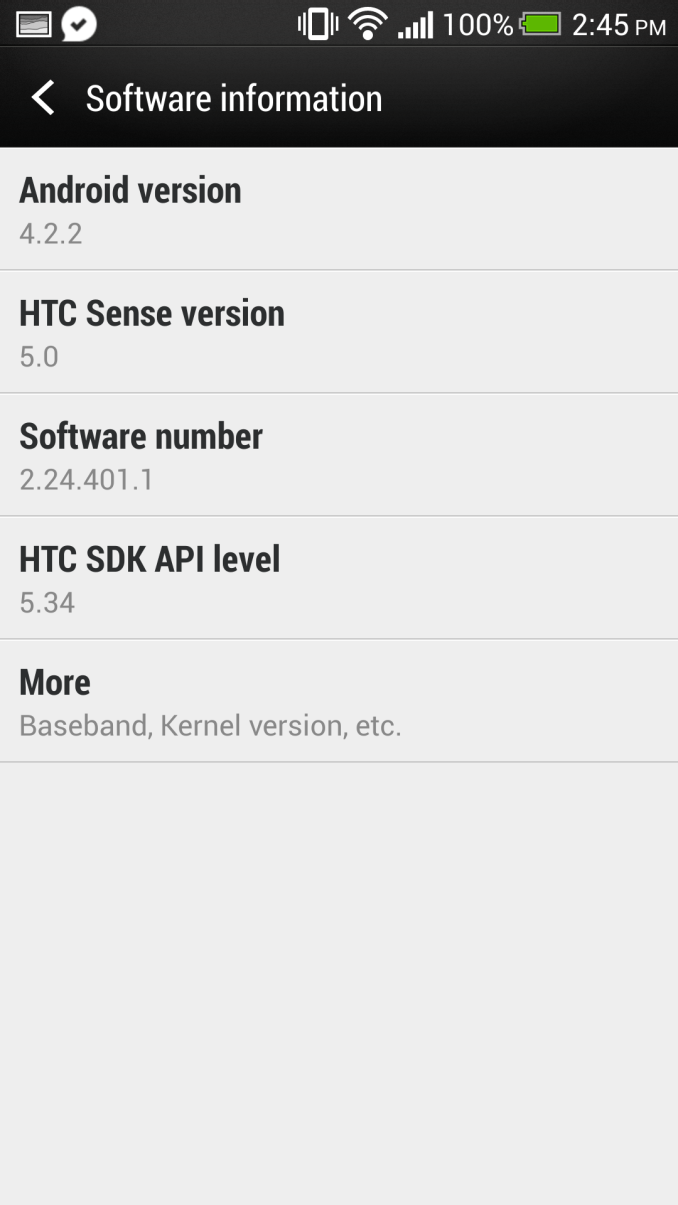
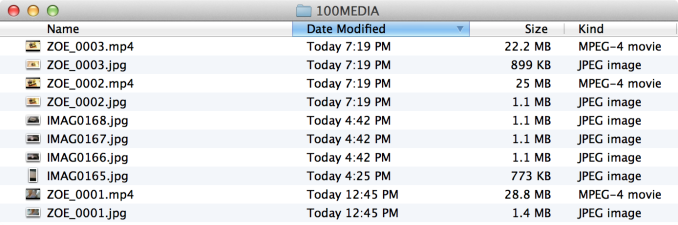
First a bit of context – HTC just recently started rolling out the Android 4.2.2 update to HTC One users in a number of regions, and our international HTC One (EMEA) just got the update, which is where we're looking at what's changed. These rollouts occur in phases and not necessarily for everyone at once, and I don't have any specific information on what regions are getting the update.
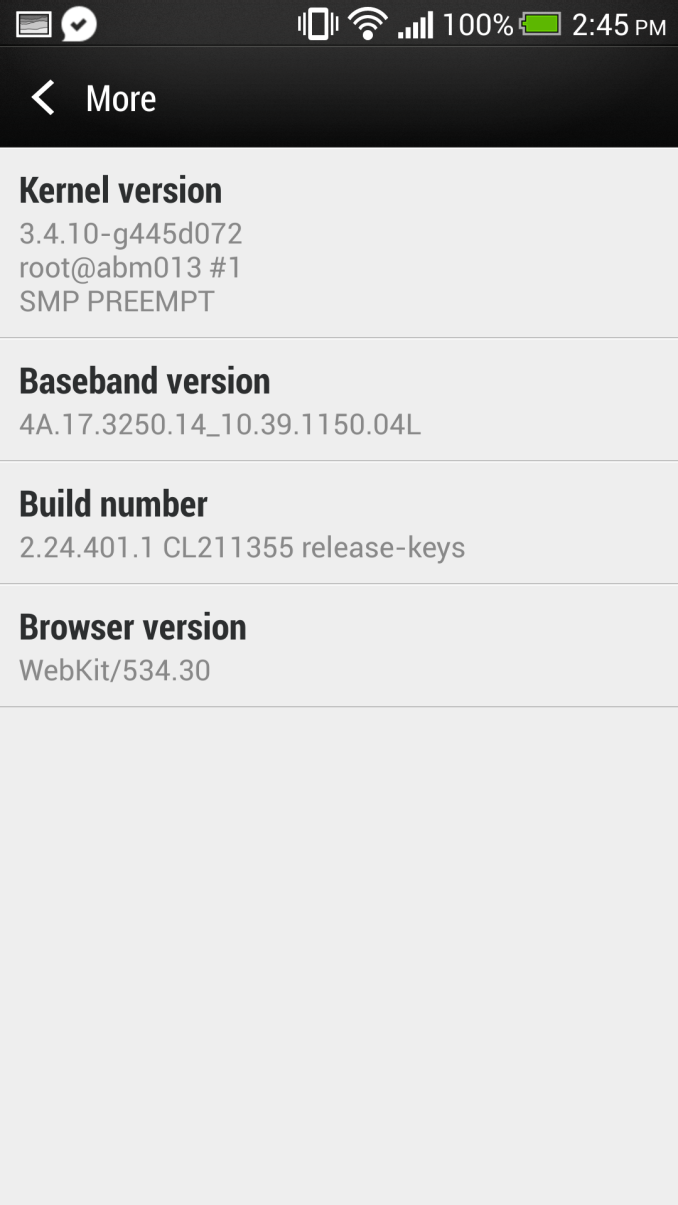
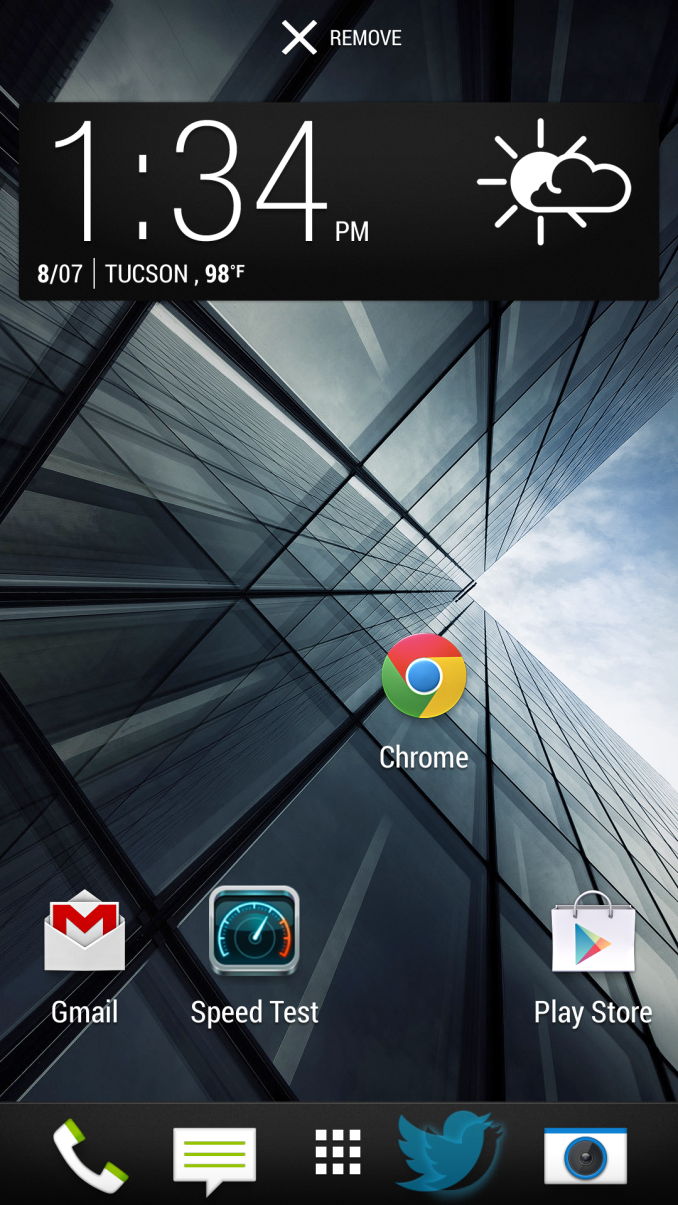
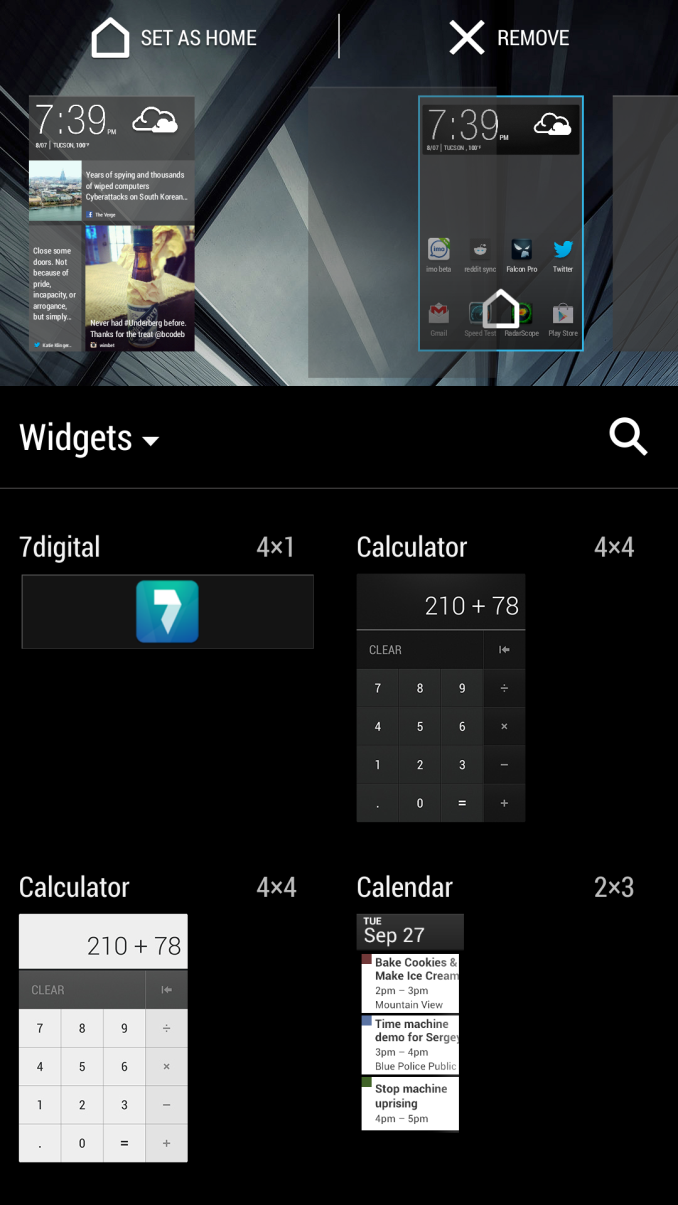
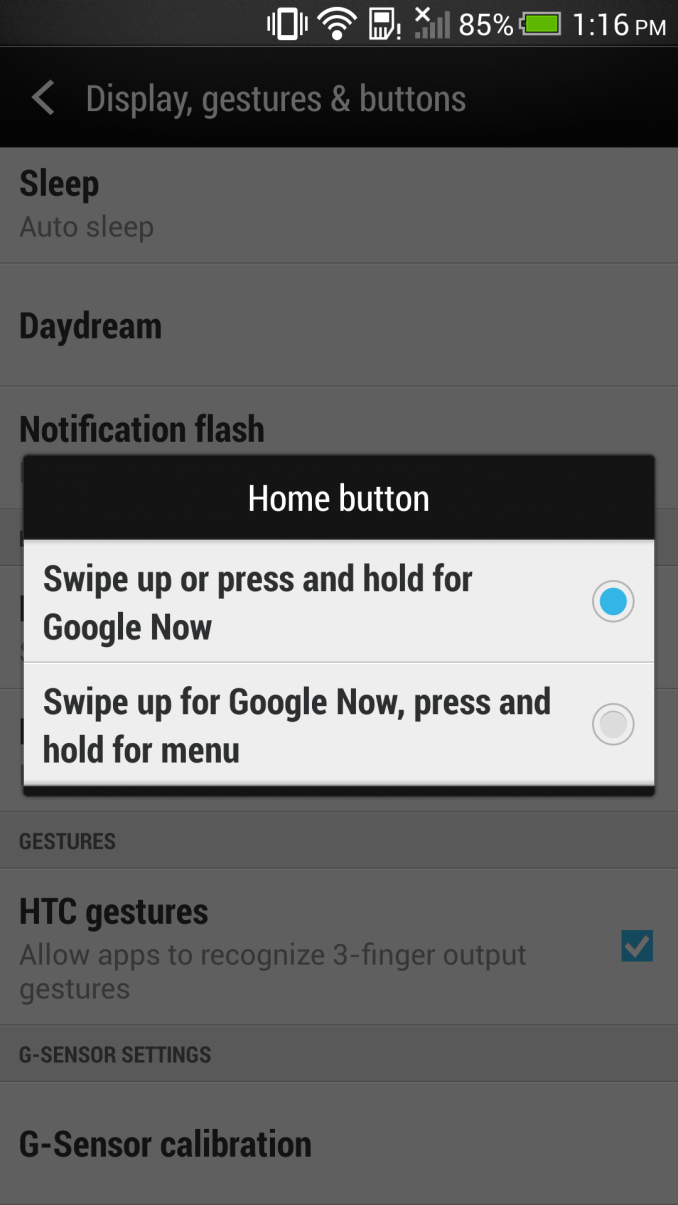

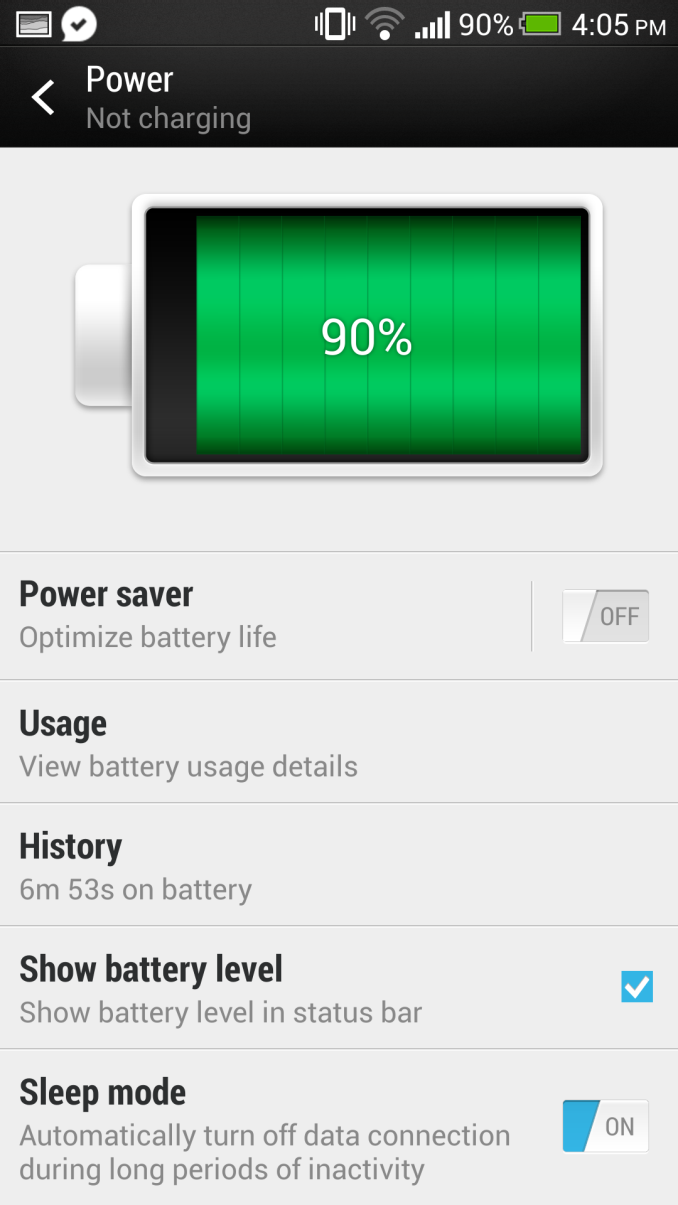

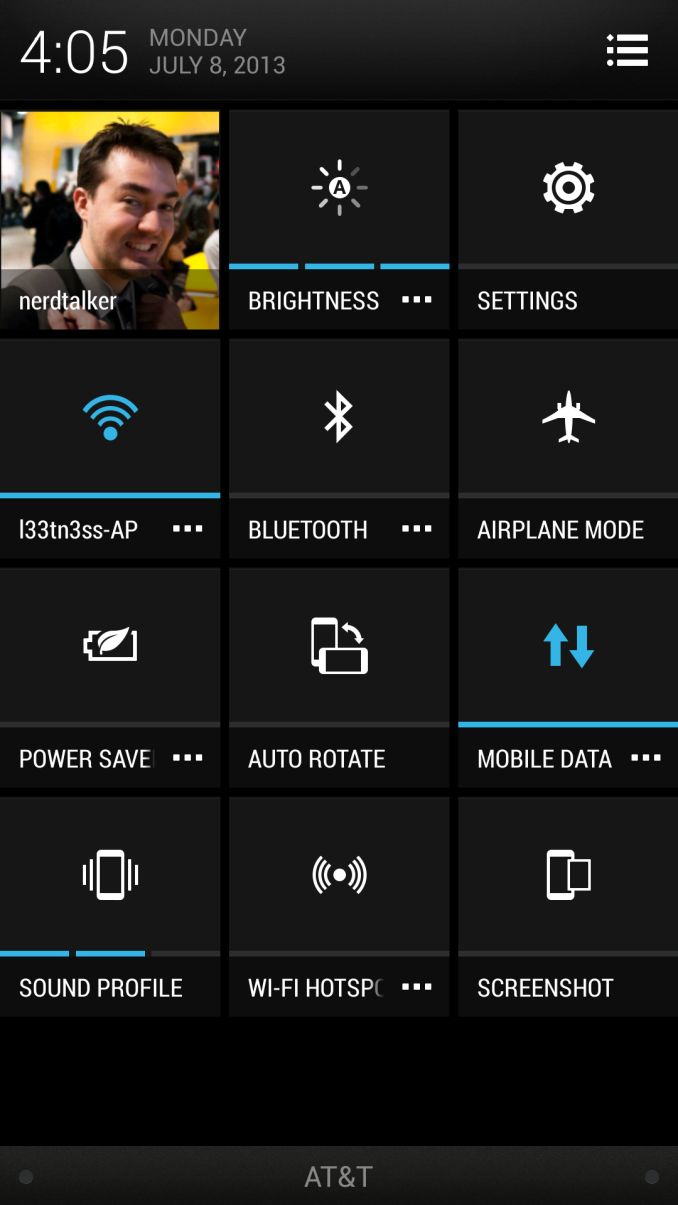
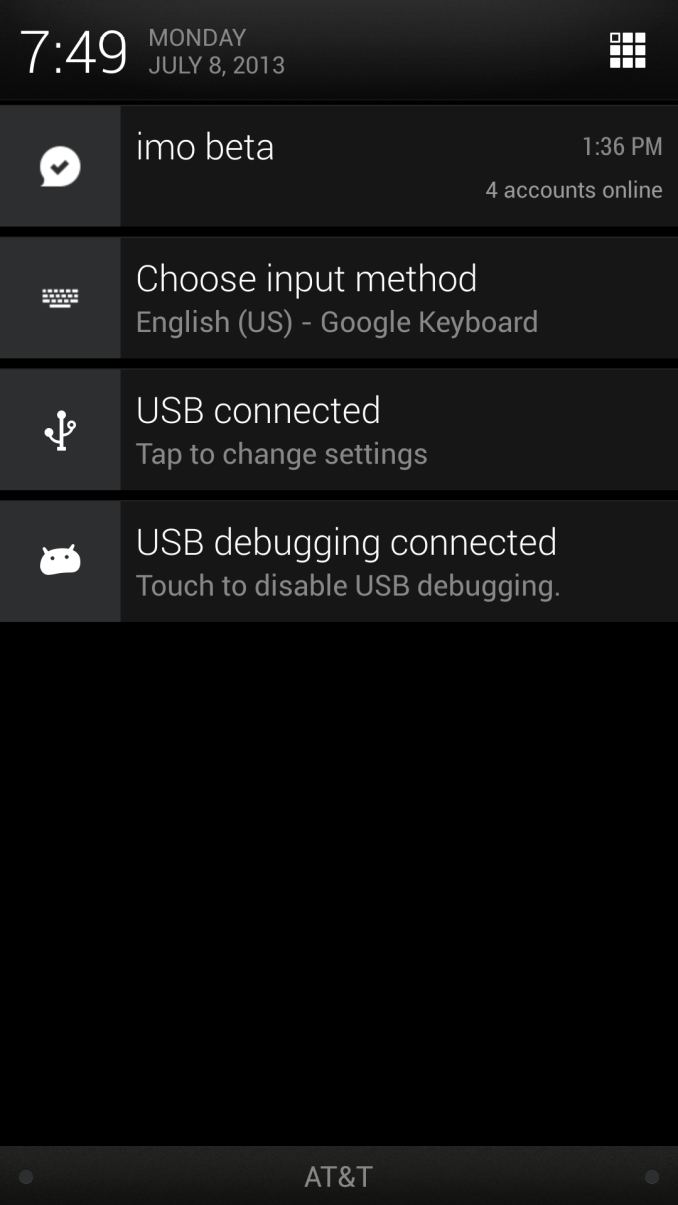


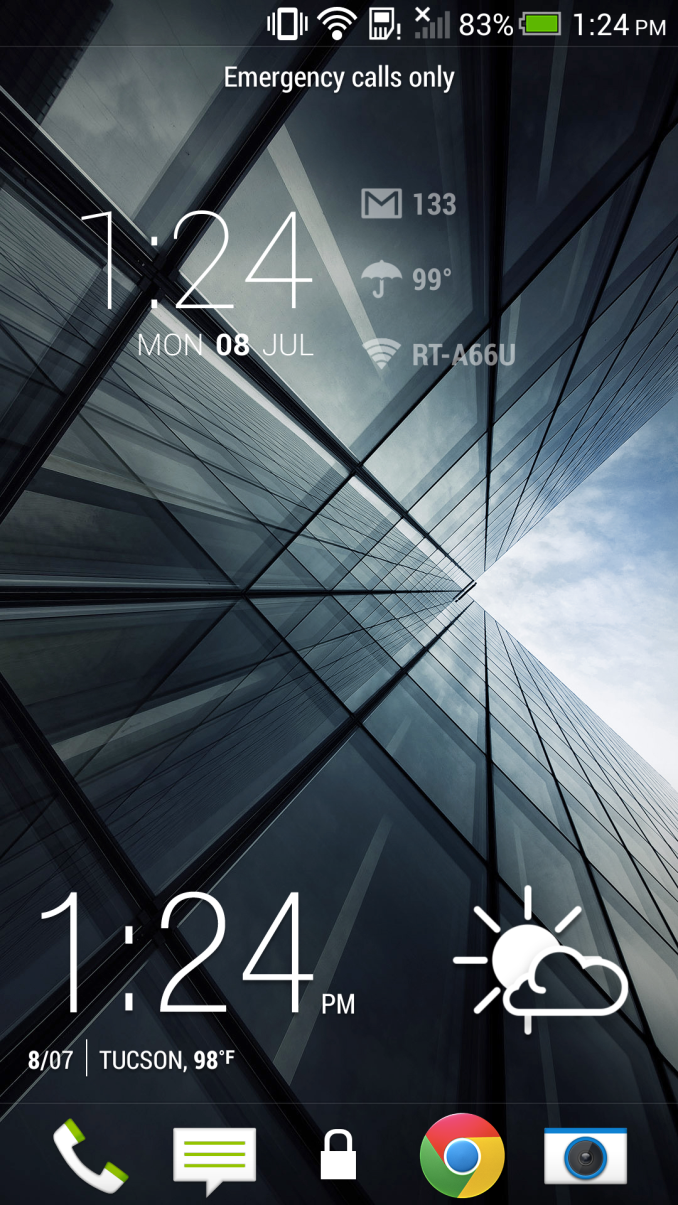


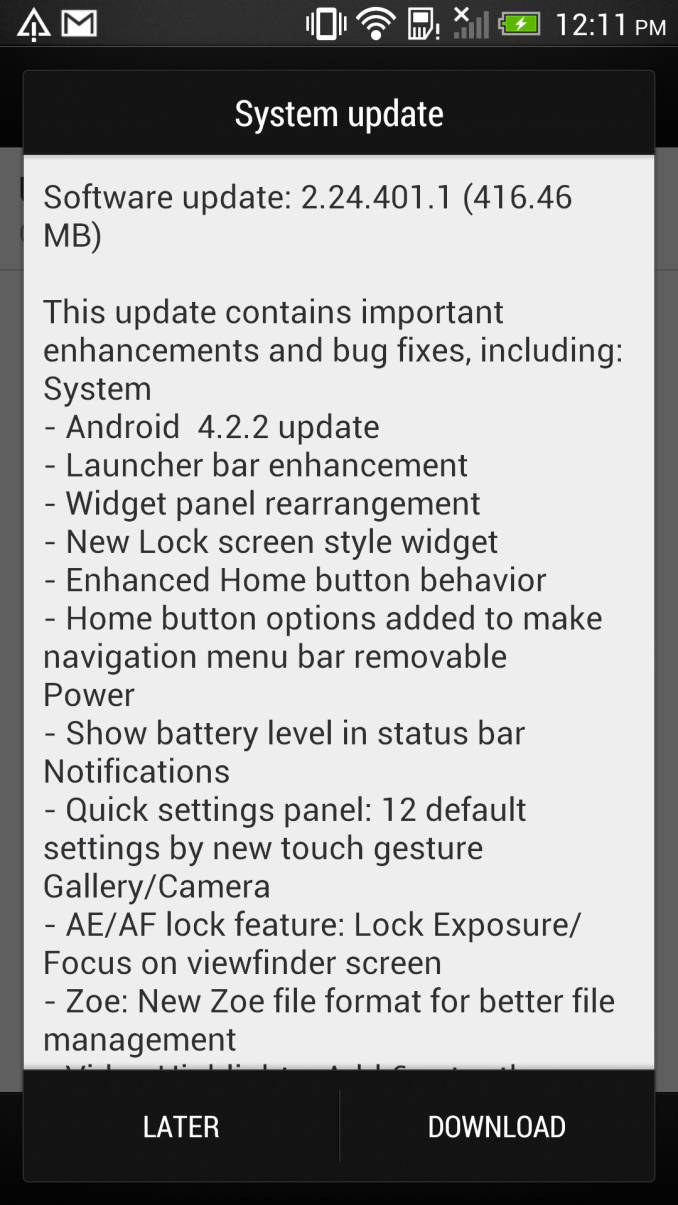
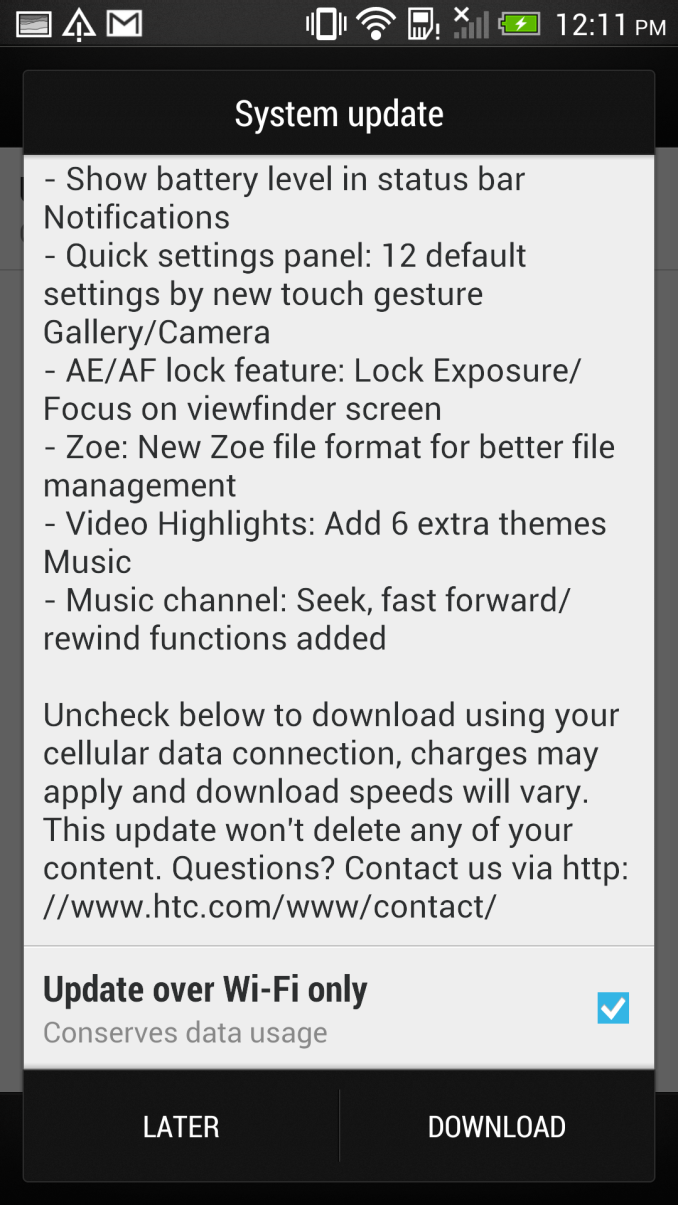
Read More ...
The Joys of 802.11ac WiFi
We’ve had quite a few major wireless networking standards over the years, and while some have certainly been better than others, I have remained a strong adherent of wired networking. I don’t expect I’ll give up the wires completely for a while yet, but Western Digital and Linksys sent me some 802.11ac routers for testing, and for the first time in a long time I’m really excited about wireless.
Read More ...
The 2013 MacBook Air: Core i5-4250U vs. Core i7-4650U
Apple typically offers three different CPU upgrades in its portable Macs: the base CPU, one that comes with the upgraded SKU and a third BTO option that's even faster. In the case of the 2013 MacBook Air, Apple only offered two: a standard SKU (Core i5-4250U) and a BTO-only upgrade (Core i7-4650U). As we found in our initial review of the 2013 MacBook Air, the default Core i5 option ranged between substantially slower than last year's model to a hair quicker. The explanation was simple: with a lower base clock (1.3GHz), a lower TDP (15W vs. 17W) and more components sharing that TDP (CPU/GPU/PCH vs. just CPU/GPU), the default Core i5 CPU couldn't always keep up with last year's CPU.
The Core i7 CPU upgrade comes at a fairly reasonable cost: $150 regardless of configuration. The max clocks increase by almost 30%, as does the increase in L3 cache. The obvious questions are how all of this impacts performance, battery life and thermals. Finally equipped with a 13-inch MBA with the i7-4650U upgrade, I can now answer those questions. The two systems are configured almost identically, although the i7-4650U configuration includes 8GB of memory instead of 4GB. Thankfully none of my tests show substantial scaling with memory capacity beyond 4GB so that shouldn't be a huge deal. Both SSDs are the same Samsung PCIe based solution. Let's start with performance.
Read More ...
Corsair Carbide Air 540 Case Review
Corsair's cases have been defined by excellent ease of assembly, solid watercooling support...and middling air cooling performance. The Air 540 is a completely different beast, though, and it looks like they may have sorted out that last issue.
Read More ...
Trials of an Intel Quad Processor System: 4x E5-4650L from SuperMicro
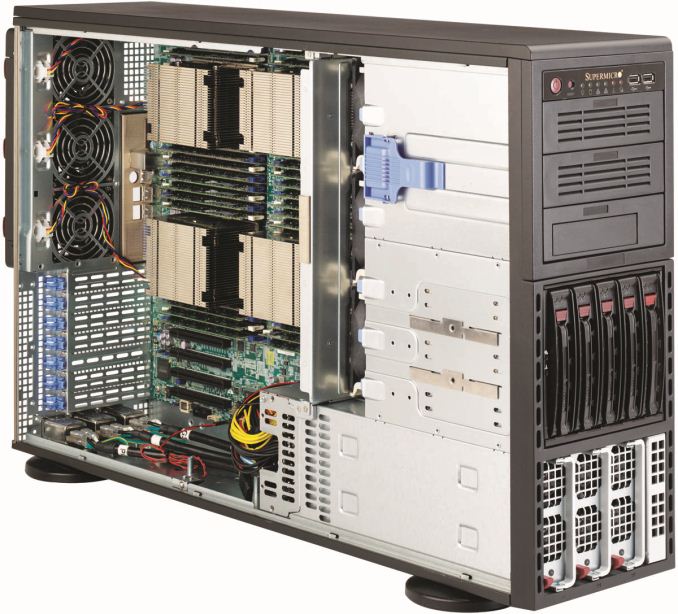
In recent months at AnandTech we have tackled a few issues of dual processor systems for regular use, and whether having a dual processor system as a theoretical scientist may help or hinder various benchmark scenarios. For the problems that I encountered as a theoretical physical chemist, using a dual processor system without any form of formal training dealing with memory allocation (NUMA) resulted in a severe performance hit for anything that required a significant level of memory accesses, especially grid solvers that required pulling information from large arrays held in memory. Part of the issue was latency access dealing with data that was in the memory of the other CPU, and thus a formal training in writing NUMA code would be applicable for multi-processor systems. Nevertheless in my AnandTech testing we did see significant speedup when dealing with various ‘pre-built’ software scenarios such as video conversion using Xilisoft Video Converter, rendering using PovRay and our 3D Particle Movement Benchmark.
To take this testing one stage further, SuperMicro kindly agreed to loan me remote desktop access to one of their internal quad processor (4P) systems. The movement from 2P to 4P is almost strictly in the realms of business investment, except for a few Folding@home enthusiasts that have seen large gains moving to a quad processor AMD system using obscure buyers for motherboards and eBay for processors. But with 4P in the business realm, the software has to match that usage scenario and scale appropriately.
Our testing scenario will cover our server motherboard CPU tests only – as I only had remote desktop access I was not fortunate enough to do any ‘gaming’ tests, although our gaming CPU article may have shown that unless you are doing a massive multi-screen multi-GPU setup then anything more than a single Sandy Bridge-E system may be overkill.
Test Setup:
4x Intel Xeon E5-4650L @ 2.6 GHz (3.1 GHz Turbo), 8 cores (16 threads) each
Kingston 128GB ECC DDR3-1600 C11
Windows Server Edition 2012 Standard
Issues Encountered
As you might imagine, moving from 1P to 2P and then to 4P without much experience in the field of multi-processor calculations was initially very daunting. The main issue moving to 4P was having an operating system that actually detected all the threads possible and then communicated that to software using the Windows APIs. In both Windows Server 2008 R2 Standard and 2012 Standard, the system would detect all 64 threads in task manager, but only report 32 threads to software. This raises a number of issues when dealing with software that automatically detects the number of threads on a system and only issues that number. In this scenario the user would need to manually set the number of threads, but it all depends on the way the program was written. For example, our Xilisoft and 3DPM tests do an automatic thread detection but set the threads to what is detected, whereas PovRay spawns a large number of threads despite automatic detection. Cinebench as well detected half the threads automatically, but at least has an option to spawn a custom number of threads.
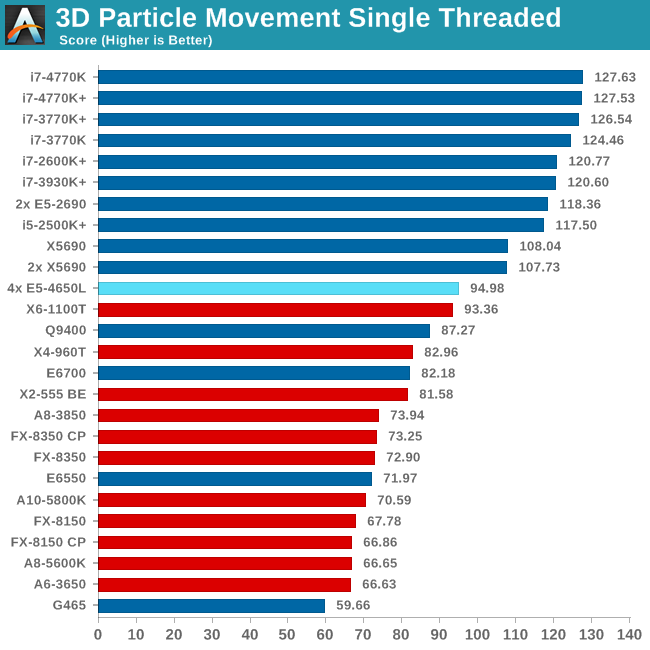
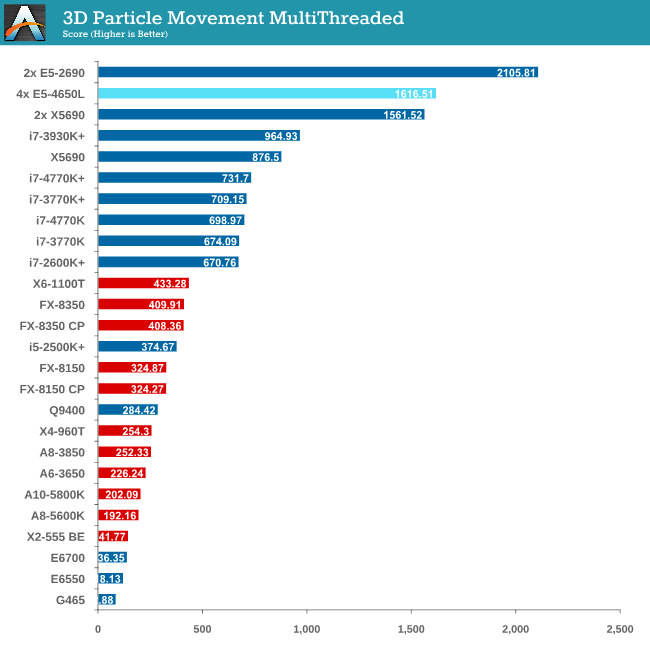
Point Calculations - 3D Movement Algorithm Test
The algorithms in 3DPM employ both uniform random number generation or normal distribution random number generation, and vary in various amounts of trigonometric operations, conditional statements, generation and rejection, fused operations, etc. The benchmark runs through six algorithms for a specified number of particles and steps, and calculates the speed of each algorithm, then sums them all for a final score. This is an example of a real world situation that a computational scientist may find themselves in, rather than a pure synthetic benchmark. The benchmark is also parallel between particles simulated, and we test the single thread performance as well as the multi-threaded performance.
Compression - WinRAR 4.2
With 64-bit WinRAR, we compress the set of files used in the USB speed tests. WinRAR x64 3.93 attempts to use multithreading when possible, and provides as a good test for when a system has variable threaded load. WinRAR 4.2 does this a lot better! If a system has multiple speeds to invoke at different loading, the switching between those speeds will determine how well the system will do.
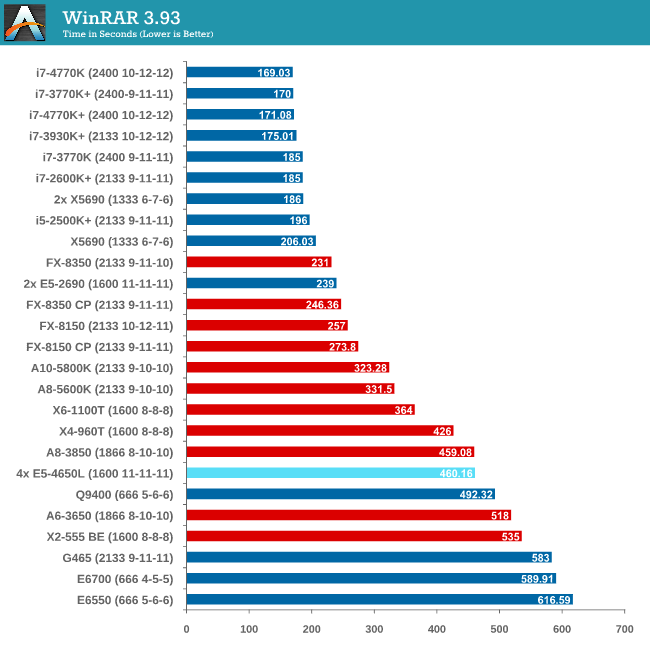
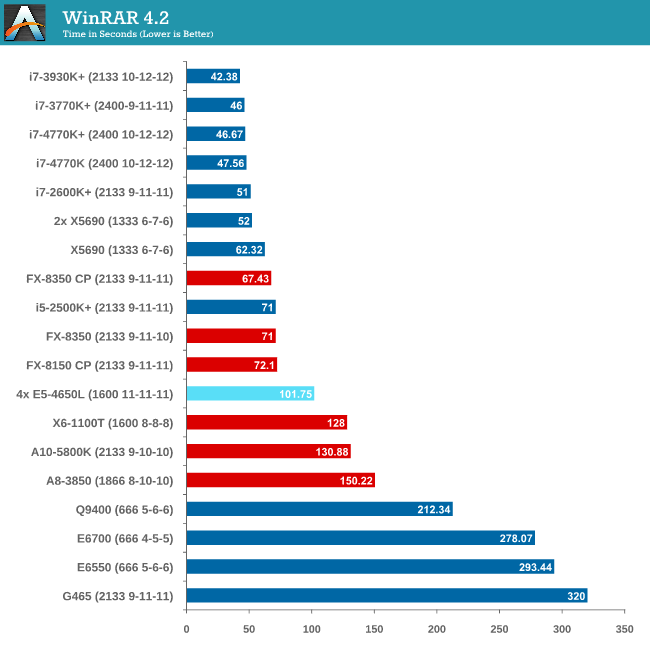
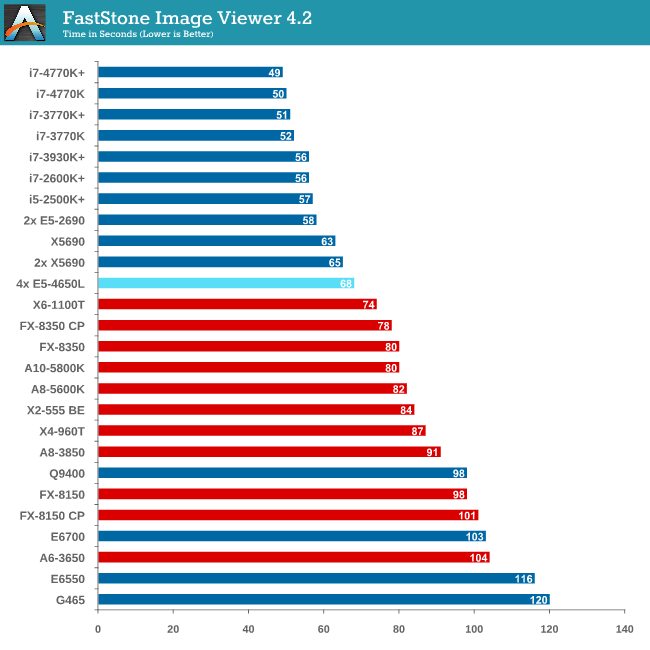
Image Manipulation - FastStone Image Viewer 4.2
FastStone Image Viewer is a free piece of software I have been using for quite a few years now. It allows quick viewing of flat images, as well as resizing, changing color depth, adding simple text or simple filters. It also has a bulk image conversion tool, which we use here. The software currently operates only in single-thread mode, which should change in later versions of the software. For this test, we convert a series of 170 files, of various resolutions, dimensions and types (of a total size of 163MB), all to the .gif format of 640x480 dimensions.
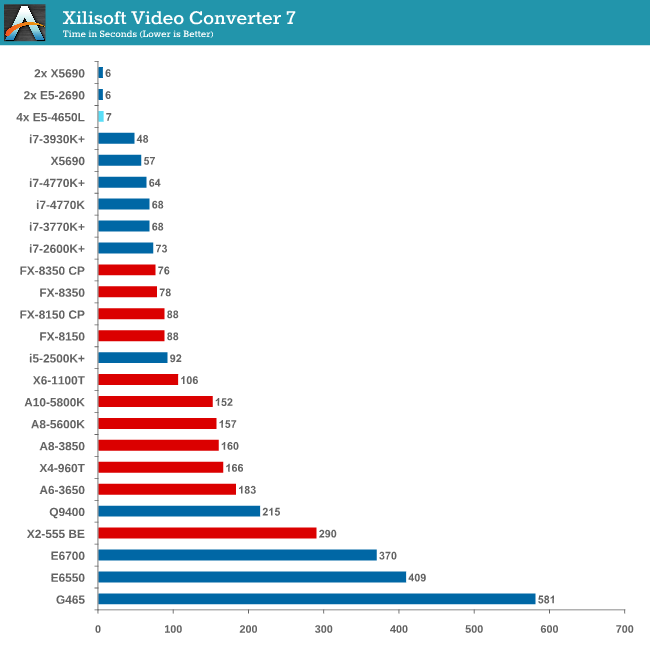
Video Conversion - Xilisoft Video Converter 7
With XVC, users can convert any type of normal video to any compatible format for smartphones, tablets and other devices. By default, it uses all available threads on the system, and in the presence of appropriate graphics cards, can utilize CUDA for NVIDIA GPUs as well as AMD WinAPP for AMD GPUs. For this test, we use a set of 33 HD videos, each lasting 30 seconds, and convert them from 1080p to an iPod H.264 video format using just the CPU. The time taken to convert these videos gives us our result.
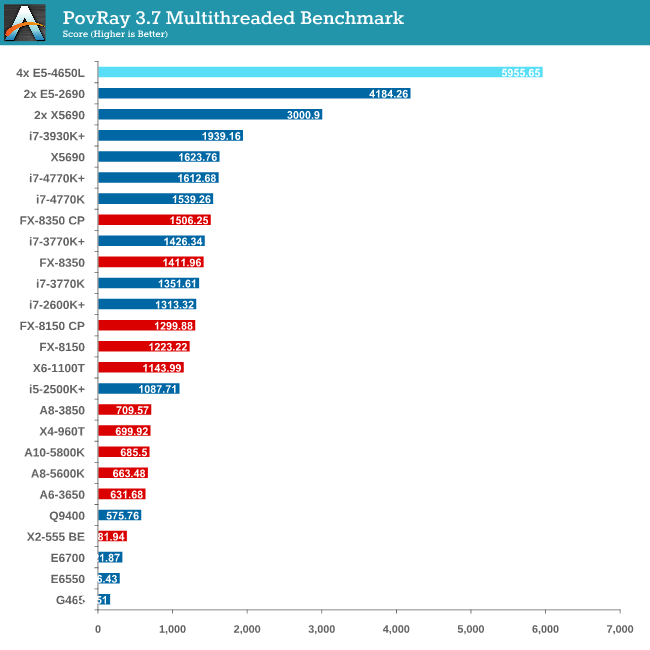
Rendering – PovRay 3.7
The Persistence of Vision RayTracer, or PovRay, is a freeware package for as the name suggests, ray tracing. It is a pure renderer, rather than modeling software, but the latest beta version contains a handy benchmark for stressing all processing threads on a platform. We have been using this test in motherboard reviews to test memory stability at various CPU speeds to good effect – if it passes the test, the IMC in the CPU is stable for a given CPU speed. As a CPU test, it runs for approximately 2-3 minutes on high end platforms.
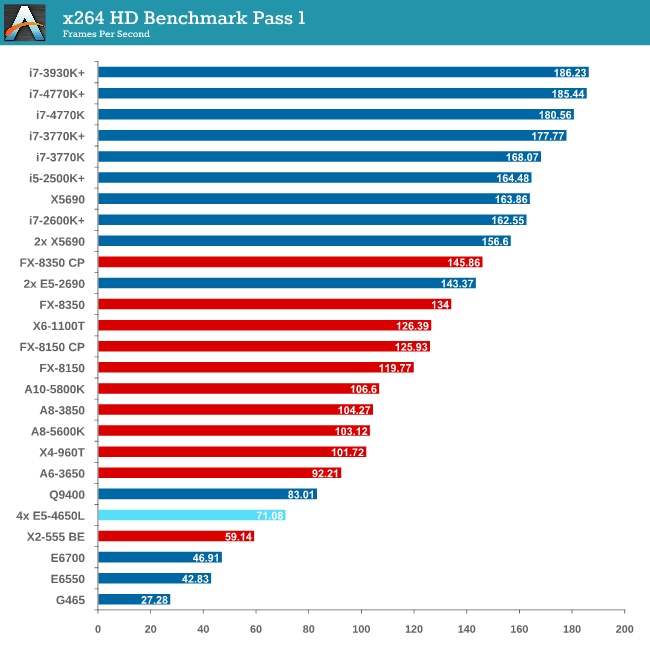
Video Conversion - x264 HD Benchmark
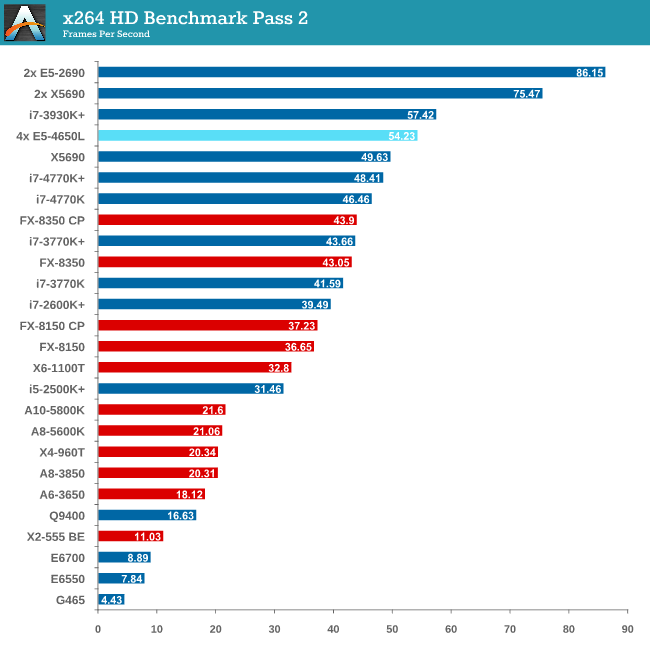
The x264 HD Benchmark uses a common HD encoding tool to process an HD MPEG2 source at 1280x720 at 3963 Kbps. This test represents a standardized result which can be compared across other reviews, and is dependent on both CPU power and memory speed. The benchmark performs a 2-pass encode, and the results shown are the average of each pass performed four times.
Grid Solvers - Explicit Finite Difference
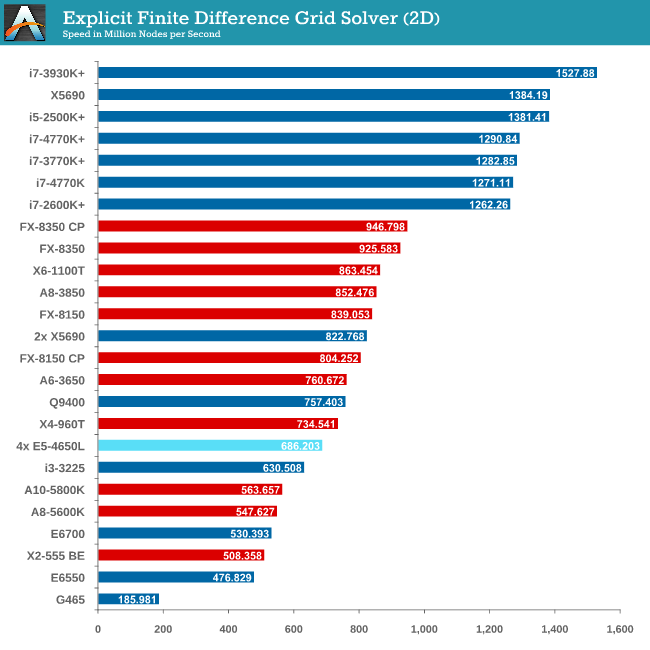
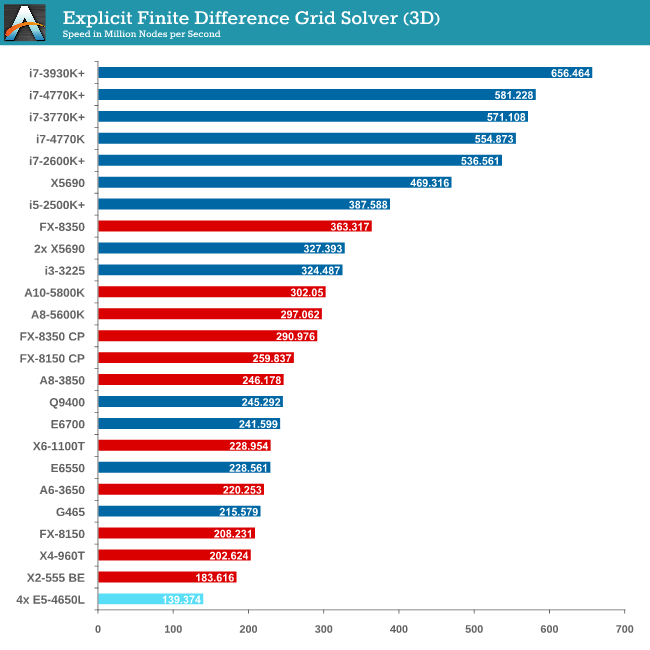
For any grid of regular nodes, the simplest way to calculate the next time step is to use the values of those around it. This makes for easy mathematics and parallel simulation, as each node calculated is only dependent on the previous time step, not the nodes around it on the current calculated time step. By choosing a regular grid, we reduce the levels of memory access required for irregular grids. We test both 2D and 3D explicit finite difference simulations with 2n nodes in each dimension, using OpenMP as the threading operator in single precision. The grid is isotropic and the boundary conditions are sinks. Values are floating point, with memory cache sizes and speeds playing a part in the overall score.
Grid Solvers - Implicit Finite Difference + Alternating Direction Implicit Method
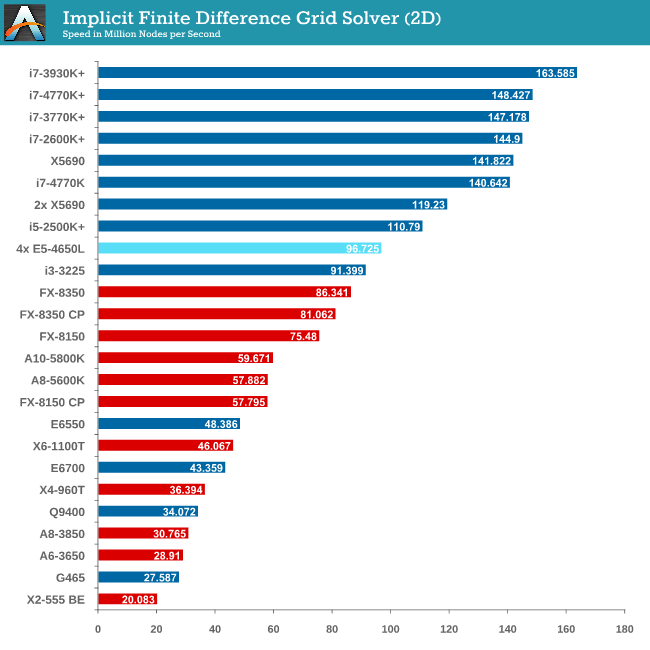
The implicit method takes a different approach to the explicit method – instead of considering one unknown in the new time step to be calculated from known elements in the previous time step, we consider that an old point can influence several new points by way of simultaneous equations. This adds to the complexity of the simulation – the grid of nodes is solved as a series of rows and columns rather than points, reducing the parallel nature of the simulation by a dimension and drastically increasing the memory requirements of each thread. The upside, as noted above, is the less stringent stability rules related to time steps and grid spacing. For this we simulate a 2D grid of 2n nodes in each dimension, using OpenMP in single precision. Again our grid is isotropic with the boundaries acting as sinks. Values are floating point, with memory cache sizes and speeds playing a part in the overall score.
For users considering multiprocessor systems, consider your usage scenario. If your simulation contains highly independent elements and lightweight threads, then the obvious suggestion is to look at GPUs for your needs. For all other purposes it is a lot easier to consider single CPU systems but scaling may occur if we look at memory management.
This makes sense when compiling your own code – the issue gets a lot tougher when dealing with third-party software. Before spending on a large multiprocessor system, get details from the company that make your software (for which you or your institution may be paying a large amount in yearly licensing fees) about whether it is suitable for multiprocessor systems, and do not be satisfied with answers such as ‘I don’t see why not’.
With Crystalwell in the picture in the consumer space, it becomes a lot more complex when dealing with a large eDRAM/L4 cache in a multiprocessor system. The system will then need to manage the snooping protocols for larger amounts of memory, making the whole procedure a nightmare for the unfortunate team that might have to deal with it. Crystalwell makes sense in the server space for single processor systems, perhaps dealing with MPI in clusters, but it might take a while to see it in the multiprocessor world at least. Fingers crossed…!
Read More ...
Kinesis Advantage Review: Long-Term Evaluation
Round two of our ergonomic keyboard coverage brings us the Kinesis Advantage. Earlier this year, I reviewed the TECK—the Truly Ergonomic Computer Keyboard—one of the few keyboards on the market that combines an ergonomic layout with mechanical Cherry MX switches. As you’d expect, that review opened the door for me to do a couple more ergonomic keyboard reviews.
Read More ...
Razer Blade 14-Inch Gaming Notebook Review
While their 17" gaming system has seen steady and incremental improvement, new to the Razer lineup is a notebook with all of the gaming performance in a remarkably slim 14" chassis. Could this be even better than the full size Razer Blade Pro?
Read More ...
Gigabyte Haswell Motherboard Giveaway
Hot on the heels of Intel's Haswell launch, Gigabyte was kind enough to share two of its flagship 8-series motherboards to give away to some lucky AnandTech readers. Today's giveaway includes one Gigabyte G1.Sniper 5 and one Z87X-OC.
Read More ...
Windows 8.1 and VS2013 bring GPU computing updates to Direct3D and C++ AMP
Windows 8.1 is bringing a new incremental update to the driver model to WDDM 1.3, which will enable incremental new GPU computing functionality. One of the important pieces is the ability to "map default buffer" (which I will call as MDB), which should be particularly interesting for compute shaders running on APUs/SoCs which combine CPU and GPU on a single chip.
We can explain the feature as follows. In a typical discrete card, GPU has it's own onboard graphics memory. The application allocates memory on the GPU buffer, and the shaders read/write data from this memory. The buffers allocated in GPU memory are called "default buffers" in Direct3D parlance. Let us assume the GPU shader has written some output that you want to read on the CPU. Currently this is done in multiple stages. First, the application allocates a "staging buffer", which is allocated by the Direct3D driver in a special area of system memory such that the GPU can transfer data between the GPU default buffers and staging buffers over the PCI Express bus efficiently. GPU copies the data from GPU buffer to the staging buffer. The CPU then issues a "map" command that allows the CPU to read/write from the staging buffer. This multi-stage process is inefficient for APUs/SoCs where the GPU shares the physical memory with the CPU. In Direct3D 11.2, the staging buffer and the extra copy operation will no longer be required on supported hardware and the CPU will be able to access the GPU buffers directly. Thus, MDB will be a big win for many GPU computing scenarios due to the reduced copy overhead on APUs/SoCs.
Intel recently rolled it's own extension called InstantAccess for Haswell. My understanding is that InstantAccess is a bit more general than MDB because InstantAccess allows mapping of textures as well as buffers whereas D3D 11.2 only allows mapping of default buffers but not textures. Extensions similar to MDB are also common in OpenCL. Both Intel and AMD allow the CPU to read/write from OpenCL GPU buffers. In addition, Intel also exposes some ability for the GPU to read/write from preallocated CPU memory which afaik is not allowed in Direct3D yet. The efficiency of different solutions is still a question that we don't know much about. For example, AMD's OpenCL extension allows the CPU to access GPU memory on Llano, but the CPU reads the data from GPU memory at a very slow speed while writing the data is still pretty fast.
UPDATE: Intel confirmed support for MDB on Ivy Bridge onwards.
At this time, there is no official confirmation about which hardware will support MDB. My expectation is that MDB will likely be available on all recent single chip CPU/GPU systems such as AMD's Trinity and Kabini as well as Intel's Haswell and Ivy Bridge. AMD has already rolled out WDDM 1.3 drivers but curiosly those do not work on Llano and Zacate APUs so I am a little pessimistic about whether those APUs will support this new feature. Microsoft for its part only stated that they expect it to be "broadly available" once WDDM 1.3 drivers are rolled out. I will update the article when we get official word from the vendors about the hardware support status.
Apart from MDB, Microsoft has also added support for runtime shader linking. This will be quite useful for both compute and graphics shaders. The idea is that one can precompile functions in the shader before hand and ship the compiled code, while linking can be done at runtime. Separate compilation and linking has been available under CUDA 5 and OpenCL 1.2 as well. Runtime shader linking is a software feature and will be available on all hardware on Windows 8.1.
C++ AMP, Microsoft's C++ extension for GPU computing, has also been updated with the upcoming VS2013. I think the biggest feature update is that C++ AMP programs will also gain a shared memory feature on APUs/SoCs where the compiler and runtime will be able to eliminate extra data copies between CPU and GPU. This feature will also be available only on Windows 8.1 and it is likely built on top of the "map default buffer" as Microsoft's AMP implementation uses Direct3D under the hood. C++ AMP also brings some other nice additions including enhanced texture support and better debugging abilities.
In addition to compute, Microsoft also introduced a number of graphics updates such as tiled resources but we will likely cover those separately. More information about Direct3D changes can be found in preliminary docs for D3D 11.2 and a talk at BUILD.
Read More ...
Some Quick Gaming Numbers at 4K, Max Settings
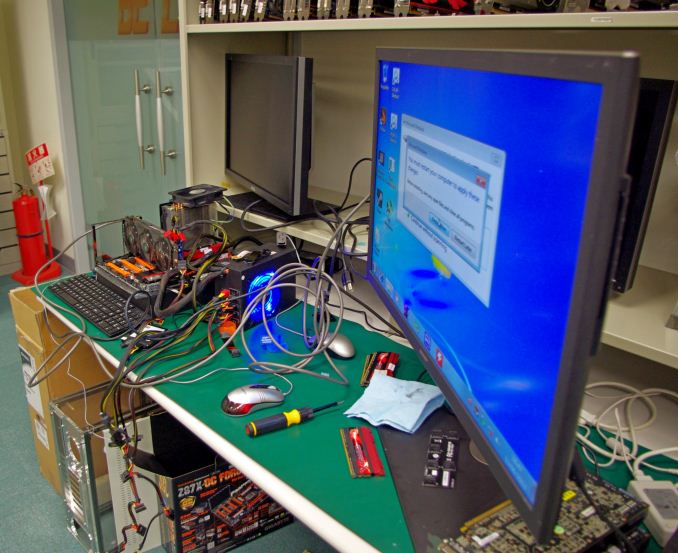
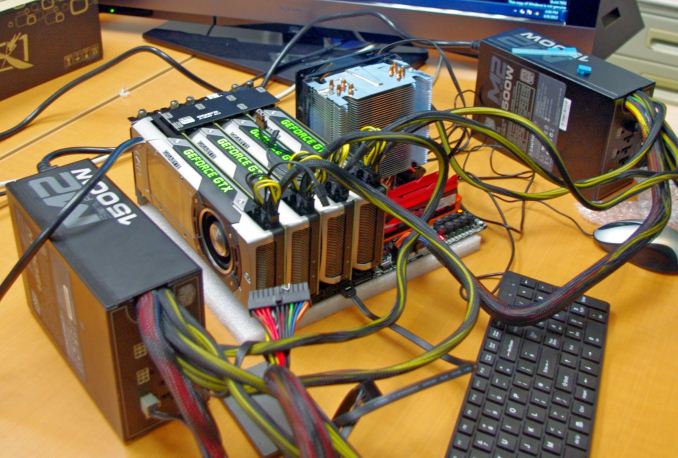
Part of my extra-curricular testing post Computex this year put me in the hands of a Sharp 4K30 monitor for three days and with a variety of AMD and NVIDIA GPUs on an overclocked Haswell system. With my test-bed SSD at hand and limited time, I was able to test my normal motherboard gaming benchmark suite at this crazy resolution (3840x2160) for several GPU combinations. Many thanks to GIGABYTE for this brief but eye-opening opportunity.
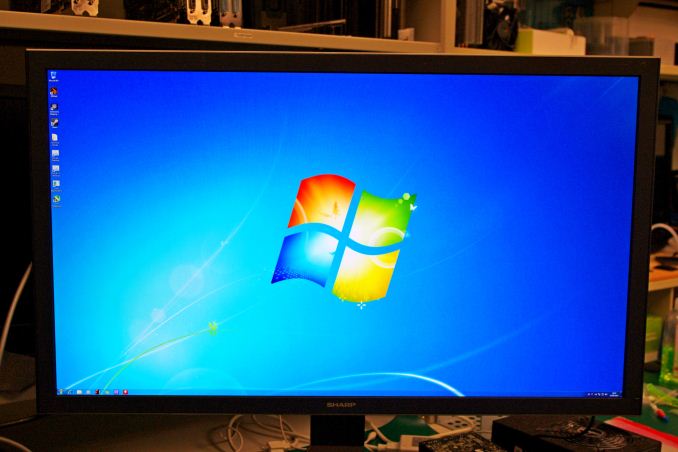
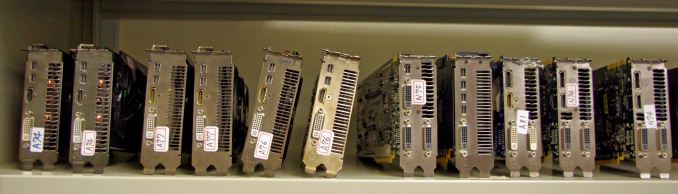
Intel Core i7-4770K @ 4.2 GHz, High Performance Mode
Corsair Vengeance Pro 2x8GB DDR3-2800 11-14-14
GIGABYTE Z87X-OC Force (PLX 8747 enabled)
2x GIGABYTE 1200W PSU
Windows 7 64-bit SP1
Drivers: GeForce 320.18 WHQL / Catalyst 13.6 Beta
NVIDIA |
||||||
|---|---|---|---|---|---|---|
GPU |
Model |
Cores / SPs |
MHz |
Memory Size |
MHz |
Memory Bus |
GTX Titan |
GV-NTITAN-6GD-B |
2688 |
837 |
6 GB |
1500 |
384-bit |
GTX 690 |
GV-N690D5-4GD-B |
2x1536 |
915 |
2 x 2GB |
1500 |
2x256-bit |
GTX 680 |
GV-N680D5-2GD-B |
1536 |
1006 |
2 GB |
1500 |
256-bit |
GTX 660 Ti |
GV-N66TOC-2GD |
1344 |
1032 |
2 GB |
1500 |
192-bit |
AMD |
||||||
GPU |
Model |
Cores / SPs |
MHz |
Memory Size |
MHz |
Memory Bus |
HD 7990 |
GV-R799D5-6GD-B |
2x2048 |
950 |
2 x 3GB |
1500 |
2x384-bit |
HD 7950 |
GV-R795WF3-3GD |
1792 |
900 |
3GB |
1250 |
384-bit |
HD 7790 |
GV-R779OC-2GD |
896 |
1075 |
2GB |
1500 |
128-bit |
Games:
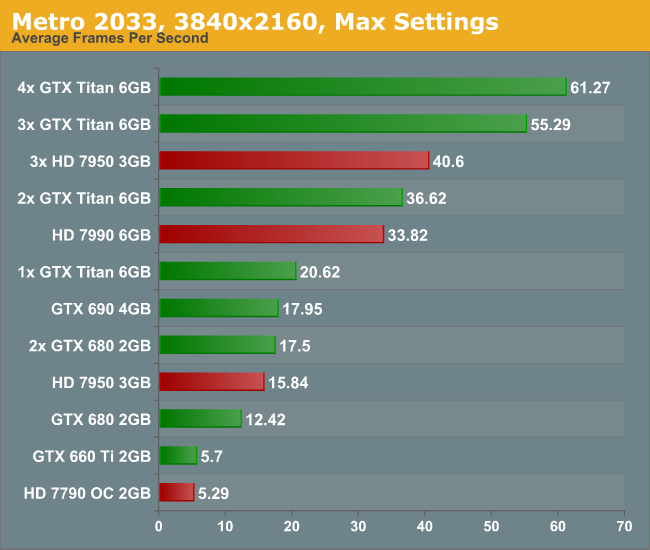
As I only had my motherboard gaming tests available and little time to download fresh ones (you would be surprised at how slow in general Taiwan internet can be, especially during working hours), we have a standard array of Metro 2033, Dirt 3 and Sleeping Dogs. Each one was run at 3840x2160 and maximum settings in our standard Gaming CPU procedures (maximum settings as the benchmark GUI allows).
Metro 2033, Max Settings, 3840x2160:
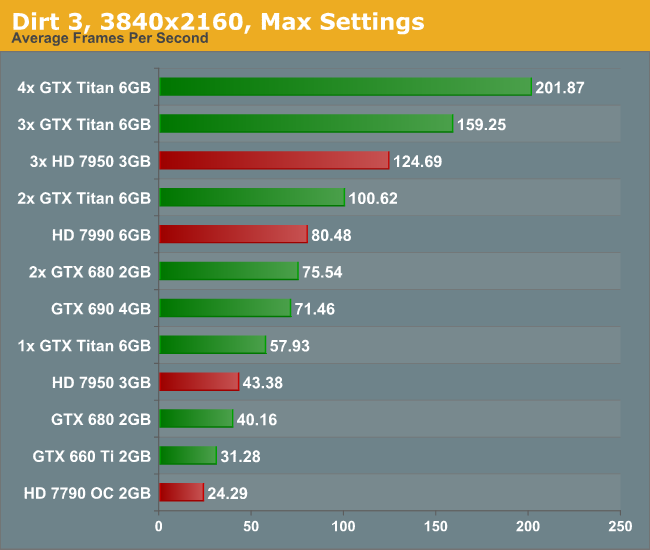
Dirt 3, Max Settings, 3840x2160:
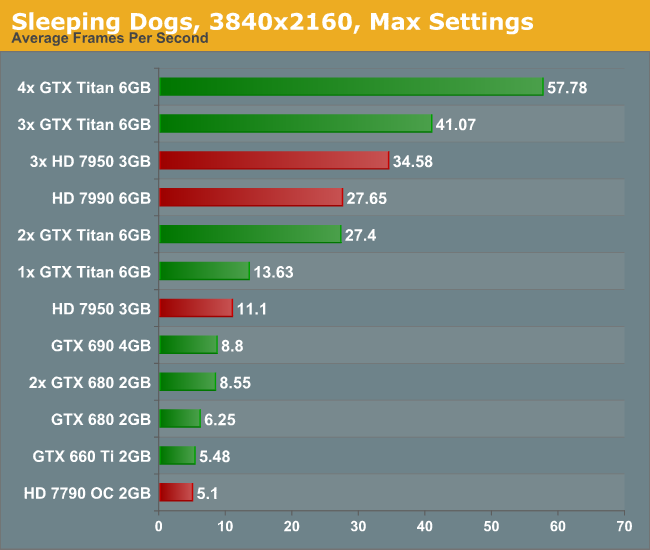
Sleeping Dogs, Max Settings, 3840x2160:
Conclusion:
First of all, the minute you experience 4K with appropriate content it is worth a long double take. With a native 4K screen and a decent frame rate, it looks stunning. Although you have to sit further back to take it all in, it is fun to get up close and see just how good the image can be. The only downside with my testing (apart from some of the low frame rates) is when the realisation that you are at 30 Hz kicks in. The visual tearing of Dirt3 during high speed parts was hard to miss.
But the newer the game, and the more elaborate you wish to be with the advanced settings, then 4K is going to require horsepower and plenty of it. Once 4K monitors hit a nice price point for 60 Hz panels (sub $1500), the gamers that like to splash out on their graphics cards will start jumping on the 4K screens. I mention 60 Hz because the 30 Hz panel we were able to test on looked fairly poor in the high FPS Dirt3 scenarios, with clear tearing on the ground as the car raced through the scene. Currently users in North America can get the Seiki 50” 4K30 monitor for around $1500, and they recently announced a 39” 4K30 monitor for around $700. ASUS are releasing their 4K60 31.5” monitor later this year for around $3800 which might bring about the start of the resolution revolution, at least for the high-end prosumer space.
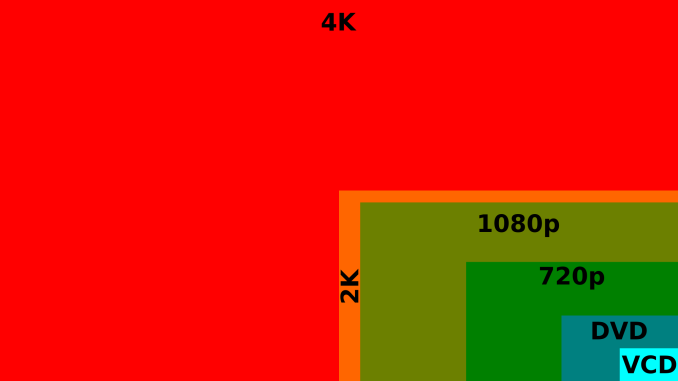
16:9 4K Comparison image from Wikipedia
Read More ...
Addonics Secure NAS R5 - A NAS / DAS Combo for the Security-Conscious
The number of readers requesting for encryption benchmarks after reading our NAS reviews has shown an uptick in the recent past. For consumers paranoid about security, Addonics is launching the Secure NAS storage appliance series. Unlike other established NAS vendors' offerings, the Secure NAS R5 (the first model in the series) differentiates itself in the following aspects:
The entire RAID volume (including the boot sector and the partition table) is encrypted.
Encryption is activated with a hardware cipher key (which can be replicated only by specialized means). There is no software to run or password to enter.
The unit also acts as a Direct Attached Storage (DAS), thanks to an eSATA port on the unit.

in a single volume and encryption is done with a 256-bit AES crypto engine. The RAID configuration (RAID0 (Striping), RAID 5 (Parity), RAID 5+S, Large Drive or Clone Mode (N-Way Mirror)) is set via DIP switches at the rear of the unit. We have built-in SMB and FTP servers and a web server for Web GUI administration. As a NAS, the supported formatters for the internal file systems are XFS and EXT3. However, when connected as a DAS, the volume can be formatted in EXT2 / EXT4 / NTFS or FAT32. Such volumes are still available when the unit is connected as a NAS. The network link is 10/100/1000 Mbps. The unit claims speeds of up to 85 MB/s over the network.
The Secure NAS R5 has a MSRP of $499.
Read More ...
Tumblr iOS App Loses User Passwords Due to Vulnerability
Patched verison of the app closes the hole

     |
Read More ...
Hacker Exposes Gaping Hole in Google Glasses With Nasty QR Codes
Wearable electronics are undiscovered country in terms of security research

| |
Read More ...
EU Decides Google's Settlement Proposal for Antitrust Investigation Isn't Enough
The search company could get stuck with a fine of $5 billion if it can't convince the EU to settle

| |
Read More ...
Tesla Building Tech to Fully Charge EVs in Just 5 Minutes
Tesla will use solar panels and batteries at Supercharger stations to help supply this extra electricity

| |
Read More ...
T-Mobile CEO Insults AT&T's New "Next" Upgrade Plan
T-Mobile's CEO ranted about the plan on Twitter

| |
Read More ...
Nokia to Launch 4.7-Inch Lumia 625
It will reportedly be a low-end phone for about $325 USD

| |
Read More ...
Ford Tries to Improve Disappointing Hybrid Fuel Efficiency with New Software Update
Software update won't change window stickers

| |
Read More ...
Available Tags:Samsung , Galaxy , Wireless , ASUS , Microsoft , Gaming , Windows Phone , Nokia , Windows , MSI , GeForce , Android , HTC , MacBook , Intel , Notebook , Gigabyte , Windows 8 , GPU , C++ , iOS , Google , CEO , Ford ,


No comments:
Post a Comment