

Android 4.2.2 Update Rollout for HTC One Begins - We Take a Look

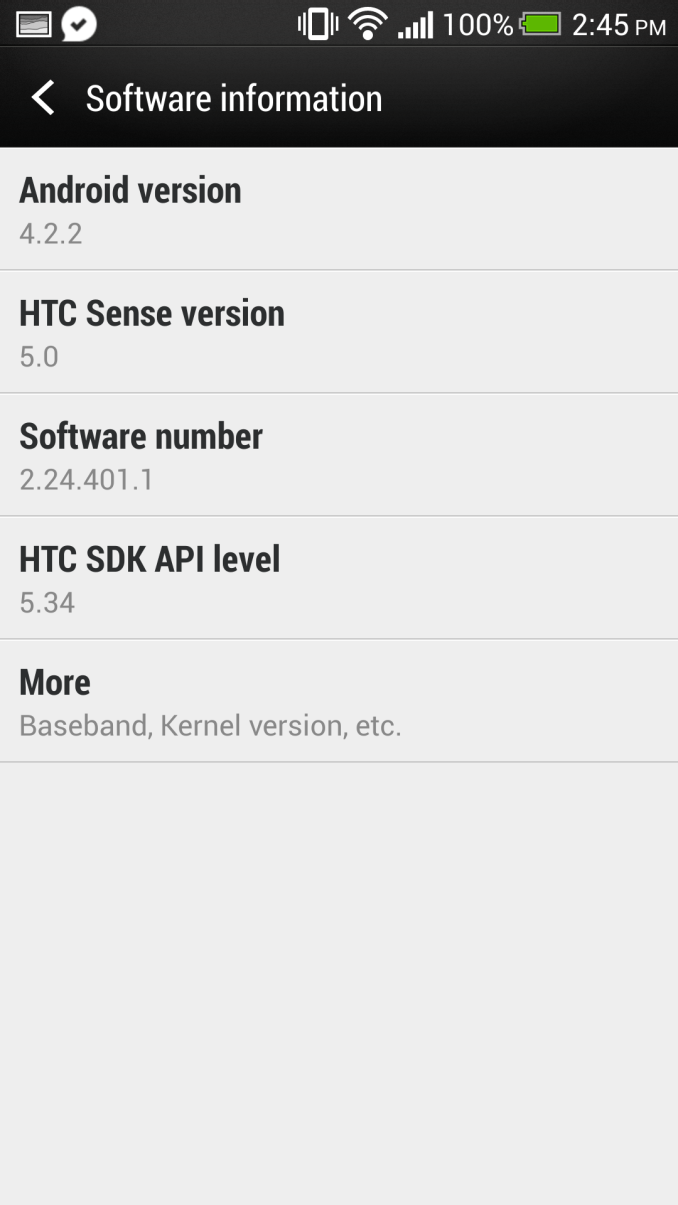
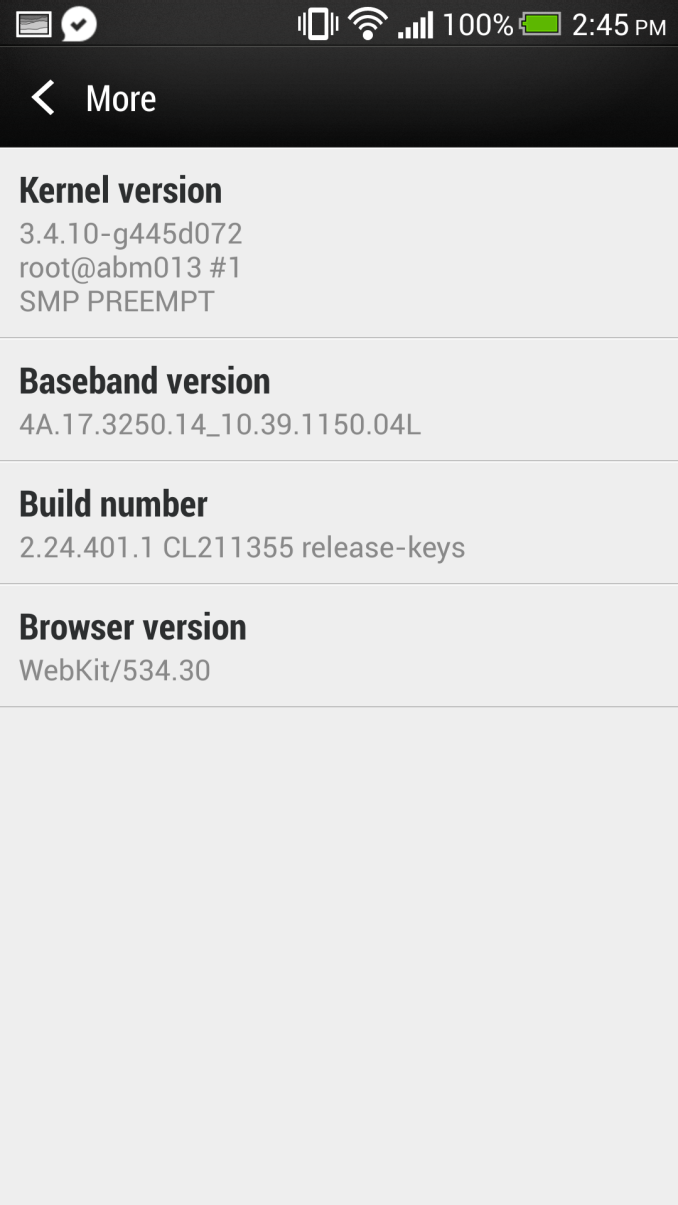
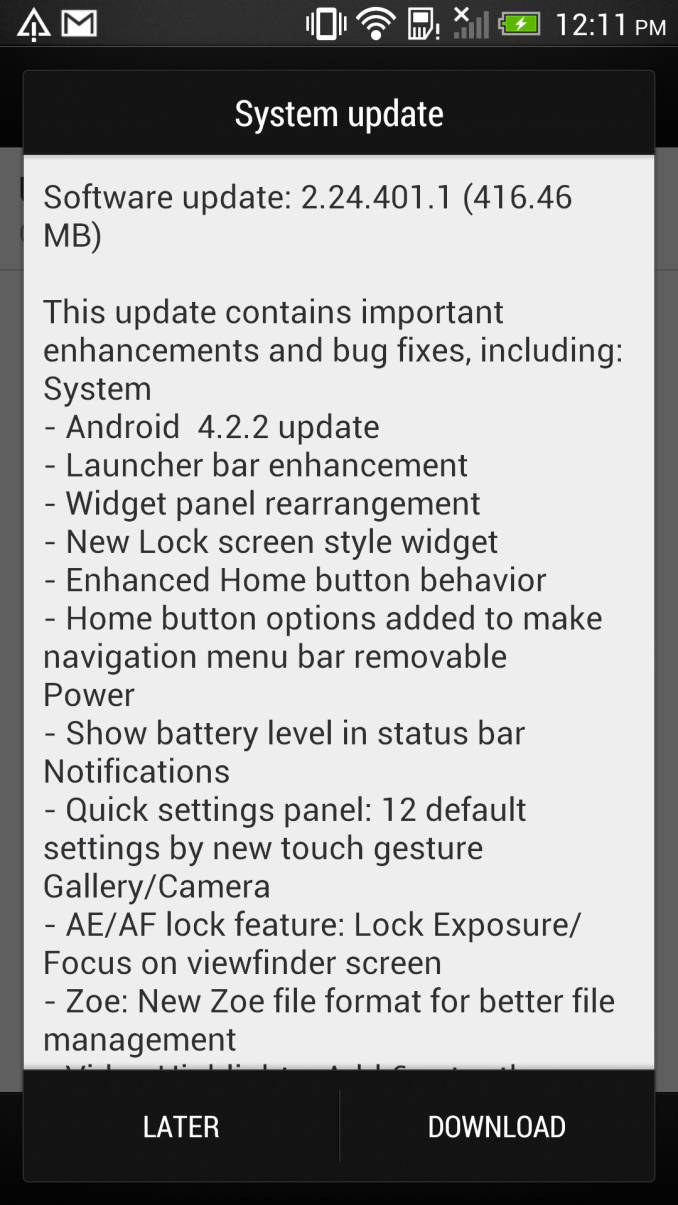
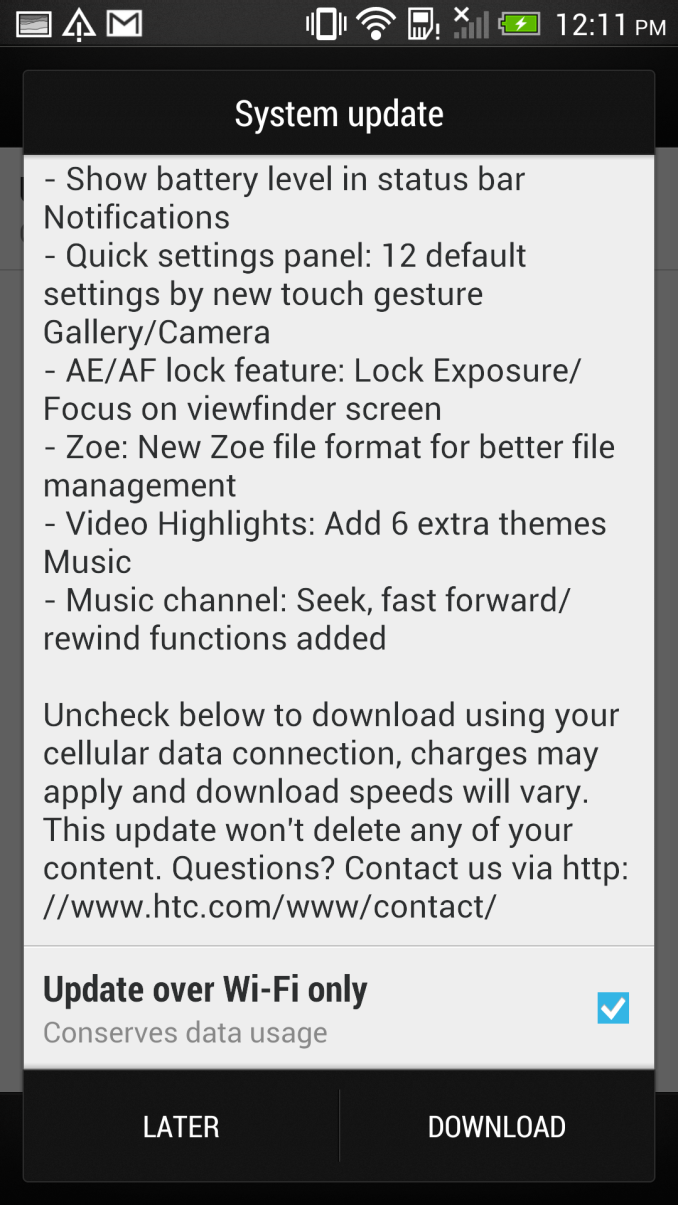
First a bit of context – HTC just recently started rolling out the Android 4.2.2 update to HTC One users in a number of regions, and our international HTC One (EMEA) just got the update, which is where we're looking at what's changed. These rollouts occur in phases and not necessarily for everyone at once, and I don't have any specific information on what regions are getting the update.












Read More ...
The Joys of 802.11ac WiFi
We’ve had quite a few major wireless networking standards over the years, and while some have certainly been better than others, I have remained a strong adherent of wired networking. I don’t expect I’ll give up the wires completely for a while yet, but Western Digital and Linksys sent me some 802.11ac routers for testing, and for the first time in a long time I’m really excited about wireless.
Read More ...
Corsair Carbide Air 540 Case Review
Corsair's cases have been defined by excellent ease of assembly, solid watercooling support...and middling air cooling performance. The Air 540 is a completely different beast, though, and it looks like they may have sorted out that last issue.
Read More ...
Trials of an Intel Quad Processor System: 4x E5-4650L from SuperMicro
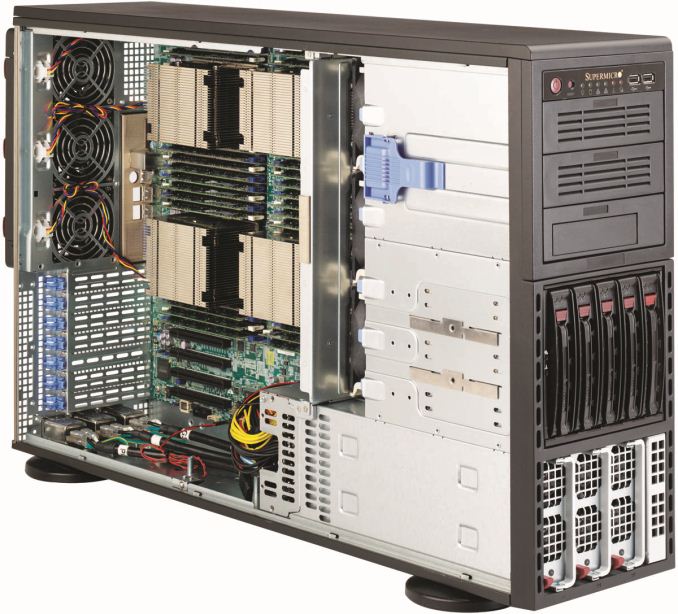
In recent months at AnandTech we have tackled a few issues of dual processor systems for regular use, and whether having a dual processor system as a theoretical scientist may help or hinder various benchmark scenarios. For the problems that I encountered as a theoretical physical chemist, using a dual processor system without any form of formal training dealing with memory allocation (NUMA) resulted in a severe performance hit for anything that required a significant level of memory accesses, especially grid solvers that required pulling information from large arrays held in memory. Part of the issue was latency access dealing with data that was in the memory of the other CPU, and thus a formal training in writing NUMA code would be applicable for multi-processor systems. Nevertheless in my AnandTech testing we did see significant speedup when dealing with various ‘pre-built’ software scenarios such as video conversion using Xilisoft Video Converter, rendering using PovRay and our 3D Particle Movement Benchmark.
To take this testing one stage further, SuperMicro kindly agreed to loan me remote desktop access to one of their internal quad processor (4P) systems. The movement from 2P to 4P is almost strictly in the realms of business investment, except for a few Folding@home enthusiasts that have seen large gains moving to a quad processor AMD system using obscure buyers for motherboards and eBay for processors. But with 4P in the business realm, the software has to match that usage scenario and scale appropriately.
Our testing scenario will cover our server motherboard CPU tests only – as I only had remote desktop access I was not fortunate enough to do any ‘gaming’ tests, although our gaming CPU article may have shown that unless you are doing a massive multi-screen multi-GPU setup then anything more than a single Sandy Bridge-E system may be overkill.
Test Setup:
4x Intel Xeon E5-4650L @ 2.6 GHz (3.1 GHz Turbo), 8 cores (16 threads) each
Kingston 128GB ECC DDR3-1600 C11
Windows Server Edition 2012 Standard
Issues Encountered
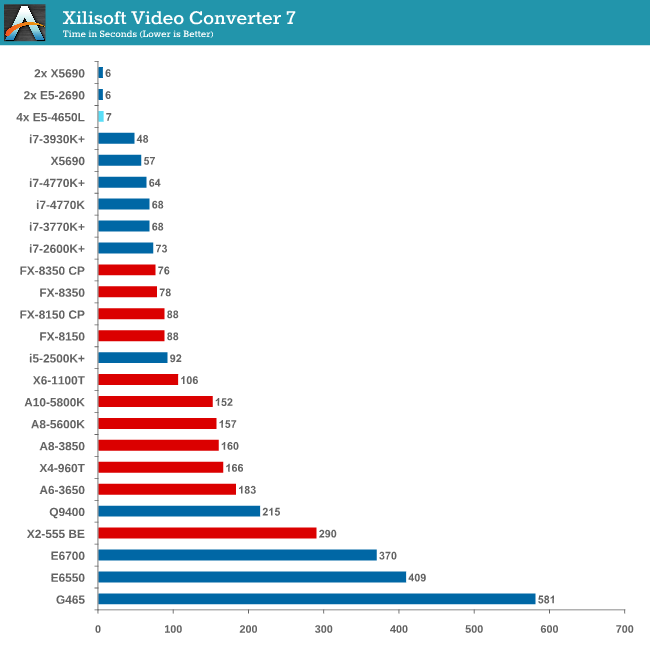
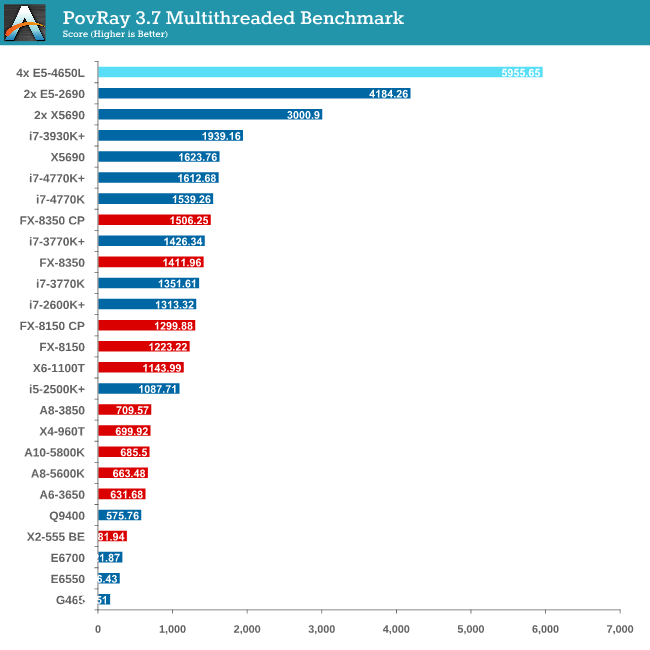
As you might imagine, moving from 1P to 2P and then to 4P without much experience in the field of multi-processor calculations was initially very daunting. The main issue moving to 4P was having an operating system that actually detected all the threads possible and then communicated that to software using the Windows APIs. In both Windows Server 2008 R2 Standard and 2012 Standard, the system would detect all 64 threads in task manager, but only report 32 threads to software. This raises a number of issues when dealing with software that automatically detects the number of threads on a system and only issues that number. In this scenario the user would need to manually set the number of threads, but it all depends on the way the program was written. For example, our Xilisoft and 3DPM tests do an automatic thread detection but set the threads to what is detected, whereas PovRay spawns a large number of threads despite automatic detection. Cinebench as well detected half the threads automatically, but at least has an option to spawn a custom number of threads.
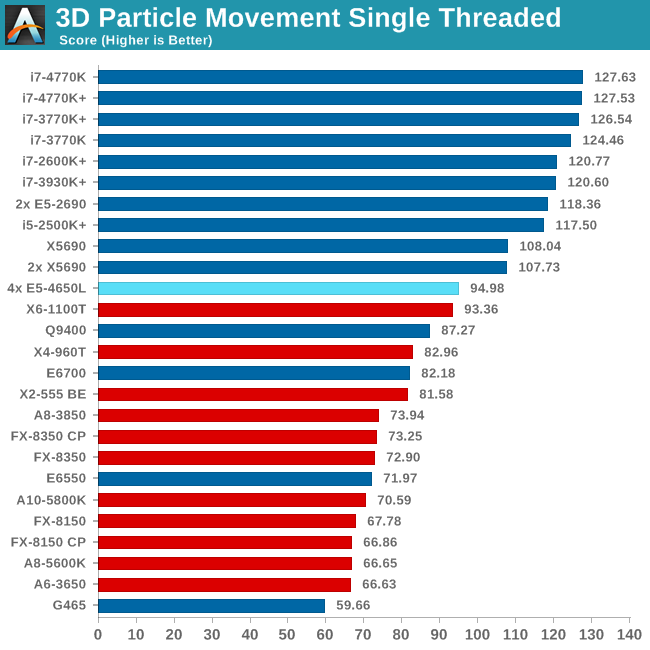
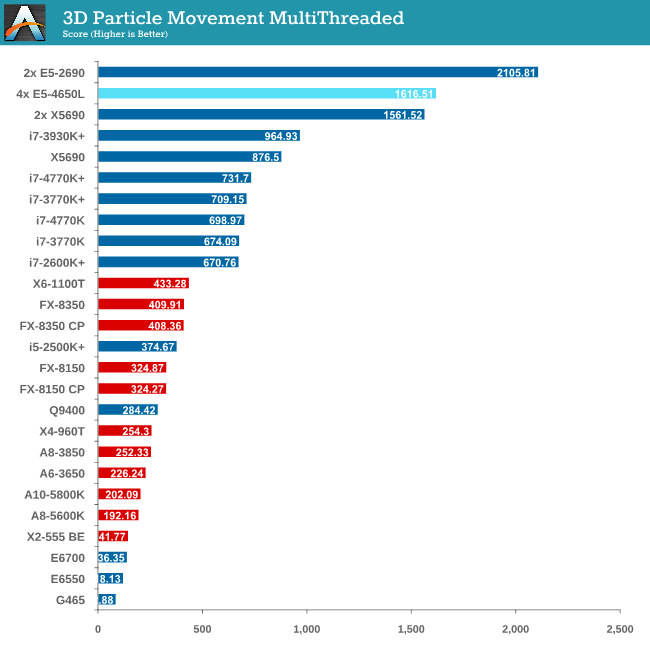
Point Calculations - 3D Movement Algorithm Test
The algorithms in 3DPM employ both uniform random number generation or normal distribution random number generation, and vary in various amounts of trigonometric operations, conditional statements, generation and rejection, fused operations, etc. The benchmark runs through six algorithms for a specified number of particles and steps, and calculates the speed of each algorithm, then sums them all for a final score. This is an example of a real world situation that a computational scientist may find themselves in, rather than a pure synthetic benchmark. The benchmark is also parallel between particles simulated, and we test the single thread performance as well as the multi-threaded performance.
Compression - WinRAR 4.2
With 64-bit WinRAR, we compress the set of files used in the USB speed tests. WinRAR x64 3.93 attempts to use multithreading when possible, and provides as a good test for when a system has variable threaded load. WinRAR 4.2 does this a lot better! If a system has multiple speeds to invoke at different loading, the switching between those speeds will determine how well the system will do.
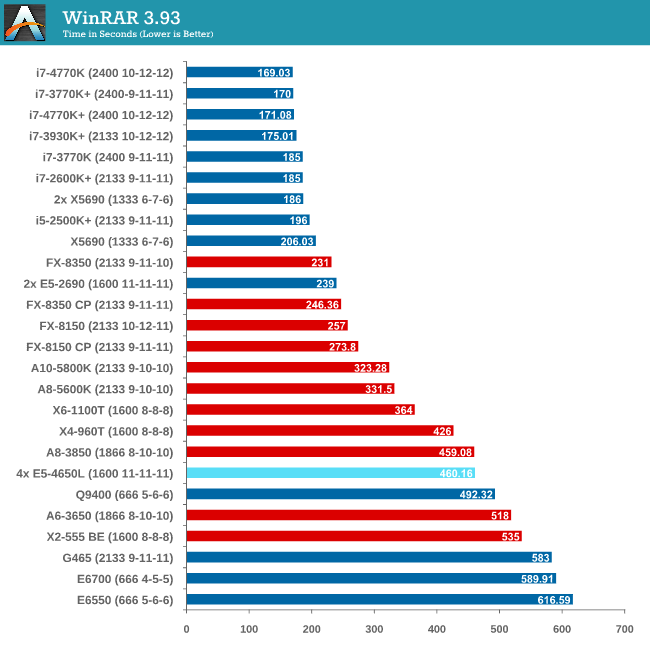
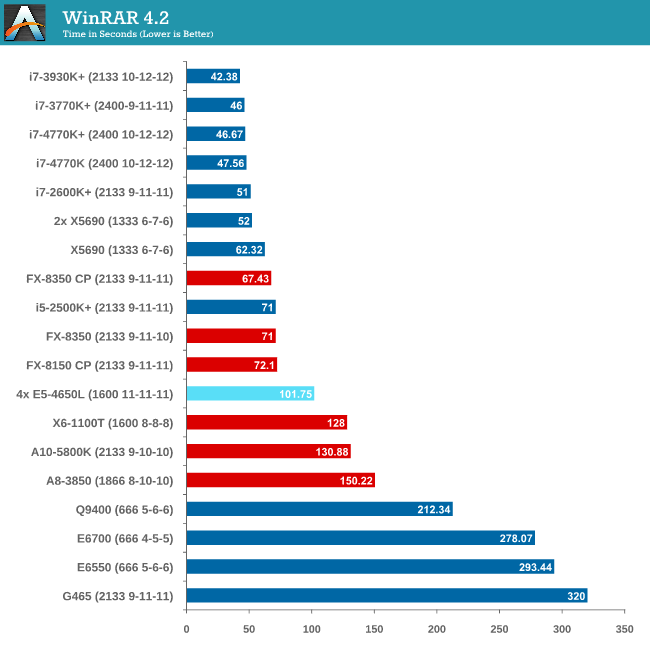
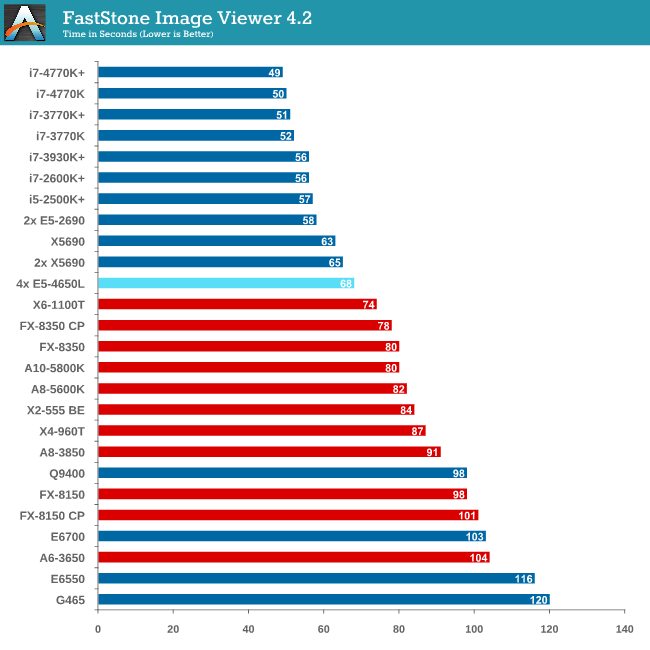
Image Manipulation - FastStone Image Viewer 4.2
FastStone Image Viewer is a free piece of software I have been using for quite a few years now. It allows quick viewing of flat images, as well as resizing, changing color depth, adding simple text or simple filters. It also has a bulk image conversion tool, which we use here. The software currently operates only in single-thread mode, which should change in later versions of the software. For this test, we convert a series of 170 files, of various resolutions, dimensions and types (of a total size of 163MB), all to the .gif format of 640x480 dimensions.
Video Conversion - Xilisoft Video Converter 7
With XVC, users can convert any type of normal video to any compatible format for smartphones, tablets and other devices. By default, it uses all available threads on the system, and in the presence of appropriate graphics cards, can utilize CUDA for NVIDIA GPUs as well as AMD WinAPP for AMD GPUs. For this test, we use a set of 33 HD videos, each lasting 30 seconds, and convert them from 1080p to an iPod H.264 video format using just the CPU. The time taken to convert these videos gives us our result.
Rendering – PovRay 3.7
The Persistence of Vision RayTracer, or PovRay, is a freeware package for as the name suggests, ray tracing. It is a pure renderer, rather than modeling software, but the latest beta version contains a handy benchmark for stressing all processing threads on a platform. We have been using this test in motherboard reviews to test memory stability at various CPU speeds to good effect – if it passes the test, the IMC in the CPU is stable for a given CPU speed. As a CPU test, it runs for approximately 2-3 minutes on high end platforms.
Video Conversion - x264 HD Benchmark
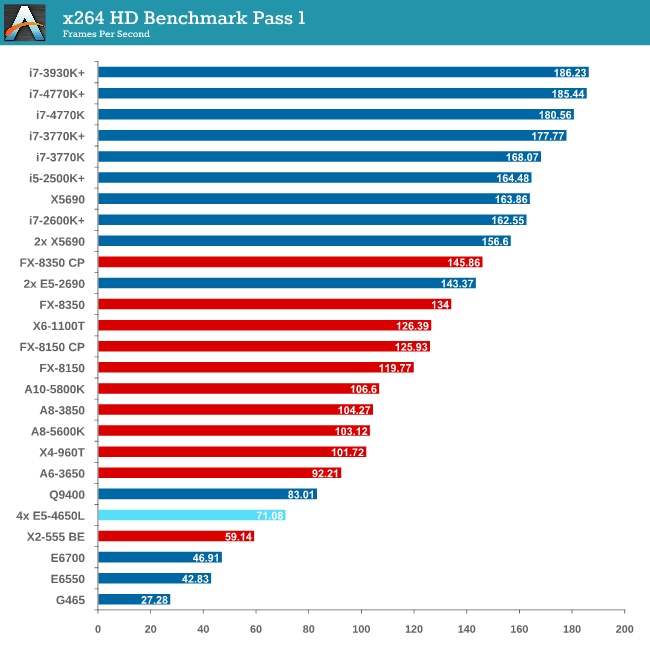
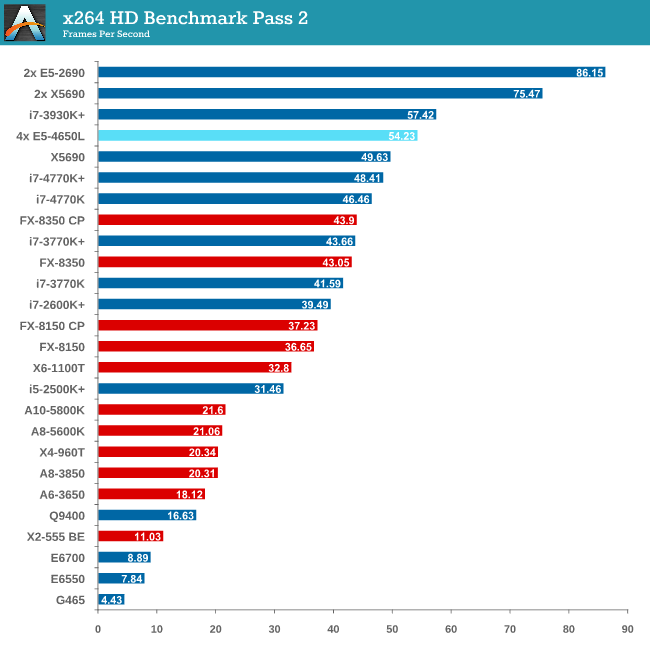
The x264 HD Benchmark uses a common HD encoding tool to process an HD MPEG2 source at 1280x720 at 3963 Kbps. This test represents a standardized result which can be compared across other reviews, and is dependent on both CPU power and memory speed. The benchmark performs a 2-pass encode, and the results shown are the average of each pass performed four times.
Grid Solvers - Explicit Finite Difference
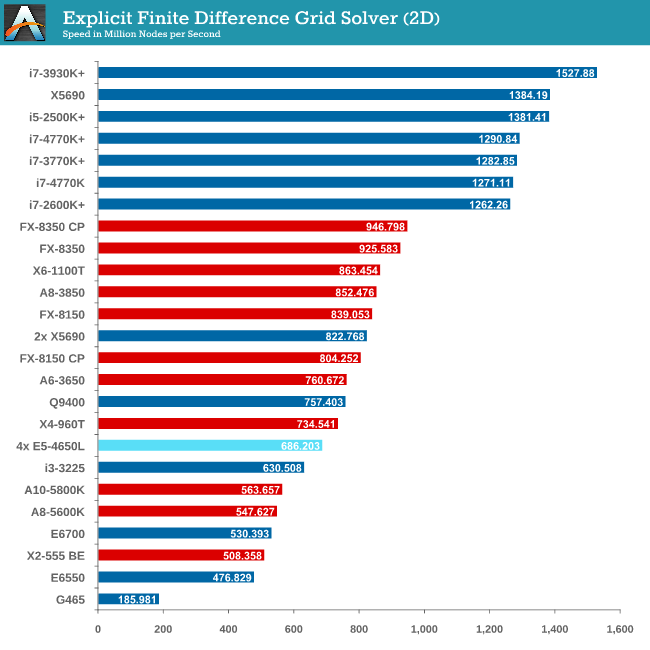
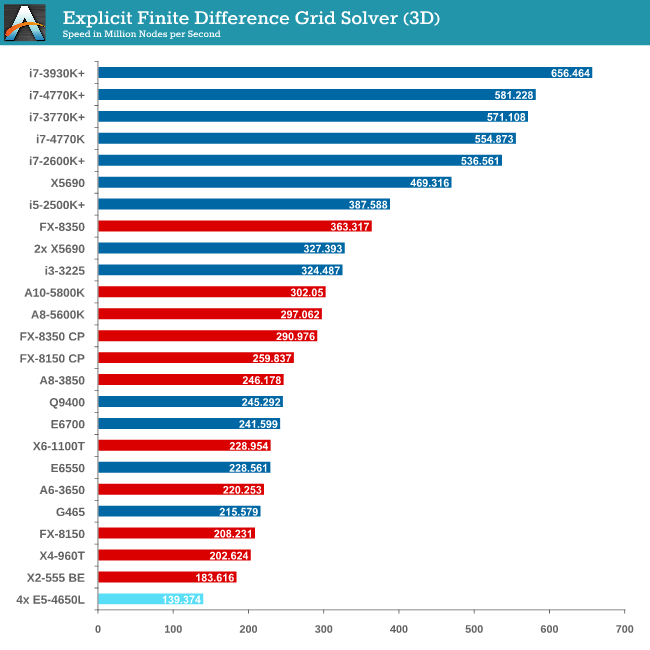
For any grid of regular nodes, the simplest way to calculate the next time step is to use the values of those around it. This makes for easy mathematics and parallel simulation, as each node calculated is only dependent on the previous time step, not the nodes around it on the current calculated time step. By choosing a regular grid, we reduce the levels of memory access required for irregular grids. We test both 2D and 3D explicit finite difference simulations with 2n nodes in each dimension, using OpenMP as the threading operator in single precision. The grid is isotropic and the boundary conditions are sinks. Values are floating point, with memory cache sizes and speeds playing a part in the overall score.
Grid Solvers - Implicit Finite Difference + Alternating Direction Implicit Method
The implicit method takes a different approach to the explicit method – instead of considering one unknown in the new time step to be calculated from known elements in the previous time step, we consider that an old point can influence several new points by way of simultaneous equations. This adds to the complexity of the simulation – the grid of nodes is solved as a series of rows and columns rather than points, reducing the parallel nature of the simulation by a dimension and drastically increasing the memory requirements of each thread. The upside, as noted above, is the less stringent stability rules related to time steps and grid spacing. For this we simulate a 2D grid of 2n nodes in each dimension, using OpenMP in single precision. Again our grid is isotropic with the boundaries acting as sinks. Values are floating point, with memory cache sizes and speeds playing a part in the overall score.
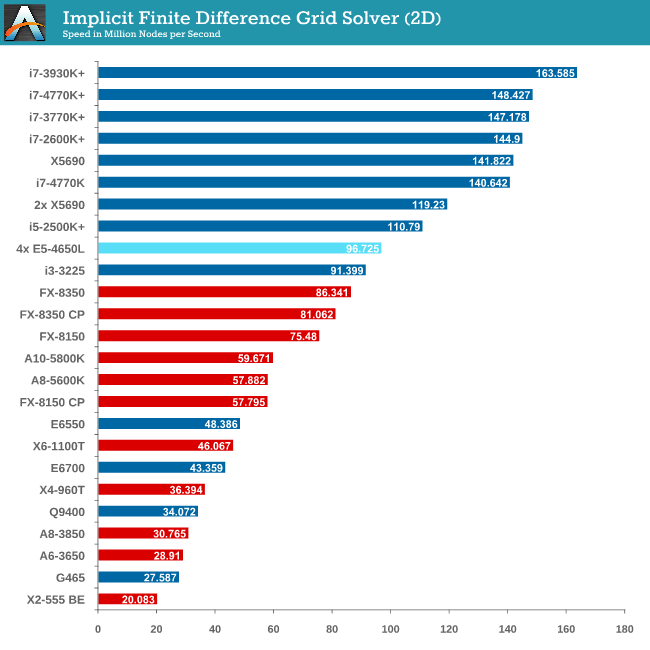
For users considering multiprocessor systems, consider your usage scenario. If your simulation contains highly independent elements and lightweight threads, then the obvious suggestion is to look at GPUs for your needs. For all other purposes it is a lot easier to consider single CPU systems but scaling may occur if we look at memory management.
This makes sense when compiling your own code – the issue gets a lot tougher when dealing with third-party software. Before spending on a large multiprocessor system, get details from the company that make your software (for which you or your institution may be paying a large amount in yearly licensing fees) about whether it is suitable for multiprocessor systems, and do not be satisfied with answers such as ‘I don’t see why not’.
With Crystalwell in the picture in the consumer space, it becomes a lot more complex when dealing with a large eDRAM/L4 cache in a multiprocessor system. The system will then need to manage the snooping protocols for larger amounts of memory, making the whole procedure a nightmare for the unfortunate team that might have to deal with it. Crystalwell makes sense in the server space for single processor systems, perhaps dealing with MPI in clusters, but it might take a while to see it in the multiprocessor world at least. Fingers crossed…!
Read More ...
Kinesis Advantage Review: Long-Term Evaluation
Round two of our ergonomic keyboard coverage brings us the Kinesis Advantage. Earlier this year, I reviewed the TECK—the Truly Ergonomic Computer Keyboard—one of the few keyboards on the market that combines an ergonomic layout with mechanical Cherry MX switches. As you’d expect, that review opened the door for me to do a couple more ergonomic keyboard reviews.
Read More ...
Razer Blade 14-Inch Gaming Notebook Review
While their 17" gaming system has seen steady and incremental improvement, new to the Razer lineup is a notebook with all of the gaming performance in a remarkably slim 14" chassis. Could this be even better than the full size Razer Blade Pro?
Read More ...
Gigabyte Haswell Motherboard Giveaway
Hot on the heels of Intel's Haswell launch, Gigabyte was kind enough to share two of its flagship 8-series motherboards to give away to some lucky AnandTech readers. Today's giveaway includes one Gigabyte G1.Sniper 5 and one Z87X-OC.
Read More ...
Windows 8.1 and VS2013 bring GPU computing updates to Direct3D and C++ AMP
Windows 8.1 is bringing a new incremental update to the driver model to WDDM 1.3, which will enable incremental new GPU computing functionality. One of the important pieces is the ability to "map default buffer" (which I will call as MDB), which should be particularly interesting for compute shaders running on APUs/SoCs which combine CPU and GPU on a single chip.
We can explain the feature as follows. In a typical discrete card, GPU has it's own onboard graphics memory. The application allocates memory on the GPU buffer, and the shaders read/write data from this memory. The buffers allocated in GPU memory are called "default buffers" in Direct3D parlance. Let us assume the GPU shader has written some output that you want to read on the CPU. Currently this is done in multiple stages. First, the application allocates a "staging buffer", which is allocated by the Direct3D driver in a special area of system memory such that the GPU can transfer data between the GPU default buffers and staging buffers over the PCI Express bus efficiently. GPU copies the data from GPU buffer to the staging buffer. The CPU then issues a "map" command that allows the CPU to read/write from the staging buffer. This multi-stage process is inefficient for APUs/SoCs where the GPU shares the physical memory with the CPU. In Direct3D 11.2, the staging buffer and the extra copy operation will no longer be required on supported hardware and the CPU will be able to access the GPU buffers directly. Thus, MDB will be a big win for many GPU computing scenarios due to the reduced copy overhead on APUs/SoCs.
Intel recently rolled it's own extension called InstantAccess for Haswell. My understanding is that InstantAccess is a bit more general than MDB because InstantAccess allows mapping of textures as well as buffers whereas D3D 11.2 only allows mapping of default buffers but not textures. Extensions similar to MDB are also common in OpenCL. Both Intel and AMD allow the CPU to read/write from OpenCL GPU buffers. In addition, Intel also exposes some ability for the GPU to read/write from preallocated CPU memory which afaik is not allowed in Direct3D yet. The efficiency of different solutions is still a question that we don't know much about. For example, AMD's OpenCL extension allows the CPU to access GPU memory on Llano, but the CPU reads the data from GPU memory at a very slow speed while writing the data is still pretty fast.
UPDATE: Intel confirmed support for MDB on Ivy Bridge onwards.
At this time, there is no official confirmation about which hardware will support MDB. My expectation is that MDB will likely be available on all recent single chip CPU/GPU systems such as AMD's Trinity and Kabini as well as Intel's Haswell and Ivy Bridge. AMD has already rolled out WDDM 1.3 drivers but curiosly those do not work on Llano and Zacate APUs so I am a little pessimistic about whether those APUs will support this new feature. Microsoft for its part only stated that they expect it to be "broadly available" once WDDM 1.3 drivers are rolled out. I will update the article when we get official word from the vendors about the hardware support status.
Apart from MDB, Microsoft has also added support for runtime shader linking. This will be quite useful for both compute and graphics shaders. The idea is that one can precompile functions in the shader before hand and ship the compiled code, while linking can be done at runtime. Separate compilation and linking has been available under CUDA 5 and OpenCL 1.2 as well. Runtime shader linking is a software feature and will be available on all hardware on Windows 8.1.
C++ AMP, Microsoft's C++ extension for GPU computing, has also been updated with the upcoming VS2013. I think the biggest feature update is that C++ AMP programs will also gain a shared memory feature on APUs/SoCs where the compiler and runtime will be able to eliminate extra data copies between CPU and GPU. This feature will also be available only on Windows 8.1 and it is likely built on top of the "map default buffer" as Microsoft's AMP implementation uses Direct3D under the hood. C++ AMP also brings some other nice additions including enhanced texture support and better debugging abilities.
In addition to compute, Microsoft also introduced a number of graphics updates such as tiled resources but we will likely cover those separately. More information about Direct3D changes can be found in preliminary docs for D3D 11.2 and a talk at BUILD.
Read More ...
Plane Powered by Solar Energy Completes Trek Across U.S.
It flew from San Francisco to New York

     |
Read More ...
Facebook Rolls Out "Graph Search" for Finding Old Facebook Info
It helps you find an old photo or check-in that was posted long ago, but lost in a sea of information on either your profile or someone else's

| |
Read More ...
Lumia 1020 Confirmed (Sort of); May Scale up the Pixel Size, Scale Down the MP
Image quality appears very good in sample shots

| |
Read More ...
BlackBerry CEO Under Pressure to Resign or Make Big Changes Amid BB10 Flop
Shareholder meeting is expected to be a roast of management, as shareholders bemoan stock plunge

| |
Read More ...
Big Cable Moves to Scoop up Streaming Rights, Pressure Netflix, et al.
Amazon, Netflix, Hulu, and more are at risk of seeing content cut off by secret backroom deals

| |
Read More ...
Hospital Mistakes Due to Digital Records Errors are on the Rise
Advocates say systems prevent more errors than they cause

| |
Read More ...
Nikon is Searching for Ways to Grow as Point-and-Shoot Market Declines
Nikon eyes to move in the medical realm

| |
Read More ...
Former Xbox Chief Wanted to Buy Zynga Three Years Ago
The idea was to give the Xbox more social gaming features

| |
Read More ...
7/8/2013 Daily Hardware Reviews
DailyTech's roundup of reviews from around the internet for Monday

| |
Read More ...
Report: Images, Video Show Apple's "Budget" iPhone
Pictures claim to represent a lower-priced iPhone offering with polycarbonate case

| |
Read More ...
SETI "Shafts" Trekkies Who Won Vote to Name New Pluto Moon "Vulcan"
Two newly discovered moons will instead be named Styx and Kerberos

| |
Read More ...
Report: Microsoft to Put Windows Phone Chief in Charge of All OS Development
Shakeup will consolidate previously separate units, reportedly

| |
Read More ...
New Contact Lenses Have Zoom Feature
This kind of development could be useful for those with macular degeneration, where vision is lost in the central area of the retina

| |
Read More ...
Available Tags:Android , HTC , Intel , Gaming , Notebook , Gigabyte , Windows 8 , Windows , GPU , C++ , Facebook , Facebook , BlackBerry , CEO , Nikon , Xbox , Hardware , iPhone , Windows Phone , Microsoft ,


No comments:
Post a Comment