

Patriot Drives Further into Mobile with FUEL+ External Batteries
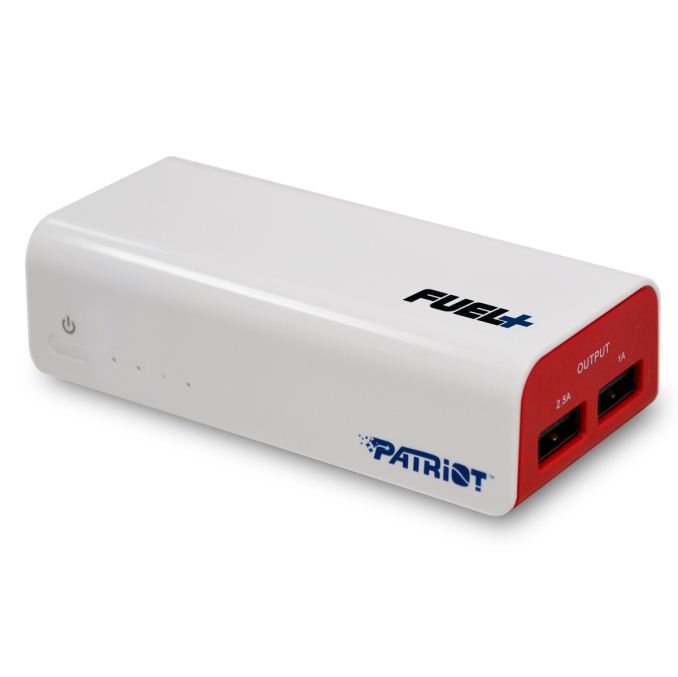
FUEL+ is available in three different form factors/capacities. The 1500 mAh version features an integrated Lightning connector for use on the iPhone 5, iPad mini and iPad 4:


Read More ...
Computex 2013: ASUS PQ321 3840 x 2160 Display, $3799
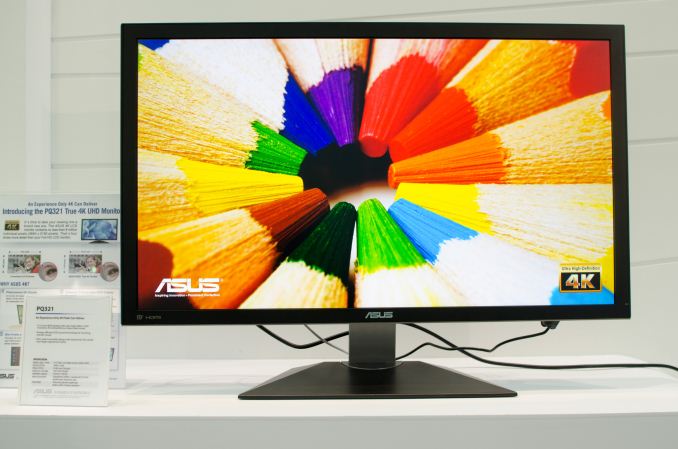
Driving the 4K display will require either a DP 1.2 output or two HDMI outputs. ASUS' Computex demo had two of its panels (one 31.5" and a 39" version as well) running off of the same system, both driven off DisplayPort outputs.
Although the demo ran at 30Hz, ASUS claims it has a display setting that will allow 60Hz operation using DisplayPort.


Read More ...
Computex 2013: ASUS PA279Q, 2560x1440 and Factory Color Calibrated
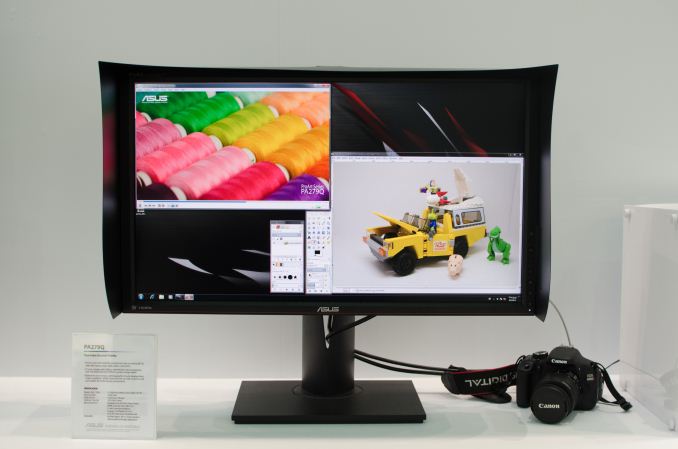
The price point will be higher than the influx of Korean 27-inch 2560 x 1440 panels, but ASUS hopes that the factory color calibration will help offset the premium. There's no word on final price or availability.


Read More ...
Intel's Thunderbolt 2: Everything You Need to Know

Falcon Ridge however is designed to address this problem later this year. Falcon Ridge will officially be the first controller to implement Thunderbolt 2. Despite the increment in nomenclature, the differences are actually pretty simple.
Today, Thunderbolt exists as four 10Gbps channels - two upstream and two downstream. Each channel however is fully independent. Although PCIe and DisplayPort are muxed from the cable perspective, you can only send one or the other over each channel. That limits max performance for a single storage device to 10Gbps (minus overhead), and it similarly limits the max display bandwidth to 10Gbps as well. The latter is insufficient for 4K video (~15Gbps depending on refresh rate). If you bypass Thunderbolt and just send DP 1.2 over the cable it's not a problem, but if you want to enable mixed use cases where you're driving both 4K video and high-speed storage over the same cable you're going to need another solution.
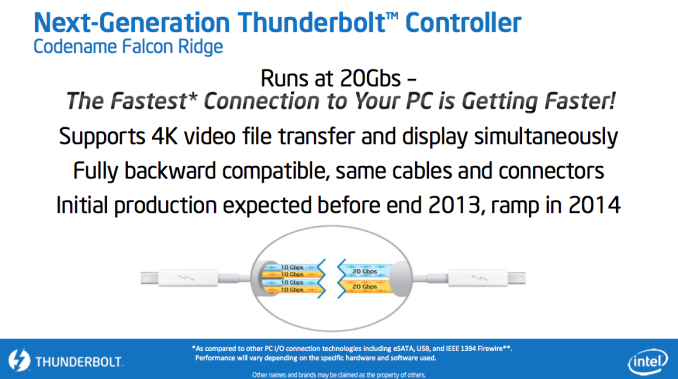
Thunderbolt 2 provides that solution. By combining the channels together, Thunderbolt 2 enables two 20Gbps bi-direction channels instead of two sets of 10Gbps channels. There's no overall increase in bandwidth, but the solution is now more capable. Since there's 20Gbps of bandwidth per channel, you can now do 4K video over Thunderbolt. You can also expect to see higher max transfer rates for storage. Whereas most Thunderbolt storage devices top out at 800 - 900MB/s, Thunderbolt 2 should raise that to around 1500MB/s (overhead and PCIe limits will stop you from getting anywhere near the max spec).
Intel put together a quick demo of Thunderbolt 2 silicon in one of its suites at Computex. The setup involved two Intel SSD 910s running over Thunderbolt 2 alongside two 2560 x 1440 panels. Peak performance to the SSD array was just under 1100MB/s, which Intel expects will be much higher once final hardware is ready.
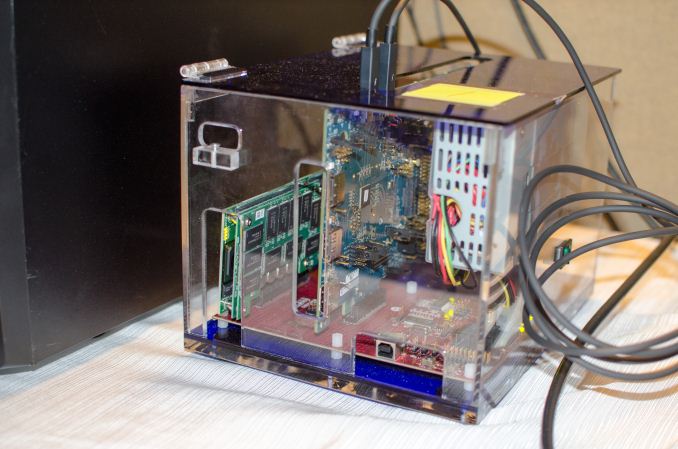
The box above basically houses Falcon Ridge silicon (card on the right), connected to a board that distributes PCIe from that controller.
I had higher hopes for what Thunderbolt 2 would be (moving to PCIe Gen 3 for example), but it looks like the spec is primarily designed around enabling 4K as well as incrementally increasing storage performance. I'm still holding out for the dramatic changes to usage models though, e.g. enabling external dGPUs over Thunderbolt, but it looks like I'll have to hold out for longer.
Read More ...
Silvermont to Sell under Atom, Celeron and Pentium Brands, 2.4GHz Z3770 Leaked

Thanks to a great tip on Twitter (thanks Ashraf!), it looks like Intel's Hermann Eul (the new head of the mobile & comms group) leaked specs for the first official Silvermont SKU: the Z3770. It's unclear if this part will be branded Atom, Celeron or Pentium though. The quad-core SKU features a max CPU clock of 2.4GHz and carries a 2W SDP (Scenario Design Power) rating. Keep in mind that SDP is a thermal rating based on a different set of benchmarks than Intel's TDP ratings, so it's entirely possible for the chip to peak (and sustain) at higher thermals depending on usage model and how the OEM has configured the power profile of the chip. Previous generation Atom cores carried similar if not lower TDPs, which could mean that with Silvermont we're going to see a wider dynamic range of power consumption. We've seen this trend towards greater dynamic range in power consumption for a while now. The devil is really in the details of how power management is implemented. Silvermont takes a step towards Core-like power management, but we'll have to see how that ends up surfacing in final products.
Ian also found some examples of Celeron branded Silvermont desktop mini-ITX motherboards at Computex from Wibtek. There's the Celeron J1850 (4C/2.0GHz) and Celeron J1750 (2C/2.4GHz):

Intel claims Silvermont will deliver substantially better performance and power consumption than current (and upcoming) ARM based SoCs. I always like to point out that literally every single SoC vendor has told me that they lead in performance per watt. Today, as best as I can tell, Qualcomm is the rightful owner of that crown. Later this year we'll really find out if Intel takes it back.
Read More ...
The Haswell Ultrabook Review: Core i7-4500U Tested
With Haswell we got a staggered launch, with only some parts ready to go immediately. Interestingly enough, it’s the high-end Haswell desktop parts that are most ready at this point. The stakes are high enough that we had to resort to testing a customer reference platform in order to evaluate Intel’s new Iris Pro graphics. And today, we had to track down a pre-production Haswell Ultrabook in Taiwan to even be able to bring you this review of Haswell ULT.
I’ve spent the past few days in Taipei hunting for bandwidth, running tests in my hotel room and trying my best to understand all there is to know about Haswell ULT, the third Haswell I outlined in our microarchitecture piece last year.
Read More ...
AMD Continues Assembling Dream Team: Sean Pelletier from NVIDIA Tech Marketing to Join, Update: He's back at NVIDIA
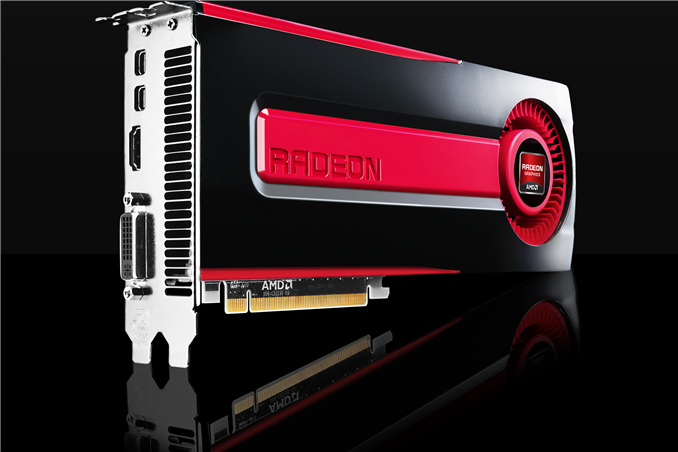
Today I just got word from a couple of very accurate and trusted sources that my old friend Sean Pelletier will be joining AMD as well. Sean will abandon his role as Senior Technical Marketing Manager at NVIDIA to assume a similar role at AMD, initially focusing on GPUs. Reporting on individual hires doesn't actually tell you a lot about talent within a company, but it can give insight into whether or not a company is viable. Not too long ago, leaving Apple, NVIDIA or pretty much any other tech company to join AMD sounded like a career death sentence. The fact that smart folks from all paths are considering AMD as an option for long term employment tells us a lot about how things have changed.
Update: I just got word that Sean ended up back at NVIDIA. He sent me a message after making the decision saying that there wasn't anything wrong with AMD, but that the fit simply didn't feel right.
Read More ...
Samsung Makes Galaxy S 4 Active Official - IP67 and Ruggedized
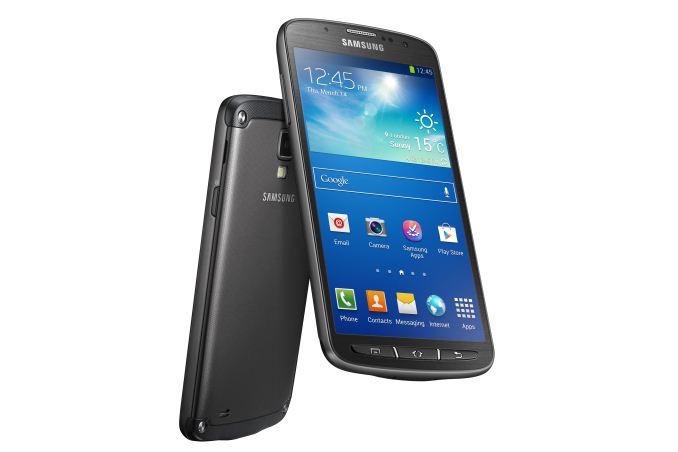
Superficially the SGS4A is almost the same as the international and other variants of SGS4, however there are a few changes to the phone beyond just a sealed design with IP67 rating. SoC remains the 1.9 GHz Snapdragon 600 (APQ8064AB) we've seen before, the major change is that camera gets a bump down to 8 MP instead of 13 MP, and there's a 1080p LCD display inside instead of Super AMOLED. Camera is likely still using 1.1 micron pixels, just the 8 MP version of the sensor for reduced z-height since LCD is a bit thicker. LCD makes sense here for cost reasons (something has to give) and brightness plus outdoor viewability reasons — AMOLED can go just as bright, but at higher power than the equivalent for LED backlit LCD. The back of the SGS4A seems to be removable given the presence of a thumb groove in the press photos, so ostensibly behind there is the microSD card slot, microSIM slot, and likely still user-replaceable battery. It's also obvious from the photos that the SGS4A includes physical menu, home, and back buttons instead of the still somewhat odd combination of both physical and capacitive on SGS4.
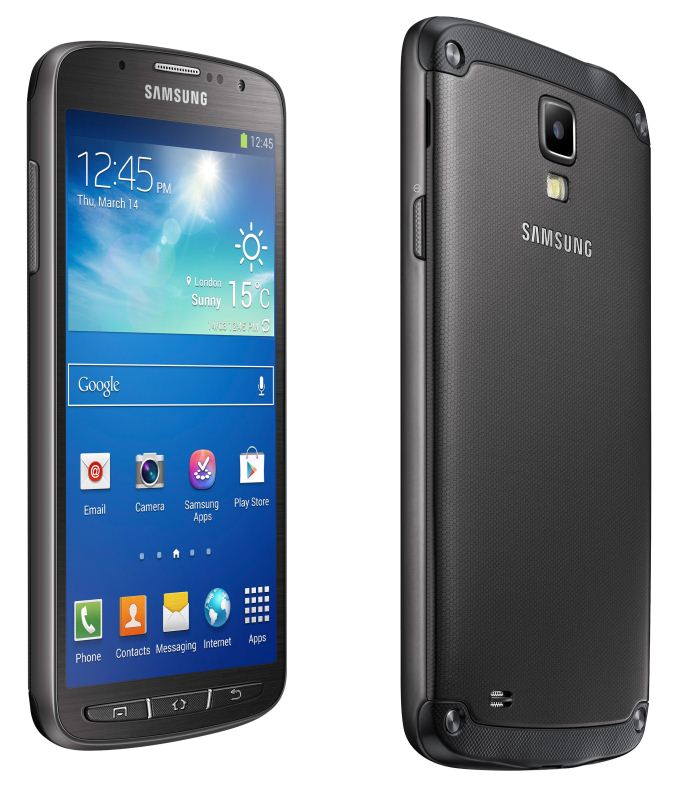
SGS4A vs SGS4 Comparison |
|||||
SGS4 |
SGS4 Active |
||||
Length |
136.6 mm |
139.7 mm |
|||
Width |
69.9 mm |
71.3 mm |
|||
Thickness |
7.9 mm |
9.1 mm |
|||
Weight |
130 g |
151 g |
|||
Display |
5.0-inch 1080p SAMOLED |
5.0-inch 1080p TFT LCD |
|||
Camera |
13 MP with LED Flash |
8 MP with LED Flash |
|||

Source: Samsung


Read More ...
Outlook 2013 RT Coming Free to Windows RT 8.1 Tablets Later this Year
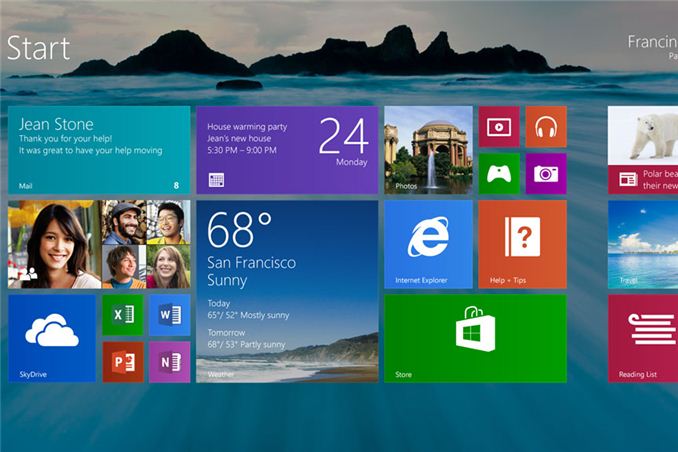
Outlook 2013 RT joins Office 2013 RT as very valuable components of the free software package that comes with all Windows RT tablets. By supplying key desktop applications for free, Microsoft not only increases the value of the platform but also drives users towards the Windows Store and modern UI apps for the rest of their needs as the basics are already met.
Despite the presence of Office 2013 on Windows RT, the ARM based platform hasn’t been embraced with tons of success. Many have blamed the lack of backwards compatibility with existing x86 applications, however I have a slightly different perspective. In my eyes, both Windows RT and Windows 8 suffered from the same issues: the OS was rushed. There was very little integration between modern and desktop UI modes and switching between the two was very jarring. Performance issues and bundled app inflexibility also plagued both OSes. With Windows 8.1, Microsoft seems to be addressing many of these items. If the list stops at what Microsoft has already announced, I suspect Windows 8.1 (and RT 8.1) will be evolutionarily better. If Microsoft can take this opportunity to address bigger problems as well (e.g. fixing high-DPI scaling in desktop mode), then Microsoft has a much bigger opportunity ahead of itself.
Windows 8.1 and RT 8.1 have the benefit of launching side much better hardware. While I complained about the performance of Tegra 3 in Surface RT, this generation we’ll see significantly better performance out of Snapdragon 800 based tablets with 8.1 (likely to also include the 2nd generation Surface RT). On the PC side, we finally have Haswell, which should make the next-gen Surface Pro significantly better (although it may take Broadwell to substantially reduce thickness depending on how aggressive Microsoft chooses to be).
As far as why Microsoft remains committed to Windows RT, I think the reasoning is obvious. PCs (and PC-like products) are under incredible pricing pressure. Microsoft’s only plays are to reduce its margins to remain competitive, or to reduce the cost of other components within the platform. Intel remains the only other big consumer of cost in a modern PC - moving to ARM helps change that. Intel does offer lower cost Atom solutions, but it’s clear at this point that Microsoft feels it needs competition in the market in order to continue to keep prices low. In that regard, ARM really is the new AMD.
Read More ...
AMD Richland Desktop APUs Now Available
AMD Elite A-Series Desktop APUs, aka Richland |
||||||
Model |
A10-6800K |
A10-6700 |
A8-6600K |
A8-6500 |
A6-6400K |
A4-4000 |
Modules/Cores |
2/4 |
2/4 |
2/4 |
2/4 |
1/2 |
1/2 |
CPU Base Freq |
4.1 |
3.7 |
3.9 |
3.5 |
3.9 |
3.0 |
Max Turbo |
4.4 |
4.3 |
4.2 |
4.1 |
4.1 |
3.2 |
TDP |
100W |
65W |
100W |
65W |
65W |
65W |
Graphics |
HD 8670D |
HD 8670D |
HD 8570D |
HD 8570D |
HD 8470D |
? |
GPU Cores |
384 |
384 |
256 |
256 |
192 |
128 |
GPU Clock |
844 |
844 |
844 |
800 |
800 |
724 |
L2 Cache |
2x2MB |
2x2MB |
2x2MB |
2x2MB |
1MB |
1MB |
Max DDR3 |
2133 |
1866 |
1866 |
1866 |
||
Price (MSRP) |
$150 ($142) |
$149 ($142) |
$120 ($112) |
$119 ($112) |
$80 |
$46 |
AMD Trinity Desktop APUs |
||||||
Model |
A10-5800K |
A10-5700 |
A8-5600K |
A8-5500 |
A6-5400K |
A4-5300 |
Modules/Cores |
2/4 |
2/4 |
2/4 |
2/4 |
1/2 |
1/2 |
CPU Base Freq |
3.8 |
3.4 |
3.6 |
3.2 |
3.6 |
3.4 |
Max Turbo |
4.2 |
4.0 |
3.9 |
3.7 |
3.8 |
3.6 |
TDP |
100W |
65W |
100W |
65W |
65W |
65W |
Graphics |
HD 7660D |
HD 7660D |
HD 7560D |
HD 7560D |
HD 7540D |
HD 7480D |
GPU Cores |
384 |
384 |
256 |
256 |
192 |
128 |
GPU Clock |
800 |
760 |
760 |
760 |
760 |
723 |
L2 Cache |
2x2MB |
2x2MB |
2x2MB |
2x2MB |
1MB |
1MB |
Max DDR3 |
2133 |
1866 |
1866 |
1866 |
||
Current Price |
$130 |
$129 |
$110 |
$105 |
$70 |
$55 |
On the GPU front, the Richland APUs are likewise clocked 5-11% higher (the only 11% gap being the A10-6700 vs. the A10-5700; the rest are 5%). At least for now street pricing is also up around 10-15%, so you’re basically paying a bit more to get a bit more performance. Also worth mention is that all of the Richland parts will work in existing socket FM2 motherboards, with support for the A85X, A75, and A55 platforms. There will be forward compatibility with FM2+ motherboards as well. It’s unlikely many people will be looking to upgrade from Trinity to Richland (just like we don’t expect many people to move from Ivy Bridge to Haswell), but the existing FM2 motherboards will help keep the price of adoption low.
While it may appear that Intel’s new Haswell chips could cause AMD some grief in the graphics department, there’s more to the story than just performance. With Trinity and Ivy Bridge, AMD clearly had a faster iGPU, but depending on what you’re looking at that’s no longer inherently true. It’s going to be a bit closer now when we compare Intel’s HD Graphics 4200/4400/4600 with the HD 8670D, but the GT3e Iris Pro 5200 should prove substantially more potent. That will likely be true of the GT3 HD Graphics 5000 when compared with mobile Trinity as well. However, Iris Pro 5200 also ends up adding to the cost of a Haswell chip, and U-series Haswell chips will be selling in substantially more expensive Ultrabooks. So we’re basically back to the same story as before: AMD will sell you “good enough” performance at a much lower price than Intel.
The fastest AMD A10-6800K costs $40 less than the least expensive Core i5 Haswell CPU, and in fact it’s still $30-$40 less than Core i5 Ivy Bridge. Intel competes against the A10-6800K with their Core i3 CPUs, which on the desktop remain Ivy Bridge for now. Unless you need absolutely top CPU performance, AMD’s A10 APUs have proven more than sufficient for most tasks—even high-end gaming rarely benefits from a faster CPU than an A10 until you start using two or more GPUs. That’s really the question you need to answer: what do you intend to do with your PC? For pure CPU performance, Intel wins easily, and Quick Sync is great for fast video transcoding; outside of those use cases, though, AMD’s APUs continue to provide a good experience that will keep all but the most demanding of users happy.
Read More ...
Sony Introduces VAIO Pro 11/13 Ultrabooks and VAIO Duo 13 Hybrid
Sony has always had a penchant for ultraportables (you know, what they were called before they became Ultrabooks), and laptops like the VAIO Z series have impressed with the amount of hardware crammed into a small chassis. With Intel’s new focus on improving integrated graphics performance, the days of requiring a discrete GPU for “fast enough” graphics performance may finally be drawing to a close, which gives companies like Sony the ability to create even smaller designs. That brings us to today’s launch of the VAIO Pro 11 and 13, along with the next generation VAIO Duo 13 Slider.
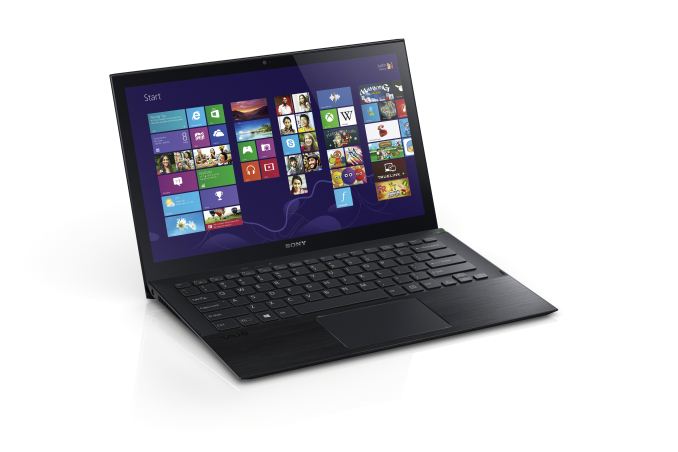
In terms of specifications, Sony hasn’t given the full rundown of the VAIO Pro laptops, but what we do know is that they’ll tip the scales at a scant 1.92 lbs. and 2.34 lbs. for the 11 and 13 inch models, respectively, making these two of the lightest laptops around. Like the VAIO Z series, Sony is using a carbon fiber casing on the VAIO Pro, with an aluminum palm rest. Sheet batteries are available for both models, boasting up to 14 hours of battery life on the Pro 11 and 13 hours on the Pro 13—double what the integrated batteries provide. The Pro 13 will also be the first notebook PC to include a PCIe SSD drive to potentially offer even more performance than standard SSDs, though as we know from our SSD reviews there’s more to a fast SSD than the interface speed. The Pro 13 also features a touchscreen, while it appears for now the Pro 11 will not.

Other features of the Duo 13 include the return of the active digitizer stylus that can be stored on the side of the PC. Capacitive touch interfaces are great for some things, but when it comes to writing and drawing an active digitizer and stylus are still the ones to beat. Sony also touts a new Exmor RS image sensor and an 8MP rear-facing camera on the Duo 13, which Sony claims is capable of functioning as an image scanner if necessary with their CamScanner application providing the ability to adjust for pictures taken at odd angles.
All of the above Ultrabooks feature full-size backlit keyboards with full-pitch key travel, which is always good to hear but we’ll reserve judgment until we’ve personally typed on the laptops. Sony is also including NFC (Near Field Communication) technology in their new 2013 summer models, allowing for the quick sharing of website data and Bluetooth configuration between supported devices. SSDs are options on all of the above models, but we don’t have details on the capacities or price points yet, and CPUs up to Core i7 will also be supported. The laptops come standard with a one-year warranty with in-home service.
Pricing of the laptops starts at around $1150 for the VAIO Pro 11 and $1250 for the Pro 13, and they should be available starting June 9 in Carbon Black or Carbon Silver. (Or if I read the press release wrong, it’s $1150 for Carbon Black and $1250 for Carbon Silver.) The VAIO Duo 13 will also be available starting June 9 in Carbon While or Carbon Black for around $1400.


Read More ...
Computex 2013: Rosewill

The main case I particularly liked was the new Rosewill Rise. This case uses the case philosophy of moving the storage behind the motherboard, allowing for direct airflow to the CPUs and GPUs in an attempt to improve cooling.
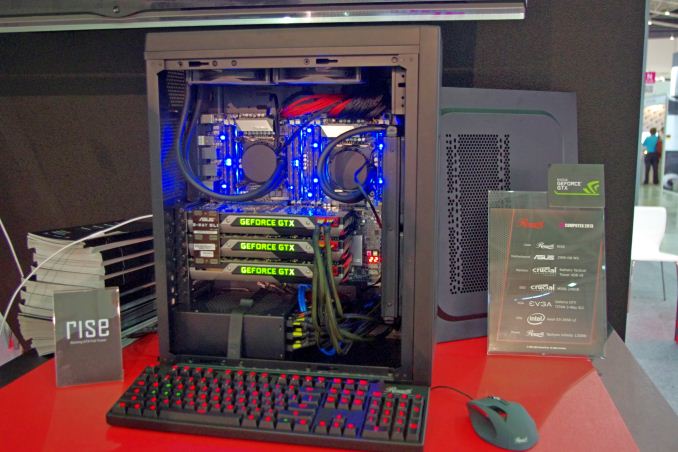
Rosewill also have a new mini-ITX case on display. With various trends of personal computing moving to smaller form factors, having a mini-ITX case that stands out from the crowd can be a serious money maker for case makers and sellers; Bitfenix have showcased it can be done with the Prodigy. Nevertheless the new case from Rosewill, called the Neutron has a few neat design elements of its own.


Read More ...
Intel Announces Thunderbolt 2 at Computex: 20Gbps Bi-Directional Bandwidth per Channel
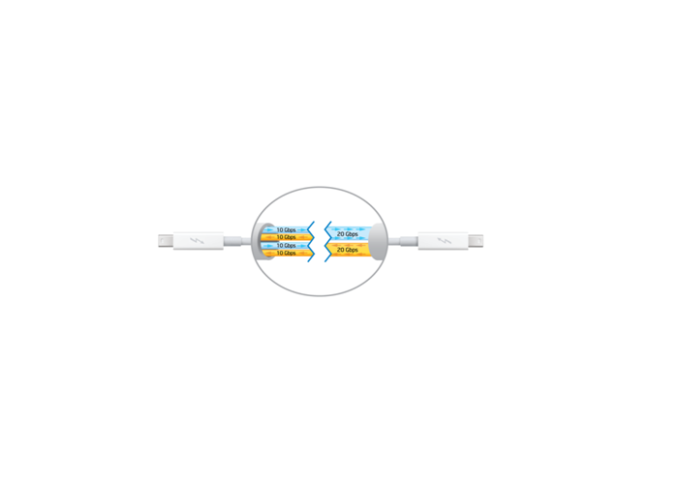
New details are scarce unfortunately. Thunderbolt 2 moves to a new 20Gbps bi-directional channel that can handle both data and/or display. Current implementations are limited to 10Gbps per channel for data or display, both can't be sent over the same channel.
Thunderbolt 2 will support DisplayPort 1.2 and 4K video. Intel expects the first Thunderbolt 2 controllers to go into production by the end of this year, and ramp into early 2014. Given the timeframe I no longer believe this is a Broadwell play. It also seems too early for the rumored 9-series chipset refresh. Thunderbolt 2 may end up appearing out of phase with both of those.
Read More ...
ASUS' Haswell 8-Series Motherboard Lineup
Like clockwork, JJ from ASUS showed up at the studio last month with a ton of 8-series Haswell motherboards in tow. JJ gave us a tour of what's new with the new platform as well as provided some color on how some of the changes to Haswell (e.g. Fully Integrated Voltage Regulator - FIVR) impacted ASUS' motherboard design. You can also see me get super excited about one of ASUS' new ROG features in the video.
JJ stuck around for a while and we've got 3 more videos coming including a tour of their new UEFI setup and a guide to Haswell overclocking.
Read More ...
Choosing a Gaming CPU at 1440p: Adding in Haswell
A few weeks ago we released our first set of results to aid readers in deciding what CPU they may want for a new single or multi-GPU build. Today we add in some results for the top end Haswell CPU, the i7-4770K.
Read More ...
ASUS ROG Press Conference: Combined Air/Water GPU Cooling
The next big announcement from the ASUS ROG Press Conference is the Poseidon – the air and water cooling combination on a graphics card.

There is no word on what GPUs this solution will be put on as of yet, but I would imagine we are going to see by at the end of the year.
Read More ...
Federal Judge Grants Reprieve to Suspect Facing Forced Hard Drive Decryption
Child porn suspect's lawyer will have time to prepare a Fifth Amendment defense

     |
Read More ...
China Says it has "Mountains of Data" to Accuse U.S. of Cyber Attacks
However, China isn't blaming Washington for the attacks -- it's looking for better solutions to fight hacking between the U.S. and China

| |
Read More ...
Intel Unveils Thunderbolt 2, Will Land By Year's End
New standard relies on smarter controller chip to offer optimized 20 Gbps bi-directional flow

| |
Read More ...
HTC One Mini 4.3-Incher Leaked, Rumored for August Launch
HTC looks to expand on its flagship success with a cut down budget model

| |
Read More ...
Apple Looking to Expand Cupertino Staff by Nearly 50 Percent Over Next 3 Years
The hiring is in anticipation of the new Cupertino headquarters

| |
Read More ...
EBay Launching Virtual "Shoppable Windows" for Closed Storefronts
The first screen will come to New York City June 8

| |
Read More ...
Available Tags:ASUS , Thunderbolt , Everything , AMD , NVIDIA , NVIDIA , Samsung , Galaxy , Windows , Sony , VAIO , VAIO , Intel , Gaming , CPU , GPU , HTC , Apple , EBay ,


No comments:
Post a Comment