

Toshiba KIRAbook Ultrabook Review
Toshiba throws their hat into the high-end ultrabook ring with this 13.3" gem featuring a 2560x1440 IPS display.
Read More ...
Choosing a Gaming CPU: Single + Multi-GPU at 1440p, April 2013
One question when building or upgrading a gaming system is of which CPU to choose - does it matter if I have a quad core from Intel, or a quad module from AMD? Perhaps something simpler will do the trick, and I can spend the difference on the GPU. What if you are running a multi-GPU setup, does the CPU have a bigger effect? This was the question I set out to help answer.
Read More ...
Acer Aspire V Series: New AMD APUs and Other Upgrades


Available in touchscreen and non-touchscreen configurations, the touch-enabled models will be slightly thicker and weigh a bit more. Acer lists the dimensions at 340mm x 240mm x 20.75mm for the non-touch models and 22.85mm thick for the touchscreen offerings. Similarly, weight is 1.95kg for the standard models and 2.1kg for touchscreens. (Wow—who knew touchscreens weighed so much more?)
Other features of the 14” models include Core i3/i5/i7 CPU support, optional GeForce GT 740M 2GB DDR3 graphics, a 4-cell battery, hard drive capacities up to 1TB or SSD capacities up to 256GB, and four stereo speakers. Acer also lists a “ZoomPerfect Touchpad” as a feature, which will hopefully work better than some of the other touchpads we’ve seen lately.

The non-touch models measure 381.6mm x 255.95mm x 20.75mm, while the touchscreen models are 22.85mm thick (so same thickness as the 14” models). Weight for the non-touch models is listed at 2.1kg, with the touchscreen bumping that to 2.3kg. As for the GPUs, Acer is offering a GT 720M 2GB DDR3 as one possibility, with a GT 750M 4GB DDR3 as a higher performance option. What’s frustrating is that both GPUs have to make do with DDR3; really, the GT 750M doesn’t deserve to be paired with anything less than GDDR5, particularly if you plan on getting a 1080p LCD!
Acer didn’t provide details on specific models, configurations, or pricing. It seems as though there will be AMD APUs available in the 14” and 15.6” chassis as well, and one of the documents mentions the availability of Radeon HD 8750M. The V7 models will also apparently make the grade for Ultrabook classification (and probably pricing to go with that). Acer notes that keyboard backlighting will be available on all three sizes, depending on your region. As for pricing and availability, all we have to go on right now are that models will begin shipping at the end of May with a starting MSRP of $500.


Read More ...
Acer Iconia A1 7.9” Tablet

Acer makes a point of calling the A1 a “one-handed” tablet, suggesting that the smaller size than traditional tablets makes it more usable with a single hand. Dimensions of the A1 measure 208.7mm x 145.7mm x 11.1mm and with a weight of 410g (WiFi only; 430g for 3G) it’s reasonably light, but we’ve seen other 7” tablets so this is nothing really new.
Other features of note are the IPS XGA LCD, 1GB DDR3L RAM, 8GB/16GB eMMC storage, 0.3MP (640x480) front-facing camera, 5MP rear-facing camera (with 1080p30 video support), microSD slot with support for up to 32GB, Micro USB 2.0, Micro HDMI, GPS, Bluetooth 4.0, 802.11b/g/n, and an 18.6Wh battery with up to eight hours of battery life. The A1 ships with Android 4.2 (Jelly Bean).
The Iconia A1-810 with 16GB will be available in June with an MSRP of $200.


Read More ...
Acer Aspire P3 Ultrabook Launched

The weight of the tablet is 790g (1.74 lbs.) while the keyboard cover nearly doubles the total weight with an additional 600g (1.32 lbs.), so the whole tablet/Ultrabook ends up being somewhat heavy at 1.39kg (3.06 lbs.) The tablet portion measures 295.4mm x 190.7mm x 9.95mm (11.63” x 7.51” x 0.39”), and the keyboard cover is slightly wider and taller and adds another 9.8mm to the thickness. Other aspects include a 40Wh battery that’s good for up to six hours of battery life, 720p front-facing camera, 5MP rear-facing camera, 802.11a/b/g/n WiFi, Bluetooth 4.0, micro HDMI, and a single full-size USB 3.0 port.
The base model P3 is available immediately with an MSRP of $800, so again this is very much a Surface Pro alternative. I would assume the $800 model comes with a 60GB SSD, 2GB RAM, and a Core i3 CPU. Acer doesn’t list an MSRP for the higher spec model, but $1000+ would seem likely.


Read More ...
Acer Aspire R7: A Laptop to Make You Flip

Equipped with a 1080p IPS touchscreen, Acer has decided to try a different approach to the touchscreen laptop. Now, instead of having the touchpad in front of the keyboard, it’s located above the keyboard and the display hinge can shift forward to bring the touchscreen experience closer to the user. The screen can also flip 180 degrees for easy sharing of content, it can lie (mostly) flat against the chassis, or it can even rest in an elevated “table” position.
The core hardware for the R7 is standard Ultrabook fare (though the R7 isn’t and Ultrabook), with an optional GeForce GT 750M available. That means processor choices consist of the i5-3337U and the i7-3537U, both slightly faster versions of the 3rd Generation Ivy Bridge CPUs we’ve had for a year or so now. There will be models with HDDs as well as SSD equipped options, and in addition to the usual WiFi and Bluetooth you get two USB 3.0 ports, one USB 2.0 port, four stereo speakers, and dual array microphone, webcam, HDMI, and SD car ports. Battery life is rated at 4.5 hours (53Wh battery), which is on the low side for a 5.3 pound laptop.
The idea of a 15.6” convertible laptop/tablet/thingy is interesting, though not necessarily something we’ve seen a lot of users clamoring for. I suspect this may turn into one of those love-it or hate-it affairs, depending on the user. Acer also notes that they’ve created a very durable "Ezel" hinge so that the screen will stay in place wherever you put it, though as I wasn’t at the launch party I can’t provide any specific comments on how it feels in practice right now.
Pricing is listed as $1000 for the “Best Buy model” that will include a free copy of Star Trek: The Video Game and will come with a Core i5 CPU, 6GB RAM, 500GB HDD, and a 24GB caching SSD. The R7-571-6858 will be available at Best Buy on May 17th and is available for pre-order now; other models will follow.


Read More ...
QNAP Lauches Marvell-based TS-x20 / x21 Series with Revamped QTS 4.0 OS
QNAP's entry level NAS models received an upgrade recently with the launch of the TS-x20 and TS-x21 series. Both of therm are based on Marvell CPUs (and the lack of explicit mention of the SoC leads us to believe it is based on the Marvell 6282 which has been around for quite some time). While the x20 series uses a 1.6 GHz version with 512 MB of DDR3, the x21 uses a 2.0 GHz one with 1 GB of DDR3. As such, these models carry twice the amount of memory compared to the corresponding models from last year. The x20 and x21 series have 1,2 and 4 bay models (for a total of 6 new units). The 2 and 4-bay models have hot-swap bays. The TS-421 also has a LCD display in front while the TS-420 doesn't. The TS-120 and TS-220 come in white.

In the meanwhile, for other NAS models, firmware version 3.8.3 is scheduled to go out in a week or two. QTS 4.0 beta for older NAS models is expected to be made available free of charge towards the end of May 2013. Business-oriented features such as storage pools and new LVM (logical volume manager) are slated to be added to QTS 4.0 in June. The next few months promise to be exciting for existing and prospective QNAP customers.
Read More ...
Micron P420m Announced: MLC PCIe SSD

The P420m is built on the very same controller as the P320h, with nearly identical firmware (save for changes to support the new NAND type). We're still looking at a 32-NAND-channel PCIe x8 controller, it's just hooked up to a different type of NAND.
The other big physical change here is the use of on-board capacitors to enable power fail protection, a feature that wasn't present on the P320h.

Like the P320h, there will be both 2.5" (SFF-8639 connector) and half-height, half-length PCIe x8 versions of the P420m. The 2.5" version only supports PCIe x4 and 16 NAND channels in capacities of 350GB or 700GB, while the x8 can stripe across all 32 NAND channels with 700GB and 1.4TB capacities. The use of 2-bit-per-cell MLC guarantees twice the usable storage of the SLC based P320h. The P420m is rated for 10PB of total drive writes (~4 drive fills per day for 5 years) compared to 25/50PB for the P320h.

Micron isn't talking about pricing (other than to say that it's cheaper than the P320h) or write performance at this time as the drive still isn't final. Read speeds are up to 3GB/s (sequential) and 750K IOPS (4K random). At the right price, the P420m could be far more interesting than the P320h given that it could deliver very similar performance.
Read More ...
Some Haswell TDPs Revealed: 15W & 28W Ultrabooks

High-end desktop parts creep up to 84W (Core i7-4770K). All socketed desktop Haswell CPUs will either use Intel HD Graphics (GT1) or Intel HD Graphics 4xxxx (GT2). There's a new category of BGA-only (non-socketed) desktop CPU with an R-suffix that will ship with Intel Iris Pro graphics 5200 (GT3e). These R-series SKUs will top out at 65W, implying lower max CPU frequencies than the K-series SKUs but obviously delivering better graphics performance.


Read More ...
Intel Iris & Iris Pro Graphics: Haswell GT3/GT3e Gets a Brand
We’ve known for a while that Intel’s Haswell processor would continue to drive GPU performance in a significant way. With Haswell, Intel will offer a higher end graphics configuration with more execution resources than before (GT3) as well as an even higher end offering that pairs this GPU with 128MB of embedded DRAM on the CPU package (GT3e). Intel’s performance target for the highest end configuration (GT3e) is designed to go up against NVIDIA’s GeForce GT 650M, a performance target it will hit and miss depending on the benchmark.
Regardless of whether or not it wins every benchmark against the GT 650M, the fact that an Intel made GPU can be talked about in the same sentence as a performance mainstream part from NVIDIA is a big step forward. Under no circumstances could Intel compete with NVIDIA on performance and still do so under the Intel HD Graphics brand. Haswell is the beginning of a new era for Intel. The company is no longer a CPU company forced into graphics, but with Haswell Intel begins its life as a GPU company as well. As a GPU company, Intel needs a strong GPU brand. AMD has Radeon, NVIDIA has GeForce, and now Intel has Iris.
Read More ...
Mophie Juice Pack Helium for iPhone 5 Review


Since the lower end of the Helium contains the lightning connector into the iPhone and microUSB connector for charging, the bottom snap on part is correspondingly thicker at its edge. Due to that thickness, getting to the headphone jack requires a large rubber extension which has a boot and male connector at one end, female connector at the other end. If you want to use headphone output and the Helium, this is something you'll want to keep handy.


Subjectively the Helium does add to the size and thickness of the iPhone 5 considerably, although it isn't any more so than previous generations. Thickness is up, although the most noticeable dimension of change is aspect ratio. The already quite tall 16:9 iPhone 5 feels even taller thanks to the speaker chamber and charge controller lip at the bottom, but it isn't overwhelmingly large.
I put together a table of dimensions with the Helium installed and what other information there is which is relevant.
Mophie Juice Pack Helium |
||||
Juice Pack Helium |
||||
Battery |
1500 mAh, 3.7 V, 5.55 Whr |
|||
Dimensions |
139.3 x 63.3 x 15.5 mm (L x W x H) |
|||
iPhone 5 Battery Rundown |
2.5 Hours |
|||
iPhone 5 W/Mophie Rundown |
4.0 Hours |
|||
Mophie Charge Time |
2.3 Hours |
|||
Mophie recommends turning on the Helium at around 20 percent battery on the iPhone 5 and then off at around 80 percent. This is ideal advice, as it closely matches the iPhone 5's charge curve. Because the Helium has to work through the PMIC on the iPhone and charge it like an external charger, there are inherent losses, and those losses are at their minimum in that region. I mimicked this for our battery life test by letting the Helium charge the iPhone 5 and then resuming the test.
We see a 60 percent scaling in this pretty brutal test which managed to kill the iPhone 5 in under 3 hours. Following Mophie's guidance and turning the Helium on only when you want to charge up the iPhone 5 will definitely help improve efficiency. There's overhead given the way the Helium has to charge the iPhone instead of act like a battery, but that's something all battery cases will endure for the iPhone. With that size battery you'll at least get an additional boost.

There will inevitably be people who complain about the size of the Helium, but there have been multiple times that the Helium has made the difference between a phone with enough charge to get me through the rest of the day, and no phone at all. Given the current state of battery life across the smartphone spectrum, I'll gladly take increased size in favor of more battery life, and the Helium will get that done and offer additional protection.
Read More ...
CyberPowerPC FangBook Gaming Notebook Review
We've seen this chassis before, but we haven't seen it with CyberPowerPC's touches, and we haven't seen anything about the Kepler-based NVIDIA GeForce GTX 675MX. That changes today.
Read More ...
The AnandTech Podcast: Episode 20

featuring Anand Shimpi, Brian Klug & Vivek Gowri
iTunes
RSS - mp3, m4a
Direct Links - mp3, m4a
Total Time: 1 hour 44 minutes
Outline - hh:mm
Crucial M500 - 00:00
Samsung Galaxy S 4 - 00:10
T-Mobile iPhone 5 - 01:15
HTC First - 01:19
ASUS FonePad - 01:22
Samsung Galaxy Note 8.0 - 01:31
Read More ...
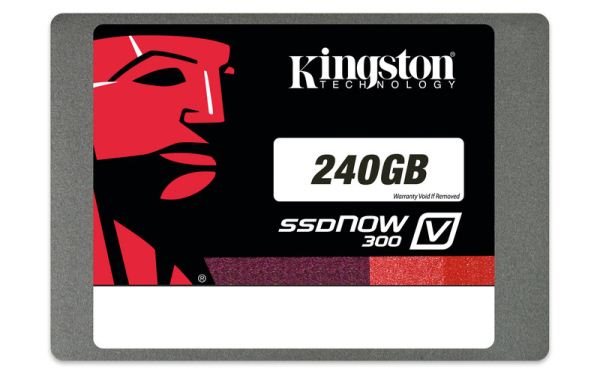
Kingston SSDNow V300 (120GB & 240GB) Review
Kingston's SSD lineup is as follows: they have HyperX-branded SSDs for enthusiasts and the mainstream market is catered by SSDNow brand. The HyperX SSDs have been fairly popular from what I've seen but the SSDNow brand has been rather inconsistent. Kingston has used controllers from multiple manufacturers in the SSDNow lineup and the naming system has been confusing to say the least. Kingston has been using a plus sign (e.g. V+200) to separate their higher-end offerings from the slower non-plus version (e.g. V200). However, the plus sign has never had any definite meaning and at least I've always found it to be very confusing.
Read More ...
ASUS Zenbook UX51VZ: Great Laptop, High Price
I have quite a few laptops that have been languishing in a non-fully-reviewed state for a while. The New Year was been a bit crazy, and in the midst of trying to update the benchmark suite and some other items, the time for a full review is long since passed. We’re finally done with our 2013 Mobile Benchmark Suite, however, and as we’ll have a variety of laptops to review in the coming weeks, I thought the UX51VZ was a good start for our new test suite.
Read More ...
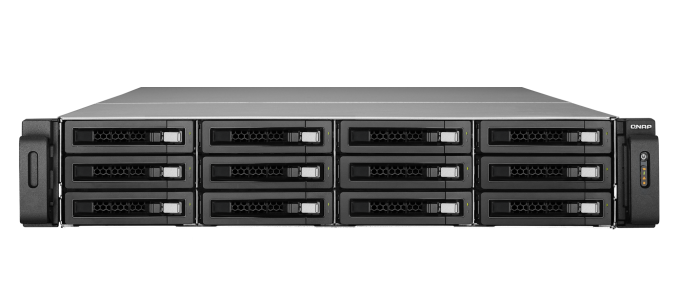
QNAP's TS-EC1279U-RP 12-bay Flagship Rackmount NAS Review
Our enterprise NAS reviews have focused on Atom-based desktop form factor systems till now. These units have enough performance for a moderately sized workgroup and lack some of the essential features in the enterprise space such as acceptable performance with encrypted volumes.
Read More ...
Samsung Galaxy S 4 Incompatible with Original TecTiles, TecTile 2 Announced
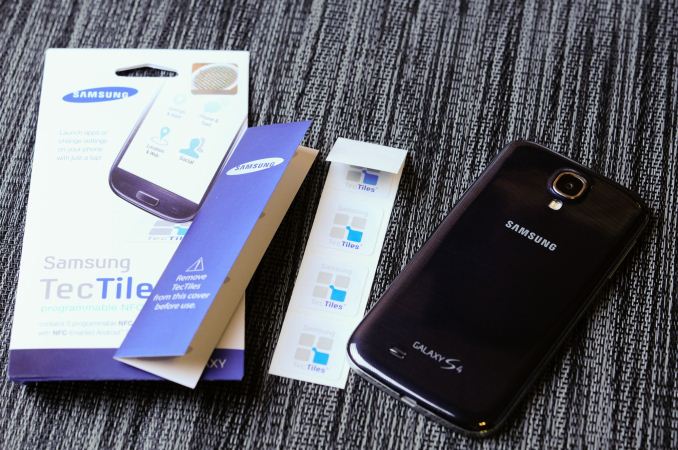
When I saw the presence of BCM2079x, I remembered that this reader doesn’t read MIFARE tags, which the NXP solution does, since it is an NXP tag format. Instead Broadcom only reads tags which adhere to the standard NFC Forum tag types. Ordinarily this isn’t much of a problem, as long as users are aware of the limitation and to stay away from MIFARE classic tags on an incompatible reader. What’s interesting here is that Samsung’s TecTiles were themselves originally MIFARE Classic 1k tags, which makes them not compatible with the new SGS4. I then confirmed that the SGS4 does in fact not read my existing TecTiles which I’ve setup around the house.


Reading a Samsung TecTile on SGS4 (Left), Checking TecTile tag type on another device (Right)
"Samsung is introducing TecTile 2, an update to the original TecTile NFC programmable tags, which will be available in the coming weeks. TecTile 2 will use the current NFC technology on the market, allowing Samsung customers to further incorporate NFC into their daily lives and to use with the latest Samsung Mobile products and services, including the Galaxy S 4. As industry standards continue to evolve, Samsung remains committed to meeting those standards and adapting its technologies if necessary. Samsung customers can also fully utilize TecTiles 2 with existing Samsung Mobile NFC-enabled Android smartphones currently in market."Interestingly enough some newer generation TecTiles not marked as TecTile 2 seem to have already made their way out onto the market. Several users replied on twitter that they’ve seen TecTiles which identify as an NFC Forum Type 4 tag instead of the MIFARE 1k tag, with a visually different appearance as well. If you’ve already got TecTiles that aren’t MIFARE, it seems that you’re in luck, otherwise if you’re upgrading to an SGS4 from another Samsung device and made use of TecTiles, it’s likely you’ll have to replace your NFC tags.
Read More ...
Cooler Master Seidon 240M and 12 More Coolers: The Retest and Mega-Roundup
There's no right way to describe it; we're testing the Cooler Master Seidon 240M along with two new Noctua coolers in a new testbed. Alongside ten of our industry's finest, retested!
Read More ...
Corsair Obsidian 350D Case Review
Corsair's Obsidian 350D is the company's first micro-ATX case, and it's a heck of an entrance.
Read More ...
Capsule Impressions: The Stinky Footboard
Every so often an oddball peripheral or product comes around and your attention is demanded, but with the Stinky Footboard I felt unusually torn. As a gamer I'm an incredibly simple creature: I may assign extra functions to my mice, but I usually don't use them. There are eighteen programmable keys on my Corsair Vengeance K90 keyboard, but of those keys I use...one, which is assigned to a script that toggles Aero on and off. Peripherals are funny things, though, and a feature that one person may have no use for could be extremely desirable to another. A good friend and I both really like the Logitech G500 (and now the G500s); he liked the adjustable weight and didn't care about the freewheel, I loved the freewheel and didn't care about the adjustable weight. So it goes.
And then, every so often, something really unusual comes around. Submitted for your approval, the Stinky Footboard:

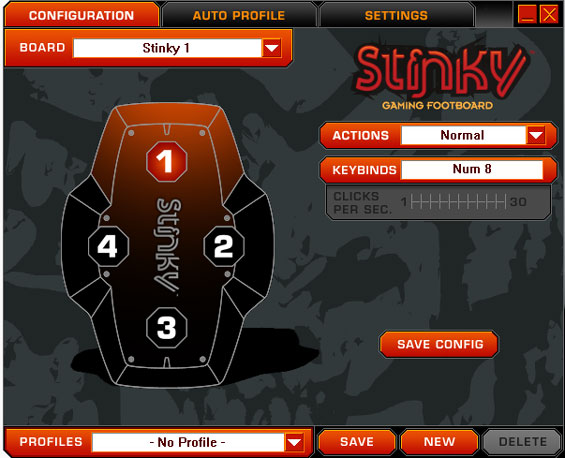
As far as I can tell, the build quality is good, the software side is good, so the pieces of a good experience are at least in play. In practice, though?
Designing a good user experience is an insanely tricky prospect. In my estimation, when you're considering whether or not something is intuitive, you're actually looking at two different types of intuition. The first is intuition within a vacuum: assuming no prior experience with something, how easy is it to figure out, does it work the way you'd hope or expect it to. The second is intuition through experience: you have experience with a particular action, maybe a particular piece of software, so even if that action or software isn't intuitive in a vacuum, you learned how to use it. This second type is where Microsoft tripped up tremendously with Windows 8; there weren't any breadcrumbs leading to the new user experience, it simply came into being, and thus people who were used to the Windows desktop and used to certain things being in certain places are suddenly completely baffled. Confusion frustrates.
By the same token, the Stinky Footboard is a fantastic idea in a vacuum that takes some serious getting used to in practice. I can see some users making the jump, but as someone who can't rub his stomach and tap the top of his head at the same time, I found I used it as a glorified pedal. The idea that our feet, which ordinarily hang uselessly beneath us, could be used to hit additional keys as needed is a sound one in theory. I can't be the arbiter of whether or not this is a good peripheral for everyone due to the very subjective nature of peripherals, but I found the Footboard complicated my gaming experience more than it enhanced it.
As a sidenote, while I was enamored with the concept I did find myself pretty severely put off by the branding. I'm not a foot fetishist nor do I harbor any illusions about the kind of funk that seeks refuge in my nether digits, but the cheeky branding and the idea that I'm going to rub my filth-infested hooves all over a peripheral was incredibly unappealing. I don't have a problem stepping on a peripheral, I play Dance Dance Revolution (badly) in the comfort of my own home whenever my living room isn't overflowing with cases, I just don't like my hardware tacitly acknowledging that my feet are raunchy.
Undoubtedly part of the reason the Footboard came our way was because it's being Kickstarted with a few days to go. My experience with it hasn't been super positive, but the times where I've felt like I was shy keys for whatever I wanted to play have been rare enough that I can't really see myself training myself to use both hands plus my foot. If it seems like something that might work for you, though, no harm in helping out with the Kickstarter. Fair warning, though: minimum pledge to actually get a Footboard is a not insubstantial $89.
Read More ...
AMD Radeon HD 7990 Review: 7990 Gets Official
Launching today and shipping in two weeks, the Radeon HD 7990 is AMD's official dual-GPU card for the Southern Islands family. Based on the same Tahiti GPUs that power the rest of the 7900 series, the 7990 seeks to pack most of the performance of a 7970 CrossFire setup into a single card. Though this isn't the first 7990 card to be launched, as we'll see it may just be the finest one yet.
Read More ...
Samsung Galaxy S 4 Review - Part 1
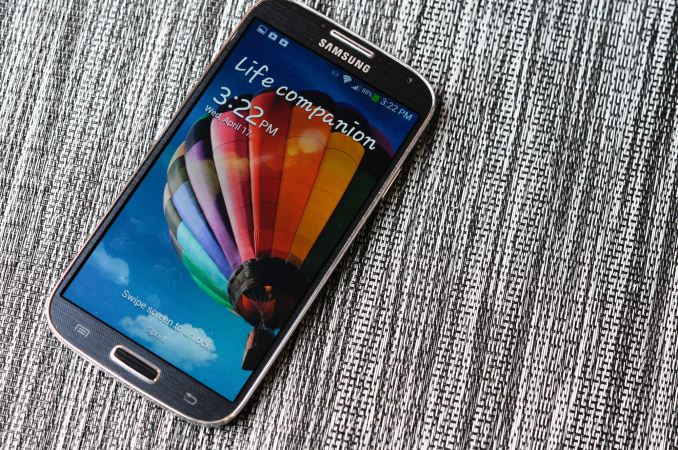
It’s no secret that Samsung enjoyed huge success with Galaxy S 3. In many markets, SGS3 was easily the Android handset to beat, even as faster and arguably better hardware became available during the life of its product cycle. Samsung nailed the branding, marketing, and consistency battles with its third generation of Galaxy smartphone, and now we’re a year later and facing down SGS4.
Read More ...
NVIDIA R319 Series Beta Driver 320.00 Available

OS support is a bit of a change from some releases. Windows XP and even Vista support look like they're finally starting to disappear, or at least they're not a high priority, so the current beta driver is only available for Windows 7 and 8 on laptops, in both 32-bit and 64-bit versions. Desktops on the other hand get the full set of support for everything from XP to Windows 8 in 32-bit and 64-bit form.
The big headliners for this series of drivers is that these are the "game ready" drivers for Dead Island: Riptide, Neverwinter, and Star Trek. NVIDIA is also listing performance improvements for single and SLI configurations for a variety of games, including Dirt: Showdown (up to 18%), Tomb Raider (up to 8%), and StarCraft II (up to 6%), though that's with a GTX 660 so your mileage may vary depending on your specific GPU. Other titles receiving performance tweaks include Sniper Elite V2, Metro 2033, Far Cry 3, Deus Ex: Human Revolution, F1 2012, Assassin's Creed III, Battlefield 3,and BioShock: Infinite.
The full list of driver download links is below. Thanks to reader SH SOTN for the heads up.
Laptops: Windows 7/8 64-bit
Laptops: Windows 7/8 32-bit
Desktops: Windows Vista/7/8 64-bit
Desktops: Windows Vista/7/8 32-bit
Desktops: Windows XP 64-bit
Desktops: Windows XP 32-bit
Read More ...
Intel's Return to DRAM: Haswell GT3e to Integrate 128MB eDRAM?
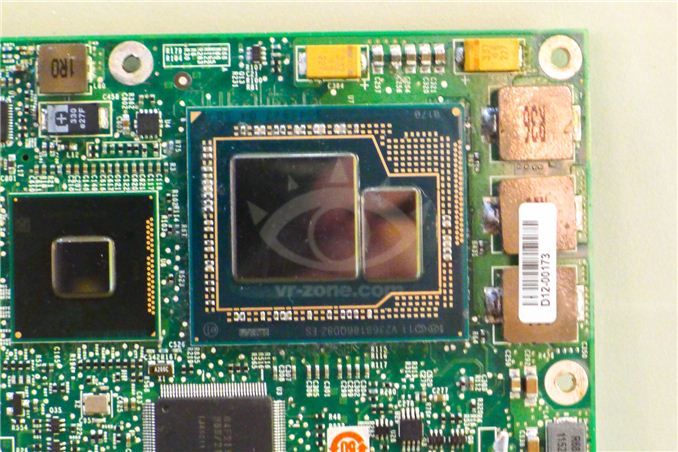
The days of simple performance scaling by throwing more transistors at a design are quickly coming to an end. Moore's Law will continue but much like the reality check building low power silicon gave us a while ago, building high performance silicon will need some out of the box thinking going forward.
Dating back to Ivy Bridge (3rd gen Core/2012), Intel had plans to integrate some amount of DRAM onto the package in order to drive the performance of its processor graphics. Embedding DRAM onto the package adds cost and heat, and allegedly Paul Otellini wasn't willing to greenlight the production of a part that only Apple would use so it was canned. With Haswell, DRAM is back on the menu and this time it's actually going to come out. We've referred to the Haswell part with embedded DRAM as Haswell GT3e. The GT3 refers to the GPU configuration (40 EUs), while the lowercase e denotes embedded DRAM. Haswell GT3e will only be available in a BGA package (soldered-on, not socketed), and is only expected to appear alongside higher TDP (read: not Ultrabook) parts. The embedded DRAM will increase the thermal load of the SoC, although it shouldn't be as painful as including a discrete GPU + high speed DRAM. Intel's performance target for Haswell GT3e is NVIDIA's GeForce GT 650M.
What we don't know about GT3e is the type, size and speed of memory that Intel will integrate. Our old friend David Kanter at RealWorldTech presented a good thesis on the answers to those questions. Based on some sound logic and digging through the list of papers to be presented at the 2013 VLSI Technology Symposium in Kyoto, Kanter believes that the title of this soon to be presented Intel paper tells us everything we need to know:
"A 22nm High Performance Embedded DRAM SoC Technology Featuring Tri-Gate Transistors and MIMCAP COB"
According to Kanter's deductions (and somewhat validated by our own sources), Haswell GT3e should come equipped with 128MB of eDRAM connected to the main SoC via a 512-bit bus. Using eDRAM vs. commodity DDR3 makes sense as the former is easier to integrate into Intel's current fabs. There are also power, manufacturability and cost concerns as well that resulted in the creation of Intel's own DRAM design. The interface width is a bit suspect as that would require a fair amount of area at the edges of the Haswell die, but the main takeaway is that we're dealing with a parallel interface. Kanter estimates the bandwidth at roughly 64GB/s, not anywhere near high-end dGPU class but in the realm of what you can expect from a performance mainstream mobile GPU. At 22nm, Intel's eDRAM achieves a density of around 17.5Mbit/mm^2, which works out to be ~60mm^2 for the eDRAM itself. Add in any additional interface logic and Kanter estimates the total die area for the eDRAM component to be around 70 - 80mm^2. Intel is rumored to be charging $50 for the eDRAM adder on top of GT3, which would deliver very good margins for Intel. It's a sneaky play that allows Intel to capture more of the total system BoM (Bill of Materials) that would normally go to a discrete GPU company like NVIDIA, all while increasing utilization of their fabs. NVIDIA will still likely offer better perfoming solutions, not to mention the benefits of much stronger developer relations and a longer history of driver optimization. This is just the beginning however.
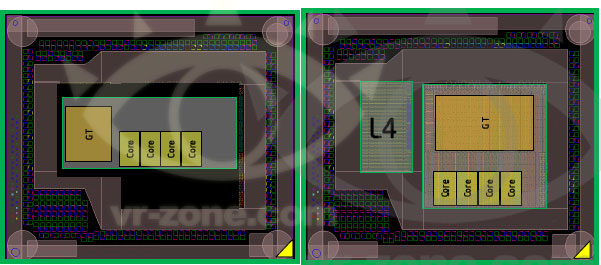
AMD is expected to integrate a GDDR5 memory controller in its future APUs, similar to what it has done with the PlayStation 4 SoC, as its attempt to solve the memory bandwidth problem for processor based graphics.
Read More ...
Tesla Reports First Profitable Quarter; Hires Aston Martin's Chief Vehicle Engineer
Tesla shares surged almost 30 percent in after-market trading in New York to as much as $72.99

     |
Read More ...
Rock Climbing Robot Can Carry a Load, Sets Sights on Mountain Rescues
Robot could be used to scout or send stranded climbers supplies

| |
Read More ...
China Dismisses Pentagon Report Claiming Beijing is Using Cyber Attacks
China calls the US the real hacking empire

| |
Read More ...
Post-Merger, T-Mobile Sees First Customer Growth Since 2009
Additions offset a troubling revenue drop, meager 500k iPhone 5 sales

| |
Read More ...
Yahoo Wants Out of Microsoft Search Contract; Would Rather be with Google
But Microsoft recently extended the contract's revenue guarantee

| |
Read More ...
SpaceX Signs Three-Year Deal with Spaceport America for "Grasshopper" Rocket
SpaceX will conduct its next phase of Grasshopper flight testing in New Mexico

| |
Read More ...
Handheld Device Separates Human DNA from Fluids in 2-3 Minutes
Current methods take 20-30 minutes

| |
Read More ...
Consumer Study Shows Buyers Are Embracing Fuel Sipping Vehicles
The majority of vehicle shopper support increased fuel efficiency standards

| |
Read More ...
Feds Drop "Hacking" Charges Against Video Poker Jackpot Winners
Men still face a single count of wire fraud for exploiting bug in the machines

| |
Read More ...
Obama, FBI Silence Critics, Plan Warrantless VoIP Wiretaps, ISP Fines
Big government's transformation into "big brother" takes another step forward

| |
Read More ...
Available Tags:Toshiba , Gaming , Acer , AMD , Other , Tablet , SSD , Intel , iPhone 5 , iPhone , Notebook , AnandTech , Kingston , ASUS , Samsung , Galaxy , Cooler Master , Radeon , NVIDIA , Driver , Yahoo , Microsoft , Google ,


No comments:
Post a Comment