

The Great Equalizer: Apple, Android & Windows Tablet GPUs Compared using GL/DXBenchmark 2.7
For the past few years we have been lamenting the state of benchmarks for mobile platforms. The constant refrain from those who had been around long enough to remember when all PC benchmarks were terrible was to wait for the release of Windows 8 and RT. The release of those two OSes would bring many of the traditional PC benchmark vendors space into the fray. While we're expecting to see new Android, iOS, Windows RT and Windows 8 benchmarks from Futuremark and Rightware, it's our old friends at Kishonti who are first out of the gate with a cross-OS/API/platform benchmark. GLBenchmark has existed on both Android and iOS for a while now, but we're finally able to share information and performance data using DXBenchmark - GLB's analogue for Windows RT/8.
Read More ...
Rosewill Blackhawk Ultra Case Review: Were It Not For Competition
We've long maintained that Rosewill's Thor v2 is one of the best deals floating around for enthusiasts. In that enclosure, Rosewill has a product that's fairly feature rich, quiet, and offers stellar performance. Yet the Thor v2 isn't the flagship of their enclosure line, but today we have that flagship in house. Given its predecessor's stellar performance, expectations are pretty high for the Blackhawk Ultra.
Read More ...
HandBrake to Get QuickSync Support
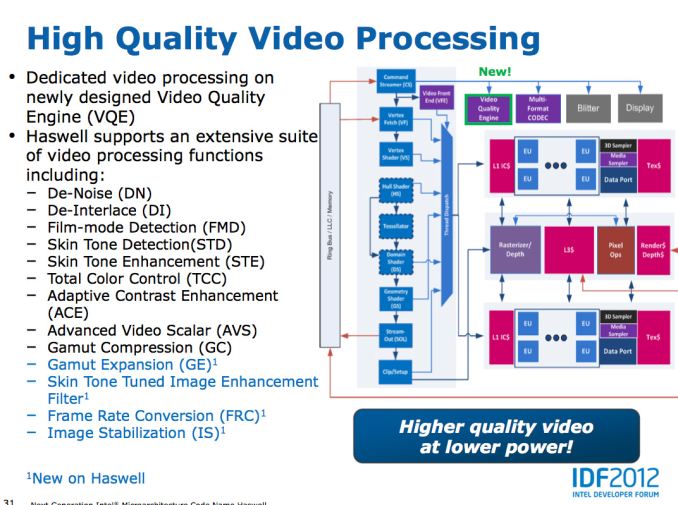
The latest version of Intel's Media SDK open sourced a key component of the QuickSync pipeline that would allow the open source community to begin to integrate QuickSync into their applications (if you're not familiar with QS, it's Intel's hardware accelerated video transcode engine included in most modern Core processors). I mentioned this open source victory back at CES this year, and today the HandBrake team is officially announcing support for QuickSync.
The support has been in testing for a while, but the HandBrake folks say that they expect to get comparable speedups to other QuickSync enabled applications.
No word on exactly when we'll see an official build of HandBrake with QuickSync support, although I fully expect Intel to want to have something neat to showcase QuickSync performance on Haswell in June. I should add that this won't apply to OS X versions of HandBrake unfortunately, enabling that will require some assistance from Apple and Intel - there's no Media SDK available for OS X at this point, and I don't know that OS X exposes the necessary hooks to get access to QuickSync.
Read More ...
Intel's PixelSync & InstantAccess: Two New DirectX Extensions for Haswell
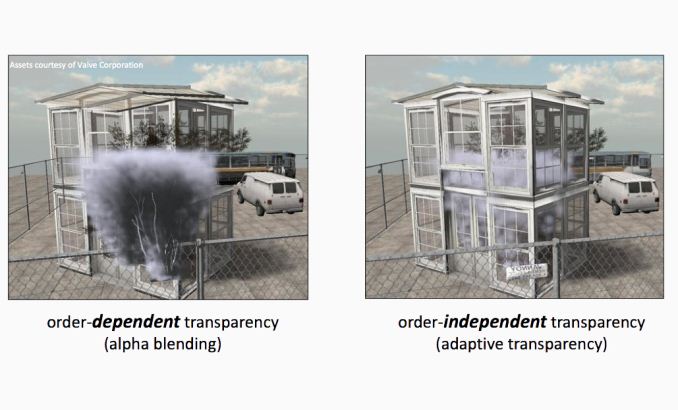
As Intel continues its march towards performance relevancy in the graphics space with Haswell, it should come as no surprise that we're hearing more GPU related announcements from the company. At this year's Game Developer Conference, Intel introduced two new DirectX extensions that will be supported on Haswell and its integrated GPU. The first extension is called PixelSync (yep, Intel branding appears alive and well even on the GPU side of the company - one of these days the HD moniker will be dropped and Core will get a brother). PixelSync is Intel's hardware/software solution to enable Order Independent Transparency (OIT) in games. The premise behind OIT is the quick sorting of transparent elements so they are rendered in the right order, enabling some pretty neat effects in games if used properly. Without OIT, game designers are limited in what sort of scenes they can craft. It's a tough problem to solve, but one that has big impacts on game design.
Although OIT is commonly associated with DirectX 11, it's not a feature of the API but rather something that's enabled using the API. Intel's claim is that current implementations of OIT require unbounded amounts of memory and memory bandwidth (bandwidth requirements can scale quadratically with shader complexity). Given that Haswell (and other integrated graphics solutions) will be more limited on memory and memory bandwidth than the highest end discrete GPUs, it makes sense that Intel is motivated to find a smaller footprint and more bandwidth efficient way to implement OIT.
The hardware side of PixelSync is simply the enabling of programmable blend operations on Haswell. On PC GPU architectures, all frame buffer operations flow through fixed function hardware with limited flexibility. Interestingly enough, this is one area where the mobile GPUs have moved ahead of the desktop world - NVIDIA's Tegra GPUs reuse programmable pixel shader ALUs for frame buffer ops. The Haswell implementation isn't so severe. There are still fixed function ROPs, but the Haswell GPU core now includes hardware that locks and forces the serialization of memory accesses when triggered by the PixelSync extension. With 3D rendering being an embarrassingly parallel problem, having many shader instructions working on overlapping pixel areas can create issues when running things like OIT algorithms. What PixelSync does is allows the software to tell the hardware that for a particular segment of code, that any shaders running on the same pixel(s) need to be serialized rather than run in parallel. The serialization is limited to directly overlapping pixels, so performance should remain untouched for the rest of the code. This seemingly simple change goes a long way to enabling techniques like OIT, as well as giving developers the option of creating their own frame buffer operations.
The software side of PixelSync is an evolved version of Intel's own Order Independent Transparency algorithm that leverages high quality compression to reduce memory footprint and deliver predictable performance. Intel has talked a bit about an earlier version of this algorithm here for those interested.
Intel claims that two developers have already announced support for PixelSync, with Codemasters producer Clive Moody (GRID 2) appearing in the Intel press release excited about the new extension. Creative Assembly also made an appearance in the PR, claiming the extensions will be used in Total War: Rome II.
The second extension, InstantAccess is simply Intel's implementation of zero copy. Although Intel's processor graphics have supported unified memory for a while (CPU + GPU share the same physical memory), the two processors don't get direct access to each others memory space. Instead, if the GPU needs to work on something the CPU has in memory, it needs to make its own copy of it first. The copy process is time consuming and wasteful. As we march towards true heterogeneous computing, we need ways of allowing both processors to work on the same data in memory. With InstantAccess, Intel's graphics driver can deliver a pointer to a location in GPU memory that the CPU can then access directly. The CPU can work on that GPU address without a copy and then release it back to the GPU. AMD introduced support for something similar back with Llano.
Read More ...
FCAT: The Evolution of Frame Interval Benchmarking, Part 1
In the last year stuttering, micro-stuttering, and frame interval benchmarking have become a very big deal in the world of GPUs, and for good reason. Through the hard work of the Tech Report’s Scott Wasson and others, significant stuttering issues were uncovered involving AMD’s video cards.
At the same time however, as AMD has fixed those issues, both AMD and NVIDIA have laid out their concerns over existing testing methodologies, and why these may not be the best methodologies. To that end, today NVIDIA will be introducing a new too evaluating frame latencies: FCAT. As we will see, the Frame Capture Analysis Tool stands to change frame interval benchmarking as we know it, and as we will see it will be for the better.
Read More ...
First Impressions: Kinesis Advantage Mechanical Ergonomic Keyboard
_575px.jpg)
Earlier this month I posted my review of the TECK, an ergonomic keyboard with mechanical switches that’s looking to attract users interesting in a high quality, highly ergonomic offering and don’t mind the rather steep learning curve or the price. The TECK isn’t the only such keyboard, of course, and I decided to see what other mechanical switch ergonomic keyboards I could get for comparison. Next up on the list is the granddaddy of high-end ergonomic keyboards, the Kinesis Contour Advantage.
Similar to what I did with the TECK, I wanted to provide my first impressions of the Kinesis, along with some thoughts on the initial switch and the learning curve. This time, I also made the effort to put together a video of my first few minutes of typing. It actually wasn’t as bad as with the TECK, but that’s likely due to the fact that I already lost many of my typing conventions when I made that switch earlier this year. I’ll start with the video, where I take a typing test on four different keyboards and provide some thoughts on the experience, and then I’ll provide a few other thoughts on the Kinesis vs. TECK comparison. It’s far too early to determine which one I’ll end up liking the most, but already I do notice some differences.
Compared to the TECK—as well as many other keyboards—the Kinesis Advantage feels quite large. Part of that is from the thickness of the keyboard, with the palm rests and middle section being much thicker than on other keyboards. Looking at the way my hands rest on the Advantage, though, I have to say it seems like it should be a good fit for me once I adapt to the idiosyncrasies. I discussed some of the changes in the above video, but let me go into some additional detail on the areas that appear to be causing me the most trouble (and this is after the initial several hours of training/adapting to the modified layout).
_575px.jpg)
My biggest long-term concern is with the location of the CTRL and ALT keys. As someone that uses keyboard shortcuts frequently, I’m very accustomed to using my pinkies to hit CTRL. Reaching up with my thumb to hit CTRL is going to take some real practice, but I can likely come to grips with that over the next few weeks. Certain shortcuts are a bit more complex, however—in Photoshop, for instance, I routinely use “Save for Web…”, with the shortcut CTRL+ALT+SHIFT+S; take one look at the Kinesis and see how easy that one is to pull off! Similarly, the locations of the cursor keys, PgUp/PgDn, and Home/End keys is going to really take some time for me to adjust. On the TECK I actually didn’t mind having them located under the palms of the hands, but here the keys are split between both hands and aren’t centralized.
With that said, the Kinesis keyboards do have some interesting features that may mitigate such concerns. For one, there’s a built-in function for reprogramming any of the keys, so it’s possible with a little effort to change the layout. Of course, for that to be useful you also need to figure out a “better” layout than the default, and I’m not sure what that might be—plus I wanted to give the default layout a shot first. The Advantage also features macro functionality, allowing you to program up to 24 macros of approximately 55 keystrokes. Truth be told, I haven’t even tried the macros or key mapping features yet, but I can at least see how they might prove useful.
There are a few other items to mention for my first impressions. One is that I didn’t like the audible beeping from my speakers at all; I think the keys sound plenty loud when typing (not that they’re loud, necessarily, but they’re not silent either), so adding a beep from the speakers wasn’t useful for me. Thankfully, it’s very easy to disable the sounds with a quick glance at the manual. Another interesting feature is built-in support for the Dvorak layout (press PROGRAM+SHIFT+F5 to switch between QWERTY and Dvorak; note that switching will lose any custom key mappings). Finally, unlike the TECK, Kinesis also includes a USB hub (two ports at the bottom-back of the keyboard near the cable connection).
As far as typing goes, the Cherry MX Brown switches so far feel largely the same to me as on the TECK. I haven’t experienced any issues with “double pressing” of keys yet, but then I didn’t have that happen with the TECK for a couple weeks either. Right now, it’s impossible for me to declare which keyboard is better in terms of ergonomics—and in fact, even after using both for a month I fear I might not be able to come to a firm opinion on the matter—but one thing I do know is that looking at the video above, I can see that my hands and arms move far less when typing on both the TECK and Kinesis. I also know that at least from a technology standpoint, the Kinesis is more advanced than the TECK, what with a USB hub, key remapping, and macro functionality, but it’s also more expensive thanks to those features.
Reviews of this nature are inherently something that will take a while and they end up being quite subjective, but within the next few months I hope to have a better idea of which mechanical switch ergonomic keyboard I like the most…and I have at least one if not two more offerings coming my way. Hopefully you can all wait patiently while I put each through a month or so of regular use. If you’re looking to spend $200+ on a high quality ergonomic keyboard, you’ll probably be willing to wait a bit longer, but if not I believe many of the companies will offer you a 60-day money back guarantee—the TECK and Kinesis both offer such a guarantee if you’re interested in giving one a try.
Gallery: First Impressions: Kinesis Advantage Mechanical Ergonomic Keyboard
_thumb.jpg)
_thumb.jpg)
_thumb.jpg)
_thumb.jpg)
_thumb.jpg)
_thumb.jpg)
Read More ...
Apple to Ship Updated A1428 iPhone 5 With AWS WCDMA Enabled for T-Mobile USA
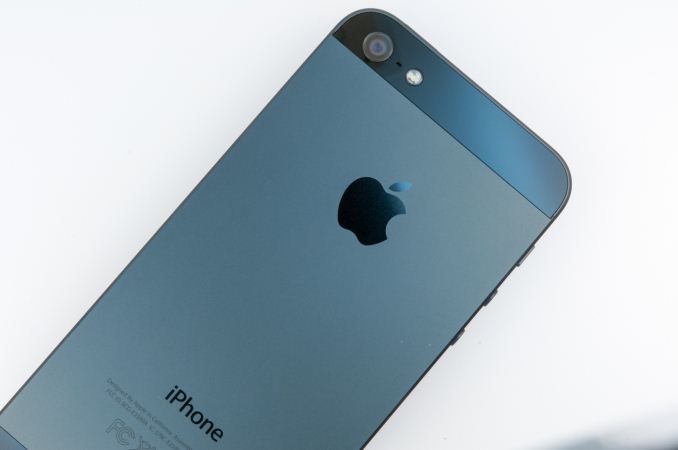
Back when I did my Qualcomm modems and transceivers piece, I gained a deeper understanding about the cellular RF engineering side of the handset puzzle. Specifically, how an OEM can enable LTE on some bands and not enable WCDMA on those very same bands. The interesting and relevant takeaway from the whole exploration is that all ports on the transceiver are created equal, and that if an OEM implements LTE on a particular band, that usually means that the device design can inherit support for 3G WCDMA on that same band, given the right power amplifier. I alluded at the end of the article to the fact that if you see an OEM implement band 4 on LTE and not band 4 on WCDMA, it's just a matter of a firmware lock and appropriate certifications to enable it, and what I was alluding directly to was the A1428 iPhone 5.
Today T-Mobile USA formalized their LTE plans and announced that the Samsung Galaxy Note 2 (as predicted), Blackberry Z10, and Sonic 2.0 hotspots would immediately work with their Band 4 LTE which is either 5 or 10 MHz FDD depending on market. In addition the upcoming HTC One and Samsung Galaxy S 4 will support T-Mobile LTE. The operator also launched its LTE network in Baltimore, Houston, Kansas City, Las Vegas, Phoenix, San Jose, Calif., and Washington, D.C. I plan to drive up to Phoenix at some point this week and test the network out there.
Among all that other news however was news that T-Mobile would finally be carrying the iPhone 5, specifically an updated version of the A1428 hardware model which included Band 4 (AWS) LTE support. This was the variant aimed at AT&T specifically, with both Band 4 and Band 17 LTE included, in addition to a number of other bands as we noted in the iPhone 5 review. As I mentioned earlier, what's interesting about A1428 is that it always had the necessary power amplifiers for AWS WCDMA, but only enabled it on LTE. The hardware could support AWS WCDMA, but that was locked out in firmware — until now. Apple gave a statement to Engadget which confirmed my earlier suspicions – beginning 4/12, Apple will ship a new A1428 with different firmware onboard that enables AWS WCDMA. There won't be any software update for existing A1428 owners, meaning if you bought an iPhone 5 AT&T model, you're not going to be able to get AWS WCDMA on T-Mobile overnight unfortunately, instead new shipping A1428 models will simply have different firmware on them which enables the AWS paths through the transceiver for WCDMA to be enabled. I'm unclear how Apple will choose to differentiate the two identical A1428 hardware models for users or on their own spec lists, either way there will be an old version and new version which differ in this regard. In addition, existing A1428 hardware without AWS WCDMA support will be phased out.
In fact, there's the same FCC-ID for the A1428 with AWS WCDMA enabled, it's still BCG-E2599A. I was surprised to see that Apple has already in fact processed the Class II Permissive Change and added Band 4 (AWS) WCDMA tests as necessary, dated today March 26th 2013.
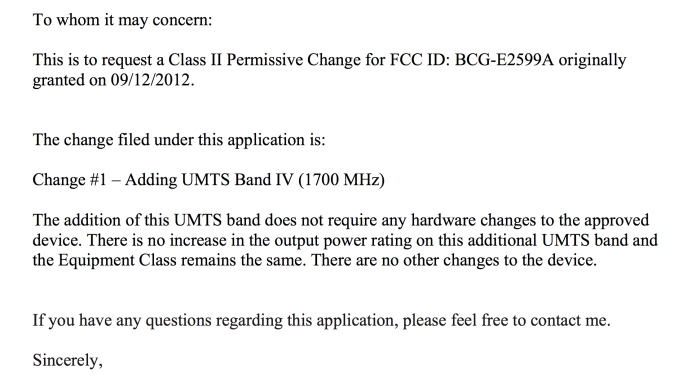
From the FCC's A1428 Class 2 Permissive Change Cover Letter
So there we have it, the new A1428 with AWS WCDMA for T-Mobile is identical hardware to the previous A1428 hardware, it's just a matter of enabling those modes in the transceiver for WCDMA. The hardware will also support DC-HSPA+ (42.2 Mbps downlink) on AWS, which means speedy fallback if you detach from LTE and are in a T-Mobile market with two WCDMA carriers.
Source: T-Mobile (LTE and Uncarrier), T-Mobile (iPhone 5), Engadget
Gallery: Apple to Ship Updated A1428 iPhone 5 With AWS WCDMA Enabled for T-Mobile USA


Read More ...
Nanoxia Deep Silence Cases Officially Available Stateside
Ever since we reviewed the Nanoxia Deep Silence 1 and Deep Silence 2 enclosures, they've essentially been setting the standard for what a silent enclosure can and should be at their respective price points. However, at the time of each review, those respective price points were largely hypothetical. They were targets, but Nanoxia was still in talks for Stateside distribution, and that had been the refrain every time a comparison to either enclosure was brought up.
.jpg)
I don't typically like doing news posts going "hey, this is shipping now," but the DS1 is a Bronze Editor's Choice winner and a highly sought after case. NewEgg is now officially taking preorders for the Nanoxia Deep Silence 1 and Deep Silence 2, with a shipping date of April 10th for the DS1 and 11th for the DS2. That would be exciting enough, but Nanoxia seems to have priced the Deep Silence cases exceedingly aggressively. My conclusions had always been predicated on both availability and on Nanoxia hitting price points that seemed frankly pie in the sky, but as it turns out, the DS1 is up for preorder for just $109, and the DS2 is going to go for just $89. At those price points, both cases are going to be incredibly tough to beat in the market.
Read More ...
NVIDIA GeForce GTX 650 Ti Boost Review: Bringing Balance To The Force
Launching today is NVIDIA's answer to AMD's Radeon HD 7790 and 7850, the GeForce GTX 650 Ti Boost. The GTX 650 Ti Boost is based on the same GK106 GPU as the GTX 650 Ti and GTX 660, and is essentially a filler card to bridge the gap between them. By adding GPU boost back into the mix and using a slightly more powerful core configuration, NVIDIA intends to plug their own performance gap and at the same time counter AMD’s 7850 and 7790 before the latter even reaches retail.
Read More ...
AMD Comments on GPU Stuttering, Offers Driver Roadmap & Perspective on Benchmarking
AMD remained curiously quiet as to exactly why its hardware and drivers were so adversely impacted by new FRAPS based GPU testing methods. While our own foray into evolving GPU testing will come later this week, we had the opportunity to sit down with AMD to understand exactly what’s been going on.
What follows is based on our meeting with some of AMD's graphics hardware and driver architects, where they went into depth in all of these issues. In the following pages we’ll get into a high-level explanation of how the Windows rendering pipeline works, why this leads to single-GPU issues, why this leads to multi-GPU issues, and what various tools can measure and see in the rendering process.
Read More ...
ASUS Maximus V Formula Z77 ROG Review
The motherboard market is tough – the enthusiast user would like a motherboard that does everything but is cheap, and the system integrator would like a stripped out motherboard that is even cheaper. The ASUS Maximus V Formula is designed to cater mainly to the gamer, but also to the enthusiast and the overclocker, for an all-in-one product with a distinct ROG feel.
Read More ...
Ubiquiti Networks Brings 802.11ac to Enterprise Wi-Fi APs
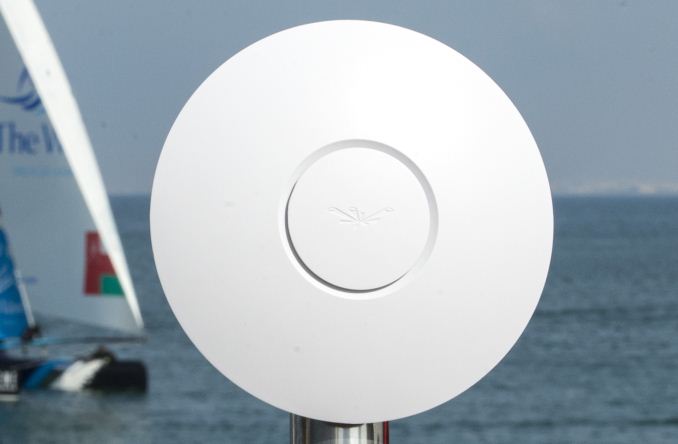
The enterprise Wi-Fi market is a hotly contested one with expensive offerings from companies such as Aruba Networks and Ruckus Wireless being the preferred choice of many IT administrators. Primary requirements for products in this market are the ability to support high client device densities and the provision of a robust and flexible management interface.
Ubiquiti Networks, founded in 2005, entered this market in Q4 2010 with their UniFi series. The offerings surprised the market with very attractive pricing while providing all the features available from the tier-one vendors. While those vendors have been a bit cautious in jumping on to the 802.11ac bandwagon, Ubiquiti is going ahead and launching the UniFi 3.0 Wi-Fi access point platform along with what seems to be the first 802.11ac enterprise AP.
The 802.11ac access point is based on the Broadcom platform (With the BCM4706 SoC, just like all the 802.11ac consumer routers / APs in the market right now). The APs also have wireless mesh capabilities. In a multi-AP deployment, wired uplinks are not needed for all of the access points.
The differentiating aspect of Ubiquiti's offering is the free UniFi 3.0 management software and controller. The latter can be run on-premises, or deployed in the cloud (either private or public). Some of the interesting features of UniFi include 'zero hand-off roaming' which allows users to roam while seamlessly switching between different access points without latency or interoperability issues. In essence, multiple APs can appear as a single AP to client devices. A single UniFi controller can manage multi-site distributed deployments. UniFi also provides detailed analytics and WLAN grouping capabilities, which are taken for granted in the enterprise Wi-Fi AP space.
Ubiquiti's UniFi 3.0 platform / 802.11ac AP is schedule to launch next month at a price point of just $299. With the arrival of 802.11ac-capable smartphones such as the HTC One and the Samsung Galaxy S4, enterprise IT administrators are bound to be on the lookout for 802.11ac-capable gear. Ubiquiti Networks seems well-positioned to tap into that market.
A challenge for Ubiquiti would be the fact that solution providers in any enterprise space are usually well-entrenched. Administrators are also wary of trying out new vendors because of support issues and a multitude of other factors. Do any of our readers have experience with Ubiquiti's products in the enterprise space? Feel free to let us know about it in the comments.
Read More ...
QNAP Launches Marvell-based 4-bay Rackmount NAS Units

Rackmount NAS units introduced in recent days have been mostly based on the powerful Intel processors, but there is a market demand amongst small workgroups and SMBs for low power NAS devices in that form factor. In order to serve this market, QNAP is launching the TS-421U and TS-420U, both of which are based on the tried and tested Marvell 6282 CPU.
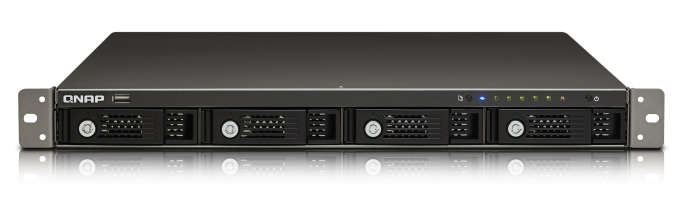
The 420U runs the CPU at 1.6 GHz, while the 421U cranks it up to 2.0 GHz. Both units have four hot-swappable bays in a 1U rackmount form factor. There are two GbE ports, two USB 3.0 ports, two eSATA ports and a single USB 2.0 port in front. The PSU is built-in. Internally, the units sport 1 GB of DDR3 DRAM (double that of the amount usually found in the Marvell-based 4-bay units with a tower form factor).
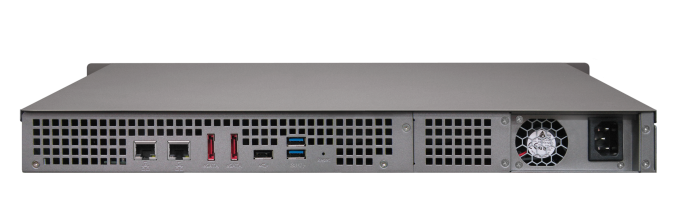
iSCSI (with think provisioning) support exists and the dual LAN ports can be configured in various port trunking modes. Windows AD and LDAP directory services can help in easy account setup from a AD/LDAP-based directory server. Backup strategies available in the new units include Real-time Remote Replication (RTRR), backup to cloud storage and support for third-party backup softwares. Time Machine is supported and QNAP provides the NetBak replicator for backing up PC data to a Turbo NAS.
More details about the two new rackmount products can be found here.
Read More ...
AMD Radeon HD 7790 Review Feat. Sapphire: The First Desktop Sea Islands
Launching today is AMD’s second new GPU for 2013 and the first GPU to make it to the retail desktop market: Bonaire. Bonaire in turn will be powering AMD’s first new retail desktop card for 2013, the Radeon HD 7790. With the 7790 AMD intends to fill the sometimes wide chasm in price and performance between their existing 7770 (Cape Verde) and 7850 (Pitcairn) products, and as a result today we’ll see just how Bonaire and the 7790 fit into the big picture for AMD’s 2013 plans.
Read More ...
The HTC One: A Remarkable Device, Anand’s mini Review
For the past week and a half our own Brian Klug has been hard at work on his review of HTC’s new flagship smartphone, the One. These things take time and Brian’s review, at least what I’ve seen of it, is nothing short of the reference piece we’ve come to expect from him.
In the same period of time I’ve been playing around with a retail HTC One and felt compelled to share my thoughts on the device. It’s rare that I’m so moved by a device to chime in outside of the official review, but the One is a definite exception.
Read More ...
Dell XPS 13 (Q1 2013) Ultrabook Review: What a Difference 1080p Makes
Around this time last year, we had a chance to take a look at Dell's first ultrabook, the XPS 13. This was an ultrabook I was for the most part fond of, but one that was clearly suffering from being first generation ultrabook hardware. Ultra low-voltage Sandy Bridge chips were perfectly serviceable, but they could still generate a tremendous amount of heat in a chassis the size of the XPS 13. That meant noise and heat were both serious issues. Compounding that was a routine, run-of-the-mill, utterly dismal 1366x768 TN panel display.
Read More ...
Logitech's G Series Branding and Product Refresh
Logitech has been producing peripherals for some time now, but what they've lacked is a concrete "this is for enthusiasts" brand identity. Ordinarily a vendor producing a specific "gaming" brand is met with eyerolls and rightfully so, but Logitech's gaming peripherals have sort of floated in their expansive product lineup with only the "G" prefix to really distinguish them. What we're looking at today is a push towards a very concrete, very distinct branding that will make Logitech's gamer oriented products much more readily identifiable.
As far as the refresh itself goes, we'll start with the quartet of mice being released. These are essentially refreshes of many of their existing mice with new skins and more importantly, newer and better hardware under the hood. The new versions all see an "s" suffix added to the model numbers, but with them we get better switches and sensors across the board.
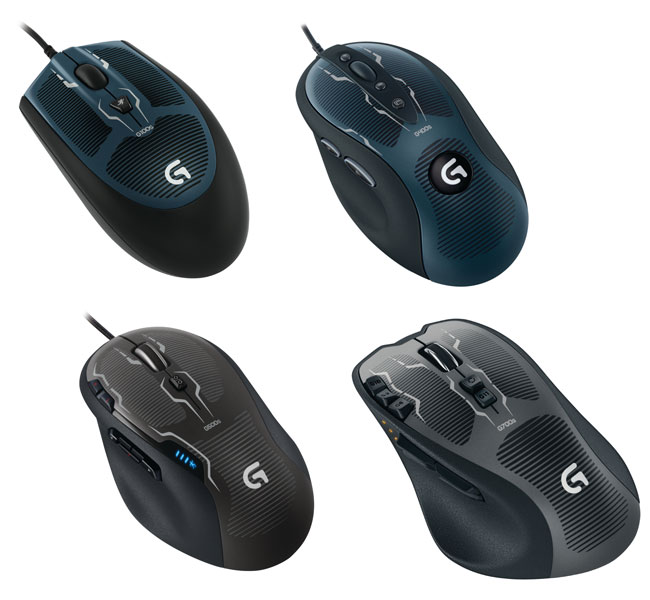
Clockwise from the top left: G100s, G400s, G700s, G500s.
Other than the upgraded internals, Logitech deliberately hewed very closely to the existing designs in terms of both materials and feel. Their attitude was "If it ain't broke, don't break it," and while my first inclination might be to chide them on being lazy, the reality is that I agree. These mice (especially the G500) were nigh perfect on their initial release, so there's little reason to mess with success. I will note that I'm not a huge fan of the new visual design, though. MSRP for these mice will be $39 for the G100s, $59 for the G400s, $69 for the G500s, and $99 for the G700s wired/wireless combo mouse.
Next on the agenda are Logitech's new keyboards, but I have a slightly harder time getting excited about these.
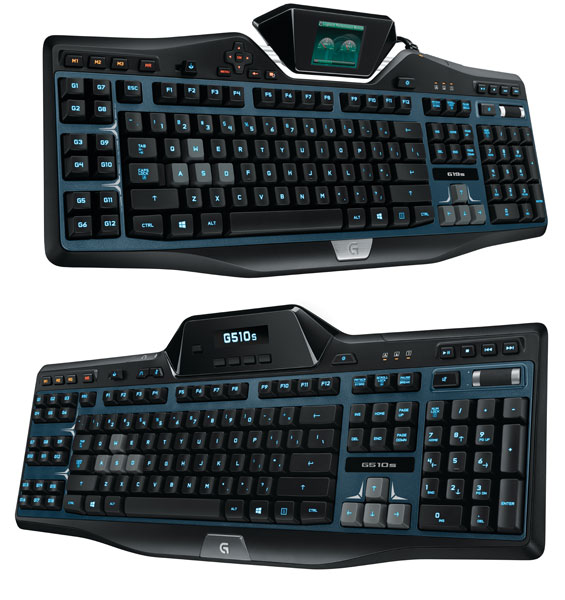
The Logitech G19s (top) and G510s (bottom).
The G19s has a full color LCD GamePanel and actually has an external power brick that allows it to use a single USB 2.0 connection while offering two powered USB 2.0 ports, the backlighting, and the panel. MSRP is set for $199.
The G510s is only slightly cut down; instead of the powered USB 2.0 ports, you get integrated USB audio that toggles on when you plug headphones and a microphone into it. I'm actually pretty keen on that as opposed to using a passthrough, as it makes Windows' clunky audio switching more tolerable. MSRP is set for $119.
Finally, Logitech is releasing two new headsets, both of which I found surprisingly comfortable. Finding a good gaming headset can be difficult for people who wear glasses (or even over-ear headphones in general), but the grip of the new headsets, the G430 and G230, was remarkably gentle while still being secure. Both headsets feature a noise-cancelling microphone. The more expensive G430 (at $79) sports 7.1 surround sound and includes a removable USB audio dongle, meaning you can opt to use it as a basic pair of headphones if you're so inclined. Meanwhile, the more affordable G230 (at $59) foregoes these accoutrements, instead offering basic stereo sound.
Common to all of these products, Logitech is unifying device drivers under one piece of software (something some of their competitors still lack), all but the G430 are Mac compatible (though there's no reason you can't remove the USB dongle and use the G430 as a basic headset on a Mac.) Availability is scheduled for the beginning of April 2013 in the United States, and May 2013 in Europe.
Update: The keyboards are apparently refreshes as well. I'd say if it ain't broke don't fix it (like the mice), but I suspect there will be room for improvement with these. We'll see when the review units arrive!
Read More ...
More Details On NVIDIA’s Kayla: A Dev Platform for CUDA on ARM
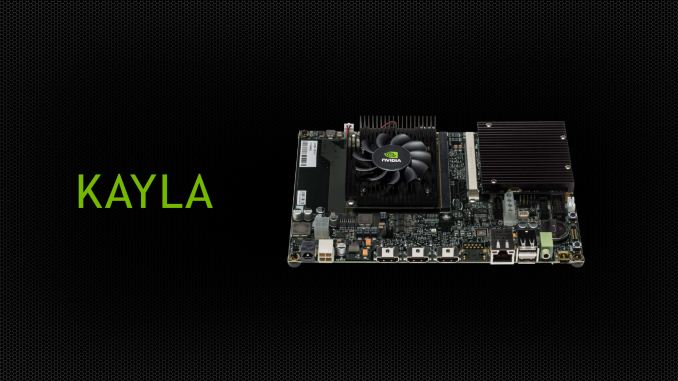
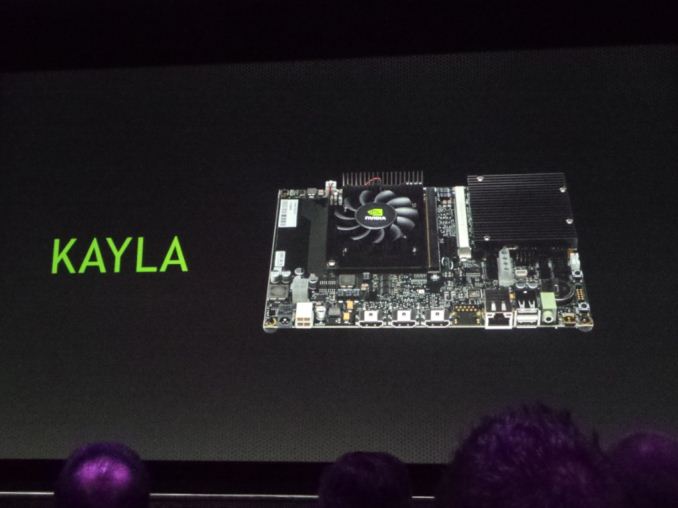
In this morning’s GTC 2013 keynote, one of the items briefly mentioned by NVIDIA CEO Jen-Hsun Huang was Kayla, an NVIDIA project combining a Tegra 3 processor and an unnamed GPU on a mini-ITX like board. While NVIDIA is still withholding some of the details of Kayla, we finally have some more details on just what Kayla is for.
The long and short of matters is that Kayla will be an early development platform for running CUDA on ARM. NVIDIA’s first CUDA-capable ARM SoC will not arrive until 2014 with Logan, but NVIDIA wants to get developers started early. By creating a separate development platform this will give interested developers a chance to take an early look at CUDA on ARM in preparation for Logan and other NVIDIA products using ARM CPUs, and start developing their wares now.
As it stands Kayla is a platform whose specifications are set by NVIDIA, with ARM PC providers building the final systems. The CPU is a Tegra 3 processor – picked for its PCI-Express bus needed to attach a dGPU – while the GPU is a Kepler family GPU that NVIDIA is declining to name at this time. Given the goals of the platform and NVIDIA’s refusal to name the GPU, we suspect this is a new ultra low end 1 SMX (192 CUDA core) Kepler GPU, but this is merely speculation on our part. There will be 2GB of RAM for the Tegra 3, while the GPU will come with a further 1GB for itself.
Update: PCGamesHardware has a picture of a slide from a GTC session listing Kayla's GPU as having 2 SMXes. It's definitely not GK107, so perhaps a GK107 refresh?
The Kayla board being displayed today is one configuration, utilizing an MXM slot to attach the dGPU to the platform. Other vendors will be going with PCIe, using mini-ITX boards. The platform on the whole is in the 10s of watts - but of course NVIDIA is quick to point out that Logan itself will be an order of magnitude less, thanks in part to the advantages conferred by being an SoC.
NVIDIA was quick to note that Kayla is a development platform for ARM on CUDA as opposed to calling it a development platform for Logan; though at the same it unquestionably serves as a sneak-peak for Logan. This is in big part due to the fact that the CPU will not match what’s on Logan – Tegra 4 already is beyond Tegra 3 with its A15 CPU cores – and it’s unlikely that the GPU is an exact match either. Hence the focus on early developers, who are going to be more interested in making it work than the specific performance the platform provides.
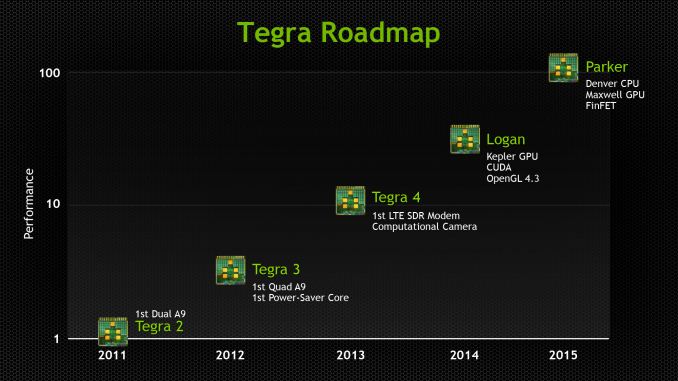
It’s interesting to note that NVIDIA is not only touting Kayla’s CUDA capabilities, but also the platform’s OpenGL 4.3 capabilities. Because Kayla and Logan are Kepler based, the GPU will be well ahead of OpenGL ES 3.0 with regards to functionality. Tessellation, compute shaders, and geometry shaders are present in OpenGL 4.3, among other things, reflecting the fact that OpenGL ES is a far more limited API than full OpenGL. This means that NVIDIA is shooting right past OpenGL ES 3.0, going from OpenGL ES 2.0 with Tegra 4 to OpenGL 4.3 with Logan/Kayla. This may also mean NVIDIA intends to use OpenGL 4.3 as a competitive advantage with Logan, attracting developers and users looking for a more feature-filled SoC than what current OpenGL ES 3.0 SoCs are slated to provide.
Wrapping things up, Kayla will be made available in the spring of this year. NVIDIA isn’t releasing any further details on the platform, but interested developers can go sign up to receive updates over at NVIDIA’s Developer Zone webpage.
On a lighter note, for anyone playing NVIDIA codename bingo, we’ve figured out why the platform is called Kayla. Jen-Hsun called Kayla “Logan’s girlfriend”, and it turns out he was being literal. So in keeping with their SoC naming this is another superhero-related name.
Read More ...
NVIDIA Updates GPU Roadmap; Announces Volta Family For Beyond 2014
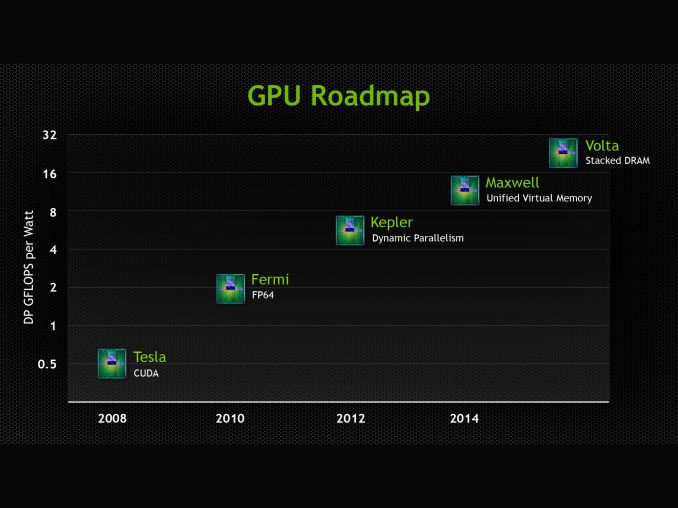
As we covered briefly in our live blog of this morning’s keynote, NVIDIA has publically updated their roadmap with the announcement of the GPU family that will follow 2014’s Maxwell family. That new family is Volta, named after Alessandro Volta, the physicist credited with the invention of the battery.
At this point we know very little about Volta other than a name and one of its marque features, but with how NVIDIA operates that’s consistent with how they’ve done things before. NVIDIA has for the last couple of years operated on an N+2 schedule for their public GPU roadmap, so with the launch of Kepler behind them we had been expecting a formal announcement of what was to follow Maxwell.
In any case, Volta’s marque feature will be stacked DRAM, which sees DRAM placed very close to the GPU by placing it on the same package, and connected to the GPU using through-silicon vias (TSVs). Having high bandwidth, on-package RAM is not new technology, but it is still relatively exotic. In the GPU world the most notable shipping product using it would be the PS Vita, which has 128MB of RAM in a wide-IO (but not TSV) manner. Meanwhile NVIDIA competitor Intel will be using a form of embedded DRAM for their highest-performance GT3e iGPU for their forthcoming Haswell generation CPUs.
The advantage of stacked DRAM for a GPU is that its locality brings with it both bandwidth and latency benefits. In terms of bandwidth the memory bus can be both faster and wider than an external memory bus, depending on how it’s configured. Specifically the close location of the DRAM to the GPU makes it practical to run a wide bus, while the short traces can allow for higher clockspeeds. Meanwhile the proximity of the two devices means that latency should be a bit lower – a lot of the latency is in the RAM fetching the required cells, but at the clockspeeds GDDR5 already operates at the memory buses on a GPU are relatively long, so there are some savings to be gained.
NVIDIA is targeting a 1TB/sec bandwidth rate for Volta, which to put things in perspective is over 3x what GeForce GTX Titan currently achieves with its 384bit, 6Gbps/pin memory bus (288GB/sec). This would imply that Volta is shooting for something along the lines of a 1024bit bus operating at 8Gbps/pin, or possibly an even larger 2048bit bus operating at 4Gbps/pin. Volta s still years off, but this at least gives us an idea of what NVIDIA needs to achieve to hit their 1TB/sec target.
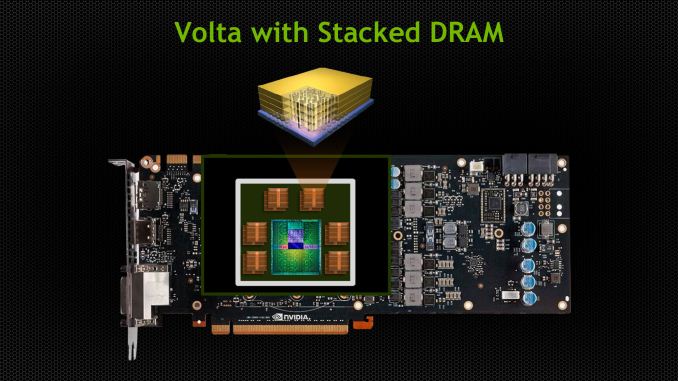
What will be interesting to see is how NVIDIA handles the capacity issues brought on by on-chip RAM. It’s no secret that DRAM is rather big, and especially so for GDDR. Moving all of that RAM on-chip seems unlikely, especially when consumer video cards are already pushing 6GB (Titan). For high-end GPUs this may mean NVIDIA is looking at a split RAM configuration, with the on-chip RAM acting as a cache or small pool of shared memory, while a much larger pool of slower memory is attached via an external bus.
At this point Volta does not have a date attached to it, which is unlike Maxwell which originally had a 2013 date attached to it when first named. That date of course slipped to 2014, and while it’s never been made clear why, the fact that Kepler slipped from 2011 to 2012 is a reminder that NVIDIA is still tied to TSMC’s production schedule due to their preference to launch new architectures on new nodes. Volta in turn will have some desired node attached to its development, but we don’t know what at this time.
With TSMC shaking up its schedule in an attempt to catch up to Intel on both nodes and technology, the lack of a date ultimately is not surprising since it’s difficult at best to predict when the appropriate node will be ready 3 years out. On that note it’s interesting to note that while NVIDIA has specifically mentioned FinFET transistors will be used on their Parker SoC, they have not mentioned FinFET for Volta. Coming from their investor meeting the question came up, and while it wasn’t specifically denied we were also left with no reason to expect Volta to be using FinFET, so make of that what you will.
Meanwhile, in NVIDIA tradition they’ve also thrown out a very rough estimate of Volta’s performance by plotting their GPUs against a chart of FP64 performance per watt. Today Kepler is already at roughly 5.5 GFLOPS/watt for K20X, while Volta is plotted at 24ish. Like the rest of the GPU industry NVIDIA remains to be power constrained, so at equal TDPs we’d expect roughly four times the performance of K20X, which would put total FP64 performance at around 5 TFLOPS. But again, all of this is early into a GPU that will not be released for years.
Finally, while Volta is capturing the majority of the press due to the fact that it’s the newest GPU coming out of NVIDIA, this latest roadmap does also offer a bit more on Maxwell. Maxwell’s marque feature as it turns out is unified virtual memory. CUDA already has a unified virtual address space available, so this would seemingly go beyond that. In practice such a technology is important for devices integrating a GPU and a CPU onto the same package, which is what the AMD-led Heterogeneous System Architecture seeks to exploit. For NVIDIA their Parker SoC will be based on Maxwell for the GPU and Denver for the CPU, so this looks to be a feature specifically setup for Parker and Parker-like products, where NVIDIA can offer their own CPU integrated with a Maxwell GPU.
Read More ...
Piz Daint Supercomputer Announced, Powered By Tesla K20X

Along with NVIDIA’s keynote this morning (which should be wrapping up by the time this article goes live), NVIDIA also has a couple other announcements that are hitting the wire this morning. The first of which is the announcement of NVIDIA landing another major supercomputer contract, this time with the Swiss National Computing Center (CSCS).
CSCS will be building a new Cray XC30 supercomputer, “Piz Daint.” Like Titan last year, Piz Daint is a mixed supercomputer that will pack both a large number of CPUs – Xeon E5s to be precise – and of course to great interest to NVIDIA, a large number of Tesla K20X GPUs. We don’t have the complete specifications for Piz Daint at this time, but when completed it is expected to exceed 1 PFLOPS in performance and be the most powerful supercomputer in Europe.
Piz Daint will be filling in several different roles at CSCS. Its primary role will be weather and climate modeling, working with Switzerland’s national weather service MeteoSwiss. Along with weather work, CSCS will also be using time on Piz Daint for other science fields, including astrophysics, life science, and material science.
For NVIDIA of course this marks another big supercomputer win for the company. Though not a huge business on its own at this time relative to the complete Tesla business, wins like Titan and Piz Daint are prestigious for the company due the importance of the work done on these supercomputers and the name recognition they bring.
Read More ...
NVIDIA Updates Tegra Roadmap Details at GTC - Logan and Parker Detailed
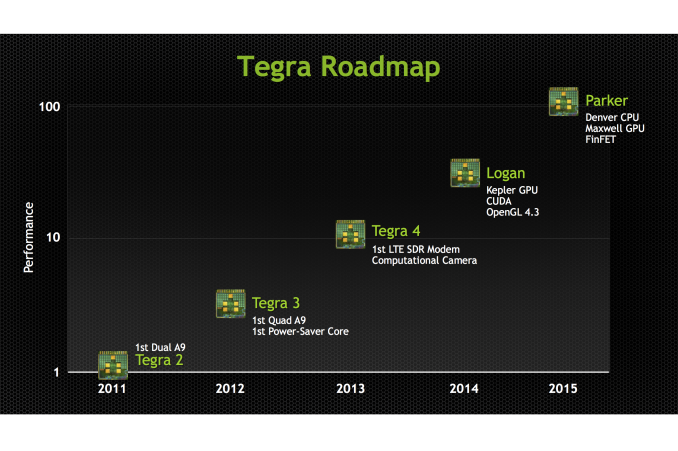
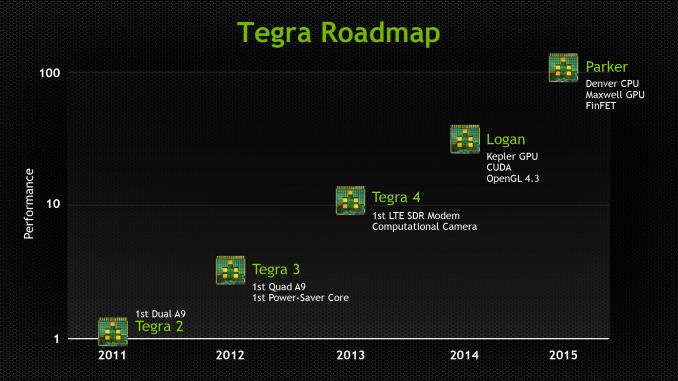
We're at NVIDIA's GTC 2013 event where team green just updated their official roadmap and shared some more details about their Tegra portfolio, specifically additional information about Logan and Parker, the codename for the SoCs beyond Tegra 4. First up is Logan, which will be NVIDIA's first SoC with CUDA inside, specifically courtesy a Kepler architecture GPU capable of CUDA 5.0 and OpenGL 4.3. There's no details on the CPU side of things, but we're told to expect Logan demos (and samples) inside 2013 and production inside devices early 2014.
It’s interesting to note that with the move to a Kepler architecture GPU, Logan will be taking on a vastly increased graphics feature set relative to Tegra 4. With Kepler comes OpenGL 4.3 capabilities, meaning that NVIDIA is not just catching up to OpenGL ES 3.0, but shooting right past it. Tessellation, compute shaders, and geometry shaders among other things are all present in OpenGL 4.3, far exeeding the much more limited and specialized OpenGL ES 3.0 feature set. Given the promotion that NVIDIA is putting into this - they've been making it quite clear t everyone that Logan will be OpenGL 4.3 capable - this may mean that NVIDIA intends to use OpenGL 4.3 as a competitive advantage with Logan, attracting developers and users looking for a more feature-filled SoC than what current OpenGL ES 3.0 SoCs are slated to provide.
On a final note about Logan, it’s interesting to note that Kepler has a fairly strict shader block granularity of 1 SMX, i.e. 192 CUDA cores. While NVIDIA can always redefine Kepler to mean what they say it means, if they do stick to that granularity then it should give us a very narrow range of possible GPU configurations for Logan.
After Logan is Parker, which NVIDIA shared will contain the codename Denver CPU NVIDIA is working on, with 64 bit capabilities and codename Maxwell GPU. Parker will also be built using 3D FinFET transistors, likely from TSMC.
Like Logan, it's clear that Parker will be benefitting from being based on a recent NVIDIA dGPU. While we don't know a great deal about Maxwell since it doesn't launch for roughly another year, NVIDIA has told us that Maxwell will support unified virtual memory. With Logan NVIDIA gains CUDA capabilities due to Kepler, but with Parker they are laying down the groundwork for full-on heterogeneous computing in a vein similar to what AMD and the ARM partners are doing with HSA. NVIDIA has so far not talked about heterogeneous computing in great detail since they only provide GPUs and limited functionality SoCs, but with Denver giving them an in-house CPU to pair with their in-house GPUs, products like Parker will be giving them new options to explore. And perhaps more meaningfully, the means to counter HSA-enabled ARM SoCs from rival firms.
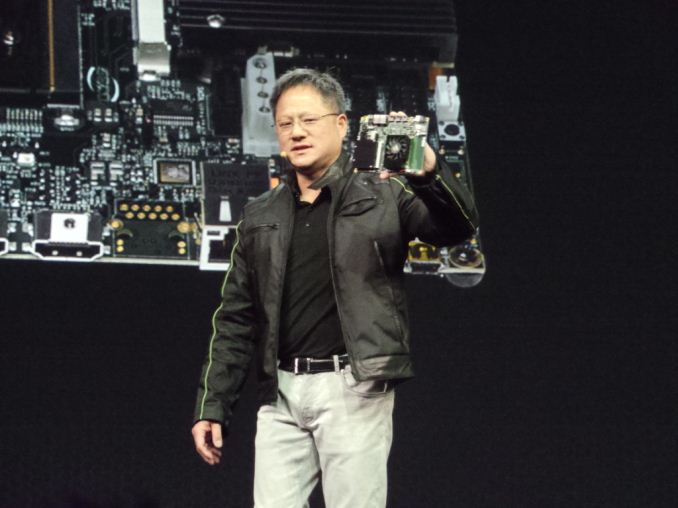
In addition NVIDIA showed off a new product named Kayla which is a small, mITX-like board running a Tegra 3 SoC and unnamed new low power Kepler family GPU.
Read More ...
Windows Phone Outselling iPhone in Seven Countries
But some of the countries are relatively small markets


Read More ...
Sony's Own 5-Inch 1080p Phone Hits Pre-order
New phone is low end of the 1080p pack, but still offers some nice features

Read More ...
North Korea Nixes 3G Data for Tourists
While it's not completely clear why North Korea is doing this, some believe it's because visitors used services like Instagram while they were there

Read More ...
Researchers Use Bacteria to Create Bio-Batteries
This could lead to more efficient microbial fuel cells

Read More ...
Battlefield 4 Promises to Be a New Benchmark in Game Design and Multiple Player Engagement
Pre-orders have already started

Read More ...
20 Percent of BlackBerry 10 Apps are Android Apps
Developers thought making native BB10 apps was risky

Read More ...
Quick Note: Ericsson Reportedly in Discussions to Buy Microsoft IPTV Software Arm
No official comments from either company have been made

Read More ...
Walmart Prepares to Take Amazon to the Mattresses with Faster Shipping Options
Walmart hopes to out Amazon, Amazon

Read More ...
Available Tags:Android , Windows , Tablet , Keyboard , iPhone 5 , Apple , iPhone , NVIDIA , GeForce , GTX , AMD , GPU , Driver , ASUS , Radeon , HTC , Dell , CUDA , Windows Phone , BlackBerry , Microsoft , Amazon ,


No comments:
Post a Comment