

Roku 3 Media Streamer Launches for $99
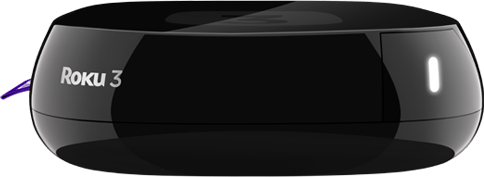
We could write multiple paragraphs about the new features touted by Roku in the new hardware, but felt it would be simpler to present the plus and minus points of the Roku 3 in a point-wise fashion:
Positives:
Areas to Improve:
Roku was one of the first companies to come out with a streaming set top box for the general consumer and it has managed to move a large number of devices over the last few years, thanks to its pioneer status and marketing budget. However, the truth is that devices like the WDTV Live and WDTV Play from Western Digital provide all the major streaming channels and also integrate very good local media support at a similar / lower price point compared to the Roku boxes. At the lower end, I have also seen Netgear's streaming devices such as the NTV200 and the NeoTV Max 300 SL provide a large number of streaming channels. The latter also integrates a useful differentiating feature in the form of Wi-Di support.
The Roku 3 refresh is interesting, but seems to lack any particularly exciting feature. What do readers think? Feel free to sound off in the comments.


Read More ...
AMD Enlists Ben Heck to Build Rocket Launching Desktop PC
In preparation for its presence at SXSW Interactive, AMD enlisted the help of famed modder Benjamin Heckendorn to build a bunch of unique PCs. Traditionally, AMD would just show a bunch of notebook and PC designs available in the market but this year it wanted something a bit more exciting. None of the designs will be sold or available, they are just intended to build interest in the PC and modding communities.
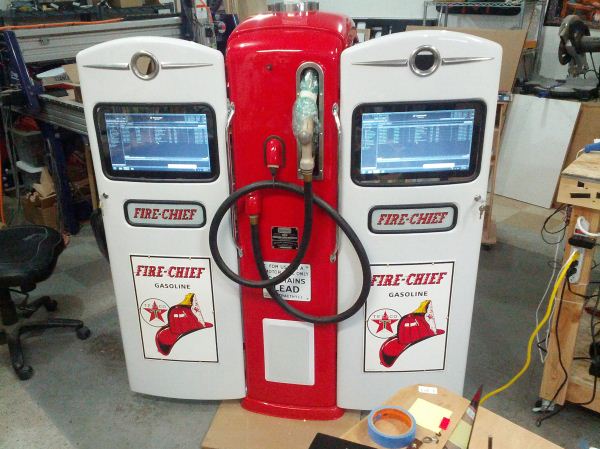
Ben was instructed to hop on eBay, buy a handful of outrageous things and build computers out of them. Among the projects are an Android controlled MP3 player PC built into a gas pump, a Pimp Hat PC, a PC built into a fighter pilot helmet, and a PC built into a small model of the Mystery Machine from Scooby Doo.
I had the opportunity of playing with one of the PCs that'll be on display at SXSWi this week: a mini-ITX based system capable of launching model rockets. AMD allegedly went to Ben and requested that he "build a computer that could launch rockets". And this is what he came up with:
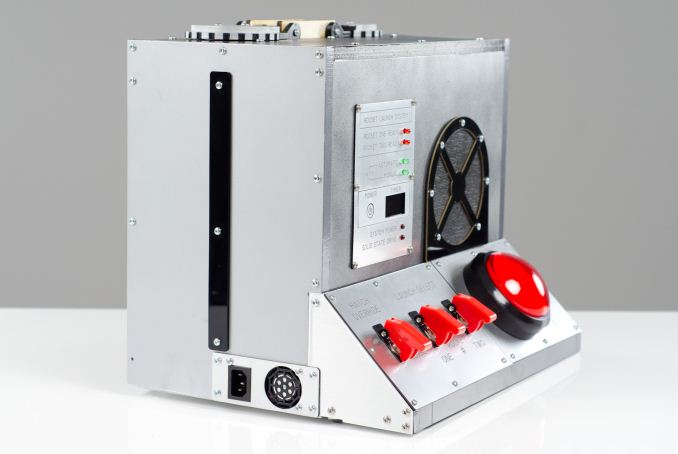
The system is running Windows 7 and features an AMD A10-5700 on a MSI FM2-A75IA-E53. There's only a single Crucial 128GB m4 SSD inside as well as a small power supply. The mini-ITX internals leave tons of room for the two rocket silos.
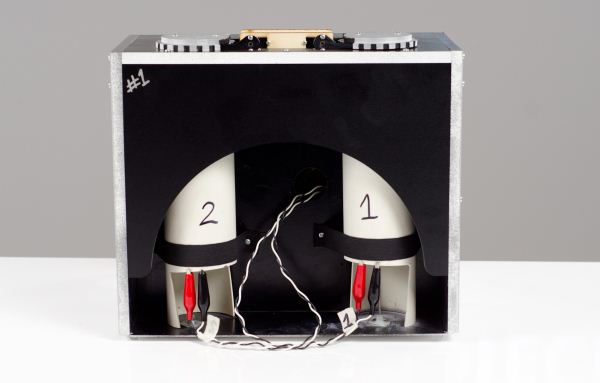
The silo hatches are driven by two servos and can be opened independently. Controls on the opposite side of the PC allow you to open the hatches independently, as well as prep the rockets for launch. Select the rocket(s) you want to launch, hit the giant start button and watch the countdown go. It starts at 10 seconds, at 6 seconds the first bay opens up, at 5 seconds the second opens, and then at 0 the two launch with a quarter of a second delay between the two.
All of the switches have a solid, almost industrial, feel to them. The launch electronics all worked flawlessly with no bugs...thankfully.
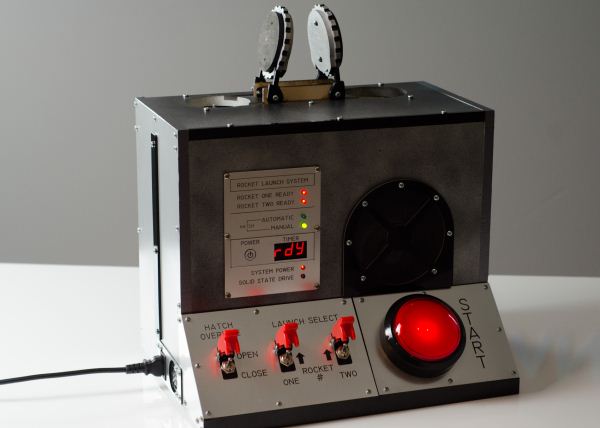
Ben built a custom PCB to drive all of the launch control electronics. The timer as well as the launch control state machine are all driven by Ben's work, rather than by the PC itself. Rockets are ignited by a pair of MOSFETS pulling current from the main PSU's 12V rail. You simply attach alligator clips to the leads of your igniters and you're ready to go. Ben did a good explanation of what it took to build this system on his show a little while ago.
The chassis itself is built from high density PVC foam, with the exception of the base which is aluminum and engraving plastic on the front. The switches were purchased but all of the panels were laser etched by Ben himself.
The system works as a PC, and although you wouldn't want to launch rockets indoors, it is functional in that capacity as well:
I'll apologize in advance for not having great footage of the rocket post launch. It's been a while since I launched a model rocket and I apparently had forgotten just how fast/high these things go. I needed a far more serious lens to follow the rocket than I had on hand. Needless to say, the system launched rockets just fine.
Admittedly I've never been one for serious case modding, but I do have to say that the end result is pretty impressive. You can argue about the functionality of being able to launch rockets from your PC, but the execution is neat. This was more of a novelty mod but some of the most interesting mods are those that enable new functionality or put PCs into areas/roles never thought possible. Ben's work on getting the Xbox 360 into a laptop is an example of such a thing. Given how powerful (and power efficient) PC hardware is these days, I'd like to see the reverse done - a mod to make a PC better approximate a gaming console.
If you're going to be in Austin for SXSW this week want to come by and check out the Rocket PC (and others) for yourself head on over here to register for AMD's Technograffiti event. Registration is free, and the event takes place March 7th (this Thursday) at 7:30PM.
Check out photos of the Rocket PC as well as some of the other Ben Heck mods in the gallery below.
Gallery: AMD Enlists Ben Heck to Build Rocket Launching Desktop PC


Read More ...
Razer Announces League of Legends Edition Naga Hex and Goliathus
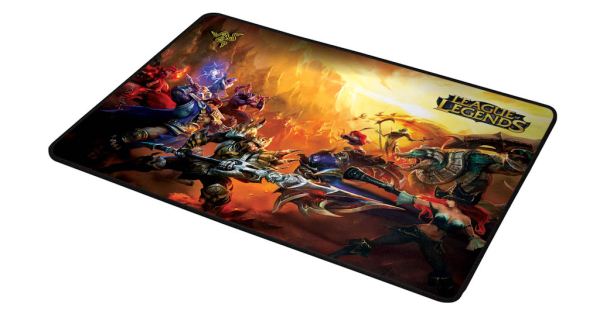
A week after announcing their sponsorship of a League of Legends tournament series, Razer is taking the veil off Collector’s Edition peripherals for League of Legends in partnership with Riot Games.
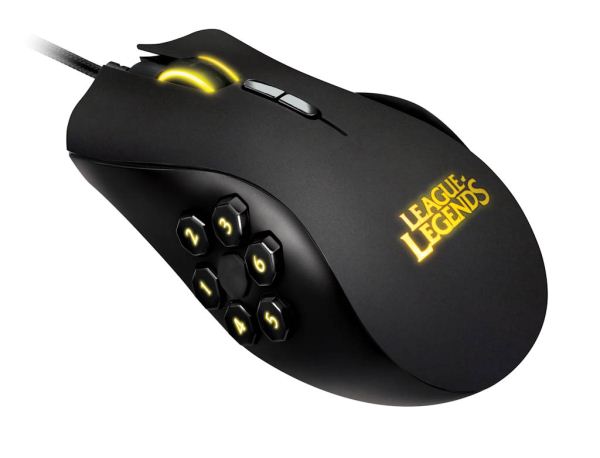 The League of Legends Edition Naga Hex (which I’m going to abbreviate as the Naga Hex LoL) is very similar to the Naga Hex, except with a matte texture to the upper body, an illuminated League of Legends logo, a different font on the buttons, and yellow LED lighting. Starting with the MMO-centric Naga, Razer created the Hex specifically for MOBA (multiplayer online battle arena) games like LoL, so centering their League of Legends product initiative around the Hex is pretty logical. The rest of the basics from the Hex are still here - six thumb buttons on the side for quick item/spell access in MOBA games, a 5600dpi laser sensor, and Synapse 2.0 integration. Other minutia: mouse buttons rated for 250 clicks per minute, a scroll wheel with 24 click positions, 7-foot long braided cable, and a gold plated USB connector.
The Naga Hex is a pretty good mouse for MOBAs, I know a few LoL addicts who enjoy it quite a bit. It’s no coincidence that the six thumb buttons correlate so well with the gameplay in League of Legends. But this is exactly the same mouse as the Hex, except with the League of Legends branding. It retails at $89.99, which is exactly $10 more than the regular Hex. It’s not a ton extra, so if you’re a big fan of League, it’s not a bad way to go.
The League of Legends Edition Goliathus Speed is a pretty fancy looking piece of kit. It’s a mousepad with a legitimate sense of visual drama, featuring artwork depicting a scene of various champions battling. It’s attention grabbing, I’m a fan. Other than the artwork, this is exactly the same as the regular Goliathus Speed mousepad. It comes in one size - the standard 355mm by 254mm, and retails for exactly the same $19.99 as the non-LoL Goliathus. If the eye-catching graphics appeal to you, it makes for an interesting alternative to the standard black and green colour scheme of the Goliathus. Both League of Legends branded peripherals come with free Tryndamere codes, though I suspect that most people who would buy one of these would already have said champ.

Read More ...
Seagate Announces New Laptop and Desktop SSHDs (Solid State Hybrid Drives)
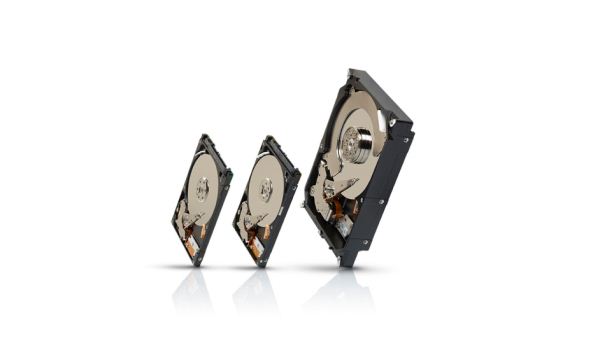
A few days ago we reported that Seagate would stop selling 7200 RPM 2.5” hard drives by the end of the year. Now we know why. Seagate will continue to offer 5400 RPM 2.5” drives, but if you want more performance without diving into the performance/capacity tradeoffs of an SSD Seagate will offer you its 3rd generation solid state hybrid drive (SSHD).
Once sold under the Momentus XT brand, the 3rd gen hybrid drives will simply be sold under the SSHD moniker. As Seagate alluded to many times in the past, we’ll also be getting a 3.5” hybrid drive as well. The two families will simply be called the Seagate Laptop SSHD and Seagate Desktop SSHD.
While both families will have many members, at launch we’ll see the following:
All of the drives use a standard SATA interface, and all of them feature 8GB of MLC NAND (with a small portion of the NAND set aside for use in SLC mode, similar to SanDisk’s nCache). This is a disappointingly small amount of NAND, however Seagate hinted at future, higher performance versions shipping with somewhere around 32GB of NAND. As we found in our investigation of Apple’s Fusion Drive, the ideal number is likely somewhere in the 128GB - 256GB range but that puts you in a very different price class.
The benefit of using only 8GB of NAND is that Seagate is able to keep prices very low. Both Laptop and Desktop SSHDs are expected to carry around a $15 - $20 price premium over competing 7200RPM alternatives.
The NAND mostly acts as a read cache, although this time around Seagate claims it will be able to cache some writes. Seagate is understandably sensitive to writing tons of data to the NAND since it’s only an 8GB MLC device, but endurance shouldn’t be too much of a problem to navigate around with good firmware. There’s no data separation, everything that is written to NAND also exists on the hard drive - although it’s not clear if that write happens in tandem or sequentially.
Seagate is particularly proud of their very low time to use performance with the new SSHDs. Apparently Seagate aggressively tuned its algorithms to cache roughly all accesses that happen within the first minute of power on.
Although I’m not very excited about the performance of these drives compared to SSDs, their low price should make Seagate’s SSHDs an obvious choice compared to a traditional hard drive. The fact that we’ll get both 2.5” and 3.5” SSHDs is nice since many SSD users on the desktop are still consumers of mechanical drives as well. Personally I’m not sure how much I’d benefit from using Seagate’s Desktop SSHDs in my RAID array since I mostly do large block sequential transfers (which would be uncached) to/from the array. For gamers or folks who have an SSD that’s smaller than their total application footprint these SSHDs might be compelling.
When I first reviewed the Momentus XT I concluded “There's no reason for any performance oriented mechanical drive to ship without at least some small amount of NAND on board.” Three years later, it looks like that vision has finally come to be.

Read More ...
NVIDIA Launches Quadro K4000, K2000, K2000D, & K600
Back in August of 2012 NVIDIA announced their first Kepler based Quadro part, the Quadro K5000. Based on NVIDIA’s at the time leading GK104 GPU, K5000 was the customary generational update to the workstation-focused Quadro family, bringing to the Quadro family Kepler generation features such as support for 4 monitors, NVIDIA’s NVENC video encoder, and of course greater rendering performance. However since its launch the K5000 has stood alone as the only Kepler based desktop Quadro card, with the older Fermi based products filling out the rest of the Quadro family. Today that will finally be changing as NVIDIA fleshes out the rest of the Quadro lineup with new Kepler based parts.
Altogether NVIDIA will be launching 4 new Quadro cards, intending to fill out the lower performance, higher volume market segments below the $2,250 K5000. These cards will be the K4000, the K2000, the K2000D, and the K600.
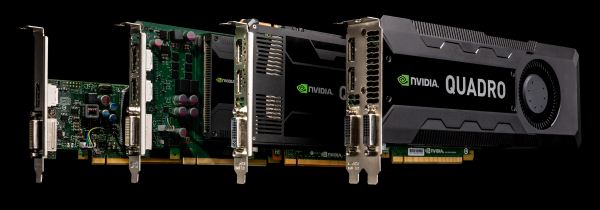
Just as how the K5000 was the direct successor of the Fermi based Quadro 5000, these new cards are the direct successors of their respective Fermi counterparts, and will be occupying roughly the same market segments. At $1,269 will be the GK106 based K4000, which combines 768 CUDA cores with 3GB of RAM. Below that is the K2000 at $599, a GK107 based part packing 384 CUDA cores and 2GB of RAM. K2000 will come in two variants, a standard variant with 2 DisplayPorts and 1 DL-DVI port, and the K2000D which flips that for 2 DL-DVI ports and 1 mini-DisplayPort. Finally at $199 is a further cut down GK107 part, the K600, NVIDIA’s entry-level Kepler Quadro card featuring 192 CUDA cores, 1GB of RAM, and 1 DisplayPort along with 1 DL-DVI port.
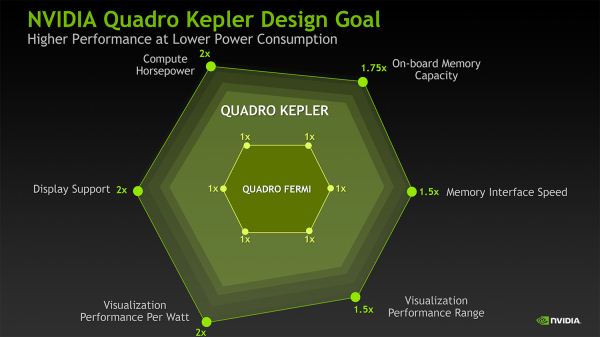
Similar to how the Fermi Quadro cards were handled, the Kepler Quadro cards are essentially stratified based on a mix of features and performance. Partial ECC support for example will not make it down to any of these new cards, while NVIDIA’s GPUDirect for Video technology is being made available on the K4000 and above, but not the K2000 or K600. Meanwhile relative to their Fermi predecessors performance has increased across the board, with the specific gains varying with the SKU and the resource needs of any given application.
Of course the big draw for the Kepler Quadro family is Kepler’s improved display controller, which adds support for DisplayPort 1.2, support for 4K displays, and at the same time doubles the number of displays that can be driven from 2 on Fermi to 4 on most Kepler cards. Like the K5000, the K4000 and K2000 will be able to drive up to 4 displays, but in an important difference, owing to their smaller profiles these cards will not feature 4 display outputs. Rather in a first for NVIDIA, they will be relying in DisplayPort 1.2’s MST/daisy-chaining functionality to drive 2+ monitors off a single DP output.
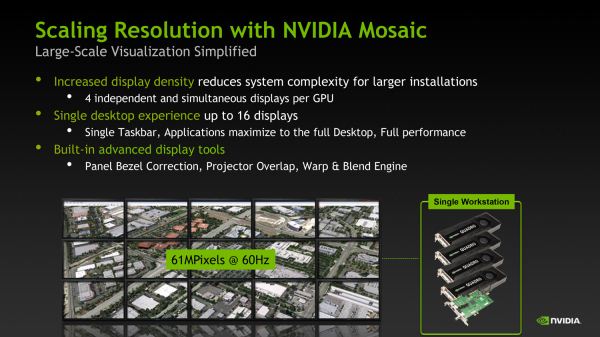
Similarly, with the increased number of supported displays per card NVIDIA has upgraded their Mosaic software to match Kepler’s capabilities, increasing the number of displays that can be part of a mosaic. Mosaic now supports 16 displays spread over 4 video cards, for 4 displays per video card.
Finally, as with the Fermi generation of Quadro cards, the Kepler generation of Quadro cards will be top-to-bottom Maximus enabled for blended graphics/compute tasks. This means any Kepler Quadro card can be paired with a Tesla K20 to offload compute onto the K20 in supported applications, freeing up the Quadro card for graphical tasks while boosting compute performance. Given the $3000+ price tag on a K20 we don’t expect to see very many environments using Maximus with the K600, but from what we’ve seen in the past, Quadro 2000 series cards have ended up being Maximus pairings for use in tasks where a Quadro card is being used to visualize Tesla results.
On a final note, unlike the K5000 this will be a hard launch, so K4000, K2000, and K600 cards will be available starting today. This goes for both retail add-in card sales and for pre-built OEM systems, with OEMs shipping systems equipped with NVIDIA’s latest Quadro cards as soon as today.
Gallery: NVIDIA Quadro K4000


Gallery: NVIDIA Quadro K2000


Gallery: NVIDIA Quadro K600


Read More ...
Securifi's Almond+ 802.11ac Touchscreen Wi-Fi Router Integrates ZigBee and Z-Wave
It isn't often that we write about products seeking crowd funding. We had written about ioSafe's Indiegogo campaign for the N2 NAS back in September 2012, and the review of that product went out yesterday. Unless a product has already been demonstrated in its full working state and is guaranteed to ship, we are hesitant to provide dedicated publicity and hype to ideas and concepts that may never reach the consumer.
We have also recently ramped up our coverage of home automation technologies. In one of the initial pieces, we were bullish on the upcoming 802.11ah Wi-Fi standard for the Internet of Things revolution happening right now. 802.11ah standardization and devices are a good 2 to 3 years away, and in the meanwhile, Z-Wave and ZigBee will extend their reach further into the home.
One of the primary roadblocks to adoption of home automation technologies is the need for consumers to invest in a dedicated controller (very much similar to investing in a wireless router for Wi-Fi, but only much costlier). Securifi, a consumer networking startup, aims to solve this problem by launching a Wi-Fi router with both Z-Wave and ZigBee radios. Securifi is no stranger to the router world. They launched the Almond touchscreen router last year and it has proved to be very popular on Amazon.

Securifi's Almond+ boasts of 802.11ac speeds with two spatial streams (867 Mbps of theoretical throughput). It will also have concurrent dual band 802.11n support (again, two spatial streams for 300 Mbps of theoretical throughput). The WAN port and four LAN ports are all gigabit. The unit is based on the Realtek 802.11ac reference platform (with the RTL8812 802.11ac + an radio). For Z-Wave, Sigma Designs ZM3102 is being used. The prototypes demonstrated at CES 2013 had Atmel ZigBee ICs, but Securifi expects to use ICs from Silicon Labs for this radio in production units. The beauty of the design is that all three radios are under the control of a single SoC running at 620 MHz with 128 MB of RAM.
Home automation components sold by companies like Comcast, Verizon and ADT bring with them monthly subscription fees. For tech-savvy folks, this is an irritant, as they want more control of the home automation services from outside without paying monthly fees. The Almond+ aims to cater to those types of users too by releasing the SDK for the router to the public. This should allow the open-source community as well as device vendors to quickly add support for various ZigBee / Z-Wave sensors in the Almond+. Securifi recently indicated that control of the Philips Hue using the Almond+ is already in the works.

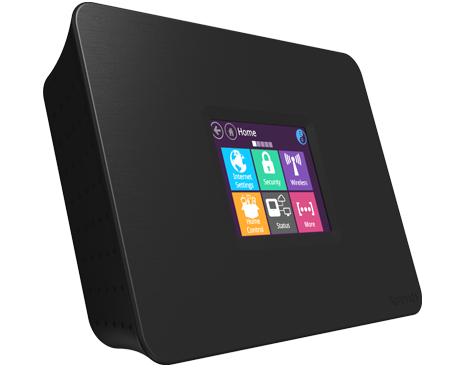
A touchscreen on a router such as the Almond didn't get us excited. However, when bundled with a controller for home automation sensors, it begins to make a lot of sense. For $99, the set of features seems like a steal (given that 802.11ac routers have struggled to break the sub-$100 barrier). The Almond+ project has already reached its funding goals on Kickstarter. Our only minor quibble is that Securifi could have upped the price a bit in exchange for a larger touchscreen (2.8in touchscreens are definitely not $200). In any case, we are really excited about the Almond+ and can't wait to get it in our hands for evaluation in real-world scenarios. Availability is slated for mid-Q3 2013. Economical devices like these are encouraging signs for the IoT (Internet of Things) ecosystem.

Read More ...
Seagate to Discontinue 7200rpm 2.5" Drives Later This Year
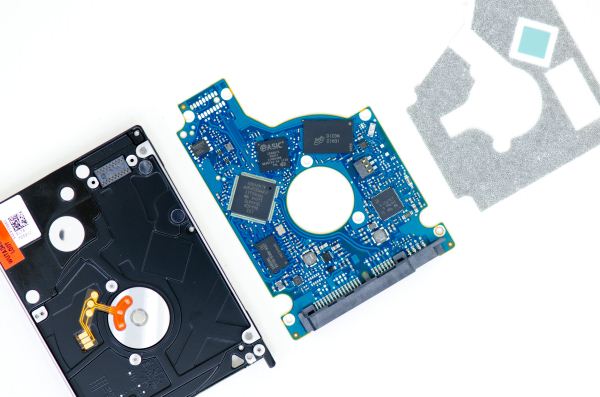
Earlier today X-bit Labs reported that Seagate will stop the production of their 7200RPM 2.5" drives by the end of this year and I just got a confirmation from Seagate that this is really the case. Seagate currently offers four 7200RPM 2.5" lineups: Momentus 7200.4, 7200.2, Momentus Thin 7200, and Momentus XT. The latter is Seagate's hybrid drive, which couples the spinning platters with 8GB of SLC NAND for caching purposes.
The move makes sense when looking at the market's state. 7200RPM mobile hard drives have always been a premium product and are mostly found in high-end laptops or built-to-order configurations. Due to the decline in SSD prices over the last few years, the market for faster hard drives has quickly faded away because users seeking for performance have opted for SSDs instead of 7200RPM hard drives. While 7200RPM 2.5" hard drives are still significantly cheaper per GB than SSDs, even a small (32-128GB) SSD will provide better overall performance when used as an OS and applications drive, and high-end laptops can often be configured with dual-drives to overcome the capacity issue (especially with mSATA around or by removing the optical drive).
As an intermediate solution, quite a few laptop OEMs also offer at least some sort of flash based storage in their higher-end products nowadays, usually in the form of a small mSATA caching SSD. 5400RPM hard drives are fast enough when the most frequently stored data is stored in an SSD and draw less power so they are more optimal as secondary storage.
Seagate won't depart the performance hard drive market as they will focus on hybrid drives (SSHDs). Ultimately I believe this is a better choice because we still haven't really seen a great hybrid drive and the market for hybrid drives is definitely bigger and more future-proof than 7200RPM hard drives. While the first and second generation Momentus XTs have been a good start, 4-8GB of NAND isn't enough to provide the real SSD experience. There is hope that with the discontinuation of 7200RPM mobile hard drives, Seagate will put more effort into the Momentus XT. Personally I would like to see multiple SKUs with varying amounts of NAND to cater to the mainstream market as well as the high-end market where users are expecting more SSD-like performance.
Seagate doesn't have a consumer SSD lineup, so the Momentus XT is a crucial product for Seagate in order to stay in the high-end, higher-profit consumer storage market. The question is whether they will be able to make a hybrid drive a more attractive option than a caching mSATA/M.2 SSD with a conventional hard drive. Given the current pricing and the upgrade path offered by mSATA/M.2, plus the fact that 20-32GB caching SSDs with Intel's Smart Response Technology clearly outperform the current Momentus XT offerings, Seagate has their work cut out for them. In another five years, short of a new explosion in storage intensive files, we will likely reach the point where everything becomes pure SSD because the cost and performance will be better than any conventional or hybrid solutions.

Read More ...
Gigabyte Z77X-UP7 Review: OC Oriented Orange Overkill
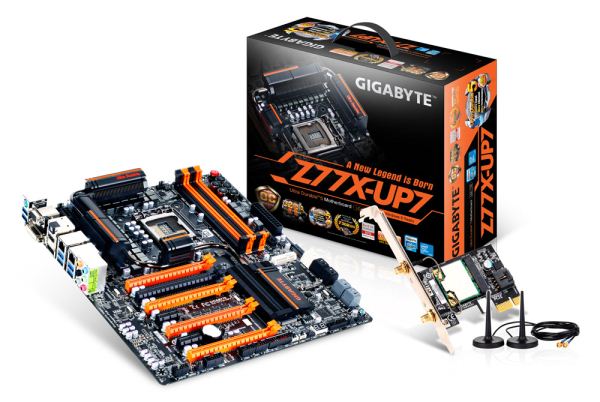
Aside from Gigabyte’s gaming motherboards (the G1 Series) and its channel motherboards (such as the UP4 TH, MX-D3H), there exists the OC Oriented series of motherboards. The first participant in this specific range was the X58A-OC, a stripped down LGA1366 motherboard for Gulftown CPUs to focus on the top overclocking scores with up to 4-way GPU action. The latest in the line the Z77X-UP7, a strike at the heart of Sandy Bridge and Ivy Bridge CPUs, which we are testing today. With a fuller feature set than the X58A-OC, our black and orange UP7 is designed to take world records by extreme overclockers, while perhaps still being a motherboard for the high end enthusiast with a deep wallet.

Read More ...
Philips Hue: Automated Home Lighting Gets Colorful
Philips sent out a review sample of their new Hue lighting system, a set of three Hue lights with the Hue Bridge that allows you to remotely control the lights. Besides being able to turn the lights on or off, the big claim to fame of the Hue is that you can set the lights to a variety of colors, or you can even program them to cycle through colors.
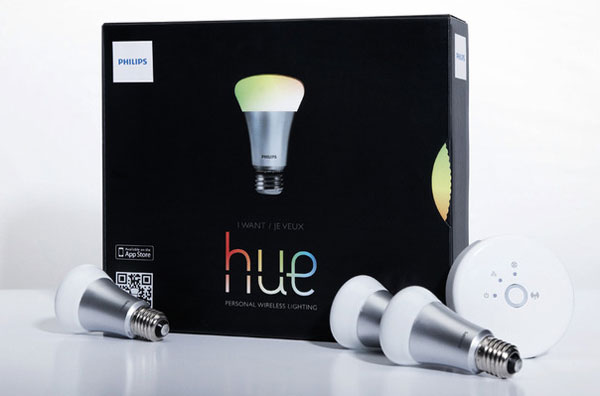
Home automation systems are often proprietary and can be quite expensive, so the entry of Philips into this market (albeit in a limited fashion) with their Hue lighting system has the potential to shake things up a bit. The lights have colored LEDs, and while the initial pack only includes three of the Connected Bulbs, you can potentially add up to 50 lights throughout your house/property. One thing that hasn’t changed yet however is that pricing is quite high: the initial kit will set you back $200. But how does the Philips Hue work in practice, and might it be worth the cost of entry?
We also have a new writer for this review, so say hello to Ashu Joshi.

Read More ...
BitFenix Raider Case Review: All These Little Things
BitFenix has historically been fairly reliable at producing reasonably priced cases that have their own aesthetic flair and solid performance. They've been exactly daring enough with designs like the extremely popular Prodigy, and been able to produce great value with less expensive builds like the Merc series. For the most part their midrange has been fairly well-covered by the Shinobi, but for users looking for something with a little more pep and a little different design, today we have on hand the Raider.
.jpg)
The Raider seems like a fairly basic ATX mid-tower, but there's some secret sauce at work here. BitFenix includes a pseudo-removable drive cage and, almost surprisingly, no side ventilation. No window, no side fan, nothing but two solid side panels. There's also a trio of BitFenix's silent Spectre fans, and that signature attractive soft-touch plastic finish. It sounds like the Raider has a lot going for it, but does it hold up?

Read More ...
OpenCL drivers discovered on Nexus 4 and Nexus 10 devices
As regular Anandtech readers will know, OpenCL is a standard by Khronos group that allows you to access the computational power of parallel devices such as multicore CPUs and GPUs in your system provided the hardware and drivers support the API. Companies such as AMD, Intel and Nvidia have been shipping OpenCL drivers on the desktop for some time now. On the mobile side, vendors such as ARM, Imagination, Qualcomm, Samsung and TI have been promising OpenCL on mobile and often show off demos using OpenCL. Drivers from vendors such as ARM, Qualcomm and Imagination have also passed official conformance tests, certifying that they do have working drivers in at least development firmwares. However, none of the vendors have publically announced whether or not they are already shipping OpenCL in stock firmware on any device. ARM and Qualcomm have both maintained that licensing and shipping the OpenCL driver is upto the handset makers and have not issued any documentation confirming which handsets or tablets do ship with OpenCL. Google has also always maintained that Renderscript Compute, and not OpenCL, is the official parallel computing API for Android.
However, recently we have seen several stories that OpenCL drivers are in fact present on both Nexus 4 and Nexus 10 stock firmware. I first became aware of the presence of OpenCL for Mali T604 on Nexus 10 stock firmware through a tweet from Kishonti who were able to run their CLBenchmark test on the Nexus 10. Then, posters on several forums (such as bearon on Beyond3D forum ) posted instructions on how to get access to OpenCL on Nexus 10. Matthew Scarpino has also posted some instructions for Nexus 10 on his blog . Finally, posters on Qualcomm developer forums posted that Nexus 4 also appears to ship with OpenCL drivers, and gave some instructions on how to get access to OpenCL on Nexus 4. On Nexus 4, drivers appear to be present for both the quad-core Krait CPU and Adreno 320 GPU.
We have also been able to confirm ourselves that both Nexus 4 and Nexus 10 contain OpenCL drivers, though we have only tested very basic functions in the API so far. I have posted sample code here that appears to be working on both Nexus 4 and Nexus 10 and does not require you to pull any proprietary binaries from the firmware, unlike some other proposed solutions. I will keep updating the source code over time as I learn more.
It is not clear whether the shipping drivers are the conformant drivers referred to above, or some other internal build that may not have the full functionality of the API. It is potentially risky for commercial apps to depend upon the libraries, as they may be buggy or unstable, and may also disappear in future firmware versions. However, it is still an exciting development for developers and tinkerers, as it opens up the way for developers to explore the potential of OpenCL on mobile/low-power platforms.

Read More ...
A Look at Broadcom's BCM21892 LTE Baseband at MWC
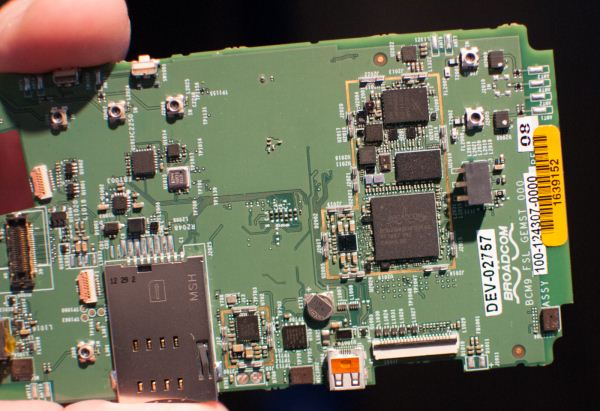
Yesterday we stopped by Broadcom to look at their newly announced BCM21892 LTE baseband, which we saw teased previously at CES doing a VoLTE call. If you're not famliar with the details of Broadcom's first LTE baseband, it's a 3GPP Release 10 modem supporting all the 3GPP air interfaces (GSM/EDGE, WCDMA, TD-SCDMA, LTE) with Category 4 LTE support, support for 10+10 MHz carrier aggregation, integrated 8 port transceiver into the baseband package, and built on a 28nm HPm process.
2x2 MIMO
There's nothing new about the feature set, but it was nice to see BCM21892 silicon working and demonstrating all of the available features we heard about in the announcement working. I recorded a video of the entire demo walkthrough which I'd encourage you to watch if you're interested. The booth contained both BCM21892 working on a few demo boards, as well as integrated with their own platform form factor reference design which runs the full house of Broadcom silicon - WLAN/BT Combo, SoC, and GPS.
Broadcom demonstrated both full 150 Mbps UE Category 4 rates on a cabled up demo, 10 + 10 MHz carrier aggregation on Band 17 and 4 (AT&T's configuration) switching in and out the band 4 carrier, and envelope tracking support working on the BCM21892.
Gallery: A Look at Broadcom's BCM21892 LTE Baseband at MWC


Read More ...
Capsule Review: ROCCAT's Kone XTD and Kone Pure Gaming Mice
The "dirty" secret of PC peripherals is that the word "gaming" can often mean any combination of two things: robust quality and gaudy design. Most mechanical keyboards tend to be geared towards gamers, and likewise, most high quality mice tend to be pointed in the same direction. It's not unusual for digital illustrators to use one of the single-hand gaming keyboards for Photoshop shortcuts, and a good mechanical keyboard like the Corsair Vengeance K90 pretty much sells itself the instant a regular user feels the keys.
.jpg)
Yet sometimes these peripherals don't feel like they were actually designed with human hands in mind. I've tested a few gaming mice that were definitely reasonably comfortable, but still clung resolutely to my aging Logitech G500. ROCCAT sent me two gaming mice to test, though, and I walked away seriously impressed. With the Kone XTD and Kone Pure, ROCCAT has two mice that are surprisingly comfortable and incredibly full-featured. Have I finally found a reason to retire my G500, and should you be looking for these?

Read More ...
StarCraft II: Heart of the Swarm Trailer

We don't necessarily cover gaming as a primary focus, but I know there are tons of people out there that love games, and perhaps one of the most beloved franchises of all is Blizzard's StarCraft series. Blizzard sent out a notification last night that the latest trailer will go live in about five minues on Twitch.tv (12PM Pacific), so if you're looking for something to do on your lunch break (or you're East coast and are getting bored at the end of the day), grab a bowl of popcorn and pull up a chair; the show is about to start!
Besides the official reveal, there will be a live discussion with Blizzard developers Chris Metzen, Dustin Browder, and Jeff Chamberlin, along with Community Manager Kevin Johnson. Viewers will be able to participate in the discussion segment by sending questions via Twitter or Vine (#Vengeance). Hopefully this time, we'll see the engine use more than two CPU cores.
Update: If you missed the trailer, you can now watch it on YouTube.

Read More ...
A Look at ST-Ericsson's THOR M7450 Category 4 LTE Modem with Carrier Aggregation
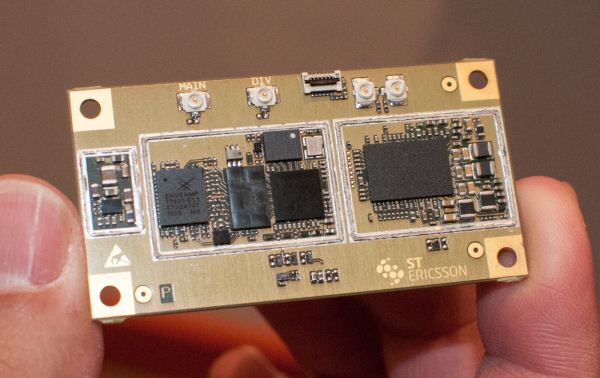
Earlier this morning we stopped by ST-Ericsson to talk about their SoCs and modem platforms, and took a look at their new Thor M7450 baseband which includes both support for 10 MHz + 10 MHz carrier aggregation to realize full category 3 and 4 speeds, and of course category 4 support. M7450 is built on a 28nm LP bulk process, though I'm told that there will be future parts also supporting FD-SOI similar to the new L8580. This is the same IP block integrated into ST-E's L8580 SoC, and includes support for both TDD and FDD LTE alongside WCDMA/HSPA+, TD-SCDMA, and GSM, all the 3GPP suite. ST-E believes its modem architecture in M7450 is very different from traditional designs, as it leans more towards being an SDR than most.
We had a chance to see M7450 demonstrating both UE Category 4 speeds and carrier aggregation on a number of different band combinations, interestingly enough 4 + 17 (AT&T), 4 + 13 (VZW), and 2 + 17 (AT&T) in addition to a few others. M7450 of course supports 5+10 and 5+5 aggregation as well.

Anand and I also got a chance to check out M7450 doing a VoLTE voice over IMS call running AMR-WB on the platform, which touts power consumption on a VoLTE call at levels equal to or less than a WCDMA call. There was a visualization showing the platform performance on the current VoLTE call versus WCDMA (for the same platform) which was at the same level or below basically the entire time. M7450 is currently sampling and expected to be in devices by the end of the year.
Gallery: A Look at ST-Ericsson's THOR M7450 Category 4 LTE Modem with Carrier Aggregation


Read More ...
Live from Nokia's MWC 2013 Press Conference
We just took our seats at the Nokia MWC 2013 press conference here in the new MWC venue in Barcelona. We're not sure what to expect from Noka today but we'll be covering the event live as best we can while WiFi holds up.

Read More ...
Rosewill Line-M Case Review: Wherefore Art Thou Micro-ATX?
Vendors are always very quick to send us their biggest, best, and brightest. Rosewill's own top-selling Blackhawk Ultra has been with us for a little while, but while we rework our testbed for high end cases, we thought it might be worth looking at one of the workhorses in Rosewill's stable. Looking at enthusiast kit is fun, but it's interesting to see what's floating around in the budget sector, too, as many of us are often on the hook to build and maintain desktops for family and friends. With that in mind, we requested the micro-ATX Rosewill Line-M.
.jpg)
While the Line M is worth checking out in its own right as a compact, $55 case with USB 3.0 connectivity, it also highlights a disparity in the current industry: Micro-ATX motherboards are still incredibly common, but case designs are stratifying within two extremes. Full ATX and larger cases are going stronger than ever, but the smaller case designs have largely been usurped by Mini-ITX. There's still a place in the world for a good Micro-ATX client, though, and we think the Line-M might just help deliver it.

Read More ...
Hands on with the ASUS Fonepad, and ASUS PadFone Infinity
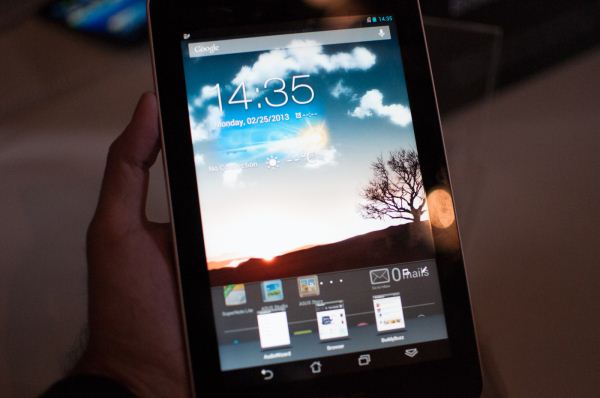
In its annual tradition at MWC, ASUS held a press conference off-site to introduce some of its mobile devices. The introductions are always interesting and typically unique in the marketplace. This year was no different.
To kick things off, ASUS introduced the Fonepad: a 7-inch Android 4.1.2 tablet that also serves as a phone. Samsung launched the Galaxy Note 8.0 earlier this week with a similar capability. While I don't expect many folks to want to hold a 7-inch tablet up to their face, having the ability to combine both tablet and smartphone functionality into one can be tempting. I can see the Fonepad being compelling if you don't make calls all that often but would rather carry a small tablet than a large smartphone, or if you are fine using a Bluetooth headset.

The device is pretty much a Nexus 7 but with a nice metal back. The dimensions are near identical to the Nexus 7 at 196.4mm x 120.1mm x 10.4mm with a weight of 340 grams. The display resolution remains 1280 x 800 and the IPS panel is LED backlit.
In a curious change of pace, ASUS integrated Intel's Atom Z2420 SoC (single-core + HT, 1.2GHz 32nm, PowerVR SGX 540). I'm curious to see how the single core, low-clocked Atom SoC does compared to Tegra 3 in a tablet. Driving all phone functionality is Intel's XMM 6265 baseband, with support for 850/900/1900/2100MHz WCDMA and 850/900/1800/1900MHz EDGE/GSM bands. There's support for 802.11b/g/n and BT 3.0.

The Fonepad features 1GB of LPDDR2 memory and 16GB of NAND on-board, with a microSD slot for additional storage expansion (a notable absence from the Nexus 7). There's an integrated 16Wh battery (like in the N7) and the device will be available in titanium gray and champagne gold (like the Transformer Prime).
The big selling point of the Fonepad is its price: $249. That's a pretty impressive deal for a full featured smartphone and 7-inch tablet in one. It's a bit of a quirky product, but I can definitely see the Fonepad filling a niche.

Next up is the ASUS PadFone Infinity. For those of you who aren't familiar with the PadFone concept, it's pretty simple. Take a phone that can dock into and power a tablet display and you have PadFone. The tablet part is strictly a display + battery, all compute and connectivity is driven by the phone element.

The PadFone Infinity takes a 5-inch 1080p Snapdragon 600 based smartphone running Android 4.2 and pairs it with a 10.1-inch 1920 x 1200 tablet dock (the PadFone Infinity Station). The phone weighs 141g and features an integrated 2400mAh battery, while the tablet dock weighs 530g and comes with a 5000mAh battery.
The phone integrates 2GB of LPDDR2-1066, and will come in both 32GB and 64GB versions. ASUS claims support for 802.11b/g/n and 802.11ac with WiFi Direct, BT 4.0 and NFC. Thanks to Qualcomm's baseband, there's full DC-HSPA+ and UE category 3 LTE support.

The PadFone features a 13MP rear facing camera with f/2.0 aperture lens and a 2MP front facing camera. When in tablet mode, the rear camera remains unimpeded while the front camera is replaced with a 1MP module.
Video out is supported via a Mobility DisplayPort interface (MyDP) that runs over the standard micro-USB port on the PadFone.
Gallery: Hands on with the ASUS Fonepad, and ASUS PadFone Infinity


Read More ...
Hands On With Nokia's New Phones - Lumia 520, Lumia 720, Nokia 105 and Nokia 301
Right after the Nokia press conference I spent time playing around with all of the newly announced Nokia phones, and there are four. Nokia's announcement primarily focused on the entry level devices which target mass market, instead of another flagship model.
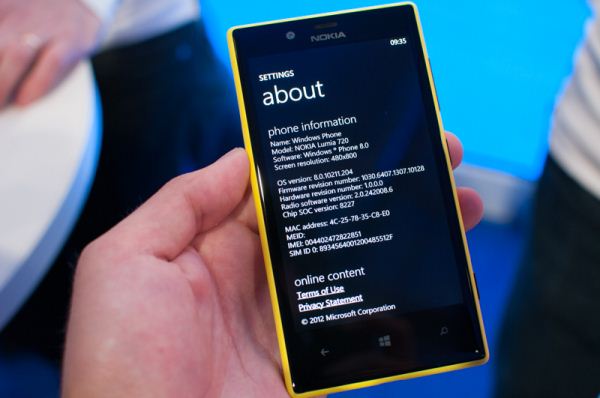
Starting with the Lumias, I got a chance to dig around in about and confirm that both the 520 and 720 are MSM8227 based, which is dual core Krait and Adreno 203 with the Kraits running at 1.0 GHz. Build quality on both the 520 and 720 was impressive, and they're unmistakably Nokia Lumia phones. I'm pretty impressed with the 720 which seems like a well put together device and also contains an interesting camera.
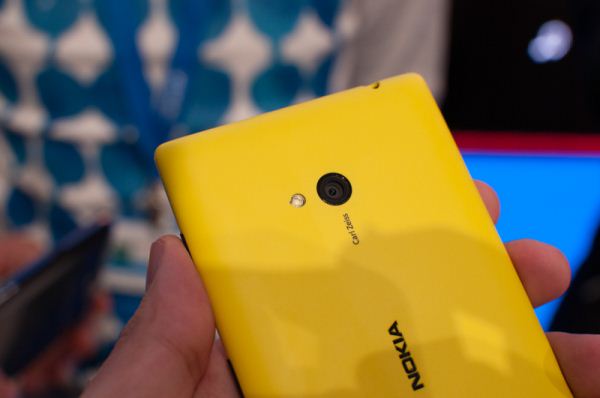
Nokia's rear facing module on the 720 is the first sub F/2.0 optics in a smartphone I'm aware of, at F/1.9, and includes a 6.7 MP CMOS. I took some sample photos with the device but couldn't get them off, what I saw did look impressive however.
I got a chance to play with the Nokia 105, their 15 euro device which is aimed at the entry level. The phone is somewhat thick but obviously very well constructed. Next the Nokia 301 has their interesting voice-assisted self shot mode, which gives you prompts to center your face in the field of view.
Gallery: Hands On With Nokia's New Phones - Lumia 520, Lumia 720, Nokia 105 and Nokia 301


Read More ...
AMD Announces FirePro R5000; PCoIP For Remote Desktops
Though most readers aren’t acutely aware of it, AMD’s FirePro lineup of graphics cards encompasses a number of more specialized fields. On top of their “mainline” cards like the FirePro W series for workstation graphics and compute, AMD also has several other series, including the server graphics/compute/VDI focused S series and the display wall focused W series. Today another FirePro series will be getting a product refresh, the remote desktop (PCoIP) R series, with the launch of the FirePro R5000.
Long-time readers will recall that AMD already has a foot in the remote desktop market with the S series, but the S series is primarily geared towards virtualized desktops (VDI). The R series in that respect is a rather specialized piece of hardware from AMD that’s not like anything else in their current (Southern Islands based) product lineup. Unlike the S series, the R series is specifically designed for 1:1 (unvirtualized and unshared) remote desktops through PCoIP technology, and it has additional 3rd party hardware to accomplish this.
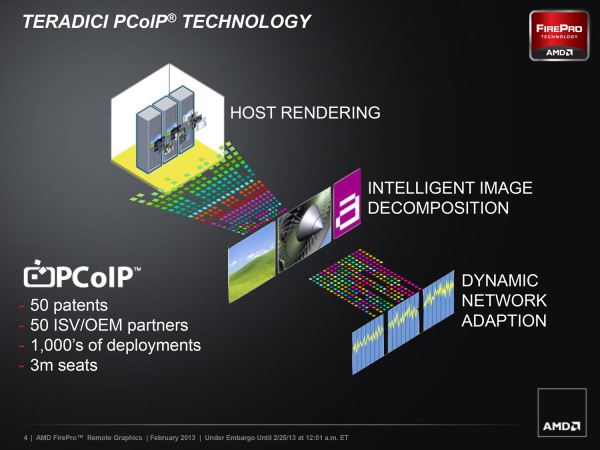
The hardware in question is a processor from Teradici, principle owners of the PCoIP technology. The PCoIP environment is a so-called “zero client” environment, that rather than being based on lightweight workstations running OSes like Windows embedded, uses a modern approximation to the “dumb terminal” of the olden days. PCoIP zero clients in this regard do almost nothing on their own, instead providing a remote desktop experience provided over a UDP/IP network and hosted entirely on a remote server.
Accomplishing this is Teradici’s processors. These provide the necessary hardware to handle encoding the remote desktop video stream along with abstracting PCoIP from the video card, while similar processors on the client side handle the decoding in the case of fully realized zero-desktop devices.
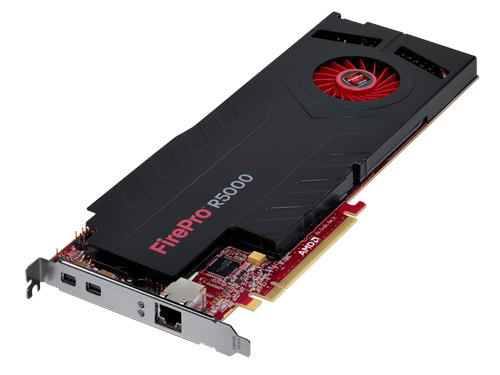
AMD fits this by being a provider of the necessary server hardware, as one of the principle methods of driving PCoIP on the server-side is to use graphics cards equipped with host processors and Ethernet ports. The R5000 in turn is one such implementation, pairing up an AMD Pitcairn GPU with a TERA2240 host processor.
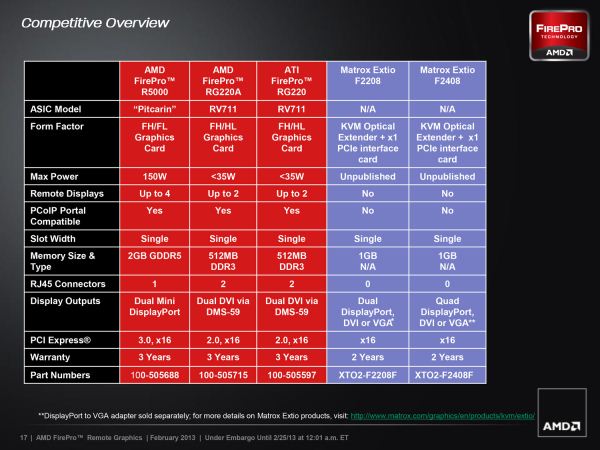
The FirePro R5000 will be replacing AMD’s previous PCoIP product, the FirePro RG220 family, a pair of video cards introduces a few years back based on AMD’s RV711 processors. In this respect the R5000 is not only significantly more powerful than the multiple-generation old RG220 series, but it’s also aimed far higher up the performance ladder; in this case RV711 was a low-end GPU in AMD’s RV700 series family, while Pitcairn is the middle child in the Southern Islands family.
Unfortunately AMD doesn’t provide any hard specifications on the R5000’s graphics performance, but given the similar configuration found on the W5000, it’s not unreasonable to guess that performance should be around W5000’s (1.28TFLOPS). Interestingly, if this assumption is correct, then it’s would mean that R5000’s 150W TDP is almost evenly split between the Pitcairn GPU and the TERA host processor. Update: Teradici has told us the TERA2240 is spec'd for 13W, so it's not clear what accounts for the rest of the power difference between the R5000 and W5000.

Read More ...
LG Optimus G Pro Hands On & Performance Preview, Snapdragon 600 Tested at MWC 2013

We began our day at Mobile World Congress with a visit to LG's booth, where it offered hands on with its 1H 2013 lineup of smartphones. Among them is the new 5.5" Optimus G Pro, the larger brother of last year's Optimus G - the basis for the Nexus 4.
The Pro adds a 5.5" 1080p display, driven by Qualcomm's Snapdragon 600 SoC (quad-core Krait 300 running at 1.7GHz paired with an Adreno 320 GPU. Internally there's 2GB of LPDDR2 memory, and storage expansion is provided via a microSD card slot beneath the battery cover. The 3400mAh battery is removable.
The Optimus G Pro is mostly made out of plastic but the device felt good in hand. It's pretty impressive what can be done with plastic these days although it seems like metal and/or glass are necessary for the ultra high end device feel. When it comes to ensuring that a device feels rugged, there's no real replacement for plastic however.
The Pro features an IR emitter as well as an extendable DMB antenna, the latter should obviously disappear if and when this thing hits the US market.
The display itself looked wonderful at the show. The 1080p panel is very sharp, bright and contrasty. Subjectively, colors looked good at the show but we'll have to run it through our suite to get a feel for just how accurate the colors are.
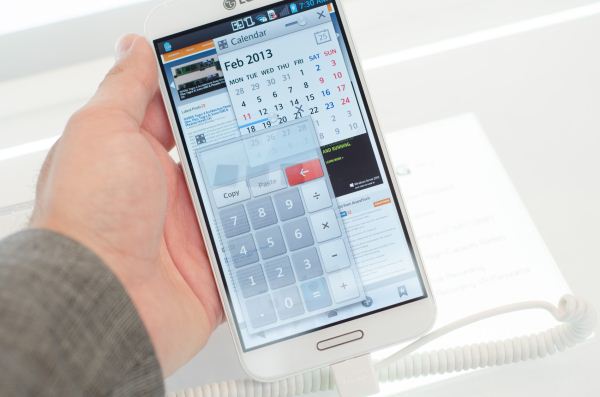
The demo units at the show were running Android 4.1.2. They also featured LG's own software customizations, including the ability to view multiple apps on the screen at the same time (QSlide) and set their transparency so you can do things like have a video or calendar visible while reading a web page. The QSlide feature is clearly geared towards multitasking, similar to what Samsung has done on its Galaxy Note line. You launch QSlide enabled apps via the LG customized notifications shade, and then control their transparency using a slider at the top of each QSlide app. While semi-transparent, the app will ignore touch input allowing you to continue to interact with the app behind it. In opaque mode however you can interact with the foreground QSlide app. Although it is possible to open multiple QSlide apps at the same time, you quickly run out of screen real estate.
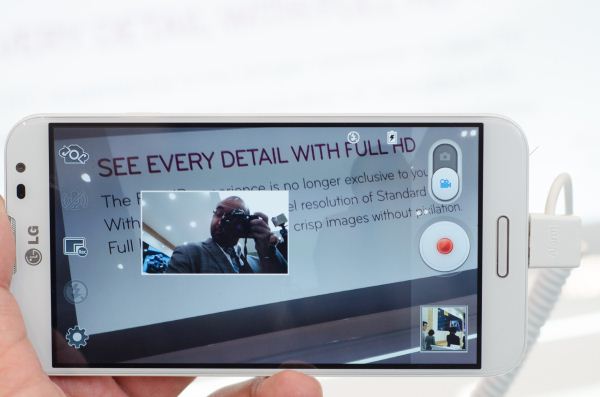
Another neat feature of LG's latest Android build is Dual Recording, which is a camera customization that allows you to simultaneously record from both the front and rear facing cameras. The 13MP primary camera is limited to 720p recording in this mode.
Gallery: LG Optimus G Pro Hands On & Performance Preview


The Optimus G Pro felt extremely quick and responsive during our hands on time at the show. Scrolling and UI performance was all very smooth. Given that we haven't had much experience with Snapdragon 600 and its Krait 300 CPU cores I ran a few tests here at the show to get a feel for what is in store from Qualcomm's performance mainstream quad-core SoC for 2013:
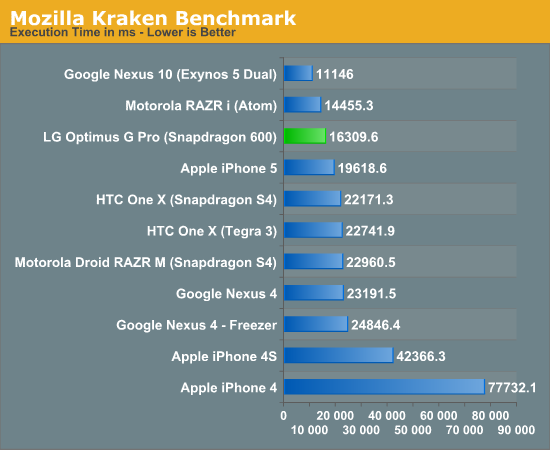
Using Chrome, Kraken showed some great performance on the Optimus G Pro. While not quite as fast as Intel's Atom Z2460, it's a big step forward compared to the APQ8064 (Krait 200) based Nexus 4. If this data is representative of the sort of improvement we can expect from Snapdragon 600, I'll be happy.
On the graphics side, Adreno 320 is still powering things on the G Pro, although we don't know what clocks the platform at the show was using:
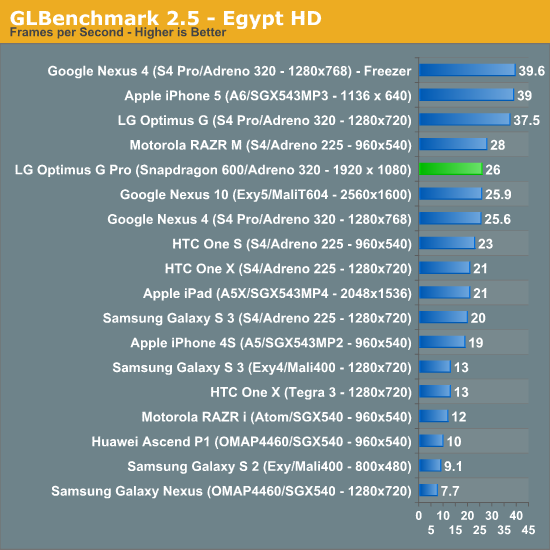
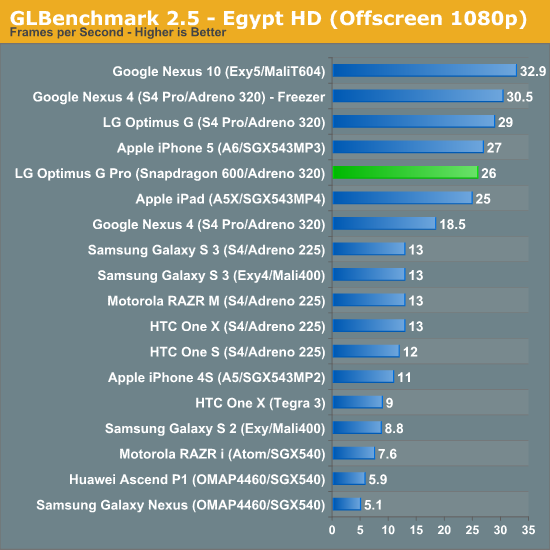
Since the Optimus G Pro uses a full HD/1080p display, the on and off-screen results are very similar. Frame rates are low enough in Egypt HD that the lack of vsync in the offscreen tests doesn't have a real impact on performance. Although respectable, I suspect that the 26 fps here is a bit lower than we'd see on production hardware since the 320 should be clocked higher in Snapdragon 600 than in the S4 Pro from last year.

Read More ...
Samsung Announces SAFE with KNOX - Security Container for Enterprise BYOD
_575px.jpg)
I talked with Anand about his impressions of the Note 8 after reading his hands on piece, and one thing that struck me was a mention of how Samsung was going to aggressively go after the enterprise market in the USA for a few reasons. First, a lot of its marketing has focused on SAFE (SAmsung For Enterprise) which is a combination of improved EAS (Exchange ActiveSync) policies, and improved MDM (Mobile Device Management) integration with more toggles and sliders for IT Admins in enterprise roles. Second, because once you win the enterprise market you're guaranteed some market loyalty and a long tail of sales thanks to the slower pace of enterprise acquisition and certification. I didn't really appreciate the full meaning of just how much Samsung was going after the enterprise business until I learned about their plans for another product geared at enterprise policy enforcement, called KNOX, and Samsung truly wants to be the one who KNOX.
KNOX builds on SAFE by basically adding two parts - a fully secure boot chain, and a new container based sandbox for Android. The idea is for Samsung to both become desirable for enterprise businesses, and enable even greater BYOD (Bring Your Own Device) functionality by shipping a single SKU that can easily be attached to an enterprise login and managed. At the same time, the container model means that consumers bringing their devices to a particular business and then leaving won't lose anything other than the container data if they leave and have their devices wiped remotely. The result is a win-win in theory for IT Admins who want more control over the devices being brought into the fray, and employees who don't want to lose personal data in the case of a device wipe, or have privacy concerns from the control IT Admins have over the platform.
First is that secure platform story, which begins with secure boot chain which only boots signed code, then SE Android (Security Enhanced Linux for Android), and TrustZone Integrity Monitoring (TIMA). Samsung will have more information about the hardware and software level for KNOX available in a whitepaper later this week. There are some obvious interesting implications to say the least for what this will mean for enthusiast users who want to run their own arbitrary third party ROMs on devices, especially since the secure boot chain will ship enabled in markets targeted for KNOX and on "iconic devices" at the high end to make them BYOD-capable.
The second part is the secure, enterprise-controlled container, which exposes itself as an application icon or shortcut in Android, and takes you into another instance of Android which is completely sandboxed or containered from the user's side. Admins then get complete control over the container, including what apps exist inside, all while maintaining the same Android UI and platform. Email, browser, contacts, calendars, and so on exist inside the container sanitized from the personal outside Android.
KNOX will include certification for FIPS 140-2 (DAR, DIT), Government Root of Trust, US DOD CAC/PIV, and US DOD Mobile OS SRG on applicable devices. In addition KNOX includes more IT policies for MDM APIs, and ActiveDirectory based management for enterprises who don't have an MDM solution or don't want to use Exchange.
The rest of the story is really one of timing and focus. Samsung says it is targeting KNOX heavily at the US market, and obviously compliance with so many federal and government security standards makes that much obvious. Timing wise, KNOX will ship on "iconic devices" in Q2 2013.

Read More ...
Available Tags:AMD , Seagate , NVIDIA , Router , Gigabyte , Philips , Gaming , ASUS , ASUS , Nokia , Nokia , FirePro , LG , Samsung , Security ,


No comments:
Post a Comment