 A Look at SkyCross and their Actively Tuned VersiTune Smartphone Antenna
On the last day of CES, while still getting over some of the
death curry that we foolishly ingested the night before, I had a meeting with SkyCross, who
recently announced a new actively tuned multiband antenna module for smartphones. With LTE, the demand for more and more bands on a smartphone has and will continue to increase, which has at present driven OEMs to simply include more antennas, each tailored for a specific frequency. Remember that the geometry of an antenna defines its radiative properties and resonant frequency, which in turn affects gain at different frequencies. At present I’ve seen smartphones with as many as four or five antennas, which poses considerable challenge for engineering a device, as number of antennas and their placement is often in direct competition with industrial design and other considerations.
Actively tuned antennas aren’t anything new for antennas in other RF applications, but they are a relatively new thing in the smartphone and tablet space. In the past that was primarily because it was easy enough to tune a design to the handful of bands the handset was designed for. The challenge of getting an antenna with the right impedance increases when we’re talking about a wider frequency range, hence the move to either more passive antennas for more bands or an actively tuned array. To date the only smartphone I’m aware of that has an active tuning block other than what you get on the power amplifiers to match a standard 50 Ohm smartphone antenna is the iPhone 5, which has an RFMD RF1102 tuner. Of course that design only has two cellular antennas to accommodate a bunch of bands, and the active tuning there also further mitigates deathgrip, which is itself just detuning.
By antenna tuning I’m referring to the ability of some part of the RF front end to actively switch in the right amount of complex impedance and match the antenna to the transmission line in the device. In the case of most applications this means switching in some capacitors using a switch or a bunch of relays and getting as close to a VSWR (Voltage Standing Wave Ratio) of 1.0 as possible. Without going on a big long discussion about SWR and VSWR, the naive explanation is that VSWR is one of the figures of merit that defines how well an antenna can radiate, and thus having good VSWR means the antenna radiates more of the power delivered to it, rather than reflecting it back into the transmission line.
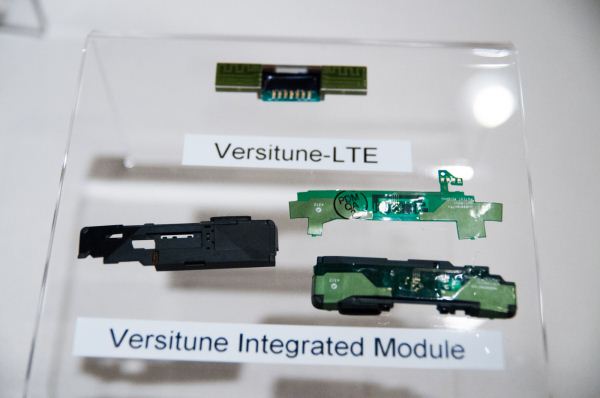
The trend in smartphone antenna design is something I’ve noted in a handful of reviews — often there’s a plastic module at the bottom of the phone with the speaker, microphone, and antenna. This is modular so the OEM can then include the right primary antenna for the right region and set of bands the phone is destined to. Look at almost any major design and you’ll see something along those lines for the primary receive and transmit antenna at the bottom.
What SkyCross is offering is the ability for OEMs to bring this plastic module to them, along with the set of bands they require, and have a single custom design tailored to their application and all the bands. They also claim to have very good (low) correlation coefficients between the two antennas on their modules, even though there isn’t much separation distance between them. Getting low correlation between the two antennas is critical for getting good gains out of MIMO (like the 2x2 MIMO in LTE) and receive diversity. The end result is a smaller solution with fewer constraints on industrial design, and possibly even better correlation coefficients for even better MIMO.
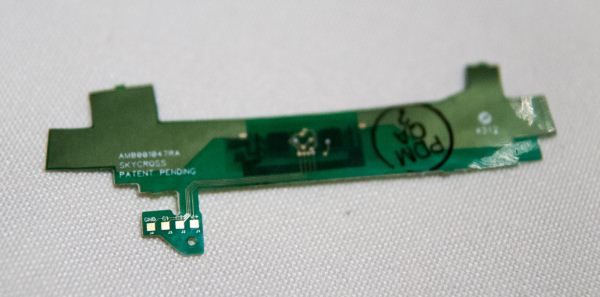
SkyCross showed off an example design and module, which had two switches visible on it along with one other package. At the bottom you can see four feed points — one for ground, two for the two antennas, and finally a voltage rail for the active components. These can then accommodate the multiple frequency bands though tuning to the appropriate configuration. I’m told that modules such as these will start popping up in smartphones in 2013.
Source:
SkyCross


 Read More ...
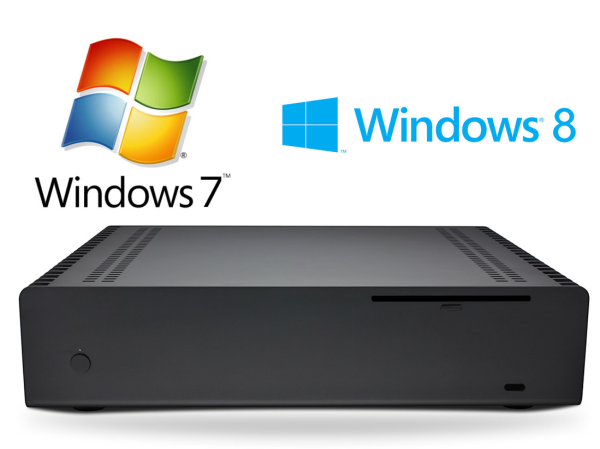
Getting the Best out of an Ivy Bridge HTPC: Windows 8, madVR and More..
The build process and thermal performance of a fanless Ivy Bridge HTPC was
covered in detail last month. I had indicated that the piece would be the first of a three-part HTPC series. Today, we are looking at the second part of the series. My original intention was to present the HTPC oriented benchmarks and aspects of the PC as it was built in the first part.
After a few experiments, we had to do some updates to the build in terms of both hardware and software (OS). Is Windows 8 a worthy upgrade for HTPC users? The second part of our HTPC series addresses that question and also provides some guidance to ensure that your Ivy Bridge HTPC performs to its full potential.


 Read More ...
NZXT Phantom 630 Case Review: The Relentless Pursuit of Perfection
It wasn't that long ago that we reviewed NZXT's shiny new
Phantom 820, a case that apart from its high price tag and slightly ostentatious design was pretty tough to beat. The Phantom 820 was providing some best-in-class thermal and acoustic performance, and it was a shot fired squarely across the bows of companies like Thermaltake and CoolerMaster, whose respective Level 10 GT and Cosmos II suddenly had a new, less expensive case to worry about competing with. Yet when I visited NZXT at CES 2013, they
already had a descendant of the 820 on hand.
The Phantom 630 is just a little smaller, a little more conservative, and a lot cheaper. At $179 MSRP it's still on the expensive side and is clearly an enthusiast case, but unlike the 820, the 630 is using an entirely new chassis built from the ground up. The 820 scored a Bronze Editor's Choice award, but as it turns out, it may not have been a flash in the pan. Once you take a look at the 630, you'll start to understand why I'm beginning to think NZXT is entering a new era and the competition needs to be on their toes.


 Read More ...
First Impressions: the TECK Ergonomic Mechanical Keyboard
This is my very first encounter with the “world’s first
Truly Ergonomic Computer Keyboard”, aka the TECK. I received the keyboard today after inquiring about a review sample—the reason for me being the reviewer this time around is that Dustin has no interest in an ergonomic/split key keyboard. The company that makes the TECK goes by the name Truly Ergonomic, and right now this is the only product they make.
Several years in the works, the main claim to fame is that the keyboard is designed from the ground up for ergonomics. To that end, they’ve ditched the traditional layout and staggered keys in order to provide an optimized layout that offers better comfort while typing, but the changes are something that will take a
lot of practice typing before you can type anywhere near your regular speed. And Truly Ergonomic makes no claims to the contrary—they recommend spending days if not weeks with the keyboard before you decide whether or not you really like it, going so far as to offer a 60-day money-back guarantee. Oh, and let’s not forget that the TECK also comes with mechanical switches, specifically Cherry MX Brown switches that are generally silent compared to many of the other mechanical switches out there.
Initial impressions are shocking—if you’ve ever tried the Dvorak key layout, I don’t think this could be any more alienating. Just about every "special purpose" key that I have become accustomed to locating by instinct is now in a new location—delete, tab, backspace, and enter are in the center column, with the spacebar split around the enter key. On the left, the Shift key is moved up one row, with CTRL where Shift normally resides and the ALT key at the bottom-left where CTRL usually sits. The right side gets the same treatment, and the enter key as noted has been relocated to the middle of the spacebar. Even the main body of the keyboard with the normal seeming QWERTY layout can feel equally alien to a “formerly” touch typist at first (I find that staring at the keys a bit while typing helps a bit right now). Elsewhere, where I normally find backspace is now an equal sign, the backslash and forward-slash are at the left where tab should be, there’s an extra key in the top-left that shifts all the numbers right one key, and we haven’t even gotten to the document navigation keys. The cursor keys reside under your right hand, down from the JKL area; Home/End/PgUp/PgDn are similarly located under your left hand.
The above paragraphs are the first paragraphs I’ve tried to type on the keyboard (plus some editing after the fact) and it has taken me fully twenty minutes with nearly constant mistakes to get them out! I’m already getting a bit more competent, but when the documentation suggests taking a while to adapt, they’re not kidding around. Truth be told, the whole experience can be a bit maddening at first—if you’ve ever been frustrated to the point where you feel a bit queasy in the gut and want to quit what you’re doing and go find something else more pleasant (like maybe beating your head against a wall)…well, I’m feeling a lot of that right now! I’m mostly writing this to give me a small amount of practice before trying some speed typing tests. I don’t think that the test is going to go well the first time around, but let’s find out.
I will be taking the tests twice on the TECK: once earlier in the writing process and a second time much later. Scores are expressed as “Gross WPM/Errors=Net WPM”. I found these tests on
TypingTest.com, and I’m using three different text selections: Aesop’s Fables, Rules of Baseball, and Tigers in the Wild. And yes, these tests are hardly scientific, as typing the same text repeatedly on different keyboards can potentially skew the results. To help mitigate that, I’m serpentining through the keyboards and taking each test twice (so six tests on one keyboard). I’m starting at the top of the list with my old Microsoft Natural Elite, moving to the
Rosewill RK-9100, and then finishing with the TECK before heading back up. I’m going to take each test four times and report the best result. (And for the final TECK result, I’ll revisit the test later.)
| Round One Typing Test Results |
| Keyboard | Test 1 | Test 2 | Test 3 |
| MS Natural Elite | 69/1=68 | 67/0=67 | 64/0=64 |
| Rosewill | 71/0=71 | 74/0=74 | 67/1=66 |
| TECK (30 minutes) | 24/2=22 | 27/7=20 | 31/8=23 |
| TECK (90 minutes) | 44/2=42 | 56/4=52 | 45/5=40 |
Ouch. I am still very clearly on the early part of a rather steep learning curve, but we’re talking about overcoming roughly 25 years of muscle memory as I adapt to the layout of the TECK—yes, in case you weren’t aware, I currently hold down the fort as the old fuddy-duddy for AnandTech, having just celebrated my 20-year high school reunion last summer. Another major difficulty for me is that I shift routinely between my desktop and various laptops, and if you’ve read my laptop reviews you probably already know that I’m quite particular about keyboard layouts. Here however the TECK isn’t a slightly tweaked layout just for kicks and giggles; it’s a completely whacked out (at first) arrangement that’s designed to be more ergonomic. And honestly, even in the short time I’ve been typing this, I’m starting to think they might be on to something, but change is never easy.
You can see the results from the table above, and when I get into a sort of zone while typing with the TECK, my speed seems to be better than before and I feel less strain/discomfort. The problem is that I’m not in the zone most of the time (yet), so I’ll go really fast for a few words or maybe even a whole sentence before the wheels fall off and I start hitting “=” instead of backspace. The layout definitely feels more compact and requires less movement, and I like everything in theory, but in practice I’m still making a lot of errors. But with only 90 minutes of typing on the TECK that’s hardly surprising; I’m at least getting closer to where I was on my previous keyboards. Where will I be in a week’s time? We’ll have to wait to find out, which is why this is only a “First Imoressions” rather than the full review.
I’ll post a complete review of the keyboard once I’ve had enough time with the device to really say how much I like (or perhaps dislike) what they’ve done, but as someone that has enjoyed using an MS Natural Elite PS/2 keyboard for most of my time writing for AnandTech, there’s a lot on tap here. I’ve long heard the benefits for touch typists of mechanical keys, but until now I haven’t seen anyone doing a curved/natural/ergonomic keyboard with mechanical keys (not that I've really looked around much--see the comments for a couple other options). The TECK is the first I’ve seen that’s readily available in the US, and while the current $222 price will almost certainly make you think twice it's actually lower than some of the alternatives, and I can tell you from personal experience that the costs of dealing with RSI, CTS, and other similar health problems are
far higher than that. You’ll hear more about the TECK in a couple weeks, but for now I’m very intrigued. I’m just not sure how I’m going to go between desktops and laptops without feeling baffled for a little while if I end up sticking with the TECK!
Here’s one final parting shot to consider, taken after the rest of this article was written. I’ve now spent over two hours playing around with the TECK, and my speed and accuracy continue to improve. The worst part for me continues to be finding keys like quotes as well as accidentally reaching too far into the center keys (delete, tab, backspace) and messing things up. I’m getting better, and I can see the potential for the layout, but it will take some time….
| Final Typing Test Results |
| Keyboard | Test 1 | Test 2 | Test 3 |
| TECK (120 minutes) | 55/5=50 | 62/8=54 | 51/2=49 |
While I try to come to grips with the TECK, I’d love to hear any suggestions on ways to better adapt to a completely different keyboard. I’m also happy to entertain requests for any specific tests you’d like me to try, or if you have questions about the unit itself I can answer those as well. Incidentally, the keyboard is very solidly built, with far more weight to it than the diminutive size would suggest. I actually like the weightiness, though it would be less ideal for transporting it in a backpack. The palm rest is also removable and attached securely via multiple screws, which is a great way of doing things. Aesthetically, there’s a lot I like about the TECK, which is part of the reason I was so interested in getting a review sample. The only question is how well I can type after spending some quality time with the TECK.
To be continued….


 Read More ...
Available Tags:
Smartphone ,
Ivy Bridge ,
Windows 8 ,
Windows ,
Keyboard ,



.jpg)
_575px.jpg)
_thumb.jpg)
_thumb.jpg)
_thumb.jpg)
_thumb.jpg)
_thumb.jpg)


No comments:
Post a Comment