

NVIDIA GeForce GTX 680 Launch Recap
If the numbers are true, then most of you have already read our Kepler review, and you know that the card has made quite a splash - it's the highest-performing single-GPU card you can buy today, and it's got solid power consumption and a lower price than the AMD Radeon HD 7970 to boot. Kepler still needs to trickle down through the rest of NVIDIA's lineup, but for now NVIDIA has the high-end sewn up. Let's look at what its partners have put together.
ASUS | EVGA | Galaxy | Gigabyte | |
Part Number | GTX680-2GD5 | 02G-P4-2680-KR | 68NPH6DV5ZGX | GV-N680D5-2GD-B |
Core Clock | 1006 MHz | 1006 MHz | 1006 MHz | 1006 MHz |
Memory Clock (Effective) | 1502 MHz (6008 MHz) | 1502 MHz (6008 MHz) | 1502 MHz (6008 MHz) | 1502 MHz (6008 MHz) |
Boost Clock | 1058 MHz | 1058 MHz | 1058 MHz | 1058 MHz |
Dimensions in inches (dimensions in mm) | 10.08 x 4.37 x 1.47 (256.03 x 111.00 x 33.34) | 10 x 4.38 x ?? (254 x 111.25 x ??) | 10 x 4.33 x 1.57 (254 x 109.98 x 39.88) | 10.83 x 4.96 x 1.50 (275 x 126 x 38) |
Outputs | DisplayPort, HDMI, DVI-I, DVI-D | DisplayPort, HDMI, DVI-I, DVI-D | DisplayPort, HDMI, DVI-I, DVI-D | DisplayPort, HDMI, DVI-I, DVI-D |
Included accessories | 4-pin to 6-pin | DVI to VGA, 2x 4-pin to 6-pin | 2x DVI to VGA, 2x 4-pin to 6-pin | 2x 4-pin to 6-pin |
Warranty | 3-year | 3-year | 3-year | 3-year |
Price (Newegg) | $499.99 | $499.99 | $499.99 | $499.99 |
MSI | PNY | Zotac | |
Part Number | N680GTX-PM2D2GD5 | VCGGTX680XPB | ZT-60101-10P |
Core Clock | 1006 MHz | 1006 MHz | 1006 MHz |
Memory Clock (Effective) | 1502 MHz (6008 MHz) | 1502 MHz (6008 MHz) | 1502 MHz (6008 MHz) |
Boost Clock | 1058 MHz | 1058 MHz | 1058 MHz |
Dimensions in inches (dimensions in mm) | 10.63 x 4.38 x 1.53 (270 x 111.15 x 38.75) | ??? | 11.10 x 4.9 x 2.3 (281.9 x 124.46 x 58.42) |
Outputs | DisplayPort, HDMI, DVI-I, DVI-D | DisplayPort, HDMI, DVI-I, DVI-D | DisplayPort, HDMI, DVI-I, DVI-D |
Included accessories | DVI to VGA, 4-pin to 6-pin | DVI to VGA, 4-pin to 6-pin, HDMI cable | DVI to VGA, 2x 4-pin to 6-pin |
Warranty | 3-year parts/2-year labor | 1-year (Lifetime with registration) | 2-year |
Price (Newegg) | $499.99 | $529.99 | $499.99 |
Common to all of these cards is 2GB of GDDR5 on a 256-bit bus and all of Kepler's features - in fact, most of these cards have pretty much everything in common with one another, from the across-the-board stock clocks to the display outputs to the single-fan, dual-slot coolers to the lackluster bundles of accessories. This isn't uncommon with high-end launches of all-new architectures - we saw the same thing happen in our Radeon HD 7970 launch recap, another crop of cards that stuck to the reference design.
As such, there's not a ton to say about them, so I'll just make notes below when there's something about the card that makes it different from the stock card that we reviewed a couple of days ago.
ASUS (Product page)

EVGA (Product page)

Galaxy (Product page)

Gigabyte (Product page)

MSI (Product page)

MSI's graphics cards usually have a 3-year parts and 2-year labor warranty, and this card is no exception.
PNY (Product page)

Zotac (Product page)

Zotac's is the only card in this lineup with a 2-year warranty instead of the 3-year warranty shared by most of the rest of them.
Read More ...
AMD Radeon HD 7870 Launch Recap
It has been a couple of weeks since we reviewed the Radeon HD 7800 series, but as we mentioned earlier this week and in our 7850 recap, that was just a paper launch - the cards hit the street only recently, and as usual we're going to go through all of the stuff from AMD's partners and give you the Facts.
ASUS | Gigabyte | MSI | PowerColor | |
Part Number | HD7870-DC2-2GD5 | GV-R787OC-2GD | R7870 Twin Frozr 2GD5/OC | AX7870 2GBD5-2DH |
Core Clock | 1010 MHz | 1100 MHz | 1050 MHz | 1000 MHz |
Memory Clock (Effective) | 1210 MHz (4840 MHz) | 1200 MHz (4800 MHz) | 1200 MHz (4800 MHz) | 1200 MHz (4800 MHz) |
Dimensions in inches (dimensions in mm) | 10.16 x 5.12 x 1.7 (258.06 x 130.05 x 43.18) | 11.02 x 5.28 x 1.67 (280 x 134 x 42.5) | 10.63 x 4.65 x 1.65 (270 x 118 x 42) | 9.5 x 4.38 x 1.50 (241.3 x 111.2 x 38) |
Outputs | 2x Mini DisplayPort, HDMI, DVI-I | 2x Mini DisplayPort, HDMI, DVI-I | 2x Mini DisplayPort, HDMI, DVI-I | 2x Mini DisplayPort, HDMI, DVI-I |
Included accessories | DVI to VGA adapter, 6-pin extension cable, Crossfire bridge | 2x 4-pin to 6-pin, Crossfire bridge | Mini DP to DP, 2x 4-pin to 6-pin, Crossfire bridge | DVI to VGA, Mini DP to DP, HDMI to DVI |
Warranty | 3-year | 3-year | 3-year parts/2-year labor | 2-year |
Price (Newegg) | $359.99 | $359.99 | $369.99 | $359.99 |
PowerColor PCS+ | Sapphire | Sapphire OC | |
Part Number | AX7870 2GBD5-2DHPP | 11199-00-20G | 11199-03-20G |
Core Clock | 1100 MHz | 1000 MHz | 1050 MHz |
Memory Clock (Effective) | 1225 MHz (4900 MHz) | 1200 MHz (4800 MHz) | 1250 MHz (5000 MHz) |
Dimensions in inches (dimensions in mm) | 9.5 x 4.38 x 1.50 (241.3 x 111.2 x 38) | 10.24 x 4.45 x 1.38 (260 x 113 x 35) | 10.24 x 4.45 x 1.38 (260 x 113 x 35) |
Outputs | 2x Mini DisplayPort, HDMI, 2x DVI-I | 2x Mini DisplayPort, HDMI, DVI-I | 2x Mini DisplayPort, HDMI, DVI-I |
Included accessories | DVI to VGA, Mini DP to DP, Crossfire bridge | DVI to VGA, Mini DP to DP, 2x 4-pin to 6-pin, Crossfire bridge | DVI to VGA, Mini DP to DP, 2x 4-pin to 6-pin, Crossfire bridge |
Warranty | 2-year | 2-year | 2-year |
Price (Newegg) | $369.99 | $349.99 | $359.99 |
Common to all of these cards is 2GB of GDDR5 on a 256-bit bus, Eyefinity support, two 6-pin power connectors, and all of GCN's features. All but one of the cards also offer identical outputs: two mini DisplayPorts, one HDMI port, and one DVI-I port. The PowerColor PCS+ card also offers a second DVI-I output.
ASUS (Product page)

Gigabyte (Product page)

MSI (Product page)

PowerColor (Product page)

PowerColor PCS+ (Product page)

Sapphire (Product page)

Sapphire OC (Product page)
Read More ...
AMD Radeon HD 7850 Launch Recap
It has been weeks since we reviewed AMD's Radeon HD 7870 and 7850 cards, but unlike the 7900 and 7700 series cards, the 7800 series was given the typical middle-child treatment and paper launched. and cards began appearing at retailers just this week.
While Kepler's launch has cast a long shadow over the top end of the graphics market (a GTX 680 recap is coming later today, dont worry), but competition is still fierce, and as we noted in our review the 7850 is a solid performer and the fastest 150 watt card on the market today. Let's look at what AMD's partners have for us.
ASUS | Gigabyte | HIS | MSI | PowerColor | Sapphire | |
Part Number | HD7850-DC2-2GD5 | GV-R785OC-2GD | H785F2G2M | R7850 Twin Frozr 2GD5/OC | AX7850 2GBD5-2DH | 11200-01-20G |
Core Clock | 870 MHz | 975 MHz | 860 MHz | 900 MHz | 860 MHz | 920 MHz |
Memory Clock (Effective) | 1210 MHz (4840 MHz) | 1200 MHz (4800 MHz) | 1200 MHz (4800 MHz) | 1200 MHz (4800 MHz) | 1200 MHz (4800 MHz) | 1250 MHz (5000 MHz) |
Dimensions in inches (dimensions in mm) | 10.2 x 4.5 x 1.7 (259.08 x 114.3 x 43.18) | 9.49 x 5.39 x 1.67 (241 x 137 x 42.5) | ??? | 7.76 x 4.37 x 1.50 (197 x 111 x 38) | 7.99 x 4.37 x 1.50 (203 x 111 x 38) | 8.27 x 4.13 x 1.38 (210 x 105 x 35) |
Included accessories | DVI to VGA, Crossfire bridge | 4-pin to 6-pin, Crossfire bridge | DVI to VGA, Crossfire bridge | DVI to VGA, Mini DP to DP, 2x 4-pin to 6-pin, Crossfire bridge | DVI to VGA, Mini DP to DP, HDMI to DVI | DVI to VGA, Mini DP to DP, 4-pin to 6-pin, Crossfire bridge |
Warranty | 3-year | 3-year | 2-year | 3-year parts/2-year labor | 2-year | 2-year |
Price (Newegg) | $259.99 | $259.99 | $259.99 | $259.99 | $259.99 | $259.99 |
Common to all of these cards is 2GB of GDDR5 on a 256-bit bus, Eyefinity support, and all of GCN's features. All cards also offer identical outputs: two mini DisplayPorts, one HDMI port, and one DVI-I port. Normally we see a range of prices from different manufacturers due to factory overclocks, longer warranties, or included accessories, but in this case we've got identical prices across the board, making it much easier to make an apples-to-apples comparison among cards. As long as you don't have any particular brand loyalty, just pick the one with the value-added extras that you need the most.
ASUS (Product page)
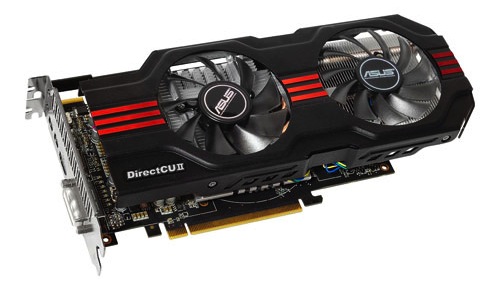
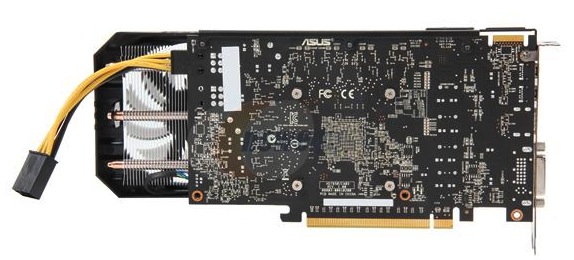
Gigabyte (Product page)

HIS (Product page)

Here's a first in AnandTech Graphics Card Launch Recap History: the dimensions for this HIS card aren't available through Newegg or HIS's product page, or anywhere else that I can find (the product page gives "box dimensions", which is useful if you're shipping the card but not if you're using it). Luckily, its humdrum single-fan cooler means that the card should be unremarkable in this regard - I'd guess it should be close to eight inches long.
Otherwise, HIS doesn't give you much in terms of value-adds - it uses stock clocks, the two-year warranty is the minimum I like to see on components that cost this much, and the DVI to VGA adapter and Crossfire bridge constitute a pretty small accessory bundle.
MSI (Product page)

Where MSI beats the competition is in its accessory bundle, which is actually worthy of the name - in addition to basics like power cable adapters (the Newegg product image appears to include two of these, though it only has the one six pin power plug on the back) and a DVI to VGA adapter, it also includes a Mini DisplayPort to DisplayPort adapter.
PowerColor (Product page)

Sapphire (Product page)

Read More ...
Jen-Hsun's Email to NVIDIA Employees on a Successful Kepler Launch
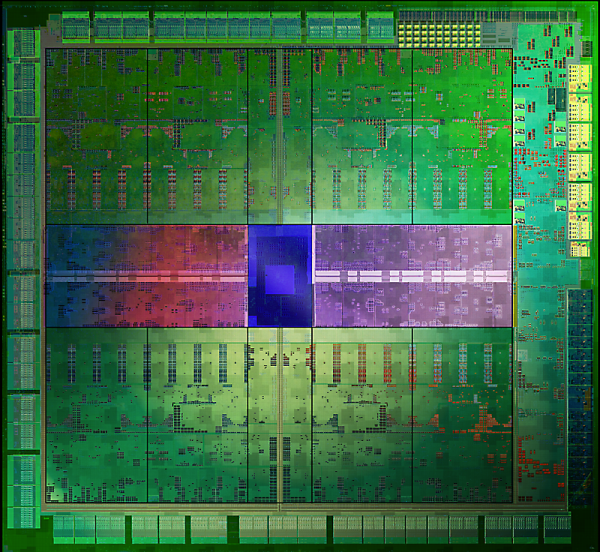
Chip planning involves figuring out what you want to do, what features you want, what the architecture should look like at a high level, etc... After several rounds of back and forth in the planning stage, actual architecture work begins. This phase can take a good 1 - 1.5 years depending on the complexity of the design. Add another year for layout and validation work, then a 6 - 9 month race from tape out to products on shelves. The teams that spend years on these designs are made up of hard working, very smart people. They all tend to believe in what they're doing and they all show up trying to do the best job possible.
Unfortunately, picking a target that's 4 years out and trying to hit it better than your competition is extremely difficult. You can put in an amazing amount of work, push through late nights, struggle with issues, be proud of what you've done and still fall short. We've seen this happen to companies on both sides of the fence, whether we're talking CPUs or GPUs, you win some and you lose some.

"But in the meantime, in the here and now, this is by far the easiest recommendation we’ve been able to make for an NVIDIA flagship video card. NVIDIA’s drive for efficiency has paid off handsomely, and as a result they have once again captured the performance crown."
We've all heard stories about what happens inside a company when a chip doesn't do well. Today we have an example of what happens after years of work really pay off. A trusted source within NVIDIA forwarded us a copy of Jen-Hsun's (NVIDIA's CEO) email to all employees, congratulating them on Kepler's launch. With NVIDIA in (presumably) good spirits today, I'm sure they won't mind if we share it here.If you ever wondered what it's like to be on the receiving end of a happy Jen-Hsun email, here's your chance:
-----Original Message-----
From: Jensen H Huang
Sent: Thursday, March 22, 2012 9:48 AM
To: Employees
Subject: Kepler Rising
Today, the first Kepler - GTX 680 - is on shelves around the world!
Three years in the making. The endeavor of a thousand of the world's best engineers. One vision - build a revolutionary GPU and make a giant leap in efficient-performance.
Achieving efficient-performance, great performance while consuming the least possible energy, required us to change our entire design approach. Close collaboration between architecture-design-VLSI-software-devtech-systems, intense scrutiny on where energy is spent, and inventions at every level were necessary. The results are fantastic as you will see in the reviews.
Kepler also cultivated a passion for craftsmanship - nothing wasted, everything put together with care - with a goal of creating an exquisite product that works wonderfully. Let's continue to raise the bar and establish extraordinary craftsmanship as a hallmark of our company.
Today is just the beginning of Kepler. Because of its super energy-efficient architecture, we will extend GPUs into datacenters, to super thin notebooks, to superphones. Not to mention bring joy and delight to millions of gamers around the world.
I want to thank all that gave your heart and soul to create Kepler. You've created something wonderful.
Congratulations everyone!
Jensen
Read More ...
Microsoft Talks Screen Resolution in Windows 8, Suggests "Retina"-esque Tablets
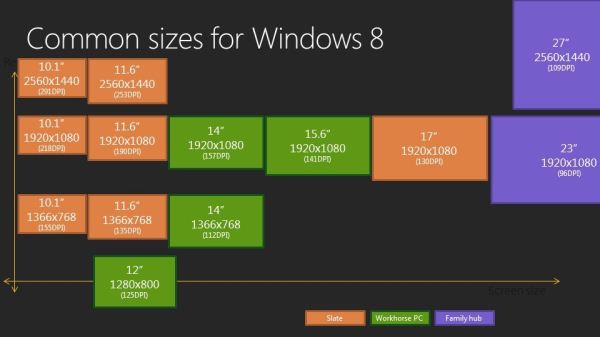
Microsoft is planning for tablets that use both the 1024x768 and 1366x768 resolutions common in earlier and lower-end tablets as well as the high-DPI screens that are being (and will be) ushered in by the new iPad. To scale Windows elements so that they're still comfortable to look at and touch at these resolutions, Microsoft has put together some pre-defined scaling percentages: 100% when no scaling is applied, 140% for 1080p tablets, and 180% for quad-XGA tablets like the new iPad. These percentages were all chosen as "pixel density sweet spots" for 10" and 11" tablets with 1920x1080 or 2560x1440 displays. It should be noted that Washington's blog post focused entirely on Metro scaling - whether the Windows desktop will automatically scale using these percentages is unclear.
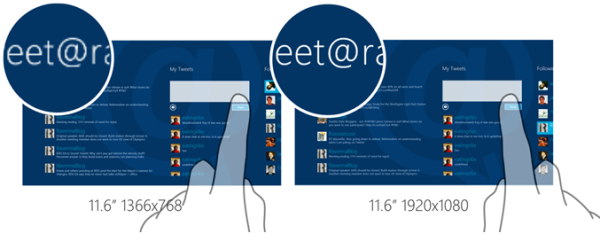
Washington went on to explain the reasoning behind the minimum resolution requirements for Metro apps that we noticed in our Windows 8 preview review - 1024x768 for Metro apps and 1366x768 for the Metro Snap feature. Both choices were largely developer and data-driven: 1024x768 is a common low-end resolution for web developers and tablet app developers, and Microsoft didn't want to restrict these developers to a lower minimum resolution to account for the small percentage of 800x600 and 1024x600 displays that are currently in use.
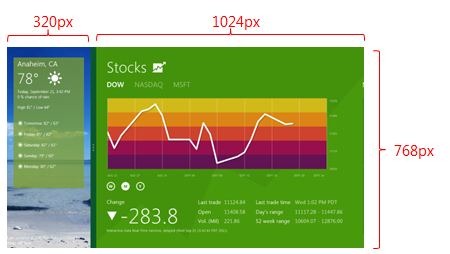
Also discussed was the methods by which Metro allows programs to expand to take up all of the pixels in a larger laptop or desktop display: To help dynamically expand content to take up more screen space when the pixels are available, Windows 8 uses the same XAML and CSS3 features that are commonly used to accomplish this on modern web pages - examples of such features include the grid, flexible box, and multi-column CSS3 layouts. App templates provided with Visual Studio 11 all make use of these features automatically. Developers can also scale their apps to fit larger displays, which is useful for games or other apps that don't need to make use of additional pixels.
For more, including Windows 8's support for scalable graphics and the Windows Simulator tool that will provide Visual Studio 11 users the ability to test their apps at multiple screen resolutions, the full post is linked below for your convenience.
Source: Building Windows 8 blog
Read More ...
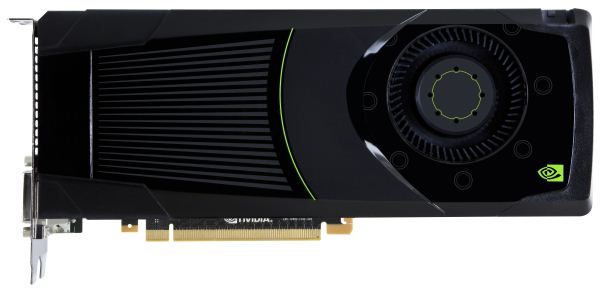
NVIDIA GeForce GTX 680 Review: Retaking The Performance Crown
“How do you follow up on Fermi?” That’s the question we had going into NVIDIA’s press briefing for the GeForce GTX 680 and the Kepler architecture earlier this month. With Fermi NVIDIA not only captured the performance crown for gaming, but they managed to further build on their success in the professional markets with Tesla and Quadro. Though it was a very clearly a rough start for NVIDIA, Fermi ended up doing quite well in the end.
So how do you follow up on Fermi? As it turns out, you follow it up with something that is in many ways more of the same. With a focus on efficiency, NVIDIA has stripped Fermi down to the core and then built it back up again; reducing power consumption and die size alike, all while maintaining most of the aspects we’ve come to know with Fermi. The end result of which is NVIDIA’s next generation GPU architecture: Kepler.
Launching today is the GeForce GTX 680, at the heart of which is NVIDIA’s new GK104 GPU, based on their equally new Kepler architecture. As we’ll see, not only has NVIDIA retaken the performance crown with the GeForce GTX 680, but they have done so in a manner truly befitting of their drive for efficiency.
Read More ...
NVIDIA's GeForce 600M Series: Mobile Kepler and Fermi Die Shrinks
While the desktop-bound GeForce GTX 680 is undoubtedly the most exciting release from NVIDIA today and the true flagbearer for their new Kepler microarchitecture, NVIDIA actually has a whole host of releases ready to go on the notebook front. We've already had a chance to check out the GeForce GT 640M in action, but it's far from the only member of the old/new GeForce 600M series. Today we have details on their complete 600M series from top to bottom; some of it is exciting and new, and some of it is just the GPU industry up to its same old marketing tricks. Read on for the full details.

Read More ...
Acer Iconia Tab A510: Tegra 3 Hits $450
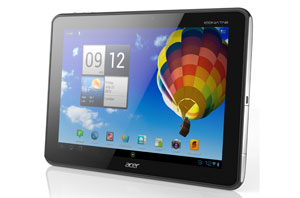
 Asus's Transformer Prime just got some company. Available for pre-order today, the Acer Iconia Tab A510 brings the price of entry for a 10.1" Tegra 3-powered tablet down to a cool $449.99, $50 less than the similarly equipped Asus offering. Like the Prime the A510 features a 10.1" 1280x800 display, the 1.3 GHz Tegra 3 SoC with 1 GB of RAM and 32 GB of storage expandable by microSD. The base battery life on the A510 is an impressive 36.26Whr, not quite as much as the new iPad, but somewhat higher than its prececessor and the Prime. That big battery does lead to a somewhat portly frame, with a thickness cresting a centimeter and weighing nearly 100g more than the Prime. The frame is similar to the A200 we saw in January, but is actually a little thinner and with a textured back for extra grip.
Android 4.0 is on order for software, complete with Acer's Ring UI, a relatively innocuous skin that mainly seeks to put your most commonly used apps in easy reach. When we took a look at the A500, we were pleased with its display quality, not quite IPS but great for a vanilla LCD; we hope we can expect more of the same from this display. Software pre-load includes the usual branded media players and print software, along with Polaris Office 3.5 for productivity. Gone though, is the full-sized USB port, replaced by microUSB, though it remains compatibile with portable HDD up to 2TB in size.
There's no shortage of options for tablet buyers right now, and everyday another pops up. But if performance, battery life and price are your main criteria, the A510 may just be the tablet for you. Pre-orders start today for $449.99 at your favorite e-tailers; no ship dates are available.
Read More ...
Quick Look: ASUS 1025C and Cedar Trail
We've known about Cedar Trail for quite a while now, the next iteration of Intel's Atom processor line. As far as the CPU is concerned, not a lot has changed from the previous generation Pine Trail. Cedar Trail is manufactured on Intel's 32nm process technology, but the CPU architecture is still in-order. You can read more of our Cedar Trail coverage in our initial look at the platform. It's taken far longer than expected, but we finally got someone to send us a Cedar Trail netbook for review. That someone is ASUS, and the netbook is their 1025C.


But YouTube HD video has always demanded more than local video playback, and we can now finally get DXVA assisted playback of H.264 video content. I tested both 720p and 1080p H.264 videos without any major issues using MPC-HC. What's more, I ran our standard H.264 battery life test to see how the Atom N2800 fared—and I ran it a second time with a 1080p video stream just for good measure. Check out the results:

I tested Hulu and Netflix on the 1025C as well and both worked reasonably well, but only with SD content. That's not an issue for Hulu, but Netflix HD content completely lost A/V sync. It may be that Hulu and Netflix are not currenlty recognizing the GMA 3600, but until this is addressed it's worth noting.
There's still a question of whether a $300 netbook has a place in the market when we've got tablets to play with, but it's really a matter of intended use as well as price. ASUS' own Eee Prime Transformer offers a better display and a nifty touch interface that easily surpasses the Windows 7 Starter experience, but if you're looking to do mundane tasks like basic word processing you'll need the keyboard attachment, which takes the final price up to ~$550—nearly twice that of the Eee PC 1025C. For basic typing, then, the price of the 1025C makes it a better choice, and you get excellent battery life that will easily carry you through a day of use and then some.
Atom still isn't going to surpass AMD's Brazos for performance or GPU driver quality, but pricing and battery life still appear to be in favor of Intel's Atom, and 10.1" Brazos netbooks are pretty rarefied. We'll have our full review as soon as we can finish running the remaining benchmarks and doing additional testing, which might be a while. Hopefully we'll see equally impressive improvements for Internet and Idle battery life, but it took over ten hours to recharge the battery on the 1025C and eight hours plus for our video playback test, so basically I'm look at a full day for each battery test cycle to complete.
Read More ...
Intel Engineer Confirms 22 nm Atom Will be Named "Valley View"
New silicon is expected to land in 2013
Read More ...
Oracle's Anti-Android Java Lawsuit Likely to be Settled For Under $100M USD
Google may pay a bit in ongoing licensing fees, but the settlement for past damages will be small
Read More ...
T-Mobile Lays Off 1,900 Workers, AT&T Tells FCC "Told ya so"
AT&T still isn't done badmouthing the FCC
Read More ...
3/23/2012 Daily Hardware Reviews
DailyTech's roundup of hardware reviews from around the web for Friday
Read More ...
RIM Loses No. 1 Canadian Smartphone Shipments Spot to Apple for 2011
This is a particularly hard blow to RIM, which is based in Canada and had the No. 1 spot until last year
Read More ...
Google Patent Outlines Weather Sensing Advertisements
One more way to spy on you or nice new feature?
Read More ...
Update: Rovio Execs Give Conflicting Statements on Angry Birds Space for Windows Phone
The mobile game developer says it's too much work to technically support it
Read More ...
Windows 8 Bests Windows 7 in Most Performance Benchmarks
Metro fan or not, Windows 8 is a performer
Read More ...
Worth the Wait: NVIDIA's Kepler GTX Geforce 680 is New Graphics Market King
New GPU is more powerful, but also quieter, cooler; beats AMD's similar offering in price
Read More ...
Alternative GOP Budget Would Chop Auto Loans and High-Speed Railway Funding
Budget proposal would kill Obama's green plans
Read More ...
3/22/2012 Daily Hardware Reviews -- NVIDIA GeForce GTX 680 Edition
DailyTech's roundup of hardware reviews from around the web for Thursday
Read More ...
Adobe Releases Photoshop CS6 Beta for Free Download
CS6 will launch in H1 2012, price undetermined
Read More ...
Acer Unveils Iconia Tab A510 Tablet with Quad Core Performance
Tablet is up for pre-order today
Read More ...
Commodore Releases Amiga Mini, Updates Other Models
Amiga is officially making its comeback in the form of a high-end gaming PC in a small package called the Amiga Mini
Read More ...
Crash Victim Opts Amputation, Robotic Replacement Hand
Elective amputation is very groundbreaking, controversial
Read More ...
Baffling Illness Strikes Africa, Turns Children Into Mindless "Zombies"
World Health Organization is on high alert about new Ugandan outbreak, cause is not fully known
Read More ...
Available Tags:NVIDIA , GeForce , GTX , AMD , Radeon , Windows 8 , Microsoft , Windows , Acer , ASUS , Intel , Java , Hardware , Smartphone , Apple , Google , Windows Phone , Windows 7 , Windows 8 , Adobe , Download , Tablet , Other ,


No comments:
Post a Comment