

Review: Exclusive: LG Optimus Pad

The LG Optimus Pad has been a long time coming.
After months of persistent rumours, LG finally announced its 3D tablet at MWC in February.
Rebadged as the T-Mobile G-Slate in the US, it was long rumoured that the Optimus Pad would pair 3D video capture with a glasses-free 3D display like the one on the Nintendo 3DS and LG's own forthcoming Optimus 3D handset.
However, that turned out not to be the case. What we have here is a Tegra 2-powered Android 3.0 honeycomb tablet with dual 5MP rear-firing cameras for 3D video capture. The display is not 3D compatible in any way – it's a standard 8.9-inch LCD capacitive touchscreen with a 15:9 aspect ratio and 1280 x 768 WXGA resolution.
On-board memory is provided by 1GB of RAM, while our test unit came with 32GB internal flash storage.
 See full size image
Look and feel
It's a fairly generic-looking device and feels so in the hand - it definitely lacks the wow factor of some of the other tablets we've seen of late.
 CHUNKY: Thickness of the LG Optimus Pad compared to iPad 2
It weighs 630g and is substantially thicker than the likes of the Apple iPad 2 – so in general it doesn't have the same premium feel of Apple's tablet or the Motorola Xoom. It feels plasticky rather than solid.
 SIZE: The LG Optimus Pad (top) at 8.9 inches is slightly smaller than the 10.1-inch Motorola Xoom (bottom) and Samsung Galaxy Tab (middle)
However, LG has made a big song and dance in its press materials about how pleasurable the Optimus Pad is to hold in one hand – and in many ways it is.
This is an 8.9-inch tablet which means it sits between the 7-inch tablets like the BlackBerry Playbook and the 9.7-inch iPad 2. The idea is that this size gives the best of both worlds, balancing a nice, portable size with a screen big enough to watch movies on.

The bezel on the left and right sides are wider than at the top and bottom, making holding it in one hand while you use the other to operate the device quite a comfortable experience.
It's fairly heavy, though, at 630g, so holding one-handed is going to get quite tiresome after a while - the much larger iPad 2 only weighs 600g, remember.
As is the norm with Android 3.0 tablets, the LG Optimus Pad has very few physical buttons.

The on/off/standby button is located on the left hand side at the top, on the same side as the small charging port.
The volume dials are located just around the corner from the on/off button on the top of the device.

Then the other physical features of note are the USB and HDMI connections on the bottom and the slender speakers on each side.
The 2MP front-facing camera is located in the top left-hand corner of the device, which makes it good for both landscape and portrait video conferencing, while the twin 5MP snappers on the back of the device sit front and centre next to an LED flash.

There's also a slide-off hatch on the rear of the device that allows you access to the SIM port. The Optimus Pad uses a standard SIM card for 3G access, so a micro-SIM is no good here.

There's no sign of an external storage port under this hatch, though, sadly. It's something that does cause us a bit of irritation – and even though Android 3.0 is currently unable to recognise external storage ports, forthcoming updates will enable this feature so it's disappointing that so many manufacturers have chosen not to include one.
As has become the norm with most of the Honeycomb tablets we've seen to date, the LG Optimus Pad comes with an almost untouched build of Android 3.0. It's very much a Google Experience Device.
There's no overlay, no custom menus and no LG widgets. It's exactly the same version of Android you'll find on the Xoom and the Samsung Galaxy Tab 10.1V.

We won't go into the specifics of the Android 3.0 OS in this review – if you want to know more about the software you can read our fully-featured Android 3.0 Honeycomb review.
It should be noted that the pre-release unit we're testing was very kindly provided to us by LG despite it not running final software, so there might be a couple of tweaks made here and there by the time this tablet hits the shops. We'll retest when we've seen a final sample and let you know about that when we know more.

In the meantime, there are a couple of very minor changes to the standard Android interface, and that's mainly down to the 3D cameras needing their own image capture and playback apps.

So in the Apps menu, you are presented with two bespoke application icons – one called 3DCamcorder and the other called 3DPlayer.
We'll cover these apps on Page 4 of this review.

The other non-standard app to be found on here is Polaris Office – the same office suite that's included with the Asus Eee Pad Transformer. It has the power to open and edit Microsoft Office documents so it's a useful tool for anyone wondering whether to buy an Android tablet over a netbook or laptop.

Screen
The screen on the Optimus Pad is adequate without being mindblowing – it doesn't stand out from any of the other Android tablets in any meaningful way. The resolution is easily high enough on the 8.9-inch display for everything to look crisp and sharp.
Motion is handled well, and it's responsive, too. We've been very pleased with all the Android 3.0 tablets we've seen up to now – there's been no lag at all. The manufacturers have harnessed the power of Tegra 2's dual-core CPU very efficiently.
It does suffer in direct sunlight, though. And actually when we put the Optimus Pad next to the Xoom and Galaxy Tab 10.1V we noticed that the screen isn't quite as bright on the Optimus Pad.
It could be that this is just the way LG has calibrated the screen for battery preservation purposes – that's just speculation, though. What's important is that it's plenty vivid enough to look good indoors, and watching movies on it is a pleasure. The screen does seem to be a little better at repelling greasy fingerprints than some of the other tablets, too - although it's still not as good as the iPad 2 in this regard.
Little glitches
We were expecting a few glitches and niggles with this pre-release unit, and it has to be said we did get some. It's nothing serious – most of the problems were related to the way the Android 3.0 OS was calibrated with the LG hardware.
For example, the volume up button actually turns the volume down, and vice versa. LG assures us that this is the kind of thing that won't affect final retail samples, so again, we will check that out when final samples arrive and let you know.

In use, we have no complaints about the LG Optimus Pad.
It starts up fairly quickly, it's fast and responsive, and most of the hardware functions perfectly.
Wireless networks can be connected to very quickly, and 3G performance is as rapid as you'd expect it to be when there's a strong signal to be had.
Indeed, after running several different benchmarking apps, the Optimus Pad returns almost identical results to the other Android 3.0 tablets – which isn't too surprising seeing as it's powered by the same Tegra 2 platform .

Battery life
Because this is a pre-release model, we can't give you a precise battery life as it's subject to change.
However, we can confirm that it's at least a match for the other Android 3.0 tablets we've tested lately. With the screen on a medium brightness setting we were able to use the device on and off for a working day without draining the battery too much.
The fact that the Optimus Pad is basically packing the same CPU as the other Honeycomb tablets, whilst incorporating a smaller screen than the likes of the Xoom, means you can expect to get a bit more juice out of the battery anyway.

The LG Optimus Pad has two different camera modes. The first uses the standard Android 3.0 camera app to capture videos and 5MP stills.
The second uses LG's own 3DCamcorder app to record videos in 3D. It's this 3D recording functionality that LG reckons is going to make the Optimus Pad stand out from the crowd.
We're not quite so sure. 3D is still very much an industry-driven thing, with arguably the majority of consumers fairly nonplussed by the whole concept.
For those who already have active or passive 3D displays, this tablet may be a slightly more attractive option. But what about the majority of folks out there who don't have 3D TVs?
How it works
It's certainly very odd to have a gadget capable of capturing full 3D video, without the ability to play it back in 3D.
From within the 3DCamcorder app the Optimus Pad allows you to set up the tablet's screen as a view finder in four different ways.

First option is 'Mixed' which combines the images from the two cameras into one image to simulate what a 3D picture looks like in 2D. It looks exactly as 3D footage looks on a 3D TV if you're not wearing 3D glasses. The difference is that it's not actually a 3D image – putting 3D glasses on is no good. It's still just a blurry picture.

The second options is Anaglyph, which is now more commonly known as 'old style' 3D. Using red-cyan 3D specs you can actually get a 3D image from the screen. It does work and it's impressive for all of about three seconds until you get tired of it. We like the inclusion of this mode, but we don't anticipate anyone actually using it more than a couple of times because the novelty wears off very quickly.
Wearing red-cyan specs, the image has depth but it also looks like a horrible red and green nightmare world, lacking colour and definition. And because most of these old school 3D specs are made of cardboard, you're hardly going to want to carry them around with you, are you?

The third 3D viewing mode is 'Single' which is exactly what you think it is – it just displays a single image so you can actually see what you're filming. This is our preferred capture mode.
Fourthly, there's also a 'Side by side' mode which puts the two images… side by side.
You can also customise the depth of the picture you're recording. So you can the image fairly neutral, you can push objects further into the picture or you can make them stand out in front of the screen.

Other settings in this camera mode include a variety of white balance adjustments, video quality and an on/off option for recording audio.
Results
The 3D footage is decent when you consider where it's come from. It's no match for fully-fledged 3D camcorders though, and really the lack of resolution in the images makes us wonder why exactly LG decided to go down this 3D route.

You can see some test footage in the YouTube video above. It displays in side-by-side mode because YouTube doesn't currently support embedding of 3D videos, so if you want to check it out in 3D, you can do so over on our YouTube channel. If you've not got a 3D TV or monitor you'll have you view in red-cyan mode.
General photography

The standard Android 3.0 camera app is present of course, and it's able to take 720p video footage as well as 5MP digital stills.
 See full-res image
 See full-res image
It's a pretty decent camera, far and away better than that of the iPad 2, although of course it's still no match for the capture skills of even a low-end compact snapper.

The LG Optimus Pad is a decent Android 3.0 tablet. It's speedy, it's responsive and it captures 3D video which makes it a bit of a one-off, at least for the time being. But the problem is that there's just something… missing.
We liked:
It's fast and responsive. The screen is nice and sharp and the battery performs as we'd expect it to. All in all, it's a full competent Android tablet with the unique ability (among tablets at least) to record video in 3D.
It's also very nice to hold in one hand which is crucial for a tablet. We particularly liked the setting to turn off the Anaglyph 3D display, because it's just nasty.
We disliked:
Our main problem with the Optimus Pad is that it's just not refined enough. It's not particularly good looking. It's quite fat, certainly compared to iPad 2 and it's rather heavy as well – particularly when you consider this is an 8.9-inch device.
It just doesn't have the same feel of quality that you get with other tablets even at this early stage.
It's comfortable to hold in one hand, but you'll need a firm grip simply because after a couple of minutes that 630g of weight starts to feel rather heavier. And there's also the issue of that missing expansion port...
Verdict:
As with the Samsung Galaxy Tab 10.1V, the verdict is still out on the LG Optimus Pad. It could well come down to how much it costs. LG has so far been unable to confirm how much money you'll need to cough up if you want to buy one.
If it drops in at around the £430 mark this could well be a decent option, especially if you're into your 3D and have a 3D computer monitor or 3D TV. But if that 3D camera adds a premium to the retail price, we could be looking at a price tag of closer to £600, and if that's the case then there's just no way we'd be able to recommend it to anyone other than 3D die hards.
Because of this, our rating of 3.5 stars out of 5 is subject to change - it's going to depend on the price.
In general though, we don't think this tablet has the chops to really capture the imagination of the masses. It's a solid performer – far and away better than most of the tablets that came out last year – but can it really claim to be as appealing as the Xoom, Samsung Galaxy Tab 8.9 or Eee Pad Transformer?
Related Links

 |  |
Read More ...
Pioneer's latest AV range offers full iPad support

If you want to play tunes or movies from your iPhone or run your new iPad internet radio app through your hi-fi, then Pioneer has your back with the UK release of five new iOS-compatible AV Receivers this month.
Pioneer's new range features support for Apple's AirPlay and full support for iPad, including an exclusive 2.1A battery charging facility via the USB port.
Pioneer's new receivers are DLNA Certified (v1.5), and work with vTuner Internet Radio and Pioneer's own custom-developed apps for iPhone, iPad and iPod Touch such as the exclusive iControlAV2 App and the Air Jam App.
A haven for advanced home cinema
With improved features and functions across the board, the 2011 line up of Pioneer receivers includes the VSX-821, VSX-521 and VSX-42, and the Airplay-toting VSX-921 and VSX-1021 7.1 channel home cinema receivers.
Philippe Coppens, Technology and Product Information Manager at Pioneer Europe, adds: "This will for example enable [users] to access their music and video content as well as share them with others in one room or throughout the home."
Pricing is still 'tbc' with Pioneer's new range set to be available in shops from June 2011 onwards.

| |
Read More ...
Review: Sony VAIO CA Series

Here at TechRadar Towers, we see an awful lot of laptops. Some are hulking desktop replacements, some are highly desirable ultraportables, but these days it takes something particularly eye-catching to stand out from the crowd.
One sure-fire method is to use a bright and colourful design. From Dell's XPS 15, which can be customised with an excellent variety of slick and surreal lid prints, to Packard Bell's red-tinted EasyNote range, it's always refreshing to see something a little different.
Sony has gone for full-on bright colours with its new VAIO CA Series, a range of family-friendly laptops that pack in Intel's latest Sandy Bridge technology. While the result will definitely get you noticed on public transport, reactions are likely to vary. Our green model gathered great interest, with some people loving the radioactive glow and others clutching their eyes, screaming in mortal terror.
If green doesn't suit, you can also purchase the VAIO CA in similarly bright orange and pink models. Otherwise, if you prefer something a little more subtle, the laptop comes in conventional black and white.

As with most Sony laptops, build quality is strong. The plastic chassis is reassuringly tough with no obvious weak points, aside from some slight flex around the DVD drive.
And although the keyboard is a tiny bit spongy in the centre, it's a well-sized and quiet board that's comfortable to type on for extended periods. Each key pokes up through individual holes cut into the VAIO CA's chassis, a style that's highly popular at the moment. Backlighting gives the keys an eerie glow and allows you to work well into the night.
The touchpad is also highly usable, with a beveled surface that proves responsive to all of your swipes and prods, and two firm mouse buttons that sit underneath.
With a weight of 2.3kg, the VAIO CA can definitely be carried around if needed. Be warned that the 39mm chassis is fairly bulky, however, so you'll need to clear some space in your bag first.
Sony VAIO CA Series review: Specifications

Sony's laptops rarely disappoint when it comes to their screens. The VAIO CA's 14-inch display is no exception, and images are reasonably sharp thanks to the 1366 x 768 resolution, but it's the contrast levels that particularly impress. We also liked the way the screen stretches close to the edges of the lid, making full use of the available space.
Images are vibrant and an ambient light sensor automatically adjusts brightness levels, although the VAIO CA's maximum brightness isn't too impressive. The glossy Super-TFT display is also typically reflective, so you'll be squinting inches from the surface if you use the laptop outside.
Anyone who uses video conferencing applications such as Skype will be pleased to know there's an integrated HD webcam positioned just above the VAIO CA's screen. Quality is great for online chats, with strong focus and minimal motion blur. The bundled ArcSoft application can be used to capture video or as a security feature, to detect motion in a room while you're absent.
As usual, Sony has included its VAIO, ASSIST and WEB shortcut buttons. ASSIST loads Vaio Care, which diagnoses any problems with the VAIO CA, restores the laptop if necessary, and gives access to various system settings.

WEB provides an instant way of loading your internet browser, if you're desperate to get online, while VAIO is a kind of media portal that enables you to quickly browse your photos, music and movies.
With just 250GB of storage on board, you sadly won't have much space for this media. We're sure Sony could have fitted double the amount into the chunky chassis, and we're sure that it won't take long for most users to fill up the meager amount on offer. Also bear in mind that a chunk of this is taken up by the recovery partition.
Thankfully networking is much stronger, with 802.11n Wi-Fi support providing the fastest access to wireless networks currently available. If you prefer a bit of good old fashioned wired networking, Gigabit Ethernet is also available.
Ports are fairly standard for this kind of laptop. You get four USB ports for hooking up peripherals, and one of them is USB 3.0, which we've found transfers data at twice the rate of the old USB 2.0 standard. Handy if you regularly back up data to an external USB hard drive or similar.
VGA and HDMI ports are also available, for hooking up an external display.
Sony VAIO CA Series review: Performance

Battery: 184
Mobile Mark: 281
3D Mark: 12,373
We've seen a lot of new laptops incorporating Intel's powerful Sandy Bridge chipset, and the scores we've achieved from our benchmark tests have been very impressive indeed, with a clear leap in performance over the original Core i3, i5 and i7 CPUs.
The Sony VAIO CA uses an Intel Core i5-2410M running at 2.3GHz, with 4GB of DDR3 memory. Once again, performance is excellent, so you can comfortably run a number of applications at once with no lag or stuttering.
We witnessed a similarly strong effort from the new Sony VAIO S Series, which uses the same Core i5 chipset. The Dell XPS 17 managed to wring even more power from the 2410M in our benchmark tests, with the same amount of memory, although the difference isn't enough to favour one over the other.

Sony has also slotted a dedicated AMD Radeon HD 6470M GPU into the VAIO CA. While the card can't handle the latest games without the detail settings dropped, it still does an admirable job with multimedia applications such as video editing software. You'll also be able to watch HD films, although the screen doesn't quite do them justice.
Sadly, this combination of Sandy Bridge power and dedicated graphics really takes its toll on the battery. We only got around three hours of life with brightness turned down to 50 per cent, which dropped further when watching DVDs. Anyone looking for portability would be better suited by the Sony VAIO VPCSB1V9E, which lasted almost five hours away from the mains.
Sony VAIO CA Series review: Conclusion

Sony's VAIO CA is one of the more colourful entries in the Japanese giant's laptop catalog recently. Actually, it's the most eye-catching device we've seen in months, although immediate reactions to the design are liable to vary between 'curious interest' and 'appalled double-take'.
Still, with Intel's Sandy Bridge technology on board, the VAIO CA is more than just a garish radioactive face. And with Sony's reputation for quality, we had high hopes for this laptop.
We liked
The Sandy Bridge Core i5 processor produces some typically stunning performance, with enough grunt to run all of your applications. This is backed up by the dedicated AMD graphics card, perfect for viewing and editing media and even some light gaming.
Build quality is as strong as ever. The VAIO CA's plastic chassis is as durable as it is colourful, while the backlit isolation-style keyboard is quiet and comfortable to use. A responsive beveled touchpad proves just as usable.
We also liked the VAIO CA's 14-inch Super-TFT display, which was suitably vibrant with strong contrast. An ambient light sensor automatically adjusts brightness levels, although the maximum brightness is still a little dim, and the glossy coating is reflective in light conditions.
We disliked
The powerful components have a profound effect on battery life, with the VAIO CA dying after just three hours (or even quicker when watching DVDs). This isn't a terrible result, but definitely below average for a modern laptop.
A mere 250GB of storage space is also limiting, so you won't be able to carry a large amount of media with you, especially if you've got lots of applications installed.
And of course the VAIO CA's bright design won't appeal to all tastes, but bear in mind that white and black versions are also available.
Verdict
There are better mid-range laptops available, but the Sony VAIO CA series is still an appealing prospect thanks to its strong performance and excellent build quality. Most attention is undoubtedly focused on the colourful design, and we're sure that many people will make their purchasing decision based on their immediate visual impressions.
Related Links

| |
Read More ...
UK retailers rush to stake claim on BlackBerry PlayBook
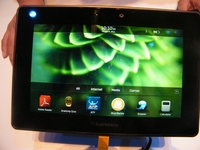
Carphone Warehouse and Best Buy have announced that both retailers will be selling the BlackBerry PlayBook when it launches in the UK.
RIM's first tablet effort goes on sale in the United States today, although initial reviews have been mixed.
The 7-inch tablet totes a 1GHz processor and runs a new OS, BlackBerry Tablet OS which is powered by QNX.
All work and no PlayBook
Although most early hands-ons, including TechRadar's own, have been positive, most US reviewers have complained that the tablet is hampered by lack of apps, given that even BlackBerry's stock of handset apps are not compatible with the new QNX OS, although a number of Android apps will be making their way to the slate soon.
The other pain point most often referred to is the lack of native email and calendar apps; current users will have to sync the PlayBook to a BlackBerry handset to use these.
None of the keen-bean retailers have let slip the BlackBerry PlayBook UK release date or pricing, but you can pre-register for information over at Carphone Warehouse's website now.

| |
Read More ...
Sky joins in fight against BT LLU pricing

Sky has joined Talk Talk's business arm Opal Telecom in complaining about the price of BT's local loop unbundling, according to Ofcom's latest bulletin.
Opal is currently in dispute with OpenReach – part of BT – about its LLU pricing, and Sky has now made a similar complaint.
Ofcom has decided to treat the two complaints as a single dispute and has stated that it is prepared to handle the argument.
Further dispute
"Following publication of the original Competition and Consumer Enforcement Bulletin entry relating to a dispute between Opal Telecom and Openreach, we received a further dispute submission from British Sky Broadcasting Limited (Sky) dated 8 April 2011,"stated Ofcom.
"We consider Sky and Openreach are in dispute in relation to the same charges and have exhausted commercial negotiations on this issue.
"We therefore consider that a dispute exists between Sky and Openreach that falls within the scope of section 185(1) of the Act. We have decided, pursuant to section 186 of the Act, that it is appropriate for Ofcom to handle the dispute.
"We consider that the principal issues in dispute between Sky and Openreach are essentially the same as the issues we are already considering in the LLU charges dispute. On this basis, we consider it appropriate to join Sky as a party to the LLU charges dispute."
The case remains open, but Ofcom's decision will be of great interest within the telecoms industry.

| |

| |
Read More ...
Gary Marshall: Why Apple is suing Samsung

Where there's a hit, there's a writ - especially in the smartphone industry, where firms often seem to spend more time suing one another than they do actually making phones.
So it's not entirely surprising that Samsung has attracted the attention of Apple's legal rottweilers. This is, after all, a firm whose - great - products tend to be reviewed using terms such as "Looks like an iPhone".
There's no doubt in our minds that somebody at Samsung might possibly have seen an iPhone, and maybe an iPad too. The Galaxy S looks awfully like the iPhone, and Samsung's own TouchWiz user interface looks rather like iOS. Apple reckons that's no coincidence, and according to the WSJ it alleges that Samsung "chose to copy Apple's technology, user interface and innovative style".
Samsung has two choices here. It can argue that function dictates form, that there are only so many ways you can operate a phone or tablet with a touch screen and that its technology evolved independently. Or it can shut up and give Apple some cash.
My money's on the latter.
Friends like these
Samsung has an interesting relationship with Apple. On the one hand it's a competitor, a smartphone and tablet firm whose products target the same kinds of customer as Apple's smartphones and tablets.
But on the other hand, as the Wall Street Journal points out, "Samsung makes microchips that are used in some Apple products as well as memory chips used in the MacBook Pro computer line".
Those microchips are the A4 and A5 processors you'll find in the iPhone 4 and iPad 2 respectively, and they represent a pretty big chunk of work for Samsung's manufacturing arm.
I think what Apple's doing here is firing a shot across Samsung's bows, reminding it that what's good for Samsung's mobile devices division isn't necessarily good for the rest of the organisation - and that just because Apple and Samsung are friends in one area doesn't mean Apple will be all sweetness and light in any other area.
It's hard to imagine Samsung execs bellowing "screw you, Steve!" and risking what's presumably a fairly lucrative business - A4 and A5 devices outsell Samsung Galaxy devices by a factor of about eleventy billion, and what those sales lack in margin for Samsung they'll almost certainly make up in volume - so what I suspect will happen is that this case will be settled fairly quickly.
That's certainly what Apple wants. It's inevitable that its market dominance will be eroded - we've seen it happen in smartphones, and we'll see it happen with tablets - but it's not going to let that happen without a fight. Like the earlier suit against HTC, Apple's action against Samsung is part of a bigger picture: it's going after Android, one firm at a time.

| |

| |
Read More ...
Will the iPad 3 feature a 2GHz dual-core Samsung CPU?

Samsung revealed this week that it is planning to develop a 2GHz dual-core CPU smartphone at some point in 2012, with rumours suggesting that the iPad 3 may well make use of the same tech.
Samsung has just announced that the Galaxy S2 will offer a 1.2GHz dual-core processor, but it's already talking about a 2GHz dual-core CPU phone will offer data processing grunt of 4GHz, which puts it alongside most high-end desktop PCs.
"We are planning to release a 2Ghz dual core CPU-equipped smartphone by next year," said a Samsung rep this month, in no uncertain terms. "This product will have the data processing capabilities of a regular PC."
iPad 3 speed bump
Samsung currently produces Apple's A4 and A5 chips for the iPhone 4 and iPad 2, which has led a number of industry watchers to speculate that the next version of the iPad will feature the aforementioned 2GHz dual-core CPU.
Samsung produces the iPad 2's nippy dual-core 1GHz processor, which allows users to get around twice the speed and performance than they were able to from Apple's first-gen iPad last year.
Might Apple and Samsung manage to double this speed again in 2012 with the iPad 3? Clearly, we are going to have to wait until early next year, at the very earliest, before we find out.

| |

| |
Read More ...
Review: GarageBand for iPad 1.0

GarageBand for iPad is a recording studio that attempts to merge aspects of its Mac-based cousin with an intuitive touch-based iOS interface.
For the beginner, GarageBand is a lot of fun. Anyone lacking musical ability can leap right to the selection of 'smart' instruments, which do all the hard work for you. You create drum parts by dragging drums to a grid, and it will auto-strum or fingerpick simple guitar chords and play arpeggios on a keyboard for you. All you need to do is tap the name of the chord.
Up to eight tracks can be added using the track editor, and individual tracks can have effects applied and volume and panning adjusted. You can also augment your smart instruments with a (slightly limited) range of built-in loops.
To take things further, you must work with some form of more manual input, and it's here that GarageBand is a bit hit and miss.
The drums are poor – the on-screen kits are perfectly 'hittable' but you only get six; worse, GarageBand's trumpeted accelerometer-based expression (tap the screen harder to make an instrument more forceful) lacks consistency and can't be disabled for drum tracks, making it nigh-on impossible to record uniform patterns.
By contrast, GarageBand's fantastic for guitarists: armed with an iRig and a beaten-up old electric guitar, we hugely enjoyed experimenting with the app's selection of amps and customisable stomp-boxes.
Despite the iRig's quiet output, we made a decent noise; the only pity was a lack of any timing assistance.
For electronic musicians, the app's so-so. The instrument selection is best suited to dodgy 80s synth pop, and the lack of pattern editing in the track editor forces you to continually re-record to deal with errors, rather than dragging notes around; on the plus side, keyboard parameters can be tweaked, the customisable on-screen keyboard interface is excellent, and Apple has sensibly provided quantisation options to tidy up timing.
Elsewhere, we enjoyed mucking about with the sampler, found voice recording workmanlike (and limited when it came to effects) and considered the app's approach to song construction-user-defined 'sections', somewhat akin to the desktop version's regions – awkward.
We also had occasional performance issues, especially when working with a lot of effects. Recordings would sometimes cut out, and the app often has to pause to 'optimise performance'.
This probably all sounds quite negative, so you might be surprised to hear that we nonetheless recommend this app. It's not perfect, and electronic musicians are far better catered for with NanoStudio or BeatMaker. But for the musically curious, this is a great toy, and for guitarists, there's huge value in the amps and stomp-boxes.

It's also pretty clear that with a few tweaks, GarageBand could offer a similar amount of depth to its Mac cousin for a fraction of the price, and with the far more intuitive interface offered by the iPad.
Frankly, we can't wait to see what Apple has planned for GarageBand's first major update.
Related Links

| |
Read More ...
Review: Archos 28 Internet Tablet

The Archos 28 Internet Tablet is one of the smallest tablets on the market. Easy to write off, we were unexpectedly impressed by it and those without a smartphone looking for a portable way of consuming media, as well as surfing the web in Wi-Fi hotspots, might find this an attractive option.
The overall matt finish to the chassis will do a good job of hiding – as far as possible – scratches and scuffs from keys or loose change in your pocket. Having said that, the screen will need protecting, so a cover of some description is certainly worth considering.
Portability is mixed, however, and while the 60g the tablet weighs means you'll hardly notice it in a jacket pocket, the four hours of battery life is unfortunate and means you'll need to carry the USB cable with you during intensive use for charging purposes.
The 2.8-inch screen is tiny and those looking for a great multimedia experience will no doubt be disappointed. But that would be unfair on the Archos 28, which is designed for convenience rather than comfort.
Nonetheless, colour vibrancy is good enough for showing off your holiday photos and viewing films on the go, even if the 320 x 240-pixel resolution provides disappointingly blurry images.
Surprisingly, considering its size, this device's screen proved very responsive to gesture inputs, making it quick and convenient to navigate through. Even the on-screen keyboard wasn't too much of a nightmare, although you will want to limit your usage to short Google searches, for example.
An 800MHz processor powers the Android 2.2 operating system with real fluidity, and this makes opening applications downloaded from the third-party AppsLib store quick and easy. Google's official Android Market app store unfortunately isn't supported.
Web browsing
The performance also makes browsing the web a pleasure and, while resource-heavy websites do cause the Archos 28 to struggle, purpose-designed mobile sites, such as BBC Mobile, run smoothly.
The 4GB of storage space will be limiting for those with large media libraries, and no Micro SD card slot means you can't expand it further. There's also no external speaker, meaning you can't play music through the device without a set of headphones.
The Archos 28 Internet Tablet is a strange device that, on first consideration, is hard to see people using at all. Having tried it ourselves, however, we were rather impressed and those looking for an ultra small and highly portable internet and multimedia device may find this to be their perfect mobile tablet.
Related Links

| |

| |
Read More ...
Speed Week: Where next for high end graphics?

This article is brought to you in association with LG Optimus 2X
Speculation about the death of the high end graphics card is a popular pastime these days, and with good reason.
Want a vision of the GPU apocalypse that keeps AMD and Nvidia executives at night? Compare 'Radeon HD 6990' with 'Angry Birds' in Google Trends, a tool which measures the popularity of search terms over time.
Proportionally, the number of people actively searching for information about the HD 6990 barely registers against the scale of people looking to splat pigs with pigeons on their iPads, a device which, in terms of hardware sophistication, is like using an abacus.
We've come a long way from the days when a new top end GPU launch could bring the net to a halt.

Look at the Angry Birds graph again. No one knows yet how disruptive the new generations of tablets will be on the way we use the PC at home, but clearly they will. Analyst firm Gartner recently predicted that nearly 300m tablets will be sold in 2014, which potentially means three tablets will be sold for every four PCs.
And then there's the rise of the hybrid CPU/GPU processor.
According to market research firm iSupply, within the same timeframe 76% of desktop PCs will have have hybrid CPU/GPU chips, and this will massively impact sales of lower end add-in boards.
"In 2011 we see [growth in PC shipments] increasing slightly to just under 5%," Matt Wilkins, principle analyst for iSuppli, told TechRadar.
"In terms of the discrete graphics market, the constant increases in performance of graphics solutions now found as part of the microprocessors product, like AMD's Fusion and Intel's Sandy Bridge chips, are helping non-discrete solutions to satisfy the requirements of a larger part of the market. Therefore we believe the discrete graphics market is challenged in the medium to long term."
All is not quite lost for the demanding gamer, however.
"For users that demand the best graphics performance possible," Wilkins added, "the discrete solution will remain the optimum solution."
But who demands the best graphics performance any more? The last game which really forced PC gamers to upgrade their systems was Crysis, which appeared in September 2008. It's telling that the sequel Crysis 2 - also launched last month - has almost identical recommended hardware requirements despite a gap of two and a half years.

NO UPGRADE NEEDED: Valve's Portal 2 will break sales records with very modest system requirements
One PC games developer, who didn't want to be named, compared the graphics on Intel's Sandy Bridge hybrid processors to Xbox quality. As a result, studios are torn between increasing the realism of their environments with high cost DX11 effects, or optimising the hell out of their engines so that anyone with a recent laptop can purchase their products.
You don't have to be Alan Sugar to see which strategy makes the better business sense.
Valve's Source engine, for example, is famously lethargic when it comes to introducing new features, and it hasn't hurt sales of Left4Dead or Portal, has it? For the first 20 years of IBM PC compatible computers, it was a running joke that hardware was obsolete before it reached the shop door. Now, it seems, PCs simply aren't going out of date.
It's easy to see why both AMD and Nvidia are both diversifying into hybrid CPU/GPUs for low end systems themselves, AMD with x86-based Fusion and Nvidia with its ARM-based Tegra. Of the two, Nvidia seems to have the winning strategy - it's Tegra 2 chipset is in just about every significant Android Honeycomb tablet due to be released this year. AMD's Fusion processors, however, are only just starting to appear in netbooks, which are tipped to lose out to tablets in the long run.

HYBRID: Intel's Sandy Bridge will eat up low end graphics cards, but that makes high end ones all the more important
In among all this doom mongering, though, it's important to recognise a few facts. For both AMD and Nvidia, graphics cards are still big business. Around a fifth of AMD's profits comes from the graphics business, and Nvidia's mobile arm was loss making last year.
Importantly for Nvidia, although it makes relatively little money from desktop GPUs - just $30m profit off of £2.5bn sales - it's workstation-class Quaddro boards and Tesla general purpose GPUs are a license to print money. The profession arm of Nvidia made ten times more profit from these chips last year based on just over a third as much turnover as the desktop business.
Based on those figures, there's no way it's going to stop developing hardware for demanding industrial designers and GP-GPU based supercomputers. That's good news for the desktop business, because the actual GeForce, Quaddro and Tesla cards are, of course, identical.
Boom in high end graphics
What's more, some analysts believe that hybrid CPU/GPUs will flatten demand for low end and mainstream graphics cards, but they could be a very good thing for the high end market.
According to Jon Peddie, founder of industry watchers Jon Peddie Research, sales of top end graphics boards are actually growing at an average rate of 6% per annum.
"For the most part all the embedded GPU/CPU chips do in terms of GPU market share is replace the integrated graphics processor," Peddie said, "although AMD's Fusion [chips] run DX11 they do not have sufficient processing power to run AAA FPS games in any resolution, and Intel's SNB only supports DX10."
The current hybrids, in other words, are next to useless for gaming on a normal monitor with any kind of image quality turned on. If you want to game, they make upgrading a necessity.
Sceptics might counter with the argument that hybrid chips are still very new, and subsequent generations will only get better. But consider this: there are around 995 million transistors in a quad core Sandy Bridge processor with integrated HD 3000 graphics.
A Radeon HD5850 has a transistor count of 2154 million. In other words, you'd need to treble the complexity of a Sandy Bridge chip just to reach the levels of gaming performance of a second tier graphics chip from two years ago. You'd also need a heatsink the size of a house and an expensive motherboard with all the supporting circuitry currently found on a giant high end card.
And even if game engine development has slowed, it hasn't completely stagnated. There is still an upgrade cycle for gamers, it's just longer than it was before. And for the more hardcore hardware enthusiast, there are plenty of other technologies, like stereoscopic gaming and multimonitor set-ups, which require more pixel-pushing power than even a top end card is capable of.

FULL SCREEN AHEAD: Will multimonitor gaming take off? AMD certainly hopes so
What's more, the bloodier days of the graphics war - when dodgy benchmark optimisations and other underhand marketing ploys were the tactics of choice - may (hopefully) be in the past, but as AMD's PR chief Dave Erskine recently proved, both GPU companies are still committed to having the 'fastest graphics in the world'.
Not only is it in their corporate DNA, chasing performance wins is part of their manifesto for shareholders. They're obliged to remain more than competitive, even if it's no longer a spectator sport.
There are a lot of disruptive influences which are changing the PC at the moment. Tablets, clouds, smartphones, hybrid processors and - of course - the global downturn. No-one quite knows what the home of the future will look like any more, and the concept of one 'winning' technology is finally being understood as quaintly naïve.
One thing is for sure, though: PC enthusiasts and their graphics cards aren't going anywhere for the foreseeable future. Finally, those GPU execs can get some sleep.

| |

| |
Read More ...
Samsung announces major new partnership with Seagate

Seagate and Samsung have announced a 'broad strategic agreement' that will see the two work closely together on future projects, and hand the Korean giant a significant stake in its new American ally.
Seagate is among the world leaders in storage and hard drives, so an alliance with Samsung – one of the giants of consumer electronics on a global scale seems sensible.
The partnership will bring interesting changes to both companies, with Samsung combining its HDD business into Seagate, providing semiconductors for use in Seagate's business focused solid state drives and – most obviously – providing the hard drives for Samsung products.
Definitive
"[The companies] have entered into a definitive agreement under which Seagate and Samsung will significantly expand and strengthen their strategic relationship by further aligning their respective ownership, investments and key technologies."
Samsung will receive "significant equity ownership" in Seagate and will provide a board member for the Californian company as well as a pot of money and ordinary shares.
"The combined value of these transactions and agreements is approximately $1.375 billion, which will be paid by Seagate to Samsung in the form of 50% stock and 50% cash."
Strategic
"We are pleased to strengthen our strategic relationship with Samsung in a way that better aligns both companies around technologies and products," said Steve Luczo, Seagate chairman, president and CEO.
"With these agreements, we expect to achieve greater scale and deliver a broader range of innovative storage products and solutions to our customers, while facilitating our long-term relationship with Samsung."
"Delivering value to the market and consumers is the primary goal of the extensive agreement announced today addedsaid Oh-hyun, Kwon, president of the semiconductor business of Samsung Electronics.
"Samsung looks forward to extending our existing strategic ties with Seagate, to deliver creative technology solutions for a broad diversity of consumer, business and industrial applications."

| |

| |
Read More ...
Review: Packard Bell EasyNote TS13

In the past couple of months we've seen the first laptops emerge featuring Intel's latest Sandy Bridge processing technology. Packard Bell's EasyNote TS13-HR-035 is the latest and it offers an impressive level of performance for such an affordable machine.
Although Intel's Sandy Bridge processors had a shaky start, the teething problems have now been fixed and the resulting boost in performance is excellent.
This laptop features an updated version of the Core i3 2310M CPU, which offers considerable power on a budget. With 4096MB of DDR3 memory also on board, you can comfortably multi-task with applications.
Integrated graphics
This laptop uses the processor's integrated graphics for rendering images and, although graphical performance can't beat the latest dedicated GPUs, the results of our benchmark tests were encouraging. You can comfortably watch HD movies and even indulge in some light video editing, although the latest games are a push too far.
Benchmarks
Battery life: 294 minutes
MobileMark 2007: 248
3DMark 2003: 9997
A built-in DVD drive allows you to enjoy movies on the go, which look good on the bright and vibrant 15.6-inch display. We would have preferred a sharper screen, but viewing angles are strong and the screen tips back to near horizontal.
Build quality is impressively strong too, considering this laptop's price. We did notice a little flex in the chassis, especially near the DVD drive, but the lid is quite tough and protects the screen while you're travelling. We also liked the bright-red patterned design.
The 2.7kg weight means you can transport the laptop when needed and a battery life of almost five hours will keep you going for a good chunk of the day.
Packard Bell has used an isolation-style keyboard with each key poking through individual holes in the chassis. This prevents dirt from infiltrating the insides, while keeping keys separated. It's a comfortable board with a dedicated numeric keypad and we also liked the touchpad, which has a separate scrollbar for quickly navigating through websites.
You get some good features too, including 750GB of storage. Networking is speedy, thanks to 802.11n Wi-Fi and Gigabit Ethernet, and one of the three USB ports uses USB 3.0 for transferring data at twice the normal speed.
Packard Bell's social networking app can be accessed by pressing a button and allows you to stream content from the likes of Facebook.
The EasyNote TS13-HR-035 is a great and cheap way of enjoying and editing your media on the move. Performance is strong and the display is satisfyingly vibrant, while usability and a range of useful features are additional highlights.
Related Links

| |

| |
Read More ...
Nokia launches 'photorealistic' 3D maps on Ovi Maps

Nokia has revealed its latest maps-based toy – photorealistic 3D models of major cities for Ovi Maps.
The new three-dimensional topography is only available on the web version of Ovi Maps, however, so don't go running to your Nokia N8 to check it out.
While 3D mapping isn't exactly new – Google Maps and Bing Maps have both offered three dimensions for some time - Nokia reckons that its Ovi service is "the most realistic available".
Location-based glue
The new 3D maps feature entire cities, including suburbs, all set for virtual exploration, and users can scale the maps up and down, as well as 'move' around buildings for a "super realistic perspective of new places", says Nokia.
They're not wrong; it's an impressive, great-looking map experience, although we'd like a little more control. It was awfully difficult to find the 3D images of TechRadar HQ without a postcode finder.
Don't take our word for it though, you can access the 3D visualisations for free by visiting maps.ovi.com/3D yourself.
The live beta service features 20 cities, with road-level imagery for five cities already available: London, San Francisco, Oslo, Copenhagen and Helsinki.
It's all part of Nokia's plans for bigger and better location-based services, something Bing is also looking at with great interest.
"Ovi Maps' photorealistic 3D models of metropolitan areas are a significant step towards our vision of bridging the real and virtual world, with location-based services being the glue," said Michael Halbherr, senior vice president, Nokia.

| |

| |
Read More ...
Nokia launches 'photorealistic' 3D maps on Ovi Maps
Nokia has revealed its latest maps-based toy – photorealistic 3D models of major cities for Ovi Maps.
The new three-dimensional topography is only available on the web version of Ovi Maps, however, so don't go running to your Nokia N8 to check it out.
While 3D mapping isn't exactly new – Google Maps and Bing Maps have both offered three dimensions for some time - Nokia reckons that its Ovi service is "the most realistic available".
Location-based glue
The new 3D maps feature entire cities, including suburbs, all set for virtual exploration, and users can scale the maps up and down, as well as 'move' around buildings for a "super realistic perspective of new places", says Nokia.
They're not wrong; it's an impressive, great-looking map experience, although we'd like a little more control. It was awfully difficult to find the 3D images of TechRadar HQ without a postcode finder.
Don't take our word for it though, you can access the 3D visualisations for free by visiting maps.ovi.com/3D yourself.
The live beta service features 20 cities, with road-level imagery for five cities already available: London, San Francisco, Oslo, Copenhagen and Helsinki.
It's all part of Nokia's plans for bigger and better location-based services, something Bing is also looking at with great interest.
"Ovi Maps' photorealistic 3D models of metropolitan areas are a significant step towards our vision of bridging the real and virtual world, with location-based services being the glue," said Michael Halbherr, senior vice president, Nokia.
| |
Read More ...
Review: MSI GE700

While the majority of gaming laptops on the market cost extortionate amounts of money, MSI is a company that regularly manufactures powerful rigs for those on a slightly tighter budget. The GE700 is such a machine and makes an impressive entry level gaming laptop.
When it comes down to it, gaming machines need to be powerful to ensure they smoothly run the latest games and multimedia programs. The GE700 features a high-powered Intel Core i5 460M processor and performance is excellent.
You'll be able to run resource-intensive applications, such as video and music editing software, with no problem, and everyday programs such as web browsers and word processors run smoothly without any issue.
Graphically the MSI can't compete with the extreme performance of full gaming laptops, but this is to be expected considering the low price. Nevertheless, the ATi Mobility Radeon HD 5730 graphics card has no problem running the latest games, although we had to set graphical settings slighty lower to enjoy best performance. This means the laptop is a highly competent gaming machine, rather than an all-conquering one.
Benchmarks
Battery life: 149 minutes
MobileMark 2007: 260
3DMark 2003: 22,729
We loved the huge 17.3-inch widescreen panel and even though it doesn't feature a full high-definition resolution, images are both razor sharp and very colourful. This means games look great and movie fans will be impressed by just how immersive films look when shown on the display.
The large screen size means the rest of the laptop is pretty huge and portability certainly isn't this machine's strong point. The 149-minute battery life is disappointing and the 2.9kg weight isn't ideal for carrying for extended periods.
Decent build
Build quality is good without being exceptional. MSI hasn't gone all out with the design or made it hugely garish, and while the mock brushed aluminium finish is universal in it's appeal, the bright red accents and trimming may not be.
The large keyboard is very comfortable to type on for extended periods, but it's quite bouncy and we would question its durability over a period of years. As a gaming laptop, it's crucial that the keyboard is strong enough to take a hammering over a few years, but we're not convinced this board necessarily would.
A row of touch-activated hotkeys above the keyboard provide quick access to your multimedia controls and glow an attractive turquoise when in use. This is an impressive gaming machine if you're on a budget.
Related Links

| |

| |
Read More ...
Can social networking beat world hunger?

WeFeedBack is a new social networking initiative from the World Food Programme, aiming to harness the power of social networking to combat world hunger.
It's a laudable cause, for sure, with the online Feedback Calculator application encouraging well-fed western folk to type in their favourite food and estimate how much it costs – the app will then calculate how many hungry children in a developing country could be fed for the same amount of cash.
The Feedback Calculator is part of a bigger push by UN's World Food Programme, to push the message that it only costs around 25 cents per (just over 15 pence) per day to feed one child.
Food for thought
WeFeedBack, "operates on the notion that the food we take for granted every day could have a major impact on the lives of school children if we decided to share from time to time," notes the WFP's press announcement.
"Individual giving is playing an increasingly important role in mobilising funds for the hungry, and WeFeedback is providing a portal into this brave new world of philanthropy," says Nancy Roman, Director of WFP's Communications, Public Policy and Private Partnership Division.
"WeFeedback allows people to share food and activate their social networks, transforming something as simple as a cup of coffee or a sandwich into funds that can change the lives of hungry children forever."
Crucially, the website and the app are being cleverly integrated with Twitter, Facebook, Google and LinkedIn, with users winning badges and rewards for donating or sharing the news via their own social networks.
The World Food Programme is also offering embeddable widgets for bloggers, with plans to release an API later this year which will allow third-party devs to use the "Do Good" functionality on their own sites and within their own apps.
The site officially launches this week, already claiming to have given meals to more than 100,000 children, with celeb support from the likes of Christina Aguilera, Drew Barrymore and footballer Kaka.

| |

| |
Read More ...
Available Tags:LG , iPad , Sony , VAIO , UK , BlackBerry , Apple , Samsung , iPad 3 , Tablet , Seagate , Nokia , 3D , MSI ,


No comments:
Post a Comment