

Review: Furutech GT40
 The Furutech GT40 DAC is something a bit different. Have a close look at the front panel and you'll see mention of 'phono'. That's right, this DAC is also an ADC and a phono stage.
 Even as a DAC, it's still something of a rarity in offering 24-bit/96kHz support. But, at least, we can expect to see more of this, as the chipsets become available.
The headphone socket and volume control (which also affects the line outputs, by the way) are nice additions. But including an analogue-to-digital converter is a much less common step. It makes a good deal of sense, given that USB is intrinsically a bi-directional interface and plenty of folks will have analogue recordings they may want to digitise for longevity and ease of access.
Computer-handy
But including a phono stage is a touch of genius. All one needs to do is to plug in a record deck (moving magnet and moving coil cartridges are supported, selection between those and line level input being via a tiny switch at the rear), connect the GT40 to a handy computer, make at most a couple of minor adjustments to the computer settings and you're off – recording with whatever software one favours at a full 96kHz.
We took a little while to latch on to how best to use the GT40, and the instructions could be more helpful.
There's no analogue adjustment of input level, but the sensitivity and headroom seem well judged (headroom is quoted plain wrongly in the instructions) and using the computer's input level control can optimise things. The phono inputs will handle pretty much any cartridge and the line input is good for at least 3V input.
You do need to check level on the recording software's display, though: monitoring via the GT40's analogue outputs suggests there is overload long before it actually happens at the record stage. This also means you can't really use the GT40 as a phono preamp for your line-only integrated.
Digital filter
Judged as a DAC, the GT40 struck us as good but not, perhaps, great. At either 44 or 96kHz sampling rate, it gives a basically clean sound with decent detail, but we've heard more precise imaging and also a more neutral balance. The upper bass seems a little more present than it ought to be.
Still, timing is good and the sound is always enjoyable. High treble is a touch cleaner with 96kHz recordings and we wonder how much of this is due to the use of a very slow roll-off digital filter, when the sampling rate is 44kHz.
Good detail
As an ADC, performance is broadly similar, though it's harder to compare things to the status quo, because we are really looking at a field of one.
Line level inputs are captured well (again with good detail) and we felt that imaging is, if anything, a little better than on the replay side. Deep bass is excellent, a touch better in our opinion than that of the semi-pro (Firewire) ADC we used for comparison and the treble is nicely open and clear.
On the phono
The phono stage is very good with moving magnet cartridges: with moving coil models it struggles a little on the noise front and, as with many integrated amp phono stages, we'd tend to recommend using an external step-up of some sort.
But MMs give clear sound with plenty of excitement and attack and an admirable lack of fuss and bother, especially with slightly worn records.
Overall, we feel this is a very successful device and excellent value.It gives hi-res replay for an already decent price, with the recording and phono abilities thrown in for mere pence. Nice one!
Related Links

 |  |
Read More ...
In Depth: The hidden places where Linux dominates
 While the fight for desktop dominance is still raging somewhere in the distance, Linux has quietly succeeded in the places no one thinks to look.
 It's being used in mobile phones, set-top boxes, media streamers and routers. It's being used to fuel the London Stock Exchange and to provide in-flight entertainment for thousands of travellers.
And it does this without ceremony and, mostly, without anyone noticing.
Mobile Linux
The average user of an HTC Desire or a Samsung Galaxy S is likely to know that their phone is running Android, but they're unlikely to know, or even care, that Android is sitting on top of Linux.
Thanks to Google, Linux is a massive success on mobile phones, and is putting open source software into more hands than the desktop revolution ever has.
The big feature updates that Google pushes out often add more functionality, and are a major factor in making Android the only viable competitor to Apple's iPhone dominance. Not only that, but Android has more hardware options, and most devices have broadly the same capabilities at a lower cost.
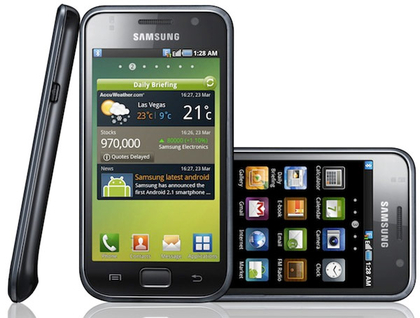
Android also inherits some important characteristics from Linux. It's much more open than Apple's devices, for example. There are fewer restrictions both on developers and what they can put in their apps, and on what users can run on their own hardware.
Initiatives such as Google's App Inventor should help far more people to scratch their own itches, and the Market application store, with its liberal approach to acceptance and inclusion, is catching up with Apple's App Store, passing the 100,000 applications mark in October.
And then there's the march of the Android tablets, many of which are appearing right about now, and all of which use Linux.
But Android isn't the only Linux mobile game in town. HP webOS, the operating system behind Palm's reinvention as a mobile vendor, has also gained a foothold in the phone market.
As with Android devices, its users are seldom aware they're using Linux. There are virtual desktops, a WebKit-enabled browser and a free development environment. There's also an applications store and access to a command line.
Even Nokia is buying into the open source revolution, firstly by taking over the Qt framework, and then by promising to ship all its smartphones with MeeGo, the Linux-based OS built in collaboration with Intel.
Set-top boxes
Set-top boxes are another secret to Linux's success. These are the devices that sit next to your television, typically streaming content from a server, recording digital television or browsing the web.
They've become so common that it's probably harder to find a device not running Linux than it is to find one with a penguin inside. But it's very difficult to see whether Linux is running on these boxes anyway.
Thanks to the ubiquity of the Busy Box embedded Linux distribution and the way most products use a completely customised front-end, there's usually very little evidence of the Linux you might be familiar with.
The fact they run Linux is irrelevant to the user, because you can't do anything the manufacturer doesn't want you to with most of them. Linux is the means rather than a feature.
The open source stack is augmented with various proprietary bits of code that are required for media content and high-definition streaming. Many digital television receivers fall into this category too.
Satellite boxes from Humax, for example, can use ext3-formatted USB drives to move recorded programs and media from the set-top boxes on to external storage, but this is the only clue that Linux may be powering the hardware.

Many media streamers, such as the Popcorn Hour devices, use Linux in the same way. The small chipset in these boxes is responsible for decoding almost every media format you can think of and sending video to your television at full 1080p resolution with digital surround sound.
That's a lot of power for an embedded system, and it's a job Linux is more than capable of.
The Popcorn Hour, however, is one example where you can get to the Linux sub-system, firstly through an open Telnet port, but you're then free to install community maintained packages or break out on your own with the command line.
Another is the Neuros Link, a low-powered PC in a box designed for media streaming and interactive TV. But because it's based on Ubuntu, you're free to install any of thousands of packages alongside the customised user interface designed to work with your television, so you get the best of both worlds.
It's a similar case with its predecessor, the Neuros OSD. This was a simple streaming client, but you could access its embedded Linux and turn the box into a much more capable front-end. Many people use them for MythTV playback, for instance.
Routers and switches
In the big brave world of the enterprise, networking and storage is what Linux does best, and some of this technology has filtered down to the home and small business market. If you need a wireless router, the OpenWRT firmware has become something of an unofficial standard.
This is because it includes many advanced routing features that, while common to the Linux desktop, can cost a small fortune if you want the same system embedded into a box. As a result, you'll find that many boxes from the likes of Linksys, D-Link, Buffalo, Gateway and Asus will have user-reported compatibility with the very latest releases.

Some, such as Netgear's WNR3500L, are designed specifically to run both Linux and OpenWRT, making them the perfect solution if you've got the skills and confidence to use it.
Audio engineering
There are several high-profile synthesizers that are using Linux because of its stability, low latency and development ease. Your first thought might be that Linux isn't exactly renowned for its library of brilliant synthesizer software, but this isn't what these devices attempt to do.
The Receptor racked synthesizer, for example, developed by a company called Muse Research, is actually designed to run synthesizers created for Windows. It enables many popular software synthesizers that would otherwise need a screen and keyboard to run within a box with only a few knobs and a small screen for control – just like most other racked synthesizers.
It manages this through the use of Wine and an old version of Red Hat Linux. What's most impressive is that, in these Receptor devices, Linux beats Windows at its own game, running VST software synthesizers at a lower audio latency and with more reliability than the operating system they were developed to run on.
This is why they've proven so popular, and why so many musicians prefer to have software synths running Linux rather than Windows.

Another high-profile Linux-based audio generator is Korg's flagship keyboard instrument, the OASYS. Korg is a Japanese company with a long history of synthesizer success, and its OASYS platform is a mythical hotbed for sound engineering development, long talked about before its release in 2005.
It's a modular system that's capable of running various types of synthesizer algorithms, all from its touchscreen, controller-rich hardware. And despite its £5,000+ price tag, it's proved to be a success with musicians who need results.

| |
Read More ...
Tutorial: 15 advanced Windows Media Center tips
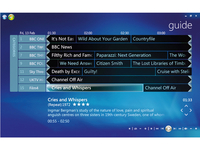 Windows Media Center is a cracking piece of software. It works elegantly if you're sitting at your desk, and equally well if you're reclining on your sofa, waving a remote control and watching a movie.
 However, despite its many advantages and undeniable prettiness, Media Center does have its foibles and limitations. He we'll identify and remove its biggest drawbacks.
1. Play MKV video files in Windows Media Center
Many high definition videos come in MKV file format, which you can play back in VLC Media Player, but not in Windows Media Center. To fix this, download and install ffdshow tryouts.
With 64-bit Windows you'll also need the 64-bit SVN, which you can get from the same place. Also install Gabest's Matroska Splitters.
You need to associate MKV files with Windows Media Center. To do this, simply open Media Center, right-click the top menu and choose 'File > Open'. Select 'Any File' in the 'File Type' box and browse to an MKV file. Open it and, when asked if you want to play this content, check the box marked 'Don't ask me again for this extension' and click 'Yes' to confirm your choice.
2. Increase the number of supported tuners
You can use multiple tuners in Media Center, but there's an upper limit of four. This is more than enough for most users, but if you're a telly addict then you might want more. You can increase the maximum to eight using TunerSalad.

Download and extract the ZIP file and run 'TunerSalad.exe'. Set the region and click 'Increase Tuner Limit'. If you want to go back to the previous limit, simply click 'Reset'.
3. Change audio output devices with a plug-in
Switching audio outputs in Windows is quite fiddly and can be tricky to do from the couch, but there's a plug-in called Audio Render Updater (French language) or translated by Google. There's an English language version of the plug-in, although its installer is in French.
Once installed, open Media Center, select 'Extras Library' and choose 'AudioRenderUpdater'.
4. Pick the optimum refresh rate for your video files
Some movies have different optimum resolutions and screen refresh rates. Refresh Rate Changer is available from the Australian Media Center Community. Once you've installed the plug-in, you need to specify some resolutions and refresh rates.
Browse to 'C:\Program Files (x86)\RRC' and open 'Settings.xml' in Notepad. Scroll to the section marked '
Add as many resolutions and refresh rates as you want and then save the file. In Media Center, you'll find Refresh Rate Changer in the 'Extra programs' section. Select the one you would like to use for the current session.
5. Mount ISO images in Windows Media Library
Save disc swapping by using virtual drives and ISO images. Install Virtual Clone Drive from www.slysoft.com/en/virtual-clone drive.html, which enables you to set up virtual drives and mount ISO images.
To access and mount image files in Media Center directly, install the Mikinho Mount Image plug-in. Once installed, it will detect Virtual Clone Drive. Restart Media Center and browse to the Movie Library. Select the movie you want to play, then choose 'More > Mount Image' and play the selected ISO.
6. Convert MKV files for use with an extender

If you want to use Media Extenders with Media Center, you'll have problems playing back MKV files because most extenders don't support them.
However, if you convert the files to DVR-MS format they'll play back perfectly. Install DVRMSToolbox from www.bit.ly/9UeuaL and launch 'DVRMSto MPEGSetting' from the Start menu. Select 'Convert MKV to DVR-MS – mencoder' and click 'Edit Profile'.
Select 'Read metadata from TvDB and build Sage XML file' and click 'Configure'. Tick the box marked 'Continue on fail' and click 'OK'. Now select 'Move the file specified in Context...' and click 'Configure'.
Uncheck all the boxes and enter your desired conversion destination. Click 'OK' and save the profile, then launch 'DVRMStoMPEGGUI', select the MKV file that you want to convert, specify an output file, choose the profile you want to use and then click 'Run' to convert it.
7. Use SFC to find and repair Media Center system files
Are you worried that your hacking might have damaged some Media Center system files? You can use System File Checker to check that they're OK. Choose 'Start > All Programs > Accessories', then right-click 'Command prompts' and choose 'Run as administrator'.
At the prompt, enter SFC /scannow. Once the scan is complete, you'll be able to see if any damaged system files have been found and fixed.
8. Convert Windows TV files to DVR-MS format
Media Center records TV shows as WTV files. If you want to process these for editing or commercial-skipping, you'll need to convert them to DVR-MS format. You can do this with DVRMSToolbox. You also need to install the WTV to DVRMS profile.

Extract the ZIP file and place 'WTV to DVRMS.dpc' in the following directory: 'C:\Program Files (x86)\DVRMSToolbox'. Omit '(x86)' if you use 32-bit Windows. You can now convert WTV files manually by opening 'DVRMStoMPEGGUI', selecting input and output files and using the 'WTV to DVRMS' profile.
9. Convert WTV files to DVR-MS automatically
You can set DVRMSToolbox to convert recorded TV shows to DVRMS format automatically. Open 'DVRMStoMPEGSettings', select 'wtv to dvrms' and open the 'FileWatcher' tab.
Check that all your recorded TV folders are shown in the 'Watched Directories' field. Also ensure that '.WTV' is shown under 'Watched Ext', and remove '.DVR-MS' as a watched extension if present. Save these settings.
Open 'ProcessingConditionEditor' from the Start menu and choose 'New Condition'. Make the Description 'WTV to DVRMS'. Choose the 'wtv to dvrms' profile from the dropdown list. Click 'Add', then select 'FileExt' from the first dropdown list and 'Equal' from the second list. Enter .wtv and click 'OK'. Click 'Save' twice. Once a show has finished recording, DVRMSToolbox will convert it.
10. Remove commercials from TV programmes
Although it's possible to use DVRMSToolbox to detect and remove commercials from TV programmes, Lifextender makes the job easier.
Install and launch the program, right-click its System Tray icon and choose 'Options'. Ensure that your recorded TV path is correct. Tick 'Automatic library scanning' and set the scan interval you want to use. Opt to recycle the original file so you can rescue it from the bin if there are any problems. Save these settings.
11. Add extra functions to your MCE remote
Customise the way your remote works by installing Intelliremote. There's a free 30-day trial, and the full version costs $24 (around £15). Before you can use the program, you need to disable the Windows service called Human Interface Device Access.
Type services into the Start menu search and press [Enter], then scroll down to 'Human Interface Device Access'. Double-click this and choose 'Disabled' as the startup type. Click 'OK' and close Services. Launch Intelliremote, choose the 'Customise' tab and use this to modify the action of each button.
12. Get the latest codecs and play FLAC files
To detect and play FLAC files in Media Center, you need to install the correct codec and regenerate your Media Library. Get the latest FLAC and other open source codecs.
Once installed, you should be able to play FLAC files, but they still won't be detected properly. Open Media Player and, in the Library, select all your albums. Right-click and choose 'Delete | Delete from library only'.
Close Media Player and browse to 'C:\Users\[username]\AppData\Local\Microsoft\Media Player'. Delete the file 'CurrentDatabase_372.wmdb'. Install the M4a/Flac/Ogg/Ape/Mpc Tag Support plug-in for Windows Media Player and Media Center from www.softpointer.com/WMPTagSupport.htm.
Reopen Media Player and choose 'Tools > Plug-ins > Tag Support plug-in'. Open your music library to rescan it.
13. Add channel logos to your WMC TV guide
You can add channel logos to your Windows Media Center TV guide by downloading My Channel Logos app from www.mychannellogos.com/download.aspx. Extract the ZIP file and then install the plug-in. Launch the program by choosing 'Start > All Programs > My Channel Logos > My Channel Logos'. It will download local logos. Click 'Autopopulate logos' to apply them to Media Center.
14. Add web videos with the Macrotube plug-in
Add popular web video services YouTube, Soapbox and DailyMotion to Media Center using the slickly designed Macrotube plug-in. The plug-in is free, but you can make an optional donation. Download and install it.
You can find Macrotube in the 'Extras' library. Select it and then choose the web video service you want to browse.
15. Stream movie trailers with Trailer Library
Get the latest movie trailers streamed to Media Center by installing the Trailer Library plug-in, which is available to download from www.bit.ly/bmhlDn. You can choose from WMV and MP4 versions of the plug-in. Select the one you want, then download, unzip and install it.

You can find Trailer Library in the Extras library. Once it launches, it will be populated with the latest movie trailers. Select one to view.

| |
Read More ...
Review: Michell Gyro SEduction
 The Michell Gyro SE is a classic British turntable that consistently scores well in our reviews, so it didn't take much for the company to tempt us with this limited edition version in a 'blue steel' and black finish.
 The SEduction version of the Gyro SE is being sold as a complete package with Michell's TecnoArm, HR power supply and matching record clamp. What's more, there's only 99 serial-numbered examples being made.
The Gyro SE has always been a good-looking turntable and this new finish brings a degree of sophistication that you don't often encounter at the price, but do the extras warrant the price premium over a standard machine?
The centre holds
The Gyro SEduction is a suspended turntable with a spring under each 'tower' on the ring-shaped black subchassis that surrounds the platter. The ring is an aluminium casting with weights on the underside to balance the tonearm at back right.
Each suspension post sits on an aluminium leg with an adjustable spiked foot at its base; the set up instructions suggest using these feet to level the turntable prior to putting the subchassis and platter on, but it pays to get your support as level as possible first.
Set up is a little more protracted than with most modern turntables and the box contains a fair number of bagged components that need to be assembled, but the process is pretty straightforward and the instructions reasonably clear.


A photographic run-through might help the uninitiated, but this is where the skills of a competent dealer will be invaluable.
We were impressed that the bubble in the spirit level, which sits on the centre pin, remains central when the platter is turning; not many turntables are that well engineered.
The platter itself is made of an acrylic/vinyl mix with weights fixed to the underside to give it inertia. These are usually polished brass, but for the SEduction the brass has been sleeved in blue-steel aluminium. The platter is driven via a round section belt and a DC motor in a superbly finished cylindrical case that sits directly on the supporting surface.
The elements that you don't get with a standard Gyro SE are the TecnoArm and the HR power supply. The latter uses the Never-Connected system to reduce the effects of mains-borne noise and has an on/off switch up front, but, as there's a very convenient switch atop the motor housing.
One feature that's worth investigating is the speed adjuster. You can use this to precisely set the platter speed if you have a suitable strobe disc. The TecnoArm is Michell's variation on Rega's classic RB300 and quite a heavily worked one at that.
It has a different counterweight stub to take an underslung weight (two are provided to suit different cartridges), provides full VTA adjustment with a pair of threaded collars and has the headshell machined to be in line with the bearings.

What you can also see is that there are holes in the underside of the armtube which reveal foam inside, the holes are 
said to increase rigidity and the foam provides damping. The high finish quality is achieved with bead blasting.
Built to last and last
The Gyro SE has always managed to combine solid engineering and good looks and the SEduction finish does it no harm in either respect.
Build quality is extremely high throughout, the inverted oil-pumping bearing is both very attractive – thanks to its polished brass finish – and rather clever in that it maintains lubrication at the thrust point where any amount of friction is detrimental to sound quality.
The trick is to set the suspension up so that the subchassis is very close to the felt washers on the spider and to centre the springs within their cut-outs.
There aren't many suspended turntables around anymore, the Linn LP12 is the most obvious competitor and in its Majik guise hits a similar price point. Avid is another player in this sector, its Diva II model has elastomer rather than coil spring suspension, an MDF platter and a cast rather than machined finish.

If you can provide a well-isolated support for a turntable, then there are a number of very fine solid plinth options around including the Townshend Rock 7. It doesn't look quite as good as the Michell, but its damping trough gives it a mechanical advantage.
Finally there's the standard Gyro SE, which can be had with a Rega RB301 for £1,340.
Gripped
In many respects the sound of this turntable and arm reflects its build quality and even its overall appearance – it's open by design and open in sonic character. It's also polished and sophisticated, presenting a coherent and extremely stable soundstage that delivers genuine sonic holography when the right slab of vinyl is on the platter.

We started out using a van den Hul DDT II cartridge, a brand that Michell MD Steve Rowland is not keen on, but one that lets the turntable produce a good solid groove thanks to excellent bass definition.
We really like the way you can hear what's going on with each instrument in an ensemble – double basses in particular seem more nimble and dynamic than usual. 

The Keith Jarrett Trio demonstrated this to boogie-inducing effect on the Changes album, and the way those musicians manage to improvise such a co-ordinated result really transports you when it's reproduced with this degree of clarity.
The quality of temporal and three-dimensional stability is what separates this package from the regular Gyro SE and we suspect that the degree of calm with which the system deals with dense material is also down to the TecnoArm, which helps to deliver impressive depth of detail and the stunning imaging that comes with it.
One older LP of Alfred Brendel playing Beethoven was particularly startling to the extent to which you could hear both the auditorium and the nature of the recording itself.
And sorted
It wasn't until we got the setup sorted that such entertaining and impressive results were achieved. Iif you audition a Gyro SE and it isn't timing well it's probably a fettling issue.
In SEduction guise this is a polished and revealing turntable that is very low on colouration and high on detail, the sort of detail that makes you realise just how good vinyl can be and why it is making such a big comeback.
With a great slab of the stuff it can place the music in the room in totally unfettered fashion, with instruments and voices placed precisely in the soundstage. Gripping stuff indeed.
Related Links

| |
Read More ...
Sony releases PS3 firmware update to foil hackers
 Sony hopes to foil hackers' and pirates' designs on its software by pushing out firmware version 3.56 to PlayStation 3s.
 The update includes a patch intended to stop hackers from executing unofficial code allowing illegal programmes and pirated games to run on the console.
Unfortunately for Sony, web-based hackers cracked the new update in a matter of hours and have circulated the necessary codes online for anyone who cares to search for them.
One step forward, two steps back
Sony recently launched legal action against hackers who published security codes for the PlayStation 3.
Earlier today, the company won a restraining order that stops the cyber-renegades from posting the codes online.
That hasn't stopped the myriad other tech-literate PS3 users from sharing the codes and hacking the latest firmware though.
Piracy poses a real problem for the games industry. But with speed-demon hackers cracking security fixes as quickly as companies can develop it, will a solution ever be found?

| |
Read More ...
Review: Asus RT-N56U Dual Band Wireless-N Router
 Asus has done the unthinkable with its RT-N56U Dual Band Wireless-N router, it's made it look beautiful.
As a dual-band 802.11n Wireless-N router the RT-N56U is designed to provide a complete Wireless-N networking extension to your existing wired network for both the standard 2.4GHz and newer 5GHz wireless ranges.
Asus has spared nothing in the design both technically and aesthetically, and you should be struck by both the shiny exterior case design and the shiny specification lurking below it.
Of key importance to the RT-N56U is the 5GHz 802.11n; AKA Wireless-N networking.
The theory being that using twice the frequency should boost speeds by two times too. The practical outcome however is far from that simple.
Despite the 5GHz range being far less crowded, along with the the availability of more free channels, the 5GHz frequency is hampered by being absorbed far more readily by objects.
Back it up with MIMO to compensate for that though and perhaps you'd hope for a 50 per cent increase in throughput over 2.4GHz.
Couple these abilities with its Gigabit LAN, cable-ready WAN port and full complement of security, management and easy-to-use web interface, this should be a winning combination.
So, is it?
We tested the wireless performance in various scenarios to see how the Asus RT-N56U performed in typical real-world situations for both its 2.4GHz and 5GHz modes.
The first was a same-room configuration transferring a large file from the router to the laptop. The second involved the laptop being placed one brick-wall and a standard wooden floor away.
Finally we ran a distance test at 30m with a direct line of sight, to see how it coped with distance.
Same room transfer speed

One-room, one-floor away transfer speed

30m line-of-sight transfer speed


At the heart of the Asus RT-N56U are two sets of 802.11n wireless antennas. These create the distinct spatial streams for the 2.4GHz and 5GHz radio frequencies.
Typically better 2.4GHz will offer three or four distinct antenna, as more spatial streams increase the MIMO effect, so increasing speed and workable distance.
The RT-N56U comes with two internal antennas for the 2.4GHz range and three for the 5GHz range.
Two antennas is something we'd expect to see on more modest Wireless-N-class routers, though we can understand the need to concentrate on the 5GHz performance.
Even so, same-room and medium-distance tests were excellent.
In some respects besting wired 100BaseT Ethernet speeds, with an average of 12MB/s and peaks just over 13MB/s. One room and floor away and speeds were maintained at 10MB/s.
It wasn't until we tried at distance that things tailed off to 1.1MB/s, which was our only disappointment with the RT-N56U, but at 5GHz its three antenna maintained a decent 3.8MB/s transfer speed.
Unusually for a router it manages to pull off the twin design goal of looking aesthetically pleasing and offering an aesthetically pleasing web interface.
In fact its interface feels more like a standalone app than a web-based interface. It's slick, well presented, easy to navigate and speedy to use.
This makes setting up what in effect are two routers in one an easy and quick job. It also includes a WPS fast-setup button that ties into Windows 7 which can eliminate entering WPA keys. If you trust that sort of thing.
A barrage of status LEDs is tastefully implemented, while the USB ports can handle storage, printers and compatible 3G adaptors. That USB storage ties in beautifully with the UPnP capabilities so it doubles as a media streamer, bittorrent, FTP and HTTP download server too.
We liked:
There's an awful lot to like about the ASUS RT-N56U from the aesthetic design of both the chassis to the slick web-based interface to its actual performance.There's a confident air about every aspect of it and you really feel the engineers have the designed knowhow to squeeze every drop of performance from their hardware.
The Ai Radar technology certainly overcome any limitations of the 2.4GHz twin antenna to provide leading-class performance and 5GHz speed are equally impressive.
We disliked:
With only a question mark over its long-range performance, at this price it's certainly full-steam ahead for this ASUS router.Related Links

| |
Read More ...
Video: BBC's 1923 silent newsreel piracy warning unearthed
 Forget the latest government's attempts to wheedle out pirates with a three strikes and you're out policy, the BBC had more effective methods back in 1923 – and it involved a chimp and a radio transmitter.
Footage posted on to YouTube from the BFI archive features an original silent newsreel shown to cinema-goers (and time travellers) that begins with the card: 'Have You Got your License Yet? Broadcasting Company's Warning To Pirates."
What follows is some eerily quiet footage of a chimp in a bed, waking up from his slumber and tuning into a radio transmitter.
Monkeying around
As threats go, it is probably the cutest we have seen. But we're guessing that being called a chimp for not buying your radio license back in 1923 was pretty insidious.
To put the clip into context – the BBC only began broadcasting radio in 1922 and just a year later it was already trying to battle 'pirates' who were listening to the company's received pronunciation illegally.

| |
Read More ...
Sky 3D video gives glimpse behind the curtain
 Sky has put up a behind the scenes video of how it films 3D, as it celebrates getting the Sky 3D channel into 70,000 homes.
 Aside from major movies, Sky is also producing sports, entertainment, documentary and arts content for Sky 3D, as the company looks to become the home of 3D in the UK.
The latest video gives customers a glimpse behind the curtain, showing filming at the MEN Arena and the Emirates Stadium.
Public scrutiny
"This is the first time we have talked publicly about the number of subscribers taking up this exciting new service, and, even more encouragingly, around half of all the 3D TVs sold so far in the UK have subscribed to Sky 3D, with thousands more joining every week," said Sky Sports director of operations Kevin Long.
"As we approach our 100th live sports 3D broadcast, we are further cementing our position as a world leader in the 3D sports production. But producing live 3D coverage of major sporting events is not child's play.
"Three dimensions adds a whole new layer of complexity to live broadcasting, and providing world class live 3D coverage relies on the dedication, skill and cutting-edge technological know-how of scores of Sky production staff.
"This exclusive behind-the-scenes video – shot on location at the MEN Arena and the Emirates Stadium – shows just how much work goes into delivering the best possible 3D experience for our customers."

| |
Read More ...
Is Nokia considering an Android phone?
 Could 2011 be the year we see Nokia make an Android handset or hop on board the Windows Phone 7 bandwagon?
CEO Stephen Elop set online tongues a-wagging with a passing comment about the manufacturer's plans after disappointing Q4 2010 financial results.
While discussing the financials, Elop said, "In addition to great device experiences we must build, capitalise and/or join a competitive ecosystem.
"The ecosystem approach we select must be comprehensive and cover a wide range of utilities and services that customers expect today and anticipate in the future."
Like Fern Gully, but with phones
When Elop says 'ecosystem', we can safely assume he means 'operating system' or even 'app platform', with Symbian^3 dividing opinion and failing to ignite US success for the Finns.
Nokia is already working with Intel on MeeGo, a brand new OS set to hit the market at some point early this year; but that 'and/or join' phrasing offers a tantalising hint that the company is considering other existing platforms.
This isn't the first time that rumours of Nokia working on an Android handset have surfaced, with Nokia flatly denying any Android involvement back in 2009.
Nokia is staying tight-lipped on the matter today, however, refusing even to comment on the rumours. Read into that what you will.

| |
Read More ...
Review: TP-Link TD-W8961N 300Mbps Wireless N ADSL2+ Modem Router
 TP-Link's TD-W8961ND is an unapologetic budget, no frills 300Mbps Wireless N ADSL2+ modem router.
This basic box seemingly provides everything a home or SOHO user might need to get ADSL broadband over a landline and share it around the home with Wireless N networking.
If you're looking to upgrade from an existing out-dated BT Home Hub 1.0 or other 802.11g wireless equipped ADSL modem router, then this could be an ideal low-cost solution.
The TD-W8961ND is squarely aimed at the entry-level market, yet still features a ADSL2+ modem router with 300Mbps Wireless N.
So coming in at under £40 it certainly succeeds on the value front.
It comes with a number of ease-of-use features that should help even the basic user through setting up their broadband connection, along with securely connecting wireless devices to the ADSL2+ modem router.
Alongside these are a host of far more complex features that add greater interest to this otherwise somewhat dull budget ADSL2+ modem router.
We tested the wireless and WAN performance to see how the TP-Link 300Mbps Wireless N ADSL2+ modem router TD-W8961ND performed compared to a similar model, in this case a standard BT HomeHub 2.0.
Compared with the BT box the wireless transfer speeds were shockingly bad, but things did pick up.
The ADSL matched the downsteam and beat the upstream by a substantial amount, both in physical connection and tested transfer speeds. The TP-Link router happily performed at 100BaseT levels on the LAN connection
Wireless transfer speed

ADSL connection speed

ADSL transfer speeds


Primarily the TD-W8961ND has to be a good ADSL2+ modem router, and it at least manages that in two parts.
First is a set-up wizard that tries to help configure the modem router for a long list of UK ISPs. The second is good broadband performance and, after fighting with the configuration, it matched our standard ADSL connection downstream and offered an enhanced upstream speed.
Less impressive is the wireless performance.
It uses dual antennas for two spatial streams and claims to be 300Mbps, though performance is unlikely to go beyond 130/144Mbps. To do that the router would need to use 40MHz channels, which is unlikely except in Wi-Fi free areas.
Performance even in the same room was somewhat dismal and erratic, peaking around 1.9MB/s and averaging a very poor 391KB/s.
This doesn't get any better with distance and, as we'd imagine this is the primary way people will be connecting to the modem router, it's a huge turn off for the TD-W8961ND.
Equally unattractive is the web-based interface.
In its defence it covers a lot of complex options and features, but that can't excuse a sluggish response and a bizarre half-finished look to the page design.
This does cover one positive area of the ADSL2+ modem router in that there are a number of advanced feature hiding inside, such as port binding for specific services, wireless bridge options, Annex M to double upstream rates and full QOS abilities.
It feels like a rushed product and at the time of writing the latest firmware dated 17/6/2010 lists one of its key updates as "Fix the low rate of wireless connection."
Which doesn't fill us full of confidence.
We liked:
It has a no-nonsense design that even comes with a power button. It knows it's a budget modem router and tries to play to that strength offering some ease-of-use features for novice users, but still offers a raft of more advanced options.We disliked:
Wireless performance was something of a disaster and taints the main way you'll be using this router. It's bad enough that it could be performing worse than your broadband connection.It doesn't help that the web-based interface has an unfriendly look, is slow to use and despite its best effort to be easy to use still baffles with a range of technical features that most will not want.
Related Links

| |
Read More ...
Klipsch ProMedia InEars for gamers are announced
 Audio specialists Klipsch has unveiled £90 ProMedia InEars which it claims takes its "intense sound philosophy and applying it to in-ear head phones for gaming."
The ProMedia InEars offers noise cancelling design, hands-free mic and a VOIP/Gaming adaptor.
The high-end headphones also feature patented oval ear-tips, durable tangle resistant cables and come in black with red accents.
Gamers
"Primarily intended for computer gaming, the ProMediaIn-Ear headphones add a new dimension to today's highly sophisticated online entertainment," explains Klipsch.
"The single-button microphone offers crisp, clear communication for talking to enemies or collaborating with teammates during online gaming, and also makes these headphones a great solution for internet Skype calls and mobile phone usage."
The gaming headphones certainly aren't on the cheap end of the range at an RRP of £89.99, but do come with a two-year warranty and a fair whack of audio credibility.

| |
Read More ...
Goal-line technology heads to meet Fifa next week
 Goal-line technology could well be on its way to the Premier League, with 13 companies meeting up with Fifa next week to vie for their tech to be used.
While the idea is still in the proposal stage, there is a lot of heat on Fifa at the moment to implement the technology and do away with controversial refereeing decisions.
If one of the 13 companies – Hawk-Eye and Cairos are two of the more famous ones attending – can convince Fifa that goal-line technology can be used and not impact the flow of the game, then it is likely that it will be used for major football tournaments.
Spot the ball
The current method of goal-line 'technology' being tested out by Uefa's president Michel Platini is to have to assistant referees stand behind the goals and make a decision as to whether the ball went over the line or not.
These additional refs have been roundly criticised due to the fact that for the majority of a game they have absolutely no involvement.
Companies such as Abatec, Tag Heuer and Longines will be running up against Hawk-Eye and Cairo but, according to the Guardian, it may well be a UK-based rival that pips the rest to the post.
Goalminder is the brainchild of ex-footballer Harry Barnes and uses cameras to see if the ball goes over the line. Within seconds a high-def image can be shown on TV of the ball, which will please the likes of Sky - famous for using technology to spruce up its broadcasts of matches.
Delayed decision
Even though this, albeit significant, meeting is taking place it is doesn't mean that any of the 13 companies will be chosen to develop their technology for football matches.
Sepp Blatter has always been coy over the use of goal-line technology and it will be him who has the final say if the technology will be used.
The International Football Board (IFAB) said back in October that it would look at the technology and make a decision in March, which means that Blatter and co will take its time to make its decision.

| |
Read More ...
Windows 7 hits 300 million mark
 Microsoft's latest financials not only brought better than expected results, but also the news that the company has now surpassed 300 million licenses sold for Windows 7.
 The software giant's key operating system ahs been a critical hit, and has also proven to be hugely popular with consumers.
That's shown by the latest announcement, with Brandon LeBlanc confirming the 300 million total in a blog post.
300 million licenses
"Today as part of our Second Quarter Fiscal Year 2011 earnings release, we announced that Windows 7 has sold over 300 million licenses to-date," said LeBalanc
"To put that in perspective, 300 million is roughly the combined number of households in North American and in Europe! Or, to put it another way, if you lined up 300 million Windows 7 product boxes, they would stretch nearly 1.5 times around the Earth!
"As of today, over 20 per cent of Internet-connected PCs worldwide are running Windows 7 according to Net Applications."
It's a key landmark for Microsoft, and will be a key boost to the company, although Windows 7 sales inevitably suffered as PC sales slowed in the last quarter.

| |
Read More ...
The Daily for iPad to launch on 2 Feb
 Apple and News Corp. have announced a press conference on 2 February to launch The Daily, the media conglomerate's long-awaited iPad-only newspaper.
 The weekly paper is set to launch for 99c per issue, which should translate to a 79p UK price tag.
The Daily's launch is expected to coincide with that of Apple's new iTunes subscription service, which explains the joint press conference.
Subscription controversy
It's Apple's iTunes subscription service that is believed to have caused The Daily's delays.
Whispers of dissent have been heard from publishers who are unhappy with Apple's vice-like control of user data and greedy 30 per cent cut of subscription sales.
With rumours of Google looking to launch a competing Android newsstand, we could see a digital publishing format battle about to commence.

| |
Read More ...
BlackBerry Curve Touch picture and specs leaked
 Phone companies just can't keep their documents from falling into internet-friendly hands, and RIM has been particularly clumsy this year.
 After a host of handset leaks earlier in the month, the company's product roadmap has now made its way to BlackBerry blog Crackberry.
Some of the products are old news – the Playbook, for example – and some are merely the CDMA versions of the leaks we've already seen (the Sedona is the Curve Apollo, the Montana is the Dakota and the Storm 3 is the Monaco).
Pacific Coast Highway
But the handset code-named Malibu is a mysterious new one, clarified in a further slide as the Curve Touch, an "accessible all-touch BlackBerry".
The touchscreen is a 3.25-inch job, with 480x360 HVGA resolution and an 800MHz Qualcomm processor.
Like most new and current BlackBerrys, the camera offers a 5-megapixel sensor with HD video recording.
Sad times for physical QWERTY fans
Although there's no physical QWERTY, the familiar optical trackpad and navigation keys from the likes of the Bold 9780 are present and correct.
Interestingly, the handset will also feature NFC connectivity, although by the time it's released at the end of the year NFC may be fairly old hat.
The Malibu's OS will be "BlackBerry 6 Evolution" – which means it will focus on the digital compass and augmented reality, NFC, HD video and HTML 5.
This information all comes from RIM's CDMA roadmap, which suggests that the handsets are intended for the USA and Canada; still, there's a good chance we'll see a GSM version of the Malibu meant for the European market. We will keep you posted.

| |
Read More ...
BlackBerry Curve Touch picture and specs leaked
Phone companies just can't keep their documents from falling into internet-friendly hands, and RIM has been particularly clumsy this year. After a host of handset leaks earlier in the month, the company's product roadmap has now made its way to BlackBerry blog Crackberry.
Some of the products are old news – the Playbook, for example – and some are merely the CDMA versions of the leaks we've already seen (the Sedona is the Curve Apollo, the Montana is the Dakota and the Storm 3 is the Monaco).
Pacific Coast Highway
But the handset code-named Malibu is a mysterious new one, clarified in a further slide as the Curve Touch, an "accessible all-touch BlackBerry".
The touchscreen is a 3.25-inch job, with 480x360 HVGA resolution and an 800MHz Qualcomm processor.
Like most new and current BlackBerrys, the camera offers a 5-megapixel sensor with HD video recording.
Sad times for physical QWERTY fans
Although there's no physical QWERTY, the familiar optical trackpad and navigation keys from the likes of the Bold 9780 are present and correct.
Interestingly, the handset will also feature NFC connectivity, although by the time it's released at the end of the year NFC may be fairly old hat.
The Malibu's OS will be "BlackBerry 6 Evolution" – which means it will focus on the digital compass and augmented reality, NFC, HD video and HTML 5.
This information all comes from RIM's CDMA roadmap, which suggests that the handsets are intended for the USA and Canada; still, there's a good chance we'll see a GSM version of the Malibu meant for the European market. We will keep you posted.

| |
Read More ...
Early View: Motorola Xoom vs iPad vs PlayBook
 When the Motorola Xoom and BlackBerry PlayBook hit the market, we'll have two serious challengers to the iPad.
And, perhaps most interestingly, all three will be running different operating systems. So let's compare how the two newcomers stack up against the hottest tablet yet released.
In terms of releases, Motorola won't say anything about the Xoom's UK release date, though it is pencilled in for the first quarter of 2011 in the US. However, it depends on when Google is planning on getting Honeycomb out the door.
Likewise we should be seeing the PlayBook arrive in the Spring or early Summer.
And, of course, around that time we'll also be expecting iPad 2, so we'll be updating this piece when we know more about that new device.
OS
This is the biggest difference between the three tablets. The iPad runs Apple's own iOS, the Moto Xoom Android 3.0 Honeycomb and the BlackBerry PlayBook runs RIM's own bespoke Tablet OS. The Xoom was the main unit used to demo Android 3.0 Honeycomb, at this year's Consumer Electronics Show, though we only saw videos of OS features running on the new device.
There will also be no Motorola MotoBlur interface overlaying Android 3.0 – this could be part of a bigger move by Google to stop having so many variants of Android.
We've got a proper hands-on with the PlayBook at CES a few weeks ago and it's a serious threat to the iPad's dominance of the sector. TechRadar's Reviews Editor James Rivington says the PlayBook "could well be the tablet that changes the game. In a word, it's a triumph."

ANDROID 3.0: This Xoom was just running a video, but the real Honeycomb looks special
Processor
All three units use ARM-based silicon. The iPad runs Apple's own A4 processor clocked at 1GHz (it's less in the iPhone 4), while the Xoom plumps for a dual-core Nvida Tegra 2 processor, capable of 720p video or sending 1080p full HD to your TV via HDMI. The PlayBook is also running a dual core 1GHz Cortex-A9-based processor, though there are no more details on who has manufactured it. It's probably an Nvidia Tegra 2.
Touchcreen
The Motorola Xoom has a 10.1-inch, 1280 x 800 display. The PlayBook is only a 7-inch tablet and to us it can feel small. The touch on the PlayBook does extend right across the bezel though, which is a nice touch and pretty important for navigating around the OS.
The screens on both the PlayBook and Xoom look pretty spectacular even under the bright show lights where we checked them out. The PlayBook's size gives it an advantage though, as we said in our hands on:
"The PlayBook's 1024 x 600 resolution isn't far off the 9.7-inch 1024x768 iPad, but because of the Playbook's 7-inch display, the increased pixel density makes all the difference. It's sharp and crisp, and 1080p HD video looks fabulous."

CRISP: The PlayBook's screen is quite pixel dense - largely because it's only a 7-inch tablet
Storage
The Xoom has a Micro SD slot, but Android 3.0 doesn't yet support it (apparently). However, Moto says that as soon as the OS permits it, you'll be able to use up to 32GB of removable storage. As you'll know, the iPad doesn't have any kind of slot – though it has 16 or 32GB on board flash storage of course.
Memory
The PlayBook has 1GB of RAM, as does the Xoom. Remarkably, the iPad lags behind in this department, though you'd scarcely notice it. It has 256MB of system memory.
Camera
While the iPad doesn't have a camera, the iPad 2 will change this. The Xoom has two cameras front (2MP) and a 720p capturing back 5MP camera with a dual LED flash. The Playbook packs two cameras – a 3MP front-facing camera and a 5MP rear-facing one.
Connectivity
All three are designed for use with 3G networks. However, we may well get a Wi-Fi version of the PlayBook before we see a 3G-enabled variant – obviously this is speculation currently. The base iPad is also Wi-Fi only of course. It looks like there will also be two versions of the Motorola Xoom. Another version will work on 4G networks in the US, though we'll only get 3G here of course. All have 802.11 a/b/g/n Wi-Fi.
The Xoom and PlayBook also support HDMI output to a TV – the iPad supports AirPlay for wireless streaming via Apple TV. All have Bluetooth 2.1 plus GPS support. The Xoom and PlayBook also have Micro USB which the iPad sticks with the trusted Apple dock connector. All three tablets have 3.5mm headphone jacks. The PlayBook can be paired with a BlackBerry phone via Bluetooth for full interaction with its Email, Calendar, Docs and BBM.
Location and sensors
All three also have an accelerometer and compass and Assisted GPS in their 3G variants. The Xoom also features a gyroscope as well as a barometer for measuring the atmospheric pressure. Details seem sketchy on whether the PlayBook will have a gyroscope, so we're keeping an open mind.

GYRO: Will the PlayBook have a gyroscope like the Xoom?
Cost
Rumours abound that the Motorola Xoom price is £720 and we shouldn't expect to pay much less: the firm's VP of international marketing, Andrew Moreley, says "the Motorola Xoom is clearly a premium device with premium prices inside. This will show in the cost." All of which makes the iPad look like a steal. The Wi-Fi version was £429 at launch of course, but the VAT rise has seen this increase to £439.
Bulk
The 7-inch PlayBook is 9.7mm thick and weighs just over 400g. The weight of the 10.1-inch Xoom has been reported to be around 730g, with a 13mm thickness. That's the same weight as the Wi-Fi + 3G iPad, which is 13.4mm thick.
Compatibility
As most of the world's population knows, the iPad doesn't support Flash. Android 3.0 does though, as does RIM's Tablet OS, with full Flash 10.1 and Adobe Air. All have HTML 5 compatibility. Will Android 3.0 and RIM's new OS really lay down the gauntlet for iOS and the iPad? Time will tell.

| |
Read More ...
Sharp Quattron TVs to get Pioneer Elite branding
 Sharp and Pioneer have announced that they will jointly be resurrecting the Eite brand of TVs for the American market.
Elite was known in AV circles as being one of the top TV brands around, but this came to an end in March 2010, when Pioneer stopped making televisions and in the process waved goodbye to both Elite and Kuro branding.
But now Elite is back and will be the name of a new line-up of Sharp Quattron TVs which both companies hope will become part of the lucrative custom install market.
High-end brand
"As a leader in large-screen LCD TVs, we are excited to collaborate with Pioneer to bring a high-end LCD TV to the Elite consumer," explained John Herrington, Sharp's president of marketing in the US.
"The Elite brand is highly respected in the high-end market, and Sharp can deliver the quality and innovation that Elite customers demand."
It will be interesting how well received the new line of TVs will be. For a start, Pioneer is synonymous with plasma technology, so seeing the Elite branding on an LED TV may irk some.
And then there's the fact that neither Pioneer or Sharp will have their names on the sets, they will simply be called Elite.
What this news does mean, though, is that there could be a slim chance that the Kuro brand may well be next to be dusted down.

| |
Read More ...
Google promises Nexus S reboot bug fix soon
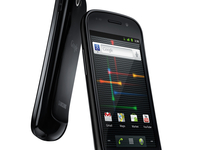 Google has got to the bottom of the Google Nexus S reboot issue and promised a fix in the near future.
The Nexus S has been a relative success in its first weeks of launch, but certain devices (including TechRadar's own) have been hit with a random reboot problem, where the phone would shut down and restart of its own accord.
Our experience found that the music player was often the cause, but others experienced the same thing with calling, or just doing nothing at all.
Google's acknowledgment of the problem has been sporadic, with the official forums seeing the issue 'declined' as a real problem on some threads.
Glad Ry Guy ain't Shy
But Ry Guy from the Android team has now not only confirmed Google has found the issue, but has also come up with a fix:
"The initial results of our tests look very promising. At this rate we will most likely be rolling out an OTA to resolve this issue within one to two weeks.
"We really appreciate your patience as we do our final verifications on this fix before sending it out."
So it seems that the bugs prowling around the coloured corridors of the Nexus S will be vanquished fiery lance of development steel - or something.

| |
Read More ...
LG Optimus 2X gets March UK release date
 The LG Optimus 2X is the latest to hit pre-order on Play.com, with UK pricing of £469.99.
That figure exactly the same as that of a Swedish retailer which popped the LG Optimus 2X up for pre-order just before Christmas, which means the Brits aren't losing out in the exchange rate cross-over, for a change.
The much-lusted-after Android handset is also listed with a UK release date of 18 March.
Dual-core
As the world's first dual-core smartphone, the LG Optimus 2X is rocking an Nvidia Tegra 2 processor, promising full HD playback and supersonic speed operation.
The price puts it in the same bracket as the Google Nexus S, although there's not yet any confirmation on whether the Optimus 2X will be running Android 2.3 like the Google-branded handset.
The March release date will also see the LG Optimus 2X competing against the promise of all the newly announced super-phones from Mobile World Congress 2011.

| |
Read More ...
Kinect and Office boost Microsoft as Windows sales fall
 Buoyant sales of the hugely successful Kinect for Xbox 360 and Office were enough to keep Microsoft's last quarter financials looking healthy, despite the expected drop off in Windows sales.
 With PC sales suffering as tablets and consoles rose in the traditionally busy holiday season, analysts has pointed to a likely major drop for Microsoft income.
However, although net income did drop, it was only from $6.63 billion to $6.6 billion – and the results were enough to push the software giant's share price up slightly.
Windows sales suffered – with a 30 per cent reduction year on year; not surprising considering its launch date.
Kinect growth
However, 8 million Kinect's sold 'far exceeded Microsoft expectations' and Microosft's Buseinss Division grew 24 per cent year on year on the back of Office sales.
"We are enthusiastic about the consumer response to our holiday lineup of products, including the launch of Kinect. The 8 million units of Kinect sensors sold in just 60 days far exceeded our expectations," said Peter Klein, chief financial officer at Microsoft.
"The pace of business spending, combined with strong consumer demand, led to another quarter of operating margin expansion and solid earnings per share growth."

| |
Read More ...
Nokia: sales are up but profits are dropping
 Nokia has revealed its financial results for the last quarter of 2010, and it's not looking too rosy for the Finnish phone manufacturer.
 Although sales increased in 2010 compared to 2009, the company's operating profits fell by 9 per cent for the entirety of the year, with a 22 per cent drop in Q4 profits compared to 2009.
Sales of regular mobile phones fell by 5 per cent but smartphone devices more than made up for the dip with a 13 per cent increase in sales year on year, thanks in part to recent high-profile launches like the Nokia N8 and Nokia C7.
Faster changes ahead
Stephen Elop, Nokia's CEO, admitted that Nokia is facing a tough year: "Nokia faces some significant challenges in our competitiveness and our execution. In short, the industry changed, and now it's time for Nokia to change faster."
Some might say it was time for Nokia to change faster about, say, three years ago when the iPhone was launched, but hey, better late than never.
Nokia is forecasting a weak start to its year, with estimated sales well over a billion Euros lower than Q4 2010's €8.5bn performance.
On the plus side, Nokia reckons the affordable C3 helped it become the leader in QWERTY devices during the fourth quarter of 2010. BlackBerry might have something to say about that, but we suppose that Nokia needs to take the good news where it can find it.

| |
Read More ...
Updated: 40 best iPhone games - paid apps
 There are now tens of thousands of games on the App Store, covering every genre.
 Huge studios battle it out with bedroom coders, providing iOS gamers with a mix of blockbuster titles and novel creations full of innovation and personality.
Below we list our 40 favourite paid-for games for iPhone and iPod touch; if we've missed your top game, let us know what it is in the comments!
Don't forget that universal apps also work natively on the iPad.
1. Angry Birds - £0.59

The moral of Angry Birds is that if you're a hungry pig, don't steal eggs from crazed birds with a death-wish, who also happen to own a massive catapult. If you're one of the 17 people who've not yet sampled this artillery classic, you fling angry birds at ramshackle structures, aiming to dispatch the pigs lurking within. Ingenious level design and varied bird 'powers' make this a classic iOS game.
2. Bit Pilot - £0.59

Avoid 'em ups are commonplace on the App Store, but none offer the polish, charm and addictive qualities of Bit Pilot. The aim of the game is simply to survive, avoiding asteroids and lasers, and grabbing sporadic shield power-ups. Lovely graphics and crunchy chip-tunes round off a first-class title.
3. Drop7 - £1.79, universal

The concept of this puzzle game is straightforward: drop numbered discs into a grid; when the number on a disc matches the amount of discs in its row or column, it explodes. Grey discs need an adjacent explosion before they reveal a number. Drop7 is brilliant and addictive, and it is to the iPhone what Tetris was to the original Game Boy.
4. Pix'N Love Rush - £0.59

Here's platform gaming for the low-attention-span generation. Doffing its hat to WarioWare, Pix'N Love Rush flings retro-platforming action at you at a blistering pace, switching between Mario-style horizontal scrolling, vertical levels, and static Bubble Bobble-oriented affairs. Dressed in Nintendo-style graphics, this is a frantic, exciting game that's an insane bargain at 59p.
5. Dark Nebula - Episode 2 - £1.19

Dark Nebula - Episode 2's developer undersells it as a 'labyrinth' game, but it's really a fast-paced top-down arcade game, albeit one with occasional puzzles and that seriously challenges your dexterity. You guide your orb through sci-fi installations, unlocking doors, defeating traps and battling foes. The aesthetics are wonderfully atmospheric, and the game offers a well-judged difficulty curve with new elements in each level.
6. Flight Control - £0.59

Firemint kick-started the path-drawing genre, and Flight Control remains the best game of its type. You guide aircraft to landing areas by drawing paths, taking care to avoid the single collision that ends the game. For extra challenge, try the navy level with a lazily rotating aircraft carrier and super-fast jets.
7. Orbital - £1.79

In Orbital, you fire orbs into the play-area; when an orb stops, it expands until it reaches an obstacle. An orb's number dictates how many times it must be hit by subsequent orbs until it explodes. Strategy therefore relies on you carefully picking your spot, aiming to create chain reactions and take out several orbs with one shot. Both beautiful and absorbing, Orbital is a textbook iPhone game.
8. Run! - £0.59

Canabalt and Mirror's Edge are glossier, but Run! combines the auto-running mechanic and swipe-based gestures of those more polished titles, and then adds falling meteors, evil wizards, UFOs, a shoulder-mounted bazooka, and the ability to karate-kick leaping sharks in the head—for 59p. It might look a little rough, but Run! is best-in-class by some margin.
9. Minigore - £0.59

If you go down to the woods today, you're sure of a big surprise: it's infested with ravenous 'furries'! To survive, you merely have your wits, trusty weapons and the means of temporarily transforming into an unstoppable beast-like killing machine. Minigore is dual-stick Robotron-style action with modern cartoon graphics and a dollop of gore. It's also excellent.
10. geoDefense - £1.19

At the last count, there were about a million tower defence games for iOS. Most of them are slow and ugly; geoDefense is neither. Instead, it's a sleek, challenging, intense game, dropping you into a neon nightmare where creeps come thick and fast.
11. Real Racing - £2.99

Firemint never got the "there are no games with any depth on iOS" memo, and so they went ahead and created Real Racing. 48 cars, 12 tracks, five game modes with 76 events, multiplayer, several control methods, different cockpit views… like hell the iPhone isn't a 'proper' games console.
12. Grand Theft Auto: Chinatown Wars - £5.99

Rockstar Games didn't get the memo either, so they went ahead and shoved a grubby, violent city full of gangland warfare into your iOS device. Matching the same game on PSP and DS, Chinatown Wars has you trying to survive turf wars, shoot-outs, high-speed chases and drug deals. But if it all gets a bit much, you can steal a taxi and earn a semi-honest living carting fares about Liberty City.
13, Zen Bound 2 - £1.79, universal

When you describe Zen Bound 2, it sounds rubbish. "You wrap rope around wooden sculptures." See? However, there's an oddly mesmerising, almost hypnotic quality to this game. Its tactile nature and fluid controls draw you in, and you soon rise to the challenge, trying to complete each level with the minimum amount of rope.
14. Squareball - £0.59

AAARRGGGHH! That's an exclamation you'll hear a lot of (from yourself) if you take on Squareball. This unforgiving mutant offspring of Pong, Breakout and a horizontally scrolling platform game is frustratingly tough, despite 'merely' tasking you with not hitting red blocks or flinging your 'square ball' into space. Soon, you realise the weak spot is in fact you, since the swipe-based controls are perfectly tuned - and by that point you'll be addicted.
15. LilRacerz Pro Rally - £1.19

Older gamers may remember Super Sprint in the arcades, Super Cars on the Amiga, or the original NES Micro Machines by Codemasters. LilRacerz Pro Rally is a top-down racer. And it's just as much fun as those classic titles (and for £1.19!), and boasts 34 tracks, ten unlockable cars, and four different environments. The controls are great - the cars drift but there's some weight to them - and the subtle 3D graphics are a nice touch.
16. Monkey Island 2 Special Edition: LeChuck's Revenge - £1.79

Yo-ho-ho! This be the classic game ye scurvy dogs have been waiting for! A classic point-and-click adventure from way back in 1991, Monkey Island 2: LeChuck's Revenge has been dusted off, turned into a 'Special Edition' (new graphics and audio, hints system, updated controls), and fashioned into a thing o' beauty. Arrrrrrr!
17. Soosiz - £1.19

Boasting a gravity mechanic akin to Super Mario Galaxy but side-on gameplay closer to the Nintendo mascot's 2D adventures, Soosiz is a cracking platform game. You must search 66 levels over seven worlds to find your friends, battling foes and gravity along the way.
18. WestBang - £0.59

WestBang's tap-based gameplay mechanics go back to the dawn of videogames, in that it's ultimately a simple reaction test. Doors open, and you have to shoot bad guys (but only after they draw—after all, good guys play by the rules) and avoid dispatching innocents. It's reminiscent of Sega's classic Bank Panic, but offers better graphics and more characters, along with added fun and depth.
19. Parachute Panic HD - £1.19, universal

It's tough for the parachutists in Parachute Panic HD. They leap from planes towards boats that won't stay put, and hazards range from UFOs and deadly helicopters to sharks only too happy to eat anyone who's careless enough to fall into the sea. The swipe-based gameplay is compelling, the controls are intuitive, and the soundtrack is both charming and funny.
20. Azkend - £1.79

Azkend eschews the typical match-game grid; instead, you drag paths to match shapes housed in hexagonal spaces. Along the way, a story unfolds that reveals talismans and power-ups to help you clear boards. Faster and prettier than Bejeweled, Azkend is perhaps a little easy to complete, but it still offers many hours of entertainment.
21. Rat On A Skateboard - £0.59

The third outing for Donut Games mascot Ratty sees him ditching his uncool scooter and instead getting all 'gnarly' and 'rad' doing various skateboard tricks. Gameplay-wise, Rat On A Skateboard is ultimately another one-thumb survival game with a few twists, but its various modes and great character make it an essential purchase.
22. Pac-Man Championship Edition - £2.99

When Pac-Man creator TÅru Iwatani returned to his yellow hero in 2007, the result was the astonishing Pac-Man Championship Edition, which turned a tired (if still amusing) arcade game into a high-octane and brilliant Xbox Live Arcade title. The iPhone release retains the game's addictive qualities, but adds a ton of extra content. Here's hoping semi-sequel DX arrives on the iPhone, too.
23. Cut The Rope - £0.59

One of the few games to challenge the chart domination of Angry Birds, Cut the Rope proves to be prettier and better to play than Rovio's title. The aim is to get the candy into the maw of small green dude Om Nom. This is done by manipulating ropes, pulleys and other systems, combining action and puzzle-solving, but without the annoying randomness of Angry Birds.
24. Linkoidz - £0.59, universal

Linkoidz is reminiscent of cult classic Magical Drop, itself an 'evolution' of popular match game Puzzle Bobble. You destroy aliens by matching three of them, or their weight eventually crushes your guy's shield and he's devoured. The hook is that instead of switching aliens Bejeweled-style, you suck one into your gun and fire it back. Fast-paced and great-looking, this is a hugely enjoyable iOS action puzzler.
25. Super Mega Worm - £0.59, universal

Super Mega Worm brings to mind cult film Tremors and pixelated 1980s videogames as you 'become the worm', terrorising all on the surface, to rid the planet of polluting humans. The challenge is relatively slight, but the game's humour and Game Center support means you'll regularly come back to it - and it's a hell of a lot better than the similar but tedious Death Worm.
26. Castle Smasher - £0.59

Although it looks similar to a simplified and angular Angry Birds, Castle Smasher plays rather differently. The game's firing mechanism (for lobbing stones at castles) is more precise, and you also have to defend your catapult guys against attacking knights. Randomly generated levels provide limitless gameplay after you work through the well-judged challenge levels.
27. Osmos - £1.79

At once resembling intergalactic conflict and microscopic warfare, Osmos is one of the strangest and most beautiful iOS games. Your 'mote' is propelled by ejecting pieces of itself, and the aim is to absorb motes smaller than yours and avoid those that are larger. Varying level types and utterly gorgeous visuals and soundtracks make this one of the finest games on the platform.
28. Piyo Blocks 2 - £1.79

Bejeweled has spawned a number of clones, the best of which is Zoo Keeper on the Nintendo DS. Piyo Blocks 2 is very similar, offering a fast-paced match game with several modes, including time attack, target capture, and more. Essential if you're a fan of the genre.
29. Axe In Face - £0.59

If Plants vs Zombies and Flight Control were mashed into a sticky pulp and uploaded to the App Store, the result would be Axe In Face. This charming line-drawing/castle defence game has Red Beard desperately defending his daffodil field from other Vikings, mostly by chopping off their heads with his magical axe. Getting through the game won't take you terribly long, but you'll be hard pressed to get more fun from 59p.
30. Beyond Ynth - £1.79

Beyond Ynth is a puzzle-oriented platform game which tasks a bug with collecting gems to bring back light to his kingdom. Each level comprises a number of 'boxes' that must be entered and correctly rotated in order to proceed; grabbing gems requires some serious puzzle-solving abilities, and one wrong move often means death by lava, ice or fire.
Mercifully, the latest Beyond Ynth update does away with the 'start the level for the 50th time' mechanic, enabling you to rewind progress past errors. Even so, it'll take you many hours to grab those gems.
31. Galaxy on Fire 2 - £5.99, universal

Doffing its cap to BBC Micro classic Elite and online MMO EVE, Galaxy on Fire 2 catapults you into an epic galactic adventure. You get to chart the course of your life, balancing trading, combat and other tasks. One of the few iOS games that can truly be described as epic, Galaxy on Fire 2 is well worth the entry fee.
32. Trainyard - £0.59

Trainyard is an innovative puzzler which will soon have you gnashing your teeth in frustration. The theory is simple: get each train to its like-coloured station, by drawing tracks. There's no time limit or score, so you'd think Trainyard would be a simple, relaxing experience. Soon, though, you're immersed in dealing with multiple trains, split tracks and colour theory, perhaps gaining a newfound respect for the British rail network when it's having problems. (OK, perhaps not that last thing.)
33. Infinity Blade - £3.49, universal

In screen-grabs, Infinity Blade visually resembles a free-roaming RPG, but it's in fact a block-and-parry beat 'em up, akin to Karateka or Punch-Out!!, but with glorious modern-day graphics and huge swords. Basic RPG-style levelling up provides a little extra depth, enabling you to gradually tackle stronger foes during each 'bloodline', and the gestural sword-fighting controls are great.
34. Bubble Pets - £1.19, universal

With iOS devices having glass screens and no tactile buttons a whac-a-mole game might seem a curious recommendation, but Bubble Pets is great. You prod pets to make them fly off the screen in balloons, taking care to avoid each level's 'bad' pet. Now and again, bosses appear, and each of the environments is colourful and vibrant.
35. Need for Speed Hot Pursuit - £2.99

Technically superior and smoother racing games are available on the App Store, but Hot Pursuit gets our vote, for sheer thrills and excitement value. This one's arcade racing all the way, with you aiming to flee from the fuzz; alternatively, you can 'be the man' and smash racing syndicate members into submission (or race your corrupt buddies through deserts, forests and along beachside towns).
36. Strategery - £1.19, universal

Although a superior experience on the iPad's larger screen, Strategery is also an essential purchase for owners of smaller Apple devices. It plays out as a stripped-down Risk, but where 'countries' have a maximum number of armies. Despite its simplicity, the game offers plenty of tactical depth, and you must learn to think several moves ahead, especially when playing human opponents in turn-by-turn online games.
37. Pizza Boy - £1.19

Mario-style platform games rarely work well on iOS devices, but Pizza Boy is a good effort. Despite there being some cheap deaths in later levels, the game offers plenty of charm, good humour and decent level design. The controls rarely let you down, and the unlock mechanism for 'bonus' levels is interesting, forcing you to explore as you play the game.
38. Scrabble - £1.19

EA's take on the world's most famous word game is a good one, with a great-looking board, a decent solo mode, pass-and-play and local network play. Scrabble has some minor dictionary niggles, and EA needs a slap for not providing turn-by-turn online games, but otherwise this is a first-rate boardgame conversion.
39. Tilt to Live - £1.79

A great example of a simple, addictive mobile game, Tilt to Live has you fleeing from evil red dots of doom. You tilt your device to fly around the screen, colliding with bonuses to fire heat-seeking missiles and glacial ice bombs at your adversaries, for a few moments' respite. The game's slightly demented sense of humour adds to the fun.
40. Helsing's Fire - £0.59

An original puzzle game is a rare thing indeed, which makes Ratloop's effort - Helsing's Fire - all the more worthy of praise. The idea is to use the careful placement of torches and coloured tonics to banish demons.
Your main foes are objects that cast shadows, stopping your light reaching intended targets. It's an interesting dynamic, and the game's 120 levels take a while to beat, all the while charming you with great character design and beautiful graphics.


| |
Read More ...
Weird Tech: Doctors to predict how they will hurt patients
 What runs on a PC, requires serious amounts of skill and generates enormous amounts of smoke and gore? Nope, we don't mean the latest first-person shooter.
We're talking about a doctor simulator. Thanks to Suvranu De at the Rensselaer Polytechnic Institute in New York, surgeons can now accurately simulate those precious moments when they accidentally cut through the wrong bit and set the patient on fire.
Speaking to New Scientist, De explains: "Intra-abdominal tissue has a very high density of blood vessels. When a cauterising device cuts it, copious amounts of smoke are generated and bleeding may occur. These effects are hard to incorporate in a simulation."

BURNING UP: Surgeons! If your operating table looks like this, you're doing it wrong! [Image credit: wwarby/flickr]
De's solution? Pre-programmed visual effects that make the simulators much more realistic and which hopefully prepare surgeons for any eventuality.
Water good idea
Remember the underwater Terminators in Rise of the Machines? Thanks to Professor Malcolm McIver, they might not be science fiction for much longer. Professor McIver's robot fish, Ghostbot, uses robotics to mimic the movements of real-life fish. The long-term plan is to develop incredibly manoeuvrable vehicles that are as agile as their aquatic inspiration.
The colour purple
You'd think that with all the woes in the world, turning gold purple would be fairly low on scientists' to-do lists - but it turns out that messing with precious metals could help develop green energy sources.
Professor Richard Watt and his students found that by mixing citric acid with a common protein, they could change gold powder's colour; doing that proved that there was a transfer of energy, which could be used to power a battery or fuel cell.

NOT GOLD: Purple gold? Somewhere in Minneapolis, Prince is smiling [Image credit: drb62/flickr]
Physorg.com reports that Professor Watt's family has form in this area: his father invented a fuel cell that ran on sugar and weedkiller.
Sail of the century
Good news for those of us who look at the sky and think "sheesh, what a mess!" - NASA may have found the answer to the orbiting junk left behind by countless satellite launches. This week, NASA's NanoSail-D spacecraft unveiled a solar sail, which is used to propel it around the Earth as lead investigator Dean Alhorn cried "We're solar sailing!"

HELLO SAILOR: NASA's solar sail could mean the end of orbiting junk [Image credit: NASA]
Such sails could be fitted to satellites to stop them hanging around forever: when their time is up they'd unfurl their sail and let it drag them back to Earth.
Crack dealing
Blowing safes open with dynamite is so twentieth century. When Kyle Vogt wanted to know if an old safe contained "cool stuff like gold coins, ancient relics or even mummified body parts" the MIT student roped in a friend and built a safe cracking robot.

BANK BUSTER: This robotic safecracker can bypass human-proof locks [Image credit: Kyle Vogt]
Rather alarmingly, the resulting robot was able to crack a supposedly uncrackable lock, the S&G 8400. When Skynet finds out about this, we're in trouble.

| |
Read More ...


No comments:
Post a Comment