

According to one European analyst, 3D TV sales are healthier than HD TV sales were at the same point early on in the life cycle of the product.
UK analysts at Futuresource Consulting claim that the sales performance of 3D televisions is healthy when compared with the initial sales of high def TVs at launch, despite widespread cynicism about the early adoption of 3D in the home.
"The retail performance of 3D hardware for the home has been developing at a healthy pace, bolstered by 3DTV prices falling by close to 40 per cent in some cases, and year one adoption of 3DTV is running at a far quicker rate in most territories than it did for high definition," claims the new industry report from Futuresource Consulting.
Futuresource predicts global sales of 3DTVs to exceed four million this year, 1.2 million of which will be sold in Europe – expected to rise to more than three million across Europe in 2011.
"3DTV will continue to provide 'premium brand' CE manufacturers with a way to differentiate themselves from the competition and add value for consumers," according to Bill Foster, Senior Technology Consultant at Futuresource Consulting.
"For systems that use active glasses technology, manufacturers are now able to embed 3D chipsets at a relatively low cost, allowing them to increase their margins while still keeping 3D affordable."
Passive auto-stereoscopic glasses still costly
The passive glasses tech that we are all familiar with from cinemas, is going to remain costly for some time, as the TV requires a polarised screen. Plus, as the report notes: "passive systems are unable to show 3D in full 1080p, as the picture on the screen is polarised, with half the image delivered to the left eye and half to the right."
"Toshiba's announcement about its autostereoscopic (glasses-free) 3DTVs, combined with a number of optimistic predictions across the industry, may be discouraging some consumers from investing in the current generation of 3DTV," adds Foster.
" Futuresource research shows that autostereoscopic technologies are at least four years away from a large screen solution for the home, and it will likely be a few years beyond this before sets reach mass-market pricing."
The new study concludes that the 3D capabilities of new TVs, along with other new features such as connectivity, web services and energy efficiency will be the key new factors in the major manufacturers battles over unique selling point and price point in 2011 and beyond.

 |  |
Read More ...
Review: MacBook Air 11-inch
 Although an excellent technological achievement, the MacBook Air has previously struggled to find its niche in the Apple notebook range. It was too expensive to compete with the low-end MacBook, and not powerful enough to replace the higher-specced MacBook Pros. It was light, beautiful and desirable, but unnecessary.
 The late 2010 release of the MacBook Air represents a major update for Apple's ultra-thin notebook. The form factor has had a major overhaul, and there's now four off-the-shelf MacBook Air configurations instead of two. Interestingly, two of the MacBook Airs have 11-inch screens, making them the smallest Apple notebooks since the Powerbook 5300 Series back in the mid-'90s.
The two 11-inch models use 1.4GHz Intel Core 2 Duo processors and cost £849 and £999 respectively, while the two higher-end MacBook Airs once again use 13-inch screens, run on 1.86 GHz Core 2 Duo processors and cost £1,099 and £1,349.
The new MacBook Airs benefit from several technologies developed for the iPad. While the last generation of MacBook Air offered a high-end flash storage model and a cheaper release that used a hard drive, the entire MacBook Air range has now gone over to solid state drives.
In fact, the two 11-inch MacBook Airs and the two 13-inch releases are differentiated only in the amount of solid state storage they have. The 11-inch MacBook Airs have 64GB and 128GB respectively, while the 13-inch models offer 128GB and 256GB.
But there's more to the new MacBook Airs than a switch to solid state storage. The new notebooks have an interesting new form factor, extended battery life and although processor speeds are nothing to write home about, new graphics technologies give them a power that belies their on-paper clock speeds.
But can the late 2010 revision reinvent the MacBook Air as a realistic alternative to a MacBook or MacBook Pro, or is it still no more than a useful second notebook?
The MacBook Air we're reviewing here is the more expensive of the two 11-inch models, costing £999. Like all MacBook Airs, it has no optical drive, but you can share a computer's hard drive over a network using Remote Disc or invest in an optional USB SuperDrive.
This generation of MacBook Air supplies its system software and applications on a read-only USB flash drive, so you don't need an optical drive to reinstall it.
Like all new MacBook Airs, this 128GB 11-inch model uses flash storage. Instead of encasing the chips in a 2.5-inch SATA enclosure, they're mounted on a card resembling a RAM stick. It uses an mSATA connection, and without the drive casing, is around 90 per cent smaller and lighter.
The saved space has been used to enhance the battery capacity, giving the 11-inch model up to five hours' use from a single charge.
The 11-inch MacBook Air's 1.4GHz Core 2 Duo processor could be seen as a backwards step. A Core-i series chip was never on the cards. A legal dispute prevents Nvidia graphics chipsets being integrated into Intel's new processor family, and a there's no room on the logic board for a discrete GPU. As a result, Apple had to stick with the Core 2 Duo.
Even so, the previous generation of MacBook Airs offered 1.86GHz and 2.13 GHz Core 2 Duos off the shelf, making this 1.4GHz CPU look underpowered. The graphics chipset has received a boost, though. All the new MacBook Airs use an Nvidia GeForce 320M, the most powerful integrated graphics chipset currently available.
Like the rest of the range, this particular MacBook Air has 2GB of RAM, expandable to 4GB if you buy online and use the custom options.
Its 11.6-inch glossy widescreen LED-backlit display has a pixel resolution of 1,366 x 768. The unibody production process has been brought to the display housing, which is now milled from a single piece of aluminium, just like the main body of the notebook. It uses 48 per cent fewer parts, allowing for a thinner yet stronger MacBook Air.
The new MacBook Air now boasts stereo audio, and has two USB ports instead of the previous generation's one. The USB ports are mounted on either side of the notebook. There's no FireWire connectivity, and unlike the 13-inch models, this 11-inch MacBook Air doesn't offer an SD card reader.
On paper, this 11-inch MacBook Air looks underpowered, but don't underestimate what it can do. Its solid state storage is twice as fast as hard disk drives, and its integrated Nvidia GeForce 320M graphics chipset is the most powerful currently available.
As a result, it's quite capable of playing in-depth and system-hungry gaming titles. Doom 3 ran at over 50 frames per second, even with the graphics quality turned up to maximum, and it plays a mean game of Call of Duty 4.
It can also handle high-definition movies with ease. Our 1,280 x 720-resolution copy of The Hurt Locker ran perfectly smoothly. Naturally, stereo speakers give the new MacBook Air's audio greater depth, but if you're serious about your multimedia, it's best to invest in a set of external speakers.
Although the 11.6-inch screen is the smallest to grace a Mac notebook in well over a decade, it's not at all difficult to use. Its screen resolution of 1,366 x 768 pixels is higher than that found on a typical 13-inch laptop, and its LED-backlit high-resolution display gives crystal clear image reproduction and great viewing angles.
Obviously those whose work demands a large screen won't be satisfied, but for everyone else, it's fine. After a while it doesn't feel any smaller than a 13-inch screen.
The 11-inch MacBook Air's battery gives five hours' use from a single charge and, like all modern MacBooks, if you close the lid without powering down, it goes into Sleep Mode. Thanks to technologies developed for the iPad, after an hour in Sleep Mode it enters Standby Mode, an ultra-low-powered state that can last for up to 30 days before it drains the battery.
Yet as soon as you open the lid again, it's instant-on. This is a fantastic feature that's great for those times when you use your notebook in short bursts instead of for long periods, such as when working away from your desk or on holiday.
There are one or two negative points. It doesn't have built-in 3G internet access, though you can get online using the Air's Wi-Fi or a 3G USB dongle. Adobe Flash isn't preinstalled, so the first time you boot up, you should go to http://bit.ly/mwfN1 and download it, and we mentioned the lack of an SD card reader.
But far more irritating is that there's no backlit keyboard for low-light conditions. This feature has proved incredibly popular in the past, but now it's back to tilting the screen forwards to light up your typing. Why this innovative and useful feature was removed is anyone's guess, but we hope it returns for the next MacBook Air release.

The late 2010 MacBook Air represents a radical overhaul for Apple's ultra-thin notebook, not least because of the introduction of a new 11-inch model. The Intel Core 2 Duo processors are nothing special, but they combine with the Nvidia GeForce 320M graphics chipset and solid state storage to give the new Airs a much better performance than you might expect.
We liked
The Nvidia GeForce 320M graphics chipset is the most powerful integrated solution currently available. Switching to solid state storage and installing the chips and controller on a RAM stick-like circuit board instead of enclosing them in a 2.5-inch casing the same size as a hard disk drive is a masterstroke. Not only is it much lighter, but it frees up room for extra battery power.
Standby Mode, where an Air in Sleep Mode for an hour enters a deep hibernation state, means you can leave the MacBook Air switched on closed for up to 30 days, but have it instantly accessible as soon as you open it again. It's great to have two USB ports and stereo speakers too.
We disliked
There isn't much to dislike about the late 2010 release of the MacBook Air, but we do miss the backlit keyboard. It's a real shame this useful and popular feature had to go, but if you use your computer in the dark, maybe in bed, it's back to switching on your bedside lamp or tilting the screen forward to illuminate the keyboard.
Some will bemoan the lack of integrated 3G internet access, but we're not too bothered. You can always connect through a 3G dongle or a MiFi unit. It's a pity there's no SD card reader in this 11-inch model too, but we accept it had to go for the sake of space.
Verdict
With the late 2010 release, the MacBook Air leaves behind its novelty image and becomes a genuine rival to the entry-level MacBook and MacBook Pro. It has a power that belies its on-paper clock speed, a gorgeous screen and with its new battery and energy-saving technology, instant-on convenience.
We miss the backlit keyboard, though, and hope it returns in the next generation of MacBook Airs. It's still pretty expensive too, with the range starting at £849 and this particular model costing £999.
It might not be a notebook for everybody, but if you want something that's powerful, convenient and portable, it just might be the notebook for you.
Related Links

| |
Read More ...
Review: Asus Eee PC 1215N
 You'd be forgiven for thinking the days of humble netbooks such as the Asus Eee PC 1215N are numbered, with tablets such as Apple's iPad, the Viewsonic Viewpad 10 and the Samsung Galaxy Tab currently stealing the limelight.
 While it can't be denied that sales have been hit by the new breed of ultra-stylish tablets, they're not exactly direct competitors to netbooks; you're unlikely to opt for a tablet if typing documents or carrying out other keyboard-intensive tasks is on the menu.
What we have here is the latest effort from netbook pioneer Asus, namely the Eee PC 1215N. With enhanced graphics and a dual-core processor, it's aimed at people looking for a mix of portability and performance.
However, the Eee PC 1215N also comes with a rather heady price tag of £429, which some will say instantly prevents it from being called a netbook at all. But with its Eee PC moniker, Asus clearly sees it as a netbook.
So what exactly do you get for your extra notes? Well, quite a lot, as it happens. Most obvious is the display, which is larger than what you'll find on most netbooks at 12 inches.
It also looks good and feels reassuringly solid in the hands. There are none of the nasty creaks you get on cheaper models when opening the lid, for example, and its smooth, curvy design looks great.

Asus has also done well to accommodate the six-cell battery into the chassis; it protrudes ever so slightly on the underside, but not enough to ruin the shape of the netbook.
There's a fair bit going on under the hood, too, with a dual-core Atom processor and Nvidia's Ion graphics combining to produce above-average performance for a netbook. You'll be sorely disappointed if you're hoping it will double as a mini games machine, but it certainly outperforms its cheaper, single-core rivals such the Acer Aspire One 533.
Ultimately, though, the Eee PC 1215N's success will be down to whether or not Asus has done enough to justify the rather high price tag.

While most netbooks such as the MSI U160 stick to a 10.1-inch screen, Asus has plumped for a 12.1-inch model on the Eee PC 1215N. It also comes with a native 1,366 x 768-pixel resolution, which means there's not only more room on your Windows desktop compared to the standard 1,024 x 600 resolution found on most 10-inch netbooks, but that it's also capable of displaying 720p HD video.
And, as you'll find out in a moment, HD video is something this netbook is more than capable of handling smoothly.
As expected, the display has a glossy coating. This enhances colours and makes movies and photos look vibrant, but it also attracts reflections like there's no tomorrow. If you'd prefer a non-glossy display, consider Samsung's N230.
Of course, a larger screen is always going to impact on chassis size, and with dimensions of 296 x 203 x 38mm, this netbook is ever-so-slightly harder to cram it into a small bag. Still, at 1.46kg it's impressively light, and won't weigh you down on your travels.
The left side is home to the power socket, VGA-out, USB and an SD card reader. There's also an HDMI-out socket, enabling the Eee PC 1215N to be quickly connected to an HD television. On the right are a further two USB ports, along with a 10/100 Ethernet socket and audio in/out.
802.11n Wi-Fi and Bluetooth take care of the wireless, but there's no built-in 3G module, so if you're looking to access the internet while travelling you'll need to purchase a separate 3G dongle.
The quality of the keyboard can make or break a netbook, and the one on the Eee PC 1215N is something of a mixed bag. We loved the chiclet design and the feedback from each individual key was spot on. However, it also has a worrying amount of flex; this is never nice to see, especially so when you're paying for a premium netbook.
The touchpad looks good and has two slim chrome-effect bars marking its left and right edges, but it has the same smooth, slippery texture as the wrist rest, which makes it a little uncomfortable to use. We also found the left and right buttons, which take the form of a single bar, to be a little on the stiff side.
Asus has been slightly stingy with the hard drive, installing just a 250GB model. Unless you're looking to amass a large movie collection, it should suffice, but we expected at least 320GB at this price.
The Eee PC 1215N comes with Windows 7 Home Premium.

Although it comes from Intel's Atom line-up and runs at just 1.8GHz, the D525 processor powering the Eee PC 1215N has two cores at its disposal. This means it's far more capable in terms of multitasking and won't slow to a crawl when your weekly antivirus scan kicks in. It also supports hyper-threading, so Windows will see it as a quad-core processor.
A total of 2GB of DDR3 memory is supplied, which is double that of most netbooks and helps Windows 7 tick along that bit smoother.
Graphics performance also gets a shot in the arm thanks to the use of Nvidia's Ion chip. Impressively, when running tasks that aren't graphics-intensive, the netbook is able to fall back on Intel's integrated GMA 3150 graphics chipset, and the dynamic switching between the two is handled so smoothly by Nvidia's Optimus technology that you won't even know it's happening.
More powerful graphics means shorter battery life, so the netbook's ability to automatically switch between the two is welcome. However, it's also possible to manually choose when to activate Nvidia's Ion chip.
This can either be done using Nvidia's Control Panel or on an ad-hoc basis; for the latter you can choose whether or not to use the more powerful graphics by right-clicking a program icon and selecting 'Nvidia' or 'Integrated' from the 'Run with graphics processor' option.
The big question is whether Nvidia's Ion graphics makes a difference. In short, it does, but it's not a massive leap. We managed smooth fullscreen 720p playback on the 12-inch display and, impressively, even when outputting Full HD 1080p content via the HDMI port. Adobe Flash Player 10.1 also supports Ion, so you'll be able to enjoy stutter-free playback online.
However, you can banish all thoughts of playing graphically intensive 3D games. When we gave Crysis a whirl, it just about managed 12fps, but that was at the very lowest resolution and detail settings – not exactly a fun-filled gaming experience.
Despite the dual-core processor and 12-inch display, battery life on the Eee PC 1215N is pretty good, and when we ran it at full pelt with the brightness at full whack it lasted 204 minutes.
Running the same test, but with the Ion graphics chip activated, saw this drop to 156 minutes, which highlights the added power-draw of Nvidia's chip. Stick to the integrated graphics and dim the screen, though, and you can expect around five or possibly even six hours from a single charge.
It's by no means table-topping battery life (Samsung's N230 can manage well over 10 hours), but it's not bad considering the higher-spec components.

The Asus Eee PC 1215N definitely offers a boost in performance compared to your average netbook. However, if you're looking to do little more than browse the web, send emails and edit documents, you would undoubtedly be better off opting for a smaller, cheaper alternative such as the Acer Aspire One 533 or MSI Wind U160.
It's also worth remembering that larger, more powerful laptops can be picked up at this price, such as the 15-inch Acer Aspire 5551, but you'll obviously lose out on portability.
We liked
Undoubtedly the Eee PC 1215N's greatest asset is the combination of a dual-core Atom processor and Nvidia's Ion graphics. Anyone hoping for a massive boost in performance will be left disappointed, but it's far better at multitasking compared to single-core netbooks, and its enhanced graphics capabilities means it's a dab hand at smoothly playing back HD video.
The seamless switching between integrated and Ion graphics is also impressive, as is the ability to manually configure which programs should take advantage of the more powerful, but battery-sapping Nvidia chip.
We also liked the 12-inch display with its higher-than-average 1,366 x 768 pixel native resolution, making it perfect for watching HD video. And with the included HDMI port, it can quickly be hooked up to a larger HD TV to display Full HD 1080p video.
The 2GB of memory is also a welcome addition, allowing Windows 7 Home Premium to smoothly run multiple applications.
We disliked
It's not all good news, though, and the Eee PC 1215N has its downsides. The most obvious is the price. Although you get a reasonable amount for your money, it's a fair bit more expensive compared to 10-inch netbooks.
We felt the keyboard and trackpad could be improved on, with the worrying amount of flex on the keyboard being the main issue. The 250GB is also a bit measly, and something closer to 500GB seems more appropriate on a premium netbook such as this.
Verdict
The Eee PC 1215N certainly isn't a bad effort from Asus, but it occupies something of an uncomfortable middle ground between bog-standard netbooks and fully fledged laptops. The performance increase over standard netbooks is definitely there, but it's not massive.
That said, if you're after something small and light, and find the current crop of netbooks don't quite meet your power expectations, the Eee PC 1215N would be a good choice.
Related Links

| |
Read More ...
View your 3D likeness prior to plastic surgery
We all know how new 3D tech is revolutionising the cinema and gaming industries, but the latest use of 3D photography allows plastic surgeons to show their patients what a little nip and tuck might make them look like.
That's right, surgeons at Beverly Hills-based Simoni Plastic Surgery are now offering their patients lifelike 3D result simulations prior to going ahead with costly (and potentially painful) procedures.

3D preview of your future self
"If you are one of the thousands of people each year considering cosmetic surgery, Simoni Plastic Surgery has some exciting news for you!" reads the surgeon's press announcement.
Dr. Payman Simoni is now able to provide his patients with a lifelike 3D preview of what they will potentially look like as the result of facial cosmetic procedures.
"The process starts with a three-dimensional photograph of the patient obtained by a sophisticated six-camera system," the surgery's PR blurb explains, adding that Dr. Simoni then uses Sculptor software to simulate the expected results in a lifelike and 3-dimensional aspect.
Who is this guy?
Simoni Plastic Surgery promotes itself as being "located in the heart of the entertainment industry, in Beverly Hills" and having a patient base "that includes numerous actors, actresses and models."
The surgery claims that the latest 3D computer imaging technology provides its Hollywood-royalty patients with "an ease of knowing what their outcome will look like since they are captured from every angle."
Dr. Simoni claims that the 3D patient views he achieves with Vectra are "unprecedented" and that his patients love it.
"For the first time, they are able to see a 3D view of themselves with their new look. And because it's in 3D, I can rotate their picture to any viewpoint and they can really examine the desired result from every angle. We can make changes here and there and agree on a final look in advance, and this greatly helps them with their decision as well as their confidence in the procedure."
Got some money? Want a new face? Then head over to www.drsimoni.com to make a booking…

| |
Read More ...
Review: New Flip MinoHD
 As functional as the Flip pocket camcorders are, cheap they are not.
At £179.99, the new Flip MinoHD is £20 more expensive than its sibling, the Flip UltraHD, but is it really worth the extra cash?
In terms of the videos they produce, there's no discernable difference between the two. Both record 720p HD video at a resolution of 1280 x 720, both record at a frame rate of 50 frames per second, and both now include digital image stabilisation for smoothing over those inevitable hand wobbles.
Furthermore, both have up to 8GB of storage, enough for two hours of footage, both have the flip-out USB connection, a tripod mount, a proprietary HDMI connection (cable costs extra) and built-in software that helps you upload direct to your social network of choice.

The only real difference between the two Flips are their relative appearances, despite them having the same two-inch 320 x 240 LCD display.

The MinoHD might be described by some as the UltraHD's younger, sexier sister (although, with self-erecting USB dongles on both devices, should we be referring to them as male?). It's slimmer than the UltraHD – always a good start. It's also smaller, and it weighs less.
The MinoHD also has touch-buttons on the front instead of the more orthodox plastic appendages on the front of the Ultra.

But while these are all positive things in theory, in practice we fail to see the real-world benefits of all those on-paper positives.
For a start, those touch buttons can be really irritating. Every time one of our digits accidentally brushed across one of them, the device registered a key press. Luckily, the red 'record' button is a proper button, so we didn't start or stop recording by mistake.
But we did accidentally zoom during recording, we did almost delete one of our videos by mistake, and we did unintentionally start playing back some of our videos. We honestly prefer the (albeit uglier) plastic buttons on the UltraHD.
Video quality
As we found with the Flip UltraHD, video quality on the new Flip MinoHD is surprisingly good.

The 50fps frame rate means that when panning or filming fast-moving objects, the video stays as smooth as can reasonably be expected. And with the addition of image stabilisation (even in its weakened digital form), it's now possible to record shots without that annoying hand-shake distortion.
Verdict:
The MinoHD is a decent little camcorder, but it comes at a price. It's too expensive in our book, and just isn't worth the extra cash over its big sister, or even some of the other HD handhelds out there that cost a lot less (stand up the Creative Vado HD).
Sure it does look good, we'll give it that – we certainly wouldn't climb over the MinoHD to get to the UltraHD, and the video quality is great, but we still don't think that's enough to warrant the extra £20 on top of an already high asking price.
Related Links

| |
Read More ...
Win a 50 inch Panasonic 3D TV worth £2,000
T3 and 3D Radar have teamed up to offer one lucky reader the chance to win a Panasonic TX-P50VT20 3D TV worth £2,000.
The TX-P50VT20 3D TV marks Panasonic's first foray into the 3D TV market, and comes with two pairs of Panasonic's 3D specs.
To have a chance of winning you'll have to cast your eye over TechRadar's Panasonic TX-P50VT20 television review and then head over to the T3 competition page to enter.

3D Radaris the new online home for all things extra dimensional covering the latest 3D technology and developments in the most exciting and rapidly advancing emerging market of the technology industry.
From TV and Blu-ray set-up reviews to news and updates on 3D movies and services,3D Radar will keep you up-to-date and in the know on everything 3D related.
Enter the competition to win a Panasonic TX-P50VT20 3D TV

| |
Read More ...
Symbian websites closing doors 17 December
 The Symbian Foundation has announced it is shutting down its websites from the 17 December as it "transitions to a licensing body".
The Foundation will continue to operate by licensing out software and maintaining intellectual property, but developers will no longer be able to get hold of the source code directly from the website.
Instead, the source code, kits, wiki, bug database, reference documentation and Symbian Ideas will likely be available for a small fee on DVD or memory stick - but this won't be available until 31 January 2011 at the earliest.
Still happy about apps
The Symbian Foundation's Twitter feed and Facebook account will close too, although Symbian Signed, the application approval process, will continue to run.
Nokia has "committed to make the future development of the Symbian platform available to the ecosystem via an alternative direct and open model", so it will be interesting to see just what that is.
But for now, it looks like Symbian is slowly winding down, or at the very least, that it's going to be Nokia's baby from now on.

| |
Read More ...
Microsoft touchscreen patent could bring Braille to tablets
 Microsoft has been busy designing a new patent that it hopes will revolutionise touchscreen devices.
According to the New Scientist, the touchscreen technology uses pixel-sized shape-memory plastic cells that can be called to the surface individually.
This technology could theoretically allow the shapes of objects to be 'felt' on a big-screen device, like a tablet.
You got the touch
The patent goes some way into explaining how the technology works, stating that that plastic is sprayed with polymer – a malleable coating which reacts differently depending what type of UV light is shone on it.
It is unknown how close to market the technology is, but if successful it could change the way touchscreens are used and even offer up a way to bring Braille on to mobile devices for the visually impaired.
It seems that the technology won't be coming to phones anytime soon, because it has been created for bigger touchscreens.
Microsoft could well implement it into its Surface devices in the future, though, as well as the inevitable slew of tablets.

| |
Read More ...
In Depth: 14 must-have security apps
 One segment of computing in particular is constantly evolving. Security software has to keep up with new attacks and protect us from new-found dangers, mostly because hackers never seem to sleep.
 These 15 apps protect your and your family whenever – or wherever. Sure, anyone can download a free virus scanner, but these must-have tools go beyond the basics.
1. Handy Safe Pro
Handy Safe, like a myriad of iPhone apps, stores passwords and protected info, but offers a few extra features of note. One is that the app itself is encrypted from break-ins, and you can archive the stored data to the cloud. You can store credit cards, PINs, e-mail passwords, serial numbers and more. The app works on Symbian and Android devices – but we expect a Windows Phone version soon.
2. Invincea Browser Protection
The first browser that runs in a virtual environment, Invincea avoids the trap of constant updates – it's essentially like using VMware as your virtual operating system (OS) but just for browsing the web. The main advantage is that, with any malware or virus attack, your actual OS is protected. Invincea watches for malware and virus-like behaviour, warns you about attacks, and blocks threats instead of using signature files.
3. TrendMicro Smart Surfing
Smart Surfing is an iPhone app that uses TrendMicro's cloud protection for your mobile internet travels. When you open a URL, the app first checks the reputation of the site and if it is known distributing harmful software. You can set the reputation level to either allowing only known reputable sites or blocking harmful sites.
4. 123 Corporation Secret 123
One of the most troubling problems in the security field has to do with unencrypted emails. Employees in a company decide, on a whim, to send out financial data over their e-mail, which is a relatively easy way for hackers to steal the information. Secret 123 is a free Outlook plug-in that lets users add encryption to an outgoing message. The main benefit is ease-of-use, since the button is so easy to find.
5. BitLocker
One of the best security apps for daily use is probably one you already have installed. Included free with Windows 7 and Windows Vista Enterprise and Ultimate Editions, BitLocker is a quick and painless way to add encryption to external hard drives and USB thumbdrives. You can lock down these drives before sending them in the mail or storing them long term.

6. Track and Protect
For anyone using an expensive smartphone, tracking its whereabouts in case of theft is critical. Track and Report works with Symbian and Android devices and lets you send remote commands to the device – such as capturing a photo, finding the current location, and listen to audio. You can also find out a new SIM card number.
7. ToneCheck
Another Outlook plug-in that protects employees, ToneCheck watches all outgoing messages and warns the user if the tone is inappropriate, insulting, or could possibly get the company in trouble. The app catches most insults and even learns from user behavior. Free in beta currently for any company.
8. AVG
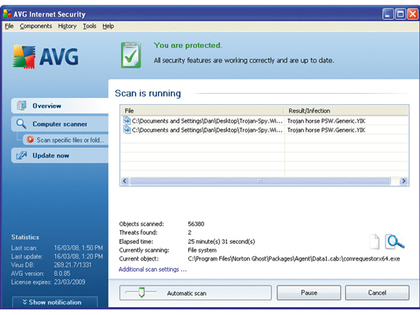
AVG might not be the most comprehensive anti-virus software on the market – there are no cloud-based signature updates and no advanced admin console for tracking viruses within a company – but the tool does maintain an up-to-date registry of known virus, malware, and spyware threats to keep your PC safe.
9. Advanced Registry Optimizer
Registry errors cause PC slowdowns – but from a security standpoint, the registry is also a potential breeding ground for corrupt and damaging software. Advanced Registry Optimizer is a cleaning tool find corrupt and suspicious entries and works in the background to make sure your registry is running at the fastest speeds possible.
10. GoGoStat Parental Guidance
This free app for Facebook is for parents who want to track their kids and make sure there's no inappropriate behaviour. You first install GoGoStat in your Facebook account then add your kids (which they approve). You can get alerts about chat messages, when photos are uploaded, and new contacts.
11. ezDataCloak
Look for this new web security tool in the future – it lets you exchange heavily encrypted messages on a website so that you and the receiver are the only ones who could possibly read the message, without ever transmitting the message over common e-mail protocols and potentially revealing private information. We've tested a limited alpha release but stay tuned for the first beta release this year.
12. Ixia IxDefend
This robust security application scans firewalls to make sure they're actually working. Ixia is known for their networking analysis tools. XeDefend simulates common network attacks and thoroughly searches your network for all endpoints and makes sure the firewall is actually working as you intend it to.
13. PeaZip
Call it the poor man's way of encrypting files, the PeaZip archiving tool is a must-have for those who need to compress files and add extra encryption to make them secure. The tool supports every compression format under the sun (such as ZIP, ARC, GZ, and TAR) and works fast on both Windows and Linux boxes.
14. McAfee Total Protection for Endpoints
Running a memory-hogging anti-virus app just doesn't make sense any more, now that companies such McAfee and TrendMicro offer cloud-based options. A small app runs on the desktop, but the signature files are maintained in the cloud. Even better, you can pull up an admin console and quickly see any infections and whether someone has not installed the app yet (or you can install it for them remotely).

| |
Read More ...
Is Flash the future of the 3D web?
While much of the discussion about 3D consumer tech focuses on TV, gaming and 3D home cinema, let's not forget that the 3D web experience is also set to be a major driver of 3D technology in the home.
A new WebGL tech demonstration shows off 3D models of asteroids striking a rotating planet, which is causing some developers to suggest this might well be a threat to the current graphical dominance of Flash on the web.

3D in your browser
"We believe that 3D on the Web should be a first-class citizen running directly in the browser and not through plug-ins," said Tim Johansson, core developer at Opera recently.
But can WebGL offer better tools to those from Adobe when it comes to 3D graphics in a browser?
The Mozilla principal engineer who helped create WebGL certainly thinks so, telling CNet: "WebGL likely won't be finalized until early 2011, though a provisional 1.0 spec may arrive before the end of 2010."
Microsoft seems to be holding out on WebGL, for now at least, mainly because Flash works fine on Internet Explorer.
Yet there is chatter amongst web developers that this might all change with IE9.
For its part, Adobe's 3D Flash offering, code-named Molehill, should be made available to users in beta sometime mid-2011, according to Anup Murarka, Adobe's director of product marketing for the Flash platform.
"I'm thinking end of the second quarter or the beginning of the third quarter," said Murarka.
"There have been numerous options available for some time - other 3D plugins. That's something we're used to," Murarka added. "Our value is making this consistently available.
"I think the biggest element of the last 18-24 months has been rebuilding the foundation of our code base so it would be capable of being delivered across multiple screens. Designing the foundation to scale across desktop, mobile, tablet, and television is not a trivial undertaking," Murarka continued.
"Doing an entirely new 3D pipeline and engine isn't a simple task either."

| |
Read More ...
Analysis: Games industry: Time is ripe for PSP Phone
 Senior figures from the games industry have suggested that the time is ripe for the arrival of a PSP Phone, with many suggesting that both games makers and consumers will benefit from the new platform.
It seems to be a case of when rather than if a PSP Phone is set to arrive from Sony, with the device likely to bring an adapted Android operating system and, obviously, be focused around gaming on the go.
TechRadar has spoken to industry experts from the gaming world – and the feedback we received was overwhelmingly positive.
Open market
Richard Wilson, the CEO of games trade association TIGA, told TechRadar that giving developers a more open market would be hugely beneficial.

"The advent of a Sony PlayStation Phone could create more opportunities for developers to publish their games on yet another platform," said Wilson.
"The cost of development would also be comparatively low. TIGA's research shows that many developers are already self-publishing games and many are publishing on mobile.
"This could also be good news for consumers, creating yet more choice in the market place."
Older demographic
Nick Parker – an analyst from Parker Consulting Ltd – agreed: "A viable platform other than iPhone for gaming on the move for an older (than DS) demographic would be welcome.
"I can only say that a move to a PSP Phone makes sense for Sony, and I have heard similar rumours from trusted sources that this is a Sony strategy," he added.
Paul Farley is the MD of Tag Games, a specialist mobile games developer based in Scotland, and he thinks a PSP Phone would further blur the lines between phenomenally popular so-called casual games and traditional gaming.
"It's great news for the mobile games industry – for years we've struggled to be taken seriously by the rest of the games industry and this move by Sony further fuels the acceptance of mobile gaming as a viable platform for hardcore gamers as well as the more casual players," he said.
Johnny Two-Shoes co-founder Maxwell Scott-Slade believes that the PlayStation brand itself will be a key, with people still not considering the current mobile gaming offerings as reasons to buy a handset.
"People who know and love the Playstation brand are more likely to be drawn to the Playstation Phone for gaming, rather than a phone that also does gaming," he said.
"A lot of gamers still don't take the iPhone seriously as a gaming platform, and the introduction of a behemoth brand like Playstation could help change those minds."

Damage the brand?
There was one dissenting voice, however, with Games Ivestor Ltd analyst Nick Gibson suggesting the PSP Phone could actually damage the brand.
"With PSP2 SDKs currently being deployed to developers and PSP still selling at surprisingly robust levels (given the miniscule size of ongoing PSP software sales), the PlayStation Phone concept is something of an enigma," warned Gibson.
"Where and how will it fit into the PlayStation family of products? While a PlayStation-branded game phone might make commercial sense to Sony Ericsson, Sony Computer Entertainment's approach to hardware is radically different, and there are numerous scenarios where such a product could do more harm than good."

| |
Read More ...
US babysitter @theashes becomes Twitter celebrity
 An American babysitter has become an unlikely internet star after cricket fans confused her Twitter handle with a feed for following The Ashes test series.
@theashes, the Twitter feed of 22-year-old Ashley Kerekes, from Massachusetts, now has 7,000 followers after a surge of interest from England and Australia cricket fans.
Rather than deter the Twitterverse, her first outburst of "I'm not a freaking cricket match," already has the makings of internet legend, and the number of followers is growing exponentially.
'Howzat! I'm off to bed'
A swiftly organised hashtag campaign, #gettheashestotheashes, has even caught the intention of Aussie airline Qantas. which has offered to fly her from New York for one of the remaining four tests in the series.
She's currently mulling over the over, while hawking hastily-designed "I'm not a freaking cricket match" t-shirts on the internet.
Just a nickname
Ashley says the origins of her online handle were simply a nickname given to her many years ago by her boyfriend and that the attention from cricket fans was never really part of the plan.
She says: "I was out Christmas shopping with my aunt and I got a Twitter message from a friend of mine telling me that some guy was trying to get information about me.
"I'd turned off notifications on my phone right after my first outburst so I had no idea. After that I went looking around and found that I had hundreds, maybe thousands, of messages about the Ashes."
Gotta love the internet. One day you're idly tweeting about babysitting kids, the next you're offered a free trip to Australia to watch a sport you've barely even heard of.

| |
Read More ...
AMD announces two new Radeon mobile GPUs
 AMD is going to be springing two new series of mobile graphics processors on the market, the Radeon HD 6500M and the HD 6300M.
The 6500M is pitched to the top end of the market, for people with multimedia and gaming laptops who need speed, and it offers a processor clock speed between 500MHz and 650MHz with a GDDR5 or DDR3 memory clock speed of 900MHz.
This top of the line processor boasts 400 stream processing units, 20 texture units, 8 colour ROP units and 32 Z/Stencil ROP nits, pretty nifty by anyone's standards, as it should be, being based on the TeraScale 2 Unified Processing Architecture
Mid-range mobility
For those who find that a bit too high powered AMD will also have the HD 6300M, a slightly stripped-down version that's geared to the mid-range market.
It can only support DDR3 memory interface, and the memory clock speed is 800-900MHz with a processor clock speed of 500-700MHz.
There are plenty of eye-watering features, such as AMD's famous Eyefinity multi-display technology – with the 6500M you can have up to six simultaneous displays (but only four for the 6300M) – and AMD HD3D and Direct X11.
There's no release date or price for either of these as yet.

| |
Read More ...
Toshiba considering Google TV product
 Toshiba has admitted that it is considering launching a Google TV product, using the US market to test out its product before looking elsewhere.
 Although there is no launch date for Google TV in the UK, the search giant does have global plans for its product, if it can finally overcome the hurdle of the content providers who are less than keen to get on board.
With Sony and Logitech currently producing equipment, Toshiba's head of visual products – senior VP Masaaki Oosumi told the Wall Street Journal that, if the company launches the product, "we would first sell it in the US market".
Major player
IPTV is becoming a major player in the broadcast world, and the arrival of the likes of YouView and Sky's Anytime+ in the UK will hand a key boost to the prospect of getting video on demand through your television courtesy of a broadband connection.
On top of this Virgin Media's cable service has proven that the likes of the BBC iPlayer is immensely popular when it is easily accessed through a set-top box, showing an appetite for Google TV-like services.
Google has faced significant problems, however, with content providers blocking access to its box for its catch up services online.
Hulu – perhaps the most well recognised TV catch-up name in the US – has been one of the dissenters, and has been joined by major networks such as ABC, NBC and CBS.

| |
Read More ...
Michael Bay denies 'Transformers 3' 3D shot in 2D
Director Michael Bay has hit back at rumours that the next Transformers movie has not been completely shot in 3D.
Bay insists that Transformers: Dark Of The Moon is being shot entirely with 3D cameras, despite rumour-mongering in Tinseltown suggesting otherwise.

Beautiful 3D action
"We have problems with our 3D? Really?" Bay wrote on his website's message board.
"Come into my edit room and I will show you beautiful 3D."
Bay continues: "There has never been a live action show that has pushed the boundaries of 3D like Transformers 3. I actually loved shooting in 3D."
Bay also hints that the first teaser trailer for his latest 3D movie will launch at cinema showings of Tron: Legacy and The Chronicles Of Narnia: The Voyage
Bay's statement comes after producer Lorenzo Di Bonaventura and director of photography Vince Pace said the crew was "doing a lot of the movie in 3D."
Pace had said that Bay is shooting some of the movie in 3D, and is converting the rest of the movie into 3D during post-production.
Movie fans will soon get to see what's in store, as the Transformers: Dark of the Moon trailer is rumoured to be released on December 10th.

| |
Read More ...
In Depth: Wikileaks: 8 biggest leaks in its history
 The most important website in the world right now isn't Facebook, Google or Twitter but one that's lifting the lid on the machinations of governments the world over. It's also shining a light on racist political parties and trying to out those who are actively censoring the web.
Wikileaks, for good or bad, is offering up the truth in a way that's not been seen before.
Its motto is "to publish fact-based stories without fear or favour" and it's a site run by volunteers who seemingly seek nothing but fact.
This week saw the biggest leak yet for the site. A total of 251,287 United States embassy cables were put onto torrents for anyone to download.
According to Wikileaks, it's "the largest set of confidential documents ever to be released into the public domain."
The documents go as far back as 1966 and offering them up to the public has seen the US and many other countries go into diplomatic crisis overload.
But this isn't the first time Wikileaks has managed to deliver documents that have embarrassed whole countries and it certainly won't be the last.
Below are 8 of the biggest leaks from a website that's only been around for four short years, but has already left a legacy that will last for decades to come.
1. Scientology exposed
It's one of the most secretive religions in the world. Founded by sci-fi author L Ron Hubbard in 1952 and now seen as the religion of choice by the Hollywood elite, the methods of the Church of Scientology have been shrouded in secrecy for a long time.
Wikileaks changed all this by posting "the collected secret 'bibles' of Scientology" – a whole host of documents that explained the hierarchy within Scientology.
The religion and its lawyers were not best pleased.
2. BNP membership list released
For some reason, not everybody in the British National Party is happy to have their name associated with the BNP.
This became apparent when Wikileaks (and other blogs) published details of every member of the far-right political part, including addresses and what they did for a living.
The document meant that anybody who downloaded the information could CTRL+F their way to finding out who in their hometown was paying the BNP to pedal its non-immigration stance.
Teachers were exposed, as were members of the UK police force, which was bad news for the officers – it's illegal to be in the police and support the party.
3. Afghan War logs
The leaking of the Afghan War Logs put Wikileaks firmly in the public conscience, mainly due to the US government publicly condemning the information that was made available to the public.
Talk of torture, the death of civilians and a multitude of cover-ups did not make for light reading, but did show off the true horror of what was seen by many as an unwinnable war.
4. Sarah Palin's email account gets hacked
Palin's latest slip of the tongue made her North Korea's latest fan recently, but it was her outed Yahoo email accounts that caused even more embarrassment back in 2008.
According to information given to Wikileaks, Palin was using her private Yahoo account to send work messages – a minor faux pas, but one that is strictly forbidden when you're part of the US government.
Considering she may well be running for President in the near future, we really hope she doesn't make the same mistake again. Or at least updates her personal email to something a bit hipper, like Gmail.

5. Diplomatic crisis
Over 250,000 documents were released this week that detail what the world already new – government diplomats say one thing to the press and another when they think it is in secret.
The new documents are yet to be fully sifted but this is a monumental leak at it is the biggest ever of its kind.
The leaked information includes everything from Arab nations pleading with the US to bomb Iran, China cosying ever closer to North Korea and even stuff about Prince Andrew and Bank of England head honcho Mervin King.
6. Climate 'research'
UK climate researches were put out to dry in 2009 after amore than 1,000 emails and 2,000 documents were leaked about climate change.
The documents apparently showed that information which didn't fit with current climate change theories (that it is bad) was suppressed.
Quotes such as: "The fact is that we can't account for the lack of warming at the moment and it is a travesty that we can't" appeared in mainstream media and began tarnishing the reputation of a number of scientists.
7. Web censorship lists
Wikileaks found itself on an Australia blacklist back in May 2009, all because it released details of sites banned by various countries around the world.
While Wikileaks is no longer banned in Australia, its publishing of the Australian Communications and Media Authority's list did cause outcry Down Under.
The list was interesting because Oz's stance on banned sites was meant to be to be ones that advocated child porn and terrorism. However, Wikileaks found a number of sites banned that did not fall under these banners.
8. Revealing the Bilderberg Group
Ah, the Bilderberg Group – up there with the Stone Cutters in terms of secret organisations you can't help but be interested in.
While we are not suggesting that the biggest leaders, celebrities and people of influence in the world meeting up once in a while to exchange pleasantries is in the least bit shady, it was interesting to see the Wikileaks posting a number of meeting reports from the group.
Unfortunately, while this was a monumental leak since it was one of the first times the lid had been lifted on the Bilderbergers, the minutes weren't actually very exciting. This was because all the names had been omitted (even Steve Guttenberg's) and the Bilderberg Group decided to post the information on its own website anyway.

| |
Read More ...
In Depth: 6 steps to building the quantum computer
 Quantum computing is the nirvana state for most technical research and in the exploratory sciences – and, eventually, for all of computing.
 The concept comes from quantum physics, which finds that electrons circling an atom are in multiple states at the same time – they only stop when we observe them. Similarly, a quantum bit (or qubit) can be in either a 0 and 1 state – or both at the same time.
The theory goes that, because of these multiple states, a quantum processor could handle intense computations – say, factoring a number with 300 digits – with relative ease.
For comparison, when a 232-digit number was factored, those responsible estimated that it would have taken roughly 1,500 years to do using a 2.2GHz AMD Opteron with 2GB of RAM.
The great challenge to quantum processors thus far is this: the theory is sound on paper, but how do you actually build a quantum computer? We talked to an expert to find out the roadmap.
1. Build the proof of concept
Herb Bernstein, a physicist at Hampshire College, says the first step to building a real quantum computer is to develop a basic working prototype. He says this will involve using a series of controlled optical or electromechnical pulses that work like microwaves. The pulses would control the computations and trigger the qubits to aid in the research project, serving as the core processor.
2. Increase the scale
These initial experiments, he says, would be quite small – a prototype might use just one quantum bit initially, and quantum physicists have built small-scale quantum processing prototypes. Expanding to 100 qubits would be a logical next step, but to build an actual processor that uses tens of thousands of qubits, or even just one kiloqubit, would require linking multiple lab experiments over networks that, today, are not capable of processing at the same quantum speeds. Still, in the early days of computing, it was inconceivable to design a small computer when vacuum tubes filled an entire room.
3. Build a registry for quantum functions
After expanding a prototype (and discovering some way to do that without linking lab experiments), another important step involves holding the data. This would work exactly like the computers we use today – a registry entry is like a temporary holding area. In quantum computing, a registry would hold the results of an experiment calculated with qubits – what Bernstein called a multiple entanglement of numbers. The registry would not just hold these calculations, but would keep track of how the qubits interact. The model for this is the human brain, which tracks the movement of neurons.
4. Create a way to store these calculations
Factoring a number with 300 digits is an admirable goal, and one that is a good fit for quantum computing. However, the resulting calculations would also require massive storage allocation. The closest analogy to this today is a linear accelerator, which calculates the movements of atoms as they move at incredibly high speeds. In these experiments, the calculations are often stored on extremely fast flash storage arrays. For storing quantum calculations, the storage requirements increase greatly – to the point that we may not have yet invented the storage medium required. It might involve holographic memory that also see bits in multiple states at once.
5. Programming techniques to find the value
Another step, once we find a way to store the calculations, involves figuring out how to write programs to then interpret the calculations. Modern processors run programs that work with binary numbers – they are either in a 0 or 1 state, but never both. That means, for quantum computing, inventing new ways to write programs that can run much faster, handle the quantum computing calculations, and deliver usable results. One obvious inhibitor to this is that companies have invested many millions in current platforms and programming efforts – none of which would run on a quantum computer.
6. Delivering the results over networks
Once a quantum computer is fully operational, and the calculations can be stored and the programs can interpret the data, it's also important to deliver these findings over networks. In many ways, this is the problem that birthed the internet several decades ago: the scientific calculations had to be moved from one lab to other parts of the country for analysis. Modern fibre channels running at 200MB/s in real world transmissions are not fast enough, so another step to building a quantum computer is inventing much faster network protocols and network switches that can handle the data.

| |
Read More ...
"Who viewed my Facebook profile" scam hits
 An application that claims to offer people the capacity to see who has been looking at their Facebook profiles is spreading virally and giving access to the accounts that are foolish enough to sign up to the scam.
The message "OMG OMG OMG... I cant believe this actually works! Now you really can see who viewed your profile!" is whizzing across Facebook, as people try to sign up and give permissions to use their account.
These Facebook scams are obviously very common, but this is a successful one purely because of the type of offer being made.
Who viewed my Facebook profile?
People have been desperate to learn who is checking them out on Facebook since the site arrived, but is something that the social network (very sensibly) blocks.
According to the Sophos security blog, this latest scam takes anyone who clicks the link though to the permissions page, and the moment people say yes to, effectively, handing over the keys to their social kingdom it will propagate the very link that the user had clicked on through their own account.
It's an obvious scam, but it's likely to lure thousands into its obvious trap and once again reminds us that you cannot repeat enough the advice: "don't click random links offering suspiciously favourable things online".

| |
Read More ...
"Who viewed my Facebook profile" scam hits
An application that claims to offer people the capacity to see who has been looking at their Facebook profiles is spreading virally and giving access to the accounts that are foolish enough to sign up to the scam.The message "OMG OMG OMG... I cant believe this actually works! Now you really can see who viewed your profile!" is whizzing across Facebook, as people try to sign up and give permissions to use their account.
These Facebook scams are obviously very common, but this is a successful one purely because of the type of offer being made.
Who viewed my Facebook profile?
People have been desperate to learn who is checking them out on Facebook since the site arrived, but is something that the social network (very sensibly) blocks.
According to the Sophos security blog, this latest scam takes anyone who clicks the link though to the permissions page, and the moment people say yes to, effectively, handing over the keys to their social kingdom it will propagate the very link that the user had clicked on through their own account.
It's an obvious scam, but it's likely to lure thousands into its obvious trap and once again reminds us that you cannot repeat enough the advice: "don't click random links offering suspiciously favourable things online".

| |
Read More ...
UK firm set to bring superfast broadband to world's poor
 While many of us Brits take superfast broadband access for granted these days, a new 'fibre in the sky' project that hopes to bring speedy internet connections to Africa and other limited-connection zones throughout the world just received £700 million in a new funding round.
The new O3b satellite broadband project (O3b stands for "other three billion") hopes to deliver broadband services to three billion people across the globe, which would fundamentally change the level of online access for many of the world's poor.
Ambitious space project
The project is described as one of the most ambitious commercial space projects of our generation.
O3b hopes to fix the problems created by the lack of super-fast fibre optic cable connections in throughout Africa, Asia and Latin America.
O3b chief exec Mark Rigolle said: "This has allowed us to secure our funding and to achieve our goal of reaching the billions who have so far been poorly served or completely cut off from the internet - the greatest business and information resource of our time."
Jersey-based O3b Networks's satellites would support super-fast broadband connections to the world's emerging markets.
The spacecraft will act as backhaul, linking the traffic of local telecoms and internet service providers to the global fibre infrastructure.
2013 launch into orbit
O3b has raised the latest round of cash investments into the project from a range of banks and private investors, in order to fund the first eight satellites.
These first satellites will be built by Thales Alenia Space in Cannes, and should be ready to go into orbit early 2013.
These first eight satellites will go into Medium Earth Orbit (MEO) about 8,000km above the equator, which will provide broadband coverage to countries within the plus and minus 45 degrees Latitude zones.
Internet traffic from these areas will then be fed into the fibre network that supports the internet throughout the developed world.
O3b hopes to put a total of 20 satellites in orbit following the success of this first initiative.

| |
Read More ...
Video: Nokia X7 coming to reboot X-series?
 Nokia looks set to reboot the ageing X6 with a new model soon after a video of the Nokia X7 popped up.
The new X7 apparently features four speakers for entertainment purposes (although a 3.5mm headphone jack is still miles better) and an 8MP camera on the back.
There's also a four-inch capacitive screen, and an angular design that shows Nokia has really moved on from the boringly chunky X6.
Shifting perspectives
However, the bad news is that it's still running Symbian^3 – Nokia was never going to put something fun like Meego on here, but it's still slightly depressing to see the updated OS being used in the video.

| |
Read More ...
Review: PC Nextday ZooStorm 3389-9209/B
 We haven't seen anything from UK based manufacturer PC NextDay in almost a year, but the ZooStorm 3389-9209/B is a solid laptop with a strong display. A couple of usability issues are all that hold it back.
 The flat keyboard is comfortable to type on, thanks to wide palmrests, and includes a separate numeric keypad for data entry. However, the action is a little spongy and the left Ctrl key has swapped places with the Function key, which is annoying when using keyboard shortcuts in Windows.
The touchpad has a single bar beneath that acts as the mouse buttons, and we found that resting our thumb on the bar caused the cursor to skip around the screen, much like the HP. Keeping your thumb clear solves the issue in most cases, although selecting blocks of text is a huge pain and simply pushing the buttons occasionally makes the cursor skip too.
Three touch-sensitive controls above the keyboard quickly open Internet Explorer, toggle Wi-Fi on and off, and mute the laptop. However, we found the Internet Explorer button was very unresponsive and we only got it to work twice.
Despite the usability issues, this is a solid laptop with a screen that tilts back further than any other here. It looks smart with an all-black chassis and is close to the other 15.6-inch laptops in size and weight, making it easy enough to carry around.
The battery life of 229 minutes beats all but the HP ProBook 4525s, and will suit the daily commute.
The display is also one of the best, producing sharp and vibrant images. Colours are well reproduced, thanks to the glossy Super-TFT coating, but this makes the screen highly reflective, a problem that all except the HP suffer from.
Competitive performance
Performance is good, with an Intel Core 2 Duo processor providing enough power to run intensive applications, even simultaneously. Only the Lenovo IdeaPad Z560 here provides more power.
However, the integrated graphics are less capable than the dedicated GPUs found in the HP and Lenovo and are good enough only for the most basic multimedia performance.

Plenty of ports are on offer, including an ExpressCard slot for attaching peripherals, a 4-in-1 memory card reader for sharing photos from your digital camera and an eSATA port. However, there's no HDMI port for connecting external HD displays.
A 500GB hard drive provides a generous amount of storage for your files and media.
The ZooStorm 3389-9209/B has a vibrant screen, a sleek chassis and performed well in our benchmark tests, despite the basic integrated graphics. Unfortunately, like the HP, it also suffers from frustrating usability issues that impact the overall quality.
Related Links

| |
Read More ...
Update: Australian government takes Wikileaks off banned website list
 UPDATE
Back in May 2009, the Australian government put Wikileaks on its banned list.
As of 29 November, according to ZDnet, this is no longer the case.
"Currently, the ACMA list of prohibited URLs that is notified to accredited filter providers does not contain any URLs within the Wikileaks website," said the ACMA.
"Since April 2010, the ACMA has investigated two complaints about specific pages of content on the Wikileaks website, which both resolved to content found to be not prohibited."
Wikileaks hit the front pages this month, with a new release of government documents that show the inside goings-on of diplomacy in the US.
In the dosuments our very own Prince Andrew is namechecked, as is the Governor of the Bank of England, Mervyn King.
ORIGINAL STORY
The Australian communications regulator has issued a stark warning that websites who link out to 'banned' hyperlinks are liable to fines of up to Aus $11,000 a day.
The news comes after web forum Whirlpool was threatened with the fine for posting a hyperlink to a blacklisted anti-abortion website
Wikileaks blacklisted
One of the newest additions to Australia's 'blacklisted hyperlinks' list is Wikileaks; the website that publishes anonymous submissions of sensitive info on everything from corporations, religion and governments.
The blacklisting of certain pages of the site has come about after Wikileaks posted a list of websites at the tail end of 2008 that comprised the 'secret internet censorship' list for Denmark. On this list were over 3,500 sites that were censored or banned in the country.
Disturbing picture
While Australia's list of blacklisted sites currently stands at 1,370, the Sydney Morning Herald is reporting that that list could increase to around 10,000 sites – most of which are of illegal pornographic content, but could also includes sites that house incendiary political discussions.
"The Government is embarking on a deeply unpopular and troubling experiment to fine-tune its ability to censor the internet," said communications spokesman Senator Scott Ludlam of Australian opposition party Greens.
"If you consider this kind of net censorship in the context of Australia's anti-terror laws, it paints a disturbing picture indeed."
On its website, Wikileaks, which leaked the news that the government had banned it for leaking information, simply said: "The first rule of censorship is that you cannot talk about censorship."
Currently, it is not illegal for internet users in Australia to click on the sites found on the web blacklist. The people targeted by the Australian Communications and Media Authority (ACMA) are webmasters linking out to the sites that the government have flagged up as inappropriate.
This could all change, however, if a mandatory internet filtering censorship scheme is implemented – something that is being debated at the moment.

| |
Read More ...
Update: Australian Government takes Wikileaks off banned website list
UPDATEBack in May 2009, the Australian government put Wikileaks on its banned list.
As of 29 November and according to ZDnet, this is no longer the case.
"Currently, the ACMA list of prohibited URLs that is notified to accredited filter providers does not contain any URLs within the Wikileaks website," said the ACMA.
"Since April 2010, the ACMA has investigated two complaints about specific pages of content on the Wikileaks website, which both resolved to content found to be not prohibited."
Wikileaks hit the front pages this month, with a new release of government documents that show the inside goings-on of diplomacy in the US.
In the dosuments our very own Prince Andrew is namechecked, as is the governor of the Bank of England Mervyn King.
ORIGINAL STORY
The Australian communications regulator has issued a stark warning that websites who link out to 'banned' hyperlinks are liable to fines of up to Aus $11,000 a day.
The news comes after web forum Whirlpool was threatened with the fine for posting a hyperlink to a blacklisted anti-abortion website
Wikileaks blacklisted
One of the newest additions to Australia's 'blacklisted hyperlinks' list is Wikileaks; the website that publishes anonymous submissions of sensitive info on everything from corporations, religion and governments.
The blacklisting of certain pages of the site has come about after Wikileaks posted a list of websites at the tail end of 2008 that comprised the 'secret internet censorship' list for Denmark. On this list were over 3,500 sites that were censored or banned in the country.
Disturbing picture
While Australia's list of blacklisted sites currently stands at 1,370, the Sydney Morning Herald is reporting that that list could increase to around 10,000 sites – most of which are of illegal pornographic content, but could also includes sites that house incendiary political discussions.
"The Government is embarking on a deeply unpopular and troubling experiment to fine-tune its ability to censor the internet," said communications spokesman Senator Scott Ludlam of Australian opposition party Greens.
"If you consider this kind of net censorship in the context of Australia's anti-terror laws, it paints a disturbing picture indeed."
On its website, Wikileaks, which leaked the news that the government had banned it for leaking information, simply said: "The first rule of censorship is that you cannot talk about censorship."
Currently, it is not illegal for internet users in Australia to click on the sites found on the web blacklist. The people targeted by the Australian Communications and Media Authority (ACMA) are webmasters linking out to the sites that the government have flagged up as inappropriate.
This could all change, however, if a mandatory internet filtering censorship scheme is implemented – something that is being debated at the moment.

| |
Read More ...
Orange announces new cheaper iPad plans
 Orange has announced its price plans for the new subsidised iPad model it will be offering – and predictably, it's still pretty expensive.
The iPad will come in a variety of storage capacities still, with the 16GB costing £199, the 32GB coming in at £249 and the 64GB offering costing a whopping £349.
But Orange is also rewarding its existing customers for staying loyal to the brand as well, with the monthly price plans costing £2 a month cheaper.
Slightly cheaper chips
£25 a month (or £27 for new customers) will get you 1GB of anytime data, and a further 1GB allowance from midnight to 4PM – Orange's so-called quiet time data.
On top of that you'll be allowed unlimited *cough*3GB really*cough* Wi-Fi through BT Openzone when out and about – so the upshot is you shouldn't really ever run out of data unless you're streaming the entire internet or something.
However, it's predictably not cheaper than buying the iPad outright: for instance, the 16GB 3G version costs £499 to purchase, and £7.50 a month will get you 1GB of data on Three.
This works out at £589 over the course of the deal, should you want to sell and upgrade your iPad when a new one emerges (which it obviously will). Compare this to the nearly £900 the Orange deal will cost, and you can see the cost saving.
However, we know that many people will just see the lower price tag and get into bed with the fruity network as fast as possible – and for you people, it's good news: pre-ordering has just gone live.

| |
Read More ...


No comments:
Post a Comment