

 Microsoft has responded to the myriad reports that Kinect has been 'hacked' by saying that it wanted it always wanted its motion controller to be open.
According to a transcripted interview with Microsoft program manager Alex Kipman, Kinect hasn't been hacked at all, merely played around with.
"Hacking would mean that someone got to our algorithms, that sits inside of the Xbox, and was able to actually use them, which hasn't happened," said Kipman on NPR's Science Friday.
"Or it means that you put a device between the sensor and the Xbox for means of cheating, which also has not happened.
"That's what we call hacking, and that's why we've put a ton of effort to make sure it doesn't actually occur."
Use the source, Luke
What is occurring is that the open source community have found a workaround.
"What has happened is someone wrote an open source driver for PCs that essentially opens the USB connection, which we didn't protect by design, and reads the inputs from the sensor," explained Kipman.
"The sensor, again as I talked earlier, has eyes and ears, and that's a whole bunch of noise that someone needs to take and turn into signal."
While this sounds like a case of semantics, it does mean that no one is to get into trouble for meddling with their Kinect controller.
So, if you have the brains, then you can also make your very own lightsaber version of Kinect with a broomstick – just like Yan Keyan on YouTube.

 |  |
Read More ...
Review: Advent AWP10
 Built by Kodak for Dixons Stores Group, this Wi-Fi-capable multifunction printer is one of three ultra-cheap Advent models released this Winter. The Advent AWP10, reviewed here, costs a penny shy of £70.
 The AW10 is £10 cheaper, but uses a 1.5-inch LCD colour screen instead of the Advent AWP10's 2.4-inch display. The cheapest model, the £50 Advent A10, offers the smaller screen and drops Wi-Fi connectivity. These prices are RRP, and may be discounted in-store or online.
The Advent AWP10 uses a two-tank inkjet system, one black and one tri-colour. As always with very cheap printers, it's wise to check the cost of replacement inks before buying.
Given the price, it's unsurprising that the Advent AWP10 isn't overburdened with features. However, if you're only looking for a basic printer, scanner and copier, it has everything you need.
Connectivity is through USB or Wi-Fi 802.11b/g/n, it has a 100-sheet paper tray and, for photographers, an SD/SDHC/MMC/Memory Stick card reader. Build quality is flimsy, but acceptable for a printer of this price.
The Advent AWP10's print speeds are reasonable, without being stunning. A 20-page text document printed in five minutes, ten seconds, which is pedestrian but not sloth-like. A plain-paper, default-settings photo took around a minute, with a high-quality photo-paper print taking almost two minutes, which is pretty speedy.
It's the same story with the print quality; functional and unremarkable, but entirely serviceable and perhaps better than you'd expect given the price of the printer. Text was clear and well defined, though a little grey and washed out. There was a smudge caused by ink on one of the rollers, but only a small one.
Its photo-paper printing was particularly commendable, with accurately-reproduced colours and very little banding. We've seen sharper results from more expensive printers, but the AWP10 doesn't disappoint.
Its plain-paper default-quality image printing is less strong, looking washed out and tired. It's a little grainy too, and there's definite banding on the colour ramps.
Being a multifunction device, the Advent AWP10 can scan and photocopy too, tasks it also performs satisfactorally, but with no great distinction.
Where it really falls down is its total cost of ownership. With black ink costing £12 a tank for a stated yield of 225 pages and colour cartridges at £20 for 225 pages, you're looking at a cost per page of 5.3p and 8p respectively, and that's without the paper.
The Advent AWP10 could prove a very expensive economy. It might be cheap off the shelf, but there are plenty of multifunction printers around at a similar price that don't set you back almost half the cost of the printer every time you need a full set of inks.
Over time, the quality of home printers and multifunction devices has increased while the price has fallen. Although not best suited for heavy-duty or specialist use, an entry-level, low-cost printer such as the Advent AWP10 gives surprisingly good results. It can be connected through Wi-Fi or USB, and has a reader for the most commonly-used memory cards.
We liked
Although its print quality won't win any awards, it's more than good enough for the casual user. You won't be embarrassed to print a letter to your bank manager, or send a photo to your gran. It's quick enough for a low-needs user, too. You wouldn't want to network it in a small office, but for the family PC, it's fine.
We disliked
A full set of inks (one black and one tri-colour) costs almost half as much as the printer. Although the Advent AWP10 is cheap to buy, its total cost of ownership is simply unacceptable. There are wireless multifunction printers costing only a little more off the shelf that soon work out cheaper when you replace the inks.
Build quality is merely average, and it's noisy in operation.
Verdict
Despite an agreeable performance, we can't recommend the Advent AWP10. Although arguably the cheapest wireless multifunction device to buy, it certainly isn't cheap to run. In fact, it's an excellent example of why you should always check the price of consumables when buying a printer.
Related Links

| |
Read More ...
Hands on: Dell Inspiron Duo review
 If you're looking for something more than an iPad, you might just find it here.
Dell's new Inspiron Duo is a convertible touchscreen netbook with a difference.
Instead of the entire screen swivelling 360 degrees from the middle as with many convertibles, this machine does something different.
The inside of the 10-inch screen swivels round – like this....


So you can have the Inspiron Duo as a tablet PC or as a full-blown laptop. However, don't expect miracles in performance for the price point of "from £449" – it's still standard netbook specs aside from that swivel display.

That's a shame, as it could do with a bit more punch than even an Intel Atom N550 processor and 2GB of memory can provide.
And, to provide a little more interest, Dell has partnered with JBL to provide this nifty speaker dock too. We're not sure how much this will add to the cost of a system but as you can see it really makes the Duo into a living room or kitchen sound and tablet system. There's also a clock app, which you can have running when the Inspiron Duo is in this position.


Dell has incorporated its own Stage media software onto the device and while this looks good, the touch is a little sluggish. Dell assures us this isn't final software, so we'll hold fire on that - could we see it launch with more exciting software at CES?


There's another price for that twisted loveliness, too – a rather hefty weight which we fear may put many off. The jury's still out on the Inspiron Duo then – expect it to start seeping out of Dell factories in the coming weeks.


| |
Read More ...
eBay for iPhone adds barcode scanner
 If you own an Apple iPhone and are addicted to selling stuff on eBay then the latest update to the online auction app will certainly appeal to your inner Del Boy.
That's because eBay's latest version of its iPhone app will allow you to access a new 'Quick View' home screen to see your various buyers and sellers and instant updates on items.
Sell one like this
If a seller is listing a similar item then you can now use eBay's "Sell One Like This" feature to create a listing that is automatically populated with information like category and item condition.
Perhaps most interestingly, eBay mobile is now adding technology from RedLaser, the barcode scanning iPhone app that eBay acquired recently.
"eBay, a leader in mobile commerce and the world's largest online marketplace, today released a new version of its main iPhone application that adds selling functionality and leading RedLaser barcode-scanning technology," explains eBay.
"The new app bridges in-store and mobile shopping experiences so that shoppers can scan to comparison shop across a wider selection of merchandise including electronics, movies and videogames."
eBay claims that nearly 30 million items have been bought or sold using eBay mobile apps around the world since its first mobile app launched back in 2008.
"The UK has seen the greatest adoption of mobile eCommerce, with 340,000 visits made to eBay.co.uk via a mobile app every day and more Brits shopping through the eBay app than anywhere else in Europe. UK shoppers make on average, one purchase every two seconds via eBay's mobile applications."
Steve Yankovich, vice president of eBay Mobile adds: "More shoppers are turning to their mobile phones to save money and time this holiday season.
"We listened to our 13 million+ mobile app users and we've updated our eBay iPhone app to be a one stop shop for all of their holiday buying and selling needs.
"We continue to blur the lines between in-store and online shopping by allowing eBay shoppers to conveniently scan products to find the best deals virtually anywhere, anytime."
Not got the eBay app on your iPhone yet? Clear out your loft or garage or cupboard under the stairs in no time using eBay's updated iPhone application over on the UK iTunes Store.

| |
Read More ...
Apple set to re-release iPad with 'free' data
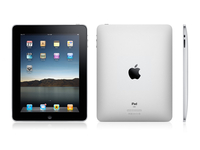 Apple could be set to re-release the iPad before Christmas this year, offering an integrated SIM and a lower price.
T3 has spoken to 'a reliable source close to a major UK network', which confirmed a newer version of the iPad would be sold with an integrated SIM and data rolled into the cost of the device.
The same method is used on the 3G version of the Amazon Kindle, allowing users to not worry about a data tariff after purchasing the iPad.
However, it's not yet known what kind of data allowance will be offered, as the Kindle's data consumption is relatively low compared to that of the iPad. It will need to be fairly high, so it will be interesting to see what price/allowances are offered if the new version of the iPad launches.
Apple surprise
It would be an unexpected move for Apple to launch a new version of the iPad this close to Christmas, although if the specs are relatively unchanged then it could be a decent standalone gift.
But given the sheer power of Apple's marketing machine, wouldn't it have already launched such a thing as many people (Ma Radar included) have already cracked on with Christmas shopping.
Add to that the fact that Apple is odds on to bring out the iPad 2 in Q1 next year, and it seems hard to believe we'll be seeing a reboot at this point - but then again, crazier things have happened...

| |
Read More ...
Buying Guide: 10 best touchscreen laptops in the world
 The touchscreen has truly arrived, and you only need to take one look the success of the iPad and the army of Android tablets bursting onto the market, such as the Samsung Galaxy Tab, to see that.
 However, if you'd rather have a keyboard for writing emails, and then a touchscreen for a natural way to surf the web and browse your photos, then a laptop could be a much more sensible purchase.
There are plenty of great touchscreen laptops on the market, and there's a model to suit every need. From swivel screens on tiny netbooks, to full size laptops with touch capability, we take you through the best touchscreen laptop options.
1. Samsung NB30 – £268

Samsung's netbook range has always impressed us, and the NB30, boasting tactile touchscreen technology is no exception. It's easy to carry, and the touchscreen gives it a near tablet feel, although the screen doesn't twist around to give the true form factor.
The 10.1-inch screen has a 1,024 x 600-pixel resolution, and it's sharp and bright, and there's no shiny Super-TFT screen coating causing irritating reflections in bright light. What's more, this is the cheapest touchscreen PC you're likely to find.
Buy the Samsung NB30 touchscreen netbook
2. Vye V-91015 Touch Screen Netbook – £379


There are a number of twistable tablet-style netbooks on the market featuring multi-touch screens but, at under £400, the Vye V-91015 is one of the cheapest around. The 10-inch screen rotates from the standard laptop form, to enable it to be carried like a tablet, which is where the multi-touch display comes into its own.
It compromises on specs a little, and there's only 1GB of RAM and a 160GB hard drive at your disposal, but you do get a decent touchscreen netbook that weighs only 1.3kg.
3. Asus EeePC Netbook T101MT – £442


If you're looking for a true tablet feel, but with the convenience of a laptop, then the Eee PC T101MT is a fantastic choice. The 10.1-inch touchscreen is tactile, and Asus's built in software helps you get the most from your touchscreen netbook.
ASUS Eee PCs are a pedigree of netbook, with fantastic build quality backed up with supreme portability. The Intel Atom N450 is adequate for most basic web surfing and YouTube video watching, and the 320 GB hard drive is one of the biggest you'll find on any netbook.
4. Asus T91MT – £459

If you've been bitten by the tablet bug, but don't want to do without a keyboard and mouse, then Asus' smaller netbook offering, complete with multi-touch screen will be right up your street.
The T91MT has a petite 8.9-inch screen, which is no bigger than most of the Android tablets that are swamping the market this Christmas. However, instead of Android, you get Windows 7 and a full keyboard. The multi-touch is fantastic, enabling you to fold the screen back and use a range of gestures, as well as using the supplied stylus.

5. Packard Bell Butterfly Touch LX.BL502.011 – £529.95

Continuing the run of touchscreen laptops to arrive on the scene in the first half of this year, Packard Bell has released the Butterfly Touch, which offers full touchscreen usability and up to a claimed eight hours of battery life in a convertible-tablet, clamshell design.
Weighing 1.6kg and featuring an 11.6-inch WXGA screen, it promises to provide ample mobility for frequent travel use. Operating as a standard clamshell laptop when opened, the screen can then be turned 180 degrees and folded down over the keyboard for full tablet use.
6. Toshiba Satellite U500-1EX – £584.97

Toshiba's Satellite U500 Series is aimed at mobile professionals and previous models have impressed us with their blend of style, comfort and quality. The Satellite U500-1EX comes with an impressive range of features and only a couple of flaws that hold it back.
The U500's impressive touchscreen usability and strong range of features lifts it above other laptops of a similar calibre, with the touch-sensitive screen and media bar offering a great means of control. Touch control is responsive and great for simply viewing documents or playing basic games.

Read our full Toshiba Satellite U500-1EX review


7. Acer Aspire 5738PG-644G32Mn – £644.93

The Acer Aspire 5738PG-644G32Mn boasts a 15.6-inch screen that features touch functionality and is designed to make using the laptop as intuitive as possible.
Acer has succeeded admirably in implementing this with the Windows 7 operating system and, while it's obviously early days for the technology on laptops – rather than tablet PCs – this machine is certainly a step in the right direction. 

We like the Acer Aspire 5738PG-644G32Mn a lot and while, realistically, you'll be using the keyboard and touchpad as much as you did before, the touchscreen technology is well implemented and very intuitive to use.

Read our full Acer Aspire 5738PG-644G32Mn review


8. Acer 1825PT – £679

The new 1825PT is an 11.6-inch netbook with a swivel-style screen that enables you to convert it into a tablet-style device in a jiffy. 

The Aspire's swivel-screen multitouch panel features up to 1,366 x 768 resolution, and the machine packs in up to 8GB of RAM, a 1.3GHz Intel Core 2 Duo SU7300 processor, and a 250GB or 320GB hard drive.
The 1825PT also has a 6-cell battery to give you eight hours of work and play time, so you can spend more time getting touchy feely with your laptop.


Buy the Acer 1825PT
9. HP Touchsmart TM2-1010ea – £863.53

The HP TouchSmart tm2-1010ea is another laptop with a swiveling screen that converts into a tablet PC, much like many in our round up.
The touchscreen is well supported by a host of software. Artists can create finger-painted masterpieces with Corel Paint It! Touch, while Magic Desktop provides children with a cartoon-based interface and access to various games and child-friendly applications.
With a strong range of touch software installed as standard, the HP TouchSmart tm2-1010ea has a sharp and well-supported touchscreen display. Its solid build, incredible portability and impressive features round off this strong contender.
Read our full HP Touchsmart TM2-1010ea review
10. Fujitsu Lifebook T4410 – £1115.99


Like the HP TouchSmart tm2-1010ea, this laptop features a screen which twists 180 degrees to convert into a tablet PC. In this form you can hold the machine in one hand while manipulating the touchscreen with your other.
The sharp 12.1-inch screen is quite small in comparison to some other touchscreen laptops, but to counter this, Fujitsu has included a stylus that tucks neatly into the chassis for storage. This can be used instead of your fingers for more accurate interaction, while a pair of configurable buttons on the side can be set up to simulate mouse-button clicks.

The display is extremely sensitive and registers the stylus tip hovering over an inch from the screen, although this does show where you're about to press and helps to minimise mistakes.


Read our full Fujitsu Lifebook T4410 review

| |
Read More ...
Berners-Lee slams Facebook
 Tim Berners-Lee, the inventor of the world wide web, has said that social networking sites such as Facebook are guilty of limiting the potential openness of the web.
Tim Berners-Lee outlined his concerns in a piece in the Scientific American journal, entitled Long Live the Web: A Call for Continued Open Standards and Neutrality.
Web's egalitarian principles
"The web evolved into a powerful, ubiquitous tool because it was built on egalitarian principles and because thousands of individuals, universities and companies have worked, both independently and together as part of the World Wide Web Consortium, to expand its capabilities based on those principles," said Berners-Lee in an impassioned call for openness online.
Saying that, Berners-Lee is also increasingly concerned that the open and democratic nature of the web was under threat by some of its more recent and "most successful inhabitants" such as Facebook, LinkedIn and Friendster.
"Facebook, LinkedIn, Friendster and others typically provide value by capturing information as you enter it: your birthday, your e-mail address, your likes, and links indicating who is friends with whom and who is in which photograph," said the web pioneer.
"The sites assemble these bits of data into brilliant databases and reuse the information to provide value-added service - but only within their sites. Once you enter your data into one of these services, you cannot easily use them on another site.
"Each site is a silo, walled off from the others. Yes, your site's pages are on the web, but your data are not. You can access a web page about a list of people you have created in one site, but you cannot send that list, or items from it, to another site."
Berners-Lee added that cable companies can also stop information flowing freely on the web, noting:
"Cable television companies that sell internet connectivity are considering whether to limit their internet users to downloading only the company's mix of entertainment."
Via The Telegraph

| |
Read More ...
Berners-Lee slams Facebook
Tim Berners-Lee, the inventor of the world wide web, has said that social networking sites such as Facebook are guilty of limiting the potential openness of the web.Tim Berners--Lee outlined his concerns in a piece in the Scientific American journal, entitled Long Live the Web: A Call for Continued Open Standards and Neutrality.
Web's egalitarian principles
"The web evolved into a powerful, ubiquitous tool because it was built on egalitarian principles and because thousands of individuals, universities and companies have worked, both independently and together as part of the World Wide Web Consortium, to expand its capabilities based on those principles," said Berners-Lee in an impassioned call for openness online.
Saying that, Berners-Lee is also increasingly concerned that the open and democratic nature of the web was under threat by some of its more recent and "most successful inhabitants" such as Facebook, LinkedIn and Friendster.
"Facebook, LinkedIn, Friendster and others typically provide value by capturing information as you enter it: your birthday, your e-mail address, your likes, and links indicating who is friends with whom and who is in which photograph," said the web pioneer.
"The sites assemble these bits of data into brilliant databases and reuse the information to provide value-added service - but only within their sites. Once you enter your data into one of these services, you cannot easily use them on another site.
"Each site is a silo, walled off from the others. Yes, your site's pages are on the web, but your data are not. You can access a web page about a list of people you have created in one site, but you cannot send that list, or items from it, to another site."
Berners-Lee added that cable companies can also stop information flowing freely on the web, noting:
"Cable television companies that sell internet connectivity are considering whether to limit their internet users to downloading only the company's mix of entertainment."
Via The Telegraph

| |
Read More ...
In Depth: iOS 4.2: what you need to know
 Let joy be unconfined: after months of anticipation, every Apple fan's greatest wish has come true. That's right: we can finally get rid of the Marker Felt font in Notes.
But it turns out that there are some other useful new iOS 4.2 features too.
Here's what iPad and iPhone owners can expect when the update hits iTunes later today - assuming you're running compatible hardware, that is.
iOS 4.2 is for the iPhone 3G or later, iPod touch 2nd generation or later and the iPad. If you've got a first-gen iPod touch or iPhone you're out of luck.
iPad multitasking
It's not full multitasking - as with the iPhone only certain things run in the background, like uploading or music playback, while other applications simply freeze until you come back to them - but iOS 4.2 solves the problem of doing more than one thing at a time without destroying your iPad's battery life.
iPad folders
If like us your iPad has the entire family's fingerprints on it, you'll be sick of flicking past endless icons belonging to other people's apps. Now with iOS 4.2, you can give everyone folders to keep their stuff out of your way.
iPad unified inbox
The iPhone's had this for a while, making its absence from the iPad really quite annoying, but at last with iOS 4.2 you can see multiple accounts in one place, organise emails by threads and open attached files in third party applications.
Find my iPhone, iPad or iPod touch
This one's a doozy: previously, you needed to pay for MobileMe to benefit from Apple's "Yikes! Some ne'er-do-well's nicked my kit!" service. Now, though, iOS 4.2 gives you this for free. That means you can track missing kit and remotely delete all its data.
AirPrint
One of the biggest items on the wish list, iOS finally delivers wireless printing to the iPad (and to the iPhone and iPod touch). You can now send emails, pictures or web pages to compatible printers. Support for networked printers - that is, printers shared on your local wireless network - has apparently been shelved.
AirPlay
Apple's streaming technology makes it to iOS devices, enabling you to stream media - music, movies or photos - to compatible devices. For now that means Apple TV or AirPlay-enabled speakers, but we'd expect all kinds of AirPlay kit to put in an appearance in the coming months.
Custom text tones (iPhone only)
If you're tired of springing across the room only to discover your bank's texting to tell you you're broke, you'll like this: person-specific text tones.
Other iOS 4.2 features
Game Center makes its debut on iPad, as do iTunes film rentals (but not TV programmes), Safari gets a Find Text feature and Calendar can now reply to invitations. VoiceOver now works with wireless keyboards, iOS 4.2 can output to Bluetooth Braille devices, there are 30 new international keyboards and dictionaries for the iPad and over 50 different languages are now supported. You also get the ability to change the font in Notes. Did we mention that already?

| |
Read More ...
Updated: Orange and T-Mobile confirm cheaper iPads
Orange and T-Mobile have confirmed that they will both be offering cheaper iPad deals - by tying users into longer term contracts.T-Mobile was first out of the blocks with a statement that reveals nothing more than a relatively soon UK release date for the new iPad price plans:
"T-Mobile UK today announced it will offer new purchase options for iPad users, including more affordable prices when purchased with a data service plan, for iPad with Wi-Fi + 3G models in the coming months."
Anything you can do... we can do equally as well
And hot on its heels, Orange released a statement that was almost identical. In fact, it is, except thankfully someone copy and pasted the word 'Orange' in for 'T-Mobile', thus avoiding an embarrassing situation:
Orange UK today announced it will offer new purchase options for iPad users, including more affordable prices when purchased with a data service plan, for iPad with Wi-Fi + 3G models in the coming months.
Currently, if users want to buy Apple's tablet and use it wherever they like, the only option is the iPad 3G, which involves a hefty payment to buy the device then more money per month to your favourite network for data.
So the statements leave us in the dark over UK pricing, but if compared to the iPhone 4, it seems likely you'll be able to pick one up for around £150-£200 on a £35-£30 per month, two-year deal - although the fact there won't be minutes or texts involved may alter that price slightly.

| |
Read More ...
Updated: Orange and T-Mobile confirm cheaper iPads
Orange and T-Mobile have confirmed that they will both be offering cheaper iPad deals - by tying users into longer term contracts.T-Mobile was first out of the blocks with a statement that reveals nothing more than a relatively soon UK release date for the new iPad price plans:
"T-Mobile UK today announced it will offer new purchase options for iPad users, including more affordable prices when purchased with a data service plan, for iPad with Wi-Fi + 3G models in the coming months."
Anything you can do... we can do equally as well
And hot on its heels, Orange released a statement that was almost identical. In fact, it is, except thankfully someone copy and pasted the word 'Orange' in for 'T-Mobile', thus avoiding an embarrassing situation:
Orange UK today announced it will offer new purchase options for iPad users, including more affordable prices when purchased with a data service plan, for iPad with Wi-Fi + 3G models in the coming months.
Currently, if users want to buy Apple's tablet and use it wherever they like, the only option is the iPad 3G, which involves a hefty payment to buy the device then more money per month to your favourite network for data.
So the statements leave us in the dark over UK pricing, but if compared to the iPhone 4, it seems likely you'll be able to pick one up for around £150-£200 on a £35-£30 per month, two-year deal - although the fact there won't be minutes or texts involved may alter that price slightly.

| |
Read More ...
Apple iOS 4.2 available today
 Apple has announced the arrival of iOS4.2 - offering new features for the iPad, iPod touch and iPhone.
Although the software isn't currently available on iTunes, the company has updated its iOS page to show off just what users can get from the software update.
Earlier today, TechRadar exclusively revealed that iOS 4.2 would be available today and it looks as if Apple is true to its word.
Some of the new features iOS 4.2 brings are as follows:
Find My iphone, iPad or iPod touch is now free. The feature allows you to find your lost device on a map, display a message on its screen, remotely set a passcode lock, and initiate a remote wipe to delete your data.
AirPlay is another new feature that allows you to stream digital media wirelessly from your iPhone, iPad, and iPod touch to your Apple TV and AirPlay-enabled speakers.
When it comes to the iPad, the introduction of folders means that you can now have a decluttered home screen.
Multi-tasking also comes to the iPad and you will now be able to print email, photos, web pages, and documents right from your iPhone, iPad, or iPod touch.
Keep checking iTunes to see when the update lands - it looks like it will be 6pm in the UK..

| |
Read More ...
Breaking: Apple iOS 4.2 available now
Apple has announced the arrival of iOS4.2 - offering new features for the iPad, iPod touch and iPhone.Although the software isn't currently available on iTunes, the company has updated its iOS page to show off just what users can get from the software update.
Earlier today, TechRadar exclusively revealed that iOS 4.2 would be available today and it looks as if Apple is true to its word.
New features
Some of the new features iOS 4.2 brings are as follows:
Find My iphone, iPad or iPod touch is now free. The feature allows you to find your lost device on a map, display a message on its screen, remotely set a passcode lock, and initiate a remote wipe to delete your data.
AirPlay is another new feature that allows you to stream digital media wirelessly from your iPhone, iPad, and iPod touch to your Apple TV and AirPlay-enabled speakers.
When it comes to the iPad, the introduction of folders means that you can now have a decluttered home screen.
Multi-tasking also comes to the iPad and you will now be able to print email, photos, web pages, and documents right from your iPhone, iPad, or iPod touch.
Keep checking iTunes to see when the update lands - as Apple has officially announced that it is here, we expect you will be able to download iOS 4.2 imminetly.

| |
Read More ...
LG tablet packing Windows 7 launches
 LG has taken off the wraps of its latest tablet device – the E-Note H1000B.
The tablet is powered by an Intel Atom Z510 chip and also has 1GB of RAM, 16 GB of storage (SSD), Wi-Fi, Bluetooth and two USB 2.0 slots and an SD card reader.
The E-Note H1000B runs Windows 7 and has a capacitive touchscreen.
Unfortunately the tablet seems run Windows 7 Starter Edition, which means it is limited in what it can do.
And it doesn't have a camera either.
Korea opportunities
There is no word of a UK release for the E-Note H1000B, currently the device is only being shown off in Korea for the around £530.
If the above specs haven't set your world alight, then don't worry as LG is rumoured to be bringing out an Android tablet in the very near future.
The tablet plans had been put on hold as the company didn't think Android 2.2 was up to much when used on tablets.
Which is pretty funny considering it is using Windows 7 Starter Edition for its Korean tablet.

| |
Read More ...
Buying Guide: Best gaming laptops: 8 to choose from
 Buying the best gaming PC is an expensive pastime, but there are huge differences in the top end of the market. Many of the biggest gaming behemoths will set you back over £2,000, but it's not always necessary to spend that kind of money.
 Many of the best gaming laptops we've looked at here cost far less, and while they might struggle with the latest games on the highest settings, they're still formidable gaming machines.
Of course, packing in the latest hardware not only costs money, but it adds weight. The Alienware M17X weighs in at over 5kg, so don't expect to be carrying it around with you. Weigh up the benefits, and you can walk away with the perfect machine for your gaming needs.
1. Alienware M11x – £599

Alienware was bought by Dell in 2006, and has since revamped its laptop range. The M15x and M17x were the first of the new range to appear and they're now joined by the stunning 11.6-inch M11x – the world's smallest gaming laptop, which offers a unique blend of graphical power and portability.
A dedicated Nvidia GeForce GT 335M graphics card has been used – featuring 1,024MB of video memory – and proved stunningly powerful in our benchmark tests.

 We were seriously impressed by the Alienware M11x. Not only is it the first of its type, but it succeeds in combining great 3D performance with everyday portability and usability at a competitive price.


Read our full Alienware M11x review
2. MSI GX740 – £899


The MSI GX740 is one of the best-priced, best-looking gaming notebooks around. There's plenty of power under the hood for the avid gamer, while the Intel Core i5 processor provides plenty of performance for your average consumer.
The real selling point of this machine is its price, and this much power for under £1,000 makes it a very affordable option, especially when the likes of an entry level Alienware M17x, providing very similar performance, will cost you around £500 more.


The GX740 does provide fantastic graphical punch, and the ATI Mobility Radeon HD 5870 is exactly the same as you'll find in an entry level Alienware M17x just, as mentioned before, for £500 less. Similarly, there's also 1GB of dedicated memory, ensuring a smooth ride.


Read our full MSI GX740 review


3. Alienware M15X – £999

This 15.6-inch gaming laptop features a 1,600 x 900-pixel resolution. It's very sharp and provides vivid colours, which makes games look crisp and bright, despite it not being the most vibrant panel we've ever seen.

This isn't a laptop you'll want to travel regularly with, however. It weighs a hefty 4.3kg and offers just 164 minutes of battery power with a nine-cell battery on board, so is much better suited for use as a desktop replacement system.

The single Nvidia GPU used here is a high-end solution. It's not the most powerful available, but still allows for the latest games to be played without issue while allowing costs to be kept down.


Read our full Alienware M15X review


4. HP Pavilion dv8-1250ea – £1,092

The Pavilion dv8-1250ea is a stunning example of high-end mobile computing and capable of amazing performance, mostly thanks to the Nvidia GeForce GT 230M GPU.
This is a great machine for gaming, with the latest titles running with suitable speed. Frequent video and photo editing – including high-definition (HD) video – is also possible, adding to the HP's usability.
This laptop features a Blu-ray-compatible optical drive for watching the latest HD movies. The drive also functions as a standard DVD/CD rewriter, backing up the ample 640GB of storage provided by this machine's twin 320GB hard drives.


Read our full Pavillion dv8-1250ea review
5. Sony VAIO VPC-F12M0E/B – £1,499

The VAIO VPCF12M0E/B is a stunning big screen Blu-ray media centre and provides staggering quad-core performance. Powered by a powerful Intel Core i7-740M processor, it was only after extensive supplementary testing that the full power of this CPU was revealed.
Graphics power is exceptional, with the dedicated Nvidia GeForce GT 330M GPU working like a powerhouse under the hood. The latest games and high-definition (HD) video run smoothly and quickly, so whether you want to use your laptop for work or play, you'll be fully catered for with the VAIO.


Combining stunning performance, great usability and HD features, the VAIO VPCF12M0E/B is a fantastic machine at this price. Costing £650 less than a MacBook Pro, it stands head and shoulders above all competition at this price.


Read our full Sony VAIO VPC-F12M0E/B review
6. Asus G51Jx – £1,699

The G51Jx proves is more than a capable gaming rig, and offers enough power and performance not only to play the latest gaming titles at full settings, but also enable you to play in 3D as well. It packs in a quad-core Intel Core i7-720QM and, with 8912MB of DDR3 memory onboard, produces enough performance for you to multitask a variety of very resource-intensive applications with little problem.


The G51Jx also features a Blu-ray optical drive, for watching HD movies on. Though it can both write and read DVDs, it can only read Blu-rays. It's also a shame that because of the low resolution of the screen, you won't get the Full HD effect on the laptop.


The Asus G51Jx itself is a good machine, with just a couple of quirks that stop it from being a great one. Either way, the 3D element of the laptop works well, and we think you'll be pleased with the results.


Read our full Asus G51Jx review


7. MSI GX660R – £1699

Performance-wise, the GX660R is a monster. Everyday applications are blitzed by the quad-core Intel Core i7-720QM processor, while the AMD Mobility Radeon HD 5870 graphics card offers comprehensive performance for running the latest games at full whack.
The GX660R features a 15.6-inch screen with a Full HD 1920 x 1080-pixel resolution. Detail is excellent, while colour vibrancy and brightness are also impressive, ensuring your games and multimedia look great.
The GX660R succeeds as a very powerful and usable machine with an impressive specification (think Blu-ray drive and 1TB of storage on top of the processing chips) and, at £1,699, it's not a ridiculous price.


Read our full GX660R review
8. Alienware M17x – £2,000


While many gaming-rig manufacturers often employ a generic chassis in a bid to offset the cost of high-end components, it's great to see Dell take care to design a laptop that's as beautiful as it is powerful.
Two ATI Radeon HD 4870 graphics cards sit in a CrossFire configuration – an ATI technology that enables the two cards to work together for a major power increase – and the result is phenomenal. The laptop destroyed all benchmarking tests we chucked its way, and thrashed all games we tried – even the infamous Crysis – with video settings up on full.
The M17x combines awesome power with great design, has a host of great features that'll keep you entertained for hours and is a product that you'll enjoy owning for many years.


Read our full Alienware M17x review


| |
Read More ...
Spotify's accounts dissected, losses revealed
 The finances of Spotify have been put online, with the company posting a £16.6 million loss in 2009.
Although the figures revealed don't quite paint an overall picture of Spotify, they do show how it is performing in the UK.
According to Music Ally, who acquired the sums, after tax Spotify posted a £16.6 million loss but it did manage to increase the amount of people using the service sevenfold.
At the beginning of 2009, there were 1 million users and by the end there were 7,000,000.
Out of these seven million, 250,000 were paid subscribers.
Groundwork laid
Spotify has released a statement regarding the numbers, which notes that 2009 was a pivotal year and there is more expansion to come.
"2009 saw us focus on establishing a new and innovative music service and bringing it to millions of people across Europe," explains Spotify.
"The groundwork laid in our launch year has been crucial to the significant achievements made in 2010. Further strengthening and expansion of the service remains our top priority."
In 2009, the revenue model for the service was balanced more in the favour of subscriptions.
It was found that 40 per cent of revenue (£4.51 million) was from advertising while 60 per cent of revenue (£6.81 million) was from subscriptions.
The losses posted may be the reason that Spotify's much-mooted expansion into the US hasn't happened yet.

| |
Read More ...
In Depth: 10 best HTC Desire apps
 Now, don't take this the wrong way. We still love the HTC Desire and continue to consider it to be the best Android phone currently available in the world today - it's just that HTC's custom HTC Sense user interface isn't to everyone's taste.
 Some of the supplied apps have been tweaked a little too much by HTC's eager-to-please software developers, straying so far from the Android norm they're totally unrecognisable – and lacking some of the newer features found in the latest third-party apps found on the Android Market.
So, to redress the balance, we thought we'd compile a list of the best apps for the HTC Desire to help it hold onto its top smartphone status for another year.
Apps that complement the installed options without putting anyone's nose out of joint.
More cool things to put on your HTC Desire, basically.
10. SwiftKey
The HTC Sense QWERTY keyboard is nice, no doubt about that, but it's still basically a last-generation text input system shoehorned onto the Desire. Which, on first look, is also what you get with SwiftKey - it's a nice QWERTY with alternate numbers and characters accessed via a long press.
The magic happens when you start to type, with the keyboard's predictive software doing an amazing job of guessing your next word. And it learns, gradually getting better at it.

9. myPlayer
By now, your HTC Desire should be up-to-date and running the very latest Android 2.2 OS with the delights of Flash Player 10.1 - and therefore access to the BBC's incredible iPlayer service.
However, iPlayer is all web-based and missing the option to download shows - which is where myPlayer comes in. A simple, stripped-down app, it lists iPlayer content and lets you save shows to SD card. For those who like to collect things.
UPDATE: myPlayer no longer offers BBC iPlayer streams. However, while the BBC streams have been removed, myPlayer does offer streams from other UK TV channels. Thanks to tony_j and backstroker in the comments for the heads up.

8. TweetDeck
HTC very kindly supplies its own Peep Twitter app along with HTC Sense, but it's hardly a next-gen, life-empowering, communications mega-hub, is it? Which is why you need TweetDeck instead.
It supports multiple accounts, also integrates your Facebook account messages into one unified timeline, and even lets you use Google's Buzz service at the same time. One of the best apps out there, and super-smooth on the HTC Desire.

7. Skype
It took a while, but we're finally able to enjoy proper Skype access on our Android phones. The mobile networks won't be happy about it, but the app now lets users make calls via VOIP - using either Wi-Fi or 3G if you're in the UK. An ideal way to make free calls to other Desire-owning app enthusiasts.

6. Chrome to Phone
Another enhancement made possible thanks to HTC's updating of the Desire to Android 2.2, Chrome 2 Phone does, as they say, what it says on the Android market product description.
Install the app on your phone, install the extension on your Chrome browser, then ping links between desktop and mobile with ease. Shame it doesn't also work the other way round. Maybe in Android 2.3, eh?

5. Opera Mobile 10.1 beta
The standard Android webkit browser is fast enough on the HTC Desire - but Opera Mobile 10.1 is even faster still. As well as the speed boost, using Opera also removes the shackles of HTC's bizarre limitation on the number of browser tabs you're allowed to have open at any time.
Plus it manages tabs better in the first place. A super browser that's a genuine showcase app on the HTC Desire. But there's no Flash support as yet. Swings and roundabouts.

4. No Lock
The simplest tool imaginable. No Lock is a widget that enables and disables your Desire's locking screen. Now, as much as we like HTC Sense on the Desire, it's a bit of a pain pressing the power button, then swiping down the unlock screen every time the screensaver kicks in. This stops that annoying 'first world problem'.
But be warned - No Lock lets you wake up your phone and get it instantly usable by pressing any button, so use with caution. Or you'll end up 'pocket calling' previous partners by accident.

3. IM Plus
It's great that HTC includes the Talk messaging application. Barely a day passes that we don't count our blessings for that act of generosity. But what about MSN? AOL? Some people are still using ICQ for heaven's sake!
Messenger aggregator IM Plus takes care of the lot, offering one unified front end that handles all popular - and incredibly old and near death - internet text chat tools. Great, if you can remember your ICQ number.

2. Data checker
Most networks are wising up to our always-on smartphones and billing us accordingly, making it easy to rack up enormous data costs as we sync everything all the time. So install the Data Counter Widget. It'll keep track of your Wi-Fi and cellular data transfer stats, with an easy option to delete all recorded data - so you can start counting data use on the same day your mobile company starts counting, therefore beating the system in some small way.

1. gReader
HTC provides a decent RSS reader along with HTC Sense, but it doesn't manage to sync data with your Google account. gReader does, painlessly pulling all your Google reader feeds into one super-simple interface, with easy access to your starred items and all the functionality of the desktop tool.
Also, don't forget that Google itself makes a blindingly fast mobile web app for its Reader web site, if you'd rather stick to the browser.


| |
Read More ...
Exclusive: Apple iOS 4.2 likely to land today
 Apple is set to unveil its new iOS 4.2 for its full range of devices, a source close to the matter has confirmed to TechRadar.
The new update is set to land later today, and usually Apple releases the update around 1PM Eastern Time, so we'll probably be seeing it this evening.
The source confirmed that it will be landing on the iPad and iPhone range, so presumably the iPod touch is getting the goods as well, although this wasn't mentioned.
Big for the 'Pad
While iPhone users will be happy to receive a little update, it's the iPad brigade that will be enjoying this new announcement, as it will bring a raft of changes to their devices.
The big one is multi-tasking: the same home button double-tap method will see apps running in the background displayed at the bottom.
The tablet will also receive folder management, Game Center and presumably the likes of AirPrint and AirPlay, allowing wireless management of new Apple services.

| |
Read More ...
Wikileaks' next release is 7x bigger than Iraq War Logs
 The folks behind Wikileaks have announced that they are sitting on a huge payload of leaked information, which when released will be seven times bigger than the Iraq War Logs.
This tidbit of information was released on Twitter by the website – although details of what information Wikileaks is sitting on is unknown, the tweet does mention that there has been "intense pressure" surrounding what it has.
Leak war
The Iraq War Logs were released by the whistle-blowing website back in July and caused such uproar that the White House released a statement condemning the information in the logs.
Given that there were hundreds of thousands of files in the Iraq War Logs, this new leak will be pretty devastating.
The full Twitter post reads: "Next release is 7x the size of the Iraq War Logs. Intense pressure over it for months. Keep us strong".
This is followed by a link to the website's donation page.

| |
Read More ...
Updated: PSP Phone rumours: what you need to know
 It's been rumoured for some time - Sony was blabbing on about a "seductive" PSP/Phone hybrid back in 2007 - but it's no longer a rumour: Sony has indeed locked a PSP Go and a smartphone in a dark room full of aphrodisiacs and Barry White CDs.
The result is the Sony PlayStation Phone, or PSP Phone, an Android-powered device that's half PlayStation and half phone.
Indeed, the CEO of Sony Ericsson mobile phones has responded to the PlayStation Phone rumours by saying that there is "no smoke without fire."
So what do we know about it?
The PSP Phone runs Android
The Sony PlayStation Phone OS will be Android, most likely the Android 3.0 release.
The PSP Phone specifications are pretty impressive
According to Engadget, the PlayStation phone specifications include a 1GHz Qualcomm CPU, a 5 megapixel camera, 512MB of RAM and a 3.7" or 4.1" display with WVGA resolution or better.
Rather than a QWERTY keyboard the PSP Phone slider reveals the familiar D-pad and buttons from the PSP Go together with a wide touch pad in the middle that supports multi-touch gestures. Unusually for a Sony device it's expandable via MicroSD cards rather than Sony's own Memory Sticks.
The PSP Phone images may be fake
Engadget is confident that the images it's published are the real thing - albeit images of a pre-production prototype - but Sony Europe is calling shenanigans.
The PSP Phone interface hasn't been leaked yet
Engadget's prototype is "still in prototyping mode", which means Sony hasn't yet applied its own skin to the Android operating system. It "is said to be rather buggy" too.
The PSP Phone release date probably won't be in 2010
A 2010 release date has been rumoured since we first heard that Sony might make a PlayStation phone, but given that we're already in October - and that Android 3.0 hasn't shipped yet - that's looking pretty unlikely. A 2011 release date is much more realistic. We'd have had it earlier if it weren't for a bad case of office politics, it seems.
UPDATE: It's looking likely that the PSP Phone might make an appearance at Mobile World Congress in February 2011.
PSP Phone games might be cheaper
The rise of the iPhone and Android app stores mean phone users are used to paying pennies for games. Will Sony slash the price of its portable games, or will it try and persude punters to keep paying thirty quid for blockbuster titles? As Screen Digest's Ed Barton told us in August, "the average sales price of iPhone and other mobile games is much lower… does Sony want [the PlayStation brand] to rush headlong into a development environment where the consumer expects games priced at 59p to £5.99?"
PSP Phone games will look like PSP and PSX games
Engadget reports that Sony PlayStation phone "games will be graphically in the range of PSX or PSP games, meaning true 3D gaming is heading to Android." Such games will be in a PSP Phone-specific bit of the Android Market, although it's possible that the games might be made available for other Android devices in the future.
------------------------------------------------------------------------------------------------------

| |
Read More ...
Review: TomTom GO Live 1000
 The sat nav market is becoming a very crowded place, and the quality of hardware has rocketed in the last year.
Gone are the poor quality boxes with screens like Casio calculators. The market is now awash with internet-connected iPhone-like creatures, with decent processing and a host of options.
The TomTom GO LIVE 1000 is the newest entry into the TomTom range, and sits at the top of its hierarchy of sat navs, trumped only by its larger brother, the TomTom GO LIVE 1050. However, it stands in direct competition with the excellent Garmin Nuvi 3790T and the 3760T for the sat-nav crown.
Like the Nuvi 3790T, the TomTom GO LIVE 1000 is a sleek, solid-feeling device, and the difference between earlier models is clear from the offset.

The sluggish resistive touch is gone, and TomTom has given the GO LIVE 1000 a solid capacitive screen. It feels like an iPhone, and it's more responsive to the finger than the TomTomGO 950 and easier on the eye as well.
While TomTom has led the march on sat nav technology for much of the last three years, in the GO LIVE 1000 has fallen behind somewhat. The 4.3-inch screen has a resolution of 480 x 272 and looks bright and vibrant, but is trumped by the impressive Nuvi 3790T's 800 x 480 offering.

What's more, at 218g, it weighs nearly twice as much, making it significantly more cumbersome to carry around.
TomTom has improved its bracket for attaching to your windscreen, and made it smaller, lighter and easier to use.

It has the ability to fold away neatly, and has a magnetic attachment to hold the unit in place, which makes it easy to whip it out one-handed and replace without fiddling. The suction unit uses the same twist principle as older models, but it's now smaller and easier to apply.

The main feature of the TomTom GO LIVE 1000 is the LIVE services, which involve a 3G connection, bringing current information to your car.
You get LIVE for a year when buying the device, but once this expires, you need to pay another £47.50 to get another year's subscription, which works out to about £4 per month.
Regular drivers will find this worth the outlay, but if you're looking for a decent navigator for those occasional forays into unknown territory then it's hardly worth the expense.
The principle LIVE feature is the HD Traffic, which lets you know of delays on the road ahead, giving you information on how long you're expected to be stuck, and offers alternative routes. This is an excellent feature, and something no road warrior should be without.
More features
A second feature is the excellent Google Search tool, which turns your queries into directions in an impressively hassle-free manner.

A search of "Tesco" found all of the local stores, and we were able to get directions in just two button presses. "Public toilets" for the weak of bladder was also successful, as were business names and vague speculative searches such as "pizza" or "pasta."

However, this fantastic feature only serves to make up for the useless "points of interest" option. The limited categories were of little use, and while any LIVE user will find these irrelevant, should your subscription slip, they're not to be relied upon.

It's not all rosy for the TomTom, and in depth use gave us the feeling that the dated looking menu system is starting to creak under its own weight.
Complex interface
TomTom would argue that this has been overhauled for the LIVE 1000, but other than a slight touch up of the menus, it's frustrating to use. The range of options is frankly baffling at times, and even simple functions which need to be done at a glance are plagued with needless screens and queries.
When the unit came for review, text to speech was turned off, and it took a long trawl through the options to find the tick box we needed to select.
Performance of the TomTom GO LIVE 1000 is impressive, and it feels more fluid than previous models. This is noticeable from the outset, and it's faster to turn on and off.
Navigation of the menus is fast and responsive, and most noticeably, the maps are smooth and quick to update. The result is an end to those jerky refresh rates as your turn corners and pick up speed, which will be all too familiar to users of the older models.
Super mapping
The beauty of TomTom sat navs is the simplicity of its mapping, and the company hasn't messed with the winning formula. It's always clear at a glance where you're heading, and it's backed up by accurate directions, which give you prior warning of hard left or right turns, giving you that extra sense of security on unfamiliar roads.
The mapping, which was always the strength of TomTom sat navs, let the brand new GO LIVE 1000 down in a big way. On two occasions on a routine trip around Bath the sat nav tried to lead us the wrong way down a one-way street, and they weren't new streets.
TomTom has come up with a decent sat nav, and dragged its hardware kicking and screaming into the tablet age with decent capacitive touchscreen and smooth performance.
We liked:
The LIVE services are still top notch and a must-have for the road warrior, and even every day users who make regular long journeys will enjoy finding out about a traffic jam before joining the back of it.
The new capacitive touchscreen is welcome, and so is the much-improved performance, and the price is also a strong point. At £240 the TomTom GO LIVE 1000 comes in £80 cheaper than the Nuvi 3790T with a year's LIVE services – but be prepared for more outlay if you want this to continue.
We disliked:
The menu system is far from intuitive, and usability suffers dramatically. The TomTom GO LIVE 1000 is also pretty cumbersome and weighty, and not the most comfortable to slip into a bag or pocket when away from the car.
Verdict:
A good sat nav with great extra services that really make a positive difference to your driving, but this wasn't quite the all-rounder we were hoping for. The wrong directions were disappointing, and the menu system too confusing for this to be an all-out winner.
Related Links

| |
Read More ...
Hands on: Sky 3D review
 While the PlayStation 3 update has given many home cinema enthusiasts the ability to watch 3D films without having to shell out any extra cash, UK satcaster Sky got there earlier with a dedicated 3D channel that's free to anyone already subscribing to its top tier HD package. But is it worth bothering with?
 The channel itself has been available for several months showing preview material, but since October 1, it now has live events and previously un-transmitted shows and movies.
To watch Sky's 3D channel you need a compatible TV, a Sky+ HD box, the appropriate subscription and, of course, a pair of specs for every viewer.
A whole new ball game
To capture its 3D broadcast pictures Sky uses two HD cameras to take left and right-aligned images of a chosen scene. The need for dedicated 3D camera rigs means that viewers watching a live event – such as the Ryder Cup golf tournament, for instance – don't see the same images as the regular 2D transmission.
This also means separate commentary teams and studio presenters. The images are anamorphically compressed and positioned side by side before being encoded as a normal HD stream. Anyone watching in 2D who tunes in to channel number 217 will see the split screen showing two nearly-identical images. It's then time to tell your TV it needs to engage its side-by-side 3D mode and the screen will display a single fuzzy image.
For perfect clarity you pop on your 3D specs and assume your viewing position. Sky's 3D channel may now be fully-fledged, but as a glance at the programming guide shows, there aren't that many original 3D broadcasts in a given week.
This, though, is deliberate, as Sky admits that 3D viewing is meant for specially planned events and the idea of watching uninterrupted 3D shows and adverts (not that there are any) is simply unimaginable.
The very nature of 3D viewing places you in a cinema-like situation and it's largely down to the darkened, shuttering specs. Hence: no glancing at each other as you discuss Tiger Woods' dire tee shot; no getting up to make a brew while keeping an eye on proceedings; and no reading magazines during the ad breaks.
3D programming on Sky
So despite several hours of preview footage and various repeats, the amount of original 3D programming available feels about right.
The first week was dominated by four days of golf, with the rest of the schedule given over to a couple of CGI movies (Monsters vs Aliens and Ice Age: Dawn of the Dinosaurs), some sporting archive footage (World Matchplay Darts, US Open tennis, Super League rugby and the 2010 Champions League final) and some bespoke 3D documentaries about dancing and wildlife.
The first time you watch any genre in 3D is undeniably exciting, although the process of switching from 2D viewing on a Panasonic 3D plasma was convoluted and involved several menu selections plus the need to switch from Normal mode to Dynamic to compensate for the reduction in brightness caused by the tinted 3D glasses.
The reversal of this process also makes it a chore to switch back to 2D and check what's on another channel. Of all the sports currently on show, golf is perhaps the biggest challenge for 3D producers. While football and tennis lend themselves to some naturally good angles that give a welcome sense of depth, golf offers a lot of images that seem flat because there isn't enough foreground interest.
3D TV in action
The best shots are those of the players teeing off, or caddies milling around the green, with a packed gantry behind them and the glorious Welsh hills in the background. Even then, the 3D effect is stronger when the sun is shining than when it is gloomy and wet.
And, despite the irritating commentators' propaganda about how fabulous 3D is, sometimes the darkness and lack of definition make it impossible to see the hole.
But other material fares better. With macro-3D documentary The Bugs!, the curiosity of seeing things stereoscopically had me marvelling at certain scenes, while the documentary entitled Dance, Dance, Dance has some great wide shots of different dance styles, and seems to work better than the animated movies that play havoc with your eyes at times by using outward projecting objects whose disappearance at the edge of frame contravenes spatial logic – although Sky should be applauded for getting a good roster of new 3D movies on its channel.
There's no doubt that there's still some way to go before you can sit down in front of Sky 3D and feel completely happy with the experience, but even at this early stage it shows promise.

| |
Read More ...
Review: SIM2 Mico 40
 The SIM2 Mico 40's big story is that it's the first SIM2 projector we've seen to use a trio of 'Luminus Phatlight' LEDs to illuminate the projector's separate red, green and blue components.
 The logic behind moving to LED at the relatively low-end of SIM2's range is persuasive. Particularly headline-grabbing is the LED lamps' (conservatively) rated life span of 30,000hrs, enough to last you for what could reasonably be considered the full life of the projector. So no need for expensive replacements.
Not replacing lamps is also environmentally friendly, of course. As is the fact that the projector can be instantly shut down fully, without the usual post-shutdown cooling fan activity. And there's no mercury or lead in the lamps, nor PVC in the cabinet. Tree-hugging film fans can also bask in the fact that the Mico 40 uses less power than similar non-LED projectors.
LED isn't just interesting for its eco friendliness, though. For SIM2's PureLED light engine is also claimed to project a wider and more consistent colour range. You can also pulse LEDs extremely rapidly, allowing the MICO 40 to deliver an active colour cycle of 20x for each and every image frame, reducing colour artefacts and boosting contrast, greyscale and colours.
The only potential downside to the Mico 40's LED lighting as far as the spec sheet is concerned is its claimed brightness of just 700 ANSI Lumens. This is low by the standards of the £10k-plus market, and means this projector is only rated to deliver a fairly small 200-inch max image size.
However, after some quality time spent with the Mico 40's pro-grade picture adjustments, I didn't find this lack of brightness much of an issue on my 100-inch screen. In fact, the pictures look stunningly dynamic.
For starters, the projector's handling of contrast is exquisite, delivering deep but natural, detail-packed black areas alongside one of the most subtly-defined upper light ranges we've seen. There are pure whites, rich reds, vibrant blues, dynamic but real greens, plus every subtle tone between.
The Mico 40 is also truly outstanding when it comes to sharpness. Its 1080-line DarkChip3 DLP chipsets reproduce HD sources so sharply, in fact, that at times it's almost unnerving. For instance, while playing Call of Duty: Modern Warfare 2, what I at first thought was a red convergence issue turned out to be the Mico 40 simply revealing some red edging in the graphical design of the menus, done to give the lettering extra definition. I haven't seen any projector or TV before with enough definition to show the edging so clearly.
The extreme clarity doesn't fall down when pictures start moving either, as SIM2's PureLED system allows the Mico 40 to produce motion seemingly effortlessly, with no unnatural judder, noise or lag.
Wrapping up a truly wondrous performance from the Mico 40 is its running noise. Thanks to its efficiency, large chassis and onboard liquid cooling system, its ventilation fans are practically inaudible. You can, however, hear a pronounced buzzing noise from the projector, requiring a little care with where you position it in your AV room.
The £11,000 question

The only other negative issues I can raise about the truly mesmerising Mico 40 are that its remote control is uninspiring for such a high-end machine, and that you could secure yourself a little more detail and openness in dark picture areas if you splurge significantly more cash on a higher brightness projector.
But it's entirely probable that many readers will struggle to raise £11K, never mind thousands more. So there's no profit in picking holes in the Mico 40 for what more expensive projectors might do better.
I'll conclude, then, with my original gut feeling – that the Mico 40 is a stunning projector for its money, and one that even lets you feel good about your carbon footprint while you're using it.
Related Links

| |
Read More ...
Buying Guide: The best student laptops for Christmas
 Buying the best student laptop can be a tricky purchase, because it's highly dependent on the needs of the individual. Some students will look for portability, so that they can take their laptop to the library or to lectures, and this means buying something lightweight.
Anything less than 2.5kg should be fine to carry around all day, and this isn't a hugely difficult target.
However, living the student life means that others will be looking for a big screen and decent performance for watching DVDs, instead of having a separate TV. This is great for the cramped conditions of student halls of residence, but portability and media performance are normally polar opposites.
We've found the best student laptops to suit most needs, but before you buy, think about what it's going to be used for so you can make the right decision.


1. Acer Aspire 1410-742G25N – £299

Performance isn't this laptop's strong point, but it isn't meant to be – instead it offers superb portability. At only 1.4kg, it's a pleasure to carry around and the small form factor makes it very easy to fit into almost any bag, which makes it great for lectures, although not so great for movies and entertainment.
The 11.6-inch screen is bright, crisp and clear, and the screen is LED-backlit, which is resource-light on the battery. The Acer Aspire 1410-74G25n sets a very high bar, and the excellent battery life will be a clincher for many buyers.


Read our full Acer Aspire 1410-742G25N review


2. Acer Aspire 5551-P32G32Mn – £385

Another budget offering, the Aspire 5551-P32G32Mn is built around a 15.6-inch screen, and despite being large enough to watch movies comfortably, the 2.6kg chassis is nice and light for its size.
While its 207-minute battery life is easily bettered, it provides adequate mobility for commuting or use in student digs.

 Offering impressive performance, great usability, a stunning screen and cutting-edge connectivity, the Aspire 5551-P32G32Mn is perfect for first-time buyers. Add its surprisingly generous software package and you've got a fantastic bargain on your hands.


Read our full Acer Aspire 5551-P32G32Mn review


3. Samsung R530 – £387

Not only is the Samsung R530 a nice looking laptop, it also boasts great usability, performance and portability – and all at a very competitive price. What's more, the line-up has been recently updated to include a Core i3 processor, which makes it an extremely attractive proposition.


The more we used the Samsung R530, the more we liked it. Performance is above average and the design and usability of the machine really endeared it to us, making it a perfect study companion.
Read our full Samsung R530 review


4. Acer Aspire 5741-333G32Mn – £419

The Acer Aspire 5741-333G32Mn is a budget laptop that combines strong performance and mobility with a solid and highly usable chassis. At 2.5kg, the chassis is a little heavier than many in our round up, but it's still light enough to carry in your bag all day.

The Intel Core i3-330M chip offers more than enough power to comfortably multitask with fairly demanding office software, making this a successful budget entry in Acer's portfolio. Performance is assured by the Intel Core i3 processor and the strong build makes for a robust and highly usable laptop.
Read our full Acer Aspire 5741-333G32Mn review
5. HP G62-a45SA – £477

An Intel Core i3 processor provides ample performance for office tasks. The Core i3-350M chip includes integrated graphics, so while there's not enough power for running complex multimedia applications or playing the latest games, watching high-definition movies and basic photo and video editing is fine.


Overall the G62-a45SA is a good machine that offers strong Intel Core i3 performance at a reasonable price and features such as LightScribe disc burning support and a fast hard drive are a welcome bonus.


Read our full HP G62-a45SA review


6. Packard Bell EasyNote NM86 – £499

With a weight of 2.3kg and thickness of 34mm, this is a compact and portable laptop. The 303-minute battery life is a great result and means you can leave the charger at home and work at university without too much worry.
With excellent build quality and a sharp and vibrant screen, not to mention strong performance for the price, the EasyNote NM86-GN-010UK offers fantastic value for money. Granted, the limited storage is a let-down, but is forgivable considering the many strengths on offer.


Read our full Packard Bell EasyNote NM86 review
7. Samsung R730 – £515

Over the past few years, Samsung has impressed us time and again by releasing a range of high-quality laptops at staggeringly low prices. The R730 is an entry-level, big-screen model and proves to be a fantastic home media centre for students who don't want a TV and DVD player.


Offering bags of style, great usability and stunning big-screen entertainment, the R730 is a fantastic laptop for students looking for a work and entertainment tool for their bedroom. While it's not at the top of the range in terms of power and features of the Acer, this is still one of the best entry-level laptops you can buy at this price and comes highly recommended.
Read our full Samsung R730 review
8. Asus K52F-SX065V – £579

The Asus K52F-SX065V is a 15.6-inch laptop that packs a cutting-edge Intel Core i3-350M processor and manages to greatly impress with a long-lasting battery and high-quality build.
The Core i3 processor is designed to provide impressive performance at a budget price and the results are stunning, no doubt helped by the 4GB of system memory.

The Asus K52F-SX065V is a great performing laptop at a truly budget price – and it all comes at no cost to battery life. The solid build may be a little heavy for long days on campus, but it offers good protection and great usability.


Read our full Asus K52F-SX065V review


9. Apple MacBook 13-inch – £849

The Macbook can easily be bettered by many PCs in terms of performance and value, but design students and those conscious of looking good on campus, will find the £849 price tag worth the premium.
The mid-2010 refresh was useful update for the MacBook and the incremental processor boost and a significantly better graphics chipset makes it good value for money.
The Nvidia GeForce 320M is a lot more energy efficient than its predecessor, giving the new MacBook a battery life of up to 10 hours on a single charge, which is enough for an entire day at uni, with plenty of juice yet for burning the midnight oil, or listening to tunes late at night.


Read our full MacBook 13-inch review


| |
Read More ...
Review: Keene KLAB20D
 This ingenious stereo tuner-amplifier module is the same size as a double mains socket and is designed to fit into a surface or flush-mounted wall box. The KLAB20D includes a FM-only tuner with 10 presets, auxiliary inputs and an efficient 20W per channel Class 'D' amp.
 One of the auxiliary inputs is a 3.5mm socket, accessible from the unit's front panel and thus ideal for plugging in iPods, personal CD players and so on.
Performance
The sound quality, although not up to audiophile standards, is very good indeed. With appropriate speakers, which are also connected via screw terminals, the KLAB20D will wipe the floor with the average iPod dock.
The basic operating controls take the form of membrane keys, which are resistant to wet fingers and everyday grime; however, the KLAB20D isn't designed for use in damp environments (it's not IP-rated). A remote control handset is also supplied.
Bass, treble, loudness and balance controls are available in a 'setup' mode. You can thus adjust the tone to suit your speakers and listening material. There are also 10 volume levels that can be preset.
The lack of a frequency display makes radio tuning awkward, and a good aerial feed is needed for all but the strongest of stations.
Also, being 25mm deep it may neatly screw onto a double wall box, but the supplied 15V power unit doesn't. The latter is of roughly the same size and shape as a laptop type.
Once the unit is installed, you have to partially remove the front panel membrane to access these screws, which can damage it, so be careful. Thankfully, Keene can supply replacement front panels.
Related Links

| |
Read More ...


No comments:
Post a Comment