

Channel 4 takes on Lovefilm with Film4oD

Channel 4 has announced that it has decided to jump into the movie-streaming game with its latest venture Film4oD.
The site is boasting over 500 movies and it is pricing its premium tiles at £3.99 a pop.
Film4oD does note that you can watch the movie you rent as many times as you want in the 48hr allotted time.
There are also a few special offers, which bring the price down to as little as 99p.
Film focus
There are a number of titles available and there's also a smattering of Film4 funded movies, like Nowhere Boy, on the site.
Film4 is claiming streamed movies will start in seconds once purchased, but you are unfortunately tied to watching them on a laptop or desktop for the time being.
Lovefilm has managed to get round this by offering its services through TV apps and it will soon be appearing on the PS3.
The new service is a tie-up with FilmFlex, which is owned by Sony and Disney, and is also what Virgin Media uses to bring its on-demand movie content.

 |  |
Read More ...
Logitech outs wireless solar-charged keyboard
 Logitech has announced one of the more intriguing gadgets of the year – a solar powered keyboard.
The Logitech Wireless Solar Keyboard K750 is a veritable Chilean miner of the keyboard world, as it can be kept in the dark for three months before losing its charge.
It doesn't need the sun either to charge up - according to Logitech any old indoor light you have will give the K750 its powers.
Let there be light
To make sure you know when the keyboard is running low there is a battery level monitor, low-power alert and even a lux meter on board to help you get the right light.
The keyboard is 7.5mm thick/thin and has rounded edges. Logitech says this makes it stylish, like when the kids of today tuck their jeans into their boots.
The concave design and incurve keys also shape around your fingertips like your very own keyboard glove.
Logitech Wireless Solar Keyboard K750 has a UK release date of January 2011 and will cost £69.99.

| |
Read More ...
Review: Canon G12
 The latest in its G-series range of high-flying compact cameras, Canon's PowerShot G12 replaces the flagship PowerShot G11 just a little over a year after the latter was released.
The G11 received rave reviews on its launch, and the Canon G12 offers some interesting new features over its predecessor. In our in-depth Canon G12 review we test the articulated screen, ISO range, image quality and more in this latest Canon compact camera.
The king among Canon compact cameras, the top-range PowerShot G series has long been the Holy Grail for those who wanted the manual features of a DSLR but couldn't afford to commit to the larger, more expensive format.
However with prices plunging and basic DSLRs available for around £350, the PowerShot G12 has its work cut out for it.
Bristling with dials and buttons, the Canon G12 is clearly built for photographers who know what they're doing, and its maximum ISO 3200 sensitivity and articulated screen give it an edge over DSLRs. But can its image quality convince?

Differences to the outgoing G11 are rather thin on the ground. Externally, the Canon G12 body is about the same as it's ever been, although you won't find us complaining. It's still well-adorned with dials and switches, and while that's intimidating to beginners, for those comfortable using a manual mode it's an absolute godsend.
For instance, on lesser compacts - and even many low-end DSLRs - changing the ISO requires that you give the menu system half a dozen prods. The Canon G12 has a manual ISO dial right on the top, with the mode dial sitting on top of that in a kind of wedding-cake arrangement.

On the left-hand shoulder there's a dial for adjusting exposure compensation, while the back of the G12 features a secure, solid-feeling jogwheel for scrolling through the menu system.
One addition to the Canon G12 is a dial on the front of the camera, which is designed to be used by your shutter finger to dial in shutter speeds or aperture settings. It's arguably quicker to find and use than the solitary wheel on the back of the G11, as it requires you to move your shooting hand less, and is very useful in manual mode, with the front dial operating shutter speed and the rear wheel changing the aperture.

Like the G11, the Canon G12 has a 3in, 461,000-pixel screen, and it remains one of the best examples you could wish to see. It's bright and extremely sharp, which is makes it superb for checking focus and making adjustments to your settings.

It's so good, in fact, that the presence of a tiny, cramped optical viewfinder above the monitor is a mystery. It's too small to be even moderately helpful: use the LCD instead.
Buy a Canon G12 and you'll have spent well over £400, so it's only fair to expect superlative image quality. Like the G11, the PowerShot G12 has a 28-140mm f/2.8-f/8 lens and offers exactly the same ISO range – from 100 to a sky-scraping 3200.
Between ISO 100 and 800 there's precious little difference in our test images. While the Canon G12 is never going to trouble even the cheapest of DSLRs, it's streets ahead of lesser compacts and is roughly on-par with more expensive cameras, such as the micro Four-Thirds Olympus E-PL1.
After ISO 800, our test images begin to soften noticeably, but while our test images taken at ISO 3200 are demonstrably softer and noisier than shots taken at lower settings, there's no argument from us that the Canon G12 is a superb low-light camera.
And, in the event that you find a situation in which high ISOs are undesirable, those with Canon accessories will be pleased to note the hotshoe on top of the camera, which is compatible with all manner of Canon Speedlite and wireless flash transmitters.
Adding to the Canon G12's suitability for low-light performance is the fast lens – f/2.8 not only means you can take pictures in severely reduced light, but it also lends the PowerShot G12 well to nature and macro photography, offering the ability to make use of greatly reduced depth of field.
Our outdoor shots bear out the conclusion that the Canon G12 is capable of some excellent results. It's arguably better at handling chromatic aberration than the G11, with leaves against a high-contrast sky resisting purple fringing extremely well. We also found that the PowerShot G12's lens was sharp throughout the range of available apertures. It's a hugely competent performer.
ISO Test

ISO 800

ISO 1600

ISO 3200
Test images
 See full-res image
The Canon PowerShot G12 does well in macro mode, offering the ability to make use of greatly reduced depth of field: 1/100sec at f/2.8, ISO 100
 See full-res image
The Canon G12 is better at handling chromatic aberration than the Canon PowerShot G11: 1/30sec at f/8, ISO 100
 See full-res image
The Canon G12 boasts a versatile zoom range with the same 28-140mm f/2.8-f/8 lens as its predecessor, the Canon PowerShot G11, which you can see evidenced in this close-up of the building obscured by trees in the centre of the image above: 1/20sec at f/8, ISO 100
The list of differences between the Canon G12 and the older G11 is a short one, but a crucial change has been made in how the PowerShot G12 records video. Where the Canon G11 offered only an anachronistic 640 x 480 mode, the Canon G12 gets with the times. You get 1,280 x 720p, 24fps recording, which is a significant step up.
It isn't perfect, though. The Canon PowerShot G12's H.264 recording is good, but video enthusiasts will prefer AVCHD, as offered by Panasonic's high-end compacts. There's also no way to access the Canon G12's formidable manual modes, which is frustrating.
You can't even access the optical zoom while recording – presumably on the grounds that the camera would pick up the noise of the motors. On the plus side, the PowerShot G12's optical image stabilisation works fantastically well, even at the lens's full 140mm zoom.

If you're in the market for a new camera and don't want the bulk of a proper DSLR – or even a smaller mirrorless camera such as the Sony NEX-3 – the G12 fits the bill extremely well. The manual modes and dials on offer, while daunting to beginners, will be hugely appreciated by anyone who's grown frustrated by the mistakes their compact makes in manual mode.
However, although the Canon G12's image quality is as good as it can be for a camera with a 1/1.7in sensor, it still can't match the quality from a DSLR, which is a major problem for photographers.
The difference between the Canon PowerShot G12 and something like the Canon EOS 1000D might not be hugely apparent when images are viewed zoomed out, but start cropping – particularly at higher ISOs – and you'll soon appreciate the benefits of a larger sensor.
And with the likes of the Canon 1000D, around £100 less than the G12, the choice is made muddier still. The 1000D doesn't offer HD video recording and takes longer to configure thanks to fewer body-mounted dials, but it does record better images up to its maximum ISO 1600 sensitivity. The fact that it's compatible with the formidable range of Canon EF and EF-S lenses is another major plus.
If you're rigidly set on buying a compact, the Canon G12 is just about the best you can buy – but keen photographers should carefully consider whether they shouldn't just bag a DSLR instead.
Related Links

| |
Read More ...
Review: Mionix Naos 3200
 The first gaming rodent we saw come scuttling out of Mionix's Swedish workshop was the Naos 5000, and a lovely little thing it was too.
It came with all the headline-grabbing numbers you could want from a gaming mouse, with lightning-fast DPI settings, huge polling rates and even a Surface Quality Analyser Tool (SQAT).
It was a pricey £60 at launch, and that held it back somewhat from gaining the score its tech and design may have deserved. But now Mionix is back, with the slightly cheaper 3200 version.
Thankfully, the Naos 3200 is using exactly the same ergonomic design as the 5000. Our chief crayon, Matt, has been using it exclusively since he first clapped hands on it. Indeed, he's even now calling it: "the most comfortable mouse I've ever used – even with my fat hands." High praise indeed.
And it is damned comfortable, cradling all five fingers with its soothing rubber surface. Even on my slightly gritty desktop it slides like a dream, and on a decent mouse mat it feels like it's bordering on frictionless.
This £40 version doesn't have quite the headline-grabbing numerals, but with a top DPI setting of 3,200 it isn't bad, and it still has the seven programmable buttons and macro functionality. It's lacking the SQAT, and more importantly, the added weight of the 5000, whih makes it far lighter and a little more flimsy.
Retaining the most important base features of the 5000 means that the 3200 is still a worthy mouse. If you're not fussed about having a weighty mouse then this ergonomic beauty is well worth a look.
Related Links

| |
Read More ...
Buying Guide: Samsung Galaxy Tab: best UK prices compared
 Before the Samsung Galaxy Tab went on sale, it was always a bit unclear how much it was going to cost.
But now that it's on UK shelves, the UK mobile networks are rolling out their data plans along with subsidised retail prices, and the picture is starting to look a bit clearer.
The good news is that monthly data plans are available from as low as £5 per month. The bad news is that most plans still involve an upfront fee of about £500.
So what are the best Samsung Galaxy Tab deals currently available in the UK?
Vodafone Galaxy Tab prices
Vodafone is offering the Galaxy Tab for a set upfront fee of £499, providing you also sign up for a data plan.The cheapest Tariff is £3 per month, but on that deal you'll have to pay an additional £2 every day you use 3G data, with a 500MB limit for that day.
You've then got the following one-month rolling deals:
- £10 per month for 1GB
- £15 per month for 3GB
- £25 per month for 5GB.
Orange Galaxy Tab prices
Orange is going for a slightly different strategy, offering a slightly better upfront deal depending on which data plan you choose.The cheapest monthly deal is a pay-as-you-go type deal where you pay 5p per MB with a £40 cap for the month. On this deal you pay £529 for the device upfront.
The other deals on offer are:
- £5 per month for 500MB (+£529, 1 month deal)
- £5 per month for 500MB (+£499, 12 month deal)
- £10 per month for 1GB (+£515, 1 month deal)
- £10 per month for 1GB anytime + 1GB between 12am – 4am (+£499, 12 month deal)
- £15 per month for 1GB, unlimited BT Openzone (+£515, 1 month deal)
- £15 per month for 1GB anytime + 1GB quiet time (+£499, 12 month deal).
Talk Mobile Galaxy Tab prices
Talk Mobile - Carphone Warehouse's own virtual network (using Vodafone's infrastructure) is also offering Samsung Galaxy Tab deals. They are as follows:- £10 for 1GB (+£479.99, 18 month deal)
- £10 for 1GB (+£499.99, 1 month deal)
- £20 for 1GB, 100 minutes, 500 texts (+£399.99, 24 month deal)

| |
Read More ...
Technics SL-1200s turntables discontinued
 Panasonic is set to discontinue production of its famous SL-1200 record-player after 38 years of manufacturing, due to a lack of demand and the difficulty of finding components to service the iconic deck.
The SL-1200 is currently available in its 'Mark 6' iteration. It was the choice of turntable for DJs, mainly because it was tough as old boots and could withstand a good battering as you moved around from club to club to beer-soaked back rooms in dodgy pubs.
Yet the digital music revolution has finally seen the Technics turntable off.
With the plug being pulled on the Technics range of turntables, mixers and headphones, the analogue music era is, it would seem, officially over.
"Panasonic decided to end production mainly due to a decline in demand for these analogue products, and also the growing difficulty of procuring key analogue components necessary to sustain production," a spokesman for Panasonic told The Tokyo Reporter.
38 years of raving
Panasonic has sold around 3.5 million Technics SL-1200 model turntables since the original launch in 1972.
The announcement comes just days after Sony revealed that it would no longer be manufacturing and selling its iconic cassette Walkman in Japan.
Japanese DJ Tatsuo Sunaga ("The Record Chief") told The Tokyo Reporter how he felt Panasonic's announcement was unfortunate:
"I've been using these products for around 20 years and rarely suffered a breakdown.
"This type of excellence is something not seen globally, and I think the fact that one doesn't need to purchase subsequent models as being the reason for forcing the move."
"I don't think analog users will lose interest," added the Japanese DJ and Technics-fan.

| |
Read More ...
Review: Samsung SyncMaster BX2350
 We've said it before and we'll say it again (well, Laird probably will next month in our massive monitor group test), but the one part of your PC that you'll always use is the monitor. So you might as well make it a good 'un.
 Samsung has traditionally been one of the top monitor manufacturers, offering bright, clear panels with accurate colour reproduction. The BX2350 is no different, giving a full HD (1,920 x 1,080) 23-inch screen in a beautiful surround.
The first thing you'll notice about the BX2350 is just how slim it is. With that 16:9 ratio it's only going to take up width on your desktop, not depth. It's also got a rather impressive viewing angle too, with its MagicAngle tech offering different setups for where you're sitting.
It is still a traditional TN panel though, so it's never going to match the superior IPS panels. But nothing's ever entirely perfect, and there is the odd niggle here and there – the main one being the rather useless plastic, chrome effect, stand.
The limit of your adjustability is tipping the screen slightly backwards. There's no height adjustment and no swivel options, either, as the lightweight stand just, well, stands there.
There's also the strange option of an audio output on the reverse side of the monitor. Realistically that's purely for plugging in a set of headphones, so why tuck it around the back? If you want to get some speakers plugged in, then why not jam them directly into the soundcard on your PC?
Still it comes with two HDMI ports as well as the standard VGA port, and comes bundled with a DVI-to-HDMI cable so there's no worries about getting the thing plugged into the digital port on your graphics card.
At £200 it's a stylish 23-inch panel, offering enough display options to keep most satisfied. That said, there are bigger screens out there for the same sort of price, which are LED backlit too.
Related Links

| |
Read More ...
iOS 4 vs Android 2.2
 The term 'smartphone' has been bandied about for over a decade now, but where it previously meant a horrible, clunky experience, and often the need for an unwieldy stylus, the new generation is more akin to something out of Star Trek.
 Everyone has one, and the user interfaces and applications are only getting better.
Apple struck first with the launch of the iPhone, creating the expectation of a slick, touch-based experience. It blew away the competition by simply working as users wanted, which says a lot about the systems that came before.
However, it took rivals years to catch up, and not until Google jumped into the mobile space with its Android OS has it really found a challenger worth its time to fight.
The champion – iOS 4
The strength of Apple's iOS is its professional feel – anyone can pick up a device running the platform and in a few finger strokes, be playing a game or taking a picture.
While developed for the iPhone originally, it also made it to the iPod touch, and now there's a whole family of products using it, most notably the iPad.

iOS 4 adds in a whole new host of features to the Apple family, with the headline-grabbers being multi-tasking and folder organisation of your icons.
The former is a big step forward for Apple, never mind how many people have complained about its absence before, allowing users to keep applications running in the background without forcing them to shut down, which was a constant source of frustration.
Importantly, though, it's not 'true' multi-tasking. Only optimised third-party applications will be able to stay open, so if a developer hasn't submitted an updated version of its program to Apple, the app will still shut down when you press the Home button. Apple says that this is to save battery and system resources, and the 40 per cent longer battery life on the iPhone 4 certainly corroborates this claim.
Folder organisation is a big step forward too, allowing users to shrink the amount of home screens needed. If you have 160 apps, previously you'd have had 10 screens to flick through. The new approach is simple to use: long-press on an icon and drop it onto another one and a folder is automatically created. Your device will auto-name the folder, but you can change it if you want.
iBooks is another key addition, meaning full-length eBooks can be downloaded from Apple, without the need to search through other online stores. iBooks is clearly successful, given that eBooks are already the most downloaded item from Apple's online portal.
There are limitations with iOS 4 though. The lack of Flash in the web browser is still a problem. Apple chief Steve Jobs thinks that HTML 5 is the way to go and that Flash video drains the battery too much, but other platforms, such as Android 2.2, seem to manage it with aplomb.
Also, using iOS 4 on older devices seems to be a no-no. Users of the old iPhone 3Gs are claiming that their handsets have been slowed down by installing it.
The contender – Android 2.2
When Google jumped into the smartphone OS game, the key thing was teaming up with the right people, and in HTC it found a decent ally. The Taiwanese phone manufacturer helped craft the first Google-powered phone, the T-Mobile G1, and has been instrumental in creating some of the top Android phones since then.

In Android 2.2,also known as Froyo, the smartphone platform has moved out of development phase into a ready-for-mainstream product. The main improvements in the new release are apparent from the first time you use a Froyo-powered device: the speed at which it works under the finger is terrific, thanks to some clever improvements to the base code.
This basically means it can run apps up to five times faster, and browse the web three times faster. This speed upgrade means the stress on the battery is lower too – earlier Android handsets have notoriously struggled to keep up decent battery performance, but with Android 2.2 on board, they can easily last the day.
Cocking a snook to Apple, all phones running Android 2.2 can now run Flash natively, so when you're browsing the web and you encounter a video, you simply need to tap it and the online movie starts up. It's not perfect, but on the whole, it's great being able to watch videos without having to jump out to a separate application.
The other impressive feature in Android 2.2 is the ability to turn your phone into a Wi-Fi hotspot. Simply activate the feature and you can share your smartphone data with other devices. Ironically, this is likely to be popular with Wi-Fi only iPad users, so in adding this feature, Google is technically doing Apple a favour.
Both iOS 4 and Android 2.2 are cutting-edge platforms, adding impressive functionality with the right kind of backend stuff that makes devices running the systems a breeze to use. It's difficult to recommend one over the other, given that both are slick and well-formed, so make your own choice and enjoy the fact that smartphone systems are becoming free of those 'work, damn it!' moments.

| |
Read More ...
Avatar 3D out now, bundled with Panasonic Full HD 3D products
 Panasonic has announced that it has nabbed the exclusivity to Avatar 3D in the UK and is bundling the disc with a number of its Full HD 3D products.
Avatar is one of the biggest grossing movies to date, let alone the biggest 3D movie, and Panasonic has been a massive partner for the movie, with cross promotion starting as far back as August last year.
Panasonic even authored the 3D Blu-ray at its Advanced Authoring Centre in California.
The 3D Blu-ray will be offered with everything from Panasonic's VT20 and GT20 series TVs to the HDC-SDT750, its 3D capable camcorder.
3D discussion
Speaking about the 3D Blu-ray deal, Laurent Abadie, CEO and Chairman, Panasonic Europe said, "Panasonic provides the most immersive 3D experience, from the authoring of exceptional 3D content to providing the best technology to view it on, with our 3D Blu-ray players and 3D Viera TVs. Avatar is the ideal film to demonstrate our end-to-end 3D capabilities."
TechRadar will be getting some facetime (through the wonders of video technology) with James Cameron this week, so we will let you know what he thinks about the future of 3D and the fact he is making Avatar 2 and Avatar 3 back to back shortly.

| |
Read More ...
Buying Guide: Best 13-inch laptops: which one is right for you?
 The 13-inch laptop is a bit of an oddity - not small enough to be considered a netbook, not big enough to be a proper laptop.
But, in many ways, it's the perfect size for a portable PC; they're not as fiddly and squint-inducing as netbooks, but not as heavy and awkward as a full-on notebook.
The price of these machines is higher than netbooks though, so if your wallet's feeling the strain we recommend you take a look at our guide to the 15 best netbooks in the world today.
Or for a broader view, look at our 20 best laptops in the world today. But whatever you do, read on to find our favourite 13-inchers of the past few months - all in price order.
1. Lenovo Thinkpad Edge - £373

If you can live with Lenovo's Thinkpad Edge's 80s-tastic looks, you'll find a relatively cheap but powerful little lappy. It's never going to perform as well as a £1,000 machine, but the integrated ATI GPU means it can handle complex multimedia presentations, as well as basic photo and video editing. Best of all is that it's as hard as nails, with a spill-resistant keyboard and high-quality plastics used throughout. Perfect for clumsy students who can't handle their drink.
Read our Lenovo Thinkpad Edge review
2. Dell Vostro V13 - £409

The polar opposite to Lenovo's industrial looks, Dell's Vostro V13 is sleek and shiny, but not much more expensive. It's got a wonderful screen, a built-in webcam and an SD card reader. At the base specs the power doesn't quite match its incredible looks, and the battery life could be better. But get Dell to slap in 4GB of RAM and a dual-core processor and you'll have quite the machine, for less than £500, too.
Read our Dell Vostro V13 review
3. Samsung Q330 - £555

Samsung's entry into the 13-inch market - the Q330 - is a powerful workhorse of a machine packed into a super-slim chassis. It includes Intel's latest Core i3 processor for decent performance plus 3GB of DDR3 memory. The integrated graphics chip could even handle some older games - such as Modern Warfare - albeit with the settings turned down. It's a class act of a laptop, and although battery life isn't quite up there with other ultraportables its high-performance features and low price more than make up for it.
Read our Samsung Q330 review
4. Toshiba Satellite U500-1EX - £687

Almost everything comes with a touchscreen these days - including this Toshiba Satellite laptop. The touch-sensitive nature of the display lets you play basic games and cruise through Windows 7 programs with a swipe of your fingers. It's all backed up with some fairly meaty specs, too, such as a Core i3 processor and 4GB of RAM. It's let down slightly by the poor integrated graphics and dodgy keyboard, but if you're really keen on the touchscreen you can simply use that instead.
Read our Toshiba Satellite U500-1EX review
5. Apple MacBook - £779

It says a lot that the cheapest Apple 13-inch laptop is almost twice the price of the cheapest Windows laptop. But you're getting a well-specced little machine, packing a 2GHz Core 2 Duo CPU, 2GB of RAM and - most importantly - an Nvidia GeForce 320M graphics chip. With Steam coming to the Mac, this makes games of Team Fortress 2 an actual possibility. And, of course, it's all wrapped up in Apple's lovely unibody chassis.
Read our Apple MacBook review
6. HP Envy 13 - £966

HP's Envy cost a whopping £1499 when we reviewed it, and we rightly criticised it for being far too expensive. Now that price has dropped to under £1000, making it a worthy competitor to Apple's 13-inch MacBook. Like the MacBook, it sports a quality build, lozenge-type keys, a lovely screen and a dedicated graphics card. Unfortunately, battery life isn't that great, but if you fancy buying something of Apple's inscrutable quality without the Apple branding, look no further.
Read our HP Envy 13 review
7. Fujitsu LifeBook S760 - £999

The first notebook on our list to include Intel's Core i5 processor - and it's a belter as a result, with stunning results in our benchmarking tests. Fujitsu hasn't stopped there, though, and has included some handy innovations such as a circular trackpad that actually works, a fingerprint scanner and a really lovely keyboard. It's also incredibly slim and light, but let down slightly by a suspect build quality and a distinct lack of dedicated graphics.
Read our Fujitsu LifeBook S760 review
8. Toshiba Portege R700 - £1,387

Spongy keyboard aside, the sample Toshiba Portege machine we received was absolutely stunning. Toshiba has reinvented the laptop with its Airflow Cooling Technology, which places core components near the edge of the machine to ensure optimum airflow over its most sensitive bits. Add to this the stunning transflective panel - which allows for use in bright sunlight - and an 128GB SSD and it's a machine as fast as it is innovative. Our sample came with a Core i7 processor, hence the high price, but you can pick up similar models with Core i3 processors from just £669.
Read our Toshiba Portege R700 review
9. Sony VAIO VGN-Z11WN/B - £1,478
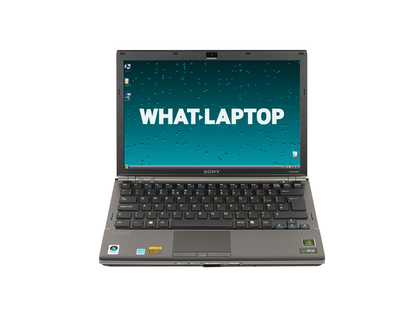
It's here that we get into the ridiculous levels of money for 13-inch laptops, but you get what you pay for. Sony's VAIO series is generally stunning, and this model includes a luscious screen capable of near-HD quality; a rarity on such a small laptop. It's all backed up by some almightily impressive specs, too: a high end 2.4GHz Core 2 Duo processor, 4GB of RAM and an Nvidia 9300M graphics card. The build quality is astonishing, battery life amazing and it's a marvel of modern micro-engineering.
Read our Sony VAIO VGN-Z11WN/B review
10. Sony VAIO VPC-Z12V9E/X - £1,931

Read our Sony VAIO VPC-Z12V9E/X review
----------------------------------------------------------------------------------------------------

| |
Read More ...
Is the Google Nexus Two actually real?
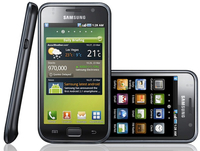 The rumours of a Google Nexus Two are growing - but it looks like they're both real and fake in equal measure.
What's certain is that Samsung is announcing a new Android phone on the 8 November - the invites confirm that - but the confusing thing is that it's in the US, and sources TechRadar has spoken to have downplayed the likelihood of it being anything that will affect the UK.
But sources over at Gizmodo, coupled with another report from Android and Me, are stating that the new Android phone could be the Samsung Galaxy S2 (or a snappier name).
The mooted specs are a 1.2GHz processor and running Android Gingerbread (confusingly referred to as 2.3, although we're sure it's going to be Android 3.0 and built for tablets too).
Nexus or Galaxy?
A 5MP camera with HD video capture (no mention of a flash, and very similar to the first Galaxy S) and a front facing option too. The latter stat would hint that the new Galaxy would be running a new version of Android, one that could handle video calling.
It will have a 4-inch Super AMOLED screen, as well as a curved back made out of a mixture of plastic and metal, which would certainly be an upgrade on the all-plastic Galaxy S.
What is curious is the constant statements that it will be known as the Nexus Two - something we believe to be unlikely given Google's earlier statements.
It seems that somewhere along the line the idea that Samsung would be making a top end 'flagship' Android phone, and somebody mistakenly assumed the name Nexus Two - and thanks to the internet echo chamber, it ran and ran.
We'll be keeping a very close eye on this situation as it unfolds - but it's likely that more information is likely to leak out as the days go by.

| |
Read More ...
Samsung Galaxy Tab out now in UK
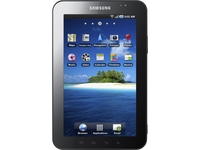 If you are in the market for a Samsung Galaxy Tab then you can pick one up today in the UK.
The initial expenditure on the device itself all depends on the 3G internet contract you wish to take with Samsung's new tablet PC.
Fun with Froyo
Sammy's Android Froyo-powered 7-inch Tab device may well have been rubbished by the likes of Google and Apple, yet the mini tablet PC running Android 2.2 is certainly going to appeal to those users that don't want to spend that extra bit of money on an iPad, but want a decent touchscreen tablet.
The Samsung Tab is coming to all the major UK mobile networks in time.
Right now you can check out the deals over at the Carphone Warehouse, with a number of different data plans on offer, ranging from £399.99 through to £529.99.
Via Carphone Warehouse

| |
Read More ...
PlayStation Phone: new details emerge
 New details have come to light about the much-rumoured PSP Phone, including some new shots of the device.
The notion of a PlayStation Phone has been around since 2007, but it is only in the last week that images and specs have started to leak.
According to Engadget, who seems to have a firm handle of all things PSP Phone related, the Sony Ericsson device definitely has the modest codename of Zeus and is currently running Android 2.2 - but this may change when it comes to market.
When it comes to storage, there seems to be a microSD card slot on board and 512MB of internal memory - likely allowing users to pump the internal storage up to around 32GB.
Phone and games
The chassis of the PlayStation Phone is around 17mm thick, according to Engadget, and looks a bit like a BlackBerry – the phone make, not the fruit.
The width of the chassis is around the same as the PSPGo, so will feel familiar to those who have had a go on the PSPGo.
Speaking recently to press (and picked up by the Telegraph) Masaru Kato, Sony's chief financial officer did talk about the smartphones and gaming, explaining: "As for the new PSP product... there is a gaming market based on [the] cellphones, and there are many changes that are being seen [with] Nintendo, as well as ourselves, in the field of the product for the gamers."
In short: he's telling us there is games market for phones and Sony makes games and phones. Which means that the PlayStation Phone is looking less and less like vapourware each day and could well launch at Mobile World Congress in February.

| |
Read More ...
Buying Guide: 10 best 42-inch HDTVs in the world today
 Our constantly updated list of the top 10 best 40-inch and 42-inch LCD TVs in the world today
 Once known simply as 'plasma screens' in the collective consciousness, the 42-inch size is where the flatscreen dream started in the late 1990s - and where it's still at its most innovative and best.
Now a lot more varied, with plasmas rubbing shoulders with (and quickly being outnumbered by) LCD TVs and their ultra-modern LED TV makeover, 40-42 inches is still the sweetspot for anyone not overly concerned with ruining the interior design of their living room.
As well as being the fastest growing sector of the TV market, this size is also great value. Serious home cinema addicts have moved on to 50-inch and bigger screens, leaving this category a swarm of slashed prices.
That's truer than ever right now; the market is divided between brand new sets with built-in Freeview HD tuners, and those with standard digital tuners.
Whether you need a Freeview HD tuner is a choice you'll have to make (and depends on where you live), though we expect them to become a default feature very soon.
Nevertheless, if you're considering buying a TV without a Freeview HD tuner, demand a discount!
Arguably the minimum size where Full HD makes most sense and where a Blu-ray player is a must, the 42-inch size hasn't lost its allure despite becoming affordable.


Sony KDL-40EX503
Pics, price, Freeview HD and online video streaming make this LCD a forceSony's very first TV to come packing a built-in Freeview HD tuner adds decent picture quality, sets a new bar for online content, and is impressively easy to use for such a complex TV.
Particularly excellent is the 40EX503's black level response, which achieves levels of profundity much deeper than anything Sony has managed before.
It's good looking, too; a brushed aluminium panel running along the TV's bottom edge adds a touch of opulence to the otherwise straightforward glossy black rectangle.
Strapped with MotionFlow 100Hz and Sony's Bravia Engine 3 system, this TV's most interesting feature is streaming from YouTube, blip.tv, DailyMotion and LoveFilm, but the bottom line is that if you live in an area that already has or is soon to get Freeview HD, then the 40EX503 absolutely demands an audition.
Read: full Sony KDL-40EX503 full review


Toshiba 40LV713DB
This budget LCD TV has had a few corners cut to meet the aggressive priceToshiba's 40LV713DB is one of the cheapest 40-inch LCD TVs around. So we guess we'd better brace ourselves for a few compromises.
The chunky, rather plasticky bodywork looks a little old fashioned and there's only three HDMIs, no Ethernet port and not even a Freeview HD tuner.
However, the Full HD resolution, Toshiba's Active Vision video processing and Adaptive Luma Control combine to offer improved black levels, rich colours and greater brightness - the picture is both dynamic and, with Blu-rays, quite cinematic.
Finally in the plus column, despite not carrying Resolution+, the 40LV713DB makes a decent fist of upscaling standard-def material.
Read: full Toshiba 40LV713DB review


Sony Bravia KDL-40HX703
Sony's best TV to date matches Freeview HD to 200Hz scanningSporting Sony's new Monolithic design and a Deep Black Panel, this TV features 200Hz processing, Bravia Engine 3 video processing, 24p True Cinema Blu-ray mode, Live Colour engine, Bravia Internet Video and Freeview HD.
The 40HX703 also scores a palpable hit with the sharpness of its HD sources, which contain oodles of fine detail and enjoy a really crisp finish, but suffer no video noise.
The crispness is further boosted by the impressive 200Hz processing, which keeps judder and motion blur to a minimum without generating hardly any unwanted processing side effects (provided, of course, you stick with the 'MotionFlow' system's Standard setting).
Colours are superb, too, and the Bravia Engine upscales standard-definition sources unusually effectively.
Read: full Sony KDL-40HX703 review

Panasonic TX-P42GT20B
Panasonic takes 3D plasma to a smaller level, and throws in 2D to 3D upscalingJust when it looked like LCD was about to bury its old rival once and for all, plasma proved it could show 3D pictures with much less ghosting noise, or crosstalk - but the only catch was size.
Those with smaller rooms (and bank accounts) can now invest in 3DTV thanks to this, Panasonic's first 42-inch 3D plasma. Endorsed by THX and the ISF, this is another superb plasma that underlines the technology's current 3D advantage.
Read: full Panasonic TX-P42GT20 review

Samsung UE40C7000
A TV so stunning that 3D is only one of its attractionsDoes 3D technology translate well into the home? And is there anything to watch? One way the Samsung 40C7000 overcomes the problem of availability of 3D material is that it features a 2D-3D conversion function, which will add depth to any flat image.
Of course, it doesn't work as well as with genuine 3D-mastered material; the only way to get the full effect is from a 3D-enabled Blu-ray player. To make the most of 3D will cost you £100 per set of glasses, plus the cost of a 3D Blu-ray player (around £300), plus the costs of the 3D Blu-ray discs (which might be around £50 each).
State-of-the-art LED backlighting, Freeview HD, and PVR, internet and wireless functions make this more than a TV; it's the centre of a home entertainment hub, and well specified for the digital, multimedia future.
Read: full Samsung UE40C7000 review

Philips 40PFL7605
Edge LED with added Ambilight & Net TV, but no Freeview HDRemarkably thin (it's just 42mm deep), but well built, this Philips has the usual classy touches - Ambilight, wireless streaming and Net TV - but no Freeview HD tuner.
That's an oversight and bound to put some people off, which is a shame, because at its core this superlative set is all about picture performance. And as Edge LED-backlit TVs go, you won't find a much slimmer or more impressive TV.
Read: full Philips 40PFL7605 review

LG 42LE7900
This wafer-thin LED TV is a plum puchaseLG's latest boundary-pushing screen, the 42LE7900, with its subtly plum-tinged frame and improbable profile, is jaw-droppingly lovely to look at and comes packed full of some the most exciting spec of any telly available today.
This set has every gadget you could possibly need and then a few more sprinkled on top for good measure. Most excitingly, it has Freeview HD brains built in, which means you won't need a digibox ever again. It also sports LG's NetCast web-browsing 'widgets', wireless capability for use with various media files or cord-free headphones and four HDMI inputs. It's also lit with LEDs, 100Hz scanning two USB inputs.
Underwhelming black levels and occasionally substandard motion handling cost the set a fifth star and an unreserved recommendation; this is one for those who prefer style over technical finesse.
Read: full LG 42LE7900 review

Panasonic TX-P42G20B
'Girl next door' plasma that you ignore at your perilGet a P42G20 home, and you'll find yourself with a TV that loves TV - especially films - as much as you do. The advances in terms of contrast and colour introduced by Panasonic's new NeoPDP technology are profound, serving up a picture that caters perfectly for the AV cognoscenti. Many people will be seriously attracted to its almost unlimited viewing angle, too.
Its multimedia talents are solid as well, and we liked the option to record Freeview HD programmes to an external USB HDD.
With the P42G20, Panasonic has effectively introduced the quality of last year's high-end models to a mid-range price point - and you can't ask for more than that.
Read: full Panasonic TX-P42G20 review


Philips 40PFL9704
Pricey 40-inch LED screen that pulverises plasmaA brushed aluminium frame and three-sided Ambilight system lends this 40-inch LCD TV a unique look, but it's the sheer quality of its hi-def pictures - and, more unusually, its built-in speakers - that give the 40PFL9704 an enviable status as one of the best flatscreen TVs around.
With subwoofers strapped to its rear, the 40PFL9704 projects the most energetic sounds we've heard on a 40-inch TV this side of a Loewe screen.
Its onscreen success is largely down to what Philips calls LED Pro, a backlight system that features 224 LED lights arranged behind the entire screen, which can switch on and off individually.
Contrast is stunning, with a plasma-like richness to dark areas of the image; Philips' LED Pro tech at last delivers on the tech's potential and achieves a picture quality that arguably tops the best plasmas - though Freeview HD is absent, as it is from all Philips televisions.
Read: full Philips 40PFL9704 review

Panasonic TX-P42VT20
Panasonic's most advanced 42-inch screen yet brings full HD 3D to the plasma partyPanasonic's 'other' 42-inch 3D plasma is from the step-up VT20 Series.
For the extra cash you'll get an extra speaker, a wireless adaptor and perhaps the brand's best-kept secret - Infinite Black Pro.
It may look drab on the outside, but one of Panasonic's flagship screens uses plasma tech to display one of the best 2D and 3D performances around.
Read: full Panasonic TX-P42VT20 review

| |
Read More ...
New search engine powered by human touch
 A new social network that relies far more on human input than traditional search engines such as Google has landed $24 million in funding this week.
The search engine is called Blekko, with the company's founders clearly hoping that the human touch will offer users something that they cannot get from the likes of Google or Microsoft Bing.
Blekko's founders claims that the web is too over-run with marketing spam, which means that many results that pop up in Google searches are not really giving the user the fastest access to the necessary information or data they require.
Humans versus SEO ninjas
Blekko Chief Executive Rich Skrenta hopes that narrowing down your search to groups of websites pre-approved by other users as being the best source of information (instead of the most popular) is the way forward.
Blekko has recently raised $24 million in funding, following three years of initial development of the new online search product.
Blekko will initially offer a directory of useful, spam-free websites in the categories of health, recipes, song lyrics, hotels, automobiles, colleges and personal finance.
The site will also allow users to create their own favoured personal directories of websites for particular topics.
While it is unlikely that such an upstart will pose any kind of significant threat to Google's hegemony in the search industry, Blekko may well prove to be a useful secondary search tool.
Google issued the following statement on hearing the news about Blekko's latest round of investment: "Having great competitors is a huge benefit to us and everyone in the search space - it makes us all work harder, and at the end of the day everyone benefits from that."

| |
Read More ...
Android 2.1 rolls out for Xperia X10, X10 Mini and Pro
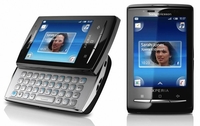 Sony Ericsson has reportedly begun rolling out the Android 2.1 update to its Android range, beginning in Scandinavia.
The update affects the Sony Ericsson Xperia X10, X10 Mini and X10 Mini Pro, giving all the Android 2.1 benefits (such as support for better versions of Google Maps, better keyboards and better social network integration).
Other key improvements are localised between the devices; the X10 has gained HD video recording with continuous autofocus, and five home screens for more widget and icon placement.
Better for Bluetooth
The X10 Mini and Mini Pro get improved Bluetooth support, auto-synchronisation between Facebook and the phone book and better content back up.
The Xperia X8 will be getting an upgrade in the near future too, although we've yet to get a definite date for that to land.
The upgrade is long, long overdue from Sony Ericsson - the Xperia X10 was launched at the start of 2010, and its still running Android 1.6, which is frankly ridiculous when more and more phones are already on Android 2.2.
We've contacted Sony Ericsson to see when the update will be hitting the UK, but in the meantime let us know if you're an X10 owner and get any little notifications.

| |
Read More ...
Opinion: The desktop PC may have legs yet
 The PC is dead. Long live the PC. In recent months, I've been sniffing the winds of change, trying to fathom the future for this most versatile digital device. At best the signals are mixed. At worst, you can make a pretty good argument for the imminent demise of the PC as we know it.
 I've suggested, for instance, that it won't be long before nobody knows or cares about the chips inside their systems. Whatever PC you pick up, it will be good enough in hardware terms.
As part of this process of commoditisation, I reckon the GPU will disappear, subsumed into the coming generation of accelerated processing units, otherwise known as the fusion processor. For similar reasons, the enthusiast end of the market looks to be on its last legs.
Phone takes over
At the same time, the smartphone has taken over as arguably the most dynamic digital device. Phones are currently being swept along by a tidal wave of rapid development and innovation.
Inside of a decade from now, it's not hard to imagine a smartphone-like device with ample power to play HD video and games, along with the gumption for more serious office duties; a device that connects wirelessly to the displays and audio systems in whatever room you happen to be in.
At most you might need some dedicated input devices for serious work. I don't think the keyboard and mouse won't die for a while yet. But the point here is that you might not need a desktop PC at all.
The advantages of a consistent, personalised computing experience that can hook into whatever display you happen to have in front of you are obvious enough. Plugging into this more mobile and modular computing model are software and cloud services.
Web browsers are increasingly allowing both applications and users to be agnostic to operating systems and underlying computing architectures. Likewise, storage capacity or serious number crunching for the likes of content creation become non-issues with web services. Why do it on the desktop when you can lighten your load by using the cloud via your mobile digital device?
In defence of the PC
If that's a précis of the prosecution's case, the defence goes something like this. Ten years from now, PCs will be everywhere. They'll be powering your TV, they'll be driving your car, and they'll be in your pocket wherever you go. At least, they will if Intel and, to a lesser extent, AMD have anything to do with it.
Both companies would love to embed x86 PC processors into everything that moves and, frankly, most things that don't. For starters, PCs will soon be so powerful and cheap that replacing them with smartphones may be a solution to a problem that doesn't exist. Who needs the complexity of wirelessly connecting your smartphone to a large display when PCs are a dime a dozen and the cloud can provide that all-important consistency of computing experience?
So, the desktop PC may have legs yet, albeit smaller and cheaper ones. As for opportunities for expansion, the key case studies are phones and TVs. It's difficult to predict how and when the PC might finally assimilate the TV.
PCs in TVs
History is strewn with valiant but failed efforts, including Microsoft's Media Center operating systems. However, when it comes to TV, the PC's status as the primary internet access device could be crucial. Intel certainly has its eyes on the prize and has been shacking up with anyone who will answer its phone calls.
Back in 2008, Intel was bedding down with Yahoo and its TV Widget Engine. More recently, Intel has been hawking its own Intel Smart TV initiative and cosying up to Google's TV effort in concert with hardware outfits Sony and Logitech. Still, I think the whole internet-enabled TV shizzle will get a lot more messy before it begins to settle down into something resembling a consistent platform that consumers can understand.
I'd therefore be very, very surprised if Smart TV or even Google TV was anything more than a stepping stone. It's a similar story with smartphones. Intel may have inked a deal with one of the biggest phone makers in Nokia.
However, Nokia is well off the pace in the smartphone market. Likewise, Intel has yet to prove it can make an x86 chip that can beat ARM's CPU architectures for both power consumption and performance.
With all that in mind, it could go either way for my favourite computing device. But you won't be surprised to hear that my money's on the PC popping up almost everywhere. Just don't expect it to always be recognisable as a PC.

| |
Read More ...
Review: Sony PRS-650 Reader Touch
 The tablet market may be casting a dark shadow over the future of the ebook reader, but there are still two big-name manufacturers out there who believe that a dedicated reading device is what consumers want.
Both Amazon with its Kindle and Sony with its Reader range are slogging it out to become the number one ebook reader manufacturer.
You wouldn't have failed to notice that Amazon has pumped a lot of money into advertising its Kindle on TVs and billboards. But Sony, with little fanfare, has managed to impress TechRadar with the fantastic quality of its latest Reader, the Sony PRS-650 Reader Touch.
This isn't the first time Sony has released a touchscreen ebook reader but it is the first time it has launched a decent one.
Touchsreen and e-ink usually goes together like water and oil; the two technologies aren't compatible due to the extra layer that has to go on top of the e-ink display to make it touch-friendly.
This extra layer makes touch that little more sluggish and renders the screen almost unreadable in direct sunlight due to added shine.
Given that one of e-ink's USPs is that it works well in direct sunlight, the first Sony Reader Touch was hampered by too many glitches to make is a decent touchscreen device.
Sony has gone a long way to rectify this and the results (which we will relay further on in the review) are quite special.

The Sony PRS-650 Reader Touch has been given a 6-inch screen with a 600 x 800 resolution. This is the same size as the original Sony Reader, but it's the build quality which has been improved dramatically.
An aluminium chassis replaces the dowdy plastic exterior of yore. This gives the Reader a nice weight – solid but far from too heavy. At 215g it won't give you arm and neck ache like the iPad does.
The chassis of the Sony Reader Touch is slim, too, at just 119 x 168 x 10mm, and Sony has made sure that every button on the device is flush to the bezel. This is a nice stylistic touch and one which means that you won't accidentally turn it on when it is in a bag.
As the Sony Reader does utilise touchscreen, the buttons on show are limited. On the front, just under the screen is a forward and back button for flipping pages and home, zoom and option buttons.

Situated on the bottom of the Sony Reader are a Micro USB port, volume control and 3.5mm jack.
The top features a sliding power button and two expandable memory slots: SD and MemoryStick.
Unfortunately Sony still seems intent of keeping the MemoryStick format alive. The slot may not take up much room on the top of the Reader Touch, but it does feel a little like overkill having both memory slots on board.

The only other noticeable feature on the Reader Touch is the stylus. Yes, the Sony Reader Touch comes with a stylus. This is a little strange considering how much the touchscreen has improved on the device, and is a feature which will become redundant in future renditions of the Reader Touch.
In our tests we hardly took the stylus out. Except to look at it to remind us what technology in 1999 looked like.

Switch the Sony PRS-650 Reader Touch on and it takes around 10 seconds to boot up your library of books.
The menu screen is nice and pleasant to look at. Sony has made significant improvements with its e-ink technology. It uses E Ink Pearl which is sharper, has a faster refresh rate and now comes with 16 levels of greyscale.
This does make a noticeable difference to the sharpness of the text on the screen.
The menu is broken down into your library of books (you get a number of books like Doctor No and Pride And Prejudice loaded on to the device). Your periodicals (newspaper articles), collections (books you have purchased) and any notes you have made.
This is where the Sony Reader Touch gets interesting. You have the ability to make notes on the books you read. You can underline, circle and scribble on the books you are reading. It is virtual graffiti and it is a great feature which is primed for students.
You can also double tap on words to load up the included dictionary to find out their definition.
And even better, you can find out the definition of foreign words as well, so there's no stopping you when reading even the most pretentious la literature.

The new and improved screen resolution means that the Reader Touch is a joy to use. Words sparkle on the page and even the page transition doesn't seem as jarring as normal e-ink readers. To get back to the menu screen you have to use the real home button.
Everything else though is done through the touchscreen. Sony has managed to create a touchscreen on the Sony Touch which does away with the shiny extra layer it had to put on its prior Touch ebook reader – this makes a world of difference.
Essentially Sony is using tiny sensors at the top and bottom of the screen which detect when a finger is present on the screen.
This means that swiping the screen can be done with the deftest of touches and there's no harder finger prodding when having to navigate menus.
E-Ink touchscreen displays are never going to compete with the capacitive screens of phones or tablets, but the screen on the Sony Reader Touch is a revelation for those who have tried touch on an e-ink device before.

Other slight features include bookmarking and searching. Searching brings up a QWERTY keyboard, which isn't as responsive as we'd have liked, but there was no muddling of letters when typing out the names of books.
The Sony Reader Touch also makes for a decent PDF viewer. This is because any PDFs you feed into the device are automatically resized for ease of view.
It's not that great at viewing images, though. While the front covers of books are great in thumbnail form when they are blown up they are less than impressive. And swiping through the images makes the e-ink have something of a fit. It looks like the image is drowning in treacle before actually coming up to the surface.
As there is a 3.5mm jack, you can also load up the device with MP3s to listen to while reading your missives.
When it comes to internal memory, the Sony Reader Touch has 2GB which is around 1,200 ebooks. This is expandable with the two memory slots.

After playing with the Sony Reader for a number of weeks, we can vouch that the battery life is impressive. Having listened to MP3s and loaded up myriad ebooks we didn't have to charge it for at least a week.
Sony is promoting it as around two week's juice, but this must be with little action.
Sony is making the Reader Touch as open as possible, so the file formats it will take are plentiful. The main ones include: EPUB eBooks (Adept) BBeB eBook, PDF, Word, TXT and RTF.
This does a good job of masking the fact that Sony doesn't have the might of the Amazon Kindle Store to go with its ebook reader.
As it is sporting EPUB, you can download ebooks from most online stores out there, though. The one which you won't be able to is, for obvious reasons, the Kindle Store.

With the release of the Reader Touch, Sony is promoting that you can now rent books through 50 council library websites.
We found this was easy enough to do, but there are some interesting things with the renting. Even though it is a digital file, each library only has so many licences, so like a real library the book you want may well be 'out on loan'. You do get notified when the ebook is available, though.
It's a nice idea, but one which is currently limited. If more libraries sign up then it may well take off.
What is much better is the search function of the Sony Reader website which offers up all the free domain books Google has to offer.
This saves you a lot of time wading through the priced books which Google also offers.

The Sony PRS-650 Reader Touch is a mightily impressive piece of kit, but there are a few niggles with the product.
The biggest for us is its complete lack of wireless connectivity. That's right, there is no 3G or wireless, so downloading content on the go is a big no-no.
Amazon must have been extremely pleased about this, given that its latest Kindle offers Wi-Fi and/or 3G.
We have to admit that the amount of books you can pre-load onto a Reader Touch is more than you would probably get through in a lifetime, so there isn't that much need for wireless.
It does mean that you can't have RSS feeds on the device and those spur of the moment purchases of ebooks go out of the window.
The second niggle is the price. The Sony Reader Touch is an expensive bit of kit, priced at around £200.
In these wallet-tightening times this may be too much for some. But Sony has created a product well deserving of the price.
The aluminium chassis is one of the most desirable we have seen at any price, it feels perfect in the hand and is easy to read.
The quality of the touchscreen will blow most ebook reader naysayers away. But the price will unfortunately put others off – or at least turn them to the perfectly priced Amazon Kindle 3.
Related Links

| |
Read More ...
Review: Canon PowerShot SX30 IS
 We are used to digital bridge cameras having wide focal length ranges, but the 14.1-million-pixel Canon PowerShot SX30 IS is a little bit special because its 35x optical zoom gives the SX30 IS a focal length range equivalent to 24-840mm.
Just to be clear, that's the Canon SX30's optical range at full resolution and it doesn't include the digital zoom which can extend the reach to 140x.
Having such a phenomenal range should make this new Canon PowerShot camera ideal for a whole raft of photographic situations, from shooting in fairly confined spaces indoors and taking shots of wide, sweeping vistas to photographing distant wildlife.
The PowerShot SX30 IS's lens features Canon's most advanced optical Image Stabilizer, which assesses camera shake around 8,000 times per second and is claimed to extend the safe hand-holdable shutter speed by up to 4.5 stops. Obviously this can't deal with subject movement when shooting wildlife, but it is a big help with cancelling out the involuntary camera movements that are an issue with very long telephoto optics.
Interestingly, Canon has used three Hi-UD (high-refractive index, ultra-low dispersion) elements, which are normally reserved for broadcast-quality video optics, to reduce the overall weight of the SX30's lens and keep the overall mass to a manageable 601g (including battery/batteries and memory card).
While the SX30 has a host of novice-friendly automatic scene modes, more experienced photographers will appreciate the option to shoot in program, aperture priority, shutter priority and manual modes. At the widest point aperture can be adjusted in 1/3 EV steps from f/2.7-f/8, but at the longest point on the lens this drops to f/5.6-f/8. Meanwhile shutter speed varies by shooting mode, but the maximum range (which is selectable in shutter priority and manual mode) is 15-1/3200 sec.
Sensitivity may be set to auto, ISO 80, 100, 200, 400, 800 or 1600, which is probably about as far as you would want to push a camera with a 1/2.3in CCD and 14.1 million effective pixels.
As usual, exposure may be measured using evaluative, centreweighted or spot metering. While the evaluative metering may be linked to the Face Detection AF frame, the spotmeter can measure from the centre of the frame, the Face Detection AF frame or the FlexiZone AF frame.

In keeping with the bridge camera genre, the PowerShot SX30 IS looks like a mini DSLR. There's even pseudo button-bump where you'd expect the lens release to be.
In some lights the SX30 looks two-tone, but I think it's actually the result of the two different finishes used on the camera's surface. The fine texture of the deep fingergrip provides just enough purchase when shooting or carrying the camera, but lacks the adhesion of Canon's DSLR grips.
I am a fan of articulating LCD screens and the hinged 2.7in unit on the SX30 is good, making it much easier to shoot from a range of angles. Although the screen has a relatively low pixel count by modern standards (230,000 dots), it provides a clear view even when shooting outside in bright sunlight – though bear in mind I used it in the UK's October sun rather than tropical July sunshine.
I am slightly less impressed by the SX30's electronic viewfinder (EVF), which seems rather small and allows little latitude in your eye position. On the plus-side, the EVF has only a few fewer dots than the LCD screen (around 202,000 dots) and provides a reasonably detailed view of the scene being composed. It's frustrating that there's no eye sensor to detect when the camera is held to the eye and automatically switch between activating the LCD and the EVF; instead, the Display button must be pressed to toggle between the options.
The PowerShot SX30 IS is one of those cameras that almost anyone can pick up and use straightaway. The controls are sensibly arranged and easy to locate, although there is no direct access to the white balance options by default. I set this to be accessed via the Shortcut button to the top left of the LCD screen.
Those wishing to mix stills and video shooting will love the fact that the SX30 has a dedicated button that can be used to start recording 720p (1280x720 pixel) movies whatever the shooting mode selected.
Even stationary subjects can sometimes be hard to locate in the LCD or EVF when a long focal length lens is being used, but Canon's Zoom Framing Assist button to the right of the thumbrest on the back of the camera makes life much easier. While this button is depressed the lens zooms out allowing the photographer to see more of the scene and locate the main subject. It's a real bonus when the lens is zoomed into 840mm.
In good light the SX30's autofocus system performs pretty well. It doesn't exactly snap the subject into sharp focus, but it comes into register fairly promptly. Things slow down a little in lower light, with low-contrast subjects and at the longest point of the telephoto lens, but in most instances the SX30 manages to find the target. In continuous AF mode the SX30 managed to keep up with a jogger making his way up a steep hill towards me, but I don't think it is the camera I would use for faster moving sports and action.
Canon knows a thing or two about exposure systems and the PowerShot SX30 IS's evaluative metering system doesn't disappoint. The main subject is correctly exposed in the majority of my images, although in some instances this is at the expense of the highlights. Fortunately, exposure compensation is available to +/-2EV in 1/3EV steps and is easily accessed using the 'up' navigation control and the control on the back of the camera.
It's worth keeping an eye on the histogram view (accessed via the Display button), as I found that the on-screen image sometimes differs a little from the captured version.
Overexposed areas of blue sky tend to look rather cyan, but this can often be rectified post-capture to make the results look more natural. Colours direct from the SX30 are generally quite vibrant and I would steer clear of the vibrant mode. Canon has one of the best, if not the best, white balance systems around and on the whole my images captured in auto white balance mode retain the atmosphere of the scene.
Chromatic aberration is an issue along some high-contrast edges, especially towards the corners of the frame. In several instances I was able to reduce this coloured fringing by adjusting the image using Adobe Camera Raw. Distortion is controlled well.
Still images may only be saved as JPEGs on the SX30, which is a little disappointing, but not entirely surprising. At high sensitivity settings there's little sign of chroma noise, but when examined at 100% on screen, even toned areas of images captured at ISO 200 have a slight granular texture caused by luminance noise.
Out-of-focus areas with very fine detail also look slightly smudged under high magnification, especially in high-sensitivity images. When the images are sized to make A3 prints they look good and the smudging is not apparent, but images captured at the highest sensitivity setting (ISO 1600 at full resolution) look a little softer than those taken at the lowest settings.
While not spectacular, 1280x720-pixel video quality from the SX30 is good, though some edges look at little oversharpened. Recording at 30fps ensures that movement is fairly smooth.
We used this set of clothes pins on a wooden tabletop to study the effects of noise at each of the SX30's ISO settings from ISO 80 to ISO 1600. Each image was cropped at 100% to better illustrate the changes. Click on each cropped image for the full version.

ISO 80

ISO 100

ISO 200

ISO 400

ISO 800

ISO 1600

 See full-res image
Man in a canal boat, shot at 840mm: 1/400sec at f/5.8, ISO 200
 See full-res image
Shooting at the 24mm end of the Canon SX30's lens captures a stunning perspective, but note the canal boat on the opposite side of the river. That dot in the window on the right is the man in the image above, which demonstrates just how impressive the SX30's zoom range really is: 1/200sec at f/5.6, ISO 200
 See full-res image
Colours direct from the SX30 IS are generally quite vibrant as seen in this image using the Canon SX30's tilt and shift effect option: 1/500sec at f/4, ISO 80
 See full-res image
Again using the Canon PowerShot SX30's tilt and shift effect you can manipulate the size and orientation of the zone that's sharp: 1/125sec at f/4, ISO 320
 See full-res image
The hinged 2.7in articulated LCD screen on the Canon PowerShot SX30 IS makes it easier to shoot from a range of angles: 1/50sec at f/4, ISO 400
Canon's PowerShot SX30 IS is capable of producing some excellent images, but it's best to keep to the lower sensitivity settings if you want to make A3-size prints.
It's a shame that images cannot be recorded as raw files to allow experienced photographers more control over the noise reduction that is applied to their high-sensitivity images. Canon has added raw capability to its bridge cameras with a firmware update in the past, and I wonder if it will do so this time?
The SX30 is very easy to use and although the focusing can be a bit slower than usual when the lens is at its longer point, the incredible focal length span makes it a great choice for family day trips to the zoo etc.
Features: 4/5
The PowerShot SX30 IS's key features are its incredibly wide spanning lens, articulated LCD screen and its advanced exposure modes that are backed up with entry-level modes.
Build quality: 3/5
There are no real surprises here: the body of the SX30 is well put together, but it has a plastic look and feel to it – for obvious reasons.
Value: 4/5
This is a difficult one, as an EOS 1000D (body only) can be purchased for less than £300 these days. However, buying a range of lenses (or lenses and teleconverters) to cover the full focal range span of 24-840mm will set you back considerably more, making the £449.99 RRP of the PowerShot SX30 IS seem very reasonable.
Performance: 3/5
With a 1/2.3in sensor, the image quality from the SX30 IS is never going to compete with that from an APS-C-format DSLR, but it is nevertheless impressive. A superzoom lens usually demands a few compromises in the image quality, and although chromatic aberration is visible in some images, it is not as big an issue as I might have feared.
Overall: 4/5
Canon's PowerShot SX 30 IS is an excellent choice of camera for someone who wants something a bit more than the average compact model, yet doesn't want to go down the route of having interchangeable lenses. The feature set is extensive, the camera is easy to use and the results are generally good, allowing you to make prints at sizes up to A3.
Related Links

| |
Read More ...
Competition: WIN! A Sony 3D bundle worth £2,000
 3D has been the buzz word for 2010. 3D enabled products and content are now available in people's homes for the first time. And with 3.2 million 3D TVs expected to be shipped worldwide this year, you'll be able to enjoy movies, games and sport in 3D from the comfort of your sofa.
 While some of you might remember 3D from the 1980s with ill-fitting paper glasses and poor picture quality, the experience today has come a long way. For example did you know that Sony's 3D glasses block external light making viewing content even better?
Other models tend to let light in which can make it difficult to see the picture clearly, especially in a bright rooms. There can also be other issues with 3D, such as ghost images known as crosstalk, which Sony has worked hard to eliminate.
Critically acclaimed
This is why Sony is proud of its TVs. Its 3D range is consistently ranked highly by critics. TechRadar recently recognised Sony's expertise when it ranked BRAVIA in the top three places for 3D LCD TVs in its '10 Best 3D TVs in the World today'.
Sony is also making it easier to get into 3D by offering a complete range of 3D capable products. Its full 3D bundle includes a 3D Blu-ray player, PlayStation 3 (3D enabled), a Cybershot TX9 as well as one of its BRAVIA 3D TVs.
For more information on Sony 3D home entertainment see http://www.sony.co.uk/hub/tv-home-entertainment/3
We're offering one lucky winner the chance to win one of Sony's 3D bundles worth £2,000!
Enter the competition
-------------------------------------------------------------------------------------------------------
Please note that this competition is only open to UK residents over 18 years of age.
There is no cash alternative to the prize and unless agreed otherwise in writing the prize is non-refundable and non transferable.

| |
Read More ...
New Xbox 360 dashboard update out today
 Microsoft is releasing a new revamped Xbox 360 dashboard today available to download via Xbox Live right now.
The mandatory update should take you around five to ten minutes to install, depending on the speed of you home internet connection.
Microsoft emailed Xbox Live users to inform them the update will "enhance the interface, navigation, and responsiveness" of the Xbox 360, as well as adding new features.
UI improvements
In addition to a few design and user-interface changes, the main reason for the update is to get your Xbox ready for the forthcoming release of Microsoft's Kinect motion camera later this month.
The Kinect motion camera goes on sale in the US on Thursday and in the UK later next week on November 10.
The new update will bring a few minor tweaks to Xbox Live Avatars, better voice quality and give users the ability to use Kinect to navigate through menus.

| |
Read More ...
Turkey lifts YouTube ban
 The Turkish government has lifted a two-year ban on YouTube, following widespread criticism from Turks.
The ban was originally put in place as the Turkish authorities considered that a number of videos on the site were insulting to Turkey's founder Mustafa Kemal Ataturk and to the concept of "Turkishness" more generally, both of which are illegal in the country.
Google talks Turkey
Turkish Transport Minister Binali Yildirim, said the government had been in negotiations with YouTube-owner Google, who had agreed to remove all the offending videos in question.
"YouTube will hopefully carry out its operations in Turkey within the limits of law in the future," said Yildirim, adding "common sense prevailed".
"But we didn't get here easily - we have been through a lot in the process," he told NTV.
"I hope that they have also learned from this experience and the same thing will not happen again. YouTube will hopefully carry out its operations in Turkey within the limits of law in the future," he added.
Turkish President Abdullah Gul had criticised the YouTube ban and pressed his ministers to find a quick solution.
YouTube said in a statement: "We want to be clear that a third party, not YouTube, have apparently removed some of the videos that have caused the blocking of YouTube in Turkey using our automated copyright complaint process.
"We are investigating whether this action is valid in accordance with our copyright policy."

| |
Read More ...
Buying Guide: 10 best 37-inch LCD TVs in the world today
 Our constantly updated list of all the best 37-inch TVs in the world
Which is the best 37-inch TV?
Making the decision to upgrade from a bulky old 28-inch CRT TV is almost too easy, but heading straight for a 42-inch plasma can seem a little daunting.And thus the 37-inch size has become one of the UK's most popular shapes; a lot more impressive than a 32-incher, yet not big enough to entirely dominate a living room. It's also often the maximum size for those of us who are forced, simply by the shape of our living room, to shove a TV in the corner.
It's a size division that's as competitive as any, with the big brands weighing in with both LCD and plasma TV models. Despite its direct forerunners being some of the best-reviewed (and best-selling) TVs around, Panasonic's TX-P37X20 is the only plasma left in this category.
The options explained
Surrounded by LCD TVs not just from Panasonic, but from other huge brands like Sony, LG and Toshiba, the 37-inch size has become a battleground dominated by aggressively low pricing.
A buyer's market, the 37-inch size is also home to some wonderful innovations. Here you'll find some sets properly exploiting a Full HD resolution, and TVs with built-in Freesat tuners, others with online dimensions, 100Hz scanning and even - in the case of Loewe's Connect - a luxury wireless TV that can stream music and video from a PC or Mac, before pumping out incredible sound.
Loewe is hardly typical of this cut-price - and sparsely populated - genre, but it shows just what can be done at this modest measurement.


Sony KDL-37EX503 - £720
Freeview HD and media streaming grace this brilliant TVAt last, we have a 37-inch TV that carries a Freeview HD tuner that doesn't cost the earth.
To celebrate the ground-breaking nature of the Bravia KDL-37EX503, Sony has departed from its usual aesthetic by adding a comely strip of brushed aluminium to the bottom edge.
The set's rear is attractive, too, thanks to the inclusion of four HDMIs, a USB for playing MP3, JPEG, and AVC/AVCHD/DivX/MPEG4 video files, and an Ethernet port. As well as enabling you to stream from DLNA PCs, the Ethernet connects to Sony's new Bravia Internet Video platform.
Black level response is among the deepest we've seen on a non-LED LCD TV, colours are natural and exceptionally subtly blended while the set's various processing systems do well at cancelling out LCD's inherent motion blur problems - so HD and SD pictures look enjoyably detailed.
Read: full Sony KDL-37EX503 review

Toshiba 37RV753
Feature-packed 37in set with Freeview HD and Resolution+ upscalingGet ready for about as much telly as you're likely to see for half a grand. Toshiba's 37RV753 is yet another set from this manufacturer to feature an impressive set of features for an almost puzzlingly low price.
Pictures are bright and punch and lend themselves well to blockbusting movies or animation, with the only downside a clumsy user interface.
Read: full Toshiba 37RV753 full review

Philips 37PFL9604 - £1,000
Solid aluminium set to stunWith its £1,000 price tag, this is easily one of the costliest TVs for its size, but it's also blatantly superior.
The 37PFL9604 sets about the seemingly Herculean task of justifying its price right away, having an extremely eye-catching design and an Ambilight system that sees coloured light sympathetic to the colour content of the picture spilling from the TV's left and right sides.
In full swing, this Philips' high-definition pictures are jaw dropping. Fine detailing is peerless; colours are among the boldest and most accurate we've seen; motion handling is amazingly fluid and crisp and black levels are exceptionally profound by LCD's standards.
Perhaps even more exceptional, though, is the standard-definition performance. The amount of sharpness and detail the Perfect Pixel HD engine adds to a humble DVD or Freeview broadcast has to be seen to be believed - but there's no Freeview HD tuner.
Read: full Philips 37PFL9604 review

LG 37LH7000
Bluetooth and value-busting good looksComfortably one of the prettiest TVs around, with subtle red highlights, see-through bottom edge and high-gloss finish, it sports a USB slot and Bluetooth for wireless compatibility with phones and headphones.
The 37LH7000's 100Hz engine works nicely too, making motion look strikingly fluid and sharp. And so long as you only set TruMotion to Low, you get the motion benefits without suffering many of the flickering, shimmering processing artefacts witnessed using higher TruMotion settings.
Pictures are frequently quite spectacular, with exceptionally vivid colours, fluid and sharp images, and decent black levels. The only thing that's run-of-the-mill is its speakers.
Read: full LG 37LH7000 review

Panasonic TX-L37D25
One of the best-equipped sets for free HD is a top-notch performerDespite its run-of-the-mill price, this 37-incher from Panaosnic is a high-end TV - it's so good that it makes everything else seem rather ordinary.
Laying down a marker for spec and performance that many of its rivals will struggle to match, the D25 adopts Edge LED backlighting and delivers both Freesat HD and Freeview HD tuners. Easily one of the best displays in its class and comprehensively well featured.
Read: full Panasonic TX-L37D25 review

Panasonic TX-P37X20 - £450
Panasonic's budget plamsa TV offers a lot of bang for your buckThe TX-P37X20 is at the bottom of Panasonic's new plasma TV pile. As such, it's rather low on features and cutting-edge technology. But we're confident it will find an audience.
Fashionistas won't like it much, mind you, for the standard black finish, unimaginative sculpting and chunky size is bland in the extreme. Its connectivity is mostly entirely standard, too, with highlights of three HDMIs and an SD/SDXC card slot capable of handling AVCHD video files or JPEG photographs.
The P37X20 boasts sharp hi-def, but isn't Full HD - though without any of the blur that's common LCD screens, you'll arguably see a more consistently detailed picture on this plasma from its built-in Freeview HD tuner.
The set's viewing angle, too, is vastly superior to the angles supported by most liquid crystal sets. Given the right HD material, though, it's worth an audition
Read: full Panasonic TX-P37X20 review

LG 37LE5900
Edge LED lighting in a budget TVDespite its low price, LG's 37LE5900 is an edge-lit set that's proof that LED tech is getting cheaper by the day.
Elsewhere an amazing set of features crammed somehow into a breathtakingly slinky chassis (including a Freeview HD tuner and 100Hz processing), though an occasionally patchy backlight takes the gloss off this otherwise impressive package.
Read: full LG 37LE5900 review

Panasonic TX-L37S20B - £650
Future-proofed Freeview HD model is a winnerHaving the brains to decode Freeview HD broadcasts, plus a 1080p panel on which to display it, makes the Panasonic TX-L37S20B about as future-proof as it's possible to be.
Also appearing is Panasonic's own V-real Pro 4 processing engine, a sophisticated suite of picture tweaks widely regarded as one of the better examples of its kind currently on the market.
The socket count is disappointing in terms of HDMIs (of which there are just three), but it's redeemed slightly by the inclusion of an SD card slot for enjoying multimedia files either from the internet or from your personal computer.
Colour is impressive and black levels aren't bad, and although the picture is on the noisy side, its speakers are typically robust.
Read: full Panasonic TX-L37S20B review

LG 37LH3000
Can this budget LCD TV hold it's own against new TV technology?Boasting a glossy, curvaceous body that looks anything but cheap, this budget LCD TV - note the absence of LED backlighting - includes features such as LG's Twin XD Engine processing and ISF Certification.
We're instantly struck by how bright and colourful things look, while upscaling is good and animated movies explode off the screen spectacularly.
Read: full LG 37LH3000 full review

Loewe Connect 37 Media
Built-in recording and impressive flexibility don't come cheap on this 37" high-end HDTVLoewe is often slated in reviews for its huge price tags, forgetting that the German luxury brand is so called for a reason.
Massively impressive speakers are the unique attraction on the £2k+ Connect, which takes its name from an ability to stream digital media from a PC or Mac - and again, it's easy to use, unlike the mainstream brands' efforts.
Oh, and its 250GB integrated memory enables you to rewind, pause and record live television.
HD has stunning detail and fluidity, though digital TV can look poor. An expensive luxury, perhaps, but this Connect's luscious user interface and quite brilliant speakers make this a goood high-end alternative, though picture-wise it's not outstanding.
Read: full Loewe Connect 37 Media review

| |
Read More ...


No comments:
Post a Comment