

Buying Guide: 5 of the best HD 5770 graphics cards tested

Sure, we all get excited by the prospect of the latest lightning fast graphics cards, with their rather ridiculous power requirements and sexeh numbers in the GPU specs sheet.
How many of us, though, are willing to drop half a month's salary on a card that will be obsolete by the time the transaction hits our bank statements?
So what we want is a card that offers the latest tech, and decent performance on realistic settings and all for a justifiable price. AMD's HD 5770 then is one of your best bets, representing the Texan company's best mid-range card to date. The 5770 is, however, an odd prospect right now.
Related article: 15 best graphics cards in the world today
On the one hand, you will get functionality that supports DX11 and its suite of goodies, such as hardware tessellation and improved multi-threading support. However, as the first mid-ranger with true DX11 capability, we have to remind ourselves that it's just that: a mid-range card.
The extra features offered by DX11 require a resource overhead, and when you add in anti-aliasing and anisotropic filtering, that's an awful lot for a sub-£150 card to do.
We've got a mixture here of standard, stock-clocked cards, funky single-slot versions and a few overclocked beasties too to whet your appetite.
Pre-overclocked cards though are always a bit of a gamble, and the penny turns on a number of factors. How overclockable is the GPU in the first instance? Does it offer much headroom to the manufacturer?
The same goes for the memory. And the price of overclocking at a hardware level, as we all know, is heat generation, which often means an extra premium for a special non-standard cooler that's needed.
Eyefinity too is an interesting prospect, with all but the single-slot XFX offering it. The Sapphire cards offer the latest in fourway Eyefinity and if you're after a massive piece of four-monitor real-estate to run your apps, or to spread video output around multiple screens throughout the house, then it's worth a look.
But that versatility doesn't stretch to multiple-screen gaming, as the benchmarks highlight. Still, this is all about mid-range gaming, so how do they stack up?
XFX HD 5770 - £116
Manufacturer: XFX
Web: www.xfxforce.com

In most tests, the XFX offers equivalent performance to the bulk of the 5770s we tested. Worth noting is that it scored the lowest in our Heaven 2.1 tessellation benchmark, but only by 0.1fps.
We'd likely attribute this to the smaller, slightly less-powerful cooler allowing the heat – and resistance – to rise. But in real-world gaming terms, its marginally lower scores in some tests are unnoticeable; the competition really is that close.
Verdict: 4.5/5
Read the full XFX HD 5770 review
MSI HD 5770 - £133
Manufacturer: MSI
Web: www.msi.com

Out of the box, and like most 5770s, the HAWK offers decent midrange performance.
It's swings and roundabouts if we're honest, the card performed slightly better in Just Cause 2 and middle and high resolutions, slightly worse in Far Cry 2, and DiRT 2, but not by any humanly perceivable margin.
Verdict: 4/5
Read the full MSI HD 5770 review
Gigabyte HD 5770 Super Overclock - £140
Manufacturer: Gigabyte
Web: www.gigabyte.com

It's perfectly reasonable to say that, out of the five 5770's we pitted against each other using the same benchmarks, the Gigabyte Super Overclock is the winner in performance terms.
But to call it a clear winner is something of a stretch. The mid-range Juniper GPU is only really capable of so much throughput, and there's the HD 5770's middling memory bandwidth to take into account as well.
Verdict: 4/5
Read the full Gigabyte HD 5770 Super Overclock review
HIS HD 5770 - £122
Manufacturer: HIS
Web: www.hisdigital.com

The HIS HD 5770 offers gaming performance that is largely equivalent to the other 5770s we've tested.
It performed about as well as any other in our Heaven 2.1 high-end tessellation tests, slightly better than most in Just Cause 2 at 1,680 x 1,050, although it was the worst performer in Far Cry 2 at the same resolution, which seems odd.
However, that performance differential is so marginal – less than a frame per second – as to be negligible. In real-world terms you won't notice the difference.
Verdict: 4/5
Read the full HIS HD 5770 review
Sapphire HD 5770 Flex Edition - £153
Manufacturer: Sapphire
Web: www.sapphiretech.com

Sapphire's HD 5770 is a decent mid-ranger that offers all the benefits the 5000-series family has to offer. As well as exploiting the DX11 effects-suite, it also makes AMD's EyeFinity multi-screen technology a possibility, with the option to attach more screens than the average card.
And that's fine if you're after some kind Adrian Zeidt multi-screen desktop, running apps and movies. But does it have the grunt to play games smoothly at the potentially massive resolutions offered by two, three or even four screens? Not really.
Verdict: 4/5
Read the full Sapphire HD 5770 Flex Edition review
Technical analysis
We've tested five HD 5770s from the leading manufacturers against each other to see which hits the price/performance sweetspot when it comes to mid-range and high-end gaming.
We also cranked the settings up (HDR, anti-aliasing, reflections etc) even at middling resolutions, to see just how capable these cards really are. All of the benchmark results here are at the full HD resolution of 1,920 x 1,080.

If you're looking to grab a 5770, then the combination of the highest settings with so many pixels is going to stretch the capabilities of this GPU, so you should see these figures as something of a worst case scenario. Ease back on the anti-aliasing for one, and you'll get a noticable boost to your framerates. It's not a bad core by any means though...

 |  |
Read More ...
Review: Webroot Internet Security Complete
 Webroot, an internet security firm founded in 1997, has just released its comprehensive Internet Security Complete 2011 suite for protecting your computer from online threats.
 With its simple, friendly interface and generous online storage, it is well worth considering. Installation is quick and easy, and followed by an initial scan of your laptop's hard drive. From this point on the software works in the background, informing you of any threats or attempts to access your network.
Updates are automatically downloaded and hazardous files are picked up instantly with a warning message. The dashboard is clean and simple and not as intimidating as Norton's front end. Any problems are obvious thanks to the red and green colour coding.
You can run a scan at any time or schedule one for the future, although scans are performed automatically by default at unobtrusive times. You also have quick access to internet or phone support and can set up an account with Webroot which gives you access to a generous 10GB of online storage for backing up and synchronising your files with two other computers.
Webroot automatically adds a toolbar to your default internet browser, which allows you to store log-in and password information for your favourite websites. You can also store personal details and card information, which is then automatically entered into online forms.
For added security, all sites are checked out for potential threats before you access them and any attachments you receive are scanned before download.
However, there are no parental controls for keeping tabs on your childrens' browsing habits.
Webroot Internet Security Complete 2011 offers comprehensive protection for your laptop, both online and offl ine, and the sharing and syncing features are an added bonus. Only the omission of parental controls lets it down.
Related Links

| |
Read More ...
10 best Dashboard widgets for OS X
 Dashboard – the screen of widgets that gives you all sorts of information – arrived in Mac OS X 10.4 amid much fanfare, but has become something of a forgotten feature.
It remains incredibly useful though. You can view it by pressing F4 on new Mac keyboards, or by clicking its icon next to the Finder in the Dock. You get some widgets as standard, including a unit converter, iCal and a weather forecaster. But there are thousands more online. Here we'll cover 10 of the best.
They come as WDGT files – just double-click them to install. Once a widget's loaded, flip it over by clicking i to view settings.
1. RSS Reader
Website

Dashboard could never replace your regular newsfeed software, but if there are a few feeds you'd like to keep a closer eye on, this widget is great. Simply add the newsfeed address and it'll display the top headlines. Click one to read the story in your web browser.
You can add multiple feeds too – navigate between them using the arrows at the top. Unfortunately, there's no Google Reader integration.
2. iStat nano
Website

Great for keeping on top of how your Mac is running. With information from fan speed to the temperature of your hard drive, it's all there at a glance.
The main Overview gives you key details. Hover over it to select another category, each of which gives you even more in-depth stats of how things are ticking.
3. Net_Remote Social
Website

This one's simplicity itself, but we love it. The chunky buttons give you instant access to Facebook, Twitter, MySpace, Digg, Gmail, WordPress, Yahoo and AIM websites.
Just click the one you want to fire up in your browser – so your blog and favourite social networking sites are literally just a click away.
4. Twitter Search
Website

Love Twitter and want to know what people are saying about a certain topic or user? If you want to run a quick search on Twitter, there's no faster way than to pop the word or words you're looking for into this unassuming little widget and it'll pop up the results for you in your web browser.
You can search for keywords, hashtags and usernames by using the respective # and @ symbols.
5. Tea Timer
Website

Ever left your pizza cooking in the oven, come back to your Mac and forgotten about dinner burning away? This widget gives you a food timer.
Flip it over to enable alarms, set a sound and voice and tick Keep Alarming. Then go back, click where it says Tea and type in what you're timing. Enter the duration below, then press Play.
6. MightyMonitor
Website

There's nothing more frustrating than when the batteries in your wireless keyboard, mouse or trackpad run out while you are working, or as you're about to finish that level you've been trying to complete for hours. This widget gives you battery readings for your input devices, so you'll know when power's running low.
7. Delivery Status
Website

If you order lots of gear over the internet, you'll know exactly how frustrating it can be having to check the delivery status of each item across multiple websites. Now you no longer have to do this – simply add the details of your order or a tracking number to the widget and it will keep you updated on progress and provide a delivery estimate.
It covers your orders from Amazon, Apple, Google Checkout and more, plus packages sent by Royal Mail, Parcelforce, Citylink, TNT and many others.
8. RefurbMe
Website

Refurbished Macs are a great way to nab yourself a Mac that's as good as new, but at a knocked-down price. But there isn't an endless supply of refurbs.
This widget enables you to keep an eye on what's on offer, so that when something tasty comes up, you can pounce. Decide whether you're after a Mac, iPod or iPhone at the top, and choose your country's Apple Store from the drop-down at the bottom.
9. UK Motorway News
Website

Do a lot of motorway driving? If so, this little widget gives you an at-a-glance view of the state of play on your commute, meaning you can plan an alternative route if things are looking congested.
Flip it over and choose a particular motorway, or leave the box blank to see how things are moving across the entire UK motorway network. Click one of the incidents to be taken to the BBC travel page to find out more.
10. WordReference.com
Website

While Dashboard comes with a translation widget, this one goes far beyond what the former does. Tapping into the extensive WordReference.com website, it can translate from English to 15 languages, and even between some of those tongues.
It gives you all the possible translations, showing words in context as well as compound forms.

| |
Read More ...
Review: Norton Internet Security 2011
 In a recent worldwide survey, security firm Symantec discovered that two thirds of us have been victims of cybercrime. Norton Internet Security 2011 is Symantec's latest version of the world famous security suite and is built to detect and eliminate any viruses, malware and other threats that attempt to infect your system, keeping you and your family safe when browsing the internet.
Internet Security automatically starts in the background when your laptop is booted, with no detrimental effect on performance and no prolonged boot times.
We copied some potentially hazardous files on to our laptop and Internet Security immediately found and removed them.
A firewall helps to prevent worms and other nasties from externally accessing your laptop, while email protection detects any dodgy attachments you might receive. Users of Microsoft Outlook also have access to an anti-spam filter.
Loading the Internet Security dashboard gives you access to a range of tools, including a drive scanner which checks for hidden viruses. Subsequent scans are quick, as only new and altered files are examined. Your applications can also be checked for possible threats and to see how much memory they are hogging.
Internet Security keeps you safe online by warning you of any potentially fraudulent websites, and detecting vulnerabilities in your web browser. An Identity Safe tool stores your personal details, credit/debit card information and passwords in a secure fashion and automatically fills in online forms.
Internet Security also has parental controls to prevent your kids seeing something they shouldn't online.
Norton Internet Security 2011 is a sleek update of one of the world's biggest security software suites. It runs quietly in the background, as security software should, and is no longer a massive system hog. Each copy comes with a year's subscription to Norton updates, and 24/7 phone support.
Related Links

| |
Read More ...
Review: Parallels Desktop 6 Switch to Mac Edition
 Following the increased popularity of Apple's MacBook laptops, Parallels has aimed to make it easier than ever for Windows users to move to a Mac with its Desktop 6 Switch To Mac Edition software/hardware solution.
 Combining Parallels Desktop for Mac software – letting you install Windows as a separate application within Apple's OS X operating system – with a high-speed USB cable for transferring your entire Windows installation, data and programs, switching to a Mac has never been easier.
Once the software has been installed on both your Windows-based laptop and your new Mac, you connect both machines via the included cable and can then migrate your entire Windows installation to your Mac in less than 20 minutes.
With the migration complete, your old Windows installation can then be opened in a separate window directly from within the Mac OS X operating system. Allowing access to all your favourite Windows software, fi les and folders alongside your new Mac software, it truly is the easiest way we've seen for a Windows user to comfortably migrate to a Mac.
As well as accessing Windows as a virtual machine within its own window, Parallels takes its simplicity a huge step further thanks to its Coherence mode. Running Windows in the background, it allows you to open and use your Windows software as if they were native Mac applications – again working seamlessly.
If you do not want to import an old Windows installation and merely wish to install and run a second operating system on your Mac, then Parallels also allows that.
Using your OS installation disc, the process is as simple as migrating an old laptop. While more complex setting are automated, you can override them to configure settings as you wish.
Smooth integration
Whichever method you use to install your second – or third, or fourth etc – operating system, the integration between it and your OS X software is smooth and easy to use. Files and folders can be dragged back and forth between each OS and, in most cases, the virtual machine immediately detects and utilises your internet connection with no input required.
Finally, Parallels also lets you control your virtual machines remotely from your Apple iPhone, iPad or even your iPod Touch. Accessed via the Parallels Mobile Application, all you need to do is ensure that both your Mac and your mobile device are connected to the internet.
Providing an intuitive and staggeringly easy way for new Apple users to migrate to a Mac laptop, Parallels Desktop 6 demonstrates how all software should be – accessible and great to use.
Related Links

| |
Read More ...
No Wii price cut for Christmas, says Nintendo
 Shoppers hoping to pick up a cheap Nintendo Wii this Christmas amid Kinect and PlayStation Move fever can forget about it, according to the company's president.
The Wii remains the cheapest console on the market, but sales have slumped in recent years after Nintendo failed to capitalise on the phenomenal success of the first couple of years.
Now with Microsoft and Sony outing motion gaming add-ons, you might think the Wii would send out an 'hello! over here!' message with a price cut this season?
However, President Satoru Iwata told the AP: "Of course, we cannot say it will never happen, but we are not thinking of it for the near future.
Declining sales
Instead Iwata is keen on identifying potential buyers who have yet to get in on the action.
That might not be enough to rescue Nintendo's fortunes after it posted a $24m loss for the last six months, with declining Wii and DS sales playing a role.
Indeed, it's unlikely that we'll see good news for the company until the the delayed Nintendo 3DS eventually launches in Japan on February 26th 2011.

| |
Read More ...
HTC Desire HD fails to knock original Desire top spot
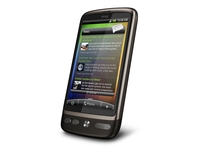 Whether you consider the HTC Desire HD to be the sequel to the original HTC Desire or another in the family, it's not a better phone.
That's according to TechRadar's 20 best mobile phones in the world buyer's guide, which looks at every smartphone around and brings you the cream of the crop.
Reviewers found that the while the original Desire had battery issues, the new Desire HD has got the same problem - but thanks to a 4.3-inch screen, the drain is even harder, so with the best combination of all-round excellence, the original has hung on to the top spot.
Apple presses on
In fact, the Desire HD only made it to number three in the list, with the power of the iPhone 4 good enough to see it sticking to the number two position.
Three Windows Phone 7 handsets have made the top ten, with the LG Optimus 7 the highest ranked at number five, beating the HTC HD7 and Samsung Omnia 7 thanks to a better set out of applications out the box.
The Orange San Francisco also came crashing into the top ten at number 8 - earning that spot thanks to a superb set of features for less than £100.
Check out 20 best mobile phones in the world today to see the full run down - and let us know if you agree in the comments below.

| |
Read More ...
Cheaper Wi-Fi-only Samsung Galaxy Tab revealed
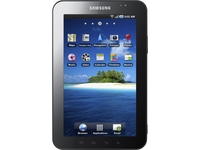 As we approach the launch date of the new Samsung Galaxy Tab tablet PC, it looks like we could soon be seeing a cheaper, Wi-Fi only version of the new slate.
A cheaper Samsung slate on the, err, slate, is clearly good news for those of us that were considering buying Sammy's iPad-alternative, but don't really want to shell out for a costly 3G contract.
Cheaper Tab for the home-bird
The FCC page details the Samsung Galaxy Tab GT-P1010. No further official details on the pricing of the machine has yet been issued by Samsung.
Samsung's WiFi-only Galaxy Tab GT-P1010 will run Anroid Froyo, just like its 3G big brother.
US pricing for the 3G version is rumoured to be $499.99. Again, this is still to be confirmed by Samsung.
The Galaxy Tab listed on the FCC page under the model number GT-P1010 has also been certified by Bluetooth SIG.

| |
Read More ...
3G internet now available at Mt Everest base camp
 A Nepalese firm has successfully brought high speed 3G internet services to Mount Everest's base camp.
The private telecoms company launched the world's highest 3G service this week.
Wi-Fi going underground
The news follows earlier news that you can now get Wi-Fi underground on London's tube.
For those that used to celebrate those contemplative moments of disconnection from the matrix, it increasingly seems that nowhere is safe anymore!
Still, while commuters busily emailing away on the northern line might be some people's idea of a whole new type of hell, the 3G service at the top of Everest may well help to save lives.
The installation should be invaluable to assist the tens of thousands of mountain climbers and trekkers who visit Everest region in Nepal's Solukhumbu district every year.
Massive investment in Nepal's mobile networks
Nepali telecom company Ncell is the firm responsible for the new service, 80 per cent owned by Nordics telecoms giant TeliaSonera.
"This achievement is as mighty as the altitude as 3G high speed internet will bring faster, more affordable telecommunication services to the people living in the Khumbu Valley, trekkers, and climbers alike," said Lars Nyberg, chief of Nordic telecoms firm TeliaSonera.
Ncell chief Pasi Koistinen added, speaking at the launch of the new 3G service: "Today we made the (world's) highest video call from Mount Everest," - a VoIP call made from an astounding 5,300 meters (17,388 feet) up.
Ncell said TeliaSonera plans to spend over $100 million to expand its facilities in in 2011, with the aim of providing mobile coverage to over 90 per cent of the population.

| |
Read More ...
3G internet now available at top of Mt Everest
A Nepalese firm has successfully brought high speed 3G internet services to the base camp near the summit of Mount Everest.The private telecoms company launched the world's highest 3G service this week.
Wi-Fi going underground
The news follows earlier news that you can now get Wi-Fi underground on London's tube.
For those that used to celebrate those contemplative moments of disconnection from the matrix, it increasingly seems that nowhere is safe anymore!
Still, while commuters busily emailing away on the northern line might be some people's idea of a whole new type of hell, the 3G service at the top of Everest may well help to save lives.
The installation should be invaluable to assist the tens of thousands of mountain climbers and trekkers who visit Everest region in Nepal's Solukhumbu district every year.
Massive investment in Nepal's mobile networks
Nepali telecom company Ncell is the firm responsible for the new service, 80 per cent owned by Nordics telecoms giant TeliaSonera.
"This achievement is as mighty as the altitude as 3G high speed internet will bring faster, more affordable telecommunication services to the people living in the Khumbu Valley, trekkers, and climbers alike," said Lars Nyberg, chief of Nordic telecoms firm TeliaSonera.
Ncell chief Pasi Koistinen added, speaking at the launch of the new mountain-top 3G service: "Today we made the (world's) highest video call from Mount Everest," - a VoIP call made from an astounding 5,300 meters (17,388 feet) up.
Ncell said TeliaSonera plans to spend over $100 million to expand its facilities in in 2011, with the aim of providing mobile coverage to over 90 per cent of the population.

| |
Read More ...
Mass Effect 2 picks up 'Ultimate' Golden Joysticks prize
 Bioware's Mass Effect 2 was the 'Ultimate' prize winner in the esteemed Golden Joysticks awards for 2010 – with the sci-fi game pipping rivals like Call of Duty: Modern Warfare 2 and Assassin's Creed 2 to the crown.
 The Golden Joysticks, organised by TechRadar's publisher Future, are officially the most popular gaming awards – at least according to the Guinness Book of Records – and a highlight of the UK gaming calendar.
The Ultimate award is obviously the headliner – but some of the other major gaming titles also picked up gongs, including Call of Duty: Black Ops – which won the 'one to watch' award for forthcoming games – and another CoD title Modern Warfare 2 taking the esteemed 'Shooter' award.

Jagex took the crown for UK developer of the year, Fifa 10 picked up the Sports crown and Guitar Hero 5 the Music game of 2010.
The Golden Joysticks have been running for a staggering 28 years – and have looked on as the games industry has changed beyond recognition in nearly three decades.
Winners list:
Action: Assassin's Creed II
Download: Plants vs Zombies
Fighting: Super Street Fighter IV
Music: Guitar Hero 5
One to watch: Call of Duty: Black Ops
Online: League of Legends
Portable: Pokemon Heart Gold/Soul Silver
Puzzle: World of Goo
Racing: Forza Motorsport 3
RPG: Mass Effect 2
Shooter: Call of Duty: Modern Warfare 2
Soundtrack: Final Fantasy XIII
Sports: Fifa 10
Strategy: Plants vs Zombies
UK Dev: Jagex
Ultimate: Mass Effect 2

| |
Read More ...
Office 2010 beta expiry date is this Sunday
 If you've been wondering when the Office 2010 beta expiry date is, wonder no more. Your copy of Microsoft Office 2010 Beta is set to expire on 31 October 2010. That's this Sunday.
Microsoft is still taking feedback on the Office 2010 beta as well as Microsoft Office Online.
The public beta became available last November as Microsoft sought widespread public testing of its new version of Office in the wake of a successful Windows 7 beta program. Office 2010 was fully released in June.
However, as with all beta software, it only has a limited life - in this case, you'll have been able to use it for nearly a year for free.
The versions of Office 2010 available in the shops are: Office Home and Student Edition, Office Home and Business version.
Price-wise, the cheapest version of the software – other than the free web version – is Office Home and Student which retails for £109.99. This includes Word, Excel, PowerPoint and OneNote.
The Professional suite is £429.99 and includes Word, Excel, PowerPoint, Outlook, OneNote, Access, and Publisher.

| |
Read More ...
Office 2010 beta expiry date is this Sunday
If you've been wondering when the Office 2010 beta expiry date is, wonder no more. Your copy of Microsoft Office 2010 Beta is set to expire on 31 October 2010. That's this Sunday.Microsoft is still taking feedback on the Office 2010 beta as well as Microsoft Office Online.
The public beta became available last November as Microsoft sought widespread public testing of its new version of Office in the wake of a successful Windows 7 beta program. Office 2010 was fully released in June.
However, as with all beta software, it only has a limited life - in this case, you'll have been able to use it for nearly a year for free.
The versions of Office 2010 available in the shops are: Office Home and Student Edition, Office Home and Business version.
Price-wise, the cheapest version of the software – other than the free web version – is Office Home and Student which retails for £109.99. This includes Word, Excel, PowerPoint and OneNote.
The Professional suite is £429.99 and includes Word, Excel, PowerPoint, Outlook, OneNote, Access, and Publisher.

| |
Read More ...
Mobile batteries set to improve ten-fold
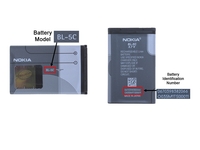 A French research team is developing new nanotech which will hopefully improve the efficiency and battery-life of mobile phones and mobile computers ten-fold.
The Swiss team at The École Polytechnique Fédérale de Lausanne is aiming to develop new nanotech as part of a project called 'Steeper' which will also allow computers and gadgets on stand-by to consumer almost zero energy.
Eco-bonus!
The École Polytechnique Fédérale de Lausanne's Adrian Ionescu said the plan was to use the latest nanoscience and nanowires to close up leaky transistors, noting the "vision is to share this research to enable manufacturers to build the holy grail in electronics, a computer that utilizes negligible energy when it's in sleep mode, which we call the zero-watt PC."
The US spends $4 billion each year on lost electricity, according to the Department of Energy.
The Steeper project hopes to make the millions of wasteful gadgets and phones and computers across the world a thing of the past within the next decade.
Steep slope transistors are so-called because of the abrupt changes they make when switching between on and off, compared to today's 'leakier' transistors, which are incredibly inefficient in stand-by mode.
The European Commission's Joint Research Center notes that around 10 per cent of all energy used in European homes and offices is used by appliances on stand-by.

| |
Read More ...
Review: MSI GeForce GTS 450 Cyclone
 It's not so long ago that the first graphics card touting Nvidia's GTS 450, the Asus GTS 450 TOP, passed through the TechRadar labs. When we first checked it out we quite liked it but as we said at the time: "we'd have hoped for a price tag a little closer to the £100 mark".
 Well, someone was listening, because MSI's overclocked N450GTS Cyclone is within a tenner of our target. It runs at 67MHz above stock speed for a card of this ilk, with a healthy 434MHz boost to the memory speed, but the main feature is the wide windmill-like cooler. It's whisper quiet and drops the temperature down to just 27 degrees Celsius when idle.
The card itself is small and requires just a single six-pin power connector, and is more or less still price comparative with AMD's HD5770.
How does it perform?
We pitched MSI's overclocked and highly cooled N450GTS Cyclone against a stock Radeon HD 5770, which costs only a little more. It also manages to outperform the more expensive still HD 5830 too. All these tests were carried out at the full HD resolution of 1920x1080 with anti-aliasing set to four times.


The MSI GeForce 450 Cyclone lives up to expectations. It's a healthy step up from a vanilla GTS 450 in terms of performance, and is excellent value for money. Even with completely maxed out settings, it got every game we tried on it running at a playable speed at the key full HD resolution of 1920x1080 barring Just Cause 2.
But there's a lot of competition in the less-than-£150 price bracket, and it's not quite an outright "must buy".
Regardless of fans and overclocks, the basic GeForce GTS 450 is still just about half of a GeForce 460 with a higher clockspeed and a narrower memory bandwidth. Given that stock versions of the 768MB version of the GeForce GTX 460 are available for just £125, that extra £20 is well spent.
The GTS 450 has the advantage over the GTX 460 of being smaller and requiring less power, which makes it a strong candidate for an SLI set-up, but it can't really compete in benchmarks.
It is, however, now pitched directly up against the HD 5750 in pricing terms thanks to the on-going Nvidia/AMD graphics card price wars. And that is a card the GTS 450 happily beats into submission in any benchmark you throw at it.
Adam Oxford
We liked
It delivers top performance for a card costing just a bit over £100, and narrowly beats the AMD HD 5770 into submission by three falls to one or more and hammers the price-comparative HD 5750 on all counts. It's also quiet, small and only requires one power connector, making it a flexible option for SLI or an HTPC.
We disliked
As big an improvement as it is over the stock GTS 450 though, you don't have to spend much more to get a clearly superior card like the GTX 460 768MB. It's hard not to believe that won't have more longevity and be better value in the long run.
Related Links

| |
Read More ...
Review: Toshiba 750GB 2.5-inch HDD
 Toshiba has launched a huge 750GB capacity 2.5-inch drive in the shape of the MK7559GSXP which you can snap up for around £80.
 To put the £ per Gigabyte argument into some sort of perspective, for the same amount of money you might just be able to buy an 80GB SSD if you shop around. Even just a couple of years ago a 750GB 2.5-inch drive would have been nudging the £200+ mark.
With this tiny 750GB drive, Toshiba has a drive that should help address the data capacity needs of today's multimedia notebook aficionados.
It's interesting to see how the MK7559GSXP with its latest mechanical drive technologies outperforms the previous generation MK5055GSX.
The MK7559GSXP loses out to WD Scorpio Black in the random access results due to its slower 5,400rpm spin speed, WD's drive spins at a much faster 7,200rpm and has a massive16MB buffer.


Perhaps the most interesting thing about the MK7559GSXP is the technologies Toshiba has used in the platter (disc) design. While many people see SSD's as the future, traditional hard disk companies haven't been hiding their collective heads in the sand, but rather have been looking at ways of increasing capacity in the traditional formats by introducing new disc technologies.
In the MK7559GSXP Toshiba uses something called Advanced Sector Formatting (ASF). Traditionally, hard drives have used the legacy 512 byte per sector format which uses Sync/DAM (lead in) blocks, Error Correcting Code (ECC) blocks and also more importantly leaves gaps between sectors which wastes storage capacity.
ASF is a technology that uses 4K bytes per sector and removes the Sync/DAM blocks and closes the gaps between sectors. The larger sector size also brings improved ECC, leading to better formatting efficiency and data integrity. The closing of the gaps also allows for increased areal density which is the key in getter larger capacities per platter (disc).
Toshiba are not alone in using ASF, but with an areal density of 541.4G bit/in^2 (which Toshiba claim is the industry's highest) it's the reason they only needed two platters to give the MK7559GSXP its impressive storage capacity.
Unfortunately Toshiba has matched all the good stuff with a relatively slow spindle speed, 5,400rpm and a small buffer with 8MB cache. Still, that's pretty standard for a standard notebook drive but it would have been nice to see them push the envelope a little more.
The MK7559GSXP is also pretty quiet in operation thanks to Toshiba's Silent Seek technology which aims to make every seek operation as quiet as the drive is when in idle mode.
We liked
Huge capacity combined, with a seriously low price tag, makes the MK7559GSXP almost a no brainer for anyone that uses a multimedia notebook to download normal and HD content. It will also appeal to mobile workstation uses that need capacity over performance.
We disliked
A conventional hard drive is never going to be as fast as a SSD but it would have been good to see Toshiba raise the anti in the standard disk market by giving the MK7559GSXP a faster 7,200rpm spindle speed.
Related Links

| |
Read More ...
Buying Guide: Top netbook: 10 budget models
 The cheap end of the market for laptops has seen an explosion recently, with netbooks becoming all the rage.
 These cheap, compact machines mean that computing on the go no longer has to involve a physio-inducingly heavy laptop, and additions like 3G mean that you don't even have to be near a WiFi connection to browse the internet. We've rounded up netbooks under £300, and we found that there's a lot of variety for penny-pinching portable PC purchasers.
We also recommend you check out our guide to the 15 best netbooks in the world today, which will give you the rundown on the latest and greatest.
1. Acer Aspire One A110 - £139

Acer's Eee-contender, the Aspire One A110, may not have the teeth to take on more fully-fledged network, but we've included it for one reason: the price. Ditching Windows for Linpus Linux Lite has shaved considerable amounts off both the cost and boot times: it's ready to go in just 22 seconds. The only let down is the SSD, which can be frustratingly slow at times. But if you're prepared to ditch Microsoft, you'll find a sturdy and handy little machine.
Read our Acer Aspire One A110 review
2. Acer Aspire One 531 - £210
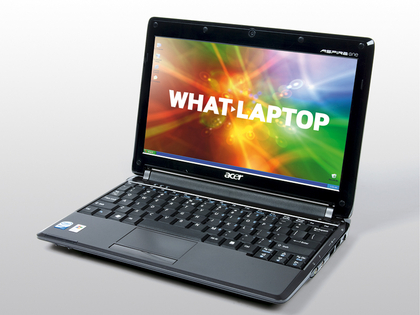
Acer dominates the lower end of the netbook market, and the Aspire One 531 shows why. It's not an exceptional netbook, but it's very well made and offers a stylish and slim chassis, as well as a surprisingly bright and colourful screen. It's got the all-essential 3G built in, too, so you can slot in a Sim and surf in Starbucks. Battery life isn't all that great, but at this price everything else is a winner.
Read our Acer Aspire One 531 review
3. Packard Bell Dot S2 - £230

Considering the low, low price, Packard Bell's Dot S2 is an excellent netbook - particularly in regards to battery life. We were able to use the netbook for 463 minutes on the road, which is all thanks to the six-cell battery; a great-value addition to such a cheap netbook. It also comes with Adobe's excellent Photoshop Elements, which allows basic photo editing. It's one of the best-looking netbooks we've ever seen, and it's highly recommended.
Read our Packard Bell Dot S2 review
4. Asus Disney netbook - £230

We know what you're thinking - a Disney netbook? It's bound to be rubbish! Asus has basically taken one of its excellent Seashell netbooks and kiddified it. You'll find pink or blue Disney graphics on the chassis, a Mickey Mouse-shaped webcam and a customised Windows XP installation. It's easy to set up to protect kids from unwanted content and time their online sessions, and what's more is that it's a surprisingly fully-fledged netbook for adults. Just don't get it out in an important sales meeting.
Read our Asus Disney Netbook review
5. HP Compaq Mini 702EA - £231

If you're a keen typist, you can't go wrong with the HP Compaq Mini 702EA - it boasts one the best keyboards we've seen on any netbook, with a responsive action that makes typing a pleasure. It's also got a lovely curvaceous body, and it's reasonably well-specced. Battery life is slightly below average but still not that bad. The screen is wonderful, but we did find we had to turn the brightness up in sunnier conditions, which impacted battery life.
Read our HP Compaq Mini 702EA review
6. Samsung NB30 - £249
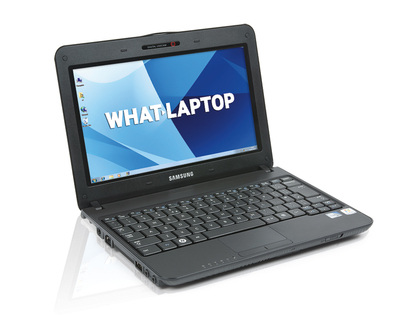
It's not quite as ruggedised as some specialist netbooks we've seen, but Samsung's NB30 will still withstand quite a bashing. It's resistant to spilt liquids, and includes a smart scratch-resistant coating so it doesn't accumulate scratches and scuffs. Samsung has also included an all-essential freefall sensor, which stops the hard drive being damaged in the result of the netbook being dropped. Battery life is incredible, too, and we got a whopping ten hours from the machine. Ideal if you've got kids.
Read our Samsung NB30 review
7. Samsung NC10 - £275

The best just got better. Samsung's NC10 was our favourite netbook last year, and the new "Plus" model (which doesn't mean it's fat) comes with a host of handy new features: Windows 7 Starter, Bluetooth 3.0 and a 250GB hard drive. Even with the new additions, the basic specs still impress, such as an epic six-cell battery, and Samsung's own Battery Manager and Recovery Solution software. It's solidly built, too, and the screen and keyboard are among the best we've ever seen.
Read our Samsung NC10 review
8. Asus X58C - £275

It's unusual to find a decent full-size laptop for less than £300, but bargainmaster Asus has managed just that with its X58C, which includes a 15.4-inch panel. It's the build quality that really impresses, though, and it's got a patterned chequered finish that puts more expensive laptops to chame. It does struggle with multi-tasking and 3D gaming, but that's understandable given the price point and the bargain basement SiS graphics chip. It's perfect for simply day-to-day computing, though.
Read our Asus X58C review
9. MSI Wind 12 U200 - £266
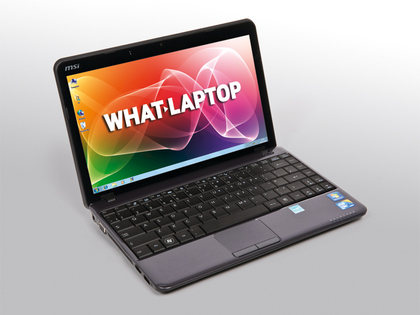
Boasting the kind of innards you'd find on a laptop rather than a netbook, MSI's Wind 12 U200 is the follow up to the U100, one of our favourite netbooks of the last couple of years. In addition to the U100's functional but solid build, the U200 has a consumer ultra low voltage (CULV) processor, which means it's capable of multi-tasking without draining the battery. Its battery life is impressive, too - we got 403 minutes out of it. The only real let down is the keyboard, which is a tad too bendy for our liking.
Read our MSI Wind U100 review
10. Asus Eee PC 1000HE - £287

Asus' latest version of the all-conquering Eee PC is sold on its battery life - the netbook giant reckons you can get 10 hours out of it. We managed seven in day-to-day computing, which is not to be sniffed at. Add to that the Mac-esque keyboard, which is apparently only 8% smaller than a standard keyboard, and Asus' reputable styling and build quality, and you've got the ideal netbook for that trans-Atlantic plane trip.
Read our Asus Eee PC 1000HE review

| |
Read More ...
iPhone 5 to ditch SIM cards for online account?
 Apple could be bringing out the iPhone 5 with a SIM card that can be accessed on any network - effectively bypassing the carriers' distribution networks for selling the phone.
GigaOM is claiming that Apple is working with SIM-card manufacturer Gemalto (which is coincidentally suing Google over Android) to create a special card that would allow users to buy a phone directly from Apple, and then connect to any network they chose.
The idea is that a network-specific ROM would contain data to 'activate' the phone on whichever network the user chose.
Control freakery
It would wrest control of the distribution from the networks, with Apple the one that spells out how the iPhone 5 is pushed into the hands of the consumer, much like Google did with the Nexus One.
It would eradicate the ability to simply swap out your SIM though for future phones, or if your phone becomes broken - although the same could be said for Apple's current micro SIM model.
It would be an odd choice for Apple to go down this route, and also be interesting to note if the carriers accept the loss of revenue - it didn't really work with the Nexus One, but if anyone can convince consumers something weird is a good idea, it's Apple.

| |
Read More ...
iPhone 5 to ditch SIM cards for online account?
Apple could be bringing out the iPhone 5 with a SIM card that can be accessed on any network - effectively bypassing the carriers.GigaOM is claiming that Apple is working with SIM-card manufacturer Gemalto (which is coincidentally suing Google over Android) to create a special card that would allow users to buy a phone directly from Apple, and then connect to any network they chose.
The idea is that a network-specific ROM would contain data to 'activate' the phone on whichever network the user chose.
Control freakery
It would also wrest control of the distribution from the networks too, with Apple the one that spells out how the iPhone 5 is pushed into the hands of the consumer, much like Google did with the Nexus One.
It would eradicate the ability to simply swap out your SIM though for future phones, or if your phone becomes broken - although the same could be said for Apple's current micro SIM model.
It would be an odd choice for Apple to go down this route, and also be interesting to note if the carriers accept the loss of revenue - it didn't really work with the Nexus One, but if anyone can convince consumers something weird is a good idea, it's Apple.

| |
Read More ...
iPhone 5 ditch to SIM cards for online account?
 Apple could be bringing out the iPhone 5 with a SIM card that can be accessed on any network - effectively bypassing the carriers.
GigaOM is claiming that Apple is working with SIM-card manufacturer Gemalto (which is coincidentally suing Google over Android) to create a special card that would allow users to buy a phone directly from Apple, and then connect to any network they chose.
The idea is that a network-specific ROM would contain data to 'activate' the phone on whichever network the user chose.
Control freakery
It would also wrest control of the distribution from the networks too, with Apple the one that spells out how the iPhone 5 is pushed into the hands of the consumer, much like Google did with the Nexus One.
It would eradicate the ability to simply swap out your SIM though for future phones, or if your phone becomes broken - although the same could be said for Apple's current micro SIM model.
It would be an odd choice for Apple to go down this route, and also be interesting to note if the carriers accept the loss of revenue - it didn't really work with the Nexus One, but if anyone can convince consumers something weird is a good idea, it's Apple.

| |
Read More ...
Buying Guide: 10 best camera phones for 2010
 These days, a phone isn't worth having if it doesn't have a top-notch snapper strapped to its back.
 We've rounded up the crème de la crème of camera phones and delved a little deeper than simple megapixels to establish what handsets should be on any self-respecting mo-pho's (mobile photographer's) wishlist.
Here are our recommended 10 best camera phones for 2010.
1. Nokia N8

Nokia is fond of using a snazzy Carl Zeiss lens to lend credibility to its camera-phones and the Nokia N8 is no exception.
Its massive image sensor (the biggest of any smartphone currently on the market), f/2.8 aperture and 5.9mm focal length produce photos that are almost film-worthy.
Unfortunately, there's no optical zoom, just a disappointing 2x digital option - but the good quality optics, Xenon flash and manual controls for everything from the white balance to ISO settings make it an excellent choice for the photography-conscious.
Read our full Nokia N8 review
2. Samsung Pixon 12
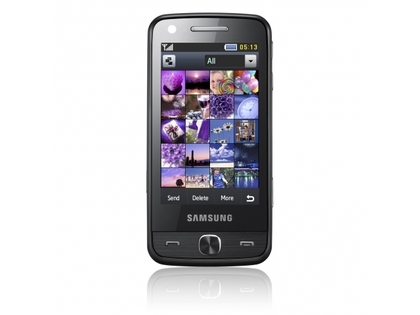
The Samsung Pixon12 offers a 30mm wide-angle lens, which gives us a wider field of view than the majority of the handsets examined here.
ISO settings range from 50 to 1600 and with the option to manually set the ISO as well as controlling white balance, resolution and exposure compensation, so you can exert a measure of control over the final image that's missing from, say, the Sony Ericsson Satio.
For all those 12 megapixels, however, we'd like to see a better image sensor on board the Pixon12 to make the most of what's in front of the lens. That said, the handset is quick to focus and handles colour admirably.
Read our full Samsung Pixon 12 review
3. Sony Ericsson Xperia X10
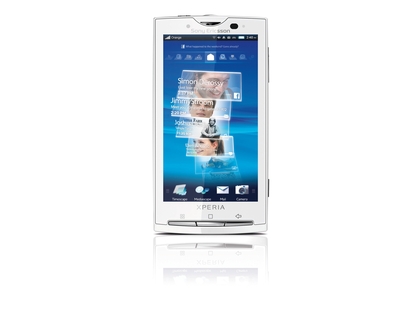
When the Sony Ericsson Xperia X10 finally launched, we described it as one of the best around – and we stand by that assessment. Although the LED photo light is a poor substitute for a flash, Xenon or otherwise, day-lit photography is not bad at all.
The 8-megapixel camera has a 4.7mm F2.8 lens – it doesn't sound very impressive on paper but in practice it makes for a good little point-and-shoot provided you're not trying to win Wildlife Photographer of the Year or anything.
The fixed lens means we've only got digital zoom to play with (16x) but the sharpness of images is quite impressive and we can adjust the metering and white balance settings to tweak image capture based on conditions.
Read our full Sony Ericsson Xperia X10 review
4. iPhone 4

Apple doesn't give you a great deal of control when it comes to the iPhone 4's camera. You're stuck with the handset's automatic white balance and metering, and the iPhone 4 will set its ISO anywhere between 80 and 1000 depending on the subject.
The LED flash offers the option to be always on should you need it for fill lighting – just as well, as the auto-flash tends to be a little shy. Some measure of exposure tweaking is offered by the HDR setting, which combines three shots with different exposure settings to provide a more detailed final product - this can work well if you have a steady hand.
The result is that images often look great on the iPhone screen, but loses some clarity and gains some noise when viewed at full size.
Read our full iPhone 4 review
5. Motorola Milestone XT720

There is a plethora of shooting options on board the Motorola XT720, from standard face detection to self-portrait and six-shot burst shooting.
The abundance of ways to tweak the settings mean you can really get the best out of most shooting situations, from adjusting the white balance to touch-focus to ensure your intended subject really is the subject of your shot.
What's more, the touch-focus tool also controls the shot metering so images tend to come out well balanced even with the Xenon flash deployed. With a short focal distance, you can also eke nicely detailed macro shots out of the XT720 too.
Read our full Motorola Milestone XT720 review
6. Samsung i8910 HD

With a digital zoom, LED flash and auto-focus now standard fare on camera phones, we always appreciate a bit of extra control in the photography department – and that's what the Samsung i8910 HD gives us.
We can set the white balance, metering and ISO ourselves – anywhere from 100 to 1600. By changing settings to suit our shots, we managed to coax the best from the camera, particularly in low light situations where the auto settings let it down.
The other feature that gives the Samsung i8910 HD an edge is the option to take continuous shots - although it's not the fastest mechanism in the world.
Read our full Samsung i8910 HD review
7. HTC 7 Mozart
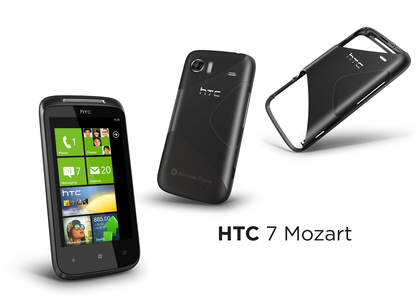
We had grand hopes for the HTC 7 Mozart's photography capabilities, given that its 8-megapixels gave it the highest resolution of all the Win Pho launch handsets. Sadly, it's not top five material for our test.
Although the image quality is pretty good, the only element we had any control over was metering – but we couldn't see any difference whether we instructed the camera to take the reading from the centre, spot or an average of the image.
The camera particularly struggles with brightness which indicates a poor ISO/shutter speed combo, neither element of which you have any control over.
Given its sRGB colour profile, shots taken with the HTC 7 Mozart lean towards the primary colours so mid-tones tend to get a little lost.
Read our full HTC 7 Mozart review
8. Sony Ericsson Satio

Sony Ericsson may have shouted about the Satio's 12.1-megapixel snapper, but this handset proves that megapixels aren't everything.
The lack of manual settings (you've no control over ISO settings other than by swapping pre-set scenes, for example) will frustrate, and the Satio's tendency to opt for a slow shutter speed often results in blurry images.
The handset performs slightly better in low-lighting conditions with the Xenon flash providing even images, but there's often something a bit lacking in the contrast department.
However, when you do manage to capture a steady, well-lit shot, the quality is good and translates well from small to large screen.
Read our full Sony Ericsson Satio review
9. Sony Ericsson C905+

On paper, the Sony Ericsson C905+ sounds great – CyberShot branding, Xenon flash, 8-megapixels to play with, exposure metering, smart contrast and macro mode – but its let down by lag and a lack of user control.
The handset offers up to 400 ISO but there's no manual setting, you'll have to rely on auto settings and various scenes. It's a similar story with smart contrast but you can sometimes add a level of control by fiddling with the metering. We'd appreciate an always-on flash mode but this is, sadly, absent.
Although you aren't handed a great deal of control, the image quality coming from the C905+ is good, with auto-settings generally offering quality good enough to compete with a traditional point-and-shoot.
Read our full Sony Ericsson C905 review
10. Nokia N86

Like its successor, the N8, the Nokia N86 features Carl Zeiss optics with a Tessar lens.
Its focus range is satisfyingly wide, from 10cm to infinity, so the macro setting offers crisp results where many other handsets struggle. We wouldn't necessarily rely on it for long distance shots, despite the wide angle optics and 20x digital zoom.
The variable aperture is a real boon – you can opt for F2.4, F3.2 or F4.8, making the N86 an excellent choice for low-light shots.
But for all its control and 3264 x 2448 resolution photos, the N86's outdated 18-month-old hardware makes it tough to compete with the new breed of camera phones.
Read our hands on: Nokia N86 review

| |
Read More ...
Updated: 10 best 32-inch LCD TVs in the world today
 Our constantly updated list of the best 32-inch TVs in the world.
Which is the best 32-inch TV?
Most living rooms can't physically take a TV much bigger than 32-inch, making this size by far the best for a lot of people in the UK.But within this size division, there's plenty of choice. A basic HD-ready set can be found for less than £300 is you search hard, though it's just as easy to spend over £2k.
There's only one certainty at this size - your new TV will be a LCD TV. If you're lucky it could have LED backlighting, but it won't be a plasma; LG used to make plasmas at this size, but there's not one on sale currently.
A typical circa £500 purchase will sport a Full HD screen, have at least three HDMI inputs, and some kind of 100Hz scanning, though the latter feature varies so much in effectiveness that you've simply got to see it in action in the shop before you shell out any extra cash.
Full HD, media streaming and even built-in Freesat HD or Freeview HD - it's all possible on these small TVs.
Freeview HD is on some of these TVs, but not all. If you've got Sky or Virgin, of course, a Freeview HD tuner is mere frippery, and worse, will add unnecessarily to the cost. And besides, if you're not among the 50 per cent of the UK population that can receive Freeview HD broadcasts yet - and are set on finding a subscription-free hi-def solution - you're better off going for a TV with a built-in Freesat HD tuner.
So what's the best 32-inch LCD TV for you? Read on to find out...


Toshiba 32LV713B - £310
Temptingly low-priced workhorse LCD TV32-inch flatscreens account for around a third of total TV sales, with models from Toshiba in particular becoming rapidly ubiquitous in UK homes.
It's at the chunkier end of the spectrum, but excellent picture quality and a friendly OS make this Toshiba an improvement on some of the brand's previous efforts; there's no 100Hz or online frippery, but it competes well at the budget end of the market.
Read: full Toshiba 32LV713 full review


Panasonic TX-L32S20 - £370
A Freeview HD tuner largely compensates for a lack of other frillsAside from a built-in Freeview HD tuner there;s little to get excited about on this run-of-the-mill Panaonsic TV, so why is it in our top ten?
Using a Full HD IPS alpha LCD panel, this set does a good job of flattering standard-definition content such as DVDs and Freeview broadcasts, but really stretches its legs with HD; blacks still aren't at the level of those on the company's own plasma screens, they're pretty impressive by LCD standards.
Read: full Panasonic TX-L32S20 full review


Sony KDL-32NX503 - £600
Stylish LCD TV with clever online functions and Freeview HDBoasting a new 'Monolithic' design that constitutes a single-layer fascia, boldly chunky black surround and a tilting desktop stand.
The 32NX503's other big selling point, its networkability, kicks in with its connections. For alongside four HDMIs you will find an Ethernet port and a USB input, both capable of multiple talents.
Sony's new Bravia Internet Video service (LoveFilm, Demand Five, YouTube and Eurosport video news) and DLNA are the result, making this the perfect 'network' TV.
Elsewhere, the set carries Sony's latest Bravia Engine 3 video processor and Live Colour processing for richer saturations, and a mode for boosting whites, though its pictures aren't the highpoint - instead, this is a TV for anyone after standout style and comprehensive multimedia features.
Read: full Sony KDL-32NX503 review

Samsung UE32C6000
A super Freeview HD TV with added multimedia functionsThe so-called 'entry-level' model in Samsung's premium C6000 range of 2D Full HD LED panels is not cheap.
And there's nothing budget about its features, which comprise a Freeview HD tuner, a broad range of picture and sound enhancement technologies and some handy multi-media capabilities – although not Samsung's internet TV portal (see the step-up UE32C6600 for that).
With its premium qualities the 32UC6000 feels like a shrunken version of a larger screen and rather over-specified for a 32in model; this is a statement TV.
Read: full Samsung UE32C6000 review

LG 32LF7700 - £500
Freesat HD and value-busting picturesNo 100Hz, but an integrated Freesat HD satellite tuner is decent return for less than £400.
Keenly priced, the 32LF7700 doesn't do anything to undermine LG's reputation for competitiveness in the flatscreen market, though Panasonic m's latest crop add a Freeview HD tuner. Nor is there a TruMotion 100Hz mode on this TV, which features on larger screens in the LF7700 range, but its absence won't be missed on a 32in screen and helps keep the price down.
Even without a Freesat tuner and Full HD panel this would be considered a good 32in deal, but considering it packs some higher-level processing and overall does a superb job, it should be considered a bargain.
Read: full LG 32LF7700 review

Sony KDL-32EX703
Superb 32-inch LCD TV boasting internet widgets and Freeview HDAfter a lacklustre couple of years, the 32EX703 represents a stunning return to form for Sony.
It's done an admirable job of squeezing as much as possible into this panel, with Freeview HD capability, an Ethernet port that enables access to a host of internet widgets (such as YouTube and Dailymotion), four HDMIs and Edgle-lit LED backlighting.
The latter prives the headline act, with the set delivering eye-popping levels of detail and forensic precision within a wholly cinematic picture.
Read: full Sony KDL-32EX703 review

Philips 32PFL9604
Net TV, WiFi and 100Hz star on this delectable - and peerless - Full HD LCDHaving produced some of the best TVs at this size in the past year or so, Philips is looking to capitalise on its new reputation with this feature-packed - and unusually, aluminium-clad - 32-incher.
The 32PFL9604 can access the Net TV portal using WiFi and even browse the internet at large. Further digital niceties come in the form of DLNA networking (wired or wirelessly) from a PC, a USB port that plays video files and a stunning five HDMI inputs.
But it's this LCD TV's advanced 100Hz picture processing that makes for outstanding Blu-ray pictures, with the added bonus of Ambilight - it's a fabulous HD picture and unbeatable at this size, though you'll need to look elsewhere for Freeview HD.
Read: full Philips 32PFL9604 review

Panasonic TX-L32D28BP - £1,000
Purple pro LED with Freeview HD and Freesat HDAlso available in silver and white, the purple framed TX-L32D28BP marks Panasonic's first ever LED TV.
It's not the only radical design change for Panasonic; the TX-L32D28BP features a hefty steel desktop stand that the screen itself slips onto. The end result of adding this 5kg stand is a TV that leans back slightly, while its subtly purple frame appears to dip away from the front; it doesn't - it's merely a clever 3D design.
Freeview HD may be all the rage, but the TX-L32D28BP adds Freesat HD, too, along with its broadband entertainment portal, Viera Cast. The latter now includes widgets for Eurosport and Daily Motion news clips, though YouTube remains the highlight.
Skype video calling, meanwhile, is now available - just add a Panasonic HD Communication Camera, the TY-CC10W, for £129.99. Most of the constituent parts of a reference Blu-ray picture are present on the TX-L32D28BP, though a touch more contrast and shadow detailing would take it alarmingly close to LED perfection. The TX-L32D28BP may be expensive, but it's got a load more talent than your average 32-inch LCD TV.
Read: full Panasonic TX-L32D28BP full review

JVC Xiview LT-32WX50 - £2,300
Phenomenally expensive photographer's friend is just 6.4mm deepAt a cool £2,300, this is a high-end option. Available largely through high-end custom install channels rather than normal high-street outlets, the 32WX50's standout feature is its truly stunning slimness.
At its thinnest point it's just 6.4mm deep and is easily incorporated into wall, or ceiling and shelf AV systems, though whether the 32WX50's incredible slimness is enough to justify the screen's mammoth price depends on how design-obsessed/well heeled you are.
The screen can tackle a full 100 per cent of the sRGB colour spectrum, and around 90 per cent of the Adobe RGB spectrum, letting it reproduce digital photographs with unprecedented (in the TV world) colour accuracy. And when its pictures are good, they're stellar - though not flawless.
Read: full JVC Xiview LT-32WX50 review

Philips 32PFL9705
Direct LED and peerless picture quality make this one of the finest 32-inch sets ever madePhilips likes to push boundaries with its flagship 9000 Series TVs and it's done this again in grandstanding style with the 32PFL9705. What's more, it's done it on two fronts.
In feature terms, its expanded its multimedia support with the unique MediaConnect system, offering a really great way of getting your TV and PC to work together for people not comfortable with the usual more inscrutable TV file streaming approaches.
The other area where the 32PFL9705 breaks new ground is with its picture quality. The use of direct LED lighting with local dimming really does make the set the best 32-inch LCD TV the world has ever produced. And you can't ask for much more than that.
Read: full Philips 32PFL9705 review

| |
Read More ...
ViewSonic launches budget 3D camcorder
 If you have ever fancied yourself as something of a budding James Cameron, then ViewSonic's new budget 3D camcorder could well be worth putting on your list to Santa this year.
The ViewSonic 3DV5 is a mere £150, which makes it easily one of the cheapest options for getting into 3D home movie-making.
720p, YouTube 3D
Not only that, the ViewSonic 3DV5 is also capable of shooting 720p HD video, and will let budding movie mavericks upload their efforts directly to YouTube's 3D channel.
You can check out your efforts with ViewSonic's supplied anaglyph glasses, which are cheap and cheerful and pretty basic – but hey, what do you want for £150?
The 3DV5 has a 2.4-inch autostereoscopic display so you can watch your movies back without glasses, for those that don't like the 3D specs look.
User-generated 3D content
"The ViewSonic 3DV5 makes it easy for anyone to create future-proof, high quality 3D home movies and also shoot in standard 2D," said James Coulson, European product marketing manager, ViewSonic.
"Everyone has watched 3D movies at the cinema, and lots of people are considering purchasing a 3D compatible display, whether a TV, monitor or projector. However, there is a lack of available 3D content, and people want to create 3D content that they will be able to watch for years to come."
"The ViewSonic 3DV5 is simple to use, featuring a one-touch recording function and the ability to quickly switch between 2D and 3D recording modes.
"Once users have recorded their content, then they can either plug the camcorder into their computer via USB, or plug it directly into a 3D TV using the included HDMI cable," adds ViewSonic's 3DV5 release.

| |
Read More ...
Acer Liquid Metal: faster with Froyo
 The Acer Liquid Metal has finally been announced: the company's attempt at keeping up with the big boys in the Android smartphone market.
The new Liquid Metal comes with Android 2.2 right out of the box, as well as Acer's Breeze UI, which offers additional widgets even from the lock screen - first seen on the Acer Stream.
Spec wise it's (sort of) up there with the best, with a 3.6-inch capacitive LCD screen and a 5MP camera with AF and LED flash on the back - also capable of capturing video at 720p HD.
The processor is only a Qualcomm 7230 800 MHz offering, which we'll be interested to see if it can live up to Acer's promise of 'lightning fast navigation'.
Signal booster
To that end, 3G signal has been boosted to HSDPA 14.4Mbps and Wi-Fi to include 802.11n (where the connections allow, this means browsing up to five times faster than other devices, according to Acer).
We're hoping the battery holds on better than the others in the Acer Liquid series, as the rest of the family was notoriously poor in this area.
But we're impressed with the UK price: a top end smartphone for £299? It might not be beating the Orange San Francisco for budget-friendliness, but that still means it's a cheaper option than a lot of the others on the market right now.
The Acer Liquid Metal will be offered in two variants: brown, with a UK release date of mid November, and silver, which is set to land in December.

| |
Read More ...


No comments:
Post a Comment