

UK Digg traffic 'down 34%' after redesign

Social bookmarking website Digg has seen its UK figures dip a whopping 34 per cent after its redesign and 26 per cent in the US.
According to Hitwise, who has put on its hard hat and done some data mining on the new Digg site, the redesign has been rejected by the site's core users who were vital to the community spirit of Digg.
Robin Goad, research director at Hitwise, said about the exodus: "Unhappy with the way Digg has changed, many of the high-profile power users publicly rebelled by switching to another social bookmarking site, reddit.com."
He does note, however, that despite the public defections to Reddit, the site has not actually seen a spike in traffic because of this.
Figures show that it is up just 2.6 per cent in August.
Don't alienate
Digg's redesign at the tail-end of August was met largely with disdain from regular users and prompted CEO Kevin Rose to write a blog post about the quick fixes he was implementing to appease the Digg masses.
The blog post was titled 'Digg v4: release, iterate, repeat' with Rose explaining that: "Our top priority is to stabilise the site, then we'll look at the data/feedback and make decisions on what to change going forward."
According to Hitwise's figures, the new Digg has seen a steady decline in readership, from its day of release to 18 September.
Goad explains it best in his blog when he notes: "The internet can be a fickle creature, but if there is one lesson that seems to consistently ring true it's this: don't alienate your core users."

 |  |
Read More ...
Google Chrome Frame breaks free of its beta shackles
 Google has announced that its Chrome Frame application, which retrofits old versions of Internet Explorer with new features, has comes out of beta and is now labelled as 'stable'.
Google is calling it its "most polished version of Google Chrome Frame to date".
Adding the frame to an old version of IE means that you can use HTML5 speed up Javascript.
Google admits in the blog that when it originally released Google Chrome Frame, it was a touch buggy and not as fast as it wanted.
But now it is had a spit and polish and some go-faster stripes have been added.
Aggressive goals
"A stable release is just the beginning for Google Chrome Frame," explains Google in a blog.
"We've set aggressive goals for future releases: we're working on making start-up speed even faster and removing the current requirement for administrator rights to install the plug-in.
"Expect more improvements and features in the near future, as we plan to release on the same schedule as Google Chrome."
Services which have integrated Google Chrome Frame include YouTube, Orkut and Google Docs.
Google is hoping to add the frame to Calender and Gmail in the near future.

| |
Read More ...
Kingston releases SSD range for road warriors
 Kingston has announced the release of its SSDNOWV+180 range of high performance solid state drives for ultra-portable 1.8 inch devices.
Available in 64GB, 128GB and 256Gb flavours, the SSDNOW V+180 delivers all the perks of solid state storage to notebooks and netbooks, allowing quicker boot times and data access, as well as giving your battery less of a hard time.
The absence of moving parts in SSDs means they're handy for machines and users that lead rugged lives, travelling as work demands and booting up at 35,000 feet as often as on trains or occasionally in the nice, quiet office.
In addition, the SSDNOW V+180 drives boast 230MB/sec read and 180MB/sec write speeds, so the awkward silence when you turn the on machine to prepare your PowerPoint show will be minimal, not to mention increased productivity from minesweeper games cut short by speedy program installs.
Way of the future
"Independent IT analyst IDC estimates that the number of mobile workers will hit 1 billion by 2011, driven by technology advances such as high speed networking, and the desire for greater work/life balance," Kingston's release states.
" Today's road warriors demand the highest performance and durability in the smallest and most mobile configuration. Kingston's SSDNow V+180 Series brings speed and endurance to the ultra-portable 1.8" form factor."
The SSDNOW V+180 drives are out now, and you'll need £610.15 for the most spacious 256GB model.

| |
Read More ...
New HP Slate 500 video surfaces
 Another video of the HP Slate 500 tablet has appeared online, with the eagerly anticipated mobile computer shown off in a four-minute showcase.
 The Windows 7 toting slate is shown in all its glory, with the video showing off the soft keyboard and the functionality of Microsoft's OS.
The whole concept of Windows 7 on tablets still splits the TechRadar office, although the ViewSonic dual-boot tablet went down better.
Scalable
Windows 7 is certainly more scalable and touch-friendly than its predecessor, but there are still many who would question if it is well-suited to a touch-only environment.
The Slate 500 has been rearing its head since it was announced back in January at CES 2010.
In July, the HP website ran a page that talked about the Slate 500, revealing more details.
Fun mood
"No matter where you are or what kind of fun you're in the mood for, the HP Slate 500 is all you need, said the page.
"Exclusive HP software gives you access to photos, videos and everything on the Internet with just a touch, while Windows 7 Premium gives you the power to do what you want.
"The unique design and 22.6 cm (8.9") screen put the full Internet in your hands, while two cameras (video and still) let you capture life as it happens or participate in web conferencing.
"Adjust the screen orientation to fit your content and use the pen to write or draw as if on a piece of paper. Whatever you want to do, the HP Slate 500 helps you do it – and makes it more fun too."
Via Gizmodo

| |
Read More ...
Review: Nikon Coolpix S5100
 The compact camera market shows no sign of becoming less cutthroat. No sooner has Nikon announced the high-end P7000, designed to go head-to-head with the Canon G12, than the company unleashes an assault on the low-end of the market, with the 12.2 megapixel S5100.
 With few manual features, an all-plastic body and comparatively modest specifications elsewhere, this isn't a camera for aspiring pros. But with its price likely to come in under £150, this could be perfectly suited for those who simply want a decent value point-and-shoot.
The all-plastic shell might not feel as rugged as some of Canon's more luxurious-feeling Ixus models, but the S5100 is nevertheless comfortable in the hand, and survived an accidental drop with no apparent ill-effects.

More irritating are the buttons on the back. They aren't cramped together, but they feel a little clicky, underlining the S5100's status as a comparatively low-end compact. The reasonable layout is helped by the 2.7in, 230k-pixel screen.
While not exactly lavish, it's nonetheless sharp and bright, and generally visible in good daylight. It does, however, suffer slightly from restricted vertical viewing angles: a problem if you want to shoot from a very low angle without lying on the ground.

Elsewhere, the lens is a 28-140mm f/2.7-6.6 number. That's rather slow when zoomed in, but the optical stabilisation works terrifically.
The S5100 doesn't exactly include the kitchen sink, but the features included work well. For instance, its face detection handled portraits well, and the smile detecting self-timer is nifty, although it could have been usefully expanded to work with larger groups.

Unsurprisingly, there's no Manual mode to get to grips with, leaving you with precious few options if you want to customise your exposures. Exposure compensation is left in, allowing you to under- or over-expose your shots by plus or minus two stops, while manual white balance could prove useful to those who want to get their JPEGs perfect in-camera.
There is a Manual autofocus mode, however, which allows you to use the D-pad to help the S5100 determine exactly where you want the focus point to fall. In practice this makes a relatively small difference, although careful macro photographers might appreciate it.

One thing more advanced photographers will appreciate is the semi-automatic ISO settings. Although the S5100's ISO features don't run anywhere near as long as they do on the company's DSLRs, you can nevertheless set the camera to restrict itself to ISO settings from 100-400, or to 100-800 – handy if you'd rather use the flash than have the S5100 bump up its sensitivity.
Fully automatic and fully manual modes also make appearances.

Image quality is excellent. The lens resolved plenty of detail, which meant sharp images. The corners of our test images remained reasonably sharp, even with the lens at its longest 140mm setting.
 Click for full-res image
ISO performance is satisfyingly good as well: there's little distinction to be made between 100 and 400. ISOs 800 and 1600 show a little noise and discolouration creeping in, but not enough to discourage us from using it in low-light situations where the flash isn't an option.
 Click for full-res image
Indeed, stick the S5100 on ISO 1600, then use a tripod with the image stabilisation on and you should have a camera capable of surprisingly good results in low light.
 Click for full-res image
The only problem is ISO 3200 – image quality takes a dive at this setting. Colour accuracy plummets and supposedly plain areas take on mottled, grey-brown hues. One best left for emergencies.
 Click for full-res image
The only recurring complaint we had was chromatic aberration. Purple fringing was a factor in far too many of our test shots – most areas of high contrast proved problematic.
 Click for full-res image
The S5100 isn't the worst culprit we've seen, and if you tread carefully when taking pictures that are likely to be a problem – tree branches against an overcast sky, for instance – you can avoid it… but it's worth bearing in mind.

We tested the Nikon Coolpix S5100 at every ISO setting. Here are the results:
ISO 100...
 See full-res image
ISO 200...
 See full-res image
ISO 400...
 See full-res image
ISO 800...
 See full-res image
ISO 1600...
 See full-res image
ISO 3200...
 See full-res image
See the Nikon Coolpix S5100 video sample in HD
Not every cheap-as-chips compact comes with a well-specified video mode, so it's pleasing to report that the S5100 comes with a 1,280 x 720, 30fps HD mode, as well as 640 x 460 and 320 x 240 modes.
Exposure and focus are modified while you shoot, although the lens' zoom mechanism is disabled, presumably to stop the camera picking up the sound of its own mechanics while recording.
Video quality is reasonable – detail resolution isn't up there with the best, although motion is handled well. We noted the autofocus hunting a little even during relatively static shots, but for the occasional high-def clip, the S5100 just about passes muster.

The S5100 might not be rocking any out of this world features, but it's a solid little camera – particularly when you consider the sub-£150 price. It's small, it's light, and it takes good-quality pictures as long as you can stand the odd spot of purple fringing.
There's no manual mode, and while that's disappointing for purists, for beginners it simply means there are no complicated settings to get to grips with: just the zoom toggle and shutter release button. More complex features, such as the optical image stabilisation and face-detection, work so well they barely require any thought at all to use effectively.
The unfussy design also wins our hearts: this might not be a stunning camera to look at, but everything falls easily to hand. And, while the all-plastic build might not be inspiring, it's likely the S5100 will survive its fair share of mistreatment.

We're less convinced by the rather dull video mode, which produces quite flat results, and there's no doubt that those who want a camera that will grow with their photographic skills should look for something a bit more involving, such as the Samsung WB600.
But for those who want nothing more than a camera that produces competent results without the taxing nomenclature of apertures and f-stops, the S5100 is a very solid choice.
Related Links

| |
Read More ...
Shazam to be pre-loaded onto LG Android phones
 Music-discovery app Shazam will be pre-loaded onto all of LG'a Android handsets, following the announcement of a global partnership between the two brands.
 Shazam has become a major player in the app world, with thousands using the service to name that tune.
"Shazam, the world's leading mobile discovery provider, today announced that its popular Android application is now being pre-loaded onto LG handsets in a worldwide rollout which has commenced in Europe with the LG Optimus GT540," announced Shazam.
Seven-day trial
The app will supply a week's trial period of Shazam Encore, but users will be required to pay up £2.99 to continue to use the service.
"Our aim has always been to deliver a fast, accurate and reliable service to consumers to further enhance the capabilities of their devices," said Andrew Fisher, CEO of Shazam,
"Shazam will bring the most complete music discovery experience to millions more LG smartphone users around the world.
"We are excited to be working with LG and proud of their vote of confidence in Shazam."

| |
Read More ...
Updated: Best Android phone 2010: which should you buy?
 The recent massive successes of Google's mobile platform are due in quite large part to the vast array of Android-powered handsets thrown out there by the smartphone makers, who have squeezed the open source operating system into a wide range of smartphones.
HTC makes loads of them, Samsung makes loads more of them and LG has a stack in the pipeline - and the mobile networks are sticking their logos over cheaper imports from the likes of Huawei and ZTE to add to the Android handset frenzy.
Android phones can be picked up SIM-free from around £80 these days with prices topping out above the £500 mark for power models with screens bigger than your granddad's TV set, while monthly tariffs vary wildly between £15 and £35.
But which one do you need? Allow us to round up the best Android phones for each budget and sector, from pocket-money spares for the kids to the flashiest piece for all you "prosumers" out there.
Best Android phone for price: Samsung Galaxy Apollo
There are cheaper phones out there in the shape of the Vodafone 845 and several Huawei and ZTE models, but you really need a capacitive touchscreen to get the most from Android. Which is what you get in the Samsung Galaxy Apollo, along with Android 2.1 and a choice between Samsung's Touchwiz user interface and an Orange skin. A great, fast phone - for "free" on £20 contracts.
Read TechRadar's Samsung Galaxy Apollo review

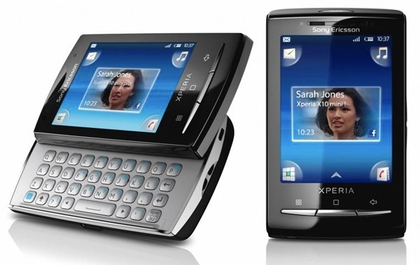
Best Android phone for portability: Sony Ericsson Xperia X10 Mini Pro
The X10 Mini was a great, tiny phone - then came the X10 Mini Pro. Equally small, but with a QWERTY keyboard sliding out from underneath. The core Android experience may be the slightly ageing Android 1.6 meaning a few apps won't work here, but Sony Ericsson's user interface makes great use of the tiny 2.5" screen - and an Android 2.1 update is on the way soon.
Read TechRadar's Sony Ericsson Xperia X10 Mini Pro review
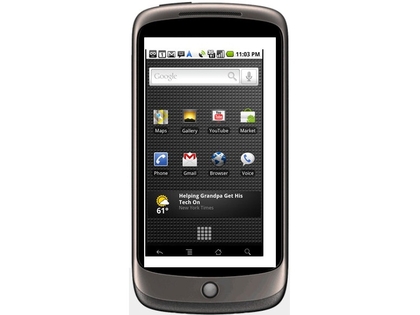
Best Android phone for nerds: Google Nexus One
If you're seriously into Android, you simply have to own Google's own-brand Nexus One. The hardware is much the same as that of the HTC Desire, plus an extra noise-cancelling mic to help improve audio quality. But it's not about that - you need the Nexus One as it offers the unbranded vanilla Android experience. The first phone to bring its users Android 2.2, Nexus One owners will always be one step ahead of the masses.
Read TechRadar's Nexus One review
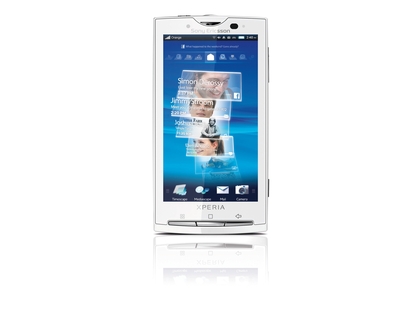
Best Android phone for media and photography: Sony Ericsson Xperia X10
The mammoth Xperia X10 Android phone has had a few problems with software glitches, poor battery life and is still powered by Android 1.6 - but there's no better Android phone out there today for photo use. The 8 megapixel camera with LED flash and autofocus takes great shots, with video emerging equally sharp and smooth. If you have a bag or pocket big enough to house it, the X10's a great media phone.
Read TechRadar's Sony Ericsson Xperia X10 review
Best pay as you go Android phone: T-Mobile Pulse
The T-Mobile Pulse has been around since 2009, and for good reason. The Huawei-made handset features a capacitive touchscreen, which is unheard of at this super-budget end of the market, plus T-Mobile has recently upgraded the phone's OS to Android 2.1. And you can currently get this from T-Mobile for £99. An ideal spare/replacement for the accident prone smartphone fan.
Read TechRadar's T-Mobile Pulse review

Best Android phone for productivity: Motorola Milestone
There's not much in the way of serious business phones in the Android sector right now, so if you're planning on doing a lot of typing and pretending you're working, the slab-like Motorola Milestone is the only option for QWERTY fans. Motorola's updated the thing to Android 2.1, plus 2.2 is on the cards for later in 2010. Until HTC's QWERTY-packing HTC Desire Z arrives, this is the best thing for text-heavy work.
Read TechRadar's Motorola Milestone review

Best Android phone overall: HTC Desire
It's nearly six months old, which is about a million in mobile phone years - yet the HTC Desire remains the best Android phone of all. All UK networks are in the process of upgrading it to Android 2.2, so even launch original models are right on the cutting-edge.
HTC had to swap the Desire's original 3.7" AMOLED screen for a Super LCD model due to manufacturing shortages, but it's still a dazzling phone - and Android 2.2 adds the ability to shoot video in 720p HD. It's actually getting better with age.
Read TechRadar's HTC Desire review

Best Android phone for looks: HTC Legend
An extremely subjective area, this. Some find HTC's style a little on the bland side, with its numerous variations on the curved black slab theme starting to look a little predictable.
Which is why the HTC Legend stands out. Formed from a carved chunk of shiny aluminium, the internal spec of the phone is nothing special by 2010 standards - but it looks superb.
Read TechRadar's HTC Legend review

Best Android phone for battery life: Sony Ericsson X10 Mini
The small 2.5" screen and Sony Ericsson's ultra-minimal custom user interface make the X10 Mini a winner - and when you're still using it after two full days without a charge it earns yet more respect.
Switch off the wasteful nonsenses like GPS and Bluetooth and you'll have an Android phone that manages to not let you down when you actually need to send a text.
Read TechRadar's Sony Ericsson X10 Mini review

Best Android phone for for price: Orange San Francisco
We're yet to review the Orange San Francisco as it only launched this week - but on paper it looks like redefining the Android budget phone. Not only does it run Android 2.1, the San Francisco also features an 800x480 resolution screen - and it's capacitive, so ought to be super responsive.
Orange is selling this for £99 on a PAYG package, which means you get a big list of specs for the money. Stay tuned for a review. It might be a game-changer.

Best Android phone for music: Acer Stream
The Acer Stream is a bit of a weird one, with Acer lumbering an otherwise decent handset with the most awful custom Android user interface we've seen. However, thanks to the great lock screen music player widget and the phone's three physical music player buttons - for play/pause, skip forward and back - it's a surprisingly decent pocket-based MP3 player. It's a mystery why more phone makers haven't stuck on specific music controls.
Read TechRadar's Acer Stream review

Best Android phone for internet: Motorola Milestone XT720
The web looks great on the 480x854 resolution 3.7" screen of the Motorola Milestone XT720, with the Android 2.1 browser enhancements making page, history and bookmark navigation super simple. Plus pinch-to-zoom multitouch support lets you whizz in and out of pages easily. There's no Flash Player in Android 2.1, mind, so it's best for those not obsessed with iPlayer.
Read TechRadar's Motorola Milestone XT720 review

Best Android phone for upgrades: HTC Desire
The HTC Desire wins this through sheer numerical superiority. There are so many Desires out there that HTC simply has to keep its OS up to date, or face the wrath of its army of fans. The networks are getting it together with regards Android 2.2, with the newest OS now sitting on most Desires in the UK. Nothing's been confirmed for the next version of Android, but we suspect the Desire will be one of the first phones to get it.
Read TechRadar's HTC Desire review
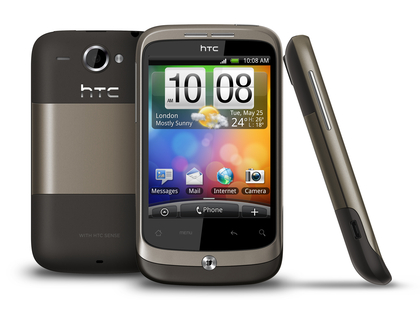
Best Android phone for social networking: HTC Wildfire
The HTC Wildfire isn't unusual in featuring HTC's FriendStream social networking aggregator or the weird app sharing feature HTC's given us to annoy people with requests to try out Seesmic, but it squeezes it into a cute little package that's cheap enough to be handed out to kids. The great capacitive touchscreen gives this full-size power in a tiny form.
Read TechRadar's HTC Wildfire review
Best Android phone for GPS: Dell Streak
Is it a phone? Is it a tablet? Whatever category it belongs in, the Dell Streak is an undeniably strong performer as a standalone satnav replacement. Obviously Google's stunning Maps Navigation tool is the software behind it, but it's the 5" screen that makes this the best choice for serious GPS users. You'll be able to see it without swerving into oncoming traffic.
Read TechRadar's Dell Streak view

Best Android phone for email: Samsung Galaxy S
Exchange support and Android's simple auto-detection setup system makes the Samsung Galaxy S a winner for syncing various email accounts. Plus the Android phone comes pre-loaded with Swype - the fantastic gesture-based alternate keyboard that makes typing on a touchscreen easier and quicker than ever.
Having a 4" screen give you room to work with, too, plus it's incredibly responsive to touch for extra-precise word entry.
Read TechRadar's Samsung Galaxy S review
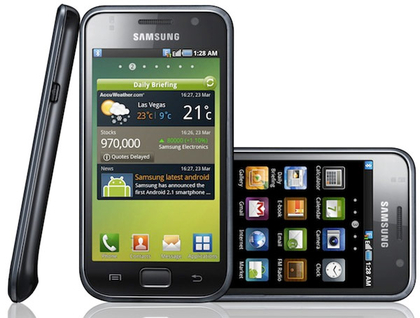
NB: While we've had hands-on time with the recently announced HTC Desire HD and HTC Desire Z, we're yet to put them through their paces in full, in-depth reviews, so these handsets haven't been included in this article.
Related Links

| |
Read More ...
YouView wades in to ISP bandwidth argument
 YouView has insisted that internet service providers should see the impending arrival of the IPTV service as a 'growth opportunity' rather than worrying about the amount of bandwidth it will use.
 The likes of the BBC iPlayer and YouTube have already led to grumbles from the ISPs that they are being left to pay the cost of more people using internet connections to stream video.
But YouView could potentially increase that bandwidth use hugely should the IPTV project that is aiming to replicate the success of Freeview become a hit.
Two-tier internet
This is all wrapped up with an on-going debate about two-tier services, in which content providers and ISPs pay extra to the major network owner BT to prioritise video traffic though Cisco kit and bring it up to a better quality.
Speaking to TechRadar, a YouView spokesperson provided the company's stance on bandwidth.
"The internet has previously risen to the challenge of meeting increasing bandwidth requirements and the take-up of IPTV services in the UK is a growth opportunity for ISPs as they continue to invest in networks," said YouView.
"People will be streaming more content generally as IPTV services take-off and we expect to see ISPs providing new or improved broadband plans designed to support these – including YouView.
New technologies
"YouView will also uniquely support a great range of technologies to reduce the bandwidth needed [including] IP multi-cast capabilities [which] will reduce the overhead of delivering a large number of simultaneous streams," the statement continued.
"This means that more people can watch a programme with minimal bandwidth requirements.
"The seamless integration of local recordings means that people will have the option to play content from their local hard drive to reduce the need for streaming.
"YouView will deliver the best quality at the lowest bitrate using Adaptive Bitrate technology plus systems that allow ISPs to use edge-caching technologies will be supported."
BT and Content Connect
BT was one of the loudest complainants about the extra traffic that online video use was generating on its network last year, but it recently unveiled Content Connect - a system BT is wholesaling to ISPs that means they can prioritise video traffic to ensure a degree of quality, and charge content providers a fee to do so.
ISPs that offer Content Connect could potentially ask for more money from consumers in order to cover the cost of this, or face the difficult decision of not paying for the technology and not offering the higher quality video service.
Further to this, we could potentially see independent channels and community stations on YouView not able or prepared to pay the necessary Content Connect fee and therefore miss out on streaming at decent bit rates for SD, let alone HD.
Money talks
Of course, it comes down to money – the ISPs that use Content Connect will not want to cut profits, the content providers will have to choose between quality of service and cost, and the consumer will no doubt be offered an even more confusing range of internet packages.
And if the only way to get a good quality YouView service is to pay for a special broadband package with Content Connect, then describing it as being subscription free begins to look even more tenuous.
It's an argument that is at the heart of the ongoing debates around net neutrality and big companies using their clout (both financial and other) to benefit.
Although it is perhaps the most high-profile UK IPTV service, YouView is at pains to point out that it does not influence broadband packages, and will not exclude anyone from accessing the service regardless of their internet package.
But although consumers won't need to worry about extra equipment because of Content Connect, we could see a two tier system in both programme quality and ISPs, as the haves pay up, and the have nots provide a lesser service.

| |
Read More ...
Blockbuster US files for bankruptcy
 Video rental service Blockbuster has announced it has filed for voluntary bankruptcy in the US, after admitting debts of $1.46 billion (£932 million).
It's no secret that the US-based company has been struggling to keep up with a constantly changing entertainment climate, trying to maintain a high-street presence while building up its online business, but it is still a shock to see such a high-profile company file for Chapter 11.
While it has been adapting to life on the web, the likes of Netflix in the US and LoveFilm in the UK were already established in the online market.
Although it has voluntarily gone to the courts because of its debts, non-US Blockbuster outlets are said to be not affected as they are separate entities.
Optimal path
In the bankruptcy filing, Blockbuster revealed it has $102 billion in assets, compared to $1.46 billion of debt but it is hopeful that it can still do business, with Chief Executive Officer Jim Keyes explaining: "This provides the optimal path for recapitalising our balance sheet and positioning Blockbuster for the future, as we continue to transform our business model to meet the evolving preferences of our customers."
As the company has secured a $125 million loan to finance current operations, BlockBuster is hoping to come out of the bankruptcy with no debts, except for this loan.

| |
Read More ...
Schmidt says changing identities comment 'was a joke'
 Google CEO Eric Schmidt has admitted that comments he made regarding people automatically changing their identities in the future, to rid themselves of the amount of information the web holds on them, was 'a joke'.
Speaking to Stephen Colbert on the The Colbert Report this week, Schmidt explained that he said the comment was meant to be light-hearted and that "it was a joke; it just wasn't very good."
The 'identity' remark was taken from a piece in the WSJ back in August but no verbatim quote was attributed to Schmidt in the article.
Regardless, his comments spread like wildfire around the web and painted an interesting picture of what Scmidt thought the future of identity was.
Data mining
In the Colbert interview, Schmidt was also asked about Google's apparent data mining of information users feed into the Google search engine, but Schmidt tried to dampen the privacy debate explaining that: "It's true that we see your searches. But we forget them after a while."
Although The Colbert Report is known for its satire, the Schmidt interview looked to be played straight with Schmidt explaining about what it does with the information it acquires, noting: "We actually don't do data mining.
"Our computers go out and they find out everything going on on the web and they figure out what points to each other and that gives us the algorithm, which is called PageRank.
"And that's how we decide how to rank the results."

| |
Read More ...
Schmidt says changing identities comment 'was a joke'
Google CEO Eric Schmidt has admitted that comments he made regarding people automatically changing their identities in the future, to rid themselves of the amount of information the web holds on them, was 'a joke'.Speaking to Stephen Colbert on the The Colbert Report this week, Schmidt explained that he said the comment was meant to be light-hearted and that "it was a joke; it just wasn't very good."
The 'identity' remark was taken from a piece in the WSJ back in August but no verbatim quote was attributed to Schmidt in the article.
Regardless, his comments spread like wildfire around the web and painted an interesting picture of what Scmidt thought the future of identity was.
Data mining
In the Colbert interview, Schmidt was also asked about Google's apparent data mining of information users feed into the Google search engine, but Schmidt tried to dampen the privacy debate explaining that: "It's true that we see your searches. But we forget them after a while."
Although The Colbert Report is known for its satire, the Schmidt interview looked to be played straight with Schmidt explaining about what it does with the information it acquires, noting: "We actually don't do data mining.
"Our computers go out and they find out everything going on on the web and they figure out what points to each other and that gives us the algorithm, which is called PageRank.
"And that's how we decide how to rank the results."

| |
Read More ...
Sling Media launches Slingbox PRO-HD
 Sling Media has announced the UK launch of its high-definition TV streaming device, the SlingBox Pro HD.
The latest bit of kit from Sling allows you to stream high-definition content from your main TV at home to other SlingBoxes around your home or, more interestingly, to your laptop or mobile phone.
Bandwidth-sucker
The SlingBox Pro HD will set you back £250. However, just make sure that you have enough bandwidth to stream that data-heavy HD telly to your other devices before you invest in Sling Media's new top-of-range kit.
The SlingBox Pro HD is available right now from the likes of Amazon and PC World, featuring both standard and widescreen video support, plus support for over the air DVBT digital signals, HDTV cable or satellite receivers, or HD PVR's, on a laptop or desktop computer.
"Millions of people are enjoying the benefits of HD quality pictures at home, creating a huge market for new products like Slingbox PRO-HD. With Slingbox PRO-HD, our customers can placeshift their HD programming without sacrificing the quality of the picture," said Stuart Collingwood, VP EMEA, Sling Media.
"Slingbox PRO-HD marks a giant leap forward in hardware and software development from Sling Media, such as powerful encoding enhancements. All of this means the Slingbox PRO-HD delivers a delightful user experience and amazing picture quality."
SlingBox is also launching SlingBox.com, an online version of the SlingBox client, so you can stream your TV to any computer without having to download any software.
Multi-faceted TV viewing
"Slingbox PRO-HD is designed to meet the varied requirements of today's multi-faceted TV-viewing households," continues the company.
"The product includes standard (4:3) and widescreen (16:9) video support and features multiple integrated sets of audio-video inputs and outputs…and features integrated looping outputs for each input.
"Slingbox PRO-HD transforms PCs, laptops, Macs and a variety of smartphones (including the Android platform) into personal, portable TVs and builds upon the goals of the original Slingbox – to give consumers the freedom to view their home TV programming anywhere."
For more check out www.slingbox.com.

| |
Read More ...
In Depth: Nvidia's next big graphics chips explained
 Although he told TechRadar that the GPU Technology Conference isn't about "speeds and feeds", Nvidia CEO Jen-Hsun Huang also announced the first ever roadmap for future Nvidia products
This isn't a roadmap for graphics cards, but for the GPU architectures that power both gaming graphics and the parallel programming GTC (Nvidia's GPU technology conference) concentrates on.
Coming in the second half of 2011, Kepler is the replacement for the current 40nm Fermi GPU; it will be Nvidia's first 28nm chip and Huang expects it to deliver "a big step up"; three to four times the performance per Watt of Fermi – from the current peak of 1.5 to up to 6 double-precision floating point operations per second per Watt.
He's quoting performance per Watt rather than simply performance because, just like CPUs, GPUs have to deal with power issues: "In the future we know there is a power wall, so performance per Watt equals performance.
"With parallel computing, transistors are free but power is not. If we are conscientious about the use of performance per Watt, we will continue to expand performance with the number of transistors we add."
Innovation
It's not just packing in more transistors by going to a smaller nanometer scale, Huang says: "It comes from innovation as well as architectural efficiency."
The new GPUs will support traditional CPU features like virtual memory, scheduling and pre-emption to make it easier for programmers to work with both GPU and CPU resources and to make it easier for operating systems to take advantage of them.
"These are vital to the era where you have multiple apps [running on the GPU]," he told us. "In the future you'll be able to mix and match."

ROADMAP: How Keppler and Maxwell compare to previous Nvidia GPU processors for parallel computing
We asked Ian Buck, Nvidia's Software Director of GPU Computing and the man Huang credits as the inventor of CUDA, for an example of how this might work.
"Now there are two types of processor in the system, these are simplifications to make it easier to move code onto the GPU," he explained "and we hope to do more of that in the future. We have a memory management unit and we can have the GPU read directly out of CPU-side memory. It's not much of a stretch to go the other way or to allow the programmer to load data back and forth. We think that's a natural direction and way to do OS integration."
Mid-life kickers and mobile parallel computing
The next architecture will be based on the 22nm Maxwell GPU, coming in 2013. "The improvement from Tesla [the chip Fermi replaced last year] to Maxwell should be about 40 times," Hsuang told TechRadar. "Fermi is about four times faster, relative to Tesla, so it's ten to 12 times faster from Fermi to Maxwell."
In between each new GPU will be what Huang calls a "mid-life kicker" updating the previous architecture to improve the performance by enhancing the microarchitecture. The first will add more cores and faster memory to Fermi next year, and similar update to Kepler will come in 2012.
The new GPUs will obviously show up first in Nvidia's high-end graphics cards, but "from the moment it goes into the architecture in the high end products in three months we should have in it the entire family," promises Huang.
Faster rollout
He says that will happen faster than it did for Fermi, which had delays getting into production because the fabric of wires that interconnect between the 256 processors was so closely coupled that they were interfering with each other and had to be redesigned.
"We found a major breakdown between the models and tools, and reality!" He blames the design flaw on the fact that it was the responsibility of two different engineering groups; "the engineers who understand physics and the engineers who understand architecture sat in two different organisations."
With that management issue fixed, he says that although there will be further problems ("we don't know what we don't know") they'll be spotted sooner. "The design is progressing very rapidly; we have hundreds of engineers working on it and by the time we're done we will have invested a couple of billion dollars."

LOST PERFORMANCE: Issues of heat and power consumption mean that CPUs aren't getting faster the way they used to; we're losing out on the performance benefit we have come to expect and enjoy, says Huang
Kepler and Maxwell won't immediately go into Nvidia's Tegra mobile processors although the parallel architecture will end up there.
"Tegra 3 is almost done," Huang told us. "Tegra 4 is being built and every year there will be a new Tegra. I am highly enthusiastic about taking parallel computing to mobile devices. We know if one thing would benefit more than any device from the most energy efficient performance, it's the mobile computer."
Why did Nvidia finally start talking about the future? It's not to compete with Intel or AMD's announcements, he claims and he didn't only pick GTC to announce the roadmap because it's Nvidia's big public event - it's because the software developers who need to know about future Nvidia chips are the ones using them for parallel computing rather than games, and the performance they can expect dictates the features they can develop.
"They need to know what they should expect in one or two years' time. Should they expect performance to increase by 50% or one times or two times? That's important information when it takes then two or three years to develop software. If I were developing today I would target a GPU that's four times faster than today."

| |
Read More ...
Review: FaceVsion Touchcam N1
 With the FaceVsion TouchCam N1 retailing dangerously close to the £100 mark it's going to have to be a bloody good camera to justify it's very existence.
 After all, how many of us really need a high definition webcam? Come to think of it who actually needs a standalone webcam full stop?
Trying to convince a buying public, who likely as not have a laptop as well as their desktop PC, that an external webcam is necessary when there's one sat in the lid of their lappy is always going to be tricky. Especially if you're asking this much cash.
But luckily the TouchCam N1 is a darned good camera. With Skype and Live Messenger both hitting the HD video messaging trail the N1 is all ready to roll. It's picked up pretty much immediately by Skype, and so it should considering it comes bundled with the installer in the FaceVsion packaging.
There's precious little else in that package though; no fun stuff and no recording/editing software either. Which for this price is a bit of shame.
Frame rates are nothing to write, or video call, home about either averaging around 19fps. Which is a little short of the purported 22fps which the marketing spiel would have you believe. Still, there's no hassle actually getting the cam working, it's about as driverless as they come and all it needs is plugging in and you're away.
It is a pricey beast, but if you're in the market for a HD webcam then you'll get framerates as smooth as any other on the market and guaranteed Skype compatibility too.
Related Links

| |
Read More ...
Review: Exclusive: Marantz KI Pearl Lite SACD and amp
 The new Pearl 'Lites' are two of the more obvious and predictable introductions following the original Pearls, which emerged from the Marantz stable about two years ago, as a celebration of Ken Ishiwata's 30-year or so reign as the public face of Marantz.
 Given the effort that reportedly went into their design, there had to be a follow-up. The Pearls were limited to a production run of 1,000 units combined for the SACD player and the amp – 500 units apiece – which even with the premium pricing they commanded probably didn't represent a pot of gold.
The obvious requirement, then was for a slightly simplified version of the two units that could be sold at a more attractive price than the Pearls, and in much larger numbers, and this is exactly what the Pearl Lites promise.
Ken was also the prime mover behind a number of other enhanced models over the years, most with an 'SE' or a 'KI' designation, derived from standard components, that were often sold alongside the regular models, or in different markets.
No lite weight
'Lite' in the context of this review means 'much more affordable', but that doesn't mean the Lites have been stripped to the bone.
The amplifier is still usefully powerful in practice (though significantly less so than the Pearl) and has a broad range of inputs including an MM phono, three line inputs and two tape circuits.
The SACD player also has a USB input on the front panel and a full set of S/PDIF and optical TOSLINK in and outputs. It can be used as a D/A converter, typically with an iPod with a digital output, or to provide a digital feed for a recorder.
We had half-anticipated that the player would lose its SACD status in the move to reduce the price, but on inserting the first disc, we noticed the familiar SACD logo near the display and breathed a sigh of relief.
In common with the regular Pearls, this is a two channel player, so any multi-channel mix is not recognised by the machine and cannot be played.
As usual, the digital outputs are disabled when playing the high-resolution layer of SACDs. The amplifier includes preamp outputs and a direct power amplifier input. Two pairs of speakers can be connected and switched independently and headphones are connected via a volume control, but the SACD player has its own headphone socket and associated volume control.

We were also amused (bemused rather) to see that the unit is equipped with not the usual two tone controls, but three – bass, midrange and treble. The reason according to Marantz is that with compressed audio media in the ascendant, something needed to be done to improve sound quality with these frequently inadequate sources.
We questioned this at first (see our interview with Ken, opposite page), but at least we can agree that it gives you another fine-tuning option and many systems may well benefit from a touch of left hand up or down on the midrange control.
Marantz hasn't completely lost its marbles here as it has included a 'source direct' switch so that the tone control stage and the balance control can be bypassed. This made quite a substantial change for the better: the sound becoming fuller and palpably more focused and less 'grainy' with the 'direct' mode engaged. But it is quite possible that stripping out the tone control circuits in their entirety would result in a further improvement in sound quality. That certainly seems to be the case historically, where a direct comparison has been possible.
Either way, the Marantz tone circuits are not completely transparent and our advice is to engage the bypass for all 'serious' listening. Both units are well made, which is practically a given with the brand, but that is not to say it compares with the original Pearls.
The controls are well-weighted and act smoothly as does the player mechanism and key construction-related features (like a dual-layer case) included for stiffness, have been retained.
The two units have a chunky, stable feel, but overall the duo are of a much lighter build and the covers, to give an example, are distinctly tinny in comparison.
Listen and you'll see
Lite by name they may be, but the newbies still wear the Ken Ishiwata KI imprimatur. The SACD player designation is SA-KI Pearl Lite and likewise for the amplifier, which is known as the PM-KI Pearl Lite.
Marantz says a number of high-quality passive components have been specified, based on its extensive listening tests – Elna Cerafine and Silmic capacitors and double-shielded transformers for example – and, as usual with the brand, the disc player has Marantz's favoured HDAM-SA2 discrete output module.

The amplifier also employs a discrete current feedback, instead of cheap and cheerful op-amps at the output. It also uses the same Xyron mechanism and the Cyrus Logic CS4398 DAC that is specified for the Pearl SACD player.
Smooth operator
The Marantz duo saw active service on test with a wide range of speakers, but the highlight of the test period was a brand new model from Triangle called Quartet. The Marantz combination proved to be a surprisingly good match, capable of driving this admittedly quite sensitive speaker, about 91dB higher than expected.
It also managed a similar feat with the much less sensitive Amphion Krypton, whereas the similarly priced Roksan M2 integrated was clearly less at ease. Somewhere in the pile of information we've accumulated on the Lites, Marantz makes the suggestion that the Lites are balanced to sound a little warmer than usual through the mid and upper frequency band.
We don't want to make too much of this, because there is no way the sound of this combination could be described as tonally dull or lacking in detail, because neither is true, but there is a subtle loss of the excessive sharpness, the exaggerated sense of detail that is often a part of contemporary amplifier design and the result is almost valve-like, but in a positive sense.
The disc player is simply excellent, and in keeping with the amplifier, creates a combination that is easy on the ear, with expansive, stable imagery, and a very open kind of voicing that makes for easy and consistent longterm listening.
Pearl and sheen
Voicing is a particularly good word in this context, as voices in particular are handled with real grace and passion (examples include Jan Chaplin (Songs of Stevie Wonder) on SACD and Christianne Stotijn (Mezzo Soprano) in Brahms Alto Rhapsody on CD, both of which were reproduced with an unusual sweetness and flair.
Understandably, the Lites don't quite have the weight of the Pearls, but in combination they are, indeed, a great stereo package.
Related Links

| |
Read More ...
In Depth: How to buy a media centre PC
 A media centre PC can be a number of things to different people, either a box to store and stream all of your many types of media from, something to plug into your big-screen TV and enjoy the many delights of HD from or a media server that sits there recording and absorbing media from the many corners of the internet.
Storage may not immediately seem like the most important aspect of a media centre PC but vast amounts of storage are key when it comes to holding large libraries of video and music.
But beyond simply having large amounts of storage, fast access is also important if you build a system that you expect to be recording live TV along with streaming pre-recorded material and a number of other tasks besides this.
At the most basic you can buy a single large internal 3.5-inch drive, capacities up to 2TB or 2,000GB are currently available, enough to store hundreds of hours of HD video and tens of thousands of MP3 files.
This can seem like an ideal option, however buying three 1TB drives opens up the option of what is known as a RAID system. This 'ties' the drives together into a single storage device, offering increased performance and reliability through data back-up. The idea is if one drive should fail, no data is lost, the drive can be replaced and everything carries on as if nothing had happened.
These systems are more complex to install and manage but the data security can be welcoming to many, especially with so much of our lives now in digital form. If this sounds overly complicated it's possible to buy ready-made NAS boxes that can do the job.
Finally, noise is a serious consideration for media centre PCs. If you want absolute quiet then a newer Solid State Drive or SSD could be an option. These have smaller capacities than a standard HDD and cost more but have no moving parts. Currently they're more often used as the boot drive with main storage still being delegated to a spinning HDD.
Check out our PC storage reviews for a selection of suitable options.
Processors for media centre PCs
For smooth HD media playback you need a reasonable dual-core processor. Both Intel and AMD offer excellent processors for these jobs in the Athlon II/X2 range from AMD and from Intel the older Pentium Dual Core, the Core 2 range and the new Core i3 models.
A dual-core processor is essential as there's a relatively high overhead in power required to decode the video alongside the audio and any data access required, which a single-core model will struggle with.
An issue to be aware of is the amount of heat a processor produces, this is often called the TDP or just the Wattage. The lower this is the less cooling is required and so the quieter your PC will run.
Some processor models are designed to be more efficient so have a lower TDP. A low-power model uses around 35 to 45 watts, more common power consumption is 65 to 75 watts. This isn't always listed but search for the model number on the AMD or Intel website for the exact TDP rating.
Our processor reviews will help you decide on the right processor for your needs.
Sound cards
With so much talk aimed at visuals, HD and 3D graphics, audio often gets totally overlooked. This is a sad state of affairs as it's well known even the best film would lose most, if not all of its impact without its soundtrack.
If you're serious on home cinema then a good audio set-up should be something you already have. Making sure your home cinema PC can connect to this as well as possible is one of the key parts of a good sound card.
In this digital world sounds tracks are digital and come encoded usually in one of the Dolby Surround formats. Ideally an S/PDIF optical or coaxial connection is ideal, however an analogue connection is usually possible with 3.5mm mini-jacks.
If you choose the right motherboard it's certainly possible to have it offer one or all of these options from its onboard sound. If it does not then you'll want to add a sound card that provides the best solution for your home cinema set up, no matter if that's a dedicated surround sound system or a PC-based speaker set.
If you plan to use the speakers in your HD TV then it's possible to use one of the options mentioned above. However, the HDMI connection is designed to carry digital audio as well but with a PC this is somewhat complicated as the audio signal has to be added to the HDMI video signal via an additional cable, usually connected internally to the case.
If your motherboard comes with onboard graphics and HDMI then it should offer this facility from the onboard audio via a supplied cable. If you're opting for a third-party graphics card, again this should be the case if you use one we have mentioned on this page. It this sounds overly complicated it is, but is unfortunately the way it works.
Head over to our sound card reviews to make your comparisons.
Media centre cases and cooling
When people talk of media mentre PCs the usual thought is of a box that sits under or near your TV or projector. If this is your plan then a good looking, quiet case with efficient cooling is essential. Media centre cases are available - these tend to look like large DVD players and will come with a quiet PSU plus some type of front-panel display and controls.
Opting for this style helps keep the look of traditional entertainment equipment and minimises size. The compromise is that you need to buy 'half-height' expansion cards, if adding them plus there can be a reduced number of hard drive bays.
It is possible to buy enhanced coolers or controls for the processor, to help eliminate or at least reduce any noise from the fan. A good solid copper cooler with a large fan that can spin more slowly offers quieter cooling.
Take this in combination with tweaking the built-in fan controls, picking a low-power processor and having good case airflow will result in minimal fan noise.
To shop for cases and cooling, visit our cases and cooling reviews.
Peripherals for media centres
Good looking wireless peripherals are the order of the day for a living room based Media Centre PC. The good news is that a good number of wireless desktop sets are available. If you don't fancy a full-sized keyboard then a small number of compact versions – usually omitting the numeric keypad – dot the market.
The Microsoft favoured solution is using a Media Center remote control in conjunction with Microsoft Media Center that thse days comes with Home Premium versions of Widows Vista and Windows 7.
This offers a remote-based interface for watching video, photos and a host of other features. However Media Center's limited support for other video formats and poor network performance can put people off using it.
A recent alternative to remotes and keyboards is to use an iPod touch, iPhone, Android phone or other smartphone as a smart Wi-Fi based remote control usually with mouse controls built-in via the touchpad. Check your phone app store for possible candidates.
TV tuners
Not an essential addition to a Media Centre PC as the TV it'll be connected to will likely have a suitable one built in, however if you plan on recording programmes then a TV tuner will be required. Available as external USB models or internal PCI and PCIe cards both enable a PC to receive and record separate broadcasts.
An internal card is the best permanent solution. If you plan to watch and record channels go for a twin-tuner model. You also need to make sure it'll fit into your case, so if it's a slim line case you'll need a half-height (70mm) card.
It's also worth checking if it's PCIe or PCI and that your motherboard has the right available slots and some can be blocked by installing a graphics card. They're less common but satellite tuner cards are also available while USB sticks with twin tuners can also be bought.
For tuners, check out our TV tuner reviews.
Motherboards for media centres
For a low-cost media centre PC check the motherboard offers onboard digital audio output and HDMI video. This is besides the usual checks that it uses the correct processor socket. For quiet running make sure you also adjust the BIOS settings to enable processor fan control.
Our motherboard reviews and motherboard buying guide will set you off in the right direction.

| |
Read More ...
Review: Sharkoon Fireglider Black
 When it comes to mice, there have always been two things to bear in mind. Firstly, buy a Microsoft one. Failing that, buy a Logitech one. Recently that's been shaken up with the infinitesimally adjustable Cyborg R.A.T. 7 mouse, which works surprisingly well.
 If there's a problem with these mice, though, it's that they generally cost upwards of £50, which is far too much for something that you'll only use for scrolling down pages of porn trying to find the one who looks like your neighbour. Sorry, I mean something you'll only use for gaming.
Enter the Sharkoon Fireglider Black, which will set you back just 25 notes. Unsurprisingly, it looks and feels exactly like a £25 mouse, with a plasticky finish and rubber 'gills' at the side, which I doubt mean that it can breathe underwater. Although that would be cool.
Sadly the Fireglider really isn't that cool I'm afraid. It's also got one of those weight systems modern mouse designers are so fond of, but even at maximum weight it feels like even a light breeze would send it straight to Oz. As in where Dorothy went, not the fictional, Nazi-filled prison from the TV show where everyone bums or gets bummed all the time.
It loses points for its look and feeling, but as a gaming mouse it's actually pretty competent. Sharkoon has covered it in buttons, which can be filled with macros to execute your favourite executions. It's also got a six-stage adjustable DPI system, which goes from 600 to 3600 DPI, complete with customisable LED colours.
It worked well with Dead Rising 2. Admittedly, chopping a zombie to bits doesn't require huge amounts of precision, but I did find myself switching through the DPI settings as I ran around the mall.
Problem is, on my desk I also have Logitech's G500, which is available for just a fiver more than Sharkoon's effort. The G500 just feels so much more solid and weighty, it has an iron-proof cable and it packs a similar number of those lovely buttons. And the venerable G5 is only £35 now. So, you should still buy Logitech.
Related Links

| |
Read More ...
Updated: HTC Desire HD: release date, price, specs and more
 Update: now read our Hands on: HTC Desire HD review.
On 15 September 2010 HTC announced the successor to the popular HTC Desire - the HTC Desire HD.
The Desire HD specifications include a 4.3" WVGA capacitive screen, a 1GHz Qualcomm Snapdragon processor and Android 2.2.
The back of the aluminium-cased handset features an 8MP camera with LED flash and face tracking, plus the ability to record in 720 HD video.
The Desire HD also features Dolby Mobile and SRS, and enhanced photo features.
Internal storage has been increased, and there's a microSD card slot for expansion.
The Desire HD comes with a new version of HTC Sense. There's a video of the new interface on YouTube.
HTC Desire HD release date and price
The Desire HD has a UK release date of October 2010, and Vodafone will be the first network to offer the handsets.
You'll also be able to get the Desire HD on T-Mobile at £40 a month, from
Play.com is taking pre-orders for the Desire HD SIM-free for £469.99 and will be shipping from 11 October 2010.
There have been no further announcements on Desire HD prices and networks yet, but we'll keep you updated on any news in that area.
HTC Desire HD specifications
Size: 123 x 68 x 11.8 mm
Weight: 164 grams (with battery)
Display type: Touch screen with pinch-to-zoom capability
Screen size: 4.3 inches
Screen resolution: 480 x 800 WVGA
Processor: 1GHz Qualcomm Snapdragon
Operating system: Android 2.2 with HTC Sense
Internal storage: 1.5GB
Card slot: microSD, up to 32GB (SD 2.0 compatible)
RAM: 768MB
Camera: 8.0 megapixel; auto focus; dual-LED flash; face detection capability; built-in effects include depth of field and vignette; geotagging
Video: 720p HD
USB: microUSB v2.0
Connectors: 3.5 mm stereo audio jack; Standard micro-USB (5-pin micro-USB 2.0)
Bluetooth: Bluetooth 2.1 with Enhanced Data Rate
Sensors: G-Sensor; Digital compass;Proximity sensor; Ambient light sensor
Tethering: USB and Wi-Fi tethering
Battery type: Rechargeable Lithium-ion battery
Battery capacity: 1230 mAh
Talk time: WCDMA: Up to 320 mins;GSM: Up to 550 mins
Standby time: WCDMA: Up to 490 hours; GSM: Up to 420 hours
Audio supported formats:
Playback:.aac, .amr, .ogg, .m4a, .mid, .mp3, .wav, .wma (Windows Media Audio 9)
Recording:.amr
Video supported formats:
Playback:.3gp, .3g2, .mp4, .wmv (Windows Media Video 9), .avi (MP4 ASP and MP3), .xvid (MP4 ASP and MP3)
Recording:.3gp

| |
Read More ...
Sonos launches new wireless iPod dock
 Sonos has announced that it plans to launch a wireless iPod and iPhone dock next month, making it even easier to stream your tunes from anywhere in your house.
Sonos' new WD100 Wireless Dock will set you back £99 although, of course, you will have to have a Sonos multi-room music system already installed in your crib to begin with.
Multi-room music streaming
"The leading developer of wireless multi-room music systems for the home, today introduced the Sonos Wireless Dock (WD100), an accessory for the award-winning Sonos Multi-Room Music System," reads Sonos' press release just in.
"With the Sonos Wireless Dock you can now play all of the music stored on an iPod or iPhone in every room of the house.
Phil Abram, President, Sonos, Inc. adds: "The Sonos Wireless Dock is the perfect accessory for our music loving customers who own an iPod or iPhone and want to enjoy the music stored on them in any or every room of the home.
"This new dock reinforces our mission to provide our customers with access to all of the music on the planet, including everything available on an iPod and iPhone in the home."
The dock sends your iPod/iPhone tunes to Sonos ZonePlayers dotted around your home before converting the music to analogue "guaranteeing the best possible audio quality."
For more check out www.sonos.com.
.
About Sonos

| |
Read More ...
In Depth: How to buy the best processor for your PC
 Whether you're buying a new PC, or upgrading an old one, perhaps with a new motherboard, then your choice of processor will be critical. But there's a lot to consider if you want to get the best processor for your PC.
So what's the best CPU for you? Will you opt for AMD, or Intel, for instance? How much performance do you really need? How many CPU cores will it take to achieve that? What might you be able to achieve for overclocking? And how much is all this going to cost? Which processor is best for gaming? What's the best processor for Photoshop users? The list goes on, and on.
Fortunately, while there's a huge list of processors available, it's actually not that difficult to reduce the selection to more practical and manageable levels to decide which processor to buy. You just have to take the process step by step, analysing your needs and looking at the best candidates to fulfil them, and this begins by thinking about the age-old question: Intel or AMD?
Intel vs AMD
You might well already have chosen your preferred CPU manufacturer, of course. Maybe you always go with one particular company. Or perhaps you have your motherboard already, in which case the decision has been made already: you'll have to opt for whatever is compatible.
If not, though, selecting Intel or AMD will pose an interesting dilemma.
Right now, Intel is the performance king. Its Core i7 range is blisteringly fast and, initially at least, outperform anything that AMD has to offer.
This comes at a price, though - if you're looking for value, then AMD offers a much better deal. As we write, for instance, the quad-core AMD Black Edition Phenom II X4 965, one of AMD's fastest processors, can be yours for around £130. Intel's core i5-680 delivers roughly equivalent performance, but will cost you maybe £230. And becoming a speed king via something like Intel's Core i7-950 will virtually double the figure again: you can expect to pay £450 or more.
(These figures change day to day, but AMD will remain the value choice for the foreseeable future. If you already have a few CPUs in mind, check our processor section for reviews and more up-to-date price comparisons.)
It's also worth factoring in the price of the motherboard. Spending just £60 to £70 will give you plenty of possible homes for a high-end AMD CPU; opt for the best that Intel has to offer and you'll probably spend at least twice as much. (But again, visit our motherboard pages for up-to-date prices.)
If you want and need Intel's performance then things aren't quite as bad as they seem. Intel CPUs are generally a little more overclockable than AMDs, and something like the i5-750 (priced around £150 as we write) can be pushed a very long way.
But if you don't require that kind of high-end power (or you just can't afford it) then an AMD processor is the way to go. You'll still get plenty of speed when you need it, and will save a pile of cash, too.
Intel Core i7-930 review
Processor features
These days the CPU features that attract the most attention are the number of cores, and its clock speed. Both are simple concepts to understand, but you still have to be careful how you interpret them.
AMD's Black Edition Phenom II X6 1090T, for example, contains six cores, individual processors, which means the CPU can work on six separate tasks at the same time. And each of these runs at a very respectable 3.2GHz.
Meanwhile the Intel Core i7-860 has only four cores, and runs at a mere 2.8GHz. So you might, not unreasonably, expect it to be slower. However, it supports Intel's Hyper-Threading technology, providing an extra four "virtual" cores, and thanks to this, and a few other design decisions, it actually outperforms the Phenom II X6 1090T. So you can't rely solely on these figures to determine which CPU is best.
Still, as a general rule for processors from the same manufacturer, the more cores a CPU provides, the happier you're going to be. You won't see large speed increases from all programs - the popular LAME encoder is still single-threaded, for instance, so upgrading from a dual to quad-core CPU won't deliver any noticeable changes - but most apps that could benefit significantly from multithreading, now do so, and will take advantage of the extra processing power. And just about everything else will be upgraded over time.
Cores should be your first priority, then: you'll want a quad-core CPU at a minimum. After that, opt for the highest clock speed you can afford, or need, but don't worry about that quite as much. You can often ramp that up later with a little judicious overclocking.

GOOD BUY: Quad-core i7 CPUs are excellent performers, easily outpacing the AMD competition
Intel Core i5-750 review
Socket set
Every processor comes sized to fit a particular "CPU socket", a component that connects the CPU to a motherboard. If you've chosen your motherboard already then you'll know what this is; if not, then now might be a good time to think about it, as your processor will need to be compatible.
If you're opting for an AMD CPU then there a couple of options. The cheapest is to go for a Socket AM2+ motherboard, but choosing Socket AM3 instead will get you support for faster DDR3 RAM. AM3 boards will typically also come with USB 3.0 and SATA 6 Gbps, and prices are so affordable that it makes little sense to go for anything else.
If you're choosing an Intel Core i5 CPU then there's even less to think about: you'll want an LGA1156 motherboard.
But if you're splashing out on a Core i7 then it's a little more complicated.
You could buy a Core i7 CPU that also fits the LGA1156 motherboard. These are known as the 800 series, so they'll all have product numbers that are 800 and something: the Core i7-860, say. This will save you a little money, but the LGA1156 boards have some limitations, and for example are often lacking in PCI Express lanes, cutting your expansion possibilities.
The alternative is to buy a Core i7 CPU designed for LGA1366 motherboards, which means 900 series chips like the Core i7-930 or -940. Not only is the board more powerful, but it's also reasonably future-proof. High-end Intel releases like the 6-core i7-975 are already available in the LGA1366 format only, for instance.
If you're building a power system, need plenty of PCI Express power (perhaps to install multiple graphics cards) or want to ensure your system's future upgradeability, then, an LGA1366 board is the way to go.
But if a Core i7 CPU already feels more expensive than you'd really like to pay, and you're just building a regular system, then an LGA1156 board and processor will be fine. Avoid the PCI Express issues and there's little difference in performance, and you can put the money you save towards enhancing another area of your PC.

CHOOSE WISELY: Your choice of motherboard will define exactly which CPUs you can install
Intel Core i7-980X review
CPU options
We've reduced the original mountain of possible CPUs to just a handful, then, but to choose the right model from these you'll need to understand just a few more processor-related terms.
As we've mentioned, many Intel CPUs include a feature called Hyper-Threading, which allows each core to run two sets of instructions simultaneously. It can be a very effective technology - Intel Core i7 CPUs are essentially i5's with Hyper-Threading enabled - and you'll want to get it if you can.
Every Intel processor also contains an amount of embedded memory called a cache, which is used to hold regularly-used information. If the CPU needs this again then it can be fetched from the cache, which is far quicker than accessing system RAM. Look for descriptions like L2 (Level 2 Cache), L3 (Level 3 Cache) or "Intel Smart Cache" (which means L3) - the more your processor has, the better.
And it's a similar story with AMD CPUs, although less dramatic. Opt for a quad-core Phenom II X4 and you'll find they all have the same cache amounts, 2MB for L2, 6MB for L3. The 6-core Phenom II X6 increases L2 cache to 3MB, though, while will provide a useful speed increase in many situations.
What you might want also to consider, though, is the Phenom II's "Thermal Design Power" (TDP), the maximum amount of power it's likely to consume when busy running applications. This ranges from 65W (Phenom II X4 905e or 910e) to 125W (Phenom II X4 955 and higher); the low TDP CPUs are slower, but use less electricity and run cooler, making them better choices for media centre PCs where you want to keep fan noise to a minimum.
You should now have a better idea of what you want from a CPU, then - but you'll still need to find confirmation of exactly which model is best for you. And our processor reviews are a great place to start. There are over 100 reviews online, all filterable by socket, CPU type and more, and with instant price comparisons to hand you'll soon locate the best CPU deals around.

NOT THE BEST: It's a great CPU, but the Intel Core i5 750 lacks Hyper-Threading, reducing its performance a little
Intel Core i7 875K review

| |
Read More ...
Mark Zuckerberg is richer than Steve Jobs
 Mark Zuckerberg is officially richer than Apple CEO Steve Jobs, and gives more money away to charity, according to this year's Forbes 400 list.
The annual Forbes 400 list ranks the US's 400 richest businessmen and entrepreneurs, with an increasing number of tech industry luminaries on the list every year.
Value of Facebook triples
Facebook CEO Mark Zuckerberg has shot up the list in recent years. He is now sitting pretty at number 35, with a personal fortune of $6.9 billion (around £4.41 billion).
Facebook is now valued at around $23 billion (around £14.7 billion), which is three times last year's estimate.
Notably, Zuckerberg is now richer than Steve Jobs, who is ranked at number 42 on this year's Forbes 400 list, with a personal fortune of a 'mere' $6.1 billion, most of which comes from his stocks in Disney, rather than Apple.
Jobs, Disney, Apple
Jobs acquired 138 million shares of Disney after selling Pixar to the company in 2006, shares which were valued at $4.4 billion for the purposes of this year's Forbes 400 listing.
In contrast, Jobs' 5.5 million shares in Apple are worth around $1.3 billion.
According to the Wall Street Journal Zuckerberg is soon to announce a $100 million donation to the Newark, NJ public school system, working closely with Newark mayor Cory Booker and New Jersey Governor Chris Christie to find an equivalent $100 million from other private foundations.
Jobs founded Apple in 1976. Mark Zuckerberg was born eight years later in 1984.
Microsoft co-founder Bill Gates remains the wealthiest person in the US for the 17th year in a row, with Forbes estimating his personal fortune at $54billion (£34.5bn).
Investment guru Warren Buffet was second in the list with $45bn, closely followed by software tycoon Larry Ellison in third place.

| |
Read More ...
Dell reveals new 7-inch Android-powered tablet PC
 Just when we thought the market for new tablet PCs could not possibly expand any further, none other than Michael Dell, CEO and founder of Dell, has revealed that the company is working on a 7-inch Android powered tablet PC.
Details are sparse, with the CEO revealing the news at an Oracle conference in San Francisco this week.
"Of course, it's nice to have a larger screen," Dell said, although refused to reveal anything more about the device or the plans for an official launch.
CES 2011 is suddenly looking like it might, yet again, feature some interesting new tablet PC announcements…
Dell partners with Best Buy
Dell released the Dell Streak 5-inch screen tablet earlier this year, with the CEO also revealing the company's plans to sell the Streak in major US electronics retail chain Best Buy this coming October – something of a departure for Dell's PC marketing strategy.
We have contacted Dell UK for further details on the latest tablet PC.
Shipments of touchscreen tablet PCs are expected to top 15.4 million units in 2010, according to analysts at iSuppli, with forecasts of an increase to 76.7 million units by 2012.
BlackBerry manufacturer Research in Motion (RIM) is also rumoured to be launching a new so-called 'BlackPad' 7-inch screen tablet device in the near future.
"You're going to see a spray-and-pray approach with a lot of the tablet market over the course of the next year as vendors throw a number of products out there to see what sticks," said iSuppli analyst Rhoda Alexander.

| |
Read More ...
Rumour: INQ mobile working on iPhone-style 'Facebook phone'
Those rumours that there are branded 'Facebook phones' in development just refuse to go away, with new reports emerging that INQ Mobile is currently working on two such devices.Bloomberg cite three separate (unnamed) sources claiming to be familiar with the project, who suggest that the Facebook-branded mobile phones will be launched in Europe early in 2011 and in the US later next year.
Network tie-up
Facebook and INQ Mobile Ltd are also said to have negotiated a network tie up with AT&T in the US, according to Bloomberg's sources.
"People are increasingly updating their status when they're on the go," noted Augie Ray, an analyst at Forrester Research. "Facebook is a very popular application on every single smartphone in the country."
For its part, Facebook has continued to deny the rumours, with spokesperson Jaime Schopflin, saying that the company's current mobile phone strategy was looking at "deeper integrations with some manufacturers."
A suitably vague response, as many have noted, which could well be interpreted in numerous different ways. Facebook declined to comment on more specific plans for branded handsets.
iPhone-style Facebook phone?
"We've been working with INQ for a couple of years now to help them build a deeply integrated Facebook experience on their devices," Facebook said in an e- mailed statement.
"While we can't speak for their future product development plans, we can say that our view is that almost all experiences would be better if they were social."
One of the new phones is said to feature a Qwerty-style keyboard and touch screen. The second device is said to resemble Apple's iPhone, being solely touchscreen based, according to Bloomberg's sources.
We have contacted both INQ Mobile and Facebook for further comment on this story.
Via Bloomberg and Reuters

| |
Read More ...
RealD: Passive Full HD 3D 'in 2011'
 RealD has thrown something of a 3D curveball this week, announcing that it is preparing to release Full HD passive 3D into the TV market sometime in 2011.
Currently active shutter glasses are the only technology to offer 1080p 3D visuals but RealD reckons it has found away to offer Full HD but through cheap passive glasses – the ones which make you look like an Elvis Costello knock-off.
According to RealD president Josh Greer, who was speaking at the third Annual 3D Entertainment Summit in California, revealed all about the new technology and said that RealD's licensees (Sony, JVC, Samsung, Toshiba and Panasonic) will have access to the technology next year.
There's no word on which manufacturers will take RealD up on its offer, though.
Passive technology
The Full HD passive technology uses ZScreen technology which is currently found in digital cinemas. The screens preserve the light, keeping dissipation to an absolute minimum.
It also offers circular polarisation, which blacks each eye out much like what happens in active shutter glasses – this is done by light on the screen swirling at speeds counter clockwise and then anti-clockwise.
RealD believes it has ported this technology into the humble TV screen.
There's no word on cost, but the TVs are likely to be more expensive than their active-shutter counterparts – although the glasses will be able to be sold for around £1.
This is very much an emerging technology but as it is already in use in cinema projectors which use RealD technology, expect to see a demo of the technology at CES 2011 and along with it the talk of yet another format war in the home.

| |
Read More ...
Orange HTC Desire Android 2.2 update rolling out now
 Orange has officially announced that it is now offering an Android 2.2 update to its customers who have an HTC Desire.
Conor Maples from Orange revealed today on Twitter the news that Orange HTC Desire users have been waiting an age for – the 2.2 Android update for the handset is rolling out now.
Orange's announcement comes after T-Mobile revealed it was giving its customers the firmware update late last week.
If you are an HTC Desire owner who is on Orange, then the best way to get the update is to go to Settings > About Phone > System Software Updates > Check Now.
It's a bit of a whopper at 90.93MB, so it is probably best to wait until you are in a Wi-Fi hotspot before you start downloading.
FroYo
Android 2.2 is the latest mobile operating system from Google which offers a whole load of extra functionality, including HMTL 5 support and the ability to turn your phone into a Wi-Fi hotspot.
For more about the update, check out TechRadar's all singing, all dancing 20 handy Android 2.2 tips and tricks.

| |
Read More ...


No comments:
Post a Comment