

Review: Updated: LG Optimus GT540
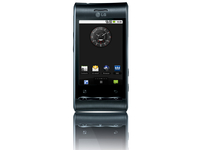 The LG Optimus GT540 is LG's latest shot at an Android smartphone, and the company's second to hit the UK. The last Android offering – the inTouch Max GW620 – came with a slide-out keyboard, but this time the keyboard has gone.
 Aimed at the middle range market, the Optimus GT540 comes in at about £150 on PAYG and we found it free on contract for as low as £15 a month.
Can it do enough to show Android off to the best of its powers, do the platform proud and please its intended market at such a low price?

In terms of look and feel, the LG Optimus GT540 punches above its weight. The curvature of the top and bottom edges, and the faux brushed-metal finish look rather good.
We like the waved panel where the Call, End/Power and Home buttons sit, too, as it's noticeably different from the norm.

When it comes to internal specs, it is worth pointing out that the LG Optimus GT540 runs Android 1.6. That makes it very out of date in terms of the Android OS, and cuts out a whole swathe of potential goodies for users – although the core of Android is here, of course.
The LG Optimus GT540 is fairly small for the hand, weighing in at 109 x 54.4 x 12.9mm, and it shouldn't be a challenge to reach all the way across the 3.2-inch screen one-handed.

The screen is clear and bright, but sadly it's resistive, and far from being the best of its type to come our way. We didn't have to press too hard to make a connection (although it is annoying having to remember to over-press, although we guess that will become second nature eventually).
The same can be said for the two touch buttons under the screen – the Android back and menu buttons are touch sensitive, and can be a little inaccurate at times.
LG has kindly added a 3.5mm headset slot in the top edge of the phone, where it sits surprisingly comfortably in the curvature of the chassis, and the bottom edge is clear of any ports or connectors.


On the sides you'll find the usual array of buttons in the shape of a volume rocker on the left and a camera button on the right. The micro USB connector is also on the right.
One oddity is that the right side also contains the Android search button. Tap this to get context sensitive searching options. We can sense that its positioning might irritate some users, but we didn't find it a problem at all.


Where the LG Optimus GT540 will either wow you or irritate you beyond all understanding in its offering of two different skins.
Android has its very own look and feel, and many of the phone manufacturers who choose to use it opt to skin it, adding their own tweaks, twists and turns in a bid to personalise things in their corporate image.

LG has tried to offer users the best of both worlds by allowing you a vanilla Android or a liveried LG skin. You can flick between the two by choosing the Home Selector app in the main applications menu.
Choose LG's own skin option and you get the ability to decide how many home screens you want to play with – three, five or seven. You can also decide on a theme. How about Pink Coco or Modern Silver?
We'd have liked the home screens to automatically grow in number up to seven, as we add new widgets rather than have to make a physical choice, though.


The 600MHz processor is surprisingly nippy for a phone of this price - it's the same spec as the one used in the iPhone 3GS and although it lags, it generally reacts to the gestures you ask it to perform.
It can be slow to run apps, and slow to manage data too. It isn't a big enough issue to be a deal breaker, but we would suggest that you shouldn't expect lightning speed from this phone at times.
Also the resistive screen is a real problem when trying to drag down the top notifications bar. You see you've got an email to look at and what a quick glimpse of it, but trying to pull the relevant section of the screen down is nigh-on impossible with the LG Optimus GT540.
Another tweak LG offers is to group applications in the main menu. You just need to hit the menu button when you are in the main apps menu to add new categories, and then move applications into them by dragging them. You get between categories by vertically scrolling.

When it comes to widgets, LG has some rather nice offerings. We especially like the note widget, which can be used to store all kinds of information. You flick through different notes with a horizontal finger scroll. We can see it being used for shopping lists, short to-do lists and all kinds of quick-fire information gathering.

LG Optimus GT540 is a perfectly adequate handset for managing contacts and making calls. When you choose the LG skin for Android, there are tiny icons for the dialler and for messaging hardwired onto the bottom of every home screen you set up, so the dialler is only usually a single tap away.

When you aren't on the main screen, a tap of the physical Call button opens up the usual Contacts menu so you can access your friends easily.
If you've logged into a social networking site, you can pull in contacts from there. Three are supported – Twitter, Facebook and Bebo – and you login using the SNS (Social Networking Services) button that is on the main screen by default.

Adding friends from your social networks in the contacts app is as simple as tapping the menu and choosing to import friends, although we did have a little bit of an issue with this, as for some reason our review handset didn't want to import from our Twitter account, despite being quite happy to download tweets from and upload tweets to it.

Call quality is fine, although it can be a little quiet at times. We found that the connection speed was generally pretty good, although if on a bus or train the 3G signal could be slow to update.
The 3G/HSDPA signal icons are actually a little overbearing at the top - if someone wasn't sure what they all mean, then it might be a little disconcerting to see the signal letters changing so much.
With the LG Optimus GT540, what most people are going to want to do with an Android based smartphone, regardless of its price or overall specifications, is text-based messaging. Primarily we mean SMS, email and social networking. The news is not that great on this front, unfortunately.
We've already noted that the screen is resistive, and not the most responsive under the fingers for sweeping, swiping and making menu selections.
The problem gets compounded when you enter the messaging arena. The unresponsiveness of the screen follows through to the keyboard, which is mighty small on the 3-inch screen.

When working with the screen in portrait mode, we found it almost impossible to hit keys accurately using the miniature QWERTY option.
It is usable if you slow down enough, but don't expect to type at iPhone-like speeds as the auto-correct is pretty poor too.
The X9 keyboard, which functions like a standard predictive text effort, is much better - we got some pretty slick speeds when using this, but it feels a bit alien doing so on a touchscreen.
Landscape mode was somewhat better, with larger keys to act as targets for our fingers. But we still had to slow down to get a high accuracy rating.


The social networking apps range is adequate but not wonderful. We wonder how many people there are actually using Bebo these days, though Facebook and Twitter are obviously more popular.
There's a good range of settings – the Twitter and Facebook apps even have the ability to set an auto updating schedule for a set number of hours only, so you can save battery power by not auto-updating when you are usually otherwise engaged.

Web browsing is another activity which suffers on the LG Optimus GT540 because of the small screen size. The resolution does it no favours either.
At 320x480, the screen resolution is fine for many activities, and is on a par with that of other lower-end Android handsets. But you simply can't see as much on the screen as you can with bigger-screened, higher resolution Android handsets, like the top-end Motorola Milestone XT720, Acer Stream or HTC Desire.

With no pinch to zoom support on the resistive screen, you are limited to the old Android 1.6 zoom bar. However, there is a massive ray of light with the LG Optimus GT540, and that's the fact text reflow is supported when zooming in.
This means that although the overall view is a little low-res and skewed, if you're trying to read an article on a website you can choose the size of the text you want, with the letters jiggling around to fit your desired column size.

Still, there's a magnifier window that you can drag around on a page to help you decide what you actually want to home in on. Just pull it around, then lift your finger away from it to see your desired portion of the screen.

There's a sidebar menu that you can pull out at any time to access features and settings, although some people might forget it's there and keep trying to find the browser reload button from the Android Menu key.

Oh, and you can have multiple windows opened at once. It is easy to switch between them by hitting the double squares icon on that sidebar menu.


Just as you won't buy the LG Optimus GT540 primarily for its Web capabilities, you won't be choosing it primarily for its camera either, although in general we found photos to be reasonably good.
Before we go into how well the camera performs, it is worth noting that you need an SD card in order to use both the camera and video recorder – and none is provided with the device.
The camera's maximum pixel shooting capability is 3MP for stills and 640x480 for video, and put it very firmly towards the bottom of the range. But there are some interesting and useful user tweaks.
Beauty shot, smile shot, blink detection and panorama modes are present, and you can set the ISO to 100, 200, 400 or automatic. You can geotag photos, and can alter the white balance. There is no macro mode, though, nor flash.
However there is the option for automatic Face Tagging - take a snap of a buddy and theoretically if you take another picture of them the LG Optimus GT540 will recognise and tag them accordingly.
In practice this only works if you take the picture head on - meaning you're rarely going to get the face tags you so desperately want.

Click here for the full res image
The camera is not big on capturing finer detail, but it produced reasonable snaps. Just don't zoom in too far on the PC or Mac if you want to avoid seeing your images pixellate.

Click here to see the full res image
There's plenty of capability for taking general tourist type photos, which are good enough to share over the Internet. Colour reproduction is pretty accurate too, although shots do tend towards the pallid.

Click here to see the full res image
There was plenty of overhead lighting when we took this photo, and so it is passable – although not great. If we'd had to rely on the flash we'd have been stumped, as the camera does not have one.
The LG Optimus GT540 video footage was a little on the jerky side, but fine for capturing a memento or two.
It is a shame the maximum resolution is just VGA (640x480), but at least video duration is limited to the maximum that your media card can cope with, so you can knock your socks off shooting movies if you like.
However, it's only going to be decent enough for YouTube uploading at best - don't think you'll be the next Tarantino with this camera.
With just 130Mb of internal storage, you're going to have to use a micro SD card for your music and video storage.
The music player is a pretty bog standard affair. It failed to pick up album art stored in folders alongside the music tracks it found on our SD card, which is somewhat annoying, but at least you have access to good music playback controls and can easily make playlists.


LG did not send us its headset to test with this phone, but plopping our own into the 3.5mm connector on the top edge of the handset revealed that sound quality is decidedly lacklustre.
There is no equaliser, so the slightly treble-rich tones are going to have to suffice. At higher volumes, the sound becomes somewhat distorted.
Video is much better though - MP4, DivX, Xvid, H.264, H.263 and WMV are all supported, meaning the LG Optimus GT540 can actually play back more file types than the HTC Desire out the box.
Meanwhile the handset speaker doesn't deliver enough volume to annoy fellow public transport users, and its output is decidedly tinny.
There is an FM radio with autoscan which stops every time it finds a station, and asks if you want to store it or skip it. If you store a station, only its frequency is recorded. There is no RDS and you can't edit the station info later to include its name.

The LG Optimus GT540 comes with a 1500mAh battery. That's quite a lot of power for a smartphone with this level of spec, and we found it coped quite well. We got a day-and-a-half of use that included some Web browsing and Wi-Fi, as well as a bit of music listening and a bit of time spent using the GPS.

If you like your smartphone to double up as your music player and you are a very keen music fan, or you use Wi-Fi or GPS a lot, you'll probably find a daily charge is in order. But more frugal users might easily stretch to two days.
While this is a rarity for a smartphone, it is more likely to be seen at the lower end of the market where the LG Optimus GT540 sits, simply because such devices have less power hungry screens than those at the very top end.
Comparison
When it comes to the competition, there isn't a lot that gives the LG Optimus GT540 a run for its money.

The already mentioned InTouch Max GW620, with its built in keyboard, might be a better bet for anyone really keen on keeping in touch via written rather than spoken words, and LG's Cookie Fresh might also be an option, although it is not an Android handset.
There's also the option of the new low cost ZTE F930, which is exclusive to Three – though again this is not an Android handset, and the ZTE Racer, which appears to be something of a rival.
Maps
Using Google Maps is an OK experience on the Optimus GT540, as while the GPS chip is quick enough to find you (although no earth shattering speeds) the resistive screen makes it hard to interact with the screen successfully.
Clicking a specific address from the map is difficult as you're generally pretty inaccurate, and swiping through different categories is hard too. It's not a terrible experience, but this is one of the applications where the resistive screen on the Optimus GT540 really lets it down.


We've been rather hard on the LG Optimus GT540, and not without good reason. Its specifications are very much at the lower end of the pile as far as a modern smartphone is concerned, and it is not going to be the kind of handset you'll rush out and buy if you want the latest features.
But given that it's free on £15 a month contracts, you don't really have the right to expect top notch features.
And, taking that into consideration, we have to say that the LG Optimus GT540 is a nicely rounded phone. There's nothing outstanding about it, but the features fit together well enough, rivalling those of a higher end handset thanks to the same Android experience (albeit Android 1.6).
We liked
The price is certainly very attractive, and that may well be a significant factor for many people in deciding whether or not to opt for this, rather than another Android handset - especially when most of the times the Optimus GT540 performs admirably.
There are plenty of shooting options on the camera, and while it is not great, it is good enough for everyday point-and-shoot use. It has no flash though, so beware of poorly lit indoor shots.
The physical design punches above its weight, and makes the LG Optimus GT540 look like a more expensive phone than it actually is.
LG's skin for Android is not unattractive, and some people will find it preferable to the vanilla option. But whichever you prefer, it is pretty easy to switch between them.
Battery life is good, and we'd even go as far as to say it may stretch over two days for some users – which is a real plus point for an Android handset.
We disliked
The FM radio has to store each found station individually, which is a bit of a bore when you are initially scanning for finds.
The Web browser is lacking in features, so it can be slow and a little painful to use at times, which reflects throughout the UI with the processor seeming to lack any real grunt - although text reflow is a nice addition.
The resistive touch screen requires a fairly hard press, and is not always as responsive to finger touches as we would like.
Android 1.6 has to be a big downer if you are the kind of person who likes to have the latest kit in your pocket. Android 1.6 is serviceable, but you do miss out on the latest tricks and tweaks, like sat nav and Live Wallpapers.
Verdict
There is no doubting that the LG Optimus GT540 is attractive in pricing terms, and LG has done a good job of making it look attractive both physically and in terms of its own Android skin.
The resistive touchscreen lacks responsiveness at times though, making you feel like you're swiping through treacle, and the screen itself is a bit too small for media rich activity like Web browsing. We'd have liked to see a higher resolution for video capture too, although video playback is well thought-through.
But battery life is good and for the price it's a phone that might make inroads into the under-populated mid-range Android market.
Related Links
- Phones@TechRadar - our new mobile phones channel
- How much is your old mobile phone worth?
- Mobile phone reviews
- TechRadar's Reviews Guarantee

 |  |
Read More ...
BlackBerry App World 2.0 unveiled by RIM
 RIM has unveiled the next iteration of its application portal, sticking with simplicity and calling it BlackBerry App World 2.0.
The move is designed to make using App World a more seamless experience and bringing it up to speed with the likes of the iPhone App Store.
In addition to PayPal, customers will be able to purchase applications using credit cards, as well as an improved UI to make it easier to see the top lists of BlackBerry applications, from Themes to Apps, both free and paid for.
We know who you are
BB App World 2.0 also supports user IDs, which can work across any device, making it easy to see your app purchase history.
QR barcode scanning, already used on Google's Android Market, will also be supported - meaning an app vendor can advertise on the web or in a magazine and the phone's camera can decipher the code and link straight through to the app.
But the most important overhaul is for the app purchase system - now users can decide to have a dedicated credit card or PayPal account set up with RIM, and simply enter a password to download new applications, making the whole process a lot simpler.
The newest version of BlackBerry App World is available for beta preview to customers in the United Kingdom from BlackBerry Beta Zone, so if you're BlackBerry'd up then head on over and check it out.

| |
Read More ...
Competition: WIN! An iPhone 3G/3GS mophie juice pack air
 Double the battery life of your iPhone 3G or 3GS with a mophie juice pack air - the world's thinnest Apple-certified external battery for iPhone 3G.
The rechargeable 1200 mAH battery, integrated into an ultra-thin case, is available at www.store.apple.com/uk for £69.95 in black, white, red and purple.
The juice pack features an innovative 'standby mode' that enables you to control when you want to take advantage of additional battery support versus simply using it as a protective case.
The integrated four LED charge status indicates how much power is remaining in the external battery, while a unique pass-through design allows you to simultaneously charge your juice pack and sync your iPhone 3G with iTunes via the included USB cable.
We've got eight of these handy gadgets up for grabs.
To be in with a chance to win one, visit our competition page.
-------------------------------------------------------------------------------------------------------
Please note that this competition is only open to UK residents over 18 years of age.
There is no cash alternative to the prize and unless agreed otherwise in writing the prize is non-refundable and non transferable.

| |
Read More ...
In Depth: 10 web hoaxes you wish you hadn't forwarded
 The global scandal caused by sexy pretend resignation girl a couple of weeks ago is nothing new.
 Bored people on the internet have been trying it on for years, leaving a trail of embarrassed hoax victims behind them. Have you just emailed a very old advert around the entire office? Is that amazing leaked US military footage from Roswell actually a clip from last night's Shooting Stars, in which Bob pulled entrails out of Vic's fake alien torso?
Probably and probably. We'd like to reassure you and say there's nothing to be ashamed of in falling for obvious online hoaxes and misunderstood videos, but actually there is. No one likes getting the same thing emailed to them 20 times a day, and if you're consistently pinging through tired old tat to people, you're in danger of hitting their mental spam filters.
So don't email any of the below links around, or believe their lies. We've seen them all before and obviously didn't fall for the them first time around. Oh no, we always knew there was something not quite right about this lot...
1. "I'm using the iPad"
Never mind April Fool's Day, the day before a high-profile Apple event is the easiest time of year to pull off a successful hoax. Any idiot who draws an Apple logo on the back of a fag packet and sticks it on Twitter has a chance of fooling the world.
The largest Apple hoax was perpetrated by web entrepreneur Jason Calacanis in the hours before Apple's iPad reveal. It seemed perfectly reasonable that a successful blogger might be granted pre-announcement access to Apple's new tablet under an NDA, so his string of Tweets about it - with facts like "has a solar panel" and "uses fingerprint recognition" seemed plausible. For literally about six hours.

2. Bike Hero
It's amazing! Some kids just took out a video camera and made something incredibly professional and way too good to be true. And yes, it was too good to be true - Bike Hero was basically an advert designed from the ground-up to go viral, created to build hype for the Guitar Hero brand. You emailed an advert around the office, is what happened.

3. "Guy goes crazy at the office"
Of course, no one believed this was real at the time. That's always the defence. The mad office destruction clip was later revealed to be a viral advert for Hollywood blockbuster Wanted, so you were right.
4. Bill Cosby died again last night
Twitter's a double-edged sword when it comes to hoaxes. On the one hand, it's easy to make a lie go viral - Tweeting that John Leslie died in a light aircraft accident on an internal flight between Southampton and Edinburgh is easy, and might just take off. On the other hand, it also makes shouting down hoaxes easy. Take poor Bill Cosby. The first thing he has to do most mornings upon waking up is Tweet that he's still alive, as the poor comedian's a regular on the death-hoax listings.

5. "Leeroy Jenkins"
To our educated, modern eyes, the 2006 Leeroy Jenkins YouTube clip simply has to be a fake. The suspiciously long intro sequence packed with extra-mundane calculations and tech speak - surely that would've been edited away by a man clever enough to record his own Warcraft battles? If Leeroy hit the web today he'd be decried as a fake by thousands within hours. Mind you, isn't everything?
< class="pageBreak">Web hoaxes 6-10>6. Bigfoot in the freezer
Sure, we've all got some weird, unidentifiable hairy things sitting at the bottom of the freezer that may have been living creatures at one point in time, but Bigfoot? Perpetrated by serial hoaxer Tom Biskardi, the photo of a dead Bigfoot in the fridge was soon revealed to be a fake - as was that packet of Loch Ness Monster fish fingers he claimed to have lined up for dinner.

7. "Lonelygirl15"
Let's all just pretend this never happened. Although it was a clever use of YouTube in its early days, the pretend series of videos about a girl's boring life never delivered much after its initial burst of excitement. We were young, YouTube was still innovative, and she was cute in an American way. Wouldn't work now, we're all way too cynical.
8. Nintendo ON
Again, this one was all about timing. In the days before E3 2005, everyone sort of knew Nintendo was gearing up to announce something completely bonkers, but didn't know exactly what. So the Nintendo ON video, with its impressively high production values and head-mounted interface, could indeed have been real. But it wasn't. It was a clever fake knocked up by Pablo Belmonte. Hope you didn't send it to too many people.

9. "UFO Haiti"
Oh yes, turns out this wasn't surprisingly high quality amateur footage of UFOs mucking in the skies about above Haiti, it was a computer-generated graphics test made by a man who does computer graphics for his day job. If you haven't seen it on the news, it's probably fake. That's the general rule to follow about things with aliens. When real aliens happen, they'll interrupt EastEnders to let us all know - not put it on YouTube.
10. 6 Volt Battery Hack
Does the rounds every few months, this one. No, those massive old 6volt battery packs we used to power the train sets and big torches of the world do not actually contain 32 AA batteries. It's a joke, or, as some less charitable people might say, a whopping great lie with serious environmental waste implications.


| |
Read More ...
David Mitchell rails against bad 3D, in bad 3D
 Comedian David Mitchell has used his popular 'Soapbox' on YouTube to rail against the gimmickry of bad 3D, in bad 3D.
 Mitchell is best known as the star of the genius Peep Show and The Mitchell and Webb look sketch show – both alongside Robert Webb.
Mitchell uses his soapbox to wax lyrical about a topic that annoys him, and this week's is 3D, filmed in anaglyphic 3D.
Gimmick
"I don't see the attraction of 3D, it's not just a gimmick, but a gimmick that detracts from the story when it's badly done," says Mitchell.
"And even when it's impressive, its very impressiveness yanks you out of the world that you are immersed in, as you stop to admire it."

| |
Read More ...
Opinion: Intel-McAfee deal is about more than just software
 Intel's announcement of agreeing to pay £4.9 billion for McAfee caught everyone by surprise for a number of reasons.
It seems odd that a chip maker would shell out that kind of money for an anti-virus company, despite its vast portfolio of home and enterprise products.
McAfee may be at the top of the game, but the anti-virus segment is saturated with products that may cost your company a small fortune or cost you nothing for scanning your home PC.
And if it was just software products that it was after, why didn't the world's largest semiconductor chip maker just let its R&D department take a bite out of its treasure chest?
No, there's more to this agreement than meets the eye. Intel makes money by making chips smarter and smaller, which in the current context covers devices that are power-efficient and internet-enabled. Intel's CEO Paul Otellini might say security adds another dimension to this mix, but it's just part of its 'making chips smarter' campaign.
Which is what this agreement seems to be all about: making virus-repellent chips in upcoming internet-enabled devices. Intel plans to take protection from threats beyond software.
The advantage to Intel
One advantage of this move to the company is that it makes it impervious to policy changes of ISPs and device vendors, something McAfee is well aware of as it lost 15.7 million Comcast customers because the ISP shifted to Symantec earlier this year.
Secondly, the move comes just as the joint-venture between Intel and Nokia, MeeGo, prepares to roll out on a variety of consumer devices. Security has been a threat to computing ever since we got on the internet. But with MeeGo all set for consumer devices, from smart phones to smart TVs, it seems to be the right time for Intel to start pitching security as the third pillar of computing.
Then there's the fact that there's more to Intel than MeeGo. The number of devices that ship with Intel chips will always outnumber those that ship with MeeGo. By bringing down security to the level of flashable hardware, Intel's got all its bases covered. As a consumer, you'd feel more protected buying an Intel-powered internet-enabled device, irrespective of the software running on top of it.
What's not to like
Although it might sound like a win-win situation for all, it isn't. The Intel-endorsed "Trusted Computing" initiative didn't go down well with the Free Software Foundation, which argues it can be used to lock out devices. Add the McAfee acquisition (a la endpoint encryption) to Intel's Trusted Execution Technology and you're just inching closer towards vendor lock-in, a nightmarish situation for free and open source applications.
Even from a consumer's point of view, although it adds a degree of convenience, tied to the hardware, the ramifications of a botched virus update can be far more devastating than they are at the level of the software.

| |
Read More ...
Vodafone HTC Desire Android 2.2 update landing 23 August
 Vodafone has confirmed to TechRadar that it will be releasing the Android 2.2 update for HTC Desire owners from 23 August.
The rollout will begin from next week, where users will be prompted to download the new Android 2.2 firmware.
However, the rollout will be phased, so Vodafone customers might have to wait up to two weeks to get the new upgrade.
Vodafone said: "Our priority has been to make sure that the software does what we said it will do. This meant testing took a little longer than anticipated."
Longer than first thought
It's a little outside of the earlier 7-10 days time frame promised, but at least it's coming soon. It will also scrub away the much-maligned 360 update - although it's a little trickier than just deleting the applications from your phone.
First of all, check your software version in Settings, About Phone, Software information. Your software should either be 1.19.161.5 if you haven't downloaded the recent Vodafone 360 software, or 1.24.161.3 if you have accepted the update.
If you have accepted it, but not opened the applications, then their functionality will be removed, although you'll need to delete any icons and reset any bookmarks/home page choices manually.
You can perform a factory reset too to remove the 360 update, but be warned this will erase all data stored on the handset, so make sure you're fully backed up if you take this route.
What if I did click the icon?
If you have opened and updated any Vodafone 360 applications, then the same process will work, apart from "360 updates" and "Shop" applications, which to get rid of you'll need to 'uninstall the update' in Settings, Applications.
It might sound a little complicated, and we're sure that Vodafone regrets offering the 360 update for HTC Desire users - but at least it's offering a way out, and users can now enjoy longer battery life, HD video recording and Wi-Fi sharing.

| |
Read More ...
V Festival and Moonpig more important than a Uni place?
 London fastest rising search terms this week on Google suggest that students are more concerned with the V Festival than getting a University place, and are keen on streaming sites and cut price supermarkets.
 In an eclectic set of fastest rising search results from Google for the week, retailers Waitrose and Aldi both make an appearance – the latter in second place, alongside online card manufacturer Moonpig and betting company Bet365.
Interestingly, considering it's A levels week, UCAS only managed a lowly 11th place, well below 'v festival 2010' and 'fantasy premier league'.
Average teen
As far as we are concerned that proves that despite the media's insistence that times are 'a-changin'' it would take Gok Wan, Lord Sugar and Simon Cowell combined to change the habits of the average teen.
Real Madrid made a top three entry, powered by the Special one himself Jose Mourinho, and Arsenal also popped into the top 20.
Gaydar was a place outside the top 10, behind Disney and streaming site Iraq Goals, but also ahead of UCAS.
Fastest rising searches in London this week
wwe
aldi
real madrid
v festival 2010
fantasy premier league
moonpig
iraq goals
waitrose
btyahoo
disney
gaydar
ucas
arsenal
guardian
monsoon
bet365
top 40
lovefilm
utorrent
nasza klasa

| |
Read More ...
Logitech Wireless Headset H760 unveiled
 Logitech has announced the Wireless Headset H760, offering up to six hours of battery life.
 The Logitech Wireless Headset H760 is billed as a comfortable, wireless entertainment device that lets you move up to 40 feet away from your computer.
"Our newest headset gives you the freedom to roam when you're connecting with your co-workers and loved ones, or when you just want to be entertained," said Marcus Harvey, Logitech UK Country Manager.
Easy
"Our plug-and-play wireless headset is easy to set up, easy to wear, and easy to use."
The Logitech H760 headset offers a built-in and quick-access audio controls to adjust volume, pause and navigate your playlists and a noise cancelling microphone which mutes automatically when swung away.
The navigation controls are compatible with Windows Media Player and iTunes.

| |
Read More ...
Review: Serif PhotoPlus X4
 This latest version of PhotoPlus may not reach Photoshop levels, but that's definitely where it wants to be – and it's not far off.
 Unlike many competitors, it offers help without patronising you, it doesn't force you to use wizard-based interfaces instead of getting things done, and it doesn't have to pull back for fear of cutting into the sales of a more expensive edition.
As well as doing much of Photoshop's job, PhotoPlus X4 looks very much like it – the layout is similar and many of the tools work in exactly the same way.
The left-hand toolbox contains a range of Photoshop-equivalent tools with similar icons. There's a Paintbrush tool that offers different brush shapes and sizes, and a Text tool with all the options you'd expect. There's a range of tools for retouching your photos, and also a group of functions for correcting simple problems such as red-eye, scratches and blemishes.
You don't have to get your hands too dirty though. New to this version is the PhotoFix tool – a collection of quick adjustments to give your photos a different look, or do common jobs such as cropping and red-eye removal. All of these features are available outside PhotoFix, but here they're organised and easy to access.
Making selections
The ability to select different parts of your image to process independently is at the heart of what a photo editor does, and PhotoPlus X4's range of basic selection tools is decent.
A new Magic Wand is included (for quickly selecting similar areas) and there's a Magnetic Selection tool for following the shape of objects. You can also use a paintbrush-style selector for those tricky areas, and you can feather, expand and contract your selection.

Over the past few years, selection tools in Photoshop have really blossomed. PhotoPlus X4's answer to this is the Cutout Studio. This enables you to simply drag over any part of the image to create an intelligent selection that follows the contours of objects in your shot. You can add and remove items in your selection to fine-tune the effect and then return to the main layout to see the results. It's not a perfect solution, and it needs some trial and error, but it works well.
Layer upon layer
Over on the other side of the screen is another Photoshop-inspired set of tools, this time enabling you to work on different layers.
Layers are another fundamental part of image processing, and PhotoPlus nails them. At a basic level, it's a fairly traditional implementation, enabling you to place different layers for different image elements, then quickly and easily control how they're blended into your finished image.
You can alter each layer separately and rearrange them as you wish to fine-tune your work. However, PhotoPlus X4 takes things a stage further. When you apply a colour correction to your image (for example, using the Levels tool to improve the contrast or the colour balance tool to give the image a warmer look), the package puts this adjustment on its own layer.
This is great because it means that at any stage, you can go back and change or remove your colour correction, without affecting any of the work you've done since.
Along with the equally comprehensive masking, it's an excellent example of previously high-end features bleeding down into mid-level tools.
PhotoPlus is the plucky young contender in a very fierce market, which makes it all the more impressive that as far as photo editing goes, you could quite happily use it instead of Photoshop. Of course, Adobe's tool goes much further, but when you're using it for home use, it's typically in directions that you don't actually need.
The difficulty curve of PhotoPlus is perhaps a bit steep if this is your first image editor, but the wizards and one-click tools definitely help. There are simpler packages out there, and cheaper ones, but if you want to be creative with your photos rather than just making them printable, look no further.
Related Links

| |
Read More ...
Weird Tech: Electric race decided by gentleman's agreement
 The Zero Race is about as far removed from traditional car racing as it's possible to get. Kicking off outside the United Nations HQ in Geneva this week, the Zero Race is only for electric cars - so is likely to be rather slower than the petrol-driven wars of every other Sunday.
 And it's happening on proper roads, so there will be traffic and ice cream van hazards to contend with. Also, victory will not be determined by who crosses the finishing line first. Winners will be picked from the entire field, by committee, after spectators and a panel of judges decide which car scores best for reliability, practicality and efficiency.
Then everyone has a big, environmentally-friendly cuddle and a cup of green tea.
Also a bit different is the number of laps - one. Although the track is pretty big, seeing as Zero Race challenges the electric cars to drive all the way around the world, albeit with a couple of rather large pauses while the cars are shipped across the Atlantic and Pacific oceans. The event is scheduled to take 80 days, rather fortunately for reporters and headline writers.
Uhura vs Leia Cage Submission Match
Lego Star Wars has been hacked. Not the videogame, but the actual Lego pieces themselves. Jon Ippolito, who is a life-long fan of rival long-running sci-fi saga Star Trek, has dedicated a large amount of his spare time to recreating Star Trek ships and famous wobbly planet-side sets out of Star Wars pieces.

BATTLE-SCARRED KIRK FIGURINE: A pulled-off Chewbacca head makes a nice Tribble
According to Wired, Jon has set up a blog about it, illustrating a few homemade Trek scenes - and the Star Wars originals used to build them. We can't help but worry if George Lucas is planning to sue.
Be the Man
Electronic Arts has been listening to user feedback. This is always a bad idea, as it results in features like "Be a Goalkeeper" that people on internet forums think sound like a funny idea being incorporated into today's big-budget videogames.

FIFA 12: Be The Linesman?
If you fancy the idea of standing around in goal for 90 minutes - even throughout the game's 15-year career mode - you can in this year's FIFA 11 franchise update. And you can "be" the goalkeeper online as well, if you want to accurately simulate the pain of making everyone hate you over one minor error.
ET tweet home
If you don't die of neglect or self-abuse-based dehydration within the next 25 years, you could be in with a chance of seeing extra terrestrial life confirmed by the Search for Extra Terrestrial Intelligence sky scanning project.
According to leading SETI astronomer Seth Shostak, there's a "really good chance" concrete evidence of the existence of people/things other than us in the universe will be found within the next quarter of a century. His theory is based on the Drake Equation, which calculates the minimum possible number of aliens with the ability to send us messages.

SPACED OUT: Church attendance figures will be hit hard. [Image credit: Daily Galaxy]
In 25 years time, SETI ought to have passed the percentage-scanned threshold at which detecting at least one alien world is expected.

| |
Read More ...
Updated: Top 30 best iPad apps - paid apps
 Although it's only been out for a matter of months, the iPad already has dozens of great apps available for it.
Some are universal, optimising themselves accordingly for your iPad or iPhone. Some are 'upgrades' of iPhone apps, reworked for iPad. And some are entirely new apps, designed specifically for Apple's table.
We worked our way through the App Store and furiously tested a huge (digital) pile of apps, before coming up with our 30 best paid-for iPad apps.
1. 1Password for iPad (£5.99)
Online security is increasingly important, and it's recommended you use 'random', complicated passwords for logins. The thing is, they're tough to remember, which is why 1Password is a handy app to install. It enables you to store website names and passwords for automatic login.
Unlike the Mac version, 1Password for iPad doesn't integrate with Safari, instead using a built-in browser, but it's a no-brainer for safeguarding details you don't want anyone else to have access to.

2. Air Display (£5.99, universal)
If your iPad's sitting unused in your office while you work on your Mac, Air Display enables you to turn your tablet into a second display. It's likely using VNC, so updates aren't fast enough for video, but the app's fine for palettes, inspectors, IM apps and browser windows, and although you can move your mouse cursor to the iPad, you can also control Mac windows via the touchscreen. Developer Avatron promises Windows support "soon".

3. Air Sharing HD (£5.99)
Apple seems to think email and iTunes are the best ways to get documents on and off your iPad. If you want something better, Air Sharing HD enables you to wirelessly copy across files via Finder or Windows Explorer, or to grab attachments from email accounts. Items within the app can be managed, viewed, opened in another app, emailed, or printed via a shared printer on your network.

4. Air Video (£1.79, universal)
Air Video Free grabbed a slot in our best free iPad apps feature, but the paid-for Air Video release is even better. Lacking restrictions, it enables you to browse full playlists and folders from computers on your network running the free Air Video Server, enabling you to stream video. The app uses live conversion when necessary.

5. FlipTime XL (£1.19)
In our opinion, FlipTime for iPhone is the best clock app ever designed. The iPad version is pretty much identical, aping old-school flight info boards and including alarms and a 'flickable' calendar. Luckily, this means it's still utterly brilliant.

6. FTP On The Go PRO (£5.99, universal)
FTP On The Go PRO is used to view web and office files on a server, and to resize and upload images from your photo library. There's also a built-in editor and browser, making the app almost resemble a 'lite' iPad version of Panic's Coda.

7. GoodReader for iPad (£0.59)
If you want a good PDF reader for iPad, it makes sense to buy one called GoodReader! Luckily, the app lives up to its name. You can connect to various services (or dump documents into the app via iTunes file sharing), and the app is effective for reading PDFs (and also other text files, such as Office and iWork documents).

8. Instapaper (£2.99, universal)
If you often find yourself thinking "I'll read that later", but you never do, you need Instapaper. It enables you, with the help of a bookmarklet, to fling web content to the service, which then syncs with the iPad app. This provides you with a focused, high-quality reading experience on a device that's great for reading. A number of iPad and iPhone apps also offer 'send to Instapaper' support.

9. Korg iElectribe (£5.99)
If you're lucky, you might be able to pick up an Electribe-R on eBay for £100. By contrast, Korg iElectribe costs six quid and yet it's essentially the same piece of kit that's revered by dance musicians. While it's great fun for mucking about with, the app also has serious potential for live performance and recording duties.

10. LogMeIn Ignition (£17.99, universal)
Yet another universal app that suddenly makes sense on the iPad's larger screen, LogMeIn Ignition enables you to access and control computers remotely. Set-up is simple and the app is usable, assuming you've a reasonably fast internet connection.
The iPad version also helpfully includes Command+Tab and Command+' shortcuts for Mac users, assuming you have the slightly cryptic 'Alt=Command, Windows=Alt' setting selected in LogMeIn Ignition's 'Remote Control' preferences.

11. Numbers (£5.99)
The best of the three iWork apps for iPad, Numbers feels right at home on Apple's tablet. The intelligent keyboard is a joy to use when entering data, and you can create forms that make adding data to tables a cinch. If your needs are modest, this app can rival Bento for data management, and while its lack of Excel export support is baffling and irritating, Numbers nonetheless comes recommended.

12. OmniGraffle (£29.99)
OmniGraffle feels right at home on the iPad, using the touchscreen as a canvas. The diagramming tool - which you can use to create flowcharts, sketch out ideas, and even plan an office floorplan - is intuitive and straightforward, enabling you to make full use of multi-touch gestures to draw, drag and style shapes.

13. Pages (£5.99)
Another iWork app converted to the iPad, Pages is a successful word processor, offering some interesting multi-touch gestures for editing content. In combination with a keyboard dock or Bluetooth keyboard, it's possible to do real work on the iPad using Pages, even if the app lacks some features from the desktop version.

14. Photogene for iPad (£2.39)
Photogene is similar to the iPhone version in being a simple tool for making quick image edits: cropping, resizing, straightening, levels adjustment and sharing. Usefully, the app includes session restore and the ability to revert any section's edits, ensuring you can experiment without fear.

15. Pianist Pro (£5.99)
This upgrade of MooCowMusic's iPhone app is a useful tool for musicians. On the iPad, the piano keys on Pianist Pro are large enough to actually play a real song. There's a selection of sampled piano, organ and synth sounds included, along with an arpeggiator, a basic drum machine and recording functionality, making this a suitable app for laying down quick demos.

16. SketchBook Pro (£4.99)
We're big fans of SketchBook on the iPhone, and this high-def version, SketchBook Pro, makes it even easier to sketch out an artistic image. The tools are amazingly advanced, mirroring what you might see in Photoshop, Painter or in a real artist's shop. (Image credit: Michael Heald, fullyillustrated.com)

17. Soulver (£3.49)
It's hard to categorise Soulver - the app is a mixture of calculator, spreadsheet and the back of an envelope. It enables you to make calculations in plain English, using a multi-line display. The large, friendly keyboard includes useful features such as percentages and user-definable variables, and while Soulver for iPad lacks Soulver 2 for Mac's conversion engine, it nonetheless comes recommended as an alternative, superior take on a calculator.

18. Things (£11.99)
Things is a task manager for iPhone and Mac, well-regarded due to its innovative, efficient means of filing items, which helps you focus. New to-dos are collected in your inbox, and you define what you want to achieve today, soon (via the 'Next' category), soonish (via 'Scheduled') or at some point in the distant future ('Someday'). On the iPad, Things boasts an intuitive interface, making using the app almost effortless.

19. Twittelator for iPad (£2.99)
Twittelator for iPad is a Twitter client which makes full use of the iPad's screen space. On the left is your feed; on the right is everything else: messages, mentions, searches and drafts. This means you don't leave your feed to do other stuff. There are also loads of options for power users, but the default set-up's fine for anyone who doesn't like to tinker.

20. Weather Station Pro (£1.19)
It's not the most feature-packed weather app, but Weather Station Pro is one of the best-looking ones. It provides current conditions for user-defined locations; for one selected location, you also get a five-day forecast, sunrise and sunset times, and local time information, making the app suitable for use as a clock when your iPad's docked.

21. Comic Zeal Comic Reader (£4.99, universal)
Comics remains our favourite comics app for iPad, but Comic Zeal is great if you've comics in CBR, CBZ, RAR, ZIP or PDF formats, lurking on your hard drive. It deals well with large images, and the interface has useful customisation options.

22. Weather Pro for iPad (£2.99)
Without doubt the best weather app for Europeans, and still a good buy elsewhere, Weather Pro provides a great interface for at-a-glance forecasts for the week ahead. You can store as many favourite locations as you wish, and cloud and rainfall radars are included.

23. miniSynth PRO (£5.99)
miniSynth PRO is another app that shows the iPad isn't just for content consumption. This full-featured synth offers plenty of sliders and settings for retro-oriented keyboard players. The arpeggiator is particularly impressive, and the ability to save presets and output audio for the likes of GarageBand and Logic makes this app well worth the outlay.

24. The World Factbook for iPad (£1.19)
The CIA World Factbook, with information on over 250 countries, comes to the iPad. The content is updated regularly, but works offline, and the interface provides fast access to succinct, informative facts about chosen countries. Built-in comparison charts are also available, appearing in context as pop-ups.

25. Reeder for iPad (£2.99)
Not just the best iPad RSS reader, Reeder is the best RSS reader for any platform. Forget the gimmicky 'zoom to peek' gesture for checking out a feed's latest articles—where Reeder truly shines is in its sheer usability. So much care has gone into making navigation simple and effortless, and aesthetic decisions taken by the developer have resulted in clear, readable content throughout.

26. My Writing Nook for iPad (£2.99)
With Apple's Pages available, you might question the reasoning in buying another word processor. However, My Writing Nook takes things back to basics, concentrating purely on writing, not presentation; it offers auto-save, automatic word count, and a choice of font style, and keeps everything simple and focussed.

27. UK Traffic HD (£1.79)
We question the idea of an iPad as an in-car navigational aid, but it's good for planning journeys before you set off. The Maps app provides routes, but UK Traffic HD is a decent buy for checking out possible disruption during your intended journey. Give it start and end points and the app will flag roadworks and other issues.

28. OmniFocus for iPad (£23.99)
It's been a long time coming, but Omni Group's task manager has hit the iPad, and in style. As you'd expect, OmniFocus for iPad happily syncs with OmniFocus for other platforms, but it also works nicely as a standalone product. The interface is workmanlike but highly usable, enabling you to efficiently detail, edit and review tasks and schedules; a standout feature is the new 'forecast' view that bundles overdue items and provides an overview of the week ahead.

29. Photo fx Ultra (£3.49)
The iPad's fairly large screen makes it ideal for adding effects to your photos. Photo fx Ultra offers a wide range of digital optical filters, enabling you to enhance your images and add effects. Its layers feature is weak, but for applying one or two filters, straightening and cropping, this app does the job ably.

30. FlickStackr (£1.19, universal)
FlickStackr deals with two major concerns of regular Flickr users: browsing and managing photos. On the former task, FlickStackr makes it a cinch to browse Flickr as a whole, or view slideshows of your contacts' images. For uploading, there's a user-friendly interface for grabbing images on your iPad, adding tags and sending your selection to Flickr.


| |
Read More ...
Updated: Top 30 best iPad apps - paid apps
Although it's only been out for a matter of months, the iPad already has dozens of great apps available for it.Some are universal, optimising themselves accordingly for your iPad or iPhone. Some are 'upgrades' of iPhone apps, reworked for iPad. And some are entirely new apps, designed specifically for Apple's table.
We worked our way through the App Store and furiously tested a huge (digital) pile of apps, before coming up with our 30 best paid-for iPad apps.
1. 1Password for iPad (£5.99)
Online security is increasingly important, and it's recommended you use 'random', complicated passwords for logins. The thing is, they're tough to remember, which is why 1Password is a handy app to install. It enables you to store website names and passwords for automatic login.
Unlike the Mac version, 1Password for iPad doesn't integrate with Safari, instead using a built-in browser, but it's a no-brainer for safeguarding details you don't want anyone else to have access to.
2. Air Display (£5.99, universal)
If your iPad's sitting unused in your office while you work on your Mac, Air Display enables you to turn your tablet into a second display. It's likely using VNC, so updates aren't fast enough for video, but the app's fine for palettes, inspectors, IM apps and browser windows, and although you can move your mouse cursor to the iPad, you can also control Mac windows via the touchscreen. Developer Avatron promises Windows support "soon".
3. Air Sharing HD (£5.99)
Apple seems to think email and iTunes are the best ways to get documents on and off your iPad. If you want something better, Air Sharing HD enables you to wirelessly copy across files via Finder or Windows Explorer, or to grab attachments from email accounts. Items within the app can be managed, viewed, opened in another app, emailed, or printed via a shared printer on your network.
4. Air Video (£1.79, universal)
Air Video Free grabbed a slot in our best free iPad apps feature, but the paid-for Air Video release is even better. Lacking restrictions, it enables you to browse full playlists and folders from computers on your network running the free Air Video Server, enabling you to stream video. The app uses live conversion when necessary.
5. FlipTime XL (£1.19)
In our opinion, FlipTime for iPhone is the best clock app ever designed. The iPad version is pretty much identical, aping old-school flight info boards and including alarms and a 'flickable' calendar. Luckily, this means it's still utterly brilliant.
6. FTP On The Go PRO (£5.99, universal)
FTP On The Go PRO is used to view web and office files on a server, and to resize and upload images from your photo library. There's also a built-in editor and browser, making the app almost resemble a 'lite' iPad version of Panic's Coda.
7. GoodReader for iPad (£0.59)
If you want a good PDF reader for iPad, it makes sense to buy one called GoodReader! Luckily, the app lives up to its name. You can connect to various services (or dump documents into the app via iTunes file sharing), and the app is effective for reading PDFs (and also other text files, such as Office and iWork documents).
8. Instapaper (£2.99, universal)
If you often find yourself thinking "I'll read that later", but you never do, you need Instapaper. It enables you, with the help of a bookmarklet, to fling web content to the service, which then syncs with the iPad app. This provides you with a focused, high-quality reading experience on a device that's great for reading. A number of iPad and iPhone apps also offer 'send to Instapaper' support.
9. Korg iElectribe (£5.99)
If you're lucky, you might be able to pick up an Electribe-R on eBay for £100. By contrast, Korg iElectribe costs six quid and yet it's essentially the same piece of kit that's revered by dance musicians. While it's great fun for mucking about with, the app also has serious potential for live performance and recording duties.
10. LogMeIn Ignition (£17.99, universal)
Yet another universal app that suddenly makes sense on the iPad's larger screen, LogMeIn Ignition enables you to access and control computers remotely. Set-up is simple and the app is usable, assuming you've a reasonably fast internet connection.
The iPad version also helpfully includes Command+Tab and Command+' shortcuts for Mac users, assuming you have the slightly cryptic 'Alt=Command, Windows=Alt' setting selected in LogMeIn Ignition's 'Remote Control' preferences.
11. Numbers (£5.99)
The best of the three iWork apps for iPad, Numbers feels right at home on Apple's tablet. The intelligent keyboard is a joy to use when entering data, and you can create forms that make adding data to tables a cinch. If your needs are modest, this app can rival Bento for data management, and while its lack of Excel export support is baffling and irritating, Numbers nonetheless comes recommended.
12. OmniGraffle (£29.99)
OmniGraffle feels right at home on the iPad, using the touchscreen as a canvas. The diagramming tool - which you can use to create flowcharts, sketch out ideas, and even plan an office floorplan - is intuitive and straightforward, enabling you to make full use of multi-touch gestures to draw, drag and style shapes.
13. Pages (£5.99)
Another iWork app converted to the iPad, Pages is a successful word processor, offering some interesting multi-touch gestures for editing content. In combination with a keyboard dock or Bluetooth keyboard, it's possible to do real work on the iPad using Pages, even if the app lacks some features from the desktop version.
14. Photogene for iPad (£2.39)
Photogene is similar to the iPhone version in being a simple tool for making quick image edits: cropping, resizing, straightening, levels adjustment and sharing. Usefully, the app includes session restore and the ability to revert any section's edits, ensuring you can experiment without fear.
15. Pianist Pro (£5.99)
This upgrade of MooCowMusic's iPhone app is a useful tool for musicians. On the iPad, the piano keys on Pianist Pro are large enough to actually play a real song. There's a selection of sampled piano, organ and synth sounds included, along with an arpeggiator, a basic drum machine and recording functionality, making this a suitable app for laying down quick demos.
16. SketchBook Pro (£4.99)
We're big fans of SketchBook on the iPhone, and this high-def version, SketchBook Pro, makes it even easier to sketch out an artistic image. The tools are amazingly advanced, mirroring what you might see in Photoshop, Painter or in a real artist's shop. (Image credit: Michael Heald, fullyillustrated.com)
17. Soulver (£3.49)
It's hard to categorise Soulver - the app is a mixture of calculator, spreadsheet and the back of an envelope. It enables you to make calculations in plain English, using a multi-line display. The large, friendly keyboard includes useful features such as percentages and user-definable variables, and while Soulver for iPad lacks Soulver 2 for Mac's conversion engine, it nonetheless comes recommended as an alternative, superior take on a calculator.
18. Things (£11.99)
Things is a task manager for iPhone and Mac, well-regarded due to its innovative, efficient means of filing items, which helps you focus. New to-dos are collected in your inbox, and you define what you want to achieve today, soon (via the 'Next' category), soonish (via 'Scheduled') or at some point in the distant future ('Someday'). On the iPad, Things boasts an intuitive interface, making using the app almost effortless.
19. Twittelator for iPad (£2.99)
Twittelator for iPad is a Twitter client which makes full use of the iPad's screen space. On the left is your feed; on the right is everything else: messages, mentions, searches and drafts. This means you don't leave your feed to do other stuff. There are also loads of options for power users, but the default set-up's fine for anyone who doesn't like to tinker.
20. Weather Station Pro (£1.19)
It's not the most feature-packed weather app, but Weather Station Pro is one of the best-looking ones. It provides current conditions for user-defined locations; for one selected location, you also get a five-day forecast, sunrise and sunset times, and local time information, making the app suitable for use as a clock when your iPad's docked.
21. Comic Zeal Comic Reader (£4.99, universal)
Comics remains our favourite comics app for iPad, but Comic Zeal is great if you've comics in CBR, CBZ, RAR, ZIP or PDF formats, lurking on your hard drive. It deals well with large images, and the interface has useful customisation options.
22. Weather Pro for iPad (£2.99)
Without doubt the best weather app for Europeans, and still a good buy elsewhere, Weather Pro provides a great interface for at-a-glance forecasts for the week ahead. You can store as many favourite locations as you wish, and cloud and rainfall radars are included.
23. miniSynth PRO (£5.99)
miniSynth PRO is another app that shows the iPad isn't just for content consumption. This full-featured synth offers plenty of sliders and settings for retro-oriented keyboard players. The arpeggiator is particularly impressive, and the ability to save presets and output audio for the likes of GarageBand and Logic makes this app well worth the outlay.
24. The World Factbook for iPad (£1.19)
The CIA World Factbook, with information on over 250 countries, comes to the iPad. The content is updated regularly, but works offline, and the interface provides fast access to succinct, informative facts about chosen countries. Built-in comparison charts are also available, appearing in context as pop-ups.
25. Reeder for iPad (£2.99)
Not just the best iPad RSS reader, Reeder is the best RSS reader for any platform. Forget the gimmicky 'zoom to peek' gesture for checking out a feed's latest articles—where Reeder truly shines is in its sheer usability. So much care has gone into making navigation simple and effortless, and aesthetic decisions taken by the developer have resulted in clear, readable content throughout.
26. My Writing Nook for iPad (£2.99)
With Apple's Pages available, you might question the reasoning in buying another word processor. However, My Writing Nook takes things back to basics, concentrating purely on writing, not presentation; it offers auto-save, automatic word count, and a choice of font style, and keeps everything simple and focussed.
27. UK Traffic HD (£1.79)
We question the idea of an iPad as an in-car navigational aid, but it's good for planning journeys before you set off. The Maps app provides routes, but UK Traffic HD is a decent buy for checking out possible disruption during your intended journey. Give it start and end points and the app will flag roadworks and other issues.
28. OmniFocus for iPad (£23.99)
It's been a long time coming, but Omni Group's task manager has hit the iPad, and in style. As you'd expect, OmniFocus for iPad happily syncs with OmniFocus for other platforms, but it also works nicely as a standalone product. The interface is workmanlike but highly usable, enabling you to efficiently detail, edit and review tasks and schedules; a standout feature is the new 'forecast' view that bundles overdue items and provides an overview of the week ahead.
29. Photo fx Ultra (£3.49)
The iPad's fairly large screen makes it ideal for adding effects to your photos. Photo fx Ultra offers a wide range of digital optical filters, enabling you to enhance your images and add effects. Its layers feature is weak, but for applying one or two filters, straightening and cropping, this app does the job ably.
30. FlickStackr (£1.19, universal)
FlickStackr deals with two major concerns of regular Flickr users: browsing and managing photos. On the former task, FlickStackr makes it a cinch to browse Flickr as a whole, or view slideshows of your contacts' images. For uploading, there's a user-friendly interface for grabbing images on your iPad, adding tags and sending your selection to Flickr.

| |
Read More ...
Review: Mindjet MindManager 9
 Mind mapping software is quite a niche software product, but at the same time incredibly versatile. It can be used in a number of ways to help bring any type of project from the drawing board into reality, from brainstorming ideas to planning various tasks, organising data and more easily identifying the relationships between different aspects of a project.
 MindManager 9 adopts the ribbon toolbar that is now the norm in Microsoft Office and while this helps to give the program a uniform look, it also means that many program options and features take a while to locate.
That said, the interface is generally far less overwhelming than in version 8 of the program. With templates covering everything from meetings and to-do lists to training plans, getting up and running is also easier than ever.

Integration with Microsoft Outlook is a welcome inclusion – notes, emails, tasks and appointments can all be pulled into MindManager and incorporated into a mind map.
The ability to add dynamic Outlook dashboards to a mindmap means external information relating to a project can be viewed without switching programs, and any necessary changes can be made to Outlook data from within MindManager.
MindManager can be used as a project management tool, helping you to make better use of the resources available. Mind maps can be shared online with colleagues using the Mindjet Catalyst service. Web-based map editing means that remote collaboration is a possibility, and maps can also be exported as PDFs.
In addition, the program's presentation mode works like a cutdown version of PowerPoint, and makes it possible to transform an entire mind map into a slideshow.
Where MindManager stands apart from the competition is in its ability to enable a team to not only plan a project, but also to oversee it to completion. It's a useful weapon for your arsenal.
Related Links

| |
Read More ...
Voting opens in the .net 2010 awards
 Voting has opened in .net magazine's annual Awards – a celebration of the very best in web design and development.
 The .net Awards website (http://www.thenetawards.com), in association with Microsoft Internet Explorer 9, is open now for voting across 16 wide-ranging categories.
These include Web App of the Year, Best API Use and Design Agency, with nominees ranging from Instapaper to Modernizr; Wikileaks to the Muppets.
Jeff, Paul and Molly
Held annually since 1998, the long-running .net Awards combine the votes of the public with those of a leading panel of over 100 industry judges, including the likes of Jeffrey Zeldman, Paul Boag and Molly Holzschlag, who will deliberate on the final shortlist.
Voting will take place between now and 12 October, and the winners will be announced on Thursday 18 November at a special event in London.
Editor of .net, Dan Oliver said: ".net magazine is read by thousands of professional web designers and developers from around the world, and winning one of our coveted Awards is a great achievement, made even more special by the fact that both the general public and industry peers take part in the decision process.
"We work in one of the most dynamic and creative industries on the planet, and these Awards showcase the talent, creativity, and passion that help make the web what it is today."
For more information and the chance to vote, visit http://www.thenetawards.com.

| |
Read More ...
Review: CloudCanvas
 To go by the hype, HTML5 isn't just the future of the web but the cure for all illnesses, the defender of the innocent, and the magic key that fits the lock of any problem you might have.
 In practice, whatever Apple thinks, we're not likely to be waving goodbye to Flash applications just yet, but the more we see applications such as CloudCanvas, the more obvious it is that their days are numbered.
CloudCanvas isn't a fully baked product yet. It's slow and glitchy, and it's impossible to ignore the fact that a Flash application could definitely do what it offers more sleekly.
However, what it does offer is impressive: a complete drawing package with layers, brushes, the integration of features such as Google Images and an interface that runs in the web browser without the need for a plug-in. You can even view the source file of your image if you want to get technical.
Your experiences may vary according to the browser you use, but in Firefox, trying to draw using the brush tool resulted in a laggy series of individual dots, rather than a nice painted line.
Meanwhile, the lack of familiar hotkeys and slow movement of everything from interface elements to layer switching made us glad we had something as old-school and reliable as Photoshop on hand.
Still, it's early days, and even if this isn't the tool that turns HTML5 into an artistic powerhouse, it's clear that the potential is there to at least create respectable competitors to lower-end art tools.
The inclusion of back-end services to handle more advanced features – for instance, HDR in a dedicated photo editor – would be another valuable addition for people who primarily work on mobile devices, rather than desktops.
In short, there's definitely a market for friendly tools like this. The only question that remains is which companies are going to be the first to capitalise on it. This is a good start, but it needs work.
Related Links

| |
Read More ...
Trend: McAfee sale proof that security is 'absolutely fundamental'
 Security vendor Trend says that Intel's proposed purchase of McAfee is "a clear statement to the industry and investors that security is absolutely fundamental to future technology services and products".
In a statement sent to TechRadar, Trend CEO Eva Chen went onto say that Intel would use its vast resources to upsell McAfee security protection to purchasers of other Intel products and services.
"For current and future customers, Intel's resources may now enable McAfee to offer protection to multiple devices and endpoints, replicating what other vendors, such as Trend Micro, have already achieved through the Smart Protection Network.
Embedded software model
"However," says Chen, "the embedded-software model is fundamentally different from the security-software operating model and this is a good opportunity for customers to review their relationship with their security partner to assess whether they will be receiving the services and expertise they need."
If the deal goes through, McAfee will become a wholly owned but separate subsidiary of Intel costing in the region of $7.7 billion. McAfee will report into Intel's Software and Services Group.
In a phone conference yesterday, Intel CEO Paul Otellini said that the proposed acquisition of McAfee will enable Intel to innovate across all three key pillars of computing. "We have concluded that security has become the third pillar of computing after energy efficient performance and internet connectivity," he said.
McAfee is the world's largest dedicated security technology company with 6,100 employees based in Santa Clara.

| |
Read More ...
FourSquare responds to Facebook Places threat
 Foursquare CEO Dennis Crowley has responded to the news that Facebook is taking on location tagging with Facebook Places, insisting that a redesign and new features will keep people checking in.
 Facebook Places offers many of the kind of features that has made Foursquare a hit, but Business Insider received an email from Crowley insisting that Facebook users were already well served.
"We're still a platform for location, specifically around sharing locations though check-ins, surfacing interesting things around you and using game mechanics to encourage and reward for certain actions and/or behaviours," wrote Crowley.
Location, location, location
"Facebook also launched a location platform, which appears to be mostly based on checkins (and common FB elements like comments / likes / photos)," he added.
"We already allow users to publish their 4SQ checkins into the Facebook News Feed and we'll eventually going to allow users to push them into the Facebook Checkin Feed.
"I'd imagine we'll probably pull FB checkins into 4SQ too. We're in the middle of a redesign and some new feature launches, so we're going to get through those before getting started on FB integration."
Crowley also makes the valid point that Facebook photos are bigger than Flickr, but it does not make the latter any less of a successful service.
Whether there's room for two geo location tagging services remains to be seen.

| |
Read More ...
Review: Sony Alpha A850
 A step down from Sony's original A900 full-frame offering, the newer A850 is nevertheless almost identical in most areas, but with a significant price reduction, making it the cheapest full-frame camera on the market.
 Compared with the A900, it still boasts the same CMOS sensor, with a class-leading resolution of 24.6Mp and all of the same controls.
The only notable changes are that the memory buffer is smaller and the maximum frame rate is reduced from 5fps to a particularly pedestrian 3fps.

Viewfinder coverage also shrinks to 98%, but that's still on a par with the Canon EOS 5D Mark II and is slightly better than the Nikon D700. The A850 has a clunky design but a good, solid feel based on an aluminium chassis and magnesium alloy shell, with plenty of weatherseals.
Under the skin, dual Bionz image processors team up to tackle the high-resolution output of the sensor, which itself is unique in the group by featuring sensorshift stabilisation.

The so-called SteadyShot Inside system gives a two-stop anti-shake advantage, which isn't a match for the latest four-stop optical stabilisers fitted in many current lenses, but at least it has the bonus of working with any attached lens.
And speaking of lenses, you can also use those designed for smaller sensor cameras, thanks to an APS-C shooting mode, which crops the resolution to a still-useful 11Mp.
Autofocus
The Sony features AF microadjust for fine-tuning autofocus for individual lenses, and autofocus itself is based on a system with nine selectable points plus a further ten 'assist' points.

Like the Canon, only the centre point is a bi-directional cross-type sensor, whereas the Nikon boasts 15 cross-type sensors in its bigger 51-point array. In practice, autofocus proved very accurate in our tests but was quite sluggish locking on to static subjects and struggled to track moving targets, especially compared with the Nikon D700.
There are the usual options of Multi-segment, Centre-weighted and Spot metering, all of which are impressively accurate. Dynamic range gets a boost for tricky lighting conditions thanks to a built-in D-Range Optimizer.
This has off, standard and advanced auto options, along with no less than five individually selectable manual levels. Even so, it can't quite knock Nikon's Active D-Lighting off its perch as the top performer.
Indeed, there can be quite a lot of guesswork involved in deciding which D-Range Optimizer setting to use in any given situation, so it's usually better to shoot in RAW and adjust it afterwards, using the straightforward yet powerful Image Data Converter SR program that Sony gives away with the camera.
In some respects, the A850 is found wanting. Not only is there no movie capture mode, but the Sony also lacks Live View shooting, which has become a standard feature on even basic D-SLRs. Customisation options for shooting settings are a little limited, but at least you get three custom shooting settings, which are easily assigned to the Mode dial.

Sony has also cut back on the size of the top plate LCD, which only gives the barest minimum of information. On the plus side, this makes more room for big, independently placed buttons with plenty of space around them, for direct access to exposure compensation, drive mode, white balance and ISO, all within easy reach of the shutter button.
And even though the top panel LCD is disappointingly small, the so-called Quick Navi menu displayed on the rear LCD is particularly good, even if the LCD itself is overly bright, our review sample needing to be turned down by a couple of notches to give a reasonably accurate display.

Sadly, while the A850 delivers essentially noise-free results at its base sensitivity setting of ISO200, you don't have to push it very far before images start to look grainy. Noise becomes quite noticeable at anything over ISO400, making the Sony a bit of a fair-weather friend, and of relatively limited use as an indoor tool.
Related Links

| |
Read More ...
Video and voice chat for Linux added to Gmail
 Google has added support for voice and video chat in Linux operating systems to its Gmail webmail service.
 Although both features have been around for some time for Windows platforms, Google has now made them available for Ubuntu and other Debian-based Linux distros.
The company also pointed out that RPM support would be on the way 'soon'.
Same punch
"Since sometimes reading "lol" doesn't deliver the same punch as actually hearing your friend laugh at your jokes, you can now use voice and video capabilities in your Gmail, iGoogle and orkut chat," says Google's information page.
"From within these services, you can have an actual conversation with someone (seriously, out loud), or even chat face to face over video."
You can download the plugin from http://www.google.com/chat/video.

| |
Read More ...
Blu-ray for home cinema nuts: Robin Hood
 In the first of a weekly series, Home Cinema Choice – part of the TechRadar network – takes a look at an upcoming Blu-ray disc which dazzles the audiovisual senses and reminds everyone why disc-based media is still alive and kicking.
This week, HCC took Robin Hood for a spin, the reboot of the titular myth directed by Ridley Scott and starring Russell Crow.
HCC News Editor Anton Van Beek explains why the disc should be on every AV nut's list: "The Blu-ray boasts an astonishingly aggressive DTS-HD Master Audio 5.1 soundtrack bursting with room-rattling bass and dynamic spatial effects.
"It's no slouch in the picture department either, delivering a crisp and intricately detailed image you'll be using as a showcase for your home cinema system."
"And Scott's commitment to always delivering the most-thorough package possible is once again demonstrated by an impressive collection of extras including a fascinating picture-in-picture viewing mode complete with interviews and behind-the-scenes footage, plus an hour-long making-of documentary."
Disc-ussion
To show just why the Blu-ray impresses so much when it comes to picture quality, HCC has taken a number of screenshots from the disc and posted them online in all their AV glory.
The stills have been reproduced as they are seen on the disc, so the quality of the picture can be analysed.
The Robin Hood: Extended Director's Cut Blu-ray has a UK release date of 20 September and is priced at £24.99.
For more information on what Blu-rays a home cinema enthusiast should be spinning, check out http://hcc.techradar.com.

| |
Read More ...
Hands on: Nikon Coolpix S1100pj
 The camera market may be one of the most burgeoning areas of technology, but it is also one of the safest.
 Rarely does a significant innovation come along, with the big manufacturers tweaking rather changing things entirely.
Nikon is as much as guilty of this as the rest but at least it has gone out on a limb and created something entirely unique in the camera market, and that is the projector cam.
Utilising pico projector technology, Nikon originally brought the first projector camera to shops back a year ago. The Coolpix S1000pj was something of an oddity and didn't really know who its marketplace was – business or consumer?

Thankfully, though, Nikon has decided to stick with the innovative camera-projector mash-up and has come up with the S1100pj.
Boasting a more consumer-friendly design than its predecessor – it now comes in lime green as well as the pictured black! - the S1100pj is also a whole lot brighter, projecting images containing 40 lumens of brightness all the way up to 40 inches in size.
To continue the '40s theme, this is a whopping 40 per cent increase of brightnes.

The results are impressive. Even in the not-so-dark room where we tried the camera, the images shown were crisper than expected.
The chassis of the S1100pj is slimmer than you may think for a device which has a projector built in, and Nikon assures us that it has sacrificed none of the quality of the snaps the camera takes.

In fact the sensor is a beefy 14.1MP and there is also a 5x optical zoom on board. The projector aspect of the camera should be seen as a value added extra than anything else.
Projecting images does seem to drain the S1100pj's battery, but you still get a good hour out of the camera before it has to go for a lie down.

Nikon has also decided to make the projection feature one-touch, which simplifies the camera somewhat.
Alongside the sharper design comes tweaks to the camera's features. These include the addition of in-camera editing.

It's never going to be a camera which will be embraced by the mainstream, but Nikon has to be applauded for getting into the pico projector business early.
In the next few years we are going to see a proliferation of devices with projector functionality – including mobile phones – and by this time Nikon would have had two years to refine what is already shaping up to be a very smart and user friendly camera.
UK release date for the Nikon Coolpix S1100pj is 16 September, with prices starting at £350.

| |
Read More ...
Hands on: Nikon D3100 review
 The lines between consumer and prosumer is becoming increasingly blurred in the camera world, with entry level DSLRs equipping themselves with the type of features you would normally see on a camera hitting the £1,000 plus mark.
The Nikon D3100 is the latest feature-rich entry level marker from Nikon and is a replacement to last year's D3000.
The camera has a refined sensor - now offering 14.2MP CMOS - Full HD movie shooting and some nifty new AF modes. And while it has a number of new features, it still retains the simplicity that the D3000 oozed.
This makes the camera range a perfect one for those who have never tried a DSLR but want to give one a go.

To make things as easy as possible, Nikon has installed a number of user guides into the camera. This Guide Mode is a throwback to the D3000 but we are glad that the feature is still included.
Essentially, if you have no idea what all the buttons on the camera do, then you load up the video tutorials and they will guide you to photographic stardom.

This 'hand holding' approach continues when you drill into the menu options and choose, say, to toggle with the aperture, an animated image will change, showing you what will happen when you use the feature in your photography.

The chassis of the D3100 is almost identical to the D3000. This is no bad thing. It's actually pretty trim for a DSLR which means you can easily grip it, with your fingers and thumbs finding the right spots.
But it is the weight of the thing which is the most surprising aspect of the D3100 – it's super light, with Nikon boasting that it is its lightest DSLR yet.

The 3.0-inch LCD on the back has been improved from the D3000, with the most significant difference being the inclusion of Live View.
This was sorely missing on the D3000, so we welcome it with open arms of the D3100. Included on the Live View is an AF-F mode and Scene Auto Selector, which means that the camera will best match the shooting conditions to a pre-determined mode if you want it to.

Another new feature is movie shooting. You have the option to shoot Full HD video with the camera, which for the price is a massive incentive towards buying this entry level DSLR and the fact it is also shot at 24fps is also a boon.
As is the extraordinarily high ISO. At 12800 it almost negates the need for a flash and the 11-point autofocus system means that even if you have eyesight like Mr Magoo, you should be able to shoot sharp images.

There is a lot to like about the D3100. It is a definite rival to the Canon 550D but it is also significantly cheaper.
Couple this with features like 1080p video and a decent ISO setup, and what you have is a powerhouse of a camera which is safe for even the most camera shy to pick up and use.
The Nikon D3100 has a UK release date of the end of September and costs £500 (body only).

| |
Read More ...
Review: Apple iMac 21.5-inchThe mid-2010 refresh of Apple's iMac range is more radical than it looks. Although they have the same form factor as their immediate predecessors, under-the-hood component upgrades take the respected all-in-one desktop range to a new level.
As before, there are four off-the-shelf models on offer, with substantial opportunities to customise your machine of choice by ordering through the Apple online store. Two of the new iMacs (including this one) have 21.5-inch screens, with the other two offering massive 27-inch displays.
All iMacs now use Intel's new Core i-series processors, with the mid-2010 upgrades retiring the ageing Core 2 Duos. Three of the four new iMacs use entry-level Core i3 CPUs, with the most expensive in the line giving you a quad-core Core i5.
If you're not satisfied with Core i3s, all but the cheapest Core i3 iMacs can be upgraded to dual-core Core i5s, and the top-of-the-range model can be boosted to a Core i7.
Graphics processors have also had a boost, giving up to three times the graphical power of the previous range. The cheapest model on offer, a 3.06GHz Core i3 with a 21.5-inch screen (reviewed here), now has an ATI Radeon HD 4670 graphics processor with 256MB of GDDR3 memory.
This is a significant step up from the previous low-end 21.5-inch model, a 3.06GHz Core 2 Duo, which didn't have a discrete graphics chip at all.
Instead it relied on an integrated NVIDIA GeForce 9400M. The more expensive 21.5-inch model and cheaper 27-inch version offer ATI Radeon HD 5670 GPUs with 512MB of GDDR3 memory, and the high-end 27-inch iMac gives us an ATI Radeon HD 5750 with 1GB of GDDR5. There are a few minor improvements too.
This model reviewed here, the 3.06GHz 21.5-inch iMac, is the cheapest in the range at £999. It's only £30 more expensive than the previous entry-level model.
Apple is clearly sticking to its refresh policy of improving internal components while keeping the price points the same, barring small inflationary increases. Its 3.06GHz Core i3 processor has the same clock speed as the previous release's 3.06GHz Core 2 Duo, but the more modern chip facilitates a significantly-improved performance.
Although the Core i3 processors lack Intel's Turbo Boost feature, whereby unused cores can be shut down and their power transferred to active cores, they do allow Hyper Threading. This means each of the chip's two cores can run two threads at once, giving a total of four virtual cores.
The CPU can therefore spread tasks much more efficiently, especially when running multiple applications at the same time.
The 3.06GHz 21.5-inch iMac's new graphics processor, an ATI Radeon HD 4670, is much faster than the NVIDIA 9400M integrated chipset offered by the previous entry-level iMac. According to Apple, the performance increase offered by this new GPU can reach as high as 50 per cent in some graphics-intensive applications.
Once again, the entry-level iMac has 4GB of onboard memory, arranged in two 2GB SO-DIMM (Small Outline Dual Inline Memory Module) sticks. Its four SO-DIMM slots allow you to upgrade to a maximum of 16GB.
The new iMac uses 1333 MHz DDR3 SDRAM, which is faster than the late 2009 refresh's 1066 MHz memory. The hard drive is still 500GB, and perhaps surprisingly, there's no opportunity to upgrade it through Apple's online customisation options.
This 3.06GHz model is unique in this respect; the other three iMacs can all be upgraded. Note there's no opportunity to replace or augment your hard drive with a solid state drive either – a customisation option available only on 27-inch iMacs.
Externally, the iMacs haven't changed since the October 2009 refresh. The screen is still a delicious 16:9-ratio, 21.5-inch IPS display with excellent viewing angles and beautiful, rich colours.
Its 1920x1080 HD resolution has 17 per cent more pixels than most 20-inch displays, and its viewing angles are amazing. You can look at the iMac's screen from almost any position without the colours shifting at all. Connectivity is still four USB 2.0 ports, a single FireWire 800 socket and built-in Bluetooth 2.1+EDR.
There's 10/100/1000BASE-T Gigabit Ethernet and WiFi 802.11a/b/g/n for networking, and an SD card reader which is now SDXC-compatible, allowing for a theoretical maximum card capacity of 2TB. It's bundled with a Bluetooth keyboard with no numerical pad (but you can opt for a full-sized USB keyboard on the Apple online store) and a Magic Mouse.
As you'd expect for a Mac, OS X 10.6: Snow Leopard is preinstalled, as is the latest version of Apple's popular software suite, iLife.
The new processor and graphics card give the 3.06GHz Core i3 mid-2010 iMac a significant power advantage over most of the late 2009 machines. In our Cinebench rendering tests, using a single core it proved seven per cent faster than its 27-inch, 3.06GHz Core 2 Duo predecessor, but using all available cores, it offered a 33.4 per cent increase.
The Core i3's Hyper Threading function clearly makes a significant difference. Although an entry-level iMac isn't an ideal gamer's machine, it puts in a credible performance here too, running Doom 3 at 132.2 frames per second with the screen resolution set to 1024x768 pixels and the video settings at ultra-high.
Not a massive improvement on the last generation's 122.8 frames a second, but a step in the right direction.
In our QuickTime encoding test, in which we convert a five-minute test video for use on iPods, the new iMac finished the encoding in 193 seconds, down from 245 seconds with the previous generation. This 22 per cent speed boost will come as welcome news to those who use their Macs for multimedia.
Our iTunes encoding test, where we rip a test CD to iTunes, showed only slight improvement. This is to be expected as the optical drive hasn't changed, and the speed at which the iMac draws the data from the physical disc has long been the limiting factor in this test.
It's a pity Apple insists on using a slot-loading 8x SuperDrive (DVD±R DL/DVD±RW/CD-RW) instead of make its peace with Blu-Ray. Even though the Cupertino-based company sees the future of high-definition movies in downloads rather than optical discs, a Blu-ray drive should at least be offered as a custom option, especially given the quality of the screen, which is ideal for HD video.
Another custom option we hoped for, but didn't get, is an anti-glare screen. All iMacs use a glossy screen, which most users find perfectly acceptable. But some would still prefer a matte display.
Why we're not given the choice is anyone's guess. After all, you can opt for an anti-glare screen if you buy a MacBook Pro on the Apple online store.
Most new Mac releases are preceded by rumours and mutterings about what it will offer, some of which prove wildly inaccurate. This mid-2010 iMac refresh is no exception.
It was suggested that next-generation connectivity ports would be included, with USB upgraded to 3.0 and FireWire 1600 introduced. Alas, this was not the case.
Another rumoured new feature was a touchscreen, possibly with iPhone OS integration. Again, this never happened, but keep an eye on the next release of Mac OS.
Back in October 2009, Apple made significant updates to the iMac's form factor. This mid-2010 refresh is externally identical, but its components have had a major boost.
This is no incremental upgrade. All iMacs now use Core i-series processors, and this entry-level model has a discrete graphics chip, where before it relied on an integrated chipset.
The SD card reader now supports SDXC, and can therefore read cards with a theoretical maximum capacity of 2TB.The screen is still a gorgeous high-definition IPS display.
We liked
The move to the new Core-i processors is very welcome. The Core i3's Hyper Threading facilities mean the new mid-2010 iMac is great at multitasking, and running applications that use more than one core.
Discrete graphics is very welcome, with the machine's ATI Radeon HD 4670 adding much to its multimedia and gaming capabilities. The screen is as excellent as ever, and can be viewed from almost any angle without the colours shifting, and iLife remains a very useful software bundle.
Even though the new iMac costs £999, it isn't overpriced given the quality of its components.
We disliked
The battle between Blu-ray and HD DVD has long been settled in favour of the former, so it's utterly ridiculous that Apple doesn't include a Blu-Ray drive in its Mac range.
With no OS-level Blu-ray support, there's little point in adding your own. We realise Apple feels the future of HD movies lies in downloads rather than optical discs, but surely that's a decision for the consumers to make?
Many Mac owners have Blu-ray players in their living room. It's pretty spiteful not to let us watch our Blu-ray movie on our Macs. It's about time Apple turned its attentions to USB 3.0 too, and maybe offer an anti-glare screen as a customisation option.
Verdict
At a quid shy of a thousand pounds, the entry-level iMac isn't cheap – but given the quality of the components and performance, it isn't outrageously expensive either.
The mid-2010 refresh is more than an incremental upgrade. Despite retaining the previous generation's form factor, the new Core i-series processors and great new graphics capabilities take the iMac a significant step forwards.
Even this, the cheapest entry-level model, offers an excellent performance. It's a great multimedia machine, a credible (if imperfect) gaming rig and a superb all-round home computer.
Only Apple's insane refusal to offer a Blu-ray drive and a few omissions like USB 3.0 and an anti-glare screen keep it from near-perfection.
Related Links

| |
Read More ...
In Depth: 10 best graphics cards under £100
 There's a golden rule for building a cheap PC: never spend more than £100 on a single component. Of course, the graphics card is the most essential piece of equipment if you're building a gaming rig, but you needn't break the bank to get something capable of running the latest games.
 In fact, the PC games market has plateaued as we wait for the low-powered console boys to catch up. This means that you don't have to spend a small fortune to get a graphics card capable of outpowering consoles by an order of magnitude.
We've rounded up 10 of the best sub-£100 cards ordered by price. And even if you've decided which side of the AMD/Nvidia battle you want to take, there's a lot of choice.
1. AMD Radeon HD 5450 - £32

It's never going to be able to power the likes of Crysis or Just Cause 2, but AMD's cheapest entry in the 5000 series is still a fully fledged DirectX 11 card. What's more is that the AMD Radeon HD 5450 silent passive cooling and DVI-out make it ideal for a media centre PC set up, and you'll be able to get a few sessions of World of WarCraft out of it. Best of all is the price: this Sapphire flavour costs a wallet-pleasing £32.
2. AMD Radeon HD 4670 - £53

It may be almost two years since we reviewed AMD's HD 4670, but it still packs a graphical punch. It's not DirectX 11 compatible, but it will provide the necessary DirectX 10.1 fireworks. It's also powered directly from the PCI-Express interface, which makes it ideal for media centre PC setups. Admittedly, it's not going to be able to provide top-notch performance at high resolutions, but if you're only running a wee monitor it's perfect.
Read our AMD Radeon HD 4670 review
3. AMD Radeon HD 5570 - £61

Despite its diminutive size, the Radeon HD 5570 impressed us with its all-round decent gaming performance, which is largely down to its whopping 1GB of RAM. Again, this will be right at home in a media centre, with its half-height form not taking up too much room. It's also got all the right outputs in all the right places - VGA, HDMI and DVI. Our chief complaint on its release was the asking price, but now that's reduced it's well worth looking into.
Read our AMD Radeon HD 5570 review
4. Nvidia GeForce 9600GT - £70

If you're firmly pitched in the Nvidia camp, this is the cheapo card for you. While it's true that the processor is lagging behind similarly priced AMD and Nvidia cards, it still pumps out impressive gaming performance, and is capable of high frame rates on a 24-inch monitor. Perfect for a second PC for the kids, or stick it in a secondary slot in your machine and take advantage of Nvidia's CUDA extra processing power.
Read our Nvidia GeForce 9600GT review
5. AMD Radeon HD 4850 - £77

It may be getting a bit long in the tooth, but the HD 4850 is half the price it was when it came out, and it's still a killer graphics card. If you can forgo the DirectX 11 support, you'll find a card that's capable of many wonderous things - including 41 frames per second on notorious GPU-hogger Crysis. If you don't mind stepping back in time a couple of years to save a few quid, it's a winner.
Read our AMD Radeon HD 4850 review
6. Nvidia GeForce GT 240 - £80

Unfortunately, Nvidia's GTS 250 is still sitting slightly above the £100 mark, so we can't include it in this round-up. However, you can pick up its little brother - the GT 240 - for a lot less. In spite of its day-glo looks, this is yet another card perfect for a media centre: quiet fan, low power drain and a host of outputs make it ideal. You're not going to be doing high-end gaming on this, but the pre-overclocked GPU still cranked out a respectable 26 frames per second in Far Cry 2.
Read our Nvidia GeForce GT 240 review
7. Nvidia GeForce 9800GT - £84

As the name suggests, this is the next model up from the 9600GT. Essentially an update of Nvidia's legendary 8800GT, it's not a bad little card, especially given that games have moved on so little in terms of graphical requirements. It's not quite up there with AMD's similarly priced HD4770, but you are getting a whole whack of Nvidia processing extras chucked in free. The passively cooled version of the card (pictured) - which is totally silent - will set you back an extra £20.
Read our Nvidia GeForce 9800GT review
8. AMD Radeon 5670 HD - £90

It's a quarter of a HD 5870, but it's still roughly twice as good as the GPUs you'll find in modern consoles. PC gaming WIN. The 5670HD happily chugged out decent framerates in the insatiably popular Modern Warfare 2, and Asus claims its version is completely dust-proof, so you needn't worry about it sucking up the contents of your carpet, Dyson-style. If you're keen to try DirectX 11 gaming without spending the earth, it's the card for you.
Read our AMD Radeon 5670 HD review
9. AMD Radeon HD 4770 - £90

A minor miracle of micro-engineering, and a heavenly sight for your bank balance, the HD 4770 beat us round the head with our initial scepticism by being able to handle every graphics test we could throw at it. There is a caveat: you'll have to turn off anti-aliasing to get smooth framerates on larger displays, but it's still as solid as ever. Only the memory bandwidth holds it back from being as good as cards twice its price.
Read our AMD Radeon HD 4770 review
10. AMD Radeon HD 5750 - £100

Teetering on the edge our price criteria, the HD 5750 is undoubtedly the best card you can buy if you've got exactly £100. It's fully DirectX 11-upped, and manages to hit decent frame rates at high resolutions - 23 frames per second in Far Cry 2 is not to be balked at on such a cheap card. At the time of reviewing, it was a tad too close to the HD 5770, but now it's cheaper it's well worth considering.
Read our AMD Radeon HD 5750 review

| |
Read More ...


No comments:
Post a Comment