

Hands on: Panasonic DMP-BDT100 review

With the DMP-BDT100, Panasonic has extended its 3D Blu-ray proposition down to the mass market. While the the brand's first player, the DMP-BDT300, was a highly-polished performance machine, this model not so much cuts corners as neatly bevels them.
Perhaps the first thing you need to know is that this player has been designed to work in an HDMI 1.4 environment. There's no secondary HDMI output or analogue audio bank to deliver lossless audio into legacy equipment.
It's been positioned at those who simply want to connect the player direct to a 3DTV; if buyers also hanker for lossless DTS-HD MA or Dolby TrueHD they'll need to spring for a new AV receiver with HDMI v1.4, or take advantage of an all-in-one system with ARC (Audio Return Channel).

The unit itself is smart enough. A fascia flap lowers to reveal an SD card slot and USB port. The latter can be used with Panasonic's DY-WL10 Wi-Fi adaptor (sold as an optional extra), if you don't want to use a wired network connection.
With its DLNA branding you might expect the BDT100 to smugly play all media across your network – but you'd be wrong. If you have one of this season's Panasonic Blu-ray recorders on your network, the BDT100 can access and play content from that machine. However it cannot play media across a network (even though it lets you browse to UPnP devices).
File playback only extends as far as an attached USB device. My standard assortment of AVIs and MKVs could all be played once moved to a USB flashdrive.
Although supportive of BD-Live, the player has no internal memory onboard (so you'll have to provide your own).

In addition to BD-Live, the BDT100 can access the Blu-ray version of Viera Cast (it's worth noting that this does not have identical content to Viera Cast on TVs). Picking are relatively slim. Attractions includes YouTube, Bloomberg, Daily Motion, Weather and Picasa.
There's also a fair amount of German content (Tagesshau, Bild.de, Q-Tom), which may be of interest to Brunhilda, who lives down the road.
Performance-wise the BDT100 dazzles like Christine Brinkley's dental work. It may not deliver the same video performance as the BDT300 (measurable characteristics are quite different) but I would still regard video quality as excellent.
A combination of extreme sharpness and stability with nuanced colour ensures both 2D and 3D Blu-rays look pristine. Take a bow PHL Reference Chroma Processor Plus and Adaptive High Precision 4:4:4 signal processing!

The player is also surprisingly refined as a CD spinner. We measured audio jitter at just 313.8ps and the levels of the dedicated stereo output are matched within 10 millivolts; the BDT100 may not be audiophile-grade (dynamic range peaks at 91.7dB) but imaging is spacious and enjoyable.
Tweakers should investigate the 96kHz Re-Master modes (accessible from the handset) which subtly tailor frequency response.
The BDT100 represents an inevitable and welcome broadening of Panasonic's 3D player line-up – and both video and audio performance can be considered top-notch.

However I would still expect this player to struggle against its better-specified competition. The DLNA functionality is limited and online content available via Viera Cast lags behind that of online offerings from Samsung and Sony.
The Panasonic DMP-BDT100 UK release date is August and will cost around £250.
To learn more about the BDT100, head over to HomeCinemaChoice.com.

 |  |
Read More ...
Review: Acer Stream
 We've seen a number of smartphones launched this year from Acer including beTouch models running Android and neoTouch models running Windows Mobile.
 There has also been the Liquid E, an Android 2.1 upgrade of an earlier handset which we thought had potential but which failed to live up to its billing.
Acer keeps forging ahead with new launches, and the latest, the Stream, looks on paper to be a stunner.
Alongside the essentials of 3G, Wi-Fi and GPS, we have a nice large 3.7-inch AMOLED screen with an 800 x 480 pixel resolution, 1GHz processor, 720p video recording, HDMI out, a 5-megapixel camera and really nice-looking build quality.

And while Acer barely touched the Android user interface on the Liquid E, the Acer Stream is fully skinned. This is potentially a worry because Acer has not been wonderful at skinning operating systems in the past.
But we were hoping from the outset that the Stream might be able to rival HTC's super Sense user interface.
In the end the reality lies between the two. HTC Sense is still the one to beat, but Acer has made a pretty good job with skinning on the Stream.
As you'd expect from those specs, the Acer Stream doesn't come cheap. At £399 SIM free, it's actually a shade more expensive than the HTC Desire.
Of course, it's brand new, so its price may fall and come into line with the Desire over the next few weeks.
Even before getting to the software, there are things to like about the Acer Stream. The physical design is streets ahead of what we've seen on recent Acer smartphones.

There is a metal-look finish to the border of the front, with a black screen-surround that houses four touch buttons.
However, it's got a very 'industrial' feel to it - like the phone is bigger than it needs to be all round, with a very chunky chassis.
These buttons perform the usual Android functions – Home, Search, Back and Menu. The Home button, in a circular surround, glows red when the Stream is charging and green when the charge is complete.

All the buttons have a white backlight when one is pressed, and there's a teeny bit of haptic feedback at that point too.
Where the Acer Stream differs from other Android handsets is in the presence of three further, physical buttons at the very bottom of the front chassis. Marked with arrows these are media controls and provide previous/rewind, play/pause, and next/forward functions.
They work when you're listening to music, so you can control playback while in another app, which is very useful.
They also work while you're watching video over the HDMI output, but not when viewing still images.
The edges of the Acer Stream are only very lightly peppered with buttons. The bottom is completely clear, the top has a 3.5mm headset jack.
On the left, there's the main power button and a volume rocker, both of which are extremely thin.

The right edge houses an equally thin camera button and, under a rubber hinge with a central pivot, the micro-USB power/PC connect cable and mini-HDMI port.

One slight grumble about the side buttons it is that the micro-USB and HDMI ports are a little fiddly to get to, because the rubber cover gets in the way.

Acer has given the Stream a skin that sits on top of Android, and it's done a pretty good job.
When you switch the handset on there's a main screen that offers you access to further home screens by horizontal sweeping. This is actually the lock screen, but it has five discrete screens onto which you can put the standard array of Android widgets.

However, you can't tap and hold on any of these screens to add widgets as you do with, say, the HTC Desire.
To add widgets, you have to move into the main screen by pulling at a tab in the bottom left corner of the display.
Then you can either hold down the Home button or tap the apps button and run the Widgets app.
With either method, you can then scroll through the Home screens and put whatever widgets you like onto whichever screens you like.
It's very convoluted and, frankly, a little unintuitive.

The main screen that you get to when you lift that aforementioned tab has an array of eight shortcuts on it.

Stroke upwards to reveal the full apps list and you'll find these eight shortcuts are the first two lines of the full apps list, and they remain static. The four rows below that scroll horizontally, giving access to the full array of apps.

Above these four shortcuts is a bar offering the time, signal strength and battery status.
Tapping this bar enables you to make changes to the settings and see more info. Depending on where you tap, you'll either see clock/alarm info or connection settings and battery status info. Sweep left or right to see what's missing, tap to change the settings.


And there's still more. Tap and hold on the portion of the main screen above these shortcuts and you can set wallpapers and sounds.
Sweep left and you can see a usage history enabling you to switch to apps you've recently used. Sweep right and you're into Acer's media widget, which gives access to photos, music and video.

As you can tell by our discombobulated explanation, the way of interacting with the main Home screen is a little complex – miles away from the simplicity of the Samsung Galaxy S or the iPhone 4.
It isn't as fast or intuitive as sweeping through just one set of home screens, and we think maybe Acer could have simply upped the number of Home screens from five to seven. That way, it could have forced its History and Media screens into two of them, rather than having two separate arrangements.
As you get further inside the Acer Stream you see more detail in terms of customisation. For example the Gallery app, which provides access to your photos and videos, has a rather nice visual menu that leads to a thumbnail display.


The Acer Stream will pull contacts in from a range of different apps, but it can't do quite as much as other social networking handsets can.
It'll gather your Facebook friends, and any that you've got squirreled away in Google, as well as pulling in corporate contacts via Exchange.

But if you're a fan of Twitter or MySpace and have contacts there too, there's no simple tool for pulling those in.
Entering contacts manually is not too much of a pain since the look and feel of the user interface is quite friendly.
It's a shame you can't tap the photo icon and pop straight into the camera to take a picture of any new-found friends though.
Instead, tapping the icon takes you to the photo gallery, assuming you've already got a photo in stock.

There's nothing especially fancy about the dialler at first glance, though when you tap the menu button you see that you can get access to speed dials, although they are a couple of screen presses away.

Messaging
Messaging is straightforward and the capacitive touchscreen means the keyboard works well in both portrait and landscape modes.
It switches between the two modes very quickly, and the predictive text system seems very good at second guessing what you want to type. However, despite being adequate at text entry, the keyboard isn't great - you'll be frequently reaching for the backspace key, especially in portrait mode..
But this is still light years ahead of the Acer Liquid E, which used the default Android keyboard, complete with irrational auto-correct choices – we're glad it's been upgraded.
What we really don't get, though, is the little icon that's to the left of the Space bar. Tap it and you can change the text entry language.
It seems a bit odd to have this accessible every time you type out a text. And, because it's next to the Space bar, it is easy to hit by accident. Do that, and it is eight taps (to get through all the languages) before you're back at English again. Grrrr!

Even before we switched the Acer Stream on, it looked like web browsing was going to be a pleasure. A capacitive 800 x 480-pixel display is always begging for pinch to zoom support, and this was present and correct.
And the impressive performance doesn't stop there. The 1GHz processor, here to help primarily with things like video playback, works wonders at rendering even complex pages like the TechRadar home page quickly.

The pinch to zoom support is superb, with fast reactions to our fingers gliding over the page, so again we've no complaints there.

And text reflowing support is included, so whether you're in portrait or widescreen mode, you can read all the text on a page without needing to fiddle about scrolling too much, although it can take a while to re-jig the words into the smaller space.

When it comes to entering URLs, the bottom row of the keyboard reconfigures to offer you 'www.', '.com', dot and forward-slash buttons, so that getting these bits and pieces typed out is as fast as it can be.
That's good as far as it goes, but '.co.uk' is still a bit of a fiddle to enter, though.

There is no Flash support, so watching embedded video from the likes of the BBC website is out of bounds.
At least the YouTube client worked, with smooth rendering of video on the sharp and clear screen.
When it comes to other uses of the internet there's a Facebook client and TwiDroid app for your Tweeting needs already on board, although you'll probably want to upgrade them to the better versions as soon as possible.
The familiar Acer add-ons of urFooz and Spinlets are present, though. The former is a silly app that enables you to create custom avatars, while the latter is designed to stream media for free.
We've never really been too enamoured of Spinlets, and this latest experience was not a lot different, but it's something else to explore at the very least.

Acer's paper specifications don't make the camera sound industry-leading, just quoting its 5MP stills resolution and the 720p video recording.
And, in truth, there aren't a huge number of tweaks and fiddles you can achieve with it. Having a side button for quick launch is handy, and the macro mode is capable of some stunning shots.
But when it comes to settings there's not a lot going on. There's no panorama shooting mode, and not even a flash to liven up indoor shots.
And there's one more gripe. Although the AMOLED screen is sharp and bright indoors, when you're outside and trying to frame photos it can be pretty difficult to see, especially if there's a lot of sunlight around.
There are HD (1280 x 720) and Full HD (1920 x 1080) still shooting modes to accompany the more usual 5MP, 3MP, 2MP, 1MP and 0.3MP modes, and there's also a mode to shoot at 800 x 480, which is called wallpaper mode and photographs at the native screen resolution.

(Click here for full-res version)
This shot, taken in shade, looks okay at first glance, but check out the left-hand grassy area and the further away parts of the water. These are the areas with the brightest light and the camera doesn't cope well here. Also, the purple flowers are something of a blur.

(Click here for full-res version)
In general, everyday photographs were a little bland as far as colour goes. On a fairly bright sunny day, the exposure on this photograph isn't quite what it could be. There's a lack of detail in the brickwork, for example.

(Click here for full-res version)

(Click here for full-res version)
The difference between using 5-megapixel and Full HD (1920 x 1080) shooting modes is clear here. Look at how much more foreground is in the HD shot, and also at how much thinner the photo is.

(Click here for full-res version)
The macro mode produced some absolutely stunning shots. We'd be happy to get a print of this one – the colour reproduction and detailing is superb
The 720p video shoots at 24 frames per second. It had the same problems coping with available light as the stills camera did, so video looks a bit washed out.
And there's another, arguably more important, issue in that video is jerky. The jerkiness exists through the whole video, rather than coming in bursts as it did on the Motorola Milestone XT720, which also shoots 720p.
As we've already noted, any content shot on the handset can be sent directly to a device with HDMI support. There's a port on the Acer Stream, and a cable is provided. You can control video playback using the buttons on the front of the Acer Stream.
Quality is comparable to what you see on the screen – jerkiness present but not wholly unwatchable by any means.
Music and sounds are key features of the Acer Stream and there are several features to help you make the most of them. Of course, that large 3.7-inch, 800 x 480 screen is a good start.
The nemoPlayer brings together video, sounds and photos in one place through a pretty neat interface that makes it easy to find what you're looking for. It could come in most handy when streaming content to a larger screen via that HDMI port.

Watching video is quite an enjoyable experience as long as you're inside. Outdoors, we found the screen to be quite reflective and it became difficult to see in bright sunlight.
However it oddly had trouble synchronising the audio and video on the sample video on the 8GB microSD card, but was fine on movies we popped on there ourselves.
NemoPlayer also won't resize some Mp4 files from 4:3 to 16:9 (despite that being the native resolution) yet will in the standard Android video player. Odd.
There is an FM radio with RDS and the ability to record directly from broadcasts, which is a nice touch.
The Acer Stream will auto scan to fill 18 presets and you can even choose between three themes for the radio.

There's a link to the MusicA service, which finds the tune you are currently listening to and gives you album and artist info as well as linking in to YouTube videos.
It worked for us first time and was pretty quick too, which is impressive. It saves all results in a history file so you can go back and check on previous 'finds' whenever you want to.

The music player is fairly standard Android fare, except that Dolby Mobile is on hand to help enhance sound quality.

This gives you access to equaliser-style settings that really did enhance the quality of audio output through the average set of earphones provided by Acer.

As well as being able to tweak treble and bass settings, you have access to a number of settings for both music and video sounds.

Streaming is also sadly woeful - despite reports the Acer Stream packs DLNA to send and receive media to different devices in your home network, it seems this isn't the case - just UPnP, which very few of your everyday gadgets support.
For a phone so named, this is a real shame and very much an opportunity missed.
With all this media functionality on offer, plus the ability to record that 720p video, you are going to need some serious storage capacity on hand.
Well, the Acer Stream packs 2GB of internal memory and a microSD card slot for adding more. Our review sample came with an 8GB card to get things started – although 10GB isn't that much for something that's supposed to be a media marvel.
So there's plenty of storage for media right out of the box and if you really want to go to town you can currently add up to 32GB of storage with a microSD card.
With all this going on, battery life is likely to be quite an issue. Acer supplies the Acer Stream with a fairly generous 1400mAh battery, and it really needs it.
We found that we went from 100 per cent charge to 92 per cent charge in 20 minutes of video and stills shooting – about average, and much better than the Acer Liquid E, which practically gave up the second you switched it on.

However, that's just one example. We drained the battery in half a day during a session of very heavy fiddling with GPS, HDMI output and 3G data.
Most of our time with the Acer Stream was spent being pretty heavy on its power resources and, in everyday life, the average user is very likely to be lighter on the phone.
But, as with every other smartphone we can think of, you're going to need to budget for a daily battery charge, and if you're going to be using this regularly for video, then a midday charge might not be out the question.
However, this is no different to a plethora of other smartphones, the iPhone 4 and Samsung Galaxy S included, so it's not really a negative point.
Like any smartphone worth its salt the Acer Stream has GPS, and like a good Android handset it has Google Maps installed.
That gives you the ability for point to point navigation with spoken instructions right out of the box, rather than having to download them the first time you use Google Maps Navigation.
We found the GPS took a very long time to get its first fix, but thereafter it maintained connections well.
Comparison
The Acer Stream's most obvious competition is the Motorola Milestone XT720 and HTC Desire. Both are top of the range smartphones with a long list of high-end features.
The Desire lacks the rich multimedia capability of the Acer Stream, but it does have what we still consider to be the market-leading user interface, and the Android Market can fill any holes in the media performance.
The Motorola Milestone XT720 shares the Acer Stream's 720p video shooting. While results from both device are far from perfect, the more significant jerky bouts from the Motorola put it behind the Acer Stream in our view.
And we do like the Stream's integrated media player, nemoPlayer as well as the rather super MusicA service.
The Acer Stream is let down in respect of both its rivals by a screen which isn't as viewable in bright conditions, and that, for any serious video watching fan, could be a major disadvantage.


The Acer Stream has a physical design which makes it look like a quality product.
With separate button controls for video playback, it shows that it's taking a no-nonsense approach to this aspect. And there's some good software on board that provides great added value to Android.
Everything isn't rosy in the garden, though. For example, we feel the user interface is a bit convoluted, and the screen suffers outdoors. The camera, too, though great on paper, did let us down a bit in the real world.
We liked
There is a superior quality to the hardware design of the Acer Stream which puts it very much in the same league as the HTC Desire and the iPhone 4. Acer has not always paid this much attention to hardware design, and the effort here really pays off, although it remains a little too chunky.
The high resolution screen is super when it's in the correct conditions, but in bright sunlight it just doesn't deliver the goods, which is a real pity.
The ability to send content to a larger screen via HDMI is a real plus. You won't use it a lot, but when you do it'll be a great boon.
There's plenty of internal storage at 2GB, and the 8GB microSD card provided gives this a boost.
The Dolby Mobile equaliser makes a real difference to sound output for both music and video.
We disliked
The user interface feels a bit convoluted. We're sure that it wouldn't take too long to get used to, but we wonder whether its almost dual-layer approach isn't a bit more complicated than is really needed.
The camera isn't what it could be. We'd have liked more options, especially a panorama mode, and the 720p shooting was too jerky for our taste. And there's no flash, which is a cardinal sin for a high-end handset like this.
Battery life, as ever, could be better. There's no getting away from the fact that a high-end smartphone like the Acer Stream cries out for a lot of power, and if you use it to its full potential you're likely to need fairly regular access to mains power – although it's a country mile better than the Acer Liquid E.
Verdict
The Stream is the best smartphone we've ever seen from Acer. The hardware is well-designed and there is a lot of good stuff under the hood. But there are also many negatives. No flash for the camera, jerky 720p video recording and no DLNA streaming, along with a disappointing screen that flails in bright sunlight.
None of these problems are insurmountable, and we can't wait to see what wonders Acer might produce if it concentrates on sorting out these niggles.
However, while a decent effort, we can't see why you'd take it over some other handsets on the market at a similar price, so make sure you have a really good play with this somehow before you fork out.
Related Links
- Phones@TechRadar - our new mobile phones channel
- TechRadar's Reviews Guarantee
- How much is your old mobile phone worth?

| |
Read More ...
Report: BlackBerry compromise found for Saudis
 Saudi Arabia has reportedly restored service for BlackBerrys, following the furore over RIM's encryption.
 The Saudi government had expressed its fears that the encryption process could compromise national security, but after an outage of four hours a reprieve has apparently been granted.
The BBC is reporting that the service appears to have been restored, following a move by RIM to appease the authorities.
Fear of compromise
Earlier in the week BlackBerry makers RIM had put out a public statement backing its 'very strong security architecture'.
"RIM cannot accommodate any request for a copy of a customer's encryption key, since at no time does RIM, or any wireless network operator or any third party, ever possess a copy of the key," the statement explains.
"This means that customers of the BlackBerry enterprise solution can maintain confidence in the integrity of the security architecture without fear of compromise."
However, it may be that a compromise has occurred at the very least to appease the Saudi government, and, potentially the UAE, which has also expressed concerns.

| |
Read More ...
Review: Blackbox i10 earphones
 It's a truth universally acknowledged that Apple's white iPod headphones are crap.
Which is why a whole industry has sprung up around replacing the things, despite their iconic status on billboards and in TV adverts.
Joining the fray is electro-acoustics expert Phitek, which makes the noise-cancelling tech inside acclaimed headphones like the Audio Technica ANC-AN7 and Creative Labs Aurvana, as well as supplying most of the world's biggest airlines with similar technology for their passengers. Exciting stuff.
Philex has now applied its know-how to natty Apple earbud alternatives – and it looks like it's scored a home run with the i10: a pair of active noise cancelling headphones, which use unique technology to get your music singing loud, clear and free from unwanted outside noise.
Here comes the science bit
What makes the i10s different from other noise cancelling headphones is the way in which they work. Instead of using a bunch of microphones to monitor the ambient noise outside the headphones, Phitex's version listens to the sounds inside the ear canal instead.

LISTEN HARD: The business end of the Blackbox i10 headphones include Active Noise Rejection – a Phitex technology which analyses and then suppresses unwanted noise inside the ear canal
Because the Blackbox i10's silicone earbuds isolate your ears from a good deal of outside noise already, the noise cancellation system – called Active Noise Rejection (ANR) – only has to deal with the remaining annoying noises that make it through to you ear.
This is not only brilliantly done, but it's energy efficient too. Many noise cancelling headphones require you to carry spare batteries around in case they conk out mid-flight. The Blackbox i10s simply draw power from your iPod, using its proprietary 30-pin connector instead.
Design and ease of use
The Blackbox i10 headphones themselves comprise a pair of in-ear buds with a shaped, but slightly bulky, drive unit box apiece, along with a generous 1.25m cable that incorporates a volume slider control and mute button, which you press to let the outside world in – handy for giving out your drinks order to the air hostess, or for crossing busy roads.

CONTROL: The Blackbox i10 headphones include an inline remote control with volume slider and a mute button so you can let in sounds from the outside world
Also included in the box are small, medium and large silicone sleeves that ensure a snug, noise-isolating fit no matter how big or small your ears are.
In use, the Blackbox i10 headphones prove comfortable to wear for long periods and that noise isolation/active noise cancelling combo really works.
You can listen to your favourite tracks without them struggling to be heard above the sounds around you, with the added benefit that you can listen at lower volumes, so saving your hearing.
When it comes to outright sound quality, the Blackbox i10's equip themselves brilliantly. 256kbps AAC tracks ring out with incredible clarity, with enough bass on offer to satisfy even the most ardent drum 'n' bass junkie.
The only real drawbacks are three-fold. The first minor one is that the volume control on your iPod no longer works, so you have to rely on the inline slider instead.
The Blackbox i10s are also only really compatible with iPods: plug them into an iPhone and a compatibility warning message pops up on screen.
And because the headphones use a proprietary connector, you won't be able to use them with any device that relies solely on a headphone socket, so that stops you from using them any other kind of MP3 player or even a laptop or desktop PC.
But given sheer number of iPods out there – and the ubiquity of those crappy white headphones, that's not as much as curse as you might think.
Related Links

| |
Read More ...
iPod touch 4th generation to get FaceTime?
 Pictures have emerged of what could well be a case for a new iPod touch – a device that Apple is rumoured to release this September.
After refreshing its iPhone range with the iPhone 4, it's inevitable that the iPod touch is the next in line to get an update, with pictures showing a case that's primed for FaceTime, the video-calling technology.
The images – which were sent to MacRumors – show a hole that would leave room for the front-facing camera needed for FaceTime.
Face value
Adding this feature to the iPod touch makes sense – it may not have the call functionality of an iPhone, but FaceTime over Wi-Fi would mean that the humble iPod would have the ability to make video calls, while also being a dedicated media device.
The iPod has been overshadowed by the launch of the iPhone. But what the iPhone still doesn't have is the memory capacity for most people's entire iTunes collection.
As the last iPod touch refresh came with 64GB solid-state memory, we are expecting something a little more capacious this time around – enough for both music and video collections to be stored.
The only problem with the front-facing camera is that this may squeeze out a rear-facing camera on the device, given that the new iPod touch will no doubt have a thinner chassis than the current iPhone 4.

| |
Read More ...
Three next to offer up BlackBerry Torch 9800
 Three is the next UK network to announce it will be stocking the BlackBerry Torch 9800 when it gets its UK release.
Although not giving much away in terms of the vital pricing and release date information, Three is the third network after Vodafone and Orange to announce it will be bringing out RIM's latest and greatest.
Next up
"The new BlackBerry Torch 9800 smartphone with BlackBerry 6 will be coming soon from Three.
"We will keep you posted with more details as we get closer to availability."
That announcement is still likely to be "several weeks away" according to RIM at the official announcement earlier this week, but given this is the most tech-stacked BlackBerry ever made, it's likely to be at the pricier end of the contracts.
With its new WebKit browser and massively enhanced touch-based operating system, the BlackBerry Torch is likely to be a popular choice among BB fans – although we'll reserve judgement until we publish our imminent in-depth BlackBerry Torch review.

| |
Read More ...
Microsoft's Kinect gets dissected
 With Microsoft's Kinect ready to make its appearance for Christmas, T3 has been flown out to the US to take a lengthy look at how the technology works.
 Three in-depth features from the gadget maestros take in the sensor, the motor and the way the voice recognition works.
"[The motion sensor] is made of two main parts: a projector and an IR VGA camera. The former bounces out a laser across the entire field of play, which the camera picks up to separate you from your sofa on what's called a 'depth field'," explains T3.
Pixels
"It's essentially all the pixels that Kinect gets back as IR noise measured in varying colour dependant on how close they are to the system," it continues. "That way bodies appear a bright shade of red, green etc, and things further away appear grey.
"The software takes this image and runs it through a host of filters so that Kinect can work out what's a person and what's not.
"The system follows a basic system of guidelines, such as 'a body is from x-foot tall to x-foot tall' and 'a person has two arms and two legs' to work out that your coffee table or dog aren't extra players. It's also taught to be able to pick you out if you're wearing baggy clothes or have hair coming over your shoulders."
It's a fascinating look at the internal workings of one of the big new gaming technologies in 2010 – and you can check out more at www.t3.com/feature/xbox-kinect-how-the-movement-tracking-works.
As you all know by now, T3 is a part of Future Publishing, as are we. But they didn't pay us to put this up, we just liked it.

| |
Read More ...
Schmidt: we can predict where you are going to go
 Google's CEO Eric Schmidt has admitted that his thinks that internet anonymity won't last, with governments looking to maintain visibility over users' online movements.
Speaking at the Techonomy conference in the US, Schmidt said that, in the interests of stopping criminal or anti-social behaviour, governments will demand a more active role:
"The only way to manage this is true transparency and no anonymity. In a world of asynchronous threats, it is too dangerous for there not to be some way to identify you. We need a [verified] name service for people. Governments will demand it."
Seismic change
He also added that the amount of content users are putting online means people need to be ready for a seismic change in the way their data is used, according to ReadWriteWeb:
"If I look at enough of your messaging and your location, and use artificial intelligence we can predict where you are going to go," said Schmidt.
"Show us 14 photos of yourself and we can identify who you are. You think you don't have 14 photos of yourself on the internet? You've got Facebook photos!
"People will find it's very useful to have devices that remember what you want to do, because you forgot... But society isn't ready for questions that will be raised as result of user-generated content."
Benefits
However, he pointed out that despite the obvious privacy issues users will have to deal with; the sheer volume of information being published online will have fantastic benefits to the lives of nearly everyone:
"In our lifetimes we'll go from a small number of people having access to information, to 5 billion people having all the world's knowledge in their native language."

| |
Read More ...
T-Mobile Pulse updated to Android 2.1
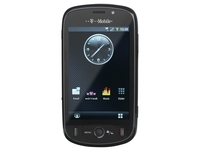 T-Mobile has broken the exciting news that its first budget Android phone, the T-Mobile Pulse, can now be upgraded to Android 2.1 Éclair.
Although it has since been superseded by the Pulse Mini (which came equipped with the newer version of Google's OS) Pulse owners will still be happy to see T-Mobile isn't ignoring older models.
The update means users will get Live Wallpapers, enhanced contact menus, built-in Exchange support (so long as T-Mobile adds it) and much better camera performance.
Tweet happy
A tweet from the official T-Mobile account didn't give much away other than to confirm the news:
"Exciting news for all our Pulse users: the Android 2.1 update is now available to download."
However, at least it's not a 'coming soon' tweet. So if you're a T-Mobile Pulse owner, simply head to the Settings section and check for software updates – you should be the proud owner of a significantly upgraded phone.

| |
Read More ...
Guide: How to unlock your O2 iPhone
 Unlocking your iPhone can be a bit of a nightmare and it depends what network you're on and whether you're still in contract.
 You can always buy a SIM-free device from Apple, or one of the box-only options available from the various operators – in other words, it's been sold to you without a contract and without subsidy.
Once you've been informed by your network that your iPhone has been unlocked, you'll need to pop in your new SIM card and connect your device to iTunes to complete the process of the unlock – you can't just do it on the handset alone. iTunes will then confirm the unlocking of your handset.
Be warned that once you have unlocked your iPhone, using it with another network will require new Access Point Name (APN) settings from your new network - otherwise you won't be able to browse and send email.
Check with your new provider as your handset may update rather than you having to type them in manually.
How to unlock your O2 iPhone
Unlocking your O2 iPhone is the most simple of the three major networks and even pay monthly customers can do it at any time.
Simply visit O2's online form and fill it in. The process takes up to 14 days. If you have a Pay-As-You-Go (PAYG) iPhone on O2, you will need to pay a £15 fee which can be deducted from your balance. Be warned that you will lose the free web and Wi-Fi bolt-on that O2 gives you.
How to unlock your Orange iPhone
It's not possible to unlock your Orange iPhone if you're still within the first three months of your contract. After this date, it is possible by paying a small fee - £20.
To do this, simply dial Orange (150 from your Orange handset or 07973 100150 from another number). Orange says the process of the unlock can take up to 7-10 days.
How to unlock your Vodafone iPhone
Vodafone iPhones remain locked to the network for the duration of the contract after which you can visit its Unlock Code Request Form to have it unlocked.
Vodafone says that you have an iPhone unlocked from Vodafone then you can apply to have it unlocked – use the unlock code request form. Vodafone says that it can take up to 14 days for Apple to approve the unlock request.

| |
Read More ...
Asus Rampage III Formula pictures emerge
 Pictures of Asus' hotly anticipated Rampage III Formula have surfaced, revealing plenty of details of this gaming motherboard.
 The Rampage III Formula will be part of Asus' Republic of Gamers 'ROG' range and will use the X58 chipset, acting as a cheaper version of the popular Rampage III Extreme.
It will offer SupremeFX X-Fi 2 audio, Digital VRM and Intel Ethernet to improve system performance by relieving CPU load during online gaming.
The gaming world has been waiting for an X58 board that sits somewhere between the high-end offerings, with many features that gamers are not fussed by, and the budget end – and Rampage III Formula is looking to fill this niche.

There are, as you would expect, six DDR3 memory slots supporting 2200MHz and a maximum 24GB.
Asus' board is also offering three PCIe 2.0 x16 slots supporting three-way SLI and CrossFireX, Gigabit LAN from the Intel 82567V Ethernet controller, two SATA 6Gbps, and USB 3.0


| |
Read More ...
Digg caught up in political censorship scandal
 Social media powerhouse Digg has found itself in a political row this week, when members of the site were apparently uncovered censoring certain liberal stories from gaining popularity.
A group called Digg Patriots has been accused of playing the site for more than a year, with its 100 plus members burying stories which did not tally up with their right-wing political stance.
According to blog AlterNet, the group has got so powerful that it has taken off thousands of stories on the site, effectively censoring Digg.
Mass burial
By burying the stories, it means that they are unlikely to see the light of day as they are taken off of the upcoming section and therefore can't reach the front page.
Digg is a powerful site in social media circles. It is regularly in the top 50 US sites in the world and has the power to shut down smaller sites by pushing huge amounts of traffic to them when a story of theirs becomes popular.
The idea that the site's political categories have been hi-jacked by a group who seem to have their own political reasons is a massive problem.
Thankfully, in a wonderful case of schadenfreude, the original story regarding the Digg Patriots' apparent shady efforts is one of the most read on Digg at the moment.

| |
Read More ...
Aiptek 3D camcorder heads to the UK
 Firebox, the online gadget store, has announced the arrival of the Aiptek HD 3D Camera, bringing 3D shooting to the UK on a budget.
The camera has been built as a point and shoot, offering a battery life of 1.5 hours and has an expandable memory suited for 32GB SD cards.
Three's the magic number
The camcorder is able to shoot in 3D because it has two lenses and two image sensors, which record simultaneous footage.
In the box is a pair of 3D glasses and you can hook the device up to a computer via its embedded USB connector.
If you don't want to shoot 3D, then you can also record HD movies in 2D and it will take 5MP stills.
The Aiptek 3D Camera is out imminently, available from Firebox.com, and is priced at £199.99.

| |
Read More ...
Review: Asus M4A88TD-V EVO
 Asus is the name, impossibly slick motherboards is the game. Even this modest M4A88TD-V Evo model is still quite a looker.
 For starters, like nearly all Asus boards it's immaculately arranged. Wherever possible, components are positioned in near-perfect little rows. It must make motherboard engineers from other companies weep onto their MOSFETs.
Then there's the natty blue-and-black colour scheme and expensive heatsinks for the northbridge and voltage regulation circuitry. It's nearly enough to make you assume this is a fine board without dissecting the details or seeing the benchmarks. Nearly enough, but not quite.
Not that the M4A88TD-V Evo doesn't stand up to close inspection. Asus has dropped in the SB850 southbridge rather than the older SB710 chip seen on some boards based on the AMD 880G chipset. Consequently, all five of the SATA ports are 6Gbps.
Further adding to the big bandwidth cred is the NEC USB 3.0 chip pumping 500MB/s per port to two sockets on the rear panel.
The only significant drawbacks involve graphics. The 880G's Radeon HD 4250 integrated GPU runs at 560MHz to the 890GX's 700MHz Radeon HD 4290 core. The 880G also plays second squaw to the 890FX discrete chipset in terms of PCI-e lanes.
Where the 890FX can pony up two x16 electrical links, the 880G can only manage two x8 or a single x16. Of course, it's questionable whether the full 16 lanes is essential for dual-GPU gaming thanks to the enormous 500MB/s per lane delivered by PCI-e 2.0.
Other features
As for non-chipset-related shortcomings, you don't get a handy hardware switches for power, reset and clear CMOS. However, what you do get is the TurboV Evo auto-overclocking dip switch.
In practice it doesn't deliver terribly impressive results. Bumping up a Phenom II from 3.2GHz to 3.45GHz is hardly worth the bother. Still, Asus' comprehensive set of BIOS features and options goes a long way towards making up for that.
The core unlocker ensures you can make the most of AMD CPUs with hidden cores, while the Express Gate embedded Linux OS divvies up a quick booting option for fast access to the internet and media files.
All of which just leaves space for the minor matter of performance. Strictly speaking, the M4A88TD-V Evo delivers slightly patchy results in our application tests. It's joint fastest in video encoding, but a second off the pace in Cinebench. It's also a couple frames slower than the best in World in Conflict.
Likewise, sub-300MB/s in HDTach and a maximum bus overclock of 300MHz relegate this board to a mid-table position overall. But let's be clear. The margins are incredibly tight.
Related Links

| |
Read More ...
Opinion: Why serious gamers won't go for wireless mice
 Logitech has taken a bold step by releasing a wireless gaming mouse, but there remain huge doubts from professional gamers that even the most advanced technology is reliable enough.
 Microsoft has already trialled wireless gaming mice through its Sidewinder range, and Logitech's latest G700 will be considered a desirable piece of gaming kit by many.
But for the top echelons of gamers, and the much bigger group of serious gamers that care greatly about their kit, wireless still brings major doubts.
Come a long way
"Wireless peripherals have come on a long way in recent years and some of the better ones out there are actually really great," said pro gaming events organiser Corin Cole.
"The reason they're not suited for professional gamers, however, is that they just aren't as reliable as wired mice.
"If I'm browsing the web at home and run out of battery, or find there's some interference causing me problems, that's fine, I can live with that.
"If it happens to a gamer in the middle of a big game when prize money is on the line, that becomes a huge problem, and that's not a risk they want to take."
Horror stories
Cole's take is reflected by many gamers, myself included. I have dabbled with wireless mice, but a series of horror stories involving death, destruction (only of my avatar fortunately) and severe gamer rage put pay to that brief foray.
Logitech's wired mice are, as thousands would testify, wonderful pieces of technology. I currently use a G9 at work and G9X for my main gaming PC – but despite my faith in the company's peripherals I won't be taking the jump to wireless.
Firstly, I don't really see the point. At no point in my gaming life have I felt trapped by my wired mouse.
A wireless headset is a slightly different matter, but when you sit in front of a screen (or a laptop) the chance of ever being irritated by the wire is tiny.
Problems
So when you factor in problems like charge and interference – however unlikely – you can understand why people are reticent to leave their cables behind.
The latest Logitech mouse, and Microsoft's wireless Sidewinder, offered the chance to leave the cable plugged in, giving people the option of choosing wired or not.
But, several of my problems came from the mouse constantly failing to charge despite being 'plugged in' so even a wired/wireless mouse can have issues.
I'm not convinced by a wireless gaming mouse. Wireless makes a degree of sense for casual use, but I just haven't been given a proper reason why I need to do away with my trusty old wired version.

| |
Read More ...
300,000 Symbian phones sold every day
 The Symbian Foundation has responded to Google's Android sales announcement by claiming its activating 50 per cent more phones each day.
According to a report by analyst firm Canalys, over 300,000 Symbian-powered phones were sold every day in Q2 this year, compared to Android's 200,000.
This equates to three phones per second being activated, and show that despite the headline-grabbing growth, RIM, Google and Apple still aren't top of the worldwide smartphone pile.
Positive reading
Lee M Williams, Executive Director of Symbian, said: "These figures make for very positive news for the Symbian community.
"The smartphone market place has become more crowded than ever. So the fact we continue to outsell our competitors by such large margins, combined with all the feature commitments and developments published on our roadmaps, make us highly confident in our outlook and we will continue to embrace the challenges ahead."
While a number of these phones aren't competing with the headline-grabbing smartphones like the HTC Desire and iPhone 4, Nokia's success in the mid-range market with the likes of the 5530 touchscreen phones has helped smuggle the OS into the pockets of millions.
And with Symbian^3 set to make an even bigger assault into the mid-range market, with the C7 one of the first to enter that fray, Android's seemingly inevitable domination might not happen as soon as some might think.

| |
Read More ...
Secret sauce to Twitter influence revealed
 The director of HP's Social Computing Lab Dr Benado A Huberman believes he has cracked the formula for Twitter influence, creating an algorithm to analyse a Twitter account's stature.
A nine-page document has been posted online – it has graphs and everything – which tries its best to separate influence from popularity.
This can only be a good thing, considering the amount of bots on the service which garner thousands of users.
Pay it forward
In the study, Huberman notes: "This study shows that the correlation between popularity and influence is weaker than it might be expected. This is a reflection of the fact that for information to propagate in a network, individuals need to forward it to the other members, thus having to actively engage rather than passively read it and cease to act on it."
So, if your Tweets are re-tweeted on a regular occasion, then it seems you are deemed to be more influential regardless of the amount of followers you have.
Out of the 22 million tweets, the following users were found to be influencers: @mashable, @jokoanwar, @google, @aplusk, @syfy, @smashingmag, @michellemalkin, @theonion, @rww, @breakingnews.
We are assuming that @TechRadar had a day off tweeting when the list was compiled.

| |
Read More ...
Review: MSI 880GMA-E45
 Are you ever likely to run two AMD video cards in multi- GPU CrossFire mode or use a second graphics card as a physics or GPGPU accelerator? The honest answer is: it's unlikely.
 What you probably don't need, in other words, is a full sized ATX mobo with a silly number of PCI-e slots. A micro-ATX board with a single graphics slot and some enthusiast-friendly features will get the job done just fine. Enter, MSI's 880GMA-E45.
Powered by AMD's middling 880G chipset, it's bang up to date and offers enough power features to keep most enthusiasts happy. And all in an extremely compact and reasonably cost effective package.
Bandwidth wise, there's bags thanks to MSI's decision to go with the more powerful SB850 southbridge and its six port's worth of SATA 6Gbps. Next up is Gigabit Ethernet, a couple of USB 3.0 sockets and official support for DDR3 memory up to 1,333MHz.
This board may be a bit puny. But when it comes to lugging data around, it's well equipped for heavy lifting.
Like most current AM3 boards, it's ready to roll with AMD's latest six-core chips, too. Overclockers will also appreciate MSI's so-called "Military Class" components, including solid core aluminium capacitors.
Less promising is the apologetic-looking heat sink covering the northbridge chip and the absence of any cooling at all for the MOSFETs. As for graphics, you get an integrated Radeon HD 4250 core with 40 shaders but no sideport memory.
As ever, the prospect here is a combination of feeble 3D performance and solid 2D features. DVI and HDMI cover the digital connectivity, while a VGA port caters for analogue Luddites.
Genie in the BIOS
However, pop into the 880GMA-E45's BIOS menu and things get interesting. For starters, MSI's familiar overclocking Cell Menu provides all the clock, voltage and timing options you'll ever need.
If you don't want to get your hands dirty, the OC Genie feature claims to do the job for you. The final feature of note is MSI's Unlock CPU, allowing you to expose those naughty hidden cores in certain AMD Athlon and Phenom CPUs. Promising stuff all round and we're happy to report that it translates into solid real-world performance.
The SATA 6Gbps ports do their big bandwidth act, topping out at 375MB/s with our Crucial test SSD. Application performance and gaming grunt using a discrete graphics card are likewise up there with the best.
In the overclocking stakes, the 880GMA-E45 puts in a very respectable performance: 300MHz on the bus is a 50 per cent overclock and as much as you'll ever need. Even better, the OC Genie function breaks with form and produces decent results, ramping up our 3.2GHz Phenom II X4 test chip to 3.65GHz.
If you're looking for downsides, there aren't many. The memoryless integrated GPU is about 25 per cent slower than similar solutions with 128MB of Sideport Memory. You also miss out on a few frills including physical onboard switches for power, reset and indeed the OC Genie feature.
More critical, for home theatre buffs at least, is the absence of digital audio out via S/PDIF. Arguably, however, the provision of digital audio via HDMI makes that a moot point.
Related Links

| |
Read More ...
Weird Tech: Winston Churchill's UFO files released
 If you have nothing particular planned for the rest of your life, try searching through the enormous database of UK UFO sightings over at the National Archives.
 The collection of alien encounter reports hit the headlines this week after claims that Winston Churchill himself ordered a UFO cover up during the war years when a returning pilot claimed his plane was "approached by a metallic UFO", and Winnie didn't want to alarm the nation with fears of possible new Nazi technology.
The sighting was taken to the very top – a subsequent letter claims the incident was discussed in a wartime meeting between Churchill and US president Dwight Eisenhower.
The rest of the latest batch of material released by the National Archives makes for equally interesting reading, with letters to the Ministry of Defence – and the MOD's replies – scanned into huge PDF files for our enjoyment. The occasional illustrations from confused elderly spotters are the highlights.
Foot patrol
Amy Windom got herself out of an extremely serious spot of bother in a very clever way – by typing an appeal for help on her laptop using her toes. She couldn't use her fingers, because she'd been tied to the bed by a rather rude intruder, who then proceeded to ransack her house.

TOE-TYPING: Ctrl+P would be tough
According to AJC News, Amy convinced the robber not to take her laptop because it would be traceable. So, with it lying on the bed, she opened the case, unlocked it, opened up AIM and typed "HELP. CALL 911" and "IM HOME TIED TO BEED" to her boyfriend using her toes.
And that's why people shouldn't type in capital letters on the internet. Your rage-filled paragraph could be interpreted as a toe-typed call for help.
Little Black Phone
If you're in the extremely lucky position of having so much sex with so many different people you have trouble keeping on top of who exactly you were rubbing it up against last night, DateMate – The Dating and Sex Tracker might help alleviate embarrassing mix-ups over stuff like the names, hobbies and favourite TV programmes of your conquests.

MET A GIRL ON MONDAY: Bluetoothed photos of her to my mates on Tuesday...
Designed to help attractive people schedule and organise their sexual lives via – what else? – iPhone, DateMate enables users to create profiles of each of their dating partners, building a fact-packed little bio of each person to refer to when conversation has started running dry halfway through the main course. There's isn't an Android version. No need.
Knee-jerk reaction
If you're getting on a bit, and kneeling down on the floor isn't the enjoyable, relaxing leisure experience it once was due to the pains and stresses of getting back up again, Japanese researchers have the answer. Robotic knee enforcements.
ONE BENDED KNEE: His feet needs recharging overnight
According to CrunchGear, the under-the-trouser robotic knee is actually more of a walking aid, one that's been designed to help people get around without relying on crutches. Although there's one slight problem – it currently requires a backpack full of equipment in order to power the thing.

| |
Read More ...
In depth: Best TV 2010: top-rated TVs on TechRadar
 TVs are the must-have technology item of the century so far.
Forget mobile phones – everyone's got one of those. TVs are the tech items that everyone covets the most.
Everyone who doesn't own an HDTV wants one. And most of the people who have got one, want a new one.
But who makes the best TV? Which screen should you go for? Which is the best type of TV tech? Do you need a widescreen TV?
There's so much to consider when buying a new TV these days, that many people are actually scared away. Do you go for Full HD 1080p? Or is HD-ready OK? Do you go with LCD or Plasma? How about 3D TV – is it worth the extra money?
In this article, we'll pull together all of the key info from our TVs@TechRadar channel, with links to helpful articles and all the best TV reviews.
So if you want to buy the best TV for you, read on.


10 best 32-inch TVs in the world today...
Most living rooms can't physically take a TV much bigger than 32-inch, making this size by far the best for a lot of people in the UK.
But within this size division, there's plenty of choice. A basic HD-ready set can be found for less than £300 is you search hard, though it's just as easy to spend over £2k on the best ones.
There's only one certainty at this size – your new TV will be a LCD TV. If you're lucky it could have LED backlighting, but it won't be a plasma; LG used to make plasmas at this size, but there's not one on sale currently...
Read more: 10 best 32-inch TVs in the world today

10 best 37-inch TVs in the world today...
Making the decision to upgrade from a bulky old 28-inch CRT TV is almost too easy, but heading straight for a 42-inch plasma can seem a little daunting.
And thus the 37-inch size has become one of the UK's most popular shapes; a lot more impressive than a 32-incher, yet not big enough to entirely dominate a living room. It's also often the maximum size for those of us who are forced, simply by the shape of our living room, to shove a TV in the corner.
It's a size division that's as competitive as any, with the big brands weighing in with both LCD and plasma TV models. Despite its direct forerunners being some of the best-reviewed (and best-selling) TVs around, Panasonic's TX-P37X20 is the only plasma left in this category...
Read more: 10 best 37-inch TVs in the world today

10 best 42-inch TVs in the world today...
Once known simply as 'plasma screens' in the collective consciousness, the 40-42-inch size is where the flatscreen dream started in the late 1990s - and where it's still at its most innovative and best.
Now a lot more varied, with plasmas rubbing shoulders with (and quickly being outnumbered by) LCD TVs and their ultra-modern LED TV makeover, 40-42 inches is still the sweetspot for anyone not overly concerned with ruining the interior design of their living room.
As well as being the fastest growing sector of the market, this size also offers possibly the best value TVs around. Serious home cinema addicts have moved on to 50-inch and bigger screens, leaving this category a swarm of slashed prices...
Read more: 10 best 42-inch TVs in the world today

10 best 3D TVs in the world today...
Slip on a pair of £100 3D glasses, nestle in front of a brand new £2,000 TV and switch on a £350 3D Blu-ray player and you'll likely warm to the notion that 3D is more than just an illusion.
It's created by your brain processing two separate images coming to it via your eyes, and while this stereoscopic approach can be done relatively cheaply, the big manufacturers have plumped for a rather expensive format that relies on rather clumsy, heavy glasses.
It's called Full HD 3D, and, to be fair, it's the best form of 3D TV currently available...
Read more: 10 best 3D TVs in the world today
 TechRadar's complete guide to 3D TV - everything you need to know
With the Blu-ray 3D specification finalised and Sky's 3D TV channel due, the UK faces another telly revolution.
Forget the digital switchover, 1080p 'Full HD' and web-connected TV widgetry. Jump-out-of-the-screen 'stereoscopic 3D' is the best TV tech around!
Trying to describe it is like trying to paint a symphony. So what will you need to watch 3D TV? Who's doing it? When? What's the best 3D TV? And will your existing HDTV work? Carry on reading to find out the answers to these and many more 3D TV questions...
Read more: Everything you need to know about 3D TV
The different types of TV tech explained:Standard LCD (CCFL-backlit)
Until recently, all LCD TVs were backlit by always-on, CCFL (cold cathode fluorescent) lamps. This ageing technology has been superseded by the superior LED method on more expensive sets, but is still standard on cheaper models.
Direct LED
These displays are backlit by an array of LEDs (light emitting diodes) directly behind the screen. This enables localised dimming – meaning immediately adjacent areas of brightness and darkness can be displayed more effectively – and greatly improves contrast. LED TVs are also more power efficient and capable of a wider colour gamut than CCFL sets. Read: 10 things you need to know about LED TVs
Edge LED
The LEDs of the backlight are mounted along the edges of the panel. This arrangement enables radically slender displays and offers superior contrast levels to CCFL, but can't achieve the same picture quality as directly lit LED sets.
OLED
The backlighting on OLED (organic light emitting diode) sets is achieved by passing an electric current through an emissive, electroluminescent film. This technique is thought to produce better colours and higher contrast and also enables screens to be extremely thin and flexible. As yet, though, the only commercially available OLED TVs are small and very expensive.
Plasma
PDP (plasma display panel) TVs use glass panels containing millions of tiny cells filled with a mixture of inert gases. Electricity excites the gases, causing them to illuminate the pixels across the screen. Plasma, while arguably superior to LCD in terms of contrast and colour accuracy, is only viable on large (42in+) screens and has been dropped by all but a handful of manufacturers.
3D TV
These are modern LCD (LED) or plasma screens with electronics able to display 3D pictures. There are two types of 3D technology: passive and active. The former utilises screens with a polarised filter, combined with lightweight, cheap plastic glasses, much like those used at the cinema. The latter, meanwhile, creates a 3D effect by synchronising fast-shuttering glasses with the screen using IR (infrared) transmitters. Sources of 3D currently include 3D Blu-ray players and Sky's 3D TV channel.
Read more: What makes an HDTV a 3D Ready TV?
-------------------------------------------------------
Quick links to TV reviews by price:
-------------------------------------------------------
The best TVs from £120 to £300
The best TVs from £300 to £400
The best TVs from £400 to £500
The best TVs from £500 to £700
The best TVs from £700 to £1000
The best TVs from £1000 to £1500
The best TVs from £1500 to £2000
The best TVs from £2000 and upwards
---------------------------------------------------------------
Quick links to TV reviews by manufacturer:
---------------------------------------------------------------
All Panasonic TV reviews
All Samsung TV reviews
All Philips TV reviews
All Sony TV reviews
All LG TV reviews
All Toshiba TV reviews
All Sharp TV reviews

| |
Read More ...
Opinion: Dedicated GPUs are increasingly irrelevant
 The end is nigh for the modern graphics chip. It genuinely pains me to say that. After all, I'm an unapologetic chip aficionado, someone who loves the technology of integrated circuits for the sake of it.
 But it's becoming increasingly apparent that GPUs are over-engineered, increasingly irrelevant and almost definitely not long for this world.
The background here involves a confluence of technological trends. The most ominous of these in terms of the GPU's longevity as a discrete component is the architectural convergence of CPUs and GPUs. However, one of the most debilitating symptoms of the graphics chip's terminal malaise is complexity – sheer, pointless complexity.
Take Nvidia's uber pixel pumper, the GeForce GTX 480. It weighs in at three billion transistors. That's getting on for triple the size of Intel's beefiest PC processor, the six-core Core i7-980X. If the GTX 480 was any use, that monster transistor count would actually add to the allure. But the harsh truth is that it isn't – for almost anything.
And that makes it dumb. You see, despite the hype regarding running non-graphics applications on GPUs, there's still very little outside of games that makes more than passing use of a desktop or laptop GPU. More to the point, the number of games demanding a really high-end GPU that are actually worth playing isn't merely a small number. It's zero.
Put it all together and you have a terminal mismatch between the cost and complexity of GPUs and their real-world utility. In truth, I've felt this way for some time. But it's the apparent emergence of a radical alternative to established 3D rendering technologies that really brings home how bloated and ludicrous graphics chips have become.
Revolution in rendering
This alleged revolution in rendering comes from a small Australian software startup known as Unlimited Detail. It's not actually brand spanking new, having been in development for a year or three. But thanks to the random nature of web-based content aggregators, Unlimited Detail was lifted from obscurity recently in a flurry of YouTube-powered publicity.
Anyway, as far as I could tell the basics of this new rendering technology involve ditching polygons in favour of atomic points in 3D space. The claimed result is quite literally unlimited geometric detail. Oh, and the whole thing runs in software at smooth framerates on a conventional PC processor. The GPU doesn't get a look in until it's time to spit out the final 2D images.
You hardly need me to point out it all seems too good to be true. So, there was nothing for it other than to go straight to the source and speak to the guys at Unlimited Detail.
The technical brains are provided by Bruce Dell, a former supermarket manager, while the business nous comes courtesy of Greg Douglas, a games insider formerly of developers Auran.
The idea of using atoms or points is not new, of course. The really clever bit in UD is the 3D search algorithm developed by Dell. The precise details are UD's big secret. But according to Dell, "The algorithm takes point cloud data and files it in a certain way so that it can be quickly sorted and accessed."
When the algorithm searches for points, it doesn't do so indiscriminately. Instead, it only pulls up a single point for each on-screen pixel being rendered. "We only grab the atoms we need for each pixel, we don't touch the others," explains Dell.
In other words, the workload depends on screen resolution, not the underlying geometric detail of the scene being rendered. Thus, an impression of unlimited geometry is created. The UD guys claim the algorithm is so efficient it runs in real-time in a single thread on just one core of a conventional PC processor. Apparently, it will even scale down to simple CPUs in mobile devices.
So far, the only hard evidence for these incredible claims takes the form of a few pre-recorded videos of dubious quality. However, having spoken to the UD pair, I'm happy to confirm they're not only incredibly passionate, but strike me as completely genuine. It's potentially extremely exciting stuff.
Still, even if UD works exactly as advertised, the established players in graphics are hardly going to embrace a technology that instantly renders several decades and billions of dollars of investment obsolete overnight.
You have to assume Nvidia, and to a lesser extent AMD, will resist the idea strongly. But if Unlimited Detail's technology gains any traction at all, GPUs really will look sillier than ever.

| |
Read More ...
Review: MSI 870A-G54
 What's your take on integrated GPUs? When it comes to gaming, integrated graphics is obviously in no-touchy territory. But it gets the job done just fine for 2D or home cinema work.
 Likewise, onboard graphics is a handy backup should your 3D card lose the will to render. However, if you're building a gaming or content creation rig on a tight budget, paying for the redundant circuitry doesn't make sense.
What you want is a no-nonsense motherboard that ditches the feeble integrated GPU and only gives you what you need. What you want is MSI's 870A-G54. Right? That's an affirmative, on paper at least.
MSI has plumped for AMD's entry-level 8 Series chip, the 870, but paired it with the top-spec SB850 southbridge. The result is a feature set that mostly nails it in terms of providing value for money from a discrete graphics motherboard.
Expansion slots include a pair of PCI-e x16 graphics ports, enabling multi-GPU CrossFireX gaming. Admittedly, you only get eight lanes per slot with both populated. But in our experience that's plenty for all but a pair of dual-GPU cards, such as the Radeon HD 5970.
Frankly, if you can afford two 5970 cards, you're hardly likely to be in the market for a budget AMD mobo like this.
The SB850 chip, of course, means SATA 6Gbps is on the menu. Similarly, MSI hasn't skimped on the USB connectivity. The ever-popular NEC USB 3.0 controller appears once again and enables two 500MB/s ports on the mobo's back panel.
Funky features
As if that wasn't enough, MSI has given the 870A-G54 some real overclocking chops. The OC Gear feature comprises both an on/off button and a toggle wheel. After hitting the OC Gear button on boot, the wheel can be twiddled back and forth to tweak the CPU bus speed.
By default, one click of the wheel bumps the bus speed by 1MHz. But you can choose any increment between 1MHz and 10MHz in the BIOS. It's a funky little feature, even if it doesn't work all that well in practice.
The problem is that all the relevant non-bus settings including memory dividers, voltages and the PCI Express to northbridge ratio stay constant. In other words, as fun as the OC Gear wheel is, you still get better overclocking results from hand-tuning the BIOS options.
That said, the board's alternative OC Genie tool works better than most auto-overclocking tools, cranking our Phenom II X4 955 up from 3.2GHz to 3.65GHz.
Just as impressive, for the most part, is the 870A-G54's application and storage performance. Only the ubermoney Asus Crosshair IV Formula beats it in the SSD throughput benchmarks, for instance. Likewise, it's near-as-dammit as quick as any board in the video encoding and professional rendering tests.
It's also not far off the ultimate pace for overclocking with a maximum bus frequency of 315MHz. That's actually more than we were expecting given the cheap-looking northbridge cooler and exposed MOSFETs.
The only real let down is the mildly disappointing 45fps in World of Conflict. Still, for just £79 it's a pretty compelling all round package.
Related Links

| |
Read More ...
Review: ASRock 880GMH USB3
 Fact: When it comes to CPUs, AMD makes cheapo chips. Would it prefer to sock it to Intel at the more profitable end of the market? You're damn tootin', it would. But until its all-new Bulldozer processor rocks up next year, AMD is stuck peddling a geriatric CPU architecture that dates back to 2003.
 In our minds, then, PCs based on AMD technology are all about maximum performance in return for the minimum outlay. That means paying as little as possible for a motherboard.
By that rationale, Asrock's 880GMH USB3 should be our default winner. It's the cheapest board on test. The only slight snag is that it's not the cheapest by all that much. MSI's impressive 880GMA-E45 is based on the same 880G northbridge chip and is yours for just £17 more while the graphicsless MSI 870A-G54 is even closer in the price lists.
At the very least, Asrock's effort needs to be nearly as good as those boards. For starters, you get the AMD 880G northbridge chip complete with AMD's latest DX10.1 graphics, 128MB of Sideport graphics memory and all the Blu-ray accelerating 2D goodness you can eat.
There's also Gigabit Ethernet, VGA, DVI and HDMI video connectivity, not to mention USB 3.0 support. What's more, it's all solid state using Japanese capacitors, which is nice.
No SATA 6Gbps
The downside is that the usual SB850 southbridge chip has been replaced with the low-end SB710 from the older 7 Series. The most obvious impact of this is the loss of SATA 6Gbps support. There are five SATA ports and they're all 3Gbps.
As odd as that is, things get even weirder with the USB 3.0 feature. Instead of using the popular NEC controller chip, Asrock has gone with the Fresco Logic FL1000G. The result is a single USB 3.0 port instead of the usual pair.
Whether or not you find that acceptable, the following factoid is sure to infuriate you. On the back panel, there are two blue-coloured USB ports. But only the one closest to the PCB is USB 3.0. Given Asrock's reputation for odd-ball boards, none of the above is all that surprising.
Moreover, what matters is performance. Aside from the inevitable limitations of the SATA 3Gbps ports, the news is generally very good. Application performance is strong if fractionally slower than the best.
As for overclocking, a maximum bus speed of 315MHz makes for ample overclocking. It's easy to achieve, too, thanks to a healthy set of options in the BIOS. You also get the same Turbo UCC feature that appears on Asrock's more expensive 890FX Deluxe 3. As an auto-overclocking tool, it's not much cop. But you wouldn't want to be without its ability to unlock hidden cores.
Related Links

| |
Read More ...
Asus CineVibe headphones include force feedback
 Asus has unveiled it latest gaming headset, with the CineVibe headphones bringing force feedback for 'greater immersion in games and movies.
 Although force feedback (or rumble) is not a new concept, Asus has decided that gamers will benefit from having it in their headsets.
So, they have integrated the technology into the Asus CineVibe headphones, and hope that it will 'change the way gamers perceive and enjoy personal audio.'
Miles ahead
"The inclusion of moving bass, force feedback reactive vibration and superior audio quality put the all-new ASUS CineVibe miles ahead of other headphones, providing an entirely upgraded personal audio experience," says Asus' release.
"CineVibe headphones use advanced audio rendering to provide impressive bass as well as precision mid and high range output, making them ideal for exciting gaming and movie watching.
Force feedback
"Better yet, the biggest attraction with CineVibe headphones is the addition of reactive force feedback that vibrates in tandem with the action on screen, creating a gripping experience," it continues
"Unlike the forgettable sound of most headphones, CineVibe headphones evoke great wonder and amazement, injecting a whole new dimension of audio to personal, undisruptive gaming and movie watching."
Asus' CineVibe headphones are available now for £58.99. And, we're just as intrigued as you as to what a headphone rumble-pack is going to feel like.

| |
Read More ...
PC gaming is 'double the size of consoles'
 The PC Gaming Alliance has released figures that suggest that annual shipping volumes for PC gaming were two times the combined amounts for all the major consoles last year.
With the PC perceived as being increasingly marginalised by major companies, the figures from the PCGA Horizons report serve as a timely reminder that the platform remains not only buoyant but massively profitable.
"Annual shipment volumes for the PC gaming hardware market in 2009 were over two times larger than the combined Wii, PlayStation 2, PlayStation 3 and Xbox 360 console units shipped in the same period," said the PCGA report.
Trend continues
"This trend for the PC Gaming hardware market to outpace all console shipments combined is expected to continue through the forecasted period of the research," it adds
"In addition, revenues from consumer PCs capable of gaming that shipped with a discrete GPU (excludes netbooks and integrated graphics-based PCs) totalled approximately $54.6 billion in 2009 and are forecasted to grow to $61.3 billion by 2014."
New era
"PC gaming is the highest profile and most mature example of a new era of computing systems based on usage," said Richard Shim, research manager at IDC covering PCs.
"These new usage-based systems are hardware configurations optimised for an improved user experience.
"Consumers are often willing to pay more for such an experience. In the case of gaming PCs, up to 25 per cent more as compared to a mainstream system."

| |
Read More ...


1 comment:
9:30: 'Hill Billy' Tom had found a parking space around the corner and we threw our luggage
in back. According to the location of the mobile crusher station and shift based study will be divided into self-shift and shift two.
inspiration, creativity and intuition within the mind.
my blog post :: azurite
Post a Comment