

8 things to know about Blackberry 6 OS

BlackBerry 6 is the latest operating system from RIM which promises to offer many new features to bring BlackBerry well and truly into the touchscreen world.
RIM released a little more information this week on the OS which it hopes will entice non-BlackBerry users to its handset range for the first time, pointing to a consumer-friendly interface that's accessible to both business and everyday users.
Here's a selection of what's to come...
1. Universal search
Want to find a contact in a hurry? Well instead of heading over to the phonebook, just tap the search icon and start typing. Blackberry 6 OS provides system-wide search results as you type. So whether it's a contact, application or song name, you should be able to find it in super-quick time. The OS also displays search results as icons, to make finding stuff that bit faster.2. Enhanced media playback
The media player in Blackberry 6 OS has had a revamp, displaying your album art front and centre on a carrousel, similar to iTunes' Coverflow. BlackBerry has made it so that all you need is on the one screen. From here you can flick through your albums, navigate through the track you're listening to, shuffle and repeat.
3. Social Feeds
Blackberry 6 displays all of your social activity in one place, so you can quickly tap between texts, tweets and Facebook messages. All of your events - be it a friend request in Facebook, an upcoming calendar event, or an unread text – appear in one place.4. RSS Feeds
With one swipe to the right, you can jump from social to RSS feeds, and new feeds can be added by entering a web address and selecting the feed you want to subscribe to.
5. Visual, fluid interface
All of these new features link into the fluid interface, which sees tiles float over the top of each other to make efficient use of the screen space. The operating system never shows you more information than it needs to, helping you find the option you're looking for quickly.6. Blackberry messenger
Blackberry's free messaging service is back on Blackberry 6 OS and it has been redesigned to make your conversations looks clear and crisp, with the option to attach an image, video or audio selection to your message available.
7. Simultaneous postings
Blackberry 6 OS lets you post to your Messenger, Facebook and Twitter accounts all at once, saving the need to write the same message three times. This is great for those who want to treat all their social networks the same, not so if you want to keep Twitter and Facebook entirely separate. Great to have the option, though.8. Richer web browser
The web browser in Blackberry 6 OS displays web pages in full and implements pinch and zoom to magnify small text. Open tabs are displayed as thumbnails sat on an attract Coverflow-style dock, and then maximise to full screen when tapped on.
Unfortunately, there is no UK release date for BlackBerry 6 OS but with more and more updates about the operating sytem coming from RIM, we're expecting it to arrive in the UK very soon.

 |  |
Read More ...
Sony releases new 3D TV surround sound system
 Sony has released a new 3D-ready surround sound system for those early adopters out there keen to invest in one of the first 3D TVs out on the market this summer.
The new Sony HT-AS5 is described as an ultra-compact system with 3D HDMI pass-through and high-power S-Master amplification.
3D sound just like the cinema
Which basically means it will make your new 3D Bravia TV sound exactly as its manufacturer intended, when you are enjoying those new 3D Blu-ray movies that should be on the shelves very soon.
"Sony makes 3D plus great surround sound simpler than ever with the arrival of the HT-AS5 - designed to give room-filling audio - without filling the room with audio equipment," reads Sony's release just in.
"The system has 3D pass-through on HDMI, and features 1000W of S-Master digital amplification hidden away in its compact subwoofers, which also acts as the control centre for the system."
Sony's new system has 2 optical inputs and 1 coaxial digital input for games consoles and set-top boxes.
3D gaming audio
If you are going to buy a 3D TV soon and if you fancy playing some of the new 3D-ready PlayStation games that are already starting to appear on Sony's PlayStation Network (PSN) then this new 3D-ready audio set-up could well prove to be a wise investment.
Providing you have understanding neighbours, that is…
The recommended retail price of Sony's new HT-AS5 is £429.99, although if you shop around you should be able to find it cheaper.

| |
Read More ...
Review: Dell Precision M4500
 Dell's laptop range covers a broad spectrum of consumer and business requirements, with its Precision range comprising its most powerful high-end mobile workstations.
 Packing cutting-edge components and performance, the Precision M4500 sits in the middle of the range and aims to offer a compromise between compact mobility and big-screen graphics power..
Billed by Dell as 'the world's most powerful 15.6-inch mobile workstation', we expected nothing less than the holy trinity of laptop design from the Precision M4500 – portability, performance and usability.
Thankfully Dell has succeeded and, despite some very minor complaints, the Precision M4500 is one of the best workstations you can currently buy.
While Dell's corporate laptops often come from the same school of design as Lenovo's ThinkPad range – with plain black plastics used throughout and very little design flair on show – the Precision M4500 is more pleasing to the eye.
Finished with a ribbed, brushed-aluminium lid, it carries a high-end corporate look that will fit nicely into any office environment.

The interior of the Precision M4500 is less eye-catching, with matt black plastics used liberally, but when combined with the aluminium lid it creates an impressive level of resilience that will easily withstand years of daily use.
Entirely scratch and smudge resistant, with no noticeable flex on the lid or any of the panels, this is one of the toughest laptops we've seen.
The Dell Precision M4500's chassis is not as well equipped as we were expecting, however. The left-hand side of the chassis is fitted with just two USB ports, an ExpressCard slot, an SD Card reader.

A DisplayPort is also in place for connecting digitally to an external monitor, but
we would have preferred an HDMI port, as compatibility for DisplayPort technology is so rare.
The right-hand side of the chassis is far better equipped, with two more USB ports, a mini-FireWire port, an SD Card reader and a standard PC Card slot.
A DVD rewriter is also in place, with the unusual ability to be quickly hot-swappable. A compact handle pops out of the drive and can then be pulled to remove and replace the drive while the laptop is switched on.

Despite having a comparatively large chassis, the keyboard of the Precision M4500 is not as large as we'd expected. Rather than span the width of the machine, two large speakers are fitted on either side, reducing the keyboard's size.
Audio quality is excellent, however, with a surprisingly powerful and warm sound that can easily fill a small room without straining.
The keyboard itself is one of the best we've used of late, although its lack of a numeric keypad is unusual for a business machine. With large, firmly fixed keys and no flex on display at any point, we were able to type accurately and comfortably all day.
Our only gripe is that the board is set quite far back on the chassis, forcing you to lean forward slightly when typing.
As with such rival corporate machines as those from Lenovo's ThinkPad range, both a touchpad and pointing stick are in place for controlling on-screen actions, each with their own set of dedicated mouse buttons. Both also include a third mouse button in the centre, which can be clicked to allow you to easily scroll up and down inside documents and internet pages.
As far as the specification goes, of particular note is the Precision M4500's 15.6-inch screen. Calibrated to 100 per cent Adobe Colour Gamuts, image quality and colour reproduction is truly stunning and ideal for professional graphics use. It is also one of the brightest screens we've seen which, when combined with its non-reflective matt coating, makes easy to view in all lighting conditions.
Driving the screen is an Nvidia Quadro FX 1800M graphics card – a chip designed by Nvidia as a professional business graphics solution for CAD use, computer animation and video editing.
Performance is outstanding, with the Dell Precision M4500 powering through out benchmark tests with ease and delivering ample graphics performance for all requirements.

Standard office performance of the Precision M4500 is equally impressive. While the 2.4GHz dual-core Intel Core i5 processor and 4096MB of DDR3 memory of our test machine is not a particularly impressive specification on paper, we were amazed by just how quickly it dispatched the most demanding office tasks, even when running multiple applications.
Since the Precision M4500 can also be configured with a top of the range, quad-core Intel Core i7 920XM processor and up to 8192MB of DDR3 memory at the time of purchase, there's no reason to suspect that it can't fulfil its claim of being the world's most powerful 15.6-inch mobile workstation, as it's by far one of the strongest we've seen.

Less pleasing is just how hot the chassis gets during use. While far smaller yet more powerful laptops such as Sony's VAIO Z-Series manage to stay cool at all times, the underside of the Precision M4500 quickly becomes uncomfortably hot, even when the system is not being driven to its maximum abilities.
This means it is better used on a desk than on your lap.
That's unfortunate, because the Precision M4500 provides a surprising level of mobility.
While its 3kg chassis is too bulky and heavy for daily travel use, it is compact enough to be carried on shorter journeys. Its 260-minute battery life is also particularly impressive, considering the amount of power on offer, letting you work for half a day away from the office.

Storage is equally pleasing, with the Precision M4500 fitted with a 500GB hard drive – more than enough to hold large design files and thousands of business documents. A choice of operating systems is also available and while our test unit was installed with the 64-bit Windows 7 Professional OS, you can opt for Red Hat Linux software if you prefer.
While we can't say for sure whether the Dell Precision M4500 is the world's most powerful 15.6-inch mobile workstation or not, it;s certainly among them.
With its stunning performance, surprising battery life and feature-packed specification, it's a truly impressive workstation and a viable alternative to such other high-powered workstations as Lenovo's ThinkPad W701.

We liked
Squeezing maximum performance from Intel's mid-range Core i5 technology, the Precision M4500 is one of the most powerful business machines we've seen. When combined with its high-powered Nvidia graphics card, any office task can be ran with speed and ease.
The stunning 15.6-inch screen continues Dell's recent run of vibrant laptop panels. Offering 100 per cent Adobe Colour Gamuts, accurate colour reproduction and staggering brightness levels, this screen can easily be viewed in all lighting conditions.
While the keyboard is not as wide as it could have been, usability is excellent nevertheless. All keys respond well and the choice of a touchpad and pointing stick is a nice touch, giving the user a choice of ways to interact with the screen.
The stereo speakers that flank the keyboard are surprisingly powerful and provide a warm and full sound ideal for use at home or in the office. It is unusual to see such good speakers on a business laptop and professional video editors are sure to appreciate them.
We disliked
Despite its large chassis and mid-level components, the base of the Precision M4500's chassis quickly gets uncomfortably hot. Although there is a large cooling fan in place, it gets far too hot for laptop use, making it better suited to use at a desk.
Even though the chassis is thick and bulky, it's disappointingly poorly equipped. Ports are limited and the lack of an HDMI port is unfortunate. A DisplayPort is in place for connecting digitally to external Dell monitors, but you can't easily connect to an HDTV.
Although the keyboard is comfortable to use, it's set too far back on the chassis, with the palm rest proving far too large. As a result, you're forced to lean forwards when typing, which can place you in an awkward and uncomfortable position when sat at a desk.
Verdict
While the Dell Precision M4500 lacks the power and features of larger graphics workstations such as the Lenovo ThinkPad W701, its impressive power, usability and mobility make it a viable alternative.
The poor cooling system and limited extras hold it back from greatness, however, as it is uncomfortable to use on your lap and lacks comprehensive features.
Related Links

| |
Read More ...
Review: MSI GX740
 The MSI GX740 is a gaming notebook, and is a very powerful machine featuring the Intel Core i5 processor and a high-end ATI graphics chip.
 The real selling point of this machine is its price, and this much power for under £1000 makes it a very affordable option, especially when the likes of an entry level Alienware M17x, providing very similar performance, will cost you around £500 more.
As we'll see, however, cuts have had to be made to keep the price low.
Some people like their gaming rigs styled with all the bells, whistles and flashing lights. Personally we don't, and it's fair to say that the GX740 has struck a fine balance between sophisticated and showy.
The lid features a brushed aluminium finish which looks and feels fantastic. It isn't shiny in any way and is therefore easy to keep clean, and also resists fingerprints and scratches well.
The same material is repeated on the palmrest. Again, it's very easy to keep clean but we did notice the area got a little warm after prolonged gaming sessions. It certainly isn't uncomfortable, but worth noting.
Significantly more irritating is the intrusive specification sticker MSI has slapped on the left hand side of the GX740's palmrest.

The company has an irritating habit of doing this, having previously stuck something similar on the excellent MSI Wind U160 netbook. Why you'd want to stare at an ugly silver sticker is beyond us, and it wouldn't be such an issue if it wasn't near impossible to remove without leaving acres of glue behind.
MSI's traditional red trimming adds a splash of colour to proceedings, and offers a nice contrast to the dark brushed aluminium. Above the keyboard part of the speaker system sits behind a metal grill, with a bank of black and red touch-activated hotkeys positioned in the centre.
This looks great, giving an almost retro flavour.
The GX740's 17-inch screen is pretty decent. It doesn't feature a full high definition (HD) resolution, plumping for a 1680 x 1050 instead. This, of course, means that it features a 16:10, rather than a widescreen 16:9, aspect ratio.

While not all games support a widescreen mode, most do these days so it seems a little strange MSI has implemented this technology, and has a lot to do with keeping costs low so as to pass on savings to the consumer.
It shouldn't cause a problem when playing games, as you can alter the settings of most titles to suit your screen, but widescreen movies and TV will appear with the classic black letterbox sandwiching in the picture, which might not suit everyone.
Nevertheless the GX740's panel is bright, detailed and colourful, with contrast especially impressing. Games and films look fantastic, and the shiny Super-TFT screen coating is surprisingly effective at suppressing irritating reflections in bright light.
The keyboard is mounted fairly well into the GX740's chassis, but there remains quite a bit of flex when typing at speed or gaming hard.
Also, despite the large chassis, the board feels a little cramped, and to accommodate the dedicated number pad the Backspace, Enter and Shift keys have been cut small, and are quite easy to miss-hit as a result.
MSI has painted the WASD keys – commonly used gaming keys – red, making them easy to locate during frantic gaming, which is a nice touch.
Set just above the keyboard is the row of touch-activated hotkeys mentioned above. From left to right they control your media (skip back, stop, pause/play and skip forward), activate MSI's Eco mode, Cinema Pro mode, webcam, Bluetooth, Wi-Fi and a programmable button.
All the keys glow blue when activated, and all are quick to respond. The media controls work great and are compatible with players such as Spotify, but we'd liked to have seen volume control buttons also included.
The GX740's Eco button lets you switch between various power programs to help you get the balance of battery life and processing performance right, and includes a gaming mode, movie mode, office mode and turbo battery mode.
The Cinema Pro hot key is designed to provide greater screen detail and higher sound quality, but the only noticeable difference was louder speaker play back, and we can't envision anyone using the feature much.
Down the left-hand side of the chassis you'll find the DVD optical drive – cost cutting has ruled out a Blu-ray drive – two USB ports for attaching peripherals, a Gigabit internet connection (the GX740 also boasts 802.11n Wi-Fi, currently the fastest technology for connecting wirelessly to a router and then the internet) and a modem line also makes an unexpected appearance, which is useful for those looking to browse the web via dial-up.

On the right-hand side of the GX740's chassis sits an ExpressCard slot where you can add a range of enhancements, from a GPS module to a digital TV tuner.
There's also a multi-card reader letting you transfer your photos from your digital camera onto the notebook, along with two more USB ports. One of which doubles as an eSATA interface, which allows you to transfer data at very fast speeds to a compatible external device, such as an external hard drive – great for those who regularly back data up.
Rounding out the right-hand side is a FireWire connection, commonly used to import large amounts of video off a camcorder, and also the GX740's fan, which remains surprisingly quiet during use.
On the back of the notebook's chassis, perhaps not so conveniently located, sit an HDMI connection and a VGA port. The former is great for hooking the GX740 up to an HD source, such as your TV to show off photos, while the latter is useful for connecting to older, analogue displays.

We were very impressed by the speaker system built into the GTX740. Normally notebook speakers produce disappointingly poor sound quality, but the SRS patented technology works fantastically well.
The bundled software allows you to tweak the sound to very decent levels, and all but the most ardent audiophile will be content without even stand alone speaker system.
Performance wise we'd expect any gaming powerhouse to feature at least a dual-core Intel Core i7 processor, but the GX740 runs a less powerful Core i5 chip, again in a bid to keep costs down.
Nevertheless, the GX740 provides enough processing power for pretty much any task the average user could wish for, and the 4GB of DDR3 of RAM – the latest and fastest memory technology – meant all our test applications, from word processors to the latest games, ran without incident.
The GX740 does provide fantastic graphical punch, and the ATI Mobility Radeon HD 5870 is exactly the same as you'll find in an entry level Alienware M17x just, as mentioned before, for £500 less. Similarly, there's also 1GB of dedicated memory ensuring a smooth ride.
We had no problems playing the latest games with settings on high. The fact the screen isn't full HD makes the graphics card's job a lot easier, even if images aren't as razor sharp as they would be on a 1920 x 1080 pixel resolution screen.
This graphical prowess also means the GX740 lays waste to multimedia tasks such as HD video editing and, of course, photo editing. You'll be able to run the likes of Adobe Photoshop with very little issue at all.
A 500GB mechanical hard drive, spinning at the standard 5400rpm, will provide comprehensive storage well into the future, holding tons of games as well as all your photos, music and movies.
You could argue that a drive spinning at 7200rpm – providing faster access to your data – would be more suitable for a high-end multimedia machine, but they cost more, and the omission is another example of MSI saving costs where possible.
Finally, the sticky question of portability. The GX740 is actually one of the most carry-able gaming laptops we've ever come across. It weighs only 3.2kg, feather light compared to Asus' witheringly heavy 6.1kg W90, and at 43mm thick you won't feel like you're lugging a breeze block around. So all good there.

The 83 minute battery life is horrific, however, and you can pretty much see the meter drop through the floor as soon as you power up the machine away from a wall socket.
Portability wise, therefore, you need to consider your options. As a desktop replacement system the poor battery life won't be a problem, if it is a priority – and you're looking to travel with your gaming machine – we'd highly recommend the fantastic Alienware M11x.
As it happens, we're big fans of the MSI GX740. By making sensible and realistic cuts – think Core i5 instead of i7 processor, no Blu-ray drive, lack of full HD screen – MSI has managed to deliver a laptop that boasts serious graphical prowess at a very competitive price.
The GX740 also looks great, and we're told by MSI this is the last model to feature the famous style, with the inbound GT660 demonstrating the way of things to come, so if you like the design we'd suggest you get stuck in before it's too late.
We liked
First and foremost the affordability. Yes, cuts have been made, but to all but the most hardcore of gamers – who are likely to have built their own systems anyway – Core i5 is going to be more than sufficient for quite some time.
The graphical power here is formidable, and the latest games run as smooth as you'd like with settings up high.
MSI has been using this design to great effect for quite a few years, it's neither garish nor boring, and we'll be sad to see it go.
The relatively low weight and form factor of the GX740 make it very easy to carry around, not something often said about gaming rigs.

We dislike
The lack of a Full HD screen may bother some, and images may not be sharp enough for the hardcore.
The laptop maybe easy to carry, but realistically you'll be sprinting between power points thanks to a truly shocking battery life.
There are considerably cheaper laptops on the market with a Blu-ray drive, and if this is important to you it may be worth looking elsewhere.
The sticker plastered across the palm rest will always be a bone of contention for us.
Verdict
The MSI GX740 is one of the best priced, best looking gaming notebooks around. There's plenty of power under the hood for the avid gamer, while the Intel Core i5 processor provides plenty of performance for your average consumer.
Related Links

| |
Read More ...
Develop: 'iPad HD' will soon match Xbox 360
 Speaking at this week's Develop Conference in Brighton, the CEO of developer Fishlabs has claimed that the quality of mobile gaming will overtake that of home consoles within a year.
Fishlabs CEO Michael Schade also said that he thinks Apple will release an "iPad HD" which will run games of an equivalent standard to a Microsoft Xbox 360 within the next year.
Schade was speaking in a Develop session called "Mobile becomes Console" and remains incredibly bullish on the opportunities for better quality handheld games in the very near future.
iDevices close in on PlayStation
"I think you can expect some time next year to have rendering capabilities onmobile devices superior to the Xbox 360," claimed the Fishlabs CEO.
He added that he thinks Apple's range of 'iDevices' (iPod touch/iPhone/iPad) could have sold 120 million copies by the end of the year putting them "close to a par with the PS2's 140 million."
"When we have made it so that someone buys a mobile device to play a game, then the mobile has become a more important platform than consoles," said the developer.
Nintendo clearly hopes that its recently-announced 3DS handheld console is going to be appealing enough to gamers to help the Japanese gaming company maintain its current market-leading role in the handheld gaming market.

| |
Read More ...
BlackBerry tablet to come with Flash support
The much-rumoured BlackBerry tablet device looks to be real and packing Flash, according to those close to RIM.Just this week, we told you that Ashok Kumar, MD at analyst firm Rodman & Renshaw, had 'outed' the new tablet in a research note and it seems that what he revealed is the truth.
This is according to Beta News, who has spoken to a RIM source who wishes to remain anonymous.
Flash support
Not only will the BlackBerry tablet have a seven-inch screen, dual cameras and 1080p functionality, according to the source, it will also have Flash support.
As Flash seems to be Steve Jobs' Kryptonite at the moment, this is definitely something which BlackBerry will have over the iPad.
BlackBerry showed off its new OS this week (BlackBerry 6 OS) which may also hint at what is to come with its tablet device. The main upgrades seem to be better web surfing and integration of social-networking features.
If other rumours are correct, the BlackBerry tablet will have a UK release date of December.

| |
Read More ...
Microsoft integrates Facebook into Outlook with Social Connector
 As announced in February, Microsoft Outlook now allows users to integrate their Facebook accounts and view contacts' photos, news feeds and status updates with an add-on to Social Connector.
Microsoft states that: "According to the Nielsen ratings, 67 per cent of the global online population now goes online to visit social networks and blogs to stay connected, make decisions, and get things done. Today's news demonstrates our commitment to evolving Office to support the way you get things done."
LinkedIn and MySpace became available in Social Connector over the winter, and this week Facebook and Windows Live were also added.
Convenience
Instead of offering up its own social network, Microsoft is keen to promote the convenience of mixing users' Outlook inbox with their social networks, such as Facebook and MySpace.
Microsoft has also released a new version of the Outlook Social Connector, giving users the ability to receive real-time updates in the 'People Pane' within Outlook.
With regard to privacy, Microsoft have said that the user decides what information they share, and with who.
Back in April Microsoft announced Live Messenger 9, which allowed users to share their status updates with all of their social networks. Today's Outlook update promises similar integration with our inboxes, too.

| |
Read More ...
Tweetdeck celebrates second birthday with 15 million downloads
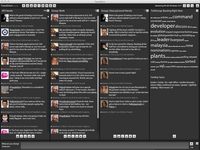 The popular Twitter client Tweetdeck celebrates its second birthday this week, having grown from a small application with one employee, to a multi-platform international success story.
To celebrate, UK-based founder Iain Dodworth wrote a stat-packed blog post, firstly thanking his staff, then going on to say the desktop version of Tweetdeck has been downloaded over 15 million times and the iPhone app has had 2.5 million downloads.
Approximately four million tweets, status updates and Google Buzz messages are sent using Tweetdeck each day, and 30,000 images are uploaded daily, notes the blog.
Multi-stream functionality ingrained
Looking to the future, Tweetdeck believes "the future holds even more fast-moving streams of socially relevant information. Our mission is to help our users manage and harness these information flows.
"To that end, we are moving towards being truly multi-stream, re-building our clients from the ground-up with multi-stream functionality ingrained," the blog post continues.
Dodworth explains that Tweetdeck should be more about what our friends are saying, rather than the networks they use to say it.
He also discusses monetisation and adds: "we are committed to working with our integrated networks to make sure that the user experience remains paramount as revenue streams are introduced."

| |
Read More ...
In Depth: HTC Desire vs iPhone 4 vs Samsung Galaxy S
 The world has been forced to live with sub-standard smartphone experiences for years; putting up with a huge number of foibles in order to access the latest tech.
Want GPS on your Nokia N95? Get used to low battery and a slow UI. Want to record video? You'd be better off sketching what you see rather than try and decipher the blocky mess you're left with.
But now most smartphones are now getting to the stage where there's very little wrong at all – no longer is there a compromise to be made.
So let's take a look at the top three in the world at the moment and see which phone gives you the most for your cash:
Interface

iPhone 4
The iOS4 interface is more evolution than revolution, but that doesn't mean it's not a lot better than before. Things like double tapping the home button to call up multi-tasking and iPod controls work well, and the menu system is as familiar as ever.
However, the time is right for Apple to start thinking about widgets – people might have been scared before, but now iPhone users are starting to 'get' what smartphones are about, and a few things like weather widgets wouldn't go amiss - it's not always 23 degrees and sunny.
HTC Desire
The HTC Sense UI is one of the best overlays we've seen on a mobile – it's the perfect blend of style and functionality.
From being able to pinch the screen to see all home screens at once to the integrated social networking in the contacts menu, the overall feeling is one of intuition.

Granted, it takes a while to set up, but once done you're sorted for the entire journey with your new phone.
Samsung Galaxy S
Bringing the TouchWiz 3.0 interface was a good move for Samsung, as it offers more than the basic Android overlay we've seen on its other Android phones.
Seven home screens are accessible for widget and icon dropping, and the menu system is simple to use.
However, the widgets on offer are woeful – why are there so few on offer, Samsung?
The contacts menu is better, but a little convoluted compared to the intuitive Sense UI.
Winner: HTC Desire
iPhone 4
The Retina Display from Apple packs the highest amount of pixels into a mobile phone screen, and offers a very sharp image on the screen indeed.
You can zoom right into letters on a web page and there's no graining - Apple says this is so high-res that the human eye doesn't need any more.

It uses LCD technology, rather than OLED, so it's a little thicker - although the iPhone 4 is still the thinnest smartphone on the market.
HTC Desire
The OLED screen on the Desire is pretty nice in its own right - decent colour saturation, high contrast ratio, good response - but despite it being at the sharp end of the industry it's still beaten comfortably by its rivals.
It has the same resolution as the Samsung Galaxy S but doesn't have the same clarity - although watching video on the screen is still a nice experience, and you can really ramp the brightness up when necessary.
Samsung Galaxy S
The Super AMOLED screen on the Galaxy S is the most advanced the Koreans have created - and it shows.
The screen is pin sharp, and the speed and response time is the best we've seen on a mobile, which means watching movies is a really nice experience.

According to the spec sheet, the iPhone 4's Retina Display is actually superior - but to our eyes we prefer looking at things on the Galaxy S.
Winner: Samsung Galaxy S

iPhone 4
The iPhone has traditionally been plagued with dropped call issues – that seems to have been remedied in the latest version, which is lucky, as people were about to lose faith in Apple.
However, somehow Jobs' lot managed to let a big problem slip through the net: holding the iPhone 4 in your left hand will force signal to drop dramatically. We haven't encountered any dropped calls because of it, but it's a poor show.
Call quality is good thanks to the noise cancelling microphone though - and FaceTime is there if you like living in the early part of the millennium.
HTC Desire
The Desire loses one key feature from the Nexus One in a separate noise cancelling microphone – although that does mean it's £5 a month cheaper on contract.
Call quality is only average as a result – not poor by any means, but get caught on a noisy street and you'll struggle to be heard.
Samsung Galaxy S
Like the Desire, there's no noise cancelling here – call quality is improved simply because the device is longer than most others thanks to a 4-inch screen.

Other than that it's the same basic experience – you get a fun beepy sound when calls are connected, the buttons are nice and easy to hit, and you'll feel pretty chirpy about the whole thing to be honest.
Winner: Samsung Galaxy S (although iPhone 4 if you're right-handed)
iPhone 4
The iPhone has always come at messaging from the right angle – Exchange email, threaded conversations etc, and now it's added a unified inbox too. We agree it's not ground breaking, but all the small steps are in the right direction.

The QWERTY keyboard is ridiculously good for touchscreen – so many people will use the iPhone as their first taste of non-keyed handsets and will be blown away at how easy it is.
HTC Desire
With the Desire you're actually pretty limited in terms of how much you can do messaging-wise – sure, you can add widgets for Facebook and Twitter and such, but in terms of core functionality it's pretty much the same as the iPhone.
That's not to say it's a bad experience, but we'd hope a forward-thinking company like HTC would be seeing opportunities to create a unified inbox for Facebook, Twitter, email and everything else, like the BlackBerry range manages so easily.
That said, the keyboard is almost on a par with the iPhone, spookily working out what you're trying to say even if you just look at the correct keys. (Note: not actually true about the eye thing. But typing-wise it's tip top).
Samsung Galaxy S
Like the other two phones on test here, the Galaxy S doesn't really have much in the way of unification.
Like the Desire with Friendstream, it has social networking all in the same place, and the cool 'Write and Go' application works nicely too if you find you have something to say but can't initially decide whether to email, text or Twitter it.

The keyboard is decent too – it also packs Swype, where you trace instead of tapping letters out. It's clever and works well, but it's not so much re-inventing the wheel as creating something that's as good but different. Like... erm... we don't know what's as good as a wheel.
Winner: iPhone 4/HTC Desire
Internet

iPhone 4
The iPhone series has been built on a solid internet experience and that hasn't changed since the inception of the range.
Pinch and zoom was a revelation, loading speeds for full HTML are brilliant and even the transitions between the window changes are cool
However, we're still not treated to Flash video, nor will we ever be – the iPhone 4 is a little stuck until HTML5 video pops up.
HTC Desire
We never thought a mobile could out-iPhone the iPhone when it comes to the internet, but the Android OS has offered that chance, and the HTC Desire has taken it.
A fast 1GHz processor and quick-loading internet pages might make it the equal of the iPhone 4, but it's in the details where the Desire comes alive.
Things like being able to easily share via Twitter or Facebook from the internet menu and a constantly updated list of your most-visited sites are awesome touches... and with Flash already onboard it makes internet video a cinch – and this will be improved even further when Flash 10.1 lands via the Froyo update in the near future.
Samsung Galaxy S
Making the best use of the Android web browser, the Samsung Galaxy S internet experience is pretty good – although not up to the level of its Desire brethren.
It's essentially the same experience, with a finer detail thanks to the Super AMOLED screen, but doesn't use Flash video, which is a little bit of a let down.
You can still share links and see the most visited pages as bookmarks, which is cool – plus the internet menu has a quick link to the brightness setting of the Galaxy S, which is a really nice touch.

When Froyo comes to the Galaxy S, there won't be much to choose between it and the Desire – but for now, it's just slightly inferior when it comes to the 'net.
Winner: HTC Desire
iPhone 4
Apple's iPhone cameras have long been the stick with which to beat the handsets – sure, Safari Mobile is great, but the 2MP cameras in the first models were just rubbish.
Jobs must have taken umbrage with such criticism, as the iPhone 4 has a 5MP camera with LED flash and HD video recording.
It's a great option to have, simply because the pictures look so good and the shutter speed is out of this world – HD video recording is slick and stable too.

And when it comes to media, we're looking at up to 32GB of storage, the full range of iPod power making music and video browsing very easy, and a decent audio performance coupled with good video thanks to the retina display.
HTC Desire
It's strange to think that in a few short months the Desire has slipped so far back in terms of photography and media power.
Sure, the 5MP camera isn't going to set the world alight, as it only offered slightly above average photos, but it was certainly better than anything HTC had offered previously.

But it's not in the same league as the iPhone, as even though it has a flash it's not as powerful and the shutter speed isn't anywhere near – plus it only records at DVD quality, where others are moving to HD.
Media is the same – it's all very good, it's just not stellar with things like audio performance and ease of browsing (with videos lumped in with photos for some reason) not quite hitting the high levels its peers are managing with ease.
Samsung Galaxy S
Samsung has always had a heritage of making decent cameras, with the Pixon 12 among the most advanced cameraphones in the world.
However, that knowledge hasn't really shown up on the Galaxy S, as despite packing a 5MP sensor like the others on test, it hasn't got a flash and also struggles to take clear snaps.
The HD video recording is a bit better though, with decent footage possible providing you can hold the camera really still.

But when it comes to media, the Galaxy S really excels. Not only is the screen clear, large and bright, it's also got a ridiculous amount of sharpness to it when watching videos, and the contrast ratios are immense too.
Audio-wise it's great as well, with the bass and high-end particularly nice. However, thanks to the poorer camera, you'd have to argue the iPhone 4 is better overall.
Winner: iPhone 4

iPhone 4
Were you aware the iPhone family has an app store? It does, you know, and a damn good one at that.
Packed with a whole host of apps, and boasting the largest number of big name brands chucking their wares in, the App Store has revolutionised the way we use smartphones.
Mapping is decent too – quick, easy to use and often updated, with the API offered out to developers for apps as well.
However, it lacks some of the critical elements that Google obviously saves for its Android platform, which means it will always be slightly inferior.
HTC Desire
The HTC Desire has access to the Google Android Market, which is apparently closing in on offering 100,000 applications.
However, this portal is a little under stocked still, with most of the tier-one applications still only available on the iPhone. This should change in the next year, as many brands are seeing Android as a more mature platform, but it's a long way from matching the iPhone.
The Google Maps application is great, not least because it's making good use of the phone's 1GHz processor.
Elements like transit lines, free satellite navigation and a swift GPS signal make this a really good option if you're looking to find yourself – literally, not in the philosophical sense. Although there may be an App for that...
Samsung Galaxy S
Like the Desire, the Galaxy S has access to a whole range of applications through the Market, so there's no differentiation there.
However, the Galaxy S also has another portal: Samsung Apps.
It's a little odd as not only are there just six apps on offer, but these keep getting updates every two to three days.

It's not a great offering, but one that we hope will get bigger and offer tailor-made Galaxy S applications to users.
Map-wise, the Galaxy S slightly outdoes the Desire simply by having a better and clearer screen. This means if you're using the phone as a sat nav, seeing where you're going is that much easier, which is always a plus when navigating.
Winner: iPhone 4
cost
iPhone 4
The battery life on the iPhone range has been notoriously poor over the last few years, with the phone constantly asking for more than the power pack can provide.
The iPhone 4 bucks that trend by making a battery that last 40% longer, with the Apple processor helping to make sure the device only sips power, rather than gulping it down in huge swathes.
HTC Desire
If there was one problem with the Desire, it would be the battery life, as users often struggle to get it to last the day at times.

It's not a terrible battery, as most are used to overnight charging of their phones, but it could still be a little bit better, especially when the competition has raised its game.
Samsung Galaxy S
The Galaxy S is neither awful at retaining battery nor good at lasting for a good length of time. Depending on whether you're enticed by the movie or music player, the power source can last from 8 hours to 1.5 days.
The main problem is the battery meter output – it will quickly slip down from 50% to almost nothing on occasion, meaning you can feel a little tricked by your handset.
Winner: iPhone 4
Cost
iPhone 4
We don't know what the deal is with Apple and the networks, but Jobs has somehow managed to force them to offer the iPhone 4 at a much higher price than other phones.
It's at least £50 more expensive than its rivals SIM free, but even on contract you seem to have to pay around £170 for the device where it's free for others.
HTC Desire
The cheapest of those on test here, you can get the Desire for around £400 SIM free and from £30 a month for a free phone on contract.
However, you do need to add a memory card into the mix, as you only get a 2GB offering with the phone.
Samsung Galaxy S
While it's one of the more expensive smartphones, coming in at around £470 with 24GB of memory, the Galaxy S is still streets ahead of the iPhone in terms of contract price – if you shop around you can get if free on a £30 a month deal.
Winner: HTC Desire
Verdict
We like what we're seeing here: three smartphones that really offer a shedload of hardware for your cash.
The iPhone 4 and HTC Desire are very closely matched at the head of the field, with the Samsung Galaxy S not too far behind either.

It almost comes down to preference – are you a lover of the open Android approach, or do you prefer the controlled-but-app-filled Apple existence?

Thanks to the reception problem, the HTC Desire still represents the best all-round device in our opinion – whether Apple can sort that out and reclaim top spot, we don't know.

So well done to the HTC Desire – despite being the oldest on test, it's still the top smartphone in our eyes... and if something beats it in the next few months, we're looking forward to seeing that.
Winner: HTC Desire

| |
Read More ...
Updated: Orange readying Project JAL Android phone
 Orange is readying a new Android device under its own branding, according to information sent to TechRadar.
The new handset, currently codenamed Project JAL, will be a budget offering in the same vein as the Vodafone 845 and T-Mobile Pulse Mini, according to a source close to the matter.
The new Orange phone will be a slim tablet-style device with no keyboard, with a 3MP camera and running Android 2.1.
It also looks like the Orange Project JAL phone will come with a 3.5-inch WVGA capacitive OLED screen and will be based on the ZTE Blade, according to eagle-eyed readers over on EuroDroid (image from Mobile Review).

Packed with Vitamin C
Orange will obviously be packing the device with its own services, including Maps, Messenger and its App Store, as well as full connectivity from Wi-Fi, Bluetooth and GPS.
We've not got word on a Project JAL handset UK release date, but it seems the new Android phone will be landing on pay as you go and contract deals, so an affordable UK price of between £100-£150 seems highly plausible.
We've contacted Orange for more information on this new phone, so when we get confirmation of its existence we'll let you know.
UPDATE: Orange has replied to TechRadar and while it hasn't confirmed Project JAL, the absence of denial is conspicuous:
"We can confirm we will be unveiling Android models in our own device range in the coming months, and will announce further details nearer the time."

| |
Read More ...
Teenagers moving away from Facebook, blame boredom
 Figures released by eMarketer for April reveal that a startling 29 per cent of teenage Facebook users left the site, or used it less, during the month.
A further nine per cent of teens admitted to abandoning the social network completely, although this is some way behind MySpace's abandonment rate of 22 per cent.
The most popular reason for leaving, accounting for 45 per cent of teens aged 13 to 17, was that it's become boring, or they've lost interest in the site.
Being given too many notifications ranked in third place with 27 per cent, while 16 per cent left because their parents joined.
Shared Information
Interestingly, privacy was not a popular issue among teenage users, with just 13 per cent being uncomfortable with their information being shared and 12 per cent disliking changes implemented by Facebook.
The eMarkter report found that social gaming is big news for teenagers, with 73 per cent playing social games online, and 81 per cent of teens playing games on Facebook.

| |
Read More ...
In Depth: PlayStation Move vs Microsoft Kinect
 Later this year both Sony and Microsoft will release motion control devices that they hope will not only enhance the gameplay experiences on their consoles, but also eat into the Wii's motion-controlled mass-market dominance.
 Sony has the PlayStation Move controller and accompanying Navigation controller, UK release date 15 September.
Microsoft has cooked up something a little more space-age with Kinect, a full-body 3D motion-sensing camera, out with a UK release date of 4 November.

Both have motion control at their cores and yet they're vastly different devices, giving gamers a decision to make come the holiday season. Just the differences in the way they detect your movement mean they offer completely differing experiences.

So, Kinect vs Move: which one is better? Having played early versions of games to appear on both devices, we attempt to make the decision easier for you by weighing up their very distinct pros and cons.
PlayStation Move vs Kinect: how they work
We've already done detailed write-ups on the technology powering the PlayStation Move and Microsoft's Kinect, so nip over to those if you need a real techy run-through. Here, we'll be a little more brief.
Sony's Move controller takes obvious influences from the Nintendo's Wii – it's shape and button configuration, not to mention the accompanying Navigation controller with its analogue stick, all closely resemble the Wii Remote and Nunchuk, minus the wires and plus a few extra gizmos.
The combination of tilt, movement and orientation sensors inside the Move, plus that glowing orb on top which is detected by the PlayStation Eye camera make this a more precise device than the comparatively clumsy Wii Remote.

Kinect on the other hand leaves you completely hands-free, detecting the movement of your entire body using an array of multiple cameras and depth-perceiving sensors to see your movements in 3D.
That means, in theory, it knows where all of your limbs are at all times and can portray your every move in the virtual world.
PlayStation Move vs Kinect: accuracy
It's the most basic question; how accurate are they? We can tell you right off the bat that our experiences with the Move have thus far been flawless. It seems completely free from the clumsiness and errors that occur too regularly with the Wii Remote.

The glowing orb on the end of the Move controller can be tracked within a millimeter of its position. Not just on a 2D plane but distance too – the larger that orb appears to the PS Eye camera the closer the PlayStation knows it is. And any time the camera can't see the orb, those sensors in its body effectively take over.
There's also no risk of the orb blending in with anything in the background – the PS3 will monitor your surroundings and prompt the orbs to glow any one of over a hundred different colours so that it contrasts suitably.
Although there's no way of knowing if another bright light source in the background could momentarily confuse the PS Eye until we test it thoroughly, its certain to be far more reliable that the Wii Remote's IR sensor (that top panel that sees the Sensor Bar on your TV), which is sensitive to everything from candles and lighters to Christmas lights and even sunlight. We had no issues using Move on a busy expo show floor.
Kinect admittedly has the tougher task of tracking your entire body with no visual aids whatsoever - no pin-on lights and no handheld sensors. And we were somewhat disappointed to see that the difficulty of such a feat is evident in the device's occasional hiccups.

A Kinect racing game, Joy Ride, had us holding our fists in front of us and spinning them in circular motions as if we were clutching an invisible steering wheel. It works, most of the time, and is very impressive when you turn your first corner and realise how far videogames have come since the stiff joystick and single red button inputs of the Atari 2600.
But then you overshoot a bend and desire a steeper turn. Your instincts tell you to rotate that virtual wheel more aggressively, and that's where Kinect goes wrong. We found that if your fists pass the 90-degree turning angle the game gets confused and sometimes steers in the opposite direction.

It was almost like the game was only tracking our fists and not our entire arm, because if it was it would see our arms unmistakably coiled in a particular direction. We tried a bowling game on Kinect too. Large limb movements appeared to work perfectly – thrusting our bowling arm forward at different speeds resulted in equivalently paced bowls. It was greatly satisfying.
But it seemed to struggle with detecting our smaller movements – such as the twisting of our wrist to put spin on the ball. We tried repeatedly, starting with subtle twists and then large over-exaggerated flicks. Sometimes the ball span, sometimes it didn't, but we couldn't detect any kind of consistent recognition of our ball-curling intentions.
It just wasn't acting the way we wanted, and that's with all our understanding of motion tech and our greatest efforts to accommodate multiple possible parameters of its detection abilities. We wonder how the not so technically-minded mothers and younger children will get along with it.
PlayStation Move vs Kinect: latency
What's really impressive about the Move is the speed at which it keeps up with your movements. PS3 game The Fight has you holding a Move controller in each hand (no need for a Navigation controller) and punching in any way you like as you compete in bare knuckle fist fights.
We literally couldn't throw this thing off. We tried varied combinations of punches as quickly as we could move our fists and our on-screen man copied everything from the most subtle of twitches to the over-emphasised uppercuts. Any latency there may be was undetectable.
Kinect, again, seems to fall short of Move's performance in this area. One demo has you batting a ball into the screen against a wall in the distance that would crumble as the ball strikes it. You can see the entire body of your on-screen avatar and so you can use any limb – head, arms, feet, whatever – to hit that ball.
This full-body interaction is beyond the capabilities of the remote-only Move, but there's a noticeable delay between your movements and that of your virtual counterpart. Enough of a delay that a sudden last-minute flick of the hand would potentially miss your target.
We played a hurdles racing minigame in the title Kinect Sports which has you run on the spot and jump to make your on-screen racer bound over hurdles. The first thing we noticed is that your runner's legs don't go the same pace as yours, his speed increases gradually just like those old Track & Field games where you bash two buttons as rapidly as you can to build up a 'speed' gauge.

You also don't jump when your character reaches the hurdle as you would do intuitively. You jump when the hurdle turns green a few second before you get to it. If Kinect recognises you jumped within that brief window your character will make the jump over the hurdle. Too early or too late and he stumbles.
This is the most shockingly basic form of gesture recognition at work here – there was no 1-to-1 relation between our movements and that of the runner at all. It felt like we were basically performing pre-defined gestures to activate commands that could just as easily have been assigned to buttons. This is not what we expect from next-generation motion control.
PlayStation Move vs Kinect: limitations
Four Move controllers can be connected to the PS3 at once – along with four Navigation controllers. Recently revealed (but unconfirmed) Kinect specs claim that while it can detect up to six different players, it only allows for "two active players", which puts a serious downer on any four-player party game action you may have been looking forward to.
The one glaringly obvious limitation with Move is its ability to track only the movements of one limb – the one holding the controller - or two limbs for games like The Fight which have you hold two Move controllers. Kinect senses your whole body – up to 20 limbs per player for two-player games if those aforementioned tech specs are accurate.
Although, hilariously, we saw one woman who's long skirt prevented her from playing the track racing game on the device because it couldn't see enough of her legs. Evidently you'll have to dress suitably to play Kinect.
You'll need to be happy on your feet too – we're yet to see a Kinect game played sitting down. And how well will it work for people (such as those in Japan) with tiny living rooms? We're yet to see.
Doubts have also been cast over Kinect's ability to accommodate more complex gaming experiences like shooters and the like. Sony has emphasised its focus on catering to the hardcore crowd with Move, which has enough buttons on its body to accommodate complex controls alongside all that flowery motion control stuff.
In it has backed up these claims showing core games working perfectly with Move, titles like first-person-shooters Killzone 3 and Socom 4, or Resident Evil 5 and platformer LittleBigPlanet.
PlayStation Move vs Kinect: potential
So we've said Move is more accurate than Kinect, reacts faster, can cater to both mainstream and hardcore experiences and lets you have a seat while you do it. Yes, it's been a very one-sided argument so far.
But if there's one incredibly significant factor that lies in favor of Kinect, it is its potential to innovate. While Move is clearly brilliant, it's hard to ignore its similarities to Wii. It's an improved Wii Remote, and while this will no doubt allow it to provide a few experiences the Wii Remote couldn't, we expect many of the same experiences just with better 1-to-1 response.
Kinect has the potential to be truly surprising. The fact it's the first mass market device to detect your entire body movement in 3D arguably throws up more far-reaching gameplay possibilities the likes of which we've never seen before.
But we place emphasis on the words 'never seen' because that's just it – both Move and Kinect are due out in a matter of months and while Sony has showed off everything from hardcore shooters to cutesy pet sims, Microsoft is yet to showcase anything other than a selection of simple sports, racing, dancing and fitness games that are all so very Wii-like and blatantly going for that same casual gamer crowd.
It's no secret that Xbox 360's mostly hardcore following is so far disappointed with what's been shown. We imagine adventure games that place you in the fantasy world, fighting games that let you duke it out in realistic bouts, and interactivity unlike anything before.

JUST DANCE: Dance Central on Kinect
The only Kinect software shown that lives up to these fantasies is the Milo and Kate demo, which uses voice recognition (and the microphones built into Kinect) to let players interact with a virtual boy named Milo.
But there's much doubt as to how realistic early demonstrations of the software are. It portrays perfect full-sentence voice recognition, emotion recognition based on a player's facial expression, subtle vocal tones and delays in speech, and artificial intelligence all of which are literally light-years ahead of the most advanced computer software we even knew existed.
It's little wonder that doubts have been placed over its validity as a representation of the actual game, which creator Peter Molyneux has recently been forced to reassure gamers is a real product planned for release next year.
PlayStation Move vs Kinect: final thoughts
Microsoft has been touting the traditional controller as the barrier between the player than the game – a barrier which Kinect rids us of at last.
But from our pretend-steering-wheel, early-hurdle-jumping experiences, we argue that taking away the controller doesn't remove barriers – it removes the tactile connection with a game. The visceral aspect of gaming.
With Kinect, you have no feeling of the world you're pretending to be in. Something as simple as tugging on the trigger on the back of the Xbox 360 controller and feeling that rumble in your hands as your on-screen gun rattles through bullets serves as a tactile connection between you and the virtual world.
In driving games, real immersion comes from the feeling of a (usually pricey) force feedback steering wheel twitching and jerking violently to the drama of your on-screen vehicle. That subtle vibration as you drive over dirt roads, or that sudden release of tension as the car launches into the air followed by the violent shudder of the landing. That feeling pulls you into the game.

RACING AHEAD: Forza 4 will be Kinect enabled
You may not own one of those pricey wheels, but we think that even just the simpler vibrations you get from a standard controller (and more significantly the PS Move) offers at least some form of tactile feedback which, continuing with the racing game example, is another layer of feedback that can sometimes assist you in judging how much grip you have on the road, how hard you actually hit the wall, or how rough the road surface is.
In any gaming application – playing tennis, shooting a gun, swinging a sword or steering a car - given the choice between holding something in our hands or suspending them in mid-air and pretending, we'd go for the tactile controller without a second thought.
Imagine, however, if MS was to make games that combined use of the standard controller with Kinect's full-body recognition. A standard shooter in which you could literally peer around corners, for example. Food for thought.
Overall, Move has the upper hand with what's been shown so far. Its library is more rounded for both the hardcore and the casual, and the games feel more complete. Everything about Kinect feels work-in-progress. Yet, we're not writing it off yet. On the contrary we feel we know what to expect from Move, while we remain curious and excited to see what Kinect could have in store.

| |
Read More ...
3D films prove painful for 6 million Brits
 The Eyecare Trust has revealed that 3D films could be causing headaches for 12 per cent of the British population due to poor binocular vision.
While many have raved about 3D blockbuster hits Avatar and Alice in Wonderland, The Eyecare trust has said that more than one in 10 of us "has a visual impairment that means our brains are unable to correctly process the individual images that are transmitted to it via our left and right eyes.
"This leads to an inconsistency in viewing the three spatial dimensions (height, width and depth) required to enjoy 3D films in all their glory," its website said.
Treatment
The vision impairment can lead to reduced reading ability and increased screen fatigue when watching TV for long periods of time.
Poor binocular vision can be easily detected during an eye examination, and a new pair of glasses or vision therapy can prevent the 3D-induced headaches.
These findings could be causing their own headache for game publisher Ubisoft, who expect a 3D TV in every living room in three years and half of all games produced to be 3D-ready.

| |
Read More ...
YouTube invests $5 million in original indie content
 YouTube has announced it is to invest in original indie content for the site, splashing out a cool $5 million in distribution for a number of independent films.
This is a massive change in the way YouTube has worked in the past. It usually waits for somebody else to create the content and upload it, but now it is using its own money to pay indie filmmakers to create movies and other content for exclusive use on the site.
Creativity on a shoe-string
"Our goal is to catalyse the creation of new ideas and production models from some of our most innovative and original content partners," said YouTube's George Strompolos about the new initiative.
"We've been amazed by the creativity and resourcefulness of many of our partners. Some, operating on shoestring budgets, have been able to produce incredible videos, generate substantial revenues and command an audience that rivals that of network television".
This new grant scheme is similar to the Musicians Wanted service YouTube introduced back in March.
Both schemes are only open to US residents at the moment, but if they are deemed successful then we may well see some of YouTube's money helping out independent filmmakers in the UK.

| |
Read More ...
We7 adds breaking news to on-demand listening
 We7 has unveiled an innovative new feature to its on-demand web streaming service – breaking news bulletins.
One of the main problems of on-demand is that it doesn't have the real-time structure of a radio show. We7 is trying to change this with the introduction of breaking news from GMG (Guardian Media Group ) Radio's Real Radio brand.
New paradigm
Speaking about the service, CEO of we7, Steve Purdham, said: "This partnership marries high quality news production and delivery with the new paradigm of on-demand music. Radio and Cloud based music can learn a great deal from each other, so we are really excited about working with GMG Radio"
We7 was setup in 2007 and is both a streaming service and download store. Currently, there are around 3,000 users which log into We7's music archive, which will now be punctuated with breaking news bulletins.
This is the first time that such a partnership has taken place.

| |
Read More ...
Video: BlackBerry 6 OS: Sneak peek shows bevy of new features
 RIM has shown off its BlackBerry 6 OS again on video, only this time with a lot more relevant information without an annoying Black Eyed Peas video in the background.
The new video highlights the integration of messaging options for the BlackBerry range, with IM, text and social networking all available from a contact profile.
Pinching and zooming has also been added to the process, so web page viewing (on the new Webkit-based browser) will be a much more pleasurable experience.
Tweet, Facebook and go
Social hubs will be integrated too - you'll be able to send a Tweet or Facebook message to a specific contact (or more) and then simply scroll right to see RSS feeds and the like.
The main message from RIM seems to be that this is a much more consumer-friendly interface, with touch at the heart rather than an afterthought, as it felt on the Storm range.
Check out the video to see for yourself - if you're a non-BlackBerry user, does this convince you to try one out for the first time?

| |
Read More ...
Review: LG 37LH3000
 The LG 37LH3000 is a budget LCD TV and also happens to be very attractive, boasting a glossy, curvaceous body that looks anything but cheap.
 Its connectivity doesn't quite match its rivals, though, for it only manages three HDMIs and, while it does sport a USB socket, this is just for servicing.
While the 37LH3000 sits quite low down in LG's current LCD TV lineup, it does have a few handy tricks up its sleeve.
On the video processing front, while it doesn't have 100Hz, it does enjoy LG's home-grown Twin XD Engine, which improves various aspects of the picture. Plus, there's LG's Blu-ray friendly 24p Real Cinema processor as a nice bonus.
More surprisingly, though, is the discovery of two image presets labelled 'ISF'. This proves that the independent Imaging Science Foundation has acknowledged the 37LH3000 as having enough image setup flexibility to be professionally calibrated by its experts. Indeed, the number of tweaks that feature in the TV's gorgeous and well-organised onscreen menus really is prodigious for such an 'entry-level' telly.
Of course, such flexibility might intimidate some, so we applaud LG's decision to equip its 37-incher with a Picture Wizard utility, that walks you through setting up your picture via a few basic test signals.
Performance
In typical LG fashion, the 37LH3000's pictures are better than you might expect for its money. We're instantly struck by how bright and colourful things look.
Animated movies explode off the screen spectacularly, but even relatively drab video footage such as EastEnders looks engagingly dynamic, especially versus the Toshiba 37XV635.
The set does a good job of revealing the extra sharpness and detail of HD sources, making optimal use of its full HD resolution.
Standard-def pictures are decently sharp, too, if sometimes slightly noisy, and colours are vivid, but natural if you avoid the aggressive wide colour gamut setting.
On the downside, the 37LH3000's black level response is merely solid; deep enough to create a generally punchy look, but troubled by a little greyness and lack of shadow detail.
The generally crisp flavour of the picture can break down marginally, too, if there's a lot of motion in a picture, due to low-level motion blur. But this isn't a deal breaker.
While some of LG's higher spec models have produced reasonable sonics this year, the 37LH3000 is painfully average, lacking the power and dynamic range to present even a fairly low-level action scene with any openness or flair. At best the audio doesn't actually distort.
Related Links

| |
Read More ...
In Depth: Top 10 best iPhone 4 accessories
 Apple's new iPhone 4 does everything you want it to out of the box, but it's even better once you hook it up to some other gadgets.
 Here we've come up with 10 handy iPhone 4 accessories that enable you to do even more with your lovely new iPhone 4 than you thought was humanly possible.
Alternatively, if that special person in your life is an iPhone fanatic and you're looking for a way to get them to notice you again, simply waft one of these products under their nose and they'll at least acknowledge your existence, if only briefly.
1. Ziisound D5
If you're looking for a speaker set for your shiny new iPhone 4 then we'd recommend the Ziisound D5 (£279). Not only is the sound fantastic, with great stereo separation and rich tones, but the build quality is great (including a delightful touch sensitive volume control) but it works over Bluetooth.

So, once you've paired it with your iPhone 4 (in the Settings app) you're free to wander around with it up to 10 meters away and enjoy uninterrupted audio. Alternatively, you can dock your iPhone to charge it. If you've never considered a Bluetooth speaker set before then now is the time.
2. Opera S5+ KLEER Digital Wireless Earphones
If you're looking for wireless earphones for your iPhone 4 then consider the brand new Opera S5+ KLEER Digital Wireless Earphones (£85). In fact they're so new we haven't published a review yet (look out for one soon at TechRadar). They deliver better wireless audio quality than Bluetooth headsets; in fact CD quality (16-bit 44.1Khz transmission) is being touted.

In addition the S5+ offers full control of your iPhone via the earphone controls, with volume, forward, back, pause, all available remotely using buttons on the earphones. That means you can keep your iPhone safe in your pocket, or a bag, and change track wirelessly - something that's not possible using Bluetooth on Apple devices. Battery life is good too, with up to 10 hours playtime on a single charge.
3. Apple iPhone Bumpers
Not only do the iPhone Bumpers (£25) come in a variety of colours and protect the edges of your iPhone from wear and tear, but they also do wonders to prevent the widely reported iPhone 4 reception problems.

4. Aliph Jawbone ICON Ace Bluetooth Headset
Looking for a Bluetooth headset that works great with the iPhone 4? We'd recommend the Aliph Jawbone ICON Ace Bluetooth Headset (£69.99). Not only does it look great, but there are an elegant selection of different designs available and only one simple button to press.

5. IDAPT i4
In addition to your iPhone 4 you probably have a plethora of electronic devices that need regular charging. With the IDAPT i4 (£39.99) you can charge your new iPhone 4 and pretty much anything else (over 3,500 to be exact) using one universal docking device.

It comes with 6 charging tips, but these just pop out and you can slot in different ones that work with other devices to take their place. Importantly it also has a high powered USB port, so you can charge an iPad as well.
6. iRig
If you're a guitarist you'll love the iRig ($39.99/€29.99). You plug into your iPhone's headphone jack, and connect your guitar cable (and hence, guitar) into the other end.

There's also a headphone jack output on the iRig. It works together with a free app from the App Store for your iPhone/iPod touch/iPad called AmpliTube, which enables you to apply various different guitar effects like Fuzz, Chorus and Wah to your playing. It's also incredibly easy to use.
You can watch a video hands-on I did of me using one after just 10 minutes of getting it out of the packaging.
7. Apple iPhone 4 dock
You might not be aware of it, but Apple makes a special dock (£25) specifically for the iPhone 4. It holds your iPhone at a jaunty angle, so it's perfect for using the iPhone on your desk while its charging. After all, when you're making a FaceTime call there's no point having one of your hands tangled up.

Now you're free to type on your PC or Mac at the same time as chatting away with the camera pointing at your face for FaceTime calls. There's also an audio line out port that connects to powered speakers and supports other accessories like the iPhone AV cables for connecting to a TV.
8. Belkin's TuneCast Auto LIVE FM Transmitter
An FM Transmitter broadcasts your iPhone's audio on a radio frequency that your car radio can tune into, so you can listen to your iPod app through your cars stereo. You can also charge your iPhone as you're doing this, which makes the Belkin TuneCast Autio LIVE FM Transmitter (£49.99) perfect for long journeys.

There's also a free ClearScan LIVE app which enables you can control FM transmission and music from your iPhone screen. It also cleverly suggests the best frequency based on your GPS coordinates.
9. Scosche IDR655m
Apple's white earphones may be iconic, but they're not the best when it comes to audio quality. If you're looking for something better then the Scosche IDR655m (£60) earphones won a recent MacFormat group test of iPhone earphones, so they're well worth looking at - a beautifully lively sound combined with a well placed mic and a comprehensive feature set.

10. Elan Passport Wallet for iPhone 4
If you're looking for a case for your iPhone 4 that offers a little bit more than Apple's minimalist bumpers then you might want to consider the Elan Passport Wallet for iPhone 4 (£29.99).

Not only does it protect your iPhone 4's screen (which an Apple Bumper does not) without limiting your ability to get quick access to it, but you'll also have somewhere handy to store your bank cards.

| |
Read More ...
Review: Red Sweater Software MarsEdit 3.01
 Even the most advanced blog's web browser interface suffers from problems: you need internet access to use it; it doesn't have the responsiveness or features of desktop software; and it doesn't have a true WYSIWYG editing system. MarsEdit 3.0 is one of the best desktop tools around for filling these gaps.
 It can download posts from most blog systems, including Blogger, WordPress and Movable Type.
You can then compose and edit posts using the new built-in, syntax-highlighting HTML or rich-text editors, see what they'll look like using a preview based on your blog's template, then upload them when you're ready.
If you want to include pictures from your iPhoto, Aperture or Lightroom libraries, your hard drive or Flickr, MarsEdit lets you add them to an entry, resize them and upload them to your blog.
You can also use templates for blog entries and presets for photo uploads to speed up operations. The competition between MarsEdit and ecto, its nearest competitor, is a close-run thing.
Despite its new features, MarsEdit is still faster. Its rich text editor is (slightly) less buggy and more accurate, and its support for WordPress's custom and slug fields is better. However, it lacks ecto's Amazon integration, its interface is less clear, and its image uploader is a lot clunkier and less feature-packed.
However, both are great tools for the serious blogger, so it comes down to personal preference.
Related Links

| |
Read More ...
Sky to show darts in 3D
 Sky has confirmed that it will show World Matchplay darts in 3D later this month.
 The company is working hard on its 3D sport, and believes that darts - and its fiercely loyal audience - should be included.
Of course, some will recoil in horror at the thought of beer bellies erupting through our screens, but darts may be a nice showcase for 3D.
Rock and roll
With a very specific focal point and the prospect of some neat objects flying out of the screen trickery, we'll be keen to see if this works.
Sky's (awesome) darts commentator Sid Waddell said the arrival of the technology was a "revolution in darts TV broadcasting.
"For years I've described our coverage as resembling a rock 'n' roll concert on your telly," he said.
"Now it's going to resemble a rock 'n' roll concert in your pub - I can't wait!"

| |
Read More ...
Review: G-Technology G-Drive Mobile 500GB HD
 The G-Drive Mobile 500GB HD portable hard drive from Hitachi subsidiary G-Technology takes a 'no-frills' approach to mobile storage.
 It's USB 2.0 only, and offers no fancy features like capacity gauges or one-touch backup, no additional software or turbo drivers, and its only bundled accessory is a USB cable. So given it costs £100, and you can get similarly specced portable drives for around £70, what does it do to justify its price tag?
In our tests, the G-Drive Mobile achieved an average random read speed of 9.4MB/s, and an average random write of 13.42MB/s, which is about what you'd expect for a portable USB drive. Not too shabby, but nothing special.
If matching styles are your thing, it's designed to resemble the white polycarbonate MacBook, though it looks more like the previous generation than the current release.
Build quality is average, with a plastic lid atop a metal tray, and at 250g it's a bit heavier than most portable drives. Its attractive custom desktop icon is neat, though.
G-Drive Mobile is pre-formatted using Apple's Mac OS Extended (Journaled) format, but then again, you can reformat a drive yourself in the time it takes to make a cup of tea.
There's nothing much wrong with G-Technology's G-Drive Mobile 500GB, but then there's nothing much to make it stand out from the crowd either. White MacBook owners who go to great lengths to make sure their computer equipment matches might find it worth the extra money, but everyone else would do well to look elsewhere.
Related Links

| |
Read More ...
Panasonic Lumix revew: all the biggest models tested
 Every Panasonic Lumix review, all in one place
Panasonic is one of the biggest consumer electronics firms on the planet.
Among its many brands, the Lumix range of digital cameras has garnered critical praise across the board.
With cameras ranging from the budget Panasonic Lumix FS15 up to the high-tech Panasonic Lumix G2, there's a camera for every need.
Here are all our Panasonic Lumix reviews we've written to date:

| |
Read More ...
TVS@TECHRADAR
Our guide to the best new TVs:
- TVs by price
- All TVs
- Up to £500
- £501-£800
- £801-£1,200
- £1,201-£2,000
- £2,001-£3,000
- £3,001-£4,000
- £4,001- £6,000
- £6,000+

| |
Read More ...
Five HD launches on Sky and Virgin Media
 Five will launch today in HD, with both Virgin Media and Sky showing the latest high-definition channel.
 Five HD will be a simulcast of Five's terrestrial offering, bringing a host of top shows (and a lot of not-so top ones) to the home in high definition.
Cable and Sky customers will be able to view the channel, but not Freeview HD viewers - with Five famously told that it would not be able to keep its slot on the platform.
Mentalist
Programs to be shown in HD include The Mentalist, Grey's Anatomy, Law & Order, and sport including cricket and Europa League football.
Charles Constable, Five's Director of Strategy, said: "We broadcast so many high quality series shot in HD, such as Don't Stop Believing and our line-up of great US dramas, so our schedule is really suited to fantastic picture quality.
"Five HD is a great addition to our channel portfolio."
The channel will launch on 171 on Sky (currently showing a placeholder) and 150 on Virgin Media.
Virgin also announced that it will be bringing two time-shifted channels for Five channels, Fiver +1 and Five USA +1 will be on channels 152 and 154 respectively.

| |
Read More ...
Skype: Fring 'misused our software and damaged our brand'
 Mobile voice app Fring sparked a war of words with Skype this week, claiming that the VoIP service was "refusing to allow Fring to restore connectivity to Skype."
In a vitriolic statement, Fring said that: "Skype's anti-competitive ambush comes in the wake of Fring's mobile video calling on iPhone 4 launch, which continues to set the standard in rich mobile internet communication."
No truth
Not one to wait by the wayside and watch its name sullied by a competitor, Skype has contacted TechRadar to explain its side of the story and try and clear up some of the statements that have been reported.
"Skype has been in discussions with Fring regarding our belief that Fring is breaching our API Terms of Use and End User Licence Agreement," notes a Skype statment.
"Skype is disappointed that an amicable resolution was not possible. There is no truth to Fring's claims that Skype blocked them, it was their decision and choice to withdraw Skype functionality."
Protecting brand and reputation
The statement continues: "Skype encourages openness and supports developers to build products that work with Skype in accordance with our various API licences.
"In this case, Fring violated Skype's terms by misusing the Skype software in ways which it was not designed for and which does not scale to meet consumer demand."
Leaving the hardest punch for last, Skype also explains: "Just this past weekend Fring had to pull down Skype support for their iPhone video client which further damaged the Skype brand and disappointed consumers yet again.
"Skype will rigorously protect its brand and reputation and those companies that do not comply with our terms will be subject to enforcement."
Skype has been in the VoIP business since 2003, Fring in the mobile business since 2008. It will be interesting to see which company saves face in what is turning into a rather messy split.

| |
Read More ...


1 comment:
Good post, Thanks for sharing..
Post a Comment