

In Depth: Orbitsound: We want to be bigger than stereo

iPod docks are ten-a-penny at the moment, so something special has to come along if it wants to stand out from the crowd.
One company who is trying its best to be different is UK-based Orbitsound.
Created by sound engineer Ted Fletcher – who has worked with Jethro Tull and the Eagles – Orbitsound's products are based around a simple premise: 'believe your ears'.
In short, the company is looking to redefine the systems music is played on and believes it has done so with the Orbitsound T12 and T4.
Fletcher and his cohorts have taken the idea of the company's first release – the wear-round-your-neck T3 – and utilised its airSOUND technology to be used in a home environment.
While it already released a version of the T12 soundbar back in 2008, the new edition of the T12 is all ready for the digital age, with digital inputs added (something that was sorely missing on the original release).

DIGITAL ORB: The new and improved T12
Orbitsound's technology means that it can create stereo sound from just one speaker. None of this 'left and right' business, airSOUND produces natural spatial stereo from one sound source which means that, unlike stereo, the sweet spot of the speaker follows you around the room.
While this concept sounds new, the roots of the technology have been around for 80 years.
"When I first came up with the idea for the airSOUND, I couldn't believe that the technology wasn't around," said Fletcher.
"So I scoured the web and found out somebody had done something similar before – but way back in 1930. He was called Alan Blumlein and he worked for HMV at the time."
Blumlein was one of the pioneers of creating stereo and Fletcher is hoping that his airSOUND technology can revolutionise the audio industry as much as Blumlein's work did.
"The world of 3D TVs means that imaging technology has come a long way but audio has been left behind," notes Fletcher.
"Orbitsound's airSOUND technology is different and it is this difference that has made the company a talking point."

iPOD RADIO: The new T4 from Orbitsound
Originally launching at CES 2008, it wasn't until 2009 when Orbitsound managed to get itself into the CES Unveiled section of the show that the media really started to pay attention to the company.
Two launches later and a distribution deal with John Lewis, and Orbitsound managed to sell out of its initial stock of the T12.
The company's two new launches this month are the T4 Radiopod – an iPod dock and DAB radio in one – and the T12 Soundbar (mark II).
Both these utilise the technology first found in the T3, with Fletcher noting: "Porting the airSOUND technology to new products is easy. It's made in such away that you just need to make the components bigger – so you can use it for MP3 players or large arena loudspeakers."

SPEAK ONCE: One speaker creates stereo sound
Harvinder Hungin, executive chairmen of Orbitsound, is in no doubt that the technology used in the company's products is revolutionary.
"We're creating a really big problem for manufacturers like Samsung and Sony as we have proprietary technology that is game-changing.
"Although stereo has been the dominant audio force for the last 50 years, we really think that our technology is a rival, something that can be bigger. If anything, the ideal would be that stereo is used for the higher-end kits and our technology is used in the mainstream."
When asked why the airSOUND concept hasn't yet found its way into the big manufacturers' products, Hungin explained: "Manufacturers are interested in the technology, but we are also creating our own products. Companies like Sony didn't hit their stride until they created game-changers – it was the Walkman for them and the iPod for Apple.
"We have technology that is a differentiator and we have had a phenomenal response."

GAME-CHANGER: It all started with the T3
Orbitsound is hoping its new products will hit the consumer sweet-spot. But given that it is entering the iPod accessory market, which is one of the busiest around, it's not going to be easy.
Hungin doesn't seem too perturbed, though, explaining: "It's like a distributor once said to me about technology today: 'we have plenty of candy for the eyes, but not the ears'. This is what Orbitsound is bringing."
The Orbitsound T12 and T4 have a UK release date of June and are priced at £299 and £179 respectively. For more details, go to www.orbitsound.com.

 |  |
Read More ...
Samsung Android tablet is a scary iPad clone

Samsung has finally unveiled its Android tablet device - cunningly called the Samsung Galaxy Tab - and it feels eerily familiar.
The new device was unveiled on Samsung's official South Africa Twitter feed, and says that the new Galaxy tab has a seven inch LCD screen, or "this particular one is" according to the update.
This hints at the fact there will be a variety of Android tablet sizes from Samsung, with more to come in the near future.
Hang on a minute...
The tablet might be using Android and a TouchWiz overlay to operate, and have a phone icon that hints at - you've guessed it - phone calling ability, but we can't help but scream in our minds 'IT LOOKS LIKE AN IPAD!"
Anyhow, Apple similarities aside, there's a 3.5mm headphone jack, a front-facing camera and we'd assume other cool feature that will become apparent in the near future.
No word on UK release date as yet, but it looks like the Android vs iPhone war is about to step up a notch as the bigger devices get thrown into the mix too.

| |
Read More ...
In Depth: 'We can make TV navigation more intuitive'

The head of Philips' uWand project believes that existing remotes are unwieldy and need to be replaced – and that the pointer-based uWand is a better solution than Natal-type gesture interfaces.
"If you see all these new TVs that try to stick to their up, down, left, right remote controls, it's quite cumbersome in our opinion," said Navin Natoewal, General Manager of uWand at Philips. "It's not built for it. But still the industry tries to hold onto it."
"We think we can change that and make the navigation of TVs more intuitive… and at the same time make better UIs. At the moment UIs are quite limited… with better controls you can make better UIs.
Nintendo's role
The uWand doesn't use an accelerometer like gesture based remote concepts, instead opting for a pointer using an infrared camera and RF transmitter.
That means you just point the uWand at the screen and the pointer appears – unlike gesture-based controllers, which Natoewal is not a fan of. "What we saw is that there's a drift in the sensors. You start out and it's like a mouse. Before you know it, your arm is round your back. People like direct pointing a lot more."
The other advantage of the pointer-based uWand is that, when you put it down, the cursor doesn't jump around on the screen.
"Nintendo really paved the way," says Natoewal when quizzed about the role of the Wii in getting people to accept gesture-type tech. "The technology is quite similar, so we've taken it to a CE experience.
"[Unlike the Wiimote] the sweep angle is the same [with uWand]. The other things is that Microsoft is coming up with Natal.
"Is the gaming experience the same as the TV experience? No, they're very different. You lean back when watching TV. The whole gesture control [idea isn't] well suited for a TV experience.
"It's totally different from an active gaming experience. You don't want to wave to a TV screen. There's this physiological barrier people have. We also tested voice control - when people are alone, they're not very comfortable talking to a machine."
Release in late 2010/early 20111
"What we have done is tested this technology. We gave 200 houses in Amsterdam interactive services and for the first month they had a traditional remote control. After a month we changed it and gave them all the uWand.
"Just by changing the controller, the service [rating improved]. Because people liked the service better, the revenue went up.
"That's what I tell TV manufacturers, usually they design a product and the service offering and then at the end of the project they think 'I need a remote control' and they buy the cheapest one out there, right? [They] should be thinking about UI and controllers up front."
The device runs on two AA batteries and has a simple three button layout - OK, Back and Home. In use, it becomes surprisingly intuitive, although it initially does take a bit of getting used to.
The battle for the living room
The uWand, although developed by Philips, is going to be licensed by the Dutch company and Natoewal expects some products at the "end of this year, beginning of next year".
"We have some licensees already. Two of the licensees already have a full Media Center remote control (which it will offer to PC manufacturers)."
How does Natoewal see the battle for the living room developing? "What we see is that there is a struggle for PC manufacturers to control the set-top box. Content providers want the same thing, TV manufacturers want the same thing and console manufacturers want the same thing. And we can debate who's going to win, but we're focusing on TV manufacturers and content providers.
"They collect revenue and… there's a strong relationship between the appreciation of the service and revenue collection. [As for] PC manufacturers… there's little incentive for them to include a premium remote control."

| |
Read More ...
Hands on: Motorola Flipout review
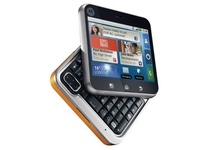
Motorola's Android renaissance might be ramping up in the likes of Asia and the US, but here in the UK we're not getting much love.
So far we've had the Motorola Dext and the Motorola Milestone - the latter not even being picked up by a network in Britain.
Motorola's latest release, the Flipout, is thankfully both being released in the UK this summer, and on a network as well (Orange, FYI).

The first thing to notice about the Motorola Flipout is the size of it - it's teeny. It fits in both the hand and the pocket very well, although for the heavy user it might be a little too compact.

The cool thing about it is the flip action is that it pivots around a corner of the phone - it's very addictive and we can only hope that Motorola has fortified the hinge as otherwise it's going to have a truckload of returned Flipouts.

The phone, being square, sits in the hand nicely, in both closed and open modes. The five line keyboard is slightly raised to allow for easier typing, and due to the shape allows for a separate row of numbers, which we like to see.

Typing is a little cramped on the keyboard; it's certainly not got the fluency of the LG Intouch Max or anything, but on the other hand the compromise on size is acceptable - plus there's a little d-pad to allow you to move the cursor through text more simply.


The battery is a little small, and we could found out how many mAh it's packing - from the look of it we'd imagine it's going to be around 1100mAh, so it will be interesting to see how that stands up to the power-hungry Android system.

You can also chuck a microSD card in there without needing to remove the battery, which is always handy, although the covers are nigh-on impossible to remove without feeling like you're ripping the screen off too.

We're told that there might be the option to customise your own covers for the Motorola Flipout, casting us back to the mid-'90s with Nokia's covers... we like this notion.

As mentioned, this is running Android, and 2.1 at that, meaning it's offering the near-latest Google features, although we're not sure if and when it's getting a 2.2 Froyo update or anything.
The overlay is 'enhanced' MotoBlur, building on the UI placed on the Motorola Dext - which basically integrated social network contacts into your phone book and provides a stream of status updates and Tweets on the home screen as 'Happenings'.

The enhanced part is actually pretty good, with the Happenings improved to allow you to only see streams of information from specific networks or even just certain people, which is much better than the information overload from the original version.

The music player is now 'connected' as well, which basically means when you're playing tracks the Motorola Flipout can work out what they are and display the lyrics as well - we think this shows quite clearly the demographic this phone is aimed at.

However, the enhanced MotoBlur does pack one really handy feature, in that you get seven home screens and whenever you drag and drop widgets onto them you can also re-size them to get more information on the screen for the elements you want to see.

The Motorola Flipout only has a 2.8-inch QVGA screen, which means both space and resolution are at a premium - we're looking forward to seeing enhanced MotoBlur on larger and more powerful devices in the future.

However at least it packs a capacitive screen, and this will whip along at a fairly decent rate under the finger - just don't expect to be blown away with what's displayed on the phone.

The internet is also a pretty low resolution - we were unable to get a 3G signal to test the connection and rendering speeds, but we'd imagine it would be pretty speedy compared to other operating systems by just having the standard WebKit-based browser on there.

Messaging, as we mentioned earlier, is a pretty nice affair - not only is there a full keyboard but there are also a number of ways to communicate with your buddies.

While there doesn't appear to be any option to get corporate email on the device (we may be wrong as this was just a test unit) you can easily send messages through Twitter, Facebook, MySpace and even, mystifyingly, Bebo.
We like options, and the Motorola BackFlip certainly has them.

The camera on the phone isn't much to write home about though - a 3.1MP effort with no flash and not the best photos in the world doesn't really set our world on fire - the iPhone 3G even has a better camera than this, and that's only 2MP.

Overall, we're mildly impressed with the Motorola Backflip - it's the sort of thing that is cool enough until you find out that it's going to cost £30 a month or something.
Essentially, this will either be around £20 a month and a free phone, thus making it a great option for the budget market, or more expensive and therefore a low-spec phone that can't mix it with the big boys.

| |
Read More ...
Sony: the PS3 3D retrofitting process is a challenge

Sony has candidly spoke about its experience in retro-fitting its back catalogue of PS3 games and admits that it is hard work.
Speaking to Official PlayStation magazine, senior development manager at Sony, Simon Benson, revealed that it was making some older PS3 games 3D but the process doesn't fit all titles.
Whole new experience
"I'm sure we will [retrofit more games with 3D], as adding 3D to a game can make it a whole new experience," Benson explained.
"Retrofitting 3D is actually harder than building 3D into a game from the outset. One of the big issues is that all of the game assets were designed to work with only one HD output. Being able to render them twice to make a 3D output can be a challenge."
He did note, though, that while many old-school titles will be re-done in 3D there wasn't really "a one-size fits all" solution.
The first batch of 3D ready games will arrive 10 June, with titles including WipEout HD and Super Stardust HD.
Sony revealed recently that the first 3D firmware update for the PS3 is for games only - a movie one will be coming at a later date.

| |
Read More ...
Updated: Vodafone confirms UK safe from Samsung Wave virus

The Samsung Wave, which has just gone on sale, has been confirmed as shipping with a Trojan virus.
The virus lives on the 1GB microSD card, and will automatically run when the phone is connected to a PC.
UPDATE: Samsung has contacted TechRadar, and while it had declined to say why there's a virus on the phone, it did give us this statement:
"In relation to your story on the Samsung Wave and the reported virus that has been found on some microSD cards sold with the product in Germany, we wanted to let you know that this is an isolated issue that took place solely in the German market.
"As soon as the problem was identified the issue was immediately resolved. All products currently available on the market have been tested and are perfectly safe to use. To be absolutely clear – this problem does not and did not affect the UK."
UK not to worry
Future shipments should be clean and virus-free though, according to the Korean firm, although it's never good to unleash your first phone running a new operating system with a virus.
But don't worry if you're in the UK and are now worried you're carrying a ticking PC bomb in your shiny new Wave, fear not, as Vodafone has told TechRadar it is certain its phones will not carry the microSD card virus because:
"Our phones do not come with a bundled microSD card."
Worry over, then.

| |
Read More ...
Nokia unveils mobile charger for cyclists

Cyclists will soon be able to charge up their mobiles on the go with a new bicycle mobile phone charger from Nokia.
Nokia introduced a bicycle charger this week targeting customers in developing countries with limited access to electricity.
Developing markets
The mobile phone giant also hopes that the bike charger will catch on with cyclists in the UK and in Western Europe.
"We are targeting the initial rollout in the developing markets, but we do, of course, see the potential outside of these countries," Nokia spokesman Leo McKay told Reuters.
"In cities like Amsterdam for instance, where bicycles are probably the most common means of transportation, the supply of free, environmentally friendly power is pretty much limitless."
Power from your legs
The Nokia Bicycle Charger Kit consists of a Nokia Bicycle Charger DC-14, Nokia Phone Holder for Bicycle CR-124, and a Bottle Dynamo.
"Users will get free and efficient charging from cycling as the dynamo starts charging when a bicycle speed of 6 km/h is reached and stops at 50 km/h, matching the efficiency of a normal charger when the bike is traveling at 12kmh," Nokia's press release informs us.
John Nichols, Head of Marketing, Nokia UK said: "The innovative Nokia Bicycle Charger Kit gives people even more freedom to use their Nokia handset without worrying about battery life.
"A growing number of people in the UK cycle for leisure, exercise or as a daily means of transport so this simple innovation is about convenience and getting the most out of your Nokia while you're on your bike. It's also the perfect piece of kit for those that care about the environment."
The charger will go on sale later in 2010 for around 15 euros.

| |
Read More ...
Skype and Kazaa founders launch new music service

The founders of Kazaa and Skype have officially launched a new online music service that stores the music you listen to in the cloud and feeds it to your various computers and mobile devices.
The new service, called Rdio (pronounced r-dee-o) will be competing with already established music streaming offerings from the likes of Spotify, Pandora, Rhapsody, Apple iTunes and Microsoft's Zune.
Turn the Rdio on
San Francisco-based Rdio is particularly interesting due to its backers being none other than Skype founders Janus Friis and Niklas Zennstrom.
The service will offer US users subscription packages of $4.99 a month for an unlimited number of songs from a database of over 5 million songs from the major labels.
There is also a Spotify-style $9.99 a month subscription offering which will also let you listen to your music on mobile phones, with an iPhone and BlackBerry app already available and an Android app in development.
Implications for British music fans
"Rdio is for US users only at the moment so there's no immediate implication for UK music fans," notes Music Ally's Steve Mayall.
"However the fact that it's the founders of Skype and Kazaa mean that it's going to be interesting as they're known for building mass market disruptive technology. They're banking on the fact that more and more of us will want to get access to music wherever we are, rather than download to a computer and transfer it onto various devices. And they're banking on the fact that we'll want to pay for that service.
"In the UK we're already getting used to these kinds of 'cloud' services. Spotify is all about access to unlimited music rather than downloading single track, but the interesting thing about Rdio is that they also expect people to pay to be able to access their own music, wherever in the world they are. "In this way they're hoping to challenge iTunes - and Apple is going to make an announcement next week that might show they also want to move into the cloud music space. "
Social music service
Drew Larner, Chief Executive of Rdio is keen to also highlight the social aspects of the service, noting how you can also choose to listen to your mates' music in addition to your own.
"Many digital music services have tried to address specific challenges, but no one has managed to elegantly integrate discovery and a high-quality music streaming experience under one roof," noted Janus Friis – a slightly disingenuous quote if you take into consideration that Spotify has already managed to do this pretty well, although only in Europe to date.
"We think people are ready for the next evolution in music," adds Friis. "Rdio gives you unlimited access to all the music, anytime, for the equivalent price of one album download per month."
Rdio is still running a limited invitation-only paid beta/preview testing program. For more head over to Rdio.com

| |
Read More ...
90% of web traffic to be video 'by 2014'

Video content is set to take over the internet by 2014, with net analysis firm Cisco VNI Forecast predicting big changes for the web by 2014.
From there research, there's a few mind-blowing numbers, including that 64 exabytes per month will be processed on the web in 2014 – four times the amount which is piped through in 2010.
Cisco VNI Forecast also believe that the various forms of video the internet now carries – TV, VoD, Internet Video, and P2P – will account for 91 per cent of consumer traffic.
Beating peers
A new trend will also see streaming video overtake the popularity of P2P networks. Although this is fairly obvious that as web speeds increase, so will the amount of streaming done but Cisco VNI Forecast believes that by the end of this year "peer-to-peer traffic will not be the largest internet traffic type".
Speaking about the findings, Pankaj Patel, senior vice president and general manager, Service Provider Group, Cisco, said: "The Cisco VNI Forecast offers a global snapshot of video's significance in our daily lives and signals the need for further network preparations to support the quadrupling of the Internet and the more than 1 billion online video users by 2014."
Just this week, Sky announced that it is adding streaming and downloads to its Anytime Plus service – bringing web video streaming to the mainstream in the UK.

| |
Read More ...
Gary Marshall: Will 3D porn be the making of 3D TV?

Good news for fans of 3D TV and Apple iPads: the porn industry is doing its very best to protect your favourite bits of kit. Despite Steve Jobs' best efforts to keep the iPad porn-free the adult industry is already adapting its content to make it iPad-friendly.
Meanwhile in Japan, porn star Mika Kayama is going to do her thing in glorious 3D. That means both the iPad and 3D TV will be massive successes for a very long time.
Everybody knows that given the choice between tech that's pristine and pure and tech that likes to get down and dirty, down and dirty always wins. Skin flicks help tech triumph, and formats without them flop. But is that actually true?
Not any more.
Let's travel back in time to a happier place, where the world was very different from today. Yep, we're talking about 2007. Amid rumours that Blu-ray firms weren't keen on making mucky movies in their pristine plants, the porn industry threw its weight behind HD DVD.
One year later, HD DVD was dead.
It turns out that what really mattered wasn't the adult industry, but the traditional film industry and the PlayStation 3. And that's because increasingly, porn is something that's viewed in a web browser, not bought on a disc.
Because of that, Steve Jobs' anti-porn stance is utterly meaningless. As long as Apple kit ships with a web browser, people will be able to view pornography on it. iPad porn doesn't mean apps; it means nothing more than "we're re-encoding our video clips."
It wasn't just the delivery mechanism, though - it was the quality. Pornography has the same "good enough" problem that music has: beyond a certain point, any improvements are incremental. That's why Super Audio CD bombed: most people were perfectly happy with low-bitrate MP3s on rubbish headphones or cheap stereos.
With pornography, once the quality's good enough that you can differentiate between People Totally Doing It and a documentary about pigs, a few extra pixels don't make a lot of difference.
Then again, 3D doesn't just offer pixels: it offers a whole new dimension. So let's pretend that the market for shiny video discs isn't dying. If the adult industry embraced 3D, would that shift 3D TVs? Would there be enough business to justify the extra cost of producing 3D porn? We doubt it.
Whether it's a 3D PC or a 3D TV, adding an extra dimension isn't cheap: you're looking at a brand new TV or monitor and a 3D-capable player or video card. That's a big investment for what we suspect isn't going to be an awfully long viewing experience.

| |
Read More ...
Review: Samsung UE46C8000

Samsung got the UK's 3D ball rolling in solid fashion with its UE40C7000 a couple of months ago. But we're hoping that its more glamorous and larger sibling, the UE46C8000 will launch the brand into the same kind of stratosphere occupied by Panasonic's 3D debutante, the Panasonic TX-P50VT20.
Features
The UE46C8000's compatibility with all the key new 3D formats is obviously its dominant feature, but it also boasts a so-called 3D HyperReal Engine that's claimed to deliver significant performance benefits over other brands.
Some aspects of this engine are too complicated to fully explore here, but for starters, Samsung has added a scanning backlight to its existing 200Hz engine – delivering an effect that some rival brands would most likely call 400Hz. This should enable it to reproduce motion with greater clarity.
Also key is a dual black insertion system, where frames are inserted between the alternating left and right 3D frames to reduce the ghosting phenomenon that's commonly known as crosstalk.
Samsung has developed a special high-speed pixel-driving circuit for the 46C8000, too, along with an ultra-fast 1.05Gbps high speed interface, to reduce LCD's usual, response time issues.
The 46C8000 also integrates a 2D to 3D conversion system, so that users can watch conventional discs and broadcasts in three dimensions until there are more true 3D sources available to buy.

The design is a feature in itself meanwhile, with a gorgeous, shiny silver metal bezel to the fore and an exceptionally slender rear end, courtesy of edge LED backlighting. Samsung has introduced a local dimming element to the latter, whereby segments of the edge lighting can have their brightness individually adjusted if the TV detects obvious areas of discrepancy, to boost contrast.
Extensive multimedia features include online access and DLNA PC file streaming; Freeview HD timeshifting to USB drives and optional Wi-Fi via a USB dongle.
Ease of use
Inevitably, the set is complex to use, due to its sheer number of features.
Among such important features as various LED Motion control circuitry and the local dimming option, Samsung has added one or two unnecessary and confusing submenus without adequately explaining them.

The menus are clear and attractive and the glinting remote is as easy to use as it is gorgeous.
Picture
The 3D pictures really are an advance on those of the C7000. This is particularly true where motion is concerned, with the moving image components suffering markedly less from resolution blur and crosstalk.
Another contributory factor is that the 46C8000 doesn't suffer as badly as the C7000 series with backlight inconsistencies. The pictures are fearsomely bright and vibrant, too, exploding off the screen with 2D footage, but also, crucially, retaining good brightness when watched through Samsung's 3D glasses.
This provides a truly substantive point of difference between Samsung's 3D approach and Panasonic's, with the former brand delivering extra shadow detail and more dynamic colours, while Panasonic delivers slightly less crosstalk and deeper black colours.

The 46C8000's 2D to 3D converter is more effective than expected, creating a sense of real depth without generating as many glitchy effects as anticipated. However, it's still a diluted 3D effect, and as such we question the wisdom of the feature's inclusion.
The TV is also highly accomplished with non-3D material, exhibiting outstanding colours, loads of detail with HD, good upscaling with standard-def and good noise and motion handling. However, the motion and noise reduction processing should be used judiciously to avoid side effects.
The general black level response isn't as profound as we'd ideally like, and the local dimming engine creates obvious 'blocks' of light, so we chose to leave it deactivated. But otherwise, the 46C8000's pictures really are terrific.
Audio
While the 46C8000 represents a vast improvement over Samsung's previous flat TV generation when it comes to sonic ability, it's still short of bass and fails to deliver an expansive soundstage during action scenes.

However, it sounds fine with ordinary TV and, given its price, would quite likely be accompanied by a separate sound system when watching more demanding fare.
While undeniably expensive against standard 46in TVs, it does feature extensive multimedia support, a stunning design and a large amount of innovative 3D technology.
Related Links
| |
Read More ...
Zuckerberg sweats over Facebook privacy

Mark Zuckerberg, CEO of Facebook, took to the stage at the All Things Digital D8 conference this week to have his say on the site's privacy debate.
A rather sweaty Zuckerberg – it must be hot under those convention lights – tried to explain Facebook's reasoning about privacy, explaining: "Privacy is very important to us. I think there are some misperceptions. People use Facebook to share and to stay connected.
"You don't start off on Facebook being connected to your friends, you've got to be able to find them. So having some information available broadly is good for that.
"Now, there have been misperceptions that we're trying to make all information open, but that's false. We encourage people to keep their most private information private. But some of the most basic information, we suggest that people leave public."
Social serendipity
When asked why people have to actually make steps to protect their privacy on the site, he explained rather cryptically that it's all about "serendipitous connections".
As for the backlash the site is getting, Zuckerberg noted: "I started building this when I was around 19 years old, and along the way, a lot of stuff changed. We went from building a service in a dorm room to running a service that 500 million people use."
During the interview Zuckerberg apparently looked so sweaty that his interviewee asked him to take his hoody off, saying: "You all right? We're not even yelling at you… yet."
In its live blog, All Things Digital said, jokingly, that this could be Zuckerberg's "Nixon moment".
Compared to Steve Jobs' interview at the conference, Zuckerberg was a lot less polished, although he did manage to throw a joke in, saying: "One of the things I try to do as CEO of this company is not make mistakes that other companies make. I make different ones."
Never a truer word said…

| |
Read More ...
Samsung triples size of Apps store
Samsung has tripled the size of its apps store in the UK and other European, Asian and Latin American markets, to support the launch of the Samsung Wave.
The Wave is the first phone to offer Samsung's Bada operating system, and the company is keen that the increasingly important application access does not become a hurdle for its smartphones.
To that end, the company has expanded its Samsung Apps store – with a statement stating that it has 'more than tripled in size' for Wave.
Adding value
"Launching the application store has enabled Samsung to increase smartphone sales, while at the same time add value for our existing customer base," said Samsung's Kanghyun Kwon.
"Samsung Apps allows users to discover new apps, which are consistently making our smartphones more useful, productive and entertaining.
"In the future, we will continue to offer apps perfectly optimized for our smartphones, and introduce new devices to fit all lifestyles."
The doyenne of app stores is, of course, the Apple App Store which has set the standard for its competitors, and even with the increase Samsung's App store lags well behind it in terms of offerings.

| |
Read More ...
Exclusive: Will ebook sales overtake print within five years?

Sony has claimed that ebook sales will overtake print sales within five years, although publishing industry reps are already questioning the ebook manufacturer's bullish predictions.
Sony predicts that ebook sales will follow the same pattern that has been seen in the music and photographic industries, although traditional print publishers are still unsure that this will happen.
E-book sales predictions
Steve Haber, president of Sony's digital reading business division, told The Telegraph: "Within five years there will be more digital content sold than physical content. Three years ago, I said within ten years but I realised that was wrong - it's within five."
"Of course you have to take this news with a pinch of salt," Catherine Neilan, Senior Reporter on the Bookseller magazine informed TechRadar, "coming as it does from an e-book manufacturer."
Neilan adds: "I'd be surprised if it were true. The most optimistic forecast we've had from a range of sources have not suggested that this is the case.
"So it's unlikely, but not impossible, as estimates keep changing and the tipping point keeps being brought closer."
"Right now ebook sales are less than 1 per cent in the UK. Yes, ebook sales are growing very rapidly, but they are growing from a very small base."
Sony sponsors Dylan Thomas Prize
Sony is sponsoring a new category in this year's Dylan Thomas Prize - the Sony Reader Award for Unpublished Writers, which will be awarded this December to an unpublished novelist under 30 years old.
Sony's Steve Haber says: "I have multiple meetings with publishers and tell them paradigm shifts happen. You can say fortunately or unfortunately you haven't had a paradigm shift in, what, hundreds of years."
"We in the consumer electronics area have a paradigm shift every year or two."

| |
Read More ...
Exclusive: Will ebook sales overtake print within five years?
Sony has claimed that ebook sales will overtake print sales within five years, although publishing industry reps are already questioning the ebook manufacturer's bullish predictions.
Sony predicts that ebook sales will follow the same pattern that has been seen in the music and photographic industries, although traditional print publishers are still unsure that this will happen.
E-book sales predictions
Steve Haber, president of Sony's digital reading business division, told The Telegraph: "Within five years there will be more digital content sold than physical content. Three years ago, I said within ten years but I realised that was wrong - it's within five."
"Of course you have to take this news with a pinch of salt," Catherine Neilan, Senior Reporter on the Bookseller magazine informed TechRadar, "coming as it does from an e-book manufacturer."
Neilan adds: "I'd be surprised if it were true. The most optimistic forecast we've had from a range of sources have not suggested that this is the case.
"So it's unlikely, but not impossible, as estimates keep changing and the tipping point keeps being brought closer."
"Right now ebook sales are less than 1 per cent in the UK. Yes, ebook sales are growing very rapidly, but they are growing from a very small base."
Sony sponsors Dylan Thomas Prize
Sony is sponsoring a new category in this year's Dylan Thomas Prize - the Sony Reader Award for Unpublished Writers, which will be awarded this December to an unpublished novelist under 30 years old.
Sony's Steve Haber says: "I have multiple meetings with publishers and tell them paradigm shifts happen. You can say fortunately or unfortunately you haven't had a paradigm shift in, what, hundreds of years."
"We in the consumer electronics area have a paradigm shift every year or two."

| |
Read More ...
Review: Triax TR 105

Though reasonably priced, the Triax TR 105 Freeview SD receiver isn't the smallest or smartest looking zapper around.
A minimalist fascia sports a blue LED indicator together with power and arrow buttons for channel changing. The remote has less of a budget feel about it and it's well-placed and responsive buttons quickly become intuitive to use.
The rear panel has a modulated UHF TV output but no loopthrough should you wish to feed other kit with a TV signal. There is, however, a single RGB capable Scart (through which the receiver will output in 576i) and analogue phonos for audio but no digital option.
The branching menu interface is clearly presented and easy to navigate and comes in a choice of four colours. The tuner appears sensitive, with the adapter quickly locating Freeview channels in our test area.
Manual scanning options go above the norm down to the ability to edit audio, video and PCR PIDs, though it's unlikely you'll need to. You can sort channels with eight categorised favourites lists (e.g. news and family), and rename, lock, delete or opt to have them automatically skipped when zapping. Whole multiplexes can also be deleted, if required.
The EPG supports full DVB data displaying five channels at a time in grid format with the current channel running in the top left hand corner of the screen. You can skip back and forth 24 hours, call up full-screen programme synopses and schedule up to eight timer events.
User-friendly
The programme information banner is limited to showing now and next information for the current channel but doesn't let you browse what's on other channels too without switching to them. Pressing info calls up a page of technical data including strength and quality rather than the expected programme synopsis.
We've been rather spoiled by the number of upscaling Freeview boxes appearing recently but the RGB Scart output and decent tuner ensure that Freeview pictures still look reasonably colourful and sharp.

Audio performance is reasonably bold too via Scart or phonos, but some may decry the lack of a digital connector.
Though lacking in a few areas, the Triax TR 105 remains a competent, user-friendly adapter worth perhaps considering as a second room digital upgrade.
Related Links
| |
Read More ...
In Depth: 10 things to expect from iPhone 4G / iPhone HD

All eyes will be on Moscone West on 7 June as the San Francisco venue hosts WWDC.
With Apple CEO Steve Jobs delivering the keynote, it's almost guaranteed the new iPhone will be officially revealed.
And since Apple's been suffering from more leaks than a wooden boat with a payload of ravenous woodworm, we have a pretty good idea of what to expect from the revamped device.
Here's what you can expect to see in the new iPhone…
1. A new case design
Although people were suspicious of the 'leaked' next-gen iPhone images that circulated in April, subsequent leaks have confirmed the device will have a quite different design to the iPhone 3GS. The back is flat, the sides have an iPad-like metal surround, and the volume buttons are separated rather than being combined as a rocker switch.
2. Improved camera
An update to the iPhone's camera is almost a given. As far back as December, reports were circulating that the iPhone's camera resolution would be upped to 5-megapixels. More recently, devs digging into the iPhone SDK have unearthed references to HD video recording, suggesting the video-capture capabilities of the device will rival those of the Flip HD.
3. Front-facing camera
The iPhone SDK also has icons and commands relating to video chatting, perhaps confirming the long-standing rumour that iChat will make its way to the iPhone. Recent reports also claim Sam Mendes has helmed a new iPhone advert that features a mother and daughter using iPhones for a video chat.
4. An improved screen
It's looking increasingly likely that the new iPhone screen will boast a 960-by-640-pixel resolution, blowing away existing models and providing a 'print quality' 320ppi density. This will not only leapfrog the Nexus One (252ppi) but make Apple's new iPad (132ppi) look a little rough by comparison for consuming text.

CLOSE-UP: The new iPhone screen under the microscope, confirming that it is high-res
5. New iPhone price
A Screen Digest analyst recently claimed the iPhone 4G will drop in price, due to Apple aiming to expand its smartphone marketshare. There's some precedent here, given the aggressive pricing of the iPad, although with Sterling continuing to weaken against the US dollar, British customers are unlikely to benefit.
6. An Apple processor
Tear-downs of leaked iPhones have revealed an Apple-branded processor inside. Therefore, it's possible the new iPhone will have a processor similar to the one that powers the iPad. If so, expect apps on the new device to fly, due to a huge performance boost.
7. A micro-SIM slot
The iPad Wi-Fi + 3G uses a micro-SIM rather than a regular sized unit, and since Apple tends to share technology across devices where possible, the new iPhone should follow suit - a claim given extra weight by the fact the device Gizmodo 'acquired' had a micro-SIM slot.
8. A bigger battery
The new iPhone's front panel is thinner than the iPhone 3GS's, meaning there's more room for a battery - and a bigger battery means more time between charges. According to MacRumors, the next-generation iPhone's battery should see a 16% increase in capacity.
9. iPhone OS 4.0
When Steve Jobs unveiled iPhone OS 4.0 back in April, he said it would ship this summer. Unless the entire event was an elaborate practical joke, it's safe to say the new iPhone will ship with iPhone OS 4, bringing it out-of-the-box multitasking support for third-party apps, a unified Mail inbox, springboard folders, and more.

IPHONE OS 4.0: Jobs demos iPhone OS 4's multitasking. The new OS will likely ship with the updated iPhone
10. A new name
Having eschewed the mobile industry's penchant for giving phones bizarre, impossible-to-remember names, Apple itself came under a little criticism for the awkward 'iPhone 3GS' moniker.
Pundits are divided on whether we'll be calling the next iPhone the iPhone 4G or iPhone HD - although if Apple settles on the latter this will make for a confusing App Store, what with the rash of 'HD' apps for iPad.

| |
Read More ...
Review: One For All Smart Control

Universal remote controls come promising minimal handset juggling when turning on more than one piece of AV equipment at a time. But setting them up isn't always straightforward for novice users or sometimes even pros.
One For All thinks it has an answer in the form of the Smart Control, a budget priced remote that puts less emphasis on trawling through lists of product codes to gain control of your kit.
This is achieved via the 'Simple Set' system which involves pressing the 'Magic' button, pressing another confirming your device type – TV, set-top box, DVD, amplifier, MP3 player or Game – then another corresponding to the brand name as listed in the manual. Most major brands are covered.
Punch and pray
If this doesn't work then you can punch in codes from the supplied list or the remote will try to learn what it is in a more conventional manner.
This involves placing the remote for the device you want to control in front of the Smart Control and pressing Magic to learn the functions of each button in turn.
For multiple devices, the Smart Control system allows simultaneous control of up to three using one of three macro buttons labelled 'watch TV', 'watch movie' and 'listen to music'. This is done by holding down Magic for three seconds, selecting one of the aforementioned keys and pressing a number corresponding to the desired combination of devices you want to turn on (e.g. TV set-top box and amplifier).
If you fail to get sound or vision from your target device, a 'help' feature involves jabbing the audio or video button until you get the right result.
The Smart Control's looks belie its budget pricing. It's reminiscent of the sort of zapper bundled with pricier TVs and has a rubberised backing which sits well in the hand.
Buttons including a central circular backlit navigation pad are responsive (it's a shame not all buttons can be backlit to use in low light) and reasonably well-placed, though we would have liked some differentiation in size for more intuitive navigation.
We had no problem getting the remote to work with our Sky+, Virgin Media V HD box, Xbox 360 and three-year-old Panasonic plasma TV.
While lacking such extras as internet updating (understandable at this price) the Smart Control succeeds admirably in reducing the 'fiddliness' often associated with a universal remote.
Related Links
| |
Read More ...
Review: Terratec S7

Encased in a smart black box, the Terratec S7 DVB-S/S2 tuner plugs into a spare USB 2.0 port on your computer, including laptops, although a mains outlet is needed for the accompanying power supply.
The only other connectors are a dish/LNB input and, unusually, a CI slot for pay-TV services (excluding Sky).
Naturally, the S7 is compatible with free-to-air satellite broadcasts, including Freesat ones, although you don't get Freesat's EPG. Thanks to its DVB-S2 compatibility, you can catch free hi-def services including ITV HD and BBC HD. A powerful PC is essential for glitch-free viewing, though.
Another boon is that TV and radio channels alike can be recorded to your PC's hard disc; timeshifting is also possible. Terratec's accompanying 'Home Cinema' software looks after this, but the BDA (Broadcast Driver Architecture) hardware-drivers can work with third-party software like DVBViewer and DVBDream.
Room to manoeuvre
Built into the S7 is an infrared sensor that takes commands from the supplied 37-button handset. A 'remote-control editor' will configure the handset for other applications.
Software comprises the Windows only 'Home Cinema' and a 'lite' version of Elgato's EyeTV for Mac users.
Home Cinema turns your PC into a basic single-tuner satellite PVR. In addition to a resizeable (up to full-screen) video window is the control panel, which lists EPG derived programme data and other information.
Buttons sequence through channels, take 'snapshots', change aspect ratio, access the timer and engage teletext, radio mode or the EPG. The latter supports timer programming and now-and-next or, if available, seven-day schedules.
Home Cinema dovetails with the tvtv online EPG, and indeed a free trial subscription is included.
Recording can also be manually invoked; there may only be one tuner but you can simultaneously watch and record different channels if they're on the same transponder. Clicking OK brings up a complete channel list – an alternative is to choose one of the four user definable favourites lists.
Other features include picture-in-picture, subtitles and support for Dolby Digital audio.
Home Cinema is easy enough to set up – select the satellite you're after, specify its DiSEqC position (a maximum of four – only version 1.0 of the standard is catered for) and start scanning. FTA/scrambled-only or all-channel scans are supported, but options like blind search are unavailable.

Other setup menus look after functions like channel management, AV matters and recording mode ('transport' – i.e. TS – or the more compatible 'program' streams – e.g. .mpg).
Performance-wise, the S7/Home Cinema combo couldn't really be faulted. All available channels were found, although searching is ponderously slow. Picture and sound quality are limited only by transmission quality and the capabilities of your computer.
Over a couple of weeks the system didn't crash once. It's also efficient in terms of system resources – when displaying TV it accounted for 10 per cent of an Intel 2.8GHz P4 with 2GB of RAM.
Related Links
| |
Read More ...
Google letting you set your own search background

Google is allowing you to add your own photo as a background to its search engine, in a move that many will compare with the more pictorial Bing search engine from Microsoft.
One of Bing's most popular features has been an ever changing background picture set by Microsoft and dotted with facts, compared to Google's traditionally austere white, simple layout.
However, for those with Google accounts, the background can now be set as whatever picture you want.
New feature
"Today, we're introducing a new feature that brings a whole new level of personalisation to Google by letting you add a favorite photo or image to the background of the Google homepage," blogged Google's VP of Search Products & User Experience Marissa Mayer.
"You can choose a photo from your computer, your own Picasa Web Album or a public gallery hosted by Picasa which includes a selection of beautiful photos."
"Whether you choose a photo of a loved one, a picture of your favorite vacation destination or even a design you created yourself, Google.com is now yours to customise.
"For those of you who want to enjoy the clean, simple look of Google as well as your personalised view, we've made it easy to switch between your customised search page and classic Google."
US only for a few days
The feature is, thus far, only being rolled out in the US, but should arrive in the UK in the 'coming days' according to Mayer.
"For those of you outside of the US, you can expect to see this new feature in the coming days as we roll it out internationally to offer similar, consistent experiences globally."
We're setting ours to a screenshot of the TechRadar home page, just to confuse ourselves.

| |
Read More ...
In Depth: 9 things to know about new Windows Live Essentials

Microsoft has announced an overhaul to its Windows Live Essentials service, offering significant updates to a number of its features – including: Windows Live Photo Gallery, Movie Maker, Mail, Messenger and the addition of Windows Live Sync.
Microsoft is embracing the cloud with this update, offering more synchronisation and sharing than ever before.
The computer company is also helping users climb over its walled garden by adding official upload links to a number of sites, including Facebook and YouTube.
To help you better understand the new features within the Photo Gallery, and Mail parts of Windows Live Essentials, we have compiled a list of our essential parts of, well, Essentials.
1. Photo Fuse
Ever had two so-so images that you wished you could combine to make an awesome one? Well, now you can – courtesy of Essentials' Photo Fuse feature.
Having seen this in action, the outcome is pretty impressive, banishing closed eyes and wonky smiles forever.

CUT/PASTE: Dodgy photos? There's an Windows app for that
2. Face recognition
This can't really be classed as a new feature, given it's on every camera in the market at the moment but Essentials uses the technology to good effect, allowing you to group photos by people's mugshots.
While it's not 100 per cent perfect – people wearing caps puts it off of its stride – it does work well and you can always manually add names to it, so the face recognition software will remember for next time.
3. YouTube and Facebook integration
As we explained in our look at the new Messenger, Microsoft is softening its approach to sharing, adding official links to other sites that aren't owned by Ballmer and co. Shock and indeed horror, as this means that users now have one-click uploads for images and the like to Flickr, YouTube or Facebook. You can also, obviously, add them to SkyDrive.

UPLOAD IT: Share and share alike with Essentials
4. Using Messenger in Mail
Messenger has been set free from Microsoft and can now be used within Mail. This means that you don't have to have a load of, er, windows up at once – you can log into Messenger straight from your inbox and try and speak live to the person you are emailing.
5. Saving photos in high definition
This is an obvious addition but a welcomed one. You can now save your images so that they are primed for watching back on either a 720p or 1080p television.
That's not to say that your photography will stand up to that sort of detailed scrutiny.

HD IMAGERY: Now you can hi-def your images
6. Email account aggregation
Microsoft has finally got wind that we use more than one email system and is now allowing you to synch up all your accounts and view them straight from Mail.
Instead of bunching all the emails into one space, the accounts are given their own tabs so you can flick between them as and when you wish.
7. No image clogging up of inboxes
There's nothing worse than getting a 100MB image file from someone, only for it to clog your inbox and slow your email right down.
Microsoft knows this and has created a Photo Mail feature that allows you to add thumbnails of images to an email and then add a link to the full size images on your SkyDrive account – where you get up to 25GB free.

YOU GOT MAIL: Link rather than clog up your inbox
8. Calendar co-operation
In the new Essentials update, it seems that your calendar works with you and not against you, with new features including the sharing of calendars, offline access and an instant view, so you don't have to leave your inbox to see what appointments you have that day.
9. Introducing Windows Live Sync
Microsoft now allows remote access to your computers from wherever you are and even if they are offline.
This is another aspect of Microsoft embracing the cloud and means that if you forget to email yourself a document, then you can go into Sync, access your home computer and get what you need. It will even work with Apple Macs.
A beta version of Windows Live Essentials will be released in the coming months. A UK release date for the software is still to be confirmed.

| |
Read More ...
In Depth: 9 things to know about new Windows Live Essentials
Microsoft has announced an overhaul to its Windows Live Essentials service, offering significant updates to a number of its features – including: Windows Live Photo Gallery, Movie Maker, Mail, Messenger and the addition of Windows Live Sync.
Microsoft is embracing the cloud with this update, offering more synchronisation and sharing than ever before.
The computer company is also helping users climb over its walled garden by adding official upload links to a number of sites, including Facebook and YouTube.
To help you better understand the new features within the Photo Gallery, and Mail parts of Windows Live Essentials, we have compiled a list of our essential parts of, well, Essentials.
1. Photo Fuse
Ever had two so-so images that you wished you could combine to make an awesome one? Well, now you can – courtesy of Essentials' Photo Fuse feature.
Having seen this in action, the outcome is pretty impressive, banishing closed eyes and wonky smiles forever.
CUT/PASTE: Dodgy photos? There's an Windows app for that
2. Face recognition
This can't really be classed as a new feature, given it's on every camera in the market at the moment but Essentials uses the technology to good effect, allowing you to group photos by people's mugshots.
While it's not 100 per cent perfect – people wearing caps puts it off of its stride – it does work well and you can always manually add names to it, so the face recognition software will remember for next time.
3. YouTube and Facebook integration
As we explained in our look at the new Messenger, Microsoft is softening its approach to sharing, adding official links to other sites that aren't owned by Ballmer and co. Shock and indeed horror, as this means that users now have one-click uploads for images and the like to Flickr, YouTube or Facebook. You can also, obviously, add them to SkyDrive.
UPLOAD IT: Share and share alike with Essentials
4. Using Messenger in Mail
Messenger has been set free from Microsoft and can now be used within Mail. This means that you don't have to have a load of, er, windows up at once – you can log into Messenger straight from your inbox and try and speak live to the person you are emailing.
5. Saving photos in high definition
This is an obvious addition but a welcomed one. You can now save your images so that they are primed for watching back on either a 720p or 1080p television.
That's not to say that your photography will stand up to that sort of detailed scrutiny.
HD IMAGERY: Now you can hi-def your images
6. Email account aggregation
Microsoft has finally got wind that we use more than one email system and is now allowing you to synch up all your accounts and view them straight from Mail.
Instead of bunching all the emails into one space, the accounts are given their own tabs so you can flick between them as and when you wish.
7. No image clogging up of inboxes
There's nothing worse than getting a 100MB image file from someone, only for it to clog your inbox and slow your email right down.
Microsoft knows this and has created a Photo Mail feature that allows you to add thumbnails of images to an email and then add a link to the full size images on your SkyDrive account – where you get up to 25GB free.
YOU GOT MAIL: Link rather than clog up your inbox
8. Calendar co-operation
In the new Essentials update, it seems that your calendar works with you and not against you, with new features including the sharing of calendars, offline access and an instant view, so you don't have to leave your inbox to see what appointments you have that day.
9. Introducing Windows Live Sync
Microsoft now allows remote access to your computers from wherever you are and even if they are offline.
This is another aspect of Microsoft embracing the cloud and means that if you forget to email yourself a document, then you can go into Sync, access your home computer and get what you need. It will even work with Apple Macs.
A beta version of Windows Live Essentials will be released in the coming months. A UK release date for the software is still to be confirmed.

| |
Read More ...
Which is the best HTC phone?

So you've decided that HTC is the brand you want to spend the next 24 months of your life with - but that's not the end of the quest.
You have a plethora of devices, price points and operating systems to choose from and it can all get a little bewildering. But which is the best HTC phone for you?
Thankfully TechRadar is on hand to help you out - check out our run down of all the HTC phones around at the moment, complete with star rating:
HTC Wildfire
OS: Android 2.1
A nice phone that's well packaged - it just needs a decent price to go with it and HTC could have solved the problems posed by the HTC Tattoo: a budget Android phone that doesn't scrimp on hardware specs.
Read our full hands on: HTC Wildfire review
HTC Smart
OS:Brew
The Smart is cheap for a brand new smartphone, but considering you can pickup an HTC Hero for free on entry level contracts too, it's hard to recommend the Smart.
Verdict: 2.5/5
Read our full HTC Smart review
HTC HD Mini
OS: Windows Mobile 6.5
This is the best Windows Mobile handset currently available, and it makes us think that HTC will have something very special for us when Windows Phone 7 finally hits the street.
Verdict: 4/5
Read our full HTC HD Mini review

HTC Desire
OS:Android 2.1
As a piece of hardware it's without par in the mobile world. A stunning phone, and one that will show the world that Android isn't just for the hackers and phone geeks any more.
Verdict: 5/5
Read our full HTC Desire review
HTC Legend
OS: Android 2.1
If you're someone that doesn't really care massively about apps or gets irritated by a day-long battery life, we couldn't recommend this phone more. The HTC Legend is not quite the phone to persuade the masses Android is finally an adequate iPhone replacement - but it's awfully, awfully close.
Verdict: 4.5/5
Read our full HTC Legend review
HTC HD2
OS: Windows Mobile 6.5
We so desperately want to give the HD2 4.5 stars to rank it alongside the likes of the Legend and the iPhone 3GS, but it just falls short. But until then it will have to be content with being one of the best 'business devices' on the market by a country mile.
Verdict: 4/5
Read our full HTC HD2 review

HTC Tattoo
OS:Android 1.6
If you are interested in just what Android has to offer at a more than reasonable price bracket, then this is one Tattoo that you will not regret having - although the HTC wildfire does everything the Tattoo does and a whole lot more for a cheaper price.
Verdict: 4/5
Read our full HTC Tattoo review
HTC Touch2
OS:Windows Mobile 6.5
The HTC Touch2 is good, but it's not the ultimate smartphone. The iPhone and the HTC Desire still are light years ahead – the benefits of having an operating system designed from the ground for touchscreens are painfully missing from this device.
Verdict: 3/5
Read our full HTC Touch2 review
HTC Hero
OS: Android 1.5
The first Android device to break out and really challenge the iPhone - it's looking a bit creaky compared to the super slick Legend and Desire, but when it's upgraded to Android 2.1 it will still be a great budget option.
Verdict: 4/5
Read our full HTC Hero review
HTC Touch Pro2
OS: Windows Mobile 6.5
If you can handle its size and weight, the quality screen, QWERTY keyboard, connectivity, messaging, A-GPS and additional features make the HTC Touch Pro2 is a great business tool which is also plenty of fun to use
Verdict: 4/5
Read our full HTC Touch Pro2 review

HTC Touch Diamond2
OS: Windows Mobile 6.5
The Diamond2 used to be the do-it-all jewel in HTC's crown, and the most creditable alternative to the iPhone available anywhere - but the resistive screen and creaking OS mean it's slipped down the rankings somewhat, with the might of the HD2 and HD Mini much better options.
Verdict: 4/5
Read our full HTC Touch Diamond2 review
HTC Magic
OS: Android 1.5
The first all-touch Android device still can be picked up pretty cheaply. It's lightweight and can't handle too many apps at once, but still manages to delight in places even after all this time.
Verdict: 4/5
Read our full HTC Magic review
HTC Touch HD
OS:Windows Mobile 6.5
Impressive battery life and the latest version of Windows Mobile make this a decent effort in the smartphone world, but the looks are already ageing and it still costs a fair whack on some networks.
Verdict: 3/5
Read our full HTC Touch HD review

| |
Read More ...


No comments:
Post a Comment