

Gary Marshall: Location-aware websites scare us silly

We're not ones to miss a good time-wasting opportunity, so we've spent most of this morning using the new, improved Google Street View to look at the houses we used to live in and to sneer at our exes' choice of curtains. But Google's not the only firm on a geolocation tip. Everybody's at it.
You've been able to say where you're tweeting from for some time, but Twitter has added mapping to the main Twitter website. Where Twitter goes Facebook inevitably follows, and the social network will unveil its own location features at next month's F8 conference. Then there's the new breed of location-based sites and services such as Foursquare and Gowalla, and HTML5's built-in geolocation support.
It's all very clever and really, really scary.
The problem with location data is that it adds a whole new layer of information about you: there's a huge difference between reading a tweet then clicking on the user's profile, and reading a tweet, having a look at their house and finding where they are right now on a map.
It's all opt-in, of course, but anyone who's been watching the ongoing saga of Facebook redesigns knows how difficult it can be to work out what you're opting into and out of.
If you do opt-in to this stuff then the amount of data the firms can assemble is truly incredible: not just what you post, but where you were when you posted it.
If you're using a GPS-equipped smartphone that's accurate to within a few metres, and if the service you're using is storing all of that location data, it ends up with a very clear picture of your life: who you are, where you are and what you do when you're there. It's like being spied upon, but in reverse: you're the one spying on yourself.
If you're an exhibitionist, that's all very exciting. If you're not, it's all very alarming. Unless you're exceptionally good at saying no to people, your original plan to let only true friends connect with you on your chosen network fell by the wayside a long time ago.
Now, your friends list has your parents, your bosses, people you met once on a night out and a couple of sales reps on it. Do you really want all of them - or any of them - to know where you are at any given moment? When you tweet about how much you hate the BNP, do you want anyone searching for BNP critics to know what pub you're sitting in?
If the Government stored this amount of data we'd be hanging around Big Ben with barrels of explosives - yet we seem quite happy to hand it to remote, unaccountable, unelected corporations who don't necessarily have our best interests at heart.
When Google introduced Buzz it clearly didn't think about privacy, which was why it ended up reuniting abusive exes with the people trying to escape them and exposed journalists' potentially sensitive contacts - and of course CEO Eric Schmidt recently told CNBC that "If you have something that you don't want anyone to know, maybe you shouldn't be doing it in the first place."
Meanwhile Facebook appears to have changed its corporate mind about the importance of privacy too.
Its ill-fated ad system Beacon made it abundantly clear that profit was more important than privacy, while recently founder Mark Zuckerberg said that sharing is a "social norm" and that if he started Facebook today, the default would be to share everything with everyone.
As ReadWriteWeb put it: "350 million people signed up for Facebook under the belief their information could be shared just between trusted friends. Now the company says that's old news, that people are changing. I don't believe it."

 |  |
Read More ...
Francis Ford Coppola links up with SIM2 projectors

Francis Ford Coppola has signed on the dotted line with SIM2 to help the projector manufacturer come up with the perfect solution for projectors in the home.
Italian manufacturer SIM2, known for its premium range of home cinema and professional DLP projectors, is hoping that working with the director of The Godfather, and his tech team, will bring the kind of quality Hollywood producers need when viewing movies to the consumer market.
Although Coppola will feature in the company's marketing campaign, it seems the Hollwood honcho is a bit more engrained in SIM2, other than having his face plastered over promo material.

Since 2008 he's had his own SIM2 projector and has used the device to edit his latest movie Tetro on.
"I have owned many projectors in my life: SIM2 is now in both my studios and my home," the director explains.
"Mr Coppola, like SIM2, is a perfectionist always striving to be at the forefront of his craft. His productions are not just movies; they are real masterpieces," says Maurizio Cini, President of SIM2 Multimedia, who has obviously not seen Jack.
Coppola will be starring in SIM2's marketing campaign for 2010 so expect to see posters of the bearded one in your local AV shop soon.

| |
Read More ...
Pink Floyd protect online albums from the chop

Legendary prog-rockers Pink Floyd have won a landmark court ruling, which states that songs from the group's albums are not allowed to be sold separately online.
Unless Pink Floyd gives permission to EMI – its record company – to do so, only the bands albums will be made available for purchase on the web.
According to the judge who resided over the case, this is to "preserve the artistic integrity of the albums".
The albums-only decision means that EMI will have to pay £40,000 in court costs with further fines, according to the BBC, to be decided.
Tangled web
While albums like The Dark Side Of The Moon – which has sold in the region of 35 million copies – are something that needs to be listened to in its entirety, Pink Floyd did release a number of singles when they were together, including early tracks like 'Arnold Layne' and the classic 'Another Brick In The Wall'.
The court decision, however, doesn't mean that these singles will not be released online sans album – they just have to be vetted and approved by the band first.
Interestingly, in court, EMI argued the semantics of what the word 'record' actually meant in Pink Floyd's contract.
EMI said it described the physical thing rather than the group of songs, so the company could essentially take the songs and distribute them however it wanted online. The court, in the end, disagreed.
This will come as a relief to many more musicians whose contracts were created pre-digital that are worried about their back-catalogue being distributed ad hoc on the web. But it will also mean that now bands retain control of how their back catalogue is sold on the internet, downloaders may see big delays in some music finding its way online.

| |
Read More ...
Review: BT Vision+

BT Vision is the telecom giant's on-demand TV service and, for better or worse, we on Techradar have been plugged into it since May 2007. At the heart of the system is the V-Box, a network enabled PVR capable of serving up content from BT's online library or Freeview TV.
History tells us early adopters are cursed and our early experiences with the fledgling system did indeed leave us cursing. The V-Box was highly crash-prone and the content offered by BT underwhelming.
We weren't put off and nor was BT. Doggedly it updated and upgraded the original V-Box's firmware, ironing out its problems and - credit where credit is due - created a solid, dependable and reliable hard disk recorder. Software updates couldn't however cure the V-Box's most striking ill - it was pug ugly.

All that - and more - should be changed with the arrival of the new BT Vision+ box.
Features and performance
Straight out of the box, the Vision+ box feels like a slick and modern piece of home entertainment kit. Gone is the old machine's dower gun metal grey and in comes piano black.

When you move beyond the glossiness of the new machine, however, finding differences between it and the old machine becomes a challenge. Their specifications, for example, are near identical - twin Freeview tuners, 14-day EPG and a 160GB hard disk.
Sure the two machines' rears look radically dissimilar, but they both sport the same slew of connectors, albeit in different arrangements. That said, the Vision+ box has every connector you're likely to need.

BT claims the new black Vision+ box is more energy efficient than the old one. It's suggesting a drop of 12% and asserts the improvement helps the machine "meet the new more demanding EU energy regulations". We can only applaud that improvement.
The new remote is - as you'd expect - black, but beyond that looks remarkably similar to the original. BT claims the newer device has bigger characters on its buttons to help in reduced lighting.

There are also a few extra buttons on the machine itself, notably a handy instant record button and a standby button too.

Setting it up is simple and fast - wire it all up, switch it on and you'll be up and running in minutes. Quite why BT has emblazoned "start enjoying great TV in just 30 minutes" on the box is a mystery.
In use - once more - the difference between the old box and the new Vision+ machine are hard to spot. Indeed, try as we might, we couldn't spot any UI improvements, tweaks or changes. That in itself is no bad thing - BT has developed its interface well.


Verdict
The Vision+ box is a refinement of the original BT Vision PVR and in isolation, a fine PVR. Upgrading your original machine will cost £200 and, considering the slim improvements on offer, it's just not worth it.
Given BT is working on a Freeview HD-enabled box we say keep your powder dry. Remember too Project Canvas is developing nicely. As such, now just isn't the time to buy - no matter how good looking the machine.
We like
The machine's improved looks and lower power consumption coupled with a straight forward interface all add up to make this a sold PVR. In use it also feels subjectively quicker than its predecessor.
We dislike
Put the old and new BT machines next to each other and there's no absolute must-have upgrade. Support for Freeview HD, for example, would have been a brilliant addition. As it is, BT claims to be working on a box which will support the new broadcast system, but hasn't said when.
Related Links
| |
Read More ...
In Depth: 4 of the best online data storage services on test

With 500GB disks now shipping as standard on all but entry-level PCs and 2TB disks costing less than £130, storage space has never been more abundant or affordable.
So the recent proliferation of companies offering online data storage products and services might seem surprising – except when you factor in the features and benefits online storage offers that could never be met by local storage alone.
Among the list of unique benefits are fully automated backups, synchronising files between different PCs and sharing files with colleagues, friends or even the whole world. Here we investigate these benefits and take a look at four products that claim to offer all of these services and more.
File synchronisation
USB flash drives enable us to carry large amounts of data around in our pockets. But in order to benefit from them we must be organised enough to make sure that they always contain the files we're likely to need.
An online service also suffers from this problem to some extent, but it has several advantages over using a thumb drive. Going online lets you access a document from several computers or mobile phones while also allowing you to modify that document from any of those devices and then make that modified version accessible.

LIVEDRIVE: Online backup services allow you to access your files wherever you are
Read TechRadar's Livedrive reviewYou could create a document on your desktop at home, read and modify it on your laptop in a hotel room and then work on the updated version when you get back home, all without any manual moving of files.
A typical additional feature is that previous versions of files are saved, so you can roll back to an older copy if you've made a mistake or decided you don't like your changes.
File synchronisation is the tech behind all this functionality, and while it's very useful, you should be aware of its potential problems.
Say both you and a colleague start to edit the same file at the same time. When you close the file it's written to the online drive but if your colleague then does likewise, without special precautions, it would mean that your edit gets lost.

HUMYO: File locking is a must if you want to share the same file with different people
Read TechRadar's Humyo reviewIf you intend to use this service collaboratively, you'd be advised to check that it offers a suitable fix for such conflicts. The classic solution is to employ file locking so that as soon as one person starts to edit a file, subsequent access to that file won't be allowed until the first person has finished editing it.
File sharing
Although the main benefit of file synchronisation is the ability to work on files from several computers, another is the way it allows you to share those files between a small group of individuals who can also modify them.

SUGARSYNC: You can also set it up to allow read-only access to certain people you dont want to edit your files
Read TechRadar's SugarSync reviewRegular file sharing is also offered for distributing your files to a larger circle of contacts without providing them with the ability to modify the documents. Generally, these services allow you either to share an online file or folder with certain individuals or to make it public, which means that anyone can see it.
In essence, the end result is much the same: a URL is generated to permit access to your shared files. The only difference is that if you decide to share it only with certain individuals then an email is sent to them containing a link, whereas if you make it public then it's up to you to publicise that link for the world to see.
Automated backup
You don't need an online service to back up your data, but it does make the process easier and more secure. Local back-up software lets you perform backups automatically at preset times, but unless you've made sure your back-up media is connected and ready to go, that backup will fail.

DROPBOX: They also provide a good alternative to home backups that will be lost in the event of something drastic occuring
Read TechRadar's DropBox reviewTo prevent this, you could keep your back-up drive attached to your PC. This would protect against a failure of your main disk, but if your PC is stolen or destroyed in a fire, an external drive sitting next to it would likely suffer the same fate.
Ideally you need a method of backup that is both automatic and remote. Online backup provides just that. Online backup services often use client software installed locally that allows you to mark files or folders for backup. Then whenever a file is modified, the new version will be automatically uploaded to your secure storage space via the web.
The only thing that could prevent a file from not being backed up is the lack of web connection – but the transfer will take place as soon as web access is restored, rendering it a temporary problem.
All the services here provide the three basic services described above, and all offer encryption. Differences mostly come down to personal preference on matters such as which user interface you prefer, which facilities you prioritise and, of course, the price you're willing to pay.

| |
Read More ...
Skynet satellite to get extended robotic reach

The Ministry of Defence has announced that its Skynet satellite system is to be expanded to include a £400 million fourth spacecraft.
The expansion is touted as Britain's biggest space project and is set to launch in 2013.
It is designed to help monitor and control unmanned aircraft, like the miltary's new Reaper drones. That's right. Something called Skynet is being built to help control robot killing machines.
Albeit in Stevenage and Portsmouth rather than at the heart of the US industrial-military complex.
Meeting their needs
"The decision to go for a new satellite is an absolute vindication of the approach that made Skynet 5 a service contract," explained Paradigm's chairman Malcolm Peto, who is in charge of the satellite service, to the BBC.
"It gives the MoD an assurance that the extra bandwidth will be there to meet their needs, and it gives us the ability to sell more capacity to third parties."
However sinister those third parties might be.
The current Skynet system, which sorts out secure transmissions for the UK military, has so far cost £3.6bn.
Let's hope they don't employ a man named Dyson to oversee operations.

| |
Read More ...
Review: Samsung Galaxy Portal i5700
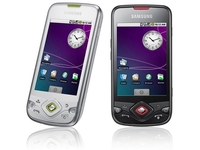
Samsung, the famed Korean jack-of-all-technologies, is having another go at mastering the Android phone scene, after making a bit of a mess of it with last year's original Galaxy.
The i7500 Galaxy was a brave first attempt, but Samsung threw it away, alienating early adopters by not bothering to update the phone past its basic Android 1.5 operating system.
Seriously, there are petitions all over the place. Some men are still very angry about it all.

And now, learning from past mistakes, comes the Samsung Galaxy Portal - which looks pretty much identical and features... Android 1.5. Oh well. Let's give it a chance.
First impressions of the Portal are good. Nobody's going to be won over by black plastic in this day of hyper-alloy unibody combat cases and NASA-derived coatings, but at least the Portal feels solid - and the grippy, rubberised-effect of the back cover should minimise dropping/pavement catastrophes.
In fact, the Portal manages to be thicker and generally chunkier than last year's Galaxy, measuring 13.2mm thick compared to last year's model's 11.9mm.

The OLED screen of the previous Samsung Galaxy i7500 has been dumped, in favour of reliable old LCD technology - coming in at a thoroughly middle-of-the-road 3.2-inch in size.
It's bright and big enough, and if you haven't yet used a modern smartphone you'll be staggered by the HVGA resolution.
The phone's button layout is a slightly tweaked version of the original Galaxy's control array, which sees acres of the finest black plastic bent into a curved, yet unintelligible collection of icons you might expect to see on the command console of an alien space vessel.

You don't get a trackball or optical pad - directional controls are taken care of by a clickable d-pad reminiscent of old video game controllers.
But this is actually fine - text editing is much easier with a reliable, clicky button.
Moving the cursor back three characters to correct a typo in an important, what-time-is-dinner-related text message is much easier when you can simply BASH-BASH-BASH a button three times, rather than fiddle about scrolling a little wheel into position - or even worse, trying to poke the screen at the relevant point.
The screen is also impressive to use - capacitive tech means it's solid and glassy, and it's every bit as occasionally patchy as most other touchscreens out there.

You'll soon get used to pressing a bit harder around the edges. Even Apple hasn't mastered that yet with the iPhone.
The standard Android buttons are all present, but there's no explanation of what they do. The 'Menu' button doesn't say 'Menu' - all you get is an icon that looks a bit like a tray with an arrow on it.
The Home button is easy to comprehend thanks to the little house illustration on it, but we can't help but pity some poor old dad who's going to get given one of these as a free upgrade and be left utterly confused by it all.
The handset also feels very 'bottom heavy' - trying to press back or home while holding it in one hand is fiddly, and worse still is the unintelligible approach to button placement - there's thousands of them. Metaphorically.
You get a separate 'lock' button on the top-right edge of the case to wake it up and send it to sleep, a camera button on the bottom-right side, and the volume up/down clicker to the left - picking the Portal up without accidentally pressing something requires forceps and a very steady hand.

If only Samsung would bite the bullet and copy HTC's idea (like on the HTC Hero) of having the power buttons also acting as your screen lock - it'd then be possible to do away with at least one plasticky button, shaving fractions of a penny off the manufacturing cost, too.
At least there's a dedicated key for taking photos, which removes the utterly awful concept of operating a camera using a touchscreen button.
If you're not experienced with Android, you'll find the Portal a confusing phone to get to grips with.
For those of you who've only experienced Android via a quick fiddle on a demo phone in Carphone Warehouse at lunchtime, the operating system's basically reminiscent of a simple touch-enabled version of Windows.
The desktop, which Google calls Home, spans three screens in the Portal's standard Android 1.5 (some providers skin this to give you more Home areas and Android 2.1 comes with five), so you're able to curate three separate collections of shortcuts.

This means you can have a page full of all your social tools, a page for your web stuff, then a third desktop space with boring work links.
There are two types of Android Home button - icons and widgets. Icons are straightforward shortcuts to apps, a pretty simple concept. Widgets are a little different, coming in all sorts of sizes and offering interactive content.
You might download a Twitter widget that sits on your Home screen, taking up three icon slots and letting you watch a live stream of Tweets without having to fire up a custom app.
Or there are news apps that load RSS feeds directly onto your Home page, giving you the latest important business (or meaningless celebrity) news without having to open an app at all.
Which is the great thing about Android. The Portal's rather bland and featureless default installation is a blank canvas that can be changed beyond all recognition thanks to a good hour of app downloading through the Android Market, and you'll soon ditch the bland analogue clock for something much more swish.

The Portal's faster-than-many 800MHz processor (including the Sony Ericsson Satio and iPhone 3GS) means loading apps and swiping your way through pages is very quick, with the Settings and Applications lists populating themselves with data much quicker than they do on some slower Android phones.
The phone comes out of standby mode in an instant, and you're able to pull the menu tab up to start browsing your phone's content as soon as it's woken up. Using it's a breeze.
However, the overall feel of the Samsung Galaxy Portal's interface lacks the smooth gloss of the likes of HTC's Sense overlay - it just feels a little sparse and featureless.
There's no flashy TouchWiz (like that used on the Samsung i8910HD) or Sense overlay on the Samsung Galaxy Portal; all you get to manage your calling and contacts business is the standard, barely updated Android default system.
The Android Contacts list is not your boring old list of numbers. Each entry has a separate field for mobile, home and work numbers, plus you can add as many extra fields as you like, if you have very, very well connected friends.

It supports fields for storing instant messaging IDs for your chums as well their postal addresses, and from the Contacts tab you may specify a separate ring tone for each caller if you want advance warning about who it's going to be on the other end.
If you're sociable and have lots of friends, there's a separate Favourites list pulled up from a tab within the Contacts, where you can access the numbers of people you call the most - you can also add people to this by pressing the star next to their name in the main listing.
You also get a call log of all incoming and outgoing calls, for keeping tabs of who the wife's been talking to.
Calling quality was fine, the same as on the HTC Magic or T-Mobile Pulse - not too digitised and more than loud enough.

Sending a message brings up Samsung's only software enhancement on the Portal - the Samsung keyboard.
It's basically a slightly larger version of the default Android keyboard, along with a customised dictionary, T9 predictive text options and the option of using a 123/ABC numeric style keypad.
If you're a bit old and still stuck in your T9 ways, it's handy to have your old numeric mobile typing style replicated - but this does run a bit slower than the stock Android keyboard, with the auto-suggest taking a fraction of a second to pop up its possible words.
Elsewhere, it's a standard Android 1.5 phone. Messaging is, therefore, pretty cumbersome. You send text messages by opening up Messaging or picking a name through the phone's Contacts, bumbling through way too many message screens in the process and wondering why texting is suddenly 100 times harder than it was on your old Nokia.
But that's not Samsung's fault. And if you don't like it there are numerous other text interfaces available on the Android Market - you just have to sift through them a bit to find them.

Your Gmail account is handled seamlessly by entering your username and password on startup - the inbox is automatically downloaded and messages update at very frequent intervals (especially if you're one of those popular sorts we hear so much about).
Non-Gmail email is also handled incredibly well. Android's email client supports numerous external providers, and it seamlessly connected to our Hotmail and BT accounts through its own tool in seconds.

It certainly beats the traditional living hell that is guessing your POP3 settings when setting up email on other gadgets.
And the other bit of good news - when the expected Android 2.1 lands to turn your Samsung Galaxy Portal into the Google super phone you always dreamed of, that will probably come with Exchange functionality as well.
Here's a rare area where the Samsung Galaxy Portal shines. Its 800MHz processor helps kick web pages into view very promptly indeed - and lets you scroll around them with ease.
This is a lot better than the likes of the T-Mobile Pulse or HTC Magic - which aren't slouches themselves when it comes to web browsing.

It's also a darn sight more fluent than the Samsung Jet - which also has an 800MHz processor, but fails to render web pages well at all.
One of the areas the Android OS really shines is its web browser, which somehow manages to be so simple you hardly even know it's there.
Android's default browser is the model of simplicity. Pages load up without any visible tabs, toolbars or anything else on the display, giving you a full 3.2-inch window into the internet.
For keeping track of what you've been doing - and to save you having to retype URLs on the touchscreen - you get History and Most Visited tabs, accessible by pressing the Menu button, plus you can organise your own bookmarks through the Menu as well.

And no, there's no "pinch to zoom" - but when you touch the screen while browsing it pops up a magnifying tool, letting you zoom in and out in increments or hit a button to shrink the entire page to fit on the screen, which then gives you a magnified square you can use to examine the page in detail.
Also, it's here you get a great impression of how accurate and responsive the Samsung Galaxy Portal's touchscreen is - selecting tiny text links from a list is easy, with the most delicate and precise of finger touches selecting what you need.
Install one of the alternate Android browsers like Dolphin or Opera and you soon realise how little point there is in trying to do anything too complex on a touchscreen.

More buttons and more options means mo' problems, to misquote the famous hip hop song.
And if you're really after 'pinch to zoom' on pages you know which phone to flit off and buy instead, don't you?

The Samsung Galaxy Portal's camera quality is surprisingly good for a 3.2MP snapper that's been rammed into the body of a mobile phone.
The focus is a bit slow, with the phone pausing, steadying its view, doing a bit more auto-focusing then waiting for you to release the button - and then waiting a little bit longer before deciding to capture what you're pointing at, if it's still there.
It takes a while, so don't go expecting to capture anything on the spur of any moments, but at least there's a dedicated camera shot button, which makes using the clunky default Android camera tool a little bit more bearable.
Photos come out at a decent 2,048 x 1,536 resolution, although, as with every mobile phone camera in existence, it's quite poor in low-light conditions.

WIDE SHOT: The camera's a bit over-eager to emphasise the brightness of things. Shadows are wiped out in favour of exaggerated colours when shooting in good light, with shots often coming out more bright and enhanced than necessary


CLOSE UP: The auto-focus, while slow, does a good job when taking pictures up close - the sample shot we took of our emergency backup Nokia 6680 mobile was surprisingly sharp, even with the camera held around 30cm away from the trusty last-gen brick

NO MACRO: There's no macro option, so don't expect to be able to take detailed pictures of the back of your hand, but as an all-rounder the Samsung Galaxy Portal's camera performs very well

LOW DETAIL: Detail tends to fall apart into abstract blotch territory when shooting complicated things like, er, grass and trees, but the output is decent enough to more than handle your social networking photo sharing needs

STRAIGHT LIGHT: Shooting straight into bright light is not advised on the Samsung Galaxy Portal, with very little detail captured
You can also select "camera nightmode" from the camera menu to enhance brightness, if you don't mind your shots looking like you've taken them within the blast radius of a nuclear detonation.
However, the lack of any sort of flash won't help you snap compromising photos of friends drinking specialist cocktails in specialist bars.
Another feature added in is Android lets you upload photos simply, but just clicking on them and sending them to Facebook or Gmail or whatever else you've installed. It's clever like that.
The Samsung Galaxy Portal's videos are recorded in 3GP mobile format and look passable, appearing in a fuzzy, blocky resolution of 352 x 288 - and VLC tells us they run at a frame rate of around eight or nine frames per second.
We also encountered error messages about not being able to play the video's sound on our PC due to a missing Samsung audio codec.
When it comes to media on the Samsung Galaxy Portal, there's Google's Android YouTube client, which is pleasingly simple and uncluttered, while music playback is handled by the bland default Android tool.
It is not glamorous, but will make 'Bad Romance' spew out of your headphones in an emergency.

The Music Player widget takes up four icon slots on a Home page and is alarmingly simple - you can pause or skip to the next track, that's it.
Tapping the widget takes you to the main Music Player menu, and from there it's as easy as long-pressing on a song to add it to an existing playlist or to create a new one from scratch.

The supplied headphones have a flimsy 'Pause' button on the wire, but if you want to offend the artist's integrity by skipping album tracks there's no option but to get the phone out and use the touchscreen.
At least the phone's volume control works while the screen is in standby mode, so you're able to adjust sound levels without having to de-pocket your mobile.

If you can live without a way to skip tracks without poking the screen, the Samsung Galaxy Portal's a workable MP3 player option - but you might need to upgrade the supplied 1GB microSD card if you get bored easily of the same few albums.

The photo gallery is the standard old Android one, so don't expect to be blown away - unless you get very, very easily blown away by things like grey tabs. It also confusingly houses videos as well.
If you're into doing it yourself and downloading video content through 'unofficial' channels, the Samsung Galaxy Portal copes well.

It was able to play an off-the-internet MP4 of Doctor Who, scaling down the original file's 640 x 368 video size and making it look superbly sharp on screen - and it played with no glitches whatsoever.
A 720 x 416 resolution AVI file of Relocation Relocation (don't ask) played just as well, despite Samsung only listing MP4 and 3GP formats on its official Samsung Galaxy Portal spec sheet.

The other video playback option on the phone comes via DivX, which supplies its DivX VOD Player.
To activate it on your phone you must first install the latest DivX Player on your PC or Mac, then synch it with the Samsung Galaxy Portal by copying across a registration code, then play a sample video on your phone.
And then, once you've gone through that significant kerfuffle, you're greeted by the option to pay for and stream DivX content on your Samsung Galaxy Portal. We doubt many people ever will.
A very capable video player, as long as you don't mind the rather basic front end.
It's your standard Android 1.5 default suite on here, with only a few nods to the year 2010.
Samsung has, for some odd reason, decided to pre-install a copy of location-based app Layar onto the phone, so you're able to do such clichéd tasks as look for branches of Starbucks or search for pizza delivery companies in the vicinity.

But honestly, who really uses these tools outside of TV adverts? Who thinks to themselves "I fancy a pizza, I'll fire up my mobile phone and point it at the sky to see if there's one nearby"?

Of far more use are the other Google services you get as part of the Android spec. You need a Google account to activate the Gmail stuff (and access the Android Market), and it's essential that you do - as it's through your Gmail account that all your Contacts are backed up and synchronised.
You might not think you need that if you've not had an Android phone before, but you really do, as once you're all synchronised it's possible to edit your contacts on your PC and have them all automatically copied back to your phone nice and neatly.
Need someone's number but left your phone somewhere else? Google's got a copy on your Gmail Contacts list. That's a life-saver, if you're the sort of person who still makes actual phone calls.
Elsewhere under the Apps tab sits a Facebook and MySpace button, if you're into boasting about your life to people you never really liked 10 years ago.

The only other time-saving tool pre-installed by a lackey in the Samsung factory is the Switchers app, which handles shortcuts to quickly toggle settings for Wi-Fi, GPS, Bluetooth and Google's Autosync option.
This means you can turn everything off if you're in a sulk and want to avoid everyone. Or save a bit of battery through killing the Wi-Fi and Bluetooth when out and about.
Get ready for a shock - the Galaxy Portal has a surprisingly decent battery. Samsung's previous Galaxy, was lambasted by all and sundry for eating battery life willy-nilly, despite having a supposedly more efficient OLED screen.

The tables have been turned here, with the Samsung Galaxy Portal's regular LCD screen somehow staying alive for a full day of in-bed, on-train, in-office, on-train then in-bed-again casual Twitter and web action.
Battery enthusiasts will know there's a good scientific reason for all this - the Samsung Galaxy Portal has a 1500mAh battery, slightly larger than the usual 1400mAh versions or lower you find in other phones. Every little helps.
You'll still spend most of your time worrying about unnecessary apps running in the background guzzling power and leaving you without text access at unfortunate moments, mind - but that's all part of the modern smartphone game.

Battery makers need to get their act together, basically, as they're seriously holding back technology - although there are some free task-manager applications on the Android Market that can seriously help maintain battery life.
You'll be doing all your home browsing and Tweeting while connected via Wi-Fi, and the Portal does a fine job of instantly hooking itself into your router without whining for attention, then slipping surreptitiously back onto 3G when the signal disappears.
There's a 3.5mm headphone jack on the top of the phone, which is welcome, but the awful, awful supplied headphones, which are the type you have to physically force down your ear canal, are crackly right out of the box.

At least ours were - instant upgrades are recommended, and at least there's no proprietary adaptor to worry about.
Sound quality was tinny even with the in-brain headphone fully rammed right into our poor little earholes - Samsung's headphone quality is usually pretty good, so we're not sure what's happened here.
You'll be wanting some proper headphones, or, better still, a proper MP3 player - as Android 1.5's default music-playing software isn't the greatest or most user-friendly tool in existence, and you don't want to hammer the battery of a smartphone any more than necessary.
There was a 1GB microSD card in our Samsung Galaxy Portal box, along with a large-size SD Card adaptor if you've left your Micro-USB cable in the wrong house and need to copy off some photos.
The PC situation is a weird one - on the original Samsung Galaxy i5700, the phone came with Samsung's New PC Studio in the box.

Not so with the Samsung Galaxy Portal - but no worry, as this can be downloaded from Samsung's website to give you all manner of connectivity.

Well, no actually, because it appears that like its bigger Android brother, the Galaxy Portal is not supported by NPS as yet. We've no idea why Samsung seems to secretly hate mating a PC and an Android phone, but it clearly does.
At least you can drag and drop files to the SD card via the microUSB cable - this means getting media onto the phone is a cinch.

Samsung is playing an odd Android game. Korean rival LG is playing the budget-Googlephone game with the likes of the Intouch Max GW620, and across the water HTC is bringing out better and better Android phones like the Legend seemingly every day.
But Samsung seems to be happy to wander around making basic Android phones like the Samsung Galaxy Portal and then shouting about its new Bada platform instead.
Given that both are based on a Linux kernel you have to question whether Sammy's heart is really in the Google game.
We liked
Performance was robust. Our Portal never crashed or got bogged down with multiple apps open, while the battery lasted significantly longer than this reviewer's ladylike HTC Magic routinely manages.
Turn Wi-Fi and GPS off and you'll easily make it through a full day of semi-pro use.
The resistive touchscreen is responsive, bright and the phone feels reassuringly heavy and solid. The 3.2-inch screen size is right in the Android 'sweet spot' - big enough to see and use, small enough to slip into the tightest of trouser.
Android 1.5, although visually rather basic, runs fast and does what a smartphone needs to do - and you can, of course, customise the hell out of it through the Android Market.
Plus there's a beta version of Android 2.1 for the European version of the Portal (known as the Galaxy Spica) floating about online, so an official update for the Portal ought to be imminent.
We disliked
While Android 1.5 runs the majority of apps on the Android Market, the lack of a few headline modern tools that require Android 1.6 and above will kill this phone stone dead for hardcore Android nerds.
If it doesn't get an update soon, the Portal will be yesterday's news.
The button layout is a mess. Anyone new to Android will be utterly bewildered by the black plastic nightmare beneath the screen, while the Home button, which is squeezed right into the edge of the case, is tricky to press if you're a right-handed phone user.
Left-handed people will love it, though. Perhaps left-handed people is the mystery demographic Samsung is targeting with this amazingly average phone?
Verdict
There's nothing wrong with the Galaxy Portal, but there's also nothing exciting about it.
Offering the same spec a mid-range Android phone would've shipped with 12 months ago, there's little here to boast about - especially when we've been bombarded by hype regarding dazzling new HTC glamour-phones for the last few months.
Even Samsung itself seems desperate to make the Portal seem more exciting than it is, claiming in print adverts that it comes with a "visual search engine" - when in fact that refers to the Layar app that's comes pre-loaded, and is freely available on every Android phone via the Android Market.
However, the Portal is tough and perfectly functional. The fact it ships with Android 1.5 and Samsung's poor history in offering updates will put off the geeks, but for the average punter looking for an affordable 'in' into Android, it's ideal.
It does come in for £20 a month on T-Mobile (that's for 24 months, unless you want to pay £360 for the phone), but it's the Vauxhall Astra of Android - dull but will get you where you need to be.
Related Links
| |
Read More ...
Opera launches Mini 5 browser for Android

Opera has announced its Mini 5 web browser is now available for Google Android in beta form.
The browser was recently announced for Windows Mobile and BlackBerry handsets but now Android users can download it from Market, with Opera saying it offers "a fast and cost-efficient Web experience".
The fast part is because Opera nicely compresses data from the web by up to 90 per cent before sending it to you – giving you a speedier mobile web experience.
Fast and cost-efficient
Opera boasts that it has over 50 million users worldwide and it also notes that its "easy-to-use interface offers a desktop-like web browsing experience on a mobile phone."
Other features Mini 5 offers include Speed Dial, tabbed browsing, password manager and bookmarks.
"Android users should not have to compromise when it comes to surfing the web on their phones." Says Dag Olav Norem, Vice President of Products, Opera Software.
"Opera Mini will give Android users a fast and cost-efficient access to their favourite websites and services."
This announcement means that Android users have pipped iPhone users to the Opera post.
Although Mini 5 was announced for the iPhone at Mobile World Congress, the browser has so far yet to appear.

| |
Read More ...
GamesMaster TV return being considered

Fondly remembered computer games television show GamesMaster could be set for a return to the small screen, with Future Publishing confirming that it is currently exploring its option for bringing back the programme.
Future Publishing, also TechRadar's publisher, owns the rights to GamesMaster and is set to unveil its redesigned GamesMaster magazine in May, but the revival doesn't stop there with confirmation that the brand could move back onto TVs.
"Future is also looking at ways to extend the brand into new formats," said Future.
"GamesMaster remains the UK's most successful videogames TV show of all-time, running from 1991 until 1998 on Channel 4, and the team are exploring the potential for reviving the brand on TV screens."
Moore Diamond
The original GamesMaster programme featured Dominik Diamond and Sir Patrick Moore as the brilliantly grumpy GamesMaster.
Simon Maxwell, Group Publisher of Future's Console and Online portfolio, added: "GamesMaster is a key gaming brand for Future and there are some fantastic opportunities to expand its reach and influence beyond the magazine.
"This year, we'll bring a comprehensively redesigned GamesMaster magazine to market, develop an online presence through our existing sites, and explore the appetite for bringing the show back to TV."

| |
Read More ...
Review: Toshiba Portégé R600-13Z

Toshiba's Portégé laptops are built for the business user, and the R600-13Z is a fantastic laptop which cements the Holy Trinity of portability, performance and usability under one roof, with very few concessions made - despite its small and very light form factor.
The laptop boasts the inclusion of a dual-core Intel processor and 3072MB of memory. Running word processors, internet browsers and email clients simultaneously won't prove an issue for this laptop, making it more suited to intensive work than the Sony VAIO VPC X11Z1E/X.
As with the competition, an integrated graphics card is employed and means very little multimedia work is possible. This machine also provides the least amount of storage space, with only 128GB of space in place via a Solid State Drive – similar to the one used in the Sony.
Unlike a standard mechanical hard drive, the SSD is less susceptible to damage and therefore minimises the chances of data loss if dropped. If you want to know more about SSDs, check out our all you need to know feature.
Toshiba has also done well to fit an optical drive into the very small chassis. Not only can you listen to music CDs and watch DVDs but you can also back up your work to recordable or rewritable CD or DVD.
The 12.1-inch screen features a 1280x800 pixel resolution and provides a sharp and crisp picture. It uses transflective LED technology which absorbs and then bounces light back out, providing decent colour reproduction and excellent contrast, even when outdoors.
The laptop is intelligently built and, while some have complained about the excessively flexible screen lid, Toshiba has in fact designed the laptop this way to reduce the risk of cracking under pressure.
Although the chassis feels weak because of its low weight, it is in fact highly durable.
Water-resistant
The keyboard boasts a well-spread design with tapered keys that are very comfortable to type on. There is a little sponginess, but the board is water-resistant and we've witnessed it be flooded with liquid while the rest of the laptop continued to run fine.

Portability is good, with an impressive weight of only 1kg and an excellent 385-minute battery life. While not as long as the Asus' here, this provides you with pretty much all day usability.
A raft of extra features have also been crammed in, including a 3G module, fingerprint reader for added security and even an eSATA interface.
The Toshiba Portégé R600-13Z impressed us almost across the board. It is expensive but, unlike the Sony, this is because it's packed with cutting-edge technology that provides great performance and usability.
Related Links
| |
Read More ...
Virgin Media trialing telegraph poles for 50Mbps service

Virgin Media has announced that it is trialing the use of telegraph poles to deliver superfast 50Mbps broadband, with the village of Woolhampton serving as the test-bed for the technology.
The trial will see the Berkshire Village offered the chance to get ultrafast broadband, as well as a Virgin Media cable television – with the trial starting this month and running until September.
Virgin Media has already announced that it is looking to extend the reach of its fibre-optic network, and believes that using telegraph poles could extend the reach to another million homes.
Aerial deployment
Neil Berkett, Chief Executive Officer of Virgin Media, said: "This unique trial will allow us to understand the possibilities of aerial deployment and may provide an exciting new way to extend next generation broadband services.
"With everything from BBC iPlayer to YouTube increasingly demanding reliable ultrafast broadband speeds, we're keen to ensure that all communities, in towns, cities and villages right across the UK, stand to benefit."
Virgin Media's network is currently available to 12.6 million homes, and the company is benefiting from the broadband speed benefits of a fibre-optic infrastructure.
"Virgin Media believes that using overhead poles as well as underground ducts could, in some cases, significantly improve the viability of delivering next generation digital services to rural communities and continues to explore a range of innovative solutions that could allow it to further increase coverage," added Virgin Media.

| |
Read More ...
About TechRadar
We love technology!
We're unashamedly geeky about it. So we'll tell you what we think without fear or favour. That's what we're about.
We're able to promise this because we're the largest UK-based consumer technology news and reviews site, our editorial independence backed by the weight of the UK's largest technology publisher plus objective test data from the TechRadar Labs.
Our experienced writers also operate under Future Publishing's 20 year old policy of a cast-iron guarantee of editorial independence.
TechRadar will tell you about the coolest new stuff. We'll work hard to bring you original quotes and exclusive access. We'll review it more thoroughly and carefully than anyone else. We'll explain how it works and why you should care (or not).
Then it's up to you. Add your own comments and opinions. Review gear for yourself. Discuss the latest developments on our forums.
There's no monopoly on the truth here - tell us what you think.
Find out more
- Find out about how we review and rate products with our Reviews Guarantee
- Discover the benefits of becoming a registered member of TechRadar
- Discover all the different ways you can access TechRadar - from iPhone, Android and more
- Tip us on news
- Or find out how to contact the team
If you think we're not living up to our promises, please email the editor and we'll endeavour to put it right.
Related Links- Contact us
- Sitemap
- Accessibility
- Media enquiries
- Terms and conditions
- Privacy policy
- Advertising enquiries
- Jobs

| |
Read More ...
Google Street View rolled out to 95% of UK

Google has expanded its Street View universe in the UK, photographing around 90 per cent of the country.
You can now virtually go and take a gander at deepest, darkest Somerset, the sunny docks of Arbroath, Scotland and even the lovely seaside village of Exmouth, Devon if you so wish.
Google Street View originally started off in the UK last March and was available to just 25 main cities.
But it seems that Google and its infamous streetcar have been busy of late, photographing towns and counties like it was going out of fashion.
And it takes note of how nice the streets are too – with The Shambles in York recently announced as Britain's 'most picturesque street'.
On yer bike
Google seems to be constantly expanding the service for the better. Just this week, it announced you can edit place-markers on Street View and there is also an inclusion of bike routes.
Unfortunately bike routes are just for the US at the moment, with 12,000 miles of cycling track covered.
We're hoping this will come to the UK soon – if only to see Google's crazy street-bike hit the paths again.

| |
Read More ...
In Depth: 12 things to expect from Virgin Media's next-gen box

Although Virgin Media are remaining coy on the details of its forthcoming next-generation TiVo-enabled boxes, there are plenty of assumptions that can be made.
With the partnership signed and sealed and development well underway on an interface that brings the Virgin Media hardware and the TiVo user experience together, what can you expect to find on the next-generation cable set-top boxes?
1. Recommendation and automatic record engine
Central to everything that has made TiVo such a dominant force in US PVRs is the much-vaunted recommendation engine. Users grade the kind of programmes that they watch, giving it up to three thumbs up or down, and TiVo's system then uses the recommendation to find and record the kinds of programmes that you like.
On top of this, TiVo uses the (anonymised) information from all of its user base to work out what people who watch the same kinds of shows as you are watching to make even more guesses on your behalf.
The upshot is that your PVR will always be full of programs that you may (or may not) like to watch based on your viewing preferences.

But how will TiVo recommendations work on boxes without a PVR? This is something that Virgin Media is working hard to solve – but the recommendations can apply equally to available Video on Demand (VOD) meaning that things like BBC iPlayer content, catch-up TV and, potentially, TV Choice on Demand will be graded and provided as TiVo recommendations.
Plus, expect to see TiVo recommending shows you might like to watch on the linear channels, even if it cannot record them for you.
2. 6 degrees of Kevin Bacon
Another useful addition to TiVo that is likely to appear in Virgin Media's user interface (UI) is functionality that allows you to see the cast of any given show and then what other shows and movies they appear in.
So, for instance, should you be watching Kiefer Sutherland in 24 and want to see if any of his extensive range of movies are being shown elsewhere in the listings (or available on VOD of course) then you can. You can also then surf onto his co-stars in those films and see what TV and film they are appearing in that's available and so on.
3. Context specific recommendations
Another offshoot of the recommendation engine is that when they are combined with some content hand-picked by an editorial team and the cast and crew information you can have a dynamic feed of relevant content that actually sits nicely with whatever it is you are looking at.
So, if you happen to be looking for a movie starring a particular actor, you could well get recommendations on the page that point to other work by some of the cast, other movies of the same type and movies that people who watched that film have also watched.
4. Collections
For those who have flicked through some of the TV Choice on Demand and film VOD menus in the current Sky+ box you will have some idea of what to expect from collections. Essentially these are groups of related pieces of content that you may want to watch.

However, Collections from TiVo takes that to the next level, providing some timely groups of programmes and other longer form content. So, for instance, you could have a Collection of romantic movies that appears around Valentine's Day, or a grouping of England's World Cup football matches but you could equally more static content like Total Film's top 10 movies of all time.
5. Three tuners
In come ways the Virgin Media TiVo box may be better than the TiVo boxes on sale in the US and one of those ways will be in the amount of tuners. Currently TiVo (and Sky+) offers dual tuners – you can record two things but you then can't watch any other channel live unless it is one that you are recording on.
One of the key selling points of V+ is that it has three tuners – allowing dual record and a live third channel – and we'd put our mortgage on Virgin Media keeping the three tuner approach for its next generation.
6. HD for all
There's been no announcement but if we had a bottom dollar then we'd be ready to bet it on that next generation of all V boxes being HD enabled.
Currently all V+ boxes can run HD content and there's no added subscription, but we expect more HD functionality to be rolled out sooner rather than later, bearing in mind that Freeview HD is beginning to roll out to the masses and Sky's HD strategy is clearly working.
7. Enhanced search and 8. Curation
Perhaps the most vital functionality in the new TiVo boxes is the use of search. The word being used all over the place is 'curation' meaning the way in which the masses of content are brought together and displayed in a way which is relevant to the user and search is central to that.
TiVo's principle is that if you are looking for a TV show then the channel, type or access to that programme is of secondary interest. If you are looking for the latest episode of Lost, for example, then you should be given all options – VOD or linear – or be told when the episode is actually going to be available.

So therefore search is of huge importance – and TiVo's search orders things by popularity; start typing and just like the awesome bar in Firefox, or auto suggest in Bing and Google, the option start to narrow down with the most popular choices appearing first be it actor or show.
When you arrive at the show or actor the way in which the results are displayed are important. To continue with our example going to the Lost page will bring up show information, cast, an episode guide and, crucially, when (and where) you can watch or record them.
Why is this cool? Because you don't need to trawl through the listings looking for a programme – you can just find all the content from a series (or actor) in one place.
9. Internet content
Another thing that features for each show on the TiVo box is selected internet content for each programme or actor. Essentially a search is run for content on YouTube appending the name of the show and the world TV – not exactly sophisticated but potentially useful.
Although VM might well not go exactly down this route – the principle of using internet data to boost TV watching is clear, and some kind of YouTube access is likely to be enhanced with other routes to web content.
10. More graphics, less text
Last but not least, Virgin Media's TiVo boxes will almost certainly boast a much more visual user experience. The current text-heavy menu systems are a million miles away from the graphical TiVo UI and integrating things like movie posters and screenshots really make using it significantly nicer.
Of course, the corporate colours are likely to feature heavily and it remains to be seen whether the ever-present discovery bar at the top of the screen will be ported across in all its graphical glory, but expect a more dynamic, more graphical and friendlier experience.

11. Networked multi-room
One of TiVo's most popular features is its networked boxes – allowing you to access the recordings you made in your living room from your second box in the bedroom or vice versa.
It certainly isn't much of a reach to suggest that Virgin media will be keen to bring this feature to its boxes, especially because 'upselling' – convincing people that they shouldn't just get the basic packages but should add a V+ box or multi-room – is a great way of increasing revenues, and this is a great reason to splash out a little more for a nice bit of functionality.
12. Mobile content
This remains the feature that is both the most desirable for consumers and thorniest for Virgin Media. Imagine being able to simply convert and send your content to your mobile phone or laptop so that you can keep up with your television wherever you are.
It's obviously a powerful concept, and yet content providers – ie, the people who make the TV programmes or films – remain worried that being able to copy to a mobile device could impact on their DVD sales.
Can the problem be solved? Almost certainly. But it remains to be seen if we will get the TiVo mobile functionality in the Virgin box

| |
Read More ...
Review: Asus UL20A

Asus is famous for kick-starting the netbook market with its EeePC branded machines, but also offers a broad variety of full-size laptops, including high-quality ultraportables. The Asus UL20A offers an enticing blend of portability, usability and performance.
We were impressed by the durability of the machine and it certainly feels like a laptop which will absorb some punishment on the road – unlike the Sony VAIO VPC X11Z1E/X. The solid chassis is built from tough plastics and features an attractive, yet understated, weave pattern on the palmrest.
The brushed aluminium lid is as tough as it is attractive, and this laptop looks a lot more expensive than it is.
Great battery
Adding to its roadworthy credentials, the laptop features a fantastic 557-minute battery life and weighs in at just 1.6kg. While it's not the lightest machine, it is by no means a cumbersome machine to carry around with you, thanks to its relatively small and light form factor.
The 12.1-inch panel of the UL20A is no exception. It is bright and crisp, and also boasts excellent colour reproduction with impressive contrast and deep blacks. Like the Acer S243HL, a shiny screen coating is in place, however, and the reflections may irritate.
The keyboard is a little sluggish, unfortunately, but the keys feature a textured finish which provides decent purchase. Overall we found the board to provide an acceptable typing experience – although it is not quite as intuitive to use as the Acer Aspire's.

Everyday performance is decent and you'll have no problem running office applications. We found 3D power to be adequate, meaning that basic photo editing is also possible.
A 320GB hard drive offers plenty of space for your files and folders, as well as any media libraries you might want to carry around with you.
Unlike the Acer and Toshiba Portégé R600-13Z, however, the Asus lacks an optical drive for using CDs and DVDs. It also fails to feature Bluetooth, which may be a consideration for those who need to regularly synchronise devices such as smartphones with their machine.
It does feature a quickstart button, however, that lets you access the internet without starting up the main operating system.
We like the Asus UL20A a lot. It is compact and boasts an excellent battery life, providing you with hours of power on-the-go while also looking very smart and delivering decent performance.
Related Links
| |
Read More ...
Google prepares iPad friendly news reader

Google Labs has announced a prettified version of Google Reader, which could well end up being a killer app for the Apple iPad or one of the many new tablet PCs set for release later this year.
Google Reader Play is essentially a more visual way of browsing through your RSS feeds, which might not appeal to news junkies with hundreds of feeds, but could well appeal to those wanting to kick back on the couch on a weekend to catch up on the sports results or their favourite book reviews and lifestyle features.
It could well be yet another nail in the coffin of the printed newspaper, if Google Reader Play's interface is as easy to use as the company suggests.
If you are not signed in then you will be shown news from sites that are popular on Google Reader, navigating from page to page with right and left arrows at the sides of the screen, or selecting a site from the options at the bottom of the screen.
Share with mates
If you are signed in then you can do the usual stuff such as starring an item for reading later, agreeing to be shown similar content in the future, and select to share stuff you like with friends.
Google's Garrett Wu notes on the official Google Reader blog that he is, "happy to announce an experimental product from the Google Reader team that makes the best stuff in Reader more accessible for everyone, while giving Reader users a new way to view their feeds.
"In Google Reader Play, items are presented one at a time, and each item is big and full-screen. After you've read an item, just click the next arrow to move to the next one, or click any item on the filmstrip below to fast-forward. Of course, you can click the title or image of any item to go to the original version. And since so much of the good stuff online is visual, we automatically enlarge images and auto-play videos full-screen."
Reader Play is an experiment and is launching in Google Labs for now.

| |
Read More ...
Review: Samsung R580

Samsung is well known for its excellent range of consumer laptops, as it frequently offers the latest technology and stylish designs at truly affordable prices. The R580 is an entrylevel media centre and impresses with its powerful performance and features.
As with the Dell Inspiron 1546, Intel's latest Core i3 technology is used to deliver stunning levels of power at this price. Combined with 4096MB of high-speed DDR3 memory, performance is outstanding and even the most demanding applications run with ease.
Graphics power similarly excels. Powered by a dedicated Nvidia GPU, 3D performance is good enough for some modern games. Mid-level gaming is possible, as is frequent photo and video editing and an HDMI port lets you connect to an HDTV if a larger picture is required.
You're unlikely to need it, however, as the 15.6-inch LED screen provides striking images. Despite its glossy Super-TFT coating, reflections are kept to a minimum. Colour and contrast are strong, with deep black levels on offer, but brightness is a little lower than we would have liked.
While the chassis is slightly too large for frequent travel use, it weighs a surprisingly light 2.5kg. Combined with the great 207-minute battery life, you can comfortably work around the home.
In terms of design, the R580 takes cues from past Samsung laptops, but adds a new layer of style. The glossy plastic chassis uses a graduated black/red colour scheme alongside a patterned finish to good effect, although the shiny surface is easily smudged and scratched.

An isolated-style keyboard has been used and works flawlessly with all keys well-spaced and with a reassuringly firm action. Thanks to the large chassis, a full numeric keypad is also in place.
Capacious drive
Specifications also impress. The capacious 500GB hard drive offers ample storage and 802.11n Wi-Fi and Gigabit Ethernet deliver high-speed network connectivity. An eSATA port provides fast connections to compatible external hard drives.
Of particular note is the inclusion of sleep-and-charge technology on one of the R580's four USB ports. It allows you to connect any USB-compatible external device – such as an MP3 player or smartphone – and charge the battery even when the laptop itself is switched off.
Offering impressive power and usability, the R580 is yet another great addition to the Samsung range. Its combination of high-speed network connectivity, powerful graphics and impressive array of ports nudge it ever so slightly ahead of the Dell Inspiron 1546, making it a great choice for a laptop.
Related Links
| |
Read More ...
Review: Packard Bell EasyNote LJ65-AU-052UK

Releases from Packard Bell were initially fairly infrequent following its acquisition by Acer in 2008, but this has changed over the past few months. The latest release, the EasyNote TJ65-AU- 052UK, is a highly portable yet low-powered consumer machine.
Although it is not the smallest laptop you can buy at this price, the 2.7kg chassis provides adequate mobility for short journeys and use around the home. This is helped by the excellent 244-minute battery life, keeping you juiced up while on the go.
Unfortunately, performance is less impressive. The dual-core Intel Pentium processor is a low-powered variant and provides adequate performance. While it suits basic home office use, it cannot hope to match the abilities of the Dell Inspiron 1546 and Samsung R580.
Limited graphics
Graphics performance is equally limited. The integrated Intel graphics card provides only enough power for occasional photo and video editing and watching DVDs. More pleasingly, an HDMI port is in place for connecting to an HDTV.
The laptop's own 15.6-inch screen is excellent. While it's not as bright as we would have liked, colour and contrast are both strong and create vibrant, if a little dim, images. The glossy Super-TFT coating is also one of the least reflective we've seen, making it easy to view.
Of course, any machine is useless without a good user interface and the EasyNote TJ65-AU-052UK delivers here. While the keyboard unfortunately doesn't span the full width of the chassis, the tapered keys are large and accessible, making typing a pleasure at all times.
The black/silver chassis design isn't the most stylish we've seen, but it creates a sleek look for the home or office. The chassis also feels pleasingly resilient throughout and is sure to take the knocks of regular family use.
Although storage is bettered by three rivals, the 320GB hard drive will prove ample for most users. Also, a strong level of compatibility with flash storage cards is provided by the built-in 5-in-1 card reader, making it easy to share files with your phone and camera.
Equally useful for the home or office is the high-speed 802.11n Wi-Fi and Gigabit Ethernet connectivity on offer. Unfortunately, Bluetooth is not included for short-range wireless data transfers.
Although the EasyNote TJ65-AU-052UK is a usable and likeable machine, its limited power makes it tough to recommend it against its rivals, and you will find you get more for your money with the Samsung R580 and Dell Inspiron 1564.
Related Links
| |
Read More ...
In Pictures: PlayStation Move motion controllers

Ever since Sony unveiled its motion controller at E3, the world has been waiting to see what the final incarnation of the product would be – and the company has finally shown off the product at the Games Developers Conference.
Now called the PlayStation Move and complete with a sub-controller (basically a nunchuck), Sony's motion controller will take on both Nintendo's well established Wii and the forthcoming Xbox Natal.
"The combination of the PS3 system and PlayStation Eye camera detects the precise movement, angle, and absolute position in 3D space of PlayStation Move motion controller, allowing users to intuitively play the game as if they themselves are within the game," explains Sony.
"PlayStation Move motion controller delivers unmatched accuracy through its advanced motion sensors, including a three-axis gyroscope, a three-axis accelerometer, and a terrestrial magnetic field sensor, as well as a color-changing sphere that is tracked by PlayStation Eye camera.
"Through PlayStation Move system, both fast and subtle motion can be detected, whether the user is swinging a tennis racket, or painting with a brush.
"With PlayStation Move motion controller, users can provide direct input through action buttons and an analogue trigger, while receiving physical feedback from rumble functionality and visual feedback from the sphere's ability to display a variety of different colours.
"Furthermore, PlayStation Eye camera can capture the player's voice or image, enabling augmented reality experiences."
But more importantly - what does it look like. Here are the official product shots of the Sony PlayStation Move.


All images are copyright of Sony and the design could be changed at any time.

| |
Read More ...
The Internet up for Nobel Peace Prize

The internet is up for this year's Nobel Peace Prize.
The internet is among 237 individuals and organisations nominated for the prize, advocated by the Italian version of Wired magazine for advancing "dialogue, debate and consensus".
Last year's prize of 10m Swedish kronor ($1.4m) was awarded to US President Barack Obama.
Geir Lundestad, Director of the Nobel Institute, told BBC News that they had received thousands of nominations this year.
"Some were nominated by one person, others by 10, others by 100," he said.
OLPC founder backs nomination
The nomination for the internet is also supported by the founder of the $100 OLPC project Nicholas Negroponte.
"The announcement of this year's laureate will be made on the 8 October," Mr Lundestad said. "The prize amount is very likely be the same as in recent years."
It is still unclear who will pick up the prize (and prize fund) should 'the internet' win this year's Nobel Peace Prize.

| |
Read More ...
OnLive launching in June, $15 a month

Cloud gaming service OnLive is set to launch in the US this coming June with up to 20 titles at launch, it was announced at GDC this week, with no word as yet on plans for a UK launch.
OnLive CEO Steve Perlman and COO Mike McGarvey detailed the plans for the launch and the developer/publisher opportunities presented by their streaming service.
Launch titles will include gems such as Mass Effect 2 and Dragon Age: Origins.
Subscription-based service
CVG reports that the service will be available in June for a subscription of US $15, with games to be offered on an à la carte basis.
McGarvey added that OnLive's catalogue of titles will grow from fewer than 20 games on launch to "50 to 60" by the end of the year.
OnLive will let users stream games to their PC, Mac or television (with the help of an add-on box), and has been in public beta since last September.
Only the PC and Mac versions of the service are launching on the 17th — the TV gaming box connects won't launch until later this year.
The fact that the $15/month will seemingly ONLY get you access to OnLive's service, but no games — which will have to be purchased separately - is already attracting criticism among gamers and developers alike at GDC.
The games OnLive offer will certainly need to be priced very competitively for the offering to appeal to gamers currently strongly attached to their PCs or consoles.
The promise of the cloud
Executive Producer Tom DuBois said: "The promise of cloud computing is the idea of huge CPU resources, huge GPU resources, large amount of storage, large amount of RAM, really eliminating the constraints of what somebody can afford to put in their home."
OnLive has already announced deals with EA, Take Two, UbiSoft, and THQ.
Developers are being asked to aim for target specs of a X86 compatible multi-core processor, 2 GB of RAM, ATI or NVIDIA GPU. OnLive runs Windows Vista, supports DirectX 9 or 10 and OpenGL, and includes keyboard and mouse support. Developers are also being encouraged to support the XInput Gamepad to support players who are running through their television.
The company claims their target latency is under 80 ms round-trip, creating "a local experience."
Five data centers around the US and a partnership with AT&T is already in place.

| |
Read More ...
PlayStation Move and sub-controller revealed

Sony has finally revealed that its new motion controller for PS3 is to be called PlayStation Move, and that it will have an additional nunchuk style add-on, similar to Nintendo's Wii.
Sony's motion controlled wand-style controller finally got its official name at this week's GDC conference.
PlayStation Move is set to be made available in three different bundles: standalone for those who already have the PS Eye; with the camera and a PS3; or with the camera and a game – which will cost under $100.
Lag-free and wireless
Latency (or lag) for the Move is nearly non-existent at one frame, a similar response you get from the DualShock 3 controller.
Sony demoed a one-on-one battle game called Gladiator Duel, and a table tennis game.
The wireless nunchuk style add-on is to be called the 'Sub-controller', and was demoed with Sony's Socom 4.
The Sub-controller features an analogue stick, so gamers can play more complex games like first-person shooters with PlayStation Move.

Sony's statement
"Sony Computer Entertainment (SCE) today announced that PlayStation Move motion controller for PlayStation 3 (PS3) computer entertainment system, launches worldwide this fall, offering a motion-based, high-definition gaming experience unlike anything on the market," said Sony.
"Concurrently with its launch, SCE will also release PlayStation Move sub-controller to be used along with the motion controller for intuitive navigation of in-game characters and objects.
"The PlayStation Move platform, including the motion controller, sub-controller, and PlayStation Eye camera, together with a strong lineup of software titles, will deliver an innovative and highly immersive experience on the PS3 system.
"The combination of the PS3 system and PlayStation Eye camera detects the precise movement, angle, and absolute position in 3D space of PlayStation Move motion controller, allowing users to intuitively play the game as if they themselves are within the game.
"PlayStation Move motion controller delivers unmatched accuracy through its advanced motion sensors, including a three-axis gyroscope, a three-axis accelerometer, and a terrestrial magnetic field sensor, as well as a color-changing sphere that is tracked by PlayStation Eye camera.
"Through PlayStation Move system, both fast and subtle motion can be detected, whether the user is swinging a tennis racket, or painting with a brush.
"With PlayStation Move motion controller, users can provide direct input through action buttons and an analog trigger, while receiving physical feedback from rumble functionality and visual feedback from the sphere's ability to display a variety of different colors.
"Furthermore, PlayStation Eye camera can capture the player's voice or image, enabling augmented reality experiences."

Sub-controller
"The newly announced PlayStation Move sub-controller is a one-handed controller, developed to further expand the game play options that PlayStation Move games can offer," Sony added.
"PlayStation Move sub-controller features a sleek curved design that pairs with the motion controller and comes with an analog stick and directional buttons that allow users to easily control the game when moving characters or choosing a direction.
"Like all other Wireless Controllers for the PS3 system, it comes with a built in lithium-ion rechargeable battery as well as Bluetooth® technology, enabling the controller to transfer the input information wirelessly to the PS3 system without a cable.
"PlayStation Move motion controller and sub-controller will further broaden the gaming experience on the PS3 system for all genres, from games that use one motion controller to games that use both controllers.

Games
"The introduction of PlayStation Move controllers has been well received within the industry and now 36 third party developers and publishers have decided to support PlayStation Move platform.
"In fiscal year 2010, SCE Worldwide Studios will also release more than 20 games that are either dedicated to or supported with the PlayStation Move platform.
"SCE, with strong support from software developers and publishers, will deploy various measures to enhance the PlayStation Move software title line-up and vigorously promote the PS3 platform."

| |
Read More ...
Microsoft loses appeal in $290 million patent case

Microsoft was asked to stop selling its popular word-processing software in the US last August by a Texan court, relating to a patent infringement case by Canadian company i4i.
i4i was claiming that the software giant was guilty of infringing patents - specifically that Microsoft "willingly violated" a 1998 patent regarding methods for reading XML.
Microsoft appealed against the Canadian company's claim, but that appeal has now been turned down by the court.
David beats Goliath
i4i is claiming that its patent "prohibits Microsoft from selling or importing to the United States any Microsoft Word products that have the capability of opening .XML, .DOCX or DOCM files (XML files) containing custom XML".
The latest decision made by the court is as follows: "a panel for the United States Court of Appeals for the Federal Circuit issued a revised opinion in i4i v. Microsoft which affirms the 11 August 2009 Final Judgment by The Honorable Judge Leonard Davis that ruled in favour of i4i and found that Microsoft had wilfully infringed i4i's U.S. Patent No. 5,787,449."
Loudon Owen, Chairman of i4i, says of the decision: "The appeals court has again upheld the lower court's decision in its entirety. In addition, it issued a more detailed analysis in concerning the finding of willfulness in this case. The determination that Microsoft willfully infringed i4i's patent stands.""
"Michel Vulpe, founder of i4i and co-inventor, added: "i4i is especially pleased with the court's continued decision to uphold the injunction, an important step in protecting the property rights of inventors. i4i continues to offer custom XML solutions.""

| |
Read More ...
Review: Sony Ericsson Vivaz
The Sony Ericsson Vivaz is the HD-video-shooting successor to the Swedish-Japanese firm's flagship Satio model.
With an 8.1MP camera that can also record 720p HD video, it is designed to thrill YouTube-rs with its easy video upload features as well as the bundled 8GB memory card for ample storage.
The touchscreen phone has been ergonomically designed to fit the contours of the hand and with social networking and multi-media features galore, the Sony Ericsson Vivaz is set to give the likes of the Nokia X6 and the LG InTouch Max GW620 a run for their money.

The handset itself has been ergonomically designed and does feel really nice to hold.
The curve of the back fits nicely into the palm and although it's a light handset, the Sony Ericsson Vivaz doesn't feel insubstantial. It has an abundance of very smooth surfaces, so we did find we dropped it quite a few times.

Aside from the LCD display, the handset is very plastic-heavy and does leave something to be desired in the design department.
Available in four different colour combinations, we tested the Sony Ericsson Vivaz Moon Silver with silver back panel with dark blue sides.
The touchscreen is resistive, unfortunately, but it's probably one of the best we've seen and gives the LG InTouch Max GW620 a run for its money.
Although it's not as smooth or accommodating as the capacitive screens found on handsets like the iPhone and HTC Legend, it is still quite responsive and swiping through menus doesn't require much pressure on the screen.

There is a sensible number of buttons on the Sony Ericsson Vivaz. The call, end and menu buttons are on the front of the handset, with volume/zoom and two camera buttons on the right side panel, and power/lock on the top.
However, the latter can be a little fiddly to hit when holding the Vivaz in one hand, with some juggling needed - this means you run the risk of dropping it.

We're glad to see a 3.5mm headphone jack and microUSB port, given Sony Ericsson's previous love for its proprietary Fast Port connector instead of a basic headphone socket.
In the box
The Sony Ericsson Vivaz comes with the basics – a plug, separate USB to microUSB cable to connect to the plug or to your PC, a pair of Sony Ericsson headphones and a standalone stylus.
The headphones don't come with sponge ear buds, nor in-ear fittings to accommodate different sized ears, but do double as a handsfree kit thanks to the built-in microphone.

Given the HD recording function of the handset, Sony Ericsson has also seen fit to include an 8GB microSD card - we would have preferred some inbuilt storage too, but at least this is a generous addition.
The Symbian S60/S^1 operating system is traditionally associated with Nokia handsets, found on devices like the Nokia 5800, N97 and X6.
Despite this, the look and feel of the Vivaz interface is still very 'Sony Ericsson.'
The menus are well laid out and easy to navigate, but because the Vivaz is limited to just one menu screen, some sub-menus are packed with options.

You can avoid venturing into the menus too often if you invest some time customising the home screen.
The default set up offers a row of five widget tabs across the top of the screen. These can be assigned different functions depending on your preferences.
For example, we had tabs housing our favourite contacts, social networking apps, menu shortcuts and a favourite image acting as wallpaper.

Scrolling between the tabs is easy and satisfying, but is slightly less elegant than the traditional Android home screen set up.
The tabulated layout of the Sony Ericsson Vivaz is much tidier than the more crowded approach taken by the X6 and N97 Mini, although there is less information available at a glance.
For those craving a simpler life, fewer home screen options can be set using the Standby Themes in the settings menu.
There's a nice level of customisation on the Sony Ericsson Vivaz, but it's more constrained than some of its contemporaries, particularly the Android-toting HTC Tattoo and LG InTouch Max GW620, where a plethora of widgets are on offer.
Making and taking calls is very straightforward thanks to the dedicated call and end buttons, but we wish we could say the same for locking and unlocking the screen and keys.

Locking the keys should be a one-button affair, but not so with the Sony Ericsson Vivaz.
After hitting the power/lock button you have to either select the lock option on the screen, or hit the power/lock button again.
This might not sound like a chore, but the power/lock button is not particularly easy to press as it's almost flush with the panel it sits in.
When you're not sure if your press has been registered, it's all too easy to press the power button too hard and switch the handset off.
What makes that even more annoying is that the Sony Ericsson Vivaz takes its time closing down, and starting up again isn't exactly lightning fast.

The other danger was forgetting to choose any option from the menu and leaving the keys and screen active in your pocket or bag, from which anything can be tapped and accessed thanks to a resistive screen.
Even after several days of use, this was still grating on us.
Speed of use is an area where the Vivaz also lets itself down. Aside from being slow to start up, the temperamental auto-rotate takes a second or two too long to kick in.
We also had issues with the handset's multi-tasking – although we definitely welcome it as a feature and had no problem switching between applications, it's a little too tricky to close things down entirely.
Simply using the menu or end buttons keeps them open in the background, so you end up with several unnecessary things running, slowing the handset right down and taking away all the advantages of the Vivaz's fast processor.
It is possible to download new apps for the home screen via the PlayNow app store.
This provides music, game and wallpaper downloads as well as apps, but they're generally not cheap and there are very few free options, unlike the wildly successful Apple App Store and Android Market.
Searching through the store is a bit of a chore as it isn't hugely intuitive, but downloading is fairly straightforward direct to the handset - perhaps we're just spoilt by the plethora of much better portals on offer.
One of the things we really like about the Vivaz is the quick and easy access to the dial pad – something that is often hidden away on touchscreen phones.
On the Sony Ericsson Vivaz it sits at the front of the home screen as a grid - you won't know what it is the first time you take the phone out the box, but it's handily placed.
There are also various simple ways to access the contacts book - through the menu, dial pad or by hitting the call button.

Sound quality when making and taking calls with the Sony Ericsson Vivaz is fair, we didn't experience any major issues.
Both the caller and the recipient's voices were clear and comfortable to hear, although there was some occasional buzzing on the Vivaz's end.
The contacts book is pretty basic, just an alphabetical list of names, but there is the option to segment them into groups.

The individual contact entries are a bit more exciting, with room for multiple numbers and email addresses as well as company information, job title and photo to help you remember who's who.
Favourite contacts can be saved to one of the five home screen tabs for quick and easy access. But unlike the INQ Chat 3G and other phones of this calibre, there is no option to synchronise your phone book with your social networking profiles.
The messaging menu features a dazzling array of options, from regular SMS, to an email inbox, an SMS conversations view (which shows your messages in threaded conversation format) and a range of granular message settings.
It may seem like a bit much at first, but once you are used to the layout, it's really convenient to have all that messaging paraphernalia in one obvious place.

We can't fathom why the standard SMS inbox does not just use the conversations layout, though - instead it makes you look at the 'normal' inbox and then scroll through the menus to view the conversation in the threaded view.
Setting up email on the Sony Ericsson Vivaz is basically painless. We set up a Gmail account and, after inputting the account name and password, the handset did most of the hard work for us, with the email list presented simply.
Setting up Exchange email was relatively easy too and didn't take long to sync with the server, but does require you to input the settings manually.
Push email isn't configured by default (although you can schedule the phone to update at specified times) so the inbox only refreshes when it is physically opened – not ideal if you expect instant real-time email.

Typing isn't too heinous a task, despite the resistive touchscreen which we've struggled with on handsets like the Sony Ericsson Satio.
The screen is quite slim, so it's easier to opt for the landscape QWERTY layout - although the number pad layout coupled with predictive text does a passable job too.

There is no autocorrect function, which is a real annoyance for minor mistakes. Of course, you can opt to use the stylus - but sorry, we're not in 1995 any more and this isn't a PDA.
If you MUST use the stylus, there is a mini-QWERTY option which squeezes the whole keyboard into the width of the vertical screen position – really too small to use unless you're blessed with 20:20 vision or a really good magnifying glass (and third hand).

As with all stylus-bearing phones, we find it a fiddle to rummage around for another piece of equipment when all we want to do is send a quick message - we're not sure why Sony Ericsson is persisting down this route on a high end phone.
As the Sony Ericsson Vivaz isn't a smartphone to rival the likes of the iPhone 3GS or HTC Hero, it is fairly conscientious about its internet use and only connects when you open an application requiring the internet.
Great if you're on a budget or don't have an unlimited data plan, but quite annoying if you do.
The Vivaz asked what connection we wanted to use every single time we accessed any internet application, despite the fact that we had set post-pay internet as the default connection.
This got very frustrating very quickly, and the three dialogue boxes to go through made even a quick glance at Twitter a chore.
The plus side is that switching between 3G and Wi-Fi is really very easy.

Browsing web pages over the SIM card data connection was changeable – at times it was very speedy to load image-intensive web pages, but at other times it took up to a minute to download all the images with seemingly the same levels of reception.
Wi-Fi, though a little slower, was much more constant.
To avoid using the stylus while browsing the internet, the zoom function (denoted by two magnifying glasses) is great.
It allows you to zoom right in on web pages, but not onto specific bits so you have to scroll around to get to the part you want to see.

Another helpful addition is the 'find' function so you can locate the relevant bit of the web page once you have zoomed in.
The Sony Ericsson Vivaz isn't Flash compatible, so Flash-based sites will just render as plain text.
We were really impressed with the mobile version of YouTube, however – as a widget option in the Vivaz's video player, clicking through to YouTube was quick and the videos loaded without much delay.
We also applaud the in-menu BBC iPlayer web shortcut, although this requires a Wi-Fi connection to let you download content to your mobile.

Social networking apps generally work without a hitch, although having set Twitter as a tab on the home screen we were disappointed to have to repeatedly enter log in information - in fact, it was a terrible way to work with a phone that offers 'native Twitter'.
It also lacks access to DMs, @replies or anything else other than the last 20 or so updates in your timeline, so you tend to be better off using the mobile site.

The camera is where Sony Ericsson intends the Vivaz to shine, with 8.1-megapixels to play with on still shots and the ability to shoot 720p HD video.
There are separate buttons to launch the video and still-shot camera functions, as well as the on-screen option to swap between the two.
Despite the one-button process, the camera is a little slow to get up to speed.
Using the camera functions was a breeze, with on-screen icons showing the current setup at a glance and housing menus for swapping between different features.
There is a whole range of shooting options available on the Vivaz, on a par with a number of mid-range compact digital cameras.
Although there's no manual focus you can choose between full autofocus, or specialist options for specific types of shots; macro for close-ups, infinite mode for landscape shots and portrait mode.

TEST SHOT: Infinite focus for landscape shots – the colours here have come out slightly washed out

TEST SHOT: The panorama function is really nice to use, with instructive on-screen motion detection helping you get a seamless shot

TEST SHOT: The camera didn't fare so well on moving objects, even in sports mode, with images coming out fuzzy and, in some cases, pixelated

TEST SHOT: Direct light was not handled brilliantly, with the whole image coming out much darker than it should have

TEST SHOT: Macro focus is useful for close-up shots, although we found on other shots that it tended to focus on the wrong things – like objects further from the lens

TEST SHOT: Using the camera's light in low light was very effective, although the 'low-light' mode came out slightly grainy


The Sony Ericsson Vivaz 8.1MP camera also has built-in effects. These are the solarise and sepia effects - although the latter is not as rusty as we'd like it to be.

The camera also handled colours well, even in incandescent light.
Sony Ericsson Vivaz HD Video
Click here to see the full resolution video
Sony Ericsson Vivaz SD Video
The sound quality is better in the HD recording here, as is the image which is much crisper and doesn't suffer from the visual noise in the SD clip (QVGA 320 x 240). While the SD clip looks like it was taken with a camera phone, the HD clip does not.
Click here to see the full resolution video
This was shot indoors in low light using the camera light which washes the van out a little as it's close to the lamp. You can also see the camera trying to auto-focus throughout; this is a nice touch in the right circumstances, but can get a little annoying.
On a number of separate occasions, recording would begin but get stuck on a single frame – sound would continue to record but the images wouldn't.
This was frustrating when filming one-off occurrences like a couple of randy squirrels frolicking through the park, and happened more than three times rendering it really quite unreliable.
On other occasions however, the video function would work without a hitch.
Comparison to Samsung i8910HD

It's hard to work out which of these phones is better - on the one hand, the price of the Sony Ericsson Vivaz is around £70 cheaper than the older Samsung i8910HD - but the latter offers a lot of extra features.
On the media front, both can capture 720p video, and both can do so at 24fps. We're tempted to say that the Vivaz looks slightly better on the PC screen, but once you run them both through a TV there's very little to choose from.
Add in the fact that the 8MP camera on the i8190HD is, we think, a touch better than the Vivaz's, and the fact it has a massive OLED screen to watch media on, and we still believe Samsung's media behemoth is the better option.
With a heritage in music-playback devices like the Walkman, we always expect Sony-branded products to have an advantage over other handset manufacturers on the media side of things.
Usually we're a little disappointed, with previous Sony Ericsson handsets using the proprietary Fast Port headphone connector, last seen on the Sony Ericsson Satio.
We're glad to say that Sony Ericsson has done away with the Fast Port connection on the Vivaz, which houses a 3.5mm headphone connector flush to the left-hand side of the handset, bringing the brand squarely into 2010.
The music player interface on the Vivaz is also much more user friendly than older Sony Ericsson offerings like the clunky W205.
With a slick interface complete with animated background, the monochrome player plays host to all the traditional options – artists, albums, playlists, audiobooks and podcasts, as well as your own voice recording files.

Artists are arranged alphabetically, and while it's a shame that artwork doesn't appear in this list to give it a bit more colour, the artwork is available in the album list view and during playback.
Creating playlists on the fly is also very simple if you fancy a compilation approach. We did find the music a little bass-heavy at times – sadly there is no equaliser function to try and remedy this.
A handy widget on the home screen keeps you up to date with track names and offers easy access to skipping tracks when you have music playing in the background.
The media player makes switching to video playback or the photo library very easy as it's all part of the same application. Going to a video simply pauses the music playback, so you can return to the same place later.

Sound quality when playing music through the handset itself is less tinny than we've come to expect from phones at this level, although it is still a little crackly and no substitute for headphones.
Using a pair of Sennheiser in-ear headphones gave audio playback more depth and less audible noise.
The Sony Ericsson Vivaz also has an FM radio player located in the Apps folder. You can set this to play either through the headphones or the phone's loudspeaker but you have to have headphones plugged in throughout as they act as the antenna.

It's not the most intuitive radio player we've used, with radios on even very basic handsets like the LG Brio proving easier to use.
You can leave the radio playing in the background while using other functions on the Vivaz, but it's not possible to record the sound, as is offered on the Samsung Jet.
The onboard memory is around 75MB, but that won't store much alongside an HD video file, so the Vivaz can support up to a 16GB microSD card and comes with an 8GB card in the box.
Sony Ericsson states that the Vivaz can delivery up to 5 hours 20 minutes of 3G talktime, 2hours 30 minutes video call time and up to 430 hours of standby life.
We reckon that talktime estimation is probably a little optimistic but not way out. After an intensive day of use, including watching and filming HD videos, the Vivaz was about ready to give up the ghost.

But we also managed to get a good two to three days of more casual everyday use out of it before it needed recharging.
Organiser
The Sony Ericsson Vivaz has a whole folder dedicated to organisational apps and functions, but don't look for the calendar here – that has its own menu option.
It's nothing to write home about, but allows you to set reminders and tasks with alerts and deadlines as you'd expect.

In the organiser folder you'll find the clock and alarms function where you can set recurring alarms, like a weekday alarm that doesn't go off at weekends.
There's also a fairly standard note-writing app, calculator, file manager and document readers – although the document readers require licences and therefore payment.
Other handy features to keep you ticking over are the converter app which can tell you plenty about how many kilocalories are in a kilojoule, but only has 'Home' and 'Foreign' options when it comes to currency.
This means you have to set your own rates – we'd have liked this to sync with current conversion rates online, but you can't have everything.

You can, of course, download more apps from the PlayNow store, offering apps from web-publishing through to weather forecasting, although as we said earlier there's not a huge amount of choice there.
Location-based services include Google Maps and GPS positioning. Symbian-based Google Maps is pretty good (although not up to the speed and feature-base of the Android range) and the GPS found us fairly quickly.
Directionally it wasn't too bad either - we navigated between tube stops in the outer reaches of London without getting lost, which is something that still happens far too often due to our rather addled brains.
Media-wise there is an onboard music identification programme called TrackID which works in a similar way to Shazam, as well as a sound recording app for vocal notes-to-self or for recording interviews and so on.
Finally, for the DIY enthusiast, there is an onboard spirit level - good luck getting an accurate reading using either edge of the phone though, there are too many protruding buttons on each.
The Sony Ericsson Vivaz connects to a computer via USB cable. Installing drivers onto a PC is very easy as the necessary software is stored on the handset.
This means no messing about with CDs or going to websites to download executable files. The PC companion suite lets you move files quickly and easily between your phone and computer, but it's not essential.
The software doesn't work on Mac computers, but transferring files between the phone and computer is still possible using the handset as a mass storage device and if you know your way around a computer file then you shouldn't find it too taxing.

Setting up the Wi-Fi connection was easy enough, but assigning a default connection proved difficult. In the end we were forced to select a connection option manually each time we connected.
We also had trouble maintaining a data connection while out and about, even around central London. We often had to just abandon attempts and seek out Wi-Fi.
The phone's GPS fared a little better on-the-go, with the onboard compass proving handy when our feeble sense of direction let us down.
Comparison
Like the Sony Ericsson Satio, this phone puts all its eggs in the camera basket; but the Vivaz manages to keep its other functions up to scratch somewhat better than the Satio, thanks in part to its faster processor.
We were sorely disappointed that the Satio didn't have a 3.5mm headphone socket, so it's a very welcome addition on the Vivaz, and the touchscreen has certainly improved.
It's a shame Sony Ericsson didn't opt for a capacitive screen, but it does keep the costs down.
The ergonomic design of the Vivaz also puts it ahead of the Satio and will feature on all of Sony Ericsson's upcoming handsets.

Given the Vivaz's superior camera, sleek design, ergonomic build and user-friendly music player, it wipes the floor with Nokia's X6, despite the X6's capacitive screen.
The resistive screens of the HTC Tattoo and LG InTouch Max GW620 don't quite measure up to the Vivaz's screen which is surprisingly responsive.

Despite this we'd have welcomed a physical QWERTY keyboard in the style of the GW620, although we can cope without. It's the range and quality of apps we miss most though, with the Tattoo and GW620 both privy to Android's superior marketplace.
This is Sony Ericsson's second effort at a touchscreen phone after the disappointment of the Sony Ericsson Satio, so there's a lot of pressure riding on it.
HD video recording is the headline grabber, but the rest of the phone needs to impress as well in this smartphone-heavy age.
We liked:
The Sony Ericsson Vivaz is lovely to hold – that ergonomic design really does pay off and the near-HD screen also plays a part in making it look and feel like a quality phone.
The touchscreen does a great job considering it is resistive, and the camera quality is high – not solely for recording HD video; still shots using the 8.1-megapixel camera come out very nicely too.
The clean and tidy home screen pleased us, and the tabbed functions were handy for quick access to our favourite apps and media.
We disliked
For all its nice design and screen, we couldn't help but feel the chassis was still a bit too plastic, particularly the back panel which gives it a slightly cheap feel.
The Sony Ericsson Vivaz also has quite a few little glitches and niggles – not least the frustrating screen and key lock mechanism.
Also having to constantly reassure the handset that yes, we do want to connect using the default internet connection made our techno-hackles rise.
The Android-esque interface lends itself to apps, so we'd have liked to have seen more good quality, low-cost apps in the PlayNow app store, but these may come with time.
And, although it may have been one of the best resistive touchscreens we've seen, it's still not a patch on a capacitive screen.
Verdict:
For a mid-to-high range feature phone, we were pleasantly surprised by how much we liked the Sony Ericsson Vivaz.
As a phone it performed well and we were impressed with the music player and camera functions – the main features of the phone.
Such a shame, then, that little things let it down; we were constantly annoyed by the key lock function, the temperamental auto-rotate and the schizophrenic internet settings.
Related Links
| |
Read More ...
LG announces LX9900 3D TV for the UK

LG has announced it is bringing a "complete 3D package" to the UK, courtesy of its LX9900 3D TV and BX580 3D Ready Blu-ray player.
Using the company's ultra-thin Infinia design, the LX9900 (which launched at CES as the LE9500) is available in both 47-inch and 55-inch versions and will offer Full HD 3D picture quality.
This means the TV will be using 'active shutter' technology which has also been favoured by the likes of Samsung, Panasonic and Sony.
·The TV is said to be Full LED and comes complete with TruMotion 400Hz for ultra-smooth images.
The LX9900 has Freeview HD inside, offers a 10,000,000:1 Dynamic contrast ratio and 4x HDMI 1.4 ports.
And the LX9900 will be web-enabled too. Using LG's Netcast technology, you will be able to pick up apps for YouTube, Picasa and Accu Weather.
Doesn't come with glasses
Alongside the telly is the BX580 3D Ready Blu-ray player. This also uses HDMI 1.4 and means that you can spin 3D Blu-rays (when they eventually appear).
The BX580 has Wi-Fi capabilities, bringing with it the Netcast experience.
There's also a UB connection on-board and you can also hook the system up to you DLNA network.
LG is pushing for UK release date of May for both the LX9900 and BX580 (sooner than expected), with pricing to be announced.
Annoyingly, you will not get any 3D glasses bundled in with the TV. As they are active shutter, his means that you will potentially have to fork £100 extra for each set.

| |
Read More ...


No comments:
Post a Comment