

Sony announces new Vaio E and W series

Sony has announced a couple of additions to its VAIO notebook range, in the shape of the E and W series.
The E series is the more heavyweight of the two, offering a 15.5-inch screen in a thinner chassis (248.2 x 31.1 x 369.8mm).
It has 4GB of DDR3 RAN, Windows 7 Home Premium and an Intel Core i5-430M 2.26GHz with Intel Turbo Boost Technology, up to 2.53 GHz, as well as Dolby Home Theatre with HDMI out too.
The screen is also 'enhanced' by a super-thin bezel, and the keyboard is apparently laid out in an easier to use format, with 'evenly pitched' columns.

Mini Marvel
The W series is the more netbook-esque of the two, although Sony would never call it such. It's packing a 10.1-inch screen, and weighs just over 1kg. There's a 250GB HDD on board, with Windows 7 Starter powered by 1GB of RAM.
The processor is your basic Atom effort, the N450 (running at 1.66GHz), and there's also a cheeky webcam on there for all your video conferencing needs.
The W and E series are available from later this month, although no pricing has been announced as yet.

 |  |
Read More ...
Review: In Depth: Asus O!Play Air HDP-R3

Asus' new media box, the bizarrely-named O!Play HDP-R3, is sold as the easiest way to enjoy HD content in the living room.
With no set up required aside from choosing the display format and time zone, it's not far from being just that.
And at آ£80 it's a good shout from Asus and really is a true plug-and-play device.
Plug it in via the composite cable, or more usefully through the HDMI connector, and you're ready to roll.
Performance:
It takes barely a few seconds to boot into its solid, if visually uninspiring, menu screen, then it's just a question of plugging your media into either the built-in card-reader, USB device or combo eSATA/USB port. It's got a raft of codecs ready to play, including the downloader's favourite HD wrapper: MKV.
The video interface is very neat too, giving a rolling preview by simply highlighting a particular file, and playback is then only a click away and starts up refreshingly quickly.
For someone into their pretentious foreign, subtitled, films (like me) the added bonus of SRT, SUB, SMI and SSA format support is fantastic and with the in-video menu screen you can tweak the subs to your own particular tastes too.

I can't help though but read the moniker of the O!Play as "Oi, play!" which, coincidentally, is exactly what you're likely to be shouting at the diminutive box if you're trying to stream any HD content from your standard PC out to this player.
Sure it can play all your hi-def, MKV packed 1080p loveliness without batting an eyelid from your external hard drive or USB key, but you're going to have difficulty getting it playing smoothly over ethernet.
That said, all your standard definition content will roll happily across your home network, but with an operating power rating of less than 10w you'd ideally be running this on it's own and have your power-hungry desktop switched off.
Stick it into a NAS device though and you can be smug in a technologically eco-placating way with all your media right there available in your lounge. You'll also have access to all your music and image files too, with impressive support for the ever-popular lossless audio codecs too.
So the O!Play Air HDP-R3 is a neat li'l player then, with a quality list of support, and will fit happily in even the most minimalist of living rooms.
Verdict:
It does feel a little lightweight with the plastic surrounds, but that's only a minor grievance. The remote is responsive and small enough to be unobtrusive without being too easy to drop down the back of the sofa, and it can be yours for less than a ton.
The O!Play HDP-R3 isn't going to set the world alight, and to be perfectly honest I'd rather it had the option of some internal storage, but hooked up to a decent NAS device or with a fat USB stuck in the side it should fulfil your basic media player needs.
Related Links
| |
Read More ...
Dell announces UK price for Alienware M11x
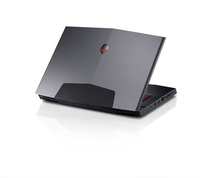
Dell has announced the UK pricing for its top of the range gaming netbook, the Alienware M11x.
The company claims it packs the power of a 15-inch machine into an 11-inch frame, including a 1GB GDDR3 NVIDIA GeForce GT 335M graphics card, and it debuted to a warm reception at CES this year.
However, Dell is offering the new Alienware 11X starting at آ£749, including VAT and delivery, so you'll be able to enjoy gaming on the go with plenty of change from a grand.
Beating the battery
Other headline grabbing stats include 8GB of DDR3 RAM, over 8.5 hours battery life (although not for constant gaming) and the latest version of Windows 7 Ultimate.
Dell has still yet to confirm an exact UK release date for the new Alienware M11x, but we're hoping for more information in the next few weeks.

| |
Read More ...
In Depth: 6 of the best portable hard drives for your Mac

The days when you could carry around all the data you needed on floppies are long gone.
Its successor, the Zip drive, has also had its day. And while USB flash drives are getting bigger and cheaper, for high-needs mobile storage, you still can't beat a portable hard drive.
A portable hard drive is based around a 2.5-inch HDD to save on size, and requires no additional power supply, drawing its power from the USB port it connects to for data transfer. In case this is insufficient, many drives include a cable enabling extra power to be drawn from a second USB port.
If you need to power an external drive from the mains, it isn't a portable drive. Although bigger – and therefore less convenient – than a solid-state USB flash drive, the portable hard drive offers several key advantages.
On a pound-per-GB ratio, portable HDDs are by far the cheapest way to carry around large amounts of data, and they're available in sizes of up to 1TB, which should be enough for even the most demanding user.
In the following group test, we compared six 500GB portable drives from leading manufacturers, rating them for speed, portability, features, bundled extras and, of course, value for money.
The candidates

Buffalo MiniStation Lite آ£77

Freecom ToughDrive Custom SE آ£141

Iomega eGo Portable Hard Drive آ£107

LaCie Little Disk آ£120

Seagate FreeAgent Go for Mac آ£143

Western Digital My Passport Studio آ£115
We compare the drives' aesthetics and construction
Freecom's ToughDrive Custom SE comes with six coloured, rubberised sleeves, as well as a clear one to use with the bundled art decals.
The Seagate FreeAgent Go for Mac is particularly attractive, with a brushed metal finish and LEDs that light up the 'snowstorm' pattern at the back of the drive.
Western Digital's My Passport Studio features the company's famous book-like design. It includes a slider to cover the ports when in transit and an LED capacity gauge that gives a rough idea of how full the drive is.

The Iomega eGo Portable has a lovely red finish, but a slightly odd shape. The bundled USB cable has two heads, so you can take up an extra USB port for additional power if required.
We're less impressed by LaCie's effort, though, which picks up fingerprints very easily and has a cap that looks vulnerable to getting lost.
Only the LaCie and Seagate drives can be stood on their edge, so bear this in mind if that's important to you.

Testing each drive using its fastest connection
For this test, we use the fastest connection method offered by each drive, with speed-boosting software installed where available. It reflects the speeds you're likely to achieve on your own Mac, taking advantage of speed-enhancing factors such as FireWire and bundled turbo drivers.
Using benchmarking utility QuickBench 4, we assess each drive's random and sequential read and write speeds, taking the standard average times to transfer files of between 4K and 1MB.
For both of our speed tests the drives are connected directly to the Mac, not through a hub or extension; we use the drive cables supplied.

Unsurprisingly, the FireWire 800 is fastest, with Western Digital's turbo drivers giving it the edge over the Iomega and Seagate models.
LaCie's FireWire 400 connection keeps it ahead of the USB-only drives. The Buffalo's turbo drivers are not yet Snow Leopard-compatible, and make little difference to its speed. The Freecom is bare USB-only.

Via USB connection, minus any turbo software
The chances are you want something you can use to transfer data between your Mac and other computers. These secondary computers may not offer FireWire, and you might not be able to install your drive's speed-enhancing drivers.
So for this test, we look at how well the drives perform under a nonenhanced USB connection, the lowest common denominator of external hard drive connectivity. QuickBench 4 is our test software.
The fastest drive on offer was the LaCie, with a random read speed of 11.2MB/s and a random write of 15.4MB/s.

The Buffalo drive had a slightly quicker random write speed at 15.5MB/s, but its random read of 9.6MB/s was decidedly average.
Perhaps unsurprisingly, there was very little to differentiate the drives in this test – all put in a performance of between 9.6 and 11.2MB/s random read speed, and 13.1 to 15.5MB/s random write speed. Sequential read and write speeds were similarly tight.

We look at the bundled applications and accessories
Full marks to Seagate here. The FreeAgent Go for Mac is bundled with a useful FireWire 800 dock, making it really convenient to connect to your computer. When you need to take it away with you, there's a handy simulated leather carry case too.
Western Digital's My Passport Studio and the LaCie Little Disk offer drawstring pouches for carriage.
The LaCie and Freecom drives include an integrated USB cable, though both (especially Freecom's) are too short. The Little Disk has a programmable shortcut button that launches an app of your choice, but this isn't yet compatible with Snow Leopard.

It also has two FW400 ports so you can daisy-chain your peripherals, though we're not sure why you'd want to with a portable drive. As mentioned elsewhere, the Buffalo and Western Digital models have turbo drivers.
The LaCie is bundled with a backup app, the Western Digital has a drive manager and the Iomega has a suite of downloadable apps.

The best performers in sub-optimal conditions
When connected directly to our iMac, as opposed to going through a hub or extension, all the drives mount without an additional USB power cable. But as some portable drives are more tolerant of indirect USB connections than others, we also try them in an unpowered hub connected to a Mac through a short USB extension cable.
If it fails, we add a USB power lead, connected to the keyboard's USB port. Not an ideal way of powering a portable HDD, of course, but the idea here is to test the drives under less-than-ideal conditions.
The Freecom passes our test with flying colours. The Buffalo and Western Digital drives lack the means of adding a USB power cable, but both mount perfectly well without one.

Iomega's and LaCie's drives fail to mount when powered solely by the USB hub, but make an appearance on the desktop when also connected to the keyboard for power. The Seagate fails, even with the secondary power source.

Which drive gives you the most bang for your buck?
For this test, we use the current price of a drive on Amazon.co.uk and assess each drive's value for money. As they're all 500GB in size, capacity isn't an issue, but it's interesting to see how the retail price correlates to the features offered.
Although we appreciate the Freecom ToughDrive Custom SE, with its integrated USB cable and interchangeable rubberised covers, it's far too expensive at more than آ£140. Remember, this is for a USB-only drive with no bundled software.
The Buffalo MiniStation Lite was almost as minimalistic, but at only آ£77, it's a bargain for a USB drive.

Seagate's FreeAgent Go for Mac is the most expensive, but you're getting a lot for your money. The convenience of having a docking station isn't to be underestimated, but whether it's worth the extra cost is up to you.
Finally, the three FireWire-and-USB drives, from Iomega, Western Digital and LaCie, are all agreeably priced at between آ£107 and آ£120.

My Passport Studio's handy, book-styled form factor means it can fit into your shirt or trouser pocket, and its bundled drawstring carry pouch is just the right size for your drive and a connectivity cable or two.
It passed our power consumption test with flying colours, mounting on the desktop even when connected through an unpowered USB hub. All in all, it's great for carrying data from computer to computer.
Although the My Passport Studio lacks a FireWire 400 socket, it comes bundled with a FireWire 400-to-800 lead, so it's effectively triple interface. Its turbo-boosted FireWire 800 connection was the clear winner in our first speed test, and while there wasn't much to differentiate the devices under bare USB, it acquitted itself very well.
Add in handy features such as a sliding port cover and an LED capacity gauge, and you have an excellent drive at an agreeable price.
Also worth a mention is Seagate's FreeAgent Go for Mac. A delicious-looking device with real style, its docking station is a boon. However, it's hard on the wallet, and performed poorly in our power consumption test.
But if you're looking for a cheap, capable USB drive with few bells and whistles, the Buffalo MiniStation Lite is ideal.

| |
Read More ...
Fujifilm rolls out ultra-zoom HS10 camera

Fujifilm has unveiled its new summer range of cameras, with the HS10 top of quite an impressive crop.
The HS10 boasts a 30x optical zoom and a manual zoom mechanism.
Both these combined make a world's first according to the camera company.
Couple its zoom capabilities with a 10MP CMOS sensor, Full HD recording and motion tracking autofocus and what you have is a feature-packed device ready to take on the photography masses.

ZOOM ROOM: The F80EXR comes with 10x optical zoom
Also announced are the F80EXR and Z70 cameras. The F80 comes with 10x optical zoom (not bad for a compact), a 12MP CCD sensor and HD movie shooting.

YOUTUBE READY: The Z70 comes with YouTube capabilities
The Z70 is pitched at the social-networking crowd, with a one-touch YouTube/Facebook upload function.
The Z70 also comes with a 12MP CCD and has a 5x optical zoom lens.

SHOCK TACTICS: The XP10 is ready for you to unleash hell
For those who don't mind taking expensive bits of kit with them when seeking thrills, the Fujifilm XP10 is, according to Fuji, is shockproof, waterproof (to 3 metres), freezeproof (to -10 degrees) and dustproof.
It comes with 5x optical zoom, HD movie recording and a 12MP sensor.

HD SHOOTING: The Fujifilm S2500 captures movies in hi-def
Following the shockproof XP series is a hard task but the Fujifilm S-series update (S1600/1800/2500) tries its best with some great zooming options (15x and 18x), CCD sensors and the ability to capture HD video.

SUPER-SLIM SHOOTER: The J-series of cameras are the thinnest of the lot
The last cameras released that are of not are the J-series. The JV and JX series have been given a 5x (JX200/250) and 3x (JV100/150) optical zoom respectively, HD shooting and a rather thin chassis, at just 18.9mm.
The JZ300/JZ500 may be a bit thicker (at 23mm) but on-board is a handy 10x optical zoom lens, an HD filming option and advanced CCD-shift image stabilisation.
All UK pricing and release dates are still to be confirmed. Go to www.fujifilm.co.uk for more details.

| |
Read More ...
Exclusive: 3 outlines iPad, Android and Spotify plans
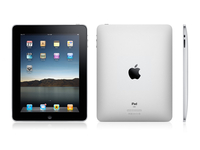
At a network briefing today CEO Kevin Russell talked about 3's strategy regarding zeitgeist products, such as Android and the iPad.
When asked by TechRadar about the possibility of being one of the big data providers for the 3G iPad, Russell stated that it's not something that would fit into the company's strategy:
"To range the iPad would be a great thing, and the iPhone in time on the right terms, but we prefer to be doing something that other guys [networks] would be less comfortable doing.
"If every man and dog in for bidding for [the iPad], it's like in the Premier League with footballers, you end up paying more than you should do.
'Interesting product'
"[However] The iPad could be an interesting product; the iPhone is already a great product but I don't see 3 as a player in there overstretching to buy something in a very competitive landscape - I see 3 as something different, so when everyone charges one way, we go the other. It might not always be a successful strategy, but it's the culture I'd rather have."
Russell was also asked whether he would continue to range Android handsets, having begun to do so with the recent release of the HTC Hero.
He replied that the company will be bringing out more in the near future: "Yes, Android will play a big part - it is important to us."
He also highlighted the importance of Spotify, which was debuted as a mobile application on the 3 network with the launch of the Hero, promising "half a dozen more [Spotify] handset in the next few months."

| |
Read More ...
Review: Philips 40PFL9704 LCD TV

With tumbling prices and features galore, standing out in the big-screen TV market isn't easy.
However, Philips has managed it with distinction in the last 12 months - and amazingly the 40PFL9704 tops its previous successes.
It's part of Philips' 9000 series LED Pro range of TVs, which also includes the 46-inch Philips 46PFL9704.
A brushed aluminium frame and three-sided Ambilight system lends this 40" LCD TV a unique look, but it's the sheer quality of its hi-def pictures - and, more unusually, its built-in speakers - that give the 40PFL9704 the enviable status of being one of the best flatscreen TVs around.
Its on-screen success is largely down to what Philips calls LED Pro, a backlight system that features 224 LED lights arranged behind the entire screen, which can switch on and off individually.
Philips uses LED Pro to differentiate the 40PFL9704 from other less serious variants of LED tech available.
Compare this Philips' 'local dimming' system (where any segment of the screen can be in total darkness while the segment beside can be at maximum brightness) to 'edge' LED lighting from the likes of Sony, Samsung and LG.
Edge LED systems are self-explanatory - LED lights around the frame shine light into the panel, potentially leaving the middle of the screen far less dynamic.

But although the 40PFL9704's LED Pro system seems relatively high-end, it's very similar to that found on Sharp's recent sub-آ£700 LED TVs; at آ£1,800, this Philips is going to have to put in an exemplary performance.
Picture quality on this Full HD set is given a further boost by Philips own Perfect Pixel HD engine, the most interesting parts of which are a 200Hz system and Perfect Natural Motion, circuitry that's designed to rid Blu-ray playback of blur and judder, respectively.
Ins and outs aren't typical either, with a stunning five HDMI ports included alongside a multimedia USB port and, best of all, a built-in Wi-Fi module.

The latter allows the 40PFL9704 to stream music, video and photos from a computer on the same home network, though its primary function is to power this set's Net TV feature.
A collection of widgets include some giving you access to YouTube videos and Ebay, and are operated solely from the TV's remote control, a luscious affair that matches the TV's silky metallic design.
Adding to its aura is Ambilight Spectra 3, a collection of yet more LED lights around the outside of the TV that projects coloured light on to the walls behind
Designed to reduce eye strain, Ambilight underlines the 40PFL9704's high-end status. It's presented here in its three-sided version, with lights around the sides and top of the rear of the TV.
Elsewhere in the 9704 Series is a 46-incher, while those after something even more unique should head for Philips' 56PFL9954H. Otherwise known as Cinema 21:9, that آ£3,500 LCD TV can present Blu-ray discs in their native 2.35:1 or 2.40:1 aspect ratio.

The 40PFL9704's performance with Blu-ray is irresistible.
Contrast is stunning, with a plasma-like richness to dark areas of the image.
During a space combat sequence in Star Trek on Blu-ray, the fine lights of far-off star systems are visible, with no halo whatsoever; LED Pro's promise of local dimming is a reality and the screen hosts stunning contrast all over the display area.
Better still, the 40PFL9704's wide viewing angle means you can watch from anywhere without any loss of colour or contrast - something that's almost unheard of on an LCD TV (don't let the 40PFL9704's use of LED tech confuse you - this is an LCD TV at heart, which has been updated with a different backlighting system that aims to be more subtle).
Blu-ray smoothing
Though startling contrast is the 40PFL9704's most delightful feature, it's run pretty close by Perfect Natural Motion.
Working only with discs, not live TV, this tech estimates motion in the picture and corrects the judder - and it does it potently.
With Perfect Natural Motion on its lowest setting, Star Trek's opening scene of a young Kirk racing a Chevrolet towards the Canyon is very fluent and easy to watch, though we did notice the occasional flicker.
In another scene where Kirk and Spock walk down the steps of Starfleet Academy, a noticeable flicker rings the edges of actors passing quickly through the shot in both the foreground and background.
The 200Hz system, which can only be used if Perfect Natural Motion is on at least the minimum setting, is slightly less accomplished.
During a panning close-up of fighting zebras from Life on Blu-ray, the 40PFL9704 arranges their markings without much judder or flicker, though there is a slight loss of resolution.
Soft Freeview pictures
In contrast to its superb HD performance, digital TV pictures look rather soft, with a sheen of processing across the picture; the 40PFL9704 does its best work on a hi-def diet.
That's the one area that lets the 40PFL9704 down - and the main reason why you should consider, and certainly compare, this LED TV's performance to that of a plasma.
Far friendlier to Freeview while being sharp enough with Blu-ray (and with comparable DVD performance), plasma's continued success is proof that LCD manufacturers still have some work to do.
Although they appear to have solved LCD tech's problem with contrast and reproducing deep black, it comes at a cost; the 40PFL9704's price tag is around twice that of a decent plasma TV.
What you don't tend to get on a plasma - aside from Panasonic's high-end sets - is a host of extras that are included on the 40PFL9704, such as Wi-Fi, Net TV and video playback from USB.

Philips' provision of five HDMI inputs is very welcome, though perhaps slightly overcooked for anyone but those who solely watch TV in high definition.
They'll be useful to those with a couple of games consoles, a HDMI laptop, Sky +HD box - and anyone with designs on a Freeview HD set-top box.
Elsewhere, connectivity is just as comprehensive.
A set of component video inputs (which are capable of carrying a HD signal, bringing the 40PFL9704's possible HD feed to a maximum of six!) are provided next to a couple of Scarts, a composite video input and even an S-video port - something that's rapidly being deemed as unfashionable as almost all other TV brands remove them from new sets.
The USB port works well, while there is also a connection for a PC, some analogue stereo ins and outs, and a headphones jack.
No digital audio-out
Our only grumble about connectivity on the 40PFL9704 is the absence of an optical digital audio output.
A coaxial digital audio is provided, but the lack of optical could trouble some amplifiers.
Relegated from headline act to bit-part player on the 40PFL9704 is Ambilight, though it remains every bit the high-end feature.
Unique to Philips TVs, Ambilight Spectra 3 is a cinch to use - and as impressive as ever. Yet more LED lights are used, this time on the outside of the TV, hidden on the back of the frame.
The idea behind Ambilight is that it projects dynamically changing light that matches whatever is showing on the screen. So, for instance, images from a football match will usually mean green light from all sides, but when the camera goes to a close-up of the players, the colour of the shirts then get represented instead. It's designed largely to reduce eye strain, though it puts on an impressive light show in itself.

A dedicated button on the remote toggles Ambilight on or off, while the on-screen menus contain settings to adjust its brightness, the separation of colours, and dominant colour - from warm white, blue, cool white or a colour of your own choice.
Ambilight can even be set to shine a white light when the TV is switched off, effectively acting as a lamp in your living room - as it uses LED lights, that's a relatively eco-friendly idea.
Incidentally, having a lamp behind or alongside a big TV is a good idea; it's easier on your eyes, and helps improve the perceived contrast you see on the screen - though a آ£10 lamp will do the job, making Ambilight seem an expensive luxury.
While the 40PFL9704 is hardly a media mogul, it does support most major file formats stored on a USB stick.
For such an expensive TV, media playback is rather restricted; in our tests we got MP4, MPEG, WMV and some AVI video files (though not most DivX movies) to play without any issues, alongside the usual MP3, WMA music and JPEG photos.
The absence of DivX HD support is a shame, if hardly a catastrophe, but it's worth noting that bargain basement TVs from the likes of LG and Samsung can usually handle any file format you throw at them.
Stream over Wi-Fi
In contrast the 40PFL9704's built-in Wi-Fi module is a real boon. Though hardly essential for a TV, we consider it a must-have on any product purporting to be a 'connected TV'; having to either put a TV next to a broadband router or sliding an Ethernet cable around a living room will only delay the 'net TV' revolution.
That said, Wi-Fi streaming is very slow with video files, although it works much better with Net TV. It's not the best platform of its type; browsing Ebay is a slow process, and much easier to do on a PC or laptop.
Most of the other widgets are fillers, though Screen Dreams gives you free access to a photo gallery of hi-res pictures that can be displayed full-screen.
With subwoofers strapped to its rear, the 40PFL9704 projects the most energetic sounds we've heard on a 40-inch TV this side of a Loewe screen.
Bass is slightly detached from the overall soundstage, but dialogue is always clear and far fuller than on most TVs.
A quasi 'surround' mode doesn't add much to what is already a great performance, but it does create even more depth and the occasional illusion of rear effects.
Easily worth the extra hulk it adds to the TV's chassis, the 40PFL9704's speakers are a runaway success and easily able to take the place of a separate home cinema system in a small living room.
For the last few years we've often wondered why some brands had dropped plasma in favour of LCD.
Although LCD tech continues to magnify even the slightest problem with images, Philips' LED Pro at last delivers on the tech's potential and achieves a picture quality that arguably tops the best plasmas.
Drenched in contrast and with minor blur, this elegant yet powerful LED set is decent value if you can afford it.
We liked:
Blu-ray discs with this much depth are something of a revelation, while accurate colours and a huge dollop of contrast make the 40PFL9704 a set to stun. There's very little motion blur and on-screen action is lent even more fluidity by Perfect Natural Motion.
Arguably what makes this set truly stand out from the crowd is its audio. Powerful and nicely balanced stereo sound with plenty of bass is a rare thing indeed on a flatpanel TV.
The cost, of course, is slimness - this is a fat-panel compared to most - but serious AV fans will thank Philips for ignoring the trend for super-slim TVs in favour of some seriously punchy sonics.
Also worth a mention is the 40PFL9704's versatility; it's particularly good with Blu-ray and HDTV sources, but its treatment of DVD and even digital video files is also impressive.
We disliked:
Though undoubtedly a TV high on quality, the attractiveness of the 40PFL9704's Perfect Natural Motion feature is ultimately down to personal taste.
We're prepared to live with the odd blemish in exchange for some giddy depth, though others may not be.
The occasional - though distracting - flicker from Perfect Natural Motion aside (it's best left on its lowest setting), the only other serious concern for some will be the 40PFL9704's treatment of digital TV pics from its built-in Freeview tuner.
Soft, noisy and looking over-processed, it's a serious low point on the 40PFL9704, though thankfully this slight weakness with standard definition doesn't stretch to DVD, making this as good an all-rounder as any LCD TV.
Final verdict:
A benchmark LED set it may be, but a good plasma - which costs half the price - remains a good alternative. Our advice is to bide your time and shop around for a lower price, but don't let the 40PFL9704 fall off your radar, because this is one luscious LED TV.
Related Links
| |
Read More ...
Google News lets you 'star' favourite stories

Google is offering users of its News service a new way to sort out the myriad stories offered on the site – by adding a star next to their preferred subjects.
This is a boon for those who want to weed out the stories relevant to them, instead of having to trawl through all the needless bumf that sometimes clogs up the Google News feeds.
Once you have starred a headline you like, this will go into a starred field on the left-hand column, creating your very own customised news source.
Star a story
"Users can mark a story cluster by clicking on the star next to it, like they can with messages in Gmail and items in Google Reader," says the Google blog.
"When you star a story in Google News, it's one way to let us know that you're interested in that subject."
This new features is all part of the custom rollout Google began a few months ago. These let you create news fields by adding relevant keywords to the Create Your Own section. This meant that those with an insane interest in pink bunny slippers could now create their own dedicated field to the subject.
There's no word on whether you can share you starred news feed, but knowing Google this option is not far away.

| |
Read More ...
Google reveals tablet UI concepts

Google's forthcoming Chrome OS is being developed with the burgeoning budget netbook market in mind, although the search giant is also developing a version of the operating system for tablet or slate PCs.
Google has shared a little more information on how a new tablet operating system might work on the Google's Chromium projects site.
Manufacturer HTC is rumoured to be looking to partner with Google to make a Google-branded tablet PC running Chrome OS.
Tabs only system
The Google Chromium website says that tablet devices running Chrome OS would have a screen size between 5 and 10 inches with optimised touch UI taking up the whole screen, with the possibility of a 'tabs only' system instead of separate windows.
Additionally, there would be larger touch targets and multi-touch gestures including "upward dragging motions."
Google adds that the UI would be "ideal for portrait devices" and that the toolbar could be "auto-hidden to have full-screen content" and that the tabs could be shifted to the side of the screen when the device was used in landscape mode.

| |
Read More ...
Review: Panasonic TX-P42G10

The Panasonic TX-P42G10 uses plasma panel rather than the more common LCD technology. But that's not it's only unique selling point, for it is also our only contender with a built-in Freesat HD tuner.
It's also nice to see that the plasma screen is one of Panasonic's NeoPDP models, with their much-enhanced brightness and pared down running costs.
More good news finds the panel sporting a full HD resolution, which is a big deal in the plasma world, where precious few 42in screens manage better than HD Ready resolutions. To our knowledge, Panasonic remains the only maker of full HD 42in plasmas.
Continuing the numbers game, meanwhile, is the P42G10's blistering 2million:1 claimed contrast ratio, which leaves the figures of even the best of our LCD rivals looking feeble. And still we haven't got anywhere near the end of the P42G10's attractions.
For it's also got an SD card slot for playing JPEG photos and AVCHD movie files, an Ethernet port readying the TV for the imminent launch of the BBC's eagerly anticipated Freesat iPlayer service, 600Hz processing for removing judder and flicker from pictures, plus the brand's own V-real 4 processing.
There's also proprietary Intelligent Frame Creation (IFC) processing, which inserts subframes of image data to enhance motion processing, although this is actually part of the 600Hz system.
Performance
The latter really does a very good job of reducing the judder that's long been one of the few failings we've found with Panasonic plasmas, and it makes images seem generally more stable and colourful along the way.
Colours warrant more coverage, since their vibrancy and expansive tonal range, especially with HD, offers more proof of the worth of Panasonic's NeoPDP technology. As you'd expect with plasma technology, the P42G10 also performs mightily well when it comes to black levels, which look deeper, more natural and more detailed than those of any of our LCD rivals.
Wrapping up a really terrific picture effort with HD is some outstanding sharpness, as the set really rams home that important full HD pixel count.
The P42G10's flaws are relatively minor, consisting of a little residual judder during fast camera pans, some rare and quite low-level processing artefacts when engaging the IFC system, a few rogue colour tones (especially when watching SD sources) and a slightly soft look to standard-definition pictures.
With some decently robust audio the only barrier to total irresistibility is this screen's rather steep price.
Related Links
| |
Read More ...
In Depth: 8 essential Firefox add-ons for web developers

Firefox has an aggregate market share of 27 per cent and is widely thought of as the professional's browser of choice. Beloved by designers, developers and network boffins, it's stable, extensible and tries hard to keep bang up to date with web standards.
But if you're only using it as a browser, you're really missing out. Mozilla's modular add-on features enable you to inject more power into Firefox.
That got us thinking. Could we use Firefox extensions to turn a browser into an IDE? It turned out that, yes, we could. Adding CSS, HTML and scripting capabilities to the core browser is one of the easiest parts of the project; it's easily achieved with a range of powerful, free tools that are available now and compatible with Firefox 3.5.
You can go even further with FTP, colour picking, code verification, graphics and layout helpers. The result is a web-authoring platform that gives you all the tools you need to create and publish pages.
1. Web Developer
Chris Pederick's Web Developer should be at the core of any Firefox web authoring makeover. We find it essential for working with CSS, especially on blog platforms like Wordpress or Movable Type, where it can be difficult to track down which class or ID belongs to which element.

The extension adds a new toolbar to Firefox that lays bare the Document Object Model (DOM) of your page, enabling you to highlight page elements, view cookies, troubleshoot forms, see object names and so on. You can also disable or enable targeted site functions. For example, you can turn off JavaScript, images, style sheets, cookies or even page colours.
For us, the best feature is the ability to see and edit CSS. The 'Add User Style Sheet' command also allows you to apply saved styles to pages and preview any changes.
2. Firebug
Firebug is a great complement to Web Developer. There's a bit of an overlap between the two apps, but essentially Firebug is a tool that's better suited to direct inspection of underlying code, while Web Developer uses overlays to reveal the DOM on the page.
Google Chrome users may have a sense of dأ©jأ vu, as Firebug's inspection window is very similar to the 'Inspect Element' tool in Google's browser. It gives you direct access to the code in a page, enabling you to edit and debug it in a hierarchical, DOM-nested document window.
One of Firebug's best features is its take on the Mozilla JavaScript console. It's easy to invoke and gives you two interface options: either a single command line to type in and test code line by line or a full text window that uses Firefox's JavaScript engine to execute code.
3. Pixel Perfect
When you've installed Firebug, add Pixel Perfect, a very useful tool that enables you to add a tracing image to a page you're editing.

A tracing image is a transparent page mock-up that you can use to tweak the positioning code in your page. The two extensions work together to provide preview and manual code-editing tools.
4. Codetch
Codetch takes things a stage further than either Web Developer or Firebug, adding a complete web development IDE on top of Firefox. Install it and you'll find a full code-editing environment with distinct preview, design and code views that can be configured in splitscreen mode.
Word processor-style text-layout tools can be used for formatting content, while built-in validation ensures that your pages are W3C compliant and work as they should in Firefox. It's like having an early version of Dreamweaver as a browser plug-in.
5. Colorzilla
Colouzilla is one of our favourite tools. Adding an eyedropper function to Firefox, it allows you to sample colour from anywhere in a page. The colour HEX code readings can then be pasted directly into your text editor.
Colorzilla allows you to sample multiple colours for a page or to add to a palette as you build up your own colour scheme. Hold down [Shift] as you sample pixels. If the area you want to sample is small, zoom in by selecting the 'Zoom' option from Colorzilla's menu.

The applications for these features are many, from matching CSS colours with a bitmap image to snatching a favourite colour scheme from another site.
There's more too. Double-click on the Colorzilla icon in Firefox to get a full RGB colour picker. There's also a palette view that includes custom schemes, such as the official W3C colour names and classic web-safe palettes.
6. MeasureIt
Colourzilla has one last hidden feature up its sleeve – you can measure between two points, which you specify using the eyedropper. But for even finer control, choose MeasureIt instead.
This add-on draws a grid over an element as a marquee around it – giving you accurate block measurements and a live read out. This is valuable when you need to match CSS widths and heights to existing components in a layout.
7. FireFTP
FireFTP embeds a fully featured FTP client into Firefox – and we really mean fully featured. When launched, FireFTP is reminiscent of desktop FTP app Filezilla. The split-pane view gives you full drag-and-drop access to your local desktop and to FTP servers.
There are also command tools to control remote files. Use FireFTP to upload scripts and files without leaving Firefox, giving your browser-based authoring environment a highly usable set of site-management tools.
8. Firefox Accessibility
The extensions mentioned so far do a pretty good job of replicating the kind of features you find in commercial web-authoring tools. Web Developer and Codetch even include code validation features. We'd advise that you add on an accessibility testing suite too.
If you're running a commercial site it must comply, by law, with European and UK access regulation under the Disability Discrimination Act (DDA). The Firefox Accessibility Extension bundles together a range of accessibility reporting tools that you can run on your pages in a new toolbar. Though it's an American tool, there's a lot of crossover between US and EU legislation, so what passes the test here should be enough to ensure that your sites are DDA-compliant.
Crucially, the extension runs in your browser rather than remotely accessing content from a server. It tests the interpreted HTML in your page as Firefox renders it. This method means that it avoids false errors that might otherwise be generated.

| |
Read More ...
Windows 7 RC shut downs start next month

The free preview version of Windows 7 runs out next month, with users still running Win 7 RC set to face PC shut-downs unless they upgrade to the full, paid-for version of Microsoft's new operating system.
Shut-down notices will begin on 15 February, with Windows 7 Release Candidate – or, as it is widely known, 'the cheapskate version' – showing a warning notice every few hours that users will need to upgrade to the full version of the OS by 1 March.
28 days to comply
If they do not comply, then their PC will start to automatically shut down every two hours after 1 March, which we imagine would become rather bothersome.
"To avoid any data loss, I suggest making plans to move to a released version of Windows 7 before the automatic shutdowns start," Microsoft spokesman Brandon LeBlanc posted on The Windows Blog.
"During these shutdowns, your work will not be saved."
The shutdowns will run through to 1 June, after which the PC's wallpaper will display a "this copy of Windows is not genuine" notification on the lower right corner of the taskbar and users will no longer receive any optional updates or downloads that need Windows validation.
Users can opt for an upgrade edition of Windows 7 to move from the RC to a full and final and official release copy.

| |
Read More ...
Fujifilm brings portable 3D image printing to UK

Fujifilm has announced the perfect stablemate for its compact 3D camera, the FinePix Real 3D W1, a dye sublimation 3D printer.
What is dye sublimation we hear you cry? Well, for those not savvy in the dark arts of home printing, dye sublimation is merely a method of using heat to make dye stick to a material. In this case, as it is 3D, the material is lenticular.
Fujifilm is pitching the computer at the professional photographer and shops short on space, as it measures 0.9m (H) x 0.5m (W) x 0.5m (D) – a size which Fujifilm is touting as portable.
Reducing costs
"The offering of 3D prints can be established easily without the need for much space," says the release. "It's perfect for event photographers who need a portable system, and for shops where space is at a premium."
The new printing system means that shots now come in four print sizes and you will "receive the prints back in days, not weeks, and the cost per print will be reduced significantly".
Okay, so it's not the instant availability you are used to with digital, but this is 3D. And 3D is the future, and the future takes its time.
There's no UK pricing available for the printer but the UK release date is April. Plenty of time, then, to see if 3D photography is your thing.

| |
Read More ...
Review: Philips 42PFL7404

After producing a stream of extravagantly specified premium TVs, Philips is finally catering for the less well off with the 42PFL7404, and we hope this doesn't mean too many cut corners.
It certainly doesn't look cheap: the glossy black bezel is extremely slender, and is dramatically offset by a transparent cowl curving forward around the TV's extremities. However, there's no sign of Philips' usual Ambilight technology.
The set lacks the extravagant fifth HDMI and Ethernet port of models higher up the range, but most users will likely find the four provided HDMIs and the multimedia-savvy USB port more than adequate.
As per every Philips TV these days, even the relatively affordable ones, the 42PFL7404 is stuffed with picture processing. The 'engine' here is called Pixel Precise HD – a system that's roughly half as powerful as Philips' flagship Perfect Pixel HD engine.
While the former can't handle as many pixels per second as its bigger brother, it still tackles such issues as motion blur, colour saturations, SD upscaling and noise suppression more potently than any other TV at this price range.
Performance
In fact, when fully optimised, the 42PFL7404's images can look sensational. The sharpness with which it presents standard and high definition is a joy to behold, especially as the provided motion processing removes practically all traces of judder and blurring from objects as they traverse the screen.
Colours are phenomenally intense, too, radiating off the screen with such force that we almost suspected they were trying to hide other problems such as a poor black level response, perhaps.
But, actually, the black levels are good by LCD standards, and while its pictures aren't as polished as those of Philips' awesome 9000 series (there's more grain and shimmering around objects with the motion processing engaged), they have nothing to be ashamed of. As long as you are careful with the set's many picture adjustments, that is.

If you're too heavy handed with the noise reduction, pictures become soft. Conversely, too much motion processing can produce lots of distracting side-effects. And some of the sharpness tools can lead to graininess if set too high.
It only takes a little initial experimentation and a reasonable level of ongoing commitment to keep things looking tickety boo, though, and your efforts are always handsomely rewarded.
Add to all the picture glories some solid audio that's rather light on bass, and the 42PFL7404 adds up to a really compelling option for anyone whose budget points them towards the sub-آ£1,000 flatscreen price bracket.
Related Links
| |
Read More ...
Exclusive: Hands on: SideWinder X4 keyboard review

The QWERTY layout of the standard keyboard was designed to avoid the keys of a typewriter tangling when you type quickly.
Computer keyboards have a similar problem; they stop you hitting too many keys at once because the keyboard can't cope with that many inputs.
That's helpful if you hit more keys thank you meant to in the middle of typing a word and less helpful if you're trying to use key combinations at speed in a game (or in Photoshop). The problem is called N-key rollover or anti-ghosting (because the keyboard matrix is designed to prevent 'ghost' key presses).
Microsoft's new SideWinder X4 gaming keyboard takes a different approach; you can press as many keys as you want at the same time (up to 26, to make sure that whatever key combination you want will work).
"Game software doesn't limit you from pressing two, three, four or five keys at the same time," says Microsoft Product Manager Bill Jukes, "but the hardware does. Think of this as 'what you press is what you get'."
We got a chance to try the keyboard out – and to take it apart to see how it works.
The matrix that connects the keys inside most keyboards has a single sensor for each key, laid out in a grid with a crazy pattern of connections between them.

SIMPLER MATRIX: The matrix of a conventional keyboard (left) has a far more complex layout than the SideWinder X4 (right)
"The normal matrix grid should look nicely ordered - it should look like a grid," explained Steven Bathiche, the research manager of the Applied Sciences Group who came up with the multi-touch system in the SideWinder X4.
"It obviously doesn't. The reason is that a 'ghost' hit happened here, here and here…Keyboard manufacturers spend a lot of effort moving ghosts around; they have a list of typical keyboard combinations people press and they try to minimise the ghost hits."

INSIDEWINDER: We took the SideWinder X4 apart, peeling back the protective layer over the keyboard matrix
The SideWinder x4 looks much neater inside; it has strips of resistive multi-touch digitiser underneath each key, with much simpler connections running between them.
Bathiche gives much of the credit to Paul Dietz, the ex-Disney imagineer who came to the Applied Science Group after designing the Mitsubishi DiamondTouch, one of the first multi-touch capacitive tables; "we've had this problem for around two decades and he was able to take this technology from a different field and his team came up with this technology in about a month".
The multitouch sensors mean you can press as many keys as you want at the same time – and the simpler, shorter connections means the keyboard can read the signal from each key faster.

FULLY FEATURED: Media keys and three banks of programmable keys mean you hardly ever need to let go of the SideWinder
Even though the keyboard isn't scanning for key presses all the time the way most keyboards do (to reduce the amount of power it uses), Bathiche says "as soon as any key is pressed we'll start to scan, we scan all the keys at the same time and you go from a typical 8 millisecond latency to 2 milliseconds – in gaming that really gives you an edge".
Previous multi-touch keyboards have been very expensive; "we figured out how to print thin-film resistors, says Bathiche, "but the big innovation was that we figured out how to make it really cheap."
The $59.99 price tag is certainly lower than many other gaming keyboards and anti-ghosting isn't the only feature. You can switch the backlight from full to 75 or 50% brightness if you're playing late at night or turn it off altogether.

LIT UP: The backlighting shows the multitouch strips behind each key (two strips are cheaper than one larger piece)
There's a set of media keys and you can create macros (or record them from a game) and assign them to the 18 programmable keys; you can have different sets of macros for different profiles, and the keyboard will load profiles automatically when you start a game you've created a profile for. A switch moves you from normal typing mode to gaming mode (disabling the Windows key, for example).
The SideWinder X4 isn't just for gamers and advanced Photoshop jockeys; Bathiche mentions a music app that turns the keyboard into – well, a keyboard, and says the technology (which Microsoft will licence to other manufacturers) could also make for more accurate typing on small keyboards on netbooks by detecting which of several keys pressed at the same time you actually meant to hit. "It's applicable to many different devices; mobile phones, anything that has buttons…"

| |
Read More ...
Review: LG 42SL9500

Cast your mind back to our review of the LG 42SL9000. That five-star-bagging set is, to all intents and purposes, the same as the LG 42SL9500 here, except that the latter is exclusive to Currys, while the former is available in other outlets, including Comet.
The 42SL9500 is similarly gorgeous with a blade-thin profile encased in a plate-like bezel that fades into transparency at its outermost edge and the whole thing sits on a swivelling stand.
Features
Like its stablemate, it's an edge-lit LED model with a 1080p panel driven by LG's much-admired XD Engine processing.
The backlight configuration makes the almost improbably slight depth of less than 30mm possible. And into this LG has managed to cram an equally unlikely amount of features.

You don't get web widgets, but that's about all that is missing from a roll call that includes Bluetooth connectivity for use with wireless headphones or for transferring such suitable music and picture files to the screen for playback.
The image electronics include 100Hz TruMotion digital scanning to smooth over any movement glitches, while an 'Intelligent Sensor' is on hand to monitor the ambient light levels in order to optimise brightness output.
The tweaks are sufficiently refined and far-reaching to enable calibration to professional standards, while a pitch-perfect Picture Wizard helps those of a less technical bent set up the screen to their liking without so much as a hint of anxiety. And if you lose the paper manual, LG has thoughtfully uploaded a virtual version into the set's software for your perusal.
The 42SL9500, as with all top-line televisions from this manufacturer, is very well connected, with a quartet of HDMI inputs to handle all your hi-def requirements and is joined by all the other digital and analogue regulars, plus an optical digital audio output and a USB port.
Ease of use
We're almost weary of telling anyone who will listen just how good LG's current operating system is, but we'll keep on banging the drum on its behalf until someone else invents something better (Philips' gorgeous spectral-blue interface possibly notwithstanding).
Everything is arranged under large, attractively rendered tiles that, combined with a peerlessly intuitive architecture, make setup and adjustment about as easy as it could possibly be. There's also a 'quick' menu arranged as a wheel that enables you to cycle through the parts of the system you're likely to need most.
You can also assign different picture settings to each input if you want to accommodate the differing demands of, for example, TV and movie viewing.

Picture
LED is really getting its eye in these days and the 42SL9500 is one of the best we've seen.
The colour palette is one of the most lifelike you'll encounter this side of plasma, with a range that can go from dazzlingly dynamic to authentic restraint in a moment, with the sorts of tones that must look absolutely right in order to pass muster (flesh, grass, sky and so forth) handled with apparently effortless fidelity.
Blacks are also surprisingly good, particularly if you take the time to adjust the brightness and contrast properly, and the LEDs manage to spread their light evenly across the screen, only occasionally leaving traces of their peripheral presence in conditions of almost total blackout.
Movement can jerk slightly now and then, but the LG manages about as well as we've come to expect from LCD and the overall experience, with both standard and high-definition source material, is hugely satisfying.
Sound
The 42SL9500 pulls off the same neat trick with its audio quality as its sibling, producing a sound that's rich, deep and resonant enough to defy its almost two-dimensional body.
The bass levels aren't going to register on the Richter Scale, but it's loud enough to fill a decent-sized room at just a third of the way up and the 'image', if not three dimensional, is spacious and faithful, with a sparkling mid-range and passable cinematic presence when required.
Value
Buyers on a budget might balk at the grand-or-so price tag. On the other hand, it's a good a telly as you'll find at any price (and better than plenty of more expensive models); it's got more features than anyone can possibly need and is stunningly attractive.
If you can't forgive the Currys exclusivity, buy the nigh-on identical 42SL9000. Otherwise, this 42in LCD television should be at, or at least very close to, the top of your flatscreen shopping list.
Related Links
| |
Read More ...
Sony Ericsson unveils WinMo 6.5.3 toting Aspen

Sony Ericsson has taken the veil off its latest smartphone, the Windows Mobile 6.5.3 enabled Aspen.
Business phones are 10-a-penny at the moment, so there needs to be some sort of hook to get the crowds exciting. So, not only has SE added the latest version of WinMo on to the device but it is also proudly claiming that the Aspen has a number of green credentials.
We first got wind of the Aspen back in January, when it was tentatively titled the 'Faith'.
Part of the company's GreenHeart portfolio, the Aspen allows you to charge your phone in the more eco-friendly way with the Energy Saving Mini-Charger EP800.
And, well, that's about it for the green side of things – except the panel on the phone is GreenHeart branded and there's some nifty power saving options.
Human curvature design
If the Aspen doesn't quite bring out the eco-warrior in you, then the phones specs may well appeal.
On-board is a 2.4 inch, 240أ—320 QVGA display, 3.2 megapixel camera, 3.5mm headset jack, front facing QWERTY keyboard, microSD card slot with 4GB card and some stereo speakers.
Connectivity wise, you are looking at Quad-band 3G/EDGE, WiFi and Bluetooth. And when it comes to how the device feels in the hand, well Sony Ericsson assures us it has a "human curvature design" so it "fits into the palm of the hand". Always good to know.
The Sony Ericsson Aspen, which looks likely to take on the Blackberrys and Nokia E72s of the world, comes in Black and White Silver and has a UK release date of Q2 of this year.

| |
Read More ...
Review: Toshiba 55SV685DB

New LED technology, home networking and endless calibration options help make the Toshiba 55SV685DB a prime candidate for a hi-def home cinema setup, but its flaws leave it looking like an expensive luxury.
Features
The 55SV685DB's key feature is its LED backlighting. Capable of switching on and off, according to the demands of any video source, its stack of white lights are capable of local dimming and promise the simultaneous delivery of inky blacks and bright whites on any part of the screen.
On-screen menus include a Backlight Adjustment Pro that optimises performance and shows a bar measuring ambient light and a graph that plots the exact brightness.
As befits the TV's status as a high-end set, it possesses some advanced picture processing circuitry in the form of Active Vision M200.
Crucially, it includes a 200Hz frame rate to eliminate blur, while an additional film stabilisation mode creates extra smoothness. The last part of the processing jigsaw is Toshiba's celebrated Resolution+, circuitry that's designed to boost the quality of standard-def Freeview and DVD to hi-def levels of detail.
Almost any source can be attached to the 55SV685DB's roster of in and outputs. An Ethernet LAN port powers the 55SV685DB's DLNA networking feature; plug the TV into your broadband router and you can stream music, photos and video from a PC on the same home network.
In practice it's easier to get such digital media files into the TV via the set's USB Pro input. The SD card slot will only show JPEGs.

Ease of use
Thumbnail pictures from the SD card are slow to load, while the DLNA networking is also very frustrating.
Finding another PC on the network is a cinch, but actually viewing any type of media is convoluted and unreliable. The system can play MP3 music and JPEG photos, along with AVI and MPEG videos, but basic navigation is slow and dogged by delays.
The biggest problem by far is the remote control, which doesn't take charge of these features. Skipping back a step isn't possible and the TV is often left 'hanging'.

An Auto Brightness feature removes the harshness of the factory settings. It's especially useful since a lot of users will avoid the complicated menus.
Picture
The 55SV685D's delivery of Blu-ray is breathtaking; it handles hi-def scenes from NASA's Greatest Missions with rare skill, seeking out endless detail of the Discovery ship as it launches from Cape Canaveral.
A pin-sharp – though rapidly moving – helicopter leaves a trail of visible heat as it swoops by the rocket; the backdrop of billowing exhaust clouds and the ultra-bright orange tail of fire from the Shuttle look absolutely stunning.
The LEDs are doing their work here, separating bright areas of the image from the duller background with astonishing accuracy. When the Shuttle does reach space, the surroundings are jet black, whilst at the same time dark areas of its fuselage are clearly detailed.
The quoted contrast ratio is hard to believe, but it is impressively high, while the picture remains free of haloing. A more testing passage from The Matrix Reloaded demonstrates the 55SV685D's skill with motion and judder.
The 200Hz scanning defines images slightly clearer on its own, but switch on the film mode and Blu-ray judder vanishes. The camera pans smoothly downwards into the depths of Zion, a shot that tends to lack stability on most LCD televisions.In another breathtaking scene, the edges of the fast-moving Nebakanezer are rendered silky smooth.

However, the 55SV685D's treatment of digital TV pictures is frankly shoddy. Freeview and even cable channels suffer from noise, stepped diagonal edges and blocking, to the extent that they just don't look real.
That's not excusable at this price, and especially on a set that has Resolution+ onboard to upscale SD sources.
This system, when used on its lowest setting, does work, but even 720p hi-def footage on BBC HD looks soft.
Sound
As a rule, the bigger the TV, the better the sound and the 55SV685D proves this with plenty of stereo separation and a noticeably bigger range than on smaller sets. Using the standard setting, background effects are well-defined, with clear dialogue and the overall sound free from distortion.
Value
If you're after a large screen with the latest LED technology for a dedicated home cinema system and you watch only Blu-ray, this set is hard to beat.
But there are cheaper plasma TVs available, which can deliver digital TV and DVD pictures that are far superior and in a more user-friendly manner.
Related Links
| |
Read More ...
Virgin unveils underwater plane

Virgin has revealed a new 'underwater plane' called the Necker Nymph, with guests on Necker Island in the British Virgin Islands now able to take a dive into the Caribbean for a mere $325,000.
Necker is Virgin Group Chairman Richard Branson's own private island and as of 20 February, two guests and a pilot will be able to take a dive down and fly into the great unknown in the new Necker Nymph.
The underwater plane uses downward pressure on its wings to effectively fly through the water for periods of up to two hours at a time, with the passengers getting a full 360-degree view out of the plane's open cockpit.
Underwater flight
Karen Hawkes, a rep from the Nymph's designers Hawkes Ocean Technologies, said: "Gliding on the water's surface like an aeroplane on a runway, one of the three pilots will operate the joystick to smoothly dive down."
Passengers must be fully SCUBA trained, although we doubt that the added cost of that extra training will really bother anybody willing to shell out over $325,000 for a weeks' underwater fun in Branson's new Nymph!
Virgin claims that the Necker Nymph has "near-zero" environmental impact and that its "positive buoyancy prevents the sub from landing on a reef, and its low light and noise emissions ensure the fragile ocean ecosystems remain undisturbed."
Via CNN

| |
Read More ...
iPad apps to cost more than iPhone apps

When the iPad finally arrives in the UK later this spring, the one thing that will make or break its success with British consumers will be the perceived value of the applications on offer.
After all, this is an entirely new type of computing device for the vast majority of consumers, many of whom are both intrigued by the concept yet still asking the question: "But what will I actually do with it?"
The latest reports from the US suggest that the iPad's apps are going to be bigger in size and costlier than their iPhone counterparts.
Why people buy iPhones
"The reason why people buy an iPhone is because there are 140,000 apps and you can change your iPhone into anything you want," noted Gene Munster, a senior research analyst at Piper Jaffray.
According to Munster and other industry analysts, iPad apps are going to be more expensive – averaging around $4 (آ£2.50) per app instead of the average of $1.90 آ£1.20) for iPhone apps.
Travis Boatman, VP of game giant Electronic Arts, noted at the iPad launch that the experience was "a little bit like holding a hi-def television just inches from your face."
We all await to see what developers create for the iPad after the device hits the shelves this spring – and hope to be pleasantly surprised by the new books, games, work productivity apps, shopping apps and more which will no doubt arrive in a flurry through the spring and summer as developers hope for a new app gold rush.
Bob O'Donnell, VP of research firm IDG, expects about 3 to 4 million slate computers to be sold in 2010.

| |
Read More ...
NASA to develop cheaper, extended-range space flight

US space agency NASA is set to focus on cheaper, more sustainable and longer-range space exploration and human space habitation in the future, revamping its entire space travel and research program this month.
NASA came under fire in a damning report late last year that called its existing planning "unsustainable."
In response, this month NASA administrator Charles Bolden has announced a new five-year budget plan that completely shifts the focus of the US's spaceflight priorities, away from 'low-orbit' flight and towards cheaper, longer-range space travel and research.
Constellation canned
NASA has also canned the Constellation program, which included the Orion crew vehicle and Ares launch vehicles.
"The fact that we poured $9 billion into an unexecutable program does not mean that we should pour another $15 billion after it," said one NASA staff member, "that's what I'd tell taxpayers."
The International Space Station will now no longer be deorbited in the middle of this decade, but instead will be treated like a national laboratory to research materials and long-term human habitation in space.
Over half of the planned budget for the next five years – roughly $7 billion will be spent developing technology for cheaper, extended-range space flight, including in-orbit fuel depots, closed-loop life support systems, and automated rendezvous and docking technology.

| |
Read More ...
Sega launching budget motion control console

Sega is set to launch a new budget mini-console that features motion control built in, all for the cost of a mere آ£50!
Sega's new Sega Zone is pre-packed with 20 classic Sega games including 20 classic Sega titles, like Alex Kid, Golden Axe, Sonic and Knuckles and Ecco the Dolphin and a further 30 titles, 16 of which will feature motion control.
No Wii competitor
Of course, the console is unlikely to be launched as a mainstream competitor to the Nintendo Wii or Xbox 360 or PlayStation 3, but will be marketed as a budget gift for youngsters and nostalgic Sega fans.
The console will reportedly ship with two included wireless remote controls.
Sega Zone is due to arrive in the UK this coming April for around fifty quid.

| |
Read More ...
LG hints at 40-inch OLED launch

OLED TVs are set to get bigger and better, with the announcement that LG is to make a 40-inch OLED panel for commercial use by 2012.
So far, the market for OLED TVs is smaller than Portsmouth FC's net profits, despite the panels being thinner than the club's chances of surviving the Premiership.
Sony was first with its 11-inch XEL-1 effort and then we had a long wait until LG announced it was offering up a 15-inch version.
May be expensive
Now LG has hinted that more OLED TVs are in the pipeline, with a 30-inch TV pencilled in for 2010 and it looks like the company will be bringing a 40-inch TV to market in 2012.
This is bigger than the 32-inch set the company mooted back in July, with LG's VP Won Kim explaining: "They may be expensive, but it will be possible to buy a 40-inch class OLED TV in 2012."
We think you safely change "may" to "will" but the idea that you could possibly watch Usain Bolt charge down the 100-metre track in OLED goodness sounds like an enticing one to us.

| |
Read More ...
Zune phone 'confirmed' for MWC unveiling
Microsoft is apparently set to unveil a 'Zune phone' later this month, according to claims made on a Spanish blog.
The blog states that the new phone will be using an Nvidia Tegra chip, with the chip company teaming up with Microsoft to make the presentation.
MuyComputer is claiming that the phone will have 720p playback through a video output socket, and has seen 'indications' the device will run Windows Mobile 7.
Spurious rumour?
While the former fact seems obvious, the latter seems a little more spurious given that the WM7 platform is not going to be here until the end of 2010 or even 2011.
Add to that the fact that Ballmer stated there would be no Zune phone (albeit a year ago) and you can see why the rumours might lack credence.
That said what could be happening is a phone that Microsoft helped design will showcase the Zune platform (which IS coming in Windows Mobile 7) could be confused as a standalone Zune handset.
Either way, we'll be there on the show floor to bring you all the news and hands on reviews of whatever Microsoft show off (if anything at all, that is).

| |
Read More ...
Panasonic 3D authoring centre now fully operational

Panasonic has taken the veils off its 3D authoring centre, bringing the facility up to scratch with the Blu-ray Disc Association's recent specification agreement on 3D Blu-ray.
Although the facility was announced back in February 2009, it has now brought itself up to the BDA's standards and opened its doors for the masses.
A number of upgrades are said to have taken place, with Panasonic hoping its 3D authoring centre will be the best in the business – offering up a place where filmmakers image processing, authoring and disc certification, all under one roof.
Most compelling experience
Speaking about the 3D's ultimate house of love, Jeannine Patton, Vice President & General Manager of the Advanced Authoring Center, said: "Given Panasonic Hollywood Laboratory's vast experience with HD image processing, we are confident that we lead the industry with MPEG4 MVC (Multiview Video Coding) 3D image compression technology."
To put in simple terms, this essentially means that when it comes to 3D, Panasonic believes it rocks.
"Blu-ray 3D is an exciting new space for the home entertainment industry and our early research and collaboration was extremely helpful in determining what will provide the most compelling experience and optimum performance when designing for Blu-ray 3D," Patton also noted.
The laboratory is situated in Hollywood (where else?) and hopes to be rolling out 3D-Ready discs for the commercial masses in spring.

| |
Read More ...


No comments:
Post a Comment