

Razer unveils Xbox 360 controller & headset

PC gaming specialist Razer is taking its gorgeous gaming peripherals to a whole new platform, with the announcement of a headset and a controller for the Xbox 360.
Razer's peripherals have long been desired by PC gamers, and the Xbox peripherals certainly look like they could do the same for Xbox 360 owners.
According to Razer it has received 'preliminary approval from Microsoft to develop the Razer Onza Professional Gaming Controller for Xbox 360 and Razer is working towards approval of a licensed Razer Chimaera Professional Gaming Headset for Xbox 360 designed specifically for the Xbox 360 gaming console.'
Console gaming
"Just as we did for PC gamers, we are really looking forward to revolutionizing the world of console gaming by creating a controller and gaming headset that gives console gamers the same level of quality, precision and accuracy that they know and expect in our PC products," said Robert "Razerguy" Krakoff, president, Razer USA.
"This is a great opportunity for us to continue to give gamers the competitive edge by really listening and responding to their needs."
The Razer Onza will feature Razer Hyperesponse buttons, analog sticks with customizable tension and a programmable multi-function button (MFB).
Chimaera headset

The Razer Chimaera is equipped with a 5.1 Channel Virtual Surround sound system, a Daisy-Chain cable system and a 'circumaural' design for optimum sound quality and comfort.
"These releases promise to be an exciting new endeavour as Razer makes its much anticipated debut into the world of console gaming," says Razer's release.
The controller is going to cost €44 - so probably آ£40 when it arrives in Europe, with the headset at a €109 - so a shade under آ£100.

 |  |
Read More ...
Gary Marshall: Apple vs Google: why history isn't repeating

In a fantastic piece of flame bait, Henry Blodget of Business Insider says that Android is going to do to the iPhone what the PC did to the Mac: blow it out of the water.
Blodget correctly says that in the 80s, Apple was an industry leader; ten years on it was a basket case. Why? Because of "its insistence on selling fully integrated hardware and software devices, instead of focusing on low-cost, widely distributed software." Really?
Blodget quickly glosses over Apple's other mistakes - "maintaining a premium price point, ditching its famous founder and spiritual leader, and developing clunker products" - because they don't matter. Apple's failure to license OS was what nearly killed it.
To put that another way, if Apple had kept Steve Jobs out of the picture and continued to make crappy products that cost too much, it would be doing fine provided you could by a Dell running the Mac OS. Really?
Apple didn't falter in the 1990s because of its closed ecosystem; it faltered because, in the excellent words of Infoworld.com, it had "unimaginative management" who understood chips better than they understood consumers, leading to "a chaotic product line that confused customers… engineers' pet projects ran amok, leading to lots of half-baked technologies and a confused direction for the Mac."
Engineers' pet projects? Half-baked technologies? That sounds more like Google than today's Apple to us. But we digress.
Most wanted
Is the iPod/iPhone ecosystem closed? Yep. Does anybody care? Apparently not: last time we looked, Apple owned the MP3 market and had the most-wanted smartphone, too.
Those proprietary OS X machines aren't doing too badly, either: despite not letting anyone make OS X machines, Apple gets roughly half of all the cash spent on desktop PCs in the US, and a third of the money spent on laptops.
So how, exactly, is Android going to monster the iPhone? According to Blodget, "in its short life, Google's Android operating system has captivated developers."
All developers? No. Most developers? Nope. Apple's App Store is where the action is. This is not a Mac watching sadly while everyone develops for Windows: this time, the apps are on the Apple kit.
"The Droid and Google Phone are getting rave reviews," he continues. Which is true, although all the reviews I have seen say things such as "no multi-touch", "unimpressive media player" and "not as good as the iPhone".
"Technology tastemakers are thrilled with the platform's open-ness", Blodget asserts, waggling an accusing finger at Big Bad Apple and its treatment of developers. That's irrelevant. Ogg Vorbis is open and thoroughly approved by technology tastemakers. When was the last time anybody without a beard ripped their CDs into that format?
And while risible, Apple's treatment of the odd developer is only of interest to a few developers.
Is Android pretty nifty? Will it gain market share? Will a few iPhone refuseniks buy Nexus Ones? Yes, definitely and undoubtedly. Is the iPhone about to tank? Don't be silly.
iPhone going strong
This year it'll be in more countries, on more networks and in more hands than ever before, and don't forget there's a new model due this summer. iPhone sales have yet to stumble, let alone fall, and there's no reason to assume that they will any time soon.
If anybody should be worried about Android, it's not Apple: it's Microsoft and Nokia.
Let's say Android does become a really big deal. Will Apple care? We doubt it. Apple isn't interested in volume; it's interested in profitability. No matter how well Android does, it won't make money for Google in the way iPhones make money for Apple.
Which brings us to Blodget's final question. He asks: "Will Apple's insistence on maintaining end-to-end control, on trying to shoot the moon by owning every aspect of the mobile computing business, doom it to failure against a competitor hell-bent on achieving software ubiquity?"
No, Henry. No, it won't.

| |
Read More ...
In Depth: 7 technologies to thank the 1970s for

The 1970s were a decade of impressive technological invention and development with the first microprocessors, calculators and video games strutting onto the scene oozing cool.
Here are just seven of the best technologies to emerge in these years.
1. The first microprocessor
When Intel brought out the first microprocessor in 1971, the Intel 4004, it started the evolution of the home computer. Up until this time most computers were in the hands of fans and scientists with few members of the public really paying attention.
Measuring only 1/8th by 1/6th of an inch it was as powerful as the ENIAC built in 1946 and is, according to Intel, one of the smallest microprocessor designs to go into commercial production.

SMALL WONDER: It's hard to believe that something so small could have started something so big [Image credit: John Pilge]
2. Videogame era dawns
While Tennis for Two, created by William Higinbotham, could be considered the first ever videogame, it was only in the 1970s that video games hit the big time. Pong was released in 1972 by Atari and was the result of a training exercise set by Nolan Bushnell for his protأ©gأ© Al Alcorn.
Shortly after Pong entered the arcades, the hard work done by Ralph Bauer in the 1960s saw the release of the Magnavox Odyssey in 1972, the very first video game console that allowed you to play several different games from the comfort of your sofa.

TIMEWASTER: Pong is considered to be the first commercially successful video game [Image credit: ProhibitOnions]
3. Liquid Crystal Display
The history of liquid crystals is a long and interesting one starting with their discovery in 1888 by Friedrich Reinitzer when he found them in cholesterol extracted from carrots. Carrots!
However, it was James Fergason who took the research done by Reinitzer and George Heilmeier (in the 1960s) and expanded it, taking out a substantial number of patents in liquid crystal displays.
Seen as the father of the liquid crystal industry, he started the International Liquid Crystal Company (ILIXCO) and produced the first LCD watch in 1972.

WATCH THIS: The Gruen Teletime LCD Watch - it was quite a looker
4. The first word processor
This one may well take you by surprise. The first word processor was the Wang 1200 launched in 1971 by An Wang's company, Wang Laboratories.
Designed by Harold Koplow, the Wang 1200 had only four operational modes: record, play, transfer and edit. It was not very powerful and had some persistent issues but it did provide IBM with some much needed competition and made typing documents a thousand times easier than it was before.
Certainly, creatives and typists danced with glee as these became increasingly easier to use than ye olde typewriter.

WORD UP: "Almost from the beginning I wanted to use microprocessors, one in each device," says Koplow on his site [Image credit: Harold Koplow]
5. Email
Yes, the bane of our modern lives came about as a result of work done by a man known as Ray Tomlinson in 1971. He says on his site, "I sent the first network email in 1971 using a program I wrote called SNDMSG."
While we all would imagine that he can remember exactly what he wrote in that groundbreaking email and what he felt like when he sent it, he's quite open about the fact that he just did it because it seemed like a good idea at the time.

YOU'VE GOT MAIL: And you would have had mail in 1971, too, if you were Ray Tomlinson
6. The first digital camera
The first working prototype of a digital camera was completed in 1975 by Steven Sasson for Kodak.
It weighed in at eight pounds, captured black and white images on a cassette tape, had a resolution of .01 megapixels and was not exactly the handiest of gadgets to cart about.
It counts as the first ever digital camera although it never went into production and it would be some time before Kodak released its first digital camera commercially.

POINT AND SHOOT: The first digital camera was hardly a neat little thing you could pop into your handbag [Image credit: Burnick/Kodak]
7. The pocket calculator
While it certainly doesn't seem like an enormous invention to us in the 2000s, it was something of a revelation back in the 1970s when the first pocket calculators arrived.
The Sanyo ICC-0081, launched in Japan, was the first of these but it was soon followed by stiff competition from the likes of Canon, Sharp and Texas Instruments.
Initially very expensive they soon became affordable enough for everyone to own and were a welcome relief from their predecessors that were clunky and difficult to use.

NUMBER CRUNCHER: Launched in the mid 1970s, the Adler 81S weighed 128g without batteries and had a VFD display [Image credit: NJR ZA]

| |
Read More ...
Gaming addiction causes 'intimacy problems' for men

A Seattle-based internet addiction specialist has revealed how computer and MMO addiction can cause serious 'intimacy disorders' in young men, who only handle their sexuality with online pornography.
Dr Hilarie Cash set up Heavensfield rehab unit in Seattle last September, the first in-patient internet addiction clinic of its kind outside of the Far East.
Broken sexual template
And while Dr Cash admits to Vice Magazine this month that "you can have people who are raised with computers who are smart and worldly," she is quick to add, "what I tend to see is people are physically at a deficit because they're chronically sleep-deprived, they've got carpal tunnel syndrome and they're socially uncomfortable in the real word, as the only place they're comfortable is in cyberspace."
Many of her patients have never dated, instead "they've handled their sexuality with pornography, which means that their sexual template is divided out between sex and intimacy. That's a recipe for an intimacy disorder – they don't know how to bring sexuality and social things together."
Cash tells two particularly harrowing stories about two extreme cases of young men who led lives of deception and become suicidally depressed because of their 'gaming habits'. "Both young men who weren't diagnosed with any problems that a clinician would have spotted before they became addicted," she explains.
Internet porn addiction
As far as internet-porn addicts go, Cash also treats a lot of them too, "but they really are bracketed in their own category," she notes, adding, "they are men who were exposed to porn at a young age, or were sexualised at a young age, maybe through abuse. They're older – 30, 40, 50."
"But almost universally, as I said before, the gamers I work with are accessing pornography, and my concern is that it's a real ticking time-bomb that's being created for ten or 20 years down the road."
For those parents that find gaming to be taking over their children's lives, Dr Cash recommends a device developed by Californian psychologist, Ken Woo that fits on the computer and controls the time the child can play.
Cash also claims that many games companies "hire professional psychologists these days to help them develop the best unpredictable reward payoff structures… [stimulating] the reward centres of the brain into releasing dopamine and opiates."
And while the therapist openly admits she is not a heavy net-user herself and has always preferred face-to-face meetings as her primary form of social interaction, she genuinely does have some useful advice for reigning in the ways in which technologies control your life.
"We need to figure out how to build the firewalls into our lives that can help us cope with its influence," she says. "It's...analogous to our dealings with cars. When we first had cars, we didn't have stop signs or safety belts. But through all the accidents that happened, they figured out what they needed, and now driving a car is pretty safe."
For more on Dr Cash's ITTA 12-step programme (Internet and Technology Addicts Anonymous) check out her website.

| |
Read More ...
Weird Tech: What's the link between Bladerunner and Google's new phone?
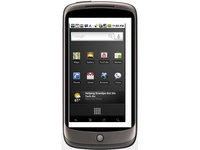
The internet has been going Nexus One bonkers this week, thanks to a very dull Google press conference in which the search giant did little more than rubber-stamp all of December's internet rumours then announce it had made a little shop, somberly nodding in agreement with all the Nexus "leaks" we've had for weeks.
But the underwhelming news of the Nexus was literally too much for the family of sci-fi author Philip K. Dick, who have apparently issued Google with a "Cease & Desist" letter, claiming the name "Nexus One" is a bit too reminiscent of the "Nexus 6" androids featured in Dick's Androids/Sheep novel that was later turned into bewildering movie Bladerunner.
With Google already shipping the Nexus around the world, it's a bit of an inconvenience to suddenly be told it might have to start calling the thing the "Google Phone" again. We're sure it's nothing a few Amazon orders of the complete PK Dick back catalogue can't smooth over.
Right up your Alley?
Here's an extremely odd combination of technology and Twitter, even odder than the amazingly popular combo of Demi Moore and Twitter - it's Kirstie Alley and Phitter.
Alley, the yo-yo-dieting former star of Cheers and early geek lust object in Wrath of Khan, has launched a "phitness phocused community" a bit like Twitter, right down to the 140-character message limit, designed to help fat people motivate fellow fat people into not having a massive bowl of pasta and chips for dinner tonight.

GET PHYSICAL: What an extremely phat idea
At the moment, the front page is full of poorly written recipe advice and women talking about their goals. We shan't be registering just yet, not until they start letting us vote on which one's the phittest.
Soon to be a minor motion picture
Remember Duke Nukem Forever? It was the game news we all grew up with. First announced in 1997, scrapped and restarted in 1998, revealed again in 2007 - then publicly and stunningly axed altogether in 2009. But the dream lives on, courtesy of a group of fans - who have decided (are pretending, but let's also pretend) to make a live-action fan movie based around the doomed shooter.
The trailer looks pretty authentic - it's shot in HD, features a nice bit of sexism, and stars a man who looks as stupid and macho as the original Duke himself.
THE DUKE: Probably not coming soon to any format, ever again
The trailer claims the film is "coming soon" - which in Duke Nukem terms, means it should be finished in, about, forever.
Yes in my back yard, please
Blimey, some good news about mobile phone radiation. Your local community might soon be rallying round and demanding a new phone tower is built right in the centre of the village next to the school, thanks to a group of scientists who believe phone radiation can actually protect the brain and stop the development of Alzheimer's disease.

WHAT DO WE WANT? "A powerful mobile phone mast! Where do we want it? Here!" [Image credit: Flickr]
Like everything new and exciting, it's being tested on mice - and the mice being used so far are doing well, so well that the scientists are twisting the dial and trying to find other frequencies of radiation that protect the mouse brains better. If all goes well, the technology night be scaled up to eventually protect cat brains. Then maybe dog brains.

| |
Read More ...
TechRadar bargain hunt: tech deals of the week

We all want cheap tech. Especially while the January sales are serving up their seasonal bargain delights.
Although the high street is still doing its best to compete, it seems online is still the best place for bargains.
And while some of these deals run for the next week, some of them will end when stocks run out and one ends at 5pm today - so get in there quick!
Here are our 10 top bargains for this week:


1. Technika 32" HD TV - آ£199 - tesco.com
You can't beat 1080p, and you can't beat this price on a 32" TV. A marvel if you want high definition without paying through your teeth.

2. Sony BDP-S360 Blu-ray Disc Player - آ£94.99 - play.com
If high def's your cup of tea, and you don't fancy a PS3, this might answer your problems. Developed by Blu-ray engineers at Sony, we found it to be a capable budget disc player.

3. Samsung C6625 - آ£99.99 (11AM - 5PM today only) - expansys.com
If you fancy a Blackberry-style smartphone, but don't want to shell out on a hugely expensive contract, this sub-آ£100 Samsung is perfect. Boasting GPS, a micro-SD slot and push email, it's the perfect pocket companion.

4. Acer Aspire One (refurb) - آ£159.99 - misco.co.uk
Asus promised a cheap netbook with its Eee, but Acer actually delivered it. With an SSD drive, 8.9" screen and a bonus 8GB SD card, it's a total bargain.

5. Henry Desktop Vac - آ£6.95 - firebox.com
I admit it. I've only put this in here because I'm proud that my parents named me after a household appliance. But even so, we've had one of these nifty gizmos in the office and the techradar desks have never been cleaner. A half-price Henry.

6. Wii docking station - آ£6.66 - argos.co.uk
There's nothing worse than a Wiimote running out of power half way through a session. Actually, there probably are worse things, but not in the context of a technology blog. Anyway, for under آ£7 you can charge two of the blighters via USB.

7. Philips Wireless Router and USB Adapter - آ£23.49 - bigpockets.co.uk
The wireless modems that ISPs usually give away are often quite bum, and if you're still using wires, well, what's wrong with you? This Philips router will stop your home looking like the pasta bit of a bolognaise, and the Dutch tech co have even thrown in a free Wi-Fi dongle!

8. Canon printer, scanner, copier - آ£39.99 - pcworld.co.uk
Do you remember the days of photocopying things into glorious blurry black-and-white at the local library for 10p a shot? Canon's all-in-one lets you relive those days in the comfort of your own home! It also prints and scans all your Christmas memories for less than آ£40.

9. Kodak Zi6 Camcorder - آ£89.99 - amazon.co.uk
A worthy competitor to the overrated Flip, this camcorder records people falling over in proper high definition, and captures sounds remarkably well.

10. Logitech Freedom 2.4 Wireless Joystick - آ£24.49 - play.com
Play has an epic sale on at the moment, and it includes this wireless joystick. It may seem a bit passe, but there's nothing to match a great big stick wobbling in your hand as you while away the hours in front of a computer screen.

| |
Read More ...
Guide: Make your Linux netbook battery last longer

All laptop users have something in common: we want our device's batteries to last longer. Whether it's for the daily commute or a long flight, an extra 30 minutes of power means an extra 30 minutes of entertainment.
If you're running a Linux-based distribution on your netbook, there's a lot you can do to squeeze every last negatively charged ion from your power source. Here we're going to cover the best techniques that we've discovered.
Don't worry if you're not a netbook user, as much of this information can be used on Linux laptops too. However, we've specifically tailored our advice for netbooks as these seldom include full-blown distros (and hence any easy way of compiling and installing new software).
We're going to focus on Intel's Moblin and Canonical's UNR (Ubuntu Netbook Remix), two of the most popular Linux distributions for netbooks, but there's absolutely no reason why you can't use a full-fat distribution on your device and make the same changes to its power management.
Netbook Linux is still in its infancy. This means that there's still a great deal that can be done to make these devices more power efficient, and each release of distributions like Moblin or UNR gets better at it. But it also means that hardware compatibility and power saving is experimental for each distribution, especially when you've installed it yourself.
Until netbook distributions are built for specific netbooks, though, there's always something you can change in a generic installation to make it work better on your own machine. We're not talking about massive improvements, but each incremental change may stretch your battery life by around five per cent.
Even if just one or two of them work out, you'll see some extra life from your machine. Like most things to do with Linux, it just takes a little trial and error.
1. The easy targets
Sometimes it's the most predictable power saving options that can reap the biggest benefits. Wireless and Bluetooth are our first targets. Even when you're not using these connections, the radio device tucked away within your machine is still expending energy, either keeping a connection in contention or looking for new networks and devices for you to connect to.
Both Moblin and UNR allow you to disable these devices from the desktop, but these options won't necessarily completely disable the radio.
The best option is to use a hotkey combination that's dedicated to your devices. These are usually labelled in blue across the laptop's keyboard, and typically involve you having to press the [Fn] key in conjunction with a number.

The number key will normally feature a somewhat ambiguous icon that you'll need to decode in order to figure out which number is the correct one. If you're lucky, you'll also see an on-screen message updating you on any progress once you've pressed the key.
However, some netbooks don't have function keys to disable the wireless or Bluetooth radios, and you can't take any chances with the software disable function. Samsung's popular NC10 is one example of a machine that doesn't have a keypress option.
In these cases, your only course of action is to change a setting in your netbook's BIOS – a setting that will stay fixed until you restart your machine and manually undo the change.
Like many desktop machines, you can normally enter your netbook's BIOS by quickly pressing [F2], although like the hotkeys, this is dependent on your manufacturer (as is what you can and can't turn off within the BIOS).
With the NC10, for instance, you can switch your wireless devices to 'Always Off' from the Boot menu within the BIOS. While you're there, you might also want to disable the 'Internal LAN' setting in the Advanced menu, as the Ethernet port can steal power even while not being used. You should also make sure that any power saving modes for your device are enabled.
2. Screen brightness
Dimming the screen is a great way of saving some power, but this can sometimes be problematic with certain netbooks running a Linux distribution. This is because the hotkey combination may not work from the desktop, and the software isn't always capable of changing brightness either.
The Linux kernel needs to have support for your specific device. If it does, the distribution you use also needs to use the correct version of the kernel and provide a means of changing the brightness.
If this isn't the case, you might still be able to adjust the brightness of your screen from the command line. The trick is to use a special kind of file that accesses your display hardware. As with most devices, this can be found by typing ls /sys/class/backlight/.
If you've not encountered the '/sys' series of directories before, it contains dozens of folders and files that refer to each of the devices on your system. Rather than representing the files and folders on a storage device, this structure is a portal for configuring any plug-and-play hardware discovered on your system, and that includes devices like your netbook's screen, CPU and drive.

To change values in the /sys tree, you will need to switch to the administrator's account on your machine. Ubuntu users won't be able to use sudo in the way they might be used to because the command to change values is really two commands, one piping output to another. The sudo privileges will only apply to the first and won't stretch to allow you to change the parameter in the second.
You can get around this by launching a new bash session using sudo, which will start a pseudo-administrator mode where every subsequent command is executed with root privileges. Moblin users just need to type su followed by their root password to get the same thing.
The contents of '/sys/class/ backlight/' should look something like 'acpi_video0', but this is dependent on the kernel driver for your hardware. Beneath this directory, you'll find a special type of file called 'brightness'.
If you probe the value of this file by typing cat acpi_video0/ brightness, for instance, you'll see the current brightness setting for your screen. This is usually within the range of 0 to 100, and may jump up in steps that are defined by your hardware's capabilities. The converse of this probe operation is to pass a value to this special file, hopefully changing your screen brightness in the process.
Typing echo 100 > acpi_video0/brightness, for example, will configure maximum brightness, while a value in the region of 15 should be close to your screen's minimum.
3. CPU optimisation
We're going to stick within the /sys subsystem to make a few changes to how the CPU is handled. This can be a rather experimental area to play around with, which may explain why many distributions choose not to enable some of the more optimal modes, but it can be worth the trial and error. It's also dependent on the features embedded within your CPU.
Recent models built around Intel's newer Atom processors shouldn't have any problems, but older models may not be so flexible. You should also make sure you've got a backup of any critical data on your netbook's drive before trying things out.
The most important parameter can be discovered by typing cat / proc/sys/vm/laptop_mode. If your machine returns a value of 0, then Laptop mode is currently disabled. You can enable it by typing echo 1 > /proc/sys/vm/ laptop_mode.

When Laptop mode is enabled, the kernel takes special care only to shuttle data to your storage device when it needs to, saving your battery in the process. You can disable this by swapping the 1 for a 0 in the previous command.
You can get even deeper into how the processor handles tasks by changing how the scheduler works. This is only going to be beneficial if you've got a multicore machine, and it changes the way processes are loaded onto each core. Check the contents of the '/sys/devices/system/cpu/sched_ mc_power_savings' location.
If this is set to 0, your netbook is configured for optimal CPU performance – which is useful for mathematically intensive apps, but not so great if you're only planning to read a couple of emails. Changing this value to 1 will ask the scheduler to use the threads and processes more efficiently before more are created, effectively saving your other CPU cores from being used and saving energy in the process.
4. Process pruning
The best thing about a netbook distro is that it is already pruned down to the bare minimum of applications and running processes. There should be very little you can do to improve things here, but there's never any harm in taking a look.
The quickest and easiest way of checking what processes are running is to run the 'top' command from the command line. It may look a little perfunctory, but it tells you everything you need to know. It's called top because it shows you a list of the processes sorted by CPU time, with the highest at the top.
This list changes dynamically, and the processes at the top usually include top itself, the Xorg X-Server (which is rendering the graphics on the screen) and maybe the gnome terminal (if this is how you're running top).
You can also remove processes and change their priority, but you need to be careful about this as you could seriously affect the performance of your netbook (and even lose some of your data). The safest option is to look for tasks that are running under your user account: you should be able to see your name in the second column for any tasks falling into that category.

On Moblin 2.0, for instance, we've noticed that the Nautilus file manager is used to manage external storage such as USB sticks. Occasionally, especially when you remove a USB stick without first unmounting it, Nautilus is left running, taking up precious CPU cycles. You'll even be able to see that it's the process connected to the USB device because this path follows the name of the process.
You can remove tasks by pressing [K] to enter Kill mode and then entering the process number. This is listed in the top output below the top line.
If you're running a standard Linux installation, then there are a great number of processes you might want to consider removing. These could include indexing routines, compositing managers, background servers and log file generation.
Further information can be found by looking at how the 'initd' process works and working out how to disable these services at bootup.

| |
Read More ...
Review: Magnepan Magneplanar MG1.6

The Minnesota-based US Magnepan Corporation has been making its various Magneplanar speakers for more than 40 years, though the range has rarely found its way to the UK during that time. The good news is that Hifi Sound of Stockton-on-Tees is taking on the agency.
Maggies are uniquely different. The fact that they're full-range dipole panel designs means that their closest relatives, technologically speaking, are Quad's electrostatic designs.
But they have the obvious added advantage of offering some models at a much lower cost than Quads, while still possessing some of the same unique attributes of the type. Such is the case with this آ£2,500 per pair MG1.6.
Because it's a panel speaker, it's tall and wide with a large frontal area but minimal depth, and it operates as a dipole, radiating equally from the front and the back. The back radiation is out of phase with the front radiation of course, so when the wavelength of the reproduced sound is larger than the width (ie at low frequencies), the two cancel each other out.
Physics therefore dictates that the 48-centimetre width here will, in practice, restrict bass extension to 50Hz.
Available with different colour wood frames and fabric coverings, it's actually a two-way design, using 'quasi-ribbon' drivers with large area, low mass diaphragms which combine a conductive ribbon or wire with an ultra-light plastic film, held close to permanent magnets and a perforated panel polepiece.
Both drivers run side-by-side the full height of the unit, the larger bass/mid driver crossing over via very gentle slopes to the narrow mid/treble unit at around 600Hz (a big advantage over conventional speakers that cross over around 3kHz, where the hearing is more sensitive).
Brackets are supplied and support the panels effectively and with good stability, though without particular floor-coupling arrangements.
Each speaker has three pairs of rather awkward terminals, enabling not just single-or bi-wiring but also usefully allowing resistors to be optionally added to reduce relative treble level if desired.
Sound quality
Our first and well run-in pair were damaged in transit, so we had to review a brand new pair. This meant that the overall tonal balance was a bit too bright and it therefore proved helpful to put the supplied 1.2ohm resistors in series with the treble quasi-ribbons.
The MG1.6 does have limitations, especially in deep bass extension and sensitivity, so in practice loudness capability is almost certainly limited. This is, therefore, not the speaker for those who like their music heavy and loud. The Chemical Brothers tended to sound quite scratchy.

But for those of more moderate tastes, this Magneplanar is a revelation for its fabulous neutrality, wonderfully even tonality and lack of coloration, as well as magnificent freedom from boxiness. It sounds wonderful when working at very low levels, and exceptionally fine with acoustic and classical material.
As the speaker comes as mirror-image pairs, there's the option to have the treble ribbons on the inside (better focus) or the outside (wider image). On balance the former was preferred under our conditions.
Imaging is excellent in either case, the shifts noted with head movement attesting to the essential phase accuracy. And although it measures bass-rich, it actually doesn't sound it – agile, crisp and clean are the adjectives that come to mind.
Related Links
| |
Read More ...
Video: Dutch devs show off DSi motion control

Motion-control for handheld gaming consoles has become the talk of the games industry this week, following comments made my Nintendo President Satoru Iwata.
And while Mr Iwata's comment may well have been little more than a throwaway aside in a longer interview, a Dutch company is already going ahead with development of hardware that brings tilt-control to the Nintendo DSi.
Camera-based tilt tech
Engine Software has developed a camera-based method of motion sensitivity for DSi and has been showing off the tech in a video demo of somebody playing a game of Tilt.
Joystiq reports that the company is also working on a DSiWare title that incorporates the motion-control technique.

| |
Read More ...
Review: Cabasse Egea 3

France's longest established speaker company, Cabasse, has an illustrious history that stretches back long before hi-fi became fashionable (and before it went out of fashion again).
Based in Brittany, on the North West coast of France, it was owned and run by two generations of the Cabasse family until its 2006 acquisition by Japanese multinational Canon.
Although it has been a major force in French hi-fi loudspeakers for decades, Cabasse has always found the UK scene tough going, having made more than one short-lived appearance here, less through any technical shortcomings than inadequate marketing.
The total product portfolio is dauntingly large and peppered with AV and sub/sat variations. The simple version is that the speakers are organised into three distinct ranges, Oceo, Idea and Artis, which seem to translate broadly into 'standard', 'premium' and 'style/high-end'. In a recent group test we were well impressed by the آ£1,358 per pair Oceo MC40 Java.
This review looks at the Egea 3, which is part of the Altura MC sub-group of the main Idea range: it shares a broadly similar configuration, but at آ£2,700 per pair, it also costs roughly twice as much as the Oceo model.
Although the similarity between the two models is unmistakeable, examining the detail shows that not only the enclosure, but also the drive units and crossover points are different and the total weight is considerably greater.
Build quality
Egea 3 is a three-way design: twin 170-millimetre bass drivers with 125-millimetre diameter Duocell cones are loaded by a downward-firing port that exits between the base and the plinth.
This crosses over around 1.12kHz to one of Cabasse's special co-axial drive units, which has an annular ('ring doughnut') shaped diaphragm, surrounding a small horn-loaded dome tweeter.
The annulus has visible inside and outside diameters of 55 millimetres and 97 millimetres respectively (determining the inside one is difficult because the tweeter horn overlaps the inside edge). The tweeter itself has a 19-millimetre diaphragm.
The speaker as a whole comes in high-gloss black or a couple of real-wood veneer options. The sides are convex – the speaker is wider at the middle than the front or the narrower back, avoiding horizontal standing wave focusing – and the oversize plinth ensures good physical stability.
A single terminal pair is mounted through a solid metal plate, and the grille is held by magnets.
Sound quality
Clearly intended to be positioned well clear of walls, the Egea 3 has a rich, full and laidback overall character, but it can also sound a little thick and heavy with some material.
It's certainly as lively as its high sensitivity would lead one to expect, and the bass goes deep with reasonable smoothness and plenty of energy, power and weight.
Timing is pretty good, and the 'point source' coherence of that mid/treble co-axial drive unit does help deliver decent quality stereo imaging. But there's no escaping the combination of a little too much restraint through the broad midband, alongside a lack of smoothness that's probably responsible for a degree of audible coloration.
The Egea 3 might have the edge over the MC40 Java, but it's hard to see how it can justify its very hefty price premium.
Related Links
| |
Read More ...
Review: DeVore Gibbon 3XL

Established relatively recently at the beginning of this century, American company DeVore Fidelity has picked up plenty of plaudits on its home turf, while proprietor John DeVore – himself something of a youngster by hi-fi industry standards – brings a welcome breath of fresh air to our sometimes rather stuffy industry.
He presumably also has a thing about apes. Of the four loudspeaker models in the current DeVore portfolio, three make up the Gibbon series while the top model is a Silverback and 'gibbon' also seems to be the name applied to the company's proprietary crossover design technique.
That said, though very entertaining for browsers, the website did seem rather weak on hard facts. The four-line specification and additional information is very sparse, and doesn't discuss how this 3XL has evolved from earlier Gibbon 3s, or provide any real and useful information at all.
This Gibbon 3XL is the smallest model in the range and the only standmount. It also costs آ£3,000, give or take a fiver, which seems rather expensive for a compact two way stand-mount, though the price does include an attractive pair of wooden stands.
Due to a long-term accumulation of numerous display stands, we elected instead to use our regular reference 600-millimetre Kudos S100s, with Blu-Tac coupling between speakers and stands. It should be pointed out that this is unquestionably one of the most beautifully finished and presented speakers we have ever seen.
A quite deliciously figured, high-gloss polished real-wood veneer forms the wrap, with nicely rounded edges front and back. The inset front and back panels are both finished in high-gloss black, and an optional mini-grille is held in place by hidden magnets. The whole thing feels extremely solid, possibly helped by the fact that the carcass is made from bamboo ply.
The two drivers are nicely rebated and held by shiny screws. The main driver here has a cast frame and a 100-millimetre doped paper cone. The tweeter is apparently the same as that used in the top-of-the-line Silverback model and has a 19-millimetre dome diaphragm.
Sound quality
The Gibbon 3XL's sound quality turns out to be a bit of a mixed bag. It certainly has considerable charm and good vocal expression, thanks to a fine midband, but above and below that most important part of the audio band things are rather less satisfactory.
In the way that it majors on a good sensitivity upper midband, the Gibbon 3XL is somewhat reminiscent of a speaker system based on a single full-range driver.
It has fine coherence with good timing and some dynamic expression, but the top end is a bit dull and restrained, so the sound and soundstage lack some airiness and openness.
The bass drives along purposefully, helped by low box coloration and a fine dynamic range, but with limited ultimate weight and some lack of warmth and harmonic richness through the upper bass and lower midband.
The speaker sounds attractively informative, when operating quietly, but when the volume is turned up, the voice band can become a little uncomfortable and too forceful, and the frequency imbalances are a bit too obvious – cymbals and other percussion tend to jump out.
While the Gibbon 3XL will undoubtedly win many friends, it does lack strict neutrality.
Related Links
| |
Read More ...
TechRadar Choice: Top 10 best Freesat boxes for UK TVs

Top 10 best Freesat boxes for UK TVs
Monthly subscription charges, who needs 'em? Especially when you can get over 140 TV and radio channels as well as HD content free.
That's the promise of Freesat - the BBC-backed alternative to Sky's Pay TV service, which can give you all this right, right now - you don't have to wait for Freeview digital TV to come to your TV region.
The only thing you really have to think about is what kind of satellite receiver (plus dish, naturally) that you're going to choose to get your TV programmes on.
Which is why we've lined up our favourites below - from affordable receiver-only boxes to Sky+-style PVRs.
Arm yourself with a motorised dish, a couple of LNBs, and and some of the more exotic offerings here and you could well find yourself straying well beyond your regular Freesat/Sky comfort zone. Austrian Eurotic TV anyone?


Manhattan Plaza XT-CM
The Manhattan Plaza offers excellent blind search functionality
It's a budget option, but the single-tuner XT-CM's blind search functionality puts that of some more expensive receivers to shame.
You get a single common interface, two card readers, DiSEqC 1.0/1.2/USALS and SCR support, TV/VCR Scarts, and a DVB-compliant, seven-day ready EPG (but no ability to schedule the timer) and teletext.
Audio and video quality are both great.

Read: full Manhattan Plaza XT-CM review
Price check: get cheapest Manhattan Plaza XT-CM price

Sagem DSI86 HD
Sagem finally produces its first Freesat zapper
Sagem was originally tipped to be one of the first manufacturers of Freesat receivers, but we've had to wait more than a year for its first effort - the DSI86 HD.
Although we suspect that anyone buying an HD box will probably be relying exclusively on the HDMI output, standard-definition Freesat pictures are rather soft looking viewed via TV Scart, even with RGB enabled.
The HDMI output gives better results with standard definition sources and effective upscaling to 720p and 1080i makes good-quality SD broadcasts look appreciably sharper as a result.
True high-definition broadcasts from BBC HD are also crisply presented. Audio performance is decent and on a par with Sagem's Freeview boxes.
Read: full Sagem DSI86 HD review
Price check: get cheapest Sagem DSI86 HD price
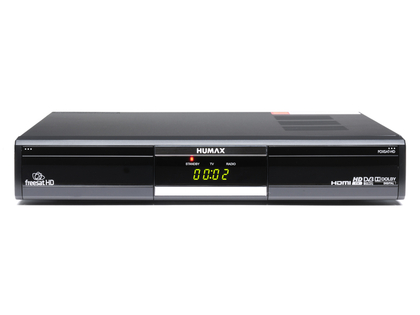
Humax Foxsat HD
The first hi-def Freesat receiver is still a must-have
The آ£125 Humax was the first HD receiver available and it's wonderfully specified. Its back panel crams in two Scarts, one HDMI, an Ethernet port, USB, component video, AV phonos, an optical audio output and a standard F-connector.
Pretty much everything you need for either a simple box and TV combination, or high-end home theatre hook-up. Image quality is channel-dependant.
At launch, the only HD service came from the BBC, although ITV has since launched its own HD offerings.
Thankfully, images from the Beeb are simply gorgeous, with ravishing levels of detail. Overall, this little Humax is impressive. It's well-built, looks smart and is generously specified.
Read: full Humax Foxsat HD review
Price check: get cheapest Humax Foxsat HD price

Metronic Freesat Kit
Metronic bundles its Freesat HD receiver with a dish kit for DIY Freesat installation
The receiver is well-made, roughly the same size as a box of Black Magic, and is powered by an external 12V DC power supply.
Yet it has all - or most - of the features of other Freesat HD units.
The front panel lacks a display - all you get is a red LED to indicate standby - but there are tiny buttons for standby plus channel and volume up/down.
Picture and sound quality are excellent, the HD 100 proving more than a match for more expensive Freesat hardware. Detail levels are impressive, and the upscaling of standard-def to hi-def is handled well.
Read: full Metronic Freesat Kit review
Price check: get the cheapest Metronic Freesat Kit price

Humax HDCI-5000
Humax's affordable FTA HD receiver is a great performer
In 2006, before Humax's HDCI-5000 was born, the HDCI-2000 was one of an elite breed.
It wasn't the first FTA HD satellite receiver, but the 2000 could accommodate the cutting-edge H.264 and DVB-S2 standards.
You could use it to watch the BBC HD channel and also tune into the emerging European HD channels. The HDCI-5000 sells for about آ£100 less than its predecessor and is, alas, nowhere near as svelte in appearance.
However, both picture and sound quality are first-rate, hi-def channels standing out with a rich visual texture and vivid, natural colour. If you're after a reasonably priced HD receiver and aren't bothered about the bells or whistles, the HDCI- 5000 is worth considering.
Read: full Humax HDCI-5000 review
Price check: get cheapest Humax HDCI-5000 price

Golden Interstar GI-S900CI
Yet another affordable PVR-upgradable HD receiver catches our eye
German brand Golden Interstar is new to us. Here, we look at its GI-S900CI - a single-tuner receiver with support for DVB-S2 and hi-def, in addition to regular standard-def DVB-S.
Features include HDMI and component hi-def outputs (with upscaling of standard-def), CAM emulation and a pair of CIs.
Picture and sound quality from HD channels like Arte and BBC HD produce intricate detail and vibrancy.
A noticeable drop in quality can be seen after changing to SD channels. Changing channels and menu access are both fast, but the scanning speeds beat those of many more expensive units we've tested.
Read: full Golden Interstar GI-S900CI review
Price check: get cheapest Golden Interstar GI-S900CI price

Echolink EL-7020 HD IR 2CI
Hi-def, PVR upgradability, multimedia playback and blind search for آ£200
We've seen a fair few hi-def/DVB-S2 receivers with PVR support recently.
Thing is, they tend to be rather expensive. The midi-sized Echolink EL-7020 HD IR 2CI bucks the trend by providing this functionality for a mere آ£179.
Sure, it doesn't include the USB hard drive you'll need for PVR operation, but these are cheap enough nowadays. Bonuses include HDMI and component hi-def outputs, blind search, 2-slot CAM emulation and a pair of CIs.
BBC HD demonstrates the extent of the picture quality that the 7020 can muster. A direct comparison between the 7020 and a Sky+ HD box reveals little discernible difference, displaying radiantly pure colour, stupendous depth and crisp detail.
Read: full Echolink EL-7020 HD IR 2CI review
Price check: get cheapest Echolink EL-7020 HD IR 2CI price

Technisat HDFS
Technisat launches its first Freesat HD receiver with multimedia and streaming thrown in
The HDFS is its first Freesat receiver offering standard and hi-def reception. It has two operating modes - Freesat and Technisat mode.
In Freesat mode the receiver scans for Freesat channels only, prompting you to enter your postcode beforehand to set regional channels.
You can only access the Freesat EPG while in this mode. The Technisat mode is for multi-satellite users and has many features offered by a conventional satellite receiver. Genre searches can be slow but the software is pretty slick on the whole.
Standard-def pictures can look a tad soft, but are still acceptable. HD looks sharp all round, whether you're watching BBC HD or FTA HD channel Luxe HD.
Read: full Technisat HDFS review
Price check: get cheapest Technisat HDFS price

Goodmans GFSAT200HD
True colours shining through
Don't let the brightly-coloured flashing lights around its edges distract you from some eye-catching tech inside this LED backlit telly.
As is often the case with Philips 2009 sets, there's some disadvantages; you have to be careful with the 42PFL9903H's bountiful Perfect Pixel HD settings to achieve picture greatness, but it's worth the commitment.
And unlike most flat tellies, the 42PFL9903H's sound quality is excellent. Two subwoofers tucked away on the TV's rear give a reasonably dynamic, wide-ranging and clear soundstage that goes well beyond the flat TV norm.
Read: full Goodmans GFSAT200HD review
Price check: get cheapest Goodmans GFSAT200HD price

Humax Foxsat HDR
The first Freesat+ HD PVR, and the only serious satellite rival to Sky+
With the arrival of the Humax Foxsat-HDR there is finally a subscription-free rival to Sky+, the de facto satellite TV PVR in the UK.
Previously, recording a Freesat broadcast meant resorting to antediluvian methods such as using a separate DVD recorder or VCR in conjunction with a Freesat receiver.
The system works almost flawlessly and can deliver top-quality broadcast images and sound. Directly comparing simultaneous broadcasts on Freesat, Freeview and Sky (using my third LNB) show that this system is on a par or sometimes better than its rivals.
Standard definition BBC broadcasts and most other channels look as good on the Humax as they do on Freeview and Sky.

Read: full Humax Foxsat HDR
Price check: get cheapest Humax Foxsat HDR price

| |
Read More ...
Review: Audioplan Kontrapunkt IVB

Audioplan is a German operation that has been around for nearly 30 years. While its prime activity has long been the creation of a small, but highly refined range of speakers, it has also played a major role in emphasising the importance that accessories in the broadest sense have in the final performance of a hi-fi system.
A two-way miniature invariably supplied with matching stands, the original Kontrapunkt was launched way back in 1984 and claims to have been: "the first serial production loudspeaker with spikes and sand filling".
That's as may be; the little Kontrapunkt has gone through several distinct stages of evolution, as its IVB suffix clearly shows, for example abandoning spikes in favour of Sicomin AntiSpikes when the first Mk IV model appeared in 1997.
Ten years on, Audioplan introduced this آ£2,898 per pair Kontrapunkt IVB. It's still a tiny two-way miniature, but an exceptionally solid and refined one.
The speaker itself weighs a surprisingly hefty 9.4 kilograms, but that pales into insignificance when you try to lift the matching pedestal stand, which totals 29 kilograms (including 20 kilograms of sand fill). It's almost as though the pedestal 'raises the floor' to support the speaker proper, although it's apparently possible to adjust the tonality by varying the amount of sand.
It's a very pretty loudspeaker (and pedestal), with a choice of four real-wood veneers – cherry, beech, maple and apricot – or four paint finishes (grey, white and black enamel, and black high gloss). It's also very heavily built, with walls up to 65 millimetres thick.
Heavy duty twin terminal pairs, plus substantial silver-plated links, feed an encapsulated crossover. The small main driver has an 80-millimetre doped paper cone and is mounted above a mechanically decoupled 25-millimetre fabric dome tweeter and below a slot-shaped port.

The AntiSpike coupling consists of small discs, about three centimetres in diameter and a few millimetres thick, which sit on three similar looking discs recessed into the top surface of the pedestal.
The base of the pedestal has a small plinth which extends the stability footprint and again sits on AntiSpikes – four in this case.
Sound quality
Tiny loudspeakers are bound to lack bass weight and loudness capability, but they also have significant advantages in several areas.
Small enclosures are bound to produce similarly small cabinet coloration, and their wide dispersion promotes good imaging; small main drivers operate higher into the upper midrange without difficulty and integrate better with a tweeter.
And it's the quite wonderful stereo image, precision and focus that really sets this small speaker apart from the herd. The above reasons do indeed contribute, but such advantages can only be as good as the specific implementation.
It's abundantly clear that this model's painstaking long-term development, and its consequent excellent coherence and very low levels of coloration, make a major contribution to its superior imaging.
Although deep bass isn't on the agenda here, and the lower mid sounds a little lean, there's sufficient port-assisted midbass to keep the speaker well clear of walls and thus add air and spaciousness to the imaging.
There's also a touch of chestiness through the lower registers, but the mid and presence voicing and coherence are about as good as it gets and are more than fair compensation.
Related Links
| |
Read More ...
CES 2010: Intel unveils 25 new processors in 2010 'family'

Intel has officially announced its Intel Core 13 and Core i5 processors – among 10 new chipsets, 25 new processors, 802.11n Wi-Fi and Wimax products with new Intel My WiFi features and introduced its 32 nanometre offerings.
Intel's announcements hardly come as a shock, but are important with the introduction of new Intel Core i7, i5 and i3 chips coinciding with the arrival of Intel's groundbreaking new 32 nm manufacturing process.
"Intel is unveiling several platform products, including more than 25 processors, wireless adapters and chipsets, including new Intel Core i7, i5 and i3 processors, Intel 5 Series Chipsets, and Intel Centrino Wi-Fi and WiMAX adapters that include new Intel My WiFi features," says Intel's release.
"More than 400 laptop and desktop PC platform designs are expected from computer makers based on these products, with another 200 expected for embedded devices."
Adapt to user's needs
"For the first time, there's a new family of Intel processors with the industry's most advanced technology available immediately at virtually every PC price point," said Sean Maloney, executive vice president and general manager of the Intel Architecture Group.
"These smart processors adapt to an individual's needs, automatically providing a 'boost' of performance for everyday applications.
"They become energy efficient to the point of shutting down processing cores or reducing power consumption to provide performance when people need it, and energy efficient when they don't."
The Intel Centrino brand now represents Intel's wireless products with three new Intel Centrino Wireless adapters feature advanced 802.11n multi-stream capabilities and dual-band support for WiFi, offering users 'up to 8 times greater speed, consistent coverage and reliable connectivity while consuming minimal power'.
All the adapters support Intel My WiFi Technology, which allows users to turn their laptop into a hotspot and directly connect wireless devices to their laptop.

| |
Read More ...
Report: Ford's new cars will read out Twitter

Ford has revealed its latest in-car entertainment and control systems, with its new MyFord tech including the option to have Twitter feeds read to drivers.
Ford's new technology will first appear in Edge and Focus model cars in the next 12 to 18 months, with the auto manufacturer promising Tweeting behind the wheel in a year's time.
MyFord voice control
MyFord includes two 4.2-inch LCD screens on either side of the speedometer, an 8-inch touch screen in the dash and a five-way button steering wheel control to give the driver more control over the heating and air conditioning system, entertainment system, navigation system and mobile phone.
"With MyFord driver connect technology, we realized we weren't necessarily competing with other automakers, but we were really redefining how customers interacted with their cars," said Jim Buczkowski, Ford director of electronics and electrical Systems Engineering.
"We had to look very closely at the evolution of hand-held devices in terms of user interface, connectivity, productivity and entertainment applications."
"What the mouse did for the PC, we need to create for the automobile," Buczkowski told the Wall Street Journal.
"The first version of Sync was impressive, but this blows the doors off," added Carey Butler, v.p. of professional engineering services at Bsquare.
Distraction or control?
However, safety campaigners have been quick to jump on the news as yet further evidence that new technologies are driving us to dangerous levels of distraction in the car. Ford and other in-car tech specialists have, in response, claimed that listening to Twitter feeds and text messages and the like being read out to you is considerably safer that looking at a screen to read them while doing 100mph on the outside lane of the M1.
Doug VanDagens, Ford's global director of connected services, told CNN that people read Twitter feeds and send text messages while they're driving and that Ford is only trying to make those activities safer.
"We take what people do -- they talk on the phone, they fumble with mp3 players, they look at maps. We take these activities and make them safer," he said.
Christie Hype, a spokeswoman for AAA, was quick to hit back, noting: "The more things that are going on in a vehicle, the more things can distract a driver…You only have so much attention to give, and we really want everyone to keep their attention on the roadway for safety reasons."
More study of the tweeting by voice while driving would need to take place to make an absolute determination as to what effect Ford's announcement will have on distracted driving, she said.
As previously reported, Ford's new tech will also generate a Wi-Fi hot spot in the car to let passengers and (presumably, parked) drivers get online in the vehicle.
The Twitter-reading function works with an app called Open Beak. Ford's new in-car tech will also let you play internet radio via Pandora's mobile app.

| |
Read More ...
CES 2010: Nvidia announces Tegra 2 chips

Nvidia has announced Tegra 2 – the next generation of its ARM-designed platform, and the chip can cope with Windows CE, Android, Windows Mobile and possibly even Chrome OS.
According to the graphics giants Tegra 2 is a 40nm chip, that's lower power than Intel's Atom and, apparently, Qualcomm's snapdragon.
The next generation Tegra has the world's first dual-core ARM Cortex A9 CPU running up to 1GHz and eight independent processors to handle web browsing, HD video encode and decode and mobile 3D gaming
According to Nvidia's release, it's ten times faster than the processors used in smartphones today, and up to four times the performance of the previous generation Tegra processor with advanced TSMC 40nm process with active power management.
Tablets
Nvidia suggests that partners will be unveiling five to ten inch Tegra powered tablets at this CES, although there will no doubt be a delay until the first kit is available.
And Nvidia is backing tablets rather than folding devices, because it believes that people expetc a Windows PC when they see a clamshell.
"A year ago there was a lot of talk about clamshell devices," said Nvidia's Mike Rayfield told Cnet.
"The tablet is a good entree from a (telecommunication) carriers standpoint. It would avoid confusion of people getting clamshells and assuming they're getting a Windows PC."
"Tegra 2 is in production. Hundreds of development systems out in the wild. You'll see devices with Tegra 2 in the marketplace in 2010," he added.
"The GPU (graphics processing unit) is used extensively in flash acceleration. We believe that will be a significant differentiator."
Tegra fact list from Nvidia:
o 3D touchscreen user interfaces
o Amazing battery life— always-on and always-connected
o Adobe Flash Player 10.1 acceleration for streaming video and 3D mobile games
o Resolution ranging from four-to-eight times that of smartphones
o Form factors and screen sizes ranging from 5-15 inches
o Immersive gaming, vivid photos and video, and crystal-clear audio
"Consumers can now get the tablet experience they've always dreamed of and they can leave the power cord at home. Only NVIDIA Tegra can make this happen. We're driving tomorrow's tablets today." said Michael Rayfield, General Manager of the Mobile business, Nvidia.

| |
Read More ...
CES 2010: In pictures: Asus Eee PC Keyboard

It's one of the most bizarre concepts for a computer we have ever seen, and since it was announced back in CES 2009, TechRadar has been scratching its collective head whenever the Asus Eee PC Keytboard is mentioned.
But now the device looks to be getting a release, you can't help but fall in love with it.

For the uninitiated, the device is essentially an Eee PC stuffed into a keyboard (hence the Ronseal-esque name), complete with a 5-inch (800أ—480 resolution) multi-touch display.
Asus has gone back to the drawing board with the keyboard, offering up an easier to use user interface. This means that most applications are one or two touches away, so there's no getting lost in myriad menus.
Powering the keyboard is an Intel Atom N270 and the device comes with 1GB of RAM and either 16GB or 32GB of solid state storage.
Asus doesn't expect you to use it just on its own, although as there is a screen the option is there.
Through something called Eee WiCast wireless HDMI, you can hook the keyboard up to a monitor and stream HD (720p) media to the screen – as long as you are about five metres away.

Asus told TechRadar that it is under no illusions that the Eee PC Keyboard will become iPod like in popularity. It knows it's a niche product and it's being treated as such.
The Asus Eee PC Keyboard is out in the US in February for $499. Expect it to wing its way to the UK in Q2.

| |
Read More ...
CES 2010: HP shows off Android netbook concept

HP has been showing off a concept netbook based on Android at CES. Packing a Qualcomm Snapdragon processor, an HP rep was happy for us to take these snaps but held his hands underneath it when we fondled the netbook "in case we dropped it."
As the Snapdragon concept boasts integrated 3G, the netbook is always-connected.
The prototype looks like a very thin HP Mini, but doesn't have an escape key "because in Android, you always go back" said our rep.
The HP Slate shown off by Steve Ballmer last night has already left Vegas, despite HP promises that it would be on display at another event in the city.
As well as that Slate, HP is also rumoured to be working on an Android version, too. It'll be interesting to see the price differentiation between the two.
And then, of course, there's Chrome OS. Where does that fit in?

| |
Read More ...
CES 2010: Sony and Samsung in 3D OLED face-off

Not content with announcing that they will bring 3D imaging technology to market in 2010, both Sony and Samsung showed off some rather cool 3D OLED concepts off at CES 2010.
Sony had a whole section dedicated to 3D OLED and while it's unlikely these TVs will see the light of day for at least a year or two, it does point to just how stunning 3D on TVs will be in the future.
Using OLED technology, 3D is brighter than it has ever been. Brightness has always been an issue when it comes to 3D but Sony's OLED sets not only solve that problem, they also make your jaw-drop due to just how dazzling the images look.
Samsung also showed off some OLED concepts, but instead of showing off a pure OLED version of 3D, they displayer AMOLED displays.
Though not as dazzling as what Sony had at its booth, again the idea of watching 3D on a bright, wafer-thin television set is a great one.
We are hoping, though, that Samsung can sort out the dead pixel problem it seemed to have in its AMOLED 3D demos. When we picked LG up on this, however, they insisted it was because the panels were still very much in the concept stage.


| |
Read More ...
Alienware's new netbook can run Crysis

Alienware has just announced a new Nvidia-powered gaming netbook with enough processing power to run high-end PC games such as Crytek's sublime Crysis - still, for many, the benchmark title that sorts the real gaming machines from the try-hards.
The new Alienware M11X is a super-portable machine with an 11-inch screen that runs at a 720p resolution (1280x720px).
Gizmodo was quick to put the new mini gaming machine through its paces and ran both Crysis at 50FPS and Call of Duty at 30FPS, with both games' graphical options set to "High".
2 hours of intense gaming
Alienware revealed its new mini gaming marvel at CES 2010 this week and, in even better news, also revealed that it will cost US gamers less than $1000, and that it has a battery life of 6 1/2 hours, which lasts about 2 hours during "intense gaming".
Whether or not there is a significant market out there of PC gamers willing to shell out that kind of money for what is essentially a very fast netbook remains to be seen.
TechRadar has contacted Alienware's UK PR for further details on UK release and pricing. And we definitely look forward to getting one of these babies in for review sometime very soon, to really test out those manufacturer's claims on battery-life and performance.
For now, you can check out the new microsite for Alienware's M11X and just drool a little.

| |
Read More ...
CES 2010: In pictures: Samsung CL80 OLED touchscreen camera

The Samsung CL80 is an impressive new compact from the Korean manufacturer that boasts a 14.2-megapixel resolution, Wi-Fi connectivity for instant on-camera uploading and a a 3.7-inch WVGA AMOLED touch screen.
The casing is also quite special, using hydro-forming technology. This, according to Samsung, gives a better finish to the camera.
The camera is DLNA compliant, while you can email off pictures directly from the camera using a QWERTY keyboard that appears on the touchscreen. You can also upload images directly to Facebook and Picasa as well as videos to YouTube. The camera will shoot 720p 30 frames-per-second movies in the H.264 format.


| |
Read More ...
CES 2010: Intel: wireless tech needs to get better, faster

During his keynote at CES Intel's CEO Paul Otellini said that while computing was evolving and becoming about more than the PC, connectivity was key to this change.
"Smartphones truly embody personal computing," Otellini said. "Wireless connectivity is critical and 3G is great, but it's not fast enough. 4G technologies like WiMAX are needed to deliver on the promise and potential of these new devices."
Otellini demonstrated 4G technology that has been on show at CES and continued to preach the message about Wimax – he stated that 700 million people will be covered by WiMAX by the end of 2010.
"Computing in the home is rapidly expanding beyond the PC," Otellini said. "The TV will continue to be a focal point of the home while becoming smarter, much in the way phones are evolving into smartphones. New user interfaces and forms of connectivity will change the way we interact with entertainment in the home."
Intel's CEO also welcomed the advent of 3D in the home and cinemas, saying that creating 3D content requires a "ton of computing power." Otellini also said there are some powerful PCs available today that are capable of creating 3D content at home.
To prove his point, he demonstrated real-time creation and editing of 3D using a Core i7 PC.
In a move to combat the rise of Android running on ARM-based devices, Otellini also announced the beta launch of an app store for Atom-based devices called the Intel AppUp Center and said that Acer, Asus, Dell and Samsung have already pledged support. The announcement follows on from the Atom Developer Program that was launched back in the Autumn.
Otellini also described how advancements in microprocessor technology will continue to transform how people enjoy media at home. He showed new ways to visually search for TV shows, internet access to videos and other applications on a yet-to-be introduced Orange media set-top box powered by the Intel Atom CE4100 system on a chip.

| |
Read More ...
CES 2010: Microsoft keynote: it's all about the PC

In the opening CES keynote this year, CEO Steve Ballmer and Entertainment and Devices president Robbie Bach repeated the "three screens plus the cloud" story that Microsoft has been pitching for a while, although they concentrated on the PC and TV screens, brushing past Windows Mobile with a demo of the already-launched HTC HD2, the usual vague hint from Ballmer about bringing "the Zune music and video service to other Microsoft platforms" and the promise of announcements at Mobile World Congress next month.
For the PC, the emphasis wasn't just on the success of Windows 7, although Ballmer produced some impressive stats about 50% increases in PC sales and 94% user satisfaction with Windows 7; it was about showing that the PC can compete with upstarts like ebook readers and instant-on smartbooks running Android.
"The quality, value and choice in Windows PCs simply can't be matched on any other platform," claimed Ballmer. "No matter what the source of the content, what kind of content, video, text, whatever, Windows PCs will absolutely offer the greatest variety and the most interesting content and entertainment experiences in the world."
Cool things
"There's lots of cool things out there," admitted Ryan Asdourian, a senior program manager for the Windows team; "there's Kindle, there's Sony, there's Nook – but all of this can be done on your PC". He showed off the Graphic.ly digital comic book reader software and the Blio reader, with a million books in the store (including interactive textbooks) and Ballmer gave a sneak preview of a an HP slate PC running the Kindle software. (The slate isn't the Courier prototype that got so much attention last year but HP CTO Phil McKinney confirmed to us that it is a real product that will be launching this year).
When Ballmer says "we're talking about something that's almost as portable as a phone, and as powerful as a PC, running Windows 7," the obvious comparison is to devices like the Lenovo Skylight and the 'proof of concept' Android netbook HP will show in the Qualcomm keynote (both running on Qualcomm's Snapdragon platform) or the Entourage dual-screen e-reader (which has a second Android-powered screen for watching video and browsing the web).
He also showed the Dell Adamo XPS waking from sleep fast enough to draw applause – and fast startup is one of the major advantages claimed for alternative platforms. PCs can be that small and light, is the Microsoft message; they can start up that quickly – and they can run all your familiar apps.
Similarly as Sony and Samsung and others announce internet streaming and premium video services directly to TVs (and the PlayStation), Microsoft demonstrated sophisticated home entertainment developments like version 2.0 of Microsoft's Media Room IPTV offering and Xbox offerings that will ship in 2010, from the next version of Halo to Project Natal.
Blue skies for research
Both Media Room 2.0, which lets you take programmes from IPTV services like BT Vision and view them on a PC, Xbox or mobile device and the latest Bing maps, with Silverlight-enabled transitions that zoom from map view to satellite imagery to 3D street scenes with optional weather effects like snow, are good examples of what Microsoft means by 'plus cloud'.
As Ballmer put it, "We believe in an approach that combines the power of immersive and intelligent software that runs on devices along with smart and intuitive services accessed instantly through the cloud".
But like Project Natal and the touch interface for the HP slate, they're also perfect examples of Microsoft's secret weapon – Microsoft Research.
For years Microsoft has been spending a significant proportion of its budget on a wide range of research (and collaboration with universities and other research centres). The Photosynth technology behind the 3D environments on Bing Maps that let you explore places in detail comes from MSR, as does everything in Project Natal except the 3D camera (which was developed by an Israeli startup Microsoft bought last year).
"This is why we send the Neil Armstrongs of our company, our world-class engineers, psychologists, ethnographers, physicists, chemists, vision specialists, and design gurus to the farthest realms of the sci-fi world," said Bach; "to think and apply rigorous science to computer vision, machine learning, user interfaces and language processing."
Being able to control your Xbox by moving your body is the culmination of 20 years of research and over a thousand patents on digital ink, speech, touch and air gestures (Natal draws on the touch features in Windows 7, Zune HD and Surface – another Microsoft Research project). Most of the technologies Microsoft Research works on don't see the light of day for five to ten years or more, but this is where the products that really differentiate Microsoft come from.
In the past, Microsoft has come up with fascinating technologies in research that haven't made it out of the lab – or that haven't really made an impact when they have. But more and more, Microsoft is turning research into successful features and products.
As Ballmer spent the first half of the keynote demonstrating, Windows 7 has done a lot to reinvent the PC, but Microsoft is still dependant on PC and device manufacturers and software developers to take advantage of the platform it's built. The technologies that come out of Microsoft Research may give the company a little more control over its own destiny.
And of everything Ballmer and Bach showed in the keynote, including the HP slate and the preview of Halo Reach, it was Project Natal that drew by far the most applause.

| |
Read More ...
Microsoft: 'Natal does not require a dedicated Xbox 360 CPU core'

Following yesterday's news that Microsoft announced Project Natal would use up to 15 per cent of the power of the Xbox 360's CPU, some development sources are now claiming that Natal will actually use closer to a third of the processing power of the console.
Microsoft has moved quickly to deny the claims, which have immediately led to anxiety amongst gamers concerned that Natal might not be completely compatible with high-end games that require as much processing grunt as their Xbox 360 can provide to be fully enjoyed.
Following the emerging reports yesterday that Natal would use 10-15 percent of the Xbox 360's "computing resources" an unnamed source familiar with the development of Project Natal told Kotaku that the new peripheral would actually need to use up to a third of the 360's CPU.
Kotaku reports how its source explained: "While Natal wouldn't use the horsepower of a full core of Microsoft's three-core central processor, it would need to use a core on its own in order to reduce latency between human input and what happens on a TV screen. That would leave the CPU's other two cores for the other processes needed to run Natal-compatible Xbox 360 games.
Forza 3 Natal still possible
"High-end graphics such as those in a richly-rendered racing game such as Forza 3 could still be possible, the source told Kotaku, but compromises might have to be made for "slightly reduced" artificial intelligence, sound or physics."
Microsoft immediately shot down the claims that Natal would use up to 33 per cent of the console's processing power, stating: "The software behind 'Project Natal' is what makes it special. While we aren't able to share further details at this point, we can assure you that 'Project Natal' does not require a dedicated Xbox 360 CPU core."

| |
Read More ...
CES 2010: Opinion: Ballmer blew it
Every day, Apple shareholders wake up and thank their lucky stars that their chosen firm's CEO isn't Steve Ballmer. The Gordon Brown of tech could make even the Apple Tablet as desirable as some horrible bum disease.
Think we're being unfair? Check out Ballmer's CES keynote, where he managed to turn some pretty amazing technology into something with all the excitement of a wet Wednesday in Bridlington.
And Microsoft does have some pretty cool stuff. You know that 3D Apple patent everyone's getting excited about this week? Microsoft already has a 3D interface: Project Natal, which ships later this year.
Wouldn't it have been awesome if Ballmer had shown Natal working on Windows as well as on the Xbox, which we're reliably informed it does? No such luck.
The most exciting thing about Natal this year was Ballmer's carefully chosen words: Natal "will work on your existing console", which could, maybe, possibly mean that there's a new kind of Xbox heading for the High Street.
Show off the tablet!
3D isn't the only thing Microsoft's unveiling before Apple does: there's the tablet, too. Apple may or may not be showing a tablet computer at the end of this month, but Steve Ballmer was definitely standing on stage with not one, not two, but three tablets.
How are they different from the tablets Microsoft has tried and failed to interest us in for aeons? Ballmer didn't say. What's so great about them? Ballmer didn't show us. Why should we care? Ballmer didn't appear to know.
Again and again Ballmer apparently preferred to talk for ages about things we already know about – Look everybody! It's Windows 7, and I'm going to talk about it for a week! – rather than things we'd like to know more about.
We know Windows Mobile 7 is coming, and it's a proper new mobile OS rather than the stopgap Windows Mobile 6.5. "We'll have more to say about phones next month," Ballmer said.
The next generation of Windows' in-car systems was glossed over, too, as was the gaming power of DirectX 11 – but the Mediaroom video on demand service was demoed for seventeen billion years. And so, interminably, on.
Today, Twitter is largely laughing about it – if it's being discussed at all. As legendary tech pundit Andy Ihnatko put it: "You can tell that your industry keynote didn't do its job if an hour later, it isn't a trending topic on Twitter."
He's absolutely right: as we write this, Google's Nexus One is in the trending list. Microsoft products and people aren't. We're not surprised: if Steve Ballmer can't get excited about Microsoft's stuff, why should anybody else?

| |
Read More ...


1 comment:
Fantastic goods from you, man. I've understand your stuff
previous to and you are just extremely wonderful.
I actually like what you have acquired here, certainly like what you're saying and the way in which you say it.
You make it enjoyable and you still take care of to keep it sensible.
I can not wait to read much more from you. This is really a wonderful site.
Look into my website - Weight loss Clinic
Post a Comment