

Firefox 3.6 delayed until spring

Firefox 3.6, which Mozilla had previously confirmed was to launch this month has been delayed until spring 2010.
The Mozilla wiki has been updated to include "ship Firefox 3.6" as a goal for the first quarter of 2010.
Firefox 3.6 brings minor tweaks and some personalisation tools to the browser and a claimed 25% reduction in start-up time on Windows.
The browser will also bring the potential to take advantage of accelerometers as well as open, native video support.
Firefox 4.0, which was due to launch in 2010 has also been pushed back – this time to "late 2010 or early 2011," according to the Mozilla wiki. Firefox 4.0 beta will be made available in the summer of 2010.

 |  |
Read More ...
Guide: How to get the Windows 7 look in Linux

Linux fanboys will probably have had one thought when they saw this article's title: 'Why would you go to the trouble of making Linux look like Windows when Linux already looks pretty good?'
Well, there are a few good reasons. Firstly, you may want to install Linux for someone who's only familiar with Windows, and you'd like to make their working environment as friendly as possible.
Secondly, it could help smooth the process of integrating Linux into an office environment. Thirdly, there's a lot to be said for Microsoft's design aesthetic; it's functional and easy to use.
Finally, and perhaps most importantly, there's a certain amount of geek heritage in making one operating system look like another. Look at the number of desktops that can be emulated from KDE, for example.
Getting the Windows look is only another step in the same direction. We're going to try and ape the current generation of Windows – the newly released Windows 7 – and merge some of its features into the Linux desktop, and we've decided to use KDE to do it.

This is because KDE is more Windows like than Gnome and the other Linux desktop environments. Its file manager behaves more like the Windows equivalent and its applications behave more like their Windows counterparts.
However, many of our suggestions will work for Gnome too, and you can always run KDE applications within the Gnome desktop if you want the best of both.
1. Colour scheme
KDE has the most comprehensive theming engine of any Linux desktop. If you can see it, you can almost certainly change it. We're going to start our theme experiment with the Windows colour scheme. This is easy to emulate and, as it's a non-destructive process, it can quickly be switched back with just a couple of mouse clicks.
The Colour Scheme configuration panel can be found by clicking on the System Settings application from the Launch menu and then clicking on the Appearance icon in the top right. This is the main page for changing the look of your desktop, and the colour palette can be adjusted by selecting the 'Colours' option.

This will open another window that lists a selection of installed colour schemes, with the current one selected at the top of the list. Despite the KDE 4 theme being mostly blue, there's still a big difference between KDE and the palette used by Microsoft.
Click on the Colours tab on the right to see a list of the current colour configuration. It's a big list, including elements such as 'active window background', 'inactive title bar', 'hover decoration' and 'neutral text', but you can apply your changes as you go to see the results, and a small preview at the bottom of the window gives an indication of how things will look.
The most significant change is the window background colour. Click on the colour box to the right of this label to open the colour selector, and enter an HTML value of B7D0E6. This is the closest match to the Windows blue we could find, and if you click on the 'OK' and 'Apply' buttons, you should see your desktop leap in the direction of Windows 7.
The other major colour changes include a button background value of CFDCE9, a selection background value of 96E2FB, an inactive title value of BCD4EB, an inactive titlebar text value of 485359, and switching selection text to white and active titlebar text to black.
The result should be a very Windows-like palette. You need to click on the Scheme tab followed by 'Save Scheme' to save your changes.
2. Window decoration
The next step is to alter the decoration that surrounds the window. Unsurprisingly, this is the job of something called the Window Decorator, and while KDE's is very flexible, it's not the most user-configurable.
The winner of that accolade goes to the Emerald project, which is closely tied to the Compiz framework used by Gnome to do all the graphical frippery we've come to expect from the Linux desktop. Emerald needs to be installed along with Compiz and its dependencies, but this can be accomplished with either the Kubuntu package manager or your package manager of choice.

You then need to launch the applications from the command line by typing compiz-manager followed by emerald-thememanager. The first thing you'll notice is that your window borders will switch to a hideous shade of red. This is a sign that Emerald is working properly.
You should also see the Emerald theme manager now sitting on your desktop, and it's this we're going to use to create our new window decoration. If you visit www.compiz-themes.org and download the Who Needs Windows 7 theme, you'll have a good foundation for building a slightly more accurate theme.
To install and use any Emerald theme you download, click on the Themes tab in the main window of the Emerald manager, followed by 'Import'.
Next, select the downloaded file. This should then appear in the Themes list, and it can be activated by clicking on it. Within Emerald, theme editing updates the desktop in real-time, which makes it perfect for experimentation. We'd suggest opening a screenshot of Windows 7 and switching to the Edit Themes view.
From there, we found that setting all the blend colours to B7D0E6 gave a closer result than the default Windows theme, as did increasing opacity to 0.95.
However, as with Windows 7, window opacity is a matter of taste. Darkening one of the blend colours also emulates the Windows radiant. If you switch to the Titlebar page, we changed the vertical and horizontal offset to 13 in an attempt to copy the new style of button layout.
We also increased the size of the font used in the titlebar and reduced the titlebar height to 35. The button images aren't perfect, but they're fairly representative of those used by Windows 7.
3. Adding functionality
There's obviously a lot more to Windows 7 than the refined visuals, but some of the new functions are closely tied to its desktop appearance, and you can modify KDE to take on similar characteristics.
One thing you notice in Windows 7 is its lack of menus. Those that do appear tend to be beneath the toolbar icons and are a mixture of icons and dropdown text. You can emulate this in KDE by pressing [Ctrl]+[M] to remove the menu bar, but this will stop you getting to the functions you need.

The solution is to drag those functions into the toolbar using the 'Configure Toolbars' function in the right-click menu of any KDE toolbar. This lists most of the options within the menu, and you can drag them onto a current toolbar or create a new one to copy the menu's functionality.
Another aspect of Windows 7 that combines the visual with the functional is its use of desktop widgets. These have become an integral part of the desktop personalisation process, and KDE 4 has made the same leap to making them part of the standard desktop.
KDE's widgets are called Plasmoids. Even the desktop window that holds your files is a special kind of Plasmoid, and this can be forced to use the entire desktop with the Rescale widget by dragging it to fill the whole screen when Plasmoids are unlocked. Alternatively, get rid of it completely by clicking on the '-' symbol in the Plasmoid list.
4. Desktop widgets
A default installation will include tools for updating news, as well as the usual array of widgets for things such as weather and system performance. There are dozens more you can install by searching for plasmoid in your distribution's package manager.
If you're not too keen on KDE's offerings, you can install Google's Gadget equivalents, as these come as both GTK+ versions for Gnome and Qt versions for KDE users, too.

Another new feature in Windows 7 that KDE can emulate is its ability to snap windows into various divisions of the desktop. But for this to work, you need to be using KDE's window manager rather than the Emerald window manager that we're using for the Windows-like borders.
If you do stick with KDE's manager, the window snapping options can be found by right-clicking on the window border, selecting 'Configure Window Behaviour' and clicking on the 'Moving' button in the list.
You need to enable the Centre snap zone and give this a value of around 25 pixels in order to approximate the handy new snapping functionality of Windows 7.
5. Desktop panel
The final part of the KDE 4 desktop that can be manipulated to behave more like Windows 7 is the desktop panel sitting at the bottom of the screen. The default 4.3 look for this is called Air, which is light-grey and low-contrast (in fact, it feels somewhat similar to Mac OS X).
The default Windows 7 theme is similar to the glassy Aero look of Vista. You can change the KDE theme for the panel by right-clicking on the desktop and selecting 'Desktop Settings'. The appearance of the panel is changed by choosing a theme from the dropdown Desktop Theme menu, and we've found 'Oxygen' to be the closest match.

You can also pin applications to the panel in the same way that you can with Windows 7. From the Launch menu, right-click on the application you want quick access to and select 'Add to Panel'. Its icon will then appear.
You can rearrange the panel by clicking on the cashew icon on its right end. If the cashew symbol isn't there, click on the same symbol in the top right corner of your screen and click on 'Unlock'.
You'll then be able to drag, resize and arrange icons and sections of the panel just as you would a sentence in a word processor.

| |
Read More ...
GSM phone encryption cracked

A German security researcher claims to have cracked the secret code used to prevent eavesdroppers from listening in on mobile phone users' conversations.
In a presentation given at the Chaos Communication Congress in Berlin, researcher Karsten Nohl said he had compiled two terabytes of data in order to figure out the encryption key used to secure a GSM phone call or text message.
Nohl said that that his tables of data, when combined with some free open source software and a few thousand dollars of hardware, could enable someone to crack the encryption and listen in on calls.
Nohl didn't release a GSM-cracking device, which would be illegal, but said that a sophisticated programmer would be able to create one.
"I don't think anything we did was illegal," said Nohl, although "using what we produced in certain circumstances would be illegal."
The GSM Association has developed a stronger standard called A5/3, although adoption has not been widespread.

| |
Read More ...
World of Warcraft magazine free preview hits the web

Warcraft fans can now view 40 pages of the upcoming official WoW magazine free online.
Launching simultaneously in English, French, German, and Spanish editions, World of Warcraft magazine is a quarterly title running to 148 pages per issue, and no ads.
The mag is published by Future Publishing which also publishes TechRadar.
Editorial Director Julian Rignall explains the mission of the magazine in his opening letter, saying that the mag's main goal is "to show you Azeroth from a different perspective… Rather than simply tell you how to play, we're going to show you a wide variety of opinions on enjoying, exploring and extending the game's fun beyond the borders of the screen."

The free preview issue features strategies and advice from expert players, profiles of other players, and insight from WoW's development team. Every cover features specially commissioned artwork created by a Blizzard approved artist.
World of Warcraft magazine is available on subscription at آ£29.95 for one year and آ£52.50 for two years. US subscriptions are $39.95 for one year, and $69.95 for two years.


| |
Read More ...
In Depth: 5 most likely Apple products of 2010

With its regular keynote address at MacWorld Expo consigned to the dustbin of history all bets are off as to when Apple will lay down new product in 2010.
However, we'd expect them to start arriving in late January. Here is what we think you're in store for from Apple next year.
1. The Apple Tablet
The consensus amongst the industry is that the arrival of Apple's tablet device in 2010 is as inevitable as England making a hash of the first round of the World Cup. February is the most touted date for the Jesus Tablet.
"The new touch-sensitive device Apple is working on will have a screen that may be up to 10 inches diagonally. It will connect to the internet like the iPod Touch - probably without phone capability but with access to Apple's online stores", said the Financial Times (free registration required).
We're looking at a device that is essentially a super-sized iPod touch, capable of acting as an entertainment centre, web browser and email client. Excited? You should be, this is going to be huge.
2. iPhone 4G
Just to be clear, we're talking about a next generation iPhone here, not 4G broadband. The exciting news is that Apple is in the process of trialling the next generation iPhone.
The developer of the iPhone app iBart noticed an iPhone labeled 3,1 in their PinchMedia analytics logs. The identifier "iPhone3,1" appeared in Pandav's usage logs this November, and doesn't match any shipping iPhone (the last iPhone released, the iPhone 3GS, has the identifier "iPhone2,1".
The iPhone 4G release date and features haven't been announced, but we'd expect something much later than February (no point clashing with the iTablet, and June and July have seen previous iPhone releases). We expect more storage and perhaps a multi-core processor and Wii-like sensor?
3. Revamped Mac Pro
Apple followers will already know that the new Quad-Core i5 and i7 processors from Intel have featured in Apple's iMac range, but forget Quad-Core computing, Intel's new Xeon "Gulftown" processor offers 6-Core processing.
It will be sold under the name Core i9, and the rumour (from Apple Insider and The Mac Observer is that we could see it debuting in a revamped Mac Pro as early as first quarter 2010. Since it offers a reported 50% performance boost over quad-core chips there's a real reason to be excited about it.
"If paired with another chip, as Apple usually does in its high-end workstations, the processors will offer 12 physical and 24 logical cores." said Apple Insider.
4. iPod touch with video
The spectacular non-appearance of an iPod touch with a camera was 2009's biggest let down for Apple fans. Everybody was ready for one, and cases even appeared on the market, but Apple didn't deliver.
It has to make that right in 2010. Already the rumours from an "inside source" are stating that we can expect an iPod touch with a camera in the first quarter, and this time we believe them.

POINT AND SHOOT: The iPod touch needs a camera, and Apple has to deliver in 2010 [image credit: Cult of Mac]
5. iTunes offers streaming music service
Apple didn't just spend $80 million on the purchase of media streaming specialists Lala for fun. It's seen the buzz that Spotify has created and its wants a piece of that pie.
With its hands on Lala's engineers (who have already built a neat streaming music service) we'd expect to see some sort of streaming music subscription service coming to iTunes in 2010.
But will it work over 3G on your iPhone? That will depend on the carrier, and AT&T is already feeling a little overstretched.

| |
Read More ...
Ford offers HD radios with iTunes tagging

Audiophiles will be thrilled to hear that Ford is introducing high definition radios with features such as iTunes 'tagging' (the ability to virtually buy tunes on the go) in 2010.
The news follows Ford's announcements earlier this month about its plans to extend Wi-Fi access to its new car customers.
Ford is now set to be the first car manufacturer to offer factory-installed HD Radios with iTunes tagging via its new in-car Sync entertainment systems.
New in-car tech at CES 2010
"iTunes Tagging and HD Radio technology are strong new additions to the growing collection of Ford convenience features and technology we're offering customers to make driving even more enjoyable," said Mark Fields, president of The Americas.
We expect to hear more tech specs, pricing details and release plans from Ford at CES next month.
"Ford continues to lead the market in bringing advanced capabilities to popular vehicles. We are very pleased that HD Radio technology is an integral part of Ford's broad offering of new features," said Jeff Jury, COO of iBiquity Digital Corporation, the developer of HD Radio technology.
For more on HD Radio tech head over to www.ibiquity.com

| |
Read More ...
EA set to launch 'Wii Fit for men'

EA is set to launch what sources are referring to as 'Wii Fit for men' if the latest games industry scuttlebutt is to be believed.
EA recently hinted that hint that it was developing a fitness title within its sports division for a release in 2010, in a clear attempt to jump aboard the 'exergaming' bandwagon kicked off by Nintendo's own Wii Fit.
American soccerball
EA Canada's Alain Quinto tweeted that EA Sports is gearing up to reveal a brand-new game in January, with games site Destructoid claiming that EA's new IP will be an American football game for Wii called NFL Trainer.
Clearly this game is targeting the US market, as us Brits generally have about as much of a clue about the arcane rules of American Football as our US cousins have about proper football.
Destructoid's source also claims that the game will ship with a NFL football-shaped attachment.

| |
Read More ...
BT scuppers plans for universal fast broadband

BT has warned the Labour government that it will take legal action should the state push ahead with its plans to liberalise the UK's mobile phone spectrum.
BT wants the UK's wireless spectrum to be auctioned off, in direct opposition to the British government's plans to use it to extend fast and wireless broadband services to all.
Universal access to all to at least 2mbps broadband was a key part of the government's pledge to its citizens in this year's Digital Britain report – and a key pledge that it might not be able to deliver on, if BT's latest threats to limit access to wireless broadband for all become a reality.
Rural Brits suffer
There are considerable numbers of Brits that live in rural areas where fixed-line broadband services will simply not be able to be improved to the required government-pledged levels by 2012 – hence these households will be totally reliant on access to wireless broadband.
"Universal access requires changes to the way the airwaves are split between the UK's five mobile phone networks, so they can run mobile broadband services in rural areas where fixed-line services are too slow," reports The Guardian. "It also requires the sale of new space on the spectrum that will be freed-up when the analogue TV signal is switched off in 2012."
The five main mobile phone networks' current 3G licences are due to expire in 2021. The government now wants these licenses to be extended indefinitely. BT doesn't, having now sent a "letter before action" to current business secretary, Lord Mandelson, objecting to these plans and threatening a judicial review if they are implemented.
"BT has major reservations around the wireless spectrum proposals from the Independent Spectrum Broker," said a BT spokesman.. "The proposal to extend current 3G licenses indefinitely represents a gift of several billion pounds from the UK taxpayer to the mobile operators and is a barrier to competition and innovation in the mobile market."
"We would like spectrum to be auctioned in a way that is fair to all operators and stimulates competition in the market for both existing operators and new entrants," he added. "We are discussing our concerns with BIS and are hopeful that these will be addressed."
So much for Digital Britain then…

| |
Read More ...
In Depth: Computing tech that defined the decade

Bill Gates anticipated great things from the so-called "noughties" when he described it as the "Digital Decade" back in 2001.
"The innovations of this decade will be more than just a handful of new features," he wrote. "They'll transform the way the PC fits into our lives, and the way we think about computing."
Was he right? It's been ten years of rapid technological change; ten years of smaller, faster and cheaper.
The PDA died; you could cook an egg on the heat generated by a 3.8GHz Pentium 4 PC; small laptops spawned recession-friendly netbooks; and social networking exploded with MySpace, Facebook and Twitter.

PENTIUM 4: The Intel Pentium 4 was planned to scale up to 10GHz, but never made it past a 3.8GHz chip
At the beginning of the decade, Gates prophecised that we'd all be carrying Tablet PCs, accessing our information on the move, and that our shiny Windows XP-powered computers would be the entertainment and communication hubs of our digital homes.
Needless to say, not all of this has come true. But here are some selected highlights extracted from the TechRadar hive-mind – you can add your own in the comments section below. First up...
The rise of the super-laptop
Rewind to the year 2000 and laptops were chunky, sombre grey biz-machines with 14-inch displays, Intel Mobile Pentium III processors and (if you were lucky) a 20GB hard disk. But laptop manufacturers started to experiment.
On the one hand, they shoehorned full-fat Pentium 4's into hulking 'desktop replacement' systems with 17-inch LCDs, rewritable CD/DVD combo drives and a battery life of less than an hour. On the other, we saw machines like the TR1MP, a dinky, mist-silvered Sony VAIO no bigger than a hardback book. It blazed a trail for countless netbooks to come.
In 2003, Intel's Centrino platform not only introduced the efficient Pentium M processor, but gave the fledgeling Wi-Fi standard a much-needed boost by including 802.11b as standard.
As the years rolled by, manufacturers also started sneaking in other features: 802.11g and 802.11n, Bluetooth, TV tuners, built-in webcams, widescreen displays, LED-backlit displays, bigger hard disks, faster GPUs, novelty fingerprint recognition systems and more RAM.
More recently, single-core processors have quietly bowed out in favour of new multi-core architectures. Modern laptops are now thinner, lighter, cheaper, faster, longer-lasting and far more colourful than their predecessors.
The dawn of the netbook
If you ignore the pioneering PDA/laptop mashup that was the Psion 7 (2000), then the Asus Eee (launched in 2007) is widely considered as the first true 'netbook'. Small and lightweight, the Eee stripped the traditional laptop down to its undies, jettisoning expensive technology like the hard disk, large LCD and Windows in favour of flash memory, a 7-inch display and Linux.
Less isn't more in this case. It's actually less. Nevertheless, netbooks remain in vogue. MSI, Acer, Dell, Sony and Advent have all jumped onto the bandwagon to ride it into 2010.
Format wars continue to rage
We love a good format war and the past ten years have been rife with technology showdowns – Mac vs PC; OS X vs XP/Vista/Windows 7; Blu-ray vs HD DVD; Intel vs AMD; Nvidia vs ATI (later AMD); EU vs Microsoft; IE vs Firefox (Firefox forced IE usage below 90 percent for the first time in 2004); Google vs Microsoft; Xbox 360 vs PlayStation 3.

FIREFOX: The browser's popularity with users saw the market share of Internet Explorer dip below 90% in 2004
Mac vs. PC (again)
While Microsoft is now happily bathing in the glow of good Windows 7 reviews, the decade arguably belongs to a simpler operating system – Windows XP. Launched in 2001, XP replaced Windows 2000 and the forgettable Windows Me. It's a testament to XP's usability, flexibility and Service Pack-fuelled staying power that users stuck with it even when Microsoft rolled out the 'wow starts now' Windows Vista in 2007.
The noughties also saw the release of Apple's OS X operating system. The public beta of OS X (codenamed Kodiak) was released in early 2000 and has grown impressively through incremental big cat upgrades – Cheetah, Puma, Jaguar, Panther, Tiger, Leopard and Snow Leopard.
OS X continues to be flexible, stable and easy on the eye. The versatility of the code also saw chunks of it used in the software for the iPod touch, iPhone and Apple TV.
And while we're talking operating systems, a quick word about Linux... Ubuntu saw its first release in 2004 (aka Warty Warthog), with updates every six months that included the likes of Hoary Hedgehog, Breezy Badger and Feisty Fawn

UBUNTU: The OS did much to strip away the geeky image associated with Linux. Heck, even my mum now uses it
Based on the Debian Linux distro, Ubuntu has arguably done more to make Linux acceptable to mainstream computer users than any other version of the open source OS. In short, Ubuntu has made Linux look cool.
Where would we be without USB?
The USB 2.0 specification was introduced in 2000 and it's now had ten years to permeate through all aspects of computing and technology.

OVER TO 3.0: After ten years of Hi-Speed USB 2.0, the stage is set for the arrival of SuperSpeed USB 3.0
Hi-Speed USB has let us plug in all manner of peripherals including: external hard disk drives, flash drives, novelty USB desktop fans, digital cameras and camcorders, MP3 players, mobile phones, printers and scanners, keyboards and wireless dongles. Here's to USB 3.0, the next generation of plug-and-play connectivity. The less said about Wireless USB the better.
A decade of Wi-Fi
Can you remember what your life was like without wireless internet access? This decade has seen a boom in wireless networking technology, from the early adopters who played around with 802.11b and 802.11g (and the 802.11g+, Turbo and Super-G modifications) to the 802.11g MIMO-based technologies that would pave the way for today's 802.11n hardware. This decade also saw WiMAX (designated 802.16) promise a sci-fi landscape of city-wide wireless nodes. We're still waiting.
The impact of iTunes
Gadget of the decade? Undoubtedly the iPod (and its many revisions and spin-offs, including the iPhone). But the iPod couldn't have changed the music landscape without Apple's iTunes software.

APPLE ITUNES: The Store continues to set the pace for digital downloads
Launched in 2001, the original version was a mere music manager for Apple's iconic digital music player. But come version 4 in 2003, the addition of an online iTunes Store sounded the first death knell for the traditional record shop. Fast forward to version 9 and iTunes is now a versatile (if clunky) gateway to downloadable music, videos, podcasts, movies, TV shows, Apps and audio books.
From single-core to multi-core
Up until 2004, processor technology was a straight speed race. The Pentium 4 kicked off the decade in 2000, incorporating Intel's 7th generation NetBurst microarchitecture. Clocked at 1.3GHz and 2GHz, the Pentium 4 was quickly scaled up to 3.8GHz in 2004 and incorporated HyperThreading, which acted as an extra (albeit virtual) processor core.
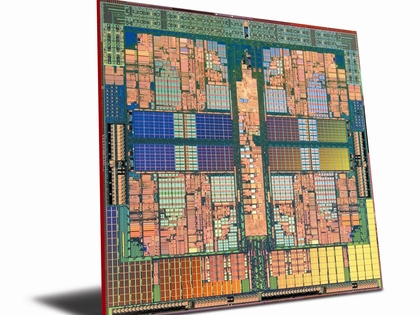
MULTI-CORE: Abandoning single-core processors in 2004, both AMD and Intel are now pursuing multi-core designs
But all this speed came at a cost – Pentium 4 chips ran hotter than any previous Intel chip with TDPs in excess of 100W. With the cancellation of the 4GHz Pentium 4 in 2004, Intel switched its attention to low-power processors (the Pentium M and Intel Atom) plus dual- and quad-core architectures. AMD beat Intel to the punch with both 64-bit processors and dual-core chips. Its dual-core Athlon 64 X2 processor was launched in 2005.
The age of 'touchy feely'
Anyone expecting the traditional QWERTY keyboard and mouse to have disappeared by 2010 will be sorely disappointed – they're still the most effective way to interact with a computer. Other gizmos have come and gone – the Maltron Single Handed Ergonomic Keyboard, Microsoft's Tablet PCs, Dragon Naturally Speaking and OCZ's brain-activated Neural Impulse Actuator to name only four.

MULTI-TOUCH: Microsoft's Surface prototype was unveiled in 2007 showcasing table-top multi-touch computing
Then there's 'multi-touch'... Touchscreens themselves have been around since the 1980s, but could only handle one contact point at a time. The Multi-touch concept gatecrashed the mainstream with the launch of the iPod touch and the iPhone in 2007. Microsoft also unveiled its Surface prototype in the same year.
From your desk to the Cloud
We already do a lot of our day-to-day computing in the so-called 'cloud'. We bank online, we shop online. We catch up with TV shows using the BBC iPlayer, store photos on Flickr and own virtual albums piped directly from iTunes or Amazon.

IPLAYER REVOLUTION: The BBC iPlayer (and rival services) have brought the PVR online, changing the way we watch television forever
Using a webmail service like Gmail or Yahoo! Mail we have access to our messages, regardless of whether we're using a Mac, a Windows PC, a Linux-powered netbook or a smartphone. This sort of device-independent, go-anywhere access to our important digital 'stuff' is arguably the future of personal computing.
You, me, Facebook and YouTube
If this digital decade is remembered for anything, it will be the rise (and rise) of social networking sites and Web 2.0 playthings. From Friendster to Myspace, Facebook and Bebo to Twitter and Posterous, there are now countless ways to update/spam/bore your friends with the minutiae of your daily life.
Similarly, this outgoing decade saw the launch of Web 2.0 giants like Wikipedia, Skype, Digg, YouTube, eHow, Gmail, Google Docs and Delicious. While online gaming will thank the noughties for a little title called World of Warcraft.
Goodbye to the noughties
It's not just computing technology that's changed during the past ten years. How we use our computers has also changed. We now Skype, Facebook and Twitter. We buy, sell, blog, make podcasts and upload home-made videos to YouTube. We work online, navigate, research and translate.
The computer hasn't quite made into into the living room with the TV, but it is starting to replace it. Catch-up TV services like the BBC iPlayer enable us to watch our favourite TV whenever and wherever we want to. While traditional Hi-Fi gear has been outmoded by digital playlists, MP3 players and wireless streaming.
Gates was right about a 'Digital Decade', but wrong about how strongly Microsoft would be involved in it.
As for the next decade of computing? We're bracing ourselves for faster, thinner laptops; more processor cores; USB 3.0; touchscreen interfaces; new Tablets and MIDs; faster internet access; wider mobile internet coverage; and maybe a new social network that will see the cool crowd abandon Facebook. Whatever happens, it's going to be exciting.

| |
Read More ...
Sony PlayStation 4 set to get multi-core CPU

Sony is working on developing a multi-core central processing unit (CPU) for the PlayStation 4, according to Japanese sources.
Japanese website PC Watch Impress reports that Sony is already developing new alternatives to the PS3's Cell architecture, which will come as great news to the legions of games developers that have struggled (and are still struggling) to fully get to grips with the PS3's difficult-to-master CPU.
Sony was initially looking towards Intel's Larrabee and also at a modified version of the Synergistic Processor Unit, but is now reportedly focusing on new designs centred on a multi-core CPU.
PS4, Xbox 720, Wii HD
Nintendo and Microsoft are also reported to be looking at new console CPU technology – although the real surprise would be if anybody actually thought for a second that they were NOT developing their cash-cow gaming hardware!
Japan's PC Watch Impress claims that it takes around 24 months to produce new consoles, with some speculating that we are looking at late 2012 or 2013 any beyond before we see PS4 or Xbox 720 or even Wii HD.
PC Watch Impress adds that we should see new handheld consoles before we see new home consoles, which isn't much of a claim, as both Sony and Nintendo seem to refresh their PSP and DS range on an annual basis, with the latest PSPgo and DSi XL both currently wowing gamers in Japan.

| |
Read More ...
Google netbook specs 'spotted'

Specs for a Chrome-powered Google netbook device have been apparently released and against some expectations, it looks like it's a high powered machine.
It'll reportedly have an Nvidia Tegra chipset, which does indeed support Android, with an ARM processor, all powering a 10.1 inch multi touch screen, and will come with 64GB SSD, 2GB RAM, WiFi, 3G, Bluetooth, Ethernet, USB, webcam, 3.5mm audio jack and multi-card reader.
The release date is around the end of 2010 and is expected to come with standard Google apps, like Gmail, Calendar, Documents and so on, as befits a device expected to be optimised for cloud computing.
Other rumours suggest a sub-$300 price point, which puts it securely in the netbook category, but it may be bundled as part of a 3G deal, which would make sense.
It's not the first time Nvidia has been linked to Tegra powered MIDs: we know Nvidia is looking to the netbook category with its Tegra 2 lineup and ARM have also expressed a lot of interest in Chrome.
So it's not completely inconceivable, although Google did tell us not too long ago that touchscreens for Chrome OS weren't part of their current focus.
Not everyone is taking the story at face value especially given a lack of sources, although it is not dissimilar to a story we reported just a few days ago, via TechCrunch, that suggested a similar spec.
Internet echo chamber? Maybe. But not impossible, especially in light of the upcoming Google Nexus One phone.
Via IB Times

| |
Read More ...


No comments:
Post a Comment