

LG pimps out its Piccadilly Circus giant LED screen

LG has announced it's letting the public take control of its LED screen in Piccadilly Circus, hoping that they will use it to share some of 'Life's Good' moments.
The idea is that people will upload photographs of nights out (safe for work, mind!), your baby's first steps or anything that qualifies to you as proving that life's good – which just so happens to be what LG stands for (at the moment). Clever, LG. Clever.
Public image
Although it's essentially a branding campaign, it's clear to see why LG is using its LED screen for promotions like this. Bear in mind that BT has erected its own giant LED screen to promote the 2012 Olympics on its colossal tower in the centre of London.
LG is obviously vetting the images before they go live. It is doing this via a gallery on the LG website (www.lge.co.uk/piccadilly).
Upload your life-affirming images there, and the public then votes on which images it would like to see on the (very) big screen.
If you receive the most votes, then your image will be shown.
There are also prizes involved, although LG hasn't actually told us what prizes they are. We're hoping you will be able to win a unicorn and a piece of the Moon.

 |  |
Read More ...
Google Nexus One phone unboxed in photos and video
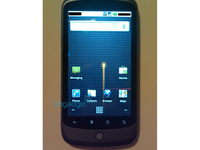
Google's 'possible' new Nexus Phone has been unboxed on camera and video, showing off a decent high-end handset.
While the specs and shape of the phone have been comprehensively leaked on to the web thanks to the likes of Twitter and over-eager Google employees, this is probably the most complete run down so far.
Twitter user Phillm has posted all the information online, and the video clearly shows the new phone packing a heavily modified Android interface with some cool menu options, such as 3D animations.
Touchy feely speedy
It looks like it works very fast to the touch, and the amount of multi-tasking initially shown in the video bodes well for a phone that's apparently packing an industry-leading processor.
We'd still be surprised if the Nexus One name stuck, but the Google-branded box seems to hint that it will be there at launch in (likely) early January, although packaging can change in a heartbeat.
The Nexus One certainly takes a lot of cues from the HTC range, which is no bad thing given the success the company has had this year - the only question is whether the company will unveil the mooted (and similarly specced Bravo) alongside it.

| |
Read More ...
YouTube jumps on Twitter bandwagon with URL trimmer

YouTube has decided its URL is just, well, too long, and is now offering its users the chance to trim them down.
The move clearly comes as the world starts to cut down its URLs to use in the likes of Twitter.
Speaking on the Official YouTube Blog, the video-hosting site said that it hopes cool things will be possible with the new service.
YouTube only
"We've just launched youtu.be as a shortener for YouTube video links - and nothing but YouTube links - so you can rest assured that when you see a link with this URL, you are indeed about to click on a YouTube video.
"Also, because the link contains the ID of the video you're going to see, developers can do interesting things like show you thumbnails, embed the video directly, or track how a video is spreading in real-time."
If you're interested in chopping letters out of web addresses from YouTube, then just use AutoShare from your YouTube account synced with something like Twitter, and the URL will be snipped.
If you want to do it manually (well, machines get to do too many fun jobs already) then simply switch the 'http://www.youtube.com/watch?v=' element of the URL with http://youtu.be/ and you'll be good to go.

| |
Read More ...
Google VP posts meaning of open essay

As the year that has seen mounting criticism of Google and its practices draws to a close, a company Senior VP has posted an essay on the Google blog on 'The Meaning of Open'.
The 4,000 word piece by Jonathan Rosenberg, Senior Vice President for Product Management, was originally an email to all Google staff, but he decided that "in the spirit of openness, I thought it would be appropriate to share these thoughts with those outside of Google as well."
Rosenberg writes that the company's "default approach" should be to "tell people, in obvious, plain language, what we know about them and why it's valuable to them that we know it. Think that your product's value is so obvious that it doesn't need explaining? There's a good chance you're wrong."
He advocates adhering to standards for handling user data, and where there are no standards "we should work to create an open one that benefits the entire web, even if a closed standard appears to be better for us (remember: it's not!). In the meantime we need to do whatever we can to make leaving Google as easy as possible."
Google Idealism
Rosenberg is a strong proponent of the idealism that won Google so many fans in the early days with its "do no evil" motto:
"We believe that open is the only way for this to have the broadest impact for the most people. We are technology optimists who trust that the chaos of open benefits everyone. We will fight to promote it every chance we get."
The question is, does Google, now a global powerhouse that apparently works around paying taxes still believe in that?

| |
Read More ...
Samsung upgrades Genio line with M5650 Lindy

Samsung has unveiled the next in its low budget, cheery features phones with the announcement of the M5650 Lindy.
Following on from the successfully launched Genio line up in the UK (Corby to the rest of the world), Samsung has unleashed the M5650 Lindy with a 2.8-inch touchscreen display, complete with one finger zoom.
It also packs a 3MP camera, microSD slot for memory expansion and Wi-Fi, Bluetooth 2.0 and HSPDA connectivity.
Bebo, Facebook: who knew we'd use those words one day?
And in keeping with the social-networking slant Samsung has placed on its budget range, it's present again once more, which we imagine will be the likes of Facebook and Bebo.
Dedicated music keys also show that the M5650 Lindy is more than just a device to poke your friends with, as it's got multimedia qualities as well.
We're still waiting for UK information on this phone, as it's currently only available in Portugal for €149 (آ£133), but we'd imagine it will launch on our wintry shores in the next couple of months.

| |
Read More ...
China creates 'whitelist' for approved sites

China has issued new regulations that will create a so-called 'whitelist' of approved websites as part of its ongoing anti-pornography campaign.
The Ministry of Industry and Information Technology (MIIT) in Beijing has introduced a plan that will see no more domain names registered, and only allow Chinese citizens access to sites on an approved list.
This means some innocent sites could well be blocked, as well as those deemed politically sensitive.
Chinese media has said that foreign sites that haven't registered with the Ministry to go on the approved list could be blocked, too. The Beijing News reported:
"If some legal foreign websites could not be accessed because they haven't registered with MIIT, it would be a pity for the Internet which is meant to connect the whole world."
China and censorship
Currently China uses a blacklist system, where sites considered bad or dangerous are blocked when discovered.
This is, after all, the country that wanted all computers to be fitted with Green Dam software that would have acted as a censor and also operates the 'Great Firewall', although it's just one of many countries that blocks parts of the Net. As we noted last week, even Australia is considering a national web filter.
In the last 12 months China has blocked Facebook, Twitter, YouTube and Flickr, as well as several sites used within China for sharing content. The government has tried to launch its own Twitter imitator for citizens, but angry users flooded it offline.

| |
Read More ...
In Depth: 8 reasons the BBC Trust approved Project Canvas

The BBC Trust has given the green light for the BBC to push on with Project Canvas – developing IPTV for the masses, along with partners like BT and ITV.
The likes of Sky and Sony have openly stated their opposition to the BBC's involvement in Canvas, but the BBC Trust has explained exactly why it feels that the project should be green lit.
TechRadar has analysed those reasons to find out why the Trust believes that that the problems it details – including the potential damage to pay-TV services, new and existing hybrid/DTT platforms (such as the recently announced Cello TV for example) and DVD sales – to give its provisional approval.
1: "It will add a new dimension to digital terrestrial TV by enabling an increase in the range of content and services available on the platform."
This new dimension includes the increasingly powerful video on demand and catch-up TV options that has made the BBC's iPlayer, along with commercial offerings like Sky Player, popular already.
And, of course, apart from massive breadth of choice in television at the touch of a button, the development of interactivity, portable profiles, games and widgets are already causing excitment.
2: "It is intended to provide a high-quality user experience with a simple and consistent look and feel."
Rather, the Trust appears to be hinting, than letting each manufacturer and IPTV project using its own look and feel and proprietary user interface (UI) – something which will feasibly confuse users.
This UI is actually one of the major problems for manufacturers, who don't necessarily want to dress their VOD up just like the BBC iPlayer, but feel they should be given the freedom to choose what they offer – and crucially differentiate themselves from their rivals.
"If you follow the Freesat example, those manufacturers who contribute the most will get the most out of it in terms of control and flexibility – look at Panasonic, Humax and Technisat," says What Satellite editor Alex Lane.
3: "There will be low barriers to access for new producers/providers of content who wish to get onto the platform – allowing a new range of low-cost services the opportunity to flourish."
So, rather than setting the bar too high by, for instance, only allowing high quality streams – potentially putting smaller content providers at a disadvantage – the Trust believes that Project Canvas will serve up a level playing field whether you are ITV or a local television station.
And if you're a content provider, even a small local cable channel, you won't be excluded from the Canvas site, you'll just have to meet certain minimum requirements.
4: "The creation of an open joint venture and engagement with industry can help deliver a common technical standard with features currently unavailable in the market."
The Trust is hoping that by providing a level playing field, manufacturers, developers and content providers will have an arena for innovation – bringing as-yet unthought of services, widgets and ideas to the IPTV market.
5: "It may also help drive broadband take-up."
this ia an obvious one – although you could easily state this about any popular IPTV service, not necessarily Canvas.
6: "Growing demand for on-demand content on TV and, to a lesser extent, residential broadband."
You would imagine the success of iPlayer, and the BBC's constant need to redevelop for multiple platforms, have figured in the corporation's desire to come up with a widespread, mass-market way of getting IPTV to the average television.
The BBC Trust also believes that the desire from the public for both video on demand (VOD) and faster broadband should be helped by the venture
7: "Offering a greater number of Internet Service Providers (ISPs) the opportunity to develop 'stronger triple play' (phone/TV/broadband) offerings."
You would imagine that this comes as something of annoyance to the likes of Virgin Media and Sky – both of which have had a real impact with their triple-play packages, but not (Canvas partner) BT whose BT Vision has not proved to be nearly as popular as its optimistic targets, leaving it with a less tempting triple play package.
In fairness, this will provide greater competition in the triple-play market, which could result in lower prices for consumers.
8: "Offering new entrants providing content to the market an accessible and affordable platform to reach the public."
This is quite a key one: major content providers are always going to do well on whichever platform they choose, but could feasibly push their own content over others.
The Project Canvas platform should allow for smaller offerings to be given a voice and a chance to grow.

| |
Read More ...
Exclusive: O2 claims mobile internet data problem fixed

O2 is claiming to TechRadar that it has managed to fix the problem stopping its user getting access to internet on their mobiles, but admits the problem isn't over.
While internet is re-enabled, MMS and visual voicemail is still down, and the network is still staying tight-lipped on the reasons behind the 'non-geographical' problems:
"Internet access has now been restored. MMS and Visual Voicemail services for iPhone users are coming back online gradually.
"We are working as hard as we can to restore full service and apologise to those customers who have been affected."
Setback
However, this is another setback for the network that has had to suffer a barrage of ire from users over the last year with numerous network outages highlighted by its wealth of iPhone (and data hungry) customers.
TechRadar readers have also been having issues with the under-fire network, with some stating internet connection is still very patchy:
Commenter deephack said: "Yesterday I couldn't get any data connection at all in Edinburgh from morning till night. Normally O2 have excellent data rates in Edinburgh rarely dropping below HSDPA speed.
"Soon as I ventured out of the city I got data again albeit nothing much above GPRS speed."
Wigwam_salesman agreed: "What they mean by non-geographical is that it was the whole damn country. I came back from Poole to Manchester yesterday and had no data access for the entire time.
"For آ£45 a month contract these outages (which are getting more frequent) are completely unacceptable."

| |
Read More ...
In Depth: Highs and lows of a decade in AV

There has not been a more important decade for home entertainment technology than the noughties. Fact!
John Logie Baird may have unveiled the first basic design of a TV in the 1920s, but did he think of adding a HDMI socket? Visionary? Pah!
And the emergence of VHS in the 1970s may have introduced the dazzling new concept of cinema in the home, but did it allow you to play stuttering, partly broken Java games while communicating in three-letter street slang to a 65-year-old widower via on-screen chat? No it did not.
Okay, so some of the leaps forward in AV tech since the turn of the millennium have been more Eddie Kidd-esque than Evel Knievel, but the rate at which the industry has evolved in the last decade is extraordinary.
It certainly started well. DVD may have been launched in 1997, but its adoption as a household mainstay only came about in 2000, with the consumer release of the PlayStation 2.

Sony's games console was an unlikely AV hero, and certainly not the best movie spinner – exhibiting video motion issues and image fuzziness آ– but its uptake was so widespread that millions of homes suddenly had the technology to watch the new-fangled discs, whether they wanted to or not.
HD DVD vs Blu-ray
Seven years later, its successor repeated the trick. In similar fashion, the PS3 gave Blu-ray a boost after its UK launch in 2007.
Certainly, without it, the winner of the HD format war would have been less conclusive. Indeed, in 2006, it was HD DVD that looked to be the most convincing winner in the format skirmish.

Multi-region, internet-ready and able to run Java-like menus from the get-go, Toshiba's players were far more advanced than their rivals.
Initial Blu-ray decks lacked many of the basic features and functionality originally promised, and the Blu-ray Disc Association couldn't make its mind up on the final specifications for a good two years.
However, it turned out to be the content providers that decided the final outcome of the battle, not the kit manufacturers, and Warner Home Video's fateful decision to put its exclusive weight behind Blu-ray was a fatal one for HD DVD. The decision came in February 2008 – Toshiba withdrew from the battle in February. Game over!
LCD vs plasma
Throughout the decade, television tech has been raging its own format war, one that LCD is seemingly winning by a country mile. However, it was plasma that started the strongest – being the only technology stable enough for home cinema-centric screen sizes at the time.
In 2002, though, Samsung wowed the market with its LW40A13W 40in LCD TV and, despite the آ£7,000 price point, it proved to be a big success.
To start with, it didn't suffer from the dreaded screen burn issues associated with plasma, and its brightness levels were vastly superior. It proved to be the start of complete dominance in the TV sector for the tech and the brand.
Plasma made a brief comeback in 2007, mostly thanks to Pioneer's ill-fated Kuro HD Ready and Full HD panels. They offered such amazing black levels and sumptuous video performance the screens, despite being costly, became favourites for the true AV enthusiast – the Bugatti's of the industry. All seemed great.

KURO's SWANSONG: The KRP-500A was the last Kuro to be produced
The company, it transpired, couldn't compete on a global scale with cheaper LCD TVs coming from South Korea, or rival less-expensive plasma TVs from Panasonic in Japan, so withdrew from the TV market entirely.
AV-holics can still be heard mourning across forums worldwide, although had they bought Kuros at the time, things may have been different.
Enter OLED
Towards the back end of the decade, a third TV technology emerged, OLED.
Much was expected of the new technology, which promised thinner footprints for televisions and greater resolution, but the global recession deterred manufacturers from investing the billions of dollars required to make it a consumer proposition.

DEVELOPING: LG's 15-inch OLED TV shows that companies are still pressing ahead with the tech
Instead, a majority of them wisely poured the funds into LED backlighting, creating LCD TVs that rival OLED prototypes in depth and quality. The end of the decade has seen these new sets take the market by storm.
However, the most telling home entertainment legacy of the decade would have to be the explosive emergence of high definition.
In a few short years, the entire landscape of broadcasting, solid state and downloadable media, and television and projection technology has changed.
Ten years ago we were getting used to watching movies on a shiny new disc format, wowing at not having to rewind it before returning it to Blockbuster.
Now we complain if it's not encoded in 1080p at 24 frames per second. We've changed. For the better.

| |
Read More ...
Yahoo cuts costs by closing for Christmas

Yahoo has said it will be closing its offices worldwide from Christmas until New Year's Day this year as a way of cutting costs even further.
Yahoo's cost-cutting strategy seems to be working, however, with the company reporting a profit boost back in October.
However, customer support staff, as well as those performing other essential duties, won't be affected by the new rule.
It's the first time the company has forced its 13,200 global employees to take time off during the holiday season. Within the US, where the time between the two holidays is not generally considered time off, employees will be given the choice of taking vacation time or unpaid leave.
For areas outside the US, company spokeswoman Dana Lengkeek said that "time off will be paid consistent with local standards and laws."
Cost Cutting
Yahoo, which is headquartered in Sunnyvale, California, has been attempting to cut costs for well over a year, and has shed over 2,000 jobs since then, including 700 this spring, to offset a 12 per cent decline in revenues, the first fall since 2001.
Langkeek stated that closing "during a traditionally slow week allows employees to recharge, and the company to reduce operating costs for the week." Some other Silicon Valley companies have an established practice of closing for the week.

| |
Read More ...
In Depth: 12 things you didn't know Google Docs could do

Slick and simple, Google Docs is the online office suite for people who don't need bells and whistles.
You can open and edit most office document, spreadsheet and presentation formats in Google Docs - and view PDFs. It autosaves your work, so it's crash proof, and you can share documents publicly or with selected contacts.
Google Docs looks underpowered, but dig deep and you'll find smart features that other suites can't beat. Here are 12 of the best.
1. Recover old revisions
Go to File > Revision History and the entire past of the current document will be revealed. This powerful feature allows you to select and edit any version of your document. Compare revisions side by side too - new edits are colour coded to their author.
2. Create HTML tables
You can access a document's underlying HTML code direct by going to "Edit > Edit HTML". There are lots of uses for this. For example: use Google Docs WYSIWYG table making tools - then go to "Edit HTML". Paste the code into any input window that expects HTML. Instant, painless table coding.

HTML VIEW: Handy for chucking together web page content, Google Docs are rendered in HTML
3. Add CSS
Google Docs allows you to add CSS styles to any document. Try this. Make a new document, highlight it and choose "Heading 3" from the Styles dropdown. Next, go to "Edit > Edit CSS" and enter this code:
{ font-size: 200%; font-family: Georgia,"Times New Roman",Times,serif; }
Click "OK" and the change should be instant. Go to "File > New > New from Template" to investigate more complex CSS examples.
4. Batch upload files
Click the "Upload" button, then use CTRL-Click to selectively highlight multiple files or SHIFT-Click to select a continuous list. Google Docs will put them in a queue and upload the lot.
5. Back up Google Docs
You can export multiple documents to a ZIP archive. Just tick the files you want to download in Google Docs main view and choose "More Actions > Export". You'll see a dialogue prompting you to choose a file conversion type or types. Want to back-up everything? Tick the box marked "Export all your files".

BACK UP: Export and archive all your files for safe keeping. We recommend making it a weekly ritual
6. Synchronise documents
The free personal edition of back-up tool Syncplicity [www.syncplicity.com] enables you to connect your Google Docs account with a designated folder, which in turn can be synchronised with a folders on your computer. So, to add new files to Google Docs, you just drag them to the synchronised folder. Sign up and select "Apps" in "My Syncplicity", then "Google Docs" to configure the tool.

IN SYNC: Syncplicity acts as a go between, automatically updating Google Docs from folders on your local machine
7. Full screen mode
Want to write distraction free? Hit CTRL-SHIFT and F to get rid of on-screen menus and links. You can then hit F11 in most browsers to toggle into full screen mode. Hitting ESC brings back the menus.
8. Emulate classic word processors
Go even more old school by changing the background colour of a document to black in "Format > Document settings" and your text colour to green from the toolbar before going full screen.

OLD SKOOL: Full screen and green on black. Word processing for purists can be done in Google Docs
9. Publish to your blog
Click "Share > Publish as Web Page" in any document. Next click "Set your blog site settings" and enter your login details. You can publish to Blogger, LiveJournal, SquareSpace and others.
10. Create new documents fast
Here's a trick from the Official Google Docs Blog [googledocs.blogspot.com]. Drag the following link to your browser's bookmark bar:
New Document [http://docs.google.com/?action=newdoc]
Select the bookmark to make a new Google Doc.
11. Open MS Word docs in Google Docs with Firefox
Download the Google Toolbar for Firefox. Go to the installed Toolbar's options and choose "Tools". Tick the box labelled "Google Docs" and click "Edit". Tick the box labelled "Double-click a file icon". Save the changes and Microsoft Word docs will now open in Firefox.

FOXY: Make Firefox your word processor, with Google Toolbar's application tools and Google Docs
12. Take it to the limit
Google Docs files can be up to 500k in size with a limit on embedded images of 2MB. There's a combined limit of 5,000 documents. See Google Docs help pages for more stats.
-------------------------------------------------------------------------------------------------------
Liked this? Then check out 50 time-saving Google Docs templates
Sign up for TechRadar's free Weird Week in Tech newsletter
Get the oddest tech stories of the week, plus the most popular news and reviews delivered straight to your inbox. Sign up at http://www.techradar.com/register

| |
Read More ...
BBC Trust gives provisional go-ahead for Project Canvas

Following earlier reports, it has been confirmed that the BBC has been granted provisional approval by the BBC Trust to push on with Project Canvas, with the watchdog insisting that the public benefits outweigh the potential for trouble in the television market.
Despite outspoken criticism from the likes of Sky and major manufacturers, the BBC will now be able to push on with its plans to bring IPTV to the masses – providing standards, marketing and branding.
The joint venture – which also includes Five, Channel 4, ITV, TalkTalk and BT and could be joined by other parties in the coming months – will give manufacturers the chance to build the boxes to Project Canvas specifications.
The industry criticism has been noted, and the Trust's provision approval includes several conditions including an annual review, and provide non-discriminatory access to content providers.
- Industry engagement: the core technical specification must be published well in advance of launch to allow all manufacturers to adapt to the Canvas standard. The BBC must report to the Trust within twelve months of final approval or within three months of launch, whichever is the sooner, and at regular intervals on its progress in achieving industry consensus around technical standards.
- Access to the platform for content providers: must be on fair, reasonable and non-discriminatory terms, with minimal technical requirements and content standards and access charges calculated on a cost recovery basis.
- Access for ISPs: any quality standards for ISPs should again be set and applied on a fair, reasonable and non-discriminatory basis. This is designed to keep barriers to entry for ISPs to a minimum and avoid the proposal being linked to any one provider or service.
- Syndication: a Trust review, 12 months after launch, to assess what, if any, effects Canvas has on the partners' incentives to syndicate their content to other platforms.
Rigorous
"The Trust has reached its provisional conclusions after a rigorous process of assessment, evaluating the evidence gathered and put to it about the proposal," said the BBC's official release.
"There were more than 800 written consultation responses from individuals and industry stakeholders, and the Trust also spoke to more than 60 industry stakeholders and considered a range of other research.
"The Trust is proposing some conditions on the BBC's participation in the venture, to secure public value and lessen any adverse impact Canvas might have on the wider market, where possible.
"There will now be a period of consultation on the provisional conclusions closing on 2 February 2010, after which the Trust will reach its final decision."
Industry response
Some industry experts are pleased by the news, hoping that the public will be the ones to benefit from having the BBC representing its interest.
"This is a great Christmas present for TV viewers and consumers that puts the UK in the vanguard of next generation TV," said What Satellite editor Alex Lane.
"Project Canvas will open up a new era in home entertainment that goes far beyond just getting iPlayer on your TV.
"Despite their complaints, it will also stimulate the premium pay-TV providers to launch better and more exciting broadband TV services."

| |
Read More ...
Apple TV subscription service hots up

Apple has garnered some heavyweight support for its subscription-based Apple TV service, with both CBS and Disney showing interest in the platform.
Apple TV is set to offer subscriptions to TV shows through iTunes, piggy-backing on to TV networks and offering between $2 and $4 per subscriber (a month) to the networks or a cheaper $1 to $2 to cable TV providers.
This levy would allow Apple to stock TV shows on to iTunes and stream them to paying monthly subscribers.
TV deals
According to Apple Insider two of the major companies in the US are interested in what Apple is offering – CBS and Disney.
It's not surprising that Disney is in talks, considering Apple CEO Steve Jobs is on the board, but any interest from the majors in America is good news for Apple.
The all-you-can-eat service looks likely to cost, in the US, around $30 a month (again, according to Sony Insider) with no word if and when this version of Apple TV would come to the UK.
With the likes of YouTube offering free TV shows in the UK and Hulu overrun with free long-form content, Apple is going to face some big challenges in making the TV VOD market its own.

| |
Read More ...
Review: DigiQuest 6630 + USB

A sat receiver for آ£50? At this end of the market you don't get niceties like HD support, multiple tuners or PVR upgradeability. In fact, we had better make it clear that you don't even get an EPG.
That's right – there's no programme guide, which makes the 6630 unique in the set-top box world for the wrong reason.
However, as the receiver's name suggests, a USB port is provided for firmware upgrades and basic multimedia playback. And although there are no CI capabilities the 6630 presents you with a card slot.
To take advantage of this multi-CAM emulation is provided. This makes the 6630 even better value for money.
Also on board are blind scan (which, as we'll discover, isn't all it seems) and full DiSEqC compatibility.
Build and connectivity
The 6630 is enclosed within a casing of fittingly modest dimensions. Yet the power supply is built in and benefits from a rear-panel switch that safely isolates it from the mains altogether.
Also on the rear panel are Scarts for TV (RGB or composite, but no S-video) and VCR (composite), a collection of phono sockets and an RS232 port for PC-based firmware upgrades. These provide stereo audio, composite video and coaxial digital audio.
A fifth provides a programmable 12V output for non-DiSEqC LNB switches and the like, a surprising feature at this price. A bit too close to the LNB input is a loopthrough output, so fitting these connectors can be fiddly.

The much-vaunted USB port isn't on the rear panel. Instead, it resides conveniently behind the front panel, which swings downwards to reveal the card slot and a selection of operating controls that have an excellent positive feel. These take the form of a joypad disc for volume/channel change, menu access and standby.
When the 'drawbridge' is raised only the standby button can be operated – a green four-digit channel display is also visible in this closed state. You can access the menus from the front panel, but PIN-protected ones like channel setup need the numeric keys of the remote handset which, in terms of styling and size, isn't far removed from those supplied with budget DVD players.
The 6630 may be busy internally but the standard of construction is high and the running temperature will give you no cause for concern. We had it switched on for days and it never became more than comfortably warm.
Setup
No wizard-driven options here, although the 6630's carousel of five menu categories is pleasantly designed.
In the PIN-protected installation menu's 'antenna configuration' option you can tell the receiver whether you're using a fixed or motorised (DiSEqC 1.2 or USALS). You can then go to the following 'satellite list' option and pick the birds you're after from a list of 45.
Satellites can be renamed, edited or deleted – new ones can be added, too. The third option – 'antenna setup' – allows you to select the satellite(s) you've just added and configure it.
If you're using a fixed dish, DiSEqC 1.0 and 1.1 options are shown – the relevant switchbox position for each satellite can be specified in turn should you have such a setup.
This menu looks very diff erent if you're using a motorised dish – there's a choice between USALS or DiSEqC 1.2 instead. If the former is selected your longitude and latitude can be entered.
In the 'motor setting' option beneath, satellites (and transponders – complete with signal intensity/quality meters) can be selected from a list and the dish will move to the automatically calculated position. In DiSEqC 1.2 mode the longitude/latitude options are 'greyed out'.
The 'motor setting' instead provides east/west movement controls, enabling you to move the dish until a selectable transponder on the desired satellite (selected in a box at the top of the menu screen) is found. The signal intensity and quality displays are once again present – only in this mode they're more useful.
A neat trick is that you can define the specific DiSEqC memory location to which a satellite is saved – useful if you're using another DiSEqC-capable receiver (maybe an HD PVR that lacks blind search). A final 'motor setting' menu option looks after setting dish limits. Now that your satellites are defined it's time to go channel-hunting.
The first option, again under the 'antenna configuration' umbrella, is 'single satellite search'. Choose the target satellite, select a scanning mode (free – 'FTA Only' – or all channels), specify network-searching if required and select either 'full' or 'blind' from the 'scan mode' box. Hit the 'search' button, and the receiver goes about its business.
There are some drawbacks, though. In full-scan mode everything's completely automatic. You can't enter PIDs, FEC or symbol rates because a manual option is absent. Although you can add new transponders (or, for that matter, edit existing ones) with a separate menu, the only parameters that can be entered are frequency, polarisation and symbol rate.
Then there's blind scan. Simply put, it isn't; instead of stepping through frequencies it merely works its way through a list of transponders pre-programmed into the machine.
Indeed, the two modes are identical in operation with the same search screens displayed. 'Multi satellite search', automatically visits each satellite in turn, moving the dish where necessary and storing any channels it finds on the journey. The same search options of the single satellite search mode are offered. Sadly, it won't pause between satellites.
In other words, it doesn't accommodate dish transit times so some transponders could be 'missed'.
The search menus may be logically structured and easy to use, but the system they access is disappointing. It's half-finished, in other words.
Basic use
Pressing the 'enter' button to access the channel list. A very welcome feature is the 'find' button – used to 'home in' on a channel by entering one or more letters of its name. Up to 32 favourites lists can be created via the main menu's 'edit channel' option – which has separate sections for radio and TV channels (as well as a 'delete all' feature).
In addition to defining favourites these menus will let you delete, sort (by name or encryption status) or edit (rename) channels. As we noted earlier, there's no EPG out of the box even though there's an EPG button on the remote.
There is an eight-event manual timer and a sleep timer. You can zoom or freeze the picture of the currently selected channel.
PVR and multimedia
If you plug in a (FAT32-formatted) storage device you can display JPEG or Bitmap images. We also discovered that MPEG video clips will play – the receiver does, after all, have the necessary capabilities for TV viewing.
If you get bored with broadcasting you can try the 6630's three simple games – Tetris, Othello and Sudoku. The handset might sport a 'record' button (and other 'transport' keys) but, as it stands, you can't turn the 6630 into a simple single-tuner PVR by plugging in a storage device.
As we went to press, however, we learned that an unofficial firmware update (card(6630+USB)_11_13) is available on the internet that adds a few missing features. Remember that your warranty will most likely not cover implementing such tweaks and any issues that may arise.
Unpack the file, copy it to a USB stick and use the tools menu's 'upgrade by USB' option to install.
Recording to USB memory devices is now supported; the new firmware adds a 'rec' option to the main menu. From here you can enable and adjust the size of the timeshift buffer – another new feature.
It also adds a full seven-day DVB EPG that can be used to set the timer. You can record by pressing 'record' and you're given a choice between TS (transport stream – more flexible, but larger file sizes) and PS (programme stream) modes.
The 'rec' menu's PVR Manager option allows you to select and play a specific recording. If it's a TS recording you get the benefits of additional soundtracks and subtitles – in contrast, recordings made in PS mode contain only the video and main audio.
Another benefit of the PS mode is that it generates .mpg files. If you plug a USB device containing recordings made with the 6630 into your computer you'll find that most media player programs can handle the recordings.
Performance
For a آ£50 receiver, the performance cannot be faulted. Pictures from channels with strong technical standards – like the German ones on Astra 1x – are crisp and vibrant. It's difficult to tell the 6630 apart from higherend receivers.
Sound? Tuning to a classical music radio station like Astra 1x's BR-Klassik rewarded us with a dynamic and detailed delivery. It's also interesting to compare our own radio stations (many of which are carried via Astra 2x).
This receiver, connected to a good audio system, was much easier to listen to than the same broadcasts from a much more expensive DAB tuner. The satellite bit rates are higher and so artefacts are less evident.
This receiver is also pleasantly responsive in use. Searches were fast and channel changes and menu trawls don't keep you waiting longer than is necessary. But this isn't perhaps the most sensitive receiver we've tested.
Difficult transponders that were within the grasp of more capable units were ignored by the 6630. With an appropriate dish and LNB, though, reception of the key Hot Bird and Astra services should be reliable.
Related Links
| |
Read More ...
LG to follow up Cookie with Muffin?

LG will attempt to follow up its previous success with the Cookie with the equally oddly named Muffin.
The first Cookie sold over 10 million devices worldwide, which is a stunning effort for a budget phone.
The new Muffin phone (also likely to be known as the LG KP900) has had its spec sheet pictured, showing a three inch capacitive screen and a 5MP camera too.
What's next - Gateau?
The Muffin will also apparently sport Wi-Fi, another round of Dolby Mobile sound and HSDPA - along with the S-Class interface LG is bigging up so enthusiastically.
There's a 'picture' that's emerged of the Muffin as well - although given the fact it looks like it's been painted by a (admittedly talented) child we can't believe in it too much.
To us, it looks a lot like the LG POP - apart from the slightly downgraded camera, could it just be a refresh for another region?

| |
Read More ...
Review: Sagem DTR 94500

We were fairly blasأ© about Sagem's inaugural Freesat receiver – the DSI86 – awarding it 69 per cent in our November 2008 issue. Hot on its heels comes its first Freesat PVR, the Sagem DTR 94500.
Suitable for recording both high and standard definition channels, it comes with 500GB (tested here) or 250GB (as the 94250S) hard drives.
Twin tuners allow for recording of up to two standard or high-definition channels at once (while playing back a recording at the same time if you wish) and it's Freesat+ certified, blessing it with such features as automatic series recording.
Build and connectivity
Aesthetically, the 94500 isn't that far removed from the DSI86, although it's thinner and wider and has a silver edging running around the fascia. The fan in our test sample also proved rather noisy at close range.
An amber-coloured LED readout shows, among other things, the number of the channel you're watching and whether you are recording. To the right are three operating buttons and on the left is a USB port.
Sagem's Freeview PVRs routinely offer multimedia playback and even the ability to export recordings via USB, but that is not the case here. Sagem doesn't rule out the latter in future but this is liable to be SD recordings only as most HD broadcasts are likely to remain copy-protected on Freesat.
Rear connections mirror those on the DSI86, but this time with twin LNB connectors (and loopthroughs) feeding the two tuners. AV out comprises twin Scarts, an HDMI output supported upscaling to 1080i and hi-fi and SP/DIF audio outputs.

An Ethernet port means that the recorder should be compatible with BBC iPlayer when it launches widely on Freesat (supposedly any day now) and potentially ITV Player when it arrives in 2010.
The remote is the same as that found with the Freesat zapper box, where the inclusion of PVR buttons now seems logical (though it still has unused multimedia buttons). The most oft-used buttons are well positioned, though greater variation in button size wouldn't have gone amiss.
Setup
As is now standard for Freesat, the initial setup requires you to enter your postcode to receive localised variations of ITV and BBC channels before it starts scanning for Freesat channels. Channels are stored in a main list from which they can be separated into four favourites marked A to D.
If you're banking on being able to get more than Astra 2 and Eurobird you may be disappointed to learn that the 94500 doesn't match up to the likes of the Humax Foxsat HD-R when it comes to dealing with channels not on the Freesat EPG or found on other satellites. There's no DiSEqC switching or motorisation and no pre-stored satellite or transponder data, so it pays to know the precise details of what you're looking for.
Frequency and symbol rate and channel type (DVB-S or S2) must all be entered into a non-Freesat channels menu before scanning.
Located channels can be added to the main list or 'favourited'. Non-Freesat channels do not get an EPG.
Basic use
The EPG (and Sagem's distinctive icon-led menus) retain the DSI86's grey-with-amber highlights colour scheme, which is still a little garish to our eyes. It's also odd, considering that Freesat has a habit of insisting that manufacturer's products adopt a more uniformly black appearance.
You can view a programme grid of data allowing for eight channels onscreen at a time with information displayed in two-hourly segments. This can be sub-divided into bespoke EPGs for specific channel genres such as news and entertainment.
You can skip day by day or back and forth in two-hourly chunks. A vertical red bar shows you where you currently are in the schedule. Synopses are shown at the top of the guide, together with a progress bar.
Pressing OK starts a recording and you're prompted as to whether you want to record one episode or the entire series. Pick a show on ITV1 that's also in HD and you're asked if you want to record it from ITV HD (still a red button channel on Freesat) instead.
PVR and multimedia
The 94500's two tuners allow you to record two (standard or high-definition) programmes at once while playing back a recording from the hard drive. A one-hour recording occupies 1GB of space when in standard definition, or 1.5GB if in HD.
As well as recording from the guide, you can record by hitting record or there's an eight-event timer with once, daily, weekly and weekday only repeat options. You can also record while in standby. Recordings are stored in the library labelled by name, day and date where they can be re-named, PIN-locked and organised into user-created folders.
When browsing the recordings list, you can have the selected programme running in a small window on the right of the screen. Timeshifting or 'deferred TV' as it's called here, is possible (including while recording another channel) and the receiver automatically keeps a running cache of what you watch, which can last up to two hours.
You can fast-forward and rewind timeshifted material recordings at speeds of up to 100x indicated by onscreen arrows and a small progress bar appears in the top left of the screen.
Again, unlike Sagem's Freeview PVRs, there are no editing features or as mentioned an option to export recordings elsewhere via its USB port, or even MP3 or JPEG playback.
Performance
As with the zapper, Sagem has included upscaling of standard-definition channels to 720p or 1080i via HDMI and results are discernibly sharper – especially from channels broadcasting at higher bit rates. 'Proper' HD also looks as good from BBC HD, especially at 1080i, and RGB Scart pictures are also on a par with the average Freesat box.
With no post-processing involved, the quality of standard and high-definition recordings is faithful to the source. Audio performance is clear, especially via the S/PDIF outputs.
We experienced no incidences of failed recordings and fast-forwarding and rewinding is handled smoothly.
Related Links
| |
Read More ...
Nokia plans own event alongside MWC 2010

Nokia's plans to not be present at Mobile World Congress next year have been sullied somewhat after it was revealed it will be staging its own event alongside.
Nokia's Events page has been updated to show a new 'Connecting People' event (original from the Nok Boys there) being run from 15-16 February in Barcelona, the same time as MWC.
The reasons given by Nokia last year for the lack of stand at MWC 2010 were that it wanted to increase the focus on its lavish own event later in the year, Nokia World (which is not a theme park, we were disappointed to find out, but a place where it traditionally shows off its new flagship phones).
All about the connections
We have very little idea what Nokia will be putting forth at this conference, although judging by last year's event, it will likely be something to do with its business range (or perhaps even less interesting - we'd love it if it was a two day event for a new pair of Bluetooth speakers).
Although have we overlooked the obvious here? Is Nokia ACTUALLY connecting people, perhaps through some kind of nervous system integration? If that's the case, then we'd like to decline an invite right now...

| |
Read More ...
Facebook addiction blighting Indian firms

It seems it's not just workers in the West that love Facebook, with a survey of employees in several Indian cities discovering that an hour a day is being wasted on the social networking sites.
The survey, conducted by the Associated Chambers of Commerce and Industry (Assocahm), discovered that 77 per cent of more than 4,000 employees with Orkut accounts accessed them during work time, and around half of workers checked their Facebook accounts.
40 per cent of workers actually built their profiles on the sites whilst on the clock and the vast majority of workers – 83 per cent – felt it was perfectly acceptable to surf the net in office hours.
Confusing
Survey results revealed, a little confusingly, that 16 per cent of companies allowed access to social networks at work for personal use, and 19 per cent for business use, with 40 per cent stating their employers allowed full access to the sites.
But that does seem to be changing, said D S Rawat, secretary general of Assocham: "As a matter of fact, [the] growing use of browsing sites can be dangerous for overall productivity and IT companies have already installed software to restrict its use."
The survey did reveal something a little darker. Some 84 per cent of the respondents showed signs of Internet addiction. They claimed to spend more time online than would be considered normal, expressed irritation when interrupted online, and didn't take breaks at appropriate times.

| |
Read More ...
Apple's Jobs gets top CEO gong

In its latest issue, the prestigious Harvard Business Review has named its best-performing CEOs in the world and fresh in at number one is none other than Apple chief Steve Jobs, with Microsoft counterpart Steve Ballmer not even listed
The magazine collected data on 2,000 CEOs, from all fields and around the globe, covering their entire time in office, up to September 30 this year, then came up with its top 200.
Jobs wasn't the only tech CEO to rank high on the list – Yun Jong-Yong, former Samsung Electronics Co. CEO was #2, whilst Cisco Systems Inc. head John Chambers hit #4. Notably, Microsoft's CEO, Steve Ballmer, didn't make the cut.
Not just arbitrary
It wasn't about the name recognition of the CEO. The magazine used a complex methodology based on total shareholder return to determine which CEOs qualified as the very best. Total shareholder return for each company was calculated on a daily basis for the tenure of each candidate.
These figures were then weighed again returns for both industry and country. As if that wasn't enough, the researchers also looked at the changes in a company's market capitalisation over the period. According to the magazine:
"The #1 CEO on the list, Steve Jobs, delivered a whopping 3,188 per cent industry-adjusted return (34 per cent compounded annually) after he rejoined Apple as CEO in 1997, when the company was in dire shape."
Jobs was a co-founder of Apple in 1976, but found himself ousted in 1985. He came back in 1997 and has guided the company through a huge renaissance that's seen its focus move away from computers to the iPod and the iPhone, and making it into a major global brand, and himself into a true celebrity CEO.
Apple's shares have more than doubled in the last year.

| |
Read More ...
Frustrated Nook buyers getting compensation

Tis the season to be Nookless it seems, with a small percentage of those in the US who have bought Barnes & Noble's eBook reader having to be content with a $100 gift certificate rather than getting the gadget in their Christmas stockings.
Although Barnes & Noble insists that the problem with supply will only affect a small percentage of those who pre-ordered, it has a contingency plan and will offer vouchers.
Working hard
"We are working very hard to keep up with the demand and to get all Nook orders out the door and to customers on or before December 24," a Barnes & Noble spokeswoman said.
Those affected have already been notified, and will get a gift certificate to ease the pain of being without the reader.
Obviously UK customers are not affected because the Nook is only available over the other side of the pond, but following similar supply issues with the Amazon Kindle, not to mention the likes of the Nintendo Wii and the Apple iPhone, it's clear that getting the must-have gadgets into the hands of the early adopters is far from easy.

| |
Read More ...
Online shopping figures up 25%

Figures for online shopping show a 25 per cent increase month on month for those whopping online, up 11 per cent on the same period last year.
While we are said to still be in a recession, shopping online seems to have kept itself buoyant.
The 25 per cent increase was noted by the IMRG Capgemini e-Retail Sales Index, which found that the UK spent آ£5.3 billion online in November.
Differentiator
"November's results show a solid growth for online retail in the run up to Christmas," explained Mike Petevinos, Head of Consulting for Retail at Capgemini UK
"Given retailers' perceptions that consumers are holding out for November bargains, this would suggest a strong December for online.
"The challenge will be to ensure that value is at the forefront of the Christmas message, with carefully designed promotions becoming the norm across the sector.
"Inspiring confidence in late delivery windows could also become a differentiator for those that have got it right."
With the weather as inclement as it is, and the fact that shopping in the real world at Christmas is as joyful as stubbing your toe a thousand times in a row, it's no wonder that shoppers are putting their faith in all things online.

| |
Read More ...
Nans want MacBooks not slippers for Xmas

According to Logitech, the Noughties Nan is far more interested in a MacBook than a bunch of lavender handkerchiefs, with traditional presents being swapped for high-tech alternatives.
According to a poll of more than 1,500 over 50s (so not necessarily nans – but we'll let it go) more than 58 per cent wanted items like iPods, MacBooks and laptops.
Yehia Oweiss, Regional Director for Logitech UK & Ireland says: "Our research shows a growing demand for gadgets from the over 50's age group.
"With Christmas just around the corner, we're conscious that grandparents across the UK will be looking for expert help when it comes to getting all their new gadgets up and running and have made sure our support teams are on standby for a busy season."
'75 years young'
As you may expect, Logitech's release also includes some heart-warming quotes from grandmother Teri Allen (billed as '75 years young') who has dabbled in social networking and 'swapped her watering can for a web-cam'.
Teri says: "Since getting my webcam and signing up to Facebook this year, I've been able to keep in touch with my family every day, even though most of them live hundreds of miles away.
"A few of my friends are getting more involved with technology now and I've been able to help them get up to speed. They really love being able to show-off to their grandkids."
We've already forked out for a Wii Fit for our nans this Christmas, although being beaten by a geriatric at the Ski Jump has not been good for our egos.

| |
Read More ...


No comments:
Post a Comment