

Sony PS3 wins out in 2009's quality rankings

2009 has been a barn-storming year for the PlayStation, with the console coming up trumps in Metacritic's annual 'platform of the year' list.
Even though more games on the Xbox 360 were given higher scores, the website has named the console the best platform overall due to more PS3 games reaching the top 10 list than any other console – 5 out of the 10.
Wii not-so-fit
Metacritic takes data from a variety of respected reviews sites and comes up with an overall percentage for games, and this year it has put the PS3-only Uncharted 2: Among Thieves top, with a score of 96 out of a 100.
As the website notes: "Sales figures are not included in the platform or game rankings; if they were, the Wii, which is expected to sell almost twice as many titles as PS3 this year, would have a distinct advantage.
"Instead, the popular Wii platform had a poor year in terms of game quality, with critics liking just 28% of games released for the platform."
So, just because you are popular, doesn't mean you are better.

 |  |
Read More ...
Guide: How to replace your iPod touch battery

Despite the iPod touch being one of the finest devices ever conceived by mankind, the sad truth is one day your beloved iPod will die. It could be a simple blunt trauma to the face or old-age gnawing at its lithium-ion polymer power cell, but either way the Grim Reaper is going to get it.
If you own a first generation (1G) iPod touch - released back at the end of 2007 – then it's likely its battery is on the way out. Generally after 500 charge cycles a Li-pol battery's actual capacity is less than 80 percent of its original, or worse depending on how it has been treated. On top of this its life beyond three years isn't good.
Apple charges آ£66 to replace these batteries, while you can pick up a shiny new battery on Ebay for less than آ£6. The question is should you try to replace one yourself? If you can solder, then perhaps. If you also don't mind wrestling open tightly sealed cases and are good with tools, then yes.
The hardest part is initially opening the iPod itself - it's well built and tricky to open. We've done it and we're human, so with our guide you should be able to as well.
Be aware this will void any warranty. The advice is given in good faith and it's up to you as an individual to judge the appropriateness of the information and whether you follow it or not.
Step 1: You will need:
- iPod touch 1G
- Replacement battery kit with safe-open pry tools
- Soldering iron
- Small flathead screwdriver
- Small crosshead screwdriver

Step 2: The easiest place to start is at the dock-end of the iPod. Take the pry tool and insert it between the metal back and the chassis above the dock connector. Once in slide it towards the side away from the headphone socket.

Step 3: This creates a small gap in the side between the chassis and metal back. Insert the small flathead screwdriver into this gap and gently pry along until there's an audible click. This is the case clip coming undone.

Step 4: At this point insert the second pry tool and work your way along this edge 'unclipping' the case. You may need to use the flathead screwdriver, but ideally stick with the pry tool to minimise any cosmetic damage.

Step 5: With one side free the top and final side are easy to release with the pry tools and the back can be totally removed.

Step 6: The battery is glued to the iPod using three black pads. Use the pry tool to carefully remove it, by working it along the sides. Be careful, there are two ribbon cables underneath it, we've displayed these on the image, so avoid these areas. Secondly don't bend the battery, this could internally short it can cause it to explode.

Step 7: With this the battery swings free, at this point it can be replaced. Skip to step 14 for soldering advice. However we're going to continue taking the iPod touch apart, in case you want to replace the screen or have problems removing the battery. So remove the screw underneath the battery leads and the one next to the headphone socket.

Step 8: Use a pry tool to remove the screen connector ribbon cable from the iPod touch's main circuit board.

Step 9: Use a pry tool to remove the digitiser connector from the circuit board and remove the two screws from this as well.

Step 10: Use a flathead screwdriver to carefully prise the wireless antenna circuit board from the chassis. Do this by gently edging it along the inside-edge of the board until it comes free.

Step 11: At the other end of the iPod remove the strip of tape and the two screw hiding beneath it.

Step 12: Using a pry tool gently free the main circuit board, which is glued to the chassis.

Step 13: With this the entire electronics caboodle can be swung up and out of the way. This reveals a final circuit board stuck to the chassis. Use a pry tool and the flathead screwdriver to gently free this from its gluey bondage. Be careful as this section is quite thin, it may also get caught against the screw holes.

Step 14: The electronics are now free, this makes it a doddle to unsolder the original battery pack. Be careful not to short circuit the black and red power wires, as potentially this can cause the battery to explode if left in that state. We placed masking tape over one wire until soldering was required. A quick touch of a soldering iron on each lead's solder point should remove them. Remember to responsibly recycle your battery rather than throwing it away.

Step 15: Clean the area of gunk, cut the new batteries' terminal wire to the correct lengths and tin the ends. Just 1mm of tinned wire will be enough. You'll probably want to add a blob of solder to the circuit board's solder points as well. With that solder each wire in place.

Step 16: Retrace each step in reverse order and your iPod touch should end up looking like this. We found the circuit boards generally needed to be angled into place to get the screw holes to correctly line up.

Step 17: Replace the back making sure it's clipped into place right around the body. Most batteries ship with a 40 percent charge so press the power button and hope everything goes well. Success! You'll need to reset the time and date but beyond that happy iPoding.


| |
Read More ...
Average American consumes 34GB of data a day

Latest figures show that the average American is eating up around 34GB of data a day, through things like TVs, computers and personal media players.
The study was conducted by the University of California San Diego, who found that the US consume around 3.4 zettabytes (3,400 trillion gigabytes) which equates to a staggering 34GB each.
Games and TV
Over half of this amount is through videogames, with playing on a games console or PC accounting for 54 per cent of all data intake.
"The quality of visual effects on high-end machines and the rapidity with which the player is confronted with changing scenes on the screen are why these devices and games represent such a huge portion of total information to U.S. households, as well as why the games are so immersive to play," explains the study.
The study also found that a huge chunk of the average American day was taken up with watching TV. Through this they estimate 41 per cent of 'information time' is spent in front of the goggle box. That's a lot of Ricki Lake.

| |
Read More ...
Guide: Tips, tricks and hacks to make Windows 7 more awesome

We're loving Windows 7: it looks great, performs well and is packed with so many small improvements that we'll soon forget Vista ever existed. But at the same time, it's important not to get carried away by the hype.
Windows 7 isn't perfect. In fact, it's not even close. Look closely and you'll find it has security problems, interface issues and gaps in functionality, as well as faithfully reproducing common Windows annoyances that have been around for a long time.
Of course, every operating system has its irritations, and you shouldn't let Windows 7's selection put you off upgrading. The key is to understand them. And that's why we've spent weeks with Windows 7, not only uncovering the problems it still contains, but also finding out exactly how to resolve each one.
The results will help enhance any Windows 7 installation – so make sure you follow our guide before you do anything else.
Installation issues
Your first problem with Windows 7 will appear before you've even installed it, especially if you're trying to upgrade a version of the Windows 7 beta. Microsoft won't allow this by default, apparently to ensure that the set-up process runs smoothly and no dubious beta code is left behind afterwards.
If you're willing to take a risk, though, there is an easy solution that works well for most people. Take your installation DVD and copy its contents to a folder on your hard drive, or perhaps a bootable flash drive.

Open the file 'Sources\cversion.ini' in Notepad and you'll see the line 'MinClient=7100'. This defines the lowest build number that will be accepted for the upgrade. Change this to the build number for your Windows 7 installation – MinClient=7000, say – and then save the file. Now, when you start the setup for your installation, it should work fine.
Unfortunately, you may immediately run into another problem: Windows 7 no longer displays a list of the editions that you can install. So if you currently have the Professional edition, there's no way to switch to anything else during the upgrade – unless you try another tweak, that is.
Return to your custom installation folders, browse to the Sources folder and this time look for the file 'ei.cfg'. Rename this to ei.cfg.old, or edit it and change the [EditionID] value to the version you'd like to install, and the upgrade will run accordingly (see here for more information).
That's the theory, anyway, although some have reported that this doesn't work for them. And of course you will still need a legitimate product key for your version to be able to activate it.
Customising the Windows 7 interface
Now Windows 7 is installed and loading for the first time. Unimpressed by the log-in screen? Then try something else. It's fairly easy once you know how.
Launch Regedit, and browse to 'HKEY_LOCAL_MACHINE\Software\Microsoft\Windows\CurrentVersion\Authentication\LogonUI\Background'.
Doubleclick the dword key called 'OEM Background' (not there? Just create it) and set its value to 1. Next, locate the log-in background image you'd like to use. It must be a JPG file that's less than 245kB in size, and it should ideally match the aspect ratio of your screen, or it'll be stretched to fit.
Drag and drop that image into the '%windir%\system32\oobe\info\backgrounds' folder (if the info or backgrounds folders don't exist then you'll need to create them yourself). Rename it to backgroundDefault.jpg and reboot your PC to check that the log-in screen is now working.
Alternatively, use a free tweaking utility to do all the hard work for you. Logon Changer will resize a copy of your chosen image to ensure it fits, then display a preview so you can see how it looks without restarting.
The Logon Screen Rotator lets you choose multiple images, and will display a different one each time the log-in screen is displayed. Once you've finished customising the log-in screen, address your display by downloading a fresh Windows theme.
DeviantArt, I Think Different and Windows 7 Themes and have some excellent examples to help you get started.

Tweaking the Windows 7 taskbar
Start playing with Windows 7 and you'll quickly notice an issue with the new taskbar: it's not always easy to tell at a glance whether an icon represents a running application or a shortcut that's been pinned to the taskbar.
If you prefer the more traditional Windows approach to taskbar buttons, right-click the taskbar, select 'Properties' and set taskbar buttons to 'Combine when taskbar is full'. Running programs will now be much easier to spot.
One problem with this approach is that the buttons will include text labels, which wastes valuable screen real estate.
For a cleaner approach, launch Regedit, move to 'HKEY_ CURRENT_USER\Control Panel\ Desktop\WindowMetrics', add a string called MinWidth and set it to 54. On rebooting your system you'll have icon-only taskbar buttons with no text at all.
You can also use the taskbar to pin shortcuts for frequently used programs by right-clicking an application and selecting 'Pin To Taskbar', but this approach is frustratingly inconsistent. You might want to have the Recycle Bin on your taskbar, for instance, but there's no 'Pin' option on its right-click context menu.
The solution here is to find the internal Windows shortcut for the Recycle Bin or whatever other resource you'd like to pin. It can be a tricky process, but Seven Forums has a tutorial to talk you through the process.
Some have decided they prefer the old Quick Launch toolbar, and while that's not present by default it can be easily restored. Right-click an empty part of the taskbar and click 'Toolbars | New Toolbar'.
Next, type %userprofile%\AppData\Roaming\Microsoft\Internet Explorer\Quick Launch in the folder box and click 'Select Folder'. The Quick Launch toolbar should now appear on your taskbar.
By default the toolbar will use the minimum amount of space, so you'll have to click the arrows to its right to see any icons it contains. To fix this, first right-click the taskbar and select 'Unlock the taskbar'.
Dotted lines will appear to its left; these can then be dragged to the left to extend it. Right-click an empty part of the Quick Launch toolbar and clear the 'Show Title' and 'Show Text' options to save a bit of space.
Finally, take a moment to focus on the new look for the system tray, which is over on the right-hand side. Windows 7 has an annoying habit of hiding icons, but by way of compensation you can at least rearrange and reorder them. You can even move important icons outside of the tray for a while and then move them back when you no longer need to keep an eye on them.
Adding applets
With interface issues resolved you'll want to take a closer look at Windows 7's applets, a task made harder by the fact that many of them are no longer installed by default. (Bear this in mind before you get too impressed by the reduced hard drive footprint.)
Mail, Movie Maker, Photo Gallery and others are now only available as a part of Windows Live Essentials, and to get any of them you must point your browser at http://download.live.com, click 'Download' and follow the on-screen instructions.
The installer will then download and set up the programs you've selected. Unfortunately it'll also install components that many people will find unnecessary, but a little extra work will soon clear up your hard drive.
If you left the default 'Set your search provider' option selected, for instance, then Windows Live will install Choice Guard, a tool that sets your browser homepage and search engine and prevents other programs from changing them.
If it later gets in the way or you decide that you just don't need it, you can uninstall it by clicking Start, typing msiexec /x {F0E12BBA-AD66- 4022-A453-A1C8A0C4D570} and pressing [Enter].
You'll also get an ActiveX control to assist in uploading your files to Windows Live SkyDrive, as well as the Windows Live Sign-in Assistant, which makes it easier to switch between multiple Windows Live accounts and synchronises with tools like Live Messenger to ensure it's properly up to date.
But if you're sure you'll never want to use these, both can be removed through the Control Panel's Uninstall a Program applet. If you install Photo Gallery or Movie Maker then Windows Live will also install SQL Server 2005 Compact Edition to manage their databases. If you later remove Photo Gallery and Movie Maker then this can probably go too, but you may break other programs that are using it.
If the worst happens, then Jonathan Kay's Messenger Geek blog post showing where the various Live components can be downloaded individually will come in handy.
Changing Explorer
The Windows 7 incarnation of Explorer looks a little different, and some of its behaviour seems odd too.

Double-click on the Computer folder, for instance, and you'll find that the left-hand pane no longer displays system folders like Control Panel or Recycle Bin. And if you're double-clicking your way down through folders in the right-hand pane, the left-hand tree won't always expand to follow what you're doing.
This can leave you in the odd position of being unable to see the full folder structure in either pane without expanding it manually, which seems like a step backward to us.
Fortunately both problems are easily solved: click 'Organize | Folder and Search Options', check both the 'Show all folders' and the 'Automatically expand to current folder' tickboxes and click 'OK'.
The drive display may also prove a little disconcerting, as by default Windows 7 now hides drives that are empty (including CD, DVD, floppy and memory card), so you can no longer rely on a drive's position in the list to tell what it is. You can turn this feature off by clicking 'Tools | Folder Options | View' and clearing the 'Hide empty drives in the Computer folder' box.
If you prefer not to display empty drives, then keep in mind that the setting is overridden by the 'Show all folders' option we've mentioned. If that option is enabled then your empty memory card drive will be displayed however you've configured the view settings.
Once you've got Explorer set up the way you'd like then there are some interesting new options, though they are a little hidden. If you hold down [Shift] when right-clicking a file, for example, then you'll find that the Send To menu now lists all the main user folders: Contacts, Downloads, Documents, Music and more. Choose any of these and your file will be moved there immediately.
And if you're going to be working on a folder regularly, open it in the right-hand pane, right click 'Favourites' over on the left and select 'Add to Favourites'. It'll then appear at the bottom of the current list, making it very easy to access the folder later on.
If all this seems too much like just tinkering around the edges without really solving anything, you might prefer to replace Explorer entirely. In this case, Xplorer2 lite is the perfect candidate. It has the familiar look of older versions of Explorer, yet it also includes a dual-pane view, tabs, a bulk file-renaming tool, the ability to select files using filters (c*. jpg, a*.png, for example), full shell integration and a whole lot more.

It works well on Windows 7, and is free for personal use. It's well worth a look if the Windows 7 (or Vista, or XP) Explorer doesn't suit your needs.
Optimising power plans
The new, greener Windows 7 is generally a good thing, especially for laptops where you should see an improvement in battery life. However, it does come with some issues that you really need to know about.
The default power plan 'Balanced', for instance, includes some new settings that you can use to either optimise performance or power use. To take a look, click Start, type Power Options and click the 'Power Options' link, then click 'Change Plan Settings' for your current plan and select 'Change Advanced Settings'.
If you expand Multimedia Settings, say, you'll see a new 'Playing video' option that can be set either to optimise performance or save power. Have a look through the list to find out what other settings are on offer.
Another complication is that Windows 7 makes it even more difficult to turn off hibernation, which is annoying if you never use Sleep as the hibernation file will permanently occupy a chunk of your hard drive. To free this up, launch Regedit, browse to 'HKEY_LOCAL_MACHINE\ SYSTEM\CurrentControlSet\Control\Power' and set both 'HibernateEnabled' and 'HiberFileSizePerfect' to 0.
If you do use Sleep then you should pay attention to the 'HiberFileSizePercent' value, which tells Windows 7 how large you'd like the hibernation file to be as a proportion of your total RAM. The default value is 75 per cent. This means that if you're lucky enough to have a 64-bit PC with 16GB of RAM, you'll be using up 12GB.
Reducing the HyberFileSize Percent value should give you two benefits: you'll save hard disk space, and Windows should go to sleep and wake up more quickly. This seems a risky strategy, though. If the HiberFileSizePercent value is lower than Windows needs then we found that our PC would display a blue-screen error whenever we tried to hibernate. To be safe, set HiberFileSizePercent to 100 (decimal) and leave it there.
There are some suggestions that Windows 7 isn't as kind as expected to laptop battery life, though. If you have problems, open an elevated command prompt and type POWERCFG-ENERGY to get a report that may explain why.
Tweaking error handling
There are two schools of thought on the dump files left behind by blue-screen Windows crashes. A few people like to keep as many files as possible so that they can analyse the cause of crashes later with a debugger, while the rest of the world couldn't care less about crash dump files.
The Windows 7 development team knew this, but somehow they still managed to choose default settings that will annoy both groups. There's no way to fix the problem in the interface, either, so you'll need to launch Regedit to get Windows working as you'd expect.
If you like to analyse dump files, you might be puzzled why the last 'memory.dmp' file doesn't always appear on your system. What's going on?
It turns out Windows won't store the dump file for PCs not on a domain if they have less than 25GB of free hard drive space. To fix this, browse to 'HKEY_ LOCAL_MACHINE\SYSTEM\CurrentControlSet\Control\ CrashControl', create a new dword value called AlwaysKeepMemoryDump and set it to 1. The file will now always be saved.
If you're in the much larger group that thinks crash dump files are a waste of your hard drive space, you'll be unimpressed to learn that Windows 7 now keeps the last 50 minidumps by default. Again, browse to 'HKEY_LOCAL_ MACHINE\SYSTEM\CurrentControlSet\Control\CrashControl' in Regedit, set 'MiniDumpsCount' to 1 (not 0 – there's always the chance that you'll need to look at the last error) and you'll free up a little drive space.
It's not all bad news, though – the new Control Panel applet Troubleshooting is the start of a technology that will make it much easier to track down and fix any problems. If your installation is misbehaving then give it a try and see what you can uncover.
Replacing XP Mode Windows 7 contains a compatibility mode in case your installation won't run older software, just as with XP and Vista. Right-click the application shortcut, click 'Properties | Compatibility', check 'Run this program in Compatibility mode' and choose a version of the operating system where the application should work.

If that doesn't help, then you could try XP Mode, which is an installation of XP that will run in a window on the Windows 7 desktop. However, this is only included with Ultimate, Professional and Enterprise, and your CPU must support hardware virtualisation (AMD-V or Intel VT).
The second issue is proving a major concern for owners of certain laptop models, who've discovered that hardware virtualisation has been disabled on their system. Sony has said that it removed the option from Vaio systems over security concerns (we've no idea what), and owners of Acer laptops have also reported problems.
One potential solution has appeared, but it's for the brave only, as you'll need to manually tweak your laptop firmware, and if this goes wrong then it may never boot again. Point your browser at http://feature-enable.blogspot.com if you'd like to give it a try.
A better idea might be to simply use another virtualisation package instead. VirtualBox and VMware Server are the best free offerings, and neither insist on explicit BIOS support. This won't get you a licensed version of XP, but if you don't have one then check Ebay – you should be able to pick one up for around آ£30.
Make Windows 7 faster
With your Windows 7 installation now mostly whipped into shape, you can finish things off by applying a few more familiar performance tweaks. Windows 7 services are well optimised, but there are still a few things you can do.
Launch 'services.msc', and set the start-up type of services you don't need to 'Disabled'. The Distributed Link Tracking Client and Windows Media Player Network Sharing Service are two obvious candidates, assuming you don't require either.
Look also for non-critical third party services like Apple Mobile Device and set them to 'Delayed Start' to help improve your boot time. (Just don't try that with something important like an antivirus service.)
It's even more important to keep track of other software that's launched when your PC boots. Unfortunately, Windows 7 has made that more difficult by removing the Software Explorer element of Windows Defender.
Download and run a copy of AutoRuns instead and it'll let you know exactly what things are running on your system.
Windows 7 is supposed to have sorted out the TCP autotuning issues that occasionally crippled Vista's internet and networking performance, but early reports say that they can still crop up. To disable autotuning, click Start, type cmd.exe, right-click the 'cmd.exe' link and select 'Run as Administrator'.
Next, enter the command netsh int tcp set global autotuninglevel=disabled and press [Enter], then reboot and try again. If it makes no difference then use netsh int tcp set global autotuninglevel=normal to restore default settings.
Keep in mind, though, that many problems to do with both reliability and performance will be due to you running generic or very early drivers. New versions for Windows 7 should be appearing quickly and often, so check your manufacturer's support sites regularly for advice.
Better still, install a dedicated tool like DriverMax to do it for you automatically: the program is free and fast, and using it to uncover and install the latest drivers should quickly have your Windows 7 installation running at its best.
Windows 7 tweaking tools
If we've not uncovered an answer for your particular Windows 7 problem then you could always try a Windows 7 tweaking tool. But what can you expect? We took a closer look.
XdN Tweaker takes common Registry tweaks and makes them accessible at a single click, so for instance you can change the mouse hover timeout for Aero Peek, enable or disable hibernation, change the look of shortcuts, add 'Copy to folder' and 'Move to folder' features to the right-click Explorer menu, and more. There's nothing too ambitious here, but it all works well and the program has plenty of enthusiastic users.
The Ultimate Windows Tweaker is a more substantial effort, cramming more than 150 tweaks into a simple and straightforward interface. It's strong on ways to customise Explorer, the Start menu and your taskbar, can restrict a PC in many ways (you can disable Control Panel, for example) and includes Windows 7-specific features like the ability to enable and disable Aero Shake, Aero Snap and Aero Peek.
EnhanceMySe7en Free aims to be the complete maintenance toolkit, with modules to manage running processes, services and start-up tools, clean your Registry and hard drive, report on drive health and tweak and optimise many Windows settings. It looks impressive, but should you use it?
We've seen reports of users who've had problems with the tool, and we found it includes recommendations that are ineffective (set 'CPU Second Level Cache') and counter-productive (disable 'Last Known Good Configuration'). Avoid it for now.
Our verdict? Most tweaking tools are short on Windows 7-specific features – which is understandable – and reliability can also be a problem. We'd recommend you give new utilities three to six months for the authors to iron out any bugs, but if you must try one now, then the Ultimate Windows Tweaker delivers the best mix of features.

| |
Read More ...
Firefox Mobile launching later this month
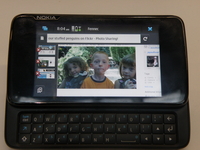
Firefox for mobile is due to launch this month, after months of development and various leaks.
As reported on v3.co.uk, the new browser will initially only be available for the Nokia N900, which has been a hotbed of Mozilla development for the mobile sector, although further operating systems, such as Windows Mobile and Android, will be available soon.
We posted exclusive screenshots of the browser in action earlier this year, showing that the new mobile browser apes the larger version well.
Extending your lifestyle
This means add-ons are included (30 or so will be available at launch) as well as tabbed browsing and the auto-search Awesome bar.
The N900 will not come pre-loaded with the browser, so you'll have to download it off your own back, much like on the 'proper' computer.
We're looking forward to finding out more details on Firefox for mobile next week, so if you're one of the lucky N900 owners, prepare your device for a download (or do nothing and wait... your choice really).

| |
Read More ...
Mozilla man urges move to Bing from Google

A senior figure at Mozilla has suggested that people switch to Microsoft's Bing search engine, after a comment made by Eric Schmidt from industry giant Google.
Schmidt's suggestion that "If you have something that you don't want anyone to know, maybe you shouldn't be doing it in the first place" has inevitably drawn ire from those who think Google is not committed enough to privacy.
And among those critics is Mozilla's Asa Dotzler, who blogged about the statement and suggested a move to Bing.
Really scary
"That a company with so much user data on its servers is led by someone who just doesn't understand privacy is really scary to me and it should be scary to you as well," blogged Dotzler.
The blog, which links to instructions on how to change your Mozilla default search from Google to Bing, also includes a YouTube of the Schmidt interview, and the assertion that "There is no ambiguity, no 'out of context'" here.
Google has traditionally had great links with Mozilla in the past, although the arrival of a rival browser in Chrome has obviously changed the two companies' relationship.

| |
Read More ...
3 first to offer INQ Chat 3G for sale
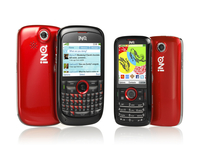
The INQ Chat 3G - the QWERTY bigger brother to the Mini 3G - has gone on sale through 3.
The device will also cost less than expected, coming in at only آ£99.99, rather than the anticipated آ£120 when it was shown off earlier this year.
The Chat 3G offers an inbuilt Twitter client from the home screen, leading to it being dubbed the 'Twitter phone' in a similar way that the INQ1 was called the 'Facebook phone'.
Feature rich
Users of the Chat 3G can also get the phone for free at only آ£15 per month with unlimited texts and Skype to Skype calling and 75 included minutes of talktime.
The phone is actually pretty feature rich for its price tag, with email clients and inbuilt Facebook communication tools on board, as well as
We were pretty impressed with the device when we played with it earlier this year, and we'll be bringing you a full, in-depth review in the near future.

| |
Read More ...
More Mars imagery comes to Google Earth

Google has announced it has added a whole host of new imagery from Mars, available now for all to see in its Google Earth service.
The images are taken from the high-resolution stereo camera aboard the European Space Agency's Mars Express orbiter and show off some of the awesome Martian landscape of the planet.
Exciting new features
Included in the images are: voluminous lava flow fields from the Tharsis volcanoes Ascraeus and Pavonis Mons; some glacier structures around the Olympus Mons' Aureole; and a good look at the brilliantly titled Orson Welles Crater.
"With these updates, nearly half of the martian surface is covered by imagery having a nominal resolution of 25 meters per pixel," says Google about the images.
"As such, there are many exciting, newly-visible surface features to see."
Since 2005, Google Earth has been providing the web world with images from space. It wasn't until Google Earth 5, however, that images from the Red Planet were added to the service.

| |
Read More ...
Review: Acer neoTouch

The Acer neoTouch is the third smartphone we've seen from the company since it acquired phone manufacturer E-Ten last year, and the first to feature the Windows Mobile 6.5 OS.
The front of the handset is dominated by the 3.8-inch display, with a robust glass coating that offers a quality feel. With a resolution of 480 x 800 pixels, it's a sharp screen, and colour reproduction is very impressive.
Most of the phone's functions are carried out using the touchscreen, with a stylus stored in the top right corner.
The Windows Mobile 6.5 operating system is better than older versions of Windows Mobile, with larger, finger-friendly icons and more intuitive menus, but delve a little deeper and you'll still find lots of tiny options where you'll need small fingers or to use the stylus.
It also lacks the slickness and aesthetic appeal of rivals such as Google's Android OS, although at least the phone's 1GHz processor makes it a fast and responsive device.
The onscreen keyboard is fine for short text messages, but it lacks the excellent text correction software found on rivals such as the iPhone, HTC Magic and HTC Touch Diamond 2. As such, you'll have to prod very precisely at the small onscreen buttons, otherwise mistakes are frustratingly easy to make.
Triple connections
Wireless connectivity is impressive, with 3G/HSDPA, Wi-Fi and Bluetooth all built in as standard. These let you browse the internet on the move and also connect to home and office networks.
Google Maps software comes preinstalled and, with assisted GPS included, you'll also be able to use the neoTouch as a satellite navigation device. Other pre-installed software includes Office Mobile –with portable versions of Word, Excel and Powerpoint – letting you get to grips with work applications on the move.
Acer has stuck with Microsoft's Internet Explorer's web browser, rather than the excellent Opera browser found on other smartphones. That said, the large screen still makes it easy to browse the web wherever you are.
The 5-megapixel camera features a dedicated shutter button on the side, automatically switching the phone into landscape mode for shooting. Image quality is disappointing, however, with colours lacking vibrancy and noise present in darker conditions. That said, there is a bright LED flash, helping slightly with night-shots.

Limited memory
The 256MB of user memory is limited, but there's also a microSD card to add further storage space. Those adding memory cards to store their music collection will be happy to find the inclusion of a regular 3.5mm headphone jack – making it easy to use your own headphones.
Battery life is disappointingly average, lasting for only a couple of days between charges under moderate use.
Overall, the neoTouch S200 isn't a bad phone. It is well made and offers a large screen, but with few stand-out features, it's difficult to recommend over the best in class.
Related Links
| |
Read More ...
Vodafone dropping HTC HD2 after two months
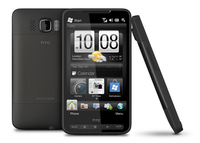
Vodafone has confirmed that it will be dropping the HTC HD2 despite it only recently going on sale.
The story first appeared on Electric Pig, and we've since had official confirmation from Vodafone that this will the case.
It seems the addition of the iPhone has mixed things up over at Vodafone HQ, with the device mentioned as part of a 'strong line up of smartphones next year', which is the reason Vodafone isn't going to be stocking the HD2 any more.
Even high interest isn't enough
"There's been a great deal of interest since we made the HTC HD2 available to buy in November and our initial supply quickly sold out," said the statement.
Vodafone says it will still honour the orders it has on backlog, and is bringing in more stock to fulfil these, but when this has run out users will no longer be able to pick up the HD2 from the big red network.
It's an odd choice, as the network only began stocking it in November, and customers have quickly warmed to the new device, which makes sense given the acclaim its received since its release.
We had a quick chat to O2, which is also stocking the phone, and it said that it is getting so many orders for the device that it hasn't even put it online yet so it can fulfil them all - and a spokesperson also pointed out that you can get BOTH the iPhone and HTC HD2 from the bubbly carrier.
We'll have a word with HTC to see if its upset about the move - but it's probably too focused on the Bravo to even care.

| |
Read More ...
Review: Advent Milano

With four netbooks already released under PC World's in-house Advent brand, it is no surprise to see yet another model added to the range. While the Milano is an affordable and functional device, it fails to stand out.
The 1.3kg chassis is highly portable and slips easily into even the smallest bag. The 3-cell battery runs for 166-minutes for basic use at home or on the move.
The combination of silver and black plastics adds style, but won't suit all tastes. Build quality is sturdy, but the glossy plastics are easily tarnished.
The first clear flaw is the design of the 10.2-inch screen. When fully open, the panel only folds back 40 degrees from vertical. This makes it awkward to get a comfortable viewing angle on your lap or on a seat-back table, for example.
Image quality is unremarkable. Brightness, colour and contrast fail to impress, but suit basic daily use. The matt-TFT screen coating is useful for frequent travellers, as it all but eliminates reflections in bright conditions.
The keyboard spans the width of the chassis and proves comfortable to use. We noticed no sign of flex, even when typing at speed. The large keys respond well, but produce a noticeable clacking sound during use that may irritate.
The Intel Atom processor and 1024MB of memory provide power for browsing the internet and basic office tasks. The 160GB hard drive provides ample storage for carrying your music, photos and work files.
There is no HDMI port for connecting to an HDTV, although a VGA port lets you connect to analogue screens. Three USB ports let you connect peripherals and 802.11n Wi-Fi allows the fastest possible wireless network connectivity.
Windows 7 Starter software is installed. While it runs slower than Windows XP, it is far better featured and a huge improvement over Vista for netbooks.
Overall, the Milano is a usable and great priced machine, but struggles to stand out in an already crowded market.
Related Links
| |
Read More ...
WebGL 3D web standard reaches draft stages

The web moved closer to another dimension this week, with news that the Khronos Group and Mozilla had come to an agreement over a 3D web standard.
Called WebGL, the spec means that web programmers now have the building blocks to bring hardware-accelerated 3D graphics to the internet.
Universally accepted
"I anticipate us moving toward a spec that is not provisional, not merely a draft, in early 2010, the first quarter," explained Arun Ranganathan, Chairman of the WebGL working group.
While the idea of having 3D graphics built straight into browsers is a nice one, it is still some way off.
Nevertheless, as the likes of Apple (Safari), Google (Chrome), Mozilla (Firefox), and Opera (Opera) are members of the WebGL Working Group, it means that the spec when properly finalised will be unanimously accepted by the web's major players.
Fingers-crossed then that playing the likes of Crysis straight from your browser could well become a reality.

| |
Read More ...
TechRadar Choice: 15 best netbooks in the world today

Top 15 best netbooks in the world today
It's hard to believe it's been just two years since Asus revolutionised the notebook market with its release of the Eee PC.
This tiny form factor computer omitted the optical drive in favour of USB ports, and even ditched Windows, switching to Linux to keep costs down. It was a brave move on Asus' part, but one that paid off.
Since then, the netbook as a concept has snowballed. Almost every major computer manufacturer has some form of netbook on offer, and there's been a lot of innovation in the field.
Modern developments
This year we've seen Nvidia's Ion platform enter the market in the form of Samsung's sprightly N510, a netbook which actually had enough under the hood to make it behave like a proper PC.
We've also seen Windows 7 Starter edition emerging on netbooks. Built from the ground up to run on tiny computers, it's a breath of fresh air in a market that's become synonymous with XP's primary colours.
Next year will certainly see manufacturers using Windows 7 to sell their new, hopefully more powerful netbooks.
The big problem with netbooks at the moment is that they're all inherently similar. Most running on Intel's Atom processor (with a couple of notable exceptions), and are incapable of doing much more than word processing and running really ancient games.
With this in mind, we've rounded up 15 of the most unique netbooks of the past year or so. Whether it's the price, the battery life, or the monolithic corporate sponsorship, each of these netbooks have done something to make them stand out from the crowd. We'll start with the cheap ones...


Medion Akoya Mini E1210
Medion's Akoya Mini E1210 is a quintessentially good value netbook
Many manufacturers have taken MSI's Wind netbook and rebadged it under a range of names. The latest manufacturer to take this route is Medion, with its affordably priced Akoya Mini E1210.
The compact 1.2kg chassis uses a combination of black and silver plastics for a functional yet staid appearance. The materials used are resilient for frequent travel and the rounded edges make it easy to carry and slip into hand luggage.
Although the Medion Akoya Mini E1210 is bettered by many other netbooks on the market, its low price, great storage and useful software still make it a compelling choice...

Read: full Medion Akoya Mini E1210 review
Price check: get cheapest Medion Akoya Mini E1210 price

Dell Latitude 2100
Are Dell's school laptops a class act?
After the success of its Inspiron Mini netbooks, Dell has aimed its next release at the education market. Sold under Dell's corporate Latitude brand, the 2100 is a tough and usable netbook with a range of unique features.
Available in a choice of colours, the textured rubber casing prevents scratches and makes it easy to hold. The chassis is quite bulky, but removable handles and shoulder straps can be added to allow easier transportation. Battery life is average, however, at just 191 minutes.
With great usability and features, the Latitude 2100 is an unusual, yet highly usable, netbook. Overall, it has just as much to offer to consumer and business users as it does to students...

Read: full Dell Latitude 2100 review
Price check: get cheapest Dell Latitude 2100 price

Sony VAIO W Series
Sony finally enters the netbook race with a tidy little number
The first proper effort at a netbook from Sony, the new VAIO W series, comes a long, long while after everyone else has already delivered their versions, comes in a bit pricier (as expected I suppose) but better designed (again, as expected).
You know exactly what to expect from a netbook these days. Nine times out of ten it will be powered by a 1.6GHz CPU, with a gig of RAM and more often than not come in a 10.1-inch chassis. They all share the same Intel GMA graphics, and you'd expect to get a decent amount of play-time on the move.
It's beautifully designed, with a great screen, but over-priced and under-specced for the cash. So, in short it's exactly what you would expect from a Sony laptop. It also comes in white and pink if you feel you have to have a Sony if you're going to have a netbook...
Read: full Sony VAIO W Series review
Price check: get cheapest Sony VAIO W Series price

Acer Aspire One 531
Acer's Aspire One 531 keeps the netbook ticking over nicely
Acer has led the way at the budget end of the netbook market, but there's little to distinguish its more expensive offerings. The Aspire One 531 looks set to change this, offering a desirable design and good quality.
The chassis is stylish and thinner than most of its rivals, making it easy to slip into a bag. Glossy highlights around the side look good, but matt plastics are used for most of the design, helping to hide ï¬پngerprints. Weighing 1.1kg, portability is impressive, although the use of a 3-cell battery limits battery life to 195 minutes.
Although the Aspire One 531 doesn't significantly move the netbook market on any further, it is a smart and well-made choice. It's just a shame the battery life is merely average...
Read: full Acer Aspire One 531 review
Price check: get cheapest Acer Aspire One 531 price

Asus Eee PC Seashell 1101
Does this Eee PC offer the best netbook balance yet?
The Eee PC 1101 is the latest addition to Asus' Seashell range, which focuses on extreme portability and usability. It is the largest machine in the range, as it boasts an 11.6-inch screen, although it also features an extremely impressive 470-minute battery life.
While the panel isn't the brightest we've seen, it is very detailed thanks to the 1366 x 768 pixel resolution. It is LED backlit which provides good colour reproduction, while also proving less demanding on the battery. There is a glossy Super-TFT coating in place, however, so working in changing light can be frustrating, due to the consistent reflections.
Overall, we like the Eee PC Seashell 1101 a lot. While it doesn't offer the extreme portability of its smaller brother, the 1008HA, it manages to provide a whole host of useful features, while being easier to use and looking fantastic...
Read: full Asus Eee PC Seashell 1101 review
Price check: get cheapest Asus Eee PC Seashell 1101 price

Samsung N120
Samsung's widened netbook design packs a serious audio punch
Samsung's range of low-cost laptops is anything if not predictable. The N120 clings on to most of the same features as the N10 and the N110 before it.
The Samsung N120 has the Atom N270 processor, the same chip that's at the heart of most of the world's netbooks.
It has 1GB RAM, and with that magic number comes permission to pre-install Windows XP. So far so standard, bar the rather generous 6-cell battery which gives you a realistic five and a half hours of use on a single charge...

Read: full Samsung N120 review
Price check: get the cheapest Samsung N120 price

Toshiba NB200-110
This is about as high end as a low-end laptop gets
We admire Toshiba for finding a design hook, hanging itself off it, and resolutely staying there no matter how loudly the world shouts: the look of the NB200 we recieved is best summed up as 'diagonal stripes and plastic'.
Stripes on the lid, stripes on the monitor bezel, even stripes on the trackpad. And although admittedly most netbooks and laptops are made of plastic, we rarely sit there thinking about it. In our time with the NB200 we could think of nothing but.
If you can find the black version we'd say the NB200 is a fantastic choice poking its head out above a busy crowd. Steer clear of the silver one, though...
Read: full Toshiba NB200 review
Price check: get the best Toshiba NB200 price

MSI Wind U115 Hybrid
MSI Wind U115 Hybrid brings both speed and size to netbook storage
MSI's Wind netbooks have been well received and extensively rebranded by many manufacturers, including Medion and Advent. MSI now brings unique storage and outstanding mobility with its own-brand Wind U115 Hybrid.
Since the original Wind design was so effective, little has changed here. The compact 1.3kg chassis is still highly portable and its rounded edges allow it to slip easily into small hand luggage.
Where the U115 blows away the competition is its storage and battery life. Both an 8GB Solid State Drive (SSD) and a 160GB Hard Disk Drive (HDD) are fitted, the intention being to run your software from the faster SSD and store your data on the capacious HDD...

Read: full MSI Wind U115 Hybrid review
Price check: get cheapest MSI Wind U115 Hybrid

Dell Inspiron Mini 10
A great screen, but better options exist at this price
Dell entered the netbook market last year with the 8.9-inch Inspiron Mini 9 and has since released a range of increasingly larger models. The Inspiron Mini 10 is its 10.1-inch netbook and strikes a great balance between mobility and usability.
The stylish black chassis is one of slimmest we've seen and weighs just 1.2kg. Its sleek dimensions make it easy to slip into hand luggage and its excellent build quality ensures resilience on the move. The glossy lid is frequently prone to scratches and smudges, however, so you'll want to invest in a protective sleeve.
The stand-out feature is the vibrant 10.1- inch screen. Encased beneath a sheet of glossy plastic, colours are stunning. The black bezel contrasts nicely with the bright panel, ensuring colours leap off the screen, so photos and movies look great...
Read: full Dell Inspiron Mini 10 review
Price check: get the cheapest Dell Inspiron Mini 10 price

Medion Akoya Mini E1312
Are 11" netbooks the new 10"?
The Akoya Mini E1312 is Medion's largest netbook and features the rare but increasingly popular 11.6-inch screen size.
This makes it a very comfortable netbook to use and it is certainly worth a look for those in the market for a larger machine.
The 11.6-inch screen size is increasing in popularity, as it strikes a good balance between 8.9 and 12-inch panels.
The screen here provides great colour reproduction and the most detailed image available on a netbook thanks to the 1366 x 768-pixel resolution. The thin bezel allows the panel to stretch almost the entire width of the machine...
Read: full Medion Akoya Mini E1312 review
Price check: get the cheapest Medion Akoya E1312 price

Advent Altro
A great screen, but better options exist at this price
While the popularity of the netbook has continued unabated, a new market has grown in the form of Consumer Ultra Low Voltage (CULV) laptops. Combining ample mobility with greater power than a netbook, the Advent Altro is the latest to hit the market.
Despite taking huge design cues from Apple's MacBook Air, the 1.7kg Altro is slightly heavier, costs almost half the price and uses resilient silver plastics rather than aluminium to keep costs down.
The main body is sturdy enough for semi-regular travel use, but we noticed some flex when typing. The thin screen panel is less resilient, bending easily under pressure. The hinges are particularly weak, requiring plenty of care when travelling...
Read: full Advent Altro review
Price check: get the cheapest Advent Altro price
MSI Wind 12 U200
The first thing of note with the Wind U200 is that it has strayed well and truly into notebook territory. Is this a netbook or a notebook? We're still not sure – mainly because of its high-end (for netbooks, anyway) spec and its price.
This laptop isn't powered by an Atom chip. Its 12.1-inch screen is actually driven by one of Intel's consumer ultra-low voltage (CULV) Core 2 Solo SU2500 CPUs.
The Wind U200 also comes with 2GB of DDR2 memory and about 260GB of storage across two drives. Complementing that are three USB 2.0 ports, SDHC card reader, VGA-out and more interestingly – HDMI out.
Read: MSI Wind U200 review
Price check: get the cheapest MSI Wind U200 price

Acer Ferrari One
A stylish, Ferrari-branded, AMD based netbook, offering dual-core power
Acer's Ferrari range has traditionally been made up of high-end ultraportables with expensive price tags to match. The Acer Ferrari One is considerably more affordable, bringing the Ferrari brand to the masses.
It's a stylish and well-made product with high-quality plastics and a cohesive design that creates a premium feel.
Not everybody will appreciate the Ferrari branding and oddball design touches – such as the rubber feet that feature a tyre-tread finish or the bright-red lid and prancing horse badges, but to our eyes it's an attractive netbook.
Read: full Acer Ferrari One review
Price check: get the cheapest Acer Ferrari One price

Samsung N510
Samsung brings the Nvidia Ion to the masses
The Samsung N510 is the first Nvidia Ion-powered netbook to hit UK shores.
Along with its great design and usability, the machine provides the kind of graphical power normally associated with much larger laptops.
The 11.6-inch screen is excellent. Colour vibrancy and image detail are top-notch, helped by a sharp 1366 x 768-pixel resolution. There's also no Super-TFT coating, so no distracting reflections in bright light conditions.
Build quality is excellent, with robust plastics used to good effect, ensuring durability on the road. The shiny lid quickly attracts fingerprints and grime, however.
Read: full Samsung N510 review
Price check: get the cheapest Samsung N510 price

Asus N10JH
The first 10.1-inch Atom-based machine we've seen with a dedicated GPU
Asus' N10 is the first netbook we've seen to feature a dedicated graphics card, letting you carry out demanding 3D tasks. The latest Asus N10JH features an updated graphics card, and the ability to switch between that and an integrated GPU means you'll benefit from both power and battery life.
Despite the small 10.2-inch screen, it's actually closer in size to a regular 12.1-inch ultraportable laptop. A wide bezel surrounds the display on all sides, dwarfing the screen, and it's a shame a larger panel hasn't been fitted. As it stands, the 1024 x 600-pixel resolution lags behind some of the latest netbooks, although it is a bright and vibrant screen.
This machine really shines when it comes to multimedia tasks, however, with the dedicated Nvidia GeForce G 105M graphics card offering more power than many larger laptops.
Read: full Asus N10JH review
Price check: get the cheapest Asus N10JH price

| |
Read More ...
Review: HP Mini 5101

We've been impressed with several of HP's netbooks, although they've struggled to match the best machines on the market. The Mini 5101 is the latest and has a lot to offer.
The conservative matt-black design is highlighted by a brushed-aluminium lid. It feels more grown up than other netbooks, but some users will find it duller as a result.
The excellent keyboard spans the full width of the chassis. Each of the keys sticks up through individual holes in the chassis and have a lot of travel, making it comfortable to use over long periods.
The strong chassis and soft-touch plastics hide scuffs and scratches well. There's some flex to the screen, but it's still tough enough for daily use.
The screen is bright and colourful, despite the standard matt-TFT finish. Reflections and fingerprints are well suppressed in bright conditions. The 1024 x 600-pixel resolution is no better than average, but HP is also selling the 5101 at the same price through its website with a higher 1366 x 768-pixel resolution, making this model somewhat redundant.
Windows Vista
With a budget Intel Atom processor in place, performance is hobbled by Windows Vista. It can be improved by uninstalling unnecessary programs and turning the settings to basic, where it's able to run smoothly.
The battery life of 198 minutes is reasonable, if unexceptional. Three USB ports offer good connectivity for your peripherals, and those wanting to connect a projector or external monitor can do so via the VGA port.
Wireless connectivity is excellent, with 802.11n Wi- Fi and Bluetooth both in place.
The HP Mini 5101 is a good choice for business users, with top-quality connectivity letting you keep in touch with the office when out and about. It's also comfortable, with an excellent keyboard but other models in the range are more appealing, and the price tag will be out of reach of many users.
Related Links
| |
Read More ...
Google's Chrome extensions off to fine start

Google's Chrome extensions have only been in beta for a matter of days, but the amount of apps has nearly doubled since its launch on Tuesday.
Around 300 apps were available as extensions to the Chrome browser at launch, but that number has swelled dramatically in a matter of days.
In fact – with 553 at the latest count – it's clear that many developers have been eagerly awaiting the arrival of extensions for Chrome.
One of Mozilla's Firefox browser's most widely appreciated options is its extensions, and it has a massive library to choose from.
Futureproofing
However, with Google expanding Chrome into an OS in 2010, the need for functional extensions was clear, and by launching to beta now there will be plenty to choose from by the time it becomes an integral part of full Chrome.
One of the latest extensions is an official Google Docs Extension - bringing previews of files.
"We didn't want to miss the extension party, so we created a Google Docs extension," wrote the Google Docs team on its official Blog.
"The Google Docs PDF/Powerpoint Viewer makes it easy to preview PDFs, Powerpoint presentations, and other documents you find across the web in the Google Docs viewer, instead of downloading them."

| |
Read More ...
Weird Tech: Get superhero powers by taking a cheap flight
There's a small chance you might get transformed into a superhero the next time you take an EasyJet flight to some remote European airport terminal for a stress-filled weekend of travel misery.
Sounds good?
The theory has been given life by scientists who've discovered plane passengers may get zapped with "gamma-ray" radiation during flights in stormy conditions.
According to LiveScience, if flight 3063 from London Stansted to Prague happens to be very near the source of a lightning bolt, passengers could find themselves exposed to radiation equivalent to 400 chest x-rays in one burst.
That's easily enough radiation to fuse your DNA with the DNA of the sedated chihuahua in the cargo hold and the DNA of the pork pie you sneaked on-board to avoid having to pay in-flight prices.

THREE STRIKES RULE: The chicken and pork meals fused together, creating a new universally popular meat they call "chork" [Image credit: Flickr]
Joe Dwyer, Professor of Physics and Space Sciences at a Florida university, says not to worry, though, and that these close strikes are "very rare". There's also a chance this is another bit of negative PR being put about by the environmentalist lobby. Just like that other loony lie about the planet getting warmer. They just want a whole row to themselves next time they get a flight.
Joke submission APPROVED
A major corporation has made a joke! The corporation in question is Epson - the joke it has made is to create a parody of an "Extreme Gamer" figure to promote one of its HD Ready projectors as being ideal for people who are into videogames.
The joke video discovered by The Reg shows a man making a bit of an arse of himself in public places with his huge portable gaming kit, which includes a PS3 and an Epson projector strapped to his body for the ultimate in... pretending.
MODERN PROJECT: The hot pink background of the product page is also a brave move. Times are a-changing at Epson
Presumably this was initially planned to "go live" last April Fool's Day, but nervous Epson management has taken this long to approve the idea for release.
One of their dinosaurs is missing
What's the biggest thing you've ever stolen? A fizzy cola bottle from Woolworths that seemed fun at the time but, with the benefit of hindsight, actually contributed in some small way to the collapse of the entire retail chain and the loss of thousands of jobs? A Mars bar? A magazine? A library book?
Chances are you're not "big time" enough to have been responsible for this week's most amazing crime - in which a آ£55,000 animatronic dinosaur went missing. The 1.5m tall robot was part of the live Walking with Dinosaurs stage show, which had just opened in Mexico.

WALKING OFF WITH DINOSAURS: Beats getting home with a traffic cone and a pocket full of complementary salt sachets [Image credit: Walking with Dinosaurs Show]
It was found to be missing during a post-show headcount in the backstage robotic dinosaur enclosure, although "everything went on as usual" the next day according to spokesman Karla Arroyo.
Norwegian whirl
We've become rather used to possible alien activity being captured by 2001-spec mobile phones in grainy 20 pixel block-o-vision, so some staggeringly sharp shots of a "space spiral" complete with aquamarine "death-ray" emanating from its core in the sky above Norway came as something of a pleasant surprise to fans of unsubstantiated claims of alien visitation.
The Daily Mail has some high-resolution images of the atmospheric anomaly, which has been explained as a Russian rocket fuel accident - even though the Russians are saying it's nothing to do with them. If it is aliens, we'd better strike soon while they're still dizzy.

| |
Read More ...
Review: Novatech V14 4100

We've seen a range of laptops from Novatech, from regular devices right up to high-end gaming machines, but the V14 4100 is the first CULV system.
With a 14-inch screen, it's not the smallest laptop we've seen, but it is thin and light – at just 1.6kg – making it highly portable.
The glossy Super-TFT screen is excellent. It's reflective in the brightest conditions, but vivid colours and pin-sharp image quality more than make up for this, and it's ideal for working with photographs.
With an integrated Intel graphics card in place, light multimedia tasks are the most you'll be able to do with this machine – gaming is definitely off the cards – but there's enough power for regular office work or watching videos on the move.
Large keyboard
The keyboard is large and easy to type on, although the board flexes slightly in the centre. Not all of the keys on our review sample proved responsive, requiring a fairly hard typing action to get the best out of it. As such, it's worth trying this laptop before you buy, as it's keyboard may not suit your style of typing.
The touchpad is large and accurate, although the integrated mouse buttons have a slightly spongy feel during use.
Design-wise, it's an attractive and simple machine, with light silver plastics that contrast well with the glossy-black screen surround. The thin chassis is surprisingly tough, with no movement under pressure, and the display is also held firmly in place when typing. The low weight does lead to a slightly insubstantial feel, however.
Processing power comes from a 1.3GHz ultra-low voltage Pentium chip, backed by 2048MB of fast DDR3 memory. The result is a machine that only suffers from lag when running a host of intensive applications, with single applications running smoothly.
Although some of the CULV machines we've seen have offered up to nine hours of battery life, the 234 minutes on offer here is a disappointment. That said, it's still more than enough for the daily commute.
As with most of the other CULV laptops we've seen, there's no integrated optical drive. Peripherals can be connected via the three USB ports, ExpressCard slot or wirelessly via Bluetooth.
802.11n Wi-Fi and Gigabit Ethernet are both in place for the fastest networking currently possible. There's also a 4-in-1 memory card reader, making it easy to transfer files between this and other digital devices.
The Novatech V14 4100 has a lot to offer for the money. Costing the same as a high-end netbook, its portability is only marginally less, yet the reasonable performance, large interface and excellent screen make it a lot more practical for frequent daily use.
Related Links
| |
Read More ...
Adult virtual worlds have kids problem

Virtual worlds designed for adults are not doing enough to exclude kids, according to the US Federal Trade Commission.
A major study into adult online worlds pointed out that seven of the worlds with the 'most explicit sex and violence' has a minimum age setting of 13.
And even the sites with an 18 rating didn't block an immediate second attempt with an older birthday put in.
Shock?
The fact that kids can access the content is hardly surprising, and the internet and chatroom are rife with the same kind of content of course.
But the FTC was less than delighted to find that even those who enter a birthdate below the proper age were not necessarily kept out for long.
"Two worlds… rejected child registrations, but then immediately permitted users to re-register as an adult from the same computer," the report said.
It's not a new problem, or an unexpected one, but it is becoming increasingly obvious that kids can easily find unsuitable content with the minimum of internet knowledge.

| |
Read More ...
10 things to know about Samsung's Bada platform

1. Making smartphones open to all
Samsung's announcement of Bada might be confusing to some people, but the firm has a clear message – it wants to make the smartphone accessible to everyone.
In a chart shown at the media launch, Samsung pointed to the growing (but still small) smartphone market and said: we want more of that.
To that end, it's looking at turning half of all mobile users into smartphone owners, and Bada seems to be a big part of that. The definition of a 'smartphone' is still a little tricky, and Bada definitely raises that debate again – does an application store, hardware acceleration and multi-touch support make a normal mobile a smartphone? If it does, then Bada is just that.
2. Taking on the big players
Another constantly asked question about Bada is simple – what on earth is it? An OS? A user interface? Well, it's mostly the former, although Samsung is being tight lipped over defining it exactly. However, Justin Hong, President of engineering for the Bada platform, did say that it could be compared to Android in that it's (partly) built on a Linux kernel, and that's good enough for us.
So what does that mean in competitive terms? Android, Symbian, Windows Mobile and Linux Mobile are all already supported by Samsung, and this seems another direction to worry about.
Well, it is and it isn't. Samsung told TechRadar that Bada is taking its proprietary UI, used in its high end feature phones like the Jet, and making it smart, by adding things like an application store and multi-touch support as standard.
The idea is by making it proprietary to Samsung phones (the company says there are 'no detailed plans at the moment' to license Bada out) the company can market it globally, make it cheaper to use (with those costs passed onto the phone SRP) and can tune the user experience in its own image without having to use a third party OS.

And Hong made the biggest statement of differentiation of all: "The lowest cost range of Bada is going to be lower than the lowest point of Android."
3. All about the applications
As you might have noticed, this is all about the applications, and that's something Samsung is hammering with this release.
Well, it's making a big deal about the fact they are there, but beyond that there's not a lot of information. Developers can code applications in Flash, C++ or Web Runtime, as well as Java if they so wish as that's supported too.
The applications will also be able to integrate into the TouchWiz widget-based home screen, meaning if you wanted an expandable box to show basic information without opening the whole application, that's possible.
4. Smarter than smartphones?
When the Jet was announced, the tagline was 'smarter than smartphones', highlighting how the key smartphone features have been potted down into a feature phone in Samsung's (then) latest and greatest.
However, Bada takes that notion one step further, by bringing the humble feature phone into the smartphone arena. API's for mapping applications are offered up, meaning developers can integrate social networking.
It's telling that the Jet was based on an earlier version of Bada from Samsung's proprietary SHP OS, which was used for several years – it makes the line between feature phone and smartphone even more fluid, if simply adding some bits to an existing framework can make the difference.
But it means that while the home screen will look the same, the experience will be a lot more powerful – Samsung told TechRadar that it will be setting a lower processor limit in order to run Bada.
5. Touchy feely
Bada is an exclusively touch platform, according to Hong, but one that also features multi-point touch.
For some reason Samsung is keen to point out that Bada isn't multi touch, it's multi-POINT touch... whether this is for some legal reason or just a desire to be different, we don't know.
But the weird thing is that it's only supported, rather than being used throughout – this means the home screen will still be single point touch like before, but the applications (Hong pointed to games) will be able to use this capability.
Another interesting snippet – Samsung believes it can use multi point touch on resistive and capacitive screen, as it says it will be working with both on the Bada platform. We're not sure why multi-point touch would be a grand idea for a resistive screened phone, but hey, that's Samsung's prerogative, and it will use it if it wants to.
6. Set menu
Much like Android, Samsung is setting some definite limits for phones running Bada – although it's a little redundant seeing as it will be the one making the phones for the OS. Perhaps it's just an exercise in disciplining the design department, but it does mean that consumers will be able to expect a minimum experience from Bada devices.
Although Hong didn't specify, there will be a minimum processor power level in place, as well as a 3G connection, GPS and obviously the ability to handle Flash.

However, it appears that touchscreens may be a little different, coming in both resistive and capacitive displays. We're not sure whether the resolution has been mandated, as it was in the early days of Android, but given that there will be a fairly wide range of handset styles, we'd imagine there would be.
7. Game for gaming
If you attended the launch of Bada, you'd quickly realise that Samsung has seen the potential for gaming on the mobile phone to become MASSIVE.
Not only did it show off a pretty nifty version of Resident Evil running on a Bada interface (although not on an actual phone) but it also pointed to the fact that multi-point touch will be used mostly in games, to make them that much cooler (and presumably make on-screen control pads easier to use).
Add to that the likes of Capcom, EA and Gameloft on board already, and we'd hazard a guess that the nascent Bada store will have a pretty bulging gaming section.
8. Central to your media life
We all heard the ramblings of Neil Davis from Blockbuster stating that the Bada phone could become the 'uber remote' to control your entire life (although this was later debunked with a quizzical sound from Samsung's team) but it does seem that Bada could become something integral to the Samsung 'experience'.
With it's role as one of the bigwigs in the consumer electronics industry, it's likely that many have a Samsung TV, netbook or even Blu-ray player, and these could be at least compatible with Bada in the future, if not built on a larger version of the system, allowing cloud access to movies and music from wherever you want.
In the short term, we'd imagine that, in Samsung style, the first units from the Bada range will be DivX certified, and pack some nice SRS audio enhancement as well.
9. Flashy image
Not content with being the saviour of the universe, Flash is set to make a big impression in the Samsung Bada range as well, with a number of Flash-based applications populating the early application store, allowing a greater range of shiny software to download.
Add to that the fact that Skyfire, which makes a Flash-enabled web browser for Windows Mobile handsets, is also one of the early players in the store and it seems that native YouTube and the Beeb's iPlayer will be available right out the box too.
10. Coming soon
Don't fret if you're bored of hearing about something about something coming in the near future at some point, Bada is set to be deployed in a big way if Samsung has anything to do with it.
The first phone will be deployed in the first half of 2010 (we're hearing rumblings of Q1, but we'll be jiggered if we believe a phone company will release something EARLY) and given Samsung's love of the flagship, it will probably be a doozie.
But then we'll probably get around five to ten more before the year is out - you have to realise that this is the new proprietary platform for Samsung so nearly all its feature phones will be converted to Bada, giving it a HUGE platform to sling applications to.
And as we all know, it's the post-purchase content that's making the moolah these days - it will just remain to be seen whether Samsung can make its mark in an already congested market - can it stand alongside Android, Symbian, iPhone OS and even Windows Mobile? We'd like to think so, especially given Samsung's strong market share - you won't buy a phone for Bada, but a huge number of us will buy a phone and find it there - the Trojan Horse strategy from the Koreans.
Of course, don't rule out the alliance with Microsoft - Bada Bing. And then if it all goes wrong: Bada Boom.

| |
Read More ...
YouTube to get exclusive 'sports hub' section

YouTube is to expand its video repertoire and include a whole host of new sporting clips, ranging from interviews to long-form content.
YouTube is set to sign a deal with SportAccord to bring the content, which will feature a whole manner of sporting events – including athletics, skiing and cycling.
According to Chad Hurley, Chief Executive of YouTube, who was speaking at the Le Web conference in Paris, the deal will create "new promotion opportunities".
New deals
It is these promotion opportunities which YouTube desperately needs. Considering Google bought the video site for $1.65 billion, it is hoping it will recoup some cash through deals like the one put in place with SportAccord and recently Channel 5 and Channel 4.
SportAccord is an umbrella organisation that represents over 100 sports federations and organisations.
While this means that we will see numerous clips of swimming and cycling, the deal won't cover the most lucrative of them all, the Premier League.

| |
Read More ...
Nokia claims 1m Ovi downloads a day

Nokia has started talking up its Ovi Store statistics, claiming that it is enjoying some pretty handy growth.
The Ovi Store, which houses all manner of downloadable items like applications and wallpapers, is apparently now churning our one million digital downloads a month.
George Linardos, Nokia's Vice President of Product/Media, said: "We're doing just under one million downloads a day, and our download numbers are growing 100% month-on-month," according to Mobile Entertainment.
Tight lipped
And not only that, but Nokia intends to completely revamp the store in the next year, which has been kept out the spotlight by the likes of the Android Market and Apple's App Store.
Although staying tight lipped on the way this new site will look, Linardos did say the current store was only a temporary measure to collate Nokia's content, and the next version will be both more attractive and functional.
"All the while there's been this new platform being built in the background, which we'll be talking about in the next couple of months and launching in the spring with what we're calling 2.0," he added.

| |
Read More ...
Spotify and Last.fm gaining new listeners

Personalised online music is gaining in popularity, according to the latest research, with sites like Last.fm and Spotify reaping the award.
A new study by radio audience measurement body Rajar has found that 4.5 million people in the UK are now using 'personal radio' services online in November. Compare this to 2.9 million in October last year and it seems that many more people are cottoning on to the idea of listening to music found in the cloud.
UK goes radio ga-ga
Dig a little deeper and the figures make for great reading, especially if you are the CEO of Spotify.
Rajar has found that one third of the UK population is now tuning into music online (or have at some point in their lives), which equates to 17.4 million people – although this was already at 16.9 million people in May.
And more people are tuning into podcasts too, with 8.1 million owning up to downloading the digital discussions.
When it comes to who wins out in the popularity stakes between Spotify and Last.fm, it seems that Spotify is proving to be more popular.

| |
Read More ...
Amazon looks to bundling digital copies with Blu-ray discs

Online e-retailer Amazon has launched a new initiative which gives its customers the chance to watch the movies they purchase instantly via a digital copy of the film.
As speedy as Amazon's disc-selling service is, it still relies on snail mail, so the company has come up with the interesting idea of bundling a digital copy in with the movie for free (it is calling it a gift) so you can get yourself some instant gratification.
Gift that keeps on giving
Called Disc+ On Demand, the service is currently available for 313 titles with the company noting: "Buy select DVDs and Blu-ray discs and watch the Amazon Video On Demand version instantly as a gift with purchase."
Some of the titles available at the moment include The Wizard Of Oz, Coraline and 2001: A Space Odyssey.
The idea isn't a new one – some distributors have been bundling digital copies in with their DVDs for a while now, but it is nice to see someone not linked with the movie studio looking at digital in this sort of way.
Currently, the service is only available from Amazon.com but TechRadar has contacted Amazon to see if the UK is going to get a slice of the action in the near future.

| |
Read More ...
Motorola Milestone on sale today with 'massive' pre-orders

Motorola's UK version of the Droid mobile phone, the Milestone, has finally landed on our shores through online retailer Expansys.
The phone is the first to offer Android 2.0, the latest version of the mobile OS, bringing with it a whole host of upgrades.
Speaking to TechRadar, a spokesperson for Expansys said the site had received 'massive' pre-orders in the two weeks it had been on sale, and confirmed the Milestone will be shipping today.
The Milestone is on sale as both a SIM free unit (آ£449) or on a contract with T-Mobile (آ£50 on an 18-month آ£35 a month deal), but the spokesperson also confirmed to us that this doesn't mean that the network will be running with it in store, just that it is Expansys' 'preferred' network.
The natural Android
The good news for all of those G2 Touch users who were left waiting for the official T-Mobile version of the upgrade is that the contract version of the phone will be offered in its 'natural' Android state - ie with no T-Mobile firmware on board.
The QWERTY keyboarded Milestone, which also brings a large 3.7-inch screen, will be sold through Expansys until 31 December, although we're still waiting to hear word over which networks will be offering it.
Expansys is also offering consumers who trade in an old HTC, Blackberry or iPhone up to a آ£100 rebate via mail.

| |
Read More ...


No comments:
Post a Comment