

In Depth: 10 fast and frugal electric cars from the Frankfurt Motor Show

The world's greenest ever car show is happening right now in Frankfurt, Germany - and we've been over there to check out the best new vehicles.
But you can forget the usual parade of crazy concepts and wild supercars, because the spotlight this year is on the latest breed of electric cars to hit the stands.
Most manufacturers, with the exception of the die-hard supercar brands and those too skint to build new cars, have at least one electric vehicle on display.
Some are full-on electric motors that are about as harmful to the environment as a celery and a carrot salad, while others use a combination of electric with petrol or diesel engines for low-speed cleanliness and long-distance usability.
The message all these cars send to us is that electric is most certainly the fuel of the future. Some of them might be concepts for now, others close to production, but each of them represents a significant step in the future of the motor car.
1. Audi e-Tron
Audi's e-Tron is one of the show's biggest surprises. A concept for now, it is an electric version of the R8 supercar with four motors – one at each wheel - churning out 313bhp and a colossal 3,319 lb/ft of torque. That's about 20 times the overtaking muscle of a Ford Focus.

2. BMW VisionED
BMW's concept is fast and frugal. It has a 1.5-litre plug-in electric/diesel motor that emits only 99g/km of carbon emissions and can hit 60mph in 4.8 seconds. It also has two electric motors, one powering the front wheels, the other the rears. The intelligent suspension even knows the type of road you're driving on and will adjust the dampers accordingly.

3. Citroen REVOLTe
Remember the Citroen 2CV, the zany French city car that's now a collector's item? Well Citroen has previewed its new 2CV. Called the REVOLTe, it is likely to be offered as both a hybrid (petrol and electric) and electric only making it perfect for clean, urban fun. It's certainly funky, with rear-hinged doors, three seats and a foldable solar-powered roof.

4. Hyundai Blue
2012 is the year of the London Olympics but we'll also see this new track star making an appearance. It's called the Hyundai Blue, a new sports car with a 1.6-litre petrol engine mated to a 100kw electric motor for instantaneous acceleration. The roof even features solar panels for recharging on the move.

5. Lexus LF-CH
Lexus is taking on the Audi A3 and BMW 1-Series with its new LF-CH hatch - except it will be offered with just a hybrid engine. This will be a sector first and bring fume-free motoring to the masses. It's also clever inside; to keep distracting buttons in the cabin to a minimum the LF-CH features "remote touch controls", which enable the driver to scroll through the in-car systems with a mouse-style controller.

6. Mercedes F-Cell
Finally, an electric car that can escape the city. Range, as in distance, is the Achilles heel of electric cars – you can only travel short distances before they need to be recharged. But this new Mercedes F-Cell has an electric engine that can travel 250 miles between top-ups.

7. Peugeot BB1
The wacky BB1 from Peugeot seats four people in tandem. Two electric motors power the rear wheels, and the driver uses bike-like handlebars rather than pedals and a steering wheel to control it. The downside is it'll only go 75 miles before you'll need to recharge.

8. Renault Zoe Z.E. Concept
Renault showed four new electric cars this year, but it's Zoe that caught our eye. The front doors open like scissors, and the rear is like a butterfly's wings, while its 100kw motor will provide power for 100 miles before a refill. The spoiler also pops out at speed to provide greater aerodynamic but efficiency but the bit that we like most is the climate control system that can "hydrate" and "detox".

9. Trabant
The Trabant name is synonymous with the former Soviet Block. It was the communist 'people car' and as such was as basic as a flea-ridden mule. However, Trabant is back, and very much westernised. This new electric car has a snazzy design incorporating a solar panel on the roof for battery replenishment on the go.

10. VW L1
VW's L1 is an electric car with a back-up diesel engine for when you've long distances to cover. Weighing a meagre 380kg and seating just two passengers in tandem like a motorbike, this little diesel-electric hybrid should be a flier when – not if – it goes on sale. Who said green cars can't be fun?

-------------------------------------------------------------------------------------------------------

 |  |
Read More ...
Review: Creative Zen MX

18 months ago, we looked at Creative's Zen. This was a flash-based portable media player capable of holding its own against the iPod Nano.
Creative has refreshed the Zen as the Zen MX, but is it still up to the job?
Aside from the rebranding, the only aesthetic difference between the Zen and the Zen MX is the "hold" switch, which has been replaced with a menu option that can be dedicated to a soft key.
Other than that, the same features we loved about the Zen have been retained: the ability to add SD cards to effectively double the capacity, the intuitive menus, and the excellent (albeit not OLED) screen.
Creative has thrown a spanner in the sleek Zen works, though: it won't natively play any video files. The original happily displayed almost everything we threw at it, but the MX requires videos to be converted to proprietary .CMV on your PC.
Reduced functionality
The screen is so small that you won't be watching anything more than 30 minutes long, but it's still a hassle.
Another feature we loved about the original Zen has been dropped. The ability to play Apple's AAC files, without conversion, meant the Zen was a good replacement for the iPod Nano. Unfortunately, this too has been removed. As with video, you'll have to transcode files yourself.
It's a shame Creative has dropped so many features, and it seems unwise in the face of the latest iPod Nano. A couple of nifty tricks like adding a video camera and a pedometer have surely put the new Nano on many Christmas wishlists.
It could be that Creative is merely seeking to eke out this Zen model (and its production process) just a little longer. Creative's Zen X-Fi II, with its touchscreen and wireless capabilities, is going head-to-head with the iPod Touch.
And the hi-def video capable, Android-powered Zii Egg - based on Creative's homegrown Zii processor - is promising great things for users who want to get more hands-on with their portable media players.
We singled out the features like AAC and DivX support as reasons to buy the original Zen, but now they're gone it's substantially devalued the player.
If you're looking for a new Creative portable media device, we'd recommend seeking out the Zen X-Fi over the Zen reissue. It may be slightly more pricey, but it's far more versatile than the MX and has better sound quality.
Related Links
| |
Read More ...
Review: Creative Aurvana Air

There are few things quite as subject to personal opinion as sound quality.
Some people will maintain that vinyl records give the best aural experience, while others would rather have Mr. Blonde give them a close shave than listen to a standard bitrate MP3 file.
Some will also happily potter around with the sub-standard headphones bundled with most media players/modern phones and be perfectly happy with the experience.
If that's you then there's very little I can say that might entice you to spend آ£100 on a set of third-party headphones; if you're someone for whom the bundled headphones are a source of aural discontent then I think we can make a case.
Creative's latest Aurvana headphones eschews the standard in-ear setup of the other Aurvana set in favour of a sleekly-designed clip that slots behind the ear, pushing the earphone in to cover the ear canal.
Personally I'm a big fan of the noise-cancelling and sound qualities of the standard in-ear solutions, having owned and loved a set of beautiful Shure 'phones and currently enjoying an ear-pleasing Sennheiser set
Because of this I really wasn't expecting to get on with the Aurvana Air, but I was wrong.
Sound quality
The sound quality is excellent, piping deep bass sounds and crisp high notes into your ear with ease and comfort.
A feat that's made doubly impressive by the fact that the 'phones are just resting on your ear rather than in it. The design of the behind-ear clips means that the buds are pressed tightly - though not uncomfortably so - to your head, and despite my glasses-wearing disability didn't interfere with said spectacles.
The problem is that as good as the sound quality is, it doesn't really matter what ear-splitting volume you're playing Billy Ray Cyrus at there's nothing to stop the ambient noise from filtering in. For some though this wont be a problem, but personally I'd rather hear the music over anything else around me.
But for the audiophiles out there who just don't get on with the somewhat ear-ache inducing in-ear solutions the Aurvana Air set is more than just a compromise. The sound quality is just as good as some of the more expensive in-ear sets, but you will also hear what's going on around you.
Related Links
| |
Read More ...
Students send home-made 'space camera' to 93,000ft

Two US students have created a budget "space camera" for the princely sum of آ£90 ($150) to take pictures of the Earth remotely.
How? They used a helium weather balloon, a Styrofoam beer cooler and a compact Canon A470 camera.
Once they'd made their contraption, they sent it up to 93,000 feet into the Stratosphere.
That's not actually space - 93,000 feet is about 28,000 metres or 28km up while Outer Space doesn't technically begin until 100km above the surface of the earth. Still, the achievement is fairly impressive.
The flight, named Project Icarus, was the brainchild of Justin Lee and Oliver Yeh.
Cleverly, the pair were able to locate the camera once it had returned to earth by placing a GPS enabled mobile phone inside the box.
For more details about how the pair were able to take pictures remotely as well as links to more pictures, head over to PhotoRadar.com.
Related Links
| |
Read More ...
In Depth: 7 reasons why the Motorola Dext will save the brand
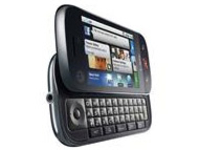
After what seems like aeons in the wilderness, Motorola is back with a new phone, the Dext. It's the brand's first effort at a phone on the Android platform, and it has high hopes that this will be the one to bring it back into the light.
We take a look at the new Dext and give you all the reasons why Moto should be feeling positive - and a few why it should feel a little ashamed.
1. Motorola has actually released a phone
Yes, it's a little bit obvious, but hands up anyone that can point to the last big phone Motorola had (and the Razr doesn't count). The company has been practically in hibernation for over a year, shedding staff in the process, and things looked pretty bleak.
But now there's a shiny new toy for everyone to see and play with, and the stocks have responded in kind, shooting up over 20 per cent since strong rumours of the launch were leaked.
2. It's based on social networking
As Motorola is by no means the first to market with Android, it had to do something different, and that's been achieved by 'Happenings' on the MotoBlur platform. These are essentially embedded widgets which link to Facebook, MySpace and Twitter and provide real-time updates to the services.
So if your mate changes his status on Facebook, it will pop up on the home screen instantly.

But it goes further than that, by integrating your mates' social networking personas into your contact book as well, in a much deeper way than that seen by Palm, INQ or HTC. It means you can choose which way to reply to someone as a drop-down menu, or post a status update of your own to one or multiple accounts at once.
Social networking on a phone isn't a new idea, but Moto has taken it and rammed it so far into the Dext that you feel like you'd see a Facebook message if you took the battery cover off.
3. The Dext embraces open source through Android
Motorola looks to have backed a winner in the Android platform, as it's not only wide open to the development community (meaning better and faster upgrades and tricks) but it comes with all the goodies Android Market application portal has to offer.
While the iPhone clearly has the best App Store, it's limited to a handful of Apple handsets. Google's Android Market may only have a small portion of the applications Apple has, but that number is growing quickly, and more importantly, it's open to other brands.
This means that not only has Motorola picked a platform that it can tinker with (meaning it can create MotoBlur) but it means it automatically comes with applications like Spotify and Doom for free, making it a better proposition.
4. It has a popular form factor... at least in the US
The US just loves a QWERTY keyboard on their mobile, as shown by the success of the Sidekick in that region. The Motorola Dext comes with just that (although it's called the Cliq over there) and although it's a little cramped vertically, it's still a decent enough set of keys.

Don't forget, the Razr was still the top selling mobile phone over in the US until last year, and while Motorola hasn't had the same level of success in the UK, the form factor will still be accepted thanks to consumers getting used to it through BlackBerrys and the T-Mobile G1.
5. Motorola's jumped into bed with Google
Motorola is not just using Android for the OS, so releasing the Dext on this platform means the phone also gets all the latest and most up to date Google goodies.
This means the best Google Maps, Talk, Mail, Voice Search, integrated GPS for turn-by-turn directions and a pretty decent HMTL browser to boot - which isn't a bad haul, especially when Moto doesn't have to develop these tools itself.
6. It's being launched at the same time worldwide
All too often phone companies will stagger the launches of their mobile worldwide, meaning we end up with a phone being launched again, and again, and again. And again (we're looking at you Palm, and the UK still hasn't got the Pre).
But although we don't have an exact release date for the Dext, it's very likely each territory will get the phone within weeks of each other.

This is important as it builds up the importance of the handset, and creates a groundswell of excitement (if it gets good early reviews, that is), which in turn boosts share price.
And given Motorola needs all the confidence it can get through this renaissance that can only be a good thing.
7. Motorola will release more models before 2009 is out
A little birdie has mentioned to us that it might not be too long before we see more MotoBlur handsets, meaning by 2010 Motorola could go from having very little presence in the market to having three top drawer phones.
In anyone's book that's a decent effort, and if the company manages to bring out the Sholes or the Calgary it will at least show there's life in the brand yet.
The Dext is crucial to these plans though, as any issues that arise from its launch can quickly be rectified in the other form factors on the OS side, and therefore each subsequent release can be seen as an improvement, helping Moto look like it's got its finger on the pulse of what the consumer needs.
Of course, it's not all sweetness and light for a company that's been mired in rumours of extinction for so long. One phone launch will struggle to make everything hunky-dory, and there are a few reasons why Motorola should worry about the forthcoming Dext launch:
1. It's too expensive for a phone that appeals to teenagers as well as adults
Social networking might be getting 'cooler' for the older generations to partake in, but MySpace and Facebook is pretty much populated by the younger generations.
So for the Dext to cost آ£35 per month on a two-year contract is a bit crazy, as it alienates a huge percentage of the market. We're not talking about the 20-30 year olds who have that kind of disposable income - we mean the teenagers who would go gaga for such converged networking.
But unless you can convince your Ma and Pa that this is phone will help you do your homework better or make you less prone to mood swings, you're unlikely to get them to pay that much per month for you. There's a reason the iPhone isn't used by many teens, and it appears Motorola has followed it down that expensive path.
2. It's not aesthetically pleasing
Yes, it's got a QWERTY keyboard and a pretty responsive touchscreen, but it is a touch on the bulky side at 15.6mm thick.
It also has leanings towards HTC's business in the chassis, which is very much more about function than style for the most part.

The reason items like the iPhone and the Palm Pre are such big hitters isn't just what they offer the user in tech terms, but also because they are not something people are afraid to pull out their pocket at parties.
Aesthetics are far from the be all and end all in a mobile phone, but if you want to extend the appeal of a device beyond the tech enthusiast, it has to be handbag friendly as well.
3. Motorola has sunk too far to play in the smartphone game
And of course, there's the case that it could be too late for Motorola. While the US might still be more interested in feature phones than smartphones, the UK and Western Europe (not to mention Asia) is very much behind the new wave of the 'do-all' handset.
Motorola has been a notable absence in the smartphone arena for some time, and while it might find it easier to rise back to the surface in the US as a top name, in order to achieve true success it needs to be competing at the sharp end of all the major markets.

| |
Read More ...
Opinion: Watchdog's PS3 expose is barking mad

I'm gutted. A gadget that cost me over آ£300 has packed up, and it's taunting me with a flickering LED. I called the manufacturer and they've told me that since it's out of warranty, it's going to cost me money for an engineer to look at it - and if I'm right and it is gubbed, it'll cost a small fortune to repair it.
PS3? Nope. Dishwasher.
I'm no Sony cheerleader, and as a veteran of the Xbox Red Ring of Death debacle I know how irritating it is when your expensive console fails. But we're baffled by the BBC's Watchdog investigation into supposedly failing PlayStation 3s.
Some PS3s, the programme discovered, pack up - and if they're out of warranty, they cost money to fix. Hold the front page!
So what exactly is Watchdog on about? First, Sony admitted to the programme that some 12,500 PS3s in the UK have packed up - a terrifying figure for a آ£400 console. It criticises Sony for only offering a one year warranty, and for charging when repairs are required after the warranty period is over. And best of all, it showed X-rays indicating "trapped gas" that apparently causes all the problems.
In order, then: 12,500 PS3s equates to a failure rate of 0.5 per cent, which is pretty much insignificant. We're not talking about an Xbox-scale disaster here: where around one-quarter of Xbox 360s are likely to suffer from the Red Ring of Death.
Figures for all failures
And that failure rate isn't just supposed Yellow Lights of Death: it's for all reported failures, so the number of consoles affected is considerably lower than Watchdog claims.
Secondly, Sony stopped charging آ£400 for the PS3 about 200 years ago.
Thirdly, one year warranties are standard for absolutely everything electronic, unless you buy a telly from John Lewis - but that's John Lewis's warranty, not the manufacturer's - and prices for out-of-warranty repairs are hefty whether it's a console or a dishwasher.
Trapped gas? If Watchdog is referring to solder voids, then Sony's rebuttal makes it clear that the soldering in the featured consoles was well within accepted tolerances.
The truth is, a failure rate of 0.5 per cent barely justifies a forum post, let alone a BBC investigation. Yes, if it happens to you it's annoying - same way my knackered dishwasher is really annoying to me. But I don't think the BBC needs to investigate Zanussi. It's a thing, it's packed up, end of story.
What's really annoying about this is that there are plenty of legitimate targets in tech. There's the dominance of individual retailers in gaming. There's the anti-competitive nature of smartphone contracts.
There's the issue of remote killswitches that can disable digital content you've bought. There's… you get the idea. If PS3s start failing in the tens of thousands then by all means bring Sony to account. Until then, there are plenty of more pressing problems Watchdog could get its teeth into.

| |
Read More ...
Virgin Media inks HD deal with Disney

Virgin Media has announced it has penned a deal with Disney, which will see high-definition content from the Mouse House available on the service for the first time.
The new channel will be called Disney XD (formerly Toon Disney) and there will also be an on-demand spin-off available.
Virgin Media users will be also able to watch certain shows on three separate platforms: TV, mobile and the web.
Multi-platform entertainment
Speaking about the deal, Boel Ferguson, VP and general manager, Disney Channel's UK & Ireland, said: "We're particularly excited about the potential for Disney XD, which was developed as a multi-platform entertainment brand with a multitude of content designed to be viewed at home or on the move."
Some of the programmes that will be available, include: Hannah Montana, Phineas and Ferb and Mickey Mouse Clubhouse.
Movie-wise, the likes of High School Musical and Camp Rockwill appear.
This is the first 'three-screen strategy' put into place by Virgin. A strategy that the company says "responds to consumers' desire for ultimate viewing flexibility".

| |
Read More ...
Guitar Hero boss silences Courtney Love

The CEO of Guitar Hero has pointed out that the estate of the Kurt Cobain has fully agreed to the avatar of the late Nirvana singer being used in Activision's Guitar Hero 5.
Courtney Love and the remaining members of Nirvana have threatened the games publisher with legal action over the issue.
However, Guitar Hero CEO Dan Rosensweig says there is "confusion" between Love and the remaining members of Nirvana over Kurt's virtual appearance in the game.
Rosensweig notes that Cobain's estate has "cashed the cheque" and handed over all the necessary rights to use Kurt's image.
Cheque. Cashed.
"I can't speak for everybody being happy, [but we work] with complete consent from artists," Dan Rosensweig told the NME. "There's absolutely a contract and we know that the cheque has been cashed. I can only deal with the facts. It's very clear what the terms are."
Players can unlock the Kurt character and use him to sing other songs in the game by other groups. As such, Bon Jovi have also supported Courtney Love in her recent attacks on Activision, saying that the game was "a little forced".
Bon Jovi, we presume, have also cashed their royalty cheques from Activision, so we don't expect to hear too much more wailing from that quarter!
Guitar Hero's Dan Rosensweig adds that Guitar Hero has "done what we've always done… we went and spoke directly to the estate and made it crystal clear, got the rights [and] paid for the rights."
'Cheque' out the full Guitar Hero 5 set-list right here on TechRadar.

| |
Read More ...
Review: LG GW520

The LG GW520 is an odd beast, neither fish nor fowl. It has a slide-out QWERTY keyboard, like a business phone, but there's no Wi-Fi, so you can't access broadband internet and there's no option to add apps like you can with a smart phone.
But it is a slim and sleek affair (at least by QWERTY keyboard standards) and includes LG's widget-based interface, push email, quad-band GSM, HSDPA 3G, a 3 megapixel camera and FM radio.
There's also a couple of nods to social networking with a Facebook app and LG's Livesquare, which offers a picturesque way of keeping track of your contacts
LG is clearly aiming it at the middle of the market, but to keep down costs it's also dispensed with camera flash and autofocus as well as GPS and made do with very little onboard memory.

It's less of a smart phone proper, and more of a QWERTY-packing Cookie – a low(ish) cost style phone with a little bit of extra attitude.


The LG GW520 is a neat enough looking package, with the black plastic front and sides offset by silver trim.
It seems a little on the chunky side at 107x53x16mm and 125g until you consider some of its QWERTY-packing rivals such as Nokia's E75 (112x50x14mm, 139g), or HTC's mammoth Touch Pro2 (116x59x17mm, 179g). In that company, it's actually quite svelte.
From the front it bears more than a passing resemblance to the KP500 Cookie with its touch screen and three buttons, though it doesn't come with a stylus.
The 2.8in screen is big enough, though the real estate beneath it could have been a bit better utilised than merely providing a border

At the bottom are call start and stop/power on keys surrounding a circular shortcuts button that also doubles as a task manager. These are all covered by rubberised plastic so they're nice and grippy.
Around the sides are volume buttons, screen lock key, camera shutter and microSD card slot (none supplied), covered by a plastic gromit.
On the top is a micro USB slot for charging/syncing, again covered by a plastic gromit. The all-silver back features a large loudspeaker grille and the lens for the 3 megapixel camera.
Screen
The GW520's 2.8in resistive touch screen features 262,000 colours and 240x400 pixel resolution. It's decently bright and clear, though it suffers easily in sunlight, and it's a bit of a fingerprint magnet.
All touch screens have to manage that trick of finding a balance between sensitivity and usability – sensitive enough to distinguish your presses and brushes, but not so insensitive that you have to bash at it to make yourself understood.
Sadly the GW520 doesn't quite manage that trick, and we often found ourselves tapping firmly but to no avail as we attempted to access functions, particularly when using the browser. The haptic feedback was a bit hit and miss too – you can adjust the levels of buzz for the home screen and menus, but it disappears when using the browser.
There's an accelerometer to switch the screen to landscape mode when you turn the handset on its side, but it only works in a few circumstances and it will automatically flip when you open the keyboard, or when using the web browser, video viewer or browsing pics from your gallery.

The GW520's interface is much the same as other touch screen phones from LG, featuring the now familiar array of widgets with which you can populate the home screen. A settings icon near the bottom opens up the widgets tray, so you can choose which widgets you want on your home screen

It's a nice system, but there aren't quite enough widgets available. You can choose from an analogue clock, message counter, web search, FM radio, music player, notes, picture slideshow, dual location world clock, calendar, weather, Facebook and push e-mail.
We'd have liked a web widget that takes you straight to your preferred home page, or a movie player, but unfortunately you can't add new widgets from the main menu, which is quite a let-down, especially in comparison to Samsung's TouchWiz interface.

If the home screen starts to look cluttered however, you can shake the handset to make the widgets line up more neatly, so long as you have your widgets tray open.
At the bottom of the screen are four fixed shortcuts – keypad, contacts, messaging and menu. The menu is neatly laid out, with four group of icons which you switch between via the selection bar on the right.
Incidentally, you can adjust the selection bar so it either flips between menu pages or scrolls through them, and the menus do that nice little iPhone-style bouncing thing when you scroll through them.

As with other recent LG touch screen phones, a press on an empty part of the home page will bring up a status page offering info on your network, connectivity, memory and data usage.
The QWERTY keyboard slides out to the left with a satisfying thunk to reveal four lines of 40 decently spaced keys.
It's very neatly laid out too, with a coloured square highlighting the numeric keys and the same colour scheme around the arrow keys.
The alt key is a different, bright colour (red on our black model) to help it stand out. The raised, rounded keys are nicely distinctive under the thumbs and backlit too, so you'll have no trouble typing in dim light conditions.
Social networking
LG is pushing the social networking aspect of the GW520, and not just with the enticement of extra long messages using the QWERTY keyboard.
Livesquare is a new offering and lives on an alternate home page you can access by brushing across the screen. It's a way of organising your contacts and messages, laid out like a field, zoo or park, and populated by animated characters which could be human or cartoon animal avatars.

Each displays the number of messages you have waiting from each contact, and even people who aren't in your contacts book. You can set it so that it refreshes each day and tapping a slider near the bottom of the screen brings up a list of your communications history.
It looks cute, and works well, though we soon found ourselves wishing there was a greater variety of avatars.

There's a Facebook app on board too, which is easy to set up with your online account. Unfortunately, updates won't be pushed to your phone, so you'll need to manually log in on a regular basis to keep up with the latest updates, which, considering the presence of push email, seems like a trick missed.
Messaging
Setting up email is easy enough in most cases, with just email address and password required. There's also the option of push email with a range of email servers for easy set-up, including Hotmail, Google mail, Yahoo! and AOL, though others are supported too.

You'll need to keep the push option open for it to work, but it will notify you as soon as new mail arrives, which makes it more immediate than most non-Blackberry devices. It supports threaded messaging too, so SMS conversations show up like an extended IM chat.

The 3 megapixel camera is okay rather than great. It launches with a press of the shutter button in around four seconds, so it's not bad for quick snaps.
There's no autofocus so you'll need to be a bit careful with your composition but then again, it takes its shots with only about a second delay.

There's no flash and not much in the way of other extras, just a multi-shot option (three, six or nine pics), night mode and a timer (three, five and ten seconds).
Picture quality isn't bad considering its limitations. It will take pics at up to a maximum of 2048x1536 pixels and if you're careful with your light and don't try anything too fancy you can get some reasonably sharp snaps which you can upload direct to your blog via the Blogger app.

QUALITY: The camera fails to focus properly and colours look washed out
There's an editing suite on board which allows you to add drawings, text or icons to your pics, as well as adjusting brightness, colour and contrast. There's also a range of effects filters which as well as offering the usual monochrome and sepia, also has oil painting, mosaic blur and sketch

LIGHT: In soft light, the camera does ok...

...but in dark conditions performance drops massively
For video recording quality drops a considerable notch since it records in QVGA resolution at just 12fps, which is pretty paltry even by camphone standards. You can add audio or text and there are different effects to merge one video or image into another such as a dissolve or an uncovering effect.
As already mentioned, the GW520 has absolutely no Wi-Fi whatsoever. While this may help to keep the initial cost down, it's a serious handicap for a phone with a QWERTY keypad.
Yes, we know it's supposed to be for messaging, but the temptation is strong to use it for browsing, and the speed of input just isn't reflected in the connection, which can get very frustrating very quickly, even though it has the fastest sort of HSDPA 3G connection available, with 7.2Mbps download if your network supports it.
It also has quad-band GSM and A2DP stereo Bluetooth for wireless headphones as well as data transfer.
Media
Video playback on the GW520 is pretty good, with movie trailers showing up nice and crisp on the screen, when we could find something to play on it. It's pretty limited on the video file format front, with no support for DivX and we couldn't even get it to play our WMV or AVI files, just MP4.
The basic music player controls can be added to the home screen as a widget but you can access the full player menu by pressing and holding the widget. It will play MP3, AAC and WMA audio files and you can organise them in all the usual ways, though you can't make playlists on the hoof.
The FM radio has a nice virtual dial interface and auto scan as well as 50 presets and RDS info. You'll need the supplied headphones to act as the aerial and they are deeply ordinary, but a pain to upgrade since there's no 3.5mm jack plug – you'll need LG's micro USB adapter.
Internet
With no Wi-Fi connection, the LG520's web browser has to make the most of its HSDPA connection and sadly, it doesn't.
It's slow to open and despite the QWERTY keypad, slow to use, since you're constantly having to tap the screen to bring up your menu options. In theory you can press the screen to zoom in but we found this only worked intermittently, and was just about impossible to zoom out again without resorting to the menu.
It's good that you can set up RSS feeds, but the menu bars are too intrusive, leaving you little room to view the webpage and the menu options aren't as obvious as they need to be for hassle-free browsing.
Bookmarks for instance tend to display the tagline rather than the name of the site, so the Guardian shows up as 'Latest news…', which can start to get confusing after a while.
Memory
There's an extremely paltry 40MB of memory on the handset itself, which is pretty pathetic, though you can increase this to 16GB via the microSD card slot. You'll need to provide your own though since there's no card supplied.
Battery
LG claims 4.5 hours of talk time with up to 500 hours of standby and the battery stood up pretty well to our more than average use while testing, and gave a clear two days including a fair bit of browsing and music playback as well as calls.

As a messaging phone it's not bad at all, and that QWERTY keyboard is one of the better, as well as one of the most discreet, we've seen. The social networking side of it has been overplayed by LG though, with only Livesquare and Facebook ticking the social boxes
We liked:
The LG GW520 is a neat little package, certainly compared to the bricklike dimensions of many QWERTY keyboard phones and manages to retain the compact good looks of the Cookie while adding extra functionality.
The keyboard is a joy to use and much better than we expected for a handset at this price with neatly spaced, tactile keys.
The Livesquare app is fun and useful – nice to see a new approach to arranging your contacts and Facebook was easy to set up and use, though we'd have liked to have had our updates pushed to us instead of having to check them at intervals.
The push email system worked well though
We disliked:
The touch screen looked good but could be unresponsive, especially when browsing. The widgets interface impresses to tease since there's only a limited number of widgets available – why not make all the menu options available as widgets?
The browser is clumsy and slow and the biggest disappointment about this handset and we really missed Wi-Fi access despite the presence of HSDPA 3G network connection. The camera is distinctly so-so and nothing to get excited about either.
Verdict:
And with the speed of change involved in online networking, we'd have liked other apps besides Facebook to have been available. As a low(ish) cost introduction to touch screen phones it offers a lukewarm welcome but the clunky browser, unresponsive touch screen and lack of Wi-Fi left us with a distinct chill.
Related Links
| |
Read More ...
SteelSeries reveals Siberia v2 headset

SteelSeries has today launched a successor to its much-vaunted Siberia gaming headset.
The SteelSeries Siberia v2 comes sporting a retractable microphone, 50mm drivers and an improved frequency response of 10-28,000Hz.
The Danish gaming peripherals company is more familiar amongst professional gamers than consumers, but the Siberia v2 is designed to offer something to both casual and professional games enthusiasts.
"Every element of the Siberia v2 has been optimized for pro-gaming, making this headset a preferred piece of equipment for the world's best competitive PC gamers," said Bruce Hawver, CEO of SteelSeries.
"What's even more impressive is that the headset is multifunctional with its ability to deliver an unparalleled audio experience for music lovers and VOIP users."
Gaming headsets are required to deliver extremely clear and crisp audio, because the ability to hear and interpret feint sounds can be the difference between winning a tournament and coming last.
SteelSeries says the Siberia v2 delivers unparalleled clarity, while its closed-cup design with leather-padded cushions should please online gamers who play in noisy surroundings.
The Siberia v2 Full-size Headset will be available all over the world in November 2009, with pricing to be confirmed.

| |
Read More ...
LG announces movie-friendly Widebook

LG has unveiled its latest home cinema laptop range, the Widebook.
Offering widescreen movie playback, the laptop has been designed to cater for your home entertainment needs.
Essentially this means that the laptop has enough power to playback HD content, including games.
At the heart of the laptop is an Intel Core 2 Duo processor with 2GB or 4GB of 'turbo memory' (RAM to you and me), and depending on which model you go for, the screen-size is 13.3-inch (R380), 14-inch (R480/R460) and 15.6-inch (R580/R560).

Graphics-wise, the Widebook packs in a NVIDIA GeForce graphics chip with up to 1GB of DDR2 video memory, which LG claims is enough for 3D gaming, if you are that way inclined.
As the screens are LED-backlit (which means they are super bright) the laptops save on power too, up to 15 to 20 per cent less than ordinary notebooks.

Although pricing is still to be confirmed, the Widebook has a release date of late September and will be available in a number of colours including 'shiny' white and 'crystal' black.
Oh, and pink for the ladies. Because girls obviously can't buy gadgets unless they are pink.

Go to www.uk.lg.com for more details.

| |
Read More ...
Review: HP Photosmart D7260

Halfway between a bare-bones printer and a multifunction device, the D7260 includes multi-format card readers and a 3.5-inch colour LCD touch-screen for direct photo printing, but it lacks a built-in scanner.
Considering its wide-ranging features, the printer is aggressively priced and running costs are also very reasonable, based on a line-up of pigment black ink and dye-based cyan, magenta, yellow, light cyan and light magenta inks. Unlike many of HP's old-school models, the cartridges are all individually replaceable, like all the other printers on test.
As with the Epson PX800FW, A4 plain paper has to make way for facedown photo paper in the bottom tray, but at least there's a secondary specialist tray for 6x4-inch photo paper.
Another letdown is that, true to form for HP, you can only access the top quality, maximum resolution-printing mode when printing from an attached computer, and not when printing from PictBridge or a memory card.
Print quality is very good on the whole, demonstrating a major step forward for HP compared with some of its older photo printers.
Our only slight reservations are that darker skin tones can sometimes look a little bit muddy, and the deepest blacks of mono photo prints have a slightly blue-black tinge.
Related Links
| |
Read More ...
Dell Latitude Z laptop to charge wirelessly

Dell is set to release a new Latitude Z laptop later this year that is able to be charged-up wirelessly.
That's right folks! Users will be able to send electricity through the air with Dell's cordless charging tech.
The Dell Latitude Z is squarely targeting the high end of the laptop market (that segment currently pretty much owned by Apple) with a premium design, bleeding edge tech specs and this new wireless charging tech.
Wireless charging
The latest Dell laptop will feature a 16-inch display, an (as yet unannounced) Intel processor and – well, beyond that details are currently hidden somewhere deep within Dell HQ.
TechRadar has contacted Dell UK for further details on the new Latitude Z. We are particularly keen to know more about how this wireless charging feature is set to work.
Palm has pioneered wireless charging for mobiles with the Palm touchstone.

| |
Read More ...
Review: Kaleidescape Mini

Kaleidescape's server/player systems offer a usability unmatched by building your own multimedia jukebox with inexpensive bits and pieces. No arcane gobbledegeek here – selecting a movie, song or complete album involves a system so intuitive even Big Brother contestants could use it.
Among the metadata added by Kaleidescape are photos, cover art, title information and even reviews. CDs and DVDs are imported from the disc 'as-is' without compression. All menus and extras are retained, too, although you can jump straight to a movie. Exactly the same 'Kaleidescape Experience' underpins the brand's new entry-level product – the Mini – which contains both server and player in a solidly-built and tastefully backlit unit.
Behind the Mini's front-panel drawbridge, you'll find a CD/DVD drive for importing or playing files. In this lowered state, the four drive bays are visible. Depending on configuration, up to 225 DVDs, 2500 CDs or a mix of the two can be accommodated. Based around 2.5in drives, the onboard server employs Kaleidescape's proprietary RAID-K technology. If a drive fails, your collection need not be lost.
The Mini gives you the same AV connectivity options as the existing players, plus two independent audio zones. It can integrate with other Minis, players or Kaleidescape servers on your home network. Support for hi-def is minimal – no Blu-ray, for example. A hi-def demo film showcases its readiness for such formats, though, and looked very good indeed on Cineversum's BlackWing 1 projector.
As did DVDs, with the caveat that all of my sample's pre-installed movies were R1/NTSC – and thus subject to the very slight motion judder introduced by the pull-down process. To be fair, little difference could be seen after I used the web interface to switch the HDMI output to 480i (thereby using the projector's own processing). This suggests the Mini's own video processing is to up to home cinema standards.
Plays for sure
In other respects, you get a wide contrast range allied to crisp detail and natural colour rendition – the presentation is akin to that of a high-end DVD player. Playback, both 'off-the-disc' and imported, of a PAL DVD proved excellent. And audio?
Again, this was up to scratch. As expected, 5.1 movie soundtracks retained all the vigour of the DVD originals. CDs, auditioned via a stereo output, also fared well: I compared a Led Zep installed album on the Mini with my own CD, played via an Arcam deck. Any differences between the two were minimal.
The Kaleidescape Mini is a unique proposition. It's expensive, but far more affordable than the company's previous products. It can work on a self-contained basis, and can be installed in minutes. The server concept means you spend less time looking for movies or music, and more time enjoying them.
Related Links
| |
Read More ...
Weird Tech: Google embraces offline paper-based media

Thanks to Google's classic literature scanning efforts and those fancy new 'electronic readers' both doing their bit to make books cool again, it is now the height of fashion to be seen sitting there reading a story rather than watching YouTube clips or the latest rapidly-edited US drama serial.
Which has led to a bizarre technical paradox - Google is set to let readers order hard, paper-based, physical copies of the classic books it's previously digitised.
Google will allow on-demand printers to access the two million books in its digital archive, letting wannabe readers order copies of rarities it's yanked out of the archives. The printing process will be carried out by a quick book printer called the "Expresso Book Machine" which is apparently capable of printing and binding a 300-page paperback in five minutes.
What next for the search monster? A hard copy of all of yesterday's news events printed on cheap paper and made available at train stations, shops and supermarkets the world over?
It could be called Google News: Paper.
Cannot be reasoned with
The latest miserable failure at attempting to CONTROL the internet was made by the Danish tourist board this week, which pulled an advert featuring a (fake) mother and her baby.
Tourism effort VisitDenmark created the bizarre "viral" ad featuring a lady with a baby she conceived as the result of a casual encounter with a tourist.
The clear inference that if YOU go to Denmark then YOU TOO might get to sleep with a sexy Danish lady was not lost on the audience, with droves of complaints leading to the video getting pulled.
As ever, attempts to remove the clip simply resulted in more people re-hosting it and being offended by it because that's how edgy they are and that's how the internet works.
Here's the clip. We are edgy and uncontrollable, too.
The sad truth is she's an actor and the baby is an animatronic fake controlled by two men off the bottom of the screen. VisitDenmark still features two naked bottoms on its home page, though, so the clean-up is not complete yet.
Google applies itself
In a new sign that Google is morphing into more of a Big Brother style figure that will soon dominate our every waking minute, the company has revealed a series of special Google Apps designed for use by the US Government.
In fact, the US Government now has its own official App Store where several departments can order apps to help smooth down the layers of bureaucracy.

APPY AS LARRY: Minesweeper's dominance under threat
Something is "up" with the pricing, though - if you want to order a Google Search option for your government office's website, for example, it'll cost your line manager a staggering $235,516.38.
Fly trapped
And finally. If you came here for rubbish UFO sighting news, here's this week's most abysmal attempt at tricking the world courtesy of a minor Russian UFO frenzy.
"My friend's mobile phone turned itself off, and then spontaneously switched back on!" said an eye-witness, which is clearly undeniable proof of alien activity. Definitely not a dodgy SIM card or wonky battery.

UFO: Uninteresting Fly Outside
The photo itself looks like a very-far-away fly (or beetle) speeding past the lens to these disbelieving amateur eyes. Zooming in on it and putting an arrow on the photo doesn't make it appear any more like a spaceship.

| |
Read More ...
Review: NAD T747

NAD has an enviable reputation for delivering superb value for money, especially when performance is a priority. Not actually my words, but NAD's. The claim heads up the NAD T747 product overview and, try as I might, I simply can't disagree.
Over the years, decades in fact, NAD has consistently delivered solid-performing products that have generally sacrificed bells and whistles in favour of better performance for your hard-earned, or benefit-thieved, pound.
But hold the phone! Have you seen the features list of the new T747? It has got auto-set-up with a supplied mic, two remote controls, multizone support, an onscreen GUI, a 1080p video upscaler and a data-dock connection for an iPod – and I've only stopped there because I ran out of breath.
Add-in a comprehensive suite of IR repeaters, 12V triggers, an RS232 port, ample AV sockets and 4-in-1-out v1.3 HDMIs, and top it off with decoding for all our favourite Dolby and DTS HD audio codecs and NAD's own matrix surround sound format, EARS. Ah, makes me chuckle every time.

The 747 has also had a bit of a makeover. Compared to previous NAD receivers, the new properly-black and neatly-curved fascia with blue display elevates it to simply 'plain' – up from butt-ugly. It is not yet mixing it with the likes of Harman Kardon or Pioneer in the style stakes, but lessons learnt from the success of the rather funky Viso components are certainly beginning to show through. Even the remote is topped with a gloss black panel reminiscent of current Samsung TV and BD deck handsets.
Okay, it's missing a few optical digital inputs, the terminals are a bit on the budget side of solid and there is no Ethernet port for networking. But we're talking about a sub-آ£1,000 receiver here.
Signal failure
This NAD also comes with an optional trump card – a DAB radio module. A آ£150 premium on top of the base-line model gets you the DB1 DAB module or, for stateside NAD owners, an XM satellite radio tuner.
Whether the DAB tuner is any good is a mystery to me as a decent signal hasn't made it to the South Coast yet – so as most of Sussex and Kent still regard FM and Nicam stereo as 'new-fangled', I do rather miss the net-connection for web radio.
There is a lot going on inside and outside of the NAD for the money, so where's the catch? Has the brand given up on its less-is-more performance-first philosophy and gone all 'gadgety'? I severely hope not, because it will get its corporate backside whipped by Onkyo at this price point.
Predictably, NAD has taken a very modest view of its power output. A mere 7 x 60W is the claimed output, which implies the T747 has all the raw industrial machismo of an energy-saving lightbulb. This rating is buried within a veritable spreadsheet of power figures proclaimed at different impedances, frequencies and phases of the moon.
More reassuringly, our Tech Labs measured the output at 5 x 141W, and having lived with the T747 for a week, I can safely say the power will be 'more than enough' for most people.
Clunky
The T747's set-up is straightforward – or would have been had the review sample had the correct remote control supplied. Yet even using the fascia buttons alone the receiver is up and running in a jiffy compared to, well, pretty much every other آ£1,000 receiver on the market. On the downside, the onscreen display is more of a colourful menu rather than the photo-realistic GUI's glamming up the competition, and some of the settings are rather coarse.
For example, speaker distance can only be adjusted in 0.3m/1ft increments (many AVRs now go to 1cm) and the relative channel level is adjusted in chunky 1dB steps – the Denons and Pioneers at this price by a factor of 10. Oh, and the auto-set up got the subwoofer level so wrong I lost two fillings to the THX logo clip.
It doesn't really matter, though. The NAD is so easy to adjust that it's almost as quick to set it up manually and the sound is lush and addictive. Playing the Blu-ray release of Monsters, Inc, the T747 rises easily to the challenge of the various vocal tones and the incredible array of different set ambiences.

Listen to Mike and Sulley's dialogue in the hangar and you feel every bit of the vast space, with the NAD creating accurate reverb and echo effects that nail the spatial sensation. Yet switch to a bedroom scene (no, not one of those bedroom scenes...) and you can all but feel the duvet and furniture damping their voices. This accuracy and detail is not uncommon among receivers of this price point, but the T747 manages to elicit the effect with such ease.
Nor is it simply too safe for its own good. As the tempo rises NAD's receiver picks up the pace nicely, adding a little more of everything across the board. Bass gets deeper and faster, the top-end projects further and the soundstage expands to create an even more impressive action vista.
It's not an AVR that will have you 'oohing' and 'ahhhhing' over any one particular facet of its presentation – or perhaps seeking out action-clips for the sake of it – but you won't find anything to point a critical finger at either!
Watts the story?
Push up the volume and you will begin to wonder just where every other manufacturers' Watts are going to. With ample clockwise action on the volume knob the sound simply grows in stature without getting harsh or changing balance – a common trait in less powerful amps.
With large, efficient floorstanding speakers it managed a 100dB (A-WTD average) in-room output with enviable grace, and turned the comic chase scenes in Bolt into sequences worthy of Bullit.
Well, almost. The T747 is every bit as punchy and dynamic as the آ£1,000 competition, but I discerned a limited maximum SPL. Simply put, the NAD will not go as maxed-out loud as some of its peers, but it does get to medium-serious listening volumes a whole lot more gracefully that many of them.
Will the slightly limited max SPL matter to most people? Probably not – unless you are blessed with stone-deaf neighbours. What the NAD offers instead is an unflappable solidity and cast-iron guarantee that no matter what you throw at it, it will continue to sound great.
A week's listening encompassed a broad brush of Blu-rays – ZZ Top Live in Texas, Monty Python's Life of Brian, Milk and Lesbian Vampire Killers – and the NAD disappeared into the movie-watching experience every time.
The T747 is a capable all-rounder that lulls you with its easy-going style and by being pretty darn good at everything. Denon's equivalent has more chutzpah, Pioneer's more detail and Onkyo's perhaps more refinement, but the T747's simplicity, solidity and consistent performance keeps NAD's reputation for quality and value thoroughly intact. In all, a worthy upgrade for existing NAD faithful.
Related Links
| |
Read More ...
How to hack your iPod

Proof that there's more to your iPod than churning out mammoth iTunes playlists, here at T3 we'd like to show you a few nifty tricks to help you liberate your Apple pride of joy even further.
Following the six simple steps below, learn how to explore new features and turn you once primitive iPod experience into a much more fruitful one.
Step 1
CHECK FORMATTING
Before you begin the hacking process, ensure that your iPod's HDD is formatted in the FAT32 file system. iPods connected to Windows PCs that use iTunes should be in FAT32 already. Mac users, however, may have to convert from the native HFS+ file system that iTunes uses on Macs. The process is relatively straightforward, but for easy to follow instructions point your cursor in the direction of http://bit.ly/K0sm6.
Step 2
INSTALL ROCKBOX
Head to www.rockbox.org/download to get your hands on the automatic installer. Once it is downloaded connect your iPod to your computer via USB and boot it in "Disk Mode" by performing a hard reset – hold down Menu and Select – then hold down Select and Play when restarting. Be sure to close iTunes if it automatically opens. All hard drive iPod and first generation Nanos are supported by Rockbox.
Step 3
SAVE TO YOUR IPOD
Run Rockbox and, providing your iPod is connected properly, the configuration dialogue box will appear. Click "Autodetect" for Rockbox to recognise your version of iPod. If it doesn't automatically work, use the "browse" box instead to select your iPod's disk directory, where Rockbox will be installed. Want to install Rockbox on players other than your iPod? As you'll see here, it is possible.
Find the last three steps to hacking your iPod by heading to the Knowledge, where you'll also find plenty of handy tips to get the most out of your tech.
Via T3.com

| |
Read More ...
Interview: OpenSUSE's Andreas Jaeger

TuxRadar: At the moment, OpenSUSE has a longer release process than Ubuntu and Fedora - are you planning to change that?
Andreas Jaeger: We've just switched... In the last few years we had an irregular schedule, where we looked at the calendar and when certain things would be released. And every time we had a very long discussion of when to schedule it... Should we schedule four weeks before Christmas? No, that's bad, we're missing the new Gnome version, or the new KDE version, OpenOffice.org, whatever... Every time it was a long conversation.
So now we've decided to go for a strict eight month schedule.
TR: Always eight months?
AJ: Let's see how far it goes! [Laughs] We will have the release of 11.2 in November, and after that we start the eight month cycle. Let's hope that we can go through with it.
TR: What are your personal favourite features of 11.2 so far, as it develops?
AJ: I started Twittering a couple of months ago, and now we have a couple of social network clients in the distribution, like Gwibber. KDE is moving on with social networking too.
There's another thing I'm looking forward to, although it's after 11.2, and that's the web element of YAST [WebYAST].
TR: Like Webmin?
AJ: I haven't seen Webmin for some years, so I'm not sure, but last time I saw it it was using static HTML. WebYAST is AJAXy and so on. It's still in its infancy... We might use one or two of its modules in 11.2.
TR: So how has the response been to the choice of KDE as the default desktop selection in the installer?
AJ: There was a lot of discussion. Some people are glad about it, some people are disappointed. There are a lot of political things... People are getting a lot more religious about their desktop choice. More than about anything else. I haven't seen the same type of discussion about a default text editor - whether we have Vi or Emacs! [Laughs] But the desktop is something a lot of people care about.
On the other hand some people are new to a distribution. They come from Windows or Mac, and we've got to reach out to those people... they don't know. "What should I choose here?" You have to make a choice - in the installer it didn't really tell users about the desktops. You can't give justice to a project in a few sentences. You can't describe what a desktop is. That's why we pre-selected a desktop.
TR: Do you use KDE?
AJ: I have been using KDE, although for 11.2 I've switched to Gnome, to see the other side as well. On my laptop it's Gnome but on my workstation it's KDE.
TR: In the past we saw various SUSE respins like SLICK, but not so much thesedays, although with SUSE Studio that will change...
AJ: That will definitely change for sure. With 11.1 we changed the trademark policy. Before that we didn't have a proper trademark policy, so whatever you did you were in a very grey area. It wasn't clear if you could use our trademarks, and if so, how you could use them. We changed the license for 11.1 to encourage respins.
TR: So could we make OpenSUSE TuxRadar Edition? How much can we use the name?
AJ: You can use the name and the branding as long as you use the OpenSUSE packages. If you put your own kernel in, you can only say it's based on OpenSUSE.
TR: We've seen that Con Kolivas is back with a new kernel scheduler. He doesn't seem to want it in the mainline kernel... Could you see it in OpenSUSE some day?
AJ: I would want to get some more measurements. I think Jens Axboe was describing some way of benchmarking it... Create some disk I/O, make a DVD, and at the same time measure another activity to see how it performs. Instead of a subjective feeling that it's better, get some numbers to see. And if it's good, we have the OpenSUSE Build Service - anyone can take our kernel and apply a patch on top of it. But at the moment it's too experimental and unknown.
TR: What do you make of Debian's decision to use eglibc instead of the normal glibc? I think only they and Ark Linux are the only distros to make that switch so far...
AJ: I think it comes from a feeling of... Ulrich Drepper is not the easiest guy to work with. He is a great technical guy, but communication and community building is not easy. But I've never seen one of the Debian or Ubuntu guys anywhere on the mailing lists... They don't get involved. Petr Baudis, our glibc maintainer, is active and he has found his way closer - to have discussions and get patches in. Right now I'm not seeing the need to use eglibc because in that small community we have a limited say.
TR: How do you think distro makers can work closer together? How can they collaborate more?
AJ: We have here the RPM Summit where we've invited over some of the Fedora guys. There's one guy walking around here with a Red Hat shirt!
TR: Setting himself up as a target!
AJ: There are certain things that make a lot of sense, especially in RPM. When you release software as source code you want people to make binaries - it helps a lot if you make a .spec file. But if one .spec file only works on one distribution, and you have to write another .spec file for another distribution, it's not easy. That's what we're trying to solve - we're working on guidelines of how to write .spec files. We're working on RPMs having the same sets of patches, so that they get upstream as much as possible.
TR: I'd like to see package names becoming uniform across distros...
AJ: That will be the discussion as well, moving forward... a naming scheme, like Debian has with shared libraries. That's one aspect of distributions working together.
Via TuxRadar.com

| |
Read More ...
TechRadar Choice: 6 super-fast SSDs to speed up your PC

When solid-state drives first hit the mainstream a year or so ago, it seemed the only problem was pricing.
After all, SSDs give conventional hard disks based on spinning platters a solid spanking by just about any metric you care to mention. For starters, SSDs typically boast hefty sustained data transfer capabilities and ultra-low seek times.
After the excruciatingly gradual performance improvements made by rotational hard drives over the years, therefore, flash memory technology is finally putting storage performance on the same path of relentless progress enjoyed by CPUs and graphics chips. Moore's Law comes to hard disks, in other words.
Thanks to a total absence of moving parts, SSDs are also much more robust and emit hardly any noise at all.
In short, they make for a much more modern solution to data storage than something that spins. If that's the theory regarding SSDs, however, the practice has so far been rather less auspicious.
Problems with SSD
After the early buzz surrounding SSDs dissipated it slowly become clear that something wasn't right. Simple tests of sequential data transfer speeds did indeed confirm the peak read and write speeds claimed by manufacturers were on the money.
But the actual user experience didn't jive with those eye-catching numbers, particularly when it comes to heavy use over an extended period. The initial sense of SSD speed was often replaced by strange system stalls and stutters.
What's more, some also questioned the longevity of solid state drives given the propensity for flash memory cells to wear out. All of which means the SSD has not quite been the messiah of storage solutions it first appeared.
Of course, nothing in the land of PC technology stays the same for long and the arrival of second and third generation SSDs, along with software upgrades to existing drives, has seen significant improvements.
With all that in mind, let's find out if the latest SSDs finally deliver on that early promise.

Kingston SSDNOW V Series 64GB - آ£105
Score: 6/10
+ Relatively affordable
+ Decent maximum data throughput
- Patchy real-world experience
- Awful random access performance
Ping any of the big online retailers for SSDs and you'll find a huge array of brands and models. Verily the solid state drive has entered the mainstream.
Consequently, prices are edging downwards daily, if not quite at the pace we'd like. The big question, therefore, is how much do you need to spend to get a decent SSD?
Making the argument for the entry level choice is Kingston's SSD Now V Series in 2.5-inch, 64GB trim.
In terms of both key performance metrics and capacity it's about as low as we would recommend you go.
Despite that, it still weighs in at a not insubstantial آ£105. Make no mistake, even modest SSDs remain painfully pricey. That's especially true in the context of the Kingston's stingy 64GB capacity.
After all, آ£100 will bag you 1.5TB's worth of rotational hard disk. Put another way, a conventional hard drive is no less than 23 times more cost effective when it comes to storage capacity. Yikes.
Still, at least the puny size kills stone dead any debate regarding the usage model for this sort of drive. It's not even close to being big enough for mass data storage.
Better instead to use it as a boot drive containing the operating system and key applications, while conventional magnetic disks do mass storage duties. For most people, 64GB will be enough for that purpose.
Problems for games
Those with large game libraries, however, might find themselves running out of space rather rapidly. Moreover, given the tendency for SSD performance to degrade when rammed to bursting with data, not to mention the fact that modern day-to-day PC usage can generate multiple gigabytes of garbage such as internet cache files and general desktop detritus, a 64GB limit is a potential irritation.
If you can live with that, the Kingston gives you an SSD with frankly mediocre sequential transfer rates.
Along with every other drive here, the V Series sports multi-level-cell (MLC) flash memory, in this case manufactured by Japanese electronics leviathan Toshiba. That makes for denser, cheaper memory chips.
But with peak sequential read performance of 100MB/s and writes of 80MB/s, they're not as fast as the MLC competition, much less single-level-cell (SLC) memory.
The other crucial part of any SSD is the controller chip. Here there's cause for further concern thanks to the presence of a controller based on the infamous JMicron design. Infamous, that is, for the stuttering problems that early SSDs suffered from.
The choice of this elderly controller is clearly a cost play. However, Kingston says it has been working closely with both JMicron and Toshiba to ensure a stutter-free performance.
Whatever the truth, the V Series comes in two packages, desktop and notebook. Both contain exactly the same 2.5-inch SSD with standard SATA connectors. The notebook version tested here sports both a handy USB enclosure and a copy of Acronis True Image HD.
The idea is that you use the USB enclosure and disk-cloning application to transfer an image of your hard disk onto the V Series before swapping it out. Overall, it's a nice package and looks good value compared to the next rung up in the SSD hierarchy, represented here by Corsair's P128.

Corsair P128 128GB - آ£265
Score: 7/10
+ Sports the latest Samsung technology
+ Monster sequential read and write numbers
- 4K random writes are a worry
- Not exactly cheap
As the name suggests, this is a 128GB 2.5-inch drive with a آ£265 sticker. Boy do you pay dearly for the additional capacity.
In return, however, you receive the latest Samsung SSD technology with both flash memory and an ARM-based controller CPU supplied by the Korean giant. In fact, this drive is essentially a 128GB version of the uber-expensive 256GB Samsung PB22-J.
That means it boasts a so-called 'self healing' function that addresses the problem of residual data in memory blocks. How well this works is tricky to judge. The feature is said to kick-in only after a cold boot, with the system left to idle.
In any case, the claimed maximum read performance looks hot to say the least at 220MB/s. Even more impressive are the nearly symmetrical 200MB/s writes. That's huge for a drive based on MLC flash memory.
On paper, therefore, this looks like a bit of a mismatch, an impression backed up by our synthetic benchmarks. Despite returning an unexpectedly healthy sequential read result of 126MB/s, the Kingston drive lags well behind the 215MB/s peak read performance of Corsair's P128.
It's a similar situation in the write performance test, where 92MB/s plays 189MB/s.
However, more worrying are the 4K random write performance results. This test is designed to more closely simulate the sort of disk activity you get during normal PC use than sequential benchmarks and it makes for very ugly reading for Kingston at just 0.24MB/s. Frankly, the Corsair's 3.64MB/s result is hardly stellar, either. It's altogether rather worrying stuff.
Gap dance
Back in the real world, however, the gap is not so obvious. Subjectively, we think a hint of lag is detectable from the Kingston V Series in general use
But there's relatively little evidence of it in our real world benchmarks. It's just a second behind the Corsair drive in our game level load test and more or less matches several of the most expensive drives on test this month when it comes to in-game frame rates.
Similarly, it completes the file unzip test in one minute and 14 seconds, a reasonable result compared to the 58 seconds required by the Corsair drive. The only major anomaly is the application install where it requires over two minutes to complete the task, nearly twice as long as the Corsair P128.
Still, along with the terrible 4K write result, it's enough to make us worry about the V Series' long-term reliability. As for the Corsair, it delivered pretty solid real world results. But here too the 4K write results are a cause for concern. However much you pay, it seems there's no such thing as the perfect SSD.

OCZ Vertex 120GB - آ£286
Score: 8/10
+ Indilinx controller's sequential throughput
+ Excellent real world performance
- No major weaknesses
- The minor matter of money
One of the very first things any student of SSDs learns is that, as a species, they're a thoroughly incestuous bunch. Not only are they all much more closely related under the skin than they seem on the surface, but you also get some pretty unholy backroom rebranding going on behind the scenes.
The reason, of course, is that there are only so many companies making the two key components required for solid state drives, namely flash memory and controller chips.
If you want to create an SSD, you'll need to go and pick those parts off the shelf. Thus we come to this eerily similar looking 120GB-ish SSD pairing from memory specialists OCZ and Patriot.
Normally, these outfits are arch enemies and yet these two drives share precisely the same 2.5-inch casing. Crack them open and sure enough you're met with identical PCB layouts and virtually identical components.
Hardware specs
Specifically, there's 128GB of Samsung manufactured NAND flash memory of the MLC variety, a 64MB SDRAM buffer and the all-important controller chip from Indilinx.
The latter is a relatively new and extremely welcome addition to the SSD ecosystem known as the 'Barefoot'.
Based on a programmable ARM processor core, it's claimed to reduce latency and increase bandwidth compared with older SSD designs based on both the ubiquitous JMicron controller and Samsung's first generation SSD controller chipset (though not necessarily the new Samsung kit as found in the Corsair and Samsung drives this month).
The upshot of all this includes some seriously juicy peak performance numbers.
Unsurprisingly, both OCZ and Patriot claim quite similar figures for maximum read performance at 250MB/s and 260MB/s respectively, the difference probably more reflecting measurement methods than any real deviation in the products themselves.
As for data write rates, both are said to top out at 180MB/s. Oh and for the record, these drives have the same capacity. OCZ prefers to go with a figure that more accurately reflects available storage after formatting.

Patriot Torox 128GB - آ£302
Score: 6/10
+ ARM-based Indilinx controller is promising
+ Huge 10 year warranty
- Catastrophic stuttering
- Poor performance across the board
Anywho, given the physical similarities you might expect them to deliver essentially the same performance. Fresh out of the box, they very probably do. However, that's not how we conducted our testing.
As you'll know from TechRadar's passim, one of the major problems with current SSDs involves long-term write performance. The root cause is derived from the way SSDs store data.
To cut a long story as short as possible, each flash memory chip is divided into 'blocks' and each block is in turn composed of 'pages'.
The specifics vary, but a typical example may be 4KB of data per page and 128 pages per block. In this scenario, a single block has a capacity of 512KB.
This matters because flash memory is read in pages and written in blocks. Of course, data doesn't always come in perfectly sized chunks, so blocks are often left only partially filled following a write cycle.
When the disk is relatively empty, unused blocks can be filled and performance does not suffer. However, as the drive fills up, data will eventually be written to partially used blocks.
Performance issues
When that happens, the entire block must be copied to the drive's cache memory before erasing and rewriting with a combination of the existing and new data. Needless to say, this process takes much longer than simply writing to an empty block.
Exactly how much longer depends on the elegance and efficiency of the algorithms coded into the drive's controller chip. In any case, the key issue is that drive performance drops off as the remaining blocks are filled.
However, the small size of SSDs means that in reality all available blocks will get filled quite rapidly in normal use, even if the drive is not packed with data. With that in mind, we first stuffed each SSD to the brim to ensure no blocks were left unused before formatting and installing a fresh copy of Windows 7.
Our results are therefore a guide to the performance you'll get over the lifetime of the drive as opposed to the initial out-of-the-box zippiness.
Surprisingly, they show a distinct difference between this apparently identical pairing. In fact, apart from similar peak read and write performance of around 250MB/s and 180MB/s respectively, there's a massive gulf in data throughput and it's the Patriot drive that's on the wrong end of the equation.
Our file decompression test is a typical example. The OCZ drive slices through it in just 40 seconds. The Patriot, meanwhile, requires a yawning two minutes and 56 seconds. It's also over three times slower during application installs and requires around twice as long to load a level of World in Conflict.
Patriot games
If that sounds bad, the subjective experience the Patriot Torqx serves up is even worse.
The drive that we tested suffered from catastrophic stutter. The stutter was bad enough to make simple things like navigating the Windows desktop a sluggish, infuriating process. Given the identical hardware and test platform, the only possible explanation for this annoying problem is firmware.
However, after flashing the drive with the latest firmware available from Patriot's website, the performance problems remain. If nothing else, the Torqx's performance problems are an object lesson in the importance of firmware.
Despite its virtually identical hardware, it's miles behind the OCZ drive with currently available firmware.
Indeed, even the Wiper.exe application created by Indilinx that supposedly removes deleted data from the memory blocks and therefore restores the performance of the drive to factory fresh levels had zero impact on the Torqx.
In the long run, it's likely that a firmware update will bring the Torqx level with OCZ's Vertex. But for now it's a pretty easy choice, especially given the latter's price advantage.

Samsung PB22-J 256GB - آ£492
Score: 7/10
+ Big for an SSD
+ Excellent application performance
- Worrisome 4K random write rates
- Silly money for a hard disk
This is it, folks, the big boys of our SSD round up. Physically, of course, they're no larger than the other drives on test. In fact, thanks to its 1.8-inch form factor, Intel's X18-M is literally the smallest here.
But this final pair are collectively among the quickest and most capacious solid state drives currently available.
And they've prices to match. At آ£508 and آ£492 for Intel's and Samsung's finest respectively, you have to be hell bent on dragging your PC into the solid state era to go for either. Well, that or an investment banker pumped up with tax-payers' pounds.
Assuming you can afford the potty price of participation, just what do you receive in return for your no doubt ill-gotten gains?
Not a lot of storage capacity, that's for sure. These drives may be big by SSD standards, but they're absolutely, positively pitiful compared to the 7.5TB or thereabouts you can snag for آ£500 in terms of traditional spinning hard disks.
Still, what you do get is truly state-of-the-art SSD technology. After an underwhelming start with its first SSDs, Samsung is having another crack at it with a second generation drive, the PB22-J – reviewed here in range topping 256GB trim.
OK, it's based on MLC flash memory rather than the really pricey SLC stuff. But in every other regard this is undoubtedly a premium drive.
For starters, it has a huge 128MB DDR cache pool, all the better for smoothing out data transfers. Then there's the new controller chip. It's a powerful ARM-based programmable CPU and boasts eight memory address channels, double the number of Samsung's previous controller.
Needless to say, Samsung says this chip, along with the work it has done on improving the memory management algorithms in its latest firmware, results in improved performance and a reduction of the dreaded SSD stutter.
Samsung has introduced a 'self healing' feature that is claimed to clean memory blocks of residual data when the drive is idle.
All told, it's enough for extremely impressive claimed data throughput figures. Peak read performance is rated at 220MB/s and writes are barely any slower at 200MB/s.
The latter is the real killer statistic, given that write performance is arguably the biggest challenge facing SSDs today. Whether Samsung has done its homework correctly regarding the anti-stutter measures, however, we shall consider in a moment.

Intel X18-M 160GB - آ£508
Score: 8/10
+ Solid all round performance
+ Well optimised memory controller
- No longer the fastest SSD on Earth
- Poor price-per-GB ratio
As for Intel's X18-M, it's arguably even poorer value than the Samsung drive thanks to its mere 160GB capacity.
It hardly looks over endowed in the cache department either, with just 16MB. What's more, although it compares favourably with 250MB/s maximum read performance, its peak write performance of 70MB/s looks well off the pace.
But as we're increasingly realising, maximum performance figures don't always tell the whole story.
Crucially, Intel has put a lot of work into optimising for real world performance, rather than merely ensuring the X18-M looks nifty on paper. Central to that effort is an in-house controller chip design that boasts no less than 10 memory channels as well as what Intel reckons are the best wear-levelling algorithms in town and industry leading 4K random IOP rates.
If the latter sounds like digital double talk, 4K random IOPs are essentially the stuff of common disk operations, the sort of ongoing disk churn you get with normal PC usage.
Arguably, it's a better measure of real world performance than the maximum sequential read and write figures that grab so many headlines.
Finally, it's worth remembering that Intel recently released a firmware update that did much to alleviate the performance degradation issues suffered by the X18-M and X25-M drives.
Intel's SSDs may not be the newest, but they're nevertheless bang up to date. But what you really want to know is which of these solid-state data depots performs best in practice.
As with the other SSDs on test this month, we first filled both drives with data to ensure every memory block was used before formatting and installing a fresh copy of Windows. In line with the official figures, Intel takes first blood courtesy of sequential data read performance performance of 258MB/s.
Meanwhile, Samsung snags the write honours with 148MB/s, a decent figure if rather lower than the official claim of 200MB/s.
Moving to the 4K random write test, Intel's 10 channel controller and apparently superior algorithms translate into a crushing victory: 36MB/s plays 5MB/s. That's a huge margin and suggests two things:
Firstly, it looks like Samsung still has some work to do with its new SSD controller. If this is what a lightly used Samsung review drive is like, you have to worry whether its performance will hang together in the long run.
Secondly, you'd think the Intel drive should be the better bet both for the long term and for the sort of daily disk grind that's commonplace.
Hung jury
Somehow, however, those assumptions aren't uniformly reflected in the real world performance of these drives.
Whether it's application installation, file decompression or game level loading, the result is either too close to call or decisively in the Samsung PB22-J's favour.
That said, the 256GB Samsung seems to betray a few fleeting signs of stutters during normal usage.
However, it's a subjective impression that's difficult to capture in testing. By this stage, you may be feeling pointedly perplexed. But do not despair, you're in good company.
It's difficult to know what conclusions to draw when the test data is spitting out such mixed messages. The only cast iron advice we can give you is that SSDs remain a nascent technology prone to patchy performance.
It's simply not possible to make a purchase with complete confidence that you've chosen the best drive at any given price point, even at this rarefied end of the market.

| |
Read More ...
Review: LG BD390

The LG BD390 is here, and it's taking on all comers. In fact, LG is now setting its stall a step further ahead of some of the rest of the BD field. This machine isn't just a Blu-ray player, it's an entertainment centre, and a showpiece for innovation.
Well, except in the design stakes. Indeed, if plagiarism is the sincerest form of flattery, Sony should be blushing for months. The BD390 looks almost exactly like Sony's year-old BDP-S550.
That's not exactly a bad thing, as the blue-mirrored fascia of the Japanese model was one of its highlights, but I've been to LG's Design Centre and, as far as I could see, they had drawing boards, paper and pencils... I think you get what I'm saying.
The rear view also offers little in the way of surprises, although there is the welcome presence of a set of 7.1 analogue audio outputs. While the deck is capable of decoding and bitstreaming Dolby TrueHD and DTS-HD Master Audio soundtracks through HDMI (and down-mixing to pass-through optical), this means the LG can feed an older amplifier with high-resolution coughs and burps. It may also come in handy if, like me, you've completely filled your HDMI quota with a host of other toys and gadgets.

The LG BD390 hides a USB 2.0 port on the front under a weird mini-flap. It's for media-playing purposes, and that's its only role. Unlike some BD decks, this player doesn't need a memory stick for storing BD-Live content and profiles – it has 1GB of internal storage.
The polite thing to say about BD-Live is that it's 'still in its infancy as a concept'. What that really means is that it's mostly a load of crap. However, while some of us couldn't care less about downloadable trailers, extra commentary tracks and the like, to say that you're not bothered if your player doesn't do it correctly, is like saying that you're not bothered if your car doesn't have air conditioning – most of the time you don't even notice, but there will be the occasional scorcher (such as the US Director's Cut edition of Watchmen) where you'll be pining for the choice. And, with its internal storage, that's exactly what this sub-آ£300 deck offers. It's hassle-free and there if you need it. You can't argue with that.
Wireless
Also lurking on the LG's specs is Wi-Fi , another technology that will help with BD-Live and much more besides. And there's no wireless dongle needed here – unlike Samsung's BD-P3600, the BD390 has its capabilities hidden within.
The receiver is compliant with the higher bandwidth specification of 802.11n (as well as 802.11b/g). This means that, should you have a suitable wireless router, not only can you access such features as the aforementioned BD-Live, YouTube and firmware updates with the same speed as a wired LAN connection, but you can also stream HD video from a PC.
This deck also comes with full DLNA (Digital Living Network Alliance) certification, and it's got the badge to prove it. In essence, it can stream music, pictures and video stored on a computer or NAS drive straight to your screen. And thanks to the 'n' part of the 802.11n compatibility, it does so smoothly and extremely quickly (at the touch of a button).
Generally, any lag is down to the speed of your PC. DLNA-compliance isn't exactly new to a Blu-ray player – a Pioneer BD deck offered a basic form of the technology for music streaming, and the PlayStation 3 has been doing it since its launch – but it's the sheer wealth of file types that the BD390 recognises that astounds.
Like with its predecessor, this deck can play MKV files. These are, essentially, but not exclusively, files that combine both high-definition video and 5.1 audio into one simply-designated lump. You're most likely to come across them if you are sailing the choppy waters of the Torrent websites, as they are the file-type commonly associated with Blu-ray movie rips and 720p-encoded episodes of American TV shows.

However, the BD370 machine could only play them if they were on a USB stick or on a recordable DVD, with the former being restricted in filesize and the latter sometimes refusing to work, depending on the video itself.
The BD390 though, can play them through the ether (wired or wireless), straight from the computer they were downloaded onto, or created on. Indeed, legality-aside (because it's a grey area at present) you could rip your own Blu-rays to a suitably large hard drive or NAS box and play them in the living room through the LG without leaving your seat – like an HD video jukebox. Superb.
And that's not all. You might even decide to use a different file-type for quality or size. This deck can recognise other HD codecs, such as VOB (MPEG) and AVCHD. It even carries full DivX HD certification. Robert Baden Powell didn't have this many badges.
And the LG plays these HD codecs with aplomb. Despite most being encoded at 720p rather than 1080p, the replay quality is excellent. Even when stretched to fill a 55in LCD TV, crispness and fine detail holds up. Standard DivX and XviD fare is a lot softer, but that's entirely the codec itself. Essentially, no matter the resolution, the LG displays the source video exactly as created, sometimes warts and all.
Testing times
Of course, Blu-ray-playing prowess shouldn't be forgotten amongst all my fawning over the feature-list. DLNA-certification and Wi-Fi aside, it'd be a sorry state of affairs should the BD390's capabilities to spin a BD movie be hampered.
Thankfully, they aren't. I'm not one to entirely trust subjective viewpoints alone, which is why I always test a player with a range of discs, including the Silicon Optix HD HQV Benchmark Blu-ray, and PAL DVD for upscaling purposes, and this deck passed every single test on both discs. That's impressive for a sub-آ£300 machine, and equates to both generally excellent-looking HD and SD video.
To put a more real-world spin on it, I also fed the BD390 with the US Watchmen Director's Cut BD, and was agog at the expansive details in the shadows (it's a very dark movie in more than one sense), the filmic levels of detail, and the vibrancy and depth of the characters' crime-fighting togs. I'm sold.
The player is also impressive with loading times, and pips the Samsung BD-P3600 by a few seconds. In fact I would say that it is as speedy loading a Blu-ray disc as the PlayStation 3 (the original one), even a title that's Java-heavy. There also didn't seem to be a time difference between BD and DVD on load up.
If there's one element of the BD390 that's not got quite the same wow factor as just about every other aspect of this machine, it's the audio performance. It's good, but not spectacular. For the price, it's more than adequate, and those without experience of high-end audio DACs at work will be impressed enough by a Dolby TrueHD or DTS-HD MA track. But this is an area that would be worth more investment if, say, you built your own home cinema.
Other than that, I am extremely impressed with this player. Indeed, I'd go as far to say that this is the best Blu-ray deck I've encountered yet. I can't fault its video performance at all, and its feature count is astonishing. If you're looking to create a high-definition entertainment hub in your living room, this is it.
Related Links
| |
Read More ...
Palm's fortunes still falling in spite of Pre success
Palm has announced another quarter of losses - the eighth in succession - despite the initial success of the Palm Pre, launched earlier this year.
The company also told journalists that it will be dumping Microsoft's Windows Mobile OS in favour of solely focusing on webOS, its proprietary platform.
On a conference call, CEO Jon Rubenstein admitted that Palm has made four times the losses compared to the same point last year, but the company has sold 823,000 handsets in the last quarter (mainly made up of Pre sales), beating analysts' expectations of 700,000 - 800,000.
Healthy belief
And despite running at such a huge loss, there is still a healthy belief that Palm will turn around its fortunes in the coming months, with the launch of the Pixi adding to the stable of webOS devices.
Palm has yet to ship the Pre to extended markets beyond North America, with the UK expected to receive the handset in the next month or two, exclusively on O2.
There's no word on whether the Pixi will be joining the Pre over here in 2009, but if Palm wants to start selling enough units to make it back into the black.

| |
Read More ...
Google CEO slams Rupert Murdoch's online plan

Google CEO Eric Schmidt has hit back at Rupert Murdoch's News Corp's recent plans to charge for online news, claiming that it is a fundamentally flawed business model.
Speaking at a Royal Television Society event in Cambridge this week (via video link-up) Schmidt explained that too much quality general news content was available online, meaning that any attempt to charge for general news online would effectively be a non-starter.
Google's Chief Executive told the assembled group of British media execs in Cambridge that the only potential for making money from online news was in niche areas, such as business news.
News Corporation's media empire includes The Sun, The Times and the New York Post. CEO Rupert Murdoch has said that he plans to start charging for online content at some point in 2010.
This is the news
Speaking about News Corp's plans to charge for such general news content online, Schmidt said:
"In general these models have not worked for general public consumption because there are enough free sources that the marginal value of paying is not justified based on the incremental value of quantity.
"So my guess is for niche and specialist markets ... it will be possible... but I think it is unlikely that you will be able to do it for all news."

| |
Read More ...
Google inks on-demand printing deal

Want to enjoy Google's multi-million-strong library of public domain books but don't fancy investing in an ebook reader?
Today, Google announced that over two million titles in its virtual catalogue will be available for on-demand printing using the Espresso Book Machines (EBMs) found in around a dozen locations worldwide.
That's in addition to the 1.6 million titles already available for the 'ATM of books' as part of the EspressNet network.
Piping hot literature
Jason Epstein, chairman and co-founder of ODB, the company that makes the Espresso, said: "With the Google inventory, the EBM will make it possible for readers everywhere to have access to millions of digital titles in multiple languages, including rare and out of print public domain titles."
The Espresso Book Machine is basically a $75,000 (آ£46,000) super-photocopier; a high-speed automated book-making machine. In a few minutes, it can print, bind and trim a single-copy library-quality paperback book complete with a full-color paperback cover.
Blackwell Bookshop on Charing Cross Road in London has one of the UK's few EBMs, and charges a set fee of آ£10 per book, plus 2 pence per page.

| |
Read More ...
HP's DreamScreen won't give Apple nightmares

Don't get too excited - although HP's new webbed-up DreamScreens look the part, they're a long way from the portable touchscreen tablet expected from Apple.
There are two DreamScreens on offer, with 10.2 or 13.3 inch 800x480-pixel LCD displays. Neither are touch-enabled, although they do have capacitive touch-sensitive buttons mounted in the frame.
A remote control allows access to various widgets on the AC-powered device, including Facebook and Snapfish apps.
Media streaming
The HP DreamScreens come with 2GB of built-in memory for storing photos, music (not iTunes) and videos (MPEG 1 to 4, H.264) directly on the device. Digital content can be loaded and played using a USB drive or most types of memory cards. Photos and music can be streamed wirelessly (b/g) or moved to the HP DreamScreen by a simple drag-and-drop from a networked PC with included software.
On-board apps include music streaming from Pandora or HP SmartRadio, a new service that aggregates streams of live internet broadcasts from more than 10,000 radio stations around the world. There are small built-in speakers, plus a headphone socket.
The Facebook app shows status updates of friends, allows you play a slideshow of your (or your mates') Facebook photos and alerts you to upcoming events. There's also a world clock, multiple alarms (with music or internet radio), weather forecasts and a calendar.
No word yet on a Euro launch but the DreamScreens are on sale in the US now, priced $250 (آ£150) for the 10.2-inch DreamScreen 100 and $300 (آ£185) for the 13.3 DreamScreen 300.

| |
Read More ...


No comments:
Post a Comment