

Breakthrough in accurate in-game face modelling

Game developers have experimented with face-modelling in games before, but they generally hit that 'uncanny valley' problem, whereby your in-game avatar just ends up looking slightly too, well, like a creepy robotic version of your own face to really add any enjoyment or immersive-ness to you gaming experience.
However, that may all soon change, if a new research project proves to be successful.
Forget about those clumsy, cartoonish attempts by Microsoft or Nintendo to customise your Xbox Live or Mii avatar, because group of French researcher's - Abdul Sattar, Nicolas Stoiber, Renaud Seguier, and Gaspard Breton - have recently published their findings on Gamer's Facial Cloning for Online Interactive Games,
Pain, anger, joy, shock!
The researchers propose using two cameras that are installed on the edges of your TV or monitor to pick up real-time images of you playing a game.
"A multi objective active appearance model is then used which produces data to be used in a synthetic face database," reports Scitechbits.com
"Very briefly, in the 2D frontal view of the gamer, several land marks are established and x coordinates of landmarks in the profile view are combined with it to make a 3D shape model. 2D texture of only frontal view is mapped on the 3D shape and is thus called as 2.5D AAM (active appearance model)."
In practise, this means that your facial expressions – of hurt, anger, joy, shock and so on – will be instantly mapped onto your in-game avatar, from two databases.
One of these databases "has a collection of the gamers (human) facial expression", with the second database "an optimal database of synthetic facial expressions."
The researchers claim that the accuracy and efficiency of the face-mapping has been very high and want to see their tech used in other applications in addition to gaming, such as online video conferencing and the like

 |  |
Read More ...
Gaming performance compared: Windows 7 vs Vista vs XP

Updated: read our Windows 7 review, plus, now it's been released, our full comparison: Windows 7 vs Vista vs XP.
Even now, it's hard to think of a single killer app that makes DX10 look any better than the huge swathe of DX9 games. This is why there are still plenty of people out there who are running their games under Windows XP. Add Windows 7 into the mix and you now have a three-way fight for your gaming attentions. But which one should you have running on your main gaming rig?
The reliable Windows XP, the pretty but oft-maligned Vista or the new kid on the block who hasn't even earned his racing wheels yet? We think it's time to put these operating systems to the test on a suite of benchmarks and see which one impresses us the most.
How we tested
In order to assess how these operating systems perform on a mainstream gaming PC, we've elected to torture a Dell for your delectation. The Studio XPS M435T we've picked boasts a Core i7 920 at its heart and 6GB of DDR3 1066MHz triple channel memory, making it a serious number cruncher when given room to strut its stuff.
Things aren't quite so carefree in the graphics department though, and in order to hit a decent price point (the machine can be picked up for around آ£700) it features a single 512MB GeForce 9800GT. Not a gaming powerhouse, but a capable enough performer for our testing.
For the benchmarks we've focused on gaming, putting Codemasters' seminal GRID, Ubisoft's brilliant Far Cry 2 and the splendid RTS-'em-up World in Conflict to task separating the OS wheat from the chaff.
GRID boasts a brilliantly optimised rendering engine, which shouldn't push the hardware too much. Far Cry 2 is taxing with all the features turned on and requires just as much rendering muscle as processing power. World in Conflict shows off the differences between DX9 and DX10 rendering and is one of the most reliable benchmarks we've used in the office.
To accompany these results, we've also benchmarked the operating systems using that perennial favourite, 3DMark06. Futuremark may have released 3DMark Vantage a while ago now, but we're still not convinced about its usefulness for assessing a system's gaming performance. For overall system performance we've used PCMark05 (although this only works in 32-bit versions of Windows) and Cinebench R10 for more serious work (there are separate 32-bit and 64-bit executables).


Finally, we've recorded boot times for the operating systems and for GRID and Far Cry 2. The results for these timed tests were a little surprising as well.

Meeting expectations
We'll freely admit that we expected Windows 7 to shine like a particularly shiny thing in these gruelling tests. One thing that came to light straight away though, is that it isn't as honed under the hood as it feels. The interface might be smooth and everything might work, but the code isn't optimised, there's debug code swilling around and, from what we can see, Nvidia's drivers still have room for improvement.
There is some good news with Windows 7 though. Firstly, raw processing performance is stronger than in Windows XP and Vista. The Maxon Cinebench test can be used on machines boasting up to 16 cores, so it quite happily handles the eight that show up here (that's HyperThreading across four real cores).

The first two sets of results focus purely on CPU rendering and put Windows 7 in the lead, particularly in the multiple-core test. Vista isn't far behind, but if you want a serious rendering platform there are good things coming. This message was backed up when we configured the graphics settings as low as possible in World in Conflict.

By doing this, we push the graphics card out of the rendering loop as far as we can and focus on straight computation. The 64-bit version of Windows 7 managed 245fps, while 32-bit Vista brought up the rear with 210fps. Microsoft has heavily optimised the code paths in its soon-to-be -released OS, which will benefit gamers as well as more serious number crunchers.
The key reason Windows 7 isn't topping the benchmarks is due to the state of Nvidia's drivers. This isn't a dig at the GPU giant, merely a statement of fact – after all, the OS hasn't been released yet. Cast your mind back to the release of Vista and the shaky start that had and we'd hazard a guess that Nvidia will be pushing up the framerates as the launch date nears.
We saw a hint of this as we went from the 179.11 drivers that were installed by default, up to the latest available at the time of testing: 181.71. Framerates didn't rocket, but a few extra frames are always welcome.
Vista is at the other end of this development cycle now and, as such, has a solid driver base. Indeed, Vista produced strong results in testing, particularly in Far Cry 2, where it managed the best frame rates of any system. Strangely, Ubisoft's game put in comparable performance in DX10 and DX9, although it's good looking whichever code path you run it on.
DX10 vs the rest of the world
As far as graphics drivers are concerned, Windows XP is in the strongest position. The performance garnered from this operating system was great everywhere except for Far Cry 2 – and judging by the minor differences in framerates between DX10 and DX9 and Vista, it appears that this engine was developed with DX10 in mind.
If you're planning to play World in Conflict in DX9 mode for instance, you'll get the best framerates in Windows XP. GRID is the same – you'll get a couple more frames out of this game in XP than any other OS. Of course, that begs the question: what about DX10?
It's true that you're going to need Vista or Windows 7 if you want to run DX10 games. The real question is, do you actually want to run games in DX10 mode? World in Conflict certainly looks a lot better in DX10, but it's still the same game in DX9 and you suffer a major penalty for turning on all that graphical loveliness, dropping from 42fps to 27fps in Vista.
To be fair to Massive Entertainment, this was one of the first DX10 titles and possibly isn't as optimised as it could be. Even Microsoft isn't pushing DX10 for its Games for Windows titles as much as it did initially.
The official Games for Windows site lists a total of nine games and some of those are rather suspect – Hellgate: London suffered an unfortunate early death, while Age of Conan's DX10 implementation still isn't live (there's a cut-down client being tested right now, but many of the effects that were shown off nearly a year ago aren't present).
Crysis is still one of the platform's best looking titles, although it's hardly cutting-edge now. For many gamers, the lack of any real benefit to DX10 is still the problem – it just doesn't do enough to warrant going out of your way to upgrade to. Sure, there are some nice effects, but clever shader programming can knock out incredible effects in DX9 too. Cast your eyes over GRID's loveliness for simple proof of this.
Game developers don't want to limit themselves to a niche of the existing market just for the odd effect either – it's simply not worth it. You only need look at the popularity of the likes of WoW to see that games don't need hi-tech visuals to be successful.
You also shouldn't forget that a fair chunk of games are console ports and that Xbox 360 doesn't have a pile of DX10 cleverness hiding behind the red ring of death – it's DX9 in nature (although admittedly with some clever DX10-like tricks up its wizard's sleeve).
So we're not convinced about DX10 as a selling point for an OS although, to be fair, it's a great way of showing off the capabilities of your graphics card. It's telling that DirectX 11 isn't going to have quite the same marketing push that its predecessor did (who can forget the ridiculous Flight Simulator images Microsoft pushed out to show how much better DX10 was than DX9). In other words don't expect any DirectX 11 only games to appear any time soon.
32-bit or 64-bit?
A more pertinent question these days is whether to install a 32-bit or 64-bit OS. Windows XP started the ball rolling with x64, but in truth the driver support was too ropey to make this a serious consideration – indeed, we couldn't get our test machine stable enough for testing in Windows XP x64. Vista and 7 are a different story though, and it's the 64-bit versions that show the best performance in Far Cry 2.
Part of the reason that the 64-bit versions do so well is because the operating system and game/ benchmark has access to the full gamut of memory. Our test rig has 6GB of DDR3 and the difference this makes to the benchmarks is obvious. Memory is one of the main driving factors in a move to a 64-bit OS and as prices of RAM continue to drop, so that option becomes more and more appealing.
In Far Cry 2, for instance, we saw an increase of two or three extra frames per second in-game, plus faster loading times for the actual games themselves, both for initial loading and for levels. Factor in much smoother alt-tabbing and it's easy to see that the move to 64-bit brings many benefits and no obvious downsides.
Speaking of loading times, our testing highlighted some interesting numbers and some confusing ones as well. Far Cry 2, for instance, may run relatively slowly in Windows XP, but it loads incredibly quickly in it – twice as quickly as it does in Vista 64.
GRID loaded quickest on the 64-bit operating systems, which points to efficient use of memory once again. The best loading time for the OS goes to Windows 7 though, rolling in at just over a minute. Note that these times were recorded from the moment the power button was pressed, and so include the POST as well.
The choice of which OS you should go for isn't just about loading times or even frame rates. It's also about usability. It's about how comfortable you are with using it and it's about compatibility. Windows 7 is commendable at this stage for just working with pretty much everything we threw at it (although for some reason on this machine it wouldn't play ball with Fraps). Once again, this gives us high hopes for its future, particularly when compared to the ill-tempered Vista launch.
Only once you've used an operating system can you really know if it's for you. Try as we might, we're still not comfortable with Vista, while Windows 7 doesn't irk us anywhere near is much. It's a personal thing. Indeed, every time we mention that Windows Vista is less than perfect we get plenty of readers complaining about the fact. Maybe all our messing around with operating systems on a daily basis has spoiled us, but given the choice we'd still go for Windows XP for pure DX9 speed and Windows 7 64-bit for the good all-round experience.
Conclusion
Should you change your operating system just to get a few more frames out of your hardware? That really depends on what you use your machine for. If, for instance, you overclock your rig and are out to get the fastest frame rates around, then sticking with Vista when you could be getting more frames out of XP seems churlish.
We're not talking double figure differences here, but then again, your overclocking generally only amounts to a few extra frames as well. If, however, you want to run DX10 games, then Vista is in surprisingly good shape – it's by far the fastest way to enjoy the likes of Far Cry 2 and there's no question that your games will run.
Ideally you'll have 4GB of RAM or more and be able to run Vista 64 too. And what of Windows 7? It's fast, particularly for number crunching, and can perform well with the latest games, but if you're looking for speed alone it doesn't quite beat Vista yet.
-------------------------------------------------------------------------------------------------------
First published in PC Format Issue 227

| |
Read More ...
Analysis: What will be inside the secret Microsoft tablet?

The Courier 'prototype' dual-screen tablet that's been making waves since Gizmodo released the video of it isn't an actual product.
What you see in the video is an animation, rather than a physical prototype.
It might be no closer to a finished product than the first 'Origami' UMPC Bill Gates showed off on stage at the Windows Hardware Engineering Conference in 2005; the reason it was so slim and light was that it was actually a slab of plastic with printouts of screenshots held behind a sheet of acetate to look like a screen.

UNREAL: Bill Gates shows off the original Origami 'prototype': screenshots printed out and stuck to a stylish plastic mockup
If there is a physical prototype, that still wouldn't make Courier a product that Microsoft was ready to build itself (or more likely ask partners to build).
The team behind the video, Pioneer Studios (named for its downtown Seattle location close to Pioneer Square) is part of the entertainment and devices division but this is much more about research and user interaction design than finished products.
An executive producer at Pioneer describes their role as leading "design incubation and prototyping" to produce "a complete product experience concept".
Prototypes like Courier are concrete examples of what a product might look like and how users might interact with it, designed to inspire developers and manufacturers; the final products are often very different.
When Microsoft creates a new category of hardware products like the wireless monitors or the portable media devices that came out a few years ago, it often works with Flextronics (who also manufacture the Zune and Xbox) to create a reference design that OEMs can then manufacture cheaply.
For new PC designs, Microsoft will collaborate with a PC manufacturer like Acer (the first tablet PC) or HP (Windows Home Server).
It worked with Asus to develop secondary displays on the top or side of a laptop to show information from Windows Sideshow like the number of unread messages you have or where your next meeting is, and Asus has been showing off a prototype dual-screen notebook.
Like many PC manufacturers Asus is preparing to launch touchscreen PCs supporting the multi-touch gestures in Windows 7, but it's not likely that Courier would be based on a standard PC.
For one thing, although the interface has similarities to the InkSeine note-taking software for tablet PCs produced by a team at Microsoft Research, there's no sign of the Windows interface.
On the dual-screen Codex prototype that Ken Hinckley of the InkSeine team built using two OQO Model 2 tablet PCs, the taskbar may be hidden but you can clearly see the minimise, maximise and close window buttons.

PROTOTYPE: The Codex dual-screen prototype from the InkSeine team; two OQO Model 2 UMPCS plus custom software

FAMILIAR LOOK: The InkSeine software on Codex looks similar to the Courier video
If Courier is a dedicated note-taking device, Microsoft wouldn't want users accidentally closing the application, although one way round this would be to use the newly released embedded version of Windows 7 (which you can expect to see in ATMs and kiosks next year).
More importantly, even an Atom processor would struggle to deliver the battery life you'd need to make this kind of device useful, especially driving two screens. And even the tiny OQO 2+ is an inch thick and a pound heavy; two of those would be less like a Moleskine notebook and more like a hardback book. Plus the mobile phone integration is much slicker than anything that Windows currently delivers.
That makes it more likely that a real Courier would use processors designed for smartphones and MIDs, like Qualcomm's 1GHz Snapdragon or the new 2GHz ARM chip.
Could Courier be based on Windows Mobile 7? It's possible; the 1GHz Snapdragon is powerful enough to do basic video editing with on the Toshiba TG01, so it could do handwriting recognition.
Like Zune, Windows Mobile is built on top of Windows CE and Microsoft has just put Silverlight into Windows Embedded CE 6.0 R3, along with touch gestures and the same version of Internet Explorer as the Zune HD -which could enable the kind of impressive user interface shown in the Courier video.
It also uses Device Stage to connect to Windows 7, meaning you'd be able to sync notes to a PC.
Kevin Dallas, general manager of the Windows Embedded business unit, suggests that the new version is ideal for what he calls 'consumer Internet devices (CIDs)'; he describes them as falling "between smartphones and the full-featured, small Windows-based notebooks", which makes them sound like Intel's Mobile Internet Devices (MIDs) and Qualcomm's Smartbook idea – or like Courier.
Systems integrator Adeneo used CE 6.0 R3 to build a slim tablet with a XAML-based touch interface from UI designers Infragistics that was shown off at the Embedded Systems Conference in Boston last week; it's not a slick as the Courier video, and it only has one screen, but it's much closer to the size of the hypothetical Courier device.

TOUCH IT: The Adoneo Silverlight-enabled 'Consumer Internet Device' with a touch interface, on stage in Boston; it's not Courier but it's closer than anything else so far
On the other hand, Microsoft's many years of expertise with handwriting recognition and ink functionality is based on Windows – and the Windows kernel team is currently engaged on rewriting the Windows 7 kernel to scale down to processors like the ARM (as well as to scale up to supercomputers and cloud computing).
That means there's another alternative: there's going to be a version of Windows for smaller devices, but Microsoft might also create something more like the Xbox operating system for mobile devices.
Xbox uses a modified version of the Windows NT kernel that runs only one application at a time (either the Xbox dashboard or an app launched by the dashboard as it exits).

NEW APPS: Developers will be able to create Silverlight apps for CIDs in the same tools they use to build Windows apps and Silverlight for the Web, which could mean lots of slick apps
A custom kernel and OS would make it more likely that Microsoft would sell a Courier tablet under its own brand, like Xbox; if it's more closely based on the PC or Windows Mobile platform, several manufacturers might launch devices.
There are many ways that Microsoft could create a platform that devices like Courier could be built on. Popular as the Courier video has proven, don't expect anything exactly like it any time soon.
That said, don't expect Microsoft, which has had touch computing and ink input since Windows for Pen Computing for Windows 3.11, to leave the tablet space to Apple and Intel, either.

| |
Read More ...
In pictures: Toshiba Satellite T110 and T130 laptops
Toshiba showed off its latest not-a-netbook range this week and TechRadar was on hand to see what all the fuss is about.
The Satellite T110 and T130 range are slimline, small-form laptops which teeter into netbook territory with their 11.6-inch and 13.3-inch screens.

Not that Toshiba want the lappies to be lumbered with the netbook tag, with the company quick to remark that their computers use Intel's Consumer Ultra-Low Voltage (CULV) processor – a budget chip which is much more powerful that the Atom processor that inhabits most netbooks on the market.

While Toshiba is pleased with how thin it has made its laptop range, at 22.2mm the devices are not the thinnest on the market, but they do a good job of looking sleek and stylish – which is half the battle in what is already a saturated marketplace.
At 1.58kg, again the 11.6-inch isn't the lightest to market but you wouldn't have any problem slinging it into a backpack.

When it comes to connectivity, the T110 and T130 both come with 3x USB 2.0 hubs and an HDMI connection. The USB ports are 'sleep & charge', useful for app-heavy mobile phones and the like which sap juice on a day to day basis.

The smaller T110 will pack a 250GB hard drive, but if you want extra space then get yourself the 13.3-inch version which can be loaded with up to 500GB disc space. It does well with the memory too, with up to 4GB DDR3 RAM available for the machine.

Under the bonnet could well be the sticking point for those purchasing this new Satellite range.
While each laptop is equipped with either Intel Pentium or Intel Celeron Single Core processor, it is just single core, with no double core version in the pipeline for the consumer versions of the laptop.

Maybe we will see one pop up at CES 2010 – who knows? For now, the single chip will have to do, unless you get yourself a Satellite Pro T130, which will mean you will have to splash the cash.

One of the more impressive features of both the T110 and T130 is battery life. Toshiba is boasting 11 hours, and if this is the case then as a workhorse the laptop range will shine.

For the fashionistas out there, you will be pleases to know that the Satellite T110 will be available in standard black (Tosh has come over all Gollum and is calling it 'precious black'), and metallic red.
Those who are eying up the 13.3-inch T130 can get the laptop in black, red and white.

Both the Satellite T110 and T130 have a release date of 22 October (unsurprisingly the street date for Windows 7) and prices start from آ£429.
For more information, point your browser to www.toshiba.co.uk.

| |
Read More ...
Exclusive: Microsoft: PC users' security the only consideration

Microsoft's free Security Essentials may well put pressure on other commercial anti-virus software companies, but it is more important to protect people's PCs according to the company's UK head of security Cliff Evans.
The arrival of free security software from perhaps the biggest name in software obviously brings with it major bonuses for the consumer, but with Security Essentials available for nothing some company's that provide alternatives are going to feel the pinch.
In a conversation with TechRadar, Evans admitted that the arrival of Microsoft Security Essentials raised interesting questions, but insisted that the company was more interested in offering the best possible protection for the majority.
High quality and free
"Consumers could uninstall their other anti-virus software, install Security Essentials and know that they are going to get a high-quality, free, excellent anti-malware product," said Evans.
"Does it cover every aspect of security on the PC? No, but no product does.
"The best approach is a multi-layered one where updates are switched on and people have the latest browsers and if you do all these kind of things then you can make sure you have a trusted machine."
Primary focus is consumers
Evans believes that getting the majority of people on regularly updated anti-malware software on their PCs is hugely important in the modern connected world.
"Our primary purpose is making sure that as many people as possible have an anti-malware product and at the moment there are barriers to that.
"People are confused by the options, they don't like paying on the credit card online for the latest software – there are lots of things like that.
"We're trying to address that with a lightweight pure anti-malware product that can be installed on a less powerful machine.
"It's available in 19 countries today with more to follow this year and next."
Not a memory hog
Some anti-malware packages have a reputation for being resource-greedy and too overt in their attempts to get people to upgrade, but Microsoft has tried to take a different path.
"Something we've focused on enormously is the idea that this an install and forget program," adds Evans.
"It will sit there quietly, updates without any fuss, and its integrated with all the right technologies.
"We've focused on making sure it doesn't take up too much memory, as that has been one of the problems with the anti-malware experience."
Security essentials is available from http://www.microsoft.com/security_essentials/

| |
Read More ...
Gary Marshall: How Microsoft's free anti-virus will improve your Christmas
For some, the thought of Microsoft making security software is like somebody coming into your house, setting it on fire and then offering you home insurance.
"We wouldn't need security software if Windows wasn't so insecure!" they'll chortle.
That perception is almost certainly why Microsoft isn't charging for its Security Essentials package - well, that and the comparative failure of OneCare to set the security world on fire - but if Microsoft delivers a decent product then it could be seriously bad news for some existing PC security firms. It could also be seriously good news for the rest of us.
A free, decent security suite isn't the greatest news for AVG and other free AV providers, because their products are essentially gateway drugs: they give you the free version and start to nag, nag and nag a wee bit more until you shell out for the paid-for version just to get some peace and quiet.
However, the firms that provide such programs are minnows in marketing terms compared to Microsoft, so if the giant decides to shout about its security suite then most of the free-AV market is going to go to it.
It doesn't really matter whether Microsoft's version is better or worse than, say, AVG Free: people have heard of Microsoft and haven't heard of Grisoft.
The big names
What about the big-name firms, the McAfees and the Symantecs? Somehow we doubt they're quaking in their boots. Their packages are more comprehensive than Microsoft's one - for now at least - and more importantly, they tend to pay hardware firms to stick trial copies on new PCs.
In these straitened times PC firms aren't going to want to lose that cash, and if you think Microsoft is going to try to pay firms to preload its security stuff you haven't been paying attention to its endless legal woes, especially in Europe.
Where Microsoft's move does become relevant, though, is when people get a free trial of a McAfee or Symantec product, use it until it expires and then go "money? Don't be silly!" when the final nag screen appears.
If they don't then install AVG or Avast - and they don't, or at least they don't in significant numbers - then their PCs become part of the great unprotected mass of PCs that deliver so much of the spam, denial of service attacks and all the other things that make the internet so unpleasant.
If Microsoft can reach those people, it won't just make the internet more pleasant. It'll make your life more pleasant, too.
The people who don't bother with security software are the people who collar you at Christmas and ask you to see why their PC is running so slowly, leaving you to strip out six months of malware while everyone else gets stuck into the mince pies.
Cleaning up the net and saving Christmas for geeks? You can't accuse Microsoft of lacking ambition.

| |
Read More ...
Palm Pre 1.2 update to bring paid-for apps
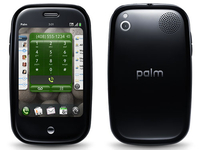
Palm has updated the Pre's webOS platform to the new 1.2.0 firmware, bringing with it a few crucial changes ahead of the UK launch.
The main talking point is users are now able to enter credit card information to their online profile for paid-for applications from the Palm application portal.
Users will be able to decide whether they want to enter a password every time they download an application, or just once at the start of a four-hour period.
Paid-for applications aren't yet available for the Palm Pre, but it's possible they may be coming in time for the UK launch of the phone on 16 October.
Other additions include Amazon MP3 songs being available to download over 3G networks instead of Wi-Fi only, but it's not yet known whether this portal will be coming the UK version.
App and app again
Palm has also decided that people can lose their phone or accidentally delete applications, so it's included a chance to download them again for free with the new webOS 1.2.0.
You can also share the applications among your friends via email, and backup web bookmarks to your profile as well in case of accidental deletion.
However, the one thing missing is iTunes synchronisation - it was hoped the new update would allow Palm users to connect to iTunes again, but Boy Genius Report has confirmed this is not the case.
Palm has included a raft of other minor changes too in the webOS 1.2.0 update, so head on over to the official page if you want to see what else you might be seeing in on the UK version of the Palm Pre next month.

| |
Read More ...
Dell's wireless charging laptop breaks cover

Dell has released the first details on its wireless-charging Latitude Z laptop, set to feature an 'instant on' OS and a wireless USB hub to hook it up to your desktop monitor and peripherals.
The Dell Latitude Z is set to cost $2000 (آ£1,260) in the US, with no word as yet from Dell UK on a price or release date over here.
The Z has both a Intel ULV processor and an ARM processor to boost the battery-life and allow the 'instant on' mode to work.
The machine has power coils built into its base which allow it to charge wirelessly, very much like the Palm Pre. Just a bit bigger!
Extra hidden costs
The magnetic inductive charging stand is set to cost US consumers an extra $200 on release. The wireless charging hub is also set to cost an extra $200.
The Latitude Z is being marketed as a high-end business laptop, weighing in at only 4.5 pounds and measuring an impressive 0.57 inches thin.
More on the UK pricing and release plans for the Latitude Z when we hear back from Dell's UK office.
For more on Dell's current range of laptops and desktops, you can head over to the Dell website.

| |
Read More ...
Review: Nanovision MIMO 710S

The idea behind Mimo's 710S 7-inch LCD monitor is to be less space-consuming than a full second monitor, and a lot cheaper, particularly as it only connects via USB – no dual-display graphics card necessary.
Just install the drivers and away you go. It's most useful for people with business PCs where graphics card upgrades often aren't an option.
Truth be told, this idea met with mixed reactions in the TechRadar office.
Some people thought it was a useful idea, some thought it was just too small. However, when the unit was taken home and shown to Miss TechRadar, the reception was massively enthusiastic. She loved the idea of having her calendar separately visible, and liked the sleek look of it too.

EASY DATES: The 7" screen is just the right size for a calendar, or dogs doing hilarious things on YouTube
Suddenly, the surprisingly handsome design of the monitor made sense.
We'd been struck by the seemingly unnecessary design flourishes when unpacking it. Dell's aesthetics spring to mind, thanks to the clean lines and round grey logo, but it's more 'Studio' than 'Latitude', and clearly Mimo is looking to appeal to home users as well as offices.
Handily, it folds down to 25mm in thickness, making it ideal for carrying around with your laptop.
There's enough acreage in the 800 x 480 screen to keep Outlook or a similar calendar or email client visible permanently without taking up any of your main screen. The choice of landscape or portrait makes it quite flexible for different programs.

CONSTANT UPDATES: Yes, you too can have TechRadar's superb journalism permanently in your peripheral vision
The screen quality is actually pretty good. The 350cdm2 brightness is fairly good for monitors, so there's no squinting to make out different part of the image. The contrast ratio isn't great, but then it's a 7" monitor, so it seems a bit nit-picky to complain about that when 400:1 is perfectly adequate.
That last sentiment kind of sums up our opinion of this monitor. It's not supposed to blow you away – it's 7-inch and powered entirely by USB.
It only has to be functional, but instead it's good enough to watch videos on. It only has to be black and plain, but instead it's eye-catching and desirable. Mimo's monitor might not seem necessary to everyone, but we'll really miss the convenience when it's gone.
Related Links
| |
Read More ...
Google adds trending search functionality

Google has added a new bit of functionality to its US and Japanese search which means that when you are looking for something that happens to be one of the hot trends it will display a graph on the page with extra data.
Google's hot trends functionality is a useful tool for looking at the zeitgeist, reporting on the trending searches.
And now, should what you are looking at correspond to what the world is searching for, you will get a handy graph in your search results that tells you much more.
Graph and data
"Now, when you search Google.com and your query matches one of the top 100 fastest-rising search terms, we'll show you a graph at the bottom of page, with more information — like how popular the query is, how fast it's rising over time, and other useful data," says Google's blog.
Although the feature uses the top-100 terms, Google has decided that the hot topics page itself should be cut down to the top-40 searches in order to simplify things
It's currently only functional in the US and Japan and there's no news on when this will be rolled out to UK searches, but the chances are it won't be too long before we see whether we're seeking with the masses.

| |
Read More ...
Review: Philips BDP3000 Blu-ray player

While the first wave of Blu-ray players offered pin-sharp HD and little else, Philips' debut budget player is loaded with features that even stretch to the downloading of disc extras from BD Live. Given the outstandingly low price, the sleek, gloss black fascia and a hood that hides the disc tray, there's little to detract from its excellent value high-definition pictures.
Features
It may be a budget player, but the increasingly entertaining BD Live service is catered for, albeit in a slightly cumbersome manner.
The BDP3000 can stream content from all the major BD Live portals, but it doesn't have any onboard space for storing trailers, director's commentaries and suchlike. So the USB 2.0 port on the rear is crucial; it must be fitted with a memory stick of at least 2GB for the BD Live functions to work. All downloaded content is then stored directly to the stick, which does protrude from the rear of the admittedly slim machine.
Unlike Panasonic's Blu-ray decks that include widgets to access the brand's VieraCast service, Philips' similar NetTV feature – which can be found on its high-end TVs – isn't included on the BDP3000, or on any of the brand's Blu-ray range.
In practice these omissions won't be a major issue for most users looking to experiment with BD Live, though it does seem a little Scrooge-like on the part of Philips.
The same can't be said for the deck's ports. As well as Ethernet and USB, the rear of the BDP3000 sports an HDMI output, component video out, composite video, digital coaxial audio and a set of left/right phonos for analogue stereo.

Throw in some anti-judder 1080/24p technology, some DVD upscaling and compatibility with Dolby TrueHD 7.1 surround sound and the BDP3000 hasn't got much to apologise for.
Ease of use
A lot of thought has gone into how the user interacts with the BDP3000. Its set-up menu is simple and, along with attractive icons that grace the screen during viewing, helps make the player a joy to use.
It's also worth mentioning that while there's no way of connecting to broadband wirelessly, getting BD Live to work on the BDP3000 is simpler here than we've ever seen before; it's literally plug 'n' play.
The fact that a USB memory stick must be bought to get the BDP3000 to connect is a shame, doubly so because the player can't read any kind of digital media files via USB. It could do with an extra port on the front panel, especially with a lot of us now watching video and playing MP3 music through our home cinema systems.
However, it can play digital media files stored on disc, including MP3 music, JPEG photos and DivX, AVC-HD and WMV video files. But it won't play MOV, MPEG4, WMV HD, MKV or DivX HD files, the latter of which Samsung's budget Blu-ray decks can cope with.
Best of all, this digital file trickery can be accessed via attractive software that's a cinch to use.

That's partly down to the excellent remote control, which is modelled on the brand's high-end TV handsets and differs only in build quality. No matter; uncluttered and as easy to use as it is to look at, it's one of the best around.
Picture
We've seen better upscalers, but the BDP3000 does a good enough job with DVDs for this to be a catch-all deck to replace a dedicated player.
DVD playback never reaches the richly detailed pictures you get from a Blu-ray disc, of course, but it does a sterling job; panoramic shots and close-ups from standard-definition DVDs look excellent and are much improved detail-wise, with good colours and contrast, although some picture noise can be seen quite distinctly in backgrounds.
Blu-ray discs take three times longer to load than their standard-definition counterparts, though that's still twice as fast as some rival decks. If that's a relief, so too is the BDP3000's treatment of Blu-ray movies. Despite its budget status there's no shortage of detail from our Trainspotting test disc.

Close-ups in the dingy nightclub scenes reveal almost as much. Even within dark areas of the picture, this deck's skill with contrast and reproducing reasonably accurate blacks is obvious. Later in the fi lm, outdoor scenes in the Scottish Highlands display lush and accurate hues, although it's not all good news; we spotted the occasional feathered edge, as well as some general judder, even with the 24fps feature. Overall though, the BDP3000 offers good screen for small bean.
Audio
While it can only cope with Dolby's TrueHD 7.1 surround sound format (there's no support for DTS HD Master Audio 7.1), the BDP3000 does a reasonable job.
The bitstream HDMI output is punchy enough for most movies, but its lack of analogue outputs restricts the sound quality to merely basic and this is a major reason why the player falls into the budget category. If top-end home cinema is your goal, the BDP7300 will better suit.
Value
It's a shame the front panel doesn't include a media-savvy USB input, as most cheap DVD players now do; the rear USB port is exclusively for storage of BD Live downloads and firmware upgrades. That niggle aside, this is a good value, basic deck.
It may not be possessed of a few of the features its rivals carry, but the BDP3000's excellent onscreen menus and sturdy picture quality make it great value all the same.
Related Links
| |
Read More ...
Bletchley Park gets آ£500k in lottery funds

Bletchley Park in Buckinghamshire is set to become a world heritage and educational centre, securing آ£500,000 of lottery funding as the first step towards a آ£10 million revamp.
Bletchley was the home of code-breaking in World War II and it has been open to the British public and school groups since 1994.
However, the house itself is in an advanced stage of decay and desperately in need of repair, so it is great news to hear that the government has recognised the historical importance of the site.
Interest growing
Interest in Bletchley has been growing in recent years and the site has already had 100,000 visitors in 2009.
Heritage Lottery Fund spokeswoman Carole Souter told the BBC: "Bletchley Park is an extraordinary part of the UK's heritage.
"We... recognise the importance of preserving the site as a tribute to the men and women who worked there with quiet and tireless dedication during World War II.
"Without their dedication, our nation's history might have been a very different one."

| |
Read More ...
Toshiba announces Qosmio X500 gaming laptop

Toshiba has announced the arrival of its latest gaming laptop – the Qosmio X500.
Boasting 18.4-inch TruBrite Full HD LCD screen with 16:9 aspect ratio, it's fair to say that this is one laptop which is not for the lap.
Features include three USB 2.0 ports (which feature sleep and charge technology), 8GB DDR3 (1066 MHz) memory and up to 1TB HDD. Processing power comes courtesy of an Intel Core i7 chip.

The keyboard is backlit, with a touchpad that offers multi-touch control and for those who want extra security there's a fingerprint scanner and face recognition via the embedded HD web cam included.
Staying true to the announcement at this year's IFA, the Qosmio X500 comes with a Blu-ray player.
This doesn't mean that Tosh is discarding its own hi-def technology as also inside is Resolution+, the upscaling tech which brings all your standard def content to near HD quality.
A full look at the specs is below:
- Intel Core i7-720QM (2.8GHz, 6MB L2, 1333MHz FSB)
- Up to 8GB DDR3 RAM (1066MHz)
- Up to 1TB HDD (500GB 5400 rpm + 500GB 5400 rpm)
- 18.4" Full HD TruBriteآ® LCD screen (1920 x 1080p)
- 6x BD-RE optical drive (Blu-ray rewritable)
- nVIDIAآ® GeForceآ® GTS 250MNV (1GB)
- Integrated Wi-Fi 802.11b/g/n
- Bluetooth 2.1
- 3x USB 2.0 Sleep-and-Charge ports
- 1x USB Sleep-and-Charge/e-SATA combo port
- 5-in-1 card reader

The Qosmio X500 has release date of late October, with pricing to be announced.

| |
Read More ...
Toshiba intros T130 and T110 ultra-thin laptops

Toshiba has announced the launch of two new compact ranges to its laptop series – the Satellite T130 and Satellite T110.
Although theyr screen sizes mean that they nestle neatly alongside the netbook clique, the T130 and T110 possess more power than your average UMPC, boasting CULV (Consumer Ultra Low Voltage) processors.
Using the CULV chip means, despite their size, the laptops perform like as well as their full-sized brethren, but have the added bonus of being man-bag friendly light.
The T130 and T110 are pretty thin too – just 22.2mm at their thickest and weight-wise they start from 1.58kg.

Alongside two screen sizes (11.6-inch and 13.3-inch, hence the names) the laptops come in three colours: Precious Black, Iron Red Metallic and Luxe White Pearl.
Specs wise, the laptops are packing the following:
Satellite T110

- Intel Pentium or Intel Celeron Single Core ultra low voltage processor
- Up to 3GB (DDR3)
- 250GB HDD
- 11.6-inch LED Backlit 1366 x 768 Screen
- Wi-Fi 802.11b/g/n
- Web Camera with face recognition
- 3 x USB 2.0 Sleep and Charge, 1 x HDMI
- 1.58kg
Satellite T130

- Intel Pentium, Intel Single Core or Intelآ® Celeron Single Core ultra-low-voltage processor
- Up to 4GB (DDR3)
- Up to 500GB HDD
- 13.3-incj LED Backlit 1366 x 768 Screen
- Integrated Wi-Fi 802.11b/g/n
- Integrated web camera with face recognition
- 3 x USB 2.0 Sleep & Charge, 1 x HDMI
- 1.76kg
The Toshiba Satellite T130 and T110 have a release date of October and prices will start from آ£429.

| |
Read More ...
Review: Sony BDP-S360 Blu-ray player

Sony's BDP-S360 is its latest entry-level Blu-ray spinner, replacing the popular BDP-S350, and once again offers a decent set of features at an affordable price.
Unlike its predecessor, which required a firmware upgrade to make it Profile 2.0, this model supports BD Live out of the box, so it's finally time for Sony's standalone players to step out of the PS3's shadow and show us what they're really made of.
Features
Compared with Samsung and Philips' glitzy players, the BDP-S360 looks positively mundane with its conventional boxy shape, minimal fascia and all-black finish, although a blue light does jazz it up a bit. There's no USB port on the front though, which might be a turn-off for those who fancy a bit of easy-access multimedia action.
To enjoy HD audio formats such as Dolby True HD and DTS HD Master Audio you'll need an AV receiver with HDMI inputs, as there are no multichannel analogue outputs. The S360 can decode the HD formats and it will output them as LPCM via HDMI.

There's an Ethernet port on the back for connecting to the web and downloading BD Live content, but after experiencing the Wi-Fi wonders of the Samsung BD-P3600, we're afraid this clunky connection just doesn't cut it anymore. It's a shame that Sony didn't include a Wi-Fi connection here.
Also disappointing is the fact that the mandatory 1GB of memory needed to store web downloads has to be added using a USB flash drive that plugs into the port on the back. And this socket can't be used for media playback – digital files have to be played from DVD or CD, but the deck only supports MP3 and JPEG.
If you want to spin old, battered discs, the Precision Drive is on hand to stabilise playback of anything that's been scratched or bent. Rounding up the decent, if not overly generous, feature list is 1080/24p output, 1080p DVD upscaling and Bravia Sync.
Ease of use
There may not be an abundance of killer features, but the S360 gets it pretty much spot on when it comes to the user-friendliness front. It's one of the slickest Blu-ray decks we've encountered, which is largely due to the ludicrously named, yet brilliantly clever, Xross Media Bar.
Imported from the PS3, this groovy-looking menu screen is stylish, responsive and logical. Why can't all user interfaces be like this?
The remote's uncluttered layout and clear labelling make it a doddle to use, especially as the well-signposted 'Home' button is there to take you back to the main menu whenever you like.

The only operational qualm we have with this player is its comparatively lengthy disc loading time. While its Korean counterparts are clocking up Usain Bolt-like speeds of around half a minute when loading Spider-Man 3, this deck limps in at 53 seconds.
This news is tempered by the inclusion of a Quick Start mode that boots up the deck in six seconds, although power consumption is higher when it's turned on.
Picture
The S360 delivers impressive hi-def picture quality that belies its budget price tag. It may not reach the heady heights of the latest Pioneers or Panasonics, but is up there with the best of its budget rivals. At the heart of this impressive performance is the deck's keen eye for detail and strong contrast levels, which ensures a rich and punchy picture with both dark and brightly-lit scenes.
I Am Legend, which has become one of our favourite Blu-ray test platters, looks magnificent; the opening shots of New York tell you a lot about a player's performance and here they are sharp and three-dimensional. The skyscrapers on the horizon have a convincing sense of perspective and the abundant detail in Times Square is reproduced with astonishing acuity for a budget deck, although we've seen better detail retrieval from both the Panasonic DMP-BD80 and Pioneer BDP-51FD.
Colour fidelity is spot on – every skin tone looks utterly convincing, while subtle tonal blends and shading appear smooth and natural. Bright colours dazzle too, but when night time rolls around, the S360 keeps the picture looking well-defined and doesn't let any shadow detail slip through its fingers.
It backs up this stellar hi-def performance with impressive DVD upscaling capabilities. There's no obvious stepping on diagonals, noise is kept to a minimum and colours look natural.
Sound
We let the Sony convert I Am Legend's Dolby True HD soundtrack into LPCM and the results were thrilling, with no discernible difference between the deck's decoding and that of our test receiver.
Effects are expansive and well steered, Will Smith's dialogue is clearly articulated and the jumpy zombie bits are delivered with venom. We also enjoyed listening to CDs on this player because of its smooth, rhythmic and well-balanced presentation of music.
Value
Although its performance is good for a آ£200 player, those missing features inevitably take their toll on the overall value score.
For a bit more cash you can get the Samsung BD-P3600, a player with Wi-Fi connection, built-in memory, multichannel outputs and extensive USB media playback capabilities. But if you're not concerned with any of these features, or if you're a staunch Sony loyalist, then you'll probably be quite happy with what the BDP-S360 has to offer.
Related Links
| |
Read More ...
Microsoft's free anti-virus software arrives

Microsoft has officially announced the arrival of its eagerly awaited free anti-virus software, Microsoft Security Essentials.
The software giant is keen to ensure that computers are better protected worldwide, and its solution is to release a free application that will be available for everyone.
"Consumers have told us that they want the protection of real-time security software, but that they are confused by trials and renewals and concerned about performance and as a result, too many are unprotected" said Amy Barzdukas, general manager for consumer security at Microsoft.
Won't get in the way
"With Microsoft Security Essentials, consumers can get high quality protection that is easy-to-get, easy-to-use, and won't get in their way."
Available from http://www.microsoft.com/security_essentials the package protects against viruses, spyware and other malware, but Microsoft will continue to offer its paid-for Forefront Client Security for businesses.
TechRadar has already had a hands on review of Microsoft Security Essentials, which has already had a beta release, and it certainly looks well worth installing.
Microsoft Security Essentials is available now.

| |
Read More ...
Review: Oppo BDP-831

Swedish brand Oppo has already made a splash in the DVD market with a range of feature-packed, high performance players, but now it turns its hand to Blu-ray with the BDP-831. This debut deck has been well received Stateside (where it's called the BDP-83), so it's one of our most highly anticipated players of the year.
Features
The BDP-831 is much heavier than a budget player, and the rigid casing comes in an understated, but utterly classy, gunmetal grey finish. Only a few buttons pepper the fascia, which adds to its allure.
But it's on the inside where the fun really starts. At the player's core is Anchor Bay's Video Reference Series (VRS) picture technology, which does all the video donkey work such as de-interlacing, upscaling and detail enhancement.
As you'd expect, the deck is BD Live compatible and as such comes equipped with an Ethernet port on the rear and 1GB of built-in storage, which is always welcome. If you manage to fill that up, you can add more memory by plugging a larger USB drive into the back. Wi-Fi support would have been the icing on the cake, but with so much crammed in elsewhere it's churlish to complain.
Another distinctive feature is DVD-Audio and SACD playback, making this the most affordable 'universal' Blu-ray deck to date. It's backed up by a full complement of HD audio tools, including on-board decoding of Dolby True HD and DTS HD Master Audio, which can be output as PCM via the HDMI or from the rear-mounted set of 7.1-channel analogue sockets.

The BDP-831 boasts a long list of compatible formats and two USB ports to play them from, but our sample only played WMA files from USB sticks or data discs, not MP3 files. We hope this is peculiar to our sample as it's exceptional otherwise.
Ease of use
Fiddling around in the setup menu, this is clearly a player aimed at those who take image and sound quality very seriously. The Picture Preferences menu, for example, boasts nine different configurable parameters, while on the audio side you can tweak the settings for each individual speaker and select various options for SACD and DVD-A playback.
There's even a range of useful zoom modes (including a decent vertical stretch setting for removing the black bars from 2.35:1 material) and a Source Direct mode that outputs the signal exactly as it's found on the disc with no processing or alteration.
Oppo's easy to use menu system is beautifully presented with modern fonts, colourful graphics and a logical structure.
The onscreen banners during playback are filled with useful information, including the current AV formats and bitrates.
It's simple to control with the large remote, which is packed with chunky buttons, but keeps confusion at bay with clear labelling and intuitive placement. Its coup de grأ¢ce is the backlight that helps you to find the right keys in the dark.

As for disc loading, the BDP-831 is the fastest player we've tested. It reached the Sony Pictures logo of the Spider-Man 3 disc in 29seconds, and less tricky discs take around 15seconds, rehabilitating Blu-ray's reputation as a slow-loading format.
Picture
With all that high-powered picture talent on board, it would be criminal if the BDP-831 offered anything less than top-drawer images. Thankfully, it's a masterful performer with both Blu-ray and DVDs.
Starting with Blu-ray, The Dark Knight gets a faithful and punchy presentation, bursting with detail and natural colours. The visuals have depth and density in spades, but the Oppo takes them in its stride, making them look rich and cinematic with deep, luxurious blacks and expansive contrast.
From the opening bank robbery, the pictures boast that HD wow factor: edges are as sharp as a Samurai sword and shots of Gotham City's buildings are terrifically three-dimensional.
The BDP-831's excellent detail retrieval is demonstrated by the precisely rendered textures of skin and walls. It picks up all the pockmarks in The Joker's patchy white make-up and the shadow detail on Bruce Wayne's T-shirt. The only let-down is the picture noise that can be seen fizzing in blue skies and other backgrounds, which the noise reduction modes seem powerless to stop.

However, it romps easily through the Silicon Optix HQV test patterns, and brilliantly bridges the SD/HD gap by upscaling DVDs with all the slickness and clarity of a dedicated high-end DVD player. The deck will even convert them to 24fps with no problem whatsoever.
Sound
The OPPO is also a formidable audio performer. We let it decode the test movie's Dolby True HD soundtrack and ran the signals through our test rig via the analogue outputs, and the results are stunning, particularly during the car chase through Gotham.
Explosions are fierce and gunshots have a sharp, bracing snap; bass is tight; steering is zippy and accurate; dialogue sounds smooth and high frequencies are relayed without sounding harsh. It's no slouch in the music department either, playing all discs with a satisfying balance across the frequency range.
Value
Although the Oppo's آ£450 price tag seems steep, its extensive feature list, high-end design and knockout performance make it one of the best-value players around.
Related Links
| |
Read More ...
Now Vodafone unveils iPhone 3G and 3GS for UK

Vodafone has confirmed that it will be stocking the iPhone 3G and 3GS in the UK and Ireland, the second operator in two days to announce such a deal.
The news comes after Orange announced it will be offering the iPhone in the UK, following the end of O2's exclusivity deal.
The iPhone from Vodafone will be available from early 2010, months later than Orange will be bringing the device.
If you want to register your interest in the new phone now, head on over to http://shop.vodafone.co.uk/shop/mobile-phone/iphone-3gs prior to launch next year.
Wide ranging
The new announcement means the iPhone will be available to nearly three quarters of UK mobile phone subscribers, considerably extending its reach.
After Orange told us yesterday that it would offer a 'competitive' edge over O2's offering, Vodafone's announcement means it's likely we will now see a price war over the iPhone with each operator frantically trying to attract potential iPhone customers.
Oh, Apple has responded to us again about this new launch: "We are thrilled to have signed an agreement to bring iPhone to Vodafone customers in the UK and Ireland in 2010."

| |
Read More ...
Warner Music Group set for YouTube return

YouTube could soon be carrying music from Warner, with reports that a deal has been found between the two media giants.
Warner Music Group has not allowed tracks from its artists on the site since December of last year, as a protest over what it described as unfair terms.
"...we simply cannot accept terms that fail to appropriately and fairly compensate recording artists, songwriters, labels and publishers for the value they provide," the group said in a statement at the time.
Source
However, a source has told several major news outlets that a deal has been found that would see Google share more advertising revenue from the site with the music group.
Although there is no official confirmation of the deal, it is clear that the two have been in talks for some time over a return to YouTube.
Warner Music Group represents the likes of Alanis Morissette, Red Hot Chilli Peppers and Regina Spektor.

| |
Read More ...
Exclusive: All projectors will be short throw 'in five years'

BenQ showed off its latest range of entry level, mid-range and high-end projectors today, and the company had some interesting thoughts on where projectors were heading in the near future.
It seems that the imaging onus seems to be very much on short throw.
Speaking to TechRadar, Ross Lye, Product and Marketing Manager for the UK, said about the technology: "Within five years, short throw will become standard throw.
"We would anticipate all projectors within that time to use some sort of short throw technology."
Short-throw away
Alongside the W600, W1000 and W6000 series of projectors – all of which will be available October time – the company also spoke about its MP515 ST (short-throw), which has the boast of being the first short throw with zoom in the market, and can project an 80-inch image at just one metre away.
The beauty of this when it comes to gaming is that you can now play things like the Wii behind the projector and not in front of it, which is highly annoying when you are bounding around like a loon.
The short throw projector market is burgeoning at the moment, mostly within the gaming sector, and BenQ is proud that within this area it holds a 60 per cent market share in Europe.

| |
Read More ...
BenQ bounds back into home cinema projector territory

BenQ has announced the arrival of its latest range of projectors – the W600, W6000 and W1000.
The latest range boasts better than ever brightness and picture quality, and has been created to ensure each segment of the home-cinema market is catered for.
First up is the W600. This is an update to the company's W500 series and is aimed primarily at the gaming / home entertainment market.
Equipped with dual HDCP-compliant HDMI ports, RGB, Composite Video, S-Video, and Component Video interfaces, the projector is 720p and uses a 6-segment color wheel.
Couple this with the introduction of BrilliantColor, and there is a 50 per cent increase in brightness, according to BenQ.

PUBLIC IMAGING: BenQ's new W600 range
Other highlights include a 3,000:1 high contrast ratio and a lamp that will last around 4,000-hours.
A step up from the W600 is the W1000. This projector is Full HD 1080p and also uses a 6-segment advanced color wheel and BrilliantColor processing.
Contrast ratio on the W1000 is 2,700:1 but picture detail and contrast is upped with the use of 3D Color Management and something called Osram's Unishape technology.

GENTLE BENQ: The new BenQ W1000 range
A step further from this is the W6000. This behemoth of a projector is the company's first foray into home cinema installs for quite a while and it seems that BenQ is back with a bang, with the 1080p 24p projector offering true 10-bit processing, BrilliantColor and a custom color preference.
Couple this with a 50,000:1 contrast ratio, picture upscaling and dual HDMI inputs, and the whole setup is definitely an enticing one.

PRO-JECTOR: BenQ's stylish W6000
With a release date in October, the W6000, W1000 and W600 priced at آ£2,499, آ£999 and آ£499 respectively.
Go to www.benq.com for more details.

| |
Read More ...
Apple shifts two billion Apps in 14 months

Apple has announced its iPod touch and iPhone users have downloaded over two billion applications from its App Store.
This is a frankly startling number, especially when you consider the App Store was only opened for business in July 2008.
The number of applications downloaded hit 300 million by December that year, crossed the billion mark in April 2009, and had hit 1.5 billion in time for the App Store's first anniversary.
Broad audience
There are more than 50 million iPod touch and iPhone users in the world at the moment, meaning Apple's library of 85,000 applications has a pretty broad audience.
"The rate of App Store downloads continues to accelerate with users downloading a staggering two billion apps in just over a year, including more than half a billion apps this quarter alone", said Steve Jobs, Apple's CEO (you may have heard of him before).
"The App Store has reinvented what you can do with a mobile handheld device, and our users are clearly loving it".
The App Store is also starting to segment too, with some applications only working on the iPhone 3GS thanks to advanced hardware.
But that doesn't look like it will stop the rate of downloading from the App Store, which will probably cross three billion by 2010.

| |
Read More ...
iPhone voted coolest brand in UK

Apple's iPhone has been named the UK's coolest brand for the year in the latest CoolBrands survey.
The iconic handset has been in the news because of the end of its exclusivity with O2, and new seller Orange will be delighted that it is not arriving to the party after the cool has left the room.
Not content with taking top spot – Apple itself was identified as the third best brand and iPod was fourth.
Last year's coolest Aston Martin dropped into second and the likes of Nintendo (fifth) YouTube (sixth) and Google (eighth) also featured in the very tech heavy top 10.
Aston smarting?
Stephen Cheliotis, Chairman of the CoolBrands council and Chief Executive of The Centre for Brand Analysis commented: "Aston Martin has finally lost its top spot in the rankings but only just.
"In fact considering cool is seen to be very fluid and changeable the top twenty shows remarkable consistency with fifteen of last year's top twenty in there again; equally most of the category winners are the same – so much for cool being a fleeting thing."
Other tech brands that were listed include BlackBerry, Xbox and BBC iPlayer. Cool.

| |
Read More ...
In Depth: 10 ways Google's made Android more awesome

The latest version of Android (1.6 or Donut) has debuted for developers, and while Google isn't calling it a major change, it does bring a good few difference to make the OS a lot more compelling.
So here we run down the 10 reasons Android 1.6 is going to make your Hero/Galaxy/Magic even better in the coming months:
1. Quick Search box
One of the major changes with the new Android update is a new 'Quick Search' box that essentially exposes all elements of the phone to find the file or whatever you need, meaning you can look for a contact, application, bookmark or extend the search out to the web.

Applications developed for Android 1.6 can also take advantage of this framework too, meaning you can look for elements within them in the future too, which will be handy when your menu list gets as long as your arm.
Some of you may think this is a little like Apple's new Spotlight feature on the iPhone - you'd be right, as it's pretty much identical. But Google = search, so it makes a lot of sense to put it on Android too.
2. Faster camera and improved gallery
Google is also improving the way you interact with your media in the Donut upgrade, as it's pretty basic at the moment.
The main difference is starting up the camera (which currently takes an age) will be 39 per cent faster, with processing up to a quarter faster, meaning you can move on to the next snap much quicker.
And when you inevitably take oodles more rubbish photos you'll be able to delete multiple pictures with the new upgrade, which will make life a lot easier.
3. Easier to get to the camcorder
One of the problems the Android OS faces is the fact it has a very limited camera interface, and that's been slightly addressed in the 1.6 upgrade.

The camera screen now allows you to toggle between the camera and the video recorder with a little touchscreen button, meaning you don't have to mess around in the menu system when you want to capture something funny your cat's doing in real time.
4. Text to speech
Android's picked up a new function thanks to a speech engine called Pico, making it possible to talk to your phone and make it do things.
The new speech synthesis engine will even be able to recognise accents within different languages, making those from the more obscure regions with odd dialects as audible as anyone else.
If you're using legacy devices such as the G1 and the Magic, you'll need to download a new element to bring the voices to the phone, but we assume Google will make this obvious when the time comes.
5. Checking your power
If you've ever wondered where all the power has gone on your Android phone, with the battery running down faster than Usain Bolt, then this feature will please you.
The new function won't be able to stop the problem by itself, but it will give you a list of all the running applications and how power-hungry they are.

So if you find that Twidroid is nabbing all your battery, perhaps you can turn it off in the evening rather than watching the wibblings of your drunken friends.
6. Gestures
This is something we're very excited about, as it means that the phone will now be able to respond to more than just your touch.
The idea is that the OS, as well as the applications contained within it, can respond to your gestures. This presumably means not only will the accelerometer be able to control applications as it does now, but that certain finger squiggles on the touchscreen will be recognised to start or interact with programs.
7. More screen resolutions
You may not know this, but Android is only set up to work with HVGA screen resolution at the moment (the same as the iPhone, but only 320 x 480 pixels).
This means that the likes of LG can run roughshod over the Android devices with pin-sharp WVGA screens (800 x 480), making video and menus look amazing.
But the new upgrade will see more screen resolutions supported, meaning QVGA for the budget efforts and higher resolutions for the more advanced versions.
Not only that, but developers can now specify which screens can be used with different applications. We'll be interested to see how this is marked in the Market, but basically if something is only meant for a four-inch plus screen, this can be achieved.
8. Prettier Market
The Android Market might be a good place to go and get a glut of applications, but it looks very basic at the moment, and deciding what to buy can be very hard.
However, the new upgrade looks to address that, with new categories differentiating between applications, games and the mysteriously titled downloads.

Within each will be the same options to choose between free and paid for applications, but the bonus is you can now see screenshots as well, making it a lot easier to choose the right one for you.
9. CDMA
It may scare you to know that some regions can't actually use Android phones because the handset is incompatible with the mobile phone signal.
The UK is fine because we run on GSM (Global System for Mobile communications), the most popular standard for mobile phones in the world. However CDMA (Code division multiple access), the technology behind a few networks in the US and other regions, is not supported.
But never fear! Google has added CDMA compatibility to the new 1.6 upgrade, meaning more countries will be available for the G-wave, and it will now be able to run on other networks too.
We'll be interested to find out which regions this applies to, as CDMA is a pretty broad term, but more countries means more developers, which in turn means more awesome applications. And we all like that.
10. VPN
Interested in browsing the old corporate intranet, but stuck with a stupid Android phone? Worry no more, as the new 1.6 upgrade offers a range of ways to interact with your corporate VPN.
L2TP/IPSEC pre-shared key based VPN, L2TP/IPsec certificate based VPN, L2TP only VPN and PPTP only VPN are all in the list, and if you don't know what any of those random letters mean, ask your IT department. They'll look stressed at having to add a new phone to their support list, so you'll know you're right.
And if you can't be bothered to think about how all these things might affect you, check out the video below - it explains it with the help of the little Android 'bot as well:

| |
Read More ...
BPI gives BT 100,000 IP address of music pirates

The chief exec of the BPI – the trade group for the British Recorded Music Industry – has hit out at BT's inaction on music piracy, after giving the broadband provider the IP addresses of 100,000 music pirates.
The BPI has obtained the IP addresses of 100,000 BT Broadband customers since February of this year.
However, BT has chosen to take no action, deciding to not use the IP addresses to send warnings to its customers over internet piracy or take any further action.
Anti-piracy costs outweigh benefits?
The boss of BT Broadband's consumer division boss John Petter said recently that the anti-piracy process could cost ISPs آ£365 million a year, which Torrentfreak notes is "آ£165 million a year more than the آ£200m the BPI says the industry will lose to online music piracy in 2009."
The BPI has branded BT's effective refusal to take action on the matter as "shameful". In turn, BT's John Petter has said that the organisation's response was "melodramatic".
"If you operate a commercial service and know it is being used to break the law, taking steps to ensure it is used legally is a cost of doing business," Taylor told the Daily Mirror.
Related Links
| |
Read More ...


1 comment:
Paynet Systems offers an opportunity to make $100 for every approved merchant account generated by your website or referred to us verbally. Join our Affiliate Program and make money for every approved merchant account.
Post a Comment